Best Graphic Design Software 2019
Whatever your budget and level of expertise, there’s a wide range of cool design tools to choose from.
The term ‘graphic design software’ covers a multitude of sins – and we use that word advisedly – but in the creative industries it most commonly refers to two main types of software. On the more artistic side of the fence there are ‘illustration’ or ‘drawing’ programs, typified by the mighty Adobe Illustrator. These drawing programs use vector graphics tools to create artwork ranging from corporate logos to technical drawings, and even sketches and illustrations that mimic the appearance of paint and other natural media.
However, graphic design can also cover page layout software as well – also known as DTP or ‘desktop publishing’ – which allows you to combine text and graphics for magazine articles, web pages, sales brochures, or incredibly long and boring technical manuals. There’s a lot of overlap between these two types of software as well.
Most drawing programs also include tools for creating and manipulating text, which can then be combined with vector artwork to create simple page layouts. And, at the same time, many page layout programs will also include pen and line tools for simple freehand drawing, or running text along a path – always good for an eye-catching headline – as well as a selection of simple vector-based geometric shapes and objects. And then there’s CorelDraw, which now calls itself a ‘graphics suite’, combining impressive vector graphics and versatile page layout within a single wide-ranging program (and even throwing in some extra photo-editing software as well).
There are plenty of powerful software tools in both categories but, to a large extent, your choice will probably be dictated by your budget. Adobe’s range of Creative Cloud applications have taken the ‘software as service’ approach, which requires customers to sign up for never-ending subscription payments – rather than a simple, one-time purchase. Corel and Quark offer rather confusing plans that combine individual purchases with subscription fees for future upgrades, but there are still some attractive and affordable options for designers on a more limited budget, most notably in the form of Serif’s Affinity Design and Publisher. Fortunately, most of these apps also offer a short trial period so that you can decide which software tools suit your needs before stumping up any cash – find our rundown of them below as another way to ‘try before you buy’.
Adobe Illustrator 2018

Adobe’s Illustrator wasn’t the first vector graphics program, but it was the one that put professional level drawing tools on the map and – along with its bitmap brother, Photoshop – created a whole new digital design industry back in the 1980s.
Today, Illustrator remains the standard to which all other vector graphics and illustration software aspires, with an imposing array of pencil, pen and curve tools for creating vector artwork, along with ‘bristle brushes’, ‘scatter art’ and calligraphy tools as well. And, because its range of drawing and text tools is so extensive, the latest update from October 2018 focused much of its attention on ease of use and streamlining the program’s interface.
The new Home screen provides access to a huge library of tutorials, which are aimed at both beginners and more advanced users, as well as a selection of document presets to help you get started. You can now choose between Basic and Advanced toolbars, and also have the ability to customise the toolbar so that it focuses on the tools you use most often. The program’s interface can now scale to suit the size and resolution of your monitor, but there’s also a new ‘actual size’ preview mode that ensures your document is displayed at its actual physical size, regardless of the monitor that you’re using. Other new viewing modes include Trim view, which hides all non-printing elements, and the Presentation mode that allows you to quickly browse through full-screen views of your artwork. And, to speed up editing of larger projects, the new Global Edit feature allows you to select multiple copies of an object, such as a corporate logo, and to edit them all at the same time.
Of course, there are some powerful new drawing tools as well. The Freeform gradient tool allows you to create custom gradient effects by adding a series of ‘colour stops’ to an object. There have also been improvements to the Puppet Warp tool, which speeds up the process of adjusting artwork, such as moving the limbs on a drawing of a person or animal.
But Illustrator is now part of Adobe’s Creative Cloud portfolio, which means that you have to commit to a continual monthly subscription in order to use it. However, there is a 7-day trial available, and big discounts for students during their first year.
Serif Affinity Designer
- RRP: £49/$50/€54
- Buy: from
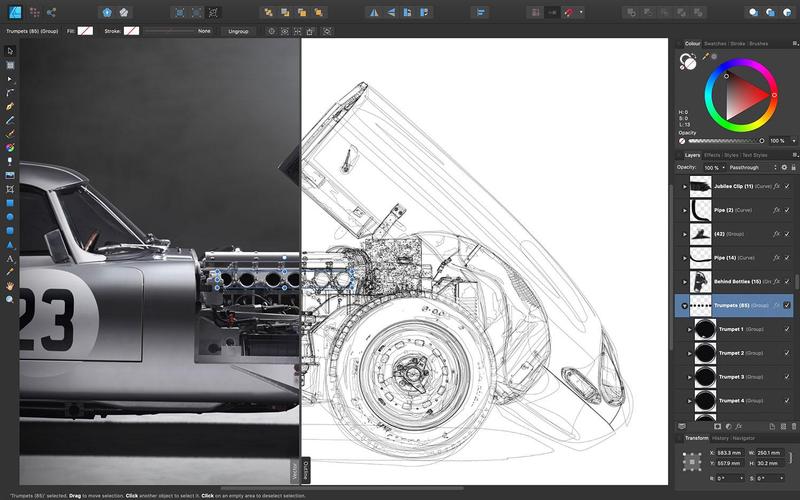
Serif is carving out an impressive niche for itself by providing powerful graphics and design tools at a fraction of the cost of its big name rivals, with Affinity Designer, Photo and Publisher all sharing the same £49 price tag. There’s an impressive iPad version also available for just £20, which means that you can buy the entire Affinity suite, covering vector graphics, photo-editing and desktop publishing on desktop and mobile devices for around £200.
Whatever device you’re using, Affinity Designer provides an impressive array of tools for vector graphics drawing. It has tools for quickly drawing a variety of geometric shapes (including the somewhat belated addition of arrowheads in the recent 1.7 update), a pen tool for curves, pencil for freehand drawing, and a ‘vector brush’ that allows you to mimic the effect of paint brushes and other natural media with vector graphics.
The Pencil tool also gains a ‘sculpt’ option in this update, which can be used to ‘redraw’ your vector graphics and make changes far more quickly than using the conventional node tools. Designer also includes an ‘artboards’ option similar to that of Adobe Illustrator, which allows you to work on a number of separate design elements within a single document. And while it doesn’t claim to be a DTP program – it leaves that side of things to the new Affinity Publisher – Designer does allow you to create simple layouts, with text frames that hold blocks of text, and an Artistic Text tool that can create text on a path or other eye-catching text effects.
It might, however, take a little while to get used to the program’s interface. Along with the usual array of toolbars and palettes, Designer has three small icons in the top left corner of the screen that allow you to select different ‘persona’ (which work differently from the persona features that are also found in Affinity Publisher). The default Vector persona displays the main vector graphics tools, but clicking the Pixel persona displays a different set of bitmap tools and effects, while the Export persona concentrates on preparing your work for export to a variety of different file formats. Switching between these different persona and tools is a bit of a wrench at first, and it takes a little while to understand how the different sets of vector and bitmap tools can work together within a single drawing. But a little bit of a learning curve is forgivable at this price, and Affinity Designer will be an attractive and affordable alternative for many designers who don’t need the vast – and expensive – array of features offered by Adobe Illustrator.
Adobe InDesign CS6
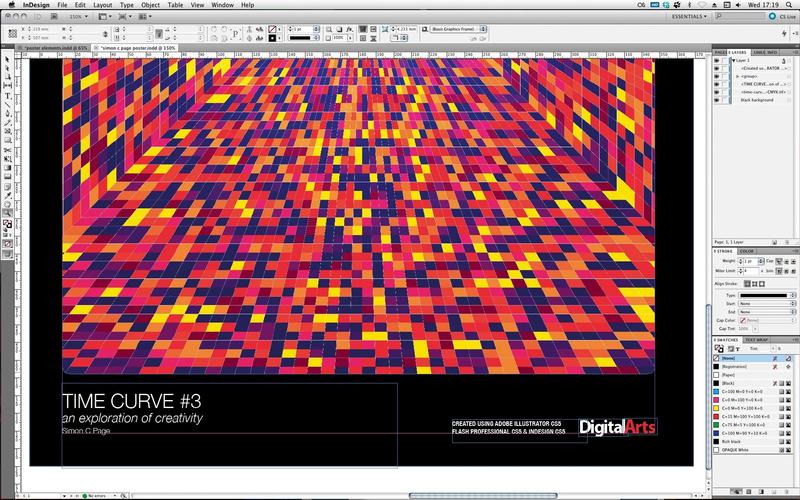
Back in ye olde days – ie before the year 2000 – it was Quark that ruled the DTP industry with XPress, but the arrival of InDesign in 1999 marked the turning of the tide as Adobe added another market-dominating design tool to its vast software portfolio. InDesign didn’t re-invent the wheel though, and it followed the standard approach for page layout software, using ‘frames’ – boxes that contain text or graphics – to define a page layout. You can create ‘master pages’ that act as a template that stores recurring elements such as page numbers, logos or footnotes, and use text styles to quickly format text for headlines, captions and body copy.
The program has continued to add ever more powerful tools over the years but, of course, greater power often brings greater complexity, so the latest updates for both InDesign and Illustrator have very much focused on streamlining these apps to improve productivity and ease of use. Adobe has been jumping on the artificial-intelligence bandwagon with its Sensei system, and when you place an image into a frame InDesign can now analyse the image and make sure that the most important visual elements are automatically placed centrally within the frame so that you don’t have to waste time resizing or tweaking it into place. There’s also a new ‘layout adjustment’ feature – similar in some ways to the flex layouts in the latest version of Xpress – which allows you to change the size of a document and then automatically rearranges the layout of all text and graphics for you.
The latest version of InDesign gains some more modern typographic tools as well, including support for OpenType SVG fonts – already available in QuarkXPress – which allow you to edit colours and gradients within text characters, as well as using emoji fonts. This makes it possible to create ‘composite glyphs’ or customised emojis, perhaps using different skin tones in order to cater to a more diverse audience.
But, as part of Adobe’s Creative Cloud suite, InDesign requires a continuous subscription, rather than than a simple, one-time purchase. We leave it up to you to decide it’s worth it.
Serif Affinity Publisher
- RRP: £49/$50/€54
- Buy: from
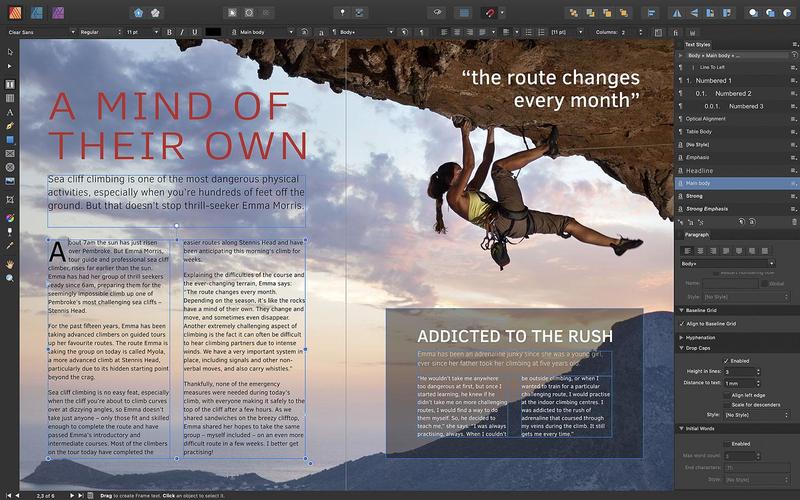
Each of the three programs in the Affinity range is quite specialised, with Affinity Designer focusing very much on its vector graphics tools, and largely leaving the page layout side of things to Affinity Publisher. That’s a task that Publisher handles smoothly and efficiently – and, like Designer, it manages to do so for the absurdly affordable price of just under £50.
It’s a simple matter to create multi-page documents and to define Master pages as required, with the Studio palette on the left of the workspace providing previews and controls for the entire document as well as related Master pages. Over on the right of the workspace there’s a second Studio area where you can dock additional palettes for controlling text, graphics, colour swatches and other tools. Context-sensitive toolbars also appear as you select tools and objects within your documents, and Publisher generally looks and feels like a fairly conventional DTP program, so it won’t take you long to learn, or to adjust if you’re switching over from a rival such as InDesign or Quark.
Admittedly, Publisher doesn’t have some of the high-end features of its more expensive rivals, such as preflighting for sending files to a professional print service – it largely relies on PDF files for both professional printing and web output – but there’s no denying that it packs a pretty mean punch for such an affordable piece of software.
The text controls are both precise and powerful, and it’s easy to create text frames and to use styles to quickly flow text into multi-page documents. There are versatile tools for creating tables, drop caps and other text effects, and for longer documents there are indexing and table of contents options as well. Admittedly, the program’s graphical tools are fairly limited, but Affinity Publisher introduces a new technology called StudioLink that allows it to work hand-in-hand with Affinity Designer and Photo for vector graphics and photo-editing work. So, if you also own Designer, then you can just click the ‘persona’ icon for Designer up in the top-left of the Publisher workspace, and the program’s interface will change to display the interface and vector tools of Designer instead – while you still continue to work with your current Publisher document without interruption. It’s an elegant solution to a problem that designers face on a daily basis, and although it does require you to own Affinity Designer or Photo as well, that’s not going to break the bank given the low cost of the Affinity range of products. There’s an iPad version in development as well, although that’s not due until sometime in 2020.
CorelDraw Graphics Suite 2019

- RRP: £600/$499/€699
- Buy: from
This recent 2019 update saw the CorelDraw Graphics Suite returning to the Mac for the first time in 20 years, and making a renewed pitch for professional and creative users on both Mac and Windows platforms.
The key word here is ‘suite’ as the central CorelDraw program is accompanied by Corel’s Photo-Paint software for photo and image-editing, along with a large collection of fonts, stock photos, and utilities such as PowerTrace, which can be used to convert bitmap images into vector graphics. There’s also an online browser-based version of the program, called Coreldraw.app, which could come in handy if you need quick access to your work when you’re away from the office (although Corel doesn’t seem in any great rush to embrace the iPad and other mobile devices).
CorelDraw itself is very much a jack-of-all-trades program, combining powerful vector graphics tools with versatile page layout features. As well as simple tools for creating geometric shapes and freehand drawing, the program includes a variety of more sophisticated tools for drawing interconnected lines and curves. You can create vector-based brush strokes and effects that mimic traditional paint media, and there’s an adjustable LiveSketch tool that smoothly converts your freehand drawings into precise vector graphics. You can even apply filters and effects to both vector graphics and imported bitmap images, with each effect stored in a series of non-destructive layers so that you can retrace your steps or create different versions of a single image.
It’s easy to create multi-page documents for layout work as well, with good controls for creating multi-column text, tables, and drop caps, and we like the handy Placeholder Text tool, which can help you to quickly mock up a design for a client. However, CorelDraw’s method of using ‘master layers’ for controlling multi-page designs might seem a little cumbersome compared to the ‘master page’ approach favoured by InDesign and Quark.
The pricing situation is rather complicated too. You can buy the CorelDraw 2019 suite for a one-off price of £600/$499/€699, but you’re not guaranteed any future upgrades unless you sign up for an ‘upgrade protection program’ – what everyone else would call a ‘subscription’ in plain English – that costs a further £110/$99/€119.40 per year. Alternatively you can go for the subscription-only option, which costs a more competitive £200 per year and includes all future upgrades – although, of course, you lose access to the program completely if you don’t renew every year. However, Corel does offer a 15-day trial of the program for free, so you can take a good look at it before committing to anything.
QuarkXPress 2019

- RRP: £1002/$975/€975.00
- Buy: from
Forget ‘graphic design’ – Quark these days refers to its products as ‘omni-channel content automation software’. But the core of Quark’s wide-reaching product portfolio remains the veteran QuarkXPress, which was recently updated with this new 2019 edition.
Quark may have ceded its market dominance to InDesign, but the page layout and typographical tools in QuarkXPress are still impressive, and in recent years the program has extended its reach to encompass web design, and ‘digital editions’ that can be published on tablets and other mobile devices. A key new feature in QuarkXPress 2019 is ‘Flex Layouts’, which provides a graphical ‘WYSIWYG’ interface for designing web pages without having to learn any HTML or CSS coding skills first. As the name suggests, flex layouts can be quickly be resized simply by using your mouse to drag the page out to the required shape or size, and the text and graphics on the page will automatically be resized and realigned so that you can see how the page will look on different screen sizes and different devices. Yet flex layouts still allow you to use all the program’s powerful graphics and typographical tools – and you can even use video as a background for the web pages too.
For more traditional page layout tasks, QuarkXPress 2019 has completely overhauled its tools for creating and formatting tables. You can now apply table styles to any type of table – whether created within QuarkXPress or imported from an app such as Excel – and data from Excel will automatically be updated within QuarkXPress. There are new tools for aligning text towards or away from the spine of a book or magazine, and there are some quite ingenious little touches such as the ‘spring loaded cursor’, which allows you to import multiple text and graphics files and ‘load’ them onto the cursor so that you can drop the files into a series of boxes on the page with just a few quick clicks of the mouse.
That ability to combine small design details with multi-platform publishing controls is the great strength of QuarkXPress – but, of course, that sort of power does come at a price. Or perhaps we should say that it comes with a confusingly complex array of different pricing options. The simplest option for new users is probably to buy a ‘perpetual license’ – which means that you own the software outright and can use it for as long as you want – along with a one-year ‘advantage program’ that provides a year of upgrades and unlimited technical support. That comes to a total price of £1002, which is no small investment and explains why Quark is increasingly focusing its marketing efforts on the corporate market. However, Mac users do have the option of buying a monthly or annual subscription from the App Store, and there’s a 7-day trial available as well.
Note: We may earn a commission when you buy through links on our site, at no extra cost to you. This doesn’t affect our editorial independence. Learn more.
https://www.digitalartsonline.co.uk/features/creative-software/best-graphic-design-software-2019-apps/