Digital Marketing in 2018: How to Boost Customer Satisfaction?

With the rise of the web, people’s approach to making purchases has changed significantly. They are now aware of how important they are to small businesses trying to survive in such a competitive marketplace. And, in return for their loyalty, they expect you to provide them with the exceptional buying experience and they won’t accept anything less than that.

Your customers not interested in your products only. Namely, they want to know the story behind your brand, as well. They expect you to answer their questions fast, connect with them on social networks, and create relevant and interesting content. They don’t want to waste their time, either. If your site takes more than 3 seconds to load, they will abandon it and look for your competitors. The same goes for your navigation, mobile-friendliness, content, and the overall visual appeal of your site.

Given all these facts, here is how you should do digital marketing in 2018.

Prepare for the Google Mobile-First Index

If you haven’t heard yet that Google has finally rolled out their mobile-first index, then you’re living under a rock. This has become one of the hottest news in the digital marketing sphere, but what does it actually mean? From now on, Google will focus on the mobile version of your site when indexing it.

So, make sure you optimize your site for mobile searchers. After all, 60% of all web searches are done via mobile devices. Make your keywords longer and more conversational to optimize them for voice search. Use Google’s AMPs to speed up your site significantly. Your navigation should be simpler, while all important elements of your website should be above the fold. For additional information, take a look at what Google says about preparing your site for the mobile-first index.

Show Appreciation

Do you know that an average U.S. household participates in about 29 loyalty programs? They love them for different reasons- some join these programs to save money, while others want to receive a reward for their loyalty. For some, the availability of rewards programs is the major factor that determines whether they will buy from you or not.

Now, loyalty programs vary and you need to choose the option that works for your target audience. You could give them points or vouchers that can be later redeemed at your stores or offer them exclusive deals for every purchase or referral they make. However, recent studies point out that people have labeled financial rewards or highly targeted incentives far more enticing. So, to make customized loyalty programs, you could offer personalized visa gift cards, with your customers’ names on them or even organize a contest and let them win your premium products.

Focus on User-Generated Content

Let’s face it- people trust other customers more than you. According to the Local Customer Review Survey, 85% of them trust online reviews as much as their friends, while 73% of them will trust your business more if your customers’ reviews are positive.

In light of statistics like this, it’s obvious that user-generated content (UGC) is one of those tactics you simply cannot allow to ignore. After all, it’s your customers that sell your products today.

Use your social networks to invite people to share their own videos of your products or services.

Boost the visibility of this content by sharing it regularly and creating dedicated hashtags.

Most importantly, you need to know what works for each of the social networks you use. Share live stories and videos on Facebook, post photos on Twitter, while the user-generated content your Instagram account could be the combination of these forms of UGC.  

Use Social Networks to Offer Instant Feedback

In the past, your communication with your customers was based on phone calls and emails. However, the times have changed and, today, your communication channels cannot be observed in isolation. All instant messaging apps, video conferencing tools, social networks, email providers, and telemarketing strategies are highly intertwined, creating what we call the omnichannel approach to communication.

Today, your customers can move from one device to another uninterruptedly. They can find your phone number on your site and call you instantly, not having to switch between different apps. They can scan your QR code that will lead them to the piece of content they want to read or a product they want to buy. They can stumble upon your business on social networks, read the reviews, ask questions, and follow the link to your site to learn more about you.

If you’re too busy answering your customers’ messages regularly, then hire someone to do so for you. Even better, use a chatbot. Even this is still a pretty new concept, chatbots are predicted to revolutionize the digital marketing industry in 2018. Namely, these AI-powered tools have become smarter and more intuitive. They will provide your customers with relevant, real-time feedback and, at the same time, do all repetitive and time-consuming tasks for you.

You can use social media monitoring tools to keep track of your brand or product mentions. Whenever someone mentions you, you’ll get notified. This is called social listening and it’s immensely important in providing your customers with real-time customers services and collecting their feedback.

Create Interactive Content

Gone are the days when you could write a 1000-word blog post and generate a bunch of links, shares, and comments. We’re living in the era of augmented reality and people expect your content to surprise and excite them. So, update your content strategy with interactive content, the one your customers can actively participate in, such as polls and quizzes. Don’t forget about visual content, especially videos, as they’re expected to account for 82% of the total internet traffic by 2020.  

Tell your Customers a Story

You’re not doing content marketing for SEO purposes solely. You’re creating your content for your customers. And, to engage them and get them emotionally involved, each article you write needs to have a good story to back it.

That’s what storytelling is about.

Namely, 92% of people emphasized that they expect all major brands to create ads that feel like stories. Stories share a real-life experience, add the human element to your brand promotion, and evoke nostalgia and empathy. Most importantly, as they don’t seem overly promotional, they will take your relationship with your customers to a completely new, more personal level.

Over to You

Digital marketing is not about promoting your business and ranking higher on Google. It’s also about building and nurturing strong relationships with your target audience. That’s exactly what will set you apart from a sea of businesses similar to yours.

Hope these tips help!

Digital Marketing in 2018: How to Boost Customer Satisfaction?



Add a sense of motion to an artwork

[unable to retrieve full-text content]https://www.digitalartsonline.co.uk/tutorials/adobe-illustrator/add-sense-of-motion-artwork/


How to Create a Cowboy Badge Icon

In today’s tutorial, we’re going to take a close look behind the process of creating a cowboy badge icon and see how we can create one of our own using nothing more than some basic geometric shapes that we will adjust here and there.

So, assuming you already have Illustrator running in the background, bring it up and let’s get started!

  • Program: Adobe Illustrator CS6 – CC
  • Difficulty: Beginner
  • Topics Covered: Design Theory, Compositional Construction, Shape Alignment, Grid Positioning
  • Estimated Completion Time: 20 Minutes

Final Image: Cowboy Badge Icon

Step 1

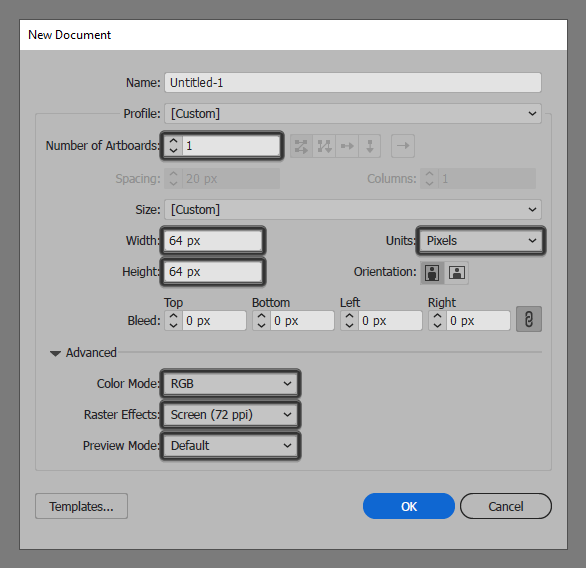
As always, we’re going to kick off the project by setting up a New Document by going to File > New (or using the Control-N keyboard shortcut), which we will adjust as follows:

  • Number of Artboards: 1
  • Width: 64 px
  • Height: 64 px
  • Units: Pixels

And from the Advanced tab:

  • Color Mode: RGB
  • Raster Effects: Screen (72ppi)
  • Preview Mode: Default

Quick tip: most of the indicated settings can be automatically triggered if you set the document’s Profile to Web, the only one that you’ll have to manually adjust being the Artboard’s Size (Width x Height).

Step 2

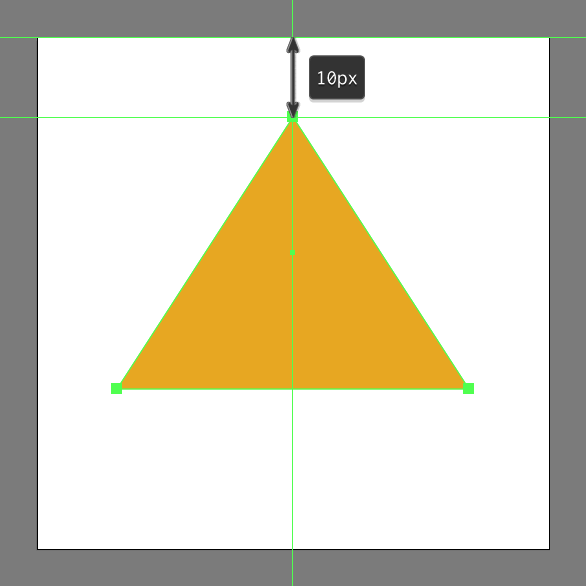
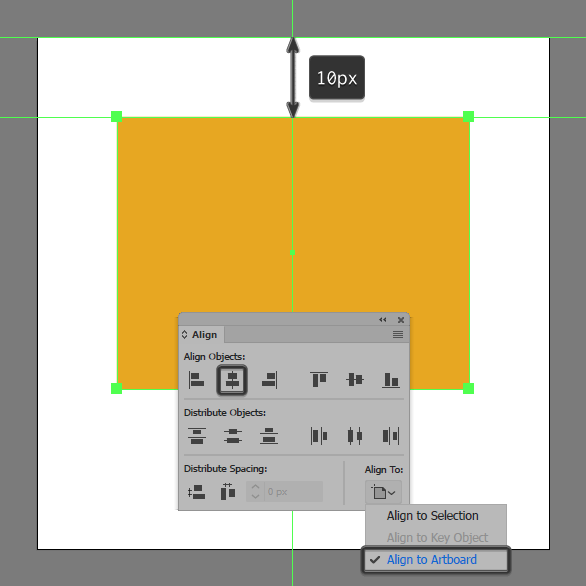
Start working on the actual badge, by creating the lower section of the star using a 44 x 34 px square which we will color using #E8A91C, and then center align to the Artboard’s top edge at a distance of just 10 px.

Step 3

Turn the rectangle that we’ve just created into a triangle, by adding a new anchor point to the center of its top edge using the Add Anchor Point Tool (+), and the removing its side ones using the Delete Anchor Point Tool (-).

Step 4

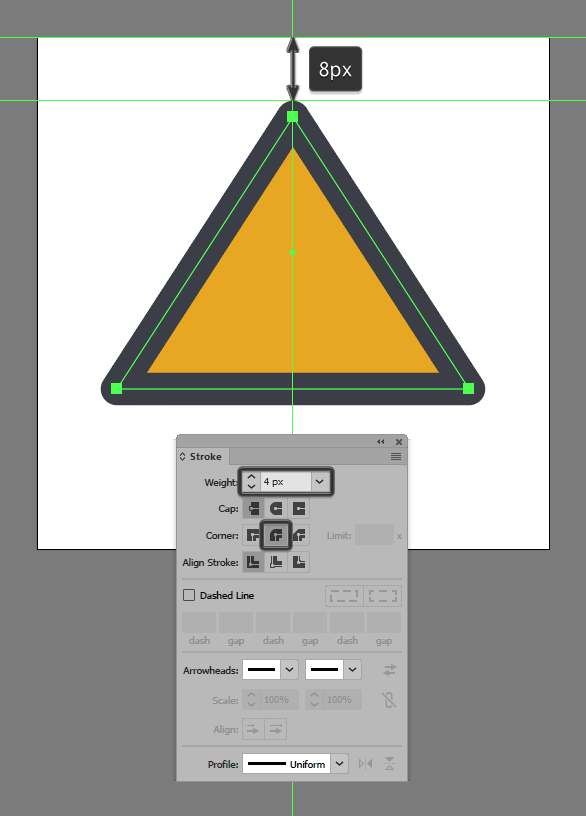
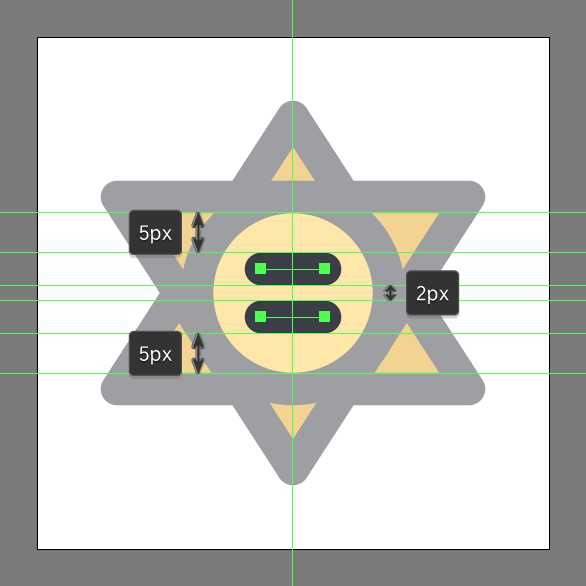
Give the resulting shape an outline using the Stroke method, by creating a copy (Control-C > Control-F) after it which we will adjust by first setting its color to #383C44 and then flipping its Fill with its Stroke (Shift-X). Once you’re done, set its Weight to 4 px and its Corner to Round Join making sure to select and group the two shapes together using the Control-G keyboard shortcut.

Step 5

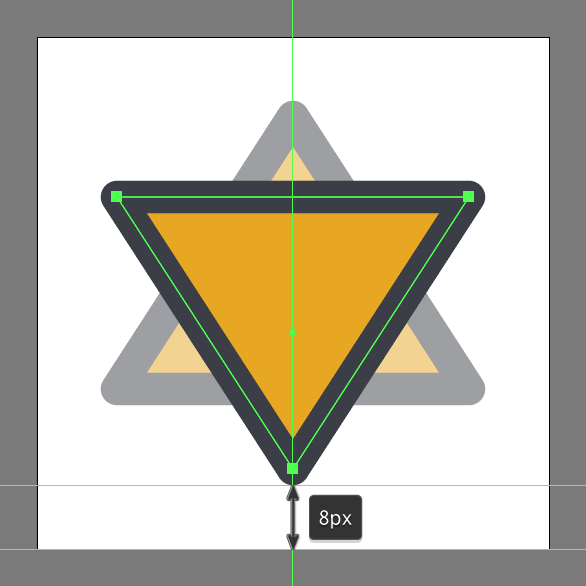
Create the upper section of the star using a copy (Control-C > Control-F) of the one that we’ve just finished working on, which we will horizontally reflect (right click > Transform > Reflect > Horizontal), and then position at a distance of just 8 px from the Artboard’s bottom edge.

Step 6

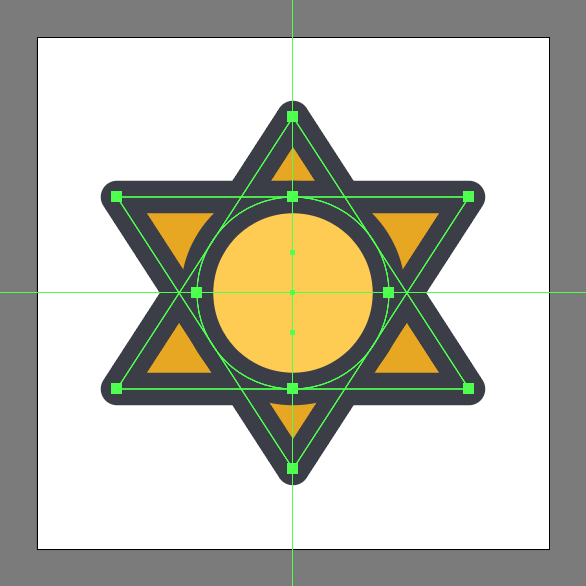
Add the center section of the star using a 24 x 24 px ellipse (#FFCD52) with a 4 px thick outline (#383C44), which we will group (Control-G) and then position to the center as seen in the reference image.

Step 7

Add the dummy text lines using two 8 px wide 4 px thick Stroke lines (#383C44) with a Round Cap, which we will vertically stack at 2 px from one another, grouping (Control-G) and then positioning them to the center of the circular section.

Step 8

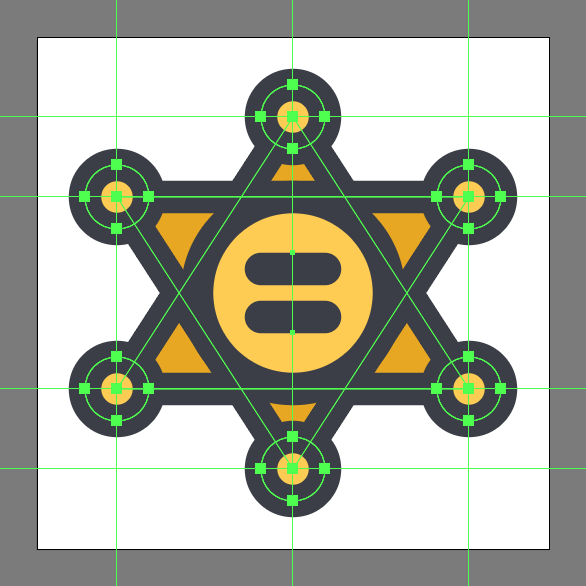
Finish off the badge and with it the project itself, by adding the circular sections to each of the star’s tips using six 8 x 8 px circles (#FFCD52) with a 4 px thick outline (#383C44), which we will individually group and position as seen in the reference image. Take your time and once you’re done, select and group (Control-G) all of the icon’s composing shapes before hitting that save button.

It’s a Wrap!

There you have it folks a nice and easy tutorial on how to create your very own cowboy badge using nothing more thane some simple geometric shapes.

As always I hope you had fun working on the project, and if you have any questions feel free to post them within the comments section and I’ll get back to you as soon as I can!

Author: Andrei Ștefan

Just another coffee addict / pixel grinder, creating colorful projects one pixel at a time.

These icons link to social bookmarking sites where readers can share and discover new web pages.

http://vectips.com/tips-and-tricks/create-cowboy-badge-icon/


Portfolio Spotlight: Très Chic Salon Branding

Très Chic Salon Branding

Go Media was approached by stylist Katie Skillman, who was on a mission to turn her passion for hair education & styling into her dream business – a Cleveland local salon known as Très Chic. During the early stages of the brand development, we explored influences from French cinema, fashion, and even some understated vintage looks. At the base of it all, we knew the goal was a strong, classic and elegant identity that held up to its name Très Chic, meaning very stylish.

View Portfolio Item

Tres Chic Salon Branding by Go Media

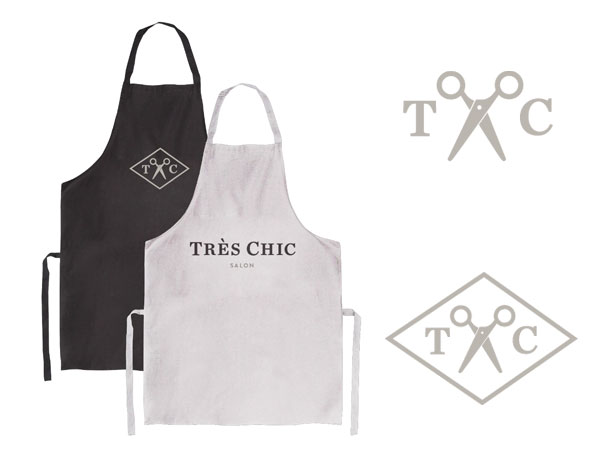
Throughout the branding process, we explored several potential applications for the identity. Everything from a business card and service menus, to the signage on the exterior of the building. Because of this, the Très Chic identity consists of a handful of logo variations to account for those various needs. You can find their signature TC scissor mark sprinkled across their marketing materials or featured on aprons worn by the stylists.

Tres Chic Salon Branding by Go Media

To see more concepts and learn more about the project:

View Portfolio Item

Portfolio Spotlight: Très Chic Salon Branding


What Color Scheme Works Best for Your Industry

Website color choice is never an easy decision. Do you stick with your company colors or go with a color scheme that has maximum impact on site visitors? There is a science to figuring out the psychology behind various color choices and the impact they have on people.

The hypothalamus reacts to color, and hormones release which trigger emotions. The emotions, in turn, impact your behavior, including shopping behavior. Somewhere between 62 and 90 percent of the decisions to purchase something is based solely on color. Using the right colors can increase your conversions and help you make an emotional connection with consumers.

Of course, different industries should focus on different color choices. The right choice of color can create a tone, a sense of trust or even lend credibility to your website. While you can experiment with different combinations to stand out, it is important to know which colors associate with an industry and how to create a sense of trust in your brand from the minute a user lands on your page.

Here are five industries and the best color choices for those industries:

1. Restaurants

Most restaurant websites stick to a basic color palette that includes colors such as brown, red, white and black. You will see these colors appear over and over on food-themed sites. Of course, some trendy designers work in additional colors to grab interest, and this can work well, especially in such a crowded marketplace.

Food photographs tend to really pop on a black or white background, which is often one of the reasons for the choice of black and white. Red has long been associated with enticing people to hunger, although there is some debate about how effective that choice is today with more and more people aware of such tactics.

Experts advise staying away from the color blue for anything food related as it is a color often associated with poison. There are not many naturally blue foods, which may be why it doesn’t work well for restaurant websites.

Website Color Choice for your Industry

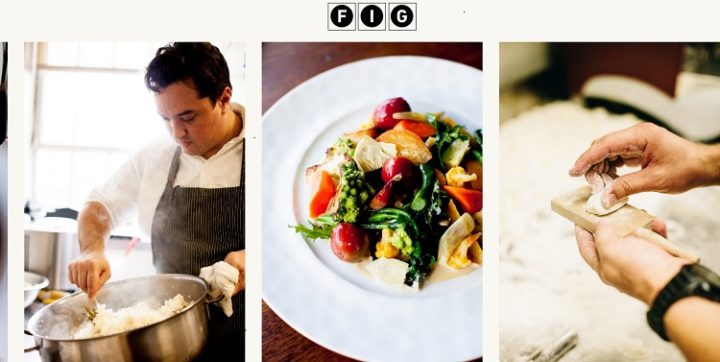
Fig restaurant in Charleston, South Carolina uses the basic approach of a black and white base. They add a pop of color through the image of one of their dishes and also show an image of a chef cooking and using a kitchen tool. The use of black and white lends a sense of trust in the establishment as it is a color scheme people are used to seeing and the pops of red and green in the food photograph draw attention.

2. Hospitality

Hospitality can encompass everything from hotels to salons. Hotels can actually increase bookings by using color psychology. The color brown lends a sense of comfort and home, but adding a pop of blue to the CTA button can draw visitors to book a room.

If creating a website for a salon or spa, using colors that put the person in mind of health and nature is a good choice. Consider using colors found in nature, such as green, brown and sky blue.

3. Medical

When creating a medical website, you want to evoke feelings of security and trust. The color blue is often seen as trustworthy. In addition, blue is a good choice because it’s a favorite color of both men and women. Many medical sites use white and blue color schemes. This keeps things simple, and the color blue makes the person feel secure.

For example, you wouldn’t use the color red, because people might associate red with blood. A color scheme of red and white might even scare potential patients away.

Website Color Choice for your Industry

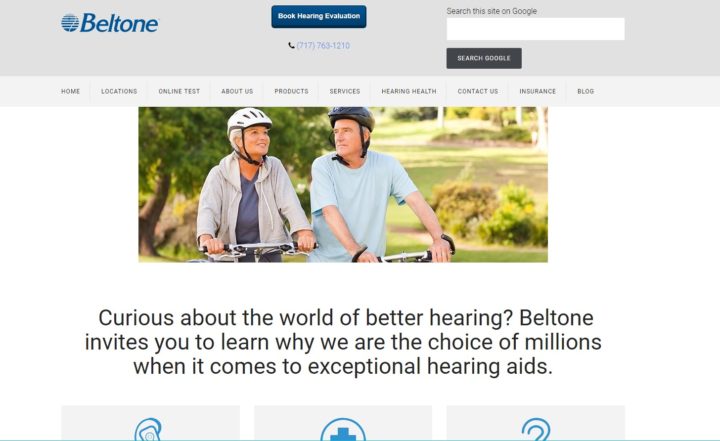
Beltone, a hearing aid provider, uses very traditional colors of white and blue with a touch of gray to lend a sense of credibility to their website. A visitor can immediately see that this is likely a medical type website. Even the colors in the photograph mirror the blues and grays in the overall design. This works well for a site providing a medical device.

4. Construction

Construction websites tend to gravitate toward brown, orange and blue. While you do have a bit more of a range of colors you can utilize, it’s smart to think through the message you most want to convey. If you want to convey energy and excitement, then orange is a good choice. If you want the site visitor to think about the earth, then browns work well. If you want a more generic color choice that is fairly safe, go with blue, which also lends a sense of trust in you and your work.

Don’t be afraid to add plenty of white to any design. The use of white is fairly neutral. You can then add pops of color with your headings, photographs and your CTA.

5. Financial

Have you noticed that a lot of banks tend to use blue and white similar to what the medical sites use? Again, this invokes feelings of stability and trust. When you place your money with an institution, you definitely want that feeling of stability.

Green might seem like a natural choice when talking about money, however, people tend to associate green with nature. So, unless you’re an environmentally friendly banking company, you might want to utilize other colors.

Note how T. Rowe Price uses a variety of blues to add a sense of credibility and stability to their website. Even the image that takes up the background is fairly neutral, which places the emphasis on the pops of blue and the single CTA in orange. Note that the orange used in the CTA is rather subdued instead of a bright color that might appear more youthful and less serious.

Best Color Scheme for Your Industry

To figure out the best color scheme for your industry, spend some time studying competitor websites. You’ll likely begin to see a pattern. Combine that knowledge with the psychology behind color choices to come up with a scheme that works for your target audience. Don’t be afraid to add a pop of color on a CTA button and to do split testing and see what works best for conversions.

What Color Scheme Works Best for Your Industry


Marketing Personas Vs. User Experience Personas

Understanding who your users are when creating a digital product is of paramount importance for a user experience designer to design a successful product. But who are these users, and how does a digital product team begin to define them? This is done through the use of Personas. Persona is defined as “a role or character adopted by an author or actor to perform a role,” however within the field of digital product design, they have a slightly different focus.

A Digital Product Persona, instead of representing a role for an actor a persona represents a large group of similar users with a single individual. Personas (when used this way) are tools to allow the team to better empathize with the user groups, as the human condition allows us to better empathize with individuals, rather than large faceless groups. Digital Product Personas come in several varieties, depending on the goals of the project. Two of these persona types, Marketing Personas and User Experience Personas have sometimes been used interchangeably, leading to incorrect assumptions and flawed products.

What is a Marketing Persona?

Typically when people think of using personas within their digital product production they are using Marketing Personas. This persona type is focused primarily on the demographic information, business landscape understanding, and media consumption. Marketing personas are incredibly valuable when it comes to placing advertising, generating interest and tailoring content as the demographic information allows the team to understand where to access this user’s attention.

Unfortunately, many digital product teams stop here when creating their personas, and while this information can be crucially valuable when developing content plans and social media marketing, it lacks important nuances when it comes to understanding what the user needs to accomplish when using the future digital product. This leads teams to make incorrect assumptions and if the product isn’t properly validated through user testing later, these assumptions can make for flawed digital experiences.

How is a User Experience Persona different?

User experience personas build off the information gathered with the Marketing Persona and use that as a springboard to better understand their users. These personas are primarily focused on problems that the person is experiencing, what they do currently to alleviate the issue, and why these are even problems in the first place. For example, a marketing persona would say that construction workers need digital records on a job site because they are more efficient, whereas a UX persona would dig a bit deeper to find construction workers want to be more efficient on a job site so that they can spend more time working, less time with unorganized paper records and more time with their family. Now with that understanding, the business can position itself as the digital product that lets construction workers get home to their families quicker.

A simple way to understand the difference between a Marketing Persona and a User Experience Persona is this: a Marketing Persona is who that user group (as a person) is, whereas a UX Persona is what problems that user group faces and what the users (as people) do to confront those problems. By better understanding what those problems are by using a UX Persona, a digital product team can build a product that provides a more elegant solution and then the marketing team can use Marketing Personas to ensure that the potential users are introduced to the product.

Marketing Personas Vs. User Experience Personas


Learn to Draw a Leaves Composition in 10 Easy Steps!

Spring is finally here! Now that everything is growing and blooming, let’s dedicate this tutorial to drawing an elegant bouquet made of ornate leaves. We’ll be using simple shapes and transform effects to make the silhouettes and learn how to draw inside the objects. Let’s start!

Tutorial Details

  • Program: Adobe Illustrator CS6 – CC
  • Difficulty: Intermediate
  • Topics Covered: Shape Building, Effects, Pathfinder panel, Draw Inside Function
  • Estimated Completion Time: 20 minutes

Final Image: Leaves Composition

Step 1

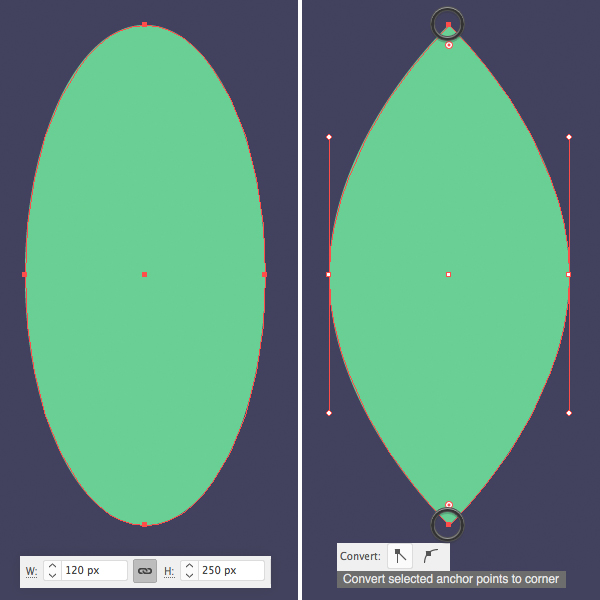
Take the Ellipse Tool (L) and let’s make a 120 x 250 px green oval. Select its top and bottom anchor points with the Direct Selection Tool (A) and click Convert selected anchor points to corner in the control panel on top and make the tips pointed.

Step 2

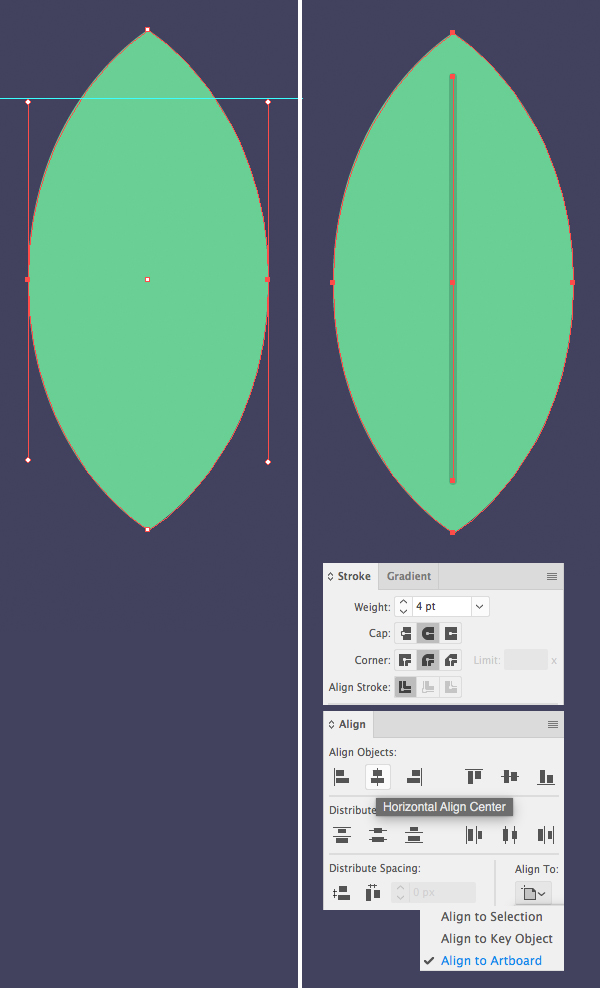
We can use Guides to adjust the length of the anchor handles if we want to make the shape rounder. Simply turn on the Rulers (Control-R) and drag the Guide down onto the Artboard. When you’ve finished with it, click the guide and hit Delete (Backspace on Mac) to get rid of it. You can also turn it off in View > Guides > Clear Guides.

Use the Pen Tool (P) and hold down Shift to add a vertical line across the leave. Open the Stroke panel (Window > Stroke) and set the Weight to 4 pt, Cap to Round Cap.

Let’s make sure that our shapes are perfectly centered. Select both the leaf and the line and open the Align panel (Window > Align). Select Align to Artboard and click Horizontal Align Center to place both elements in the center.

Step 3

Duplicate (Control-C > Control-V) the leaf and keep the copy somewhere aside, we’ll need it for our next leaf.

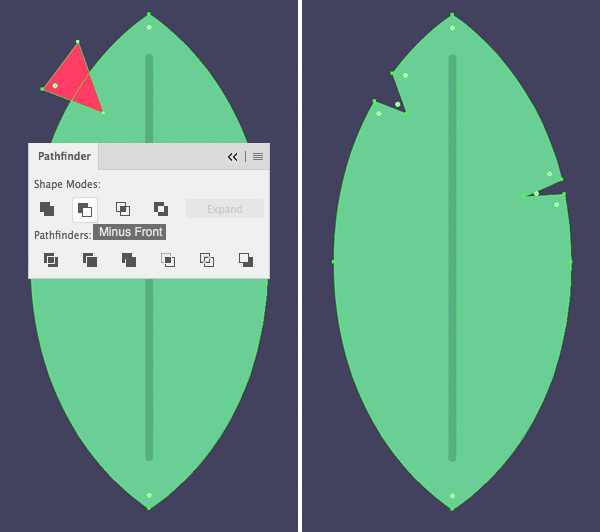
Use a Pen Tool (P) to create a small triangle in the top part of the leaf. Select both the leaf and the triangle and use the Minus Front function of the Pathfinder to cut it out.

Add another cut-out on the opposite side of the leaf.

Our leaf is ready! Let’s make another one!

Step 4

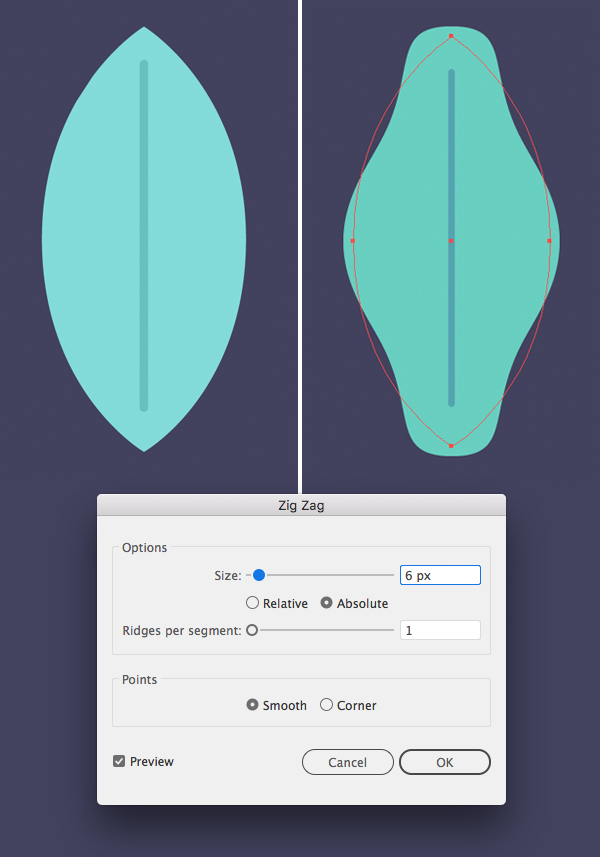
Remember the copy of the leaf that we’ve created in the previous step? Now its time to use it! First of all, let’s change its color to light-blue.

Next, select the leaf and go to Effect > Distort & Transform > Zig Zag. Set the Size to 6 px, Ridges per Segment to 1, Points to Smooth.

Step 5

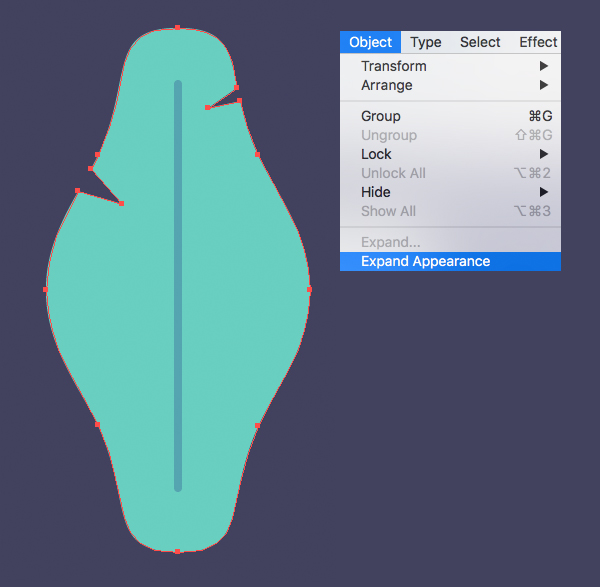
Go to Object > Expand Appearance to apply the effect and add some notches to the leaf.

Step 6

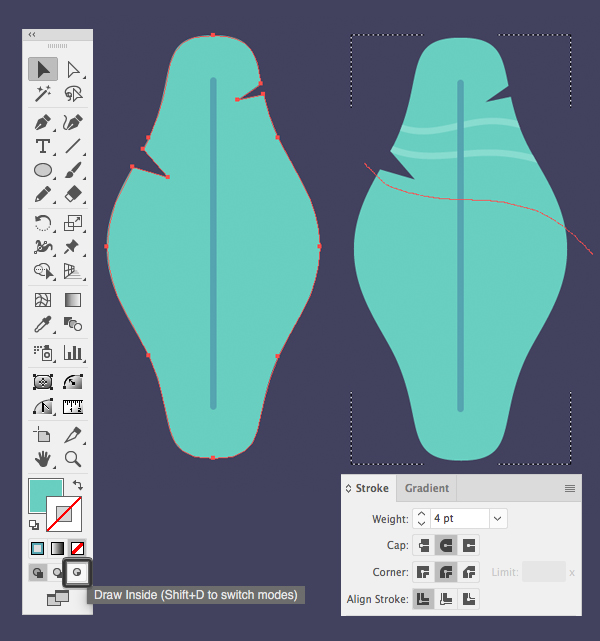
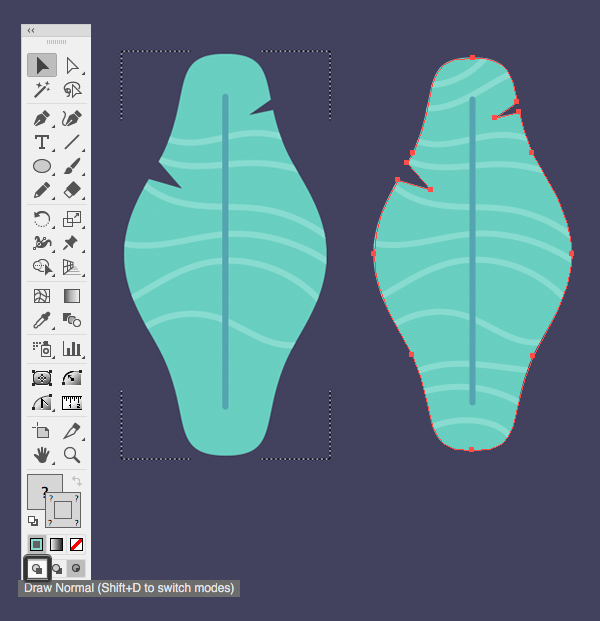
Let’s add some texture to our leaf. Keeping the leaf shape selected, head to the Tool panel and click Draw Inside in the very bottom of the panel (or press Shift-D to switch modes). You will see a dashed frame around the object, indicating that you can draw inside of it.

Take the Pencil Tool (N) and select a light-blue Stroke color in the Color panel. Set the Weight to 4 pt in the Stroke panel and start adding wavy lines to the leaf.

Step 7

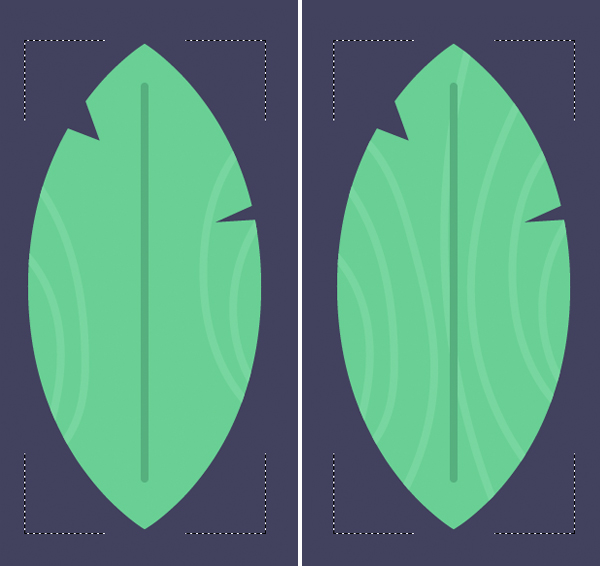
Once you’ve added enough lines, switch back to Draw Normal mode by clicking the icon in the bottom of the Tool panel.

Step 8

Use the same technique to add texture to our first leaf. Make the line pattern different, varying the direction of the lines.

Step 9

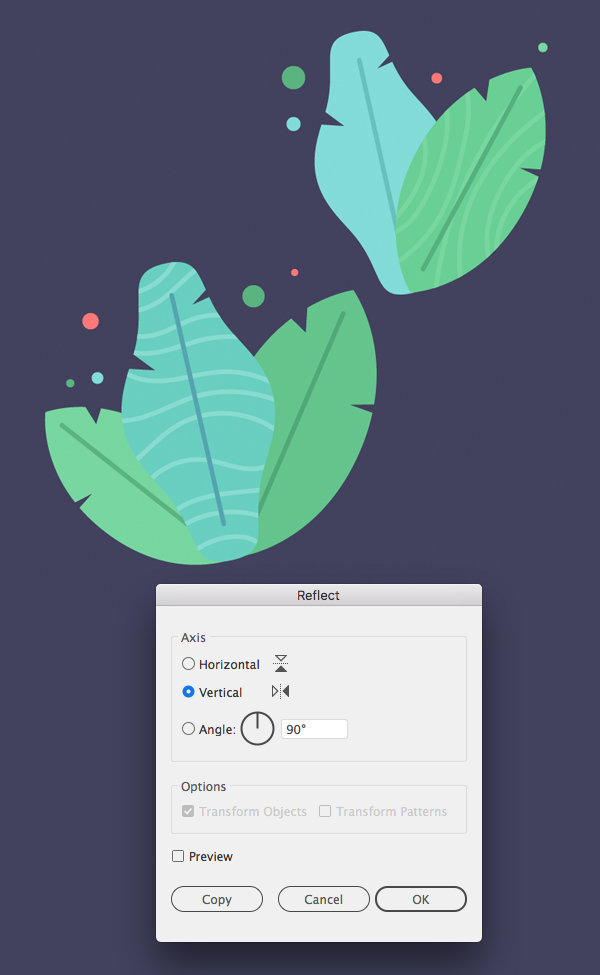
Now that our leaves are ready, we can duplicate (Control-C > Control-V) them and combine the copies, making elegant compositions. Rotate the leaves and change their scale. We can also use the Reflect Tool (O) by double-clicking it to flip some of the leaves vertically, adding variety to our bouquet.

Use the Ellipse Tool (L) while holding Shift to add small circles here and there.
Step 10

Add more details by placing dark copies of the leaves beneath the bouquet (Shift-Control-[).

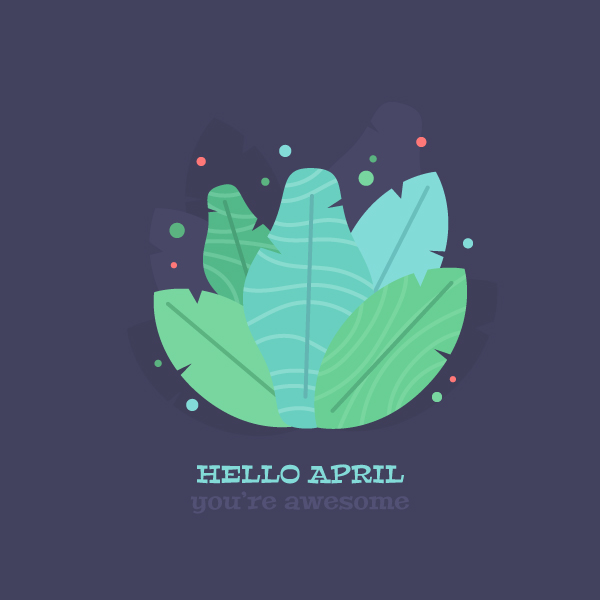
Congratulations! Our Floral Composition is Finished!

Great work! Now we can use the bouquet as it is by adding some text to it or make more variations and unite them into an elegant floral set. I hope you’ve found some useful tips and tricks in this tutorial to use in your future designs!

Have fun!

These icons link to social bookmarking sites where readers can share and discover new web pages.

Learn to Draw a Leaves Composition in 10 Easy Steps!


5 Best Time Tracking Tools in 2018

Over the past couple of years, time tracking has become a big deal, as it very well should be. Though we’ve had these capabilities for quite a while, neither freelancers nor clients used the practicality of time tracking tools quite as much as they should have, often opening the way to invoice disputes and freelance time management issues.

These days, there are so many time tracking tools available that it’s become difficult to pick one. We took a look at what’s available on the market and picked our favorite apps, based on various freelancing needs.

Time Tracking Tools 2018

Toggl

Though this list is in no particular order, we had to include Toggl somewhere on it. Toggl has become one of the most popular time trackers for freelancers in recent years and it’s obvious to see why. The tool is available for almost all platforms and is very easy to use, although it isn’t a good choice for managing large teams or freelance designers working on various devices at once. Toggle does offer these options, but there are more competitive choices in that range today.

The upside is that Toggl offers plenty of options in its free version for small freelancers or those just getting started. For those working with larger teams or who have more projects to toggle than they can count off the top of their head, the full package paid version of this time tracking app may be the best choice.

Hubstaff

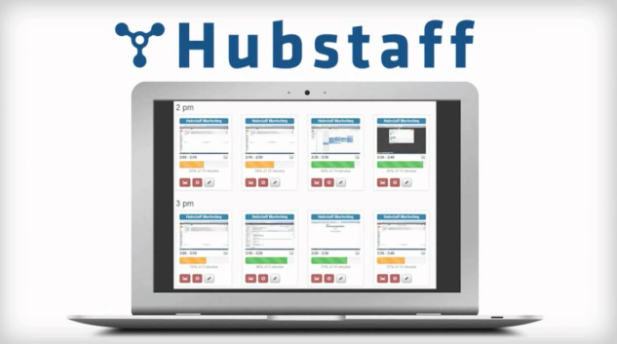
Speaking of teams and robust time tracking tools created for managing more complex projects and teams, Hubstaff has it all covered. This extensive tool is much more than just a time tracking app and includes screenshots, activity levels, setting of limits for each team member and project, GPS and location, invoicing, and even a payroll system that allows team leaders to pay freelancers with just one click when all is said and done.

Obviously, this is a tool for top tier freelancers or small agencies who manage entire teams of freelance designers. As further proof that Hubstaff was built with growing teams in mind, one of its best features is the scalable pricing they offer, including the option to make users active or inactive – and pay accordingly – making freelance time management incredibly easy for project managers.   

Upwork Desktop App

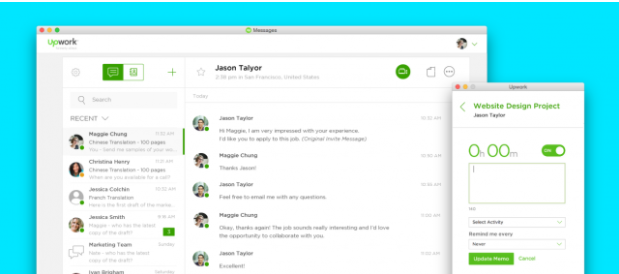
Instead of randomly listing just any time tracking tools available, we’re making another exception on this list, to include time management tips for freelancers and remote team project managers. The Upwork Desktop App is, needless to say, exclusively linked to Upwork, the most popular freelancing network today. The platform’s time tracking and work diary features are also exactly what has made it so popular, creating trust for employers and ensuring that freelancers get paid.

Getting paid once a job is done is a plague that freelancers have had to deal with forever. Using time tracking tools for bothe time management and to record work hours is essential, but adding a system in which getting paid is almost guaranteed turns it into a full package deal. Using Upwork is highly recommended for freelancers who are just getting started, along with all of its tools and its time tracking desktop app.

Qbserve

Qbserve, an automatic time tracker for Mac that includes team management and invoicing, is a more recent favorite and a dream come true for busy design pros and freelancers of all types. Typically, busy freelancers will forget to turn on their time trackers or switch between projects, while time management at work or in the home office becomes more important than ever. And that’s just if the freelancers are working independently. Add a team to all of those projects and busy schedule, and things really turn into a nightmare.

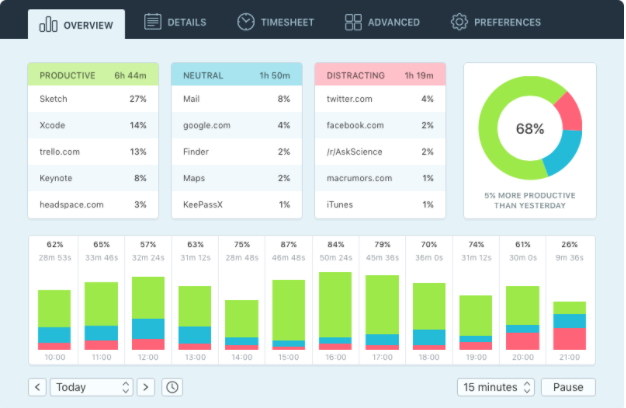
The team behind Qbserve seems to have thought of everything and provided a solution to it. Qbserve keeps track of activities on a Mac and provides constant feedback on productivity, helping freelancers and remote teams to develop better work and time management habits. It can also automatically generate invoices based on data, along with a slew of other settings that can be adjusted for design freelancers who want to focus more on work and less on managing stuff and typing up reports and invoices.

Timely

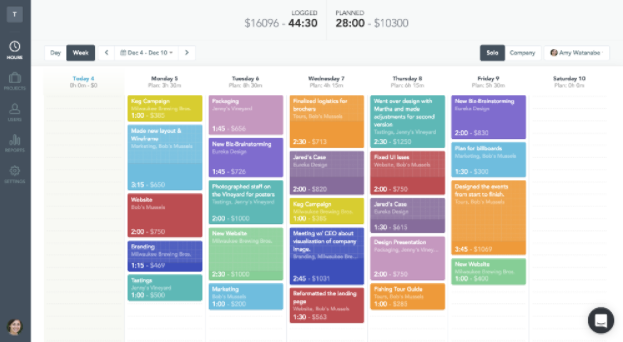
Less a time tracking tool and more of an all around time management tracker, Timely links directly to your calendar and planned events to help attain an overview of your work hours, downtime and everything else going on. Essentially, your schedule becomes your time tracker.

In this app that combines scheduling and time tracking in one place, freelancers can use their calendar and the app to out different times of your day to work on different projects, then use the app to pick a project or task, start the timer and get to work. Obviously, this isn’t a tool for managing remote teams, but for the individual freelancer, it literally allows designers to see which hours made money and which went to waste.

Hope you find these tools! You may also like our post on Must-Have Tools for Digital Marketers

5 Best Time Tracking Tools in 2018


Meet Your Instructors for Photoshop World 2018 – Part VIII

Photoshop World Conference 2018 is going to be non-stop training on all things Photoshop, Lightroom, and photography, taught by the best instructors in the industry. It’s going to be jam-packed with hands-on training, fun events, and endless opportunities to network both with your instructors as well as fellow creative minds.

We’re more than halfway through introducing all of the instructors you’ll be interacting with at Photoshop World! Here are three more talented individuals we can’t wait for you to meet:

Jeremy Cowart is a professional photographer from Nashville, Tennessee. Beginning his photography career in 2005, Jeremy quickly became a respected artistic voice in the industry. Having shot numerous musicians, entertainers, and celebrities, Jeremy is also the founder of Help-Portrait Movement, a worldwide movement of photographers giving free portraits to those less fortunate. As his list of clients continues to grow, so does Jeremy’s desire to improve, share, teach, and give back to those around him.

We are honored to have Jeremy hosting our special event, An Evening with Jeremy Cowart.

Friday, June 1 | 8:00pm – 9:30pm

Special Event | An Evening with Jeremy Cowart

Join us for the evening as we welcome celebrity photographer and entrepreneur, Jeremy Cowart. Jeremy has had a vast photography career spanning from celebrity shoots, weddings, humanitarian work, advertising, editorial, and personal work. He’s also the entrepreneur who founded Help-Portrait, See University, The Purpose Hotel, and the iPhone app OKDOTHIS. And now he’s here for a fun-filled evening where he will share stories from his photography journey.

Glyn Dewis is a professional photographer, retoucher, and trainer based in England. He has worked with a variety of national and international clients ranging from the BBC, Sky TV, and Air New Zealand to athletes, musicians, and other industry professionals. He teaches a variety of classes including his own series of workshops, one-on-one coaching, and events around the world.

His classes cover all aspects of Adobe Photoshop from basic to advanced techniques, and at Photoshop World conference will be no different! We can’t wait to dive in!

Thursday, May 31 | 4:00pm – 5:00pm

Photoshop | Photoshop Lighting Effects for Photographers

Join Glyn as he shows you how to use Photoshop for adding light to your images. Learn everything from simple spotlights, light beams, and sun flares to special effects.

Friday, June 1 | 10:30am – 11:30am

Lighting/Flash | Portrait Lighting is Easy, Trust Me!

Whether you’re a beginner or a seasoned photographer, Glyn will show you step-by-step how to create classic portraiture looks quickly and easily. It’s not about learning a lot of things; it’s all about learning one thing and perfecting it!

Saturday, June 2 | 9:15am – 10:15am

Photoshop | Photoshop Power Hour

This class offers non-stop Photoshop retouching and workflow tips, tricks, and techniques for today’s photographer and digital artist.

Saturday, June 2 | 1:00pm – 2:00pm

Photoshop | A Complete Photographer’s Guide to Photoshop

Join Glyn as he takes you through the steps of his “5 Step Portrait Processing” procedure including how to save a picture and how to give your pictures a unique and recognizable look. You will also master coloring, learn the 3 steps for adding depth and dimension, how to guide the viewer’s eye, and the best techniques for adding mood and atmosphere.

Saturday, June 2 | 10:30am – 11:30am

Photoshop | Compositing: Don’t Get Stuck, Get Creating!

Learn how to make realistic looking composites by learning how to create shadows, cut out objects, and more. Compositing is quickly becoming an essential skill for the modern day photographer so don’t get stuck, get creating!
Wednesday, May 30 | 1:00pm – 5:00pm

Pre-conference Workshop | Photograph Like a Thief: From Concept to Print & Everything in Between

With photography becoming more and more popular how do you set yourself apart? How do you develop a style that is uniquely yours and instantly recognizable? In this 4-hour LIVE shoot and retouching workshop, Glyn will show you how! In this workshop, you’ll look at work by masters such as Annie Leibovitz and Dan Winters to learn how to study the light, reverse engineer lighting set-ups, and observe their post production style so that you can apply what you have learned to your own photos but with your added individual touches. You’ll also learn how to come up with ideas, where to look for inspiration, work with non-professional models, the importance of props, how to create a ‘look’, and more. You’ll go ‘hands on’ from concept to print and everything in between, including lighting, set-up, shoot, and post-production using Lightroom and Photoshop. This workshop is limited to 40 Participants.

Mark Heaps is a designer inspired by using his creations to solve a problem. Concept to execution became the manifesto for his career. See it, think it, build it. He is obsessed with Adobe tools and how they work for designers. He appreciates giving back to the people working in the industry that has given so much to him, thus you can often find him speaking at a variety of creative events, including Photoshop World conference 2018!

Thursday, May 31 | 5:15pm – 6:15pm

Photoshop | Digital Darkroom Essentials: Landscape

Discover the secrets to a successful landscape retouch from Mark Heaps who has traveled all over the world shooting, and supporting photographers to ensure the image they capture and the one they release tells the story of the moment. You’ll discover if you are using adjustment controls and tonal curves to your advantage, how to best utilize luminosity controls and saturation values, the major differences between Photoshop and Lightroom/ACR, and how to make sure the audience is looking where you want them to.

Friday, June 1 | 8:00am – 9:00am

Photoshop | Digital Color & Tone Fundamentals

If you’ve been using Photoshop and Lightroom but still find yourself ‘guessing’ what will happen when you use Levels, Curves, Tone Controls, and alike then you need this class! n this session, Mark will cover everything you’ve ever needed to know about the power of Adjustment Layers, Blending Modes, and Controls in Lightroom.

We’ve still got 6 more instructors coming your way! Next week, we’ll introduce three more you won’t want to miss! And remember, it’s not every day you have the opportunity to mix and mingle with your favorite instructors. Check out our After Hours Party to let loose, unwind, and make some memories! Tickets sold separately.  Register Now and get the party started!

Meet Your Instructors for Photoshop World 2018 – Part VIII


Conveying a User’s Context through Storyboarding

How Storyboarding can play an integral part in Digital Product Design

A big part of being a successful user experience designer is building an understanding of who your potential users are. In fact, the most important tool in any UX designer’s toolbox is a soft skill that they don’t teach in any school, its empathy. Being able to put themselves in a user’s shoes goes a long way to building a successful product, but being able to communicate those emphatic ideas to project stakeholders can be a challenge. One tool for conveying these concepts to the team at whole is storyboarding.

What is a Storyboard?

Typically when someone thinks of a storyboard it is within the context of a motion picture or television show. In the case of movies, storyboards are simple graphic representations of key moments within a scene that convey the story. They are placed in a sequential timeline with notes that highlight key aspects of the shot, this allows the director a very simple way to convey the scenes narrative without having to go through and shoot it in its entirety. Storyboarding sessions include multiple members of the film’s team and its simple format allows for quick iteration to ensure that the story is being told in the clearest means. But what does being a good storyteller have to do with digital product design?

Storyboarding and Empathy

Why Storytelling is Important

Understanding your user’s personal story is important, but why convey it using a method from the film industry? Why not just relay the information to the team in a simple word document or spreadsheet, why bother creating a storyboard? To answer those questions simply, using a storyboard is a more effective means to communicate to your team. First off, a story is much more powerful than a list of facts, studies have shown that stories are much more (22 times) memorable than just plain facts. Another common adage heard is a picture is worth a thousand words, and the imagery of your story can add impact and additional meaning to your user’s narrative. It is important to remember that although a team’s user experience designer may be a master of building user empathy for themselves, a storyboard is a means to convey those concepts to key stakeholders and these ideas go a long way when building user empathy within the whole digital product team.

Using Storyboards in Digital Product Design

Using storyboards when creating a digital product serves to ensure that the team is building empathy with the users that will be using the product. Storyboards using within product design should not be confused with user journeys or red routes, which are the paths of the user through the screens of the digital product. Instead, storyboards serve as the means of telling the story of the user’s life outside of the digital product and what problems or issues have led to the user using the final product or serve as the story of how the user came to learn about the product and begin using it within their lives. Basically, storyboards provide the context within the user’s life where there is a need that your digital product can fulfill.

Storyboards are the tool with which a user experience designer can ensure the digital product team is able to understand your user’s story and the context in which they use the end product. Storyboarding as a means of conveying user empathy will allow all stakeholders to better understand the impacts of the digital product that is being built and help ensure that the end product solves the needs of the user’s it was created for.

Conveying a User’s Context through Storyboarding