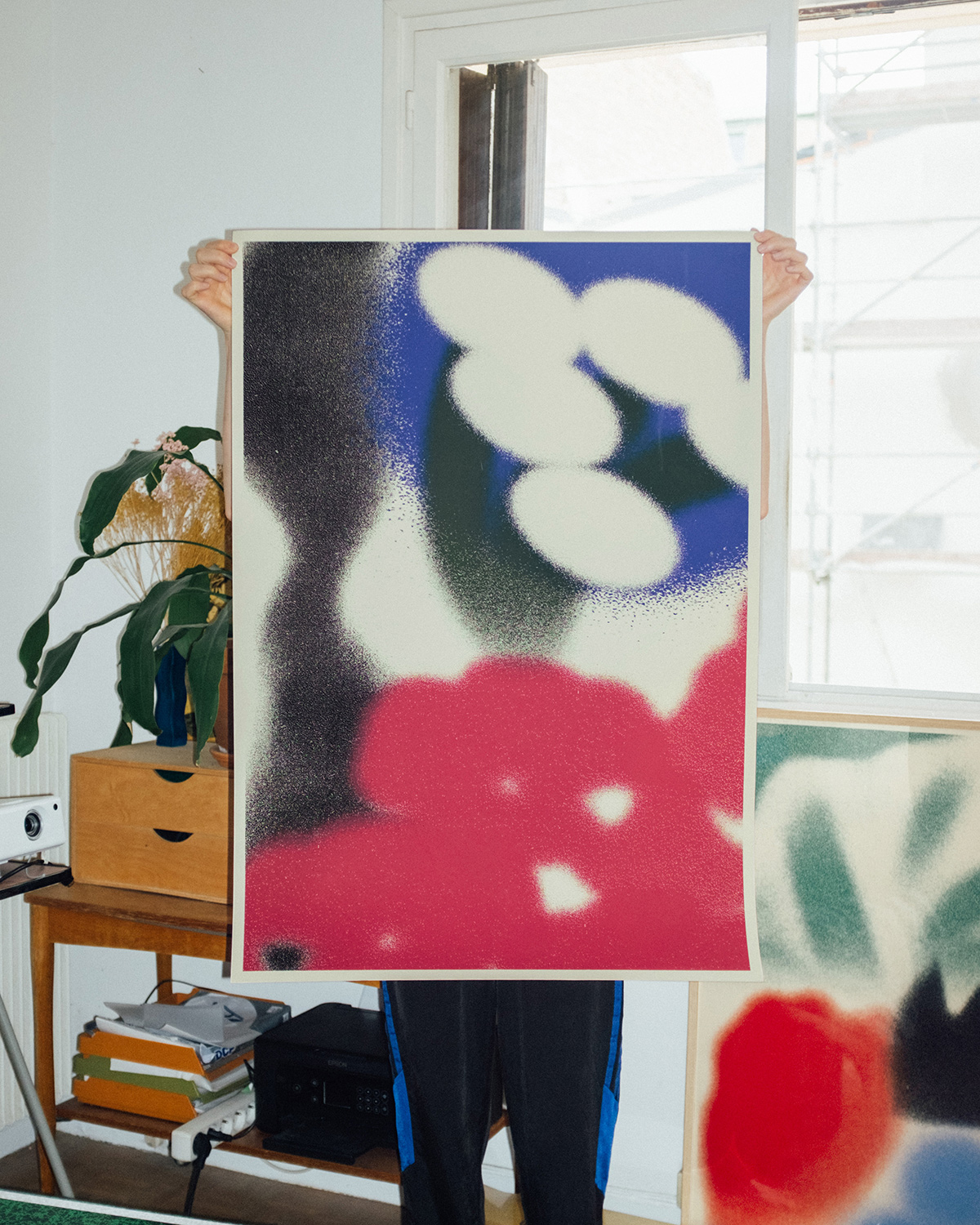
“fouuund.it” Daily Poetry Platform by Artist Emily Edwards


https://www.booooooom.com/2025/10/24/fouuund-it-daily-poetry-platform-by-artist-emily-edwards/


https://www.booooooom.com/2025/10/24/fouuund-it-daily-poetry-platform-by-artist-emily-edwards/
Announcing the Landscape Photography Conference 2025! Produced by KelbyOne Live, this online event takes place December 9–10, 2025. Join photographers from around the world for two immersive days designed to help you sharpen your eye, refine your composition, strengthen your portfolio, and push your creative vision. From capturing breathtaking scenes in the field to elevating your work with post-processing, this is your chance to learn from the best and transform the way you shoot.
We’ve gathered an extraordinary lineup of landscape photography experts—artists and educators who know what it takes to bring a scene to life. These are photographers who have braved the elements, chased the light, and crafted award-winning portfolios. Now they’re ready to share their stories, techniques, and field-tested tips with you.

Sessions cover every stage of the process, including:
Whether you’re aiming to refine your technical skills, streamline your editing, or find fresh creative inspiration, you’ll find sessions tailored to your journey.

This is your chance to join a live-online gathering of landscape lovers, photo storytellers, and people hungry to elevate their craft. Tickets are now available. Claim yours now to guarantee access, get in on all the inspiration, and start forming the vision that’ll define your next great images.
P.S. Why wait? Register now to save big with our Early Bird Special pricing. Get your 2-day conference pass for just $149 (regularly $299). This discounted price is only available until December 9, 2025, at 11:00 a.m. EDT. See you at the conference!

https://layersmagazine.com/your-journey-to-landscape-mastery-starts-here.html
Skylum is raising the bar again. The Fall 2025 upgrade to Luminar Neo isn’t just another update — it’s a reimagining of what photo editing can be in a connected, multi-device world. With a massive rollout of new tools, platform expansions, and an all-new ecosystem, Luminar Neo is now primed to be more than a photo editor. It’s becoming a complete creative environment.
Earlier this spring, Luminar Neo expanded beyond iOS with the release of Android and ChromeOS apps, completing its reach across all major platforms. Now, whether you’re editing on a tablet, Android phone, Chromebook, or desktop, you get the same powerful tools and unified experience.
No compromises. No stripped-down mobile versions. Just one seamless creative environment that travels with you.
This full-platform integration laid the groundwork for what Skylum is now rolling out: the Luminar Ecosystem, launching this fall.

Imagine starting a photo edit on your phone while commuting — cropping, adjusting lighting, maybe adding a mask — and then picking up right where you left off on your desktop at home. With real-time sync powered by Luminar Neo’s cloud-based infrastructure, that workflow is now seamless.
As you make edits on your mobile device, every change — sliders, masks, layers, even undos — is automatically saved to the cloud. When you open the same image on your desktop, it appears exactly as you left it, with all edits fully intact and ready to refine further.
There’s no need to export, upload, or transfer files manually. No version mismatches. Just a clean, uninterrupted editing experience across all your devices.
This isn’t just convenient — it’s a true workflow upgrade for creators who need flexibility without compromise, whether you’re working in the field, on the move, or back in the studio.
Luminar’s Web Galleries turn finished edits into beautiful, interactive web pages — instantly. No need for a website, coding knowledge, or design tools. Just select your images, pick a style, and publish.
This feature is aimed squarely at creators who want to share stories, not just pictures. Whether it’s a wedding, travel journal, or professional portfolio, Web Galleries help you tell a visual story with ease and elegance.
And for pros? It’s a fast, polished way to deliver work to clients.

Alongside the ecosystem launch, Luminar Neo is introducing three major editing features that make advanced photography more accessible and powerful than ever.
Have old family photos collecting dust? With a single click, the new Restoration tool revives faded prints, removes scratches, and brings back lost detail. Whether you’re preserving history or cleaning up an archive, this tool makes photo restoration effortless — and remarkably fast.


The AI Assistant is your built-in photo editing guide. It intelligently scans your image and suggests precise edits using tools like Develop Raw, Curves, and Color Harmony. It’s perfect for new users who want great results fast, and for seasoned editors looking to speed up their workflow without sacrificing control.

The new Volume tool adds a rich sense of depth by automatically enhancing light and shadow across the image. With one click, your photos get more drama, contrast, and atmosphere — no manual dodge and burn required.

To celebrate the upgrade, Skylum is offering special pricing for new and existing users:
New users can purchase:
Luminar Neo Cross-Device Perpetual License (Neo + Mobile) for $159
Luminar Neo Max Perpetual License (Neo + Mobile + Creative Library) for $179
Existing Skylum users can purchase :
Ecosystem Pass (including Generative Tools + New Tools + Mobile + Web Galleries + Cross-Device Editing) for $79
2025/26 Upgrade Pass (including Generative Tools + New Tools) for $59
The Fall 2025 Luminar Neo upgrade marks a turning point. It’s no longer just a powerful editor — it’s a creative ecosystem designed for modern workflows and modern lives.
Skylum is clearly betting on flexibility, intelligence, and storytelling as the future of photo editing. And with mobile apps, cloud-syncing, AI-powered tools, and web-ready galleries all in the same package, it’s hard to argue with that vision.
Whether you’re just starting out or have years behind the lens, Luminar Neo now meets you where you are — on your phone, your desktop, or somewhere in between — and takes your creativity further than ever.
https://layersmagazine.com/luminar-neo-fall-upgrade-2025-a-giant-leap-toward-cross-platform-creativity.html
The Guru Awards are Photoshop World’s ultimate bragging rights—and the deadline to enter is almost here. If you’re attending PSW 2025, this is your chance to put your best work on display and maybe even walk away with a super cool trophy (and eternal bragging rights).
Deadline: Friday, August 29
You can submit your work in these categories:

Winners and finalists are celebrated live during Photoshop World, streamed to the entire community of photographers, designers, and creatives tuning in online. It’s your chance to have your work seen and celebrated by the creative community worldwide.
Don’t let the deadline slip by. Hit submit, take your shot, and you could be one of this year’s Guru legends. Read all the details and rules here.

Photoshop World 2025 isn’t just about the Guru Awards—it’s about sharpening your skills, exploring new techniques, and connecting with the best creative community around. From Photoshop and Lightroom to photography and beyond, it’s three days packed with inspiration, hands-on learning, and game-changing ideas.
Get your Photoshop World 2025 ticket today
Join us for THE ULTIMATE PHOTOSHOP TRAINING EVENT and take your creativity further than ever before.

https://layersmagazine.com/will-you-be-one-of-our-2025-guru-winners.html
Ever felt like Lightroom’s editing power, while impressive, could use a little creative boost? What if you could access high-level AI editing tools without disrupting your established workflow? If you’re looking to level up your image edits without leaving your favorite environment, it might be time to explore the Luminar Neo plugin for Lightroom.

This article unpacks the seamless integration between Luminar Neo and Lightroom, dives into its most compelling AI tools, and gives you practical steps to bring it into your workflow. If you’re curious about unlocking next-level editing speed and creativity, you’re in the right place.

At its core, Luminar Neo is designed to enhance, not replace, your Lightroom experience. Once installed, it acts as a plugin, meaning you can send an image from Lightroom into Luminar Neo, apply edits, then roundtrip it right back. This process keeps your Lightroom catalog intact while opening doors to Luminar’s cutting-edge AI features and creative tools.
1. Seamless Round-Trip Editing
One of the most appreciated features is the ability to launch Luminar Neo directly from Lightroom and return edited images right back into your Lightroom catalog. This makes it easy to build Luminar into your regular workflow. You can start your basic edits and color correction in Lightroom, then pass the file to Luminar Neo for more complex or creative enhancements. Once done, Luminar sends a new version of your image back to Lightroom, preserving the original and giving you an easy way to manage variations. It’s a smooth, non-destructive workflow that saves you time and frustration.

2. Creative AI Tools at Your Fingertips
Luminar Neo excels in creative enhancement tools, especially those powered by AI. These tools allow you to apply cinematic effects, dynamic lighting, dramatic skies, or subtle portrait touch-ups, all with just a few clicks. What makes this especially useful in a Lightroom workflow is that you can skip the hassle of masking or complex brush work. If you’re a creative editor or someone who loves to push the visual storytelling of an image, Luminar Neo becomes an invaluable extension. It’s particularly helpful for photographers working under tight deadlines who still want to deliver high-quality, polished work.

3. Layer Support and Masking
Lightroom doesn’t offer traditional layers, which can be limiting for photographers who want to experiment with compositing or blending textures. Luminar Neo fills that gap with full support for layers, giving you the ability to stack images, add elements like fog or light leaks, or insert your own overlays. Each layer can have its own adjustments, blending modes, and masking, giving you Photoshop-style flexibility in a much simpler interface. For creative portraiture or fine art photographers, this opens up a new world of possibilities, no need to leave Lightroom and jump into another heavyweight application.

4. Speed and Simplicity
Many photographers are drawn to Luminar Neo because of how fast and easy it is to use. Despite the deep editing power under the hood, the user interface remains uncluttered and intuitive. The tools are grouped logically and labeled clearly, with real-time previews that let you see exactly what you’re doing. For busy professionals, this means getting more done in less time. For hobbyists and enthusiasts, it reduces the learning curve and encourages experimentation. When paired with Lightroom’s batch processing and catalog management, you get a complete system that’s both fast and flexible.

5. Smart Presets and Workflows
In addition to standard filters, Luminar Neo includes smart templates and AI-driven presets that adapt to your photo content. This feature can identify the subject, lighting, and type of scene, then recommend a starting look tailored to that image. Whether you’re editing a beach scene, a moody portrait, or a bustling street photo, Luminar gives you a creative head start. When used inside a Lightroom workflow, these presets help you maintain consistency across photo sets while still leaving room for creative tweaks. It’s a perfect companion for event photographers or travel shooters who want to build a signature style quickly.
When photographers think of the Luminar Lightroom plugin, what stands out most is Luminar’s AI-driven toolset. These tools are more than just trendy buzzwords, they’re practical, timesaving, and artistically empowering.
1. Sky AI
Sky AI automatically detects the sky in your image and allows you to replace it with one of your choosing. The plugin even adjusts lighting and reflections in the scene to match the new sky, creating believable results that would otherwise take hours to composite manually.

2. Portrait Bokeh AI
This tool uses depth mapping to simulate a shallow depth-of-field effect, perfect for portraits shot in distracting environments. You can blur the background and control the strength, edge transitions, and even the focus point with surgical precision.

3. Skin AI and Face AI
Ideal for photographers who specialize in headshots or lifestyle images, these tools smooth skin, reduce blemishes, and enhance eyes and lips without making subjects look plastic or over-edited. The adjustments are subtle and refined.

4. Relight AI
Perhaps one of the most game-changing features, Relight AI separates your image into foreground and background lighting zones. You can fix underexposed subjects or creatively relight scenes to match mood and atmosphere.

5. Structure AI and Enhance AI
Structure AI adds intelligent detail and contrast without introducing unwanted noise or artifacts. Enhance AI gives you a one-slider improvement tool that adjusts contrast, clarity, color, and detail in a balanced way.

These tools are especially helpful for wedding, travel, and portrait photographers who need fast, beautiful results without hours of retouching.
Try This:
Open a portrait photo in Luminar Neo from your Lightroom library. Use Portrait Bokeh AI and Face AI to quickly enhance the subject and soften the background. Compare it to what you could achieve with Lightroom alone. It’s a huge difference with minimal effort.
Getting started with the Luminar Neo plugin for Lightroom is surprisingly straightforward, even if you’re not a tech wizard. Here’s how to set it up and start editing.
Step 1: Install Luminar Neo
Download and install Luminar Neo from theofficial website. Make sure it’s the latest version to ensure plugin compatibility.
Step 2: Enable Plugin Support
Once Luminar Neo is installed, launch it as a standalone app first. Then go to “File” → “Install Plugins.” A dialog will pop up showing all available host applications. Click “Install” next to Adobe Lightroom.
Step 3: Launch Lightroom and Access Luminar
Open Lightroom Classic and right-click on an image. Go to “Edit In” and select Luminar Neo. Lightroom will send a TIFF (or another selected format) to Luminar Neo. Make your edits, hit “Apply,” and the finished image will appear back in your Lightroom catalog.
Step 4: Set Your Preferences
In Lightroom, you can choose how your edited files are saved (TIFF, PSD, JPEG) and whether you want them stacked with the original. Tweak these settings to match your workflow for better file management.
Step 5: Create Presets and Streamline Workflow
Once you find an edit style you love in Luminar Neo, save it as a preset. This allows batch processing of Lightroom images via Luminar’s plugin, especially helpful for event or wedding photographers dealing with large sets of similar photos.
Try This:
Once the plugin is installed, send a landscape photo from Lightroom into Luminar Neo. Use Sky AI to replace a dull sky with something dramatic. Let the AI match the lighting and tone automatically, then hit “Apply” to send it back. It’s a fast way to see the power of Luminar Neo in action.

For photographers who want the best of both worlds, Lightroom’s robust cataloging and basic adjustments combined with Luminar Neo’s intelligent editing, this plugin integration is a perfect match. Whether you’re enhancing portraits, retouching skies, or exploring creative compositions, Luminar Neo doesn’t disrupt your Lightroom flow. It elevates it.
If you haven’t already tried it, give the Luminar Neo Lightroom plugin a spin. You’ll be surprised at how much time it saves and how creatively satisfying it can be. Want to make your edits faster and more artistic at the same time? Now you can, without switching programs or learning a new system from scratch. And now you can save 10% using the discount code KELBY10.

About the Author: Vanelli
Vanelli is a passionate photographer, educator, and storyteller with years of experience behind the lens. He currently serves as the Director of Education for Skylum, where he helps photographers around the world improve their creative process through practical training and inspiration. Known for his energetic teaching style and deep love for visual creativity, Vanelli has spent much of his career helping photographers, from beginners to pros, build confidence and sharpen their skills. Whether he’s capturing dynamic portraits or leading workshops globally, he brings a unique blend of technical know-how and artistic intuition to every project. His approachable style makes complex concepts easy to grasp, and his mission is simple, to inspire others to create with purpose and passion.
https://layersmagazine.com/advantages-of-adding-luminar-neo-to-your-lightroom-setup.html

To that end, some features developed for the mobile version of Blender will cross-pollinate to desktop, like icon support for sidebar tabs and a helper overlay with curated shortcuts, among other things.
You can see some mockups over at the Blender blog. Development has begun in earnest on a new, separate branch for this tablet application. It will be developed first to target the iPad Pro and Apple Pencil, with other platforms and tablets to get tailored support later.
It sounds like the team already has some knowledgable designers and developers on this branch, but the blog post is also an invitation for new contributors. Specifically, it calls for “developers with extensive experience in this area” to contribute to building the application, touch events and gestures support, “File System / iCloud / AirDrop support,” and OpenSubdiv.
It sounds like things are already moving relatively quickly, as a tech demo is planned for SIGGRAPH 2025 in Vancouver next month.
https://arstechnica.com/gadgets/2025/07/popular-3d-application-blender-will-get-a-tablet-version/
Independent agency Rethink has launched a design practice, bringing together its services in brand strategy, visual identity, packaging, and design systems under a formal offering for clients. The practice will operate across its North American offices in New York, Vancouver, Toronto, and Montreal.
Larissa Marquez, former executive director of operations at Brooklyn design studio Gretel, has joined Rethink as managing director of the new design group. Based in New York, she reports to Sean McDonald, Rethink’s partner and global chief strategy officer.
“I saw an incredible opportunity,” Marquez said of the job. “Rethink has a strong legacy and reputation, and that was important for me as a next step in my career.”
While Rethink has done award-winning design work for clients such as Kraft Heinz, Molson Coors, and KitKat, design had never been packaged as part of its offering on par with its advertising services.
With this new practice, “design is no longer a subsidiary of advertising. It is a peer of advertising,” said McDonald.
She added that a design practice allows Rethink to benefit from “the client relationships of an advertising agency” while also “focusing on design and output.”
“We are highly conceptual and mix strong strategic thinking with strong visual storytelling,” she said. “That combination is very distinctive.”
Also joining Rethink Design’s leadership is executive creative director of design Rich Greco, previously a design leader at JKR and Droga5; partner and executive creative director Hans Thiessen, a longtime Rethink exec; and Rethink partner and group creative director Alex Bakker.
McDonald said the structure gives design leaders like Greco and Bakker a more defined leadership role on client accounts, with design treated as a standalone discipline rather than a support function.
Rethink Design’s teams include a mix of junior and senior talent across North America, and the agency is “very deliberately looking to hire talent at the junior end,” McDonald said. The agency is home to talent like Zoë Boudreau and Jesse Shaw, who recently won gold at the Cannes Young Lions Design competition.
The agency plans to “scale to the opportunities” it gets, but Marquez declined to comment on whether it’s hiring for the team.
For Rethink Design’s first year, McDonald said the focus will be on integrating with the broader Rethink team, creating quality work, and growing momentum with clients.
“If we continue to build out case studies and any number that represents the best work in the world, that will be great,” he said. “But the real opportunity is to learn and integrate all of Larissa’s experience with all of the experience that we have.”
Marquez added: “For us, the most important thing is to set the standard really high from the beginning.”
https://www.adweek.com/agencies/rethink-taps-gretel-vet-to-lead-new-design-practice/
If you’ve spent any time in the photography world over the past few years, you’ve probably heard the name Platypod tossed around in conversations about travel gear, tripod alternatives, or clever tools for tight spaces.
What started as a quirky, flat tripod base has evolved into something much bigger—a full ecosystem of smart tools that help photographers stay light, creative, and nimble in the field.

Several new products this year alone including Delta, Traveler, MagGrip and Tab—all to help get you started on your next photography journey.

Also, if you want to learn more about what we do and Photography in general, join over 7500 subscribers to our YouTube channel. Just search on YouTube for “platypod channel” (or click here) where we release a new video once a week to help you along with your imaging.


For more information on our products as well as helpful tutorials please visit us over at www.platypod.com

https://layersmagazine.com/now-theres-a-platypod-for-everyone.html

Procreate – Yes
Works beautifully and is exclusively for iPad. If you want to use Procreate on anything but an iPad, you’re s**t out of luck. If you’ve never used Procreate, try it out on a friend’s iPad first.
Adobe Photoshop – Kinda
However, there’s a tonne of features missing compared to the desktop version. It’s not a bad experience if you’re just drawing, but if you rely on actions or use a lot of filters, it’s undercooked.
Adobe Illustrator – Kinda
Like Photoshop, it’s not a full version. Vector brushes are clunky to import, and there are no brush management or organization capabilities. Scatter and pattern brushes aren’t supported.
Adobe Fresco – Yes, but…
Adobe’s Procreate competitor is a decent drawing app if custom brushes don’t matter to you. Most of our Photoshop brushes work in Fresco, but brush management is limited, and essential brush customizations such as texture scaling are not supported.
Affinity Photo / Affinity Designer – Yes
Affinity Photo and Designer both work identically to their desktop counterparts. The user interface is modified to suit the format and can take a little getting used to, but both apps run really well on iPad. No notes.
Clip Studio Paint – Yes
Again, an excellent iPad native companion to the desktop version. Works just like you’d expect, with all features accounted for and fewer interface tweaks than you might expect. Can be a little “crashy” but otherwise a great app on iPad.
Other apps
Of course, there are a ton of other drawing apps for iPad, but since we don’t make tools for them, and you’re probably a TGTS user, we’ll skip over them.
https://www.booooooom.com/2025/07/08/best-drawing-tablets-guide/
La Petite Maison Announces Major Global Expansion with New Locations in Kuwait, Marbella, and the Maldives
Award-winning French-Mediterranean restaurant brand La Petite Maison (LPM) has announced a bold new phase of global growth, unveiling three high-profile openings across key luxury destinations. The new venues will debut in Kuwait (November 2025), Marbella (early 2026), and the Maldives (2027)—each chosen for their coastal allure and international lifestyle appeal.

The Kuwait launch marks LPM’s continued expansion across the Middle East, following a successful presence in Dubai, Abu Dhabi, Riyadh, and Doha. Located on Kuwait’s iconic Arabian Gulf Street, the upcoming venue offers sweeping beachfront views near the famous Kuwait Towers. Developed in collaboration with Al Dhow Hospitality and Touristic Enterprises Company (TEC), the space will include an open-air terrace, a private dining room, and a vibrant bar with reimagined signature mocktails.

Designed by Sagrada, the acclaimed studio behind LPM’s Dubai and London interiors, the restaurant will channel Belle Époque charm with a contemporary Riviera twist. “Fourteen years after our Middle East debut in Dubai, expanding to Kuwait is a natural and exciting next step,” said Nicolas Budzynski, CEO of LPM.

Simultaneously, the Marbella opening will be LPM’s first Spanish outpost, strategically situated between Puerto Banús and the Pirulí within the Boho Club. The 800-square-meter flagship will feature both indoor and outdoor dining areas styled like a classic Riviera villa. With seating for up to 160 guests, the space will highlight LPM’s renowned dishes, fine wines, and expertly crafted cocktails. A preview pop-up event is scheduled for late 2025.

“Marbella’s cosmopolitan energy and year-round lifestyle make it ideal for our continued European growth,” said Budzynski.
Looking ahead to 2027, LPM will open within the exclusive Rosewood Resort Ranfaru in the Maldives, featuring a serene 33-cover indoor dining room and a 38-cover outdoor lounge. With privacy, sustainability, and curated luxury at its core, the setting will integrate LPM’s signature French Riviera flair with Rosewood’s A Sense of Place® philosophy.

These announcements follow a stellar year for LPM, which was named Restaurant of the Decade in Dubai (2024), earned spots in the MENA’s 50 Best Restaurants for both its Dubai and Abu Dhabi branches, and made its debut on the World’s 50 Best Bars list at #76.
With each new location, LPM continues to set the global benchmark for French-Mediterranean cuisine and timeless hospitality, expanding its elegant, convivial dining experience to the world’s most sought-after destinations.

https://www.positive-magazine.com/la-petite-maison-expands-globally/?utm_source=rss&utm_medium=rss&utm_campaign=la-petite-maison-expands-globally