Discover Common Photo Editing Mistakes and How to Avoid Them
In the age of digital photography, editing your photos is an integral part of the creative process. However, it’s important to exercise caution and avoid common mistakes that can detract from the natural beauty of your photos. In this blog post, we explore eight prevalent photo editing mistakes and offer some practical tips on how to avoid them. In the following video we use ON1 Photo RAW, powerful photo editing software that’s like having Lightroom and Photoshop in one application.

[embedded content]

Overdoing Filters and Effects

Using filters and effects can be tempting, but exercise moderation. Instead of muddying up your photo, opt for a balanced approach. Consider using milder filters or adjusting the opacity slider. To maintain the photo’s integrity, selectively apply the entire Effects tab rather than just one filter.

Ignoring White Balance – Too Cool or Too Warm

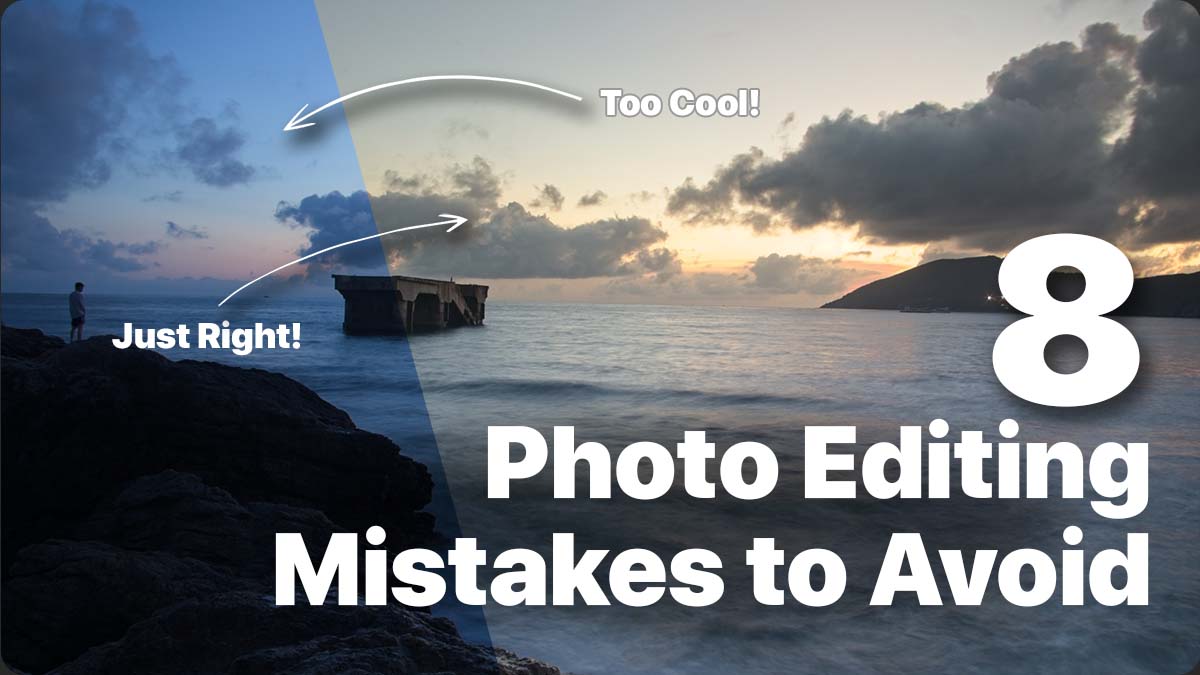
White balance significantly impacts the overall look and feel of your photos. Avoid the mistake of leaving your images too cool or too warm. Correct white balance using tools like the white balance dropper or temperature slider. Experiment by pushing the slider to the extreme and then easing it back into a natural temperature.

Oversaturating Colors and Vibrance

Vibrant colors can be visually appealing, but it’s important to maintain a natural and clean look. Avoid the common mistake of oversaturating colors, as it can lead to distracting and unrealistic results. Desaturate the image completely and gradually reintroduce color. Using a reference image and matching color saturation can also help achieve realistic colors.

Excessive Detail and Sharpening

Excessive detail and sharpening can give your photo a “crunched” or overprocessed appearance. Understand the best practices for adding detail and texture to your photos. Remember that the structure slider modifies the entire photo when applying adjustments globally. Consider using selective techniques like masks or local adjustments to maintain a natural appearance.

Disregarding Noise – Use NoNoise AI

Noise can diminish the quality of your images and remove essential details. Address noise-related issues using tools like NoNoise AI, which effectively reduces noise while preserving image details. By eliminating noise, you can create visually appealing and professional-looking photographs.

Bad Exposure Adjustments

Overdoing exposure adjustments during editing can negatively impact your photos. Use clipping warnings to ensure you retain details in the highlights and shadows. Utilize local adjustments to selectively apply exposure changes where needed. Techniques like dodging and burning in Local Adjustments can help you control exposure more precisely without making global adjustments.

Not Cropping and Leveling

Cropping your photos can eliminate distractions and create a stronger composition. Ensure your images appear natural by leveling them to straighten the horizon. Use overlays and the level tool to align the grid with the horizon effectively. Mastering the art of cropping and leveling can enhance the overall impact of your images.

Not Feathering Masks

Feathering is essential for blending adjustments and filters naturally into your images. Avoid leaving harsh edges in your masks, as they can make your edits look unnatural. Adjust the brush’s softness or feather your luminosity or color range masks to create a smooth transition between masked and unmasked areas. Remember to feather masks appropriately and decide when a hard edge is necessary.

Conclusion

By avoiding these common photo editing mistakes, you will quickly see the quality and impact it will have on your images. Remember to exercise moderation with filters and effects, correct white balance, maintain natural colors, apply detail and sharpening judiciously, address noise, adjust exposure carefully, crop and level strategically, and feather masks for seamless blending. With these tips in mind, you’ll be on your way to creating stunning and visually pleasing photographs. Happy editing!

https://layersmagazine.com/discover-common-photo-editing-mistakes-and-how-to-avoid-them.html
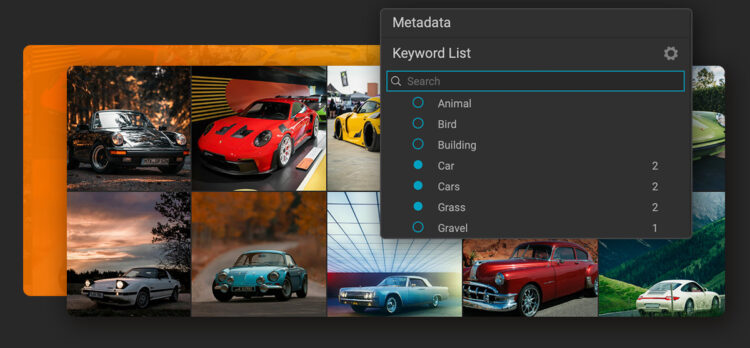


Effortlessly Discover All Your Photos with ON1 Photo Keyword AI

ON1 has introduced an exciting new AI photo organizer, ON1 Photo Keyword AI 2023. This application harnesses the power of machine learning to make your photos easily discoverable and organized. As a leading provider of innovative photo editing software apps, ON1 focuses on photographers, and they understand the challenges we all face when organizing our extensive photo collections. With ON1 Photo Keyword AI, it’s a highly simple-to-use solution that leverages AI technology to streamline these time-consuming tasks, like searching and tagging photos, allowing photographers to focus on their favorite images.

[embedded content]

Key Features in Photo Keyword AI

  • Automatic Keyword Generation and AI-Powered Organization
  • Lightning-Fast Browser and Comprehensive Metadata Support
  • Versatile File Format Support and Advanced Search Functionality
  • Effortless Duplicate Detection and Batch Processing
  • Unique Features and Other Integrations

Automatic Keyword Generation and AI-Powered Organization

The key feature of ON1 Photo Keyword AI is its automatic keyword generation capability, eliminating the need for manually tagging photos. This app employs advanced machine learning algorithms to achieve results. The application scans each image and will recognize over 800 objects and photo elements. It will also add related keywords automatically, ensuring accurate search results. Most importantly, ON1 Photo Keyword AI works locally on your computer, so security and privacy are not of concern since none of your photos need to go up to the cloud.

Beyond tagging photos with keywords, ON1 Photo Keyword AI offers a range of additional features. It can detect faces, estimate age and gender, determine location using GPS metadata, and classify photos based on various photographic traits such as key, contrast, vividness, focal length, and predominant color. This will enable anyone to quickly locate specific images within their extensive collections, saving them valuable time and effort.

Lightning-Fast Browser and Comprehensive Metadata Support

ON1 Photo Keyword AI is built around a lightning-fast photo browser that allows users to view, organize, and cull their photos quickly. The software provides complete metadata support, including nested keywords, descriptions, EXIF, IPTC, and XMP, which ensures all relevant information is captured and easily accessible within the application. Importing photos from memory cards, cameras, or phones is a breeze with the built-in import dialog, which allows users to select images, specify destinations, rename files, and add metadata simultaneously. 

Versatile File Format Support & Advanced Search Functionality

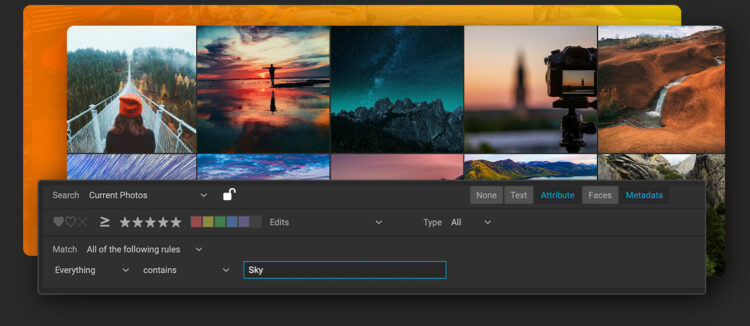
ON1 Photo Keyword AI supports many file formats, including support for raw photos from over 800 cameras and PSD, TIF, JPG, PNG, HEVC, and most video files. Its versatile search functionality allows users to search any metadata field by typing a word or phrase. Additionally, users can search by star and color ratings, number of faces, age and gender, file type, camera settings, size, and more. These advanced search capabilities enable simultaneous searches across multiple fields, with the ability to save searches for future use as well.

Effortless Duplicate Detection and Batch Processing

Finding duplicates and similar photos is also simple to do with ON1 Photo Keyword AI. The software’s batch-processing feature allows users to export copies of their photos in different formats, customize file naming, control metadata, and even add watermarks. For photographers looking to showcase their best work, ON1 Photo Keyword AI includes a fully color-managed workflow for printing photos, with soft proofing previews, print packages, and contact sheets.

Unique Features and Integration

ON1 Photo Keyword AI sets itself apart from the competition using a browse-first approach that allows photographers to organize their photos according to their preferences without extensive cataloging or cloud uploading. The built-in import dialog simplifies downloading photos from various devices, while the automatic XMP embedding ensures that all automatic keywords and metadata remain viewable and searchable in other applications like Adobe Lightroom Classic or Capture One.

Start Editing Like a Pro with ON1

ON1 strives to provide holistic solutions to photo editing. ON1 photo editing software apps for helping both professionals and beginner photographers achieve the best-finished images. This software offers photographers a simple approach to editing photos and saves time to get you back in the field, behind your camera. Start editing your photos like a professional with ON1 today!

Learn More About ON1 Photo Editing Software

https://layersmagazine.com/effortlessly-discover-all-your-photos-with-on1-photo-keyword-ai.html


Mastering ON1 Photo RAW 2023: A Comprehensive Guide for All Skill Levels

Whether you’re a beginner, have never heard of ON1 Photo RAW, or want to enhance your editing skills, this ultimate guide is perfect for you. Learn how to navigate and utilize the powerful features of ON1 Photo RAW 2023, the leading raw photo editor, to create stunning images.

Introduction

Are you ready to unlock the full potential of your photos using ON1 Photo RAW 2023? Check out this video from the ON1 VP of Product, Dan Harlacher. Whether you’re a beginner in photo editing or an experienced photographer seeking to elevate your photo editing software skills, this video guide will meet your needs. This video will give you an excellent resource to explore the features and editing techniques in ON1 Photo RAW 2023, a powerful raw photo editor that can transform your images. 

[embedded content]

Getting Started with ON1 Photo RAW 2023

For anyone new to ON1 Photo RAW or unfamiliar with raw photo editing, fear not. We’ll begin by introducing the basics, guiding you through the process of importing and organizing your photos within the software. You’ll quickly learn how to efficiently manage your image library and easily locate your files for editing. ON1 Photo RAW uses a browser-based approach making it super simple to get up and running quickly.

Exploring Editing and Retouching Techniques

Once your photos are organized, it’s time to dive into the editing world. You’ll discover the tools and adjustment options available in ON1 Photo RAW 2023. From basic adjustments like exposure and color correction to more advanced techniques such as selective editing and retouching, this guide equips you with the knowledge to enhance your images with precision and creativity.

Unleashing the Power of ON1 Photo RAW 2023

For those looking to take their photo editing skills to the next level, Dan explores some of the more advanced features of ON1 Photo RAW 2023, such as layer-based editing, creating complex composites, and quickly adding stunning effects. You will get an excellent review of the versatile masking tools that allow you to apply adjustments and seamlessly blend multiple photos selectively.

Exporting Your Final Masterpieces

Once you’ve perfected your edits, it’s time to share your work with the world. Discover the various export options within ON1 Photo RAW 2023, including formats, sizes, and metadata settings. Learn how to showcase your images in the best possible way, whether it’s for web sharing, printing, or professional use.

Conclusion

ON1 Photo RAW 2023 is an incredible raw photo editor that can transform your photography. Whether you’re just starting, have never heard of ON1 Photo RAW, or are an experienced photographer seeking to enhance your skills, this comprehensive guide has something for everyone. We hope you take advantage of the software’s powerful features and learn editing techniques that will elevate your images to new heights. Unlock your creativity and master the art of raw photo editing with ON1 Photo RAW 2023.

https://layersmagazine.com/mastering-on1-photo-raw-2023-a-comprehensive-guide-for-all-skill-levels.html


How to Become a Shoe Designer 

Are you creative with a good eye for fashion ensembles? Can you determine what type of footwear best matches any outfit? Then you should consider a career as a shoe designer. Below we tell you how to enter this exciting field. 

Studies for Shoe Designers

There are different entry points to becoming a shoe designer. Firstly, you can start with an entry-level job and work your way up the levels as you acquire experience. Secondly, you can become an apprentice if you can find a shoe designer willing to mentor you. Thirdly, you can obtain a university qualification.

If you choose university, you can study footwear exclusively, or you can take it as part of a more comprehensive fashion postgraduate degree. You will need to learn the technical aspects of shoe design as well as the art of creating fashionable footwear. This link can help you get started.

To enter a postgraduate course, you will need an applicable degree in a suitable subject. However, you may want to start with an art/design diploma before progressing to a degree. 

Salaries for Shoe Designers

You can earn a good income as a shoe designer. The salary range varies between £20,000 and £40,000, based on your level of experience. As an entry-level employee, you will start out at the lower end of this range and work your way to the top in 40-hour weeks. 

Of course, if you are a shoe design prodigy, you will be rising beyond this and designing top-notch, fashionable footwear that are displayed on the runway. Then your earnings will be astronomical. Take Rick Owens, whose net worth in 2023 is six million dollars! See the Rick Owen Converse sneaker available online through SSENSE to get an idea of what top designers create.

Essential Skills for Shoe Designers

Nowadays, design makes great use of technology, so you need to be PC literate and able to adapt to relevant software. You will require knowledge on how shoes are manufactured, and the processes involved. Another requirement is your approach to detail, which must be finely tuned. You need to be creative and able to invent designs or alter the way existing ones look. This requires using your initiative, being flexible, and an ability to cope with change and constructive criticism. Ambition is necessary as the field can be very competitive. You must be self-driven and willing to work long hours, stay up to date with trends, and attend functions and events to showcase shoe designs.

Performing Daily Tasks

CAD software (computer-aided design) is used for shoe design. However, you will also need to be able to draw clear sketches of your ideas before getting into the actual dimensions and details. Research is an important skill. You need to read up on different materials and how they function in order to design comfortable footwear. It is also vital to stay abreast of trends in the industry. You will be adapting designs that have already been created or coming up with brand new designs. 

When prototypes or product samples are made, you will supervise the process, and make changes as it progresses. The final quality needs to be checked. Marketing skills are necessary as you will have to meet with design teams and pitch your ideas. There are always cost factors to consider, and you may have to work within a budgetary limitation. Time to produce items must also be factored in.

The sky is the limit for talented shoe designers. 


Follow @positive_mag on twitter for the last updates https://www.positive-magazine.com/how-to-become-a-shoe-designer/?utm_source=rss&utm_medium=rss&utm_campaign=how-to-become-a-shoe-designer


Get a Powerful Start with the Ultimate Photography Bundle

This opportunity shouldn’t be overlooked! Whether you are a new photographer or have been involved in photography for years, this bundle provides something for everyone at every level. Upgrade your skillset from experienced photographers and master editing techniques using $1000+ worth of materials: renowned courses, software assets, and creative content to achieve stunning results.

Ultimate Photography Bundle for New Users (includes Luminar Neo lifetime license)

Ultimate Photography Bundle for those who already own Luminar Neo

Educational courses

Broaden your photography editing expertise with high caliber courses from renowned photographers. With this selection, you can be sure to find the right combination of landscape, portrait and drone lessons for amateurs or professionals alike. 

  • Full Editing Course on landscape photography from Albert Dros
    Professional photographer Albert Dros — whose work has graced some of the world’s biggest brands — reveals his editing secrets and teaches you how best to capture that perfect outdoor moment, whether on location or in post-production. Delve into exposure blending, focus stacking, noise reduction and much more – equipping yourself with all the tools necessary for beautiful landscapes every time.
  • Portrait Fundamentals from Darlene Hildebrandt
    From camera basics right through to using multiple flash rigs on location, this comprehensive guide will teach the fundamentals of radiant light capturing so that each shot can be as flattering as possible with stunning results! Perfect for experienced photographers or complete beginners – hone in those vital techniques and become an expert at lighting portraits.
  • Drone Cinematography Crash Course from Stewart and Alina Carrol
    Learn the ins and outs of drone cinematography – look no further than Stewart & Alina Carroll, a husband-wife filmmaking team since 2012. Take their intensive 100-minute crash course filmed in Scotland’s breathtaking Highlands. In this class you’ll gain insights on how to fly like a pro with any drone, adjust settings for stunning footage, use 5 steps for cinematic results every time plus tips and tricks specifically designed to help develop creative approaches – all presented during 3 live flight adventures.

Creative content

Try a professional style on your photos with collections of creative content from real pros.

  • With selection of LUTs and Skies by Mathew Browne, you can enhance your photos to tell more powerful stories. Each item is optimized for Luminar, Photoshop, or Lightroom so that achieving picture-perfect shots becomes even more convenient. Leverage 24 nature inspired LUTs plus 8k footages perfect as background skies – now’s the time to make an impression with every snap.
  • Looking for an exquisite touch to add vibrancy and beauty to your photographs? Rene Ledrado’s captivating collections might help you – 25 Northern European skies in 8K resolution, plus 12 Classic B&W presets with timeless elegance! Transform any image into a memorable masterpiece.

Furthermore build up an impressive arsenal of tools such as 125 LUTs, Skies Presets and Overlays from Luminar team members. You can experiment with them within Luminar, in Photoshop or Lightroom). Learn how to apply assets and more from “Image Editing with Luminar Neo: A Complete Guide”: well-structured content, easy-to-follow instructions, and step-by-step workshops, practical and inspiring. The eBook is designed for both macOS and Windows users and comes with a folder containing 62 image files for practice.

The Ultimate Photography Bundle is truly a one of a kind package, available to photographers of all levels. With access to courses taught by world-renowned photographers, an array of creative content from real pros, and an assortment of tools from the Luminar team, you can be sure to expand your knowledge base and perfect your craft quickly and easily. 

Don’t miss out on the chance to unlock the offer – take control of your photos today. Discover the Ultimate Photography Bundle and upgrade your skills.

Ultimate Photography Bundle for New Users (includes Luminar Neo lifetime license)

Ultimate Photography Bundle for those who already own Luminar Neo

https://layersmagazine.com/get-a-powerful-start-with-the-ultimate-photography-bundle.html


5 Weight Loss Secrets From Around The World

Weight loss is a universal health and cultural pursuit. Whether you’re working towards a beach-ready body for the summer or seeking healthier lifestyle changes, weight loss remains a hot topic, no matter where you’re from in the world.

In fact, the global weight loss market is expected to surpass €381 billion (£335.3 billion) by 2030. Reasons for weight loss will vary depending on whom you ask, but the differences can be even more interesting when considering different cultures and traditions. People from different countries and cultures pursue weight loss in different ways. As you’ll see later on, weight loss can be about how you eat as much as what you eat. Either way, there’s bound to be something useful for your weight loss journey in these cultural differences. Below, we’ll explore five weight loss secrets from around the world:

Italy – Eat heart-healthy foods

To celebrate Italy’s rich culture, we’ll start with a diet you likely have already heard of: The Mediterranean Diet—a nutritional plan so effective that it’s on UNESCO’s Intangible Cultural Heritage List, the third cultural treasure from Italy to make it in the rankings. Foods like fruits, whole grains, and fresh fish are essential components of this famous diet, which is known to improve heart health, reduce cancer risk, and promote sustainable weight loss. In fact, modern weight loss programs classify over 200 of these foods—including non-starchy vegetables, fruit, eggs, yoghurt, fish, shellfish, and chicken—as nutritional powerhouses to support your overall health and encourage better eating. While eating heart-healthy foods like the Mediterranean Diet is a great start, it’s essential to work on curbing poor eating habits as well, such as stress-eating or late-night snacking, to have a better relationship with food for your heart.

South Africa – Try rooibos tea

Rooibos tea has been consumed in South Africa for centuries, made using leaves from a shrub called Aspalathus linearis, usually grown on the western coast of South Africa. Unlike the usual green or black tea, rooibos is considered a herbal tea. Modern variations of rooibos tea include rooibos iced tea, espressos, lattes, and cappuccinos. Rooibos tea has been found to be beneficial for weight loss as it increases fat metabolism while reducing stress hormones that may trigger hunger and fat storage in the body. Rooibos tea is also associated with decreased “bad” cholesterol in overweight adults.

Eat spicy foods

Some people may not enjoy spicy foods out of preference, but that doesn’t stop spicy foods from having its share of health benefits. In countries such as Mexico, Thailand, Korea, and India, peppers of different shapes, colours, and levels of spiciness are commonly used in meals. Capsaicin, the active ingredient found in peppers, can be used for analgesia — pain reduction — and may even slow cancer cell growth. In particular, capsaicin is especially useful for weight loss as it produces heat in the body, helping you burn fat and convert fat into heat more efficiently.

Germany – Don’t skip breakfast

Did you know? 75% of Germans eat breakfast daily. To put that into context, only 44% of Americans do so. Studies have long associated skipping breakfast with unintentional weight loss, as it may make your brain and body crave high-calorie food later in the day. Having breakfast before you officially start your day will give your body enough energy before the next mealtime instead of making you hungry sooner. Adjusting your breakfast menu to include healthier options, such as fruit, whole grain cereals, and whole grain bread, is also important so your body can get enough essential nutrients to fuel you for the day.

Netherlands – Ride a bike

Weight loss isn’t just about the food and nutrition—even if they play a considerable part in the process. Lifestyle adjustments such as routine physical exercise and better sleep quality can contribute to healthy and successful weight loss. In the Netherlands, bicycles rule the roads and have become synonymous with Dutch culture since the 70s. Part road safety and part daily workout, the Dutch use the bike as a means of transportation, exercise, and entertainment. An open secret for weight loss, riding a bike is an effective way of utilising the calories you ingested from breakfast, burning belly fat and up to 2,500 calories if done daily for a week.

If you are looking for different views from around the world, do visit the rest of our site.

Follow @positive_mag on twitter for the last updates https://www.positive-magazine.com/5-weight-loss-secrets-from-around-the-world/?utm_source=rss&utm_medium=rss&utm_campaign=5-weight-loss-secrets-from-around-the-world


The Best Photo Effects Software Plugin for Photoshop

It is no secret that Photoshop is an incredibly powerful image editing tool for all kinds of photographers. However, if you aren’t an expert Photoshop user, you may find the program difficult to use and lacking in easy-to-apply effects to make your photos look better in just a few simple clicks. 

If you’ve browsed the internet lately, you’ve probably seen various Photoshop plugins meant to be launched directly from Photoshop to achieve specific effects on your images. Different plugins exist for different things, from editing your portraits, fixing noise, or even using AI technology to replace your skies. Knowing which Photoshop plugins will offer you the best value to improve your photo editing workflow is hard. 

One of the best photo effects plugins for Photoshop on the market today is ON1 Effects. This photo effects software is simply the best when it comes to ease of use, and ON1 Effects combines a simple yet effective interface with powerful effects to help shape your photo edit and make every shot portfolio worthy. Here are some of the best features of ON1 Effects:

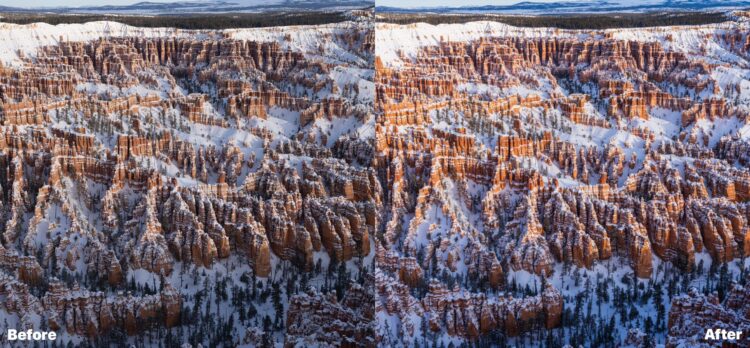
Before and after using ON1 Effects to enhance this photo.

31+ Photo Effects

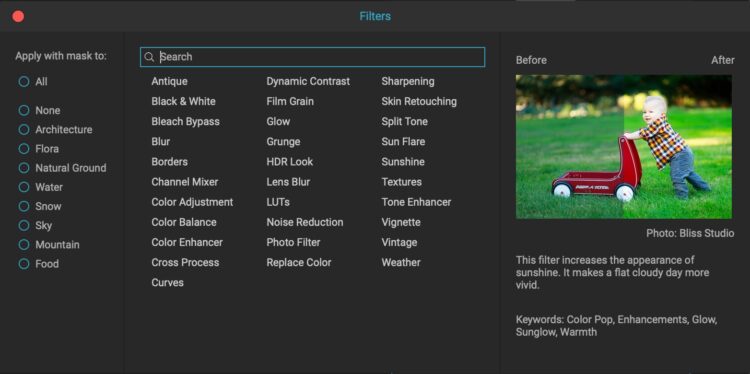
ON1 Effects is loaded with photo effects of all kinds. Whether you want to add a vintage film look to your photos or make a simple color adjustment, ON1 has an effect for that. Even for new users, finding the effect you are looking for with the search bar is very easy. Best of all (for new users), hovering over the effect with your mouse will give you a short paragraph telling you what the effect does, as well as an example image showing you what you can do with the effect.

More than 30 photo effects are included. The search bar makes it easy to find the effect you are looking for.

Achieve Photo Effects That Aren’t Available in Photoshop

Photoshop is certainly lacking in photo editing effects, especially ones that are easy to apply. Applying a simple glow to your photos takes numerous layers and a knowledge of blend modes. In ON1 Effects, you have many options to apply different effects with one simple click. Once the photo effect is applied, you can easily adjust the sliders to fine-tune the results to your image. 

Best of all, ON1 Effects is far easier to use than Photoshop. Even if you can create a unique effect in Photoshop, it is usually far easier to apply in ON1 Effects. Since each effect is named in a way that makes sense, you don’t have to spend your time on YouTube trying to figure out how to make a special filter to create your desired effect in Photoshop.

Mask Your Photo Effect

Once you’ve selected and applied a photo effect, it can be easily masked in ON1 Effects. While Photoshop offers tools for masking, they aren’t easy to use or understand without advanced knowledge. In ON1, it is as simple as clicking the mask button and then selecting a brush to paint on the mask with or using “Lumen” to make luminosity masks. Using luminosity masks has never been easier, and they’ll allow you the most precise mask on your photo based on the lightness values of each part of the image.

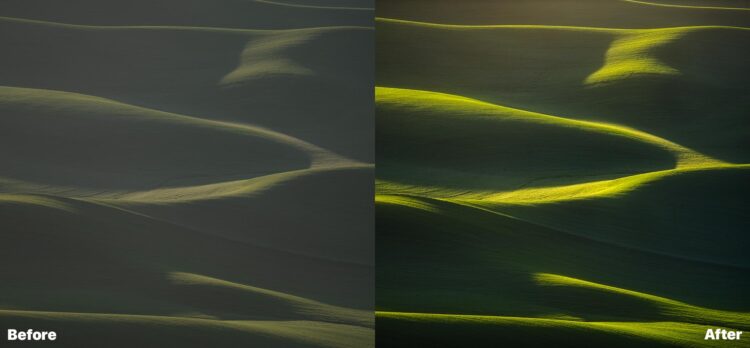
Before and after using ON1 Effects. Just 6 total effects were used to make this image.

Complete Built-In Library of Effects, Presets, and Instant Previews

If you want a quick and easy edit, ON1 Effects has tons of preset effects you can choose from for nearly any kind of photography. Some of the presets are even AI-based, where the software will automatically apply effects and use masking to make your photo look amazing — in just one click.

If you’re batch editing multiple photos and want to apply the same effects repeatedly, creating a preset to reuse numerous times is easy. Lastly, you can favorite specific presets to find them easier each time you launch the program.

Advanced Features

ON1 Effects isn’t just for the amateur photographer. This photo effects software contains many advanced features that pros and amateurs alike will love to use. In addition to the easy luminosity masking mentioned above, ON1 Effects includes blend modes, color range masking, and various selection tools to ensure that the desired effect is only applied where you want it. While these advanced features are all offered in Photoshop, using them in ON1 Effects is far easier and faster.

Use with Photoshop Smart Objects for Non-Destructive Edits

If you make your photo layer a smart object in Photoshop, you can launch ON1 Effects as a smart filter. Essentially, this means that you can make non-destructive edits to your photos. At any point in time during your edit, click on the smart filter to re-launch ON1 Effects to make adjustments to your photo effects.

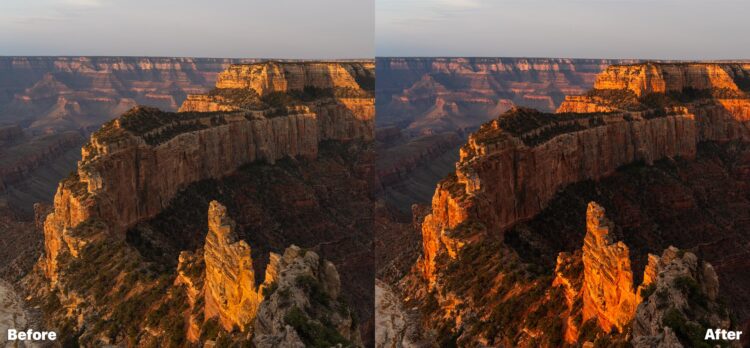
Using the “Desert Glow” Preset to enhance this photo in just a few clicks.

Regardless of your skill level or experience in photo retouching software, ON1 Effects is a photo effects plugin you absolutely must add to your digital workspace. If you’re a novice or intermediate photo editor, you’ll love having ON1 Effects to apply beautiful filters to your photo and then continue editing in Photoshop. Since the plugin is so easy to use, it takes little to no time to learn how to apply some of the many great effects to your photos. For professional photographers, this is just one more tool to add to your kit that can easily be launched anytime during your edit. ON1 Effects is just one more thing you can add to your workflow, and best of all, you can use it to apply non-destructive effects to your photos. No matter your skill level, ON1 Effects truly is a photo effects software that every Photoshop user should own.

https://layersmagazine.com/the-best-photo-effects-software-plugin-for-photoshop.html


Hook Up on Tinder

Since dating can be stressful, there is the possibility of humor to try to reduce tensions. In a new study published in the Proceedings of the National Academy of Sciences, Rosenfeld found that heterosexual couples are more likely to meet a romantic partner online than through personal contacts and connections. Since 1940, traditional ways of meeting partners – through family, in church and in the neighborhood – have all been in decline, Rosenfeld said. The company has said that this app is single, progressive and specially designed for the Gen Z market.

So it’s taken that pressure off, this has to be a friendship interaction, and this has to be a romantic interaction. The platforms highlighted below are legal, so you don’t have to worry about getting scammed. OurTime.com is a dating site that caters to singles 50 years and older. Registration is free, and you can view profiles of singles in your area. The app is easy to use, and you can connect with local singles that interest you. Starting a conversation here is very easy because your potential matches are meant to comment on a specific piece of information on your profile.

They are oriented on varied countries and on the varied nationalities. There hookupguru the sites with the diverse prices and the diverse functionalities. You will need a premium membership to use the site’s full potential. For example, messaging people as a free member lets you only use the message feature to send site-generated icebreakers, while Standard members can only send winks and add folks to their favorites.

  • Meetup.com is another popular platform, however it’s not built around dating.
  • Research from Berkeley University in California suggests there is a dropoff in interest after online daters meet face-to-face.
  • This may have something to do with most of its features being free.
  • Three-in-ten U.S. adults say they have ever used a dating site or app, according to a Pew Research Center survey conducted July 5-17, 2022.
  • A line of research initiated in recent years links dark personality traits to the reasons for using Tinder.

So until then, I’m delighted and would like to say thank you towards the present software for providing usa together. I got most positive and negative experiences previously, and many consumers actually shattered the emotions.

How to use dating apps like a pro

The date can be online or physical, with the latter costing the paying party any expenses incurred during the meet-up. If the date is to take place in a venue that requires an entry fee, your partner should pay for that too. As to how much you get to take home, the going rate averages $80 to $100 per date. Also, as an attractive member, you have an option to negotiate the bid if you feel the amount is too. After submitting your request, you’ll receive a confirmation email giving you access to the site. This is an adult dating website where bids are placed to win a date.

The Dangers of Dating App Meet-Ups

Reverting to characteristics of traditional sexual scripts, women may find themselves further entrenched in unwanted gender roles. Feminist Gail Dines has opined that pornography is “a cultural force that is shaping the sexual attitudes of an entire generation” and a “major form of sex ed today for boys.”

Most importantly, you get to set the budget for the entire date. What this means is that you get to keep the full-price amount. Finally, you don’t have to disclose your personal identity if you are not comfortable with a bidder. For the chance to get paid to date a millionaire or just the average Joe, you pay a subscription fee of $59.99 for 30 days.

Basically, you’re given a random profile with the option to either “like” them or “X” cross them out – sort of like Tinder’s swipe feature. Most of the members on SearchingforSingles are from the US, but you can still find users worldwide! Plus, there are also more women than men on this hookup site, if that’s what you’re after. Tinder has been called the harbinger of the hookup-fueled “dating apocalypse.” But the truth of the matter is, hooking up isn’t anything new . And as for Tinder, sure, it can be used for swiftly finding a one-night stand, but there are plenty of other apps that are better suited for that task. You don’t have to travel thousands of miles away to meet your date when you find the perfect match – as Tinder lets you only access singles near your location.

https://layersmagazine.com/hook-up-on-tinder.html


Emigrussian, a story about emigrants.

Many of those who left Russia after the outbreak of war in Ukraine find it difficult to choose a definition, to pick the word that best describes their identity. Some have no trouble defining themselves, but even among them there is no single term, even if the reasons for emigration are the same.

“Refugees” are now refugees from Ukraine, and even those who were threatened by direct violence from other people or the state in Russia do not call themselves that, so as not to compare military threat and political repression. Under article 1, paragraph A, subparagraph 2, of the 1951 Convention, a refugee is any person who “owing to well-founded fear of persecution for reasons of race, religion, nationality, membership of a particular social group or political opinion, is outside the country of his nationality and is unable or, owing to such fear, is unwilling to avail himself of the protection of that country; or who, not having a nationality and being outside the country of his former habitual residence in the country of his former habitual residence, is unable, because of such fear, to avail himself of it”.

The word “emigrant” has a particular historical — mostly Soviet — context. It is the white emigration of the 1920s and, later, those who left after the partial opening of the Iron Curtain. Now many say that they are not emigrants because there is a big political context behind it, and it implies that in Russia they must have been heavily involved in the political life of the country. And many feel that they “haven’t done enough.” There are people who call themselves migrants, but because of the common association with migrant workers from Central Asia, termite is also not popular.

“Expat” is the most neutral and aloof term, which implies departure of one’s own volition; however, many consider their departure forced, even if they had planned to leave before the war. Also, “expat” seems too “new-fangled” and alien in colloquial speech. It is easier for those who moved with the company for which they work — they call themselves “relocants”, and so do some people who left on their own because, in their opinion, it does not label them as runaways.

It is difficult to say whether this is a problem of language — the formation of the “blank” — or whether there is a reluctance to be categorized. Either way, an unfilled space for self-determination is created. One is left either to choose from what is there, or to make up one’s own options, or to leave the space empty, undefined — which can also, to some extent, be a statement of one’s situation, fears, hopes, and circumstances.

About the author:
Egor Borie is a documentary photographer from Russia. He emigrated to Georgia, where he lives and shoots projects on the theme of emigration.

Instagram: https://www.instagram.com/egorborie/

<img data-attachment-id="89239" data-permalink="https://www.positive-magazine.com/emigrussian-emigrants/egor_borie_positivemagazine_1/" data-orig-file="https://rassegna.lbit-solution.it/wp-content/uploads/2022/12/emigrussian-a-story-about-emigrants.jpg" data-orig-size="1500,1125" data-comments-opened="1" data-image-meta="{"aperture":"1.8","credit":"Egor Borie","camera":"ILCE-7RM4A","caption":"Natalia is in Georgia temporarily. She is waiting for visa approval to reunite with her family, who had previously emigrated to the United States.","created_timestamp":"1666091216","copyright":"","focal_length":"35","iso":"200","shutter_speed":"0.008","title":"1","orientation":"1"}" data-image-title="egor_borie_positivemagazine_1" data-image-description data-image-caption="

Natalia is in Georgia temporarily. She is waiting for visa approval to reunite with her family, who had previously emigrated to the United States.

” data-medium-file=”https://rassegna.lbit-solution.it/wp-content/uploads/2022/12/emigrussian-a-story-about-emigrants.jpg” data-large-file=”https://rassegna.lbit-solution.it/wp-content/uploads/2022/12/emigrussian-a-story-about-emigrants.jpg” decoding=”async” loading=”lazy” class=”size-full wp-image-89239″ src=”https://rassegna.lbit-solution.it/wp-content/uploads/2022/12/emigrussian-a-story-about-emigrants.jpg” alt width=”1500″ height=”1125″ srcset=”https://rassegna.lbit-solution.it/wp-content/uploads/2022/12/emigrussian-a-story-about-emigrants.jpg 1500w, https://rassegna.lbit-solution.it/wp-content/uploads/2022/12/emigrussian-a-story-about-emigrants-7.jpg 768w” sizes=”(max-width: 1500px) 100vw, 1500px”>

Natalia is in Georgia temporarily. She is waiting for visa approval to reunite with her family, who had previously emigrated to the United States.
<img data-attachment-id="89240" data-permalink="https://www.positive-magazine.com/emigrussian-emigrants/egor_borie_positivemagazine_2/" data-orig-file="https://rassegna.lbit-solution.it/wp-content/uploads/2022/12/emigrussian-a-story-about-emigrants-1.jpg" data-orig-size="1125,1500" data-comments-opened="1" data-image-meta="{"aperture":"2.5","credit":"Egor Borie","camera":"ILCE-7RM4A","caption":"Max, paraglider trainer. In the rush to avoid being mobilized, he crossed the border on a bicycle.","created_timestamp":"1651341224","copyright":"","focal_length":"35","iso":"100","shutter_speed":"0.003125","title":"2","orientation":"1"}" data-image-title="egor_borie_positivemagazine_2" data-image-description data-image-caption="

Max, paraglider trainer. In the rush to avoid being mobilized, he crossed the border on a bicycle.

” data-medium-file=”https://rassegna.lbit-solution.it/wp-content/uploads/2022/12/emigrussian-a-story-about-emigrants-1.jpg” data-large-file=”https://rassegna.lbit-solution.it/wp-content/uploads/2022/12/emigrussian-a-story-about-emigrants-1.jpg” decoding=”async” loading=”lazy” class=”size-full wp-image-89240″ src=”https://rassegna.lbit-solution.it/wp-content/uploads/2022/12/emigrussian-a-story-about-emigrants-1.jpg” alt width=”1125″ height=”1500″ srcset=”https://rassegna.lbit-solution.it/wp-content/uploads/2022/12/emigrussian-a-story-about-emigrants-1.jpg 1125w, https://rassegna.lbit-solution.it/wp-content/uploads/2022/12/emigrussian-a-story-about-emigrants-8.jpg 768w” sizes=”(max-width: 1125px) 100vw, 1125px”>

Max, paraglider trainer. In the rush to avoid being mobilized, he crossed the border on a bicycle.
<img data-attachment-id="89241" data-permalink="https://www.positive-magazine.com/emigrussian-emigrants/egor_borie_positivemagazine_3/" data-orig-file="https://rassegna.lbit-solution.it/wp-content/uploads/2022/12/emigrussian-a-story-about-emigrants-2.jpg" data-orig-size="1500,1125" data-comments-opened="1" data-image-meta="{"aperture":"6.3","credit":"Egor Borie","camera":"ILCE-7RM4A","caption":"Dasha and Yulia are roommates in an emigrant coliving house in Tbilisi.","created_timestamp":"1666706569","copyright":"","focal_length":"35","iso":"500","shutter_speed":"0.008","title":"3","orientation":"1"}" data-image-title="egor_borie_positivemagazine_3" data-image-description data-image-caption="

Dasha and Yulia are roommates in an emigrant coliving house in Tbilisi.

” data-medium-file=”https://rassegna.lbit-solution.it/wp-content/uploads/2022/12/emigrussian-a-story-about-emigrants-2.jpg” data-large-file=”https://rassegna.lbit-solution.it/wp-content/uploads/2022/12/emigrussian-a-story-about-emigrants-2.jpg” decoding=”async” loading=”lazy” class=”size-full wp-image-89241″ src=”https://rassegna.lbit-solution.it/wp-content/uploads/2022/12/emigrussian-a-story-about-emigrants-2.jpg” alt width=”1500″ height=”1125″ srcset=”https://rassegna.lbit-solution.it/wp-content/uploads/2022/12/emigrussian-a-story-about-emigrants-2.jpg 1500w, https://rassegna.lbit-solution.it/wp-content/uploads/2022/12/emigrussian-a-story-about-emigrants-9.jpg 768w” sizes=”(max-width: 1500px) 100vw, 1500px”>

Dasha and Yulia are roommates in an emigrant coliving house in Tbilisi.
<img data-attachment-id="89242" data-permalink="https://www.positive-magazine.com/emigrussian-emigrants/egor_borie_positivemagazine_4/" data-orig-file="https://rassegna.lbit-solution.it/wp-content/uploads/2022/12/emigrussian-a-story-about-emigrants-3.jpg" data-orig-size="1500,1125" data-comments-opened="1" data-image-meta="{"aperture":"1.8","credit":"Egor Borie","camera":"ILCE-7RM4A","caption":"Zhanna borrowed money from relatives to open a vegan cafe in Tbilisi, and has been operating for two months without a loss.","created_timestamp":"1666260188","copyright":"","focal_length":"35","iso":"250","shutter_speed":"0.008","title":"4","orientation":"1"}" data-image-title="egor_borie_positivemagazine_4" data-image-description data-image-caption="

Zhanna borrowed money from relatives to open a vegan cafe in Tbilisi, and has been operating for two months without a loss.

” data-medium-file=”https://rassegna.lbit-solution.it/wp-content/uploads/2022/12/emigrussian-a-story-about-emigrants-3.jpg” data-large-file=”https://rassegna.lbit-solution.it/wp-content/uploads/2022/12/emigrussian-a-story-about-emigrants-3.jpg” decoding=”async” loading=”lazy” class=”size-full wp-image-89242″ src=”https://rassegna.lbit-solution.it/wp-content/uploads/2022/12/emigrussian-a-story-about-emigrants-3.jpg” alt width=”1500″ height=”1125″ srcset=”https://rassegna.lbit-solution.it/wp-content/uploads/2022/12/emigrussian-a-story-about-emigrants-3.jpg 1500w, https://rassegna.lbit-solution.it/wp-content/uploads/2022/12/emigrussian-a-story-about-emigrants-10.jpg 768w” sizes=”(max-width: 1500px) 100vw, 1500px”>

Zhanna borrowed money from relatives to open a vegan cafe in Tbilisi, and has been operating for two months without a loss.
<img data-attachment-id="89243" data-permalink="https://www.positive-magazine.com/emigrussian-emigrants/egor_borie_positivemagazine_5/" data-orig-file="https://rassegna.lbit-solution.it/wp-content/uploads/2022/12/emigrussian-a-story-about-emigrants-4.jpg" data-orig-size="1125,1500" data-comments-opened="1" data-image-meta="{"aperture":"1.8","credit":"Egor Borie","camera":"ILCE-7RM4A","caption":"Kirill, sound designer. I took the most expensive things to emigration - a guitar and a scarf of favorite football team.","created_timestamp":"1665400210","copyright":"","focal_length":"35","iso":"100","shutter_speed":"0.0025","title":"5","orientation":"1"}" data-image-title="egor_borie_positivemagazine_5" data-image-description data-image-caption="

Kirill, sound designer. I took the most expensive things to emigration – a guitar and a scarf of favorite football team.

” data-medium-file=”https://rassegna.lbit-solution.it/wp-content/uploads/2022/12/emigrussian-a-story-about-emigrants-4.jpg” data-large-file=”https://rassegna.lbit-solution.it/wp-content/uploads/2022/12/emigrussian-a-story-about-emigrants-4.jpg” decoding=”async” loading=”lazy” class=”size-full wp-image-89243″ src=”https://rassegna.lbit-solution.it/wp-content/uploads/2022/12/emigrussian-a-story-about-emigrants-4.jpg” alt width=”1125″ height=”1500″ srcset=”https://rassegna.lbit-solution.it/wp-content/uploads/2022/12/emigrussian-a-story-about-emigrants-4.jpg 1125w, https://rassegna.lbit-solution.it/wp-content/uploads/2022/12/emigrussian-a-story-about-emigrants-11.jpg 768w” sizes=”(max-width: 1125px) 100vw, 1125px”>

Kirill, sound designer. I took the most expensive things to emigration – a guitar and a scarf of favorite football team.
<img data-attachment-id="89244" data-permalink="https://www.positive-magazine.com/emigrussian-emigrants/egor_borie_positivemagazine_6/" data-orig-file="https://rassegna.lbit-solution.it/wp-content/uploads/2022/12/emigrussian-a-story-about-emigrants-5.jpg" data-orig-size="1500,1125" data-comments-opened="1" data-image-meta="{"aperture":"1.8","credit":"Egor Borie","camera":"ILCE-7RM4A","caption":"Dima made a performance in which he tried to represent the experience of crossing a border.","created_timestamp":"1667311129","copyright":"","focal_length":"35","iso":"100","shutter_speed":"0.00125","title":"6","orientation":"1"}" data-image-title="egor_borie_positivemagazine_6" data-image-description data-image-caption="

Dima made a performance in which he tried to represent the experience of crossing a border.

” data-medium-file=”https://rassegna.lbit-solution.it/wp-content/uploads/2022/12/emigrussian-a-story-about-emigrants-5.jpg” data-large-file=”https://rassegna.lbit-solution.it/wp-content/uploads/2022/12/emigrussian-a-story-about-emigrants-5.jpg” decoding=”async” loading=”lazy” class=”size-full wp-image-89244″ src=”https://rassegna.lbit-solution.it/wp-content/uploads/2022/12/emigrussian-a-story-about-emigrants-5.jpg” alt width=”1500″ height=”1125″ srcset=”https://rassegna.lbit-solution.it/wp-content/uploads/2022/12/emigrussian-a-story-about-emigrants-5.jpg 1500w, https://rassegna.lbit-solution.it/wp-content/uploads/2022/12/emigrussian-a-story-about-emigrants-12.jpg 768w” sizes=”(max-width: 1500px) 100vw, 1500px”>

Dima made a performance in which he tried to represent the experience of crossing a border.
<img data-attachment-id="89245" data-permalink="https://www.positive-magazine.com/emigrussian-emigrants/egor_borie_positivemagazine_7/" data-orig-file="https://rassegna.lbit-solution.it/wp-content/uploads/2022/12/emigrussian-a-story-about-emigrants-6.jpg" data-orig-size="1500,1125" data-comments-opened="1" data-image-meta="{"aperture":"1.8","credit":"Egor Borie","camera":"ILCE-7RM4A","caption":"Daria, illustrator and tattoo artist. She emigrated to Georgia with her boyfriend, who was drafted to go to war. She got a job in a garment factory.","created_timestamp":"1667479290","copyright":"","focal_length":"35","iso":"100","shutter_speed":"0.005","title":"7","orientation":"1"}" data-image-title="egor_borie_positivemagazine_7" data-image-description data-image-caption="

Daria, illustrator and tattoo artist. She emigrated to Georgia with her boyfriend, who was drafted to go to war. She got a job in a garment factory.

” data-medium-file=”https://rassegna.lbit-solution.it/wp-content/uploads/2022/12/emigrussian-a-story-about-emigrants-6.jpg” data-large-file=”https://rassegna.lbit-solution.it/wp-content/uploads/2022/12/emigrussian-a-story-about-emigrants-6.jpg” decoding=”async” loading=”lazy” class=”size-full wp-image-89245″ src=”https://rassegna.lbit-solution.it/wp-content/uploads/2022/12/emigrussian-a-story-about-emigrants-6.jpg” alt width=”1500″ height=”1125″ srcset=”https://rassegna.lbit-solution.it/wp-content/uploads/2022/12/emigrussian-a-story-about-emigrants-6.jpg 1500w, https://rassegna.lbit-solution.it/wp-content/uploads/2022/12/emigrussian-a-story-about-emigrants-13.jpg 768w” sizes=”(max-width: 1500px) 100vw, 1500px”>

Daria, illustrator and tattoo artist. She emigrated to Georgia with her boyfriend, who was drafted to go to war. She got a job in a garment factory.

Follow @positive_mag on twitter for the last updates https://www.positive-magazine.com/emigrussian-emigrants/?utm_source=rss&utm_medium=rss&utm_campaign=emigrussian-emigrants


Three Tips for Image Noise Reduction

Digital grain, or noise, can’t always be avoided in photography. Despite massive advances in camera sensor technology over the years, noise is still a major issue for all different types of photographers. There are a few things you can do to help reduce the noise in your photos, one of the more useful ways is to use an AI image denoiser and we will get to that in a second. Ultimately, noise reduction starts when you’re shooting your photos, but powerful software can help you to correct noisy images. In this post, we’ll look at a few of the best tips to reduce noise in your photography.

Do it in Your Camera Settings

Increasing ISO of your photo will add more noise. If you can, keep your ISO as low as possible for the least amount of noise. If you need to gather more light for your image, consider increasing the shutter speed or opening up the aperture. Using a tripod can help you have the ability to open up your shutter speed, rather than the ISO, so the use of a tripod is generally recommended in low light situations. Sometimes, you have no choice but to increase the ISO, due to shutter speed or aperture constraints. In this case, you’ll have to use one of the other tips provided in this post. Also keep in mind that new software tools, such as an AI image denoiser, allow you to shoot at a much higher ISO to get the shot. These new technologies are incredible at removing noise and adding sharpness no matter the ISO.

Shoot in Raw

Raw files take up much more space on your memory card, but will result in photos that are much easier to adjust after you’ve taken them. Jpeg photos are compressed, so it is much more difficult to remove noise after the fact on jpeg photos, compared to raw. Raw files also work better when using software to reduce noise, there’s more data in these files for the software to interpret. Another benefit of using image noise reduction software on either file type is that programs like ON1 NoNoise AI give you amazing results regardless of raw or jpeg.  

Use a Noise Reduction Plugin

Undoubtedly, most photographers will still run into noise problems in their photos, even when taking all precautions to reduce noise in their photos. For those times, using a noise reduction plugin, such as ON1 NoNoise AI can save your photos from being burdened by noise. ON1 NoNoise AI uses AI models to remove noise from your photos. This works much better than using the noise reduction slider in Lightroom or Photoshop. The results are incredible! Keep in mind that sometimes when reducing noise your image may start to lose details. Well, not any more. The newest version of ON1 NoNoise AI also includes the new Tack Sharp AI for saving out of focus shots, deblurring, or maintain your image details. You will get cleaner and crisper images using this AI noise reduction plugin.

Let’s look at how to use ON1 NoNoise AI. ON1 also offers a free Getting Started Course for ON1 NoNoise AI you can either stream online or download. 

First, open your file into ON1 NoNoise AI. This can be used as a plugin, or as a stand-alone app.

Once open, zoom in to your image by using the options on the top of the screen. Start off between 100 and 200 zoom, and adjust as you see fit. Next, find the Noise and Sharpening Dialog box on the right side of the screen.

This is where you can adjust the settings to dial in the noise reduction. Start off by making sure that the “Auto On” box is present. If the box says “Auto Off”, click the box once to turn automatic settings on. This is a good place to start. Review the adjustment made by looking at your image, and sliding the bar in the center to the left and right. On the left side of the frame, you’ll see the image before any edits, and on the right side, you’ll see the image after. You can click and drag on the image itself to move around the frame.

After you’ve reviewed your image, you can make changes to the automatic settings. If necessary, start by adjusting the Luminance slider, and then work your way down the sliders from there. Here’s a brief explanation of what each slider does:

Noise Reduction

Luminance: Effects how much or how little noise is removed from the image

Enhance Detail: Helps to bring more detail back into the photo, very similar to sharpening

Color: Targets color specific noise

Sharpening

Amount: Increases the amount of sharpening being added after noise reduction

Detail: Effects how detailed you want the sharpening to work

Threshold: Changes how much or how little is sharpening in the image

Once you’ve nailed in the perfect settings, click Done in the bottom right corner. Then, you’ll have the option of how and where you want to save your image. Save the image as you see fit and continue editing your photo in your normal workflow.

Noisy photos aren’t quite the detriment they were many years ago. With AI technology and a few in the field tips, you can basically eliminate noise from your photography.

https://layersmagazine.com/three-tips-for-image-noise-reduction.html?utm_source=rss&utm_medium=rss&utm_campaign=three-tips-for-image-noise-reduction