How successful marketing teams are optimizing performance in 2026 (and what metrics they’re tracking)

HubSpot’s 2026 State of Marketing report uncovered some good news: 65% of marketers are meeting or exceeding their performance benchmarks. But that success doesn’t happen by accident. Behind those results are clear priorities, rigorous testing, and a sharp focus on the right metrics.Download Now: Free State of Marketing Report [Updated for 2025]

This post explores how the most successful teams are optimizing performance in 2026, and which KPIs they trust most to guide their decisions.

Table of Contents

Why Performance Optimization Matters in 2026

Marketers report that their budgets are facing more scrutiny than in past years, and expectations are rising. Leaders want to tie revenue to marketing activities, which means every line item in their budget needs to deliver an ROI.

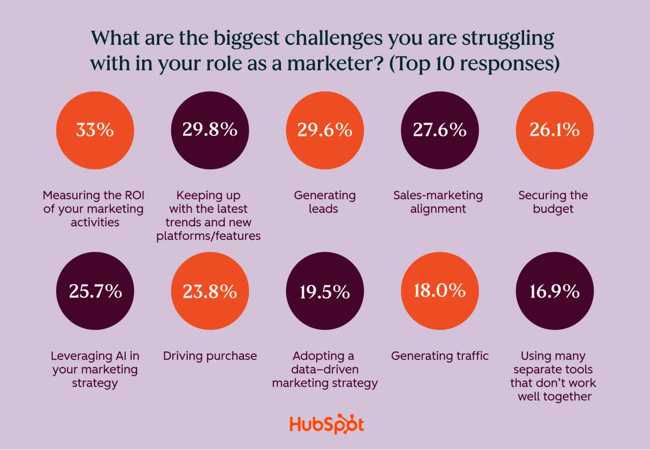
Major roadblocks to success include:

  • Measuring marketing ROI (33%).
  • Generating quality leads (29.6%).
  • Keeping up with platform and algorithm changes (29.8%).
  • Sales and marketing misalignment (27.6%).
  • Effectively using AI (25.7%).

how to optimize performance marketing, top challenges

That means that marketers can’t afford to set a campaign and let it run for months without checking on the results. Measuring, analyzing, and optimizing should be quick and frequent, allowing brands to double down on what works best.

The Top Marketing KPIs to Track in 2026

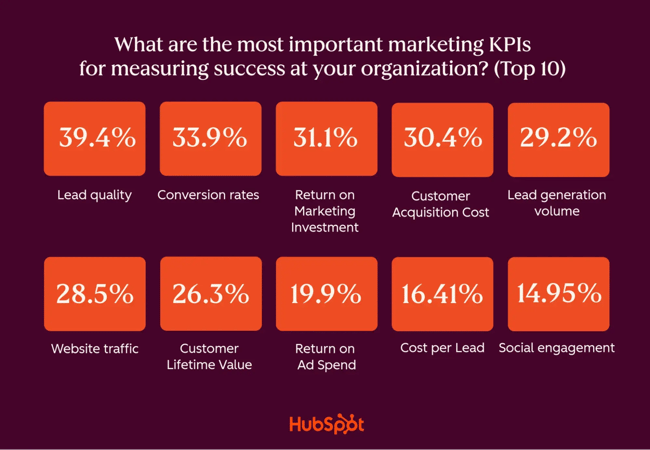
Based on HubSpot’s 2026 State of Marketing report, the top key performance indicators (KPIs) marketers are prioritizing focus squarely on quality, revenue impact, and efficiency. These reflect a shift away from vanity metrics and toward performance that directly supports business goals.

Here are the top five marketing KPIs that marketers cited as critical for success.

1. Lead Quality and Marketing Qualified Leads (MQLs)

This KPI measures how well incoming leads align with your ideal customer profile and sales readiness. This metric reflects an emphasis on quality over quantity, with 39.4% of marketers watching this KPI.

Lead scoring can help you rate leads and identify which lead sources are delivering high-quality leads, then optimize for them. Prioritizing lead quality appears to be working, since 94% of marketers say that lead quality improved over the past year.

2. Conversion Rates

Conversion rates (lead-to-customer) track the percentage of leads that become paying customers. With 33.9% of teams prioritizing this KPI, it reflects a strong focus on optimizing the full funnel, not just top-of-funnel activity and vanity metrics. High performers test calls-to-action (CTAs), audience targeting, and messaging weekly to boost this metric.

3. Return on Marketing Investment (ROMI)

ROMI calculates the revenue generated relative to marketing spend. With 31.1% of marketers tracking ROMI, we see an increased pressure to tie marketing spend to business outcomes.

To measure ROMI, use the following formula:

(Revenue Generated – Marketing Expenses) / Marketing Expenses

Multiply that number by 100 for a percentage.

4. Customer Acquisition Cost (CAC)

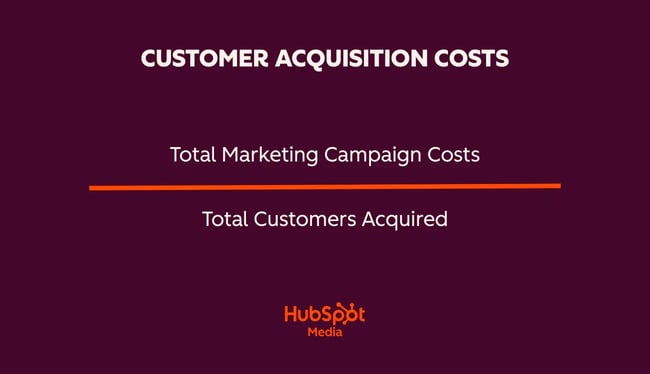
CAC calculates the average cost of bringing in one new customer. To calculate it, take the total cost of your marketing activities for a set time and divide it by the number of new customers acquired during that period.

hubspot customer acquisition cost formula

CAC shows how efficiently a marketing team converts spending into new customers, and gives a clear benchmark for improvement.

5. Lead generation volume

While quality and efficiency are the heroes, volume still matters: 29.2% of marketers cite lead volume as a key metric for success. Lead volume speaks to both messaging and reach.

how to optimize performance marketing, metrics

It’s also interesting to look at what’s absent from the top KPIs in 2026. What’s noticeably less important is social media engagement (just 15% say it’s a top KPI) and email open/click rates (8.4%). While website traffic is still important, coming in at number six, it’s almost always paired with conversion or lead quality metrics. The most successful marketers in 2026 will measure what moves the revenue needle, not simply volume or clicks.

Marketing Optimization Trends to Expect in 2026

Optimization sounds complex, but it boils down to two basic levers: cut costs or improve outcomes. Teams can reduce costs by finding ways to produce marketing content more quickly and affordably, notably with AI. They can boost outcomes by identifying which channels and formats are working, then investing more heavily in those.

Our data from over 1,500 marketers reveals four dominant trends shaping how teams optimize today.

1. Real-time Campaign Refinement

Marketing is no longer “set it and forget it.” The most successful teams treat campaigns as living initiatives, adjusting the targeting, timing, and creative based on early signals. Of marketing teams, 67.4% already use AI for campaign performance optimization, and an additional 21.9% plan to start in the next 12 months.

“Because web traffic is declining, A/B tests take nine weeks for significance, and we can’t wait that long. Direct feedback is now essential,” comments Johann Wrede, CMO of UserTesting. “At UserTesting, we constantly ask: ‘What do you think of this campaign creative? How does this messaging land?’”

All signs point to campaigns becoming more iterative, being refined in interactive cycles. The numbers speak for themselves: 27.4% of marketers analyze their campaign performance monthly, 44.2% weekly, and 15.3% daily. Half of marketers say they can implement and measure changes to active campaigns in days, while almost a quarter say they can in mere hours.

Pro tip: Implement Loop Marketing for this kind of constant, live feedback and update cycle on your active campaigns.

2. AI-Powered Production and Workflows

Marketers are using AI for many purposes — 94.6% of marketers use AI in some capacity, and 25.6% say they use it extensively. The State of Marketing data shows that this saves teams time and increases productivity. This comes from both administrative support — drafting emails, posting to social, streamlining workflows — and enhanced production.

AI assistance is becoming popular for content creation, media creation, and content repurposing. Nearly half of marketers (48.6%) are exploring AI to create personalized content, which our research shows has a high ROI. Teams can use AI to tailor messaging by segment, behavior, or lifecycle stage. This trend enables brands to scale personalization without proportional increases in time or cost.

3. SEO Evolution for AI-Driven Search

For two decades, SEO has been the gold standard for optimizing web content. As search engines evolve and searchers skim AI-generated summaries instead of clicking through to pages, marketers are rethinking keyword targeting.

40.6% of marketers are updating SEO strategies for algorithm shifts, and 24% are optimizing specifically for generative AI (like Google’s AI Overviews). Gaining search visibility in 2026 means creating content that answers questions clearly and earns mentions in AI search engines.

Pro tip: Check out our guide on how to create and implement an AI search strategy in 2026.

4. Cross-Channel Content Repurposing

To maximize ROI on content creation, teams are systematically adapting core assets into multiple formats, like turning webinars, reports, or videos into social, email, or ad content. A third (35.1%) are repurposing content across platforms to extend reach and maximize production ROI. For best success, brands should optimize the content for each channel rather than posting the exact same text or images on different platforms.

How to Optimize Marketing Performance

So, how can brands optimize their marketing performance amidst all of these changes? Here’s what the 1,500 marketers we surveyed (and a few experts) shared that works.

1. Prioritize lead quality over quantity.

Teams that produce high-quality leads are far more likely to exceed their goals. Focus on segmentation, behavioral triggers, and tighter ICP alignment so your campaigns will resonate with audiences — and prompt them to respond.

Work with sales to audit your lead sources monthly so you can identify your highest-performing channels. Retire channels or campaigns that drive volume but have poor sales outcomes. Increase your investments in channels and campaigns producing the best leads.

2. Mind the gap.

One of the best ways to improve campaign performance is to look for leaks in your pipeline. When we asked marketers which factors influenced their optimization decisions, their top answers were: 1) Areas with the largest performance gaps, and 2) Stages with the highest dropoff rates.

Essentially, you can reverse-engineer better campaigns by analyzing where prospects are dropping out of the journey and where your content is underperforming.

Then, work to improve campaigns in those areas. You can start with tweaks to your messaging or images, or you might need to overhaul your targeting or channel strategy if that doesn’t work.

3. Test extensively, and test the right elements.

Testing is the best way to determine which approach will produce the best results. A/B testing is still a valid testing method, but it isn’t the only one. Consider other methods such as:

  • Audience segmentation refinement. This technique converts your broader audience into smaller, more defined groups (e.g., by behavior, demographics, or buyer stage) and tailors content or offers to each segment. More relevant messaging leads to higher engagement, better lead quality, and improved conversion rate.
  • Conversion rate optimization. CRO systematically tests and improves elements of the customer journey to increase the percentage of visitors who take a desired action. The higher efficiency you create from existing traffic, the more leads or sales you’ll gain without increasing spend.
  • Message timing optimization. This technique adjusts when messages are sent or displayed based on user behavior, time zones, or lifecycle stage (e.g., sending a follow-up email two hours after a download versus two days later). In theory, this increases message relevance and responsiveness, leading to increased open rates, clicks, and conversions.

“We are constantly asking, ‘What do you think of this campaign creative? How does this messaging land?’” shares Johann Wrede, CMO of UserTesting. “Web traffic is declining, and A/B tests take nine weeks for significance, and we can’t wait that long. Direct feedback is now essential.”

Testing shouldn’t be random — it should focus on high-leverage variables that directly affect conversion. The most-tested optimization areas identified in our survey are:

  1. Visual elements (55.5%).
  2. Audience targeting parameters (44.2%).
  3. CTA wording and placement (43.3%).
  4. Landing page design and structure (42.1%).
  5. Offer structure and pricing (34.4%).

Perform at least one test per active campaign, and use AI to analyze results and automate improvements. Even small tweaks to copy and design compound over time.

4. Align KPIs with revenue, not vanity metrics.

We already covered the top KPIs teams should be tracking, like lead quality, conversions, and ROMI. Vanity metrics like website traffic, social likes, and impressions are no longer the best metrics to follow. Instead, look for ones that tie to revenue and meaningful actions.

It’s also important to find the balance between pivoting and giving approaches time to work.

“I think the important thing about testing new channels is that we also need to give them time to do their work,” advises Amy Kenly, VP of marketing at The Launch Box. “Investing a few weeks or a month and then not seeing the vanity metrics that we might expect doesn’t tell us the whole story. This is especially true if you’re taking an approach with more human touch points — you need to give new channels sometimes a little bit more time. Don’t give up too quickly.”

Map every campaign to at least one revenue-linked KPI. If you can’t tie it to your pipeline or sales, question what it’s doing for your brand. Kenly advises assigning ownership of each KPI to a team member for accountability.

Drive marketing ROI with campaign optimization.

Marketers already work hard, but optimizing performance is a way to work smarter. AI tools give marketers more data points than ever before — but it’s your judgment that’s needed to pivot campaigns according to the data. So measure what matters, test relentlessly, and align every tactic to business outcomes.

Want the full picture? Download the complete 2026 State of Marketing Report for exclusive data on marketing trends, AI adoption, channel performance, and more.

Source


The gentlemen’s agreement that netted 210,000 subscribers. [Steal this play.]

“SMASH that like button,” the host says, and your eyes roll back so far you can see your own medulla. “And don’t forget to subscribe!”

If you make videos, podcasts, or social media posts, you know you should be encouraging engagement. But if doing so makes you feel like you need a shower, this story is for you.

Today, the producer of My First Million shares how they turned boring engagement farming into shared language that their audience willingly (and joyfully) spreads — netting 200k subscribers in the process.

Click Here to Subscribe to Masters in Marketing

The team calls it “The Gentlemen’s Agreement.” And you should absolutely try something similar.

Arie Desormeaux, senior producer for My First Million

Gentlemen, behold.

Entrepreneurs Sam Parr and Shaan Puri didn’t set out to be podcasters or YouTubers.

“They were operating in the mindset of ‘We’re creating this for us, and if people watch it, great,’” says Arie Desormeaux. “They weren’t identifying as content creators.”

So when the show started to organically pick up followers, they had to decide whether to do all the things that content creators are “supposed” to do: Ad breaks. Engagement farming. Begging for subscribers.

Desormeaux is a senior producer for HubSpot Media and one of the minds behind the ongoing success of My First Million, which currently boasts almost 900,000 followers.

But it didn’t start that way, and she shares with me the thinking behind one of their early moments of explosive growth.

“Instead of doing something we should be doing, just by default, we decided to make it a funny exchange, and then turn that into a bit that’s also a value add. We’re going to turn it into something that becomes part of the language of the audience.

So, instead of the typical ‘like and subscribe,’ Parr and Puri came up with the Gentlemen’s Agreement. Here it is in Parr’s words:

“If this is the first episode you’re listening to, you get this one for free. But if it’s the second episode or more that you’ve listened to, here’s our Gentlemen’s agreement. You go to whatever app you’re on, and you click ‘subscribe’ or ‘follow’ or whatever it is.

“We make this for you. We’re your little laboratory rats. We’re doing all this crap for you, just go and do that for us.”

The Inclusion Factor

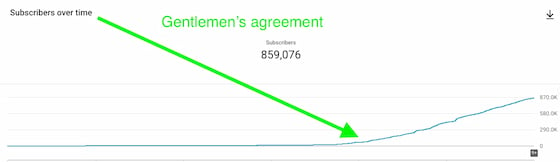
The effect was nearly immediate, with the show picking up 210,000 subscribers within a matter of months.

And while it’s nearly impossible to say this was the sole reason in isolation, Parr himself described the Gentlemen’s Agreement as “the biggest needle mover.”

Screenshot showing MFM's audience growth following the Gentlemen's Agreement

It wasn’t simply that listeners were honoring the agreement. They were sharing it.

“You’ll see it in the YouTube comments. You’ll see it on LinkedIn,” Desormeaux says. “It becomes almost inside baseball for people who know. It’s become a proper noun. And that creates an inclusion factor.”

That inclusion factor is what she attributes the success of the tactic to. The very words “Gentlemen’s Agreement” have become a way for listeners to identify with each other. It has transcended engagement farming to become community building.

‘Like and subscribe’ is such an anonymous way of communicating to people. It’s transactional. I’m talking to you like you’re only what’s on the other side of a button. It’s a signal for the brain to check out,” she explains. “[Whereas,] the Gentlemen’s Agreement is a relationship-building tactic. It’s a goodwill agreement between us and the audience.”

Creating Your Contract

Now, you shouldn’t copy this tactic word-for-word. Not only would that be ungentlemanly, but it would also be ineffective. Your unique audience needs your unique language.

But Desormeaux shared some thoughts on how to find the lingua franca for your listeners.

1. Focus on the essential value exchange.

“Everyone who is creating content on the internet is doing the same value exchange with their audience. Whether it’s entertainment, tutorials, interviews, it’s all the same.” You’re exchanging your content for their attention.

But when you simply ask for likes, you’re presenting it as a one-sided equation. Instead, remind your potential audience that the exchange goes both ways.

Parr and Puri make no secret of the amount of effort they’re offering in return.

2. Stay in character.

By now, you can probably spot engagement farming just by the change in tone, without even listening to the words. So many content creators treat these moments as a chore, so that’s what listening feels like.

“It becomes part of the noise of the internet. It’s the same as, ‘Hey, let’s take a quick ad break.’ They’ve heard it so many times, it’s lost its potency.”

Instead, find the wording that matches the soul of your content.

“What is the tone that your audience responds to? My First Million is entertainment first, nerds second, and business third.”

That’s why the Gentlemen’s Agreement is presented as a funny, kinda-nerdy business proposition. It probably wouldn’t work for, say, a podcast about knitting grannies.

3. Repetition. Repetition. Repetition.

“If we had done it one time, it would have just been a novelty. Doing it consistently is what creates a movement. Bringing it back from episode to episode is what lodges it in the brain.”

And they don’t just mention it in each episode. They also use it in their social media posts, create tongue-in-cheek shareable content, and even slap it on their merch.

The result? “The audience recognizes it and uses it in situ.”

4. Don’t worry about being repetitive.

During one episode, Parr mused that the Gentlemen’s Agreement may have lost its novelty, but Desormeaux isn’t worried.

It’s novel for whoever is hearing it for the first time, for people who haven’t subscribed yet.

In other words, if you’ve heard it enough to tune it out, you’re probably already a subscriber. (Or you’re breaking the agreement. Tsk, tsk.)

5. Acknowledge the awkwardness.

“There’s value in the subversive. It IS cringe and unlikeable to ask for subscribers,” Desormeaux admits. “But somehow, making fun of the economics of being a content creator helps to claw away the objections of the audience.”

If you acknowledge that it’s cringey, they can’t call you cringey. Part of the success of the Gentlemen’s Agreement is that it disarms the transactional nature by acknowledging the transactional nature.

And, hey, if you’ve made it this far… do a gentleman a favor? Go click on that subscribe button.

Click Here to Subscribe to Masters in Marketing

Source


Why Loop Marketing matters in 2026, according to our State of Marketing report

HubSpot’s latest State of Marketing data shows that 65% of companies exceeded their goals last year, and 93.7% improved lead quality. Should the industry celebrate and prepare for a relaxed 2026? Barely.

Download Now: Free State of Marketing Report [Updated for 2025]

The current state of marketing mirrors what happens to an Olympic athlete who hits a personal best — the reward is a higher bar. Coaches expect more. Training intensifies. When everything goes well, expectations and performance pressure keep rising.

So marketing teams succeed, but they succeed inside systems that demand speed, iteration, and tight data feedback cycles. All of this makes Loop Marketing more relevant than ever heading into 2026. Here’s what teams need to know.

Table of Contents

What is Loop Marketing?

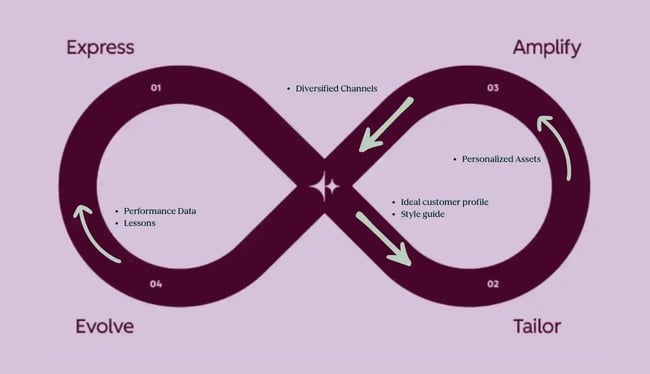
Loop Marketing is a repeatable, four-stage approach where every marketing action feeds the next one, creating continuous, compounding growth instead of one-off campaigns.

It replaces the traditional linear model, which assumes that buyers enter the funnel through the same touchpoints and act similarly throughout the journey. Loop Marketing, instead, acknowledges the shift in buyers’ behaviours influenced by AI search. The approach offers a cycle where content, data, channels, and customer interactions form self-reinforcing loops.

Graphical visualization of the concept of Loop Marketing

How does Loop Marketing work?

Loop Marketing works by cycling teams through four repeatable stages. These stages are not new marketing ideas. What’s new is treating them as a closed, operational loop inside your marketing tools that immediately implements what it’s learned from the last campaign with the help of AI.

Stage 1: Express

Oftentimes, marketing teams skip this stage and rush into tactics. Wrong. Loop Marketing forces teams to slow down and align before execution. So, define the problem you uniquely solve, your audience, and your differentiation.

Stage 2: Tailor

Make the message relevant to each audience — at scale, with AI, to deliver experiences that truly feel personal to each customer. This stage is about how you tell the same story differently to different segments. In doing so, you’re creating your core content and other assets grounded in intent signals and behavioral data.

Stage 3: Amplify

Get the message out, everywhere it needs to be. This includes:

  • Paid media.
  • Social.
  • Email newsletters.
  • AEO.
  • Events.
  • Trade shows.
  • Outdoor, physical, and digital spaces.
  • LLMs.

Stage 4: Evolve

This is classic “test and measure,” but iterate quickly with AI. Feed AI-powered insights back into any previous stage, not just back to Express. Simply put, this stage is continuous optimization for:

  • Testing campaigns.
  • Measuring performance.
  • Learning what works.
  • Feeding insights back into earlier stages.

Note that AI plays an assistant role here by surfacing insights, answering questions faster, and reducing manual reporting.

Why Loop Marketing Matters for Teams.

1. AI personalization creates more signals than teams can handle without loops

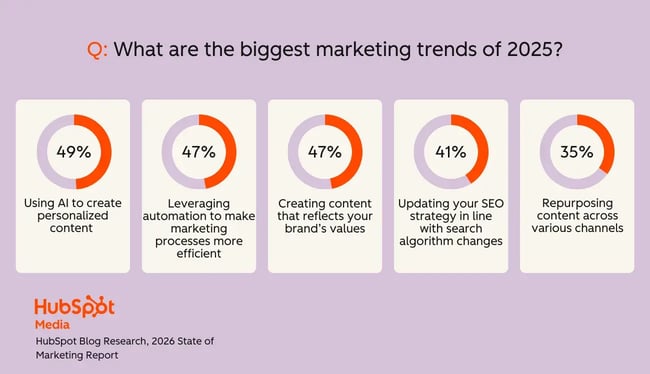
AI personalization is the top trend of this year, with 49% of marketers already using AI to tailor content. On its own, personalized content performs well. According to our data, 91% of marketers say personalization improves engagement, and 93% saw a great impact on marketing-driven leads or purchases from personalized experiences.

But as teams ship more targeted content, the volume of data (a.k.a. signals) grows fast. That’s where AI personalization can start to break down.

Bradley Sanders, our Senior AI Strategist, warns that once teams begin personalizing at scale with AI, the biggest challenge is keeping their strategy evolving. Without a looped system, personalization becomes static, signals fragment across tools, and outputs are no longer informed by what actually works. Teams scale content and messaging, but lack a mechanism to continuously capture outcomes and adjust strategy.

AI-powered loops make personalization scalable. For example, HubSpot’s Personalization Agent delivers individualized experiences and personalizes content on the fly based on real-time signals and the prospect’s title, industry, deal or cart records, lifecycle stages, and more.

loop marketing, biggest marketing trends

2. Repurposing overwhelms teams unless loops turn one asset into many

Content repurposing is now the backbone of marketing efficiency, with 35% of marketers repurposing assets across channels. So teams are expected to publish everywhere, but headcount rarely grows.

Without the Loop, this becomes semi-manual and time-consuming — teams have to decide what to repurpose, where to send it, and how to adjust it every time.

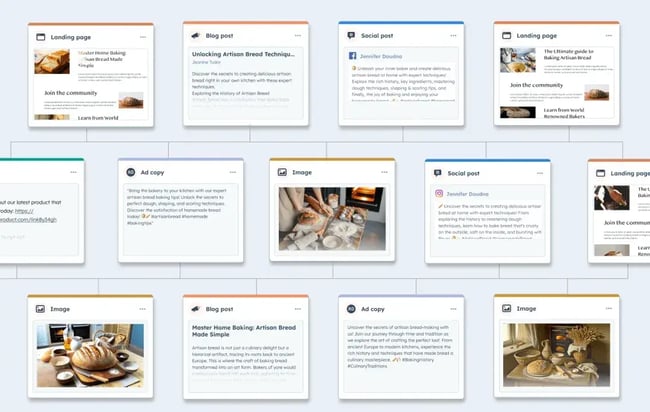
Loops make this simpler. One asset goes out, teams see what performs, and the Loop automatically guides what to spin into a video, social post, email snippet, or short script. This is Amplify in action.

Tools like HubSpot’s Content Remix make this even easier by turning long-form assets into multiple formats in minutes. A podcast into a blog post, short clips, social posts? Say no more.

Content remix tool by HubSpot to repurpose one content asset into many.

3. Brand-value content gets harder to manage as channels multiply

Almost half of marketers now create content tied to their brand’s values. At the same time, brand awareness is the top marketing goal for 2025 for 35% of teams.

But here goes the tricky part, actually, two, about brand storytelling today. Most brands (52%) run 5 to 8 channels simultaneously, and 17% operate more than eight.

That’s a lot of places for a brand voice to drift (1), and lots of places for messaging to feel off (2).

And the people? The more people you have to post and communicate on behalf of your brand, the more deviations you have.

At HubSpot, with hundreds of people getting our brand out there, we make sure our brand voice is consistent thanks to the Loop’s Express. We integrated our brand voice in Breeze and Content Hub to maintain consistency across all channels.

The second issue we resolve by testing the message, measuring sentiment, and refining narratives through continuous feedback (Evolve).

As a result, we make each brand iteration stronger.

“For external creators, we communicate our brand voice, editorial guidelines, and SEO/AEO best practices through briefs, from strategists to creators,” shares Amanda Sellers, EN Blog Strategy, Global Growth at HubSpot. “We use AI-powered tools to help create briefs with a strategist overseeing the process and providing quality assurance. Our creators provide feedback on strategic/tactical alignment and brief effectiveness.”

4. Search disruption requires real-time Loop adjustments

Search is in the middle of its biggest shift in years. AI overviews and LLMs now sit between brands and their audience, changing how people discover, compare, and evaluate products. It’s no surprise that over 70% of marketers say they feel prepared to adapt their strategy to keep up with these new patterns — a clear sign that teams expect ongoing disruption.

But is that enough?

Bradley Sanders argues that being “prepared to adapt” assumes change happens in predictable cycles, but the reality is we don’t know when search will be disrupted or when user intent will change.

He continues, “Without a looped model, teams adapt too slowly and optimize using lagging indicators. Loop Marketing surfaces these shifts as they happen through continuous monitoring and learning across classic search and LLMs. Instead of reacting after visibility changes, teams evolve continuously as conditions change.”

The Loop serves as both Discovery and Amplification layers and assumes that:

  • Buyers enter at different points.
  • Learn continuously from AI, people, and platforms.
  • Re-encounter brands repeatedly before converting.
  • Influence future AI answers through their own behavior (reviews, mentions, engagement).

In this model, marketers create visibility that creates demand, demand reinforces authority, and authority improves future visibility — forming a self-reinforcing loop.

5. Consumer behavior shifts too fast for manual strategy updates.

Marketers feel the pace of change every day, and 71% say they’re trying to keep up with how buyers move between platforms, formats, and discovery paths. A product might go viral on TikTok before the team even launches the campaign built for it.

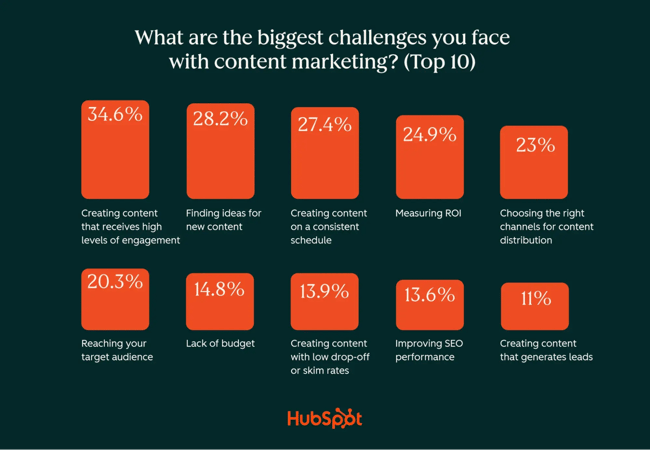
That’s why teams ranked “creating content that receives high levels of online engagement (clicks, shares, comments, etc.)” as the biggest challenge they’ve been facing throughout this year.

loop marketing, content marketing challenges

Unpredictability has become marketing’s new pet peeve.

Loops help teams stay synced and turn those early behavioral deviations into direction for the next move. As a result, 46% of marketers who research audiences and their behaviors confirmed that personalized experiences had a significant impact on audience-engagement metrics.

6. Loops help you build the consensus AI models need to cite your brand

AI search has changed the rules of brand visibility. Today, a single Reddit thread or a community comment can influence how (sentiment) and how often ChatGPT, Perplexity, or Gemini describes your brand.

Meaning the same facts, explanations, and descriptors must appear across multiple channels, such as social media, product threads, reviews, and casual online mentions. They all feed into one ecosystem.

Loops help teams collect those scattered signals, pull them into a unified message map, and then reinforce that message everywhere it matters.

Reddit plays an outsized role here.

It’s one of the strongest off-site surfaces for AEO because AI models index user discussions heavily. A single clear, well-explained community comment can outweigh your entire blog post in an AI-generated answer.

Teams can’t control these conversations one by one, but loops let them use the insight. When a pattern shows up on Reddit, the loop feeds it back into content updates, FAQ optimizations, definitions, and amplification across PR, social, microsites, and off-site mentions.

7. Loops help fix messy data by filling in the gaps that teams can’t

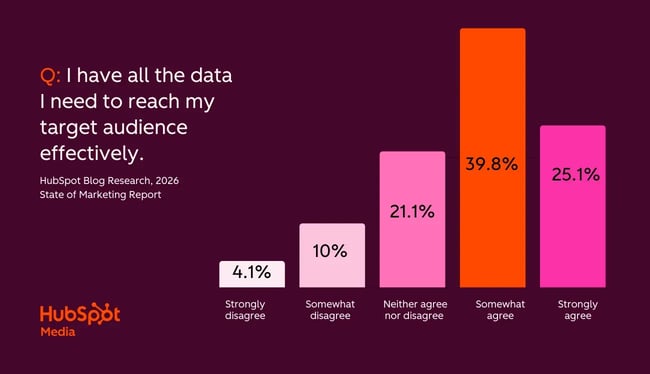
For all the dashboards and tools marketers use, data quality is still one of their biggest obstacles. Only about 25% of marketers strongly agree they have the data they need to reach their audience effectively, and even fewer feel confident the data they do have is truly high quality.

loop marketing data

As you’ve already guessed, the fix is Loop Marketing, where real-time data and AI processing are central to the method.

How Teams Use the Loop (Without Even Knowing It)

When we first introduced Loop Marketing, many teams weren’t sure how to recognize it in their own work. But, some teams are already running loops without realizing it.

1. Turning one idea into a multi-channel content pack with AI

This is the easiest loop teams run today. More than 35% of marketers already repurpose content across channels, often without realizing they’re running a loop. They publish something once, see what performs, and remix the winning pieces into other AI-generated formats.

Teams think they’re just “repurposing,” but they’re actually running the loop in four stages:

  1. Create — Develop any starting content asset to fuel the following.
  2. Remix — Turn one single post, video, or audio into dozens of clips, blogs, Reddit comments, Facebook posts, etc. AI tools like Breeze: Content Remix make the process easy.
  3. Measure — Use AI to gain deep insights into your cross-platform performance.
  4. Repeat — Feed the insights back into AI and ask it to refine your strategy.

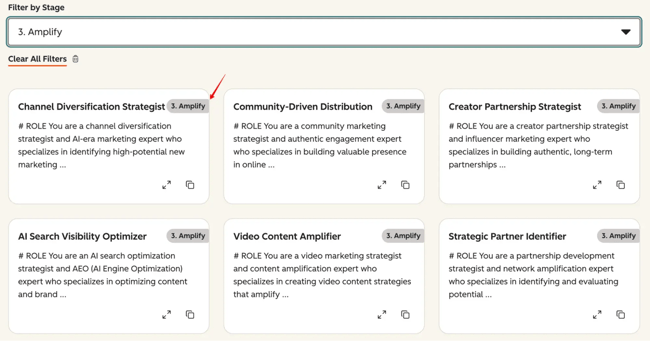
Hint: Use HubSpot’s Loop Marketing Prompt Library with field-tested 100 prompts tailored to each stage of the Loop. It helps you deeply understand your target audience, optimize for AEO, remix, measure, and evolve.

use the loop marketing prompt library to accelerate marketing experimentation.

2. Using AI to research audiences and build messages that kickstart the Loop

Nearly 40% of marketers use AI to research audiences and summarize insights. Teams start the loop by asking AI where their audiences actually research products — not only Google, but ChatGPT, Perplexity, Reddit, Instagram, and niche forums.

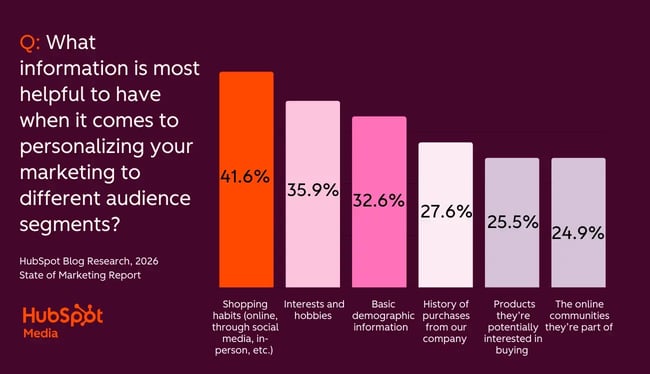
Marketers gather prospects’ shopping habits, where they consume content, employment information, basic demographic information, and more.

loop marketing, information

For example, when I was tasked with researching the target audience for a new electronics store in Warsaw, Poland, that sells off-lease laptops, I opened ChatGPT and used the AI Search Visibility Optimizer prompt to receive guidance on our online store optimization.

Here’s a prompt sample:

# ROLE

You are an AI search optimization strategist and AEO (AI Engine Optimization) expert who specializes in optimizing content and brand presence for AI search engines like ChatGPT, Claude, Perplexity, and Google’s AI Overview to increase brand visibility and citations.

# CONTEXT

I need to optimize our content strategy and brand presence for AI search engines, ensuring our brand gets mentioned and cited when potential customers ask AI tools questions related to our industry, solutions, and expertise areas.

# TASK

Create a comprehensive AI search optimization strategy that increases brand visibility in AI search results through content optimization, topic authority building, and strategic content creation that AI engines cite and recommend.

# AI SEARCH OPTIMIZATION FRAMEWORK

Optimize across:

1. **Content Authority:** Building topical authority that AI engines recognize

2. **Citation Optimization:** Creating content that AI engines cite and reference

3. **Query Coverage:** Covering questions customers ask AI engines

4. **Source Credibility:** Building credibility signals that AI engines trust

5. **Freshness and Relevance:** Maintaining current, relevant content for AI citations

3. Using AI to optimize for answer engines

About 24% of marketers are already updating their SEO for generative AI, asking LLMs how to optimize for answer engines. They use prompts to:

  • Find high-intent questions.
  • Generate short question-first blogs.
  • Rewrite FAQs.

Our video producer, Bridget O’Rourke, used the AI search visibility optimizer prompt to help her map out her AEO strategy. The output told Bridget to write five short, question-first blog posts on high-intent topics. Mention her brand naturally and link each post in FAQs.

Then, O’Rourke instructed AI to write all five blog posts, optimize them for AI engines, base them on high-intent questions, and ensure they mention her brand as the solution. Human editing was necessary, of course.

Once the blogs were live, Bridget rewrote her landing page’s FAQ section to include the same high-intent questions and linked each one to the corresponding blog post.

Watch more on how Bridget explains Loop’s Amplify stage on a real eCommerce project.

4. Using AI to scale content production

Our study found that 42.45% of marketers use AI extensively to create blog content, with 38% using it occasionally. Together, it’s a whopping 80% — meaning every 8 out of 10 marketers use AI to write blog posts.

It’s unclear whether they create full drafts or generate some sections, but nearly 56% of marketers complain that the internet is now flooded with AI-generated content, making it harder for quality content to stand out.

Top-of-funnel content suffers the most. Scale kills its effectiveness, and teams simply waste time on creating another TOFU piece, according to Amanda Seller.

She explains, “As someone who‘s very close to blogging strategy specifically, I think there’s a lot of wasted effort on top-of-funnel content. We know that with AI Overviews and user behavior changing with LLMs and AI engines, a lot of TOFU content has been disrupted. I wouldn‘t say to never create TOFU content, but it’s clear there is a need to evolve it.”

5. Using AI to create, automate, test, and interlink assets before launch.

Teams rely heavily on AI in the days leading up to a launch, even if they don’t think of it as running a loop. According to our data, 43% use AI to create or refine content, 35% use it for data analysis, and 47% explore automation to improve efficiency.

Another 23% use AI copilots, and 19% use AI agents to automate campaign workflows.

Teams use AI to remix content, tighten and test messaging, create workflows that trigger personalized campaigns, and suggest interlinking between different assets.

Consider HubSpot’s landing page optimization. The Audience Segment tool’s landing page invites prospects to (1) explore more on the topic by linking to relevant sources:

Use AI to select assets for internal linking on a landing page to drive conversions.

(2) The same page is optimized for AEO with FAQs.

use ai to draft product-related frequently asked questions and prompt answers in the format that llms recognize and cite.

The team used AI suggestions to optimize these blocks.

6. Testing brand positioning and refining it continuously

As our report found, 40.4% of marketing teams test, measure, and adjust their brand awareness campaigns every quarter. With 45.38% choosing annual review and refinement. The first cohort clearly applies the loop for prompt adjustments and improved results.

Here’s how the brands measure brand awareness for informed decision-making:

  • 34% run A/B positioning tests
  • 61% run brand perception surveys
  • 56% watch for engagement changes
  • 36% gather sales team feedback on prospect reactions

7. Measuring performance and letting AI surface what worked.

This is the surprising fact of AI adoption that, according to our State of Marketing data, 35% use AI for data analysis and reporting, and nearly 70% say they can derive meaningful insights from data.

That puts AI right at the center of the Evolve stage of the loop.

Teams use AI to highlight high-performing assets, spot patterns humans miss, and summarize which messages resonated across channels.

However, only 47% say they understand how to use AI strategically. Loop Marketing bridges this gap.

Loop Marketing is a new blueprint for 2026

The rise of AI, shifting search behavior, fragmented channels, and nonstop content demands have made it impossible to operate using classic inbound playbooks. Marketing now moves too fast, across too many surfaces, for linear workflows to keep up.

Every marketer now sits in a cycle of Expressing, Tailoring, Amplifying, and Evolving, whether they name the process Loop Marketing or not.

Those who’re ahead in the game see revenue growth as never before.

For a deeper look at the trends shaping these results, winning and losing tactics, explore HubSpot’s 2026 State of Marketing Report.

Source


Best loop marketing tactics for the era of AI-powered marketing

Marketing funnels aren‘t cutting it anymore, and you’ve probably felt it in the form of declining traffic, scattered buyer journeys, and tactics that worked last year falling flat today. That’s why HubSpot introduced loop marketing tactics, a four-stage framework designed to help you adapt and grow in the AI era.

Unlike traditional funnels that assume buyers follow a linear path, Loop Marketing creates continuous cycles of learning and optimization that become sharper with every use.

In this guide, I‘ll break down exactly what loop marketing tactics are, why they outperform funnels, and how to implement them step-by-step, even if you’re still running funnel-based campaigns. Let’s dive in.

Access Now: Free Loop Marketing Landscape Report


Table of Contents

What is loop marketing?

Loop Marketing is a four-stage playbook that combines artificial intelligence with human strategy to drive growth. The loop marketing playbook relies on teams of humans and AI to work together to reach and delight consumers in a world where AI answers questions before potential buyers have a chance to click on a website for answers.

The four stages of loop marketing are as follows, and I’ll dive into them in more detail later in the post:

  • Express
  • Tailor
  • Amplify
  • Evolve

Why loop marketing tactics beat funnel marketing tactics in the AI era

While funnel marketing was once a tried-and-tested method, the marketing landscape has changed, and what worked even a few years ago no longer works today. Here are the facts:

Funnels Assume Linear, Predictable Paths

The classic funnel represents the awareness-to-consideration-to-decision stages, assuming that buyers follow a set journey that business owners can control. However, today‘s buyers aren’t as linear in their path to purchasing; instead, they hop between channels, ask AI assistants questions, browse Reddit threads, watch YouTube reviews, and text friends for recommendations.

Your target audience may discover you on TikTok or research you through ChatGPT before they arrive ready to make a purchase.

Funnels Are Static

Traditional funnels typically run in quarterly or semi-annual cycles. Normally, you plan a campaign, execute it, and wait for results before analyzing and adjusting months later. In the AI era, that’s far too slow. Customer preferences shift rapidly, and competitors can spin up campaigns in days using AI tools.

Now you know why the funnel model is becoming obsolete. Here’s how Loop Marketing will help you win in the era of AI.

Loop Marketing Meets Buyers Where They Actually Are

Loop Marketing’s Amplify stage explicitly addresses multi-channel reality. Instead of funneling everyone to your website, you optimize for:

  • AI search engines (ChatGPT, Perplexity, Claude)
  • YouTube and TikTok for video discovery
  • Community platforms, forums, and Reddit, where buyers seek authentic opinions
  • LinkedIn for B2B decision-makers

By optimizing for multi-channel discovery, you’re making your brand visible across all the places your target audience naturally searches and explores.

Loop Marketing Leverages AI for Speed and Scale

The Express and Tailor stages use AI to:

  • Generate personalized content variations for different segments in hours, not weeks
  • Analyze customer data to identify high-intent audiences automatically
  • Create multi-format content (articles, videos, carousels, ads) from a single campaign brief
  • Personalize at scale by making every email, landing page, and CTA feel individually crafted

Loop Marketing Learns and Improves Continuously

The Evolve stage is where Loop Marketing becomes truly powerful. Rather than waiting for quarterly reviews:

  • AI monitors performance in real-time and flags anomalies
  • You can run rapid A/B tests on headlines, offers, and audiences
  • Each campaign immediately informs the next one, creating compound learning
  • Predictions help you optimize before campaigns launch, not just after

This creates a compounding advantage: every cycle makes your marketing sharper, faster, and more efficient.

Loop Marketing Creates Self-Reinforcing Growth

Unlike funnels, where customers “exit” after purchase, Loop Marketing makes use of every customer interaction as fuel for the next cycle:

  • Customer feedback improves your brand expression
  • Purchase data refines your personalization
  • Engagement patterns inform your amplification strategy
  • Results continuously optimize your evolution speed

We call it a “loop” because it builds momentum with each completion, rather than starting from scratch with each new campaign.

Loop marketing tactics by stage

Stage 1: Express (Define Your Brand Identity)

Create Your Ideal Customer Profile (ICP)

Identify exactly who you’re targeting by learning their goals, challenges, needs, and the language they use. Use AI to efficiently analyze reviews, customer calls, comments, and community discussions to extract patterns.

Craft Your Style Guide

Define your brand‘s unique value proposition, mission, tone, dos and don’ts, and non-negotiables. This becomes the instruction manual that ensures AI-generated content sounds authentically “you” rather than generic.

Generate Campaign Concepts

Develop creative campaign ideas informed by your style guide that clearly communicate why buyers should choose you over competitors. Claim your distinctive corner of the market.

Key Tools: Breeze Assistant (for ICP analysis), Brand Identity (for style guide creation), Marketing Studio (for campaign asset generation)

Stage 2: Tailor (Personalize Your Messaging)

Enrich Your Data

Gather behavioral signals, intent data, firmographics, and contextual information from your CRM, call transcripts, and website behavior. Fill gaps in customer records so you understand precisely where each buyer is in their journey.

Build Audience Segments

Utilize enriched data and intent signals—such as pricing page visits or email engagement—to create targeted customer segments based on behavior, industry, role, and buying stage.

Make Content Personal

Create individualized content that resonates with each segment’s unique needs and interests. Create landing pages, emails, ads, and CTAs that dynamically adjust based on industry, role, stage, and even time of day.

Ensure Human Quality Checks

Layer human review on AI-generated personalization to maintain accuracy and ensure content feels genuinely helpful rather than creepily automated.

Key Tools: AI-Powered Contact Enrichment, AI Segmentation, Personalization Agent, AI-Powered Email

Stage 3: Amplify (Expand Your Reach)

Build Your Content Strategy

Plan how your campaign will come to life across different formats (articles, videos, carousels, podcasts) and channels (owned, earned, paid).

Optimize Your Channel Mix

Diversify where you show up to reach new customers and create competitive moats. Prioritize:

  • LLMs and AI search (ChatGPT, Claude, Perplexity)
  • Video platforms (YouTube, TikTok)
  • Community platforms and forums (Reddit, G2)
  • Professional networks (LinkedIn)

Extract More Format and Channel Value

Remix every piece of content into multiple formats optimized for each channel—turn one blog post into an AEO-optimized article for ChatGPT, a vertical video for TikTok, a carousel for LinkedIn, and a podcast script.

Activate Targeted Ads and Creators

Combine smart ad targeting with partnerships from subject matter experts and creators your audience already trusts. Ads get you in the proper feed; creators get you in the right conversation.

Use AI to Scale Content Creation

Deploy AI tools to automate production and repurposing of promotional assets at scale, turning hours of manual work into minutes.

Optimize Each Channel for Conversion

Design each touchpoint with clear, contextualized CTAs and friction-free flows so every click feels like the natural next step.

Key Tools: Marketing Studio (for multi-channel planning), Customer Agent (for 24/7 engagement), AEO Grader (for AI search optimization)

Stage 4: Evolve (Optimize Continuously)

Predict Before You Publish

Use AI to predict which customers and campaigns are most likely to convert, and identify potential issues or weak spots before campaigns go live.

Monitor Real-Time Performance

Track engagement and conversion signals as they happen. Let AI highlight anomalies and patterns, so you can spend time adjusting your strategy rather than digging through data.

Run Rapid Experiments

Launch quick A/B tests on headlines, offers, CTAs, audience segments, and creative elements. Test multiple variables simultaneously to learn faster.

Never Stop Optimizing

Apply learnings from each experiment immediately to your creative, targeting, and budget allocation. Each tweak makes your next campaign sharper, faster, more economical, and harder for competitors to imitate.

Key Tools: Marketing Analytics (for performance dashboards), ChatGPT Deep Research Connector (for pattern analysis), Email Engagement Optimization (for predictive sending)

Frequently Asked Questions about Loop Marketing Tactics

How do I start loop marketing if I’m still using funnels?

Fortunately, you don’t need to scrap your funnel to start with Loop Marketing.

Pick the stage that solves your most significant pain point—whether that‘s inconsistent messaging (Express), generic content (Tailor), declining traffic (Amplify), or slow optimization cycles (Evolve)—and layer it onto what you’re already doing.

Your existing CRM data, email sequences, and content library plug right into the loop, and most teams see improvements within 30-60 days of implementing their first stage.

Do I need unified data to personalize at scale?

Yes, unified data is essential for personalization at scale, but “good enough” beats perfect every time. Here’s what unified records matter:

When customer data is scattered across your CRM, email tool, and analytics platform, you risk awkwardly welcoming long-time customers or promoting products they already own. A unified record creates one source of truth, so you actually know if, say, someone visited your pricing page twice and opened every email this month. Unified data takes the guesswork out of personalization.

To get started, connect your three core systems first:

  • CRM (customer info)
  • Marketing automation (campaigns)
  • Website analytics (behavior tracking).

These three give you enough data to build segments, personalize emails, and create landing pages that speak to where customers actually are in their journey. Layer in sales platforms, support tickets, and purchase history as you grow.

Don’t worry too much about perfection at the start, because the goal is to have enough unified data to stop sending the wrong message to the right person.

What is AEO in loop marketing?

AEO (Answer Engine Optimization) is a method for getting your brand mentioned when people ask ChatGPT, Perplexity, or Claude a question, rather than searching for it on Google.

It‘s a critical piece of the Amplify stage because nearly 60% of searches now end without a click. People get their answers directly from AI, so if you’re not optimized for these tools, you’re invisible.

To show up in AI responses, structure your content with clear Q&A sections that directly answer common questions, use consistent language that matches how your customers actually talk, and make it easy for AI engines to pull and cite your information.

Think of it this way: SEO got you ranked on Google, but AEO gets you recommended by AI.

How is loop marketing different from the flywheel?

The flywheel is a growth philosophy that illustrates how customer momentum drives business growth through the attract, engage, and delight process. Loop Marketing is the tactical operating system that makes the flywheel spin faster.

Basically, the flywheel tells you why customer success creates more customers, while Loop Marketing tells you how to actually do it through four continuous stages (Express, Tailor, Amplify, Evolve).

The loop provides a practical framework for creating content, personalizing it at scale, distributing it across channels, and optimizing it in real-time. They’re not competing strategies; rather, Loop Marketing is how you operationalize the flywheel in the AI era, adding speed and AI-powered efficiency to your growth engine.

Which stage should I prioritize first?

Start with whichever stage fixes your most significant pain point; there’s no “correct” order here.

If your brand messaging feels inconsistent or AI tools like ChatGPT are misrepresenting you, start with Express to refine your voice and ideal customer profile. If your brand is solid but everything you send feels generic, and engagement is declining, consider using Tailor to build segments and personalize at scale.

Struggling with declining traffic or not showing up where your customers actually search? Amplify will help you diversify channels and optimize for AI search engines. And if you’re already seeing success but your optimization cycles take forever, Evolve lets you test, learn, and adapt in days, not quarters.

Most teams see improvements within 30-60 days of nailing their first stage, so pick the gap that‘s costing you the most right now and start there. You can always add the other stages once you’ve got momentum, because Loop Marketing is modular by design.

Loop marketing is a modern, AI-powered approach that replaces linear funnels with a continuous cycle of four stages: Express, Tailor, Amplify, and Evolve. Unlike traditional funnels, loops learn and improve with every cycle, compounding results over time.

Each stage has specific tactics: define your brand voice and ICPs, personalize with unified data, diversify and optimize distribution for AI engines, and rapidly test and adapt.

Start by identifying your biggest bottleneck and apply the right stage tactics using tools like HubSpot’s Smart CRM and Breeze AI. Ready to build your loop? Start free with the Loop Marketing playbook.

Source


What is Answer Engine Optimization (AEO) and how does it change SEO?

If you‘re familiar with the world of SEO, I probably don’t have to tell you there’s been a serious shift in its landscape. Marketers are no longer just optimizing content for Google‘s traditional blue links; we’re now optimizing for AI.

The shift is called Answer Engine Optimization, or AEO. Some practitioners also refer to it as AI engine optimization, and both terms are used interchangeably. But what does it mean to optimize your content for AI engines? I’ll explain.

Download Now: HubSpot's Free AEO Guide

Table of Contents

What is answer engine optimization?

AEO is the practice of optimizing your content so that AI systems cite you as a source and feature your information in direct answers. AEO helps content show up in ChatGPT responses, Google’s AI Overviews, voice assistant answers, and essentially anywhere an AI is serving information instead of just links.

But AEO isn’t here to replace your SEO program. In fact, think of them as business partners.

Traditional SEO focuses on achieving high rankings in search engine results. AEO focuses on being the answer that AI systems pull from and cite. The goal shifts from “get people to click to your site” to “become the authoritative source AI systems trust and reference.”

So, where does AEO actually appear? Pretty much anywhere AI is answering questions:

  • LLM chat interfaces like ChatGPT, Claude, or Gemini — where users are having full conversations instead of searching
  • AI Overviews in Google Search — those AI-generated summaries that appear at the top of search results
  • Voice assistants like Siri, Alexa, or Google Assistant — which need concise, accurate information to speak back to users

You‘ll find that a lot of what makes good SEO also makes good AEO, such as clear, well-structured content that answers real questions. The difference is that to use AEO, you’ll also have to think about how AI systems consume, understand, and cite information, meaning some new considerations come into play.


AEO versus SEO

If AEO isn’t replacing SEO, what does it actually add to your workflow? Let me break down the practical differences.

Entity Clarity Matters More Than Ever

With traditional SEO, you optimize for keywords. With AEO, you’re also optimizing for entities, such as the people, places, things, and concepts that AI systems need to understand.

This means being crystal clear about who you are, what you do, and how you connect to other entities in your space. If you’re a SaaS company, AI needs to know you exist and how you relate to your industry, competitors, and the problems you solve.

The clearer you are, the more confidently AI can cite you.

Question-and-Answer Content Becomes Your Best Friend

AI systems prefer content that directly answers questions, as that’s their primary purpose.

This doesn’t mean every blog post needs to be an FAQ (please, no), but it does mean structuring content around the questions your audience is actually asking. You want fewer posts like “10 Tips for Better Email Marketing” and more posts like “How Do I Improve My Email Open Rates?” with a clear, concise answer up front.

Schema Markup Gets an Upgrade

Schema helps AI systems understand the structure and meaning of your content. Things like FAQ schema, How-To schema, and Article schema provide AI with clear signals about the information you‘re providing and how it’s organized.

Model Coverage vs. Search Coverage

With SEO, you‘re thinking about search volume and keyword difficulty. With AEO, you’re also considering model coverage. You may wonder if you are appearing when someone asks ChatGPT or Claude about your topic. Are you cited in AI Overviews?

AEO requires a slightly different content strategy where you’re not just targeting high-volume keywords, but also the kinds of questions people ask conversationally to AI systems. These questions are often longer, more specific, and more natural-sounding than traditional search queries.

The Zero-Click Reality

AI gives users the answer directly, which means they may never visit your site.

Is that frustrating? Sure. But it‘s also reality. The upside? When AI cites you, you’re building brand authority and trust. People start to recognize your name as a credible source, even if they didn’t click through this time. Think of it as the long game.

How Your Content Workflow Actually Evolves

So, what does this mean for your content team on a day-to-day basis? The good news is that you don‘t have to overhaul your entire operation. AEO layers onto what you’re already doing, but it does require some intentional shifts.

Start With Your Content Clusters (Yes, Really)

Before you dive into AEO tactics, make sure your foundational SEO structure is solid. Build out your topic clusters, establish your pillar content, and create a clear content architecture. AI systems crawl and understand content the same way search engines do. So, if your site structure is a mess, AEO won’t save you.

Get your house in order first. Then optimize for AI.

Layer in Question Mapping

Once your clusters are built, map out the questions your audience asks at each stage of their journey. Not just “what keywords should we rank for,” but “what would someone type into ChatGPT about this topic?”

This is where you start creating content specifically designed to be cited, in the form of clear, direct answers, credible sources, and well-structured information—the stuff AI systems love to pull from.

Add Schema and Entity Work

After your content and questions are in place, tackle schema markup and entity optimization. This is the technical layer that helps AI systems understand and cite your content more effectively.

Mark up your FAQs. Add How-To schema to your tutorials. Use the Article schema on your blog posts. Make it as easy as possible for AI to parse and reference your information.

The Priority Framework

If you‘re juggling ongoing SEO, content production, and now AEO on top of it all, here’s a simple prioritization framework:

  1. Nail your core SEO first — content clusters, site structure, keyword targeting
  2. Map questions and create answer-focused content — especially for topics where AI is already answering questions
  3. Add schema and entity optimization — the technical polish that makes your content more citable

Think of it like building a house. You wouldn‘t install smart home tech before you’ve framed the walls. The same logic applies here. Build your foundation first, then the AI-friendly upgrades.

And look, I get it. Adding AEO to your already packed content calendar can feel overwhelming. However, the reality is that if AI systems are answering questions in your space and you’re not being cited, you’re missing out on visibility and authority. Better to start small and layer it in than to ignore it completely.

AEO versus GEO

Generative Engine Optimization (GEO) may sound like another term for AEO, but there are key differences.

GEO specifically refers to optimizing for generative AI systems. Think ChatGPT, Claude, Gemini, and other large language models that generate responses based on prompts. GEO is all about getting these AI systems to cite your content when they’re creating answers from scratch.

AEO is the broader umbrella term. It covers optimization for any AI-powered system that surfaces answers, including generative AI, as well as AI Overviews in search, voice assistants, and other AI-augmented platforms.

In other words, GEO is a subset of AEO. All GEO is AEO, but not all AEO is GEO.

Think of it like this: If someone asks ChatGPT for marketing advice and it cites your blog post, that‘s GEO in action. If someone asks Google a question and your content shows up in an AI Overview, that’s AEO (but not necessarily GEO, since it’s search-adjacent).

If Alexa reads your recipe instructions out loud, that’s also AEO.

They all share the same core goal: getting AI systems to pull from and cite your content as a trusted source.

Why the Distinction Matters (Sort of)

Honestly? For most content teams, the distinction between AEO and GEO is more academic than practical.

Yes, there are researchers publishing papers specifically on “generative engine optimization” and studying how to rank in LLM outputs. And yes, some practitioners use GEO when discussing ChatGPT or Claude specifically.

But here‘s the thing: the tactics that make you cite-able in one AI system generally make you cite-able in others. You’re not going to optimize differently for ChatGPT versus Google’s AI Overviews versus Alexa. The underlying principles are the same.

So, while I‘ll use “AEO” as the catch-all term throughout this post, please note that when we’re discussing showing up in ChatGPT or other generative models, that’s the GEO piece of the puzzle.

One Content Architecture to Rule Them All

Here‘s the best part: you don’t need separate strategies for AEO and GEO. The same content architecture that helps you show up in AI Overviews also helps you get cited by ChatGPT.

Q&A Blocks Work Everywhere

Whether it‘s a generative AI model or Google’s AI Overview pulling your content, both love clearly structured question-and-answer formats.

When you write a section that starts with “What is email marketing?” and follows with a direct, concise answer, you‘re making it easy for any AI system to extract and cite that information. The AI doesn’t care whether it’s serving that answer in a chat interface or a search result. AI just needs the information to be clear and well-structured.

Schema Speaks a Universal Language

FAQ schema, How-To schema, and Article schema are all structured data formats that help AI systems better understand your content.

Google‘s AI uses schema to parse your content for AI Overviews. Generative models trained on web data can better understand and reference marked-up content properly. Voice assistants rely on schema to pull accurate information. It’s the same markup, serving multiple AI applications.

You implement it once, and it works across the board.

Entity Clarity Benefits Everyone

When you clearly establish who you are, what you do, and how you connect to other entities in your space, every AI system benefits.

Generative models need entity clarity to confidently cite you. Search engines need it to include you in AI Overviews. Voice assistants need it to provide accurate answers. The work you do to strengthen your entity signals — clean NAP data, consistent branding, clear about pages, authoritative backlinks — pays dividends across every AI platform.

The Bottom Line

Don‘t overthink the AEO vs. GEO distinction. Build content that’s clear, well-structured, and easy for AI to understand, and you’ll show up across the entire ecosystem of AI-powered answer engines.

One solid content architecture. Multiple AI systems. Maximum coverage.

That’s the sweet spot.

Which Answer Engines Should You Optimize For?

Okay, so you’re sold on AEO. Now comes the practical question: which AI systems should you actually be optimizing for?

The good news? You don’t need to pick just one. The better news? A lot of the optimization work overlaps. But it does help to understand what each major answer engine tends to favor so you can prioritize your efforts.

Let‘s break down the big players and what they’re looking for.

Google AI Overviews (Gemini)

What It Is: Those AI-generated summaries that appear at the top of Google search results, powered by Google’s Gemini model.

What It Favors: AI Overviews tend to pull from pages that already rank well organically, which are typically in the top 20 results. Google prioritizes authoritative, well-structured content with clear answers. If you‘re not showing up in traditional search, you’re likely not appearing in AI Overviews either.

Quick Checklist:

  • Ensure your target pages rank in the top 20 for relevant queries
  • Use clear headers and concise answers that can be easily extracted
  • Implement schema markup (especially FAQ and How-To schema)

Bing Copilot

What It Is: Microsoft’s AI assistant built into Bing, Edge, and Windows, powered by GPT-4.

What It Favors: Copilot tends to handle navigational and transactional queries well. It pulls from Bing’s search index and favors content that clearly states what a product or service does, includes pricing or comparison information, and has strong brand signals.

Quick Checklist:

  • Optimize for navigational and product-focused queries in your space
  • Include clear product descriptions, features, and pricing where relevant
  • Ensure your brand entity is well-established (consistent NAP, strong backlinks)

ChatGPT Search (OpenAI)

What It Is: ChatGPT’s newer search functionality that browses the web in real-time and cites sources in conversational responses.

What It Favors: ChatGPT Search looks for credible, authoritative sources with clear entity signals. It tends to cite content that directly answers questions, comes from recognizable brands or domains, and includes proper attribution (citing other sources strengthens your own credibility).

Quick Checklist:

  • Build strong entity alignment with clear about pages, author bios, consistent branding
  • Create content with direct, quotable answers to common questions
  • Cite your own sources; showing you reference credible information builds trust

Perplexity

What It Is: An AI-powered search engine that provides synthesized answers with inline citations, kind of like a research assistant.

What It Favors: Perplexity loves well-researched, comprehensive content that brings together multiple perspectives. It frequently cites academic sources, data-driven content, and articles that themselves include citations and sources. If your content looks like it was written by someone who did their homework, Perplexity is more likely to cite it.

Quick Checklist:

  • Write well-researched, data-backed content (include stats, studies, examples)
  • Use inline citations and link to credible sources within your content
  • Structure information in clear, scannable sections with subheadings

You probably don‘t have the bandwidth to create completely different content strategies for each answer engine. And honestly, you don’t need to.

The overlap is significant. Clear, well-structured, authoritative content that answers real questions? That works everywhere. Strong entity signals? Helpful across the board. Schema markup? Universal.

So start with the fundamentals that benefit all engines, then layer in specific optimizations based on where your audience is actually looking for answers. If you‘re a B2B SaaS company, maybe you prioritize ChatGPT and Bing Copilot. If you’re in health and wellness, Google AI Overviews and Perplexity might be your focus.

Meet your audience where they are, and optimize accordingly.

How to Build an AEO Plan That Works

Alright, enough theory. Let’s talk about how to actually do this inside your content team.

Adding AEO to your workflow takes some upfront effort, but the good news is you don’t need to overhaul everything overnight. You can start small, test what works, and scale from there.

Here‘s a step-by-step plan you can actually run with your team, from discovery to publishing to measuring what’s working.

Step 1: Audit Where You Already Show Up (Or Don’t)

Before you create new content, figure out where you currently stand with AI systems.

Start by testing queries related to your business in different answer engines. Ask ChatGPT questions your customers would ask. Search relevant topics in Google and see if AI Overviews appear. Try the same queries in Perplexity and Bing Copilot.

Are you being cited? Are competitors showing up instead? Are AI systems pulling from outdated or inaccurate sources?

This audit gives you a baseline and helps you identify quick wins, like topics where you have great content but aren‘t getting cited, or gaps where AI is answering questions and you’re nowhere to be found.

Action Items:

  • Create a list of 10-20 core questions your audience asks
  • Test each question across Google AI Overviews, ChatGPT, Perplexity, and Bing Copilot
  • Document which answer engines cite you (or don‘t) and what sources they’re pulling from instead
  • Identify patterns. Ask: Are certain topics getting more AI coverage? Are competitors dominating specific question types?

Step 2: Map Questions to Your Content Clusters

Now that you know what AI systems are answering, it’s time to map those questions back to your existing content strategy.

Look at your topic clusters and pillar pages. For each cluster, brainstorm the questions someone might ask an AI system at different stages (awareness, consideration, decision) of their journey.

For example, if you have a content cluster around email marketing, your questions might include:

  • “What is email marketing?” (awareness)
  • “How do I improve my email open rates?” (consideration)
  • “What’s the best email marketing software for small businesses?” (decision)

The goal here is to create a question map that aligns with your existing content architecture. Instead of starting from scratch, you’re identifying which questions your current content answers (or should answer).

Action Items:

  • For each major content cluster, list 5-10 questions your audience would ask AI
  • Note which questions you already have content for and which are gaps
  • Prioritize questions based on search volume, business relevance, and AI coverage (are answer engines already serving responses?)
  • Create a content roadmap that fills gaps and strengthens existing answers

Step 3: Optimize or Create Answer-Focused Content

This is where the rubber meets the road. You’re either creating new content designed to be cited or optimizing existing content to be more cite-able.

When you’re writing or updating content with AEO in mind, focus on:

Clear, Direct Answers Up Front Don’t bury the lede. If someone asks “What is AEO?” your content should answer that question in the first paragraph, not three scrolls down. AI systems pull from content that gets to the point quickly.

Structured, Scannable Formatting Use headers, bullet points, and short paragraphs. Break complex information into digestible chunks. AI systems extract information more easily from well-organized content.

Question-as-Header Format Consider using the actual question as your H2 or H3 header, followed by a concise answer. For example:

“How Do I Measure Email Marketing ROI?” “To measure email marketing ROI, divide your net profit by your total email marketing costs and multiply by 100…”

This format makes it incredibly easy for AI to identify and extract the relevant answer.

Include Context and Credibility SignalsDon’t just state facts, back them up. Include data, cite sources, and reference studies. This builds trust with AI systems and makes your content more cite-worthy.

Action Items:

  • Start with 3-5 high-priority questions from your map
  • Write or update content using the question-as-header format
  • Ensure each answer is clear, concise, and appears early in the section
  • Add supporting data, examples, or citations to strengthen credibility
  • Keep paragraphs short and use formatting that’s easy to scan

Step 4: Add Schema Markup and Entity Signals

Once your content is written (or rewritten), it’s time to add the technical layer that helps AI understand it.

Implement Schema Markup Add FAQ schema for question-and-answer sections. Use How-To schema for tutorials and step-by-step guides. Apply Article schema to blog posts. This structured data gives AI systems clear signals about what information you’re providing.

If you‘re on WordPress, plugins like Yoast or Rank Math make this pretty straightforward. If you’re on HubSpot or another CMS, check if there’s built-in schema support or work with your dev team to implement it.

Strengthen Entity Signals Make sure your brand entity is crystal clear across your site:

  • Keep your NAP (Name, Address, Phone) consistent everywhere
  • Have a robust About page that explains who you are and what you do
  • Include detailed author bios for content creators
  • Build authoritative backlinks from credible sources in your industry

Think of entity signals as your credibility score with AI systems. The clearer and more consistent your signals, the more confidently AI can cite you.

Action Items:

  • Add FAQ schema to Q&A content
  • Implement How-To schema on tutorials or process-driven posts
  • Apply Article schema to blog posts and long-form content
  • Audit your About page, author bios, and NAP consistency
  • If entities are weak, create a plan to strengthen them over time (this isn’t a quick fix)

Step 5: Publish, Promote, and Let AI Systems Discover Your Content

You’ve created great content and added the technical polish. Now you need to make sure AI systems actually find it.

Get It Indexed Submit your new or updated pages to Google Search Console. This speeds up the crawling and indexing process so AI Overviews can start pulling from your content sooner.

Promote It Share your content on social media, in newsletters, and anywhere your audience hangs out. The more signals of engagement and authority your content has, the more likely AI systems are to trust and cite it.

Build LinksQuality backlinks still matter. They signal to AI systems that your content is credible and authoritative. Reach out to industry publications, guest post on relevant sites, and look for natural link-building opportunities.

Action Items:

  • Submit new/updated URLs to Google Search Console
  • Share content across your owned channels (social, email, Slack communities)
  • Identify 2-3 link-building opportunities for high-priority content
  • Monitor crawl and indexing status to ensure AI systems can access your pages

Step 6: Measure What‘s Working (and What’s Not)

Here‘s where things get tricky. Measuring AEO success isn’t as straightforward as tracking keyword rankings, but there are ways to gauge whether your efforts are paying off.

Manual Testing The most direct method: regularly test your target questions in different answer engines and see if you‘re being cited. Create a spreadsheet with your priority questions and check monthly (or weekly, if you’re ambitious) to track changes.

It‘s manual, it’s time-consuming, but it’s also the most accurate way to see if AI systems are pulling from your content.

Monitor Branded and Direct Traffic If AI systems are citing your brand without linking directly to your site (hello, zero-click reality), you might see an uptick in branded searches or direct traffic. People see your name in an AI response, remember it, and come find you later.

Track branded search volume in Google Search Console and watch for changes in direct traffic patterns.

Track Engagement Metrics Look at engagement on the content you’ve optimized for AEO. Are people staying longer? Reading more pages? Downloading resources? Even if AI gives them the quick answer, the users who do click through are often more engaged because they’re already informed and interested.

Use AEO-Specific Tools (If You Have a Budget)There are emerging tools explicitly designed to track AEO performance, such as citation tracking in LLMs or AI visibility scores. These tools are still in development, but if you have the budget and are serious about AEO, they’re worth considering.

Action Items:

  • Set up a monthly check-in to manually test priority questions in top answer engines
  • Track branded search volume and direct traffic trends over time
  • Monitor engagement metrics (time on page, pages per session, conversions) for AEO-optimized content
  • If budget allows, test AEO-specific tracking tools

Step 7: Iterate and Scale

AEO isn‘t a one-and-done project. It’s an ongoing optimization strategy that evolves as AI systems change and your content library grows.

Start with a small pilot of 5-10 high-priority questions. Test the process, see what works, and learn what doesn‘t. Once you’ve validated the approach, scale it across more topics and content clusters.

And remember: AI systems are constantly evolving. What works today might shift tomorrow. Stay curious, keep testing, and adapt your strategy as the landscape changes.

Action Items:

  • Review your AEO performance monthly and identify what’s working
  • Double down on content types and question formats that get cited most often
  • Gradually expand your AEO efforts to additional content clusters
  • Stay informed on AI system updates and adjust your strategy accordingly

Building an AEO plan takes time, but if you approach it systematically, you’ll begin to see results.

How to Measure and Report on AEO Success

I won‘t lie to you, AEO measurement isn’t as clean as tracking keyword rankings or click-through rates. There’s no universal “AEO dashboard” you can pull up that shows you exactly where you rank in ChatGPT.

But that doesn‘t mean you can’t measure success. You just need to get a little creative and look at a combination of signals that, together, tell the story of your AEO impact.

Let me walk you through the metrics that actually matter and how to track them without losing your mind.

1. AI Citation Frequency

What It Is: How often AI systems cite or reference your content when answering relevant questions.

How to Track It: This one requires manual work, unfortunately. Create a list of your priority questions (the ones you’ve optimized content for) and test them monthly across your target answer engines — Google AI Overviews, ChatGPT, Perplexity, Bing Copilot.

Document whether your content is cited, how it’s cited (direct quote, paraphrased summary, link), and where it appears in the response (primary source, supporting source, or buried in the footnotes).

Yes, it‘s tedious. But it’s also the most direct way to measure whether your AEO efforts are working.

What Good Looks Like: You’re seeing an increase in citations month-over-month, especially in your priority answer engines. Bonus points if you move from “not cited at all” to “secondary source” to “primary citation” over time.

2. Share of Voice in AI Responses

What It Is: How often you’re cited compared to competitors when AI systems answer questions in your space.

How to Track It: Take that same list of priority questions and note which sources AI systems are citing, like you, your competitors, industry publications, whoever. Calculate your share of voice by dividing the number of times you’re cited by the total number of citations across all sources.

For example, if ChatGPT answers 10 questions about email marketing and cites you 4 times, a competitor 3 times, and other sources 3 times, your share of voice is 40%.

What Good Looks Like: Your share of voice is increasing over time, and you‘re being cited as often (or more often) than key competitors. If you’re in a crowded space, even 20-30% share of voice is a win.

3. Branded Search Volume

What It Is: The number of people searching for your brand name specifically, which can indicate increased awareness from AI citations.

How to Track It: Use Google Search Console to monitor branded search queries. Look for upward trends that correlate with your AEO efforts, especially if you‘re being cited in AI systems that don’t always link back to your site.

When someone sees your name in a ChatGPT response or Perplexity citation, they might not click through immediately. But later, when they need a solution, they remember your brand and search for you directly.

What Good Looks Like: Branded search volume increases over time, particularly after you start getting consistent citations in AI responses. Watch for spikes that align with specific AEO wins (like landing a primary citation in a high-traffic AI Overview).

4. Direct Traffic Growth

What It Is: Visitors who come to your site by typing your URL directly or through bookmarks, often driven by brand recognition from AI citations.

How to Track It: Monitor direct traffic in Google Analytics (or whatever analytics platform you use). Look for sustained growth or unusual spikes that can’t be explained by campaigns or other marketing efforts.

If AI systems are mentioning your brand but not always linking to you, direct traffic is one of the ways people find you afterward.

What Good Looks Like: Direct traffic grows steadily as your AEO presence increases. You might also see a shift in the quality of direct traffic, such as users who arrive directly from brand recognition tend to be more engaged and further along in their buyer journey.

5. “Zero-Click” Engagement Signals

What It Is: Metrics that indicate people are engaging with your brand even when they don’t click through from an AI response, such as time on site, pages per session, and conversion rates from branded or direct traffic.

How to Track It: In your analytics platform, segment users who arrive via branded search or direct traffic and compare their engagement metrics to other traffic sources. Are they spending more time on site? Viewing more pages? Converting at higher rates?

These signals suggest that AI citations are pre-qualifying your audience. By the time they reach your site, they already know who you are and what you offer.

What Good Looks Like: Users from branded/direct sources show higher engagement and conversion rates compared to cold traffic. This indicates that AI citations are building awareness and trust before users even visit your site.

6. Topic Authority Growth

What It Is: Your increasing presence and authority on specific topics, measured by how comprehensively AI systems cite you across related questions.

How to Track It: Map out a topic cluster (say, “email marketing”) and track citations across all related questions within that cluster. Are you being cited for beginner questions? Advanced questions? Tactical how-tos? Strategic overviews?

The more comprehensively you’re cited within a topic area, the stronger your topic authority.

What Good Looks Like: You‘re being cited across multiple question types within your core topics, not just one or two. This signals to AI systems (and users) that you’re a comprehensive, authoritative source on the subject.

7. Referral Traffic from AI Systems (When Available)

What It Is: Direct clicks from answer engines that do provide links, such as Perplexity, ChatGPT Search, or Google AI Overviews.

How to Track It: Check your analytics referral traffic for sources like perplexity.ai, chatgpt.com, or Google’s AI Overview traffic (which typically shows up as Google organic but can sometimes be identified through UTM parameters or landing page analysis).

Not all AI systems link back, but the ones that do can drive highly qualified traffic.

What Good Looks Like: You’re seeing consistent (even if small) referral traffic from AI systems, and those visitors engage well with your content. As AI search adoption grows, this metric will become increasingly important.

Frequently Asked Questions

How long does AEO take to show results?

Plan for 3-6 months to see meaningful results from AEO efforts. AI systems need time to crawl, index, and begin citing your optimized content, and you‘re also building authority signals that don’t happen overnight.

That said, you might see early wins within 4-6 weeks for low-competition questions or if you’re optimizing content that already ranks well organically.

Which schema types help most for AEO?

FAQ schema, How-To schema, and Article schema are your heavy hitters for AEO. FAQ schema is particularly effective because it directly maps questions to answers in a format AI systems love to extract.

The How-To schema works well for process-driven content, and the Article schema helps AI understand the structure and context of your long-form content.

How do I track AEO across different AI engines?

The most reliable method is manual testing. Create a spreadsheet with your priority questions and check them monthly across Google AI Overviews, ChatGPT, Perplexity, and Bing Copilot, logging when and how you’re cited.

For scaled tracking, some emerging tools like BrightEdge and SEOclarity are adding AEO monitoring features, though the space is still maturing. You can also monitor indirect signals like branded search volume and direct traffic growth that indicate increased AI-driven awareness.

Does AEO replace SEO?

No, AEO complements SEO rather than replacing it. Many AI systems (especially Google AI Overviews) pull from content that already ranks well organically, so strong SEO fundamentals are actually a prerequisite for AEO success.

Think of AEO as an evolution of SEO that optimizes for how AI systems consume and cite information, not a completely separate strategy.

How do I get leadership buy-in for AEO?

Lead with the risk of inaction. Show leadership examples of competitors or industry leaders being cited in AI responses. At the same time, if your brand is absent, tie it to business metrics they care about, such as branded search growth and market authority.

Frame AEO as a natural extension of existing SEO and content efforts rather than a net-new initiative, and start with a small pilot program (5-10 priority questions) to demonstrate ROI before asking for significant resources.

Most importantly, emphasize that early movers in AEO are establishing authority that will be harder for latecomers to displace as AI adoption accelerates.

Source


SEO audits: How to conduct one that drives traffic growth [+ checklist]

At its core, an SEO audit is a step-by-step review of your website’s technical health, content quality, and search visibility. An SEO audit identifies technical, on-page, content, and link issues on a website. It helps SEO teams identify, prioritize, and fix the issues that block traffic, rankings, and, importantly, conversions. Businesses and SEO teams should create audits to identify opportunities that advance business goals and growth.

→ Download Now: SEO Starter Pack [Free Kit]

A modern audit goes beyond identifying issues that further traditional blue-check rankings in Google Search. With AI search reshaping how users discover brands, marketers now need to evaluate entity signals, brand visibility in AI answers, and how well their content performs in generative engines.

In this guide, you’ll learn how to run an SEO audit that’s helpful in today’s search landscape. I’ve included clear steps, examples, and an SEO audit checklist to help SEO professionals at any skill level drive measurable traffic growth.

Table of Contents

What is an SEO audit and why does it matter?

An SEO audit is a structured review of your website. SEO specialists conduct audits at regular intervals, such as quarterly or yearly. Sometimes third-party consultants conduct site audits to bring a fresh set of eyes to the project.

The audit identifies the issues preventing your pages from ranking, being crawled, or converting. Then, the SEO strategist turns audit findings into a prioritized plan that directly supports traffic growth, lead generation, and pipeline.

Typically, an audit includes:

Audit Area

What It Covers

Technical health

Crawlability, indexability, page speed, Core Web Vitals, structured data, and site architecture.

On-page SEO

Metadata, headings, internal linking, URL structure, and topic and keyword clusters.

Content quality + depth

E-E-A-T signals, topical authority, freshness, duplication, thin pages, and content gaps.

Top-performing pages

Pages generating the most traffic or impressions, with opportunities to improve CTR and rankings.

Revenue-generating pages

Product, service, or conversion pages with the highest commercial impact and what’s blocking them from ranking higher.

Highest-conversion pages

Pages that convert well and can be scaled, replicated, or improved further.

CRO recommendations

Layout friction, UX issues, unclear CTAs, messaging clarity, and engagement metrics.

Backlink profile & gaps

Authority, toxic links, and opportunities to earn links your competitors rely on.

Brand and entity signals

How clearly your brand is understood and categorized by search engines and AI models.

AI search visibility

How your site appears in AI-generated answers using tools like HubSpot’s AEO Grader.

SEO Audit Checklist for Quick Wins

Conducting an SEO audit can feel overwhelming, even for experienced marketers. At a minimum, an SEO audit checklist includes crawlability, indexability, page speed, on-page SEO, content quality, technical SEO, and backlinks.

A good SEO audit will surface hundreds of insights, and in-house teams often find themselves swimming in data without knowing where to start. Quick wins help cut through the noise. Spotting these early gives teams momentum and makes the rest of the audit far easier to interpret.

Here are high-impact, low-effort opportunities SEO specialists should look out for as they move through the audit checklist (the step-by-step audit guide is coming next):

  • Content audit. Identify thin or outdated pages. Nearly every site has blogs that share trends or content that is completely irrelevant now. For example, “Wedding Trends in 2002” or content about services the business no longer offers. These pages almost always have close to zero clicks and can nearly always be removed. Look at HubSpot’s article Why We Removed 3,000 Pieces of Outdated Content From the HubSpot Blog. It’s genuinely brilliant and provides the thought process and rationale for their decision.
  • Technical audit. Look for critical blockers, such as noindex tags, 404 pages, broken links, redirect chains, and slow-loading pages. Use Screaming Frog or HubSpot to identify all of these (there’s a section about tools later). Alongside the heavy-hitting technical issues, complete any task that takes less than 30 minutes to clear a bunch of problems fast. Sometimes momentum inspires further action.
  • Image compression and lazy loading. Reducing image weight is a fast way to improve page speed without developer support. Image compression and lazy loading are highly recommended to improve website performance.
  • Broken UX or CTA elements. Fix friction points that hurt conversions, such as broken forms, unclear calls-to-action (CTAs), or mobile layout issues.
  • Local SEO audit. Check that your Google Business Profile is up to date, ensure NAP (name, address, phone number) consistency, and look for duplicate listings or missing local citations. Resolve any of these issues. NAP consistency is especially important because AI tools summarize data. Inconsistencies may reduce the likelihood of a citation or lead to incorrect citations.
  • Metadata improvements. Spot missing or weak title tags. These are fast fixes that often lift CTR immediately. I recently improved my client’s click-through rate just by adding a site favicon and optimizing the title tags. The title tag edits meant other, more relevant pages ranked higher (instead of their homepage), and therefore, people clicked more.
  • Internal linking opportunities. Add contextual links pointing to your most important pages, especially those that drive conversions or support key topics. Identify orphan pages and work to reduce them to zero; many can be deleted, consolidated, or deindexed. Orphan pages are often a trove of audience and content insights; marketers create them with the best intentions (usually to close deals), then forget about them. An internal linking sweep helps resurface these pages, strengthen your site architecture, and direct authority where it actually matters. Or, orphan pages can inspire improved campaigns.
  • Duplicate or cannibalizing pages. Identify pages competing for the same keyword and consolidate them for a cleaner, stronger ranking signal.
  • Schema audit. Check for missing or incorrectly structured data on key templates (articles, products, FAQs). Proper schema helps search engines understand your content and can unlock rich results.
  • Low-hanging content refreshes. Update pages with high impressions but low clicks — a few strategic improvements can unlock quick traffic wins.
  • Backlink gap analysis. Compare your domain authority and backlink profile to competitors. Quick wins often include reclaiming unlinked brand mentions or refreshing link-worthy assets. This matters for both SEO and AEO/GEO. AI search engines lean on strong authority and brand mentions when choosing which sites to cite in generated answers. If competitors earn better links from trusted, authoritative sources, see if your business can earn the same.

Noticing a significant gap in your competitors’ backlinks compared to yours?

Watch this video and learn how to get more high-quality links:

How to Run an SEO Audit Step-by-Step

infographic shows the seo audit checklist step-by-step.

An effective SEO audit follows a straightforward process, from setting intent to translating data into strategic action.

Here’s a simple five-step framework I use with clients to stay focused.

Important: Although I’m calling this an “SEO audit,” it should always include AEO (Answer Engine Optimization) and GEO (Generative Engine Optimization) to reflect how people discover brands today.

Step 1: Outline what the business wants to achieve from the audit.

Defining the purpose of your audit means getting crystal clear on why you’re doing it and what problem(s) you’re trying to solve. Every audit should start with business goals, not just a list of technical checks, and every SEO audit improves website traffic and conversions. Still, SEO consultants or SEO team members creating the audit should ask what the underlying issue is and focus efforts on the pages, templates, and metrics that matter most.

How to do it:

  • Talk to stakeholders and ask: What triggered the need for an audit?
  • Identify whether the problem is traffic loss, declining conversions, falling rankings, poor AI visibility, or a push into a new market/topic.
  • Map the issue to specific pages, funnels, or content clusters.
  • Document what success looks like (e.g., “recover 20% of lost traffic,” “improve AI answer visibility for X topic,” “increase conversions on high-intent pages”).
  • Set the audit’s boundaries so you don’t end up analyzing the entire site without direction.

Note: An audit is a good practice; sometimes its purpose is to enable SEO specialists to step back and view the site with a fresh set of eyes. But as a best practice, each scheduled audit should have a purpose or goal.

Before I pull any data, I clarify what the business wants to solve. If a client tells me they’ve lost traffic, conversions have dropped, or a new product isn’t ranking, I shape my audit around that problem. This gives me a clear roadmap. I know which pages matter most and which elements or metrics deserve the closest attention. That doesn’t mean I ignore everything else. My rule is simple: Anything I come across goes into the audit document. There’s no need to gatekeep findings because the person running the audit prioritizes them later.

Step 2: Research and gather data.

Research and data gathering is the phase in which SEO specialists collect all quantitative signals that show how your site is performing. It’s the foundational layer of any SEO audit.

You might pull:

  • Rankings
  • Traffic trends
  • Technical errors
  • Backlink data
  • Content performance
  • AI visibility metrics

Pull all the data into one place, like a Google Sheet.

Pro tip: Keep this information stored safely, as it also serves as a benchmark for your next audit. All being well, the next audit should demonstrate an increase in metrics such as rankings, traffic, and AI visibility.

How to do it:

  • Pull data from core platforms, such as Google Search Console, Google Analytics, your CMS, crawl tools, backlink tools, and AI visibility tools.
  • Export everything into Sheets or Excel and use conditional formatting to help analyze it.
  • Set up conditional formatting to highlight anomalies (e.g., pages with high impressions but low click-through rates, URLs with 404 errors, slow Core Web Vitals, orphan pages, thin content, redirects).
  • Collect data on competitors: ranking keywords, backlink gaps, content performance, and AI search visibility.
  • Organize your tabs by theme — technical, content, on-page, backlinks, local, AI — so patterns start to emerge.

At this stage, I’m gathering everything — exports from crawlers, GSC, analytics, and backlink tools. This is what I call the “cookie-cutter SEO” phase: The tools do most of the heavy lifting, and anyone can technically do it. I move all the data into sheets, set up conditional formatting, and highlight anything unusual. I’m not trying to solve anything yet; I’m simply collecting and quietly analyzing the raw material.

Step 3: Analyze the research.

Human analysis is where the raw data becomes insight. This is the strategic layer of the audit; the part that tools can’t do for you. A sophisticated SEO reads between the lines, connects patterns, and understands why the issues exist and how they impact traffic, rankings, conversions, and AI visibility. It’s where the audit stops being a spreadsheet exercise and starts becoming a roadmap.

How to do it:

  • Interpret the patterns in your data: drops, spikes, plateaus, and anomalies.
  • Identify causes, not just symptoms — for example, whether a ranking drop is due to algorithm changes, content quality, technical regressions, or stronger competitors.
  • Connect your findings to user behavior — where people land, where they bounce, what content they trust, and what pages they convert on.
  • Evaluate how the site performs across traditional SEO and AEO/GEO — entity clarity, topical authority, and how well the brand is referenced in AI outputs.
  • Start grouping findings by theme (technical, content, on-page, authority) and by impact.
  • Determine which insights actually move the needle and which simply clutter the audit.

What’s critical: Align SEO insights with your business strategy — product priorities, revenue-driving pages, seasonal demand, campaigns, and sales goals. Refer back to the team’s notes and comments from step one.

During this stage, I start forming ideas about where we could take the site. For example, if a brand has told me they’re interested in reaching a specific audience, I quietly spot opportunities to do so and record all insights in a spreadsheet.

Then, even though I have a clear direction from the client in step one, I like to meet again in step four. By then, we can review the SEO data and determine whether priorities or goals need to change. Sometimes the data aligns fully with what the client said in phase one; if so, a quick confirmation is helpful before I dive into creating the plan.

Step 4: Huddle with stakeholders.

This phase is where your SEO insights meet the realities of the business. At this stage, SEO specialists can work with stakeholders to ensure the recommendations make sense in the broader context of strategy, priorities, capacity, and upcoming campaigns. This step validates your assumptions, fills in knowledge gaps, and ensures the audit isn’t happening in a vacuum.

Sometimes, reviewing the site through the lens of an SEO audit uncovers new insights that need discussion. For example, identify an untapped audience segment, a high-potential content cluster, or a topic area that wasn’t mentioned in step one but could significantly benefit the business. This is the moment to bring those findings to the table and realign on what truly matters moving forward.

How to do it:

  • Share a summary of key findings rather than the full spreadsheet. Stakeholders don’t need to see all the workings out (well, unless they really want to!). Focus on themes and patterns.
  • Ask stakeholders to validate context: upcoming product launches, resourcing limitations, sales feedback, seasonal trends, or known technical constraints.
  • Confirm the importance of the high-impact pages you’ve identified. Some may no longer be strategic priorities. Others might benefit from other resources, like ads or social media, to make them aware of what’s coming their way.
  • Discuss any surprises the audit surfaced — traffic drops, content gaps, missing schema, or AI visibility issues.
  • Align on what success looks like — which goals matter most and what timelines are realistic.
    Identify owners early (SEO, content, developers, product, design) so there’s clarity on who will handle each recommendation.

Important: When you get to this stage, you’ve likely got a pretty solid idea of where you want to take your strategy. Get stakeholder buy-in before creating it.

This is one of my favorite phases of the SEO audit checklist. As a consultant, in step one, I’m a passive listener to how the website performs. In this stage, I know what’s going on. I’m excited about the project and have my own insights. This meeting has more energy, and more insights are unlocked. When data supports ideas, it’s encouraging, exciting, and motivating.

Step 5: Refine the audit and build an actionable plan.

This is the moment where your findings become a real strategy. After aligning with stakeholders, refine the audit into a clear, prioritized plan that the business can actually execute.

It’s not enough to list issues. The value of an audit lies in translating insights into structured actions, with owners, timelines, and expected outcomes.

This step turns the audit from a diagnostic into an actionable roadmap.

How to do it:

  • Revisit all findings and filter out anything low-impact or non-actionable.
  • Prioritize recommendations using a simple framework like impact vs. effort or “now / next / later.”
  • Combine related issues into themes or projects (e.g., “content refresh sprint,” “template cleanup,” “AI visibility improvements”).
  • Assign owners to each item: SEO, dev, content, design, product. Accountability is so important for completing actions.
  • Add estimated effort and dependencies to help teams plan realistically.
  • Tie each recommendation back to the business goals identified in steps one or four.
  • Create a clear, digestible roadmap: what to fix first, what will drive revenue or visibility, and what can be parked for later.
  • Provide optional “quick wins” lists to help teams build momentum early.

A well-structured plan makes the audit usable, something the business can act on week by week, rather than a document that gets filed away.

I want my audits to be so actionable that anyone could take the document and run with it, feeling confident to implement it. I assign owners, estimate effort, and rank recommendations by impact so the team knows exactly where to start. This is the step where the audit stops being a list of interesting insights and becomes a clear, focused execution plan that actually drives results. If I’m working with the business long term on implementation, I take the audit and manage the actions in a project management tool like Asana.

How to Interpret Your SEO Report and Prioritize Fixes

SEO specialists should prioritize audit findings by impact, effort, and owner. Interpreting the SEO audit is where the real impact happens. Once the SEO team has collected its findings, the next step is turning them into a clear, prioritized plan that the business can act on. Here’s how to evaluate what matters most and where to start.

Here are some ways to interpret the SEO report, in the order I’d prioritize:

Prioritize fixes that unblock crawling and indexing.

Anything preventing search engines from crawling or indexing key pages should rise to the top of the priority list. These issues, such as accidental noindex tags, broken internal links, or faulty robots.txt rules, can instantly suppress visibility.

Fixing them often delivers the fastest and most noticeable traffic lift.

These five categories (crawlability, indexability, accessibility, rankability, and clickability) and how they stack within the technical SEO hierarchy are best shown in this graphic, which echoes Maslow’s Hierarchy of Needs but reimagined for search engine optimization.

technical seo is a must as part of the seo audit checklist. the infographic shows how to prioritize technical issues.

Source

Flag issues with true business risk.

Some findings need immediate attention, not for SEO reasons, but for revenue or reputation reasons. Security vulnerabilities, broken checkout flows, incorrect pricing pages, or inaccessible and broken forms should be treated as non-negotiable priorities. These directly affect conversions and trust.

Align tasks with business goals.

SEO specialists should prioritize the content clusters and pages that support the company’s specific goals, whether that is targeting a new audience, promoting a key product, or expanding into a new region.

An SEO audit should always reflect the business’s direction.

Pro tip: Ask stakeholders for SMART goals, so they’re specific, measurable, attainable, relevant, and time-bound. The graphic below shows what SMART goals look like.

infographic shows a smart goal example. seo specialists need smart goals to help them prioritize where to focus efforts within the seo audit checklist.

Identify content updates that support multiple channels.

Prioritize content that does more than rank. Pages that support SEO, email nurturing, sales enablement, or product education create compounding value. One high-quality asset can close gaps across multiple touchpoints, especially when tied to a defined content cluster or campaign. HubSpot’s free AI content writer can help with this step.

Tackle high-impact, low-effort wins first.

Look for actions that take less than 30 minutes and deliver measurable improvements.

Updating a title tag or adding a favicon can make a big difference. Sometimes, it’s all that’s needed to move the needle, and if that’s the case, just get it done.

Adding a few internal links, compressing images, or deleting an irrelevant, outdated page can get actionable work moving and build momentum early in the process.

Pro tip: Celebrate the little wins, especially if other departments, like developers, are working on the project. A bit of positivity is motivating, and these small fiddly tasks are surprisingly impactful. The goal? Get the team motivated to complete the work.

Cluster recommendations into sprints.

Group related issues so teams can work efficiently. A “page speed sprint,” “schema sprint,” or “content refresh sprint” helps teams stay focused and reduces context switching.

This makes implementation smoother and helps deliver improvements faster.

Plus, you can report on that particular sprint as soon as it’s done and show everyone the fruits of their labor.

Focus developer time on sitewide, template-level issues.

Developer resources are usually limited, so use them wisely. Prioritize fixes that affect the entire site: template-level speed issues, schema improvements, navigation changes, or structural improvements. These updates can influence hundreds or thousands of URLs at once.

Pro tip: Want to upscale your SEO skills? HubSpot Academy’s SEO Course will help teams learn the skills needed to do SEO work that drives results.

Tools to Run an SEO Audit

The right tools make your audit faster, more accurate, and far easier to prioritize. Below are the tools I use most often.

HubSpot AI Grader

seo audit tool: hubspot’s ai search grader

HubSpot’s AEO Grader is one of the best tools for an SEO audit with AI insights. AI search grader assesses brand and entity visibility in AI search results. It evaluates how well your brand appears in AI search results, including generative engines, answer boxes, and conversational interfaces. This aligns directly with the AEO/GEO components highlighted throughout this article: entity clarity, authority signals, and brand visibility are now essential parts of a complete audit.

What it is: HubSpot’s AEO Grader is a free tool that analyzes your site’s AEO (Answer Engine Optimization) and GEO (Generative Engine Optimization) readiness.

Why it matters: Traditional SEO audits don’t tell how AI systems interpret your brand. The AEO Grader does. It evaluates entity strength, content signals, structured data, and authority markers, all of which heavily influence whether your brand appears in AI-generated responses.

Best for: HubSpot’s AEO Grader is best for marketers ready to move beyond classic rankings and understand how AI search systems perceive their site.

Pricing: Free

Read more about AEO in this comprehensive guide.

HubSpot Website Grader

seo audit tool, hubspot’s website grader

HubSpot’s Website Grader is one of the simplest ways to get a quick snapshot of your site’s SEO health. Marketers can use free tools like Website Grader to start an SEO audit; it aligns perfectly with the “quick wins” section of this article. The tool surfaces issues around speed, metadata, and basic technical hygiene that can be fixed early in the audit process.

What it is: HubSpot Website Grader is a free tool that evaluates your website’s SEO, performance, mobile usability, and security.

Why it matters: HubSpot Website Grader provides a quick, easy-to-understand entry point into your audit before you dive into deeper technical or competitive analysis. It’s beneficial for spotting fast fixes that take under 30 minutes.

Best for: HubSpot Website Grader is best for marketers who want a simple, high-level snapshot before pulling data from heavier tools.

Pricing: Free

Semrush

seo audit tool, semrush

Semrush is one of the most comprehensive SEO platforms on the market. I’ve used it for over 10 years. As mentioned earlier in this article, it continues to excel at keyword research, content insights, competitive tracking, and now AI/LLM-driven recommendations.

What it does: A complete SEO toolkit covering keyword research, competitive analysis, backlink auditing, content insights, site audits, and AI search intelligence.

Best for: Marketers or consultants who want deep keyword data, competitor insights, and robust reporting.

Pricing: Plans start at $165/month billed annually.

Screaming Frog

seo audit tool, screaming frog

Screaming Frog is a must-have for technical audits, especially when you’re working through issues like orphan pages, broken links, redirect chains, thin content, or missing metadata.

What it does: A fast, locally installed crawler that scans your website and reveals all major technical issues.

Best for: Technical SEOs or marketers who want precise, crawl-based insights. To use this tool, you must know how to derive insight from your data. Unlike the HubSpot tools listed here, it doesn’t provide insights.

Pricing: Free version, plus licensed version for $279/year.

HubSpot’s Marketing and Content Hub

seo audit tool, hubspot marketing hub

Used together, HubSpot’s Marketing Hub and Content Hub make marketers unstoppable.

HubSpot Content Hub combines content management with built-in SEO intelligence, making it perfect for implementing many of the opportunities uncovered in an SEO audit, especially those related to metadata, content quality, or outdated content.

What it is: HubSpot’s Content Hub is a CMS with AI-powered SEO recommendations, content suggestions, and intelligent content tools that support editorial and technical improvements.

Why it matters: Content Hub helps optimize metadata, improve on-page signals, and manage content clusters.

Pro tip: SEO specialists and writers who use Breeze AI within Content Hub are automating content production.

HubSpot Marketing Hub includes SEO tools that are directly connected to your website data, content strategy, and reporting, making it easier to find actions and implement the roadmap created in Step 5 of your audit.

What it is: HubSpot’s Marketing Hub is a comprehensive marketing platform that includes SEO recommendations, content optimization tools, analytics, and reporting.

Here’s a screenshot from Marketing Hub’s SEO report.

seo report example from marketing hub’s recommendations.

Why it matters: Marketing Hub connects your SEO insights to real business outcomes. Track performance, analyze SEO growth, manage content clusters, assign tasks, and measure the impact of your audit on traffic and conversions.

Pricing: Free plan; Starter – $9 per seat/month; Professional – $800/month; Enterprise – $3,600/month

Useful resources:

Frequently Asked Questions About SEO Audits

How long does an SEO audit take?

Most SEO audits take between two and eight weeks, depending on the size and complexity of the site, and the depth of coverage. For example, smaller sites can be completed in a few days, while enterprise sites with thousands of URLs, multiple templates, and complex technical structures take longer.

The analysis and stakeholder alignment phases often require the most time and are the most important. While a large portion of the audit involves data gathering and is fairly subjective, there are areas (such as content ideation) that require creativity. In my experience, creativity needs time to develop. Rush your audit, and risk missing out on creative ideas.

Do I need a developer to complete an SEO audit?

SEO specialists shouldn’t rely on developers to run the audit, but developers are often needed to implement parts of it. SEOs can diagnose and document technical issues, but fixes such as template-level changes, Core Web Vitals improvements, structured data implementation, and JavaScript cleanup typically require development support. The audit itself identifies the work; the developer helps execute it.

How often should you run an SEO audit?

Most businesses benefit from a quarterly, biannual, or annual audit. Regular SEO audits help maintain and grow search performance over time.

Fast-moving companies, sites with frequent content updates, or businesses heavily impacted by AI search changes may benefit from more frequent checks. At a minimum, run a full audit once per year to benchmark performance and flag unexpected declines.

What tools do I need for a free SEO audit?

You can run a basic audit using free tools, including:

These tools cover core areas: crawlability, indexability, content quality, and AI search visibility.

What’s the difference between an SEO audit and a website audit?

An SEO audit focuses on the elements that influence rankings, visibility, and conversions — technical health, content quality, backlinks, and AI visibility.

A website audit is broader. It may include UX design, accessibility, CRO, branding, navigation, and overall site performance.

You can think of an SEO audit as one part of a full website audit. Both can be combined, but the SEO audit is more specialized and directly tied to traffic growth and search performance.

Modern SEO audits go beyond blue links.

A well-executed SEO audit doesn’t just surface problems; it turns your website into a growth engine. By reviewing your technical health, content quality, authority signals, and AI search visibility, you can uncover quick wins, shape long-term strategy, and build a roadmap that directly supports traffic, conversions, and pipeline.

Remember: Modern audits go beyond blue links; they evaluate how well your brand shows up in generative search and whether your content is truly understood as an entity. If you want a fast, accurate snapshot of where you stand, tools like HubSpot Website Grader and HubSpot AEO Grader make it easy to assess both SEO fundamentals and AI visibility in minutes.

From my experience, the most impactful audits are the ones rooted in business goals and executed collaboratively. I love the point in the process when the data clearly aligns with what stakeholders feel intuitively — or reveals something completely unexpected. When an audit is done well, teams walk away feeling focused, confident, and energized because the path forward is so clear. That’s the sign of a great audit: One that doesn’t just diagnose, but inspires action and drives real results.

Source


Il 64% delle app di terze parti accede a dati sensibili senza un motivo valido. La ricerca di Reflectiz


Dall’ultima ricerca di Reflectiz, “The State of Web Exposure 2026“, emerge una questione allarmante: secondo il report, il 64% delle app di terze parti accede a dati sensibili senza una vera necessità tecnica o aziendale. Si tratta di un aumento importante rispetto al 51% registrato nel 2024 che evidenzia come la “Web exposure”, ovvero la superficie di esposizione web stia sfuggendo di mano ai team di sicurezza.

Nel dettaglio, il termine “Web exposure”, così come definito da Gartner, comprende i rischi provenienti da applicazioni di terze parti quali analytics, pixel di marketing, widget social, CDN e strumenti di analisi, tutte componenti che spesso operano nel browser dell’utente finale al di fuori della protezione dei firewall e dei sistemi di monitoraggio lato server.

L’analisi di Reflectiz, la quale ha coinvolte oltre 4.700 siti web leader in 10 settori diversi, evidenzia che nonostante ci sia stata una lieve riduzione della quantità totale di dipendenze esterne, la qualità della sicurezza è peggiorata. La maggior parte delle app esterne sta raccogliendo dati sensibili che non servono al loro funzionamento.

dati sensibili

Tra i colpevoli ricorrenti di queste dinamiche il report identifica Facebook Pixel, presente sul 53% dei siti web, Google Tag Manager, coinvolto nell’8% delle violazioni rilevate, e Shopify, responsabile del 5% degli accessi non autorizzati ai dati sensibili.

Secondo l’analisi, il 43% della superficie di rischio è generata dai dipartimenti marketing e digital, un numero enorme soprattutto se comparato con il 18% relativo all’IT. I team di questi due reparti inseriscono script e tracker per scopi di business senza passare per i controlli di sicurezza. I tracker “abbandonati” perché non più utilizzati non vengono eliminati, ma continuano a essere eseguiti e possono diventare pericolosi vettori d’attacco.

Sebbene l’81% dei responsabili di sicurezza veda gli attacchi web come una priorità da gestire, soltanto il 39% di essi afferma di avere strumenti adeguati per mitigare i rischi derivanti da terze parti.

La situazione per settore e gli indicatori di pericolo

Il report evidenzia una polarizzazione netta nella postura di sicurezza tra i diversi comparti industriali. Il settore delle assicurazioni appare il più virtuoso essendo riuscito a ridurre l’attività malevola del 60%; al contrario, quello dell’istruzione è il settore più a rischio: rispetto al 2024, l’attività malevola è quadruplicata e in media 1 sito su 7 è compromesso.

Anche la pubblica amministrazione ha registrato un’impennata di attività malevole, passando dal 2% al 12,9% dal 2024, mentre il settore degli acquisti online è riuscito a ridurre l’accesso ai dati sensibili del 17%. Per quanto riguarda la sanità, la situazione rimane stagnante, senza miglioramenti significativi nei parametri di rischio.

Reflectiz ha inoltre isolato i segnali tecnici che precedono un attacco o una violazione; tra questi c’è l’età dei domini: i siti che interagiscono con domini registrati negli ultimi 6 mesi hanno una probabilità 3,8 volte superiore di essere coinvolti in attività malevole.

Per misurare il livello di rischio bisogna inoltre tenere in considerazione la configurazione dei siti web: i portali leader, classificati come più sicuri, contano meno di 8 applicazioni esterne, meno di 3 tracket e meno di 18 domini collegati. Tra i fattori di rischio principali ci sono inoltre le CDN esterne non monitorare, identificate come vettore primario per gli attacchi alla supply chain.

Proteggere i dati sensibili

Il messaggio è chiaro: ora più che mai è necessario prendere dei provvedimenti per proteggere i dati sensibili e rendere la navigazione sul web più sicura. Le sole policy, sia le normative che i regolamenti interni alle aziende, hanno evidentemente fallito nel controllo del rischio.

I ricercatori di Reflectiz consigliano innanzitutto di implementare flussi di governance automatizzati per bloccare gli accessi ingiustificati, direttamente a livello tecnico, di ridurre il numero di applicazioni che rimangono in esecuzione nelle pagine di pagamento  e di eliminare i tracker non più utilizzati.

È inoltre fondamentale implementare sistemi per rilevare in tempo reale se un pixel (come quello di Facebook) cambia comportamento o inizia a raccogliere dati diversi da quelli dichiarati e integrare le decisioni del marketing nel framework di sicurezza dell’IT.

Il costo dell’inazione – violazione dei dati dei clienti, sanzioni normative e perdita di fiducia – supera di gran lunga l’investimento necessario per una governance sistematica. Il tuo sito web è la tua vetrina digitale, la tua piattaforma di transazione e il tuo centro di relazione con i clienti. Proteggerlo non è una sfida tecnica, è un imperativo aziendale. La domanda per il 2026 non è se investire nella gestione dell’esposizione web, ma se puoi permetterti di non farlo” conclude il report.

Condividi l’articolo


Articoli correlati

Altro in questa categoria


https://www.securityinfo.it/2026/01/16/il-64-delle-app-di-terze-parti-accede-a-dati-sensibili-senza-un-motivo-valido-la-ricerca-di-reflectiz/?utm_source=rss&utm_medium=rss&utm_campaign=il-64-delle-app-di-terze-parti-accede-a-dati-sensibili-senza-un-motivo-valido-la-ricerca-di-reflectiz


Generative Engine Optimization Tools that Marketing Teams Actually Use

If you‘ve noticed your brand appearing less frequently in ChatGPT answers, you’re not alone. Savvy marketers are using generative engine optimization tools to address this issue. These tools help your content get cited by AI platforms, rather than being buried under competitors.

Fortunately, I spend way too much time monitoring how content performs across different platforms (an occupational hazard of being a marketer), and I’ve watched GEO tools evolve from experimental technology into genuinely helpful software that marketing teams actually rely on.

In this guide, I’ll break down what generative engine optimization tools actually do, how they complement your existing SEO strategy, and which ones are worth your time and budget.

Download Now: Full-Stack AI Marketing Toolkit

Table of Contents

What is a generative engine optimization tool?

A generative engine optimization tool is a software that helps create and improve digital content to increase its visibility and inclusion in responses from AI platforms like ChatGPT, Google AI Overviews, and Claude AI.

Basically, GEO tools analyze how AI models like ChatGPT and Claude “read” and prioritize content, then give you recommendations on structure, formatting, and language that increase your chances of being cited in their responses to inquiries.

So, how does GEO differ from SEO? SEO is focused on ranking high in SERPs by optimizing for keywords, building backlinks, and praying to the algorithm gods that your website lands at the top of the first results page.

In contrast, GEO means you’re optimizing to be quoted or referenced within the AI-generated response. The AI doesn’t show a results page — it synthesizes information from multiple sources and generates one cohesive answer.

The mechanics differ from traditional SEO because AIs aren‘t limited to examining keywords and backlinks. Instead, they’re evaluating credibility, clarity, how well your content answers specific questions, and whether your information can be easily extracted and synthesized.

In short, while SEO gets you clicked, GEO gets you quoted.

GEO software vs. SEO software

We know that SEO helps people find your website through search engines. GEO gets your brand mentioned in AI answers. Does this mean marketers should choose one method over the other? No. You need both, and they actually complement each other.

While SEO builds your discoverability foundation, GEO extends your reach into AI platforms where people are increasingly getting their answers. They‘re not competing strategies; they’re covering different parts of the customer journey.

A user might ask ChatGPT for product recommendations (GEO territory), see your brand mentioned, and then search for your company name on Google to learn more (SEO territory). Or they might find you through organic search first, and later reencounter your brand in an AI answer, reinforcing your authority.

The key is to know when to prioritize SEO or GEO.

Prioritize SEO when:

  • You’re building a new site or brand and need foundational visibility
  • Your audience primarily uses traditional search engines
  • You’re in e-commerce or local services where Google Maps and shopping results matter
  • You need direct website traffic for conversions

Prioritize GEO when:

  • Your target audience is heavy AI users (tech-savvy, younger demographics, developers)
  • You’re in industries where people ask questions (B2B software, education, health)
  • You want to establish thought leadership and get cited as an authority
  • Your competitors aren’t doing it yet (first-mover advantage)

It’s that simple.

How Generative Engines Choose Sources

When you ask an AI a question, it scans through massive amounts of content to generate its answer, looking for signals that indicate “this information is trustworthy and relevant.”

The AI prioritizes content that’s crystal clear and well-structured. If your content rambles or buries the answer six paragraphs deep, the AI will skip over it for something more straightforward.

This is where structure becomes crucial, so descriptive headers, bullet points for key facts, and clear definitions help the AI quickly extract the information it needs. The easier you make it for the AI to understand and quote you, the more likely you’ll get cited.

Citations and external credibility are must-haves. AIs are trained to value content that shows its work, much like a good college research paper. When your content references authoritative sources, includes data from reputable studies, and links to other credible sites, AIs interpret that as a signal that you’ve done your homework.

Entity consistency is another significant factor, although it may sound more complicated than it is.

Essentially, if you’re writing about “email marketing,” stick with that term consistently rather than switching between “email campaigns,” “inbox strategy,” and “electronic mail promotion.”

AI seeks precise and consistent use of terms and entities to understand the content’s actual subject matter and its connections to other authoritative sources on the same topic.

This is precisely where GEO tools come in handy. They analyze your content and flag issues like unclear structure, missing citations, inconsistent terminology, or buried key information. Instead of guessing what might help you get cited, these tools give you specific recommendations. They essentially reverse-engineer what AIs are looking for and give you a roadmap to fix it.

Generative Engine Optimization Tools that Marketing Teams Actually Use

1. HubSpot Marketing Hub with AI Search Grader

hubspot's aeo grader; generative optimization tools

Source

Best for: HubSpot users who want native GEO capabilities without adding another platform to their stack

Stack fit: Already in your stack if you‘re a HubSpot customer. The AI Search Grader analyzes how your content performs in AI search results and provides optimization recommendations directly within HubSpot—pairs with HubSpot’s Content Assistant for AI-optimized content creation.

What to measure after adoption: AI Search Grader scores over time, citation rates in AI platforms for HubSpot-optimized content, content performance improvements when following AI recommendations, and how AI visibility correlates with traditional SEO metrics you’re already tracking in HubSpot.

2. GEO Ranker

geo ranker; generative optimization tools

Source

Best for: Tracking your brand’s visibility across multiple AI platforms (ChatGPT, Perplexity, Google AI Overviews, Claude)

Stack fit: Works alongside your existing SEO tools and HubSpot. Think of it as the “AI version” of rank tracking. Data can be reported into HubSpot dashboards for centralized reporting and analysis.

What to measure after adoption: Track citation frequency across different AI platforms, which topics you’re being cited for, and how your visibility trends over time compared to competitors.

3. Profound

profound; generative optimization tools

Source

Best for: Getting actionable optimization recommendations for existing content

Stack fit: Can integrate with HubSpot via API to audit your existing blog posts and pages. Use it during content audits or before publishing. Recommendations can feed back into your HubSpot content workflow.

What to measure after adoption: Improvement in AI citation rates for optimized content vs. non-optimized baseline, time saved in content optimization, and conversion of recommendations into measurable visibility gains tracked in HubSpot analytics.

4. SEO.ai

seo.ai; generative optimization tools

Source

Best for: AI-native content creation that’s optimized for both traditional search and generative engines

Stack fit: Integrates with HubSpot CMS via Zapier or API. Create optimized content briefs and drafts that you can publish directly to your HubSpot blog. Works in conjunction with HubSpot’s built-in Content Assistant.

What to measure after adoption: Content production velocity, citation rate of AI-generated content vs. human-only content, time to publish, and whether AI-assisted pieces maintain your brand voice standards.

5. Letterdrop

letterdrop; generative optimization tools

Source

Best for: B2B content teams who need both SEO and GEO baked into their content workflow with native HubSpot integration

Stack fit: Direct HubSpot integration that syncs content, tracks performance, and feeds data into your HubSpot reporting. More comprehensive than a point solution — it’s a content operations platform with GEO features built in.

What to measure after adoption: Overall content ROI in HubSpot dashboards, AI platform visibility, organic traffic growth, lead attribution from AI-optimized content, and whether the integration actually streamlined your workflow.

How to Choose a GEO Tool

To choose the right GEO tool, identify your actual problem, not the trendy solution. Are you invisible in AI answers and need to understand where you stand? Get a visibility monitoring tool first. Do you already know you‘re not being cited but don’t know why?

You need an optimization tool that audits your content and gives you specific fixes.

Trying to scale AI-optimized content production? Look for creation and brief tools. Don‘t buy a comprehensive enterprise platform when you really just need citation tracking — and definitely don’t buy citation tracking if your content fundamentally isn’t structured for AI discoverability yet.

Use a simple evaluation rubric to compare tools.

  • Coverage: Does it track the AI platforms your audience actually uses?
  • Accuracy: Are the recommendations based on real AI behavior or just guesses?
  • Actionability: Can your team implement the suggestions without a PhD in machine learning?
  • Integration: Does it work with your existing stack (CMS, analytics, project management), or does it create more silos?
  • Governance: Can you control access, maintain brand standards, and audit what the tool is doing with your data? Score each tool on these five dimensions, and the right choice usually becomes obvious.

Finally, involve the right people early. Your SEO team needs to vet whether GEO recommendations conflict with the existing SEO strategy. Your content team needs to use the tool daily, so if they find it clunky or confusing during the demo, walk away.

Your operations team evaluates the integration complexity, licensing, and whether this solution adds to or reduces tool sprawl. Your analytics team confirms that you can actually measure success and pull data into existing dashboards.

A tool that works for one team but frustrates the other three is a failed implementation waiting to happen.

GEO Tool Buying Checklist

Before the demo:

  • [ ] Define your primary problem (visibility tracking, content optimization, or content creation)
  • [ ] List AI platforms your audience uses most
  • [ ] Document your current content workflow and tech stack
  • [ ] Set a realistic budget range
  • [ ] Identify 3-5 success metrics you’ll track in the first 90 days

During evaluation:

  • [ ] Score tool on coverage, accuracy, actionability, integration, and governance (1-5 scale)
  • [ ] Request a trial or sandbox with your actual content
  • [ ] Have content creators test the interface (not just watch a demo)
  • [ ] Ask for customer references in your industry and company size
  • [ ] Confirm what’s included vs. add-on modules
  • [ ] Review data privacy and security policies
  • [ ] Check integration documentation for your CMS and analytics platform

Cross-functional review:

  • [ ] SEO sign-off: Recommendations align with (not contradict) SEO strategy
  • [ ] Content sign-off: Team finds the tool intuitive, and the workflow fits reality
  • [ ] Ops sign-off: Integration is feasible with current resources and timeline
  • [ ] Analytics sign-off: Data can flow into existing reporting dashboards
  • [ ] Legal/Security sign-off: Data handling and privacy meet company standards

Before purchase:

  • [ ] Calculate actual cost (licensing + implementation + training + maintenance)
  • [ ] Define ownership (who’s the internal champion and admin?)
  • [ ] Create 30-60-90 day adoption plan
  • [ ] Set review checkpoint to evaluate ROI after 6 months
  • [ ] Document what “success” looks like and when you’d cancel

Red flags to watch for:

  • Vendor can’t explain how they track AI citations (vague = probably inaccurate)
  • Zero integration options with your existing stack
  • Pricing structure that punishes growth or usage
  • No straightforward onboarding or training plan
  • Sales pressure to buy “everything” when you need one specific capability
  • Customer references all in different industries/sizes than yours

The tool that scores highest on your rubric and gets enthusiastic buy-in from all four teams (SEO, content, ops, analytics) is your winner. If you can‘t reach consensus, you probably haven’t found the right fit yet — or you need to resolve an internal alignment issue before purchasing external software.


Frequently Asked Questions About GEO Tools

Do GEO tools replace my current SEO stack?

No, GEO tools don’t replace your SEO stack; instead, they complement it. Traditional SEO still drives the majority of your organic traffic through search engines, while GEO extends your visibility into AI platforms where people increasingly get answers.

Keep your existing SEO tools (e.g., Ahrefs, SEMrush) and layer geographic capabilities on top of them. The best approach is to maintain strong technical SEO fundamentals (site speed, mobile optimization, schema markup) since these same elements also help AIs crawl and understand your content.

How do I prove GEO’s value without changing my entire strategy?

Begin with a focused pilot on a single high-value topic cluster where you already have established content. I suggest 5-10 related articles on a subject your audience frequently asks about.

Optimize that cluster using GEO best practices (clear structure, citations, entity consistency) while leaving the rest of your content unchanged as a control group. Track AI citation frequency for the optimized cluster compared to your baseline, but also monitor down-funnel signals like branded search volume, direct traffic, and conversions from users who discovered you through AI platforms.

Run the pilot for 60-90 days, and if you see measurable improvements in either visibility or business impact, you have data to justify expanding GEO across more content.

What’s the minimum viable GEO pilot?

Start with GEO Ranker for measurement. It tracks your visibility across major AI platforms without requiring any changes to your content, giving you a baseline to work from. For optimization, use Profound or HubSpot‘s AI Search Grader if you’re already on HubSpot.

Both HubSpot’s AI Grader and Profound will provide you with specific, actionable recommendations you can implement immediately. Pick one content cluster you own completely, ideally 5-8 blog posts on a single topic where you already rank decently in traditional search and know your audience asks AI tools about it.

Optimize that cluster over 2-3 weeks, then track it for 60 days.

You’re looking for two key metrics: increased citations on AI platforms (as measured by your tracking tool) and any uptick in branded searches, direct traffic, or conversions that correlate with improved AI visibility.

This approach costs $200-$500 per month in tools and a few weeks of content work, and provides you with concrete data on whether GEO moves the needle for your business. If it works, you‘ve got proof to expand; if it doesn’t, you haven’t blown your entire content strategy or budget finding out.

How often should I monitor AI citations and visibility?

Begin by monitoring your progress weekly during the first 60-90 days to identify patterns, determine which optimizations are effective, and make course corrections promptly.

Once you‘ve established a baseline and your strategy stabilizes, shift to biweekly check-ins. AI citation patterns don’t fluctuate as wildly as daily search rankings, so you don’t need to obsess over them daily.

Create monthly roll-ups for leadership that tie AI visibility metrics to business outcomes (traffic, leads, brand searches) since executives care more about “did this drive results?” than “we got cited 47 times this month.”

Are there risks to optimizing for LLMs?

Yes, and the biggest one is sacrificing accuracy for AI-friendliness. If you oversimplify complex topics or remove nuance just to create “quotable” content, you risk being cited for information that’s technically correct but misleading in context.

Set a guardrail: Every piece of content should be reviewed by a subject matter expert before publication, regardless of its score on GEO metrics.

Brand voice is another risk. Content optimized purely for AI discoverability can start sounding robotic, generic, or like everyone else in your space.

Establish a review step where someone on your team reads the final piece and asks, “Does this still sound like us?” If anyone could write your competitors‘ content, you’ve optimized too far.

Governance matters because once an AI cites incorrect information from your site, you can‘t easily “recall” it the way you’d update a blog post. Implement a fact-checking process, cite your own sources properly, and include dates on time-sensitive content so AIs (and humans) know when information might be outdated.

The goal is to be cited often and cited accurately — not just to rack up mentions at the expense of your credibility.


Source


Creating Video for Instagram: 13 Tips from Brands You Love [+ Examples]

Creating video for Instagram is one of my favorite marketing tasks.

New Data: Instagram Engagement Report [Free Download]

From in-feed videos to Reels, Instagram Live, and Stories, marketers like you and I have tons of fun opportunities to get creative and — to make things even better — they actually work.

According to recent HubSpot Research, marketers rate Instagram the #1 social media platform for video ROI, engagement (likes, shares, etc.), and leads. And I’ve seen this first-hand, both professionally and personally.

In this article, I’ll detail everything you need to know about Instagram video marketing and share actionable tips that I and big brands have used to succeed.

New to Instagram marketing in general? Check out our article, “How to Use Instagram: A Beginner’s Guide [Expert Insights + New Data].” That foundational knowledge is essential when diving into Instagram videos.

Table of Contents

Instagram Videos vs Reels

So, when you hear the phrase “Instagram videos,” you likely think Reels — but while all Reels are Instagram videos, not all Instagram videos are Reels. Let me explain.

There are four main formats for creating videos for Instagram:

  • In-feed
  • Instagram Reels
  • Instagram Stories
  • Instagram Live

There is some overlap in specs, features, and so on, but they are, nevertheless, distinct in what they offer and how consumers interact with them.

In-feed Videos

In-feed videos are videos that you upload or record by selecting “post” in the Instagram app. They can either be shared as a individual, standalone video or as a part of a carousel. This choice affects what you can do next.

Standalone In-feed Videos

If you “post” a video on its own, without selecting any other media, that’s a standalone in-feed video, but here’s the plot twist: They get treated like Reels — at least as far as user experience (UX) is involved.

Once shared, standalone in-feed videos also appear on the Reels tab of your Instagram profile and are subject to the same UX and optimization options. In other words, you’re given the option to edit the video like a Reel, adding clips, music, captions, effects/filters, and more.

The main differentiator here, however, is that in-feed videos can be up to 60 minutes long, while Reels are limited to just three minutes.

To illustrate, let’s look at this video on my Instagram. It’s just shy of five minutes long, so I had to post it “in-feed.” However, I could still edit and refine it like a Reel, adding captions and sound. Then, after uploading, it still appeared in the Reel tab on my profile.

screenshot showing how a video longer than 90 seconds appears in a profile grid. screenshot showing how a video longer than 90 seconds appears in a profile grid, but also the reels tab.

Length: Up to 60 minutes

Use Cases: In-feed video is ideal for your existing followers looking for deeper value. Obviously, you should use standalone, in-feed videos to post content longer than three minutes, but that doesn’t mean they can be about anything.

Approximately 92% of Instagram users are under 45, and they use the platform to keep up with friends and family, trends and personal interests, and be entertained and inspired. They want content that’s funny, creative, informative, and relaxing — even from brands. So, think interviews, behind-the-scenes stories, unique spins on trends, and relevant “hacks.”

Carousel Videos

Carousel videos are videos that are included in a collection of media shared in a single post on Instagram. Unlike In-feed or Reels, these videos cannot be edited aside from muting the sound and adding a filter. They are also the only uploaded videos that appear on your grid, but not the Reels tab.

screenshot showing a video in a carousel post screenshot showing how a video can be edited in a carousel post

Length: Up to 60 seconds, per slide (20-slide max)

Use Cases: Save this for short clips that add to the narrative of your carousel. For example, say you’re promoting an interview you recently published on your website. You can use the carousel to alternate between clips from the interview and graphics with powerful quotes.

Instagram Reels

Ok, here’s the one you’ve been waiting for.

Originally created as a response to the popularity of TikTok, Reels are Instagram’s signature short-form vertical videos that can be up to three minutes long and edited in various ways on the platform. They also have their own dedicated tab on your Instagram profile, although they can also appear on your main grid if you prefer.

screenshot showing how to remove a reel from instagram grid

While not confirmed, many experts believe that Reels are more popular on Instagram than in-feed videos. A study by Metricool supports this, finding that Instagram Reels have the highest reach rate out of all Instagram content types (~37.87%).

Many also believe Reels are more widely favored by the Instagram algorithm and, in turn, get featured more in the Discover tab and seen by more non-followers.

Length: Up to three minutes

Use Cases: Use Reels for bite-sized, fast-paced videos targeted at getting shared and attracting new followers. With their high reach, Reels are best equipped to grow your audience out of all Instagram video marketing.

Instagram Stories

Instagram Stories are short-form videos that disappear after 24 hours, though they can be saved in curated “highlights” on your profile.

screenshot showing highlights on instagram profile.

They can be up to 60 seconds each and edited using filters, effects, stickers, and music, just to name a few options.

Length: Up to 60 seconds

Use Cases: Instagram Stories are great for real-time updates of events, day-to-day activities, and time-sensitive information like flash sales. If there’s something you need people to know urgently, Stories are your best bet of it getting seen.

Instagram Live

As the name suggests, Instagram Live is a live broadcast on the platform that viewers access by clicking your profile picture. You can stream for up to 4 hours and invite guests to join you. Viewers can also react and comment in real-time.

screenshot showing “live” option on instagram screenshot showing “live” screen on instagram

After you need the broadcast, it will be available to save to your camera roll or profile as a Reel for 30 days. After 30 days, if not saved, it will be deleted.

Note: Only Instagram users who have a public account with 1,000 followers or more will be able to start a Live broadcast.

Length: Stream up to 4 hours

Use Cases: With its raw production and real-time engagement, Instagram Live is great for building authentic, one-on-one connections with your consumer. You can use the feature to host Q&A or “Ask Me Anything” sessions, make product or company announcements, or even host interviews.

Why Create Videos for Instagram?

Now that you understand the different types of Instagram videos, why should you even care?

Benefits of Instagram Videos

Return on Investment (ROI)

According to HubSpot’s 2026 State of Marketing, 48% of marketers say Instagram drives the most ROI out of all social media platforms, with Reels specifically leading the way with the most ROI out of all content formats.

Those numbers alone should be enough to convince marketers to experiment with Instagram video marketing, but the benefits don’t stop there.

Audience Engagement

This is stating the obvious, but audiences love video content. In fact, our most recent social media trends report found the formats consumers enjoy most on social media (e.g., Stories, and live streams) are video-based, with short-form video being the most popular.

Which of the media formats that your company leverages have resulted in the biggest ROI this year? Select up to three.

Short-form video

48.57%

731

Long-form video

28.64%

431

Live streaming video

25.12%

378

Marketers agreed that these drive the highest ROI, while Reels also drive the most views, likes, and shares of all Instagram formats.

But why is that? Video content, in general, is known to communicate information faster and in a more memorable (and shareworthy) way than written or static visual content. Instagram is no different.

High Reach and Algorithmic Discoverability

As the second-largest social media platform, Instagram clearly has a very active audience to reach. (About three billion each month to be exact.)

Add in the popularity of video, its high engagement, and its supposed preference in the Instagram algorithm, and Instagram video presents a huge opportunity to reach new and interested consumers.

How to Make Good Videos for Instagram

Note: The rest of this article will focus on Instagram standalone, in-feed videos (which are essentially Reels), but if you’d like specialized insights just for Reels, check out our article: How to Make Instagram Reels and Use Them to Your Advantage.

For an in-depth breakdown of how to post on Instagram, check out the article “How to Post on Instagram: A Step-by-Step Guide.”

What qualifies as “good” content is really a matter of opinion.

For example, in the early 2000s, a little series named Jackass was popular on MTV and even led to nine feature films, but I just have never been able to get behind it. Today, social media is full of equally questionable video content that manages to find an audience and be successful. And that’s all that matters in the end.

As a brand and business, the only people who need to like your videos are your target audience or buyer persona. The only way to know what’s “good” by their standards — read grows your brand awareness, increases engagement, and aids business — is by experimenting.

Our research shows Instagram users describe the content they liked most as funny, informative, or educational, among other ways.

Educational and informational content

30%

Content showcasing my brands products/services (demos, teasers, etc.)

46%

Funny content

26%

To help you capture these sentiments in your Instagram videos, I’ll share 13 Instagram video best practices you can start testing.

Note: If you want even more examples and guidance on what to post, check out:

Video for Instagram Tips

Content Strategy

1. Share inspiration or motivation.

GWI also found that “inspirational” content was popular among Instagram users. In today’s often stressful world, people are looking for positive energy, motivation, and something to aspire to.

Creating videos for Instagram is one way your brand can help deliver it.

INBOUND is no stranger to sharing inspiration or motivation for marketers or entrepreneurs on Instagram. Even better, most of this content comes from moments at the event itself.

2. Capitalize on trends and memes.

Memes may seem like just fun and games, but they are also effective in promoting your brand culture, mission, and products.

Incorporating trending topics, music, or memes into your Instagram videos helps you join and engage in existing consumer conversations rather than trying to start a new one. It shows you’re up to date with what’s happening around you and also shows personality, making you more relatable.

Dunkin’ is no stranger to using trends and memes when creating videos for Instagram.

Pro Tip: Not sure what’s popular right now? A lot of Instagram video trends actually start on TikTok, so you can always do some scrolling there. But you can find trends right in Instagram, too.

Simply hit the (+) button as if creating a new post. Slide to “Reel,” then hit “Templates.”

screenshot showing where to access video templates within the instagram app.

Here, you will see a feed of recommendations followed by “trending” videos.

screenshot showing how trending videos can be found in the instagram app.

3. Tell relatable human stories.

How does your product or brand impact lives? How does it change them for the better?

Instagram videos can bring those human stories to life and engage your audience on a deeper emotional level. Consumers connect with relatable content. In fact, our research shows that relatable content is the second-most effective type of video for accomplishing marketing goals.

It helps people envision themselves as a consumer of your product or service and understand the value it can offer them.

For example, in this Instagram video, Microsoft showcases how a normal person could use their AI Copilot to meal prep in their everyday life.

While we usually think of Microsoft software and products in traditional offices, this video expands the perceived scope of their impact. It helps even more people see themselves in the brand. It’s also just a beautifully shot and edited video.

Another way to highlight human stories is through case studies (like Shopify does below), testimonials, or interviews with happy customers.

Pro Tip: Be considerate of diversity and inclusion.

Instagram is a global platform that reaches people from all walks of life.

Thinking about diversity and inclusivity can help reach a larger audience by looking past preconceived notions of gender, age, race, income, sexuality, etc. to highlight how your product or service can offer value.

One brand that has been a leader in this space for years is Dove. I love this Instagram video featuring a woman of a certain age plunging into blue water then nourishing her skin with Dove products.

It’s not just fun and inclusive, but aspirational. It prompts the thought, “Hm. Maybe I could be living my best life if I use Dove too.”

4. Tease what’s coming (New product launches, features, etc.)

A great way to build hype around upcoming products or features is to post them on Instagram.

You don’t have to do a full-fledged commercial to make an impact. In this video, for instance, Slack shares product updates via a clip of their CEO delivering a keynote.

Square discusses new products and features with a talking head video.

None of these examples are high production value or complicated, but they all effectively show audiences what they can look forward to from the upcoming releases.

Pro Tip: When posting videos about future products or futures on Instagram, take advantage of the “Remind me” feature.

With this, people who see the video can tap on the bell icon in the bottom left of video to opt into receiving notifications reminding them of the upcoming launch. Once they do, they’ll receive three notifications for the event:

  • An activity feed notification 24 hours before the event.
  • An activity feed and push notification 15 minutes before the event.
  • An activity feed and push notification at the time of the event.

The final notification can even coincide with a follow-up piece of content officially announcing the new item. (HubSpot’s social media tools can help you schedule this.)

Overall, this is a great way to keep your launch at the top of your mind and build excitement.

Learn more about setting up event reminders on Instagram here.

5. Share how to use existing products.

Your existing products could be given similar treatment. Potential customers might not be aware of the extent of your catalog or even how to use everything the right way.

Bringing those products or uses to their attention instead of leaving them to search or wonder not only improves their user experience but may even sway undecided buyers to make a purchase.

Dyson Beauty regularly teaches people how to use its tools and haircare products on its Instagram account using video.

Google simply shows someone walking through how to generate an AI image with its agent Gemini with a voiceover.


Demonstrations, hacks, and tips like these are other popular types of Instagram videos, especially for brands. More on that shortly.

6. Bring attention to promotions or sales.

According to Capital One, 91% of Americans look for discounts before making a purchase — and this serial couponer believes it. Everyone likes to save money, so don’t let your sales come and go quietly.

Use Instagram videos to highlight any promotions or sales you’re running. Amazon does a great job with this for Prime Day. They even teamed up with popular creator Zach King:

7. Make people laugh.

The most popular content on Instagram is funny. Humor is relatable, shareworthy, and also memorable. Because of this, finding ways to incorporate relevant, on-brand humor into your Instagram video marketing can be extremely valuable to a business.

Now, I know: Being funny is hard. If it weren’t, there wouldn’t be so many failed comedians.

But don’t let this stop you.

Your humorous content can be original (like Duolingo) or curated.

As long as the humor is relevant to your audience, it will be appreciated.

8. Educate your audience (i.e., how-tos, tips, hacks)

People follow and trust brands that offer real value, and few things are more valuable than education these days.

Take some time to think about what your business or brand can uniquely teach your audience.

What do they need to know about your industry or when making a purchase decision? What knowledge and expertise can you offer to help them achieve their goals or improve their daily lives? Better yet, what insights can you share that no one else can?

Shape your Instagram marketing video strategy around these topics.

For example, hair care brand AAVRANI goes high-level, teaching people what a clarifying shampoo is.

Though this isn’t directly promoting their product, it educates people on what it is and what it solves. It also gives them the chance to say, “Hey, I think I need that.”

At HubSpot, we’ve taken a similar approach, sharing email marketing tips anyone (HubSpot users or not) could implement.

Meanwhile, WIX zeros in on existing users, sharing “hacks” to get the most out of their tools.

Whether you speak to your offering or your space in general, sharing educational videos positions you as an expert and helpful resource — one people can trust, want to follow, and potentially even work with.

Production Techniques

9. Enhance your efforts with AI.

Let’s face it. Video marketing takes time and effort, and not every marketing team has the necessary resources. Thankfully, there are plenty of AI tools to supplement your efforts and help you get more done with less.

According to our research, the #1 way marketers currently use AI in their video strategy is by helping with captions, descriptions, and other text-based elements. Following closely behind is improving visual effects on videos. (Think filters and effects on Instagram.)

But the possibilities don’t stop there. Using tools Canva’s AI video generator, you can convert text into professional videos with just a few clicks.

can generate videos using canva’s ai video generator

Source

10. Think short-form first

While Instagram supports videos up to 60 minutes long, our research shows that 71% of marketers say short-form video delivers the highest ROI. 66% also said it gets the most engagement, while 60% said it drives the most leads.

With this in mind, lean into shorter videos (30 seconds to two minutes). Whether your video is focused on education or entertainment, this length tends to be just long enough to keep your audience engaged but also wanting more.

In this user-generated video, Amazon Prime shows just how sweet and effective short video can be:

11. Pay attention to production quality

One positive of the COVID-19 pandemic is that lowered the playing field in terms of social media video production. Today, you don’t need fancy video, sound, or lighting equipment or even a studio. But that doesn’t mean you can neglect production quality altogether.

How your video looks and sounds can heavily affect how your message is received and if people even stick around to hear/watch it. So, make sure to put your best foot forward.

When creating videos for Instagram, use tools like a tripod, phone stand, or even a pop socket to keep your phone steady and avoid shaky footage.

Find a quiet space or use software like krisp.ai to reduce noise and keep your sound clear and focused on what needs to be heard.

In addition to that…

Pro Tip: Follow Instagram tech specifications and requirements. When Instagram launched videos in 2013, they could only be 15 seconds long and appear in the feed. Today, they have taken on a whole new life.

To ensure Instagram can share and display your content as planned, make sure your videos are optimized from a technical standpoint. This means following Instagram’s technical specifications and requirements. We’ll get into that shortly.

Engagement Tactics

12. Collaborate with influential brands and creators in your space.

Matter Communication found that 69% of consumers trust information from influencers, friends, and family more than brands. In other words, word-of-mouth matters.

With this in mind, look into influencers, creators, and relevant businesses your buyers follow. Perhaps you can collaborate with them to get in front of potential new followers, boosting your discoverability, reach, and social proof.

YETI does an admirable job with this in their video marketing on Instagram.

Here, the manufacturer posted a video of one of its ambassadors, Matt Pittman of @meatchurch, using and recommending a YETI product to his 900k followers.

In this one, beverage consultant Robert Björn Taylor shares a recipe prepared in YETI’s Rambler™ Pitcher.

Both are smart examples of how to show the company’s products in action and reach a large, new audience of potential customers.

Pro Tip: Once published, make sure you and your collaborator make it “Instagram Official.” Tag them as a “collaborator” on the video. This way it’ll appear on the grid and feeds of their followers in addition to yours, expanding your reach.

13. Share and encourage user-generated content

As we talked about earlier, people are more likely to believe what others say about you than what you say about yourself. I mean, think about it: If I said I’m the world’s best pastry chef, why should anyone believe me?

Posting user-generated content (UGC) videos effectively offers social proof of your claims and shows appreciation for existing customers.

This is a staple of GoPro’s Instagram strategy.

The tech company regularly shares content using its products on its Instagram profile, giving customers exposure on the brand’s large platform and also highlighting what its products are capable of.

The awe-inspiring videos are also extremely shareworthy.

Instagram Video Analytics & Optimization

Once your Instagram videos are published, how do you know if they’re actually accomplishing what you want them to? You need data. Like any marketing endeavor, you can’t know if something is really working unless you measure it somehow.

This is also a must for data-based optimization. Let’s go through what these metrics should be, how to track them, and what to do with what you learn.

Key Metrics for Instagram Video Marketing

Tracking the right metrics helps you understand not just how many people saw your video, but how well it held attention and drove action. Based on this info, you’ll know better what you need to change or keep the same in order to achieve your goals. caption, video, et cetera to

Here’s what you can track:

Awareness/Discovery

  • Views / Plays: How many times your video was played (Reels count a view after ~3 seconds).
  • Benchmarks of good performance:
  • Organic Reels: 5–10% of your follower count is solid
  • High-performing Reels: 20%+ of follower count or strong non-follower reach
  • Follower vs. Non-Follower Reach: Shows how discoverable your content is.
  • Benchmark:
  • Healthy growth content: 40–70% non-follower reach
  • Viral potential: 70%+ non-follower reach

Engagement:

  • Watch Time & Average Watch Duration: Indicates how long viewers stayed engaged.
  • Benchmark:
  • Good: 40–60% of total video length
  • Excellent: 70%+ (especially for videos under 30 seconds)
  • Completion Rate: Percentage of viewers who watched the entire video.
  • Benchmark:
  • <30%: Needs improvement
  • 30–50%: Strong
  • 50%+: High-performing
  • Engagement Rate (Likes, Comments, Shares, Saves): Measures how compelling your content is. Saves and shares are also especially strong signals for algorithmic distribution.
  • Benchmark (by views):
  • Good: 3–6%
  • Excellent: 7%+

How to Access Instagram Video Insights

Instagram provides native analytics through Instagram Insights, available for Business and Creator accounts.

instagram profile where you can see the “professional dashboard” option for instagram video marketing metrics instagram professional dashboard showing where to find video marketing metrics under “insights”

To view video analytics:

  1. Go to your profile and tap Professional Dashboard
  2. Select Insights
  3. Tap Content You Shared
  4. Choose a specific Reel or video

Key Insight tabs to review:

  • Overview: Reach, plays, interactions
  • Audience: Follower vs. non-follower views
  • Retention Graph: Drop-off points by second

You can also gather insights from many third-party tools like Sprout Social and HubSpot. HubSpot Reporting, for instance, can show track and analyze your audience size growth, your interactions (engagement), clicks, shares, and impressions among other things.

Pro tip: Review insights 24 hours, 72 hours, and 7 days after posting to understand both early momentum and long-tail performance.

A/B Testing Instagram Videos

As marketers, we know A/B testing as when you run variations of an asset at the same time to see which performs best. You can do this for up to four video captions and covers on Instagram, but only if they’re being used in a Meta Ad.

When it comes to organic Instagram video marketing, most specifically Reels, you use “Trials.”

instagram profile where you can see the “professional dashboard” option for instagram video marketing metrics

Source

Trials are tests users with professional accounts can use to observe how well a video performs with a random sample audience before publishing it to their followers. The trial reel also won’t show up in their profile’s reels tab or main grid unless they decide to Share to everyone later on.

Unlike an official A/B test, most of the analysis is manual with trials. You, as the creator, will iterate then look at your views, clicks, retention rate, and other metrics to make hypotheses on what you could do to improve those numbers based on your goals.

For instance, if you’re trying to build brand awareness, you’ll likely want to see a high number of views/plays. If this number is low, perhaps there’s something about the thumbnail or hook that is not grabbing people’s attention. Make some changes and run another trial.

In the case of views, Trials does give you the option to automatically share the video if it grabs a lot of eyes in the first 72 hours.

Instagram Video Requirements

Since Instagram is a mobile-first app, if you shoot right from an iPhone or Android, your videos should automatically fit within these specs. The latest iPhone 16, for instance, can shoot up to 4K at 120 fps.

Aspect ratios are a different way of looking at the dimensions of videos. Understanding them is important because it directly affects how your content appears on different devices and platforms. The most common aspect ratios on Instagram are:

  • Landscape video – Aspect ratio 16:9
  • Square video – Aspect ratio is 1:1
  • Portrait video – Aspect ratio 4:5
  • Vertical video – Aspect ratio 9:16

Note the difference between portrait video and vertical video. While you may usually think of these things as the same, on Instagram, they are not. Videos posted in a carousel with other content follow portrait guidelines, while solo videos follow vertical guidelines like Reels and Stories.

  • Size and dimension: 1080 by 1920 pixels
  • Aspect ratio: 1.91:1 and 9:16
  • File type (Format): MP4 or MOV
  • Max File size: 650MB for videos up to 10 minutes and up to 3.6GB for videos up to 60 minutes​
  • Length: Three seconds to 60 minutes; longer videos appear as previews in the feed, with the full video viewable on your profile.
  • Frame rate: Minimum of 30 fps (frames per second)
  • AAC audio
  • 3500 kbps bitrate
  • Cover Photo: png or jpg, 420px by 654px

How to Compress Videos for Instagram

With the increasingly impressive quality of mobile video comes larger video files. While Instagram typically evolves to accommodate these, sometimes you may still need to optimize your files to share them effectively on the platform.

Sometimes this means compressing, or shrinking the file size, of the video to make it easier to upload, faster to stream, and within the 4GB limit.

Compression can sometimes take its toll on resolution quality or sound clarity, but reputable tools can help combat this.

Types of compression

A video coder is used to compress larger video files into different formats. Two common formats are mp4 files and WMV, Windows Media Video files. There are two different types of compression: lossless and lossy.

Lossy Compression

Lossy compression compresses video by removing certain data from the video files without compromising the message. For instance, it may remove repeated images or sounds. Lossy compression is aptly named, but it’ll make your file extremely small.

Lossless Compression

On the other hand, lossless compression produces a near-identical compression of the original file, because data is not lost in the process. Lossless won’t have as big of an impact on file size as lossy, but it’s still useful for smaller videos.

Common lossless formats are:

  • Windows Media Audio Lossless (WMAL)
  • Apple Lossless Audio Codec (ALAC)
  • Free Lossless Audio Codec (FLAC).

When your file needs to focus on quality, use FLAC because you won’t lose any quality in the compression process.

There are several video compression tools that will compress videos for you. For example, UniConverter has an easy and free Instagram compression tool.

Meanwhile, Free Convert and Clipchamp automatically remove certain data details of your video (lossy compression), but also allow you to make several adjustments to meet your needs.

Best Adobe Premiere Pro Export Settings for Instagram

If you’re editing your video using Adobe Premiere Pro, you already know Adobe likes to discuss the specifics of exporting. Here’s information on how to get crystal-clear images when exporting your Instagram video.

Open “Export Settings” in the “Format” drop-down box and select “H.264’ and “Match Source High bitrate” in the preset box.

These two settings will match Instagram’s video settings.

The “Use Maximum Render Quality” checkbox fixes the scaling of your video automatically, so be sure to check that box as well.

screenshot showing video specs in adobe premiere pro

Source

Once those settings are saved, your post will be Instagram-ready. Because you can’t upload videos directly to Instagram via desktop, consider a third-party app like HubSpot or Later. These will let you upload and schedule the video to publish later.

screenshot showing how you can upload and schedule a video for social media in hubspot

You can also send the video to your phone and upload it there.

Getting ready for your close-up on Instagram

Whether you’re big or small, B2B or B2C, Instagram videos have much to offer your business. Take the tips and guidelines shared in this article and start experimenting to learn what works best for your audience and your goals.


Source


How simple semantics increased our AI citations by 642% [New results]

Like your weird uncle, nobody knows exactly how AI engines choose the sources they cite. But experiments are starting to point to ways you can get on their radar.

And as consumers increasingly turn to AI search for product and service recommendations, you really want to be on their radar. (Ironically, unlike your weird uncle, who you try to avoid.)

Today, I’ve got one such experiment that contributed to a 642% increase in citations by AI tools like ChatGPT.

And to the delight of you word nerds, it’s all about semantics. But first, everyone’s favorite part: The disclaimer!

The sum vs. the parts

Before you go any further, it’s important to know that this tactic is just one piece of a wider playbook our Growth team lovingly calls the “everything bagel strategy.”

“Our experimentation hasn’t [shown that] this one tactic is the key to better AI visibility,” says Amanda Sellers, HubSpot’s head of EN blog strategy. “What we’ve found is that the sum of the parts is what’s good for AI visibility.

But if I covered all of those parts at once, this would be a novel, not a newsletter — so think of this more like part 1.

A little why behind the AI

“A human might be able to tell you what the sentence ‘Paris is cool’ means,” Sellers says. “But an AI engine without [immediate] context wouldn’t know if we’re talking about Paris, France, or Paris Hilton.

AI tools can sound very human, but the way they understand language is very different from us.

Keeping with Sellers’ example about Paris, before reading, you would know from the start whether an article you clicked on was about travel tips or one about celebrity gossip. That context would be all you needed to understand the word “Paris.” AI models need a little more handholding.

One way to coddle their cold, metallic hands is with a framework called “semantic triples.”

As simply as I can explain it: Semantic triples are a writing pattern that creates context using the sequence subject – predicate – object.

If you also pushed third-grade English out of your brain to make room for Lord of the Rings trivia, here’s a very quick recap of what those mean:

  • Subject: Who or what a sentence is about.
  • Predicate: Information about (or the action of) the subject.
  • Object: The noun or pronoun that receives that action.

A real-world marketing example might look like: “HubSpot (subject) can automate (predicate) email marketing (object).”

With only one sentence, I’m able to quickly guide a bot to connect HubSpot with email automation. Why does that matter?

“We want HubSpot to be associated with ‘marketing automation,’ so that when someone asks ChatGPT, ‘What’s the best marketing automation platform?’ we’re mentioned in that conversation.”

Semantics in action

During the experiment, Sellers’ team took key information on pages that they wanted AI models to understand, and rewrote it from paragraph format into a bulleted list of semantic triples.

Below is a snapshot from Sellers’ recent INBOUND presentation that highlights what that content looked like before and after the changes.

Screenshot from Amanda Sellers' INBOUND presentationImage Source

In conjunction with the other “everything bagel” ingredients (like schema, backlinks, etc.), this tactic helped to increase mentions of HubSpot in AI answers by 58%, and the number of times HubSpot pages were cited by AI by 642%.

Now, to some of you, this may just sound like very basic good SEO, and you’re not wrong.

“It’s very important to have a stable SEO foundation to have good LLM visibility. But while semantic triples are beneficial for SEO, they’re necessary for AEO.

To others, this may sound like really annoying content for a human to read. And you’re not entirely wrong either. Done poorly, semantic triples can read like the overoptimized garbage that dominated early SEO.

Luckily, Sellers offered up some practical tips on how to effectively use semantic triples without effectively alienating your audience.

Triple Tips

1. A little goes a long way.

“We need to find the happy medium between having the content be easily understood [by AI],” and having content that’s still enjoyable for humans to read. With a laugh, Sellers advises using the benchmark, “Would reading this as a human make me throw my phone in the pool?

Instead of cramming semantic triples all over the page, she suggests tossing in one triple for each core concept along the way.

2. Target humans and bots with the same content.

You might think you could get around the need for the first tip by simply writing separate content for AI engines and for your human audience. Sellers advises against this.

If AI or search engine crawlers discover your human-focused content, they may decide to penalize both pieces of content for being overly similar.

But worse is what happens when your human readers stumble over your bot content. A reputation for crappy content is hard to shake.

“We’re really trying to do a feed-two-birds-with-one-scone approach, because we have a massive readership that actually cares about what we write.”

3. Use answer-first phrasing.

Both humans and bots like to skim, and your content, however amazing, isn’t the exception. Your job is to make sure they can quickly get key information while skimming.

To that end, Sellers recommends using answer-first phrasing.

So instead of a sentence like “According to recent research, pizza is delicious,” you might rewrite it as, “Pizza is delicious, according to recent research.”

A warning: Both human and software editors absolutely hate this. Do it anyway. This is a structure I absolutely insisted on when I was leading the HubSpot Blog’s user acquisition program.

4. Don’t bury the lede.

Similar to putting key info at the front of a sentence, you also want to make sure your semantic triples appear early within paragraphs.

Again, this makes it easy for human skimmers to quickly get the information they’re looking for. But for bots, it’s even more important, because they often take chunks of content out of context.

“Writers need to be conscientious about the order of sentences, so that if an LLM came and took this one paragraph, it’s enough to represent the idea.

4. Think about mid-funnel and bottom-of-funnel content.

Product reviews, product comparisons, and listicles are all great places to employ semantic triples. Readers expect this kind of content to be simple and blunt, so semantic triples don’t feel out of place.

It’s also a natural opportunity to connect your brand to a product category, to certain features, or even… to your competitors.

“You want your entity to be associated with similar entities. So, for example, we want HubSpot associated with Salesforce or MailChimp. That way, any time an AI engine mentions a competitor, it would be remiss to not also mention us in the same breath.

How to check your AI visibility using AEO Grader

If you’re not sure where you stand in the eyes of the answer engines, it’s super easy to find out using HubSpot’s free AEO grader.

I sat down to write a How-To for you, and realized it’s so easy it would almost be insulting.

Just plug in four simple answers, and you’ll get ranked in areas like brand recognition, sentiment, and share of voice for the three most common AI search tools. You then have the option of providing your email address to get a detailed report of insights and recommendations.

Source