The AI Overviews YouTube Gap: The Platform Your Team Skipped For 20 Years via @sejournal, @gregjarboe

I uploaded my first YouTube video in August 2006. It was 42 seconds long, promoted an 11-part Christian Science Monitor series about a kidnapped journalist named Jill Carroll, and picked up a grand total of 1,908 views. My client at the time wasn’t impressed by that number, and honestly, neither was I.

Then, the story ran. More than 450,000 unique visitors flooded CSMonitor.com in the next 24 hours, seven times the site’s daily average that July. Page views broke past 1 million, up from a normal day of 121,247. A video almost nobody watched had just driven the biggest traffic day the site had ever seen.

That gap, between what a video earns on its own platform and what it triggers everywhere else, is the whole story of YouTube marketing. It was true in 2006. It’s true now, except the stakes have gone from one newsroom’s traffic spike to a $60 billion slice of the U.S. economy, and most SEO, content marketing, and social media departments still haven’t caught up.

The Proof Arrived On LinkedIn, Not In A Business Publication

YouTube CEO Neal Mohan posted the company’s 2025 U.S. Impact Report last week, built on research from Oxford Economics. YouTube’s creative ecosystem contributed more than $60 billion to U.S. GDP last year and supported over 540,000 full-time equivalent jobs. Every one of the 50 states now has at least 10 channels pulling more than 1 million monthly views. Creators who once needed to relocate to a media hub can now build a real business from anywhere, and the money they earn flows back into hiring local editors, renting studio space, and paying local suppliers.

YouTube’s own blog post by Alexandra Veitch, published the same week, filled in a number Mohan didn’t mention. Seventy-six percent of small- and medium-sized businesses with a YouTube channel say the platform helped them grow their customer base by reaching new audiences. That’s a distribution channel most marketing departments never built.

I’ve watched this ecosystem grow from the outside in and the inside out for two decades. The SEO and content marketing industry treated YouTube as a nice-to-have side channel for far too long, and that decision is now costing them exactly the audience Google’s AI systems are learning to trust most.

→ See also: YouTube CEO Reveals Your Video Marketing Strategy For 2026

Why The Gap Matters More In 2026 Than It Did In 2006

YouTube videos are surfacing inside AI Overviews with increasing frequency, often as the primary cited answer rather than a supplementary link. A platform your department may have deprioritized for years is becoming one of the more reliable ways to get cited inside the answer engines reshaping search.

Departments that spent two decades building text-based content and backlink profiles now find themselves without the relationships, the production workflow, or the institutional muscle memory to show up where a growing share of searchers, and AI systems, are actually looking.

The Fix Isn’t A YouTube Strategy, It’s A Partnership Strategy

Building an in-house YouTube presence from zero in 2026 is slow, expensive, and probably the wrong first move for most brands. The faster path runs through the 540,000 full-time creators the Oxford Economics research already counted. Somewhere in that number is a creator who already has the audience, the production skill, and the credibility inside your product category that your department spent 20 years not building.

That means marketers need to do three things, starting now.

  1. Identify creators who are relevant and influential in your specific category, not the biggest names in your budget range. A mid-sized channel with genuine authority in a niche will outperform a broad lifestyle creator every time a purchase decision is on the line.
  2. Fold influencer partnerships directly into SEO, content, and social workflows, rather than running them out of a separate influencer budget line with separate goals. The creator’s video needs to be treated as content that earns citations and drives search visibility, not just a one-off sponsorship.
  3. Measure the referral and citation effect, not just the view count. My 1,908-view video wasn’t designed to build an audience on YouTube. It was designed to persuade the editors at CNN.com, MSNBC.com, Yahoo News, AOL News, The Huffington Post, and Boing Boing to prepare stories about “Hostage: The Jill Carroll Story.” And their news coverage moved 450,000 people to The Christian Science Monitor’s website. The lesson has never changed. A creator partnership’s value shows up downstream, in traffic, in AI citations, and in conversions, far more than it shows up in the video’s own view counter.

My Take

Marketers who are still asking whether they need a YouTube strategy are asking the wrong question 20 years too late. The right question is which creators already own the audience and credibility your department was supposed to build, and how fast you can get a real partnership in place before a competitor gets there first. The agencies and in-house teams that treat influencer marketing as a separate line item from SEO and content strategy are going to keep losing ground in an AI search environment that doesn’t care which budget produced the video, only whether it earned the citation.

I didn’t plan to become a video marketer in 2006. A reporter’s kidnapping story and a 42-second clip did that for me. Twenty years later, the lesson is the same one Neal Mohan’s numbers just confirmed at scale. The audience was never the hard part. Showing up where it already lives is.

More Resources:


Featured Image: Roman Samborskyi/Shutterstock

https://www.searchenginejournal.com/the-ai-overviews-youtube-gap-the-platform-your-team-skipped-for-20-years/582702/


Search Growth Slows, Publishers Weigh Leaving Google – SEO Pulse via @sejournal, @MattGSouthern

Welcome to the week’s Pulse: updates affect the legal footing of the SERP tools you rely on, what it’s worth to keep your content in Google’s index, and where the revenue behind Search is heading.

Here’s what matters for you and your work.

Search Revenue Grows 17%; Pichai Points To Gemini 4

Alphabet reported Q2 2026 earnings, with Google Search & other revenue up 17% year over year to $63.27 billion. The growth rate eased from 19% in Q1, the first slowdown after four quarters of acceleration. On the earnings call, Pichai pointed to Gemini 4, now in pretraining, as the model Google needs to compete at the frontier.

Key facts: In the earnings release, CEO Sundar Pichai said the company’s “popular AI features are driving Search query growth,” and Chief Business Officer Philipp Schindler attributed the increase to strong vertical performance, led by retail. Alphabet also raised its 2026 capital spending forecast to $195 billion to $205 billion. In the call’s Q&A, Pichai named coding and agentic coding as areas where Google needs to improve.

Why This Matters

Search is still growing by billions a quarter, and Google credits its AI surfaces. The slowdown is one data point, not a trend, but it lands alongside another raise in spending meant to make AI the engine of a business that just grew slightly slower. How that bet plays out will shape which surfaces you optimize for and which ad formats reach your audience.

Read our full coverage:

Google Search Revenue Growth Eases After A Year Of Acceleration

Pichai Says Google Needs Gemini 4 To Compete At The Frontier

Court Dismisses Google’s DMCA Claims Against SerpApi

A federal judge dismissed Google’s DMCA claims against SerpApi, ruling that blocking automated access to public search results isn’t copyright circumvention when those results contain no copyrighted content.

Key facts: The judge granted SerpApi’s motion to dismiss both anti-circumvention claims under the Digital Millennium Copyright Act. Claims based on results without copyrighted content were dismissed without leave to amend, while claims involving licensed images in results were dismissed with permission for Google to amend within 21 days. The court rejected SerpApi’s argument that Google lacked the right to sue, and found Google plausibly alleged circumvention of its SearchGuard system.

Why This Matters

Many of the tools practitioners rely on, from rank trackers to SERP monitors, depend on scraped search results, and this round mostly went their way. The court held that getting past an access control isn’t a DMCA violation when the results behind it contain no copyrighted content. Google can still amend its narrower claims, and a district court order doesn’t bind other courts. For now, the decision gives scraping-based tools language to cite.

What People Are Saying

Rand Fishkin, co-founder and CEO of SparkToro, wrote on X:

“If you crawl the web, or rely on any product that does, you should be deeply grateful to @serp_api today.”

Independent SEO consultant Nick LeRoy posted on X:

“I’m not as anti-Google as most, but this is a fantastic victory for the industry (thanks @serp_api)”

Lily Ray, founder of Algorythmic, reacted on LinkedIn:

“Wow, the Google lawsuit against SerpAPI was dismissed 🤯 I wonder if we will see more Google scraping from the LLMs and tracking tools now… And a lot more noise in our GSC reporting 😕”

Read our full coverage: Court Dismisses Google’s DMCA Claims Against SerpApi

Publishers Put Conditions On Staying In Google Search

USA Today Co. CEO Mike Reed says the company is prepared to delist from Google in the next six to twelve months, according to Adweek. Several large publishers are weighing whether staying in the index is still worth the exchange.

Key facts: A Wall Street Journal report this week said Reddit is reevaluating its $60 million per year licensing deal with Google, Politico and Reuters are considering limits on Google’s crawler, and People Inc. described blocking Google entirely as an option. 

Why This Matters

Major publishers are now saying publicly what it would take to leave. If licensing becomes the answer, the value of content in Google’s index turns into a negotiated number instead of an assumed trade for traffic, and those negotiations could shape the terms smaller publishers get.

What People Are Saying

Cyrus Shepard, founder of Zyppy, wrote on LinkedIn after reading the Journal report:

“The reward to publishers is no longer there, and still declining.”

Former Ad Age editor Jack Neff, reacting on LinkedIn to Adweek’s earlier report on July 10, raised the cost side:

“If publishers blocking Google crawlers becomes widespread, I do truly fear how much worse the quality of AI Overviews can become as Gemini access to professional content gets further throttled.”

Read Adweek’s full report: Once Unimaginable, Publishers Are Preparing To Opt Out Of Google Search

EU Issues First DMA Fines Against Google, With Data-Sharing Terms Already Set

The European Commission fined Google €890 million on July 23, its first penalties against the company under the Digital Markets Act, one week after adopting binding decisions that require Google to share anonymized search data with rivals.

Key facts: The Commission issued a €460 million fine for favoring Google’s own shopping, hotel, transport, and sports results over comparable third-party services, and a €430 million fine for restricting developers from steering users outside Google Play. The separate July 16 decisions require Google to share anonymized query, click, view, and results-position data with eligible rivals, including AI chatbots that qualify as search engines, and to open Android to competing assistants. 

Why This Matters

The self-preferencing finding puts EU results-page layout under a compliance deadline, so how Google displays its services against third-party listings could change there within 60 days. The data-sharing decisions could eventually widen which search engines and chatbots can build competitive retrieval systems, and with that, who cites sources and sends referral traffic. Neither decision changes rankings on its own, and what becomes visible will depend on how Google complies.

Read our full coverage: Google Must Share Anonymized Search Data With Rivals

Theme Of The Week: Everyone Is Renegotiating With Google

Google Faces Pressure From Three Directions

A court ruling, publisher negotiations, and EU enforcement are putting pressure on Google from three directions.

Court

Dismissed Google’s DMCA claims involving search results without copyrighted content.

Legal pressure

↓

Publishers

USA Today Co. says it may leave Google Search within six to twelve months. Others are weighing crawler limits or licensing terms.

Commercial pressure

→

At the centerGoogle

$63.27BQ2 Search & other revenue+17% year over year

$195–205B2026 capex forecast

←

European Commission

Google received €890M in DMA fines. Separate decisions set search-data sharing and Android requirements.

Regulatory pressure

Every story this week is a party redrawing its deal with Google. A federal court narrowed which legal tools Google can use against companies that collect its results. Publishers are turning their presence in the index into a negotiation. The EU is fining how Google lays out its results page while compelling its search data outward. And the earnings show what sits on Google’s side of the table, a $63 billion quarter from Search with record spending riding on AI.

The exchange that defined the open web for two decades, content and access in return for traffic, is being repriced from every direction at once.

Top Stories Of The Week:

More Resources:

https://www.searchenginejournal.com/seo-pulse-search-growth-slows-publishers-weigh-leaving-google/583329/


AI Search is Working. How to Prove It With Real Tests. via @sejournal, @hethr_campbell

Adding FAQ sections to a set of test pages lifted AI citations. Removing them dropped citations back down.

That reversion is the difference between correlation and causation, and almost no team measuring AI search today can produce it.

That standard of proof anchored the latest SEJ webinar with seoClarity’s Mark Traphagen, VP of Product Marketing & Training, Mihir Naik, Senior Product Manager, AI, and Suraj Lalchandani, Sr. IT Project Manager. Their core argument: “Visibility scores tell you if you showed up. Page-level performance and split testing tell you if what you did actually mattered.”

The session walked through the split testing methodology seoClarity’s enterprise clients run across ChatGPT, Claude, Perplexity, Gemini, and Google’s AI surfaces: how to build a funnel-spanning golden set of prompts, how to construct a control group when LLMs will not let you A/B test, and where Google’s new first-party Search Console AI data fits.

They also shared results from three real client tests, including the one change that moved citations and two results nobody in the room predicted.

Watch the full webinar on demand to get the complete testing methodology.

Can You Finally See AI Search Visibility In Google Search Console?

For a subset of sites, yes. On June 3, Google launched dedicated Search Console reports for AI Overviews and AI Mode, showing page by page how often each URL appears inside Google’s AI search features.

Lalchandani called it the biggest measurement upgrade AI search testing has received. “This has been the hardest thing to measure in AI search. Everyone was sampling. Everyone was inferring. But now Google is just giving it to you.”

First-party data straight from the source carries a different level of trust than any third-party tool. But the team was direct about the limitations: the new reports cover only part of what an AI search testing program needs, and ChatGPT, Claude, and Perplexity still require structured third-party tracking.

In the session, the team maps exactly which gaps the new reports close, which they leave open, and the platform-by-platform reference for what each AI engine can crawl and render.

Action item: Check Search Console for the new AI reports, then see where first-party data fits your testing program before you build around it.

Which Prompts Should You Test First In AI Search?

The ones where you are almost winning. The team builds a golden set of prompts spanning the full AI search funnel, awareness through retention, with every prompt tagged by stage, then sorts each prompt into tiers by where the brand currently stands in the AI’s response.

Tier 1 prompts are the easy wins. As Lalchandani put it, “You’re relevant, but AI just hasn’t been given a URL worth linking to.”

Tier 2 is the heavier lift, and one bucket of prompts gets dropped from testing entirely, a move that surprised many attendees.

The sequencing is deliberate: early wins buy the political capital to run harder tests later. The session covers how to build and tag the golden prompt set, how the tiers are defined, and the tracking unit that pairs each prompt with the exact page you want cited.

How Do You Run A Split Test On An LLM?

You cannot split live traffic 50-50, so you build a control group instead: a set of correlated pages that acts as your noise filter against model updates and algorithmic shifts.

“Without a control group, every result would be guesswork,” Lalchandani said. “With one, you can tell a real win from the background noise.”

Timing is the discipline most teams skip. The methodology sets a specific baseline period before any change goes live and a minimum test window after, because AI search does not respond overnight the way traditional SEO sometimes does. Cut the window short and, in Lalchandani’s words, “you could be reading noise.”

Every test lands in one of three outcomes, and each one tells you something about your hypothesis. The full session walks through how to construct the correlated control group, the exact baseline and test windows, and how to read all three outcomes.

Watch the full webinar on demand to get the complete test setup.

The FAQ Test That Proved Causation, And Two Tests That Did Not

seoClarity ran the same methodology for three clients and got three very different outcomes, which is exactly the point.

The FAQ test was the clear win. With roughly 1,000 prompts under measurement, adding FAQ sections to test pages pushed citations up versus control, and they stayed elevated as long as the change was live. Then the team reverted the change. “The citations fell back down. That’s the second half of proof. Not that citations just went up when we added FAQs, but that they went back down when we took them away. That’s causation, not correlation.”

The other two tests, one on meta descriptions and one on listicle formatting, ended very differently, and the reasons why hold lessons for anyone about to invest in either tactic. See how both tests played out in the full session.

Naik’s framing: every result is a win, because you have evidence instead of guesses. That is more than most teams in AI search have today.

The session also lays out the schema and markdown test blueprints, two of the most argued questions in AEO right now, plus a set of fast structural tests for high-value templates you can run in a few weeks.

Q&A: Most Helpful Questions from the Webinar

Q: How do you measure AI authority when there is no clean authority metric?

“AI authority is basically how much the model trusts you as a source for this topic. I don’t think there’s a clean number for it or a single number for it, but there’s a couple of signals that you can stack to give you kind of a working picture.”

Lalchandani named four stackable signals, starting with citation share on your top prompts and cross-engine consistency, because “consistency across engines just means that you become the authoritative source in your category for specific kinds of questions.” He walks through all four, and how to track them, in the full session.

Q: Can AI bots read FAQ answers hidden behind collapsible toggles?

“Collapsible can mean many different things. It’s how you are having it collapsible.”

It depends entirely on implementation: one common setup keeps collapsed FAQs fully readable to AI search engines and Google, and another makes the content invisible to both, because “even Google will not click around on your site.” Lalchandani explains which is which in the recording, with his standing advice attached: “If you’re unsure of something, just test it out. It takes effort, but it’ll give you a sure answer.”

Q: What is the ROI of an AI citation that does not drive referral traffic?

“You want to be cited because you are controlling the answer that is actually going to be showing up.”

Even without a click, Naik explained, your cited page shapes the narrative inside the answer, especially in comparison queries where citations do the heavy work of positioning both brands. The question shifts from traffic to representation: are your USPs highlighted correctly, is the comparison set right, are inaccuracies surfacing. Lalchandani added a cautionary example from a real restaurant client that shows exactly what happens when AI cannot reach your content, told in full in the recording.

Q: Is traditional SEO still a factor in moving the AI findability needle?

“Absolutely. It is foundational. It is the foundation.”

Traphagan noted that seoClarity’s longest-standing clients, the ones with well-optimized content and technically healthy sites, are also performing best in AI search, with AI optimization as the extra layer on top. Lalchandani added: “When we run tests with our clients, we’ve rarely, if ever, found a situation where something works for SEO and does not work for AI search.”

Watch the Full Webinar

The on-demand recording contains everything the recap holds back: the golden prompt set build, the tier definitions, the control group construction with exact baseline and test windows, the platform-by-platform crawler reference, the meta description and listicle results, and the schema and markdown test blueprints. Register to watch the full session on demand.

https://www.searchenginejournal.com/ai-search-is-working-how-to-prove-it-with-real-tests-recap/583306/


AI Browsers Are Backward Because Agents Never Needed The Visual Layer via @sejournal, @slobodanmanic

An AI agent does not need the visual layer of your website, and it should never have needed it. That one idea is why the whole category of AI browsers is backward. We spent years building websites design-first and lost the web’s semantics, its accessibility, and the fundamentals underneath them along the way. So when a machine shows up to actually use the web, it cannot find the meaning we stopped encoding, and instead of putting that meaning back, the industry gave the machine a browser to work through and a screen for us to watch. On July 9, 2026, OpenAI retired ChatGPT Atlas, the standalone AI browser it launched only nine months earlier, and the death of the best-funded version of that idea is a good moment to say plainly why it was never the right one.

Atlas Lasted 9 Months

OpenAI launched Atlas in October 2025 as a standalone browser with an agent built in, positioned as a challenger to Chrome. On July 9, 2026, it announced the end. Atlas stops working on August 9, and its browsing folds into the ChatGPT desktop app and a Chrome extension. OpenAI’s own help-center article is titled “Evolving Atlas into ChatGPT for browser-based agentic work,” which is a generous way to describe discontinuing a browser about 30 days after the announcement.

It is not the first product OpenAI launched with a keynote and cut a few months later. Sora, its video app, was discontinued in April 2026, reportedly after earning only a couple of million dollars in total revenue against the cost of running it. Sora lasted six months. Both were cut in a “defend the core” push led by OpenAI’s applications chief, Fidji Simo.

The reason Atlas died matters more than the fact that it did, and OpenAI gives you a reason worth reading skeptically. The company’s line is that it is not walking away from agents on the web, only moving that capability out of a standalone browser and into the app people already use. That may well be true. It is also the kind of thing a company says when it kills a product and would rather call it an evolution than a retreat. OpenAI has not shared usage or cost figures for Atlas, so the tidy “wrong container” explanation sits right next to a plainer one: not enough people wanted a browser they had to be talked into. You do not need to settle which it is, because the deeper reason does not depend on OpenAI admitting anything.

The common read of these shutdowns is technical: the CAPTCHAs and the JavaScript walls that trip up anything trying to act on a modern website. That friction is real, but it was never the deep reason. Visual browsing was always a bad way to do this. At best, it is a necessary evil, the bridge you cross while the web still is not built for agents. I mapped the browsers carrying this wave earlier this year, and the arrival they represent is settled: Agents are coming to your website whether or not any single browser survives. What is not settled is the shape, and Atlas dying makes it plain. A machine built to squint at a page made for human eyes was always the wrong end state. One shutdown looks like engineering. Two, from the outfit with more money and distribution than anyone else building these, is the shape.

Vision Agents Are The Bet Everyone Else Is Doubling Down On

Atlas dying does not mean the AI browser is dead. Perplexity’s Comet, The Browser Company’s Dia, and Gemini inside Chrome are all still live, and underneath them a bigger bet is getting louder: vision-based agents, the “computer use” models that operate a website the way a person does, by looking at the rendered screen and clicking what they see.

The selling point is genuinely seductive. A vision agent works on any website with zero effort from the website’s owner. No integration, no standard to adopt, no cleanup. You point it at the same page a human sees and it figures out the rest. If that is the future, then arguing that agents need a machine-readable web sounds naive, because the entire appeal of a vision agent is that it does not need one. This is the tide, and it is worth taking seriously.

We Built A Web That Forgot How To Talk To Machines

Websites were built design-first, and somewhere in the process we lost the web’s semantics, its accessibility, and all the other fundamentals. The cause was not laziness, it was incentives. The focus went to developer experience and to frameworks that make it easy to build components that look a certain way, without anyone caring much whether those components are fundamentally correct underneath. A button became a styled <div> with a click handler. A form control became a bundle of nested elements that renders fine and mean nothing. To a person, all of it works, because a person brings eyes and a lifetime of pattern-matching to the page. To a machine, a <div> that behaves like a button is not a button. It is a box.

None of this is new, and the people who have been paying for the missing semantics are not AI agents. They are the people who use screen readers and other assistive technology. A screen reader cannot tell that the styled box is the checkout button, and neither can an agent, because both read the same thing: the accessibility tree the browser builds from your markup. A bare <div> never enters that tree as a button, so it is invisible to both, no matter how obvious it looks on screen. The accessibility community has described this exact failure for years, mostly to an industry that treated it as a compliance checkbox. The AI agent is the new screen reader. It is the same wall, hit by a much larger and much better-funded population, which is the only reason the industry suddenly cares.

The AI Browser Is A Workaround For A Broken Web

Once you see that agents read meaning and not pixels, the AI browser flips from a breakthrough to a workaround. Under the hood, an agent does not look at your page so much as read it, walking the same document structure and accessibility tree a screen reader walks. So what does a browser you can watch actually add? A window for a person to look through. Not for the agent, which reads the structure without rendering anything, and not for you, who needs to watch an agent read a page about as much as you need to watch a server answer a request. The watchable browser was theater from the start.

Pixels come in only as a fallback. When a page’s structure is broken enough, the accessibility tree is useless, and the agent, or the vendor behind it, falls back to looking at the rendered screen. Vision is the patch for a web that lost its semantics, not the way agents were built to work, and even the patch does not need a window you sit and watch. The cause under all of it is the same: a web that lost the ability to speak to machines.

There is a second reason these browsers exist, and it is less flattering. A visual agent clicking through a website in real time is a demo. It is something a company can put on a stage and impress people with, which is a large part of why they get built and hyped, especially at OpenAI. The receipt is the lifespan. A product built to be shown off more than used tends to have a short one. Atlas launched against Chrome with a keynote and was gone in nine months. When the spectacle is the point, the shutdown is only a matter of time.

Vision Agents Step Over The Mess Instead Of Cleaning It Up

The vision-agent bet, the one that says the machine should look at the page like a person, is the perpetual workaround. It is stepping over the mess on the floor every single day instead of cleaning it up once. Every visit, the agent re-derives from pixels what the page could have told it directly. That is slower, more expensive, and more fragile than reading the meaning, and it stays that way forever, because nothing underneath ever gets fixed. The labs can double down on it as much as they like. Working around something broken, instead of fixing it, is a bad long-term bet even when the short-term demo lands.

To be fair, vision agents do work on any website today with no effort from the owner, because the semantic web is broken enough that looking at the page is often the only reliable option right now. That is exactly why telling everyone to adopt a standard has never fixed this on its own. But “the workaround is the only thing that works today” is an argument for repairing the underlying web, not for pretending the workaround is the destination. The website that stays broken pays the vision-agent tax on every single visit. The website that fixes its fundamentals stops paying it.

The Fix Is The Fundamentals You Already Owed The Web

The move for anyone who runs a website is two things, and the first one is free: Learn to tell hype from real. Atlas’s birth and its death were both more hype than news. The launch was a browser war that was never going to happen, and the shutdown is a company cutting a side project to defend its core. Neither should move your strategy, because neither was ever about your website. Once you can see the visual browser for the demo it is, you stop chasing every new shell the labs put an agent inside.

The second thing is the work, and it is not glamorous. Put the fundamentals back. Are your messaging and story consistent across your website, so a machine reading it comes away with the same understanding a person would? Is your website easy to load and easy to read, without a wall of JavaScript standing between the agent and your content? Can a machine identify what your business is, read what is on the page, and actually use it? That is the whole of Machine-First Architecture, and none of it was invented for AI. It is the accessibility and the semantics the web always owed its users, finally worth doing because the cost of skipping them stopped being invisible.

Do that, and you are ready for any agent, in any shell, no matter what the labs hype next. A website that reads cleanly to a machine does not care whether that machine arrives in a standalone browser, a desktop app, a Chrome extension, or something nobody has announced yet.

The work in front of you was never a new burden invented by AI. It is the web done right, the way it should have been done for the people who needed it long before the machines showed up. Atlas is a footnote by August. The next agent, in whatever shape it takes, will still arrive at your website and try to understand it. Give it something to read, and you win no matter which browser dies next.

More Resources:


This post was originally published on No Hacks.


Featured Image: Igor Link/Shutterstock

https://www.searchenginejournal.com/ai-browsers-are-backward-because-agents-never-needed-the-visual-layer/583056/


YouTube Explains What Can Stop A Channel Getting Paid via @sejournal, @MattGSouthern

YouTube outlines three content categories that could disqualify a channel from the YouTube Partner Program (YPP). These categories are detailed on YouTube’s channel monetization policy page and were explained by Matt Halprin, Vice President of Trust and Safety at YouTube, in a Creator Insider video. 

The Three Categories

1. Generic/Repetitive

When content looks templated or barely changes from one upload to the next, YouTube categorizes it as generic or repetitive. The policy page cites examples like characters repeating the same situation and outcome, image slideshows with little narrative, and AI-generated videos built from generic templates.

Using the same intro and outro is fine as long as the body of each video is different.

2. Off-putting Content

The ‘Off-putting content’ category includes videos that lean on emotionally manipulative formulas or shock. Examples include showing animals in exaggerated distress and realistic visuals faking a celebrity death or disaster.

Halprin said channels with too much of this can lose YPP access whether or not the videos use AI.

3. AI Personas In Sensitive Topics

The AI personas category covers channels that use AI-generated individuals to deliver information on sensitive topics, including health, legal issues, finances, or politics. AI personas are allowed in other contexts.

Why This Matters

The old “inauthentic content” label gave creators little idea of what actually put their channel’s earnings at risk, The three named categories offer a clearer definition of what can earn and what can’t. So, a channel that gets removed from the Partner Program, or turned down when it applies, has a better read on the problem.

Halprin said the update doesn’t change what the company already enforces, noting that “there’s no change in our underlying policy at all.”

Looking Ahead

Videos that fit in the above-listed categories are ineligible to earn money, but they can still stay on YouTube if they follow community guidelines.

To keep your videos monetized, build in real variation instead of leaning on templates, stay away from shock-driven formats, and if you use an AI persona, don’t present it as an expert on sensitive topics. Using AI to help make videos is still fine.


Featured Image: Samuel Boivin/Shutterstock

https://www.searchenginejournal.com/youtube-explains-what-can-stop-a-channel-getting-paid/583096/


Are We Repeating History & Risking Backlink Penalties Again? via @sejournal, @TaylorDanRW

The race to monetize AI visibility services, claiming new acronyms and extending existing fields of practice as whole new trenches of engineering, is something we’ve witnessed a lot over the past couple of years.

We’re seeing new entrants to the market because they see a gap, but no one is really stopping to ask the question: Why does a gap exist in the first place?

The truth is simple. The gap has, more often not been left open by accident, but rather created deliberately off the back of Google changing its tack and introducing penalties for the exact same manipulation practices that people try to repackage today as solutions for AI visibility.

In the early days of SEO, it was very different from how it is now, regardless of AI and Google’s overall search features. How Google indexed and how Google weighted weak factors that led to ranking order, have changed significantly over the years. The two main mechanisms of manipulation have always been content and links.

The rise and fall of AI-generated content, and how there is a misunderstanding between content production and Google’s crawl economics, I’ve already covered in another article. What we’re now starting to see is a very confident entry into the market of services playing on the link side of how visibility is generated, based on a market gap where people are trying to exploit without actually understanding where and why those bad habits were driven underground.

A Short History Of Backlink Manipulation

Google’s Penguin algorithm, which is now a part of the core algorithm, was a series of standalone updates that focused on penalizing link manipulation practices. Not only in the volume of backlinks, but also the over-optimization of anchor text, unnatural patterns of gaining links, random and sudden spikes with little justification as to why the spike existed, and also patterns of websites linking out to random websites and non-sequential content themes.

Google does this now algorithmically at scale. If we can quickly and easily see the link manipulation going on, just by using exports from third-party tools or even in the user interface of third-party tools, we can guarantee that Google and Bing are also able to see this manipulation at scale.

Backlink Manipulation Penalties Still Exist

A common misconception about Penguin becoming a part of the core algorithm is that Google simply ignores spammy links – that you could almost run free and buy backlinks and manipulate your profile to your heart’s content, and you won’t receive a penalty because Google would have to ignore the bad efforts. Anyone believing this is gravely misinformed.

Over the past year, I’ve seen more link-based penalties occurring than in the five years before it. That’s because people have bought into buying backlinks for AI purposes without understanding, and potentially ignoring, the underlying consequences of how they appear within Google and Bing’s indexes. Being present for various fan-out, grounding, and stacked queries also plays a role in AI visibility, let alone the fact that you need to be strong and visible when it comes to being included in training data.

Buying backlinks from a marketplace has been a risky practice ever since Penguin was introduced. Failing to acknowledge and understand that doing something for AI doesn’t make it an agnostic SEO practice, and you could very easily damage one while having a minimal impact on the other.

How Gurus Are Accidentally Saving The Industry

There is a certain irony to new entrants to the organic visibility market pushing these practices. What we’ve learned from them, they also are very likely aligned with the commentary that SEO is dead and a dead-end channel for investment, but what they’re actually doing is securing the future of SEO for the rest of us.

By repackaging tactics we regard as short-termist or spammy, what they’re actually doing is creating a large pile of clutter and signal noise that Google will inevitably sweep through and ignore or penalize, just as it has done during every previous cycle since Penguin was introduced. When the signal noise is gone and cleared, only those who have not been penalized and not engaged in these tactics will remain.

SEO has always been about understanding human search intent, providing accurate answers, and building genuine authority over periods of time.

Technology may be evolving from standard lists of links to conversational answer engines, but the fundamental economics of how Google crawls and understands websites, and the fundamental economics of how Bing does the same, are relatively the same, albeit with an added layer of AI in terms of processing layered on top.

Far from killing the industry, the current wave of spam will only make high-quality SEO work more valuable than ever before.

More Resources:


Featured Image: YoloStock/Shutterstock

https://www.searchenginejournal.com/are-we-repeating-history-risking-backlink-penalties-again/583070/


Alphabet Q2 Earnings Show $5.85 Billion Negative Free Cash Flow via @sejournal, @martinibuster

Alphabet’s second quarter earnings results show that Google is earning massive amounts of money but is also spending so much that it reported a negative free cash flow due to infrastructure spending.

Massive Earnings

Q2 2026 revenue is $119.8 billion, which is up 24% year over year.

Where The Money Comes From

The earnings release shows that Search & Other account for most of the earnings, $63.3 billion. Google Cloud accounts for $24.8 billion, Google subscriptions, platforms & devices accounts for $12.9 billion, and YouTube ads brought in $11.1 billion.

  • Google Search & other: $63.3 billion
  • Google Cloud: $24.8 billion
  • Google subscriptions, platforms & devices: $12.9 billion
  • YouTube ads: $11.1 billion

Total revenue: $119.8 billion

Google’s strategy of diversifying their revenue streams is clearly paying off. Google earned $2.9 billions dollars more in the second quarter from Search & Other than it did in the first quarter, an increase of +4.8%.

The difference between first and second quarters show that Google is consistently earning more across all of its businesses.

Earnings Growth Q1 2026 – Q2 2026

  • Google Cloud: +$4.8B (+23.8%)
  • Google Search & other: +$2.9B (+4.8%)
  • YouTube ads: +$1.2B (+12.2%)
  • Google subscriptions, platforms & devices: +$0.5B (+4.2%)

Many in the search marketing and publishing communities are unhappy because Google’s AI search strategy sends less clicks to websites than classic search did. Another complaint is that Google is hoarding traffic within its own ecosystem of services and websites.

Is that the reason why YouTube’s earnings soared by 12.2% this quarter over last and Search earnings increased by nearly 5%?

$5.85 Billion Dollars Negative Free Cash Flow

Perhaps the most surprising detail to come out of the earnings result is that Google is running a negative free cash flow of nearly six billion dollars.

Negative free cash flow does not mean that Alphabet lost money this quarter, they did not. It means Alphabet spent more cash than it generated after accounting for capital investments.

Free cash flow: -$5.855 billion

Alphabet’s second quarter operating cash flow was $39.069 billion. Their capital expenditures equaled $44.924 billion. Their free cash flow for Q2 2026 was -$5.855 billion (operating cash flow minus capital expenditures).

Google’s investor presentation explained why they are running a negative free cash flow in the second quarter of 2026:

Alphabet’s presentation explained why they’re spending so much:

“We’re innovating at scale with incredible velocity.

Since launching Gemini 3 last November, our momentum has accelerated. We’ve rolled out increasingly capable generative media models; shipped features across Chrome and the Gemini app, launched Antigravity and our first model
in our Gemini 3.5 series.

Recently at our I/O annual developer conference, we showcased new advances across models, coding, and agents. This progress reflects our deep focus on delivering tangible value to people in the products they use every day.

Supporting all of this at scale for our users, while also serving enterprises and developers around the world, requires massive compute investments.

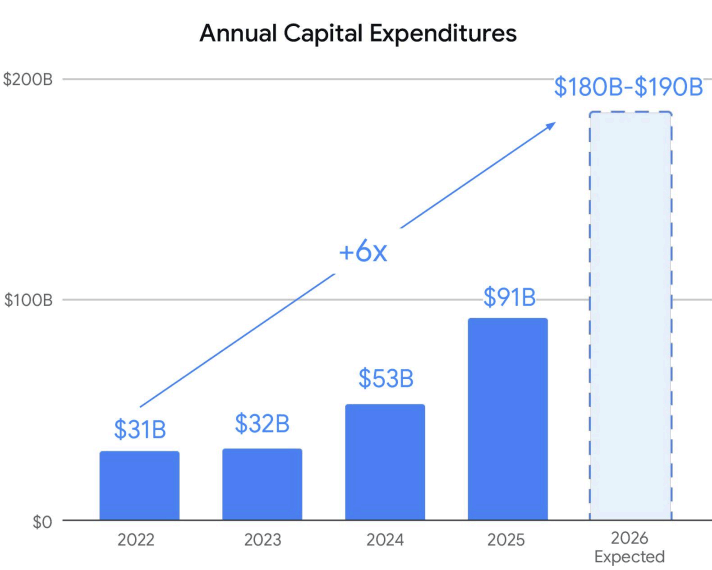
In 2022, we spent approximately $31 billion in CapEx. This year, we expect that number to be 6 times larger than 2022 and double last year’s at $180-190 billion. And next year, we expect it to significantly increase compared to 2026. The overwhelming majority of this spend will be in technical infrastructure.”

The Q2 earnings release says Alphabet raised $49.6 billion through an equity offering, specifically stating that the proceeds would be used for “capital expenditures to scale AI infrastructure and global compute.”

That’s interesting because it shows how extraordinary AI-related spending has become because Alphabet is not funding it all from operations, it also raised tens of billions of dollars in new equity to help finance their massive investment in AI data centers.

Capital Investments Spiraling Upward

The earnings release shows that Alphabet spend $44.924 billion dollars on “Purchases of property and equipment.” That’s about double the amount spent in the second quarter of 2025, $22.446 billion dollars.

What were those properties and equipment? A BBC report quoted Google’s Chief Financial Officer explained that 60% of that was for buying servers and 40% was for data centers.

The quoted explanation:

“Anat Ashkanazi, Google’s chief financial officer, noted on a call with financial analysts that the company had shown negative free cash flow due to growing capital expenditures, essentially all of which was related to AI spending.

She said the company spent $45bn in the second quarter, with 60% of the cost going towards servers and the remaining 40% going towards data centres.”

The Q2 release featured a graph showing that Google’s expenditures are spiraling upward, with estimates that the year will end by spending six times what Google spent in 2022, at the beginning of the generative AI boom.

Takeaways

  • Alphabet reported strong revenue growth across its businesses.
  • Search remains Alphabet’s largest revenue source, while Google Cloud is its fastest-growing business.
  • Revenue increased across every major business segment from Q1 to Q2, showing strong momentum across a diversified range of services and products.
  • Alphabet generated enormous profits while simultaneously reporting a $5.85 billion dollar negative free cash flow.
  • Negative free cash flow was caused by spiraling AI infrastructure spending.
  • AI infrastructure investment has become so large that Alphabet supplemented operating cash with a major equity raise to help finance it.
  • Capital expenditures are accelerating at an extraordinary pace, with spending expected to reach six times 2022 levels by the end of 2026.
  • The spending is primarily funding servers and data centers that support Google’s long-term AI strategy.

Featured Image by Shutterstock/Shutterstock AI

https://www.searchenginejournal.com/google-q2-earnings-show-5-85-billion-negative-free-cash-flow/583259/


Google Went ‘Not Provided’ In 2011 And Blinded Us, ChatGPT Just Shipped Its Version via @sejournal, @DuaneForrester

The attribution you are waiting for from ChatGPT is coming, and it is not coming to you. I ran a survey this month (it’s still open; please take it) asking whether dedicated AI visibility platforms are worth paying for, and I deliberately never asked about attribution. It showed up anyway. One consultant wrote that the whole problem is tying visibility, citations, and mentions to dollars. An agency owner managing over a dozen clients answered the “what’s your biggest-unanswered-question” prompt with a single word and an exclamation point: attribution! Another respondent put it more wearily: that tracking is only the first step, so what comes next.

Image Credit: Duane Forrester

Two different frustrations hide inside that one word, attribution. One is whether a tracker reads your AI visibility accurately at all. The other is whether that visibility can be tied to revenue. This piece is about the second. The first runs underneath it, and I come back to it at the end.

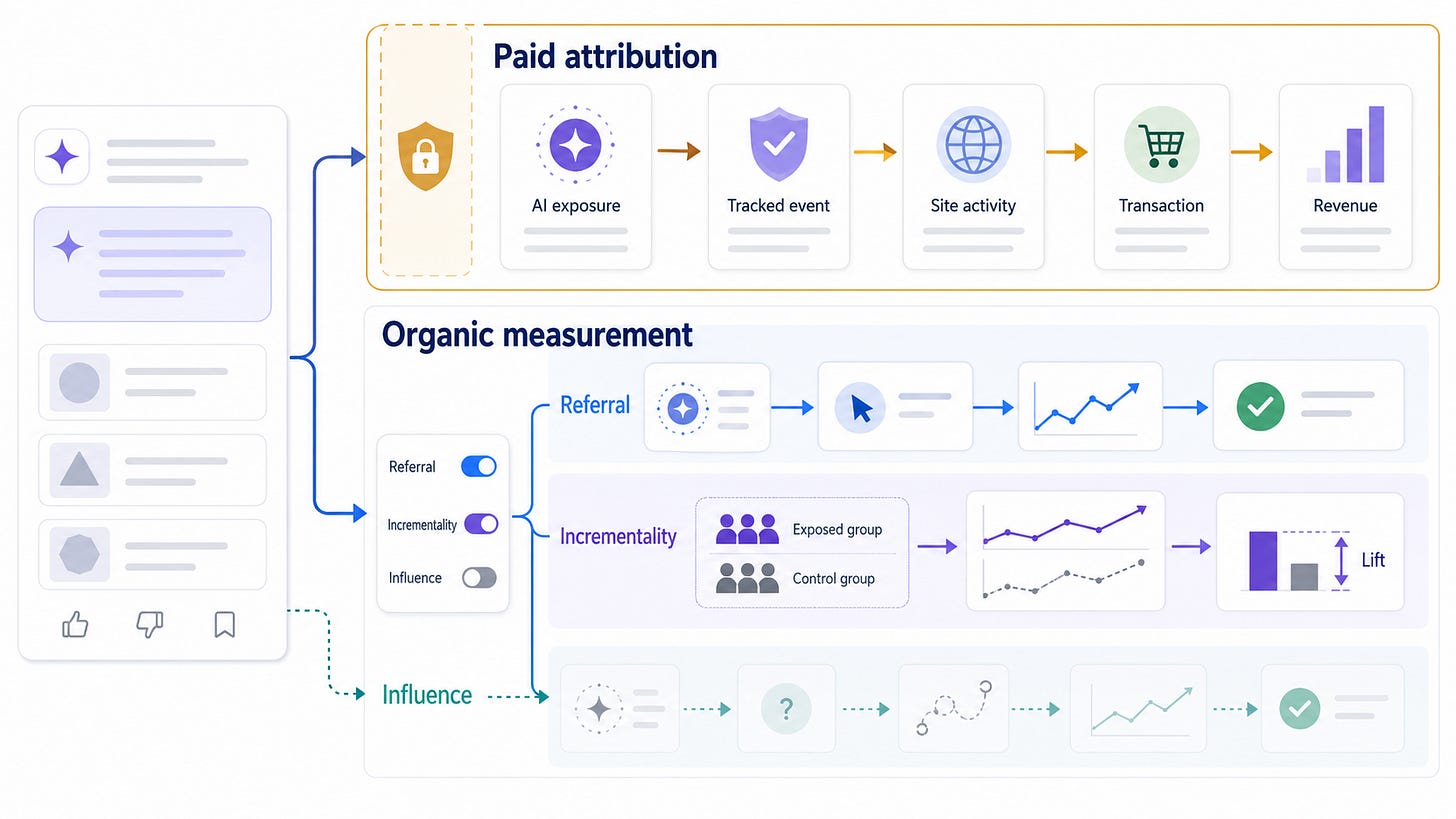
That corner has stayed dark for a reason, and it is not the reason most people think. The instinct is to treat missing attribution as a gap some vendor will eventually fill, the way rank tracking filled in twenty years ago. It will not fill in that way. The click-path attribution that organic search practitioners were trained to expect, the deterministic line from impression to session to conversion, is gone, and AI did not kill it. Referral traffic from AI answers is real but tiny, under one percent of total traffic on most sites, which means the thing people are asking for was never going to be answered by watching their own analytics. So let me toss a flashlight at the corner. Here is where attribution stands, why it stands there, and an idea about what you do starting tomorrow.

The Deterministic Era Was Ending Before A Single LLM Shipped

Third-party cookies went into slow deprecation, Apple’s App Tracking Transparency cut off a huge slice of mobile signal, Google Analytics moved to modeled conversions rather than counted ones, and media mix modeling, a technique older than most of the people now using it, came roaring back precisely because the clean deterministic path had frayed. Every one of those shifts happened for its own reasons and none of them involved ChatGPT. LLMs did not break attribution. They arrived after the break and made it impossible to keep pretending. The measurement world you are standing in was already modeled, probabilistic, and permission-dependent before answer engines entered the picture, and that is the ground we are now building on.

Now The Part That Will Annoy You, Because It Is Both Simple And Deliberate

Attribution from the platforms is coming, but it is arriving through the ads door, not the webmaster-tools door. The signal a paying advertiser needs and the signal a free organic practitioner wants are the same signal. A platform will build that signal for the person spending money and withhold it from the person who is not, because there is no business reason to give away for free what someone else will pay for.

We have watched this movie. In 2011, Google encrypted organic search referrals and organic keyword data vanished into the not-provided bucket, while paid search advertisers kept getting richer and richer conversion data. Same query intent, same underlying behavior, monetized on one side and starved on the other. Organic SEO spent a decade angry about it. (Maybe you still are?)

ChatGPT just shipped its version, and you can read both halves of it in OpenAI’s own documentation. On the organic side, the controls OpenAI gives webmasters are switches, not meters. You can allow OAI-SearchBot so you appear in ChatGPT’s answers, or disallow GPTBot so your content is not used in training. Toggles. On or off. What you cannot do is measure via OpenAI. On the paid side, OpenAI has already built a full server-to-server conversions pipeline: a pixel, an events API keyed to an Ads Manager account, standard events like order_created carrying amount, currency, and item-level detail, deduplication between browser and server, and a privacy-preserving identifier to tie exposure to outcome. That is closed-loop conversion attribution. It exists right now. It sits behind an ad account. The organic operator on the same platform gets a robots.txt file and best wishes.

The Sharper Cut Is This

Nobody at OpenAI needed to say Google’s name for this to happen. The not-provided lesson has been in plain sight for more than a decade, in every conference post-mortem and forum thread written since 2011, and the lesson is precise: taking access away costs you years of goodwill, so do not take it away; simply never grant it. Google paid for its mistake because it was a taking, and people fight takings. A designed absence generates no protest, only a low, unfocused unease. That knowledge was ambient. Any competent operator building an answer engine already had it.

Which is why this is not really an OpenAI story. Plot the model companies along a line by their stated reason to exist, a sell-to-serve spectrum if you want a handle for it, meaning where each one sits between built to sell and built to serve. OpenAI is running hard at commerce and ads, so it builds the paid measurement loop first and most visibly. Perplexity is chasing a slice of the discovery-and-shopping pie and moves in the same direction. Google already is an ad company. Anthropic frames itself around safety and long-term benefit and has the least structural reason to build an ads attribution layer at all. The doors differ, and the timing differs, but read the whole line and the conclusion holds in every seat: None of these companies has an incentive to hand free, item-level organic attribution to SEOs. The commercially driven ones gate it behind ad spend. The mission-driven ones simply have better things to build. Do not expect it from ChatGPT is the narrow version. The real version is do not expect it anywhere, sadly.

So Stop Asking 1 Question That Is Actually 3

When practitioners say attribution, they are usually blending three different problems that have three different answers. The first is referral attribution, meaning did an AI answer link to you, did someone click, did that session convert. That one is measurable today, because the click carries a referrer into your own analytics. The second is incrementality, meaning not who clicked but whether your visibility caused lift you would not otherwise have gotten. The third is influence, the dark-funnel case, meaning the buyer read your brand inside an AI answer, never clicked, and showed up three weeks later through a branded search. Referral you can see now. Incrementality you can prove yourself. Influence is genuinely hard. The mistake is treating all three as one blocked pipe, when two of them are already flowing and need nothing from the platforms at all.

Here Is The Work, And None Of It Requires Permission From OpenAI

Start with referral classification, and do it properly, because the default is wrong. AI sessions do not reliably self-label, and referrer strings alone will misfile a large share of them into direct or organic. Tag deliberately with UTMs where you control the link, build a classification rule that combines referrer with landing-page and query patterns rather than trusting the referrer field on its own, and treat the number you get as a floor, because unattributable and cross-window purchases bias every honest count downward. That gets you an accurate read on the one layer that is visible.

Then run incrementality yourself, which is the layer most teams skip because it takes design rather than a dashboard. Hold out a set of geographies and change nothing in them while you push visibility work everywhere else, or run on-off tests over defined windows, or track a fixed set of queries before and after a content push and watch what moves. This is causal measurement, and it belongs to you, not to the platform, which means the opacity of the black box does not touch it.

For the dark funnel, borrow the muscle B2B has used for twenty years, because this is not new-hard; it is old-hard wearing a new coat. Self-reported attribution, the how-did-you-hear-about-us field at the point of conversion, catches influence that no pixel will ever see. Branded-demand correlation, watching whether branded search and direct navigation rise as your AI visibility rises, gives you a defensible read at the aggregate level. Brand-lift studies do the same with more rigor when the budget is there. None of it is deterministic, and that is fine, because deterministic is not on the menu for anyone anymore.

Before You Buy Anything In This Space, Run 1 Test On The Vendor

Ask what data source closes the loop, and listen carefully to the answer. If the honest answer is first-party, meaning their agents on your site, your Google Analytics 4, your CRM, then what they sell is real but bounded, and it lives at the referral layer. If the answer implies signal drawn from inside OpenAI or Anthropic, they are either misrepresenting a referrer-detection method or lying to you. There is no third source. That single question separates the credible from the theatrical faster than any feature list.

This Is Where The Discipline Shows

Attribution counts orders from sessions you classified as AI-referred. Some of those buyers would have found you anyway. Incrementality measures the lift you actually caused, and it requires the experiments described above. Report attribution as attribution, and reserve the word incremental for the cases where you ran the test. The vendors who keep that distinction clean read as trustworthy. The ones who collapse it and promise to prove ROI are the 2026 reissue of guaranteed-first-page SEO, and they will age exactly as well, I think.

Look At Who Is Doing This Credibly, And The Thesis Proves Itself

The players with defensible revenue measurement all sidestep the black box and run on first-party data. Some vendors compute attribution by joining their own storefront sessions to checkout events against a sitewide baseline, and the numbers that get reported vary wildly, which is the honest headline. Microsoft Clarity’s study of 1,200 publisher sites found AI-referred visitors converting to sign-ups at eleven times the rate of organic search, while the peer-reviewed work in Marketing Science, 973 sites and 20 billion dollars in revenue, found organic LLM traffic converting below every traditional channel except paid social. I think both are true, and that is the point. The channel is small, high-intent, and wildly uneven, and it is not even measured the same way twice. Others resolve the loop the same first-party way, routing through affiliate infrastructure or handing purchase reporting back to your own analytics. The pattern under all of it is the tell: Everyone credible closes the loop with data you already own, because that is the only door open.

Give It 12 To 24 Months, And The Shape Is Predictable

Referral classification standardizes and gets boring, as the engines increasingly identify themselves and the analytics tools catch up. Attribution proper gets monetized as an ads product, gated and paid, exactly along the line OpenAI has already drawn in its documentation. And the honest vendors converge on the attribution-versus-incrementality language, because the market eventually punishes the ones who oversold. None of that returns free organic attribution to you, because none of it ever had a reason to.

Which Brings Me Back To The Survey, And To The Thing Underneath The Thing

The attribution requests were loud, but they were the sharp, nameable tip of something larger and more corrosive. As I read the early open-text answers together, what surfaces is not mainly a demand for better numbers; it is a refusal to believe the numbers already on offer. Respondents said they do not trust the trackers, that they cannot tell whether any of it is accurate, that they are struggling to invest because they do not trust the results. That is not a feature gap. That is a trust deficit, and part of it is the correct read of a market built on designed absences and overselling. But I would be lying if I put all of it there. Some of that unease is old thinking meeting a new situation, practitioners carrying SEO reflexes into an environment that does not run on them and skipping the work of learning what actually changed, because “GEO = SEO” is a more comfortable story than the truth. I can’t tell you how big that share is and nobody can measure it cleanly; we read it off what we see and hear online, at conferences, etc. But if it is even a third of the industry’s working mindset, that is not something a vendor comes along and fixes. That is a literacy problem, and it belongs to all of us.

If you are wrestling with this in your own stack, tell me where your loop breaks, in the comments or directly, because the playbook here is still being written and the field’s real answers are coming from practitioners, not vendors. And if you want the longer argument for why the underlying systems, not the dashboards, are where this literacy has to live, that is the whole spine of The Machine Layer.

More Resources:


This post was originally published on Duane Forrester Decodes.


Featured Image: Prostock-studio/Shutterstock

https://www.searchenginejournal.com/google-went-not-provided-in-2011-and-blinded-us-chatgpt-just-shipped-its-version/582839/


Designing A Measurement Framework Before You Touch GA4 via @sejournal, @bngsrc

In most cases, Google Analytics 4 projects start as a technical request. A marketing team, client, or stakeholder asks for tracking to be set up. Someone gets access to the property and assumes the data will eventually tell a story worth listening to.

Maybe sometimes it does. But most of the time, it produces a collection of numbers that feel precise but answer questions nobody actually asked.

The measurement framework should come first. Everything else should follow from it. Because it gives the technical setup a purpose before anyone starts measuring.

The core issue is that there’s too much data and not enough action. And that is the gap a measurement framework is meant to close.

Frame The Work Before You Track The Work

1. Define Success In Plain Language First

Before you create an event required to answer the question, define success. Success needs to be described in a way that people can recognize when they see it.

If your goal is lead generation, does success mean more total inquiries, or better-qualified inquiries?

Focusing on content performance? Then, define the success metrics as more organic traffic, returning visitors, more commercial page visits, or getting more of the assisted conversions.

If you want ecommerce growth, does success mean more purchases, higher average order value, fewer checkout drop-offs, or more repeat customers?

Each answer leads to a different measurement plan.

This is why I do not think analytics planning can be separated from business context. The same data can be useful, irrelevant, or misleading depending on what the company is trying to achieve.

2. Start With Questions, Not Metrics

This is the point where I would still delay building reports before I get the answers to important questions that will define the measurement framework. Interrogate your business like it’s a crush and get that data! But first, set a clear list of questions and don’t stop until you get the answers.

Well, now you may think, what does the business need to answer more confidently?

For example:

  • Why are users dropping off before submitting an inquiry?
  • Which landing pages generate valuable inquiries?
  • How does returning visitor behavior differ from first-time visitor behavior?
  • Which product or service pages need improvement?

At this stage, the goal is shaping the measurement setup. Because a dashboard should help people decide what to do next.

That sounds obvious, but it is where many reporting setups become messy. They include metrics because the metrics are available, not because anyone has decided what action they support.

The exercise here is simple but sometimes skipped: Write down every question your leadership team would ask if they had access to unlimited, perfectly clean data. Then look at that list and identify which questions your current setup could answer.

The gap between those two lists is your measurement framework’s job to close. Once those questions exist, the framework can move into defining what a result actually looks like.

3. Work Out What Could Help Answer Those Questions

Once success is defined, the next question is: What might be happening on the website? What is the user going through?

A good measurement framework should try to identify the behaviors that show someone is moving closer to a meaningful action.

For example, if the question is, “Why are users dropping off before submitting an enquiry?”, there are a few things we might need to understand first.

Are people reaching the call-to-action? Is the drop-off worse on mobile? Does it happen more from a specific landing page or traffic source?

Those are the behaviors that sit behind the question.

The same applies to a question like, “Which landing pages generate valuable enquiries?” The answer is probably not just in the number of sessions. You may need to look at what users do after arriving on the page.

Your questions become more useful for measurement when you can connect them to something observable.

4. Do Not Treat Every Metric Like A KPI

One reason analytics reports become confusing is that tracked actions get treated as if they all have the same level of importance. They do not. For example, a purchase is not the same as a product page view, undoubtedly.

That does not mean smaller actions are useless. But they play a different role.

I like to separate measurement into three layers:

Business Outcomes:

These are the results the company ultimately cares about: revenue, qualified leads, pipeline, purchases, subscriptions, retention, or customer acquisition.

Performance Indicators:

These help show whether users are moving toward those kinds of outcomes: demo request rate, checkout completion rate, trial signup rate, returning visitor conversion rate, or movement from content to commercial pages.

Diagnostic Signals:

These help explain why something may be happening: form abandonment, device-level drop-off, filter usage, internal search behavior, CTA clicks, or engagement with specific page types.

This matters because not every number belongs in the same report. Stakeholders need outcomes and a few performance indicators. Marketing teams may need channel, landing page, and content-level signals.

Analysts may need diagnostic data to investigate problems. Developers may need event-level detail to validate whether the implementation is working.

→ See also: GA4 Metrics Every Advertiser Should Pay Attention To

5. Decide What Not To Measure

This may be the most overlooked part of planning. However, a good measurement framework should also say what does not need to be tracked.

That can feel uncomfortable because analytics tools make so much tracking possible. But more tracking does not automatically mean better measurement.

Sometimes it just means more maintenance. Because every event has a cost. Someone has to implement it, test it, document it, explain it, and eventually decide whether it still matters.

If nobody is going to use the data, it probably does not belong in the core setup.

At this point, a simple test can help. If this number changed, would anyone do anything differently? If the answer is no, it may not be worth tracking yet.

6. Keep In Mind That GA4 Is Not The Whole Measurement System

Another important conversation needs to happen before implementation: What should GA4 be trusted to answer and where does another system need to be treated as the source of truth?

Because GA4 can tell you a lot about digital behavior. It can show where users came from, which pages they visited, which actions they took, and where they dropped off. But it should not always be treated as the final answer for everything.

As Rémi Kerhoas has argued, choosing a single source of truth can become an attribution trap because each system has its own model, limitations, and blind spots.

Therefore, for example, for ecommerce businesses, the ecommerce platform may be the cleaner source of truth for orders and revenue. For B2B businesses, the CRM system may be the better source of truth for lead quality.

Therefore, my recommendation here is that, when considering a measurement framework, you determine which questions GA4 can answer, which questions require another system, and where data needs to be compared.

7. Turn The Framework Into An Implementation Brief

Once you know what success means for the business, which questions need answering, which behaviors can help answer them, the technical work becomes much easier.

This is the point where GA4 belongs in the process.

Now the team can decide:

  • Which events need to be tracked.
  • Which events should be marked as key events.
  • Which parameters are needed.
  • Which audiences or segments matter.
  • Which reports should be created.
  • Which data needs to be compared with CRM, ecommerce, sales, or product data.
  • Which interactions should not be tracked yet.

This is much cleaner than opening GA4 first and trying to make decisions inside the tool.

The framework becomes the brief. The implementation is still technical, but it is no longer guesswork.

8. Validate Before Anyone Uses The Data

Even with a strong framework, the data still needs to be checked. An event appearing in GA4 does not automatically mean it is reliable.

It may fire twice. Or it may fire too early. It may be affected by consent settings, etc.

This is why validation should not be treated as a small technical task at the end.

The goal is not perfect data. Perfect data rarely exists. The goal is data that is defined clearly enough and trusted enough to support decisions.

The Tool Comes After The Thinking

I always find that GA4 capabilities are genuinely useful. However, the process should begin with the success definition and business questions that need answering. When teams determine these first, the analytics setup becomes far more focused.

Events gain a purpose, dashboards serve a specific function, and explaining reports becomes easier.

If you skip these first steps, GA4 turns into a repository of ambiguity. That is why the measurement framework comes first.

More Resources:


Featured Image: ImageFlow/Shutterstock

https://www.searchenginejournal.com/designing-a-measurement-framework-before-you-touch-ga4/580767/


AI SEO tools small businesses actually use

AI SEO tools for small businesses are essential to keep up with marketing trends and stay competitive. Yet most small businesses are trying to figure out which AI tools are actually worth their time and which ones are necessary, especially when there is an abundance of tools promising to solve every problem imaginable. The good news is that AI is available in just about every tool.

Get Started with HubSpot's AEO Tool

The truth is that small businesses have to invest in AI SEO tools, either in time or with cash. The stats show it clearly: AI in marketing is growing. According to HubSpot’s latest AI Trends for Marketers report, two-thirds of marketers globally use AI in their role. Among American marketers, that number climbs to 74%.

This guide cuts through the noise. It covers the essential AI SEO tools for small businesses that lean teams are actually using to do more with less. It includes free essentials like Google Search Console (GSC) and Google Analytics (GA4), and dedicated, paid-for platforms like HubSpot.

Table of Contents

Which AI SEO tools for small businesses deliver ongoing value?

AI SEO tools help small businesses research keywords, create content, optimize pages, fix technical issues, and track visibility. Choosing the right SEO tools based on what they can do for business is what’s challenging. Generally, small business buyers should prioritize time-to-value, learning curve, cost, and integration ease.
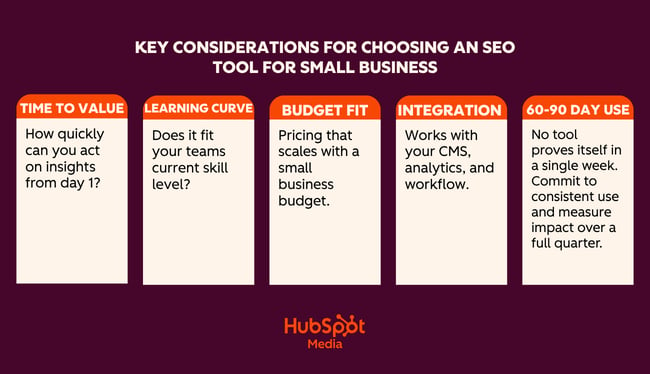
AI seo tools for small businesses key considerations

Time-to-Value

Time-to-value measures how quickly a tool delivers useful output after setup.

Time-to-value matters enormously for a lean team without a dedicated SEO resource. A tool that requires two weeks of configuration, or an external consultant to come in and set it up, may be more trouble than it’s worth. Unless, of course, the business is certain the investment is worth it.

Think about how quickly the business needs the tool to be live and running, and what the impact is on workflows and other business priorities. Sometimes, the time (and potentially cash) investment is worth it. Other times, a tool that runs with minimal setup and can surface recommendations within 24 hours is more appealing.

Here’s a real-life scenario showing how to think about time-to-value:

If I’m working with a new client, certain tools are a no-brainer. For example, Google Search Console (GSC) is a free tool, and the data it provides is invaluable. I tell all my clients to set this up, or I do it for them. Once someone has added the tracking script to the website, the tool runs on its own in the background. Within 24 hours, I get valuable data about the website and SEO performance. It’s clear to me that GSC is a must-have for all websites.

Compared to GSC, HubSpot requires more time to set up. If unlocking certain features is required, a cash investment is required, too, because some of HubSpot’s features are only available in higher editions.

The difference here is that GSC does a few things really well, such as:

  • Shows exactly which search queries are driving impressions and clicks.
  • Identifies indexing issues and crawl errors that Google has flagged.
  • Tracks average position and click-through rate by page and keyword.
  • Flags Core Web Vitals issues affecting page experience.
  • Submits sitemaps and requests re-indexing after page updates.

HubSpot does a lot of things really well and adds a layer of sophistication to marketing and other business operations. For example, HubSpot:

  • Features AI-powered SEO recommendations that prioritize what to fix and why.
  • Has content optimization tools that help teams draft, refine, and publish on-brand content.
  • Tracks organic performance alongside email, ads, and CRM data in one place.
  • Connects SEO activity directly to leads and revenue in the same platform.
  • Automates reporting so teams aren’t manually pulling data from multiple tools.
  • Has a free CRM built in — contact, deal, and pipeline management without an extra subscription.
  • Connects SEO and content efforts directly to leads, deals, and revenue in the same platform.
  • Tracks the full customer journey from first organic visit to closed deal.
  • Features email marketing, landing pages, and forms that all live in the same ecosystem as SEO tools.
  • Includes social media management and ad tracking alongside organic performance data.
  • Automates lead nurturing workflows triggered by content engagement.
  • Features shared dashboards that mean sales and marketing teams work from the same data.
  • Scales with the business with free tools to start, and Pro and Enterprise editions as needs grow.
  • Reduces tool sprawl by replacing multiple point solutions with one platform.

Some tools may take more time to set up and require a payment. But these tools and their features may be business critical.

If a tool can help save human hours and labor, influence marketing conversions, solve problems across the business, and directly contribute to business growth, then the time — and cash — investment is worth it. If a tool takes two weeks to set up and the marketing team never opens it, the value isn’t there.

Learning Curve

A tool is only as useful as the team’s ability to use it consistently. Complex platforms built for enterprise SEO agencies often overwhelm small-business users with feature depth they don’t need. When evaluating a learning curve, it’s worth asking:

  • Can a non-technical marketer or founder navigate this tool independently?
  • Does it explain why something is a problem, not just flag that it is?

The AI tools for SEO that perform best for small teams offer guided workflows, plain-language recommendations, and clear next steps rather than raw data that requires expert interpretation.

Cost and Budget Fit

The strongest AI SEO solutions for small businesses are those that live at the intersection of:

  • Required functionality
  • Affordable price point
  • Potential for scale at affordable prices

Businesses need tools that teams will use and that solve a unique problem at an affordable price point. From there, any tool needs to scale with the business. Consider the cost implications one year, or even five years, into the future. If upgraded packages are going to be out of budget, it might not be a good idea to invest now because the headache and time-sap of switching tools later could be extreme.

Pro tip: Before committing to any paid tool, map out the three SEO tasks that take the most time each week and that no other tools help with. Then evaluate each platform specifically against those tasks. A tool that solves one real bottleneck will always outperform a tool that addresses multiple.

Integration Ease

If a tool can integrate with existing systems, adoption rates increase. According to MuleSoft, 86% of IT leaders say that AI agents can bring complexity instead of value without proper integration.

For example, if SEO data connects to an already-in-use Content Management System (CMS), it feels easier to adopt the new tool because it plugs into an existing workflow, rather than creating a new workflow that operates in a silo. Integrations with existing tools also improve and enhance workflows and data rather than complicate them. They’re simply more motivating for teams to get involved with.

When comparing platforms, check how well they connect with the tools a team already uses.

60 to 90 Day Usage as the Real Test

Demo performance and trial-period enthusiasm rarely tell the full story. The more reliable measure of a tool’s value is whether teams are still using it consistently at the 60- to 90-day mark and whether they can point to specific outcomes that the tool contributed to.

When doing an AI SEO tools comparison, speak to any tool’s sales reps and see what your team can negotiate as a testing period. Or consider paying monthly for a few months before committing to an annual billing.

What AI Can and Can’t Do for Small-Business SEO

Small business SEO can’t rely on tools alone. Here’s an honest breakdown of where AI pulls its weight, and where brands still need human oversight.

Drafting and Scaling Content Quickly (Tread With Caution)

AI can generate blog posts, FAQs, service page copy, and meta descriptions in minutes. For a small business that struggles to publish consistently, this is a genuine time-saver. Prompt AI with your target keyword, your audience, and your tone, and get a solid working draft without staring at a blank page.

The quality of an AI draft depends on the topic. For example, an objective truth, or a simple question like “What is anchor text?” or “What does bounce rate mean?” is easily written with AI.

However, thought leadership pieces, or content that requires a new or expert opinion, are better written or heavily edited by a human. For example, “Is SEO dead in the age of AI search?” or “How should small businesses respond to Google’s latest algorithm update?”

Where human review still matters: AI doesn’t know your business, audiences, or industry the way subject-matter experts do. It may get facts wrong, miss nuances, or sound generic. Editors should review every piece of AI-drafted content so that it’s personalized and fact-checked before it goes live. Google also rewards content with genuine expertise and first-hand experience — and these are things AI can’t credibly create.

Finding Keyword and Topic Ideas

AI tools are good for generating ideas. Ask one to suggest keyword clusters around your service, generate questions your customers might search for, or identify related topics that may be otherwise missed. This can replace hours of manual research for a small team with no dedicated SEO resources.

Where human review still matters: AI often suggests keywords with no real search volume data behind them. Marketers should still run the best ideas through a tool like Google Keyword Planner to validate demand before building content around them. Or, at least a human sense check. While AI can generate a bunch of keyword ideas, I don’t rate it for content clustering or search engine results page (SERP) analysis.

Optimizing Existing Pages

Paste a webpage into an AI tool and ask it to rewrite the title tag, improve the meta description, tighten the heading structure, or make the copy more readable. For small businesses with dozens of underperforming pages, this kind of audit-and-improve workflow can get meaningful results without a big budget.

Where human review still matters: On important pages, include a layer of human review or judgment. On the whole, AI can do this pretty well, and if SEO specialists are reducing missed title tags on pages that don’t depend on SEO for visits, then an AI title tag is probably fine.

AI SEO Tools for Small Business

The tools in this guide are here because they solve real problems for lean teams and because the AI built into each one is genuinely useful.

If building an SEO foundation from scratch, the HubSpot SEO Starter Pack is a free resource worth downloading before diving into any of these tools.

First, a comparison table for a quick AI SEO tools for small business comparison:

Tools for SEO and Technical Audits
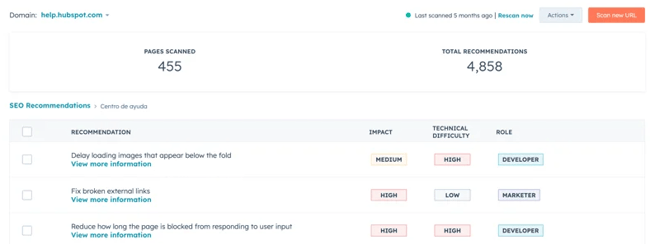
HubSpot SEO Recommendations

Screenshot from HubSpot SEO recommendations, one of the best AI SEO tools for small business.

HubSpot’s SEO recommendation tools live inside Marketing Hub and represent one of the most integrated approaches to SEO available to small businesses. Unlike standalone SEO platforms that hand over a list of issues and leave teams to figure out the rest, HubSpot connects SEO recommendations directly to the content editor, the CRM, and the reporting dashboard. This unification means that every fix, piece of content, and ranking improvement is tied to real business outcomes.

The real value is the presentation of findings. Standalone tools like Screaming Frog are excellent, but businesses need an SEO expert who can decipher issues and assign their solutions when using that kind of tool.

SEO recommendations in Marketing Hub prioritize on-page updates for non-experts, which is exactly what makes it well-suited for small business teams without a dedicated technical SEO resource. Rather than presenting raw data that requires interpretation, HubSpot explains why something is flagged, what impact it has on search performance, and what action to take to resolve it. Anyone can figure out what an issue is, how to solve it, and how much of an impact it’s causing, which helps with prioritization.

HubSpot’s guide to understanding SEO recommendations is a useful reference for a full breakdown of what each recommendation type means.

What HubSpot SEO Recommendations Does

The SEO Recommendations tool automatically scans a website’s live pages and surfaces issues ranked by priority:

  • High
  • Medium
  • Low

Recommendations are accessible site-wide under Marketing > SEO, or page-by-page through the Optimize panel inside HubSpot’s content editor. This means writers and marketers can catch and fix SEO issues without ever leaving the tool they’re already working in.

On the technical side, HubSpot’s SEO tools scan for the issues that most commonly suppress rankings for small business websites: broken links, missing or duplicate meta descriptions, missing alt text on images, HTTPS issues, slow-loading pages, and heading structure problems. Each flagged issue comes with a clear explanation and a specific action — not just “fix your meta descriptions,” but exactly which pages need attention and what good optimization looks like.

On the on-page side, the Optimize sidebar inside the content editor checks keyword placement and relevance, flags keyword stuffing, reviews readability, and surfaces internal linking opportunities, all while a page is being written or edited. Teams can analyze SEO performance across the entire site from a single dashboard, tracking organic sessions, keyword rankings, and how individual pages are trending over time.

Where HubSpot SEO Sits Within a Broader Marketing Stack

HubSpot’s value proposition becomes genuinely difficult to match. The SEO tools are part of the same platform as email marketing, landing pages, social media, ads, and the free CRM. That means teams can track the full journey from first organic search visit to closed deal, without exporting data between tools or reconciling reports across different platforms.

The CRM integration makes HubSpot one of the best tools for SEO for B2B. This connection ties SEO activity directly to pipeline and revenue data in the CRM. It becomes possible to show exactly what organic traffic is worth, not just in clicks, but in leads and deals.

Teams on Marketing Hub Pro or Enterprise have access to both SEO and AEO (Answer Engine Optimization) tools. Marketers get visibility into traditional organic rankings and how their brand is appearing in AI-generated answers. More on that below.

Pricing

HubSpot’s SEO tools are available across multiple editions. Basic SEO recommendations are available on free and Starter plans. The full suite, including topic clusters, advanced reporting, content strategy tools, and AEO features, requires a Pro or Enterprise subscription.

For small businesses evaluating cost against capability, it’s worth comparing the total cost of HubSpot against the combined cost of the separate tools it replaces: CMS, CRM, email platform, SEO tool, and reporting dashboard.

Best for: Small business marketers and lean teams who want one tool to do it all: SEO, content, CRM, and reporting in one place.
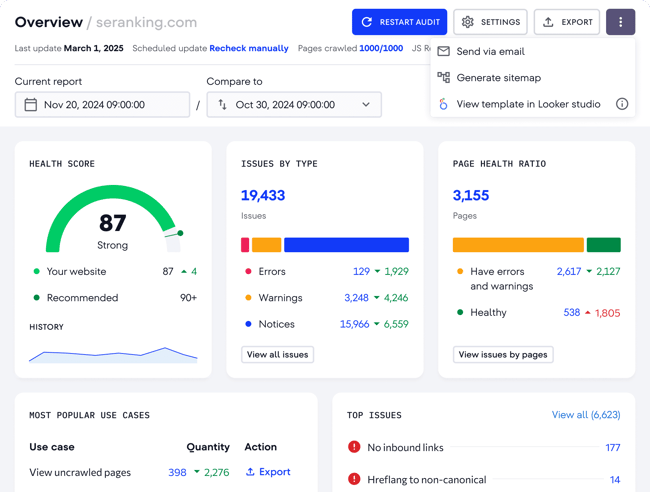
SE Ranking

SE Ranking, one of the best AI SEO tools for small business.

Source

SE Ranking is a comprehensive AI-powered platform that provides keyword tracking, site audits, competitive research, and AI-specific insights. Beyond technical SEO, SE Ranking also covers keyword research, backlink analysis, competitor monitoring, and content gap identification. It’s a well-rounded platform and includes top AI search optimization tools for content creators working across multiple clients or projects.

Key Features
  • AI-powered site audit crawls the full website and flags technical issues, including broken links, redirect chains, missing metadata, duplicate content, and page speed problems, with prioritized recommendations for each.
  • Keyword rank tracker monitors keyword positions across Google and Bing with daily updates, historical data, and built-in competitor comparison.
  • On-page SEO checker analyzes individual pages against top-ranking competitors and surfaces specific recommendations to improve organic position, such as improving relevance, structure, and content depth.

Pricing: Plans start at the Wallet tier, with Standalone and Enterprise tiers available for larger sites or agencies. A 14-day free trial is available with no credit card required.

What I like: SE Ranking hits a sweet spot for small businesses: it has the depth of a premium SEO platform but is priced accessibly enough for small businesses to justify. The interface is clean, and the recommendations are actionable. It doesn’t just flag problems; it explains what to do about them, which matters when there’s no in-house SEO specialist to interpret the data.

For teams considering alternatives: Semrush and Ahrefs are both excellent platforms, arguably the most powerful in the category, and either would be a strong choice for teams with the budget to match. You can’t go wrong, and the right choice comes down to preference.

Best for: Small businesses and lean SEO teams that need a full-featured SEO platform without the price tag of enterprise tools like Semrush or Ahrefs.

Tools for Automated Content Optimization

Creating content consistently is one of the biggest SEO bottlenecks for small business teams. The tools in this category use AI to speed up the drafting, optimizing, and structuring process.
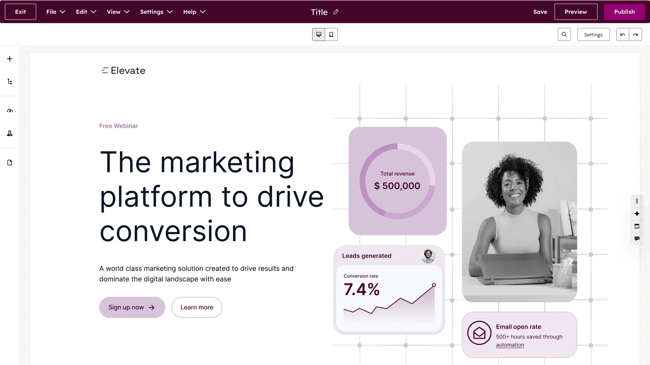
Content Hub

Content Hub, one of the best AI SEO tools for small business.

HubSpot’s Content Hub is where content strategy, creation, optimization, and performance measurement all come together. For lean teams trying to do more with fewer people, that consolidation is essential.

One of Content Hub’s most valuable features for small businesses is the topic cluster tool. The premise is straightforward: rather than publishing isolated blog posts on loosely related topics, teams build content around a core pillar page (a comprehensive, authoritative piece on a broad subject), supported by a network of cluster content that covers related subtopics in depth. Each cluster piece links back to the pillar, and the pillar links out to the clusters, creating an interconnected content structure that signals topical authority to search engines.

Read more about pillar and cluster strategy:

This approach is one of the most reliable ways for small business websites to compound organic traffic. Search engines reward sites that show depth and expertise on a subject, and a well-structured topic cluster does exactly that.

For teams new to content planning, the topic cluster tool can transform a scattered blog archive into a structured, rankable content asset. Content Hub makes it straightforward to map, build, and monitor those clusters without a separate content strategy platform.

Breeze: HubSpot’s AI Layer For Content

Inside Content Hub, Breeze functions as the engine behind the platform’s content creation and optimization capabilities. Rather than a single feature, Breeze is a suite of AI tools embedded throughout the content workflow, from the moment a topic is identified to the moment a post is published and promoted.

Breeze bridges the gap between AI writer and human. Content writers use Breeze as a co-pilot, meaning content is co-created with AI. Throughout the process, human writers can input their experience and edits.

Content Hub AI blog writer helps teams draft and refine on-brand content starting from a topic or keyword. It then generates a structured draft, allowing writers to refine, expand, or rewrite sections without leaving the editor. Breeze Content Agent suggests blog topics and generates search-optimized drafts that incorporate an established brand voice, functioning as a multiplier for subject-matter experts rather than a replacement for them.

As a writer and SEO specialist, I feel that content co-created by AI is the most efficient way to work. Compared to churning out an entire blog post with AI, co-creation with Breeze upholds a higher standard of content. The layer of ongoing human review protects accuracy, brand voice, and trust.

Beyond first drafts, Breeze handles the optimization work that typically falls through the cracks on lean teams: generating meta titles and descriptions, suggesting internal links, reformatting content for readability, and remixing existing content into new formats. Content Remix repurposes one asset across formats and channels, turning a blog post into a social caption, an email intro, or a landing page section without starting from scratch each time.

HubSpot’s Brand Voice capability allows Breeze to generate content within defined tone and language parameters. This means AI-generated drafts don’t come out sounding generic. For small businesses where brand voice is a genuine differentiator, this feature ensures that speed doesn’t come at the cost of consistency.

Performance Tracking Tied to Revenue

Because Content Hub sits on top of HubSpot’s CRM, every piece of content is tracked, not just for traffic and rankings but for its contribution to leads, pipeline, and revenue. Teams can see which blog posts generate contacts, which pillar pages drive the most organic sessions, and how content performance trends over time, all without exporting data to a separate analytics platform.

For AI SEO solutions for small businesses that need to justify content investment to stakeholders or clients, this attribution capability is significant. It moves the conversation from “our blog traffic is up” to “our content contributed X leads and Y deals this quarter.”

Pricing: Content Hub is available as a standalone product with a free plan. Paid plans start at $20 per user per month. Content Hub can also come as part of a broader HubSpot subscription.

Breeze Content Agent, including AI blog drafting and Content Remix, is available on Content Hub Pro and Enterprise editions. For small businesses already using Marketing Hub, it’s worth checking whether features are already included in the current plan before purchasing separately.
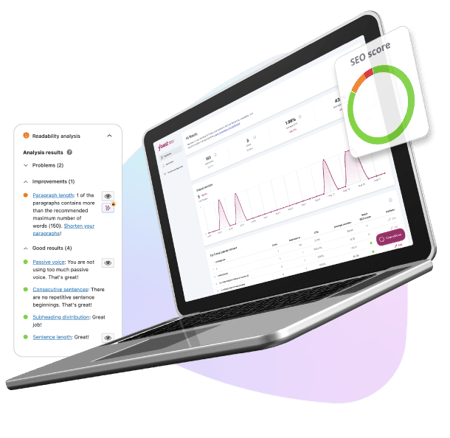
Yoast

Yoast, one of the best AI SEO tools for small business.

Source

Best for: Small businesses running WordPress websites that want real-time on-page SEO guidance built directly into their content workflow.

Yoast has long been the default SEO plugin for over millions of websites. For WordPress users, it’s one of the lowest-friction ways to bring AI-assisted SEO recommendations into the writing process — no separate platform to log into, no manual audits to run. The recommendations surface inside the WordPress editor as content is being written or edited.

Key Features
  • Real-time on-page SEO analysis: Checks keyword placement, heading structure, meta titles, meta descriptions, and internal linking as content is written, with a clear traffic-light scoring system that flags what needs attention before publishing.
  • AI-generated titles and meta descriptions: Yoast’s algorithm analyzes the content of each page and generates multiple options for SEO titles and meta descriptions, allowing teams to choose the best ones, request more options if needed, and customize the output to align with brand voice.
  • Readability analysis: Evaluates sentence length, paragraph structure, use of transition words, and passive voice, helping non-expert writers produce content that’s easier for both readers and search engines to process.

Pricing: The free package covers basic on-page SEO analysis, focus keyphrase, readability checks, and XML sitemaps. A solid starting point for small businesses with tight budgets. There are Premium and AI+ packages available that start at $9.90 per month.

What I like: I’ve used Yoast for my entire career. I think it’s excellent. Candidly, I’ve found the free version to be enough, but I have the expertise to manage SEO elements without Premium. For small businesses that need more support, consider paying for Premium. It’s very affordable.

The one thing to keep in mind is that Yoast is an optimization assistant, not an SEO platform. It helps teams polish and improve existing content. It’s not the right tool for keyword research, competitor analysis, backlink monitoring, or rank tracking. For small businesses that need those capabilities, Yoast works best alongside a tool like SE Ranking.

If teams are using HubSpot, then Yoast isn’t needed at all because Content Hub will do what Yoast does. It’s worth going back to those considerations before buying tools, especially time-to-value and cost and budget fit.
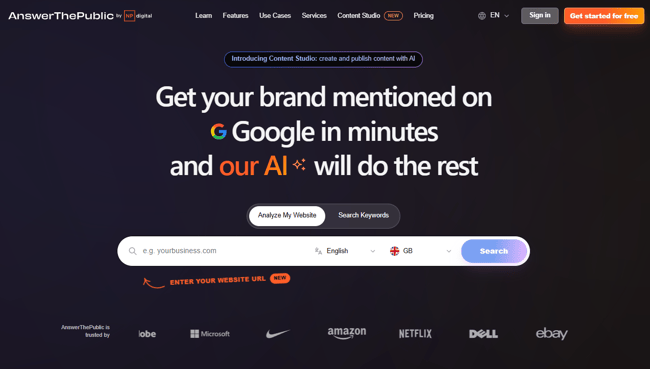
AnswerThePublic

AnswerThePublic, one of the best AI SEO tools for small business.

Source

Best for: Small business marketers and content teams who want to quickly identify the questions, topics, and search phrases their audience is actually using.

AnswerThePublic is a content ideation tool built on Google autocomplete data. Enter a keyword or topic, and it generates a visual map of the questions, prepositions, comparisons, and related searches people are typing into search engines around that subject. For lean teams trying to figure out what to write about next, it removes a lot of the guesswork.

Key Features
  • Visual question mapping: Generates an interactive diagram of every question, preposition, and comparison search related to a keyword, organized by search intent and phrasing, making it easy to spot content gaps and long-tail opportunities.
  • AI-powered search insights: Surfaces trending search queries and emerging topics in a chosen niche, helping teams get ahead of demand rather than chasing it after the fact.
  • CSV export: All keyword and question data exports cleanly into a spreadsheet, making it straightforward to build content calendars or brief writers directly from the research.

Pricing: Three free searches per day, then paid packages that start at $13.33 per month for more searches and export features.

What I like: For the price, AnswerThePublic is one of the fastest ways to fill a content calendar with topics that real people are actually searching for. The visual format is engaging and helps spot content ideas that naturally lend themselves to a topic cluster structure. It pairs well with how HubSpot’s Content Hub organizes content strategy. For a budget tool, it’s excellent. But for small businesses using HubSpot in any capacity, AnswerThePublic may repeat functionality already available.

Tools for Tracking Rankings and AI Visibility

Tracking SEO performance has always meant monitoring keyword rankings, organic traffic, and on-page engagement. In modern-day SEO, that picture is incomplete without also tracking how a brand appears in AI-generated answers. SEO and AEO are complementary disciplines, and small business strategies must optimize for both.
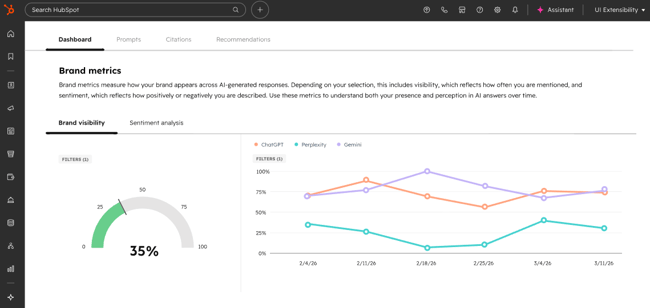
HubSpot AEO

Screenshot from HubSpot AEO, one of the best AI SEO tools for small business.

Best for: Small businesses and marketing teams who want to monitor and improve how their brand appears in AI-generated answers, then connect those insights directly to CRM data.

HubSpot AEO is designed to show marketers exactly how their business appears inside AI answer engines, and give them clear, actionable steps to improve.

What makes HubSpot AEO stand apart from other tools in this category is its CRM integration. The tool automatically suggests prompts based on industries, competitors, and customer segments because it’s connected to CRM data. Other standalone AEO tools don’t have that context. HubSpot already does.

HubSpot AEO is one of the best LLM SEO analysis software. Teams set up prompts such as the questions their buyers are likely asking AI engines, and HubSpot runs those prompts daily across ChatGPT, Perplexity, and Gemini. The platform then tracks how the brand appears in the answers: whether it’s mentioned, how it’s described, how it compares to competitors, and where the gaps are. A brand visibility scorecard tracks how well a company performs across AI-driven search experiences, signaling opportunities to improve presence.

Because HubSpot AEO sits inside Marketing Hub, recommendations connect directly to the content and social tools already in use, meaning teams can move from “we’re not showing up for this prompt” to “we’ve published content to address it.”

Key Features
  • Daily prompt tracking across ChatGPT, Perplexity, and Gemini
  • Competitive positioning where a brand appears relative to competitors in AI-generated answers
  • Sentiment analysis that tracks not just whether a brand is mentioned, but how it’s described
  • Actionable content recommendations tied directly to visibility gaps
  • Integration with Marketing Hub content tools for immediate follow-through

Pricing: Free 28-day trial covers 25 prompts across all three engines, no credit card required. Then, $50/month (or $45/month billed annually), tracking 25 prompts run daily across three engines, up to 2,500 answers per month.
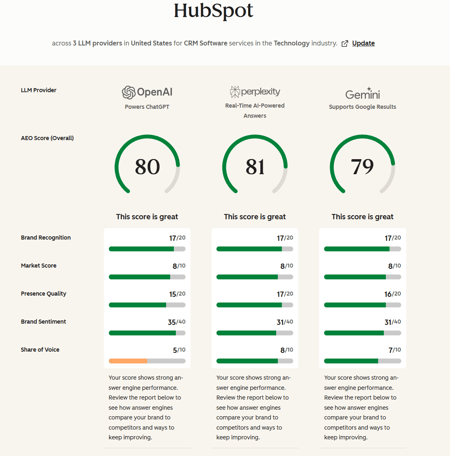
HubSpot AEO Grader

HubSpot AEO Grader

Best for: Any business that wants a fast, free snapshot of how AI engines currently perceive their brand (or competitor brands) with no setup, no subscription, and no prior AEO experience required.

HubSpot AEO Grader analyzes AI visibility across ChatGPT, Perplexity, and Gemini in a single free report. It sends brand information to all three platforms simultaneously, cross-validates their responses, and produces a composite score out of 100. Enter a company name, location, industry, and product or service description, and the grader does the rest.

The score breaks down across five dimensions:

  • Sentiment Analysis
  • Presence Quality
  • Brand Recognition
  • Share of Voice
  • Market Competition

The AEO Grader is best understood as a diagnostic tool — a way to answer “how does AI represent my brand right now?” before deciding whether ongoing monitoring through HubSpot AEO is warranted. The Grader answers the question of how AI represents a brand right now; HubSpot AEO answers how that’s changing over time, and what to do about it.

What I like: HubSpot’s AEO grader is free, fast, and the output is genuinely useful. I often use it to get an initial benchmark of how a website, or its competitors, is performing. It’s a tool I use early in my auditing process, possibly in preparation for a discovery call.

I like that AEO Grader offers a structured, plain English breakdown of where a brand stands across each dimension. For small businesses that have never thought about AI visibility before, the AEO Grader is the most frictionless possible starting point. Run it, review the results, and use the gaps it surfaces to inform the next phase of content planning.

Pricing: Free forever
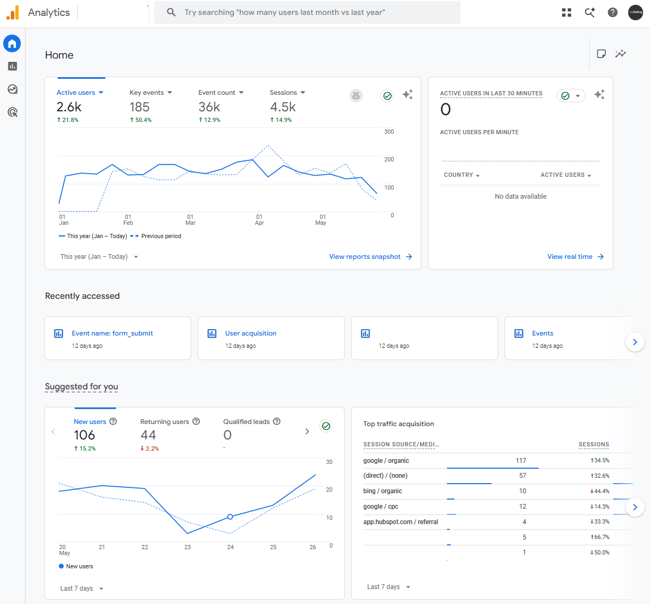
Google Analytics

Google Analytics, one of the best AI SEO tools for small business.

Best for: Every business with a website.

Google Analytics (GA4) is the foundation of any small business analytics setup. It’s free, built by Google, and tracks where traffic comes from, what visitors do when they arrive, and whether that activity converts into meaningful outcomes. No paid tool on this list replaces it, and the best ones integrate with it.

Key AI Features
  • Generated Insights: Automatically detects and explains significant changes in GA4 data, appearing on the home page and within reports, using machine learning to analyze countless combinations of dimensions and metrics and presenting findings in plain language with suggested actions.
  • Predictive metrics: Surfaces purchase probability, churn probability, and revenue predictions based on user behavior patterns, helping teams prioritize where to focus SEO and content effort.
  • Anomaly detection: Flags unexpected drops or spikes in traffic, engagement, or conversions automatically, so teams catch problems before they compound.

Pricing: Free forever.

What I like: As a free Google tool, GA4 is a must. These days, my favorite use case for GA4 is segmenting audiences by AI referral source, then tracking behavior. It’s an affordable way to see the impact of AI traffic without purchasing other tools. Simply set up a report that records the conversions from AI traffic.
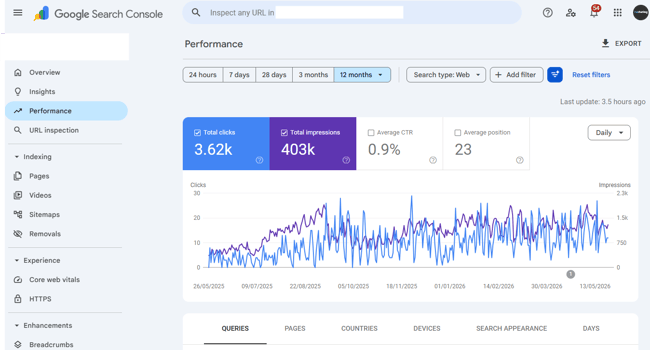
Google Search Console

Google Search Console, one of the best AI SEO tools for small business.

Best for: Every business with a website. It’s a non-negotiable and should be set up on day one.

Google Search Console tracks what happens in Google before a visitor arrives. It’s the tool for your SEO, whereas GA4 is an overall marketing analytics tool.

GSC is the only tool that shows exactly which search queries are generating impressions and clicks, which pages are indexed, what technical issues Google has flagged, and how Core Web Vitals perform across the site. The data comes directly from Google, which makes it categorically more reliable than any third-party rank tracker for understanding actual search performance.

Key Features
  • Performance report: Shows clicks, impressions, average position, and click-through rate by query and page, with trend data that makes it easy to spot which keywords are gaining or losing ground.
  • Coverage and indexing reports: Flags pages Google can’t crawl or index, with specific error types and affected URLs, so fixes are straightforward.
  • Core Web Vitals: Surfaces page experience issues affecting rankings, with mobile and desktop breakdowns and guidance on what’s causing each problem

What I like: GSC uses AI to provide insights on what’s happening in plain English, which makes it really easy for small teams without SEO expertise to see and understand their website.

Pricing: Free forever.

Featured Resource: My 18 favorite SEO tools for auditing and monitoring websites

Frequently Asked Questions About AI SEO Tools for Small Businesses

Do small businesses really need multiple AI tools for SEO?

Small businesses don’t necessarily need multiple AI tools for SEO, but most end up using at least two. No single tool covers the full SEO workflow. It’s about finding the right combination depending on internal challenges and bottlenecks. The key is avoiding too much tool sprawl and paying for overlapping features.

What’s the best way to get cited in AI answers fast?

The fastest route to AI citations is structured, specific, authoritative content that directly answers the questions buyers are asking. Clear definitions and step-by-step sections improve citation potential in AI answers, so breaking content into logical, scannable sections with descriptive headers, concise definitions, and direct answers to common questions gives AI systems more to work with.

How do I keep AI from changing my brand voice?

The most reliable protection is a clearly defined brand voice document that AI tools can reference. Usually, these come in the form of a written guide covering tone, language, terminology preferences, and phrases to avoid. Most capable AI content tools, including Breeze by HubSpot, allow teams to input brand voice parameters that shape generated output before it reaches a writer for review.

When should a small business invest in paid AI SEO tracking tools?

The right time to move from free to paid tools is when there’s a specific, identified gap that free tools can’t fill. Ultimately, a tool should really pay for itself in value or time saved. For example, HubSpot’s paid SEO and content tools make sense when the team is ready to connect content production, SEO recommendations, and revenue attribution in one place.

The right AI SEO tool is the one that solves many problems.

For small businesses that want to simplify their stack without sacrificing capability, HubSpot is the strongest all-in-one platform option available. The SEO tools inside Marketing Hub cover technical recommendations, on-page optimization, topic cluster planning, and performance tracking. Content Hub and Breeze handle content creation. Add AEO for AI visibility monitoring and the free CRM for revenue attribution, and one platform replaces what most teams are currently cobbling together across four or five separate tools.

The HubSpot SEO Starter Pack is the fastest way to get started. It’s free, practical, and built for teams scaling SEO without a dedicated specialist.

Source