AI Overviews Now Answer Most Local Searches – How To Get Your Business Cited via @sejournal, @AdamHeitzman

If your local search traffic has felt off lately, you’re not imagining it. Fewer clicks. Fewer calls. Customers finding answers and moving on without ever hitting your site. That’s not a seasonal dip or a technical issue. That’s AI Overviews doing exactly what Google designed them to do.

Local SEO used to be predictable. Optimize your Google Business Profile, build citations, stack localized keywords, and protect your Map Pack spot. That system worked for years. In 2026, it’s not enough. Working across 15+ client markets at our agency, spanning home services, legal, fitness, healthcare, and financial verticals, we’re seeing businesses rank well in the traditional local pack while being completely invisible in AI-generated answers for the exact same queries. Those two things used to be the same game. They’re not anymore.

Here’s what you actually need to know to stay visible.

The 29% Nobody Is Talking About

A Whitespark study shows AI Overviews appear for 68% of local searches. Local packs? Only 39% of the same queries. That’s a 29-point gap where your customers are getting answers without ever seeing the map results you’ve worked to rank in.

Some AI Overviews include a mini local pack. Others surface a fully synthesized answer with supporting links but no map at all. Either way, Google controls the user experience, not you. And if you’re only measuring traditional local rankings, you have a serious blind spot. Google itself has been clear that AI visibility hinges on content people actually want to read, not just content that ranks.

The gap plays out differently by query type. Simple transactional searches like “tacos San Francisco” still default heavily to the local pack.

Screenshot from search for [tacos San Francisco], Google, July 2026

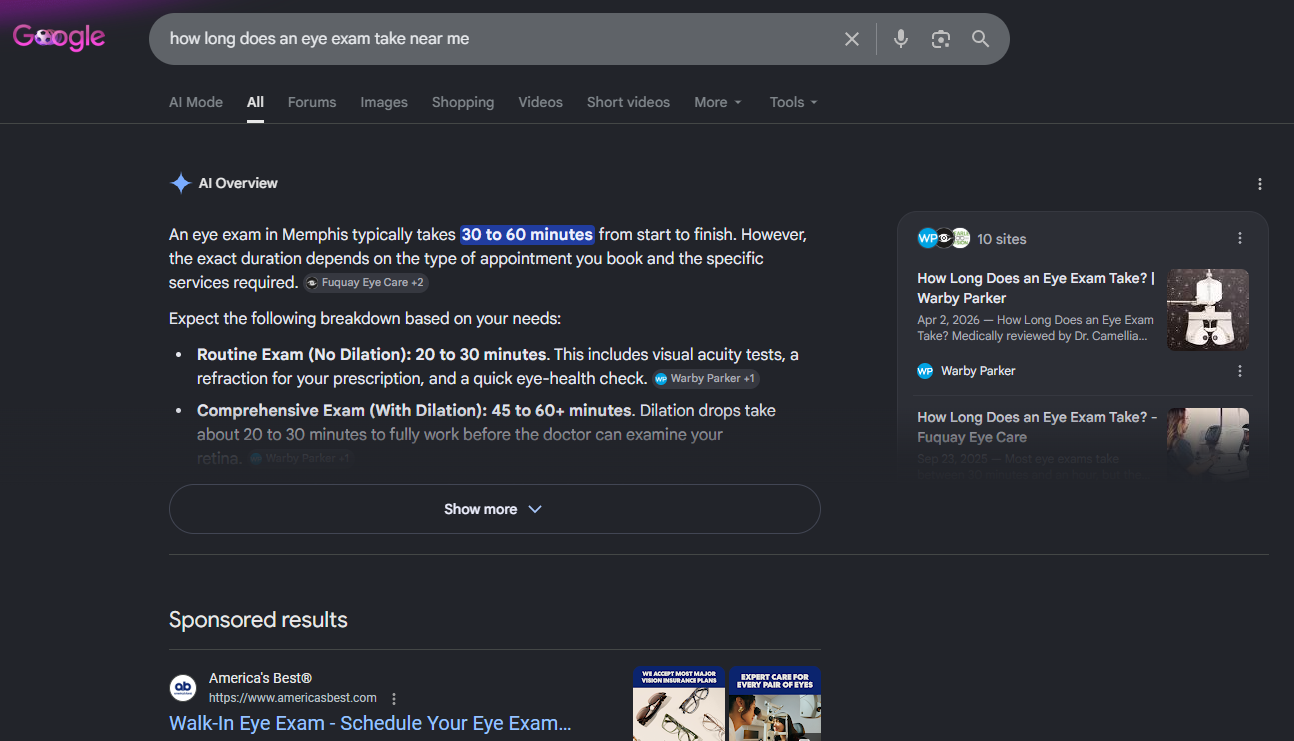
But informational queries like [how long does an eye exam take near me] trigger AI Overviews 92% of the time (according to Whitespark).

Screenshot from search for [how long does an eye exam take near me], Google, July 2026

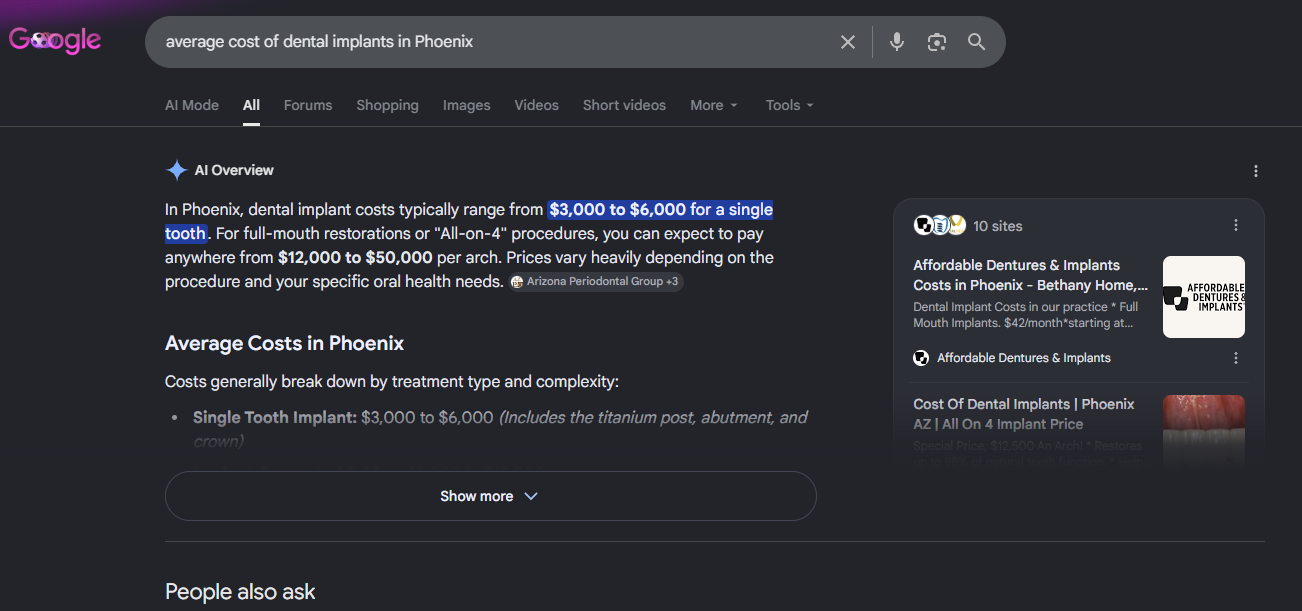
Hybrid intent searches like [average cost of dental implants in Phoenix] hit 97% (according to Whitespark).

Screenshot from search for [average cost of dental implants in Phoenix], Google, July 2026

If your business answers questions rather than just fulfilling immediate transactions, you are almost entirely living in AI Overview territory now.

Vertical matters too. Legal searches see AI Overviews everywhere, regardless of geography. Home services are more variable. Restaurants and retail still lean on traditional packs for simple queries. But the key shift is this: Your competitive set just got bigger. You’re no longer just competing with the business down the street. You’re competing with anyone who can answer the user’s question better than you can.

How To Build Location Pages AI Will Actually Cite

Across dozens of accounts at our agency, the pattern is consistent. The cookie-cutter location page approach has been around forever: same structure, same generic copy, just swap the city name. It was never a great strategy, but it used to produce okay results. Today, AI systems spot it immediately and move on.

LLMs aren’t reading your pages the way a human skims a website. They’re looking for fact density. Structured, specific, directly useful information that answers real questions without requiring interpretation. A 200-word page that says you “serve Nashville with pride” and repeats your service list gives the AI nothing to work with.

What AI actually needs from a location page comes down to three things: information architecture, geographic legitimacy, and entity consistency. Here’s how each one works.

Build For Fact Density, Not Keyword Coverage

Start with the structural foundation. Every location page needs:

  • NAP, service area, and hours (table-formatted).
  • Testimonials from customers in that specific city, with neighborhood references if possible.
  • FAQs specific to that market (permit questions, local regulations, climate-specific concerns).
  • Real project examples or case studies from that location.
  • A structured data grid showing regional pricing ranges, service tiers, or compliance details.

Tables and FAQ schema matter here. Large language models are pattern-recognition systems. Structured formats give AI discrete, labeled data points it can extract with confidence, rather than requiring it to interpret meaning from paragraphs. Kevin Indig’s analysis of 1.2 million ChatGPT responses found that cited passages skew heavily toward definitive, entity-rich statements, which is exactly what a well-built table delivers. A page that tells people which pests are common in the Austin summer heat, your average response time, and what the process looks like from first call to completion is the page that gets pulled into the Overview.

Worth noting: Publishing more content without improving structure actively works against you in an AI retrieval environment. Semantic precision matters more than volume.

Prove Geographic Legitimacy With Landmark Images

Google’s vision AI analyzes photos to verify geographic legitimacy. If your location page uses generic stock images of smiling professionals in a nondescript office, the AI reads that as low-context boilerplate. It doesn’t know where you are. And when it doesn’t know where you are, it finds someone else to cite.

The fix is intentional local imagery. I got this concept from Steve Toth, and the results have been promising. Try using this approach: three landmark images per location page, sourced from Google Images using Creative Commons filters.

Here’s how to pull them:

  1. Go to Google Images, search the specific landmark by name (not just the city, “Navy Pier” not “Chicago”).
  2. Click Tools, select Creative Commons licenses under Usage Rights.
  3. Then click through to the original source to confirm the license type before downloading.
  4. Rename the file before uploading: “navy-pier-chicago-lakefront.jpg” instead of “IMG_2473.jpg.”
  5. Write alt text that describes the image and mentions the location naturally. And always attribute properly in a small caption; most CC licenses require it.

Three or more images are more intentional than just one. When your alt text says “Navy Pier at dusk,” the filename is “navy-pier-chicago-lakefront.jpg,” the surrounding copy references serving Chicago residents, and your quick-facts section lists Illinois-specific regulations, you’ve built a page that reads as local because it actually is.

Structure each location page hero with: a primary image of an iconic, instantly recognizable landmark; a secondary image showing people in the area with a landmark visible in the background; and a full-width feature shot of a third local landmark or skyline. A Chicago page gets the Bean, Willis Tower, and Navy Pier. A Denver page gets Red Rocks, the 16th Street Mall, and the Capitol building. Three signals at the image level, before AI even reads a word of your copy.

Lock Down Entity Consistency Across Every Touchpoint

The third pillar is one that most businesses underestimate. AI systems don’t just read your location page in isolation; they cross-reference it against everything else they can find about your business. If your NAP is inconsistent across directories, your hours are outdated on Apple Maps, or your service categories don’t match between Google Business Profile and your website, the AI’s confidence in your entity drops. And lower confidence means lower citation probability.

Make sure your business name, address, phone number, service categories, and business description are identical everywhere they appear. Yelp, Google, Bing, Apple Maps, industry-specific directories – every node in your digital presence needs to say the same thing. Audit these quarterly. It takes less time than you think and pays off in citation consistency across every AI platform pulling your data.

Other Pages Worth Building: Cost And Pricing Guides

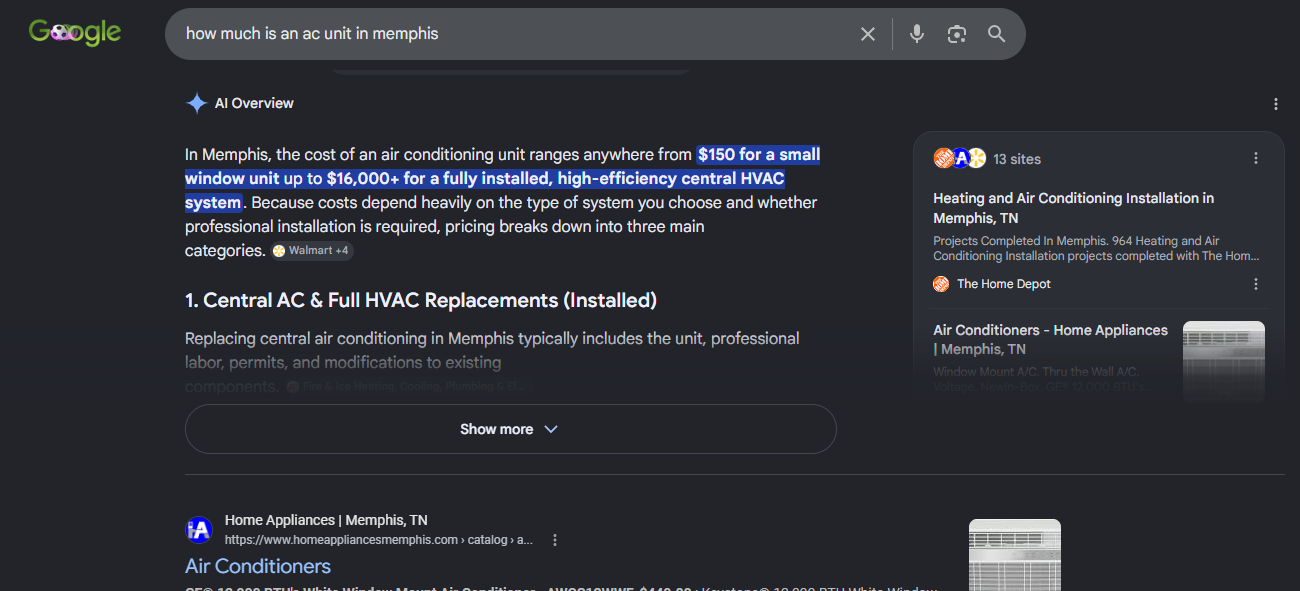
Alongside your location pages, one of the highest-leverage content investments you can make right now is building out dedicated cost and pricing guides, one for each core service or location you target. Here’s why: “price, cost, and buy” queries trigger AI Overviews more than 80% of the time, and most local businesses refuse to answer them.

Screenshot from search for [how much is an ac unit in memphis], Google, July 2026

The fear is understandable. Publishing pricing feels like giving competitors ammunition or locking yourself into a number. But if you don’t answer the “how much does this cost” question, AI will find someone who does. That someone gets the citation, the traffic, and the call.

You don’t have to publish fixed rates. Give realistic ranges (“basic lawn care packages typically run $80 to $150 per month, depending on lot size and frequency”) and then explain the variables that drive the price up or down. Square footage? Materials? Urgency? Regional permit requirements? That structure gives AI exactly what it needs: a factual, organized resource it can confidently cite for cost-intent queries.

Use natural phrasing throughout. Tools like AnswerThePublic or Google’s People Also Ask surface the conversational, imperfect ways real people search. “How much to fix a leaky faucet?” sounds different from “leaky faucet repair cost.” Optimize for how people actually talk, not how marketers write.

5 Content Plays That Build Citation Authority Beyond Your Pages

Getting your location pages right is the foundation. But it’s only half the battle. The other half happens entirely off your website.

Omniscient Digital’s research analyzing 23,000+ citations found that owned content accounts for only about 23% of citations in branded queries. The other 77% comes from off-page sources. That means even a perfectly built location page isn’t enough on its own. You need a broader content environment that feeds AI systems with citations, context, and credibility.

Here’s where to focus:

1. Answer Capsules On Commercial Pages

Don’t bury your helpful content in a blog. Embed FAQ sections, cost breakdowns, and short how-to guides directly on your service pages. Kevin Indig’s analysis of 1.2 million ChatGPT responses found that 44.2% of citations come from the first 30% of page content. Getting a concise, direct answer above the fold on your key pages isn’t just good UX; it’s increasingly what determines whether AI can extract and cite you.

2. Directory And Listing Alignment

When AI systems scan 15 different directories and find conflicting NAP information, they lose confidence in your entity. When all 15 say the same thing, you read it as verified and stable. Audit your listings quarterly. It’s one of the most consistently overlooked citation levers we see across our client accounts.

3. Reddit And YouTube Presence

Averi.ai’s research shows that Reddit is the most-cited source in Google AI Overviews, accounting for 21% of all citations, with YouTube close behind at 18.8%. The platforms shift over time, but the principle holds: AI pulls heavily from user-generated platforms. Encourage genuine reviews, optimize video descriptions with local keywords, and participate authentically in local subreddit discussions.

4. Proprietary Local Data

If you publish information that exists nowhere else, LLMs have to cite you to reference it. An annual landscaping cost report based on your own project data. Aggregated patient satisfaction stats if you’re a dentist. Unique local market benchmarks. Original data creates citation gravity that generic content never will.

5. Content Freshness

Ahrefs’ analysis of 17 million AI citations found that, on average, AI-cited content is 25.7% fresher than traditionally ranked content. Supporting content isn’t a set-and-forget asset anymore. Build a quarterly refresh cadence into your workflow.

The Window Is Open, But Not For Long

Right now, AI-driven local search is still in its early stages. These systems are still building their indexes of trusted local sources. That means there’s a real window, probably 12 to 18 months, to establish yourself as a go-to citation source before your competitors figure out what’s happening.

The businesses that move now and consistently publish structured, helpful, entity-aligned content will build citation authority that compounds over time. The ones waiting for this to stabilize will spend years trying to catch up to whoever claimed their niche first.

Traditional SEO earned you a rank. GEO earns you a citation. Those are different things, and the second one is increasingly what drives whether a customer calls you or never knows you exist.

More Resources:


Featured Image: Accogliente Design/Shutterstock

https://www.searchenginejournal.com/ai-overviews-now-answer-most-local-searches-how-to-get-your-business-cited/580757/


Anthropic’s Claude Can Now Watch A Video And Learn Your Job via @sejournal, @martinibuster

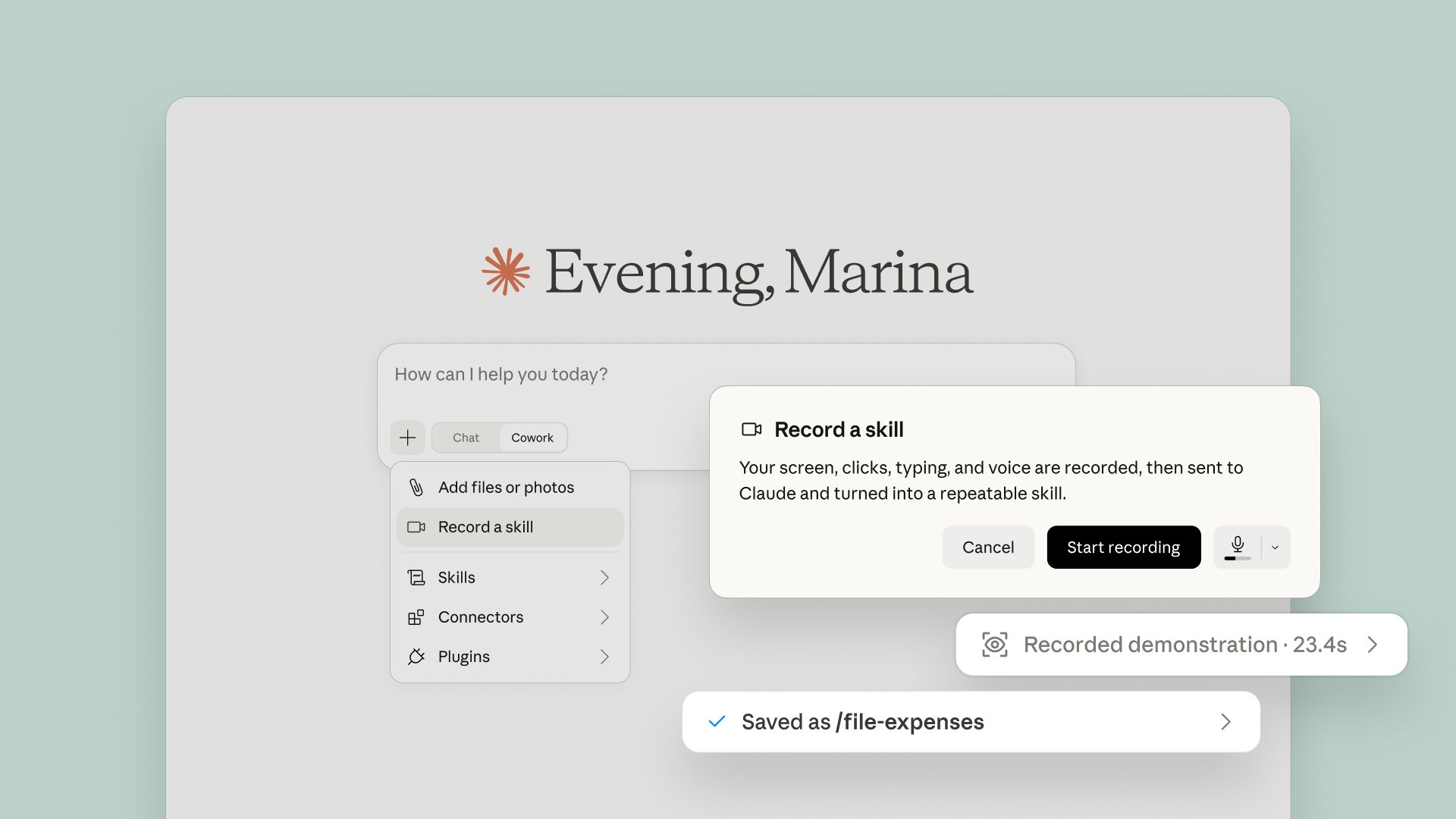
Anthropic announced that users on its paid plans can now teach Claude Cowork a skill by recording a walkthrough of a task, which Claude can then use to create a skill that it can subsequently use to complete the same task. It’s called Record a Skill.

Anthropic tweeted:

“New in Claude Cowork: teach Claude a skill.

Record your screen while you do a task, talk through it as you go, and Claude turns it into a skill it can run again. Find it under Record a skill in the + menu of the Claude desktop app.

Available on Pro, Max, and Team plans.”

Screenshot Of Anthropic Claude Record A Skill

Screenshot: Anthropic

Also Available On OpenAI Codex

The ability to record a skill has been available for OpenAI Codex users since June 18. Known as Record and Replay, it’s available only to Apple Mac users and excludes users in the European Economic Area, Switzerland, and the United Kingdom. It’s not known when it will be available for Windows users.

Response To Anthropic’s Announcement

Several people who read the announcement felt threatened by it, commenting that it’s a way to quickly lose your job.

@alfredversa tweeted:

“This has to be the easiest way to be replaced and lose your job man.”

Several others used the announcement to complain that their accounts had reached their limits, preventing them from actually trying out the new feature.

Anthropic’s Teach A Skill Feature

It may very well be that the record a skill function may lead to job losses. Some may argue that if a job can be fully automated with zero humans in the loop then the job may not have needed a human to begin with. A counterargument can be made that a person’s skill and experience is what makes a difference in the output regardless if there’s an AI in the loop.

Which is it then? Is Anthropic’s new feature something good and a timesaver or maybe not so much?

https://www.searchenginejournal.com/anthropics-claude-can-now-watch-a-video-and-learn-your-job/583053/


Court Dismisses Google’s DMCA Claims Against SerpApi via @sejournal, @MattGSouthern

A federal judge dismissed Google’s DMCA claims against SerpApi, ruling that blocking automated access to public search results isn’t considered copyright circumvention when those results include no copyrighted content.

Google’s December lawsuit accused SerpApi of violating the DMCA by bypassing SearchGuard, Google’s anti-scraping technology, to collect and resell search results. SerpApi filed a motion to dismiss in February. Chief U.S. District Judge Yvonne Gonzalez Rogers approved this motion, resulting in the dismissal of both of Google’s anti-circumvention claims.

What the Court Decided

The ruling focused on whether Google’s SearchGuard protects a copyrighted work. Google’s results primarily consist of public information, but they often include a Knowledge Panel that may contain licensed images.

The court determined that for results lacking copyrighted content, SearchGuard cannot regulate access since there is no protected work involved. These claims were dismissed without the opportunity to amend, effectively ending them.

For results containing licensed images, the court found that Google didn’t demonstrate it used SearchGuard with the authorization of the copyright owners, as the law requires. These claims were dismissed but with permission to amend, allowing Google to attempt further action.

The court also rejected SerpApi’s argument that Google didn’t have the right to sue. SerpApi had argued that the DMCA protects only copyright owners, and since Google doesn’t own its search results, it couldn’t sue. However, the judge disagreed, clarifying that the law’s protection isn’t limited only to copyright owners.

What SerpApi Said

SerpApi CEO Julien Khaleghy called the ruling a win for open access to public data and said the company will keep supporting the developers and businesses that rely on public search data:

“We’re pleased that the court rejected Google’s attempts to expand the DMCA to assert control over access to public pages. The internet’s founding principle – open access to usable information – is essential to driving innovation and ensuring everyone benefits from the promise of data. SerpApi will continue supporting developers, AI companies, researchers, and businesses that rely on access to public search information.”

Google has not commented on the ruling as of publication.

Why This Matters

The ruling clarifies that scraping public results without copyrighted content isn’t a DMCA violation in this case, and Google can’t reassert that point.

Scraping plain search results is safer than pulling copyrighted extras, such as images in Knowledge Panels. This limits Google’s ability to use the DMCA against SERP scraping, without ending the case.

Looking Ahead

Google has 21 days to amend its complaint. To keep the copyright claims alive, it will need to present facts that the court previously found missing, starting with the copyright owners’ authorization to deploy SearchGuard.

The judge has paused discovery until Google makes the necessary amendments and the court rules on any new motion.

Additionally, SerpApi is facing a separate DMCA lawsuit from Reddit that raises similar questions about scraping publicly viewable pages. This order only addresses part of that issue.


Featured Image: beast01/shutterstock

https://www.searchenginejournal.com/court-dismisses-googles-dmca-claims-against-serpapi/583033/


Google’s AI Search Data Is Growing, But The Gaps Remain via @sejournal, @MattGSouthern

Google’s Merchant Center opened a pilot last week that shows retailers what shopping-related questions people ask AI Mode and AI Overviews about.

Brodie Clark, an independent SEO consultant who got access on a client sub-account, published screenshots and called it the first Google product to give query data for these surfaces

The query data is new, and it’s useful if you run a product feed. But it’s important to know Google groups the questions rather than listing them individually. So what you get in the report are the vocabulary of a category instead of the queries themselves.

That’s enough query data to tell you which attributes to add to your product listings, but it won’t tell you whether AI Mode sent anyone to your site.

What Shipped

The report is called AI performance insights, and Google’s help documentation describes it as showing how a brand is discovered across AI Mode and AI Overviews. If you have access, you’ll find it in Merchant Center under Analytics, then Products, then the AI performance tab.

Google announced the reporting at Google Marketing Live in May, roughly seven weeks before the pilot opened.

What It Tells You

The report sorts shopping questions by query type, using Google’s examplesof searching by category, researching product specs, or looking for reviews. Query frequency shows how popular a given type has been.

Phase of shopping journey groups the questions by how far along the shopper is. Product terms are the words shoppers reach for when they describe what they want, with Google’s documentation giving “maximum cushioning” and “arch support” as examples. Share of voice compares your AI impressions against your competitors’.

Google’s documentation is clear about what to do with all this:

  1. Click through to all product terms and work the relevant concepts into product titles and descriptions.
  2. Check the popular attributes against what’s missing from your product data.

The second point is the most actionable detail in the report. Attribute completeness has long been a common challenge, and now you can close the gap with a clear demand signal from Google’s AI surfaces. If shoppers in your category are frequently asking about a feature your feed doesn’t have, that’s an easy fix.

What The Metrics Actually Are

None of the metrics in Merchant Center’s AI Performance insights show you a real question anyone typed.

You understand the shape of the demand, rather than the demand itself. That’s why the product terms serve well as input feeds but aren’t suitable as a keyword list.

Share of voice should be viewed in a similar way. Google calculates it as your AI impressions divided by total impressions across you and your competitors, and you can’t change that competitor set, because it’s defined by the competitors already available in Merchant Center. It can also produce numbers that look like performance and aren’t. If you lack sufficient impressions, share of voice displays as a zero. If your account has no competitors defined, it displays as 100%.

The scope filters carry their own limits. Traffic is restricted to organic AI traffic, and paid ads traffic isn’t included. Product category filters one category at a time, and there isn’t a report that covers all of them. Insights only count conversational queries that indicate shopping or brand intent; anything else isn’t factored in.

How We Got Here

Last month, Google began testing dedicated generative AI performance reports in Search Console, starting with a subset of UK sites. Those reports show impressions broken out by page, country, device and date. They don’t include click data, and they don’t include query-level metrics. Both absences were the story at the time, and both are still open.

The same week, the UK’s Competition and Markets Authority imposed a conduct requirement on Google covering publisher controls and reporting. The CMA’s interpretive notes call for impressions, click-throughs and click-through rates for search generative AI features, separated from other parts of general search. The click and click-through rate reporting hasn’t appeared. Under the CMA’s decision, Google has nine months to implement all changes.

In July, Google told CMOs that third-party AI-visibility tools don’t have access to its internal metrics, and named Search Console and Merchant Center reporting as the baseline for tracking gains. That was three weeks before this pilot lit up.

Line those up and the pilot reads differently. Google has put AI reporting in front of two different audiences in two months, both times as a limited test. The first answered neither of the two questions people asked. This one answers half of one, for merchants, in the US, with paid traffic excluded and clicks still missing.

Where Google Filed It

In June, SEJ contributor Slobodan Manic argued that Google put AI visibility inside Search Console on purpose, and that the filing decision was itself an argument. AI visibility is search visibility, so it belongs in the search tool, and companies tell you what they believe by where they spend engineering.

The Merchant Center pilot doesn’t refute that. Google’s CMO guidance names both dashboards as first-party reporting, so nothing here contradicts the position that AI visibility gets measured where search visibility gets measured. The grouped query information landed in the dash merchants use for feeds, not the one everyone else opens to check search performance.

Why This Matters For Search Professionals

With access to the Merchant Center pilot, you get two things that change a workflow. You get a demand signal to prioritize against, which is a different input from anything in Search Console, and share of voice becomes a number that will land in a monthly report whether anyone has explained it yet.

As for the rest, Clark isn’t so optimistic, and he drew the Search Console comparison himself:

“In its current form, similar to the recent rollout of AI reporting in Search Console, there isn’t a great deal of actionability behind the data, though it is good to see at least some form of query data being included – something that has been lacking in GSC.”

Most merchants don’t have it yet, and holding an eligible Merchant Center account isn’t enough, since the pilot covers a limited number of US accounts. The check is whether an AI performance tab has appeared. Until it does, your AI reporting is the impression data in Search Console and nothing more.

Sites without a product feed don’t get these grouped shopping-query insights at all. Affiliate sites, review sites and editorial teams publishing buyer guides compete for the same AI Mode answers as the brands they write about, and their reporting is Search Console’s impression data, which covers the same two AI surfaces without any query dimension. The gap this pilot narrows for merchants stays exactly as wide for everyone else in the same result.

Agencies have a different problem, which is the share-of-voice number itself. It travels well in a deck and badly in a conversation, because it’s relative to a competitor set the merchant didn’t pick and can’t edit. A zero can mean thin impressions. A hundred can mean an empty competitor list. Neither one is a bad quarter, and both will look like one on a slide.

What Still Can’t Be Measured

Clicks remain the most significant data point we’re missing. After a year of covering this topic, we’re still facing the same question, and this report doesn’t provide an answer either. Impressions show how often a link to your product appeared, and John Mueller has clarified how those impressions are counted. These rules also apply to share of voice, as that metric is based on impressions.

Individual queries aren’t accessible at the moment, and the details about your competitor set haven’t been shared. As of now, Google hasn’t announced if grouped query information will be available in Search Console, especially for sites that don’t have product feeds.

Looking Ahead

Google says the pilot will expand to Australia, Canada, India and New Zealand in the coming months, which will tell you whether the metrics hold up under more accounts and categories.

The open question is whether any of this crosses over. Google said in June that it would add metrics to the Search Console reports over time, without naming which ones or when.

The nearest fixed point is the CMA’s nine-month implementation window, which covers engagement reporting including clicks and click-through rates for UK publishers. That’s a different dashboard, a different audience and a different jurisdiction from this pilot.

If you want to be part of discussions with industry leaders like Loren Baker, Brent Csutoras, Shelley, Katie, Heather, Roger and myself, then check out SEJ Pro and be part of the new community where conversations happen before they become industry news.

More Resources:


Featured Image: fengdr0517/Shutterstock

https://www.searchenginejournal.com/googles-ai-search-data-is-growing-but-the-gaps-remain/582558/


The New Google Business Profile Playbook for AI Local Search via @sejournal, @CallRail

You probably set up your Google Business Profile a while back, filled in your address, picked your categories, maybe chased down a few reviews, and then called it done. Totally understandable. That was enough, once.

But here’s what’s changed: If you haven’t meaningfully touched that profile in months, you’re losing visibility to competitors who figured out something you haven’t yet. Google transformed GBP from a directory listing into a live engagement surface, and businesses that treat it like the former are quietly bleeding map pack rankings they don’t even know they’ve lost.

This applies to every local business. Retailers, yes, but also law firms, dental practices, restaurants, gyms, plumbers, and salons. If your GBP isn’t actively signaling to Google that you’re open for business and earning it every day, you’re leaving real visibility on the table.

Let’s talk about what killed the static profile, what Google built in its place, and exactly what you need to do about it.

When “Set It And Forget It” Actually Worked

Cast your mind back to the directory era. You filled out your name, address, and phone number (NAP), chose a category, uploaded a logo, and crossed your fingers. Google treated these profiles as reference points, fixed coordinates in the physical world. The algorithm cared about NAP consistency across directories more than anything else. Match your citations across 50 listing sites? You were golden.

It worked because that’s genuinely all Google needed. The platform was confirming you existed at a given address. Nothing more.

The New Table Stakes (And Why They’re Not Enough)

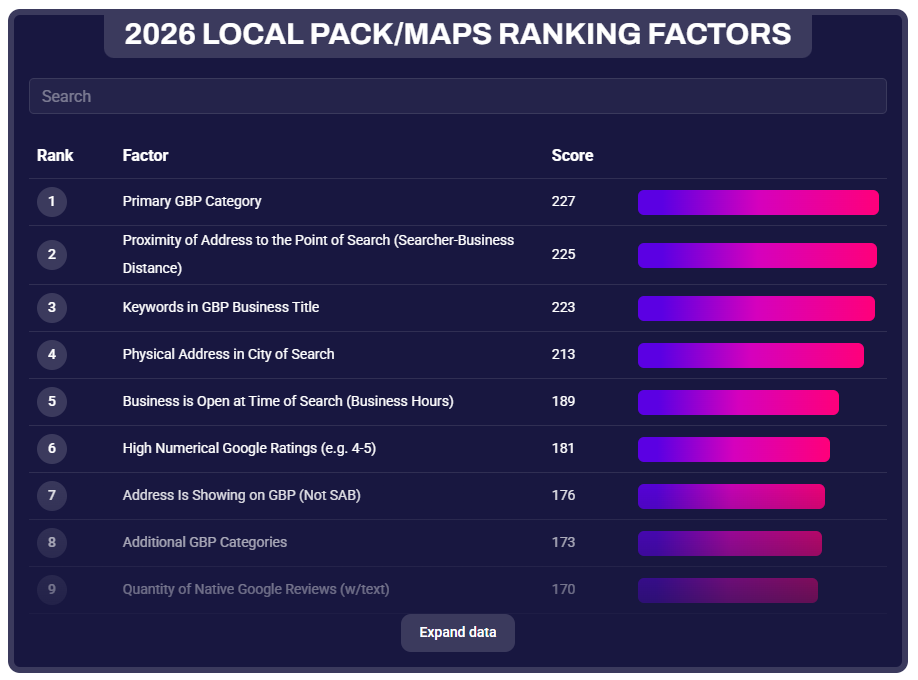
Those fundamentals haven’t disappeared; they’ve just become the entry fee. According to the 2026 Local Search Ranking Factors report, the primary GBP category is still the No. 1 factor for local pack visibility, followed by proximity to the searcher and keywords in the business title. These matter enormously. But when every serious competitor has them dialed in, they stop being differentiators.

Screenshot from Whitespark, March 2026

The report also makes clear that behavioral and engagement signals, posts, photos, clicks, calls, direction requests, and review cadence are climbing fast in importance. Google is actively rewarding businesses that “look alive.”

There’s also a finding worth pausing on: Being open when users search is now the No. 5 local pack ranking factor. Your hours aren’t just informational; they’re a ranking signal. This was first noted by Joy Hawkins of Sterling Sky and subsequently confirmed by a BrightLocal study of 50 businesses across 10 categories, which found that rankings tended to drop when a business is listed as closed. Don’t treat your hours as a set-and-forget field. Audit them quarterly, set special hours for holidays before the holiday arrives (not after), and consider whether your current hours are costing you visibility during high-intent search windows.

A static profile with perfect NAP and a 4.8-star rating is like showing up to a job interview in a great suit but refusing to speak. You look the part, but you’re not convincing anyone you’re the right choice.

Google’s Shift: From Listings To Live Engagement

Google didn’t randomly decide to make GBP harder to manage. They followed user behavior. People aren’t browsing businesses anymore; they’re searching with immediate intent. “Who can help me with this right now?” isn’t a research question; it’s a decision waiting to happen.

So Google built GBP into an active engagement surface. For retailers, that meant integrating Merchant Center so real-time product inventory could surface directly in search results and Maps. For service businesses, it means appointment booking, Q&A, and post-activity are all live signals. For restaurants, it’s menus, wait times, and reservation links. The platform expects ongoing input, and it rewards the businesses that provide it.

The core principle is the same whether you sell hiking boots or handle divorces: Google favors profiles that continuously demonstrate relevance and activity. The mechanism differs by business type. The outcome doesn’t.

The Signals That Actually Move The Needle

Review Velocity, Not Just Review Volume

Reviews have always mattered, but the 2026 Local Search Factors Ranking Report data adds important nuance. Fresh reviews don’t just help you rank; they help people pick you over a competitor with the same star rating. Research further confirms that review signals are gaining influence across local rankings, with proximity earning you the look, but review content helping secure the top spot.

Do this: Make review requests part of your operational workflow. Send the ask within 24 hours of a completed service or transaction while the experience is fresh. Respond to every review, positive and negative, within 48 hours. Owner responses are an engagement signal, not just a reputation management courtesy.

Not that: Don’t batch review requests monthly or rely on a generic follow-up email. Don’t respond to positive reviews with a copy-paste “Thanks for your feedback!” Google and potential customers can both tell.

A law firm that earns 12 reviews over three years and one that earns 12 reviews over three months are sending very different signals to the algorithm, even with identical star ratings.

GBP Posts: The Most Underused Freshness Signal

Most businesses either never post to GBP or publish one post in January and forget it exists. That’s a significant missed opportunity. Posts, whether offers, updates, events, or business news, are a direct freshness signal that tells Google your profile is actively managed.

Do this: Post at least once a week. Tie posts to things that are actually happening: a seasonal promotion, a recently completed project, a staff milestone, or a local event you’re involved in. Use the “Offer” post type when you have something time-sensitive; the expiry date creates urgency and signals recency.

Not that: Don’t recycle the same “Welcome to our business!” post every few months. Don’t post only when you remember to; build it into a recurring task, same as you would any other content channel. And don’t ignore the post types Google gives you; Events and Offers get more real estate in the profile than standard Updates.

Photos: Recency Matters As Much As Quality

According to Birdeye’s State of Google Business Profile 2025 report, verified profiles with photos consistently receive more website visits, direction requests, and calls, and listings with recent photos and video see measurably higher engagement than those with stale or infrequently updated imagery. That “recently updated” part is key. A profile with 80 photos, all uploaded three years ago, isn’t sending the same freshness signal as one with steady uploads over recent months.

Do this: Set a recurring reminder to upload new photos at least twice a month. Show real things: recent work, your current team, your updated space, seasonal inventory. For service businesses, job-site photos and before/after shots are gold; they’re authentic, specific, and far more compelling than stock imagery.

Not that: Don’t upload a batch of 50 photos once a year and call it done. Don’t use obviously staged or stock photos as your primary images; research on competitor GBP analysis shows that photo quality and authenticity are increasingly factored into how profiles are perceived. And don’t ignore customer-uploaded photos; respond to them or flag inappropriate ones rather than leaving them unattended.

Booking And Messaging: Closing The Loop Inside Google

Google increasingly wants to keep searchers inside its own ecosystem. For local businesses, that means enabling every feature your business type supports: “Book Online” links, appointment URLs, and the Q&A section. These aren’t just convenience features; they’re engagement signals. When a user books directly through your GBP, that interaction tells Google your profile is functional and driving real-world action.

Do this: If your business supports appointments, connect a booking link (Google supports integrations with platforms like Booksy, Vagaro, OpenTable, and others). Seed your Q&A section with the three to five questions customers actually ask most, and answer them yourself before strangers do it for you.

Not that: Don’t leave your Q&A section empty or unmonitored, unanswered questions (or worse, inaccurate answers from random users) erode trust and represent a missed engagement opportunity.

For Retailers: Real-Time Inventory Is Its Own Category

If you sell physical products, everything above applies, but you have an additional lever that service businesses don’t: real-time inventory.

Google integrated Merchant Center with GBP specifically to surface what’s on your shelves in search results and Maps.

Do this: Prioritize your top 50 highest-intent, most-searched products first. Get those live and accurate before trying to sync your entire catalog. Add product schema markup to your website’s product pages so your feed and your site are telling Google the same thing.

Not that: Don’t upload a feed manually once a week and assume that’s close enough to real-time. Don’t skip the Merchant Center diagnostics step; a feed with errors will silently underperform, and you won’t know why until you check. And don’t assume inventory feeds only matter for paid ads; enabling free local listings through Merchant Center unlocks organic product visibility in search, Maps, and your GBP profile at no additional cost.

The AI Layer: Why This All Matters More Than Ever

Here’s the dimension that makes everything above more urgent: GBP signals are now feeding directly into AI-driven local results, not just the traditional map pack.

Google’s AI Mode pulls from the same signals discussed in this article: review recency and sentiment, photo freshness, post activity, accurate hours, and service completeness. The Whitespark 2026 report introduced an entirely new AI Search Visibility category for the first time, with three of the top five AI visibility factors being citation and entity-based signals. Businesses that keep their GBP current and consistent are the ones being surfaced in AI-generated answers. Businesses with stale profiles aren’t just losing map pack spots; they’re becoming invisible to AI-driven discovery entirely.

Treat every update you make to your GBP not just as a ranking tactic for the traditional local pack, but as a data signal for AI systems that are increasingly acting as the front door to local search. Accurate hours, fresh photos, recent reviews, and complete service descriptions aren’t just best practices; they’re the inputs AI needs to confidently recommend your business.

What To Measure

Once you’re actively managing your profile, track what’s actually moving:

Profile interactions: calls, direction requests, website clicks, and (where applicable) booking clicks tell you which features are actually driving action. 

Review velocity: not just your total count, but how many you’re earning per month and how quickly you’re responding. 

Post engagement: views and clicks on GBP posts help you understand which content types your local audience actually responds to. For retailers, add product impressions and store visit conversions to this list.

The Compounding Effect

Here’s what makes dynamic GBP management so powerful over time: the signals compound. Consistent posting builds freshness and authority. Steady review velocity builds trust signals. Updated photos drive higher engagement. Higher engagement improves rankings. Better rankings bring more profile views, more reviews, and more interactions, which further improve rankings. And now, all of those same signals are feeding AI systems that are reshaping how local businesses get discovered in the first place.

Local visibility is increasingly built on engagement, credibility, and connection, not just keyword optimization. Static profiles erode authority over time. Dynamic profiles compound it.

The businesses treating GBP like a compliance checkbox are the ones watching competitors steal map pack spots they used to own. The ones showing up consistently, posting, earning reviews, updating photos, keeping information current, and (for retailers) feeding Google live inventory, are building durable local visibility that’s genuinely hard to disrupt, whether the search happens in the traditional map pack or in an AI-generated answer.

That’s the gap. The only question is which side of it you want to be on.

More Resources:


Featured Image: A_stockphoto/Shutterstock

https://www.searchenginejournal.com/rundowns/the-new-google-business-profile-playbook-for-ai-local-search/


70% Of Top Retailers Are Invisible To Agentic Commerce – Here’s Why

Ecommerce is entering a new phase – one where transactions can happen entirely off-site, making website visits optional, if not redundant. If your ecommerce and SEO teams are still playing the old game, there could be trouble ahead.

Of course, I’m talking about agentic commerce, where the entire customer journey – from discovery to checkout – can happen within AI. And boy do things move quickly!

In September 2025, OpenAI and Stripe announced their Agentic Commerce Protocol (ACP), allowing customers to not only research and decide which product to buy, but also complete single-item transactions right there in the chat with Instant Checkout.

In January, Google announced the Universal Commerce Protocol (UCP), “a new open standard for agentic commerce that works across the entire shopping journey – from discovery and buying to post-purchase support.”

And then in March, after only six months, OpenAI backed away from Instant Checkout, claiming that the initial version “did not offer the level of flexibility that we aspire to provide.” Instead, ACP is placing more focus on product discovery – driving valuable visibility for your brand and products within ChatGPT – while retailers can decide if and how they integrate their own checkout experiences.

In the same month, Google rolled out a UCP update that included a bunch of new checkout and catalog capabilities, including shopping carts.

So, if there’s one thing we’ve learned already, you’d better stay alert.

My honest prediction is that, sometime in the first half of next year, we’ll start hearing from some retailers that they achieve a better return on investment from agentic commerce than, say, paid social. The difference, and the competitive opportunity, will become clear.

So, I decided to do some research to see just how ready some of the top-performing retailers are for agentic commerce. And it appears a lot of them may be extremely unprepared.

But before we get to the research data, it’s important to understand why agentic commerce presents a very different challenge to retailers.

The End Of Traffic-First Ecommerce

We’ve known for a while that AI is gradually coopting more of the customer journey, particularly in the discovery, research and consideration stages.

The primary challenge for retailers has been getting into that all-important consideration set by ensuring their brand and products are recommended at key points in relevant AI conversations. Get that right, and hopefully, when the customer makes a purchasing decision, it’s your website they click through to.

For three decades now, website traffic has been at the heart of ecommerce. Online retailers have dedicated so much time, effort and money to refining the art of customer attraction – through SEO and content, through email and social media, through special offers and loyalty programs – anything that might lead more people to their product pages.

Yes, there’s more to ecommerce than just traffic. There are conversion rates and shopping cart optimizations, personalization and cross-selling opportunities and … well, it’s a long list. But these all rely on traffic. A potential customer has to land on your site before any of these other factors come into play.

However, when the customer doesn’t need to visit your website – when they can complete the entire transaction within an AI conversation – all previous ecommerce strategies begin to unravel.

On the same day as Google’s UCP launch announcement, Target put out its own press release describing what the new agentic shopping experience would look like.

“A guest starts a conversation in AI Mode or the Gemini app – for example, ‘I’m getting into working out and want to be both comfortable and stylish at the gym. Help me find cute and affordable floral leggings, in a light color.’ They’d then see different options to consider and purchase without having to leave the chat.”

So, how do you see that your products are included among those options?

The Mechanics Of Agentic Commerce

Agentic commerce doesn’t work like organic search. This isn’t about rankings where a lower position is still visible to customers who scroll far enough. You’re either in or out.

It also doesn’t work in the same way as AI citations or mentions. All that work your SEO team might already be doing to increase your brand’s visibility in AI won’t help you here.

Rather than crawling the customer-facing content on your product pages to extract the necessary information, both protocols instead draw data from the merchant feed or product feed and the on-page schema.

Therefore, agentic commerce isn’t a content optimization problem so much as a data plumbing one. The AI agents are merely conduits, piping raw product data one way for AI to relay to the customer and feeding transaction data back the other way once the purchase is complete.

This is important for two reasons.

Firstly, it means both protocols retain the retailer as the merchant of record. OpenAI and Google aren’t reselling your wares in the same way that, say, the Apple Store does.

Secondly, for agentic transactions to be successful, both protocols need detailed, accurate, and up-to-the-minute information that – as you’ll see – a lot of retailers don’t currently include in their feeds.

Right now, most retailers I come across treat their product or merchant feeds as a side project; a convenient way to update dynamic ad campaigns with basic product data. But the reason ad campaigns require so little information – a product name, an image, perhaps a special offer – is because they’re still about driving traffic back to the product page. The transaction still happens on the website.

If you want agentic commerce to complete that transaction on your behalf, it’s going to need a lot more information.

The 3 Schema Fields You Cannot Miss

When Google Gemini evaluates whether to recommend a product or not, it isn’t only concerned with basic transactional metadata. Google’s UCP documentation lists three other important signals:

  1. priceValidUntil – confirming the pricing information is still current.
  2. shippingDetails.deliveryTime – providing shipping information the customer will expect to see.
  3. hasMerchantReturnPolicy.merchantReturnDays – supplying the agent with information on return windows, etc. to give the customer some buyer protection.

If any of those fields are absent or incomplete, Gemini won’t simply rank the product lower or less prominently. Your product won’t be included. Period.

Speed matters, too. AI doesn’t want to waste valuable time and CPU trying to figure things out. If an agentic agent calls your API and the response is slow, it’ll be less likely to use your feed next time.

The same goes for stale or inaccurate information that results in failed transactions, such as an item turning out to be unavailable even though the feed claimed it was in stock.

All these issues may cause the AI to view your feed as unreliable, leading it to recommend products from brands with more trustworthy feeds in future.

The Research Findings

So, now we know what’s required. How are some of the top retailers doing?

We identified 207 top-traffic product detail pages (PDPs) from 29 different retailers according to their organic traffic volume in Ahrefs. In fetching data from these pages, 52 were not readable (returning 403, 404, or status 0 errors), while 14 others turned out not to be PDPs (misidentified category or content pages).

This left us with 141 PDPs to audit – all currently winning the old-school SEO game.

We then scored each page against a 10-point UCP-readiness rubric based on Google’s UCP documentation. (The points in bold reflect the key signals mentioned above.)

  1. Has Product / ProductGroup / IndividualProduct JSON-LD on the page.
  2. Has GTIN identifier (gtin / gtin8 / gtin12 / gtin13 / gtin14).
  3. Has MPN or distinct SKU.
  4. Has brand object (name or @id).
  5. Has price + priceCurrency on at least one offer.
  6. Has availability (InStock / OutOfStock / etc.).
  7. Has priceValidUntil.
  8. Has shippingDetails.deliveryTime.
  9. Has hasMerchantReturnPolicy.merchantReturnDays.
  10. Has aggregateRating or review array.

The findings are stark.

1. The Basics Are Fine

Let’s start with the good news. Virtually all the audited PDPs cover the basics.

  • 99% carry price and availability.
  • 99% carry MPN or SKU.
  • 96% carry brand.

Plus, all 141 of the PDPs appear to have fully adopted the product schema recommended by Google since 2014.

2. 70% Miss All Three Of The Most Important Attributes

However, the three key fields I mentioned earlier were only added to Schema.org between 2020 and 2021. And this is where things begin to fall apart.

  • Only 18% carry priceValidUntil.
  • Only 13% carry shippingDetails.deliveryTime.
  • Only 11% carry merchantReturnDays.

It seems not everyone has kept their schema templates up to date.

3. 65% Don’t Include A GTIN Field

Unlike the three fields above, the lack of a Global Trade Item Number (GTIN) won’t necessarily prevent AI from using your feed, but it will handicap the agent’s ability to compare your offering with other retailers.

The GTIN is how Google’s UCP knows that Product X on your website is the same physical item as Product X on a competitor’s site. Without a GTIN, the AI agent won’t recognize your product as the same, treating it instead as a unique item. This means it can’t do things like compare pricing. If a customer asks, “Which retailer has the best price on Product X?” the answer won’t be you.

4. The Issue Is Configuration, Not Which Platform You Use

Only three of the audited brands scored an average of 8 or higher across their top PDPs:

Brand Platform Avg. Top Failing Fields
Uplift Desk  Custom 9.0 GTIN
Carbon38  Shopify 8.6 merchantReturnDays
Sigma Beauty  Shopify 8.0 priceValidUntil, shippingDeliveryTime

It’s worth noting that none of the top-scoring brands would have needed to switch platforms or rebuild to make themselves agentic commerce ready. All they did was reconfigure their existing CMS to expose the additional fields.

And that’s probably the biggest takeaway here: Left unaddressed, the problem of incomplete feeds and schema could see your online store left behind by agentic commerce. But fixing the issues shouldn’t take a lot of effort and expense.

5. 15% Were Completely Invisible To Agentic Commerce

One interesting finding came about because of the data we couldn’t see.

Of the 207 URLs we audited, 32 returned an HTTP 403 Forbidden error, including PDPs from major brands like Adidas UK, UGG, Converse, and Christian Louboutin. Basically, our tools were unable to fetch the necessary data because these websites have defenses in place to prevent bots from scraping their sites.

Of course, deciding to block bots is a legitimate business choice. There are many reasons why a brand might want to protect its catalog from scrapers, such as stopping competitors from scraping real-time pricing data to undercut them on price.

But the same defenses that block a competitive audit tool will also block a Google or OpenAI agent trying to access product data for agentic commerce. The question is whether blocking agentic commerce is a conscious business decision or an unforeseen consequence.

Category SEO Won’t Help You In Agentic Commerce

When we built the audit sample, we were only interested in high-traffic product pages. Therefore, we filtered the Ahrefs results to arrive at a list of URLs most likely to be PDPs, stripping out category pages and other content.

However, before adding those filters, we noticed that category pages (PLPs) currently win the organic-search game over PDPs by a factor of roughly 10 to 1.

For example, Barbour’s top organic page is /gb/mens/jackets, attracting 20,248 monthly visits at the time of our search. But their best-performing PDP is the Ashby waxed jacket at 2,194. We saw this same pattern across most of the enterprise retailers in our sample.

And because ecommerce strategies are traditionally traffic-focused, a lot of SEO effort has been directed towards category pages over the years.

But agentic commerce doesn’t care about category pages because they carry none of the necessary schema. AI agents only read structured data at the product level. Barbour might rank well for “men’s wax jacket” in the SERPs and be completely overlooked by AI agents.

Fixing The Plumbing

All the data these agentic commerce protocols need would already exist in one or other of your systems, such as your ERP, PIM, or inventory management platform. Shipping delivery times, return windows, price validity dates, GTINs – it should all be there.

What’s missing is the plumbing to move this information cleanly into the merchant feed and on-page schema – not just once but continually.

For this to happen, three things need to change at an operational level:

1. Treat The Merchant Feed As Essential Infrastructure

Assess the completeness of your existing feeds. To start with, audit your top-selling products to check whether they carry all three UCP selection signals in schema and prioritize which to address first. Set an achievable target for how many products your team can optimize for agentic commerce each month or quarter.

2. Tighten Up Inventory Data Accuracy

If an agent calls your API and receives stale, incomplete, or inaccurate data that causes transactions to fail, the reliability signal degrades.

The safest course would be to configure your feeds to update in as close to real time as possible, with sub-hour or even sub-minute granularity.

3. Prepare For Loyalty And Dynamic Pricing

At launch, pricing in agentic commerce was mostly static. Agentic commerce could only offer the same item at the same price to everyone, even if some customers might normally be eligible for a discount or other deal when buying via the retailer’s website.

However, the March UCP update added an important new capability: Identity Linking. This allows the agentic agent to interact with a retailer’s website on behalf of the customer, “such as accessing loyalty benefits, utilizing personalized offers, managing wishlists, and executing authenticated checkouts.”

Of course, this means a little more work to implement and satisfy the key requirements, but the benefits should be obvious.

SEO Needs Supply Chain Thinking

For decades, ecommerce SEO has been about PDPs, categories, and content. Like the proverbial three-legged stool, get one of these wrong and your strategy falls over.

Agentic commerce doesn’t add another leg. I’d argue it’s another stool.

Unlike other AI conversations, agentic commerce doesn’t care which retailers have the best content. This isn’t about answering questions with insights and thought leadership. Categories don’t matter either, as the research showed. And while PDPs are still important, the protocol is only concerned with the schema.

These agentic commerce protocols want clean, accurate, and complete product data. Nothing else.

This requires a different strategy. But this strategy isn’t about optimization. Instead, it’s about acquiring the necessary component data from different systems, applying a certain amount of quality control, and then packaging it up to get this data where it needs to go, on time and in good condition.

This is supply chain strategy applied to SEO. And like any supply chain, this will require cross-functional ownership and clear deliverables.

While the SEO team is typically responsible for brand visibility, including within AI, the merchant team usually manages the product and merchant feeds. And then there’s whichever team is responsible for reconfiguring the ecommerce platform and implementing the necessary technologies to securely synchronize data between systems.

None of these teams are likely to have the authority or budget to drive the necessary changes alone, even if they’re fully aware of what needs to happen. Therefore, the CMO needs to make the case at board level, highlighting the growing connection between data infrastructure and commercial outcomes in AI to demonstrate why the completeness and performance of these feeds has suddenly become so important.

The winners in agentic commerce won’t be the loudest brands, or the best-ranked pages. They’ll be whichever retailer made their products easiest for an AI agent to buy.

More Resources:


Featured Image: Yellow duck/Shutterstock

https://www.searchenginejournal.com/70-of-top-retailers-are-invisible-to-agentic-commerce-heres-why/581198/


AI Overviews Visibility: A Reliable Way To Track What Spot-Checks Miss via @sejournal, @hethr_campbell

Plenty of teams now manually prompt an LLM to see if their brand appears.

That’s a point-in-time snapshot; AI engines regenerate answers with every query, so a citation confirmed last month can drop without any signal.

A single prompt test establishes no baseline, detects no citation loss, and diagnoses no cause: it can’t tell you why you’re surfaced, which pillar is weak, or what to fix next.

Ranking in AI Overviews, and staying there, requires continuous monitoring against a defined prompt set, not periodic manual checks.

How To Track Your Presence In AI Search

You can’t fix visibility issues you can’t see.

Tracking brand mentions across AI engines starts with identifying the prompts worth monitoring, then measuring citations, share of voice, and brand sentiment against them over time. That measurement layer is what separates teams running AEO from teams running ad hoc prompt testing, and it’s where this session begins.

What You’ll Learn In This AEO Webinar

About the Speakers

Lindsay Boyajian Hagan is VP of Marketing at Conductor, where she leads global demand generation and cross-channel campaign strategy across the B2B SaaS space. Pat Reinhart is VP of Services & Thought Leadership at Conductor, leading enterprise organic search strategy for some of the largest brands in the world, with over 15 years in organic search and digital marketing. Together they work daily with enterprise teams putting AEO into practice.

Get the full AEO Playbook for assessing where you stand and what to fix first.

https://www.searchenginejournal.com/ai-overviews-visibility-a-reliable-way-to-track-what-spot-checks-miss-webinar/582955/


Google AI Mode Ads Rarely Match The Sources It Cites via @sejournal, @MattGSouthern

Google AI Mode returned a text ad on 29% of the commercial keywords in a new SE Ranking analysis, and for most of those keywords the advertiser’s domain was not among the sources the answer cited.

SE Ranking checked if the pages or domains of each keyword that produced a text ad also appeared in the sources listed by AI Mode for the same query. The domain was present 11% of the time, while the exact URL appeared 1.95% of the time. For the remaining cases, the paid ad’s advertiser was not among AI Mode’s referenced sources.

Ad Frequency Rose With CPC

Ad frequency more closely correlated with cost per click than any other factor SE Ranking examined. The CPC rate increased across three bands: 24% below $2, 32.45% from $2 to $10, and 53.56% at $10 and above. Search volume and keyword difficulty didn’t show similar patterns. Since the report doesn’t provide a model or sample sizes for each band, this indicates a correlation in the data, not a proven predictor.

Ad Presence Swung Hard By Niche

Ad presence varied by niche, dropping from 72% of Pets keywords to 2% in Healthcare. SE Ranking interprets the categories with higher ad presence as primarily for lead-generation and those with lower presence as more informational or YMYL-oriented. So, the advertising potential for an account depends on its category before considering any specific keywords.

Most Advertisers Didn’t Rank Organically Either

Advertisers rarely appeared in the organic search results for the keywords they paid for. Only 2% of paid URLs also ranked organically for the same keyword, and 15.35% at the domain level.

Part of the URL gap results from campaign landing pages that are not intended to rank, but the domain-level gap persists across the top 10, 20, and 100 rankings. SE Ranking also compared advertising and non-advertising domains matched on authority and organic presence, finding no increased citations for advertisers, although the details provided are limited for verification.

The Ad Layer Google Has Been Building

Google has gradually added ads to AI Mode. During Google Marketing Live, the company introduced two new AI mode ad formats: Conversational Discovery ads and Highlighted Answers, both embedded within AI responses. These are still in testing and not widely available yet.

This follows an annual letter from Vidhya Srinivasan, hinting at expanding AI Mode ads in 2026. Google also said AI Overview ads earn revenue similar to traditional search ads.

Why This Matters

AI Mode ads are independent, with data showing that ad placement, citations, and organic rankings often don’t align for the same keyword. Buying a slot doesn’t guarantee citations or rankings, so treat this as a separate paid channel, especially for high-CPC keywords.

The overlap between ads and citations is useful for visibility, not direct purchase. Remember, a competitor appearing in AI Mode isn’t necessarily cited as a source, as these usually don’t occur simultaneously. Monitor paid and citation presence separately.

Looking Ahead

Right now, paid ads and cited information are quite different, so you can track them separately. Google is trying out new formats like Conversational Discovery ads and Highlighted Answers, where the ad is part of the response itself, instead of being shown next to it. If these new formats become more common, the line between buying a spot and appearing in the response may start to blur.

SE Ranking sells AI Mode and competitor ad tracking. The keywords were preselected to trigger text ads and sampled about evenly across niches, so 29% reflects this test set on one date, not ad prevalence across commercial searches.


Featured Image: dintadonna/Shutterstock

https://www.searchenginejournal.com/google-ai-mode-shows-ads-on-1-in-3-commercial-keywords/582976/


CRM data migration: A practical process overview

CRM data migration is the process of moving data, workflows, and assets from one CRM to another. It matters because your CRM is the operational backbone of your revenue team, and when the data inside it is wrong, every process built on top of it breaks too.

Learn more about why HubSpot's CRM platform has all the tools you need to grow better.

I’ve seen more CRM migrations than I can count, and the ones that fail almost always fail the same way: the team underestimated scope, skipped data cleansing, or rushed to go-live without a validated rollback plan. The ones that succeed treat migration as a structured business change, not a bulk data transfer.

This guide covers the full CRM data migration process from planning through hypercare.

Table of Contents

What is CRM data migration?

CRM data migration is the process of moving records, relationships, history, permissions, and connected workflows from one CRM to another. That definition matters because the phrase “moving data” undersells what is actually involved.

CRM data migration requires more than a simple CSV import. A true migration covers:

  • Entities: Contacts, companies, deals, tickets, custom objects
  • Relationships: The links between companies and contacts, contacts and deals, deals and activities
  • History: Emails, calls, notes, tasks, meetings, and attachments
  • Permissions: User roles, team structures, property-level access
  • Dependencies: Workflows, sequences, integrations, and reports built on top of that data

Each layer adds complexity. A contact record is connected to a company, associated with open deals, threaded into email history, and tied to automation sequences. Breaking one of those relationships creates orphaned records, broken pipelines, or gaps in reporting on day one.

Migration is also distinct from integration. An integration keeps two systems in sync on an ongoing basis. Migration is a one-time (or phased) movement of structured data, intending to make the new CRM the single source of truth. You may run both, but they are different workstreams with different owners.

Think of CRM data migration as a phased business change, not a technical event, much like the strategic approach required for revenue performance management.

CRM data migration has goals (what does a successful migration look like?), constraints (what is the freeze window? what is the rollback trigger?), and success criteria (what record counts, accuracy rates, and user validation tests must pass before go-live?). Every migration decision flows from those three inputs.

This guide walks through the full end-to-end process: plan → cleanse → map → sequence → test → migrate → validate → go-live → hypercare.

CRM Data Migration Plan

The migration plan is the document your entire team works from. It defines who owns what, the timeline, how decisions are made, and what happens when something breaks. I have found that teams who invest two to three weeks in planning save months of cleanup on the back end.

Roles and RACI

Every CRM migration needs clear ownership across four functions:

  • Migration lead (RevOps or CRM admin): A revenue operations role responsible for owning the plan, sequencing, and validation sign-off, is essential to understanding what is revenue operations and its critical role in data migration success.
  • Data owner (operations or IT): Owns cleansing decisions, deduplication rules, and survivorship logic
  • Business stakeholders (sales, marketing, service leadership): Approve scope decisions, especially what gets archived versus migrated
  • Technical owner (developer or SI partner): Executes API-based migration, builds field transformation scripts, and runs reconciliation jobs

Assign a RACI (Responsible, Accountable, Consulted, Informed) matrix for every major phase. The most common failure point is ambiguity around who approves a go/no-go decision. Define that before you start.

Phase Map

A well-structured CRM migration runs through eight phases:

  1. Assess: Audit current data, map object inventory, document dependencies
  2. Cleanse: Deduplicate, normalize, remove stale records, establish golden records
  3. Map: Align source fields to destination fields, handle gaps and transformations
  4. Test: Run a sandbox migration with a representative data sample
  5. Migrate: Execute phased migration by object type and priority
  6. Validate: Record counts, spot checks, and user acceptance tests
  7. Cutover: Freeze source system, execute final delta migration, go live
  8. Hypercare: Monitor errors, support users, resolve edge cases (typically 2–4 weeks)

Sandbox Usage

Always run your first migration in a sandbox environment, not production. A sandbox lets you test field mapping, surface transformation errors, and validate relationship integrity before any real data is touched. HubSpot’s sandbox environments are purpose-built for this use case, allowing you to mirror your production portal and iterate without risk.

Pro tip: Run your sandbox migration at least twice. The first run reveals gaps in field mapping. The second run, after you’ve fixed those gaps, is the one you use for your validation baseline.

Risk Register and Change Management

Document your known risks before the migration begins. Common risk items include:

  • Data quality worse than expected → mitigation: Extended cleansing window with clear exit criteria
  • Integration failure at cutover → mitigation: Smoke tests pre-cutover, rollback trigger defined
  • User adoption gaps → mitigation: Training sessions scheduled before go-live, not after
  • Source system data loss → mitigation: Full export and backup before any migration begins

Change management is the underrated half of CRM migration, and it directly impacts your ability to achieve sales optimization across the organization. Your users need to know what is changing, when, and why before they log into a new system for the first time.

A communication plan with milestone updates (kickoff, sandbox complete, go-live window, hypercare end) keeps stakeholders aligned and reduces day-one friction.

HubSpot’s Smart CRM was designed to simplify this transition. Its unified data mode reduces the complexity of remapping relationships compared to fragmented legacy systems.

CRM Data Migration Data Cleansing

Data cleansing should happen before full CRM migration, not during or after. This is the rule I emphasize most strongly with every team I work with. Dirty or duplicate data increases the risk of bad records being carried into the new CRM, and fixing data quality in the new system is significantly harder than in the old one.

Data Audit

Start with a complete data audit. For each object type (contacts, companies, deals, tickets), document:

  • Total record count
  • Percentage of records missing key fields (email, company name, deal amount)
  • Duplicate rate (identified by exact email match, fuzzy name match, or domain-level deduplication)
  • Stale records (no activity in 18–24 months, or clearly invalid data)
  • Inconsistent picklist values (e.g., “New York,” “NY,” “New York, NY” all in the same field)

This audit produces your data quality baseline. You’ll use it to set cleansing targets, prioritize effort, and measure progress.

Deduplication and Normalization

Deduplication is a time-consuming and crucial part of data cleansing. Define your matching rules before you start. I’ve found that an exact email match is the safest starting point for contacts. From there, you can layer in fuzzy matching on name + company, or domain-level deduplication for company records.

Normalization means establishing and enforcing data standards across the dataset: phone number formats, country codes, picklist values, and lifecycle stage definitions. Document your standards in a data dictionary. These standards clean your legacy data and become the governance rules for your new CRM.

Golden Records and Survivorship Rules

When two duplicate records get merged, survivorship rules define which field values survive. For example, if two contact records have different phone numbers, keep the most recently updated one. If both have email addresses, merge them into a primary-secondary structure.

Document your survivorship rules before deduplication begins. Undocumented rules lead to inconsistent decisions across thousands of records, creating new data quality problems at scale.

Pro tip: HubSpot Data Hub includes native deduplication workflows and data quality automation tools that can enforce survivorship rules at scale without manual review of every record pair. Use it during the cleansing phase to build rules you’ll carry into production.

CRM Data Migration Field Mapping

Field mapping aligns source CRM fields with destination CRM fields. It sounds straightforward. In practice, it is where most migration projects hit their first significant bottleneck because no two CRMs use the same data model.

Building Your Field Inventory

Before you can map anything, you need a complete inventory of your source system’s objects and properties. For each object type, document:

  • All fields, including custom fields and legacy fields that have not been used in years
  • Field type (text, number, date, picklist, lookup, multi-select)
  • Picklist values and whether they match destination equivalents
  • Lookup relationships (e.g., deal owner → user record)
  • Whether each field is actively used or can be retired

Build this inventory in a mapping spreadsheet with columns for: source field name, source field type, source picklist values (if applicable), destination field name, destination field type, destination picklist values, transformation required (yes/no), and migration status.

Handling Mapping Conflicts and Gaps

Three types of mapping conflicts come up in nearly every migration:

  • Type mismatches: Source has a text field, destination requires a picklist. You need to normalize values before migration.
  • Field gaps: Source has a field that doesn’t exist in the destination. Decide whether to create a custom property, map to the closest available field, or archive the data.
  • Naming conflicts: Source uses “Account Owner,” destination uses “Contact Owner.”

Relationship mapping is a separate, and equally critical, workstream. Relationship mapping preserves links between companies, contacts, deals, and activities. If you migrate contacts before companies, the company association has nowhere to point. If you migrate deals before contacts, the deal owner association breaks.

Pro tip: HubSpot’s CRM import tool supports field mapping at upload, so you can map source columns to destination properties in the UI before committing the import. Use this during sandbox testing to validate your mapping logic before running production migration.

CRM Data Migration Sequencing

What order should you migrate objects?

Migration sequencing helps prevent orphaned records. This is one of the most technically important decisions in the entire process, though it is often overlooked.

The core rule: migrate parent objects before child objects. Companies or accounts are often migrated before contacts and deals because they depend on them. Here’s the standard recommended sequence:

  1. Users (required to assign ownership to all downstream records)
  2. Companies / Accounts
  3. Contacts (associated with companies)
  4. Deals / Opportunities (associated with contacts and companies)
  5. Tickets / Cases (contacts and companies)
  6. Custom objects (after any parent objects they reference)
  7. Activities: notes, calls, emails, tasks, meetings (associated with contacts, companies, deals)
  8. 8. Attachments and documents (after all associated records exist)

Deviating from this sequence creates orphaned records, which are records with broken associations because the parent they reference doesn’t exist yet. Orphaned records are painful to fix retroactively and introduce data integrity risk that compounds over time.

Pro tip: Run a post-migration association audit after each batch. Check for null company_id on contacts, null associated_contact on deals, and null owner on any object. Catching orphaned records by object type makes remediation dramatically faster.

CRM Data Migration Historical Data

Should you migrate every historical activity?

No. And trying to do so is one of the most common reasons migrations run over time and budget.

Historical activities and attachments should be evaluated against four criteria before including them in scope:

  • Legal: Does your industry require activity retention (HIPAA, GDPR, SOC 2, financial regulations)? If so, how long, and in what form?
  • Operational: Do your sales or service teams actively reference historical activities when working accounts? If activities are more than 24 months old and rarely accessed, the migration value is low.
  • Analytics: Are historical activities used in reports, attribution models, or forecasting? If so, they need to migrate. If not, archiving is lower-risk and lower-cost.
  • Storage: Large attachment libraries (proposals, contracts, call recordings) can significantly increase migration time and cost. Evaluate whether these belong in the CRM or in a dedicated document management system.

My recommendation for most migrations is to migrate 12–18 months of activity history into the new CRM. Archive everything older into a read-only data store (a separate cloud storage bucket, a legacy CRM in read-only mode, or a data warehouse). Document the archiving decision and communicate it to stakeholders before go-live.

For email history specifically, most modern CRMs, including HubSpot, support inbox connection at the user level, which means future emails are logged automatically. Historical email import is often the highest-effort, lowest-ROI item on the migration list.

CRM Migration, Integrations, and Security

Integrations are the silent dependency that breaks the most migrations. I have seen go-lives derailed at the last hour because a marketing automation sync was still pointing at the old CRM, or because a Zapier workflow was writing duplicate records into production.

Integration Inventory

Before cutover, you need a complete integration inventory of all revenue operations tools connected to your current CRM, documenting each tool’s data flows and endpoint requirements:

  • Integration name and tool
  • Owner (the person responsible for reconfiguring it post-migration)
  • What data it reads and writes
  • Endpoint changes required (new CRM API, new field names, new object structure)
  • Credential update requirements (OAuth tokens, API keys, webhooks)
  • Throttling or rate limit considerations at cutover
  • Smoke test procedure to verify it works post-migration

Integrations need an inventory, owner assignment, and smoke tests before cutover. Smoke tests should run in your sandbox environment before production cutover, using real field names and sample records.

Pro tip: HubSpot Data Hub’s data sync keeps connected systems aligned during and after migration. For tools with a native HubSpot integration in the HubSpot Marketplace, the reconfiguration is often a simple reconnection with no custom API work required.

Permissions Remapping

Permissions remapping should match real user roles and access needs in the new CRM, reflecting the distinct responsibilities between marketing and operations. Permissions remapping is an opportunity to rationalize your security model rather than just replicate it.

For each user group, document: what objects they need to see, what properties they should be able to edit, what records they should own versus view-only, and whether their access should be team-scoped or global. Then map those requirements to the new CRM’s permission sets, and test them with real users before go-live.

Build security testing into your validation checklist: log in as a rep, a manager, and a read-only user, and verify that each can see exactly what they should and nothing more.

CRM Data Migration Validation

Validation is the last checkpoint before go-live and the phase most teams underinvest in. ‘The data looks about right’ is not a validation standard. Validation includes record counts, sampled spot checks, automated comparisons, and user acceptance testing — all four, not just one.

Validation Framework

  • Record count reconciliation: Total records in source versus total records in destination, by object type. Any discrepancy greater than 0.1% requires investigation before go-live.
  • Sampled spot checks: Pull a random sample of 50–100 records per object type and manually compare field-by-field against the source. This surfaces transformation errors that aggregate counts will not catch.
  • Automated comparisons: For large datasets, build a script that compares source and destination records by unique ID and flags mismatches. This is especially important for high-volume objects, such as activities.
  • User acceptance testing (UAT): Have 3–5 real users from different teams (sales rep, sales manager, marketing ops, service rep) log into the new CRM and validate their day-one workflows. Their sign-off is your go/no-go gate.

How do you plan rollback safely?

Rollback planning requires backups, trigger conditions, time windows, and communication paths, and it must be planned before the migration starts, not after something breaks.

Define each of the following before go-live:

  • Backup: When was the last full export from the source CRM? Confirm it exists and is accessible.
  • Trigger conditions: What failure scenarios trigger a rollback? (e.g., >5% record count discrepancy, critical workflow failures, user authentication failures)
  • Time window: How long after go-live can you execute a rollback? (Typically, 24–72 hours before data is written in the new system makes a clean rollback impossible)
  • Communication path: Who makes the rollback decision? Who notifies users? Who coordinates with IT and vendors?

Pro tip: Keep the source CRM in read-only mode for at least two weeks post-go-live. This gives you a clean reference point for any validation questions and a recovery path if edge cases emerge.

CRM Data Migration Tools

The right CRM data migration tool depends on your data volume, technical resources, timeline, and the complexity of your field mapping and transformation logic. Here’s how I would think about the decision:

When should you use a CRM data migration tool?

Use a dedicated CRM data migration tool when:

  • Your dataset exceeds 50,000 records across multiple object types
  • You have complex relationship structures (e.g., many-to-many associations, custom objects)
  • You need bidirectional field transformation logic (not just field renaming)
  • Your source system has an API-accessible data export, but doesn’t support native CSV export of all objects
  • You need a repeatable, auditable migration process with a rollback capability

For simpler migrations — clean data, standard objects, under 25,000 records — HubSpot’s native import tool handles contacts, companies, deals, and tickets via CSV with in-UI field mapping. This is the fastest path to production for smaller teams.

Migration Tool Options

Here are the primary tool categories and representative options:

Native Import (HubSpot):

  • Best for: small-to-mid migrations, standard objects, teams without developer resources
  • Handles: contacts, companies, deals, tickets, custom objects (via CSV)
  • Limitations: no relationship migration via CSV for complex associations; no delta migration support

iPaaS / Data Sync (HubSpot Data Hub):

  • Best for: keeping source and destination systems in sync during a phased migration; post-migration integration management
  • Handles: two-way field sync, custom field mapping, data formatting rules
  • G2 Rating: 4.4/5; users highlight bidirectional sync and HubSpot-native workflow triggers as standout features

FYI: iPaaS/Data Sync tools like HubSpot Operations Hub serve as a revenue operations platform, keeping source and destination systems in sync during phased migrations and post-migration integration management.

Dedicated Migration Tools (Trujay, Migrate.io, Data2CRM):

  • Best for: large migrations, complex object structures, non-technical teams who need a managed migration path
  • Handles: most major CRM-to-CRM migration paths with pre-built field maps
  • Limitations: variable support quality; validate that your specific source-to-destination path is well-supported before committing

Custom API Migration (Developer-built):

  • Best for: enterprise migrations with custom objects, complex transformation logic, or proprietary source systems
  • Handles: any object, any field, any transformation, with full control over sequencing and validation
  • Limitations: requires developer resources; higher upfront cost; maintenance burden if source or destination APIs change

Pro tip: Whatever tool you use, run it in your sandbox first. Every tool has quirks, such as rate limits, edge cases in handling associations, and encoding issues with special characters. Discover those in the sandbox, not in production.

CRM Migration Checklist

What is the best way to track progress?

Track CRM migration progress by phase, with explicit completion criteria for each item before moving to the next. Here’s the checklist I use:

PHASE 1: ASSESS

  • Complete object and field inventory for all source CRM data
  • Document all integration dependencies (tools, API connections, webhooks)
  • Document all user roles and permission structures
  • Run data quality audit (duplicate rate, completeness rate, stale record volume)
  • Define success criteria and go-live acceptance thresholds
  • Assign RACI for all migration phases

PHASE 2: CLEANSE

  • Establish data standards and normalization rules
  • Execute deduplication (with documented survivorship rules)
  • Remove or archive records below the retention threshold
  • Normalize picklist values across all affected fields
  • Document cleansing outcomes (before/after record counts)

PHASE 3: MAP

  • Complete field mapping spreadsheet (all objects)
  • Identify and resolve mapping conflicts and gaps
  • Define field transformation logic
  • Map all relationship/association types
  • Map all permission groups and user roles to destination equivalents

PHASE 4: TEST (SANDBOX)

  • Execute sandbox migration following the defined object sequence
  • Record count reconciliation by object
  • Run sampled spot checks (50–100 records per object)
  • Validate association integrity (no orphaned records)
  • Test integration smoke tests in the sandbox
  • Conduct internal UAT review

PHASE 5: PRODUCTION MIGRATION

  • Confirm source CRM backup is complete and accessible
  • Define rollback trigger conditions and time window
  • Execute production migration in the defined object sequence
  • Monitor for errors in real time

PHASE 6: VALIDATE

  • Record count reconciliation (source versus destination) — all objects
  • Sampled spot checks across all object types
  • Automated field-level comparison for high-volume objects
  • User acceptance testing sign-off from each stakeholder group
  • Integration smoke tests in production
  • Security testing (log in as each user role)

PHASE 7: CUTOVER

  • Set the source CRM to read-only
  • Execute delta migration (records created/updated since initial migration)
  • Confirm the delta record counts reconcile
  • Distribute new CRM access credentials to all users
  • Send user-facing go-live communication

PHASE 8: HYPERCARE

  • Assign hypercare support owner (RevOps lead or CRM admin)
  • Create an error log for day-one issues
  • Schedule daily standups for the first week post-go-live
  • Define hypercare end criteria
  • Document lessons learned for future migrations

CRM Data Migration Go Live and Hypercare

Go-live is not the end of a CRM migration. It is the beginning of a 2–4 week stabilization period called hypercare, and treating it as such is the difference between a smooth transition and a chaotic first month.

Go-Live Day

On go-live day, three things need to happen in sequence:

  • 1. Source CRM freeze: set the source system to read-only. No new records should be created there from this point forward.
  • 2. Delta migration: capture and migrate any records created or updated in the source CRM during the migration window. This is the gap between your initial migration and the freeze point.
  • 3. User access: distribute new CRM credentials, confirm logins, and verify that each user can access their records and workflows.

The delta migration is where many teams cut corners and where data loss most often occurs. Even a 48-hour migration window can generate hundreds of new records in an active sales environment. Build delta migration into your go-live runbook, not as an afterthought.

Hypercare

Hypercare follows CRM go-live as a structured support period during which your migration team actively monitors for errors, responds to user issues, and ensures revops automation workflows are functioning as designed.

Best practices for hypercare:

  • Assign a dedicated hypercare owner; this should be your CRM admin or RevOps lead, not a help desk ticket queue
  • Create a shared error log where users can flag issues with enough context to reproduce and fix them
  • Run daily standups for the first week (15 minutes: what broke, what was fixed, what’s still open)
  • Keep the source CRM in read-only mode until hypercare closes
  • Define explicit hypercare end criteria: X days without critical errors, Y% of users validated their workflows

Pro tip: HubSpot’s Sales Hub and Service Hub include activity feeds, deal pipeline views, and ticket queues, making it easier for users to self-audit their data after the migration. Point your hypercare team to these views on day one, because they are faster than custom reports for surfacing missing records.

A well-executed hypercare period typically runs 2 weeks for small migrations and 4 weeks for enterprise migrations. The goal is to catch edge cases that only surface in real-world use and fix them before they become permanent data quality problems.

Frequently Asked Questions About CRM Data Migration

How long does a CRM data migration typically take?

Timeline varies significantly by scope. A small migration (under 25,000 records, standard objects, limited integrations) can be completed in 4–6 weeks.

A mid-market migration (50,000–500,000 records, multiple object types, 5+ integrations) typically takes 2–4 months. Enterprise migrations — complex custom objects, large datasets, many integrated systems — can run 4–9 months. The cleansing phase is usually the longest, regardless of record volume. Budget conservatively.

How much should a CRM data migration cost?

Cost depends on whether you are self-managing, using a migration tool, or engaging a systems integrator. Self-managed migrations using native import tools primarily incur internal labor costs (50–200+ hours for a mid-market migration). Dedicated migration tools like Trujay or Data2CRM typically cost $500–$5,000, depending on record volume and complexity.

A full-service SI engagement for an enterprise migration can range from $20,000 to $ 150,000 or more. The highest hidden cost is always data cleansing, so budget at least 30–40% of the total project effort for it.

Can you migrate attachments and email histories?

Yes, with important caveats. Attachments (files, proposals, contracts) can be migrated if they are accessible via the source CRM’s API or export, but large attachment libraries add significant time and storage cost. Email history migration depends on how emails were logged in the source system; BCC-logged emails are generally easier to migrate than inbox-synced threads.

In most cases, I recommend migrating 12–18 months of email history and archiving the rest, rather than attempting a full historical email migration.

What happens to automation and workflows during migration?

Automation and workflows do not migrate automatically and must be rebuilt in the new CRM. This is a separate workstream from data migration and should be staffed accordingly. Before go-live, document every active workflow in the source CRM: trigger, conditions, actions, and owner.

Rebuild and test in the destination CRM sandbox. Deactivate source workflows at the same moment you activate destination workflows — not before, or you’ll have a gap during which automations won’t run.

What is the difference between migration and integration?

Migration is a one-time (or phased) movement of data from one system to another, to establish a new system of record. Integration is an ongoing, bidirectional sync between two systems that are both in active use.

Migration replaces the source system. Integration connects two systems that continue to coexist. Some projects involve both: you migrate your CRM data to HubSpot, then set up a Data Hub data sync to keep HubSpot connected to your ERP or billing system on an ongoing basis.

Final Thoughts

A well-executed CRM data migration gives your team a clean foundation to grow from. A poorly executed one creates a data debt that compounds for years. The difference, in my experience, is rarely about technology, but about planning, sequencing, and disciplined validation.

The process outlined in this guide works across CRM platforms and team sizes. The core principles do not change: cleanse before you migrate, sequence parents before children, validate before you go live, and support your users through hypercare.

HubSpot’s Smart CRM and Data Hub were designed to make this process more reliable and easier to maintain. Whether you are migrating from Salesforce, a legacy system, or a spreadsheet-based setup, they provide your team with a data model, quality automation, and an integration layer to migrate with confidence and maintain clean data afterward.

Source


AI SEO: Writing That’s Specific May Get Cited More via @sejournal, @martinibuster

Someone posted on social media about their experience writing deep and insightful articles last year and was pleasantly surprised to see that AI was leaning on their articles and even referencing them. Their secret was to choose highly specific topics, which is a good idea.

SEO And Natural Language AI

SEOs like to write articles based on keywords, and that’s actually how people did it in the relative caveman days of SEO, well over 25 years ago. Natural language processing has come a long way, and LLMs are now able to understand topics and questions in a conversational manner. So it’s truly outdated to proceed with SEO by focusing on keywords.

User behavior and what other sites and people are saying about a site or product are increasingly important. The best way to influence that is with content that’s insightful and gives users what they’re looking for and a lot of it, as often as possible.

It’s Not Just About Being Insightful

The person who started the discussion pointed out that they chose a “specific enough topic” and wrote something insightful about it. That’s a deceptively simple tip, but it is one of the key points about writing for an audience of humans and machines that interpret content as if they were humans.

Choosing a specific enough topic is about keeping the article focused on a topic and not allowing it to stray. One of the hallmarks of good writing is the willingness to remove the bits that tend to wander off topic. This is an American style of writing, although Europeans as far back as Charles Dickens knew the value of staying on topic so that the effect is a constant stream of interesting sentences that pull a reader all the way to the end of the page.

Writing is an art, like painting and composing music. But you don’t have to have a literature or journalism degree to engage users with text.

How Someone Got Lots Of Love From Claude AI

Bluesky user @danabra.mov posted about their experience writing an insightful article that subsequently began getting referred to by Claude AI.

He posted:

“If you write an insightful blog post on a specific enough topic, and people link to it, you have a real chance at influencing everyone’s LLM output in a year or so. it’s a bit wild.

I wrote some articles last year that I thought nobody would read because they’re super long. And now I see Claude regurgitating what I wrote in those articles in a perfectly condensed way (and occasionally explicitly referring to the posts). they took away exactly what I wanted the reader to take!

For me it’s a relief because i was worried about falling interest to longform blogs and declining readership. but in a sense maybe it has significantly expanded! It’s just that my reader is now infinitely patient and really wants to hear the entire thing.”

Others Agree That Being Specific Is Key To Success With AI Citations

The response to Dan’s post was overwhelmingly positive, with one person commenting that it gave them hope.

One person named Tyler shared that they had a similar experience with content they published that was specific.

‪@tylergaw.com‬ responded:

“I’ve seen a couple of mine, not even that insightful, just specific, get pulled into them and used within like 6 months. Wild.”

The person who started the discussion, Dan, agreed:

“I mean yeah but I think being specific by itself is enough…”

Why Is Being Specific Enough?

Based on my well over forty years of writing experience, including writing poems, short stories, one novel, blog posts, and articles for Search Engine Journal, my opinion on the matter is that focusing on being specific helps to keep a work focused in a way that matches the reader’s focus. The moment the article strays off topic is when the reader loses interest and jumps away.

Being insightful is not enough. Being witty or clever is nice in moderation, but in higher doses it becomes off topic and will, in my opinion, lose the reader. That’s why anyone who writes content must be willing to ruthlessly cut words out to keep it focused and specific (on topic).

What Google Said About The Topic

Google’s John Mueller reposted Dan’s post with the comment:

“Make more insightful & useful stuff.”

There was one skeptic in the crowd who argued that the economics remove the incentive to put in the work.

They wrote:

“Why on earth would anyone put in the effort required at this point only to have it immediately stolen, receive no compensation and no credit. It’s never been more hostile environment to be a creative. The economics DO NOT WORK.”

Yes, it’s true that today’s environment is hostile to creators because of AI. Yet there is always an opportunity for success by writing about the topics that interest you because they will be sure to be of interest to someone else.

Featured Image by Shutterstock/Nur Alam sabuz

https://www.searchenginejournal.com/ai-seo-writing-thats-specific-may-get-cited-more/582531/