Il dispositivo mobile come vettore di sorveglianza nella moderna TSCM

Negli ultimi anni il panorama della sorveglianza tecnica è cambiato profondamente. L’evoluzione dei dispositivi digitali, la diffusione delle comunicazioni cifrate e la presenza costante di smartphone e sistemi connessi hanno progressivamente modificato il modo in cui devono essere interpretati i concetti di intercettazione, bonifica e sicurezza ambientale.

In questo contesto, alcune delle metodologie che per decenni hanno rappresentato il riferimento nelle attività TSCM continuano a mantenere un ruolo fondamentale, ma si confrontano con minacce che non sempre si manifestano attraverso dispositivi dedicati o trasmissioni radio facilmente identificabili. Sempre più spesso il vettore di raccolta informativa coincide con dispositivi legittimamente presenti nell’ambiente e utilizzati quotidianamente dagli stessi utenti.

Questo approfondimento analizza tale evoluzione partendo dal ruolo dello smartphone come moderno vettore di sorveglianza, per poi esaminare i limiti operativi della bonifica ambientale tradizionale e il crescente ruolo della bonifica logica dei dispositivi. L’obiettivo non è sostituire i principi della TSCM classica, ma contestualizzarli all’interno di uno scenario tecnologico in cui la distinzione tra dispositivo di lavoro, strumento di comunicazione e potenziale piattaforma di intercettazione è diventata sempre più sottile.

Architettura sensoriale dello smartphone

Il dispositivo mobile moderno non è semplicemente uno strumento di comunicazione. È un nodo sensoriale permanente, costantemente connesso, dotato di capacità di acquisizione, elaborazione e trasmissione dati superiori a quelle di molti sistemi di sorveglianza dedicati di dieci anni fa. Nel contesto della sicurezza e delle attività di bonifica tecnica, lo smartphone rappresenta oggi uno dei principali vettori di sorveglianza potenziale.

Uno smartphone contemporaneo integra una molteplicità di sensori progettati per migliorare l’esperienza utente ma che, in presenza di compromissione logica, possono essere riconfigurati come strumenti di raccolta informativa.

Il microfono è un sensore MEMS (Micro-Electro-Mechanical System) ad alta sensibilità, progettato per comunicazioni vocali, comandi vocali, assistenti digitali e registrazioni ambientali. In caso di compromissione del sistema operativo o tramite malware con privilegi adeguati può attivarsi in background, registrare audio ambientale, trasmettere flussi audio in tempo reale o salvare registrazioni per esfiltrazione differita. Dal punto di vista TSCM, ciò implica che un dispositivo apparentemente inattivo possa funzionare come microspia ambientale software.

Le fotocamere (anteriore e posteriore) integrano sensori CMOS ad alta risoluzione e possono essere sfruttate per acquisizione immagini, cattura video ambientale, scansione documenti e riconoscimento facciale. In contesto di sorveglianza, un attore ostile può attivare la fotocamera in background, scattare immagini periodiche, registrare video o acquisire documentazione cartacea presente nell’ambiente. L’assenza di indicatori hardware dedicati (LED fisicamente collegati al sensore) rende la rilevazione non banale in caso di compromissione avanzata.

Il sistema GNSS (GPS, Galileo, GLONASS, BeiDou) consente geolocalizzazione precisa, tracciamento storico degli spostamenti e correlazione spazio-temporale degli eventi. In aggiunta al GPS, lo smartphone utilizza triangolazione celle LTE/5G, Wi-Fi positioning e Bluetooth beaconing, permettendo una profilazione estremamente accurata dei movimenti anche in ambienti indoor. Dal punto di vista investigativo, la cronologia posizione è uno dei dataset più sensibili in assoluto. Questa caratteristica apre anche alla possibilità di forme di osservazione opportunistica basate sull’analisi passiva dei segnali emessi dai dispositivi, che possono consentire la correlazione della presenza o degli spostamenti di determinati terminali anche senza una loro compromissione diretta.

Il dispositivo mobile è infine costantemente connesso tramite rete cellulare (2G-5G), Wi-Fi, Bluetooth e NFC. La presenza di una connessione dati attiva consente controllo remoto, aggiornamenti silenti, comando e controllo (C2) ed esfiltrazione immediata dei dati raccolti. A differenza di una microspia RF tradizionale, lo smartphone utilizza infrastrutture legittime di rete, rendendo la rilevazione radio molto più complessa.

Presenza costante del dispositivo

Lo smartphone è sempre acceso, sempre con l’utente, raramente spento e spesso presente in riunioni riservate. Questa caratteristica lo rende un vettore ideale di sorveglianza opportunistica: non è necessario installare un dispositivo esterno, perché il sensore è già nella stanza. Dal punto di vista della sicurezza fisica, il paradigma si è invertito: non si introduce più la microspia nell’ambiente, si sfrutta il dispositivo già ammesso volontariamente.

Accesso remoto ai dati

Uno smartphone moderno contiene messaggi, email, documenti, fotografie, credenziali salvate, cronologia di navigazione, token di autenticazione e dati biometrici. In caso di compromissione logica (malware, exploit zero-click, trojan commerciali) è possibile accedere ai file system, intercettare comunicazioni cifrate prima della cifratura, estrarre database applicativi, acquisire backup locali e attivare sensori on-demand. L’accesso remoto può avvenire tramite server C2 esterni, relay cloud o infrastrutture CDN legittime, rendendo la detection puramente basata su IOC spesso insufficiente.

Perché lo smartphone è oggi il vettore principale

Rispetto a una microspia RF tradizionale, uno smartphone compromesso presenta caratteristiche strutturalmente più favorevoli alla sorveglianza: non richiede installazione fisica, perché è già presente nell’ambiente; utilizza reti legittime invece di una banda dedicata facilmente identificabile; dispone di alimentazione e ricarica costante; integra in un solo dispositivo funzioni audio, video, localizzazione e accesso ai dati; richiede un’analisi logica e comportamentale, non soltanto radioelettrica.

Implicazioni per la metodologia TSCM moderna

L’analisi tecnica non può più limitarsi alla ricerca di trasmissioni RF anomale, dispositivi nascosti e segnali burst in banda non autorizzata. È necessario integrare analisi logica del dispositivo, analisi del traffico di rete, analisi dei pattern comportamentali, correlazione temporale tra uplink e dati, verifica della persistenza e individuazione di consumi energetici anomali. Il paradigma di bonifica deve quindi diventare ibrido: RF, logico, comportamentale e infrastrutturale.

Gestione dei dispositivi non verificabili

In contesti operativi può verificarsi la presenza di dispositivi mobili introdotti da soggetti esterni all’organizzazione, come ospiti, consulenti o partner commerciali. Tali dispositivi non possono essere sottoposti a verifica tecnica preventiva e introducono quindi un potenziale vettore di captazione ambientale, dal momento che gli smartphone moderni dispongono di microfoni ad alta sensibilità, capacità di registrazione locale e connettività permanente.

In queste condizioni, la sicurezza dell’ambiente non può essere garantita esclusivamente tramite attività di bonifica tecnica, ma richiede anche misure di mitigazione del rischio associate alla presenza di dispositivi non verificabili. Tra le pratiche operative adottate in contesti sensibili rientrano tecniche di neutralizzazione acustica dei terminali mobili, basate sulla saturazione dei sensori audio mediante emissioni sonore controllate. Tali approcci non eliminano la presenza fisica del dispositivo, ma riducono la possibilità di acquisizione di audio utile durante attività sensibili.

Smartphone e sicurezza: perché sono un rischio nelle attività TSCM

Lo smartphone non è semplicemente un potenziale bersaglio. È un sistema sensoriale avanzato, costantemente connesso, già accettato all’interno degli ambienti sensibili. Per questo motivo rappresenta oggi uno dei principali vettori di sorveglianza nel panorama contemporaneo: non per natura intrinsecamente ostile, ma per concentrazione funzionale di sensori, connettività e dati.

Limiti della bonifica ambientale tradizionale

Nella pratica operativa delle bonifiche tecniche non è raro riscontrare ambienti radio privi di anomalie significative, nei quali successive verifiche sui dispositivi presenti evidenziano invece comportamenti di rete incompatibili con un uso fisiologico. La bonifica ambientale tradizionale rimane uno strumento fondamentale nel contrasto alle microspie e ai dispositivi di intercettazione ambientale, ma l’integrazione tra comunicazioni radio, reti IP e dispositivi mobili impone una revisione critica del suo perimetro operativo. Non si mette in discussione l’efficacia della bonifica classica: se ne analizzano i limiti strutturali in uno scenario tecnologico ibrido.

Componenti e capacità della bonifica tradizionale

Una bonifica TSCM tradizionale si articola in tre attività complementari. La prima è l’analisi radioelettrica, che comprende l’analisi dello spettro radio (tipicamente da 9 kHz a 6/8 GHz, estendibile oltre), la ricerca di trasmissioni attive (analogiche, digitali, burst, FHSS) e la verifica di segnali persistenti o anomali rispetto alla baseline ambientale, con strumentazione tipica come spectrum analyzer, antenne direzionali e omnidirezionali, near-field probe e tecniche di sweep dinamico. Il principio operativo è semplice: se un dispositivo trasmette in radiofrequenza, la sua emissione può essere rilevata e analizzata.

La seconda è l’ispezione fisica tecnica dell’ambiente: verifica di arredi, oggetti e infrastrutture, controllo di cablaggi e alimentazioni, identificazione di elementi non coerenti con l’ambiente, eventualmente supportata da endoscopi, telecamere termiche e altre tecnologie di imaging. Questa attività rimane uno dei pilastri della bonifica TSCM, poiché molti dispositivi di intercettazione sono progettati per mimetizzarsi in oggetti di uso comune. La terza è la rilevazione di elettronica nascosta tramite strumenti come il rilevatore di giunzioni non lineari (NLJD, Non Linear Junction Detector), che individua dispositivi elettronici occultati grazie alle giunzioni semiconduttive tipiche dei circuiti integrati, anche in assenza di trasmissioni radio attive.

Se correttamente eseguite e integrate, queste tecniche possono individuare microspie RF analogiche, trasmettitori digitali UHF/VHF, dispositivi GSM/UMTS/LTE attivi, microspie Wi-Fi o Bluetooth in fase di trasmissione, beacon RF persistenti, dispositivi elettronici occultati e circuiti elettronici nascosti anche in assenza di emissioni RF. In sintesi, il modello TSCM tradizionale è progettato per individuare dispositivi hardware dedicati all’intercettazione, collocati fisicamente nell’ambiente.

Il limite strutturale del modello tradizionale

Il limite emerge quando la minaccia non consiste in un dispositivo esterno, ma in una compromissione dei dispositivi legittimi presenti nell’ambiente. In questi scenari le tecniche classiche possono risultare inefficaci, perché non esiste alcun nuovo hardware da individuare. In particolare, esse non possono individuare:

  1. software di intercettazione installato su dispositivi mobili, come spyware o captatori informatici presenti su smartphone o tablet;
  2. compromissioni di sistemi informatici, come PC, workstation o server aziendali accessibili da remoto;
  3. esfiltrazione di dati attraverso traffico di rete cifrato apparentemente legittimo (HTTPS, VPN o altri canali normalmente utilizzati dalle applicazioni);
  4. l’utilizzo dei microfoni o dei sensori già presenti nei dispositivi dell’ambiente (smartphone, smart TV, assistenti vocali o altri dispositivi con capacità di acquisizione audio);
  5. compromissioni software di dispositivi di rete, come router, access point o altri apparati utilizzabili come punto di accesso o di raccolta dati.

La criticità non riguarda una singola tecnica di rilevazione, ma il paradigma stesso della bonifica tradizionale, concepito per individuare dispositivi hardware dedicati.

Il cambio di paradigma: la minaccia nel dispositivo

Nel contesto tecnologico attuale, la minaccia può non essere esterna all’ambiente, ma interna ai dispositivi legittimi: smartphone compromesso tramite spyware, PC con Remote Access Trojan, tablet con applicazioni di monitoraggio occulto, dispositivi IoT compromessi, smart TV con accesso remoto, router con firmware alterato. In questi scenari non esiste un nuovo dispositivo da cercare, l’hardware è legittimo, la trasmissione avviene su canali perfettamente normali (HTTPS, VPN, DNS, QUIC), il traffico è cifrato e l’emissione RF non è distinguibile da quella ordinaria. Dal punto di vista TSCM tradizionale, l’ambiente può risultare formalmente pulito; dal punto di vista della sicurezza reale, può essere completamente compromesso.

Lo scenario tipico è quello di un ufficio dirigenziale sottoposto a bonifica tecnica completa (RF, ispezione fisica, NLJD) senza alcuna anomalia rilevata, nel quale emerge successivamente uno smartphone con spyware commerciale che esfiltra dati tramite traffico HTTPS e attiva da remoto il microfono.

Per la bonifica ambientale tradizionale non risultano né trasmettitori occulti né dispositivi elettronici nascosti; per la sicurezza reale, l’intercettazione è completa e realizzata tramite un dispositivo legittimo. Il punto è metodologico, non strumentale: la bonifica classica controlla lo spettro radio, verifica la presenza di elettronica nascosta e ispeziona fisicamente l’ambiente, ma non analizza il comportamento logico dei dispositivi digitali, e quindi non può eseguire analisi forense dei terminali, individuare malware o spyware, rilevare pattern di esfiltrazione né identificare compromissioni software. Da qui un rischio operativo significativo: la certificazione di un ambiente pulito basata esclusivamente sull’assenza di dispositivi di intercettazione hardware.

Bonifica ambientale e nuove minacce: perché il TSCM tradizionale non basta più contro dispositivi compromessi e spyware

La bonifica ambientale tradizionale resta necessaria, fondamentale e imprescindibile, ma non è più sufficiente da sola. L’evoluzione delle minacce ha spostato il baricentro dai trasmettitori hardware dedicati ai dispositivi legittimi compromessi, e dai segnali evidenti al traffico cifrato indistinguibile. Una bonifica tradizionale può dichiarare con elevata affidabilità l’assenza di dispositivi di intercettazione hardware attivi o occultati, ma non può escludere la presenza di intercettazioni realizzate tramite dispositivi legittimi compromessi. La differenza tra queste due affermazioni rappresenta il vero punto di rottura concettuale, e richiede un approccio integrato che affianchi alle tecniche TSCM tradizionali l’analisi dei dispositivi digitali, la verifica logica dei terminali e lo studio dei pattern di comunicazione, oggetto del capitolo seguente.

La bonifica logica dei dispositivi

La bonifica logica rappresenta l’estensione naturale della bonifica ambientale nel dominio digitale. Se la TSCM tradizionale si occupa di intercettazioni radio e microspie fisiche, la bonifica logica si concentra su dispositivi informatici e mobili che possono fungere da vettori di raccolta e trasmissione occulta di informazioni. Smartphone e computer non sono solo strumenti di comunicazione, ma veri e propri nodi sensoriali permanenti: microfono, fotocamera, GPS, accelerometri e connettività multi-radio (Wi-Fi, Bluetooth, LTE/5G) li rendono potenziali piattaforme di intercettazione sofisticata. Smartphone apparentemente inattivi possono mantenere comunicazioni periodiche verso endpoint remoti, difficilmente distinguibili dal traffico applicativo ordinario senza un’analisi strutturata dei pattern di rete.

La bonifica logica non coincide con la digital forensics né con il penetration testing offensivo. È un’attività difensiva, osservativa e metodologica, orientata alla rilevazione di anomalie compatibili con scenari di sorveglianza remota, e può essere interpretata come un processo strutturato che prevede acquisizione dei dati tecnici, analisi dei pattern di comunicazione e correlazione tra domini tecnologici diversi.

Analisi di smartphone e PC

L’analisi logica di un dispositivo si fonda su un principio essenziale: osservare senza alterare. L’obiettivo non è forzare il sistema o installare strumenti invasivi, ma analizzare configurazioni di sistema, profili di gestione, servizi attivi, processi in esecuzione, connessioni di rete e pattern temporali di attività.

Nei dispositivi mobili (Android e iOS) si osservano in particolare configurazioni MDM o profili enterprise, permessi anomali concessi ad applicazioni, persistenza di servizi in background e attivazioni radio non coerenti con l’uso dichiarato. Nei sistemi desktop (Windows, macOS) si osservano servizi persistenti, attività pianificate, connessioni outbound ripetitive e nodi di comunicazione dominanti. L’analisi è pattern-centrica: non si fonda esclusivamente su IOC (Indicator of Compromise), ma sulla ricerca di comportamenti ricorrenti, dominanti o incompatibili con l’uso fisiologico del dispositivo.

Acquisizione e osservazione del traffico

La bonifica logica si fonda su una verità tecnica: un dispositivo compromesso deve comunicare. L’acquisizione dei dati di rete, quando consentita dal contesto operativo, avviene in modalità passiva, privilegiando catture di traffico (PCAP/PCAPNG), log di sistema, log radio (Wi-Fi e cellulare) e metadati di connessione. L’attenzione non è rivolta al contenuto delle comunicazioni, ma alla struttura del traffico: frequenza delle connessioni, persistenza temporale, distribuzione IP sorgente/destinazione e concentrazione verso specifici nodi. L’analisi quantitativa (conteggi, flussi, ricorrenze) consente di individuare flussi dominanti, comunicazioni periodiche, nodi di aggregazione e pattern di beaconing. Senza effettuare ispezione profonda del payload è quindi possibile individuare anomalie statistiche compatibili con attività di esfiltrazione o controllo remoto.

L’osservazione del traffico non è un’attività di intercettazione, ma di analisi comportamentale. Si valutano variazioni improvvise del volume dati, attività in orari non coerenti con l’utilizzo, traffico in assenza di interazione utente e correlazioni tra eventi radio e attività di rete. Un principio chiave è la distinzione tra traffico infrastrutturale fisiologico, traffico applicativo legittimo e traffico anomalo per persistenza, frequenza o direzionalità. La bonifica logica non attribuisce automaticamente natura malevola a un flusso sconosciuto: produce invece una classificazione (compatibile con uso normale, da approfondire, incompatibile con scenario fisiologico).

Approccio non invasivo e differenza rispetto ad altre discipline

Elemento distintivo della bonifica logica è l’approccio passivo, non distruttivo e non alterante. Non si effettuano rooting o jailbreak, installazioni di agenti permanenti né modifiche strutturali al sistema. Questo garantisce l’integrità del dispositivo, la preservazione di eventuale valore probatorio e la neutralità metodologica. La disciplina si colloca così in una zona intermedia tra audit tecnico, analisi di sicurezza e osservazione comportamentale.

tscm

La bonifica logica non cerca necessariamente malware noto: cerca incoerenze strutturali.

Bonifica logica e TSCM moderno: perché il dispositivo personale è il primo punto di compromissione

In un contesto TSCM moderno la bonifica logica diventa imprescindibile, perché la microspia può essere software, l’esfiltrazione può avvenire su banda legittima e il vettore può essere il dispositivo stesso della vittima. La chiave non è lo strumento, ma la metodologia: separazione tra dato e interpretazione, analisi quantitativa prima di quella qualitativa, esclusione delle spiegazioni fisiologiche prima di formulare ipotesi. La bonifica tecnica moderna non consiste esclusivamente nella ricerca di dispositivi di intercettazione, ma nell’analisi strutturata dell’ecosistema tecnologico presente nell’ambiente osservato. In questo ecosistema, il dispositivo personale è il primo punto di osservazione e, potenzialmente, il primo punto di compromissione.

L’evoluzione della sorveglianza tecnica ha progressivamente spostato l’attenzione dai dispositivi di intercettazione dedicati ai dispositivi digitali legittimamente presenti negli ambienti. In questo approfondimento abbiamo analizzato il ruolo dello smartphone come moderno vettore di sorveglianza, i limiti della bonifica ambientale tradizionale e la necessità di integrare metodologie di bonifica logica per affrontare minacce che operano attraverso software, traffico cifrato e infrastrutture di rete legittime.

Nel prossimo approfondimento esamineremo uno degli aspetti più critici della bonifica logica moderna: i limiti degli approcci basati esclusivamente sugli Indicatori di Compromissione (IOC), il valore di una metodologia pattern-centrica e le inevitabili ambiguità che caratterizzano ogni attività di analisi tecnica. Comprendere cosa può e cosa non può dimostrare un’analisi è infatti un elemento essenziale per evitare false certezze e interpretare correttamente i risultati ottenuti.

Per chi desidera approfondire il tema in modo organico e metodologico, questi argomenti sono sviluppati nel white paper completo “Contromisure tecniche alla sorveglianza nell’era digitale: il Metodo SPECTRA” di Stefano Cangiano. Il documento propone un modello integrato che unisce TSCM tradizionale, analisi logica e osservazione comportamentale dei dispositivi, offrendo una visione strutturata delle moderne attività di bonifica tecnica e delle sfide poste dall’attuale ecosistema digitale.

Profilo Autore

Titolare delle licenze EJPT e ECPPT (Professional Penetration Tester) della società eLearnSecurity. Svolge attività di Network Security in particolare Penetration Test & VA – Vulnerability Assessment.
Nel 2019 fonda la società ISK (www.isksecurity.it), partner strategico ed esterno per attività di Security specializzata. Svolge attività di bonifiche ambientali da microspie, attività di Security Assessment e Mobile Security.

Condividi sui Social Network:

https://www.ictsecuritymagazine.com/articoli/tscm/



Designing A Measurement Framework Before You Touch GA4 via @sejournal, @bngsrc

In most cases, Google Analytics 4 projects start as a technical request. A marketing team, client, or stakeholder asks for tracking to be set up. Someone gets access to the property and assumes the data will eventually tell a story worth listening to.

Maybe sometimes it does. But most of the time, it produces a collection of numbers that feel precise but answer questions nobody actually asked.

The measurement framework should come first. Everything else should follow from it. Because it gives the technical setup a purpose before anyone starts measuring.

The core issue is that there’s too much data and not enough action. And that is the gap a measurement framework is meant to close.

Frame The Work Before You Track The Work

1. Define Success In Plain Language First

Before you create an event required to answer the question, define success. Success needs to be described in a way that people can recognize when they see it.

If your goal is lead generation, does success mean more total inquiries, or better-qualified inquiries?

Focusing on content performance? Then, define the success metrics as more organic traffic, returning visitors, more commercial page visits, or getting more of the assisted conversions.

If you want ecommerce growth, does success mean more purchases, higher average order value, fewer checkout drop-offs, or more repeat customers?

Each answer leads to a different measurement plan.

This is why I do not think analytics planning can be separated from business context. The same data can be useful, irrelevant, or misleading depending on what the company is trying to achieve.

2. Start With Questions, Not Metrics

This is the point where I would still delay building reports before I get the answers to important questions that will define the measurement framework. Interrogate your business like it’s a crush and get that data! But first, set a clear list of questions and don’t stop until you get the answers.

Well, now you may think, what does the business need to answer more confidently?

For example:

  • Why are users dropping off before submitting an inquiry?
  • Which landing pages generate valuable inquiries?
  • How does returning visitor behavior differ from first-time visitor behavior?
  • Which product or service pages need improvement?

At this stage, the goal is shaping the measurement setup. Because a dashboard should help people decide what to do next.

That sounds obvious, but it is where many reporting setups become messy. They include metrics because the metrics are available, not because anyone has decided what action they support.

The exercise here is simple but sometimes skipped: Write down every question your leadership team would ask if they had access to unlimited, perfectly clean data. Then look at that list and identify which questions your current setup could answer.

The gap between those two lists is your measurement framework’s job to close. Once those questions exist, the framework can move into defining what a result actually looks like.

3. Work Out What Could Help Answer Those Questions

Once success is defined, the next question is: What might be happening on the website? What is the user going through?

A good measurement framework should try to identify the behaviors that show someone is moving closer to a meaningful action.

For example, if the question is, “Why are users dropping off before submitting an enquiry?”, there are a few things we might need to understand first.

Are people reaching the call-to-action? Is the drop-off worse on mobile? Does it happen more from a specific landing page or traffic source?

Those are the behaviors that sit behind the question.

The same applies to a question like, “Which landing pages generate valuable enquiries?” The answer is probably not just in the number of sessions. You may need to look at what users do after arriving on the page.

Your questions become more useful for measurement when you can connect them to something observable.

4. Do Not Treat Every Metric Like A KPI

One reason analytics reports become confusing is that tracked actions get treated as if they all have the same level of importance. They do not. For example, a purchase is not the same as a product page view, undoubtedly.

That does not mean smaller actions are useless. But they play a different role.

I like to separate measurement into three layers:

Business Outcomes:

These are the results the company ultimately cares about: revenue, qualified leads, pipeline, purchases, subscriptions, retention, or customer acquisition.

Performance Indicators:

These help show whether users are moving toward those kinds of outcomes: demo request rate, checkout completion rate, trial signup rate, returning visitor conversion rate, or movement from content to commercial pages.

Diagnostic Signals:

These help explain why something may be happening: form abandonment, device-level drop-off, filter usage, internal search behavior, CTA clicks, or engagement with specific page types.

This matters because not every number belongs in the same report. Stakeholders need outcomes and a few performance indicators. Marketing teams may need channel, landing page, and content-level signals.

Analysts may need diagnostic data to investigate problems. Developers may need event-level detail to validate whether the implementation is working.

→ See also: GA4 Metrics Every Advertiser Should Pay Attention To

5. Decide What Not To Measure

This may be the most overlooked part of planning. However, a good measurement framework should also say what does not need to be tracked.

That can feel uncomfortable because analytics tools make so much tracking possible. But more tracking does not automatically mean better measurement.

Sometimes it just means more maintenance. Because every event has a cost. Someone has to implement it, test it, document it, explain it, and eventually decide whether it still matters.

If nobody is going to use the data, it probably does not belong in the core setup.

At this point, a simple test can help. If this number changed, would anyone do anything differently? If the answer is no, it may not be worth tracking yet.

6. Keep In Mind That GA4 Is Not The Whole Measurement System

Another important conversation needs to happen before implementation: What should GA4 be trusted to answer and where does another system need to be treated as the source of truth?

Because GA4 can tell you a lot about digital behavior. It can show where users came from, which pages they visited, which actions they took, and where they dropped off. But it should not always be treated as the final answer for everything.

As Rémi Kerhoas has argued, choosing a single source of truth can become an attribution trap because each system has its own model, limitations, and blind spots.

Therefore, for example, for ecommerce businesses, the ecommerce platform may be the cleaner source of truth for orders and revenue. For B2B businesses, the CRM system may be the better source of truth for lead quality.

Therefore, my recommendation here is that, when considering a measurement framework, you determine which questions GA4 can answer, which questions require another system, and where data needs to be compared.

7. Turn The Framework Into An Implementation Brief

Once you know what success means for the business, which questions need answering, which behaviors can help answer them, the technical work becomes much easier.

This is the point where GA4 belongs in the process.

Now the team can decide:

  • Which events need to be tracked.
  • Which events should be marked as key events.
  • Which parameters are needed.
  • Which audiences or segments matter.
  • Which reports should be created.
  • Which data needs to be compared with CRM, ecommerce, sales, or product data.
  • Which interactions should not be tracked yet.

This is much cleaner than opening GA4 first and trying to make decisions inside the tool.

The framework becomes the brief. The implementation is still technical, but it is no longer guesswork.

8. Validate Before Anyone Uses The Data

Even with a strong framework, the data still needs to be checked. An event appearing in GA4 does not automatically mean it is reliable.

It may fire twice. Or it may fire too early. It may be affected by consent settings, etc.

This is why validation should not be treated as a small technical task at the end.

The goal is not perfect data. Perfect data rarely exists. The goal is data that is defined clearly enough and trusted enough to support decisions.

The Tool Comes After The Thinking

I always find that GA4 capabilities are genuinely useful. However, the process should begin with the success definition and business questions that need answering. When teams determine these first, the analytics setup becomes far more focused.

Events gain a purpose, dashboards serve a specific function, and explaining reports becomes easier.

If you skip these first steps, GA4 turns into a repository of ambiguity. That is why the measurement framework comes first.

More Resources:


Featured Image: ImageFlow/Shutterstock

https://www.searchenginejournal.com/designing-a-measurement-framework-before-you-touch-ga4/580767/


Fourth SharePoint Vulnerability Exploited in Past Month’s Wave of Attacks

The in-the-wild exploitation of yet another SharePoint vulnerability has come to light – the fourth in the past month.

The flaw is tracked as CVE-2026-50522, and it was fixed by Microsoft on July 14 with its latest Patch Tuesday updates. 

Microsoft describes CVE-2026-50522 as a critical remote code execution vulnerability stemming from deserialization of untrusted data.

“In a network-based attack, an attacker authenticated as at least a Site Owner, could write arbitrary code to inject and execute code remotely on the SharePoint Server,” the company wrote in its advisory. 

Threat intelligence firm Defused appears to be the first to have observed exploitation of CVE-2026-50522. 

The company reported on July 17 that its honeypots had seen exploitation attempts targeting what appeared to be a zero-day SharePoint vulnerability. However, in an update shared on July 20, Defused said the targeted vulnerability was likely CVE-2026-50522.

Advertisement. Scroll to continue reading.

One day later, shortly after PoC exploit code was released, security firm WatchTowr confirmed active exploitation. 

According to the company, threat actors are “stealing machine keys to retain long-term access”.

“Attackers are pulling SharePoint machine keys via a single request,” WatchTowr noted, adding, “Patching is not enough; defenders should rotate credentials on any assets that may have been exposed.”

Microsoft has yet to update its advisory for CVE-2026-50522 to confirm in-the-wild exploitation, but it’s not uncommon for the tech giant to delay updating its advisories after attacks are detected. 

The other SharePoint vulnerabilities whose exploitation has come to light in recent weeks are CVE-2026-58644, CVE-2026-56164, and CVE-2026-45659. 

CISA recently warned organizations about attacks targeting SharePoint instances. The agency’s Known Exploited Vulnerabilities (KEV) catalog currently includes 13 SharePoint flaws, including five added this year. CVE-2026-50522 has not yet been added to the KEV list.

Related: Exploitation of ServiceNow Vulnerability Seen Days After Disclosure

Related: SonicWall Zero-Days Exploited to Deliver Custom Malware for Weeks Before Patch

Related: WP2Shell WordPress Vulnerabilities Exploited in the Wild

https://www.securityweek.com/fourth-sharepoint-vulnerability-exploited-in-past-months-wave-of-attacks/


AI SEO tools small businesses actually use

AI SEO tools for small businesses are essential to keep up with marketing trends and stay competitive. Yet most small businesses are trying to figure out which AI tools are actually worth their time and which ones are necessary, especially when there is an abundance of tools promising to solve every problem imaginable. The good news is that AI is available in just about every tool.

Get Started with HubSpot's AEO Tool

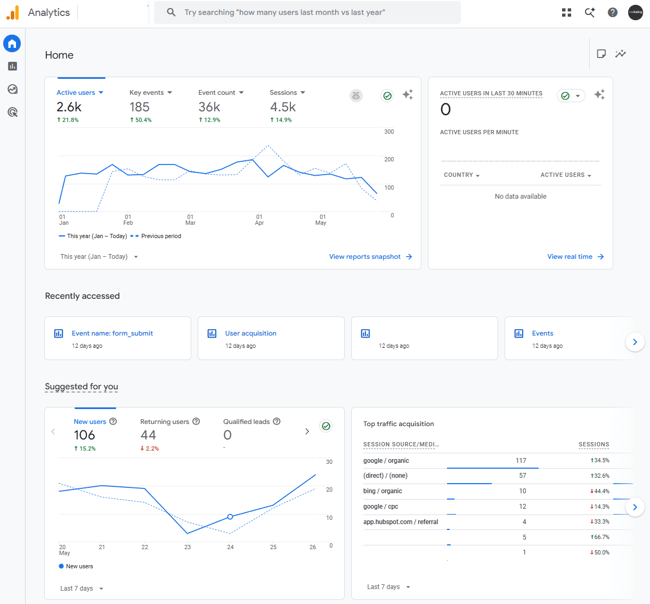
The truth is that small businesses have to invest in AI SEO tools, either in time or with cash. The stats show it clearly: AI in marketing is growing. According to HubSpot’s latest AI Trends for Marketers report, two-thirds of marketers globally use AI in their role. Among American marketers, that number climbs to 74%.

This guide cuts through the noise. It covers the essential AI SEO tools for small businesses that lean teams are actually using to do more with less. It includes free essentials like Google Search Console (GSC) and Google Analytics (GA4), and dedicated, paid-for platforms like HubSpot.

Table of Contents

Which AI SEO tools for small businesses deliver ongoing value?

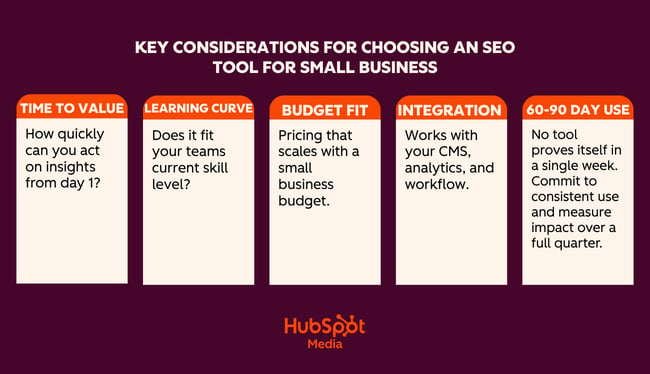
AI SEO tools help small businesses research keywords, create content, optimize pages, fix technical issues, and track visibility. Choosing the right SEO tools based on what they can do for business is what’s challenging. Generally, small business buyers should prioritize time-to-value, learning curve, cost, and integration ease.

AI seo tools for small businesses key considerations

Time-to-Value

Time-to-value measures how quickly a tool delivers useful output after setup.

Time-to-value matters enormously for a lean team without a dedicated SEO resource. A tool that requires two weeks of configuration, or an external consultant to come in and set it up, may be more trouble than it’s worth. Unless, of course, the business is certain the investment is worth it.

Think about how quickly the business needs the tool to be live and running, and what the impact is on workflows and other business priorities. Sometimes, the time (and potentially cash) investment is worth it. Other times, a tool that runs with minimal setup and can surface recommendations within 24 hours is more appealing.

Here’s a real-life scenario showing how to think about time-to-value:

If I’m working with a new client, certain tools are a no-brainer. For example, Google Search Console (GSC) is a free tool, and the data it provides is invaluable. I tell all my clients to set this up, or I do it for them. Once someone has added the tracking script to the website, the tool runs on its own in the background. Within 24 hours, I get valuable data about the website and SEO performance. It’s clear to me that GSC is a must-have for all websites.

Compared to GSC, HubSpot requires more time to set up. If unlocking certain features is required, a cash investment is required, too, because some of HubSpot’s features are only available in higher editions.

The difference here is that GSC does a few things really well, such as:

  • Shows exactly which search queries are driving impressions and clicks.
  • Identifies indexing issues and crawl errors that Google has flagged.
  • Tracks average position and click-through rate by page and keyword.
  • Flags Core Web Vitals issues affecting page experience.
  • Submits sitemaps and requests re-indexing after page updates.

HubSpot does a lot of things really well and adds a layer of sophistication to marketing and other business operations. For example, HubSpot:

  • Features AI-powered SEO recommendations that prioritize what to fix and why.
  • Has content optimization tools that help teams draft, refine, and publish on-brand content.
  • Tracks organic performance alongside email, ads, and CRM data in one place.
  • Connects SEO activity directly to leads and revenue in the same platform.
  • Automates reporting so teams aren’t manually pulling data from multiple tools.
  • Has a free CRM built in — contact, deal, and pipeline management without an extra subscription.
  • Connects SEO and content efforts directly to leads, deals, and revenue in the same platform.
  • Tracks the full customer journey from first organic visit to closed deal.
  • Features email marketing, landing pages, and forms that all live in the same ecosystem as SEO tools.
  • Includes social media management and ad tracking alongside organic performance data.
  • Automates lead nurturing workflows triggered by content engagement.
  • Features shared dashboards that mean sales and marketing teams work from the same data.
  • Scales with the business with free tools to start, and Pro and Enterprise editions as needs grow.
  • Reduces tool sprawl by replacing multiple point solutions with one platform.

Some tools may take more time to set up and require a payment. But these tools and their features may be business critical.

If a tool can help save human hours and labor, influence marketing conversions, solve problems across the business, and directly contribute to business growth, then the time — and cash — investment is worth it. If a tool takes two weeks to set up and the marketing team never opens it, the value isn’t there.

Learning Curve

A tool is only as useful as the team’s ability to use it consistently. Complex platforms built for enterprise SEO agencies often overwhelm small-business users with feature depth they don’t need. When evaluating a learning curve, it’s worth asking:

  • Can a non-technical marketer or founder navigate this tool independently?
  • Does it explain why something is a problem, not just flag that it is?

The AI tools for SEO that perform best for small teams offer guided workflows, plain-language recommendations, and clear next steps rather than raw data that requires expert interpretation.

Cost and Budget Fit

The strongest AI SEO solutions for small businesses are those that live at the intersection of:

  • Required functionality
  • Affordable price point
  • Potential for scale at affordable prices

Businesses need tools that teams will use and that solve a unique problem at an affordable price point. From there, any tool needs to scale with the business. Consider the cost implications one year, or even five years, into the future. If upgraded packages are going to be out of budget, it might not be a good idea to invest now because the headache and time-sap of switching tools later could be extreme.

Pro tip: Before committing to any paid tool, map out the three SEO tasks that take the most time each week and that no other tools help with. Then evaluate each platform specifically against those tasks. A tool that solves one real bottleneck will always outperform a tool that addresses multiple.

Integration Ease

If a tool can integrate with existing systems, adoption rates increase. According to MuleSoft, 86% of IT leaders say that AI agents can bring complexity instead of value without proper integration.

For example, if SEO data connects to an already-in-use Content Management System (CMS), it feels easier to adopt the new tool because it plugs into an existing workflow, rather than creating a new workflow that operates in a silo. Integrations with existing tools also improve and enhance workflows and data rather than complicate them. They’re simply more motivating for teams to get involved with.

When comparing platforms, check how well they connect with the tools a team already uses.

60 to 90 Day Usage as the Real Test

Demo performance and trial-period enthusiasm rarely tell the full story. The more reliable measure of a tool’s value is whether teams are still using it consistently at the 60- to 90-day mark and whether they can point to specific outcomes that the tool contributed to.

When doing an AI SEO tools comparison, speak to any tool’s sales reps and see what your team can negotiate as a testing period. Or consider paying monthly for a few months before committing to an annual billing.

What AI Can and Can’t Do for Small-Business SEO

Small business SEO can’t rely on tools alone. Here’s an honest breakdown of where AI pulls its weight, and where brands still need human oversight.

Drafting and Scaling Content Quickly (Tread With Caution)

AI can generate blog posts, FAQs, service page copy, and meta descriptions in minutes. For a small business that struggles to publish consistently, this is a genuine time-saver. Prompt AI with your target keyword, your audience, and your tone, and get a solid working draft without staring at a blank page.

The quality of an AI draft depends on the topic. For example, an objective truth, or a simple question like “What is anchor text?” or “What does bounce rate mean?” is easily written with AI.

However, thought leadership pieces, or content that requires a new or expert opinion, are better written or heavily edited by a human. For example, “Is SEO dead in the age of AI search?” or “How should small businesses respond to Google’s latest algorithm update?”

Where human review still matters: AI doesn’t know your business, audiences, or industry the way subject-matter experts do. It may get facts wrong, miss nuances, or sound generic. Editors should review every piece of AI-drafted content so that it’s personalized and fact-checked before it goes live. Google also rewards content with genuine expertise and first-hand experience — and these are things AI can’t credibly create.

Finding Keyword and Topic Ideas

AI tools are good for generating ideas. Ask one to suggest keyword clusters around your service, generate questions your customers might search for, or identify related topics that may be otherwise missed. This can replace hours of manual research for a small team with no dedicated SEO resources.

Where human review still matters: AI often suggests keywords with no real search volume data behind them. Marketers should still run the best ideas through a tool like Google Keyword Planner to validate demand before building content around them. Or, at least a human sense check. While AI can generate a bunch of keyword ideas, I don’t rate it for content clustering or search engine results page (SERP) analysis.

Optimizing Existing Pages

Paste a webpage into an AI tool and ask it to rewrite the title tag, improve the meta description, tighten the heading structure, or make the copy more readable. For small businesses with dozens of underperforming pages, this kind of audit-and-improve workflow can get meaningful results without a big budget.

Where human review still matters: On important pages, include a layer of human review or judgment. On the whole, AI can do this pretty well, and if SEO specialists are reducing missed title tags on pages that don’t depend on SEO for visits, then an AI title tag is probably fine.

AI SEO Tools for Small Business

The tools in this guide are here because they solve real problems for lean teams and because the AI built into each one is genuinely useful.

If building an SEO foundation from scratch, the HubSpot SEO Starter Pack is a free resource worth downloading before diving into any of these tools.

First, a comparison table for a quick AI SEO tools for small business comparison:

Tools for SEO and Technical Audits

HubSpot SEO Recommendations

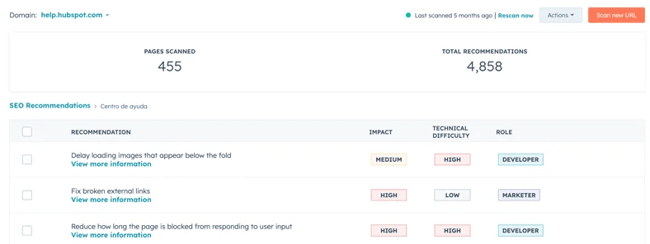
Screenshot from HubSpot SEO recommendations, one of the best AI SEO tools for small business.

HubSpot’s SEO recommendation tools live inside Marketing Hub and represent one of the most integrated approaches to SEO available to small businesses. Unlike standalone SEO platforms that hand over a list of issues and leave teams to figure out the rest, HubSpot connects SEO recommendations directly to the content editor, the CRM, and the reporting dashboard. This unification means that every fix, piece of content, and ranking improvement is tied to real business outcomes.

The real value is the presentation of findings. Standalone tools like Screaming Frog are excellent, but businesses need an SEO expert who can decipher issues and assign their solutions when using that kind of tool.

SEO recommendations in Marketing Hub prioritize on-page updates for non-experts, which is exactly what makes it well-suited for small business teams without a dedicated technical SEO resource. Rather than presenting raw data that requires interpretation, HubSpot explains why something is flagged, what impact it has on search performance, and what action to take to resolve it. Anyone can figure out what an issue is, how to solve it, and how much of an impact it’s causing, which helps with prioritization.

HubSpot’s guide to understanding SEO recommendations is a useful reference for a full breakdown of what each recommendation type means.

What HubSpot SEO Recommendations Does

The SEO Recommendations tool automatically scans a website’s live pages and surfaces issues ranked by priority:

  • High
  • Medium
  • Low

Recommendations are accessible site-wide under Marketing > SEO, or page-by-page through the Optimize panel inside HubSpot’s content editor. This means writers and marketers can catch and fix SEO issues without ever leaving the tool they’re already working in.

On the technical side, HubSpot’s SEO tools scan for the issues that most commonly suppress rankings for small business websites: broken links, missing or duplicate meta descriptions, missing alt text on images, HTTPS issues, slow-loading pages, and heading structure problems. Each flagged issue comes with a clear explanation and a specific action — not just “fix your meta descriptions,” but exactly which pages need attention and what good optimization looks like.

On the on-page side, the Optimize sidebar inside the content editor checks keyword placement and relevance, flags keyword stuffing, reviews readability, and surfaces internal linking opportunities, all while a page is being written or edited. Teams can analyze SEO performance across the entire site from a single dashboard, tracking organic sessions, keyword rankings, and how individual pages are trending over time.

Where HubSpot SEO Sits Within a Broader Marketing Stack

HubSpot’s value proposition becomes genuinely difficult to match. The SEO tools are part of the same platform as email marketing, landing pages, social media, ads, and the free CRM. That means teams can track the full journey from first organic search visit to closed deal, without exporting data between tools or reconciling reports across different platforms.

The CRM integration makes HubSpot one of the best tools for SEO for B2B. This connection ties SEO activity directly to pipeline and revenue data in the CRM. It becomes possible to show exactly what organic traffic is worth, not just in clicks, but in leads and deals.

Teams on Marketing Hub Pro or Enterprise have access to both SEO and AEO (Answer Engine Optimization) tools. Marketers get visibility into traditional organic rankings and how their brand is appearing in AI-generated answers. More on that below.

Pricing

HubSpot’s SEO tools are available across multiple editions. Basic SEO recommendations are available on free and Starter plans. The full suite, including topic clusters, advanced reporting, content strategy tools, and AEO features, requires a Pro or Enterprise subscription.

For small businesses evaluating cost against capability, it’s worth comparing the total cost of HubSpot against the combined cost of the separate tools it replaces: CMS, CRM, email platform, SEO tool, and reporting dashboard.

Best for: Small business marketers and lean teams who want one tool to do it all: SEO, content, CRM, and reporting in one place.

SE Ranking

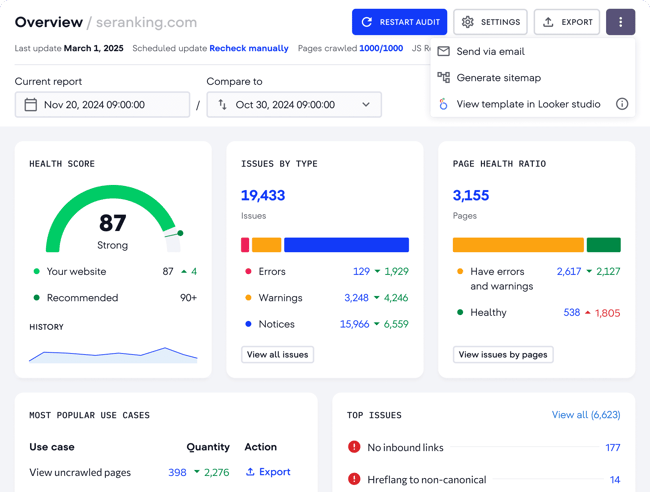
SE Ranking, one of the best AI SEO tools for small business.

Source

SE Ranking is a comprehensive AI-powered platform that provides keyword tracking, site audits, competitive research, and AI-specific insights. Beyond technical SEO, SE Ranking also covers keyword research, backlink analysis, competitor monitoring, and content gap identification. It’s a well-rounded platform and includes top AI search optimization tools for content creators working across multiple clients or projects.

Key Features
  • AI-powered site audit crawls the full website and flags technical issues, including broken links, redirect chains, missing metadata, duplicate content, and page speed problems, with prioritized recommendations for each.
  • Keyword rank tracker monitors keyword positions across Google and Bing with daily updates, historical data, and built-in competitor comparison.
  • On-page SEO checker analyzes individual pages against top-ranking competitors and surfaces specific recommendations to improve organic position, such as improving relevance, structure, and content depth.

Pricing: Plans start at the Wallet tier, with Standalone and Enterprise tiers available for larger sites or agencies. A 14-day free trial is available with no credit card required.

What I like: SE Ranking hits a sweet spot for small businesses: it has the depth of a premium SEO platform but is priced accessibly enough for small businesses to justify. The interface is clean, and the recommendations are actionable. It doesn’t just flag problems; it explains what to do about them, which matters when there’s no in-house SEO specialist to interpret the data.

For teams considering alternatives: Semrush and Ahrefs are both excellent platforms, arguably the most powerful in the category, and either would be a strong choice for teams with the budget to match. You can’t go wrong, and the right choice comes down to preference.

Best for: Small businesses and lean SEO teams that need a full-featured SEO platform without the price tag of enterprise tools like Semrush or Ahrefs.

Tools for Automated Content Optimization

Creating content consistently is one of the biggest SEO bottlenecks for small business teams. The tools in this category use AI to speed up the drafting, optimizing, and structuring process.

Content Hub

Content Hub, one of the best AI SEO tools for small business.

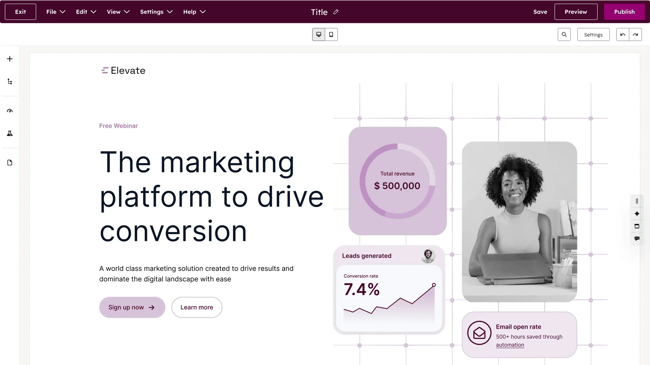
HubSpot’s Content Hub is where content strategy, creation, optimization, and performance measurement all come together. For lean teams trying to do more with fewer people, that consolidation is essential.

One of Content Hub’s most valuable features for small businesses is the topic cluster tool. The premise is straightforward: rather than publishing isolated blog posts on loosely related topics, teams build content around a core pillar page (a comprehensive, authoritative piece on a broad subject), supported by a network of cluster content that covers related subtopics in depth. Each cluster piece links back to the pillar, and the pillar links out to the clusters, creating an interconnected content structure that signals topical authority to search engines.

Read more about pillar and cluster strategy:

This approach is one of the most reliable ways for small business websites to compound organic traffic. Search engines reward sites that show depth and expertise on a subject, and a well-structured topic cluster does exactly that.

For teams new to content planning, the topic cluster tool can transform a scattered blog archive into a structured, rankable content asset. Content Hub makes it straightforward to map, build, and monitor those clusters without a separate content strategy platform.

Breeze: HubSpot’s AI Layer For Content

Inside Content Hub, Breeze functions as the engine behind the platform’s content creation and optimization capabilities. Rather than a single feature, Breeze is a suite of AI tools embedded throughout the content workflow, from the moment a topic is identified to the moment a post is published and promoted.

Breeze bridges the gap between AI writer and human. Content writers use Breeze as a co-pilot, meaning content is co-created with AI. Throughout the process, human writers can input their experience and edits.

Content Hub AI blog writer helps teams draft and refine on-brand content starting from a topic or keyword. It then generates a structured draft, allowing writers to refine, expand, or rewrite sections without leaving the editor. Breeze Content Agent suggests blog topics and generates search-optimized drafts that incorporate an established brand voice, functioning as a multiplier for subject-matter experts rather than a replacement for them.

As a writer and SEO specialist, I feel that content co-created by AI is the most efficient way to work. Compared to churning out an entire blog post with AI, co-creation with Breeze upholds a higher standard of content. The layer of ongoing human review protects accuracy, brand voice, and trust.

Beyond first drafts, Breeze handles the optimization work that typically falls through the cracks on lean teams: generating meta titles and descriptions, suggesting internal links, reformatting content for readability, and remixing existing content into new formats. Content Remix repurposes one asset across formats and channels, turning a blog post into a social caption, an email intro, or a landing page section without starting from scratch each time.

HubSpot’s Brand Voice capability allows Breeze to generate content within defined tone and language parameters. This means AI-generated drafts don’t come out sounding generic. For small businesses where brand voice is a genuine differentiator, this feature ensures that speed doesn’t come at the cost of consistency.

Performance Tracking Tied to Revenue

Because Content Hub sits on top of HubSpot’s CRM, every piece of content is tracked, not just for traffic and rankings but for its contribution to leads, pipeline, and revenue. Teams can see which blog posts generate contacts, which pillar pages drive the most organic sessions, and how content performance trends over time, all without exporting data to a separate analytics platform.

For AI SEO solutions for small businesses that need to justify content investment to stakeholders or clients, this attribution capability is significant. It moves the conversation from “our blog traffic is up” to “our content contributed X leads and Y deals this quarter.”

Pricing: Content Hub is available as a standalone product with a free plan. Paid plans start at $20 per user per month. Content Hub can also come as part of a broader HubSpot subscription.

Breeze Content Agent, including AI blog drafting and Content Remix, is available on Content Hub Pro and Enterprise editions. For small businesses already using Marketing Hub, it’s worth checking whether features are already included in the current plan before purchasing separately.

Yoast

Yoast, one of the best AI SEO tools for small business.

Source

Best for: Small businesses running WordPress websites that want real-time on-page SEO guidance built directly into their content workflow.

Yoast has long been the default SEO plugin for over millions of websites. For WordPress users, it’s one of the lowest-friction ways to bring AI-assisted SEO recommendations into the writing process — no separate platform to log into, no manual audits to run. The recommendations surface inside the WordPress editor as content is being written or edited.

Key Features
  • Real-time on-page SEO analysis: Checks keyword placement, heading structure, meta titles, meta descriptions, and internal linking as content is written, with a clear traffic-light scoring system that flags what needs attention before publishing.
  • AI-generated titles and meta descriptions: Yoast’s algorithm analyzes the content of each page and generates multiple options for SEO titles and meta descriptions, allowing teams to choose the best ones, request more options if needed, and customize the output to align with brand voice.
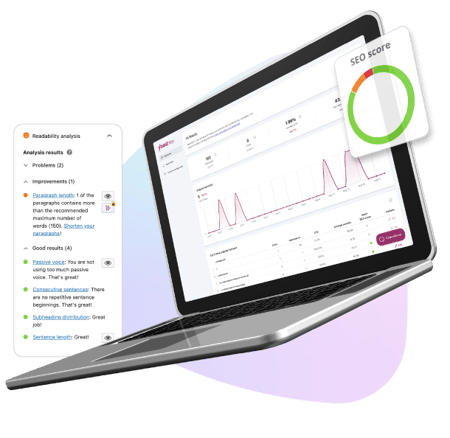
  • Readability analysis: Evaluates sentence length, paragraph structure, use of transition words, and passive voice, helping non-expert writers produce content that’s easier for both readers and search engines to process.

Pricing: The free package covers basic on-page SEO analysis, focus keyphrase, readability checks, and XML sitemaps. A solid starting point for small businesses with tight budgets. There are Premium and AI+ packages available that start at $9.90 per month.

What I like: I’ve used Yoast for my entire career. I think it’s excellent. Candidly, I’ve found the free version to be enough, but I have the expertise to manage SEO elements without Premium. For small businesses that need more support, consider paying for Premium. It’s very affordable.

The one thing to keep in mind is that Yoast is an optimization assistant, not an SEO platform. It helps teams polish and improve existing content. It’s not the right tool for keyword research, competitor analysis, backlink monitoring, or rank tracking. For small businesses that need those capabilities, Yoast works best alongside a tool like SE Ranking.

If teams are using HubSpot, then Yoast isn’t needed at all because Content Hub will do what Yoast does. It’s worth going back to those considerations before buying tools, especially time-to-value and cost and budget fit.

AnswerThePublic

AnswerThePublic, one of the best AI SEO tools for small business.

Source

Best for: Small business marketers and content teams who want to quickly identify the questions, topics, and search phrases their audience is actually using.

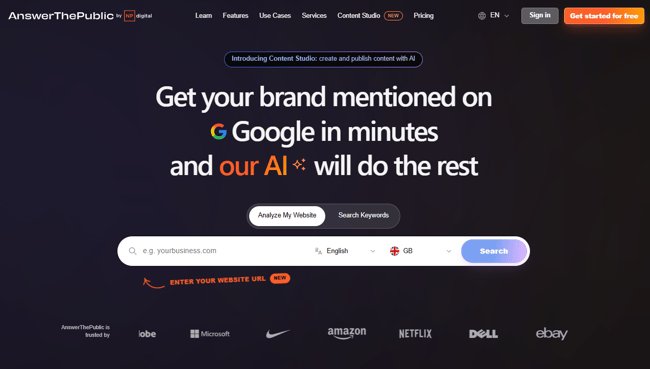
AnswerThePublic is a content ideation tool built on Google autocomplete data. Enter a keyword or topic, and it generates a visual map of the questions, prepositions, comparisons, and related searches people are typing into search engines around that subject. For lean teams trying to figure out what to write about next, it removes a lot of the guesswork.

Key Features
  • Visual question mapping: Generates an interactive diagram of every question, preposition, and comparison search related to a keyword, organized by search intent and phrasing, making it easy to spot content gaps and long-tail opportunities.
  • AI-powered search insights: Surfaces trending search queries and emerging topics in a chosen niche, helping teams get ahead of demand rather than chasing it after the fact.
  • CSV export: All keyword and question data exports cleanly into a spreadsheet, making it straightforward to build content calendars or brief writers directly from the research.

Pricing: Three free searches per day, then paid packages that start at $13.33 per month for more searches and export features.

What I like: For the price, AnswerThePublic is one of the fastest ways to fill a content calendar with topics that real people are actually searching for. The visual format is engaging and helps spot content ideas that naturally lend themselves to a topic cluster structure. It pairs well with how HubSpot’s Content Hub organizes content strategy. For a budget tool, it’s excellent. But for small businesses using HubSpot in any capacity, AnswerThePublic may repeat functionality already available.

Tools for Tracking Rankings and AI Visibility

Tracking SEO performance has always meant monitoring keyword rankings, organic traffic, and on-page engagement. In modern-day SEO, that picture is incomplete without also tracking how a brand appears in AI-generated answers. SEO and AEO are complementary disciplines, and small business strategies must optimize for both.

HubSpot AEO

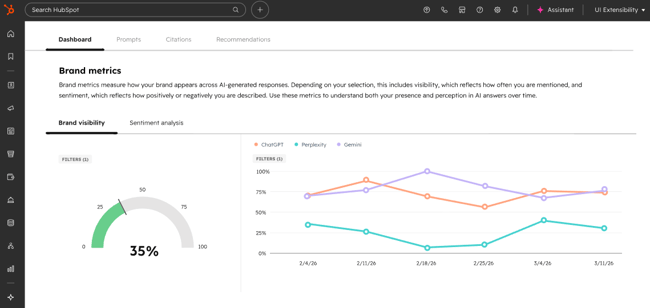
Screenshot from HubSpot AEO, one of the best AI SEO tools for small business.

Best for: Small businesses and marketing teams who want to monitor and improve how their brand appears in AI-generated answers, then connect those insights directly to CRM data.

HubSpot AEO is designed to show marketers exactly how their business appears inside AI answer engines, and give them clear, actionable steps to improve.

What makes HubSpot AEO stand apart from other tools in this category is its CRM integration. The tool automatically suggests prompts based on industries, competitors, and customer segments because it’s connected to CRM data. Other standalone AEO tools don’t have that context. HubSpot already does.

HubSpot AEO is one of the best LLM SEO analysis software. Teams set up prompts such as the questions their buyers are likely asking AI engines, and HubSpot runs those prompts daily across ChatGPT, Perplexity, and Gemini. The platform then tracks how the brand appears in the answers: whether it’s mentioned, how it’s described, how it compares to competitors, and where the gaps are. A brand visibility scorecard tracks how well a company performs across AI-driven search experiences, signaling opportunities to improve presence.

Because HubSpot AEO sits inside Marketing Hub, recommendations connect directly to the content and social tools already in use, meaning teams can move from “we’re not showing up for this prompt” to “we’ve published content to address it.”

Key Features
  • Daily prompt tracking across ChatGPT, Perplexity, and Gemini
  • Competitive positioning where a brand appears relative to competitors in AI-generated answers
  • Sentiment analysis that tracks not just whether a brand is mentioned, but how it’s described
  • Actionable content recommendations tied directly to visibility gaps
  • Integration with Marketing Hub content tools for immediate follow-through

Pricing: Free 28-day trial covers 25 prompts across all three engines, no credit card required. Then, $50/month (or $45/month billed annually), tracking 25 prompts run daily across three engines, up to 2,500 answers per month.

HubSpot AEO Grader

HubSpot AEO Grader

Best for: Any business that wants a fast, free snapshot of how AI engines currently perceive their brand (or competitor brands) with no setup, no subscription, and no prior AEO experience required.

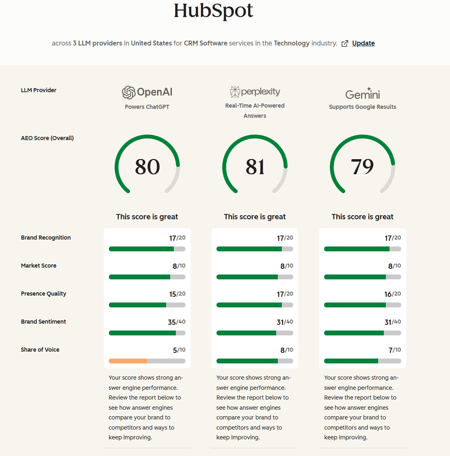
HubSpot AEO Grader analyzes AI visibility across ChatGPT, Perplexity, and Gemini in a single free report. It sends brand information to all three platforms simultaneously, cross-validates their responses, and produces a composite score out of 100. Enter a company name, location, industry, and product or service description, and the grader does the rest.

The score breaks down across five dimensions:

  • Sentiment Analysis
  • Presence Quality
  • Brand Recognition
  • Share of Voice
  • Market Competition

The AEO Grader is best understood as a diagnostic tool — a way to answer “how does AI represent my brand right now?” before deciding whether ongoing monitoring through HubSpot AEO is warranted. The Grader answers the question of how AI represents a brand right now; HubSpot AEO answers how that’s changing over time, and what to do about it.

What I like: HubSpot’s AEO grader is free, fast, and the output is genuinely useful. I often use it to get an initial benchmark of how a website, or its competitors, is performing. It’s a tool I use early in my auditing process, possibly in preparation for a discovery call.

I like that AEO Grader offers a structured, plain English breakdown of where a brand stands across each dimension. For small businesses that have never thought about AI visibility before, the AEO Grader is the most frictionless possible starting point. Run it, review the results, and use the gaps it surfaces to inform the next phase of content planning.

Pricing: Free forever

Google Analytics

Google Analytics, one of the best AI SEO tools for small business.

Best for: Every business with a website.

Google Analytics (GA4) is the foundation of any small business analytics setup. It’s free, built by Google, and tracks where traffic comes from, what visitors do when they arrive, and whether that activity converts into meaningful outcomes. No paid tool on this list replaces it, and the best ones integrate with it.

Key AI Features
  • Generated Insights: Automatically detects and explains significant changes in GA4 data, appearing on the home page and within reports, using machine learning to analyze countless combinations of dimensions and metrics and presenting findings in plain language with suggested actions.
  • Predictive metrics: Surfaces purchase probability, churn probability, and revenue predictions based on user behavior patterns, helping teams prioritize where to focus SEO and content effort.
  • Anomaly detection: Flags unexpected drops or spikes in traffic, engagement, or conversions automatically, so teams catch problems before they compound.

Pricing: Free forever.

What I like: As a free Google tool, GA4 is a must. These days, my favorite use case for GA4 is segmenting audiences by AI referral source, then tracking behavior. It’s an affordable way to see the impact of AI traffic without purchasing other tools. Simply set up a report that records the conversions from AI traffic.

Google Search Console

Google Search Console, one of the best AI SEO tools for small business.

Best for: Every business with a website. It’s a non-negotiable and should be set up on day one.

Google Search Console tracks what happens in Google before a visitor arrives. It’s the tool for your SEO, whereas GA4 is an overall marketing analytics tool.

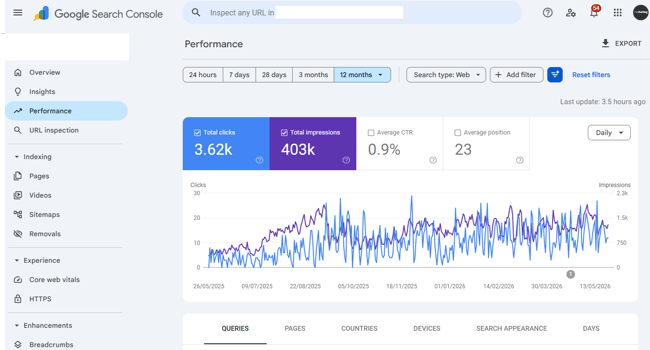
GSC is the only tool that shows exactly which search queries are generating impressions and clicks, which pages are indexed, what technical issues Google has flagged, and how Core Web Vitals perform across the site. The data comes directly from Google, which makes it categorically more reliable than any third-party rank tracker for understanding actual search performance.

Key Features
  • Performance report: Shows clicks, impressions, average position, and click-through rate by query and page, with trend data that makes it easy to spot which keywords are gaining or losing ground.
  • Coverage and indexing reports: Flags pages Google can’t crawl or index, with specific error types and affected URLs, so fixes are straightforward.
  • Core Web Vitals: Surfaces page experience issues affecting rankings, with mobile and desktop breakdowns and guidance on what’s causing each problem

What I like: GSC uses AI to provide insights on what’s happening in plain English, which makes it really easy for small teams without SEO expertise to see and understand their website.

Pricing: Free forever.

Featured Resource: My 18 favorite SEO tools for auditing and monitoring websites

Frequently Asked Questions About AI SEO Tools for Small Businesses

Do small businesses really need multiple AI tools for SEO?

Small businesses don’t necessarily need multiple AI tools for SEO, but most end up using at least two. No single tool covers the full SEO workflow. It’s about finding the right combination depending on internal challenges and bottlenecks. The key is avoiding too much tool sprawl and paying for overlapping features.

What’s the best way to get cited in AI answers fast?

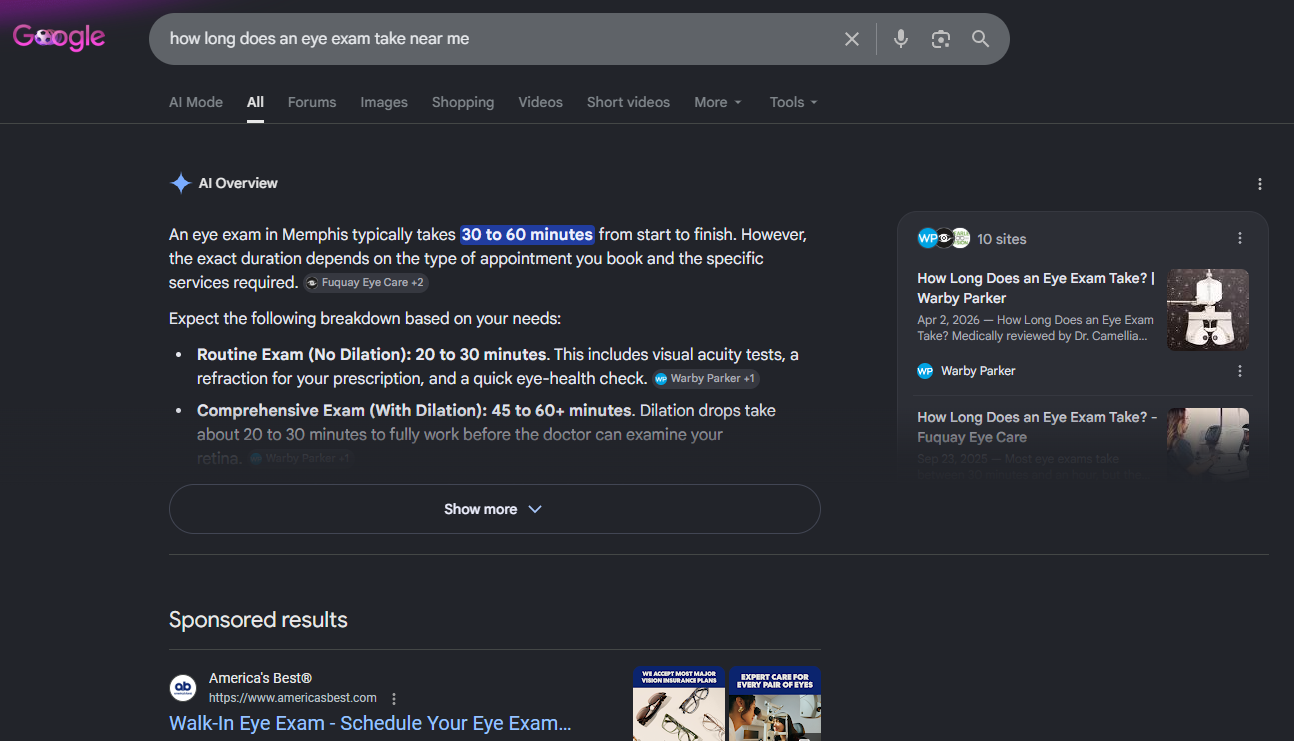
The fastest route to AI citations is structured, specific, authoritative content that directly answers the questions buyers are asking. Clear definitions and step-by-step sections improve citation potential in AI answers, so breaking content into logical, scannable sections with descriptive headers, concise definitions, and direct answers to common questions gives AI systems more to work with.

How do I keep AI from changing my brand voice?

The most reliable protection is a clearly defined brand voice document that AI tools can reference. Usually, these come in the form of a written guide covering tone, language, terminology preferences, and phrases to avoid. Most capable AI content tools, including Breeze by HubSpot, allow teams to input brand voice parameters that shape generated output before it reaches a writer for review.

When should a small business invest in paid AI SEO tracking tools?

The right time to move from free to paid tools is when there’s a specific, identified gap that free tools can’t fill. Ultimately, a tool should really pay for itself in value or time saved. For example, HubSpot’s paid SEO and content tools make sense when the team is ready to connect content production, SEO recommendations, and revenue attribution in one place.

The right AI SEO tool is the one that solves many problems.

For small businesses that want to simplify their stack without sacrificing capability, HubSpot is the strongest all-in-one platform option available. The SEO tools inside Marketing Hub cover technical recommendations, on-page optimization, topic cluster planning, and performance tracking. Content Hub and Breeze handle content creation. Add AEO for AI visibility monitoring and the free CRM for revenue attribution, and one platform replaces what most teams are currently cobbling together across four or five separate tools.

The HubSpot SEO Starter Pack is the fastest way to get started. It’s free, practical, and built for teams scaling SEO without a dedicated specialist.

Source


Assalto Big Tech al calcio europeo: Jeff Bezos e la caccia al Liverpool mettono in crisi i modelli tradizionali

Un’ombra finanziaria minacciosa si allunga sul calcio europeo. Il miliardario Jeff Bezos valuta l’ingresso nel Liverpool FC attraverso una cordata da 6 miliardi di dollari: un’operazione che rischia di travolgere gli equilibri economici e commerciali del football globale.

I club tradizionali europei tremano di fronte al rischio di essere spazzati via dai giganti della tecnologia. L’ipotesi di un coinvolgimento di Jeff Bezos nella vendita di una quota del Liverpool FC non è una semplice voce di mercato.

Rappresenta invece la prova provata che le società di calcio non sono più trattate come semplici squadre sportive, ma come enormi piattaforme di intrattenimento da monetizzare in modo spietato.

Il gruppo proprietario dei Reds, la Fenway Sports Group, valuta la società oltre 6 miliardi di dollari. L’ingresso di fondi americani e di tycoons della Silicon Valley sta trasformando la Premier League in un monopolio finanziario irraggiungibile per il resto d’Europa.

La strategia di Bezos: sport, media e l’incubo della monetizzazione totale

Per il fondatore di Amazon non si tratta del primo tentativo nel mondo dello sport professionale. In passato Bezos ha esplorato l’acquisto di franchigie della NFL americana, come i Seattle Seahawks e i Washington Commanders.

Ma la vera svolta strategica si è vista nei media sportivi emergenti. Bezos ha infatti finanziato con ben 80 milioni di dollari la startup Overtime, una piattaforma creata per intercettare i giovanissimi sui social.

L’ecosistema costruito intorno allo sport comprende ormai diversi tasselli chiave:

  • Distribuzione di contenuti virali: presenza capillare su TikTok, YouTube, Snapchat e Facebook.
  • Merchandising diretto: vendita di abbigliamento e prodotti personalizzati con loghi proprietari.
  • Lega privata giovanile: un campionato di pallacanestro a pagamento per giovani talenti.

Quindi un’evoluzione potrebbe essere l’integrazione fra i contenuti sportivi generati dal Liverpool e la piattaforma di comunicazione. Un accordo interessante, dato che si valuta che la società sportiva abbia circa 100 milioni di fan in tutto il mondo, la settima maggior squadra al mondo.

Amazon e il calcio: quali ricadute pratiche per il settore?

Però la questione potrebbe interessare non solo Overview. Se Bezos dovesse mettere un piede ad Anfield, la ricaduta economica sulle rivali sarebbe immediata ed estrema. L’integrazione tra la potenza distributiva di Amazon e il marchio Liverpool genererebbe entrate commerciali imponenti.

Un simile strapotere finanziario rischierebbe di distruggere definitivamente la competitività dei club italiani e continentali, già soffocati dai debiti e incapaci di competere con i ricavi da diritti TV inglesi.

Asset / Iniziativa Settore di Riferimento Obiettivo Economico Principale
Liverpool FC (in trattativa) Calcio di élite (Premier League) Monetizzazione del brand globale e integrazione media
Overtime ($80M finanziati) Social Media & Sport giovanile Cattura dell’attenzione della Gen Z e merchandising
Washington Post Editoria & Informazione Influenza mediatica e abbonamenti digitali
NFL (Seahawks/Commanders) Football Americano Tentativi di acquisizione nel mercato USA

La vera domanda economica è se il calcio di prima fascia diventerà una semplice appendice per vendere abbonamenti e prodotti di consumo. Per i tifosi e gli investitori tradizionali, il prezzo da pagare rischia di essere un’inflazione incontrollabile dei costi e la perdita definitiva dell’identità sportiva. Inoltre il “Soccer” non ha ancora sfondato negli USA,  nonostante la recente Coppa del Mondo.  Sarà un buon affare?

Google NewsGoogle News Rimani aggiornato seguendoci su Google News!

SEGUICI

https://scenarieconomici.it/assalto-big-tech-al-calcio-europeo-jeff-bezos-e-la-caccia-al-liverpool-mettono-in-crisi-i-modelli-tradizionali/


Endpoint Security Firm Glow Launches With $180M in Funding at $1.2B Valuation

AI-powered endpoint security startup Glow today announced it has emerged from stealth mode with $180 million in Series A funding at a $1.2 billion valuation.

The investment round was led by Sequoia, Cyberstarts, Greenoaks, and Redpoint Ventures, with additional support from Index Ventures, Swish Ventures, Lux Capital, and Holly Ventures.

Based in Tel Aviv, Glow was founded in 2025 by CEO Roi Tiger, former VP of engineering at Meta, CTO Omer Singer, former head of cybersecurity strategy at Snowflake, and VP of R&D Ophir Arie, former VP of R&D at Claroty.

The company also employs Arnon Joseph as Chief Product Officer, who previously served as senior director of product at Meta, and Emily Heath as chief strategy officer, who previously was CISO at United Airlines and DocuSign, a board of directors member at Wiz, and a partner at Cyberstarts.

Glow aims to reduce risk in modern environments, which are dominated by employees’ use of AI and exposed to attacks that leverage Mythos-class capabilities and exploit weaknesses at machine speed.

For that, it provides security teams with control over what runs on the endpoint through specialized AI agents that map the environment and analyze risks in real time, and automatically enforce policies.

Advertisement. Scroll to continue reading.

Glow leverages context and a reasoning engine to proactively allow or remove software, adapting to the environment to reduce the endpoint attack surface and allow employees to securely adopt and use AI.

While operating in stealth mode, Glow has signed enterprise customers across industries such as financial services, healthcare, and retail.

The startup will use the new investment to accelerate its go-to-market efforts in the US and to expand its research arm Glow Labs.

“I sat in the CISO seat for a long time, and I can tell you the tools available to us were never built for what enterprises face today. Every enterprise wants to move faster with AI. The question isn’t whether they’ll adopt it—it’s whether security can keep up. That’s the challenge Glow is solving,” Heath said.

Related: Empirical Security Raises $25 Million in Series A Funding

Related: Neo Emerges From Stealth With $100M to Control and Secure Enterprise AI Software

Related: Valarian Raises $50 Million for Sovereign Infrastructure Control Layer

Related: Keyfactor Scores $1 Billion+ Investment for AI, Post-Quantum Security

https://www.securityweek.com/endpoint-security-firm-glow-launches-with-180m-in-funding-at-1-2b-valuation/


Oracle Patches Over 1,400 Vulnerabilities With Quarterly Security Updates

Oracle has patched more than 1,400 vulnerabilities with its July 2026 Critical Patch Update (CPU), with a vast majority of the flaws likely identified by artificial intelligence.

According to Oracle, the latest quarterly CPU includes 1,449 security patches, addressing 1,434 unique CVEs across 334 products.

Vulnerabilities have been patched in products such as Database Server, APEX, Autonomous Health Framework, Essbase, Global Lifecycle Management, GoldenGate, NoSQL Database, Spatial Studio, SQL Developer, TimesTen In-Memory Database, Application Testing Suite, Commerce, Communications, Construction and Engineering, and E-Business Suite.

Security fixes are also available for Enterprise Manager, Financial Services Applications, Food and Beverage Applications, Fusion Middleware, Analytics, HealthCare Applications, Hospitality Applications, Java SE, JD Edwards, MySQL, PeopleSoft, Retail Applications, Siebel CRM, Supply Chain, Systems, Utilities Applications, and Virtualization.

Roughly 600 of the patches are for vulnerabilities that can be exploited remotely without authentication. Hundreds of security holes have been assigned a critical severity rating. 

The highest numbers of vulnerabilities were patched in E-Business Suite (410), Fusion Middleware (355), Communications (168), and PeopleSoft (84).

Advertisement. Scroll to continue reading.

Considering that external researchers have only been credited for discovering a few dozen vulnerabilities, a vast majority of the newly patched flaws were found internally, likely with the aid of AI.

Oracle revealed earlier this year that it has access to top-tier AI systems, including Anthropic’s Claude Mythos and OpenAI’s most capable models, and is using them to speed up and sharpen vulnerability discovery and patching. 

The company said it’s applying this AI-driven vulnerability work across its own software and services, Oracle Health, and the open source components it develops and relies on.

Organizations must install the latest patches as soon as possible, as threat actors often exploit Oracle product vulnerabilities in their attacks. Examples include the exploitation of a PeopleSoft zero-day and a recently patched EBS vulnerability.  

Related: Estée Lauder Discloses Impact From Oracle EBS Zero-Day Hack

Related: Oracle’s Second Monthly Security Updates Deliver 245 Patches

Related: Zimbra Update Patches Critical Vulnerabilities

https://www.securityweek.com/oracle-patches-over-1400-vulnerabilities-with-quarterly-security-updates/


AI Overviews Now Answer Most Local Searches – How To Get Your Business Cited via @sejournal, @AdamHeitzman

If your local search traffic has felt off lately, you’re not imagining it. Fewer clicks. Fewer calls. Customers finding answers and moving on without ever hitting your site. That’s not a seasonal dip or a technical issue. That’s AI Overviews doing exactly what Google designed them to do.

Local SEO used to be predictable. Optimize your Google Business Profile, build citations, stack localized keywords, and protect your Map Pack spot. That system worked for years. In 2026, it’s not enough. Working across 15+ client markets at our agency, spanning home services, legal, fitness, healthcare, and financial verticals, we’re seeing businesses rank well in the traditional local pack while being completely invisible in AI-generated answers for the exact same queries. Those two things used to be the same game. They’re not anymore.

Here’s what you actually need to know to stay visible.

The 29% Nobody Is Talking About

A Whitespark study shows AI Overviews appear for 68% of local searches. Local packs? Only 39% of the same queries. That’s a 29-point gap where your customers are getting answers without ever seeing the map results you’ve worked to rank in.

Some AI Overviews include a mini local pack. Others surface a fully synthesized answer with supporting links but no map at all. Either way, Google controls the user experience, not you. And if you’re only measuring traditional local rankings, you have a serious blind spot. Google itself has been clear that AI visibility hinges on content people actually want to read, not just content that ranks.

The gap plays out differently by query type. Simple transactional searches like “tacos San Francisco” still default heavily to the local pack.

Screenshot from search for [tacos San Francisco], Google, July 2026

But informational queries like [how long does an eye exam take near me] trigger AI Overviews 92% of the time (according to Whitespark).

Screenshot from search for [how long does an eye exam take near me], Google, July 2026

Hybrid intent searches like [average cost of dental implants in Phoenix] hit 97% (according to Whitespark).

Screenshot from search for [average cost of dental implants in Phoenix], Google, July 2026

If your business answers questions rather than just fulfilling immediate transactions, you are almost entirely living in AI Overview territory now.

Vertical matters too. Legal searches see AI Overviews everywhere, regardless of geography. Home services are more variable. Restaurants and retail still lean on traditional packs for simple queries. But the key shift is this: Your competitive set just got bigger. You’re no longer just competing with the business down the street. You’re competing with anyone who can answer the user’s question better than you can.

How To Build Location Pages AI Will Actually Cite

Across dozens of accounts at our agency, the pattern is consistent. The cookie-cutter location page approach has been around forever: same structure, same generic copy, just swap the city name. It was never a great strategy, but it used to produce okay results. Today, AI systems spot it immediately and move on.

LLMs aren’t reading your pages the way a human skims a website. They’re looking for fact density. Structured, specific, directly useful information that answers real questions without requiring interpretation. A 200-word page that says you “serve Nashville with pride” and repeats your service list gives the AI nothing to work with.

What AI actually needs from a location page comes down to three things: information architecture, geographic legitimacy, and entity consistency. Here’s how each one works.

Build For Fact Density, Not Keyword Coverage

Start with the structural foundation. Every location page needs:

  • NAP, service area, and hours (table-formatted).
  • Testimonials from customers in that specific city, with neighborhood references if possible.
  • FAQs specific to that market (permit questions, local regulations, climate-specific concerns).
  • Real project examples or case studies from that location.
  • A structured data grid showing regional pricing ranges, service tiers, or compliance details.

Tables and FAQ schema matter here. Large language models are pattern-recognition systems. Structured formats give AI discrete, labeled data points it can extract with confidence, rather than requiring it to interpret meaning from paragraphs. Kevin Indig’s analysis of 1.2 million ChatGPT responses found that cited passages skew heavily toward definitive, entity-rich statements, which is exactly what a well-built table delivers. A page that tells people which pests are common in the Austin summer heat, your average response time, and what the process looks like from first call to completion is the page that gets pulled into the Overview.

Worth noting: Publishing more content without improving structure actively works against you in an AI retrieval environment. Semantic precision matters more than volume.

Prove Geographic Legitimacy With Landmark Images

Google’s vision AI analyzes photos to verify geographic legitimacy. If your location page uses generic stock images of smiling professionals in a nondescript office, the AI reads that as low-context boilerplate. It doesn’t know where you are. And when it doesn’t know where you are, it finds someone else to cite.

The fix is intentional local imagery. I got this concept from Steve Toth, and the results have been promising. Try using this approach: three landmark images per location page, sourced from Google Images using Creative Commons filters.

Here’s how to pull them:

  1. Go to Google Images, search the specific landmark by name (not just the city, “Navy Pier” not “Chicago”).
  2. Click Tools, select Creative Commons licenses under Usage Rights.
  3. Then click through to the original source to confirm the license type before downloading.
  4. Rename the file before uploading: “navy-pier-chicago-lakefront.jpg” instead of “IMG_2473.jpg.”
  5. Write alt text that describes the image and mentions the location naturally. And always attribute properly in a small caption; most CC licenses require it.

Three or more images are more intentional than just one. When your alt text says “Navy Pier at dusk,” the filename is “navy-pier-chicago-lakefront.jpg,” the surrounding copy references serving Chicago residents, and your quick-facts section lists Illinois-specific regulations, you’ve built a page that reads as local because it actually is.

Structure each location page hero with: a primary image of an iconic, instantly recognizable landmark; a secondary image showing people in the area with a landmark visible in the background; and a full-width feature shot of a third local landmark or skyline. A Chicago page gets the Bean, Willis Tower, and Navy Pier. A Denver page gets Red Rocks, the 16th Street Mall, and the Capitol building. Three signals at the image level, before AI even reads a word of your copy.

Lock Down Entity Consistency Across Every Touchpoint

The third pillar is one that most businesses underestimate. AI systems don’t just read your location page in isolation; they cross-reference it against everything else they can find about your business. If your NAP is inconsistent across directories, your hours are outdated on Apple Maps, or your service categories don’t match between Google Business Profile and your website, the AI’s confidence in your entity drops. And lower confidence means lower citation probability.

Make sure your business name, address, phone number, service categories, and business description are identical everywhere they appear. Yelp, Google, Bing, Apple Maps, industry-specific directories – every node in your digital presence needs to say the same thing. Audit these quarterly. It takes less time than you think and pays off in citation consistency across every AI platform pulling your data.

Other Pages Worth Building: Cost And Pricing Guides

Alongside your location pages, one of the highest-leverage content investments you can make right now is building out dedicated cost and pricing guides, one for each core service or location you target. Here’s why: “price, cost, and buy” queries trigger AI Overviews more than 80% of the time, and most local businesses refuse to answer them.

Screenshot from search for [how much is an ac unit in memphis], Google, July 2026

The fear is understandable. Publishing pricing feels like giving competitors ammunition or locking yourself into a number. But if you don’t answer the “how much does this cost” question, AI will find someone who does. That someone gets the citation, the traffic, and the call.

You don’t have to publish fixed rates. Give realistic ranges (“basic lawn care packages typically run $80 to $150 per month, depending on lot size and frequency”) and then explain the variables that drive the price up or down. Square footage? Materials? Urgency? Regional permit requirements? That structure gives AI exactly what it needs: a factual, organized resource it can confidently cite for cost-intent queries.

Use natural phrasing throughout. Tools like AnswerThePublic or Google’s People Also Ask surface the conversational, imperfect ways real people search. “How much to fix a leaky faucet?” sounds different from “leaky faucet repair cost.” Optimize for how people actually talk, not how marketers write.

5 Content Plays That Build Citation Authority Beyond Your Pages

Getting your location pages right is the foundation. But it’s only half the battle. The other half happens entirely off your website.

Omniscient Digital’s research analyzing 23,000+ citations found that owned content accounts for only about 23% of citations in branded queries. The other 77% comes from off-page sources. That means even a perfectly built location page isn’t enough on its own. You need a broader content environment that feeds AI systems with citations, context, and credibility.

Here’s where to focus:

1. Answer Capsules On Commercial Pages

Don’t bury your helpful content in a blog. Embed FAQ sections, cost breakdowns, and short how-to guides directly on your service pages. Kevin Indig’s analysis of 1.2 million ChatGPT responses found that 44.2% of citations come from the first 30% of page content. Getting a concise, direct answer above the fold on your key pages isn’t just good UX; it’s increasingly what determines whether AI can extract and cite you.

2. Directory And Listing Alignment

When AI systems scan 15 different directories and find conflicting NAP information, they lose confidence in your entity. When all 15 say the same thing, you read it as verified and stable. Audit your listings quarterly. It’s one of the most consistently overlooked citation levers we see across our client accounts.

3. Reddit And YouTube Presence

Averi.ai’s research shows that Reddit is the most-cited source in Google AI Overviews, accounting for 21% of all citations, with YouTube close behind at 18.8%. The platforms shift over time, but the principle holds: AI pulls heavily from user-generated platforms. Encourage genuine reviews, optimize video descriptions with local keywords, and participate authentically in local subreddit discussions.

4. Proprietary Local Data

If you publish information that exists nowhere else, LLMs have to cite you to reference it. An annual landscaping cost report based on your own project data. Aggregated patient satisfaction stats if you’re a dentist. Unique local market benchmarks. Original data creates citation gravity that generic content never will.

5. Content Freshness

Ahrefs’ analysis of 17 million AI citations found that, on average, AI-cited content is 25.7% fresher than traditionally ranked content. Supporting content isn’t a set-and-forget asset anymore. Build a quarterly refresh cadence into your workflow.

The Window Is Open, But Not For Long

Right now, AI-driven local search is still in its early stages. These systems are still building their indexes of trusted local sources. That means there’s a real window, probably 12 to 18 months, to establish yourself as a go-to citation source before your competitors figure out what’s happening.

The businesses that move now and consistently publish structured, helpful, entity-aligned content will build citation authority that compounds over time. The ones waiting for this to stabilize will spend years trying to catch up to whoever claimed their niche first.

Traditional SEO earned you a rank. GEO earns you a citation. Those are different things, and the second one is increasingly what drives whether a customer calls you or never knows you exist.

More Resources:


Featured Image: Accogliente Design/Shutterstock

https://www.searchenginejournal.com/ai-overviews-now-answer-most-local-searches-how-to-get-your-business-cited/580757/


Anthropic’s Claude Can Now Watch A Video And Learn Your Job via @sejournal, @martinibuster

Anthropic announced that users on its paid plans can now teach Claude Cowork a skill by recording a walkthrough of a task, which Claude can then use to create a skill that it can subsequently use to complete the same task. It’s called Record a Skill.

Anthropic tweeted:

“New in Claude Cowork: teach Claude a skill.

Record your screen while you do a task, talk through it as you go, and Claude turns it into a skill it can run again. Find it under Record a skill in the + menu of the Claude desktop app.

Available on Pro, Max, and Team plans.”

Screenshot Of Anthropic Claude Record A Skill

Screenshot: Anthropic

Also Available On OpenAI Codex

The ability to record a skill has been available for OpenAI Codex users since June 18. Known as Record and Replay, it’s available only to Apple Mac users and excludes users in the European Economic Area, Switzerland, and the United Kingdom. It’s not known when it will be available for Windows users.

Response To Anthropic’s Announcement

Several people who read the announcement felt threatened by it, commenting that it’s a way to quickly lose your job.

@alfredversa tweeted:

“This has to be the easiest way to be replaced and lose your job man.”

Several others used the announcement to complain that their accounts had reached their limits, preventing them from actually trying out the new feature.

Anthropic’s Teach A Skill Feature

It may very well be that the record a skill function may lead to job losses. Some may argue that if a job can be fully automated with zero humans in the loop then the job may not have needed a human to begin with. A counterargument can be made that a person’s skill and experience is what makes a difference in the output regardless if there’s an AI in the loop.

Which is it then? Is Anthropic’s new feature something good and a timesaver or maybe not so much?

https://www.searchenginejournal.com/anthropics-claude-can-now-watch-a-video-and-learn-your-job/583053/


The 11 Best AI Video Editors in 2026: I Tested the Tools That Edit When You Can’t

I picked up video as a format in 2023, when I was trying to build a consistency habit. Looking at that early content now, I’m surprised it got me as far as it did. That probably says more about the power of video than it does about my editing!

It’s one thing to say you’re going to post videos and another to do it. First, you have to get over the hurdle of setting up your camera, whether that’s your phone or a more specialized device. Then you have to learn to speak coherently on camera, and one pass at filming will make you feel like you’ve forgotten all the words in human existence.

And once you finally have a rough cut, you face an even bigger hurdle: editing.

If you’re fortunate enough to have someone in your ecosystem who can edit for you, never let them go. But starting out usually means doing everything yourself.

Editing is the task I still struggle with most. My taste in videos and my bar for quality sit far above my skill level. I’m closing that gap slowly (and gaining an expensive love for cameras in the process), but I’m not all the way there. I’m also not at the point where I can fully outsource it.

This is where AI video editors come in. I tested 7 of them to figure out which ones can contribute meaningfully to my process. Here’s what I found

What is an AI video editor?

There are two types of AI video editors. The first is AI-enabled editors, which are traditional video editors with AI features built in. The second is AI-led editors have you hand over the timeline and do the work for you.

Of course, the distinction gets blurry — ”AI video editor” is doing a lot of heavy lifting as a label right now. In my testing, every tool that claims it falls into one of two camps, with a little overlap here and there. Knowing which one you’re looking at will save you from paying for the wrong thing. Let’s take a closer look:

AI-enabled video editors

AI-enabled editors are regular video editors that have AI features. These are your Capcuts, Adobe Expresses, and Veeds. You’re still the one working the timeline, but the AI takes over certain specific jobs: generating captions, cutting filler words, cleaning up background noise, reframing horizontal footage for vertical feeds. If you already know your way around an editor (or want to learn), these make you faster.

AI-led editors

AI-led editors do the actual editing for you, based on your plain-language instructions. You describe what you want (“cut the pauses, caption this, and pull the best 30 seconds for a reel”) and an AI agent executes the edit. You review, adjust, and export. Vyra was built this way from the start, and OpusClip has worked this way for repurposing long before “agentic” became a thing.

The two categories are more of a Venn diagram than a list, though. Descript is the clearest example of the overlap: it’s a transcript-based editor with an AI co-editor (Underlord) inside the app, and since May 2026, you can also connect it to Claude via MCP and run edits without opening Descript at all.

💡 MCP (Model Context Protocol) is a standard that lets AI assistants like Claude or ChatGPT connect directly to other tools. In practice, it means you can sit in a chat window, tell an AI to edit your video in Descript or Vyra, and it will.

Which camp to join depends on how much control you need or want over your editing. If your bar for quality means you’ll be adjusting every cut anyway, an AI-enabled editor keeps you in control. If your bottleneck is time (or, like me, the gap between your taste and your skill), the AI-led camp is the one that could dramatically change your output.

How to use AI video editors

When it comes to using AI to edit videos, I learned the same lesson while testing AI image generators: the tools are no longer the bottleneck. Knowing what to ask for is.

Natural language editing sounds like it removes the need to understand editing. It doesn’t. When you’re describing an edit in plain English, knowing the terminology of what you’re looking for will save you a lot of time, energy, and re-prompting. The AI can execute “add a J-cut into the b-roll” in one pass. “Make the transition feel smoother somehow” will just send you both into a spiral.

Learn the lingo (it gets you 50% of the way there)

You don’t need to have gone to film school. A handful of terms will carry most of your edit briefs:

  • Shot types: close-up, medium, wide, extreme wide. Learn when to use each one.
  • Composition: rule of thirds, golden ratio, headroom, leading lines
  • Cuts: jump cut, J-cut, L-cut, match cut, cutaway
  • The workhorses: b-roll, lower thirds, hook text, safe zones, pacing
Some of the key rules of filming in action

The difference shows up immediately. Compare “make the intro punchier” with “cut the first four seconds, open on the medium shot, add hook text in the top safe zone.” The second version will come back closer right the first time.

Build an inspiration library

Study the creators you enjoy and the films you love as closely like they’re a textbook. When a video holds your attention, save it and write down why: where the video cuts, how long each shot ran for, how the use of text made you pay attention. Your library becomes two things at once: a source of vocabulary and a reference you can point an AI-led editor at when words fail. “Pace it like this” plus a link beats a paragraph of adjectives.

Sweat through a few edits yourself

The fastest way to learn the vocabulary is to create the effects yourself a few times. Editing two or three videos manually — even badly and slowly — teaches you what it feels like. It might be a placebo effect, but I think the terms stick for me because I’ve fumbled through the manual process myself. And the knowledge will not be wasted. Doing this will also come in handy if you choose to outsource to a human since you can direct a lot better when you have walked in their shoes, so to speak.

⚡ A brief template to steal: [what to cut] + [what to add] + [format and platform] + [style reference]. Example: “Remove filler words and silences over one second. Add captions and a hook line. Reframe to 9:16 for Reels. Keep the pacing tight, like the reference clip.”

The 11 AI video editors I tested

There was no single way to test and compare every tool on this list that wouldn’t take a million hours, but I did test them out with the same clip. While it’s harder to show via screenshots how each tool operated, I took lots of notes to get you the most accurate breakdown.

I’ve also grouped them by camp, with AI-led first and then AI-enabled.

Let’s get into it.

Vyra

Best for: Handing the whole edit to an AI and only opening the timeline when you want to

Unlike many other AI video editors, Vyra wasn’t retro-fitted with AI features. It was built that way: the editor is effectively a chat window, rather than a toolbar of different AI features.

When you upload footage, it analyzes every clip first, detecting scenes, transcribing speech, identifying what’s in frame, so that when you describe an edit, the AI is working from what’s in your footage rather than guessing. Even more crucially, you can upload reference videos for the AI to model the edit after: an incredible ability since that’s the way most of us start, by copying.

What sets it apart from in-app assistants is that you can use your own AI. Vyra supports MCP, so you can connect Claude, ChatGPT, or your preferred LLM to search your clips and apply edits directly. I gave Vyra an 81-second talking-head and gave Claude a simple brief to connect to Vyra’s MCP as well as a reference video to model after. It analyzed the footage and quickly got to work.

It’s important to note that Vyra is not without limitations. Editing files in the cloud takes time that could be saved with a tool that provides local folder access.

All told, it took about 20 minutes to get a finished product. While that’s not terrible, it’s important to note that this was without it adding any b-roll or music. It takes me around 30 minutes to finish editing a video in my current style (which is admittedly very simple).

The video turned out great in my opinion. It cut in all the right places, added captions and because my requests were pretty simple and I included a reference video, the results were solid.

I was also able to go in and add in the aforementioned b-roll and music touches

I could see this being most useful for first and final touches: things like cutting a video at the start, and then after adding in all the extra b-roll or graphics, adding captions and flairs. These are things that would otherwise take extra time that may be time-consuming or not worth the effort but are mice to have.

Price: Free trial; paid plan starts at $24 if you’re connecting your own AI and $54 per month if you’re using Vyra’s AI

Stanley Studio

Best for: The fastest way to get footage into an editor — with a video that needs some last-mile editing

Stanley Studio has the purest AI-led pitch on this list: drop in clips, brief it like a human editor, never touch the timeline. It’s from the same team as the Stan Store folks, and it just launched as I was planning this article.

In my testing, it won exactly one category outright: upload speed. Getting footage in was faster than with any other tool here, taking only about 5 minutes for a 350-megabyte file.

However, the edit was where things unraveled a bit. I uploaded a reference video for the text and caption style, and it picked up on things like colors and fonts, without quite nailing the style, which was what I was after. It also didn’t cut my repeated takes and the pacing stayed slack when I’d asked for snappy. Most telling was that where my video needed screenshots and cutouts of the products I was talking about, Stanley generated AI images of them instead.

In fairness, my test was heavy on overlays, much tougher than a simple talking head, and so I’ll be retesting with simpler footage on my own time. It’s also much newer, so it needs time to ramp up the improvements (I tested this tool last minute).

A final note is that, unlike Vyra and Descript, Stanley has no MCP: the only AI you can brief is its own in-tool chatbot. If you want your own assistant running the edit, this isn’t the tool (yet).

Price: Free tier to work on one project; $19/month after that

Descript

Best for: Speech-heavy video and the clearest tool with an AI-enabled/AI-led overlap

Descript is an interesting entry because it covers all three of the core AI video editor categories.

The core editor is transcript-based: delete a sentence from the transcript, and the footage disappears from the timeline. Underlord, its in-app co-editor, handles multi-step requests — filler removal, Studio Sound cleanup, captions, pulling social clips from long recordings.

Then there’s the third mode, as of May 2026: Descript’s hosted MCP server. Connect it to Claude, and you can import media, run Underlord edits, and export a finished video to a shareable link without opening Descript at all.

I ran the MCP test on the same footage as the other AI-led tools. One prompt came back 64 seconds lighter: it cut my false starts and repeated takes (keeping the better delivery each time), compressed six pauses, captioned the whole thing in an Instagram Reels-native style, and wrote its own hook line. I’d told it to leave my original composition untouched, and it did, editing a duplicate instead.

I’d say Descript got me 40% of the way to a complete video. Since there’s no way to add a reference video like some of the other tools on this list, it’s hard to get returned edits in my style. With some manual tweaking, I can take the video to completion, but it’s something to keep in mind.

The crisp edits you see on most Instagram/TikTok content still isn’t its forté. If your videos aren’t speech-heavy, like podcast clips or cuts from a YouTube video, you might not get exactly what you want from this. It’s still a great tool for the first (and sometimes most tedious) part of editing: cutting and trimming.

Price: Free plan with limited credits; then $35/month

CapCut

Best for: The default choice when you want AI assists without leaving the editor you already know

CapCut is kind of a jack-of-all-trades that sits firmly in the AI-enabled camp. It’s still a timeline editor at heart, with an AI toolkit layered on top. And that toolkit is full: speaker-ID captions, camera tracking, vocal isolation, background removal, and a script-to-video feature that can write, sources stock footage, captions, and syncs to trending audio from a single prompt.

It also has a built-in AI editor feature that you can request things like cuts or transitions from called EditPilot.

It’s my tool of choice because it’s just that easy to start with. If you’re a beginner who wants AI capabilities but in a tool you can find a million tutorials for, this is the one for you.

However, the AI features are scattered across menus rather than gathered behind one instruction — you need to know each tool exists to use it.

Price: Free plan; with paid plans starting at $9.99/month

Canva

Best for: Editing video inside the tool where your social content already lives

Canva is where I do nearly all of my visual design work, so it’s a solid option just for that. If your carousels, covers, and graphics already live here, editing video in the same place with your brand kit, fonts, and templates one panel away is a serious advantage no dedicated editor can offer.

As an editor, it’s firmly AI-enabled. Magic Video assembles a 60-second cut from your clips and photos with templates, transitions, and music, and everything stays editable afterward. Auto-captions, background removal, and beat sync cover the standard toolkit found in many of the more robust tools on this list. And the generative side (Magic Media, now powered by Google’s Veo 3) is there too.

I’ve tested it out for video editing a few times, and while I still much prefer to do video editing in my usual apps, it works just fine. If you already use Canva and don’t want to add on multiple other subscriptions, this is a good one to try.

AI features draw from a monthly credit pool with no top-ups available — heavy users report running dry in the first two weeks, then waiting for the reset.

Price: Free plan with limited AI; paid plans start at $14.99/month (although Canva does use

Adobe Express

Best for: People already in the Adobe ecosystem

Adobe Express and Canva fall into the same boat for me. They prioritize design tools first, with video editing capabilities specific to social channels layered on top. Express is AI-enabled in the classic sense: you’re working in a template-and-canvas editor, and the AI handles specific jobs when you call on them.

It generates captions from your audio, and you can restyle the font, colors, and shape to match your brand rather than settling for a stock look. And the Clip maker does a lightweight version of what OpusClip charges for: upload a longer video and it splices out short, captioned clips of the best moments.

Because it’s Adobe, Express also comes with Firefly baked in for generative work, and it hands off to the rest of the ecosystem (Premiere for serious timelines, Adobe Podcast for audio cleanup) if you outgrow it.

Price: Free plan; paid plans start at $9.99/month

Riverside

Best for: Podcasters and interviewers who want the AI editor living where the footage is recorded

Riverside is a remote recording studio first. Co-Creator, its agentic editor, works on footage the platform captured itself — separate speaker tracks, local recording quality, transcripts from the start. You prompt it in plain language to clean audio, cut filler and silences, add AI b-roll, or pull social clips, and it can dub your video into another language with lip-sync to match.

Co-Creator is included in paid plans rather than sold as an add-on, though some features (AI translation, AI b-roll) draw from a monthly credit allowance.

If you’re not recording in Riverside, you’re importing footage into a tool built around its own recordings — at that point, Descript or CapCut fits the workflow better.

Price: Free plan; paid plans start at $29/month

Veed AI

Best for: Browser-based editing that covers the whole job without a learning curve

Veed is an AI-enabled all-rounder: transcription, captions with translation, eye-contact correction for scripted reads. Its transcription is also the most accurate among all tools on this list.

The free plan caps exports at 10 minutes per month with a watermark, if you want to test it out. AI features also draw from a credit allowance, so heavy use is capped even on paid plans.

Price: Free plan (10-minute monthly export cap, watermarked) with paid plans starting at $12/month.

OpusClip

Best for: Turning one long video into several short-form videos

OpusClip is AI-led for a single job: repurposing. You hand it a long video, and its ClipAnything model runs through four items — visual cues, audio sentiment, facial expressions, and narrative structure — to find the moments worth clipping. Each clip comes back with a hook, captions, and a virality score estimating how it’ll perform on TikTok, Instagram Reels, or YouTube Shorts.

It won’t do what the first three tools on this list do. OpusClip doesn’t want editing instructions; it wants long footage and a goal. The tradeoff is less control over individual cuts but with more finished clips per hour of your time. You can also tweak the output quite a bit (on the paid plan, of course) to get something that very closely matches your preferred style.

One important note is that if you have CapCut Pro or pay for Adobe Express, then you can get the same feature as OpusClip’s main offering.

Price: Free plan (60 processing minutes/month); paid plans start at $15/month


💡 And if you want finished Instagram Reels without ever meeting a timeline, template-first apps like Templify will get you there — pick a template, drop in clips, export. Just know that’s templates doing the work, not AI.

A note on AI video generation

There are tools out there that will also generate video for you now, including some on this list. You could get text-to-video from a prompt, AI avatars that look just like you to read your script, or b-roll to cover your cuts. I don’t use those tools, which is why they’re not recommended in this list.

If generated b-roll or avatar presenters fit your workflow, several tools here offer them (CapCut’s text-to-video, Riverside’s AI b-roll), so test them out to see what works best for you.

After all this testing, editing is still the part of making videos I struggle with most. But I could see a lot of these tools cutting down the time I spend struggling through.

Where certain things would take me an hour, I could cut my workflow down by 15 to 25 minutes just by having my clips pre-trimmed and focusing on the fun parts like what text to put on the screen or what meme to use for which clips.

If you’re starting from zero: pick the camp that matches your current workflow, choose one tool from it, and try out editing one video with it this week. You’ll learn more from that than from any roundup, including this one.

More AI video editing resources

Ready to put your finished videos to work? Get started with Buffer for free and schedule them across TikTok, Reels, and Shorts.

FAQs

What is the best AI video editor?

Vyra was the most consistent performer in my testing across the same footage and the same editing brief. The honest answer depends on which of the two camps you need, though: AI-enabled editors like CapCut and Veed make you faster inside a traditional timeline, while AI-led editors like Vyra and Descript’s Underlord execute edits you describe in plain language. Start by deciding how much of the edit you want to keep doing yourself.

What’s the difference between AI-enabled and AI-led video editors?

AI-enabled editors are traditional video editors with AI features built in — you work the timeline, and the AI handles specific jobs like captions, filler-word removal, and reframing. AI-led editors reverse the relationship: you describe the edit in plain language, and an AI agent executes it, leaving you to review and adjust. Some tools are both: Descript has a full manual editor, an in-app AI co-editor, and an MCP connection that lets an outside AI run it.

Can AI edit a video from a text prompt?

Yes. Tools like Vyra and Descript’s Underlord accept plain-language instructions (“remove filler words, add captions, reframe to 9:16”) and execute them on your actual footage. In my testing, the quality of the result depended more on how precisely I described the edit than on the tool — knowing terms like jump cut, b-roll, and safe zones got usable results in one pass.

What is MCP, and what does it have to do with video editing?

MCP (Model Context Protocol) is a standard that lets AI assistants like Claude and ChatGPT connect directly to other software. For video, it means an AI assistant can open your project, search your footage, and run edits in tools like Descript or Vyra without you touching the editor. I tested this while writing this article — Claude ran my caption brief in Vyra from a chat window.

Are AI video editors free?

Most offer a free tier, but the limits vary a lot. CapCut and Riverside have workable free plans; Veed’s free tier caps exports at 10 minutes per month with a watermark; and OpusClip’s free clips expire from storage after three days. Expect to pay $10–$29 per month for the AI features that save real time.

Will AI replace video editors?

Not on the evidence of my testing. The AI handled the mechanical work like cutting silences, captioning, and reframing. What it can’t supply is the taste: knowing what the video should feel like, which take is the better one, and when a pause is dead air versus a beat. So don’t worry: humans here still have a job, just a slightly easier one.

https://buffer.com/resources/ai-video-tools/