The Steam Machine is the most ambitious game console I’ve ever played

My first day with the Steam Machine was a mess. Instead of enjoying a worry-free game console, I spent hours troubleshooting what felt like a finicky PC. That’s because the Steam Machine is a PC, with a very important twist.

Since the Magnavox Odyssey came out in 1972, game consoles have been built with the same basic goal: to effortlessly play proprietary games on a TV screen. Nintendo, Sony, and Microsoft have spent decades essentially selling the same product. A few consoles could do more, but the formula you know and love remains buy box, plug into TV, insert game, play.

The Steam Machine aims to be something bigger. It’s a vision of a box with fewer restrictions and an almost endless catalog of games — for those willing to spend nearly twice the price of a PlayStation 5.

That’s right. Today, Valve has announced the Steam Machine will start at $1,049 without a gamepad or $1,128 bundled with one, but you aren’t getting a significant boost in performance over the 5.5-year-old Sony PS5 you can still buy today. Even after three price hikes, a vanilla $650 PS5 offers sharper images in Cyberpunk 2077 and Horizon Zero Dawn Remastered in my tests. So how can Valve possibly charge over a grand, you might ask?

The Steam Machine between the original PS5 (left) and PS5 Pro (right).

The Steam Machine between the original PS5 (left) and PS5 Pro (right).

It’s because the Steam Machine is, let’s say, a PC-plus. It’s a PC that acts more like a console than any you’ve used before. It’s incredibly cool and quiet, so much smaller than a PS5, surprisingly smooth, and completely navigable with any modern gamepad you own. You don’t need a mouse, keyboard, or even Valve’s own touchpad-equipped Steam Controller to download, launch, or play games. Joysticks do the job.

It’s the best attempt I’ve seen at a PC that actually fits into a living room, and far better than anything I could build from parts. Valve’s bet on the Steam Machine is that you literally can’t build it yourself. Even if you had the design and engineering chops, Valve tells The Verge it’s selling these components at cost, negotiating with suppliers to get you the best deal amid a memory supply and demand crisis like the world’s never seen before.

But is it good enough for $1,049? That depends on what you actually expect this PC to do — and whether Valve manages to reduce some of the lingering friction before it winds up at your door.

6

Verge Score

$1049

The Good

  • Delightfully small
  • Incredibly cool and quiet
  • Play PC games on TV without mouse and keyboard

The Bad

  • Nearly twice the price of PS5 for PS5 performance
  • Have to manually configure games
  • Can’t yet trust it to sleep

For better or for worse, the Steam Machine isn’t ready for the console wars just yet. Buy box, plug into TV, insert game, play is not yet the reality.

Opening the box, I had to plug and unplug and replug the Steam Controller to control anything at all. My Denon receiver only output stereo sound, not 5.1 surround, so I had to plug it directly into my Samsung OLED. That Samsung TV didn’t recognize the Steam Machine, so I had to manually enable Game Mode to get HDR and VRR. Valve didn’t preinstall key dependencies like Proton that let Windows games work, so they had to download before I could play. Since I was waiting anyhow, I decided to queue up a whole bunch of game downloads and walk away — only to find half the games didn’t finish, leaving me with 800GB of incomplete installs on a completely full drive.

I’m told all of this will change, and Valve is the rare company with a history of following through. When I discovered the Steam Machine would spontaneously reboot, freeze, and throw graphical errors when I tiptoed up to its video memory limit, Valve fixed it in one day. My original Steam Deck review is almost irrelevant because of how thoroughly Valve dealt with that handheld’s issues.

But like with the Steam Deck, the day one experience feels incomplete and best consumed by power users. Speaking of which, I’m typing this entire review on a Steam Machine right now — because, again, it’s a PC.

The Steam Machine in its built-in Linux desktop mode, plugged into the same peripherals I use every day.

The Steam Machine in its built-in Linux desktop mode, plugged into the same peripherals I use every day.

I plugged my keyboard, mouse, speakers, headset, USB hub, and two monitors into the Steam Machine, and everything just worked, giving me a Linux desktop that feels nearly as capable as the one I’m dual-booting on my regular PC right now. (But much quieter.) I even got an external Blu-ray drive working by plugging it into the front ports. If you don’t already have a desktop, it helps make the price more palatable.

When I’m gaming from the Steam Machine on my desk, a couple feet away from a monitor, it’s obvious it doesn’t have the graphical muscle of larger gaming desktops. But when it’s under my TV, I’m impressed by the Machine’s gaming chops. It’s no beefy gaming rig, but in almost every game I tried, I could manage a smooth, playable frame rate the same way today’s other consoles do: choosing a lower resolution like 1080p and upscaling it to the 4K resolution of my TV, using AMD’s FSR super resolution technique to do so.

1/9

How well can games play on the Steam Machine? These graphs should give you a rough idea. I want 40fps minimum on a VRR TV — without VRR, I need 60.

While you won’t be able to run the most intensive games at a true 4K resolution because you’ll run out of video memory and graphical power too quickly, I found the Steam Machine’s frame rate is incredibly stable and pairs well with TVs that support variable refresh rate (VRR). There’s just enough horsepower to, say, play Indiana Jones or Returnal at 1440p medium spec, or Forza Horizon 6 at 1440p high spec, or Cyberpunk 2077 at upscaled 4K with high spec, or Shadow of the Tomb Raider at true 4K and medium, because they didn’t drop below 40fps minimum at those settings for me — that’s mostly within the window where VRR syncs each frame perfectly with the TV.

I wouldn’t have expected Indiana Jones and the Great Circle in particular to feel like a great experience, as it’s one of the more intensive PC games you can buy. But I’ve now spent hours punching Nazis and cracking whips from my couch and I’m genuinely enjoying it.

I even downloaded the RAM-hungry Alan Wake II from the Epic Games Store (via Heroic, you can install it from the Discover app on the Linux desktop) and found it playable at an 847p base resolution like on the PS5 and Xbox Series X.

What bugs me is that in every case, I had to figure that out with trial and error. Unlike on a PS5, the console makers and game developers aren’t yet tweaking the settings for you. There’s no Steam Machine presets for any of the AAA games I’ve tried, no global FSR toggle, no checkerboard rendering or PSSR like Sony’s consoles use to make games look good on 4K TVs. By default, Valve has set the entire console to 1080p as a precaution, so you can’t even set an upscaled 4K resolution until you override that first.

When I reviewed the PS5 Pro, I couldn’t recommend the extra spend to anyone who doesn’t sit close to their TV screen. From my couch, 12 feet away from my 65-inch TV set, even my 20/20 vision wasn’t enough to see a $200 difference in graphical quality over the base PS5 model. All that mattered was that the games felt smooth, and that’s how I feel about a properly configured set of Steam Machine games, too. But they absolutely do look uglier at 12 feet by default on Valve’s box because of Valve’s arbitrary 1080p cap. Hopefully game developers will create Steam Machine presets soon.

The Steam Machine in my living room. (I typically sit much farther away, but there’s no discernable fan noise even if I get closer.)

The Steam Machine in my living room. (I typically sit much farther away, but there’s no discernable fan noise even if I get closer.)

What really kills me is that I can’t yet trust the Steam Machine to properly suspend my game when I put it to sleep. Three times, I’ve left a game running and found it exactly where I left it 12 or 14 hours later. But three other times, I found my game session gone, and once I found my TV running in the middle of the night. Valve nailed this with the Steam Deck, so I’m hoping it’s just a matter of time.

And hopefully Valve will give the Steam Machine more creature comforts we’d want from consoles, too:

  • It’s so nice that powering on the system with the Steam Controller or a Bluetooth pad can wake my whole entertainment system with HDMI-CEC commands, and power them off when I’m done. But I had to go hunting for a TV remote when my kid turned on our Apple TV by accident and I couldn’t just press a Steam button to switch back.
  • You can remote-control the whole Steam Machine from a Steam Deck or any other Steam computer and stream games either direction — but unlike with the PS5, you can’t remotely wake the Steam Machine to do that if it’s already asleep.
  • Despite the awesome-looking configurable RGB LED status bar that can visually track download progress, the Steam Machine won’t automatically download anything while powered down — you have to start the download first, and then it can finish while asleep.
  • Though Valve was proud of its dedicated internal antenna for the Steam Controller, I had a lot of disconnects I’ve never seen with the PS5 or Xbox. Valve says it has fixes coming.

1/8

Size comparo time! The Steam Machine is *not* like two GameCubes duct-taped together…
Photo: Kelsey McClellan / The Verge

Before I conclude, here are a few more tidbits you might appreciate:

  • Valve confirms to The Verge that the Steam Machine will get AMD’s superior FSR 4 upscaling, similar to PlayStation.
  • Valve says a graphics driver update should improve ray-tracing performance by as much as 20 percent in some games — I’d written off RT because my frame rates tanked whenever I turned it on, but perhaps that’ll change.
  • You can change your TV volume with a gamepad! Hold down the Quick Access Menu button and flick the left stick up and down.
  • Like with the Steam Deck, you can get a huge amount of real-time performance statistics, RAM consumption, and more by turning on the built-in overlay.
  • You can wake the Steam Machine (and thus your HDMI-connected entertainment system) with Bluetooth pads: I did it with an 8BitDo Pro 2.
  • SteamOS recognized both of my SteelSeries Arctis Pro Wireless headset’s audio devices automatically, so the chatmix feature works to easily hear your friends over the game or vice versa.
  • The Ethernet port is fast: I got nearly 1Gbps downloads from Valve’s servers on my 1Gbps fiber connection!
  • While HDR worked great, things did seem overbright and washed out in SDR by default.
Valve’s design, a clever stack of large fan and integrated power supply, makes this cube small, quiet, and cool.
  • The front USB ports are faster and may provide more power than the rear: My USB 2.0 optical drive flashed a too-little-power error plugged into the rear ports.
  • I was impressed to find my TV remote could navigate the Steam menus via HDMI commands — just know you can’t use the TV remote to play 2D games yet.
  • While the Steam Machine has multi-monitor support in desktop mode, it only currently supports a single monitor in gaming mode.
  • If you have a microSD card from your Steam Deck, you can just plug it in and play games installed on it as long as you let dependencies like Proton install first.
  • The LED progress bar is only for the current download or install, not all pending downloads.
  • When not downloading, you can set the RGB LED bar to breathing, rainbow, solid color, or a “patrolling” eye. You can make it quite bright or very dim and change the speed and hue.
  • The faceplates are magnetic and removable; Valve will release the CAD so you can design and 3D-print your own. The 2TB model comes with fuzzy red and walnut ones, too.
The Steam Machine should be a Steam Deck for your TV.

The Steam Machine should be a Steam Deck for your TV.

In 2022, the Steam Deck handheld began as a buggy, broken mess I could only recommend to early adopters. One month later, I could recommend it to savvy friends. A year of updates later, I felt comfortable recommending it to anyone who could understand the pros and cons. By early 2024, I could recommend a Deck OLED to just about anyone. I fully expect the Steam Machine will have a similar trajectory, because nobody does updates like Valve does updates — its track record is impeccable.

But the Steam Deck didn’t just open up PC gaming to people who wanted it to be portable; it made gaming PCs more affordable too. At $400 for LCD or $549 for OLED, it was the best deal in town, opening up PC gaming to those who had console money but couldn’t afford a traditional gaming rig at all.

That’s not quite what’s happening here. Valve explains that it’s not subsidizing the Steam Machine because of its “beliefs about how healthy ecosystems are built.” Sure, but that means with the Steam Machine you’re paying normal PC prices, instead of what you’d pay for a console. I still think this package is special and is an incredible deal — if you plan to use it as a PC and not just a game console. I wish it existed back when I went off to college and needed a compact setup for work and play in my dorm room.

You won’t hear me say that you should “wait and see” what the PS6 and Xbox “Project Helix” are like this time around. RAMageddon has made the future of game consoles impossible to predict. Word is Sony has pushed back its plans to 2028 or even 2029, while Microsoft is rethinking the entire console business. While the memory crisis might have impacted Valve’s price, it’s not like next-gen game consoles will surpass it very soon.

If you do want a Steam Machine this year as Valve works out the kinks, don’t hesitate to sign up for a chance to reserve one. Valve tells us it was only able to secure around two-thirds of its planned stockpile due to component shortages so far. Even at this price, I expect them to sell out fast.

Follow topics and authors from this story to see more like this in your personalized homepage feed and to receive email updates.


https://www.theverge.com/games/952765/steam-machine-review


Valve prices the Steam Machine at $1,049

After months of waiting, Valve has finally announced that the Steam Machine, its new living room-friendly PC, will start at $1,049 and go on sale beginning June 29th.

You can now register your interest to buy a Steam Machine as part of a reservation system. To offer a fair playing field for people who want to buy one, Valve will randomize everyone in the queue on Thursday at 1PM ET. After that, anyone who registers their interest will be added to the end of the waitlist. The first emails giving people the opportunity to buy will go out on June 29th.

Valve will sell four configurations of the Steam Machine:

The 2TB configurations will also come with two swappable faceplates, “red fabric” and “solid walnut,” in addition to the standard black one.

The Steam Machine is considerably more expensive than the consoles it’s arguably competing with: A digital PS5 costs $599.99, an Xbox Series X costs $649.99, and a PS5 Pro costs $899.99. (And that’s after they all got price hikes.) The Steam Machine also isn’t meaningfully improved over those options; based on my colleague Sean Hollister’s review, the Steam Machine’s performance is roughly equivalent to that of a PS5, but nearly six years after the PS5 first launched.

However, the value proposition for the Steam Machine is that it can play your library of Steam games you may have accumulated over years (or even decades), rather than just PlayStation games, and it’s also a full Linux PC that you can customize to your heart’s content. Valve also says that it’s selling the Steam Machine for the cost of its components alone instead of subsidizing the price.

The price of the Steam Machine has been one of the biggest questions about the new hardware since it was announced. Valve let us spend hours with the Steam Machine, the new Steam Controller, and the Steam Frame VR headset in late 2025, and we walked away impressed. At the time of that hands-on, Valve said that it would start shipping the new gadgets in early 2026. But in February, the company announced that the ongoing memory and storage crunch had forced it to revisit its pricing and shipping plans. And in March, Valve said in a blog post that it would be “shipping all three products this year.”

Valve still hasn’t shared specific pricing or release details for the Steam Frame.

https://www.theverge.com/news/837022/valve-steam-machine-price-release-date


RingConn’s Lord of the Rings promotion assumes smart ring wearers want to be like Gollum

Smart ring maker RingConn’s marketing copy says Lord of the Rings’ “enduring narrative highlights a simple but powerful idea: that meaningful transformation often begins with the choices we make each day. RingConn embraces a similar philosophy, believing that lasting change begins with everyday awareness and small, intentional decisions.”

Of course, the “intentional decisions” Frodo makes in Lord of the Rings include specifically not wearing the One Ring and (spoiler alert) tossing it into a volcano. That’s not the idea behind RingConn’s smart rings — much like Gollum, you’re supposed to wear them 24/7.

The Verge’s Victoria Song notes that RingConn’s Gen 2 Air has a great battery life, “around eight to nine days,” so at least you won’t have to charge it often if you want to track your vitals on the way to Mordor. But, if wearing the ring of power sounds like a good pitch to you, then starting June 27th, the first 3,500 purchases of the RingConn Gen 3 in the US will include a Lord of the Rings-themed charging case pouch, and anyone after that can expect digital movie codes.

https://www.theverge.com/gadgets/953655/ringconn-lord-of-the-rings


AMD releases FSR 4.1 upscaling for older graphics cards

AMD is officially launching FSR Upscaling 4.1 for Radeon RX 7000-series GPUs today. The update means that computers with those older graphics cards, which use the RDNA 3 graphics architecture, will be able to see improvements like better image quality and smoother gameplay in their games.

AMD had promised in May that it would be bringing support for FSR 4.1 to the RX 7000 series GPUs — though at the time, it said that support would arrive in July, so AMD is a little ahead of schedule. AMD is also planning to bring FSR 4.1 to RDNA 3 APUs; AMD’s Jack Huynh says that the company is “developing lightweight machine learning models to bring FSR 4.1 to even more devices.” The company is also set to bring FSR 4.1 to RDNA 2 cards at some point in early 2027.

FSR 4.1 is already available in more than 300 games, according to Huynh. And more are on the way: alongside today’s news, AMD announced that FSR 4.1 will be supported in Doom: The Dark Ages Revelations, which launches on July 7th, and Assassin’s Creed Black Flag Resynced, which releases on July 9th.

https://www.theverge.com/news/953664/amd-fsr-4-1-upscaling-rx-7000-series-gpus-rdna-3


The Nintendo Switch 2 is up to $50 off for Prime Day

We should have all guessed that Woot might improve on its $15 off sale from last week on the Nintendo Switch 2. Now that Prime Day is upon us, the online seller is now offering the base console for $419.99 when you use the code CHEAPSWITCH2 at checkout. You can save $50 if you’re a new customer using the code, totaling $399.99. Remember, come September the Switch 2 will rise in price to $499.99, so any deal is worth telling you about.

Nintendo recently hosted a Direct presentation where it unveiled a bunch of new games — including several remakes and remasters — coming to the Switch 2 this year and in 2027. One of the most notable announcements was a modern reimagining of The Legend of Zelda: Ocarina of Time that’s coming later in 2026. Even though the Switch 2 is barely over one year old, its future looks bright (even if it seems to be playing things a little safe currently), and there are already plenty of great games to play on the console.

https://www.theverge.com/gadgets/948292/nintendo-switch-2-deal-sale-woot


I Built a Content Engine That Creates 21 Social Posts a Week Using the Buffer API

Last year, I built Unstream, a side project that helps music fans find better ways to support the artists they actually love beyond the streaming apps. The first iteration came together over a weekend of vibe coding, but there have been a lot of iterative improvements and refinements that have caused marketing to take a back seat.

My marketing strategy, if you could call it that, was impulse posting. I’d think of something, drop everything to write it, push it to Threads or Instagram, then try to get back to what I was actually doing. It worked occasionally. It wasn’t sustainable.

Then I realized I’d been sitting on a content engine the whole time with my database of artists, a log of every feature I’d shipped, and all I had to do was automate the assembly. Here’s how I did it.

The raw material was hiding in the product

When I built Unstream, I ended up with two useful data pools without really thinking of them as content.

The first was a database of indie artists. About a month before I built the automation, I’d added a way for artists to claim and verify their profiles on Unstream. They could curate their own links and confirm their presence on different platforms. One hundred and fourteen artists signed up, giving me a clean, verified list of smaller independent musicians, and every way you can support them directly.

The second was more established artists. I used Claude Code to build a script — originally just for SEO — that pulled from the WikiInfo and MusicBrainz APIs to generate pages for musicians at a certain level of prominence. They aren’t quite Taylor Swift-popular, but that second- or third-tier of working artists most people don’t realize they can support outside of Spotify. I also filtered out anyone who wasn’t active anymore to highlight musicians who actually benefit from that support right now.

And then there was a third source of content I almost overlooked: a shipped features log. Every time I ship something, I add an entry with the feature, the date the feature rolled out, and a rough description. It powers a changelog in the app and is also a running list of things worth talking about on Unstream’s socials, at least when I get around to it.

If I had to distill the workflow, here’s the order it runs in:

  • GitHub Actions fires the job on a schedule: every Monday at 9 a.m.
  • The artist databases and features log supply the raw material
  • My templates (drafted with Claude Code, following my voice-and-tone guidelines) shape each post
  • The Buffer API schedules and publishes everything across Instagram, Threads, and Bluesky

⚡ To be clear: Claude didn’t write these posts. I built a small set of templates (some with Claude’s help) that the automation reuses for every post — closer to a daily syndication of artist and feature updates than AI churning out content.

It’s a bit more involved than those four lines, though, so here’s everything that goes into running the automation.

Claude Code is what I’ve been using to build Unstream from the start. It helped me write the scripts that populated my artist databases, and it helped me build the TypeScript automation that assembles the posts from my templates. It was the natural choice because I was already working in it every day, so there was no context-switching involved.

The Buffer API is how I schedule and publish posts. Once the automation generates a week of content, it pushes everything to Buffer, which handles the publishing across Instagram, Threads, and Bluesky. The API also lets me do platform-specific things, like adding Threads posts to the Music topic and appending hashtags on Instagram and Bluesky, without having to manually adjust each post.

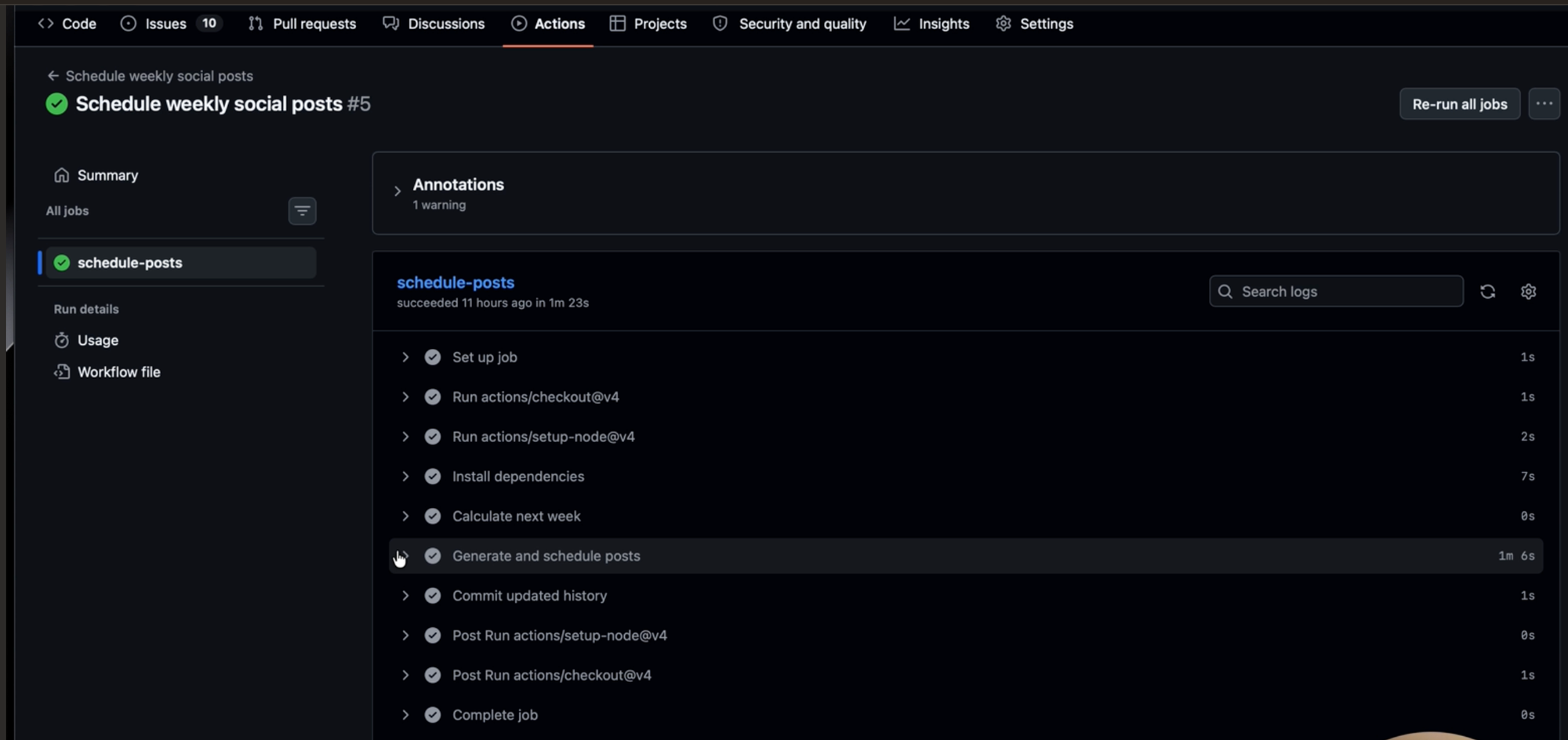
GitHub Actions is where the job runs. I have one action — “schedule weekly social posts” — that fires every Monday at 9 a.m. It calculates the upcoming calendar week, runs the TypeScript script, and that’s it. No need for a manual trigger means there’s no scheduled task I need to revisit.

iA Writer, a distraction-free text editor, is where I do spot-checks. All the generated posts and the upcoming schedule are stored as Markdown files in the repo, so I can pull them up in iA Writer whenever I want to review what’s going out. It’s not a required step since the system runs fine without me looking, but it’s nice to have a window into it.

MusicBrainz is the large music database I use to populate platform links and artist data for the more established artists. It’s one of the APIs that powers Unstream’s search, so the content pipeline is pulling from the same data source the product itself uses.

Inside the automation that generates 21 posts each week

Every Monday at 9 a.m., GitHub Actions fires the script. Then:

Step 1: Pick the artists

The TypeScript script starts by selecting six artists: three from the verified indie pool and three from the established artist pages. Indie artists come from the 114 musicians who’ve claimed their Unstream profiles. Established artists come from the WikiInfo and MusicBrainz-generated pool.

Each artist gets flagged as “promoted” once they’ve been featured. They won’t appear again until every artist in the pool has had a turn. This is one of the details that make the system work in the long term. More on that in a bit.

Step 2: Build the seven-day content calendar

The six artists get organized into a seven-day schedule, one post per day. Indie and established artists alternate every other day for variety. The seventh day is reserved for a feature spotlight, pulled from my shipped features file.

This runs across three platforms: Instagram, Threads, and Bluesky — for a total of 21 posts per week. It’s the same content calendar, adapted for each platform.

Step 3: Generate the post content

This is where the TypeScript (code written in plain text) file does the heavy lifting. For each post, it handles the business logic: pulling the artist’s Instagram handle if they have one, listing the platform names where you can support them, and generating copy from a set of standard post templates.

The copy varies based on the type of artist. For indie artists, the angle is exposure and awareness (check out this artist, here’s how you can support them). For established artists, it’s more like, “That artist you love on Spotify? You can support them better through these platforms”. Feature posts are straightforward — what’s new and why it matters.

Artist photos get pulled automatically, either from the artist’s verified page on Unstream or from the same search API that powers the platform itself. Hashtags get applied in the code for Instagram and Bluesky. Threads posts get added to the Music topic.

To give you a sense of the range: my upcoming queue right now includes Neccos for Breakfast (a friend of mine from Threads), Steve Reich (a composer I very much love), and Bear McCreary (who has scored a bunch of sci-fi TV shows). It’s pulling from all over the place, which is exactly the point.

Step 4: Schedule through the Buffer API

At the end of the script, all the generated content is written and scheduled through the Buffer API. Posts land in my Buffer queue at 9 a.m. daily across all three platforms.

The result: I open Buffer and see a full week of content, ready to go.

Step 5: The deduplication layer

This is the part that makes the system sustainable, rather than something that runs out of steam after a few weeks.

Every artist gets flagged as promoted once they’ve been featured. The system won’t pick them again until every other artist in the pool has had a turn. Once everyone’s been covered, the whole list resets and the cycle starts over.

Features work the same way. Each entry in the shipped features file has a true/false “announced” tracker. It flips to true once that feature has been posted about. When everything’s been announced, the whole list resets to false, and we go again.

The nice thing about this approach is that the system naturally expands. As more indie artists verify their profiles and more features ship, the content pool grows without any extra work from me. I don’t need to feed it new material — the product growth feeds the content engine.

Teaching the automation to sound like me

One thing I knew from the start: if the posts sounded like generic AI, this whole thing would be pointless. Consistency only matters to me if the content actually sounds like it came from someone who cares about what they’re saying.

So before I wrote a single template, I spent time teaching Claude how I actually talk. I did it in a few steps:

First, I had it trained on my entire back catalog of published blog posts. They live at bgreen.lol, but I keep local copies as Markdown files, so I pointed Claude at those to get a feel for how I write long-form.

Then I pulled my last 50 Threads posts using an alpha version of the Buffer API. Blog posts and Threads posts are different animals — the blog shows how I think, but Threads shows how I write short. Since the social posts were going to be short, that second sample mattered just as much.

From there, I had Claude study the tone across both, with a few instructions: stick to the talking points I cared about, and bias toward my Threads voice and shorter lengths, since these were meant to be quick posts, not essays.

All of that became a voice-and-tone.md file — a set of guidelines describing how I talk about music, artists, and Unstream. Claude then proposed the boilerplate templates, and I made a few manual tweaks to get them exactly to my liking.

The templates give the posts structure, but the voice guidelines are what give them personality. They’re what make the difference between a post that reads like a press release and one that sounds like me sharing something I’m genuinely excited about.

The results so far

Each post gets a handful of likes and reposts, and Threads posts land somewhere between a few dozen and a few hundred views. But it’s OK because I have a different goal for my workflow.

I went from posting impulsively whenever I remembered to posting 21 times a week across three platforms, all without touching my workflow. Consistency was always Step 0, as you can’t grow anything organically on social if you’re not showing up. Now I’m showing up every day across three platforms without it costing me the time I need to actually build the product.

The system is also getting better on its own. Every artist who verifies their profile and every feature I ship expands the content pool without any extra work, so the pipeline and the product are growing together.

Next up: I’m thinking about expanding to TikTok and posting artist photos there. Adding a new platform is mostly just adding another API call, so it should be fairly straightforward.

What you can steal from this, even if your stack looks nothing like mine

My setup is specific to my project, which is to be expected, but the underlying approach works for anyone who’s building something and struggling to market it consistently. Here’s what can apply to most situations:

You probably already have your content. I started with a database I’d already built for product reasons. If you work with any sort of structured data — a list of customers, projects, testimonials, features you’ve shipped, partners you work with — you already have the raw material for a content engine. You just might not be thinking of it that way yet.

The two-bucket approach keeps things interesting. I alternate between content that promotes other people (the artists) and content that promotes my product (the features). That balance is what makes it feel like a feed worth following instead of a billboard.

If you’re a freelancer, one bucket could be client wins, and the other could be things you’ve learned. If you’re running social for a SaaS company, one bucket is customer stories, and the other is product updates.

Deduplication is what makes it sustainable. Without the tracking logic that prevents repeats and cycles through the full pool, this system would have run out of steam in a few weeks. That’s the difference between a one-time batch of content and an engine that keeps running.

Voice guidelines are non-negotiable. If you’re using AI to draft content, the voice file is the single most important piece. Without it, you get generic posts that could belong to anyone. With it, you get content that sounds like a real person with real opinions.

Start with “good enough.” My engagement numbers aren’t super impressive and I’m OK with that. I went from zero consistency to daily posts across three platforms, and the system gets better as my content pool grows.

If you’re taking Buffer’s API for a spin, we’ve got resources to get you moving. Our developer docs cover the GraphQL schema, auth flow, and quick-start examples. The Buffer MCP server docs walk through plugging it into Claude or any MCP-compatible AI agent.

If you need hands-on help, our support team is around, or you can join our Discord server and chat to other people building with the API.

We’d love to hear about what you make. Find us in our Discord server, or @buffer on all major social channels.

https://buffer.com/resources/i-built-a-content-engine-that-creates-21-social-posts-a-week-using-the-buffer-api/


Apple’s latest AirTags are cheaper than ever for Prime Day

Prime Day has brought a number of Apple deals, but one of the most useful if you’re planning to travel over the July 4th weekend or later this summer is on the new AirTags. The four-pack has dropped to a new low of $90 ($9 off) at Amazon and Best Buy, bringing the price of each tracker down to about $22.50. It’s not a big deal, but it’s the first time we’ve seen Apple’s latest AirTags discounted this heavily since they launched earlier this year. If you need more trackers, Costco is offering a five-pack of AirTags for $99.99 to members, throwing in the fifth tracker at no extra cost.

If you own an iPhone, I’d recommend buying an AirTag over just about any other Bluetooth tracker available. Unlike rivals that simply show an item’s approximate location, AirTags can guide you directly to them using onscreen arrows, vibrations, and sounds. The original model already did an impressive job, but the latest version can more helpfully guide you up to 50 percent farther away thanks to an upgraded ultra-wideband chip. Apple has also increased the speaker volume by 50 percent, making it easier to hear an AirTag when it’s hidden in a closet or otherwise out of sight.

While some big specs have evolved, Apple hasn’t changed some of the tracker’s best qualities. It still runs on a replaceable CR2032 battery and carries the same IP67 water and dust resistance rating as its predecessor. Apple has also kept useful features like AirTag sharing, which lets up to five people track the same item. You can also still temporarily share a lost item’s location with participating airlines like United, Delta, and American Airlines to help recover misplaced luggage.

https://www.theverge.com/gadgets/951987/apple-airtag-second-gen-prime-day-deal-sale-2026


WhatsApp head Will Cathcart is stepping down after seven years

Will Cathcart, who led WhatsApp for the past seven years, is stepping down from his role as Meta appoints a new leader. On Monday, Meta CEO Mark Zuckerberg announced on Facebook that Kunal Shah, the founder of an Indian fintech startup called Cred, is taking over as the head of WhatsApp.

Cred is an app that allows people to manage their bills and receive rewards for making payments through the platform. As part of Shah’s appointment, Meta is investing $900 million into Cred, giving it a 20 percent stake in the startup, Bloomberg reports.

Meanwhile, Shah will step down from his role as the CEO of Cred to lead WhatsApp. “Kunal built CRED into one of India’s most important technology companies, and he brings the kind of builder mentality and global perspective that will serve him well in running the world’s biggest messaging app,” Zuckerberg writes.

https://www.theverge.com/tech/953464/whatsapp-will-cathcart-stepping-down-cred


Decades-Old Squid Proxy Flaw ‘Squidbleed’ Can Expose User Data

Security researchers at Calif.io have disclosed a memory leak vulnerability in Squid Proxy that has existed in the software since 1997. 

Squid is a widely used open source web proxy that can reduce bandwidth and improve response times via caching. Squid supports HTTP, HTTPS, FTP, and other protocols.

Calif researchers discovered that Squid is affected by a vulnerability that is similar to the notorious OpenSSL vulnerability known as Heartbleed, which is why they have dubbed it Squidbleed.

Officially tracked as CVE-2026-47729, the vulnerability causes Squid’s FTP parser to read beyond the boundary of a memory buffer, into a region that may contain a previous user’s uncleared HTTP request data.

Exploitation requires the attacker to control an FTP server reachable from the proxy. Squidbleed poses the biggest risk in shared proxy environments, such as corporate networks, schools, and public Wi-Fi hotspots, where multiple users may route traffic via the same Squid instance. 

An attacker with access to such a network could silently siphon HTTP request data belonging to other users, potentially capturing authentication credentials, session tokens, and API keys. 

Advertisement. Scroll to continue reading.

The exposure is limited to cleartext HTTP traffic and deployments where Squid terminates TLS. Standard HTTPS connections relayed as opaque Connect tunnels are not affected. While that reduces the overall attack surface, sensitive credentials can still travel in cleartext HTTP in many enterprise and legacy environments.

The vulnerability was discovered with the aid of Anthropic’s Claude Mythos AI model.

A patch was merged into Squid version 8 in April 2026 and shipped in version 7.6 in June 2026. The risk can be mitigated by disabling FTP support entirely if it’s not needed.

Calif researchers also recently found a high-severity vulnerability in OpenSSL and a DoS attack technique called HTTP/2 Bomb, which allows an attacker to quickly knock web servers offline. Both vulnerabilities were discovered using AI. 

Related: Attackers Exploit Gravity SMTP Plugin Flaw to Harvest Valuable WordPress Data

Related: Splunk Enterprise Vulnerability Exploited in Attacks Days After Disclosure

Related: Majority of Internet-Accessible REDCap Servers Outdated

https://www.securityweek.com/decades-old-squid-proxy-flaw-squidbleed-can-expose-user-data/


Attackers Exploit Gravity SMTP Plugin Flaw to Harvest Valuable WordPress Data

Threat actors are exploiting a medium-severity vulnerability in the Gravity SMTP WordPress plugin to steal complete system details, Defiant warns.

Gravity SMTP for WordPress is an email deliverability plugin that integrates with multiple SMTP providers and API-based services to allow admins to send and track emails directly from their websites.

All plugin iterations before version 2.1.5 are affected by a sensitive information exposure vulnerability tracked as CVE-2026-4020 (CVSS score of 5.3) that has been exploited in the wild since early May.

The issue impacts a REST API endpoint that unconditionally returns true, thus becoming accessible to any unauthenticated user. If a specific parameter is appended to a query, the endpoint returns internal connector data in JSON format.

The data contains the full system report, including configuration data such as PHP and WordPress version, loaded extensions, web server details, document root path, database details, active plugins and theme, WordPress configuration details, and configured API keys/tokens.

According to Defiant, the bug exists because the impacted REST API endpoint, registered within a shared library providing a configuration collection system, does not perform authentication or capability checks.

Advertisement. Scroll to continue reading.

“This makes it possible for unauthenticated attackers to harvest credentials that could be used to send email on behalf of the site, as well as to gather detailed reconnaissance about the site’s software stack that can be leveraged to identify and target other vulnerabilities,” Defiant explains.

The WordPress security firm has observed in-the-wild exploitation of the security defect since early May. Attackers have been sending unauthenticated GET requests to the vulnerable endpoint to retrieve the full System Report JSON object.

In June, Defiant has observed a surge in attacks targeting CVE-2026-4020. To date, the company has blocked over 17 million exploit attempts.

Site owners and administrators are advised to update their Gravity SMTP deployments to version 2.1.5 as soon as possible and to check server access logs for requests to the affected endpoint, as the in-the-wild exploitation does not leave other obvious traces.

“If you are running a vulnerable version of Gravity SMTP and have configured any third-party email integrations (such as Amazon SES, Google, Mailjet, Resend, or Zoho), you should assume the associated API keys, secrets, and OAuth tokens may have been exposed. We strongly recommend rotating these credentials after updating the plugin,” Defiant notes.

Related: Majority of Internet-Accessible REDCap Servers Outdated

Related: 15,000 WordPress Websites Cleaned Up in SocGholish Botnet Takedown

Related: Joomla, LiteSpeed Vulnerabilities Exploited in Attacks

Related: No Exploits Required

https://www.securityweek.com/attackers-exploit-gravity-smtp-plugin-flaw-to-harvest-valuable-wordpress-data/