In Giappone il Wallet di Stato è gestito da Google
My Number Card su Google Wallet, il Giappone porta l’identità digitale a portata di smartphone
In Giappone la My Number Card (la carta d’identità nazionale) arriva su Google Wallet. Dal 20 ottobre 2026, i titolari della carta d’identità nazionale giapponese possono aggiungerla agli smartphone Android compatibili e usarla per accedere ai servizi digitali e, con la nuova funzione di verifica degli attributi, per identificarsi di persona. L’annuncio della Digital Agency segna un altro passo nell’estensione dell’identità digitale del Paese, dopo il debutto della versione per iPhone nel giugno 2025.
Sul piano pratico, il telefono può sostituire la carta fisica in alcune operazioni: autenticazione ai servizi pubblici, verifica dell’identità, controllo dell’età e conferma della residenza. Tra gli impieghi indicati dalle autorità giapponesi ci sono la registrazione a eventi e servizi, la vendita di alcolici e tabacco e l’accesso a sconti riservati ai residenti. L’utilizzo dipende però dalla compatibilità del servizio o dell’esercente: non basta che la credenziale sia presente nel Wallet, anche chi la verifica deve essere in grado di leggerla.
Da carta amministrativa a credenziale digitale
Il cambiamento va oltre la digitalizzazione di un documento. Il Giappone sta trasformando la My Number Card, nata come strumento per l’identificazione e i servizi amministrativi, in una credenziale riutilizzabile nelle interazioni con soggetti pubblici e privati. In prospettiva, può semplificare operazioni come l’apertura di un conto o la sottoscrizione di un contratto telefonico, purché le aziende adottino le procedure di verifica necessarie.
La funzione più interessante è la verifica dei dati: invece di mostrare la carta e rivelare tutti quelli in essa contenuti, si può chiedere di dimostrare una sola caratteristica specifica, come l’età o la residenza, ad esempio. Per verificare il requisito anagrafico, si legge sui quotidiani giapponesi, può bastare confermare di aver raggiunto una certa età, senza esporre indirizzo e numero identificativo. È anche un modo per applicare il principio della minimizzazione dei dati: condividere solo ciò che serve per la singola operazione. Le autorità presentano la verifica di età e residenza tra i nuovi casi d’uso, ma l’effettivo livello di informazione rivelata dipenderà anche da come il servizio richiedente sarà configurato.
L’identificazione può avvenire con volto o impronta digitale sul dispositivo. Questo rende l’accesso più semplice e riduce la necessità di consegnare o mostrare la tessera. Non elimina, però, ogni traccia: app, esercenti, rete e sistema operativo possono generare metadati sulla verifica. La selezione dell’attributo limita i dati comunicati, ma non equivale automaticamente all’anonimato.
Il confronto con l’Europa
Il lancio giapponese offre un esempio concreto anche all’Europa, dove il quadro normativo per l’European Digital Identity Wallet è in costruzione. Il regolamento eIDAS 2.0 stabilisce che ogni Stato membro renda disponibile almeno un wallet entro la fine del 2026. I portafogli dovranno basarsi su requisiti comuni e consentire l’uso transfrontaliero di dati identificativi e attestazioni elettroniche. La normativa prevede inoltre l’accettazione da parte delle amministrazioni quando è richiesta l’identificazione elettronica e, in determinati settori regolamentati, da parte di operatori privati, su richiesta volontaria dell’utente. L’estate scorsa, a dire il vero, è circolata la notizia che in alcuni Paesi dell’Unione (tra cui probabilmente l’Italia) sarebbe partita una sperimentazione proprio per il caricamento del documento di identità sul Wallet di Google.
Il modello europeo punta su interoperabilità, certificazione e regole comuni per la protezione dei dati. È un’ambizione più ampia di quella di un wallet nazionale, ma richiede di coordinare standard, fornitori, sistemi di verifica e processi di certificazione tra Paesi diversi. Il Giappone mostra quanto rapidamente un’identità digitale possa essere portata verso usi quotidiani quando esistono una carta nazionale diffusa e un’integrazione con le piattaforme mobile più utilizzate.
L’Italia parte da una base solida con SPID e Carta d’identità elettronica, ha inoltre già reso disponibili alcuni documenti digitali nell’app IO. Il sistema IT-Wallet, tuttavia, è ancora in fase di sviluppo: nel luglio 2026 il Dipartimento per la trasformazione digitale ha annunciato l’apertura di un ambiente di test per i fornitori privati. Il governo ha riferito che i documenti su IO hanno raggiunto 12 milioni di attivazioni nell’ultimo anno e mezzo; questo dato riguarda l’uso di quei documenti, non il completamento dell’ecosistema IT-Wallet né la diffusione di tutte le sue funzioni.
Il nodo della sovranità digitale
La disponibilità giapponese resta limitata: servono Android 12 o versioni successive, NFC, un dispositivo compatibile con FeliCa e un chip di sicurezza supportato. Anche Google precisa che la carta digitale non sostituisce sempre il documento fisico. L’estensione ad Android amplia la platea potenziale, ma non rende il servizio utilizzabile su qualunque smartphone.
C’è poi la dipendenza da piattaforme statunitensi. Il Giappone mantiene il controllo sull’identità e sull’emissione della credenziale, ma l’esperienza d’uso su Android passa da Google Wallet; su iPhone, dall’ecosistema Apple. I wallet rendono più semplice sfruttare sistemi di sicurezza già integrati nei telefoni, ma affidano a imprese private una parte dell’accesso quotidiano a un’infrastruttura pubblica sensibile.
Il caso giapponese mostra dunque un’accelerazione importante, ma anche il prezzo di una diffusione fondata su infrastrutture private e dispositivi selezionati. Perché un wallet sia davvero affidabile servono procedure robuste per revoca e recupero delle credenziali, alternative per chi non ha uno smartphone compatibile e la garanzia che l’accesso ai servizi non dipenda da un solo ecosistema. La carta digitale può diventare una porta d’ingresso comoda, la sua governance, però, resta una questione di sovranità.
The hard way looks like this: trying to remember to post regularly (when I sometimes can’t even remember what day of the week it is), coming up with some of my best ideas at 3 a.m. (before promptly falling asleep and forgetting them), and posting sporadically with neither consistency nor strategy. Days or even weeks (eek) would go by without me posting, and the group would lose momentum.
Somewhat ironically, things changed when I went on maternity leave. Before taking three months off work, I scheduled two posts a week to keep the group active while I was dealing with diapers. In doing so, the group became more active than it’s ever been!
So in the interest of working smarter, not harder — whether you run a Facebook Page, a profile in professional mode, or a Facebook Group — let me walk you through how to set up a similar process.
The short version: you can schedule a post on Facebook natively from a Page, a professional-mode profile, or a Group you admin, but not from a regular personal profile.
In this guide, I’ll walk you through how to schedule a post on Facebook three ways: in the Facebook app, in Meta Business Suite, and with Buffer. I’ll also cover what to do when the schedule option goes missing, and how to find, edit, or delete posts you’ve already scheduled.
Key takeaways
You can schedule a post on Facebook natively from a Facebook Page, a profile in professional mode, or a Facebook Group you admin or moderate. Regular personal profiles can’t schedule posts.
Meta Business Suite schedules posts to Facebook Pages and Instagram, but not to Facebook Groups.
Buffer publishes scheduled Facebook Page posts automatically and sends Facebook Group posts to your phone as a notification to publish yourself. It doesn’t connect to personal or professional-mode profiles.
If the option to schedule is missing, the most common causes are posting from a regular personal profile or not having admin access to the Page or Group.
You can edit, reschedule, or delete a scheduled post on Facebook, Meta Business Suite, or, for posts you scheduled there, in Buffer’s calendar.
Buffer’s analysis of more than 1 million Facebook posts found that posts shared at 9 a.m. on Thursday performed best.
Jump to a section:
Can you schedule a post on Facebook? (Pages, profiles, and Groups)
Yes, you can schedule a post on Facebook. But where you can schedule depends on the type of Facebook account you’re posting from:
Facebook account type
Can you schedule with Facebook’s own tools?
Can you schedule with Buffer?
How the scheduled post publishes
Facebook Page
Yes — Facebook Pages can schedule posts in the Facebook app or in Meta Business Suite.
Yes — Buffer can schedule posts, Reels, and Stories to Facebook Pages.
Automatically at the scheduled time, with either tool.
Profile in professional mode
Yes — professional-mode profiles can use Facebook’s built-in scheduling.
No — Buffer doesn’t connect to Facebook profiles, including professional-mode profiles.
Automatically, when scheduled with Facebook’s own tools.
Regular personal profile
No — Facebook doesn’t offer scheduling on regular personal profiles.
No — Buffer doesn’t connect to Facebook profiles.
Not possible. Turn on professional mode or post from a Facebook Page instead.
Facebook Group
Yes — Group admins and moderators can schedule posts from inside the Group. Meta Business Suite doesn’t support Groups.
Yes — Buffer schedules Facebook Group posts using mobile notifications.
Automatically when scheduled inside the Group. With Buffer, you get a phone notification at the scheduled time and publish the post yourself.
Facebook Pages
Pages have the most options. You can schedule from the Facebook app, from Meta Business Suite, or with a third-party tool like Buffer, and posts publish automatically at the time you pick.
Personal profiles (and professional mode)
Facebook doesn’t offer scheduling on a regular personal profile. Turning on professional mode for your profile unlocks Facebook’s built-in scheduling. Third-party tools are a different story: Meta’s API doesn’t let them auto-publish to personal profiles, so at best they’ll send you a reminder to post yourself. Buffer doesn’t connect to personal or professional-mode profiles at all, so if that’s where you post, Facebook’s own tools are your route.
Facebook Groups
If you’re an admin or moderator, you can schedule posts from inside the Group itself, and Groups also support recurring scheduled posts. Meta Business Suite doesn’t support Groups. Buffer can schedule Group posts, but because Meta doesn’t allow automatic publishing to Groups, Buffer sends you a notification at the scheduled time and you publish the post from your phone.
How to schedule a post on a Facebook Page or professional profile
If you have a Facebook Page or a profile in professional mode, you can create, schedule, and manage posts directly in the Facebook app.
On the Facebook app
At the top of your feed, Page, or profile, tap ‘What’s on your mind?’
Create your post.
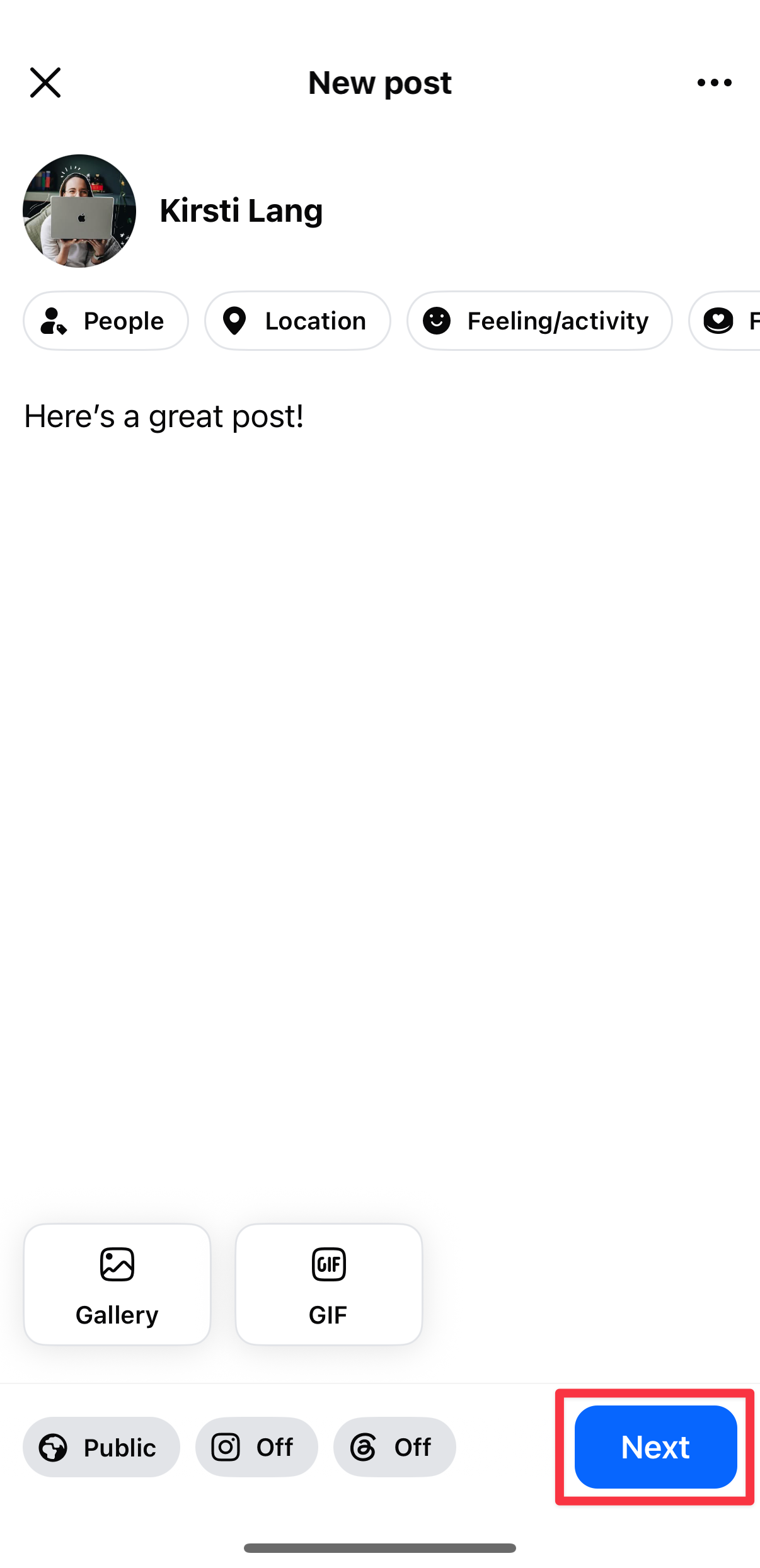
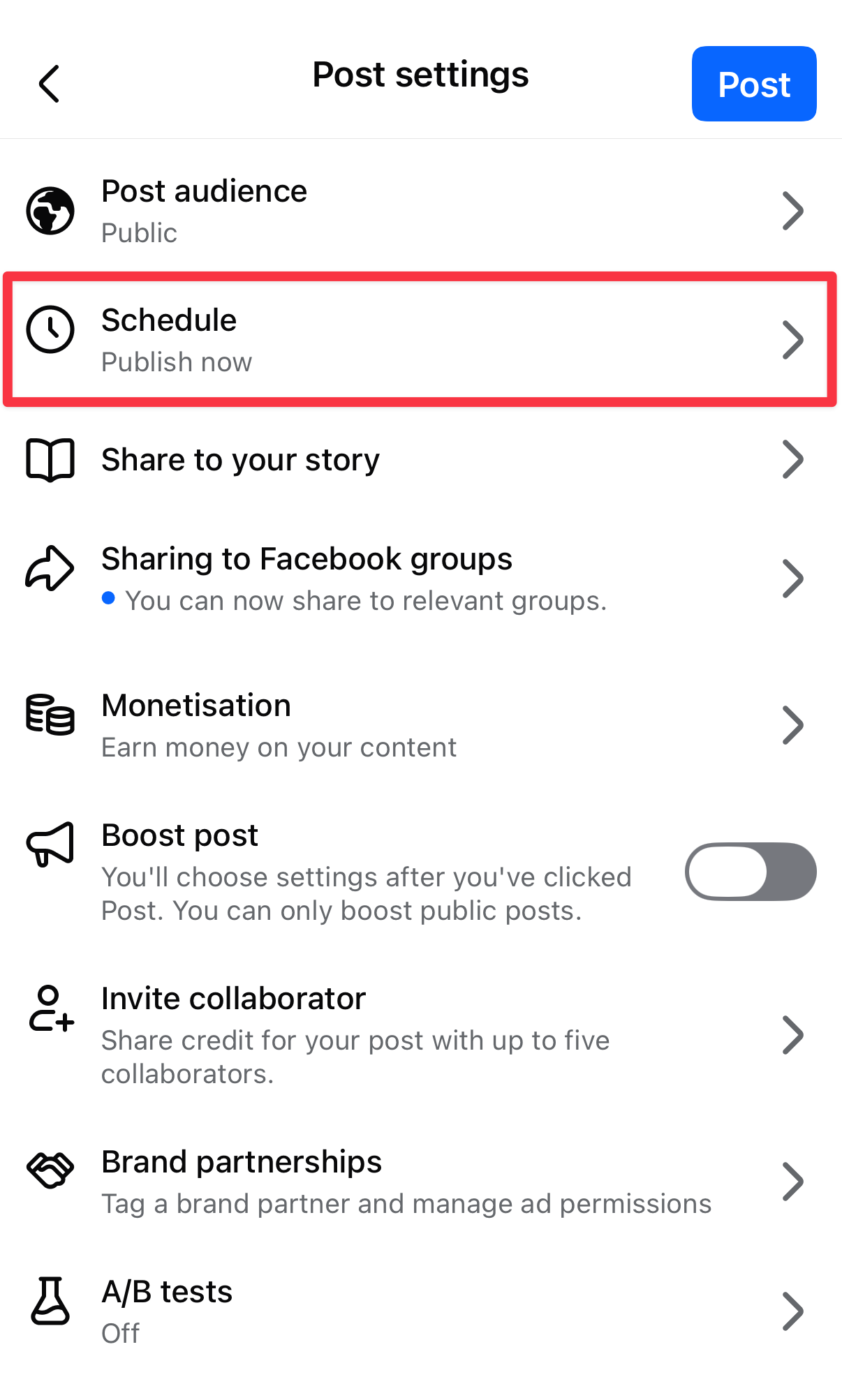
Tap ‘Next,’ then ‘Schedule’ to open post settings and scheduling options.
Choose a time to publish your post, hit ‘Save,’ then ‘Schedule.’
How to schedule a post in a Facebook Group
This is the one I use most. If you’re an admin or moderator of a Group:
Tap ‘Write something’ in your group and create your post.
Tap the calendar icon to set a date and time, then tap ‘Schedule’.
Groups also let admins set up recurring posts, which is handy for a weekly thread like an intro post or a “wins of the week” check-in.
How to schedule a post on Facebook using Meta Business Suite
Meta Business Suite is a free tool from Meta that lets you manage your Facebook and Instagram content in one place.
Compared to Facebook’s native scheduling in the app, Meta Business Suite gives you more control and lets you post to both platforms at once, though it is a bit more complicated to use.
Navigate to the business Page you manage.
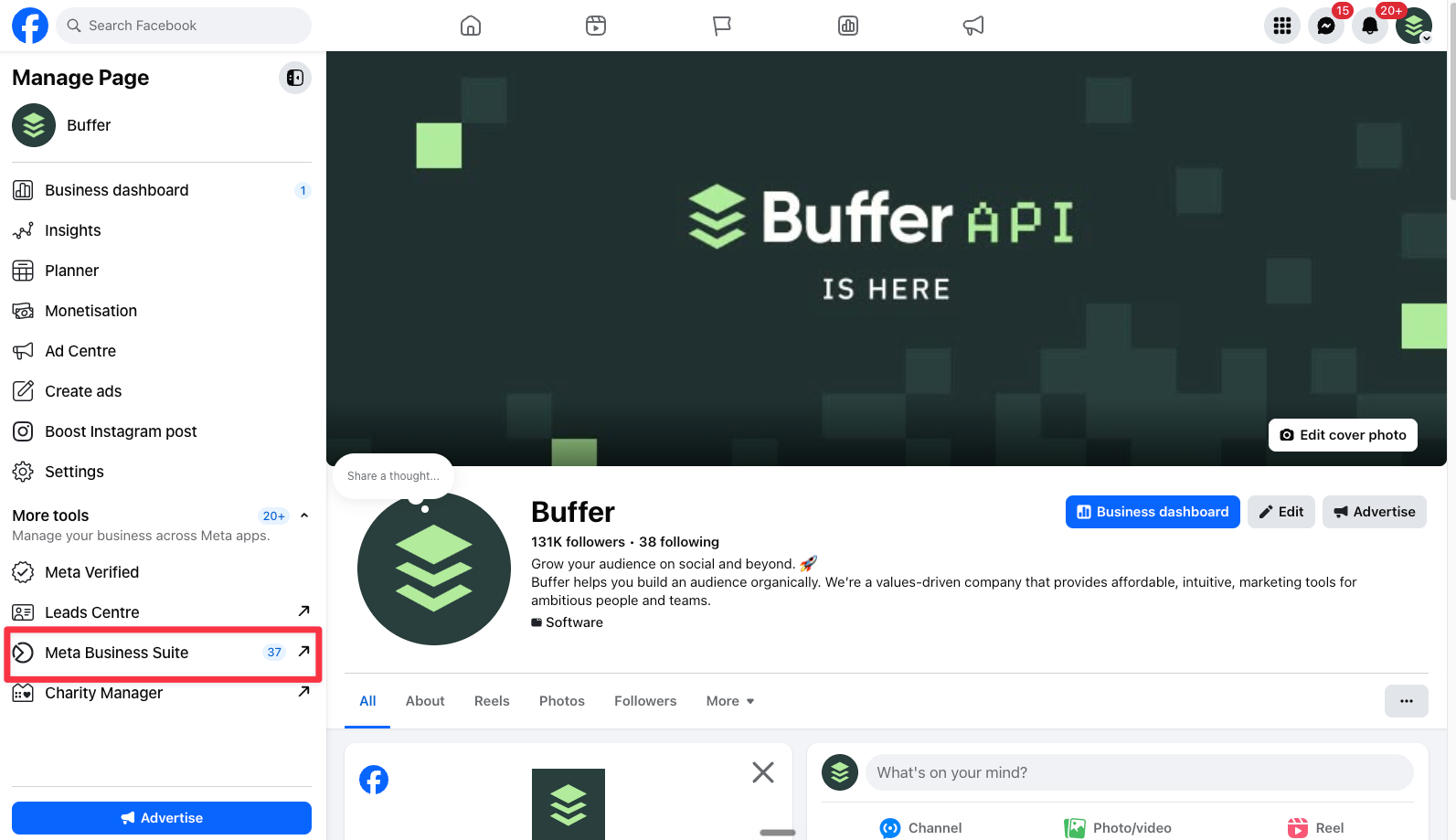
Click on ‘Meta Business Suite’ on the left-hand menu.
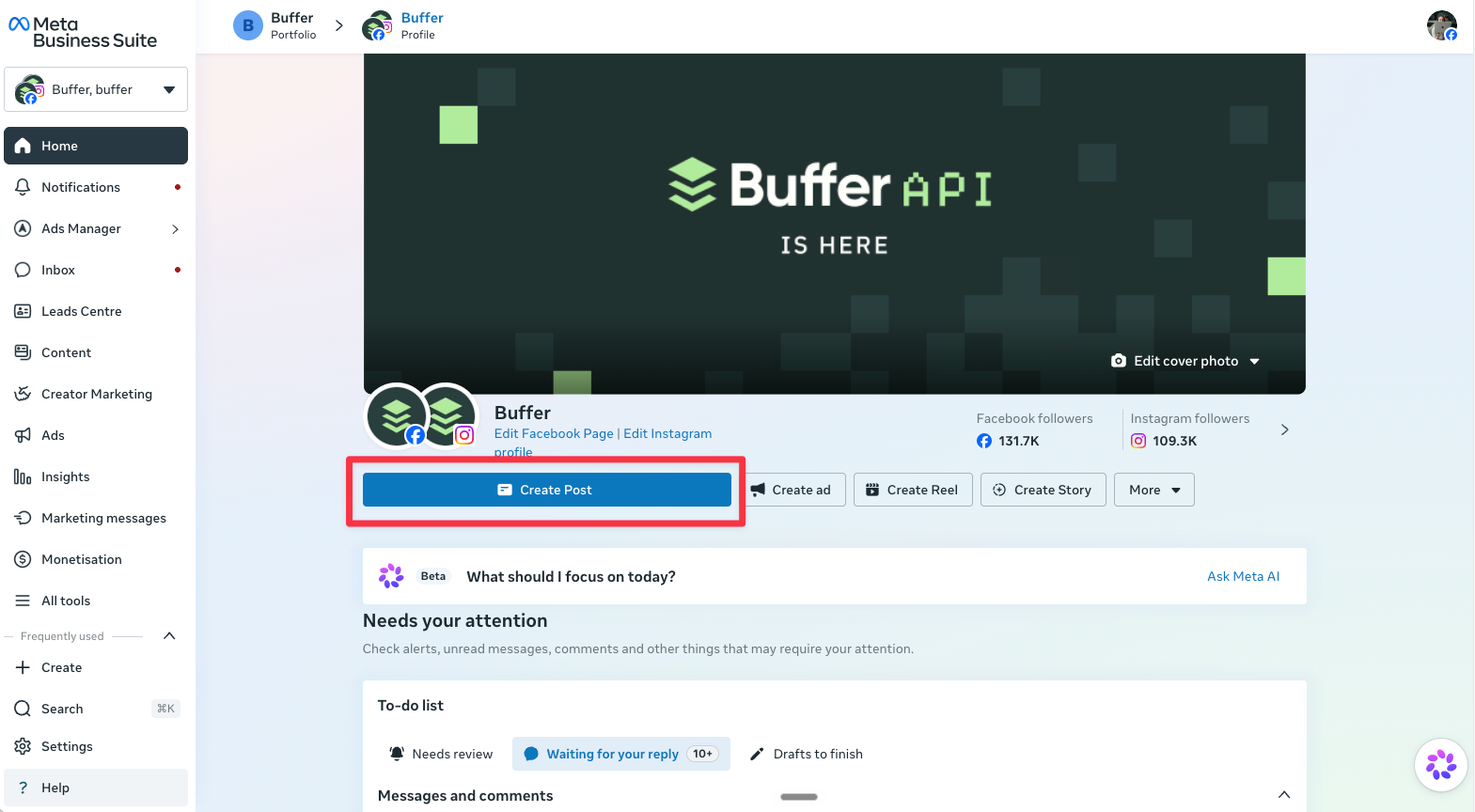
Click ‘Create post’: Choose where you want to publish (Facebook, Instagram, or both), then write your post, add media, and links.
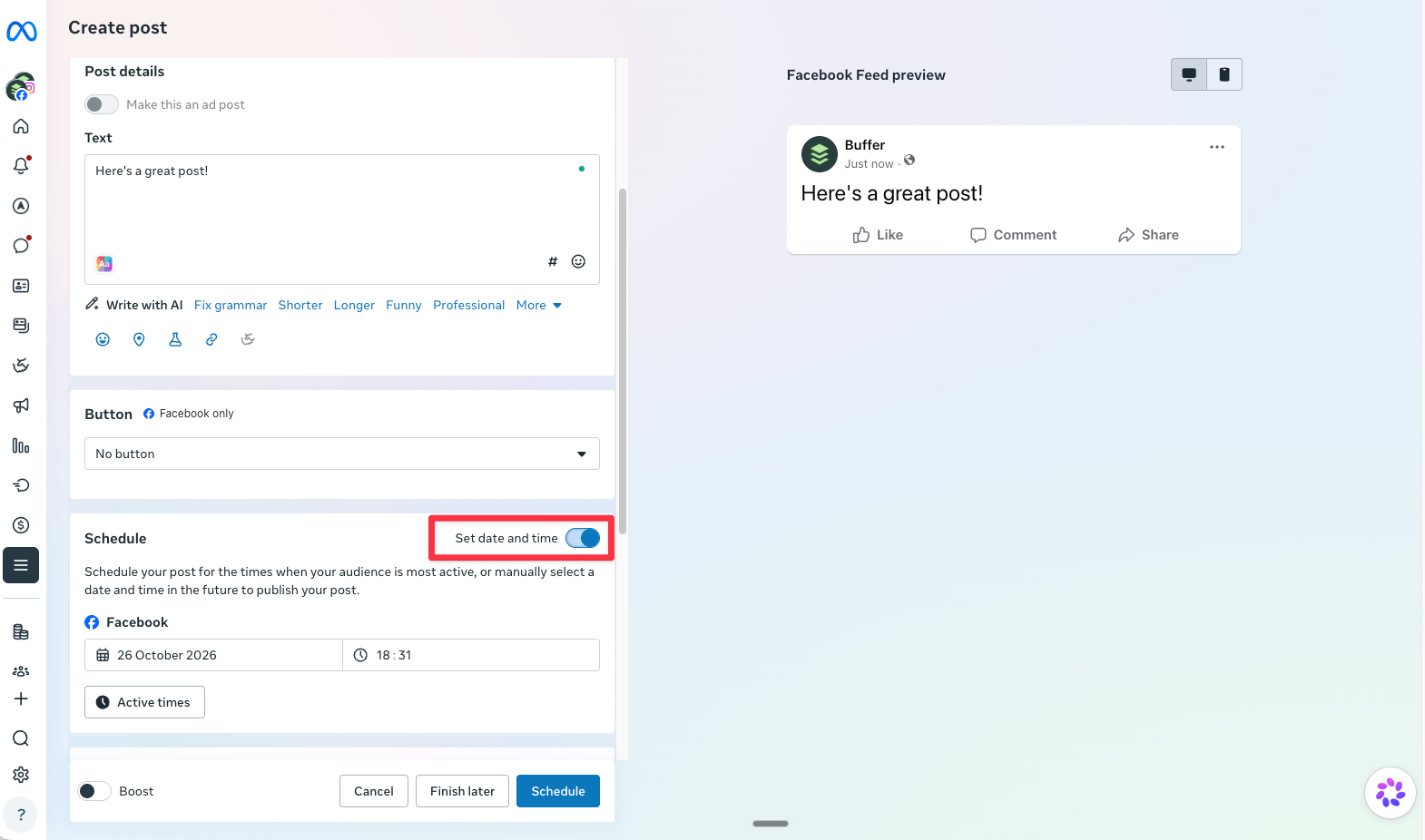
Scroll down to ‘Scheduling options’ and toggle ‘Set date and time’.
Pick the date and time you want the post to go live.
Click ‘Schedule’ to confirm.
Open Meta Business Suite from the Manage Page menu on your Facebook Page.Click ‘Create Post’ on the Meta Business Suite home screen.Toggle on ‘Set date and time’, pick when the post should go live, then click ‘Schedule’
📌
Note: Meta Business Suite doesn’t support posting or scheduling to Facebook Groups.
How to schedule a post on Facebook using Buffer
If you manage more than one channel, or you’d rather not open Facebook every time you post, a social media management tool like Buffer lets you schedule everything from one place. (Yes, this is the Buffer blog, so factor that in.) Buffer works with Facebook Pages and Facebook Groups, but not personal or professional-mode profiles.
Here’s how, in four steps:
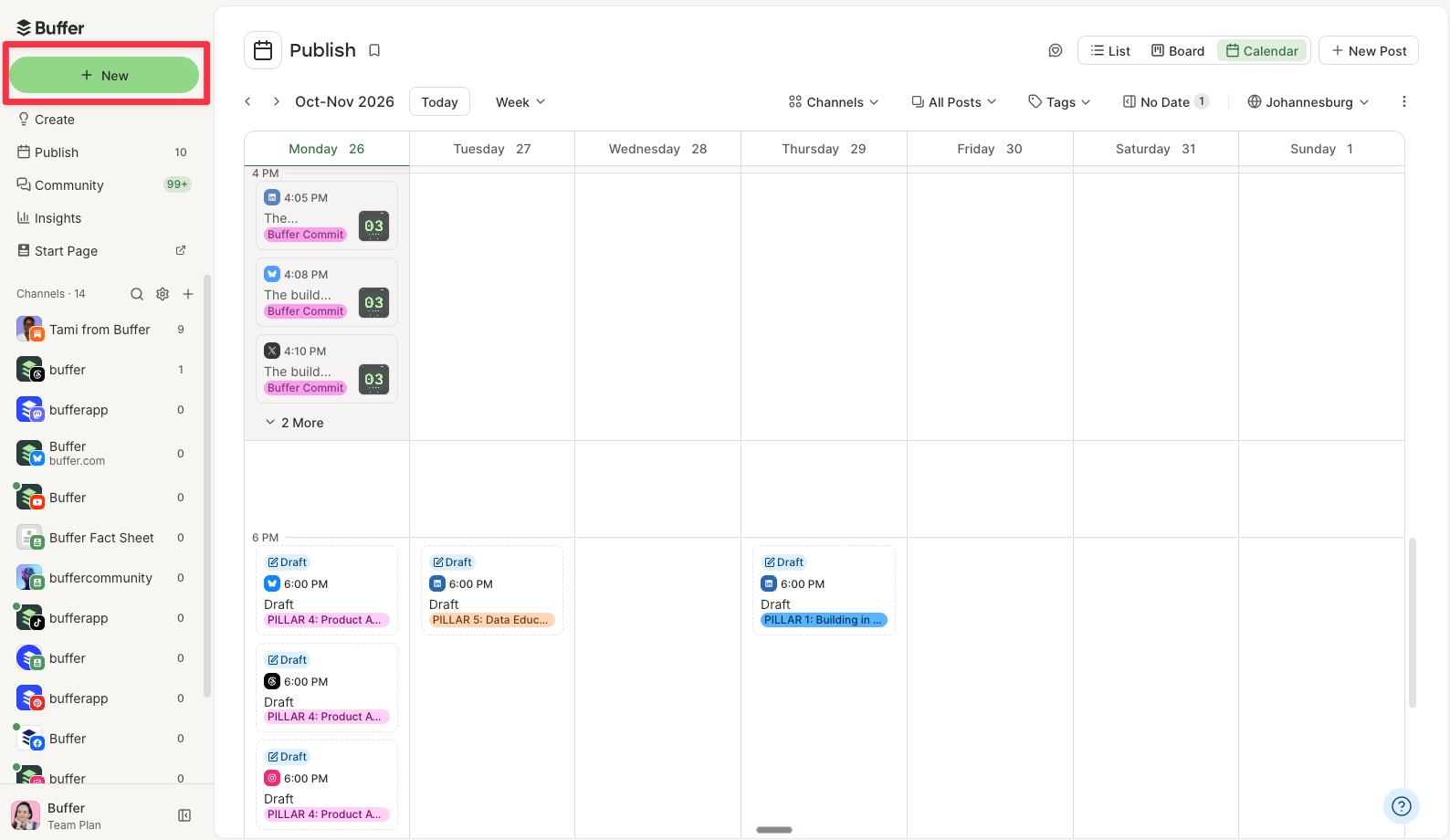
Go to your Buffer dashboard and click ‘New’ > ‘Post’ to open the composer.
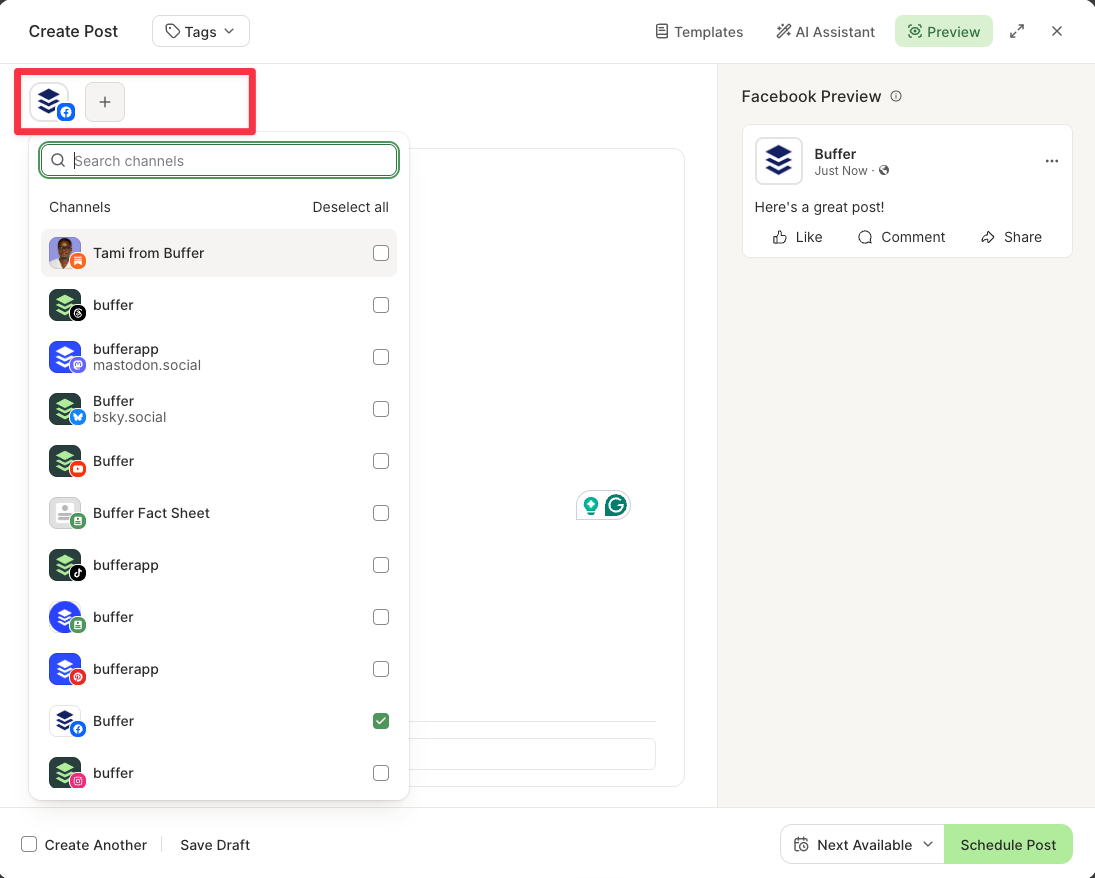
Select your Facebook Page or Group.
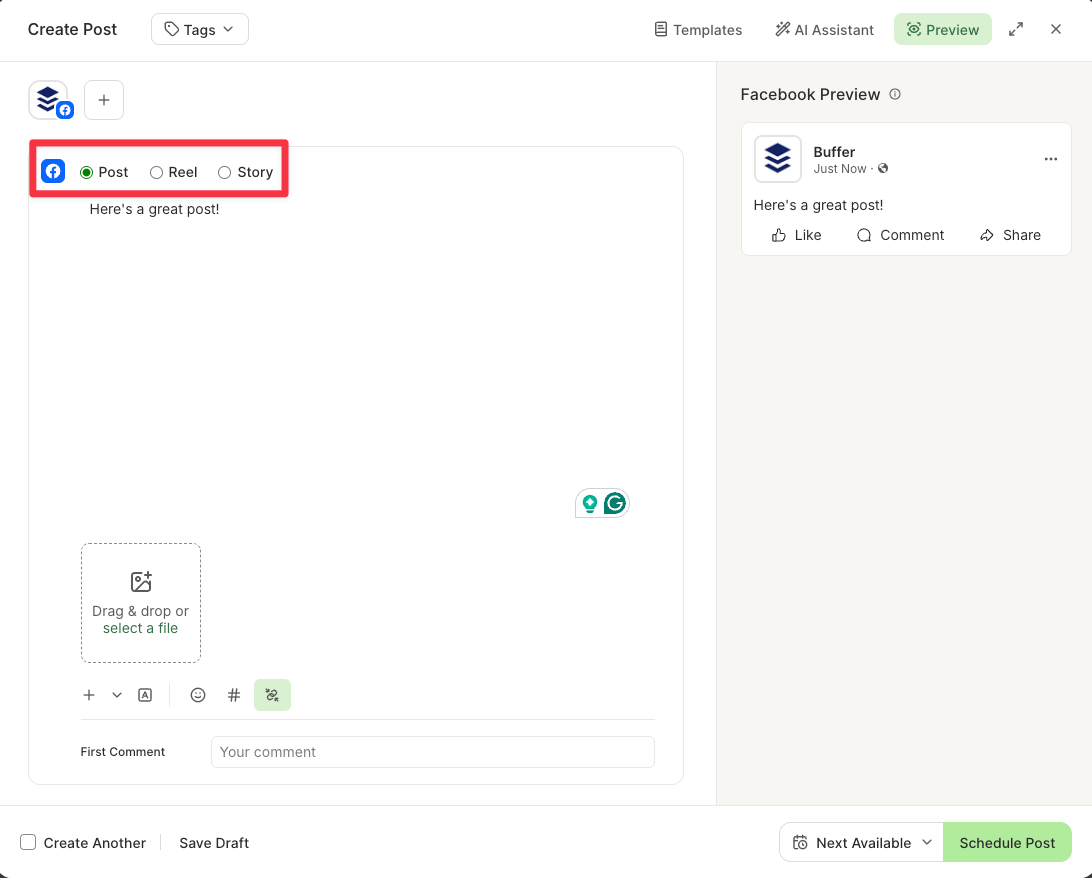
Create your Facebook post.
Schedule your post.
1. Go to your Buffer dashboard
Once you’ve signed up for Buffer and connected your Facebook Page or Group, you’ll see your Buffer dashboard.
Click + New in your Buffer dashboard to start a post.
2. Select your Facebook Page or Group
A pop-up where you can craft your post will appear. Choose Facebook from the channel list on the top left. You can also add any other channels you have connected to crosspost your content elsewhere.
Choose your Facebook Page from the channel list. You can add more channels to crosspost.
3. Create your Facebook post
Use an idea you’ve saved or start from scratch. Choose ‘Post,’ ‘Reel,’ or ‘Story,’ depending on what you want to share — Reels are available on Facebook Pages only. Upload your media and add your caption.
Choose whether you’re creating a Post, Reel, or Story. Reels are available on Facebook Pages only.
4. Schedule your post
Once you’ve crafted your post, choose when it goes out:
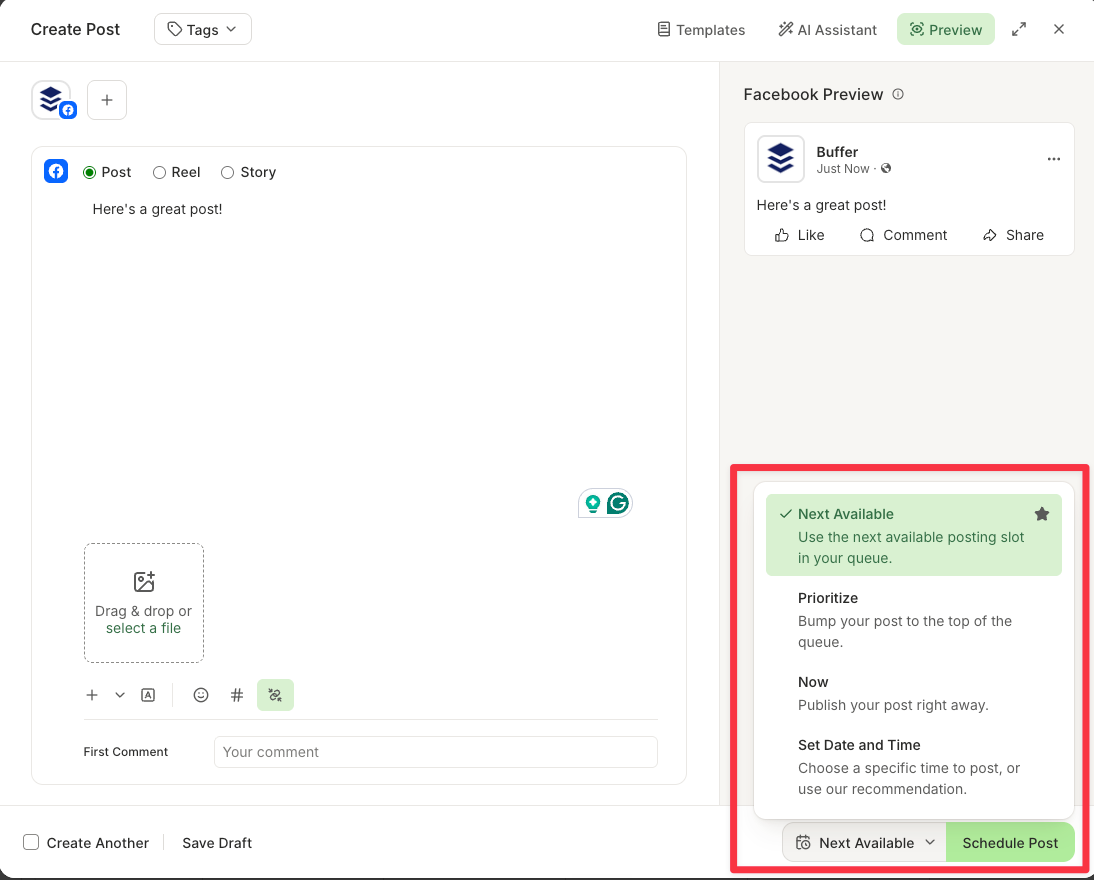
Next Available: Add the post to the next open slot on your posting schedule.
Prioritize: Put the post at the top of your queue so it goes out next.
Set Date and Time: Schedule the post for a specific date and time.
Now: Share the post immediately.
Then click ‘Schedule Post.’
Pick when your post goes out, then click ‘Schedule Post.’
Buffer is the tool behind this blog, so read that column with that in mind! I’ve tried to be straight about where Facebook’s own tools do the job just as well.
Feature
Facebook app (native)
Buffer
Meta Business Suite
Supported platforms
Facebook, Instagram
Facebook, Instagram, X, LinkedIn, TikTok, Pinterest, YouTube, Google Business Profile, Bluesky, Mastodon, Threads
Facebook, Instagram
Facebook Group post scheduling
Yes — for admins and moderators
Yes — with mobile notifications
No
Content scheduling
Yes — limited to Facebook and Instagram
Yes — schedule to all connected channels from one place
Yes — limited to Facebook and Instagram
Scheduling features
Basic scheduling with limited options
Posting queue, custom time slots, and suggested posting times
Basic scheduling without queue management
Create space
No — no central content library or idea board
Yes — a dedicated space to save ideas, photos, GIFs, PDFs, videos, links, or text and turn them into posts later
No — no central content library or idea board
AI assistance
No
Yes — AI Assistant for drafting and rephrasing posts
Yes — AI suggestions for captions and post improvements
Content repurposing
No
Yes — customize the copy and media for each channel in a single post
Yes — you schedule without opening Facebook, so no feed to get pulled into
No — you schedule inside Facebook or Instagram
Access to latest features
Yes — immediate access to platform-specific features
Indirect — may not always have immediate access to platform-specific features
Yes — immediate access to Facebook and Instagram updates
Ease of use
Simple interface, but can feel limited
One dashboard for all channels. Group posts still need a tap on your phone to publish
Can be complex to navigate, especially for beginners
Pricing
Free
Free plan for up to three channels. Paid plans from $5 per channel per month, billed annually
Free
How to find, edit, or delete scheduled posts on Facebook
Spotted a typo? Or perhaps plans changed and that “sale ends Friday” post is now wrong? Good news: you can find, edit, reschedule, or delete a scheduled Facebook post. Where you do it depends on where you scheduled it, because a post you scheduled in a third-party tool like Buffer lives in that tool until it publishes, not in Facebook.
How to find your scheduled posts on Facebook
Facebook app: On your Page or professional profile, tap ‘Manage Posts’ to see everything you’ve scheduled. You’ll find the option below your bio, just above your most recently published post. Then tap the ‘Filters’ button and change the post status to scheduled. Tap on each scheduled post to edit, delete, or reschedule it.
Meta Business Suite: On desktop, click ‘Business Dashboard’ > ‘Planner’ in the left-hand menu. You’ll be taken to a content calendar, where you can hover over each scheduled post to edit, delete, or reschedule it.
Facebook Groups: Admins can see the Group’s scheduled posts by heading over to the Group’s ‘Community home’ page, choosing ‘Admin tools’ from the menu on the left > Scheduled posts.
Buffer: Open your Facebook channel’s queue, or switch to the calendar view to see every scheduled post across your channels.
How to edit or delete a scheduled post in the Facebook app
Head over to your Page or professional profile, tap ‘Manage Posts’ to see everything you’ve scheduled. You’ll find the option below your bio, just above your most recently published post.
Tap the ‘Filters’ button and change the post status to ‘Scheduled’ to see a list of your scheduled posts.
Tap on each scheduled post to edit, delete, or reschedule it.
How to edit or delete a scheduled post in Meta Business Suite
On desktop, click on ‘Business Dashboard’ in the left-hand menu, then choose ‘Planner.’ You’ll be taken to a content calendar.
Hover over each scheduled post to edit, delete, or reschedule it.
How to edit or delete a scheduled post in Buffer
Open the calendar or queue in Buffer to see all your scheduled content.
Click the post, then click the pencil icon to edit it. Make your changes and click ‘Save.’
To reschedule without changing anything else, drag the post to a new date and time on the calendar.
To delete it, hover over the post, click the three dots, and select ‘Delete.’
Why can’t I schedule a post on Facebook?
If the scheduling option is missing or won’t work, it’s almost always one of these:
Problem
Likely cause
Fix
There’s no scheduling option at all
You’re posting from a regular personal profile
Post from a Facebook Page, or turn on professional mode for your profile
You can’t schedule in a Group
You’re not an admin or moderator of the Group
Ask a Group admin to schedule it, or to make you a moderator
The option is missing on a Page you help manage
Your access to the Page doesn’t include creating content
Ask a Page admin to update your access
Your Group doesn’t show up in Meta Business Suite
Meta Business Suite doesn’t support Facebook Groups
Schedule from inside the Group in the Facebook app, or use Buffer’s mobile notifications
Buffer won’t connect to your profile
Buffer connects to Facebook Pages and Groups, not profiles
Post from a Page, or use Facebook’s own tools for your profile
A specific post won’t schedule in Buffer
That post type isn’t supported (polls or carousels, for example)
Where did the schedule post button go on Facebook?
Facebook makes menu and interface changes fairly often, so it’s probably just on a different screen! In the Facebook app, you can find the scheduled button by writing your post, then tapping ‘Next’ > ‘Schedule’ > pick a time > ‘Save’ > ‘Schedule.’
In a Facebook Group, tap the calendar icon after writing your post. In Meta Business Suite, scroll down to ‘Scheduling options’ and toggle ‘Set date and time’. If none of those appear, check the table above: you’re most likely on a regular personal profile or don’t have admin access.
Why schedule Facebook posts? 5 benefits
Whether you’re trying to increase brand awareness, grow your audience, build community, or generate leads (or all four!), scheduling your Facebook posts in advance helps with all of them.
1. Maintain consistency
When you post regularly, your audience knows what to expect and when to expect it. And you stay top of mind so they don’t forget who you are and what you do.
The numbers back this up. Buffer’s data team analyzed engagement across all platforms Buffer supports — Instagram, Facebook, TikTok, LinkedIn, Bluesky, Threads, X, YouTube, Mastodon, and Pinterest. And guess what? The most consistent posters received five times more engagement per post than users who posted inconsistently.
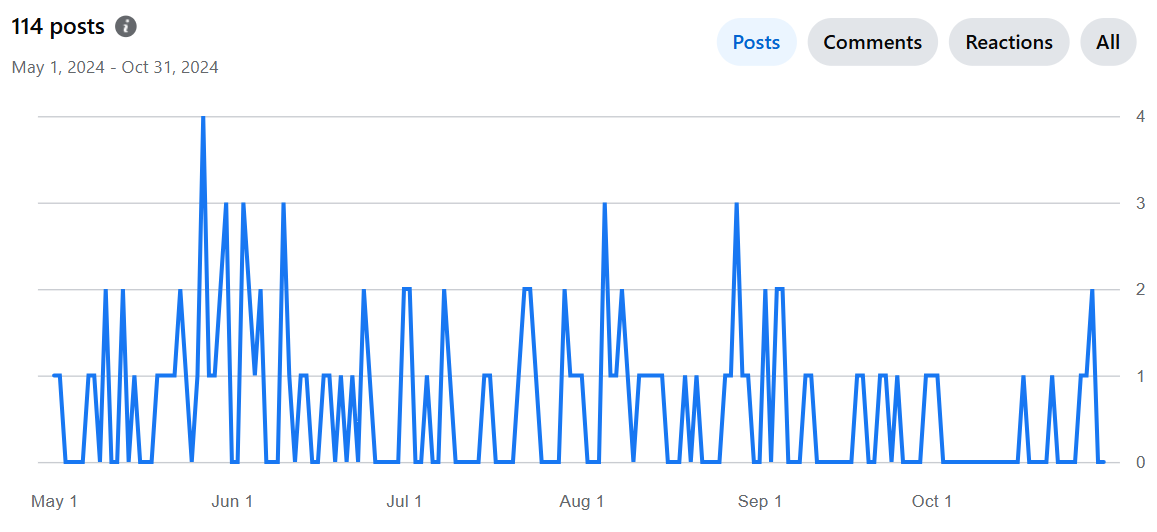
From my own small and less impressive dataset, I can definitively say that scheduling = consistency. Check out my stats below. I was on maternity leave (with scheduled posts) from May 1 to July 31. There’s clearly a lot more activity happening in the former half of the chart compared to when I relied on my ad-hoc posting (after August 1).
My group’s activity from May to October 2024. Scheduled posts kept things busy during my maternity leave (May–July).
So Buffer’s data and my one small group point the same way.
2. Create higher-quality content
Scheduling gives you time.
Instead of scrambling to come up with something on the fly, you can plan ahead and make sure each post is thoughtfully crafted and not just checking the box of, “Oh heck, I need to post something before people think I’ve disappeared.” (Yes, I am speaking from personal experience.)
A post you wrote on Sunday and reread on Tuesday is almost always better than one you dashed off in five minutes. Plus, you’ve got a buffer (no pun intended) to refine things before hitting publish.
3. Be more efficient and save time
Posting on Facebook can eat a surprising amount of time, especially if you’re creating your posts one by one on the day you plan to share them.
Switching between tasks all day is also draining. Did you know, according to a 2024 study, multitasking makes you slower, less accurate, and more mentally drained? I certainly don’t need that in my life, and I doubt you do either.
When you schedule your posts ahead of time, you can batch your work instead of breaking your flow to post on the fly. Setting aside an hour or two once a week to plan and schedule means you’ll save time, and you won’t be breaking your focus every day to post.
As I mentioned earlier, I created my content in batches before I went on maternity leave, which made the task more manageable. So much so that it’s the most consistent I’ve ever been, despite being away from my desk.
4. Optimize reach by posting at the best time for your audience
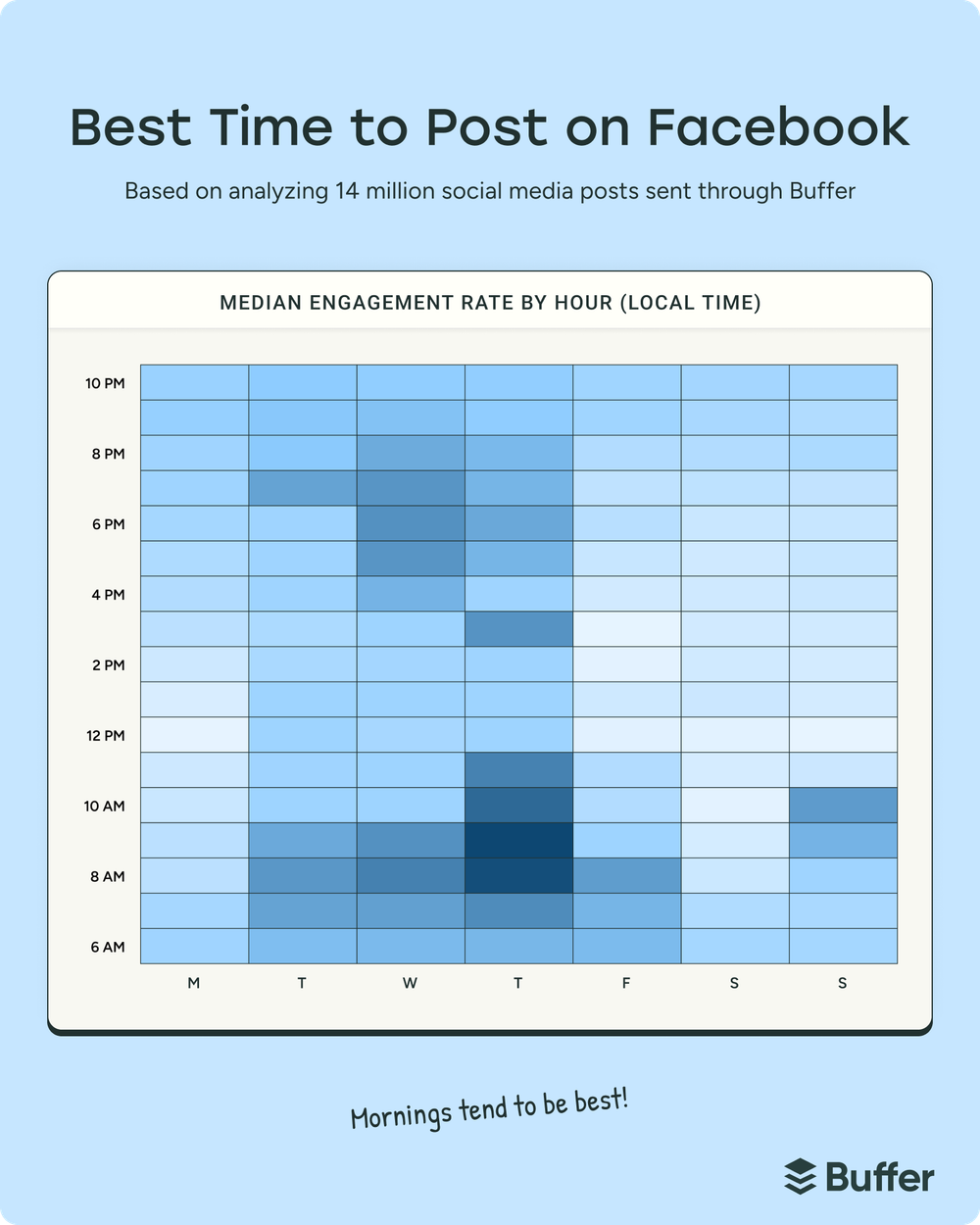
Buffer’s data team dug into this, too. They analyzed more than 14 million Facebook posts sent via Buffer by businesses, creators, and influencers to find the best time and day to post, and which content performs best.
One caveat before the number: there’s no universal best time. It always depends on your audience.
With that in mind, according to Buffer data, the best time to post on Facebook is 9 a.m. on Thursday.
Thursday mornings get the highest median engagement on Facebook, based on Buffer’s analysis of 14 million posts.
Note that this doesn’t necessarily mean this is when audiences are up and consuming your content — it’s likely that posts need some time to gain momentum on the feed. Either way, it’s when the best-performing posts went out, and unless you’re free every Thursday at 9 a.m., scheduling is how you hit that slot.
In my group, for example, I’m reaching two main audiences: South Africa (SAST) and the US, so I need to find a time that works for both. I aim to hit the South African audience at lunchtime, and the US audience first thing in the morning as they start their day.
5. Better content planning and control
I know that random posting can feel a bit like throwing spaghetti at the wall to see what sticks. But when you schedule posts, you’re in the driver’s seat.
You can plan strategically, so you’re not posting three promos in a row and then nothing for a week. This also allows you to plan for time-sensitive content, ensuring it goes out when it’s most relevant.
It’s also much easier to keep a consistent voice when you’re in control of your posting schedule. Instead of lashing out with something spicy and off-brand because you’ve had a bad day, planning ahead means a bad day doesn’t end up on your Page.
For me, scheduling Facebook posts provides peace of mind that everything’s taken care of, leaving me with more brain space to a) do my real job, and b) focus on creating even more awesome content.
4 quick tips for scheduling Facebook posts
1. How often to post
We recommend posting to Facebook up to once or twice a day, but five to seven solid posts a week is a realistic place to start.
⚡️ Action step: Plan a week’s worth of posts in one sitting and schedule them in one go.
2. Best time to post
Our data suggests that early weekday mornings are the best time to post on Facebook.
⚡️ Action step: Use Buffer’s Insights feature to help you find the best times to post.
⚡️ Action step: Set a posting goal in Buffer and use the streak tracker to keep yourself accountable.
4. Track analytics and engagement
Analyzing post performance helps you improve future content.
⚡️ Action step: Use Buffer’s Insights dashboard to track engagement, reach, and click-through rates across posts. Repurpose or expand on what worked and ditch what didn’t.
Facebook post scheduling FAQs
Can you schedule a post on a personal Facebook profile?
Not on a regular personal profile. Facebook’s scheduling tools work on Pages, profiles in professional mode, and Groups, so turning on professional mode is the way to get scheduling on your own profile. Third-party tools can’t auto-publish to personal profiles because Meta’s API doesn’t allow it, and Buffer doesn’t connect to profiles at all.
How do I find my scheduled posts on Facebook?
On the Facebook app, go to your Page or professional profile, tap ‘Manage Posts’ to see everything you’ve scheduled. Tap the ‘Filters’ button and change the post status to scheduled. Tap on each scheduled post to edit, delete, or reschedule it.
On Meta Business Suite: click ‘Business Dashboard’ > ‘Planner’ in the left-hand menu. You’ll be taken to a content calendar, where you can hover over each scheduled post to edit, delete, or reschedule it.
Can you edit a scheduled post on Facebook?
Yes. On the Facebook app, tap ‘Manage Posts’ from your Page or professional profile. Tap the ‘Filters’ button and change the post status to scheduled. Tap on each scheduled post to edit, delete, or reschedule it. In Meta Business Suite, go to ‘Business Dashboard’ > ‘Planner,’ then hover over each scheduled post to edit it.
Can you schedule posts in a Facebook Group?
Yes, if you’re an admin or moderator: write your post in the Group, tap the calendar icon, and set a date and time. Groups also support recurring posts. Meta Business Suite doesn’t support Groups, and Buffer schedules Group posts as a mobile notification that you publish yourself.
Can you schedule Facebook Reels and Stories?
With Buffer, yes. You can schedule reels to Facebook Pages (3 to 90 seconds, vertical 9:16 video) and stories (one image or video per story, with videos up to 60 seconds).
Does scheduling Facebook posts hurt your reach?
No. Using scheduling tools won’t hurt your engagement — a 2020 analysis found that Facebook posts scheduled through third-party tools got 10.3% more engagement than posts published natively. Scheduling won’t fix weak content, though. It just gets your posts out on time and frees you up to reply to comments, which is the part that actually moves engagement.
Over to you
Scheduling didn’t turn me into a more organized person. It just meant my group kept ticking over while I was busy with diapers. Whether you use the Facebook app, Meta Business Suite, or a scheduling tool like Buffer, the win is the same: you decide what to post once and stop having to remember. Happy scheduling!
DNA, la bozza Kobosko piace alle telco sullo spettro. Ma spunta il nodo roaming
Connect Europe, l’associazione che raccoglie le principali telco Ue, accoglie con favore la bozza del Digital Networks Act (DNA) pubblicata dall’europarlamentare Michał Kobosko, presidente della Commissione ITRE, che presenta una serie di novità rispetto alla bozza presentata a gennaio dalla Commissione Ue.
Le principali novità introdotte riguardano due aspetti fondamentali:
Taglio dei massimali per il roaming dati all’ingrosso (wholesale caps): La proposta prevede una drastica riduzione dei tetti massimi che gli operatori mobili si addebitano a vicenda per l’utilizzo delle reti in roaming. Il limite verrebbe abbassato inizialmente a 65 centesimi di euro per gigabyte, con una traiettoria di progressiva riduzione fino a 40 centesimi di euro per gigabyte entro il 2031. Questa misura punta ad agevolare gli operatori più piccoli, consentendo loro di competere in modo più efficiente oltre i confini nazionali senza subire costi insostenibili da parte dei grandi gruppi (come Deutsche Telekom, Vodafone, Orange e Telefónica).
Rimozione del “roaming permanente” come barriera autonoma: Viene eliminata la possibilità di vietare o limitare l’accesso al roaming all’ingrosso basandosi esclusivamente sul criterio del “roaming permanente” (permanent roaming). Pur mantenendo intatti i presidi e le salvaguardie contro utilizzi anomali o abusivi, questa modifica punta a permettere alle aziende di TLC di vendere stabilmente servizi e competere per i clienti anche al di fuori del proprio Paese d’origine.
Connect Europe contraria all’abolizione del roaming
“Tuttavia, le modifiche proposte al roaming rischiano di minare gli incentivi a investire nelle reti mobili, con potenziali conseguenze per i consumatori e la concorrenza. È inoltre necessaria maggiore ambizione in materia di regolamentazione dell’accesso e migrazione al rame per sbloccare gli investimenti nelle reti gigabit.
La prova decisiva per il DNA è se l’industria europea delle telecomunicazioni sarà in grado di fornire il 5G, il futuro 6G, la fibra ottica e le infrastrutture edge e cloud basate sull’intelligenza artificiale necessarie a consumatori, imprese e governi. La connettività è un imperativo strategico e il DNA dovrebbe riflettere una visione industriale orientata alla crescita, all’innovazione e agli investimenti”, si legge nella nota dell’associazione.
Nel complesso, Connect Europe vede positivamente
• Licenze per lo spettro che premiano gli investimenti. Il sostegno ai diritti di spettro a tempo indeterminato e a una durata minima di 50 anni per le licenze a tempo determinato offrirebbe agli operatori maggiore certezza per investire nel 5G e nel futuro 6G. Dare priorità alla copertura e agli impegni di implementazione rispetto ai costi iniziali per lo spettro sosterrebbe ulteriormente gli investimenti nelle reti.
• Spazio per l’innovazione e regole più eque. La bozza sembra compiere passi positivi verso regole più chiare sulla gestione del traffico e sui servizi innovativi, estendendo al contempo i requisiti di internet aperto all’intera catena del valore digitale, inclusi i fornitori di contenuti e applicazioni e le reti di distribuzione dei contenuti.
• Un ecosistema internet più equo, a tutela degli innovatori europei. Richiedere ai principali fornitori di traffico di negoziare l’interconnessione è un passo significativo verso relazioni commerciali più equilibrate e incentivi più forti per gli investimenti e l’innovazione nelle reti in Europa.
Principali preoccupazioni: roaming e switch off del rame (che resta)
• Le modifiche al roaming rischiano di indebolire gli investimenti. L’eliminazione delle garanzie esplicite contro il roaming permanente e l’ulteriore riduzione dei limiti di roaming all’ingrosso potrebbero minare gli incentivi a investire nella futura copertura, capacità e resilienza della rete. Potrebbero inoltre favorire l’arbitraggio normativo e creare rischi di frode, sicurezza e applicazione delle norme, potenzialmente a vantaggio di operatori extraeuropei privi di investimenti comparabili nelle reti UE. L’Europa deve tutelare la sostenibilità del servizio “Roam Like at Home” per i cittadini europei.
• Le norme di accesso necessitano di maggiore ambizione. La bozza mantiene in gran parte il tradizionale quadro basato sulla posizione dominante sul mercato, una gerarchia prescrittiva di rimedi e un prodotto di accesso armonizzato, anziché offrire un regime lungimirante e più simmetrico che supporti gli investimenti in fibra ottica, preservando al contempo salvaguardie mirate per i reali colli di bottiglia locali.
• La migrazione del rame rimane troppo prescrittiva. L’eliminazione della scadenza uniforme a livello UE per lo spegnimento e la semplificazione della procedura sono aspetti positivi, ma rimane un regime di spegnimento obbligatorio del rame. La migrazione della fibra dovrebbe tutelare la libertà di scelta dei consumatori e la concorrenza infrastrutturale, ed essere guidata dalla domanda, dalle decisioni commerciali e dalle condizioni del mercato locale, non da obblighi normativi.
• Riserve di spettro paneuropee. La possibilità di assegnazioni a livello UE per porzioni del nuovo spettro armonizzato rischia di ridurre lo spettro disponibile per le assegnazioni nazionali e solleva preoccupazioni in merito all’efficienza dello spettro, alla concorrenza e agli incentivi agli investimenti.
• La semplificazione deve significare meno burocrazia. Ulteriori obblighi per gli utenti finali e il mantenimento del margine di manovra per le misure nazionali di servizio universale rischiano di aumentare la complessità e la frammentazione. L’Europa ha bisogno di un alleggerimento normativo significativo e di una maggiore armonizzazione, non di nuove divergenze nazionali.
Connect Europe auspica una collaborazione costruttiva con il relatore Kobosko, il Parlamento europeo e il Consiglio, al fine di rafforzare le misure positive a favore degli investimenti e dell’innovazione, intervenendo al contempo su disposizioni che potrebbero ostacolare lo sviluppo delle reti. La presente dichiarazione riflette la valutazione iniziale di Connect Europe in merito alla bozza di relazione. Seguirà un’analisi più dettagliata.
L’app usata nelle proteste di piazza è Bitchat perché funziona offline: movimenti non tracciabili dalla Polizia
Bitchat sta vivendo una forte crescita in Francia. La crescita arriva dopo una settimana segnata dalle proteste contro il carovita, dalle richieste politiche di poter limitare temporaneamente l’accesso ai social network e dal blackout della rete mobile Orange e Sosh.
L’app creata da JackDorsey, cofondatore di Twitter e CEO di Block, ha raggiunto il primo posto nella propria categoria ed è entrata nella top ten delle applicazioni gratuite più scaricate. Il 17 ottobre centinaia di migliaia di persone sono scese in piazza, con episodi di violenza e saccheggi che hanno portato a oltre 1.800 arresti. Due giorni dopo l’ex primo ministro Gabriel Attal ha chiesto di consentire al governo di sospendere temporaneamente i social nelle aree interessate dai disordini.
Il 21 ottobre, intanto, la rete mobile di Orange e Sosh è rimasta in gran parte fuori uso per quasi dieci ore, mostrando concretamente il vantaggio di un sistema capace di comunicare anche senza Internet.
Come funziona Bitchat
Bitchat utilizza una rete mesh Bluetooth: ogni telefono comunica con i dispositivi vicini e può inoltrare i messaggi verso altri smartphone. Non servono account, numero di telefono o connessione dati. La portata teorica attraverso più passaggi è di circa 300 metri e una maggiore concentrazione di utenti può migliorare il funzionamento della rete.
Il canale pubblico #mesh può essere letto dagli utenti presenti nelle vicinanze, mentre i messaggi privati utilizzano crittografia end-to-end. Quando Internet è disponibile, Bitchat può inoltre utilizzare il protocollo Nostr per estendere le comunicazioni oltre la rete locale.
Il fatto che l’app non richieda un account o un numero di telefono rende più difficile collegare immediatamente un messaggio a un’identità attraverso i normali strumenti utilizzati dalle piattaforme online. Questo non significa però che l’utilizzo sia tecnicamente impossibile da individuare o tracciare attraverso altri strumenti.
Il ministro dell’Interno Laurent Nuñez ha precisato che qualsiasi eventuale sospensione delle piattaforme dovrebbe rispettare i limiti stabiliti dal Conseil d’État. Attal ha richiamato anche il precedente del blocco di TikTok in Nuova Caledonia nel 2024, successivamente giudicato sproporzionato dalla massima corte amministrativa francese.
Bitchat è già finita nel mirino di altri governi
Le caratteristiche offline dell’app hanno già attirato l’attenzione delle autorità di altri Paesi. Apple ha rimosso Bitchat dall’App Store cinese su richiesta della Cyberspace Administration, mentre l’India ha chiesto la rimozione sia dall’App Store sia da Google Play dopo l’aumento dell’utilizzo durante le proteste.
La crescita registrata in Francia mostra perché strumenti di questo tipo possano diventare particolarmente popolari durante manifestazioni, blackout o possibili restrizioni delle comunicazioni: consentono agli utenti di continuare a scambiarsi messaggi anche quando la normale infrastruttura Internet non è disponibile.
Via ChatGPT e Claude dagli uffici governativi svedesi, si tengono però Copilot di Microsoft
Stop all’uso di ChatGPT e Claude negli uffici della cancelleria svedese
A partire da oggi, in tutti gli uffici del Regeringskansliet, la Cancelleria di Governo in Svezia, cioè l’ufficio che supporta il Primo ministro e il Gabinetto (qualcosa di simile alla nostra Presidenza del Consiglio dei ministri, più tutti i singoli ministeri), è stato bloccato l’accesso ai modelli di intelligenza artificiale (AI) ChatGPT di OpenAI e Claude di Anthropic.
Il motivo è la sicurezza nazionale e la protezione dei dati classificati e sensibili. Come ha spiegato Mikael Wettercrantz, direttore della digitalizzazione degli uffici governativi, nelle comunicazioni via intranet al personale: “L’utilizzo di servizi di intelligenza artificiale senza un contratto formale può avere conseguenze per la nostra sicurezza informatica“.
Un blocco però molto selettivo che non varrà per Copilot di Microsoft, perché secondo quanto riportato dai media svedesi gli uffici governativi hanno avuto il tempo di esaminare questo modello di AI, chiedendo e ottenendo delle revisioni delle impostazioni di sicurezza che sono state di conseguenza aumentate.
Manca un accordo formale con Anthropic e OpenAI
Secondo quanto riportato dalla radio pubblica svedese Sveriges Radio e dal quotidiano Svenska Dagbladet, la Cancelleria avrebbe individuato diversi casi problematici di uso di servizi AI “aperti”, riguardanti sia la sensibilità delle informazioni inserite nei modelli sia il modo in cui le risposte generate sono state poi gestite dai dipendenti.
Il punto chiave della decisione presa della direzione della digitalizzazione della Cancelleria svedese è che solo con un accordo formale, in questo caso con OpenAI e Anthropic, si può definire a priori cosa il fornitore di tecnologie digitali può e non può fare con i dati e le informazioni gestite dagli uffici governativi e in particolare dai dipendenti pubblici che a quelle informazioni hanno accesso.
Un vantaggio per Microsoft
Alla fine tutto questo si può tradurre in un vantaggio competitivo di non poco conto per Microsoft: Copilot diventa il canale predefinito attraverso cui il personale della Cancelleria accede all’AI, mentre ChatGPT e Claude restano esclusi dall’uso diretto.
Il colosso di Redmond parte avvantaggiata perché Copilot è già incorporato nell’ecosistema Microsoft 365 usato dalla PA: identità, posta, documenti, Teams, permessi, audit e contratto enterprise sono già presenti. Questo abbassa enormemente la barriera all’adozione rispetto a un fornitore esterno che dovrebbe negoziare un accordo, integrarsi e superare una revisione di sicurezza.
Probabilmente c’è anche un discorso di continuità operativa, perché Microsoft è ormai profondamente integrato nel set tecnologico dell’amministrazione centrale svedese (ma probabilmente vale per tutti i Paesi europei). La “dipendenza” da Microsoft è stata ormai da anni integrata e omologata nella PA svedese, come infrastruttura di produttività e collaborazione, con contratti quadro e accordi enterprise che ne rendono la sostituzione complessa e costosa.
Uno studio accademico molto recente sulle amministrazioni pubbliche svedesi (centrali e locali) rileva che tutte quelle analizzate usano Microsoft 365 per il trattamento dei propri asset digitali e presentano una “dipendenza significativa” e un’elevata fiducia nel fornitore.
Ovviamente, l’uso di piattaforme tecnologiche fornite da società americane da parte di governi europei non comporta automaticamente l’accesso di Washington ai dati fisicamente depositati e custoditi in Europa, ma crea un rischio giuridico concreto: un provider soggetto alla giurisdizione statunitense può essere obbligato dal Cloud Act a divulgare dati sotto il proprio controllo, anche se archiviati nei Paesi dell’Unione. Per questo, su informazioni sensibili, la scelta del fornitore e delle garanzie contrattuali diventa una questione di sovranità e sicurezza digitale.
Bisogna anche dire che questo blocco imposto agli uffici governativi svedesi potrebbe essere temporaneo e comunque, a quanto pare alcuni dipendenti della cancelleria svedese possono ancora accedere a ChatGPT e Claude tramite una piattaforma AI sviluppata internamente dagli uffici governativi, sebbene l’ufficio stampa non abbia specificato quante persone ne abbiano accesso o quali restrizioni si applichino.
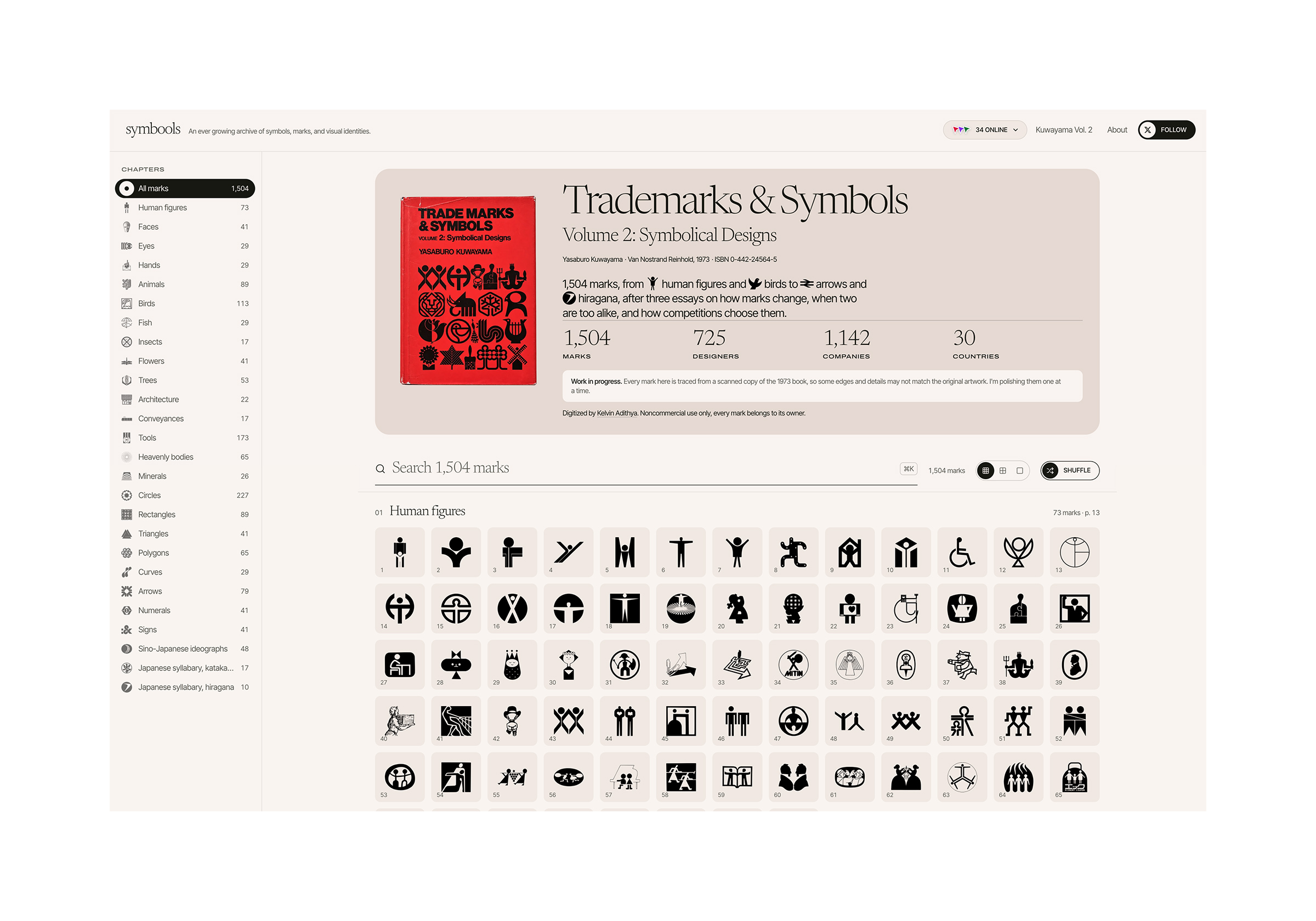
Its creator, Kelvin Adithya, shared some background on the project.
“I read Kuwayama’s Trademarks & Symbols as a teenager and it always stuck with me. Then I saw @Frozune’s post about it and it reminded me how good that book is. Most of these marks only live in old print and rough scans now, and I didn’t want them to slowly disappear, so I thought, let’s put the whole thing online.”
Kuwayama’s book can be downloaded from archive.org
On how it was made, Kelvin said, “I started from a scanned PDF of the book. The pages curve toward the spine, so first I built a flattener to straighten them out, then a tracer to turn every mark into a clean SVG. The traces still had plenty of problems from the scan, so I picked 20 or so of the worst logos and wrote notes on what was wrong with each one. That taught Claude the common mistakes and how to fix them, and then I let it loop through the rest.”
Getting each logo right was one of the main challenges behind the project. Kelvin added, “The scans are pretty bad, and checking each mark against the original really needs a designer’s eye, like telling whether a wobbly edge is the scan or the actual design.”
The site took four days to build. Checking each logo continues, and designs from other classic books may follow.
A selection of circle logos from the symbools archive
iFixit’s look inside the iPhone Duo may explain those broken screens and hinges
As is tradition, iFixit has torn open the latest iPhone and laid its parts bare on a table. It found some interesting details about how Apple might be hiding the crease on the Duo’s folding screen and gave it a 5/10 repairability score. That might not seem particularly high, but it’s the best score the site has given to a foldable yet.
The internal screen’s matte nano-texture cover doesn’t just make it more readable in bright sunlight; it also helps mask the crease by scattering reflections. When looking at the display under a microscope, iFixit also found oval-shaped subpixels arranged at various angles, which the site believes are designed to reduce artifacts and further mask the crease down the middle of the display.
The nano-texture outer layer is relatively easy to replace without swapping out the OLED underneath. If you do need to repair the display itself, however, good luck. As is the case with other foldables, it’s an expensive nightmare. Dust did make it into the USB-C port, speaker grills, and the hinge — making it a bit crunchy. But noticeably less of the glow dust found its way inside the phone than the Z Fold8 or Pixel 11 Pro Fold.
As for reports of damaged screens and cracking hinges, iFixit has some theories. The hinge on the iPhone Duo is incredibly complex, and they suspect part of it sometimes isn’t descending properly. There is also an accordion cable that passes over that exact spot, and it’s near the edge of the battery. It’s possible this is concentrating pressure and leading to the “audible crack” reported by some and the broken screens. Apple did not immediately return a request for comment.
In my mind, Spooky Season music comes in two distinct flavors. There are the fun, occasionally goofy songs like “The Monster Mash” and John Carpenter’s “Halloween Theme.” Then there is the genuinely terrifying: Throbbing Gristle, The Body, or Scott Walker’s The Drift.
This 2006 album from the singer-songwriter is truly upsetting. On it, Walker explores death, disease, and tragedy. But not just from some abstract perspective. There are visceral descriptions of the hanging of Benito Mussolini and his mistress Clara Petacci. He sings about 9/11, his stillborn twin brother, and the Srebrenica genocide. Lyrically, it’s about as dark as an album …
A YouTuber dissected an iPhone Duo and thinks he found the cause of crackgate
Social media and the iPhone Duo subreddit are filled with reports of Apple’s foldable failing quickly and in spectacular fashion. Some users report having the phone for only a few hours before the hinge seems to catch on something, then audibly crack and break the screen. Tellingly, the cracks all seem to happen in the same place.
YouTuber CuriousHagi was able to reproduce the cracked screen during some durability testing of the iPhone Duo. Then he pulled it apart to try and find the culprit. What he found is that the Duo’s hinge is quite complex, consisting of a gear-like central hinge and two different types of linking hinges.
Zen Browser is the Arc replacement I was looking for
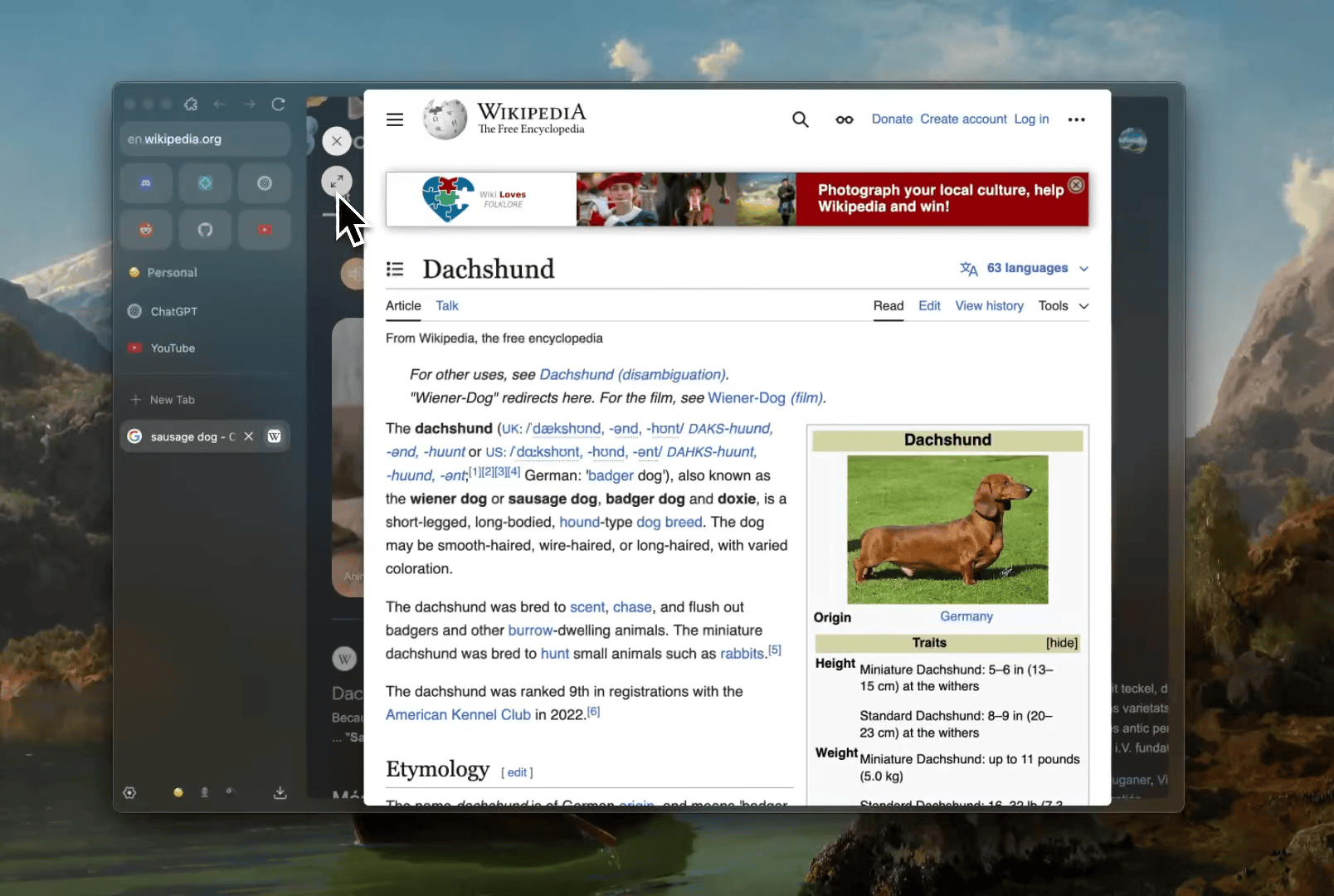
Launcher-like pinned tabs, pop-over glance view, and more make Zen my go to browser. | Image: Zen Browser
I know many of you are mourning the loss of the Arc browser, and I get it. It felt like the first app in a long time to really offer a new approach to browser design. Atlassian bought the company last year and shifted its focus to developing Dia, its even more AI-focused browser. And soon enough, Arc will officially be no more, leaving dedicated users in a lurch. But I abandoned Arc quite some time ago for the Zen Browser and haven’t really missed it. If you’re willing to deal with some minor inconveniences, I think you’ll find Zen is the Arc replacement you’re looking for.
Zen unabashedly rips off all the best bits of Arc. Visually, they’r …