Telegram, arrestato Pavel Durov

Arrestato a Parigi il CEO di Telegram: cosa significa in termini di responsabilità delle piattaforme social?

La notizia dell’arresto di Pavel Durov, il visionario fondatore dell’app di messaggistica Telegram, in queste ore sta facendo il giro del mondo.

Cosa si sa dell’indagine

Durov, nato in Russia ma residente a Dubai – dove attualmente Telegram ha la sua sede legale – e con duplice cittadinanza francese ed emiratina, era di passaggio in Francia con il suo jet privato.

L’arresto è stato eseguito dalla Gendarmeria aeroportuale nella serata di sabato 24 agosto, presso l’aeroporto parigino di Le Bourget, in forza di un mandato emesso dalla Direzione nazionale della polizia giudiziaria francese.

Questa misura farebbe parte di un’indagine preliminare tesa a far luce sull’utilizzo di Telegram in una vasta serie di reati: le ipotesi perseguite includono l’apologia di terrorismo, lo spaccio di sostanze stupefacenti e la diffusione non consensuale di materiale intimo, anche riguardante persone minorenni.

I “precedenti” di Durov

Convinto sostenitore della libertà di parola sul web, già in passato Durov si era trovato nel mirino delle forze dell’ordine, fino a dover lasciare la Russia nel 2014 dopo essersi rifiutato di fornire al governo i dati dei dissidenti politici attivi sulla piattaforma social VK, fondata nel 2006 assieme al fratello Nikolaj.

In seguito all’arresto l’ambasciata russa a Parigi ha dichiarato di avere “chiesto alle autorità francesi di spiegare le ragioni della sua detenzione […], che i suoi diritti siano protetti e che gli sia concesso l’accesso consolare”. Davanti al consolato francese di Ventimiglia, invece, sarebbe comparso uno striscione che recita “Pavel Durov è un detenuto politico come Julian Assange, liberatelo!”

Anche oggi – secondo quanto riportato dai media francesi – le accuse riguarderebbero la mancata disponibilità a collaborare con gli inquirenti. Ma a rilevare sono soprattutto la mancanza di moderazione sui contenuti scambiati via Telegram e la centralità attribuita alla riservatezza delle conversazioni: l’app implementa da sempre la crittografia E2E a protezione delle chat e nelle ultime versioni permette anche di utilizzare numeri “usa e getta”, così consentendo il parziale anonimato degli utenti e ostacolando l’individuazione degli autori di illeciti.

Le conseguenze dell’inchiesta francese

Queste caratteristiche avrebbero portato la magistratura di Parigi a perseguire il fondatore e CEO di Telegram per una presunta responsabilità indiretta rispetto ai crimini commessi tramite la piattaforma, che oggi conta un miliardo di profili attivi in tutto il pianeta.

Del resto tutte le ultime previsioni normative comunitarie, dal Digital Services Act alla Direttiva NIS2, impongono ai fornitori di servizi web responsabilità più stringenti in termini di moderazione dei contenuti e cooperazione con le autorità inquirenti.

Nella medesima direzione sembra voler andare il Trattato ONU sul cybercrime, criticato dalle organizzazioni per i diritti digitali proprio perché rischierebbe, in nome della prevenzione dei reati commessi online, di autorizzare varie forme di controllo e censura.

Resta allora da capire se (e come) l’inchiesta francese potrà rappresentare un precedente per simili operazioni giudiziarie: in caso positivo si può prevedere un inasprimento del conflitto tra privacy e sicurezza, in cui l’arresto di Durov potrebbe essere il primo di una lunga serie.

Condividi sui Social Network:

https://www.ictsecuritymagazine.com/notizie/telegram-arrestato-pavel-durov/


CERT-AGID 17 luglio – 23 agosto: INPS e pubblica amministrazione nel mirino


Nel corso dell’ultima settimana, il CERT-AGID ha condotto un’analisi approfondita dello scenario di cybersicurezza italiano, individuando un totale di 35 campagne malevole. Di queste, 17 erano mirate specificamente a obiettivi italiani, mentre le restanti 18, pur essendo di natura più generica, hanno comunque avuto un impatto sul territorio nazionale.

A seguito di questa attività di monitoraggio, il CERT-AGID ha identificato 1309 indicatori di compromissione (IOC). Questi dati sono stati prontamente condivisi con gli enti accreditati, fornendo loro strumenti essenziali per rafforzare le proprie difese e contrastare potenziali minacce informatiche.

I temi più rilevanti della settimana

Nel corso di questa settimana sono stati identificati 14 diversi temi sfruttati per veicolare campagne malevole sul territorio italiano. “Undelivered” è stato ampiamente sfruttato per numerose campagne di phishing, sia mirate all’Italia che di natura più generica, colpendo in particolare FedEx, Poste Italiane e varie webmail.

L’argomento “Documenti” è stato utilizzato per diffondere malware come Remcos, Formbook e AgentTesla, oltre che per condurre campagne di phishing, incluse due generiche rivolte a webmail e una specifica per utenti italiani di Microsoft Outlook.

Il tema “Pagamenti” è stato impiegato per distribuire diversi tipi di malware, tra cui AdWind, Vidar, AgentTesla e Formbook. Il “Banking” è stato un tema ricorrente nelle campagne generiche di phishing ai danni di Visa&Mastercard e Crédit Agricole, ed è stato anche utilizzato in una campagna di smishing italiana per diffondere il malware Irata.

I restanti temi sono stati impiegati in varie campagne di malware e phishing, senza che emergessero particolari specificità degne di nota nel rapporto.

Fonte: CERT-AGID

Tra gli eventi invece degni di nota spiccano due campagne particolarmente insidiose. La prima consiste in una nuova ondata di malspam diffusa attraverso il canale della Posta Elettronica Certificata (PEC), con l’obiettivo di propagare il malware Vidar.

Questa campagna ha preso di mira sia individui privati che dipendenti della Pubblica Amministrazione, dimostrando un ampio raggio d’azione. Il modus operandi prevede l’invio di e-mail contenenti un link che, se cliccato, porta al download di un file JavaScript malevolo.

Il secondo evento rilevante riguarda una sofisticata campagna di smishing che ha preso di mira gli utenti dell’INPS. Lo scopo di questa operazione è l’acquisizione illecita di dati sensibili degli utenti, con particolare interesse per le informazioni relative alle carte di credito, oltre a nome, cognome e codice fiscale.

Ciò che rende questa campagna particolarmente pericolosa è la sua struttura ben organizzata, che include l’utilizzo di un bot Telegram come centro di comando e controllo (C2) per la raccolta e la gestione dei dati sottratti.

Malware della settimana

Nel corso della settimana, sono state identificate sei famiglie di malware che hanno preso di mira l’Italia, ciascuna con caratteristiche e metodi di diffusione distinti.

FormBook si è manifestato attraverso tre campagne: una specificamente italiana e due di natura più generica, tutte incentrate sui temi “Documenti” e “Pagamenti”. Queste campagne hanno utilizzato email con allegati in formato 7Z e ZIP come vettore di diffusione.

AgentTesla è stato riscontrato in due diverse campagne: una italiana focalizzata sui “Pagamenti”, che si è servita di email con allegati XLAM, e una generica sul tema “Documenti”, propagata tramite email con allegati RAR.

Fonte: CERT-AGID

Vidar ha fatto la sua comparsa nella succitata campagna italiana centrata sui “Pagamenti”, diffusa attraverso il sistema di Posta Elettronica Certificata (PEC) con allegati JS; questa minaccia è stata contrastata grazie alla collaborazione dei Gestori PEC.

Irata si è distinto per una campagna italiana che ha sfruttato il tema del “Banking”, distribuendo un APK malevolo tramite SMS. Adwind è stato identificato in una campagna italiana sul tema “Pagamenti”, che ha utilizzato email con allegati JAR come metodo di propagazione.

Infine, Remcos è stato osservato in una campagna generica incentrata sui “Documenti”, diffusa attraverso email contenenti allegati EXE.

Phishing della settimana

Nel corso della settimana, le campagne di phishing hanno coinvolto un totale di 12 marchi noti, evidenziando una significativa diversificazione nelle tattiche dei cybercriminali. Tra questi, alcuni brand sono emersi come obiettivi preferenziali, attirando un numero particolarmente elevato di attacchi.

In cima alla lista troviamo le campagne mirate ai servizi di webmail, che hanno registrato un’incidenza notevole di 9 campagne. Subito dopo, con 4 campagne, Poste Italiane si è rivelata un bersaglio di primaria importanza, confermando la tendenza dei truffatori a sfruttare la fiducia dei clienti nei confronti di istituzioni finanziarie e postali ben consolidate.

Fonte: CERT-AGID

Anche Aruba, noto fornitore di servizi web e hosting, ha subito 3 attacchi, probabilmente mirando a compromettere sia gli account degli utenti che potenzialmente i siti web ospitati. Lo stesso numero di episodi si registra per l’INPS (Istituto Nazionale della Previdenza Sociale) e AVG.

Formati e canali di diffusione

L’analisi settimanale delle campagne malevole ha rivelato un panorama diversificato in termini di tipologie di file dannosi e metodi di diffusione. Sono state identificate complessivamente 9 diverse estensioni di file impiegate dai cybercriminali.

I file eseguibili (EXE) si sono distinti per una frequenza leggermente superiore, essendo stati utilizzati in due occasioni separate.

Le altre estensioni, ciascuna rilevata una sola volta, comprendono XLAM, JS, 7Z e ZIP, APK, RAR, JAR e DOCX. Questa varietà sottolinea la versatilità delle tattiche adottate dai malintenzionati per eludere i sistemi di sicurezza.

Per quanto riguarda i vettori di diffusione, l’email tradizionale si è confermata lo strumento preferito dagli attaccanti, con ben 31 campagne distinte che hanno sfruttato questo canale. Ciò evidenzia come, nonostante l’evoluzione delle minacce informatiche, le tecniche di phishing via email rimangano estremamente efficaci.

Fonte: CERT-AGID

In misura minore, ma comunque significativa, sono stati impiegati gli SMS, utilizzati in 3 occasioni separate, probabilmente per campagne di smishing mirate. Infine, si è registrato un singolo caso di utilizzo della Posta Elettronica Certificata (PEC).

Condividi l’articolo


Articoli correlati

Altro in questa categoria


https://www.securityinfo.it/2024/08/26/cert-agid-17-luglio-23-agosto-inps-pubblica-amministrazione/?utm_source=rss&utm_medium=rss&utm_campaign=cert-agid-17-luglio-23-agosto-inps-pubblica-amministrazione


Engineering the human out of cybersecurity

Human error can play a large role in how a malicious actor gains access into a system. Current cybersecurity frameworks rely on employees being able to thwart cyber risks with basic training, but as cyber threats become more elaborate, it has become increasingly difficult for employees to successfully identify and avoid cyber risks.

Human error is a highly sought out result that cybercriminals depend on. According to Verizon’s 2024 Data Breach Investigations Report, 68% of data breaches in the past year were reportedly caused by human error, meaning that any employee that fell for a social engineering attack failed to keep confidential information secure. That could mean they clicked on a malicious link, gave login credentials over the phone, reused passwords or left their work computer open and unlocked in the middle of a café. 

Companies need to begin restructuring and building cybersecurity controls to work with human limitations. A successful cybersecurity program works to reduce the dependency on the user to make the right decision, effectively engineering human error out of the equation. By understanding human nature, organizations can build controls that assume humans will make mistakes and works to mitigate those mistakes. 

Applying human psychology

Cybersecurity controls need to change to work for humans. To do so, firms need to apply a basic understanding of human behavior into their controls. 

Here are four ways a firm can restructure or build their cybersecurity controls around human behavior:

  1. Expect clicks on malicious links.
  2. Reduce access to data.
  3. Minimize footprint with break glass access.
  4. Eliminate passwords.

Expect clicks on malicious links

Malicious links have become more sophisticated and difficult for users to identify, allowing for more opportunities for sensitive information to be stolen. Cybersecurity training can help educate employees on ways to identify sketchy links, but it still leaves the door open to the chance an employee clicks on a malicious link. Organizations could instead shift towards a protected filter that can verify links employees click on, or block users from being able to click on links. A link safety filter could help reduce the potential chance an employee falls victim to a malicious link. 

Reduce access to data

Granting a firm open access to every file increases the opportunity that a malicious actor can penetrate and steal information within a system with any set of credentials. Firms need to reduce employee access to data by first organizing and labeling datasets. After organizing, access can be specifically distributed to the role each employee plays within the firm. Employees should only have access to files related to the work they perform.

Minimize footprint with break glass access

In tandem with reducing access to data, firms should consider minimizing the time that employees can access sensitive files and data. Break glass access, a procedure that provides time-limited, elevated access to a user with lower access credentials, is normally used for emergency cases. In this method, implementing this procedure regularly would allow organizations to take an extra, precautionary step to authenticate those who want to access confidential information, and minimize the amount of time they have access. This would allow for additional security on a day-to-day basis by having employees prove their identity before accessing sensitive files and providing a time limit for how long they can view files — which could be helpful if a malicious actor were still able to gain access to these files. 

Eliminate passwords

Compromised passwords are commonly used for a malicious actor to infiltrate an organization. According to IBM’s 2024 X-Force Threat Intelligence Index, there was apparently a 71% increase from 2022 to 2023 in cyberattacks that used stolen or compromised login credentials. 

Passwords are naturally difficult to remember, especially as they become more complex. Instead of asking employees to be better at securing complicated passwords, replace passwords with other authentication methods that could be easier for employees to use and more difficult for malicious actors to manipulate. Implementing authentication tools like biometric logins, such as the 1:1 authentication used for iPhones, can help reduce the chance a malicious actor uses stolen login credentials to penetrate a system.

Keeping up with emerging threats

Cyber criminals are likely to target employees and lean on human error to enter systems. New and more sophisticated emerging threat vectors will require additional education and support to avoid human error. Cybersecurity controls must be constantly evaluated to ensure they can withstand new and upcoming threats, especially those that target employees. 

Opening channels of dialogue with fellow IT teams and security professionals can help organizations maintain successful cybersecurity controls. Not all controls are built the same, so its important to build community within cybersecurity circles to help combat rising cybersecurity risks.

https://www.securitymagazine.com/articles/100974-engineering-the-human-out-of-cybersecurity


Shocker: French make surprise arrest of Telegram founder at Paris airport

Pavel Durov, Telegram founder and former CEO of Vkontakte, in happier (and younger) days.

Late this afternoon at a Parisian airport, French authorities detained Pavel Durov, the founder of the Telegram messaging/publication service. They are allegedly planning to hit him tomorrow with serious charges related to abetting terrorism, fraud, money laundering, and crimes against children, all of it apparently stemming from a near-total lack of moderation on Telegram. According to French authorities, thanks to its encryption and support for crypto, Telegram has become the new top tool for organized crime.

The French outlet TF1 had the news first from sources within the investigation. (Reuters and CNN have since run stories as well.) Their source said, “Pavel Durov will definitely end up in pretrial detention. On his platform, he allowed an incalculable number of offenses and crimes to be committed, which he does nothing to moderate nor does he cooperate.”

Durov is a 39-year-old who gained a fortune by building VKontakte, a Russian version of Facebook, before being forced out of his company by the Kremlin. He left Russia and went on to start Telegram, which became widely popular, especially in Europe. He was arrested today when his private plane flew from Azerbaijan to Paris’s Le Bourget Airport.

Telegram has become a crucial news outlet for Russians, as it is one of the few uncensored ways to hear non-Kremlin propaganda from within Russia. It has also become the top outlet for nationalistic Russian “milbloggers” writing about the Ukraine war. Durov’s arrest has already led to outright panic among many of them, in part due to secrets it might reveal—but also because it is commonly used by Russian forces to communicate.

As Rob Lee, a senior fellow at the Foreign Policy Research Institute, noted tonight, “A popular Russian channel says that Telegram is also used by Russian forces to communicate, and that if Western intelligence services gain access to it, they could obtain sensitive information about the Russian military.”

Right wing and crypto influencers are likewise angry over the arrest, writing things like, “This is a serious attack on freedom. Today, they target an app that promotes liberty tomorrow, they will go after DeFi. If you claim to support crypto, you must show your support #FreeDurov it’s time for digital resistance.”

Durov appears to be an old-school cyber-libertarian who believes in privacy and encryption. His arrest will certainly resonate in America, which has seen a similar debate over how much online services should cooperate with law enforcement. The FBI, for instance, has occasionally warned that end-to-end encryption will result in a “going dark” problem in which crime simply disappears from their view, and the US has seen repeated attempts to legislate backdoors into encryption systems. Those have all been defeated, however, and civil liberties advocates and techies generally note that creating backdoors makes such systems fundamentally insecure. The global debate over crime, encryption, civil liberties, and messaging apps is sure to heat up with Durov’s arrest.

https://arstechnica.com/?p=2045167


Microsoft to host security summit after CrowdStrike disaster

Photo of a Windows BSOD

Microsoft is stepping up its plans to make Windows more resilient to buggy software after a botched CrowdStrike update took down millions of PCs and servers in a global IT outage.

The tech giant has in the past month intensified talks with partners about adapting the security procedures around its operating system to better withstand the kind of software error that crashed 8.5 million Windows devices on July 19.

Critics say that any changes by Microsoft would amount to a concession of shortcomings in Windows’ handling of third-party security software that could have been addressed sooner.

Yet they would also prove controversial among security vendors that would have to make radical changes to their products, and force many Microsoft customers to adapt their software.

Last month’s outages—which are estimated to have caused billions of dollars in damages after grounding thousands of flights and disrupting hospital appointments worldwide—heightened scrutiny from regulators and business leaders over the extent of access that third-party software vendors have to the core, or kernel, of Windows operating systems.

Microsoft will host a summit next month for government representatives and cyber security companies, including CrowdStrike, to “discuss concrete steps we will all take to improve security and resiliency for our joint customers,” Microsoft said on Friday.

The gathering will take place on September 10 at Microsoft’s headquarters near Seattle, it said in a blog post.

Bugs in the kernel can quickly crash an entire operating system, triggering the millions of “blue screens of death” that appeared around the globe after CrowdStrike’s faulty software update was sent out to clients’ devices.

Microsoft told the Financial Times it was considering several options to make its systems more stable and had not ruled out completely blocking access to the Windows kernel—an option some rivals fear would put their software at a disadvantage to the company’s internal security product, Microsoft Defender.

“All of the competitors are concerned that [Microsoft] will use this to prefer their own products over third-party alternatives,” said Ryan Kalember, head of cyber security strategy at Proofpoint.

Microsoft may also demand new testing procedures from cyber security vendors rather than adapting the Windows system itself.

Apple, which was not hit by the outages, blocks all third-party providers from accessing the kernel of its MacOS operating system, forcing them to operate in the more limited “user-mode.”

Microsoft has previously said it could not do the same, after coming to an understanding with the European Commission in 2009 that it would give third parties the same access to its systems as that for Microsoft Defender.

Some experts said, however, that this voluntary commitment to the EU had not tied Microsoft’s hands in the way it claimed, arguing that the company had always been free to make the changes now under consideration.

“These are technical decisions of Microsoft that were not part of [the arrangement],” said Thomas Graf, a partner at Cleary Gottlieb in Brussels who was involved in the case.

“The text [of the understanding] does not require them to give access to the kernel,” added AJ Grotto, a former senior director for cyber security policy at the White House.

Grotto said Microsoft shared some of the blame for the July disruption since the outages would not have been possible without its decision to allow access to the kernel.

Nevertheless, while it might boost a system’s resilience, blocking kernel access could also bring “real trade-offs” for the compatibility with other software that had made Windows so popular among business customers, Forrester analyst Allie Mellen said.

“That would be a fundamental shift for Microsoft’s philosophy and business model,” she added.

Operating exclusively outside the kernel may lower the risk of triggering mass outages but it was also “very limiting” for security vendors and could make their products “less effective” against hackers, Mellen added.

Operating within the kernel gave security companies more information about potential threats and enabled their defensive tools to activate before malware could take hold, she added.

An alternative option could be to replicate the model used by the open-source operating system Linux, which uses a filtering mechanism that creates a segregated environment within the kernel in which software, including cyber defense tools, can run.

But the complexity of overhauling how other security software works with Windows means that any changes will be hard for regulators to police and Microsoft will have strong incentives to favor its own products, rivals said.

It “sounds good on paper, but the devil is in the details,” said Matthew Prince, chief executive of digital services group Cloudflare.

© 2024 The Financial Times Ltd. All rights reserved Not to be redistributed, copied, or modified in any way.

https://arstechnica.com/?p=2045127


After cybersecurity lab wouldn’t use AV software, US accuses Georgia Tech of fraud

Photo of Georgia Tech
Georgia Tech

Dr. Emmanouil “Manos” Antonakakis runs a Georgia Tech cybersecurity lab and has attracted millions of dollars in the last few years from the US government for Department of Defense research projects like “Rhamnousia: Attributing Cyber Actors Through Tensor Decomposition and Novel Data Acquisition.”

The government yesterday sued Georgia Tech in federal court, singling out Antonakakis and claiming that neither he nor Georgia Tech followed basic (and required) security protocols for years, knew they were not in compliance with such protocols, and then submitted invoices for their DoD projects anyway. (Read the complaint.) The government claims this is fraud:

At bottom, DoD paid for military technology that Defendants stored in an environment that was not secure from unauthorized disclosure, and Defendants failed to even monitor for breaches so that they and DoD could be alerted if information was compromised. What DoD received for its funds was of diminished or no value, not the benefit of its bargain.

AV hate

Given the nature of his work for DoD, Antonakakis and his lab are required to abide by many sets of security rules, including those outlined in NIST Special Publication 800–171, “Protecting Controlled Unclassified Information in Nonfederal Information Systems and Organizations.”

One of the rules says that machines storing or accessing such “controlled unclassified information” need to have endpoint antivirus software installed. But according to the US government, Antonakakis really, really doesn’t like putting AV detection software on his lab’s machines.

Georgia Tech admins asked him to comply with the requirement, but according to an internal 2019 email, Antonakakis “wasn’t receptive to such a suggestion.” In a follow-up email, Antonakakis himself said that “endpoint [antivirus] agent is a nonstarter.”

According to the government, “Other than Dr. Antonakakis’s opposition, there was nothing preventing the lab from running antivirus protection. Dr. Antonakakis simply did not want to run it.”

The IT director for Antonakakis’ lab was allowed to use other “mitigating measures” instead, such as relying on the school’s firewall for additional security. The IT director said that he thought Georgia Tech ran antivirus scans from its network. However, this “assumption” turned out to be completely wrong; the school’s network “has never provided” antivirus protection and, even if it had, the lab used laptops that were regularly taken outside the network perimeter.

The school realized after some time that the lab was not in compliance with the DoD contract rules, so an administrator decided to “suspend invoicing” on the lab’s contracts so that the school would not be charged with filing false claims.

According to the government, “Within a few days of the invoicing for his contracts being suspended, Dr. Antonakakis relented on his years-long opposition to the installation of antivirus software in the Astrolavos Lab. Georgia Tech’s standard antivirus software was installed throughout the lab.”

But, says the government, the school never acknowledged that it had been out of compliance for some time and that it had filed numerous invoices while noncompliant. In the government’s telling, this is fraud.

https://arstechnica.com/?p=2045111


Android malware steals payment card data using previously unseen technique

High angle shot of female hand inserting her bank card into automatic cash machine in the city. Withdrawing money, paying bills, checking account balances and make a bank transfer. Privacy protection, internet and mobile banking security concept

Newly discovered Android malware steals payment card data using an infected device’s NFC reader and relays it to attackers, a novel technique that effectively clones the card so it can be used at ATMs or point-of-sale terminals, security firm ESET said.

ESET researchers have named the malware NGate because it incorporates NFCGate, an open source tool for capturing, analyzing, or altering NFC traffic. Short for Near-Field Communication, NFC is a protocol that allows two devices to wirelessly communicate over short distances.

New Android attack scenario

“This is a new Android attack scenario, and it is the first time we have seen Android malware with this capability being used in the wild,” ESET researcher Lukas Stefanko said in a video demonstrating the discovery. “NGate malware can relay NFC data from a victim’s card through a compromised device to an attacker’s smartphone, which is then able to emulate the card and withdraw money from an ATM.”

[embedded content]
Lukas Stefanko—Unmasking NGate.

The malware was installed through traditional phishing scenarios, such as the attacker messaging targets and tricking them into installing NGate from short-lived domains that impersonated the banks or official mobile banking apps available on Google Play. Masquerading as a legitimate app for a target’s bank, NGate prompts the user to enter the banking client ID, date of birth, and the PIN code corresponding to the card. The app goes on to ask the user to turn on NFC and to scan the card.

ESET said it discovered NGate being used against three Czech banks starting in November and identified six separate NGate apps circulating between then and March of this year. Some of the apps used in later months of the campaign came in the form of PWAs, short for Progressive Web Apps, which as reported Thursday can be installed on both Android and iOS devices even when settings (mandatory on iOS) prevent the installation of apps available from non-official sources.

The most likely reason the NGate campaign ended in March, ESET said, was the arrest by Czech police of a 22-year-old they said they caught wearing a mask while withdrawing money from ATMs in Prague. Investigators said the suspect had “devised a new way to con people out of money” using a scheme that sounds identical to the one involving NGate.

Stefanko and fellow ESET researcher Jakub Osmani explained how the attack worked:

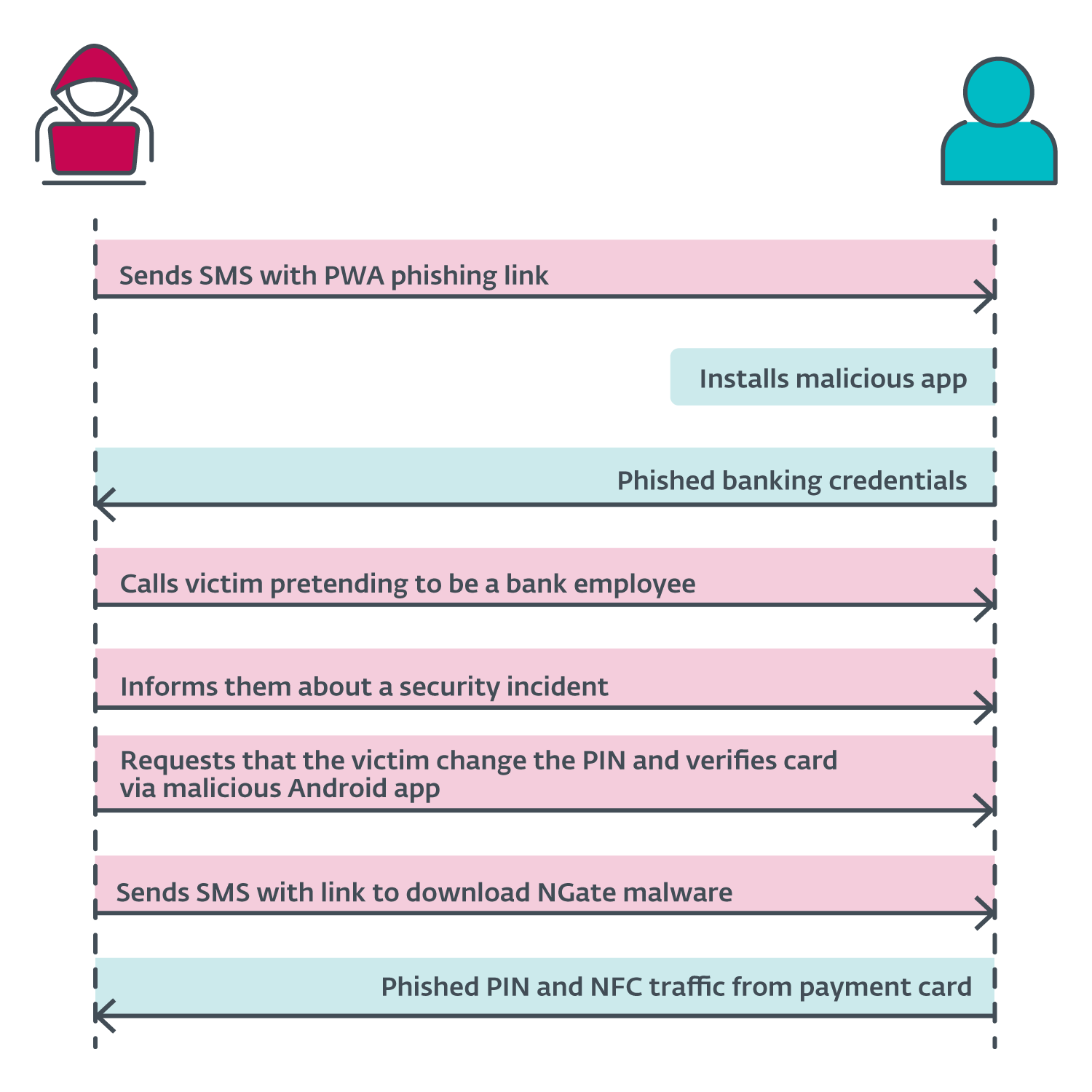
The announcement by the Czech police revealed the attack scenario started with the attackers sending SMS messages to potential victims about a tax return, including a link to a phishing website impersonating banks. These links most likely led to malicious PWAs. Once the victim installed the app and inserted their credentials, the attacker gained access to the victim’s account. Then the attacker called the victim, pretending to be a bank employee. The victim was informed that their account had been compromised, likely due to the earlier text message. The attacker was actually telling the truth – the victim’s account was compromised, but this truth then led to another lie.

To “protect” their funds, the victim was requested to change their PIN and verify their banking card using a mobile app – NGate malware. A link to download NGate was sent via SMS. We suspect that within the NGate app, the victims would enter their old PIN to create a new one and place their card at the back of their smartphone to verify or apply the change.

Since the attacker already had access to the compromised account, they could change the withdrawal limits. If the NFC relay method didn’t work, they could simply transfer the funds to another account. However, using NGate makes it easier for the attacker to access the victim’s funds without leaving traces back to the attacker’s own bank account. A diagram of the attack sequence is shown in Figure 6.

NGate attack overview.
Enlarge / NGate attack overview.

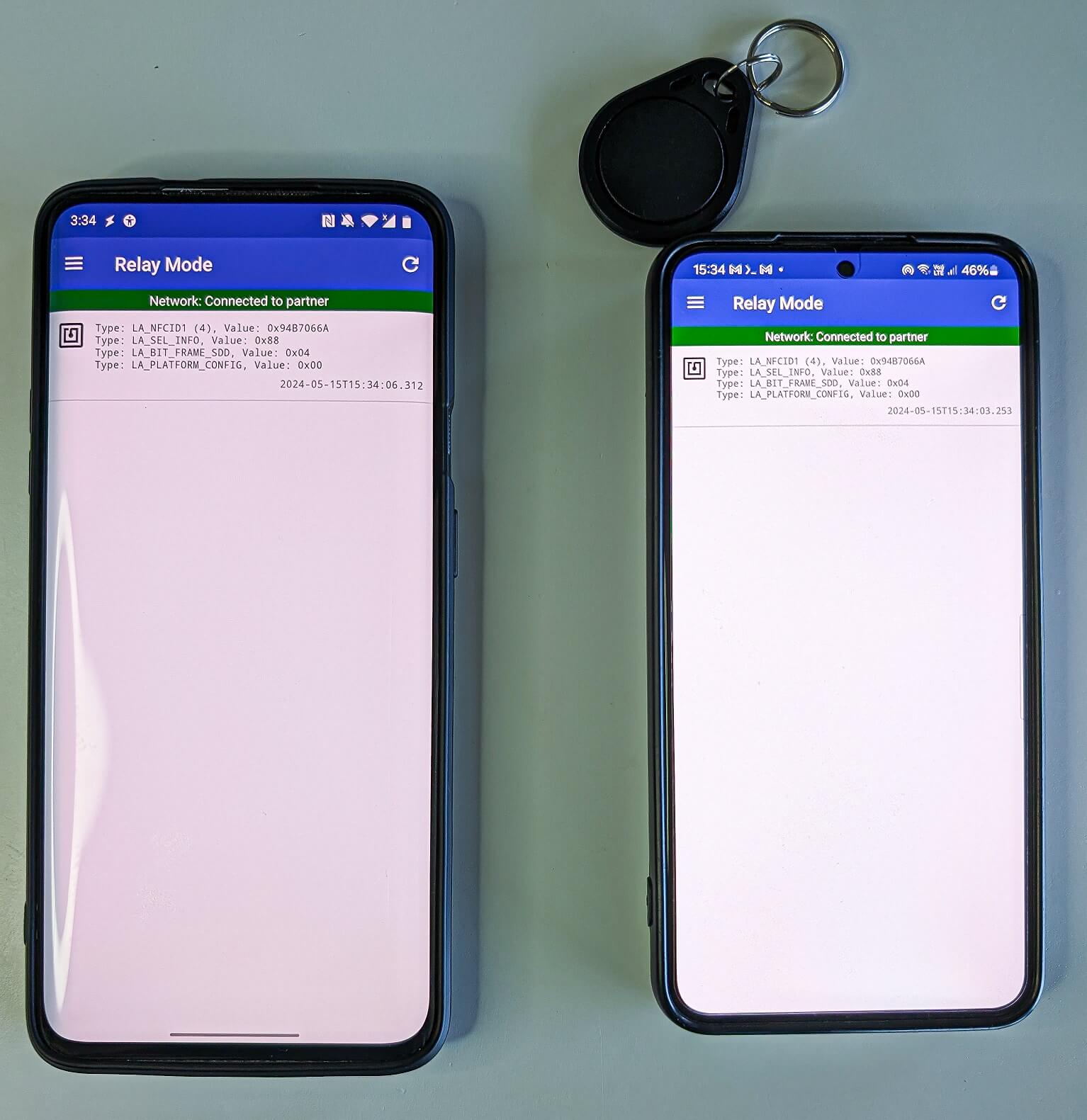
The researchers said NGate or apps similar to it could be used in other scenarios, such as cloning some smart cards used for other purposes. The attack would work by copying the unique ID of the NFC tag, abbreviated as UID.

“During our testing, we successfully relayed the UID from a MIFARE Classic 1K tag, which is typically used for public transport tickets, ID badges, membership or student cards, and similar use cases,” the researchers wrote. “Using NFCGate, it’s possible to perform an NFC relay attack to read an NFC token in one location and, in real time, access premises in a different location by emulating its UID, as shown in Figure 7.”

Figure 7. Android smartphone (right) that read and relayed an external NFC token’s UID to another device (left).
Enlarge / Figure 7. Android smartphone (right) that read and relayed an external NFC token’s UID to another device (left).

The cloning could all occur in situations where the attacker has physical access to a card or is able to briefly read a card in unattended purses, wallets, backpacks, or smartphone cases holding cards. To perform and emulate such attacks requires the attacker to have a rooted and customized Android device. Phones that were infected by NGate didn’t have this requirement.

https://arstechnica.com/?p=2045086


Top 5 ransomware groups and malware delivering ransomware in 2024

Cofense Intelligence has announced research revealing the most prominent five ransomware groups. The ransomware groups are: 

  1. LockBit 3.0
  2. BlackCat
  3. BianLian
  4. Akira
  5. BlackSuit

Among RaaS groups, LockBit 3.0 is the most active. This organization predominantly targets the healthcare and public health sector, utilizing a variety or approaches such as IABs, phishing campaigns and direct attacks. A quality of LockBit3.0 is the ability to customize many facets, including the use of modules, making detection difficult for security enterprises. 

Furthermore, the report identifies the most commonly deployed malware delivering ransomware. The top delivery methods are:

  1. DarkGate RAT
  2. Remcos RAT
  3. Async RAT
  4. XWorm RAT
  5. ConnectWise RAT

Most commonly, DarkGate RAT has been observed being delivered via an attached Office document. In the document, there is typically a link that, when clicked, will deliver the DarkGate RAT binary. 

https://www.securitymagazine.com/articles/100971-top-5-ransomware-groups-and-malware-delivering-ransomware-in-2024


Inhibitors to good decision making

Public Safety officials make important decisions every day. Furthermore, decisions during a crisis must often be made quickly with limited information. Unfortunately, people also let obstacles interfere with making good decisions. These inhibitors can also affect senior leaders who may let mission creep, staffing issues and even executive influence interfere with critical and timely decisions. 

These inhibitors are often internalized and serve as barriers that lead to poor decisions, or delayed decisions. Acknowledging such inhibitors can be a good step in eliminating such obstacle decision making in the future.

  1. Pre-conceived ideas: Stephen Covey’s book The 7 Habits of Highly Effective People tells readers to “begin with the end in mind,” which can be extremely helpful when planning, but when it comes to making critical decisions without all of the available information, jumping ahead to preferred outcome may inhibit more favorable options.
  2. Overthinking: Developing a variety of courses of action to make the best possible decision is critical, but at the same time, sticking to the facts reduces the chance of overthinking. Similarity, analysis paralysis is a state of mind where someone overthinks a problem or situation to the point that it becomes difficult to make a decision.
  3. Tunnel vision: Everyone has made a decision without seeing the big picture. People tend to focus on the here and now; get it done! Yet, when security leaders look back later, they see things they should have examined, considered, and evaluated. Tunnel vision can best be overcome by thinking differently; such as, how would my subordinates view this and what would they consider and want ME to consider, how would my ardent critic see this issue and what would they do or expect me to do, and what are the potential issues to follow my decision. Of course, if facing an ethical decision always ask: what would my grandmother want me to do here? Everyone knows grandmothers know everything, right?
  4. Lack of situational awareness: Grasping the big picture, and everything going on is often the difference between making a good decision and a bad decision. Situational awareness can be a quick analysis of the overall environment but should always be a work in progress to understand both normal behaviors and anomalies.
  5. Poor listening skills: It is in the same context as listening to reply versus listening to understand. Leaders failing to listen to others’ opinions, suggestions, etc. has the potential to make rush decisions without exploring an array of solutions. Or, listening only to select individuals, or even listening to the loudest person can reduce good decision making.
  6. Fear: The fear of making mistakes adds to indecision and potentially making a decision based solely on the easiest course of action. Make no mistake, safety is one of the most important criteria’s for making a good decision, but when it comes to life safety and other important matters, safety should not cause someone to not weigh in on other factors. Combine fear with overthinking, and not only do security leaders risk making a bad decision, but they may not make a timely decision!
  7. Lack of critical thinking: To understand this effort of critical thinking security leaders must realize this is not about what they think, rather it is about how they think. Without getting bogged down in the fallacies of logic, consider critical thinking as systematic evaluation by a set of standards. 
  8. Over confidence: One character issue that can be find hard to admit to. While security leaders could wax eloquently on General Patton’s manifold quotes, sometimes they need to step back and reconsider their confidence. 

Leaders must make tough decisions — it’s part of the job. If leaders were not expected to make tough decisions, there would not be a need for such a leadership position. Leadership training reminds us of the benefits of making timely decisions, and even the fact that a quick decision is often more important than not making a decision at all. Unfortunately, many leaders will overthink a decision based on a variety of inhibitors. Understanding such inhibitors will undoubtedly reduce their effect on decision-making.

https://www.securitymagazine.com/articles/100973-inhibitors-to-good-decision-making


Protect the entire campus: Security incidents outside of the classroom

A new report on K-12 school safety reveals that more than 50% of school safety incidents occur outside the classroom. Districts must prioritize full campus protection — from hallways to parking lots or even sports fields — to ensure that they’re prepared to respond quickly in an emergency, no matter where on campus an incident happens. By taking proactive measures, districts can be better prepared to address safety campus-wide.

Technology, training and effective emergency communication are all essential elements of safety plans aimed at ensuring full campus safety. During the 2021 to 2022 school year, about 857,500 violent incidents and 479,500 nonviolent incidents were reported by public schools. Notably, 99% of all alerts are for everyday emergencies, such as medical and behavioral incidents. When developing school safety plans, policies, and systems, the following steps can help districts to better protect their full campuses. 

The following steps can guide districts in enhancing their campus-wide safety protocols.

Start with access control: Know who is on campus and why

Access control should be at the core of any preparedness program. Understanding who is on campus and why they’re there is crucial for protecting areas outside the classroom. For example, technologies such as license-plate recognition in parking lots can inform districts about who is on campus. Visitor management systems and issuing badges for all visitors who enter buildings are also essential parts of access control. 

Collaborate with law enforcement and responders by integrating technology systems

Today, there is a growing trend across the country of police departments using real-time crime centers. Essentially, police departments create portals where critical information is brought on to one screen to monitor and respond in real time. Now, schools are integrating their camera systems into these real-time crime centers as well. This integration provides local law enforcement with real-time visibility during emergencies, so that they can see what problems are occuring, where they are happening, and can make informed decisions about where to dedicate their resources and deploy tactical units. 

Use full campus mapping to equip responders with precise location information

Understanding where an incident is occurring from a precise location standpoint is important because it helps responders deploy resources quickly and efficiently — which is critical when every second matters. Floor plans and full campus mapping are paramount. Mapping can also show precisely and immediately where safety assets are located — such as fire alarms, first aid kits, extinguishers and evacuation points — which are critical details for responders to make the most of every second.

Consider evening and weekend events that draw larger crowds

Many schools have stadiums and events that draw thousands of people, so ensuring there is a plan in place and that safety procedures are followed during these events is crucial. A system that can manage, control and cover large outdoor areas and facilities is necessary. For example, parking lots can be areas where emergencies occur. If a school has badge-based mobile panic buttons implemented, it can help mitigate these situations quickly and efficiently by dispatching help to the correct location. 

Put policies in place for full campus coverage: Clearly define expectations 

Districts must develop robust safety policies that clearly define response expectations and procedures. How do they want to respond? What does their response look like? What are the expectations of their community and their staff? Once these questions are answered, then a policy can be established and training can begin. In safety preparedness, training has to be continual in order for it to be effective. Role-playing is paramount — people need to be put in a somewhat plausible situation so that they can train in real time. Manuals can’t be pulled off the shelf when an emergency happens to guide what to do next. The more people train, the more they commit the next step to muscle memory. Training has to be continual and realistic. 

Understand how emergency communication happens: Don’t rely on cell phones alone

The best communication tools for emergencies are simple and easy to use without requiring people to think about taking multiple steps. When communicating in an emergency, the most essential thing to do is to communicate that there is an emergency to respond to. Simplifying communication technology allows users to solve this issue. There is a big misconception that an app-based panic button solution is sufficient. When an emergency happens, you may not have adequate cellular or Wi-Fi coverage. A user may also have to find the app and then login, which can take time when seconds matter. A simple process where you can press a button on a badge makes it easier to respond. 

Train every staff member and equip more people to respond in an emergency

Safety responsibilities should not just be left to security personnel. While many districts are increasing the number of security personnel on campus, these individuals can’t be everywhere. Everyone on campus — students, educators, janitorial staff — needs to be trained. These people have eyes on what’s going on in the school at all times. When thinking about eyes and ears and the ability to respond rapidly and immediately, ensuring that everyone is trained and equipped with safety technology, like a mobile panic button badge, is imperative. 

To better protect K-12 students and staff, school safety planning committees have to consider the incidents that occur outside of the traditional classroom, in places like sports fields and in parking lots. By implementing advanced technology, putting strong policies in place, and training all staff and students to be a part of campus safety, districts can improve safety campus-wide. 

https://www.securitymagazine.com/articles/100972-protect-the-entire-campus-security-incidents-outside-of-the-classroom