After cybersecurity lab wouldn’t use AV software, US accuses Georgia Tech of fraud

Photo of Georgia Tech
Georgia Tech

Dr. Emmanouil “Manos” Antonakakis runs a Georgia Tech cybersecurity lab and has attracted millions of dollars in the last few years from the US government for Department of Defense research projects like “Rhamnousia: Attributing Cyber Actors Through Tensor Decomposition and Novel Data Acquisition.”

The government yesterday sued Georgia Tech in federal court, singling out Antonakakis and claiming that neither he nor Georgia Tech followed basic (and required) security protocols for years, knew they were not in compliance with such protocols, and then submitted invoices for their DoD projects anyway. (Read the complaint.) The government claims this is fraud:

At bottom, DoD paid for military technology that Defendants stored in an environment that was not secure from unauthorized disclosure, and Defendants failed to even monitor for breaches so that they and DoD could be alerted if information was compromised. What DoD received for its funds was of diminished or no value, not the benefit of its bargain.

AV hate

Given the nature of his work for DoD, Antonakakis and his lab are required to abide by many sets of security rules, including those outlined in NIST Special Publication 800–171, “Protecting Controlled Unclassified Information in Nonfederal Information Systems and Organizations.”

One of the rules says that machines storing or accessing such “controlled unclassified information” need to have endpoint antivirus software installed. But according to the US government, Antonakakis really, really doesn’t like putting AV detection software on his lab’s machines.

Georgia Tech admins asked him to comply with the requirement, but according to an internal 2019 email, Antonakakis “wasn’t receptive to such a suggestion.” In a follow-up email, Antonakakis himself said that “endpoint [antivirus] agent is a nonstarter.”

According to the government, “Other than Dr. Antonakakis’s opposition, there was nothing preventing the lab from running antivirus protection. Dr. Antonakakis simply did not want to run it.”

The IT director for Antonakakis’ lab was allowed to use other “mitigating measures” instead, such as relying on the school’s firewall for additional security. The IT director said that he thought Georgia Tech ran antivirus scans from its network. However, this “assumption” turned out to be completely wrong; the school’s network “has never provided” antivirus protection and, even if it had, the lab used laptops that were regularly taken outside the network perimeter.

The school realized after some time that the lab was not in compliance with the DoD contract rules, so an administrator decided to “suspend invoicing” on the lab’s contracts so that the school would not be charged with filing false claims.

According to the government, “Within a few days of the invoicing for his contracts being suspended, Dr. Antonakakis relented on his years-long opposition to the installation of antivirus software in the Astrolavos Lab. Georgia Tech’s standard antivirus software was installed throughout the lab.”

But, says the government, the school never acknowledged that it had been out of compliance for some time and that it had filed numerous invoices while noncompliant. In the government’s telling, this is fraud.

https://arstechnica.com/?p=2045111


Android malware steals payment card data using previously unseen technique

High angle shot of female hand inserting her bank card into automatic cash machine in the city. Withdrawing money, paying bills, checking account balances and make a bank transfer. Privacy protection, internet and mobile banking security concept

Newly discovered Android malware steals payment card data using an infected device’s NFC reader and relays it to attackers, a novel technique that effectively clones the card so it can be used at ATMs or point-of-sale terminals, security firm ESET said.

ESET researchers have named the malware NGate because it incorporates NFCGate, an open source tool for capturing, analyzing, or altering NFC traffic. Short for Near-Field Communication, NFC is a protocol that allows two devices to wirelessly communicate over short distances.

New Android attack scenario

“This is a new Android attack scenario, and it is the first time we have seen Android malware with this capability being used in the wild,” ESET researcher Lukas Stefanko said in a video demonstrating the discovery. “NGate malware can relay NFC data from a victim’s card through a compromised device to an attacker’s smartphone, which is then able to emulate the card and withdraw money from an ATM.”

[embedded content]
Lukas Stefanko—Unmasking NGate.

The malware was installed through traditional phishing scenarios, such as the attacker messaging targets and tricking them into installing NGate from short-lived domains that impersonated the banks or official mobile banking apps available on Google Play. Masquerading as a legitimate app for a target’s bank, NGate prompts the user to enter the banking client ID, date of birth, and the PIN code corresponding to the card. The app goes on to ask the user to turn on NFC and to scan the card.

ESET said it discovered NGate being used against three Czech banks starting in November and identified six separate NGate apps circulating between then and March of this year. Some of the apps used in later months of the campaign came in the form of PWAs, short for Progressive Web Apps, which as reported Thursday can be installed on both Android and iOS devices even when settings (mandatory on iOS) prevent the installation of apps available from non-official sources.

The most likely reason the NGate campaign ended in March, ESET said, was the arrest by Czech police of a 22-year-old they said they caught wearing a mask while withdrawing money from ATMs in Prague. Investigators said the suspect had “devised a new way to con people out of money” using a scheme that sounds identical to the one involving NGate.

Stefanko and fellow ESET researcher Jakub Osmani explained how the attack worked:

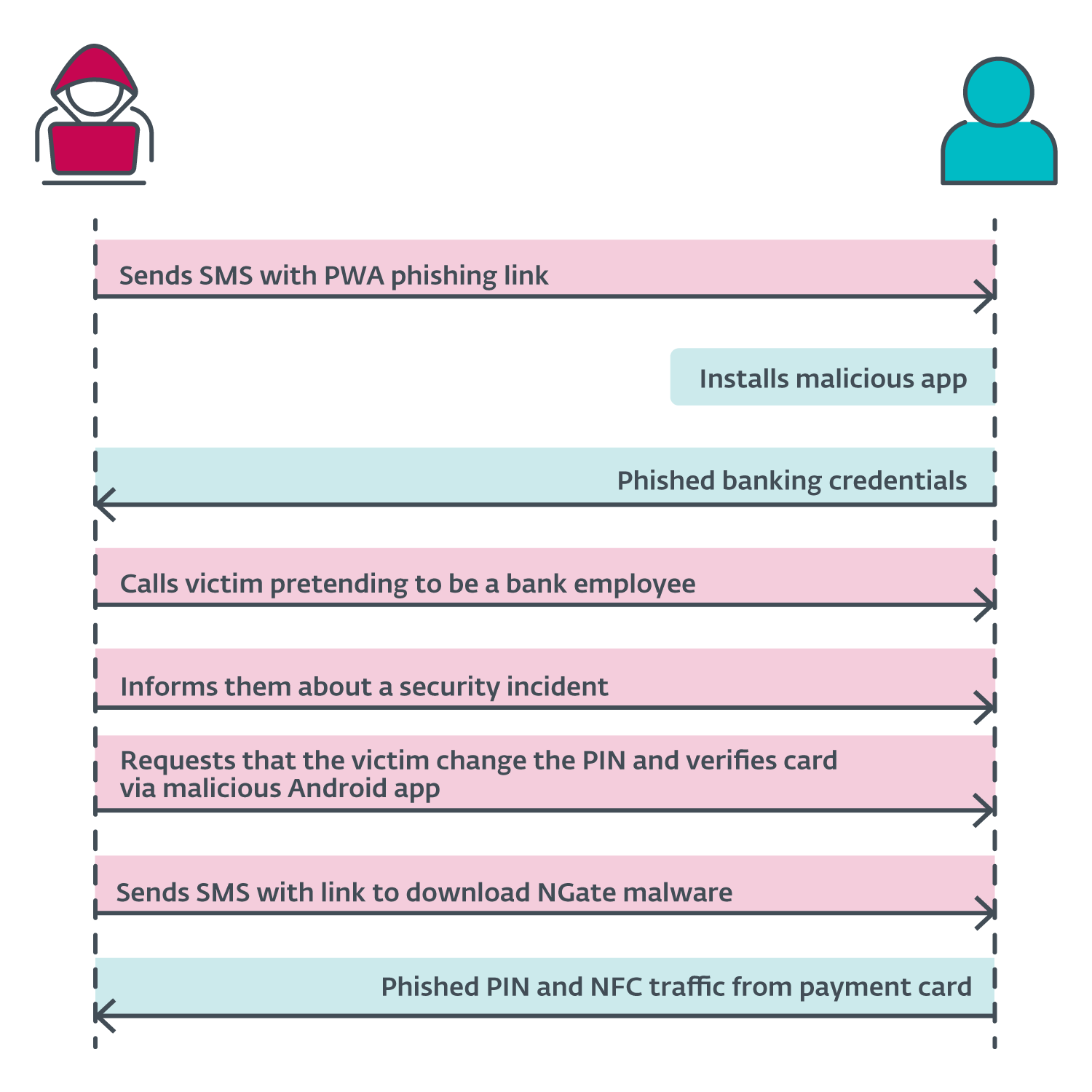
The announcement by the Czech police revealed the attack scenario started with the attackers sending SMS messages to potential victims about a tax return, including a link to a phishing website impersonating banks. These links most likely led to malicious PWAs. Once the victim installed the app and inserted their credentials, the attacker gained access to the victim’s account. Then the attacker called the victim, pretending to be a bank employee. The victim was informed that their account had been compromised, likely due to the earlier text message. The attacker was actually telling the truth – the victim’s account was compromised, but this truth then led to another lie.

To “protect” their funds, the victim was requested to change their PIN and verify their banking card using a mobile app – NGate malware. A link to download NGate was sent via SMS. We suspect that within the NGate app, the victims would enter their old PIN to create a new one and place their card at the back of their smartphone to verify or apply the change.

Since the attacker already had access to the compromised account, they could change the withdrawal limits. If the NFC relay method didn’t work, they could simply transfer the funds to another account. However, using NGate makes it easier for the attacker to access the victim’s funds without leaving traces back to the attacker’s own bank account. A diagram of the attack sequence is shown in Figure 6.

NGate attack overview.
Enlarge / NGate attack overview.

The researchers said NGate or apps similar to it could be used in other scenarios, such as cloning some smart cards used for other purposes. The attack would work by copying the unique ID of the NFC tag, abbreviated as UID.

“During our testing, we successfully relayed the UID from a MIFARE Classic 1K tag, which is typically used for public transport tickets, ID badges, membership or student cards, and similar use cases,” the researchers wrote. “Using NFCGate, it’s possible to perform an NFC relay attack to read an NFC token in one location and, in real time, access premises in a different location by emulating its UID, as shown in Figure 7.”

Figure 7. Android smartphone (right) that read and relayed an external NFC token’s UID to another device (left).
Enlarge / Figure 7. Android smartphone (right) that read and relayed an external NFC token’s UID to another device (left).

The cloning could all occur in situations where the attacker has physical access to a card or is able to briefly read a card in unattended purses, wallets, backpacks, or smartphone cases holding cards. To perform and emulate such attacks requires the attacker to have a rooted and customized Android device. Phones that were infected by NGate didn’t have this requirement.

https://arstechnica.com/?p=2045086


Top 5 ransomware groups and malware delivering ransomware in 2024

Cofense Intelligence has announced research revealing the most prominent five ransomware groups. The ransomware groups are: 

  1. LockBit 3.0
  2. BlackCat
  3. BianLian
  4. Akira
  5. BlackSuit

Among RaaS groups, LockBit 3.0 is the most active. This organization predominantly targets the healthcare and public health sector, utilizing a variety or approaches such as IABs, phishing campaigns and direct attacks. A quality of LockBit3.0 is the ability to customize many facets, including the use of modules, making detection difficult for security enterprises. 

Furthermore, the report identifies the most commonly deployed malware delivering ransomware. The top delivery methods are:

  1. DarkGate RAT
  2. Remcos RAT
  3. Async RAT
  4. XWorm RAT
  5. ConnectWise RAT

Most commonly, DarkGate RAT has been observed being delivered via an attached Office document. In the document, there is typically a link that, when clicked, will deliver the DarkGate RAT binary. 

https://www.securitymagazine.com/articles/100971-top-5-ransomware-groups-and-malware-delivering-ransomware-in-2024


Inhibitors to good decision making

Public Safety officials make important decisions every day. Furthermore, decisions during a crisis must often be made quickly with limited information. Unfortunately, people also let obstacles interfere with making good decisions. These inhibitors can also affect senior leaders who may let mission creep, staffing issues and even executive influence interfere with critical and timely decisions. 

These inhibitors are often internalized and serve as barriers that lead to poor decisions, or delayed decisions. Acknowledging such inhibitors can be a good step in eliminating such obstacle decision making in the future.

  1. Pre-conceived ideas: Stephen Covey’s book The 7 Habits of Highly Effective People tells readers to “begin with the end in mind,” which can be extremely helpful when planning, but when it comes to making critical decisions without all of the available information, jumping ahead to preferred outcome may inhibit more favorable options.
  2. Overthinking: Developing a variety of courses of action to make the best possible decision is critical, but at the same time, sticking to the facts reduces the chance of overthinking. Similarity, analysis paralysis is a state of mind where someone overthinks a problem or situation to the point that it becomes difficult to make a decision.
  3. Tunnel vision: Everyone has made a decision without seeing the big picture. People tend to focus on the here and now; get it done! Yet, when security leaders look back later, they see things they should have examined, considered, and evaluated. Tunnel vision can best be overcome by thinking differently; such as, how would my subordinates view this and what would they consider and want ME to consider, how would my ardent critic see this issue and what would they do or expect me to do, and what are the potential issues to follow my decision. Of course, if facing an ethical decision always ask: what would my grandmother want me to do here? Everyone knows grandmothers know everything, right?
  4. Lack of situational awareness: Grasping the big picture, and everything going on is often the difference between making a good decision and a bad decision. Situational awareness can be a quick analysis of the overall environment but should always be a work in progress to understand both normal behaviors and anomalies.
  5. Poor listening skills: It is in the same context as listening to reply versus listening to understand. Leaders failing to listen to others’ opinions, suggestions, etc. has the potential to make rush decisions without exploring an array of solutions. Or, listening only to select individuals, or even listening to the loudest person can reduce good decision making.
  6. Fear: The fear of making mistakes adds to indecision and potentially making a decision based solely on the easiest course of action. Make no mistake, safety is one of the most important criteria’s for making a good decision, but when it comes to life safety and other important matters, safety should not cause someone to not weigh in on other factors. Combine fear with overthinking, and not only do security leaders risk making a bad decision, but they may not make a timely decision!
  7. Lack of critical thinking: To understand this effort of critical thinking security leaders must realize this is not about what they think, rather it is about how they think. Without getting bogged down in the fallacies of logic, consider critical thinking as systematic evaluation by a set of standards. 
  8. Over confidence: One character issue that can be find hard to admit to. While security leaders could wax eloquently on General Patton’s manifold quotes, sometimes they need to step back and reconsider their confidence. 

Leaders must make tough decisions — it’s part of the job. If leaders were not expected to make tough decisions, there would not be a need for such a leadership position. Leadership training reminds us of the benefits of making timely decisions, and even the fact that a quick decision is often more important than not making a decision at all. Unfortunately, many leaders will overthink a decision based on a variety of inhibitors. Understanding such inhibitors will undoubtedly reduce their effect on decision-making.

https://www.securitymagazine.com/articles/100973-inhibitors-to-good-decision-making


Protect the entire campus: Security incidents outside of the classroom

A new report on K-12 school safety reveals that more than 50% of school safety incidents occur outside the classroom. Districts must prioritize full campus protection — from hallways to parking lots or even sports fields — to ensure that they’re prepared to respond quickly in an emergency, no matter where on campus an incident happens. By taking proactive measures, districts can be better prepared to address safety campus-wide.

Technology, training and effective emergency communication are all essential elements of safety plans aimed at ensuring full campus safety. During the 2021 to 2022 school year, about 857,500 violent incidents and 479,500 nonviolent incidents were reported by public schools. Notably, 99% of all alerts are for everyday emergencies, such as medical and behavioral incidents. When developing school safety plans, policies, and systems, the following steps can help districts to better protect their full campuses. 

The following steps can guide districts in enhancing their campus-wide safety protocols.

Start with access control: Know who is on campus and why

Access control should be at the core of any preparedness program. Understanding who is on campus and why they’re there is crucial for protecting areas outside the classroom. For example, technologies such as license-plate recognition in parking lots can inform districts about who is on campus. Visitor management systems and issuing badges for all visitors who enter buildings are also essential parts of access control. 

Collaborate with law enforcement and responders by integrating technology systems

Today, there is a growing trend across the country of police departments using real-time crime centers. Essentially, police departments create portals where critical information is brought on to one screen to monitor and respond in real time. Now, schools are integrating their camera systems into these real-time crime centers as well. This integration provides local law enforcement with real-time visibility during emergencies, so that they can see what problems are occuring, where they are happening, and can make informed decisions about where to dedicate their resources and deploy tactical units. 

Use full campus mapping to equip responders with precise location information

Understanding where an incident is occurring from a precise location standpoint is important because it helps responders deploy resources quickly and efficiently — which is critical when every second matters. Floor plans and full campus mapping are paramount. Mapping can also show precisely and immediately where safety assets are located — such as fire alarms, first aid kits, extinguishers and evacuation points — which are critical details for responders to make the most of every second.

Consider evening and weekend events that draw larger crowds

Many schools have stadiums and events that draw thousands of people, so ensuring there is a plan in place and that safety procedures are followed during these events is crucial. A system that can manage, control and cover large outdoor areas and facilities is necessary. For example, parking lots can be areas where emergencies occur. If a school has badge-based mobile panic buttons implemented, it can help mitigate these situations quickly and efficiently by dispatching help to the correct location. 

Put policies in place for full campus coverage: Clearly define expectations 

Districts must develop robust safety policies that clearly define response expectations and procedures. How do they want to respond? What does their response look like? What are the expectations of their community and their staff? Once these questions are answered, then a policy can be established and training can begin. In safety preparedness, training has to be continual in order for it to be effective. Role-playing is paramount — people need to be put in a somewhat plausible situation so that they can train in real time. Manuals can’t be pulled off the shelf when an emergency happens to guide what to do next. The more people train, the more they commit the next step to muscle memory. Training has to be continual and realistic. 

Understand how emergency communication happens: Don’t rely on cell phones alone

The best communication tools for emergencies are simple and easy to use without requiring people to think about taking multiple steps. When communicating in an emergency, the most essential thing to do is to communicate that there is an emergency to respond to. Simplifying communication technology allows users to solve this issue. There is a big misconception that an app-based panic button solution is sufficient. When an emergency happens, you may not have adequate cellular or Wi-Fi coverage. A user may also have to find the app and then login, which can take time when seconds matter. A simple process where you can press a button on a badge makes it easier to respond. 

Train every staff member and equip more people to respond in an emergency

Safety responsibilities should not just be left to security personnel. While many districts are increasing the number of security personnel on campus, these individuals can’t be everywhere. Everyone on campus — students, educators, janitorial staff — needs to be trained. These people have eyes on what’s going on in the school at all times. When thinking about eyes and ears and the ability to respond rapidly and immediately, ensuring that everyone is trained and equipped with safety technology, like a mobile panic button badge, is imperative. 

To better protect K-12 students and staff, school safety planning committees have to consider the incidents that occur outside of the traditional classroom, in places like sports fields and in parking lots. By implementing advanced technology, putting strong policies in place, and training all staff and students to be a part of campus safety, districts can improve safety campus-wide. 

https://www.securitymagazine.com/articles/100972-protect-the-entire-campus-security-incidents-outside-of-the-classroom


90% of Americans are concerned about the rise in fraud

A survey by Abrigo reveals that 90% of Americans are worried about an increase in fraud. Among worried Americans, 51% are extremely concerned and 39% are somewhat concerned. 

45% of surveyed individuals report being a victim of financial fraud. The top forms of fraud reported include:

  1. Credit card theft (53%) 
  2. Electronic payment fraud (19%) 
  3. Check fraud (17%) 

Respondents expressed concern about internet scams, identity theft and money laundering. 71% reported being worried about money laundering, with 45% being somewhat concerned and 26% being extremely concerned. 

Additionally, Americans are concerned about the impact AI may have on fraud. 68% are concerned about fraud efforts increasing due to advancing AI technology, and 74% believe that AI technology will increase the success of fraud attempts. 

https://www.securitymagazine.com/articles/100969-90-of-americans-are-concerned-about-the-rise-in-fraud


Tips for recovering lost DVR or CCTV footage

Round-the-clock surveillance footage is crucial for protecting assets, ensuring building security and investigating criminal incidents. 

Most modern CCTV surveillance systems run autonomously and capture hours of footage in large repositories, but it’s important to establish contingency plans in case this data is lost, stolen or overwritten. 

Even the most robust and resilient security systems can fall victim to data loss or theft, or accidentally overwrite important CCTV or DVR video footage. Considering the recent CrowdStrike-Microsoft outage, preserving vital footage becomes increasingly important.

But it’s reassuring to know that there are ways to potentially recover this data should it be lost. For enterprise security teams and leaders, understanding the intricacies of recovering lost, stolen or overwritten CCTV or DVR footage will drastically improve incident response and real-time security preparedness.

How CCTV footage may get deleted

If teams should lose important CCTV footage unexpectedly, it’s crucial to isolate how that might have happened. This will provide the best possible chance of recovering that footage and the right route for doing so.

There are many reasons why CCTV or DVR video footage may get deleted. For example, old footage may get overwritten after a certain time, depending on a system’s storage capacity. Some DVRs, SD cards or hard drives are prone to malfunction or corruption, making footage inaccessible.

Cloud-based systems can — if not properly secured with strict access control and authentication — be prone to calculated or opportunistic cyber attacks, locking users out of accessing important surveillance footage. 

Furthermore, recorded footage can be manually deleted accidentally or deliberately, stemming from poor system management or training gaps. As with any hardware, fire, water, and environmental conditions can also damage devices, meaning proper security is key.

While less common in enterprise settings, some organizations use remote or handheld video cameras for covert or undercover activity, which can feed back into on-site systems. If something happens to teams on the ground, incriminating or vital footage can be lost or fall into the wrong hands. 

How to prevent CCTV data loss

Recovering lost video data is possible, but it’s always preferable to prevent and mitigate as many risks of loss as possible. Consider the following practices to minimize these risks:

  • Establish regular backup processes for critical footage.
  • Invest in additional, reliable storage to prevent automatic overwriting.
  • Bolster access controls to prevent unauthorized users from getting hold of data.
  • Determine the best possible climate and security for DVR systems prone to overheating or damage.
  • Deploy stronger encryption, patch management, network segmentation and multi-factor authentication (MFA) for systems.
  • Create and update clear data integrity and hygiene policies to hold employees and leaders accountable in case incriminating data is lost.

How to recover lost or deleted CCTV footage

No security system is ever 100% resilient, and accidents can happen. Familiarizing the security team with the following ethical and approved CCTV data recovery methods is recommended. 

Investigate built-in DVR backup features

Firstly, delve deep into the system’s hardware to check its built-in backup options before attempting a more technical, complex recovery process. The system may have already automatically backed up lost footage, perhaps stored on a secondary hard drive, network-attached storage (NAS) drive, a native cloud-based system or a built-in SD card. 

Use data recovery software

Should backups not be an option, specialist third-party data recovery software can be the next best option. These tools scan storage devices for deleted or corrupted files and retrieve them for transferring to a desired storage location. Ensure that security teams opt for reputable, enterprise-grade solutions that are compatible with the incumbent security system.

Failing this, in cases of severe or widespread data corruption or a prolific cyber incident that has ground operations to a halt, consulting a professional data recovery company will be the next step. 

Undertake a forensic analysis

Severe cyber incidents resulting in large CCTV footage loss — such as the recent Life360 data breach — may warrant a deep forensic analysis of the system. This involves using CMD (Command Prompt) to uncover hidden attributes, locate vital read-only information, and isolate path locations for potentially misplaced or hidden data. 

In interconnected environments of various networks, footage may also be cached or stored in native locations that are inaccessible in certain geographies. Integrated security systems and network video recorders (NVRs) can potentially house copies of lost footage, but it requires some deep technical proficiency to uncover.

Recovering permanently deleted files can provide insights into the cause of the data loss and inform future prevention methods.

The Importance of CCTV Footage Recovery 

While situations that call for CCTV and DVR video recovery may be few and far between, knowing when they may be necessary is handy.

Footage may need to serve as evidence in court or legal proceedings or to help organizations analyze what went wrong following a theft, break-in or data breach. It may also be needed to demonstrate regulatory compliance following a high-profile incident, particularly if it resulted in sensitive information, intellectual property or trade secrets being disclosed.

As incidents and technology evolve, enterprise security leaders must take steps to stay ahead of the curve. Understanding evolving CCTV technology and data recovery techniques will be vital, as will integrating best practices into an organization’s incident response strategy. Ensuring that teams are upskilled and trained properly on all ethical data recovery techniques will also be one of the most important factors in ensuring long-term resilience.

https://www.securitymagazine.com/articles/100970-tips-for-recovering-lost-dvr-or-cctv-footage


Manufacturing is the most targeted sector by cyber criminals

Critical Start has released its biannual Cyber Threat Intelligence Report, detailing the top threat trends observed in the first half of 2024. This includes emerging cybersecurity threats impacting industries such as manufacturing, technology, healthcare, engineering and construction, and professional services. Key findings from the report include: 

  • Manufacturing is the top targeted industry by malicious actors, with 377 verified reports of ransomware and database leaks. 
  • Technology saw a 12.75% decrease in ransomware attacks and data leaks. 
  • Healthcare and life sciences ransomware and data exposure incidents increased by 180% in February 2024 when compared to February 2023. 
  • Engineering and construction experienced a 46.15% increase in cyberattacks.
  • Professional services saw a 15% increase in ransomware attacks and data leaks. 

Security leaders weigh in

Darren Guccione, CEO and Co-Founder at Keeper Security:

“The growing adoption of digital technologies in sectors like manufacturing and construction has led to the integration of Information Technology (IT) and Operational Technology (OT) systems in many organizations. While enhancing efficiency, this move presents heightened cybersecurity risks. To mitigate these risks, maintaining network segmentation, as well as a clear separation between IT and OT networks is vital. This separation limits the attack surface, protects infrastructure and ensures business continuity by preventing IT breaches from disrupting essential OT processes, such as operational controls and safety systems.  

“To better prepare for future attacks, organizations must focus on building resilience through a zero-trust security model, which limits access based on strict verification protocols, and by enforcing the principle of least-privilege access. Additionally, the integration of real-time threat intelligence and continuous monitoring can help identify vulnerabilities and potential threats before they escalate into full-blown incidents. Another lesson is the importance of maintaining robust backup and recovery protocols. In the face of a ransomware attack, having isolated and regularly updated backups can make the difference between a quick recovery and prolonged operational downtime.”

Stephen Kowski, Field CTO SlashNext Email Security+:

“I expect breaches and ransomware attacks to continue increasing throughout the rest of 2024, especially targeting healthcare, critical infrastructure and supply chains. Recent high-profile incidents in these industries highlight the ongoing vulnerabilities. To combat this, organizations need to focus on strengthening email security, implementing zero trust architectures, and improving threat detection and response capabilities.

“Manufacturing and construction sectors should prioritize securing operational technology networks and implementing zero-trust architectures. Organizations should deploy AI-based anomaly detection to identify unusual patterns in industrial control systems. Implement comprehensive email and collaboration security to prevent phishing and social engineering attacks targeting employees. Organizations should also implement behavioral analytics and machine learning to detect subtle indicators of compromise. Finally, regularly test incident response plans and conduct tabletop exercises to prepare for large-scale attacks on critical systems.

“As we move towards 2025, major ransomware trends will likely continue to include more targeted attacks on critical infrastructure, increased use of AI for evasion, and expansion of double extortion tactics. Security teams should prepare by implementing adaptive AI defenses, focusing on protecting sensitive data and enhancing resilience through robust backup and recovery processes.”

Marcus Fowler, CEO of Darktrace Federal:

“Due to the diversity of devices and bespoke protocols often used in industrial control systems, many critical infrastructure organizations struggle to maintain an accurate and up-to-date catalogue of all their assets. It is crucial that organizations have visibility into all their assets, not just those identified as critical — you cannot protect what you cannot see. This is especially critical as multi-stage and multi-domain attacks are now widely used by adversaries, who take advantage of a lack of visibility and siloes to move undetected between systems.

“Sophisticated cyber-attacks, fueled by the advent of AI together with automation, and as-a-service offensive tools, are outpacing current incident preparation, response, and management processes. Security teams often rely on outdated response strategies — like static pre-defined playbooks and tabletop exercises — that fail to deliver efficient and comprehensive situational awareness and recovery. Incident response playbooks are often created in a vacuum in a one-size-fits-all format for general attack types — for example, an organization might have one for ransomware and one for DDoS attacks, etc. While these playbooks may satisfy compliance requirements, their efficacy in a real-life incident is limited as the reality of an attack never quite aligns with the generic parameters outlined in a static playbook. 

“Organizations need to focus on collaborative integration of security solutions across the incident response program and can use both AI and machine learning to automate incident response. There is often a massive amount of incoming data pertaining to ongoing incidents that security teams and incident response teams alike must analyze to keep their networks secure. Automating this analysis makes the process of identifying and triaging ongoing incidents much more efficient, thus freeing up valuable resources. Organizations can configure this automation to ensure that only relevant events are alerted, but potentially malicious events are not missed. AI-augmented tools can also help with more rapid reporting capabilities by creating reports during and after an incident, freeing up security teams to focus on critical remediation tasks. 

“It is critical that organizations practice and drill incident response plans in real time in their bespoke environments to optimize procedures and ensure key players are ready. If a plan is never tested, it is impossible to know where gaps exist — until an incident occurs.”

https://www.securitymagazine.com/articles/100966-manufacturing-is-the-most-targeted-sector-by-cyber-criminals


8 vulnerabilities found in macOS operating system Microsoft apps

Researchers from Cisco Talos have discovered 8 vulnerabilities in macOS operating system Microsoft apps. Through these vulnerabilities, a malicious actor can bypass an operating system’s permission model via existing permissions without requiring additional verification from the user. Successful attacks could grant a malicious actor any privilege already gained in the targeted application, such as sending emails, recording video and audio, or capturing pictures. According to the research, Microsoft considers these vulnerabilities to be a low risk and have declined to fix the issues. 

“Security teams must remain vigilant as there are vulnerabilities in Microsoft’s macOS apps that could lead to potential breaches,” says Eric Schwake, Director of Cybersecurity Strategy at Salt Security. “These vulnerabilities allow for malicious code injection, potentially enabling attackers to hijack user-granted permissions and access sensitive resources such as cameras, microphones, and screen recordings without user consent. Despite Microsoft downplaying the risk, the potential for unauthorized surveillance and data exfiltration is significant. Taking immediate action is crucial, so security teams should prioritize updating vulnerable apps, enforce strict access controls, and consider additional security measures such as restricting app permissions to mitigate these risks.”

Jason Soroko, Senior Vice President of Product at Sectigo, comments, “This is not something that should become a trend. Overcoming Apple’s security undermines why people buy into that ecosystem. This situation underscores the need for security teams to assess the entitlements and permissions granted to applications critically, even if users themselves don’t. Immediate actions should include reviewing and tightening app permissions, implementing monitoring for unusual activity, and encouraging users to update their software as soon as patches are released. Moreover, collaboration between software vendors and Apple to ensure security features are properly implemented without compromising functionality is essential.”

https://www.securitymagazine.com/articles/100965-8-vulnerabilities-found-in-macos-operating-system-microsoft-apps


45% of tech leaders have experienced a SaaS cybersecurity incident

Software as a Service (SaaS) security was analyzed in a recent Onymos report. The report found that 78% of technology leaders are concerned about security threats in Software-as-a-Service (SaaS) for application and software development.

The report found that 45% of tech leaders reporting that they have experienced a cybersecurity incident through a third-party SaaS solution in the past year. Security (72%) and data privacy (65%) are the most critical priorities in the app development process.

Nearly all (91%) tech leaders believe retaining data within custom-built, internal applications is crucial. Thirty-six percent of tech leaders run all of their applications on-premise or on private clouds.

Read the report.

https://www.securitymagazine.com/articles/100967-45-of-tech-leaders-have-experienced-a-saas-cybersecurity-incident