Google Reveals The Top Searches Of 2025 via @sejournal, @MattGSouthern
In 2025, Google’s AI tool Gemini topped global searches. People tracked cricket matches between India and England, looked up details on the new Pope, and searched for information about Iran and the TikTok ban. They followed LA fires and government shutdowns.
But between the headlines, they also looked up Pedro Pascal and Mikey Madison. They wanted to make hot honey and marry me chicken. They planned trips to Prague and Edinburgh. They searched for bookstores from Livraria Lello in Porto to Powell’s in Portland.
Google’s Year in Search tracks what spiked. These lists show queries that grew the fastest relative to 2024, ranging from breaking news to entertainment, sports, and lifestyle. Together, they present a picture of what captured attention throughout the year.
Top Searches Of 2025
Google’s AI assistant Gemini became the top trending search globally, showing how widely AI tools were embraced throughout the year. The rest of the top 10 was filled with sports, with cricket matches between India and England, the Club World Cup, and the Asia Cup capturing a lot of public interest.
The global top 10 trending searches were:
Global top 10:
Gemini
India vs England
Charlie Kirk
Club World Cup
India vs Australia
Deepseek
Asia Cup
Iran
iPhone17
Pakistan and India
The US list reflected different priorities and diverged from global trends, with Charlie Kirk at the top and entertainment properties ranking highly. KPop Demon Hunters secured the second position.
The US top 10 trending searches were:
US top 10:
Charlie Kirk
KPop Demon Hunters
Labubu
iPhone 17
One Big Beautiful Bill Act
Zohran Mamdani
DeepSeek
Government shutdown
FIFA Club World Cup
Tariffs
News & Current Events
Natural disasters and political events shaped what news topics people were searching for. The LA Fires, Hurricane Melissa, and the TikTok ban drew worldwide interest, while in the US, folks were most often searching about topics like the One Big Beautiful Bill Act and the government shutdown.
Global top 10:
Charlie Kirk assassination
Iran
US Government Shutdown
New Pope chosen
LA Fires
Hurricane Melissa
TikTok ban
Zohran Mamdani elected
USAID
Kamchatka Earthquake and Tsunami
US top 10:
One Big Beautiful Bill Act
Government shutdown
Charlie Kirk assasination
Tariffs
No Kings protest
Los Angles fires
New Pope chosen
Epstein files
U.S. Presidential Inauguration
Hurricane Melissa
AI-Generated Content Leads US Trends
AI-generated content captured everyone’s attention in the US, with AI-created images and characters popping up all over different categories. The viral AI Barbie, AI action figures, and Ghibli-style AI art topped this year’s trends.
The top US trends included:
AI action figure
AI Barbie
Holy airball
AI Ghostface
AI Polaroid
Chicken jockey
Bacon avocado
Anxiety dance
Unfortunately, I do love
Ghibli
People
Music artists and political figures were among the most searched people worldwide. d4vd, Kendrick Lamar, and the newly elected Pope Leo XIV attracted the most international attention. In the US, searches mainly centered on political appointees such as Zohran Mamdani and Karoline Leavitt.
Global top 10:
d4vd
Kendrick Lamar
Jimmy Kimmel
Tyler Robinson
Pope Leo XIV
Vaibhav Sooryavanshi
Shedeur Sanders
Bianca Censori
Zohran Mamdani
Greta Thunberg
US top 10:
Zohran Mamdani
Tyler Robinson
d4vd
Erika Kirk
Pope Leo XIV
Shedeur Sanders
Bonnie Blue
Karoline Leavitt
Andy Byron
Jimmy Kimmel
Entertainment
Actors
Breakthrough performances drove increased actor searches. Mikey Madison saw a spike in global searches after her acclaimed role in Anora, while Pedro Pascal led searches in the US.
Global top 5:
Mikey Madison
Lewis Pullman
Isabela Merced
Song Ji Woo
Kaitlyn Dever
US top 5:
Pedro Pascal
Malachi Barton
Walton Goggins
Pamela Anderson
Charlie Sheen
Movies
Expected franchise entries and original films topped movie searches. Anora was the top globally, while KPop Demon Hunters gained US popularity, alongside major releases such as The Minecraft Movie and Thunderbolts.
Global top 5:
Anora
Superman
Minecraft Movie
Thunderbolts*
Sinners
US top 5:
KPop Demon Hunters
Sinners
The Minecraft Movie
Happy Gilmore 2
Thunderbolts*
Books
Contemporary romance and classic literature were the most searched genres. Colleen Hoover’s “Regretting You” and Rebecca Yarros’s “Onyx Storm” topped both global and US charts, while George Orwell’s “Animal Farm” and “1984” saw a resurgence in popularity.
Global top 10:
Regretting You – Colleen Hoover
Onyx Storm – Rebecca Yarros
Lights Out – Navessa Allen
The Summer I Turned Pretty – Jenny Han
The Housemaid – Freida McFadden
Frankenstein – Mary Shelley
It – Stephen King
Animal Farm – George Orwell
The Witcher – Andrzej Sapkowski
Diary Of A Wimpy Kid – Jeff Kinney
US top 10:
Regretting You – Colleen Hoover
Onyx Storm – Rebecca Yarros
Lights Out – Navessa Allen
The Summer I Turned Pretty – Jenny Han
The Housemaid – Freida McFadden
It – Stephen King
Animal Farm – George Orwell
The Great Gatsby – F. Scott Fitzgerald
To Kill a Mockingbird – Harper Lee
1984 – George Orwell
Podcasts
Podcast searches were driven by political commentary and celebrity-hosted shows. The Charlie Kirk Show ranked first both worldwide and in the US, while sports podcast New Heights and Michelle Obama’s “IMO” gained attention in the US.
Global top 10:
The Charlie Kirk Show
New Heights
This Is Gavin Newsom
Khloé In Wonder Land
Good Hang With Amy Poehler
Candace
The Meidastouch Podcast
The Ruthless Podcast
The Venus Podcast
The Mel Robbins Podcast
US top 10:
New Heights
The Charlie Kirk Show
IMO with Michelle Obama and Craig Davidson
This Is Gavin Newsom
Good Hang With Amy Poehler
Khloé In Wonder Land
The Severance Podcast
The Rosary in a Year
Unbothered
The Bryce Crawford Podcast
Sports Events
International soccer tournaments attracted the most global sports searches. The FIFA Club World Cup, Asia Cup, and ICC Champions Trophy were the top interests worldwide, while in the US, searches centered on domestic events like the Ryder Cup and UFC championships.
Global top 10:
FIFA Club World Cup
Asia Cup
ICC Champions Trophy
ICC Women’s World Cup
Ryder Cup
EuroBasket
Concacaf Gold Cup
4 Nations Face-Off
UFC 313
UFC 311
US top 10:
Ryder Cup
4 Nations Face-Off
UFC 313
UFC 311
College Football Playoff
Super Bowl LX
NBA Finals
World Series
Stanley Cup Finals
March Madness
Lifestyle And Gaming
Anticipated game releases led search trends. Arc Raiders was the most-searched title globally, while Clair Obscur: Expedition 33 was the top search in the US, alongside popular titles such as Battlefield 6 and Hollow Knight: Silksong.
Global top 5 games:
Arc Raiders
Battlefield 6
Strands
Split Fiction
Clair Obscur: Expedition 33
US top 5 games:
Clair Obscur: Expedition 33
Battlefield 6
Hollow Knight: Silksong
ARC Raiders
The Elder Scrolls IV: Oblivion Remastered
Music (US Only)
Emerging artists and well-known musicians drove music searches. d4vd led in musician searches, whereas Taylor Swift led song rankings with various tracks, including “Wood” and “The Fate of Ophelia.”
Top 5 musicians:
d4vd
KATSEYE
Bad Bunny
Sombr
Doechii
Top 5 songs:
Wood – Taylor Swift
DtMF – Bad Bunny
Golden – HUNTR/X
The Fate of Ophelia – Taylor Swift
Father Figure – Taylor Swift
Travel (US Only)
Major cities and popular European destinations drove travel itinerary searches. Boston, Seattle, and Tokyo led domestic travel plans, while Prague and Edinburgh were notably popular for European trips.
Top 10 travel itinerary searches:
Boston
Seattle
Tokyo
New York
Prague
London
San Diego
Acadia National Park
Edinburgh
Miami
Google Maps
Google Maps data represents the most-searched locations on Maps in 2025.
Bookstores
Historic and iconic bookstores drew worldwide attention on Google Maps. Portugal’s Livraria Lello and Tokyo’s Animate Ikebukuro were the most searched internationally, while Powell’s City of Books in Portland ranked highest in US bookstore interest.
Global top 5:
Livraria Lello, Porto District, Portugal
animate Ikebukuro main store, Tokyo, Japan
El Ateneo Grand Splendid, Buenos Aires, Argentina
Shakespeare and Company, Île-de-France, France
Libreria Acqua Alta, Veneto, Italy
US top 5:
Powell’s City of Books, Portland, Oregon
Strand Book Store, New York, New York
The Last Bookstore, Los Angeles, California
Kinokuniya New York, New York, New York
Stanford University Bookstore, Stanford, California
Looking Back
That’s what caught attention in 2025. People searched for breaking news about natural disasters and political changes. They tracked sports tournaments and looked up new AI tools. They followed major world events.
And between those searches, they looked up actors after breakthrough performances, found recipes they saw on social feeds, and planned trips to places they’d been thinking about for years.
The trends don’t tell you what mattered most. They tell you what people were curious about when they had a spare moment, whether that was understanding a major news event or finding the perfect travel itinerary.
You can watch the full Google Year In Search video below:
Most PPC marketers love talking about automation, Smart Bidding, and the latest AI-powered magic Google rolls out. But the truth is that none of those shiny features can save your account from the actual threats: human error, broken websites, overspending budgets, bad conversion data, brand safety violations … the list goes on and on.
That’s where Google Ads scripts come in.
Scripts are the unglamorous robots behind the scenes. They automate grunt work, protect your budget, enforce account hygiene, and alert you before a minor issue becomes a five-figure disaster. They’re free, easy to use, safe to test, and thanks to modern large language models, anyone can build or customize them – even without coding skills!
If you manage Google Ads accounts and you’re not using scripts, you’re working too hard and taking unnecessary risks.
I am here to tell you today: Every account should have Google Ads scripts running. Here’s why:
1. Automate The Grunt Work (The Tedious Tasks That Eat Your Life)
Every PPC professional has a short list of tasks they love … and a very long list of tasks they tolerate out of necessity. Scripts exist for that second list – the repetitive, time-draining, soul-evaporating work that must get done but doesn’t require human creativity.
Let’s look at some examples and include some free scripts.
Budget Pacing
Google has a very relaxed attitude toward daily budgets. One day, it only spends 60% of your daily budget; the next day, it decides to impress you with a 180% increased spend. Great. But not if your client expects a steady pace and has strict budget requirements.
A pacing script brings sanity by monitoring both daily and month‑to‑date spend, projecting where your budget will land by the end of the period, and alerting you whenever Google begins to overspend or drift off pace. It highlights pacing issues early and gives you room to adjust budgets proactively – or even automate those adjustments entirely.
Instead of hoping Google behaves, pacing scripts make sure your budget does.
Fixing Your Product Feeds
Any ecommerce manager will tell you: Feeds break constantly, usually at the worst possible moment (think Black Friday, or Christmas, anyone?).
Instead of leaving you to manually sift through thousands of items, scripts take on the heavy lifting. They can flag missing or invalid GTINs long before they cause disapprovals, detect broken product URLs that quietly tank performance, and surface best-selling items that have suddenly been disapproved.
Scripts also help uncover missing attributes such as sizes or colors (details that matter for relevance), and can even rewrite product titles dynamically using real search term data to improve impression quality and match user intent more effectively.
In short, Google Ads scripts help you maintain a clean, high-performing product feed that supports both Shopping and Performance Max success.
Automated Reporting
Manual reporting is tolerable for one account. Maybe two. Beyond that? No thanks.
The PPC Manager who screams “I love creating client reports” … be sure to tell me when you find one.
Instead of forcing you to manually assemble slides, screenshots, and spreadsheets, scripts take over the entire reporting pipeline. They can automatically export daily, weekly, and monthly performance reports, push the data directly into Google Sheets, and generate clean performance summaries without you lifting a finger. They also build trend dashboards that stay updated in real time, and can even work alongside an LLM to prepare and send a client email that includes the report, along with a short, auto‑generated overview of the key highlights.
You get reporting consistency without sacrificing your weekends.
2. Boost Account Performance & Cut Wasted Spend
Scripts don’t just save time; they actively improve performance. They reveal inefficiencies humans overlook and take action instantly.
Search Term Analysis & N-Gram Exclusions
N-gram analysis is one of the most underrated PPC tactics. It breaks queries into word chunks so you can identify patterns of waste.
Instead of manually combing through endless search term reports, a script can take over the entire process by pulling all queries, breaking them into n‑grams (small one‑, two‑, or three‑word patterns) and analyzing which of those patterns consistently fail to convert. It then identifies common waste phrases and can even auto‑suggest or apply negative keywords based on what it finds.
If “free,” “DIY,” or “near me” is burning budget across thousands of queries, you’ll know. And you’ll fix it.
Pausing Non-Converting Products in Shopping & PMax
No one has time to manually audit thousands of SKUs.
Scripts can automatically pause products after X spend without conversions, or down-bid poor performers by automatically placing them in a different campaign with higher tROAS and lower max CPC bids.
This is especially critical for PMax, which happily spends on products you wish it wouldn’t.
Excluding Bad Display Placements
Display inventory is unpredictable, and if you’ve ever taken a serious look at your placements report, you already know how messy it can get.
Click fraud, lead fraud, and brand safety violations are, unfortunately, daily realities in the Display ecosystem.
This is exactly where scripts earn their keep. Instead of leaving you to manually sift through questionable placements, a script can automatically detect low-quality inventory and remove it from your campaigns. It can identify and exclude MFA sites, pages associated with CSAM or malware risks, and the endless parade of children’s apps that chew through budget without producing meaningful leads. By continuously filtering out these problem areas, scripts can reduce Display waste anywhere from 20% to 60%, depending on your country and account setup.
Your brand will thank you.
3. Prevent Costly Mistakes Before They Burn Money
Scripts excel at catching issues early – before your budgets vanish or Smart Bidding crashes.
Broken Link Checker
A broken URL instantly tanks performance, and this is exactly where a link-checker script proves invaluable.
Instead of relying on manual checks, the script automatically crawls all your final URLs, scanning them for issues such as 404 errors, unexpected redirects, or pages that load so slowly they might as well be broken. When it detects a problem, it alerts you immediately, long before wasted spend or frustrated users pile up.
You avoid burning budget and annoying potential customers.
Out-Of-Stock Ad Pausing
Buying clicks to products that aren’t available is classic ecommerce pain.
Yes, a well-managed Shopping feed usually prevents this, but for standard Search ads, you’re on your own unless you automate the checks.
This is where scripts step in. They continuously monitor your product pages to detect when items go out of stock, when certain variants become unavailable, or when products are fully discontinued. Once a problem is spotted, the script automatically pauses the affected ads and then resumes them the moment stock returns, protecting both your budget and user experience.
Conversion Tracking Monitor
When conversion tracking breaks, everything breaks – and this is especially true for Google’s Smart Bidding, which becomes completely misaligned the moment your tracking data goes off.
A monitoring script can catch these issues early by watching for sudden drops in conversions, or unexpected spikes caused by duplicates. The script detects missing enhanced conversions, offline conversions that stop importing, or irregularities in how your tags are firing. It flags these problems the moment they appear, so you can intervene before Smart Bidding optimizes itself into chaos.
Trust me: When conversion tracking breaks, you want to be the first to know.
Some Personal Real-Life Examples
If the examples above haven’t convinced you yet, let me share some personal examples of how scripts saved my neck.
Account Down Alerts (The Friday 4:55 PM Nightmare Scenario)
Every PPC manager has lived this.
A real account alert in one of my clients’ accounts: “Your ads have stopped running – You reached your monthly account spend limit. To get your ads running again, increase your ad spend.”
This message arrived late on a Friday. No one was looking at the account at that time. Google didn’t send out an email.
If it weren’t for my script, we wouldn’t have noticed the issue until Monday, and the client would lose out on the weekend revenue.
Scripts can also act as “real-time account-down watchdogs” by alerting you when your ads suddenly stop serving, when billing fails, and payments can’t be processed, or when monthly or campaign-level spend caps are unexpectedly hit. They also catch situations where Google’s suspension policies kick in or when campaigns shut off without warning for any number of reasons. Instead of discovering these issues hours (or days!) later, scripts make sure you know the moment something breaks.
Change History Monitoring (Protecting Your Account From Humans)
Some of the most dangerous changes made inside a Google Ads account come from people who shouldn’t have access, from automated third-party tools, or simply from changes that happen unnoticed over a weekend by some auto-applied suggestion.
A real-life example illustrates this perfectly: One of my clients installed a third-party tracking tool on a Saturday, and the tool quietly modified the account’s tracking templates. Those seemingly small edits broke conversion tracking entirely. If it had gone unnoticed, OCI would have been misaligned and Smart Bidding would’ve optimized against faulty conversion data, performance would certainly go down the drain. This is exactly the kind of situation scripts help prevent.
My Change History alert script flagged the edit instantly and luckily warned us before real damage was done.
Monitoring changes in your account is not paranoia. This is survival.
No Excuse Not To Use Scripts
There is literally no downside to using scripts, and they’re completely free to run. Scripts are safe because Google’s built-in Preview mode lets you test everything before making actual changes. They’re also incredibly easy to use since most scripts require nothing more than a simple copy-paste to get started. And if you want to customize them, they’re flexible as well; you can modify or extend almost any script with the help of AI in just a few seconds.
Between Google’s documentation, open‑source script libraries, LLMs, and other tools, creating or customizing scripts has never been easier.
Final Takeaway: Scripts Are Now Essential PPC Infrastructure
Running Google Ads without scripts is like flying a plane with half your instruments turned off. Sure, you might land safely – but why take that chance?
If you care about PPC performance, reliability, or sanity, Google Ads scripts aren’t optional. They’re your watchdog, your analyst, your QA system, and your 24/7 protection against angry clients/bosses.
Stop wasting budget. Stop working harder than you need to. Start scripting.
Ask An SEO: What Is The Threshold Between Keyword Stuffing & Being Optimized? via @sejournal, @rollerblader
In this week’s Ask An SEO, Bre asks:
“What is the threshold between keyword stuffing and being optimized? Is there a magic rule for how often to use your main keyword and related keywords in a 2,000-word page? Should the main keyword be in the Headers AND the body in the same section?”
Great question!
There is no such thing as “being optimized” when it comes to keywords and repetitions. This is similar to looking at “authority” scores for domains. The optimization scores you get are measurements based on what an SEO tool thinks gives a domain trust, and not the actual search engines or LLM and AI systems. The idea of a keyword needing to be repeated is from an SEO concept called keyword density, which is a result of SEO tools.
Each tool would have a different way to say if you repeated a word or phrase enough for it to be “SEO friendly,” and because people trust the tools, they trust that this is a valid ranking factor or signal for a search engine. It is not because the search engines do not pay attention to how many times a word is on a page or in a paragraph, as that doesn’t produce a good experience.
Panda reduced the effectiveness of low-quality, keyword-stuffed content, and Google’s later advancements, BERT and MUM, allowed better understanding of context, relationships between terms, and the overall structure of a page. Google is now far better at interpreting meaning without relying on repeated exact-match keywords.
Keywords help to send a signal to a search engine about the topic of the page. And they can be used in headers, within text, as internal links, within title tags, schema, and the URL structure. But worrying about using the keyword for SEO purposes can lead to trouble. So, let’s define keyword stuffing for the sake of this post.
Keyword stuffing is when you force a keyword or keyword phrase into content, headers, and URLs for the sole purpose of SEO.
By forcing a keyword into a post, or forcing it into headers, you hurt the user experience. Although the search engine will know what you want to rank for, the language won’t feel natural. Instead of worrying about how many times you say the keyword, think about synonyms and other ways to say things that are easy to understand. Many search engines are getting better and better at understanding how topics, words, sentences, and phrases relate to one another. You don’t have to repeat the same words over and over anymore.
If you Google the word “swimsuit,” you’ll likely see it in a couple of title tags, but also see “swimwear.” Now type “bathing suits” in, you’ll likely not see it in a ton of the title tags, but the title tags will say “swimwear” and other synonyms, even though “bathing suits” is a popular name for the same product.
Now try “hairdresser near me,” and you’ll likely not see “hairdresser” in a lot of the results, but you will see “hair salon” and similar types of businesses. This is because search engines produce solutions to problems, and if they understand the page has the solution, you don’t need to keep repeating keywords.
For example, instead of saying “keyword stuffing” in this post, I could say “overusing phrases for SEO.” It means the same thing. Readers on this column will get bored pretty fast if I keep saying keyword stuffing, and by mixing it up, I can keep their interest, and search engines are still able to determine it is one-in-the-same. This also applies to header tags.
I don’t have any solid proof of this, but it seems to work well for our clients and the content we create, and it has worked for more than 10 years. If the main keyword phrase is in the H1 tag, whether it is a menu item or a blog post, we don’t worry about placing it in H2, H3, etc. I won’t be upset if the keyword shows up naturally, as that creates a good UX.
The theory here is that headers carry the theme and topic through the sections below. If the top-level header has the word “blue” in it, I make the assumption that theme “blue” carries through the page and applies to the H2 tag as the H2 is a sub-topic of “blue.” “H2’s” for blue could be “t-shirts” and “shorts.”
If this is true, by having the H1 be “blue” and the H2 be “shorts,” a search engine will know they are “blue shorts,” and I feel very confident users will too. They clicked blue or found a SERP for blue clothing, and they clicked shorts from the menu or found them from scrolling.
If you stuff “blue” into each link and header, it is annoying for the user to see it over and over. But many sites that get penalized will have “blue cargo shorts,” “blue chino shorts,” “blue workout shorts,” etc. It looks nicer to just say the styles of shorts like “cargo” or “chino,” and search engines likely already know they’re blue because you had it in the H tag one level up. You also likely have the “blue” part in breadcrumbs, site structure, product descriptions, etc.
One thing you definitely do not want to do is have a million footer links that match the navigation or are keyword-stuffed. This worked a long time ago, but now it is just spam. It doesn’t benefit the user; it is obvious to search engines you’re doing it for SEO. Sites that stuff keywords tend to use these outdated tactics too, so I want to include it here.
I hope this helps answer your question about overusing specific topics or phrases. Doing this only makes the tool happy; it does not mean you’ll be creating a good UX for users or search engines. If you focus on writing for your consumer and incorporate a keyword or phrase naturally, you’ll likely be rewarded.
More Resources:
Featured Image: Paulo Bobita/Search Engine Journal
Google Updates Search Live With Gemini Model Upgrade via @sejournal, @martinibuster
Google has updated Search Live with Gemini 2.5 Flash Native Audio, upgrading how voice functions inside Search while also extending the model’s use across translation and live voice agents. The update introduces more natural spoken responses in Search Live and reflects Google’s effort to improve natural voice queries, treating voice as a core interface as a way for users to get everything they can get from regular search plus enabling them to ask questions about the physical world around them and receive immediate voice translations between two people speaking different languages.
The new updated voice capabilities, rolling out this week in the United States, will enable Google’s voice responses to sound more natural and can even be slowed down for instructional content.
According to Google:
“When you go Live with Search, you can have a back-and-forth voice conversation in AI Mode to get real-time help and quickly find relevant sites across the web. And now, thanks to our latest Gemini model for native audio, the responses on Search Live will be more fluid and expressive than ever before.”
Broader Gemini Native Audio Rollout
This Search upgrade is part of a broader update to Gemini 2.5 Flash Native Audio rolling out across Google’s ecosystem, including Gemini Live (in the Gemini App), Google AI Studio, and Vertex AI. The model processes spoken audio in real time and produces fluid spoken responses, reducing barriers to natural conversation, reducing friction in live interactions. Although Google’s announcement didn’t say that the model was a speech-to-speech model (as opposed to speech-to-text then text-to-speech), this update follows Google’s October announcement of “Speech-to-Retrieval (S2R). It’s a neural network-based machine-learning model trained on large datasets of paired audio queries.”
These changes show Google treating native audio as a core capability across consumer-facing products, making it easier for users to ask and receive information about the physical world around them in a natural manner that wasn’t previously possible.
Improvements For Voice-Based Systems
For developers and enterprises building voice-based systems, Google says the updated model improves reliability in several areas. Gemini 2.5 Flash Native Audio more consistently triggers external functions during conversations, follows complex instructions, and maintains context across multiple turns. These improvements make live voice agents more dependable in real-world workflows, where misinterpreted instructions or broken conversational flow reduce usability.
Smooth Conversational Translation
Beyond Search and voice agents, the update introduces native support for “live speech-to-speech translation.” Gemini translates spoken language in real time, either by continuously translating ambient speech into a target language or by handling conversations between speakers of different languages in both directions. The system preserves vocal characteristics such as speech rhythm and emphasis, supporting translation that sounds smoother and conversational.
Google highlights several capabilities supporting this translation feature, including broad language coverage, automatic language detection, multilingual input handling, and noise filtering for everyday environments. These features reduce setup friction and allow translation to occur passively during conversation rather than through manual controls. The result is a translation experience that behaves much like an actual person in the middle translating between two people.
Voice Search Realizing Google’s Aspirations
The update reflects Google’s continued iteration of voice search toward an ideal that was originally inspired by the science fiction voice interactions between humans and computers in the popular Star Trek television and movie series.
Generate a digital version of yourself to virtually try on clothesGenerate a digital version of yourself to virtually try on clothesVP of Product
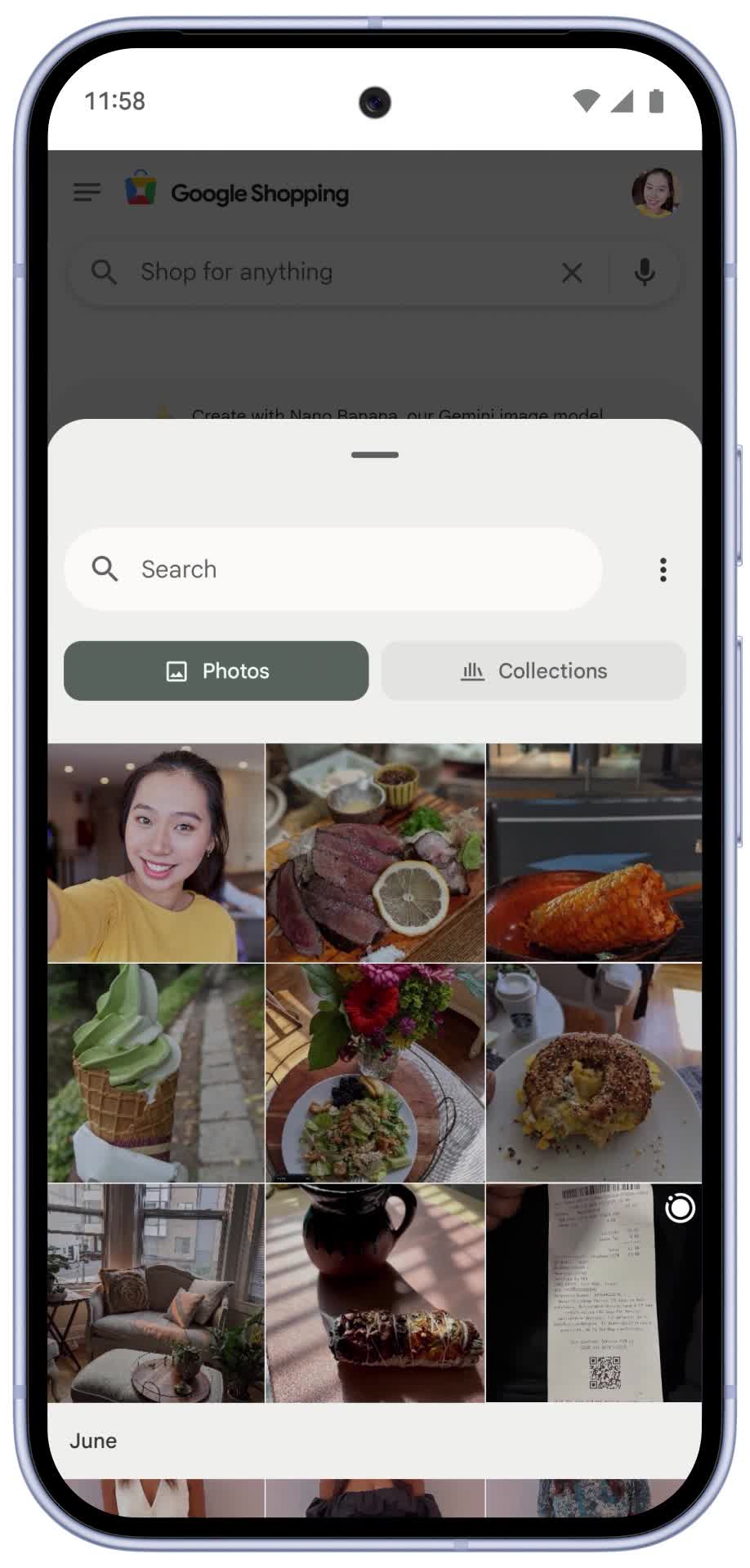
Say goodbye to bad dressing room lighting and awkward outfit selfies. Today U.S. shoppers have a new way to use our virtual try on tool: Now if you don’t have a full body photo of yourself you can use a selfie and Nano Banana, our Gemini 2.5 Flash Image model, will generate a full body digital version of you for virtual try on.
Simply upload a selfie at g.co/shop/tryon, select your usual clothing size and we’ll generate several studio-like images. Select one to make it your default try on photo, and start shopping. If you prefer, you still have the option to virtually try on clothes using a full body photo or a range of models with diverse body types.
Make your image now at google.com/shopping/tryon, and start trying on clothes from billions of product listings from our Shopping Graph.
So You Want To Paywall?
There are three inevitabilities in life. Death, taxes, and big tech companies dumping on the little guy. As zero-click searches reach an all-time high and content is stolen and repurposed for the gain of the almighty tech loser, there’s only one viable solution.
To paywall.
To create a value exchange that reduces reliance on third-party platforms. To become as self-sufficient as possible. Like an off-grid cabin or your mum’s basement, a paywall gives you a sense of security you just cannot put a price on.
Subscriber revenue is intrinsically more valuable to a business because it is predictable. Subscription and advertiser revenue are not created equal.
Don’t paywall everything. Use dynamic/metered paywalls and leave high-reach, generally lower-quality platforms like Google Discover free for email signups.
Subscription success relies on your USP – whether that’s exclusive data, deep, niche insights, or a certain vibe – you have to stand out.
The customer experience and understanding of your audience matter. Create habit-forming connections and products. Become an essential part of their life.
But What About Our Traffic?
Your traffic will decline. But guess what? You’re already hemorrhaging clicks and have been for some time. And traffic doesn’t pay the bills.
Two comparable pages, one with a paywall, one without (Image Credit: Harry Clarkson-Bennett)
The only way to sustain rankings over time is with high-quality engagement data. Navboost stores and uses 13 months of data to identify good vs bad clicks, click quality, the last longest click, and on-page interactions to establish the most relevant content. All at a query level.
Paywalls are not your friend when it comes to user engagement. Not for the masses. But for a small cohort of people who like you enough to pay, your engagement data will be excellent.
In an ultra-personalized world, you will still do well to the people who really matter.
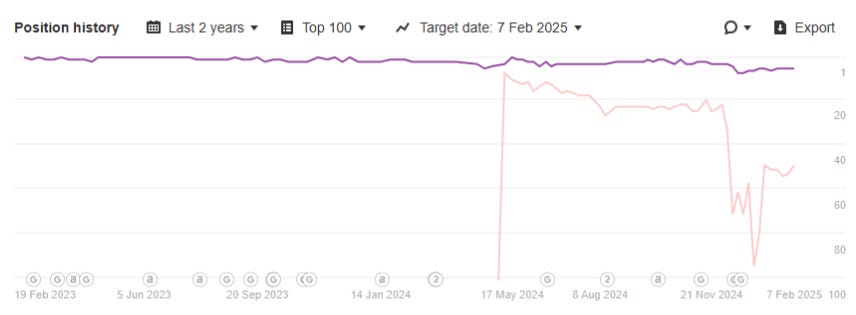
We have data that pretty perfectly highlights the impact of a paywall on rankings. Over the course of three to four months in traditional search, your rankings start to steadily drop before settling in severe mediocrity. You’ve got to fight for every click. With great content, marketing, savviness. Everything.
We have used an image manager to try and generate a free-to-air badge. It rarely shows up unless there’s no featured image, but the idea is excellent (Image Credit: Harry Clarkson-Bennett)
In Google Discover – a highly personalized, click and engagement driven platform – this is even more pronounced. While Discover’s clickless traffic is lower quality, there will be a small cohort of highly engaged users that develop over time, you can target with a paywall.
Unpaywall for the masses, build your owned channels, and paywall for the highly engaged. The platform will take care of the personalization for you.
So, maximize your value exchange with ads and email signups for most users, but don’t neglect those with a high return rate.
There’s some psychology involved in all of this. When a brand becomes widely known for paywalling, I suspect the likelihood of a click goes down as users know what to expect. Or maybe what not to expect.
This likely perpetuates over time, so you should clarify what articles are free to air.
Is Our Content Good Enough?
To nail SEO bingo, it depends. It depends on what your value is in the market. There is a lot of free stuff out there already. But broadly rubbish. So as long as the bar keeps dropping, we’ll all be fine.
I am old-ish. I like words. Writing great content isn’t easy and is usurped in many cases by richer, more visually striking content. Content that satisfies all types of users. Scanners, deep readers, listeners and get the answer and go-ers.
In some ways, you can satisfy all types of users more effectively than ever. I think you have to hit three of the four Es of content creation. Make it resonate, be consistent, and understand youraudience. Whatever you create stands a chance.
But that doesn’t mean creating great stuff is any easier. If you work for a traditional publisher, the chances are you’ve brought a spoon to a gun fight. The war for attention is being fought on all fronts, and straight words are losing.
Fortunately, not every subscription model relies on the quality of the prose. It might be that you have unique data, granular insights into a specific market, or are just a bloody good laugh.
Subscriptions come in all shapes and sizes.
Ultimately, it comes down to your market, marketing, positioning and your USP. You have to know and speak to your audience and you have to stand out. As Barry would say, if you’re forgettable, you’re doomed.
How Do We Know If People Will Pay?
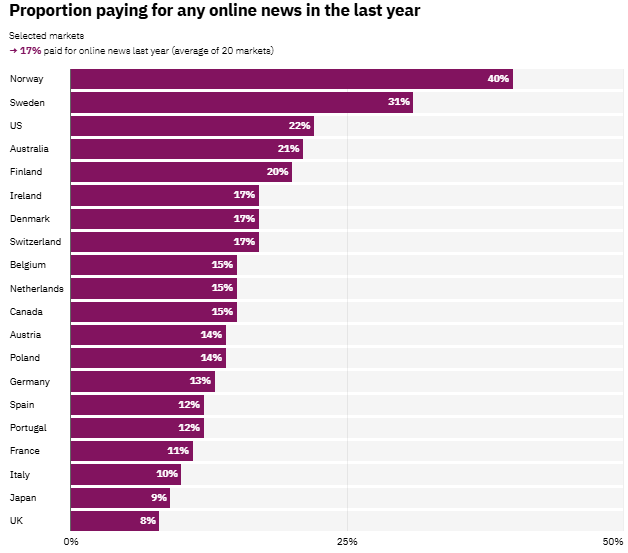
When it comes to paying for news, some markets are far more “advance” than others. The Scandinavian market is light-years ahead of almost everyone else when it comes to paying for news. You have to do your research to understand:
While it doesn’t align perfectly, it’s not surprising that those most likely to pay for news have higher income levels. Higher disposable income tends to create an environment where people buy more stuff.
And while the UK sits in a pretty shocking-looking position, almost 24 million of us pay for a BBC license fee. That is, in essence, paying for news. Insert joke about BBC bias and woke cultural agendas here.
Cultural and societal factors really matter. As does your understanding of the market.
“Most heartening is what this represents as the wider information ecosystem fractures: audiences recognise the value of professional journalism and are willing to pay for it.”
In an era of slop, paying for something good is not a bad thing.
Macro And Micro Factors Are Influential
You can only control what you can control. But you shouldn’t dismiss the wider climate.
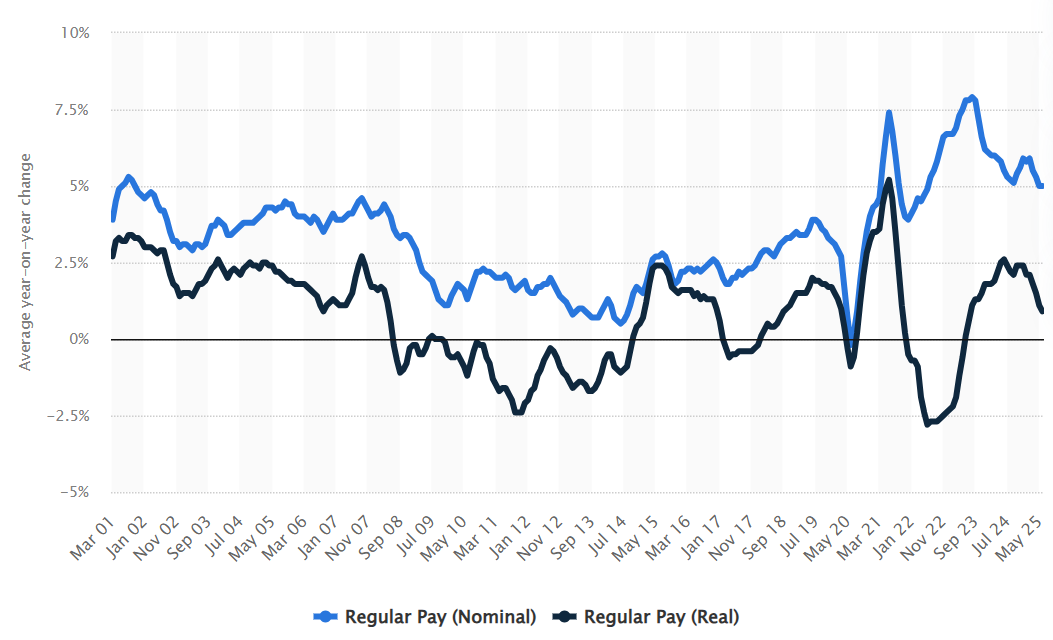
In the UK and arguably globally, there is a cost-of-living crisis. Globally, there have been a number of very significant geopolitical issues that affect the wider economy. Money doesn’t go as far as it once did, and most subscriptions are a luxury purchase.
Is a £20 or £30 monthly subscription more valuable than a £10 Netflix one? Or Spotify? These are questions you need to ask. Why would someone subscribe and stick around?
How far your money goes has been declining for some time… (Image Credit: Harry Clarkson-Bennett)
And we aren’t just competing with other publishers. While screen time and content consumption are at an all-time high, video consumption and the creator economy are booming.
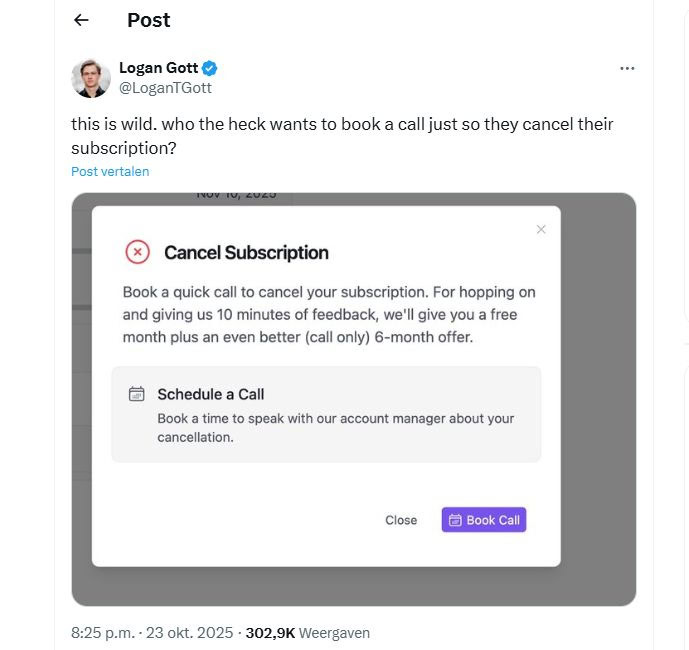
So your pricing strategy, customer service, and overall experience are hugely important. You are almost certainly going to be a nice-to-have. So make sure your customer journey and path to conversion are premium, and your audience feel listened to.
The standard customer experience (Image Credit: Harry Clarkson-Bennett)
You need to speak to your audience. You don’t have to go into this blind. Forging real connections with people is not impossible and making them feel listened to will go a long way.
You can try to figure out what they really value, how much they’re willing to spend and what’s stopping them.
Should I Paywall Everything?
No. Content is designed to do different things, and not everything is a premium product. Whatever journalists will tell you. If you shut down your site entirely, you become too closed off an ecosystem in my opinion.
Commercial Content: If you have affiliate-led content, paywalling is a questionable decision. It may not be wrong per se, but think about whether the pros outweigh the cons. Typically, it’s a good gateway drug for the rest of your content. And makes some money.
Content You Can Get Elsewhere: Evergreen content of a comparable quality to what already exists in the wider corpus is not a profitable opportunity. I’d argue that leaving this free-to-air has more pros than cons. You can always unpaywall the 100 best albums of all time, but gate the richer, individual album reviews.
Lower-Quality Platforms: A user that comes from a platform like Discover is far less likely to convert than someone who comes from organic search. So think about the role each platform plays in your content access ecosystem.
Paywall Vs. Newsletter signup: It is far easier to convert people to a paying subscriber from a newsletter database than from an on-page paywall. And the user journey is far less interrupted. Building an owned channel is never a bad thing, so think about how engaged users are and whether an email would be a more effective starting point.
As of just a few months ago, the search giant asked that publishers with paywalls change the way they block content to help Google out. The lighter touch paywall solution (a JavaScript-based one) includes the full content in the server response.
“…Some JavaScript paywall solutions include the full content in the server response, then use JavaScript to hide it until subscription status is confirmed.
This isn’t a reliable way to limit access to the content. Make sure your paywall only provides the full content once the subscription status is confirmed.”
According to Google, they are struggling to determine the difference. So the problem is on us, not them. They (and I strongly suspect other LLMs) are ingesting this content and training their models on us whether we like it or not.
For those of you who haven’t heard of Common Crawl, it stores a corpus of open web data accessible to “researchers.” By researchers, we now mean tech bros who don’t want to pay for, surprisingly, anything.
“If you didn’t want your content on the internet, you shouldn’t have put your content on the internet.”
It doesn’t stop there either. Even if you block all non-whitelisted bots from accessing your site at a CDN level, you may have syndication partnerships in place. If so, it’s likely your content is making it out into the wider world.
The internet is not exactly a leakproof vessel. If you’re setting one up now, try to implement a server-side option.
What Is The Right Paywall For Me?
I have written about the types of paywall available to you and the pros and cons of each. Generally, I think a metered or dynamic paywall is the best option for most publishers. At the very least, a freemium model. Something that gives people enough to draw them in.
And you can’t exactly draw them in if you just hard paywall everything.
You have to think of this as a full-blown marketing strategy. You need to know where people come from. How much of your content they have consumed. Whether it’s better to show them a newsletter signup as opposed to a paywall.
It is absolutely worth knowing that over time, a strong email database will convert far more effectively than a hard paywall.
So encouraging free signups and taking a longer-term view to conversions (you’ll need a good customer journey here) may be far more effective.
How Can I Set One Up?
There are a number of paywall management options out there for publishers. Leaky Paywall, Zephr, Piano. There are plenty.
The best ones integrate with your existing tech stacks, have excellent personalization and customization options, deploy ad-blocking strategies, and run flexible gating strategies.
Larger publishers tend to go with enterprise-level options with deep analytics and CRM integrations. Smaller publishers can work with lighter touch, cheaper operators. You really just need to scope out what will work best for you.
Particularly when it comes to monthly costs and revenue share options.
How Can I Map The Impact?
You’ll need to establish a few key things:
The average drop in traffic you expect to see.
The subsequent loss of existing revenue (probably ad-related, but there may be some knock-on wider commercial impact).
The average value of a subscription (and the expected conversion rate).
Focusing on Customer LTV shifts marketing from chasing traffic to profitable, loyal audience relationships. It makes businesses understand that not all audiences or subscriptions are created equal.
You generate more subs through paid media because the net is larger. But lots slip through the net. So you need a quality product (in both a product and marketing sense) alongside UX and customer service that reduces friction.
Search and owned channels are smaller, but far more likely to pay because they have taken an action to find you. In some cases, they actually want you in their inbox. The quality is higher, but the overall returns are lower.
So you just can’t treat everybody the same.
Closing Thoughts
Subscriber revenue is so valuable because it’s predictable. Subscription business models have boomed for that very reason. A pound of subscriber revenue is far more valuable than almost anything else, and it should be the focus of your business.
But that doesn’t mean you put all your eggs in one basket. You can have multiple subscription types on your website, and that can help you become habitual with all types of users. But you need to add value to their lives every day.
Puzzles, recipes, short and long-form videos, et al.
Businesses make money in many ways. A diverse business is resilient. Resilient to macro and micro factors that will decimate some publishers over the next few years. So talk to your audience, trial new ways of adding value, and commit when one works. Become habitual.
And, shock horror, people want to belong to something. So while the digital experience is crucial, making an effort to connect with people IRL matters.
Why Is Organic Traffic Down? Here’s How To Segment The Data via @sejournal, @torylynne
As an SEO, there are few things that stoke panic like seeing a considerable decline in organic traffic. People are going to expect answers if they don’t already.
Getting to those answers isn’t always straightforward or simple, because SEO is neither of those things.
The success of an SEO investigation hinges on the ability to dig into the data, identify where exactly the performance decline is happening, and connect the dots to why it’s happening.
It’s a little bit like an actual investigation: Before you can catch the culprit or understand the motive, you have to gather evidence. In an SEO investigation, that’s a matter of segmenting data.
In this article, I’ll share some different ways to slice and dice performance data for valuable evidence that can help further your investigation.
So, before we dissect data to narrow down problem areas, the first thing we need to do is determine whether there’s actually an SEO issue at play.
After all, it could be something else altogether. In which case, we’re wasting unnecessary resources chasing a problem that doesn’t exist.
Is This A Tracking Issue?
In many cases, what looks like a big traffic drop is just an issue with tracking on the site.
To determine whether tracking is functioning correctly, there are a couple of things we need to look for in the data.
The first is consistent drops across channels.
Zoom out of organic search and see what’s happening in other sources and channels.
If you’re seeing meaningful drops across email, paid, etc., that are consistent with organic search, then it’s more than likely that tracking isn’t working correctly.
The other thing we’re looking for here is inconsistencies between internal data and Google Search Console.
Of course, there’s always a bit of inconsistency between first-party data and GSC-reported organic traffic. But if those differences are significantly more pronounced for the time period in question, that hints at a tracking problem.
Is This A Brand Issue?
Organic search traffic from Google falls into two primary camps:
Brand traffic: Traffic driven by user queries that include the brand name.
Non-brand traffic: Traffic driven by brand-agnostic user queries.
Non-brand traffic is directly affected by SEO work. Whereas, brand traffic is mostly impacted by the work that happens in other channels.
When a user includes the brand in their search, they’re already brand-aware. They’re a return user or they’ve encountered the brand through marketing efforts in channels like PR, paid social, etc.
When marketing efforts in other channels are scaled back, the brand reaches fewer users. Since fewer people see the brand, fewer people search for it.
Or, if customers sour on the brand, there are fewer people using search to come back to the site.
Either way, it’s not an SEO problem. But in order to confirm that, we need to filter the data down.
Go to Performance in Google Search Console and exclude any queries that include your brand. Then compare the data against a previous period – usually YoY if you need to account for seasonality. Do the same for queries that don’t include the brand name.
If non-brand traffic has stayed consistent, while brand traffic has dropped, then this is a brand issue.
Screenshot from Google Search Console, November 2025
Tip: Account for users misspelling your brand name by filtering queries using fragments. For example, at Gray Dot Co, we get a lot of brand searches for things like “Gray Company” and “Grey Dot Company.” By using the simple regex expression “gray|grey” I can catch brand search activity that would otherwise fall through the cracks.
Is It Seasonal Demand?
The most obvious example of seasonal demand is holiday shopping on ecommerce sites.
Think about something like jewelry. Most people don’t buy jewelry every day; they buy it for special occasions. We can confirm that seasonality by looking at Google Trends.
Zooming out to the past five years of interest in “jewelry,” it clearly peaks in November and December.
Screenshot from Google Trends, November 2025
As a site that sells jewelry, of course, traffic in Q1 is going to be down from Q4.
I use a pretty extreme example here to make my point, but in reality, seasonality is widespread and often more subtle. It impacts businesses where you might not expect much seasonality at all.
The best way to understand its impact is to look at organic search data year-over-year. Do the peaks and valleys follow the same patterns?
If so, then we need to compare data YoY to get a true sense of whether there’s a potential SEO problem.
Is It Industry Demand?
SEOs need to keep tabs on not just what’s happening internally, but also what’s going on externally. A big piece of that is checking the pulse of organic demand for the topics and products that are central to the brand.
Products fall out of vogue, technologies become obsolete, and consumer behavior changes – that’s just the reality of business. When there are fewer potential customers in the landscape, there are fewer clicks to win, and fewer sessions to drive.
Take cameras, for instance. As the cameras on our phones got more sophisticated, digital cameras became less popular. And as they became less popular, searches for cameras dwindled.
Now, they’re making a comeback with younger generations. More people searching, more traffic to win.
Screenshot from npr.com, November 2025
You can see all of this at play in the search landscape by turning to Google Trends. The downtrend in interest caused by advances in technology, AND the uptrend boosted by shifts in societal trends.
Screenshot from Google Trends, November 2025
When there are drops in industry, product, or topic demand within the landscape, we need to ask ourselves whether the brand’s organic traffic loss is proportional to the overall loss in demand.
Is Paid Search Cannibalizing Organic Search?
Even if a URL on the site ranks well in organic results, ads are still higher on the SERP. So, if a site is running an ad for the same query it already ranks for, then the ad is going to get more clicks by nature.
When businesses give their PPC budgets a boost, there’s potential for this to happen across multiple, key SERPs.
Let’s say a site drives a significant chunk of its organic traffic from four or five product landing pages. If the brand introduces ads to those SERPs, clicks that used to go to the organic result start going to the ad.
That can have a significant impact on organic traffic numbers. But search users are still getting to the same URLs using the same queries.
To confirm, pull sessions by landing pages from both sources. Then, compare the data from before the paid search changes to the period following the change.
If major landing pages consistently show a positive delta that cancels out the negative delta in organic search, you’re not losing organic traffic; you’re lending it.
Screenshot from Google Analytics, November 2025
Segmenting Data To Find SEO Issues
Once we have confirmation that the organic traffic declines point to an SEO issue, we can start zooming in.
Segmenting data in different ways helps pinpoint problem areas and find patterns. Only then can we trace those issues to the cause and craft a strategy for recovery.
URL
Most SEOs are going to filter their organic traffic down by URL. It lets us see which pages are struggling and analyze those pages for potential improvements.
It also helps find patterns across pages that make it easier to isolate the cause of more widespread issues. For example, if the site is losing traffic across its product listing pages, it could signal that there’s a problem with the template for that page.
But segmenting by URL also helps us answer a very important question when we pair it with conversion data.
Do We Really Care About This Traffic?
Clicks are only helpful if they help drive business-valuable user interactions like conversions or ad views. For some sites, like online publications, traffic is valuable in and of itself because users coming to the site are going to see ads. The site still makes money.
But for brands looking to drive conversions, it could just be empty traffic if it’s not helping drive that primary key performance indicator (KPI).
A top-of-funnel blog post might drive a lot of traffic because it ranks for very high-volume keywords. If that same blog post is a top traffic-driving organic landing page, a slip in rankings means a considerable organic traffic drop.
But the users entering those high-volume keywords might not be very qualified potential customers.
Looking at conversions by landing page can help brands understand whether the traffic loss is ultimately hurting the bottom line.
The best way to understand is to turn to attribution.
First-touch attribution quantifies an organic landing page’s value in terms of the conversions it helps drive down the line. For most businesses, someone isn’t likely to convert the first time they visit the site. They usually come back and purchase.
Whereas, last-touch attribution shows the organic landing pages that people come to when they’re ready to make a purchase. Both are valuable!
Query
Filtering performance by query can help understand which terms or topic areas to focus improvements on. That’s not new news.
Sometimes, it’s as easy as doing a period-over-period comparison in GSC, ordering by clicks lost, and looking for obvious patterns, i.e., are the queries with the most decline just subtle variants of one another?
If there aren’t obvious patterns and the queries in decline are more widespread, that’s where topic clustering can come into the mix.
Topic Clustering With AI
Using AI for topic clustering helps quickly identify any potential relationships between queries that are seeing performance dips.
Go to GSC and filter performance by query, looking for any YoY declines in clicks and average position.
Screenshot from Google Search Console, November 2025
The resulting list of semantic groupings can provide an idea of topics where a site’s authority is slipping in search.
In turn, it helps narrow the area of focus for content improvements and other optimizations to potentially build authority for the topics or products in question.
Identifying User Intent
When users search using specific terms, the type of content they’re looking for – and their objective – differs based on the query. These user expectations can be broken out into four different high-level categories:
User Intent
Objective
Informational
(Top of funnel)
Users are looking for answers to questions, explanations, or general knowledge about topics, products, concepts, or events.
Commercial
(Middle of funnel)
Users are interested in comparing products, reading reviews, and gathering information before making a purchase decision.
Transactional
(Bottom of funnel)
Users are looking to perform a specific action, such as making a purchase, signing up for a service, or downloading a file.
Navigational
Brand-familiar users are using the search engine as a shortcut to find a specific website or webpage.
By leveraging user intent, we identify user objectives for which the site or pages on the site are falling short. It gives us a lens into performance decline, making it easier to identify possible causes from the perspective of user experience.
If the majority of queries losing clicks and positionality are informational, it could signal shortcomings in the site’s blog content. If the queries are consistently commercial, it might call for an investigation into how the site approaches product detail and/or listing pages.
GSC doesn’t provide user intent in its reporting, so this is where a third-party SEO tool can come into play. If you have position tracking set up and GSC connected, you can use the tool’s rankings report to identify queries in decline and their user intent.
If not, you can still get the data you need by using a mix of GSC and a tool like Ahrefs.
Device
This view of performance data is pretty simple, but it’s equally easy to overlook!
When the large majority of performance declines are attributed to ONLY desktop or mobile, device data helps identify potential tech or UX issues within the mobile or desktop experience.
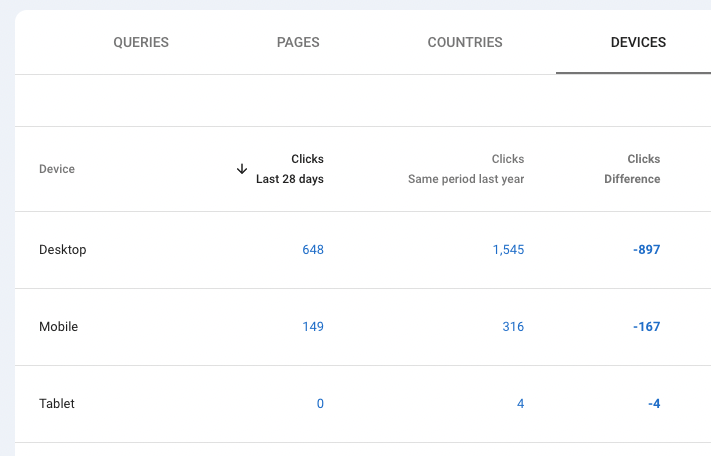
The important thing to remember is that any declines need to be considered proportionally. Take the metrics for the site below…
Screenshot from Google Search Console, November 2025
At first glance, the data makes it look like there might be an issue with the desktop experience. But we need to look at things in terms of percentages.
Desktop: 1 – (648/1545) x 100 = 58% decline
Mobile: 1 – (149/316) x 100 = 52% decline
While desktop shows a much larger decline in terms of click count, the percentage of decline YoY is fairly similar across both desktop and mobile. So we’re probably not looking for anything device-specific in this scenario.
Search Appearance
Rich results and SERP features are an opportunity to stand out on the SERP and drive more traffic through enhanced results. Using the search appearance filter in Google Search Console, you can see traffic from different types of rich results and SERP features:
Forums.
AMP Top Story (AMP page + Article markup).
Education Q&A.
FAQ.
Job Listing.
Job Details.
Merchant Listing.
Product Snippet.
Q&A.
Review Snippet.
Recipe Gallery.
Video.
This is the full list of possible features with rich results (courtesy of SchemaApp), though you’ll only see filters for search appearances where the domain is currently positioned.
In most cases, Google is able to generate these types of results because there is structured data on pages. The notable exceptions are Q&A, translated results, and video.
So when there are significant traffic drops coming from a specific type of search appearance, it signals that there’s potentially a problem with the structured data that enables that search feature.
Screenshot from Google Search Console, November 2025
You can investigate structured data issues in the Enhancements reports in GSC. The exception is product snippets, which nest under the Shopping menu. Either way, the reports only show up in your left-hand nav if Google is aware of relevant data on the site.
For example, the product snippets report shows why some snippets are invalid, as well as ways to potentially improve valid results.
Screenshot from Google Search Console, November 2025
This context is valuable as you begin to investigate the technical causes of traffic drops from specific search features. In this case, it’s clear that Google is able to crawl and utilize product schema on most pages – but there are some opportunities to improve that schema with additional data.
Featured Snippets
When featured snippets originally came on the scene, it was a major change to the SERP structure that resulted in a serious hit to traditional organic results.
Today, AI Overviews are doing the same. In fact, research from Seer shows that CTR has dropped 61% for queries that now include an AI overview (21% of searches). And that impact is outsized for informational queries.
In cases where rankings have remained relatively static, but traffic is dropping, there’s good reason to investigate whether this type of SERP change is a driver of loss.
While Google Search Console doesn’t report on featured snippets (example: PAA questions) and AI Overviews, third-party tools do.
In the third-party tool Semrush, you can use the Domain Overview report to check for featured snippet availability across keywords where the site ranks.
Screenshot from Semrush, November 2025
Do the keywords where you’re losing traffic have AI overviews? If you’re not cited, it’s time to start thinking about how you’re going to win that placement.
Search Type
Search type is another way to filter GSC data, where you’re seeing traffic declines despite healthy and consistent rankings.
After all, web search is just one prong of Google Search. Think about it: How often do you use Google Image search? At least in my case, that’s fairly often.
Filter performance data by each of these search types to understand which one(s) are having the biggest impact on performance decline. Then use that insight to start connecting the dots to the cause.
Screenshot from Google Search Console, November 2025
Images are a great example. One simple line in the robots.txt can block Google from crawling a subfolder that hosts multitudes of images. As those images disappear from image search results, any clicks from those results disappear in tandem.
We don’t know to look for this issue until we slice the data accordingly!
Geography
If the business operates physically in specific cities and states, then it likely already has geo-specific performance tracking set up through a tool.
But domains for online-only businesses shouldn’t dismiss geographic data – even at the city/state level! Declines are still a trigger to check geo-specific performance data.
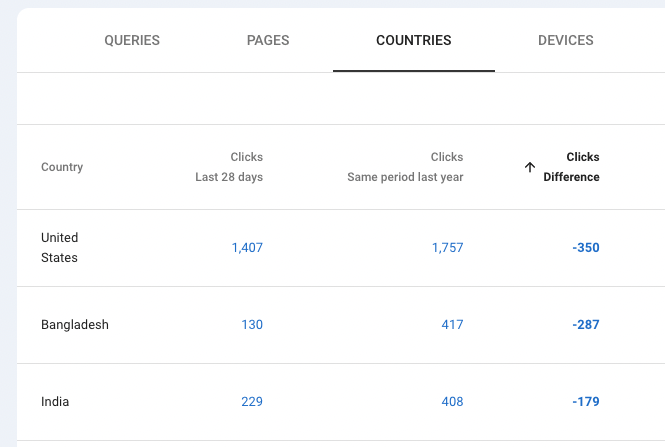
Country
Just because the brand only sells and operates in one country doesn’t mean that’s where all the domain’s traffic is coming from. Drilling down by country in GSC allows you to see whether declines are coming from the country the brand is focused on or, potentially, another country altogether.
Screenshot from Google Search Console, November 2025
If it’s another country, it’s time to decide whether that matters. If the site is a publisher, it probably cares more about that traffic than an ecommerce brand that’s more focused on purchases in its country of operation.
Localization
When tools are reporting positionality at the country level, then rankings shifts in specific markets fly under the radar. It certainly happens, and major markets can have major traffic impact!
Tools like BrightLocal, Whitespark, and Semrush let you analyze SERP rankings one level deeper than GSC, providing data down to the city.
Checking for rankings discrepancies across cities is possible by checking a small sample of keywords with the greatest declines in clicks.
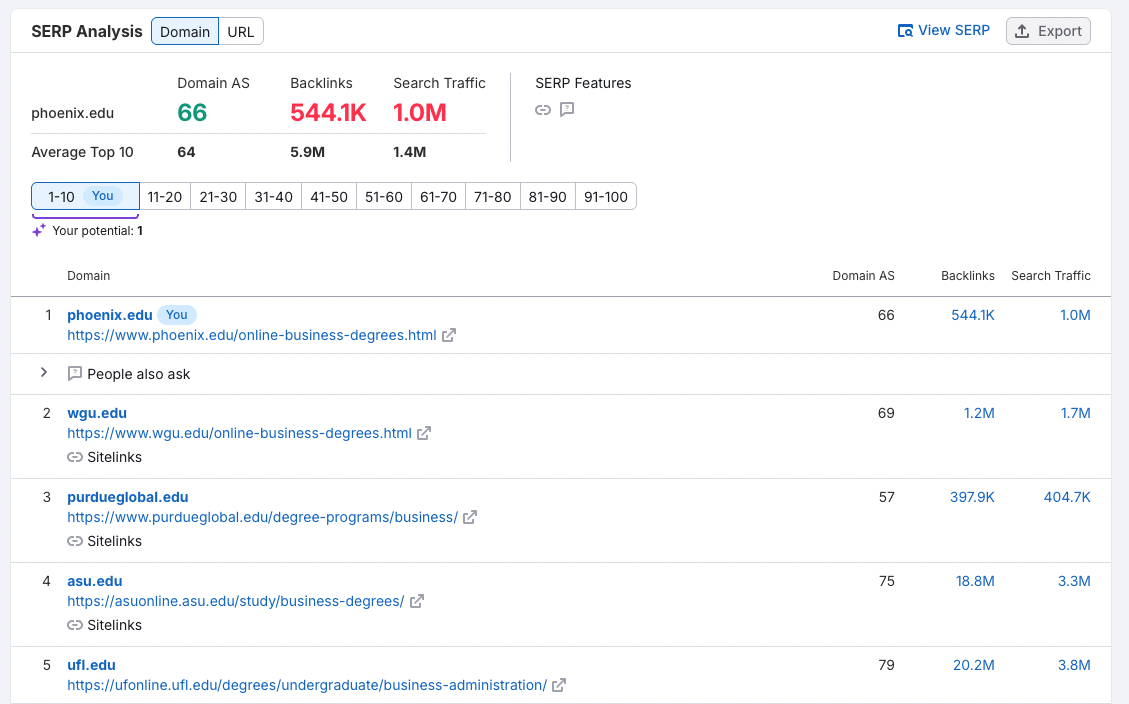
If I’m an SEO at the University of Phoenix, which is an online university, I’m probably pretty excited about ranking #1 in the United States for “online business degree.”
Screenshot from Semrush, November 2025
But if I drill down further, I might be a little distraught to find that the domain isn’t in the top five SERP results for users in Denver, CO…
Screenshot from Semrush, November 2025
…or Raleigh, North Carolina.
Screenshot from Semrush, November 2025
Catch Issues Faster By Leveraging AI For Data Analysis
Data segmentation is an important piece of any traffic drop investigation, because humans can see patterns in data that bots don’t.
However, the opposite is true too. With anomaly detection tooling, you get the best of both worlds.
When combined with monitoring and alert notifications, anomaly detection makes it possible to find and fix issues faster. Plus, it enables you to find data patterns in any after-the-impact investigations
All of this helps ensure that your analysis is comprehensive, and might even point out gaps for further investigation.
As Sherlock Holmes would say about an investigation, “It is a capital mistake to theorize before one has data.” With the right data in hand, the culprits start to reveal themselves.
Data segmentation empowers SEOs to uncover leads that point to possible causes. By narrowing it down based on the evidence, we ensure more accuracy, less work, faster answers, and quicker recovery.
And while leadership might not love a traffic drop, they’re sure to love that.
Ask An SEO: Digital PR Or Traditional Link Building, Which Is Better? via @sejournal, @rollerblader
This week’s ask an SEO question is:
“Should SEOs be focusing more on digital PR than traditional link building?”
Digital PR is synonymous with link building at this point as SEO’s needed a new way to package and resell the same service. Actual PR work will always be more valuable than link building because PR, whether digital or traditional, focuses on a core audience of customers and reaching specific demographics. This adds value to a business and drives revenue.
With that said, here’s how I’d define digital PR vs. link building if a client asked what the difference is.
Digital PR: Getting brand coverage and citations in media outlets, niche publications, trade journals, niche blogs, and websites that do not allow guest posting, paid links, or unvetted contributors with the goal of building brand awareness and driving traffic from the content.
Link Building: Getting links from websites as a way to try and increase SERP rankings. Traffic from the links, sales from the links, etc., are not being tracked, and the quality of the website can be questionable.
Digital PR is always going to be better than link building because you’re treating the technique as a business and not a scheme to try and game the rankings. Link building became a bad practice years ago as links became less relevant, they are still important, so I want to ensure that isn’t taken out of context, and we stopped doing link building completely. Quality content attracts links naturally, including media mentions. When this happens in a natural way, the website will begin rising as the site has a lot of value for users, and search engines can tell when the site is quality.
If you’re building links without evaluating the impact they have traffic and sales-wise, you’re likely setting your site up for failure. Getting a ton of links, just like creating content in mass with AI/LLMs or article spinners, can grow a site quickly. That URL/domain can then burn to the ground equally as fast.
That’s why when we purchase a link, an advertorial, or we’re doing a partnership, we always ask ourselves the following questions:
Is there an active audience on this website that is also coming back to the website via branded search for information?
Is the audience on this website part of our customer base?
Will the article we’re pitching or being featured in be helpful to the user, and is our product or service something that is part of the post naturally vs. being forced?
Are we ok with the link being nofollow or sponsored if we’re paying for the inclusion?
If the answer is yes to these four, then we’re good to go with the link. The active audience on the website and people returning by brand name means there is an audience that trusts them for information. If the readership, visitors, or customers are similar or the same demographics as our user base, then it makes sense we’d want to be in front of them where they go for information.
We may have knowledge that is helpful to the user, but if it is not on topic within the post, there is no reason for them to come through and use our services, buy our products, or subscribe to our newsletters. Instead, we’ll wait until there is a fit, so there is a direct “link” between the content we’re contributing, or being an expert on, and our website.
For the last question, our goal is always traffic and customer acquisition, not getting a link. The website owner controls this, and if they want to follow Google’s best practices (which we obviously recommend doing), we will still be happy if they mark it as sponsored or nofollow. This is the most important of the questions. Building links to game the SERPs is a bad idea; building a brand that people search for by name will overpower any link any day of the week. This is always our goal when it comes to Digital PR and link building. Driving that branded search.
So, that begs the question, where do we go for digital PR?
Sources To Get Digital PR Mentions And Links
When we’re about to start a Digital PR campaign, we create lists of the following targets to reach out to.
Mass Media: Household names like magazines, news websites, and local media, where everyone in the area, the customers, or the country or world knows them by name. The only stipulation we apply is if they have an active category vs. only a few articles here and there. The active category means it is something interesting enough to their reader base that they’re investing in it, so our customers may be there.
Trade Publications: Conferences, associations, and non-profits, as well as industry insiders will have websites and print publications that go out to members. Search Engine Journal could be considered a trade publication for the SEO and PPC industry, same with SEO Roundtable, and some of the communities like Webmaster World. They publish directly relevant content for search engine marketers and have active users, so if I was an SEO service provider or tool, this is where I’d be looking to get featured and ideally links from.
Niche Sites and Bloggers: There is no shortage of niche sites and content producers out there. The trick is finding ones that do not publicly allow guest contributions, advertorials, etc., and that do not link out to non-niche websites and content. This includes sites that got hacked and had link injections. Even if their “authority” is zero, there is value if they quality control and all links and mentions are earned.
Influencers: Whether it is YouTube, Facebook group leaders, LinkedIn that is crawlable, or other channels, getting coverage from people with subscribers and an active audience can let search engines crawl the link back to your website. It may not boost your rankings, but it drives customers to you and helps with page discoverability if the link gets crawled. LLMs are also citing their content as sources, so there could be value for AIO, too.
Link building is not dead by any means; links still matter. You just don’t need to build them anymore. Focus on quality where an active audience is and where you have a chance at getting traffic and revenue. This is what will move the needle for the long run and help you grow in SERPs that matter.
More Resources:
Featured Image: Paulo Bobita/Search Engine Journal
Google Disputes Report Claiming Ads Are Coming To Gemini In 2026 via @sejournal, @MattGSouthern
Google is publicly pushing back on an Adweek report that claimed the company told advertising clients it plans to bring ads to its Gemini AI chatbot next year.
Dan Taylor, Google’s Vice President of Global Ads, responded directly on X shortly after the story published, calling the report inaccurate and denying any plans to monetize the Gemini app.
The Original Report
Adweek’s Trishla Ostwal reported that Google had informed advertising clients about plans to introduce ads to Gemini. According to the exclusive story, Google representatives held calls with at least two advertising clients indicating that ad placements in Gemini were targeted for a 2026 rollout.
The agency buyers who spoke to Adweek remained anonymous. They said details on ad formats, pricing, and testing were unclear, and that Google had not shared prototypes or technical specifications about how ads would appear in the chatbot.
Notably, the report said this plan would be separate from advertisements in AI Mode, Google’s AI-powered search experience.
Google’s Response
Taylor disputed the claims publicly on X, writing: “This story is based on uninformed, anonymous sources who are making inaccurate claims. There are no ads in the Gemini app and there are no current plans to change that.”
Google’s official AdsLiaison account amplified the denial, reiterating that there are no ads in the Gemini app and no current plans to add them, and pointing out that ads currently appear in AI Overviews in English in the US, with expansion to more English-speaking countries, and are being tested in AI Mode.
Logan Kilpatrick, who works on Google’s Gemini team, responded to Taylor’s post with “thanks for clarifying!!”
Where Google Is Monetizing AI
While the Gemini app itself remains ad-free according to Google, the company is actively monetizing other AI-powered search experiences.
Google began showing ads in AI Overviews earlier this year and has been expanding that program to additional English-speaking countries. The company also continues testing advertisements within AI Mode.
Why This Matters
The question of how AI chatbots will be monetized has become increasingly relevant as these products gain mainstream adoption. Google, OpenAI, and other AI companies face pressure to generate revenue from expensive-to-run conversational AI products.
Just last week, code discovered in ChatGPT’s Android app suggested OpenAI may be building an advertising framework, though the company has not confirmed any plans to introduce ads.
For now, Google maintains that Gemini users won’t see ads in the chatbot app. Whether that position changes as the AI landscape evolves remains to be seen.
Google Reports Search Console Page Indexing Report Delays via @sejournal, @MattGSouthern
Google announces delays in Search Console’s Page indexing report. The company confirms crawling, indexing, and ranking remain unaffected by the reporting issue.
Google is experiencing longer than usual delays in the Page indexing report within Search Console.
The issue affects reporting only, not actual crawling, indexing, or ranking of websites.
Google will provide an update when the issue is resolved.