Discounted ChatGPT Go Is Now Available In 98 Countries via @sejournal, @martinibuster

ChatGPT Go, OpenAI’s heavily discounted version of ChatGPT, is now available in 98 countries, including eight European countries and five Latin American countries.

ChatGPT Go offers everything that’s included in the Free plan but more. So there’s more access to GPT-5, image generation, extended file upload capabilities, a larger context window, and collaboration features. ChatGPT Go is available on both Android and Apple mobile apps and on the macOS and Windows desktop environments.

The eight new European countries where ChatGPT Go is now available are:

  1. Austria
  2. Czech Republic
  3. Denmark
  4. Norway
  5. Poland
  6. Portugal
  7. Spain
  8. Sweden

The five Latin American countries are:

  1. Bolivia
  2. Brazil
  3. El Salvador
  4. Honduras
  5. Nicaragua

The full ChatGPT availability list is here. Note: The official list doesn’t list Sweden, but Sweden appears in the official changelog.

Featured Image by Shutterstock/Nithid

https://www.searchenginejournal.com/discounted-chatgpt-go-is-now-available-in-98-countries/559723/


How Agentic Browsers Will Change Digital Marketing via @sejournal, @DuaneForrester

The footprint of large language models keeps expanding. You see it in productivity suites, CRM, ERP, and now in the browser itself. When the browser thinks and acts, the surface you optimize for changes. That has consequences for how people find, decide, and buy.

Microsoft shows how quickly this footprint can spread across daily work. Microsoft says nearly 70% of the Fortune 500 now use Microsoft 365 Copilot. The company also reports momentum through 2025 customer stories and events. These numbers do not represent unique daily users across every product; rather, they signal reach into large enterprises where Microsoft already has distribution.

Google is pushing Gemini across Search, Workspace, and Cloud. Google highlights Gemini inside Search’s AI Mode and AI Overviews, and claims billions of monthly AI assists across Workspace. Google also points to customers putting Gemini to work across industries and reports average time savings in Workspace studies. In education, Google says Gemini for Education now reaches more than 10 million U.S. college students.

Salesforce and SAP are bringing agents into core enterprise flows. Salesforce announced Agentforce and the Agentic Enterprise, with updates in 2025 that focus on visibility and control for scaled agent deployments. SAP positioned Joule as its AI copilot and added collaborative AI agents across business processes at TechEd 2024, with ongoing releases in 2025.

And with all of that as the backdrop, should we be surprised that the browser is the next layer?

Agentic BrowsersImage Credit: Duane Forrester

What Is An Agentic Browser?

A traditional browser shows you pages and links. An agentic browser interprets the page, carries context, and can act on your behalf. It can read, synthesize, click, fill forms, and complete tasks. You ask for an outcome. It gets you there.

Perplexity’s Comet positions itself as an AI-first browser that works for you. Reuters covered its launch and the pitch to challenge Chrome’s dominance, and The Verge reports that Comet is now available to everyone for free, after a staged rollout.

Security has already surfaced as a real issue for agentic browsers. Brave’s research describes indirect prompt injection in Comet and Guardio’s work, and coverage in the trade press highlights risks of agent-led flows being manipulated.

Now OpenAI has launched ChatGPT Atlas, a browser with ChatGPT at the core and an Agent Mode for task execution.

Why This Matters To Marketing

If the browser acts, people click less and complete more tasks in place. That compresses discovery and decision steps. It raises the bar for how your content gets selected, summarized, and executed against. Martech’s analysis points to a redefined search and discovery experience when browsers bring agentic and conversational layers to the fore.

You should expect four big shifts.

Search And Discovery

Agentic flows reduce list-based searching. The agent decides which sources to read, how to synthesize, and what to do with the result. Your goal shifts from ranking to getting selected by an agent that is optimizing for the user’s preferences and constraints. That may lower raw click volumes and raise the value of being the canonical source for a clear, task-oriented answer.

Content And Experience

Content needs to be agent-friendly. That means clear structure, strong headings, accurate metadata, concise summaries, and explicit steps. You are writing for two audiences. The human who skims. The agent that must parse, validate, and act. You also need task artifacts. Checklists. How to flows. Short-form answers that are safe to act on. If your page is the long version, your agent-friendly artifact is the short version. Both matter.

CRM And First-Party Data

Agents may mediate more of the journey. You need earlier value exchanges to earn consent. You need clean APIs and structured data so agents can hand off context, initiate sessions, and trigger next best actions. You will also need to model events differently when some actions never hit your pages.

Attribution And Measurement

If an agent fills the cart or completes a form from the browser, you will not see traditional click paths. Define agent-mediated events. Track handoffs between browser agent and brand systems. Update your models so agent exposure and agent action can be credited. This is the same lesson marketers learned with assistants and chat surfaces. The browser now brings that dynamic to the mainstream.

What To Do Now

Start With Content

Audit your top 10 discovery and consideration assets. Tighten structure. Add short summaries and task snippets that an agent can lift safely. Add schema markup where it makes sense. Make dates and facts explicit. Your goal is clarity that a machine can parse and that a person can trust. Guidance on why this matters sits in the information above from the Martech article.

Build Better Machine Signals

Use schema.org where it helps understanding. Ensure feeds, sitemaps, Open Graph, and product data are complete and current. If you have APIs that expose inventory, pricing, appointments, or availability, document them clearly and make developer access straightforward.

Map Agent-First Journeys

Draft a simple flow for how your category works when the browser is the assistant. Query. Synthesis. Selection. Action. Handoff. Conversion. Then decide where you can add value. This is not only about SEO. It is about being callable by an agent to help someone finish a task with less friction.

Rethink Metrics

Define what counts as an agent impression and an agent conversion for your brand. Tag flows where the agent initiates the session. Set targets for assisted conversions that originate in agent environments. Treat this as a separate channel for planning.

Run Small Tests

Try optimizing one or two pages for agent selection and summarize ability. Instrument the flows. If there are early integrations or pilots available with agent browsers, get on the list and learn fast. For competitive context, it is useful to watch how quickly Atlas and Comet gain traction relative to incumbent browsers. Sources on current market share are below.

Why Timing Matters

We have seen how fast browsers can grow when they meet a new need. Google launched Chrome in 2008. Within a year, it was already climbing the charts. Ars Technica covered Chrome’s 1.0 release on December 11, 2008. StatCounter Press said Chrome exceeded 20% worldwide in June 2011, up from 2.8% in June 2009. By May 2012, StatCounter reported Chrome overtook Internet Explorer for the first full month. Annual StatCounter data for 2012 shows Chrome at 31.42%, Internet Explorer at 26.47%, and Firefox at 18.88%.

Firefox had its own rapid start earlier in the 2000s. Mozilla announced 50 million Firefox downloads in April 2005 and 100 million by October 2005, less than a year after 1.0. Contemporary reporting placed Firefox at roughly 9 to 10% market share by late 2005 and 18% by mid-2008.

Microsoft Edge entered later. Edge originally shipped in 2015, then relaunched on Chromium in January 2020. Edge has fluctuated. Recent coverage says Edge lost share over the summer of 2025 on desktop, citing StatCounter.

For an executive snapshot of the current landscape, StatCounter’s September 2025 worldwide totals show Chrome at about 71.8%, Safari at about 13.9%, Edge at about 4.7%, Firefox at about 2.2%, Samsung Internet at about 1.9%, and Opera at about 1.7%.

What This History Tells Us

Each major browser shift came with a clear promise. Netscape made the web accessible. Internet Explorer bundled it with the operating system. Firefox made it safer and more private. Chrome made it faster and more reliable. Every breakthrough paired capability with trust. That pattern will repeat here.

Agentic browsers can only scale if they prove both utility and safety. They must handle tasks faster and more accurately than people, without introducing new risks. Security research around Comet shows what happens when that balance tips the wrong way. If users see agentic browsing as unpredictable or unsafe, adoption slows. If it saves them time and feels dependable, adoption accelerates. History shows that trust, not novelty, drives the curves that turn experiments into standards.

For marketers, that means your work will increasingly live inside systems where trust and clarity are prerequisites. Agents will need unambiguous facts, consistent markup, and licensing that spells out how your content can be reused. Brands that make that easy will be indexed, quoted, and recommended. Brands that make it hard will vanish from the new surface before they even know it exists.

How To Position Your Brand For Agentic Browsing

Keep your approach simple and disciplined. Make your best content easy to select, summarize, and act on. Structure it tightly, keep data fresh, and ensure everything you publish can stand on its own when pulled out of context. Give agents clean, accurate snippets they can carry forward without risk of misrepresentation.

Expose the data and signals that let agents work with you. APIs, feeds, and machine-readable product information reduce guesswork. If agents can confirm availability, pricing, or location from a trusted feed, your brand becomes a reliable component in the user’s automated flow. Pair that with clear permissions on how your data can be displayed or executed, so platforms have a reason to include you without fear of legal exposure.

Treat agent-mediated activity as its own marketing channel. Name it. Measure it. Fund it. You are early, so your metrics will change as you learn, but the act of measuring will force better questions about what visibility and conversion mean when browsers complete tasks for users. The first teams to formalize this channel will understand its economics long before competitors notice the traffic shift.

Finally, stay close to the platform evolution. Watch every release of OpenAI’s Atlas and Perplexity’s Comet. Track Google’s response as it blends Gemini deeper into Chrome and Search. The pace will feel familiar (like the late 2000s browser race), but the consequences will be larger. When the browser becomes an agent, it doesn’t just display the web; it intermediates it. Every business that relies on discovery, trust, or conversion will feel that change.

The Takeaway

Agentic browsers will not replace marketing, but they will reshape how attention, trust, and action flow online. The winners will be brands that think like system integrators (clear data, structured content, and dependable facts) because those are the materials agents build with. This is the early moment before the inflection point, the time to experiment while risk is low and visibility is still yours to claim.

History shows that when browsers evolve, the web follows. This time, the web won’t just render pages. It will think, decide, and act. Your job is to make sure that when it does, it acts in your favor.

Looking ahead, even a modest 10 to 15% adoption rate for agentic browsers within three years would represent one of the fastest paradigm shifts since Chrome’s launch. For marketers, that scale means the agent layer will become a measurable channel, and every optimization choice made now – how your data is structured, how your content is summarized, how trust is signaled – will compound its impact later.

More Resources:


This post was originally published on Duane Forrester Decodes.


Featured Image: Roman Samborskyi/Shutterstock

https://www.searchenginejournal.com/how-agentic-browsers-will-change-digital-marketing/559280/


Ask An SEO: How To Manage Stakeholders When An Algorithm Update Hits via @sejournal, @HelenPollitt1

In this edition of Ask An SEO, we address a familiar challenge for marketers:

How do you keep stakeholders from abandoning SEO when algorithm updates cause traffic drops?

This is an all-too-common issue that SEOs will encounter. They have strong plans in place, the buy-in from their leadership, and are making great strides in their organic performance.

When disaster strikes – or, more specifically, a Google algorithm update – all of that goodwill and great results are lost overnight.

What’s worse is, rather than doubling down and trying to recoup lost visibility through data-led SEO work, leadership starts questioning if there is a faster way.

Check The Cause Of The Decline In Traffic

First of all, I would say the most critical step to take when you see a drastic traffic drop is to check that it is definitely the result of an algorithm update.

It’s very easy to ascribe the blame to an update, when it could be caused by a myriad of things. The timing might be suspicious, but before anything, you need to rule out other causes.

Is It Definitely The Result Of The Algorithm Update?

This means checking if there have been any development rollouts, SEO fixes set live, or changes in the SERPs themselves recently. Make sure that the traffic loss is genuine, and not a missing Google Analytics 4 tag. Check that you aren’t seeing the same seasonal dip that you saw this time last year.

Essentially, you need to run down every other possible cause before concluding that it is definitely the result of the algorithm update.

This is important. If it’s not the algorithm update, the loss could be reversible.

Identify Exactly What Has Been Impacted

You are unlikely to have seen rankings and traffic decimated across your entire site. Instead, there are probably certain pages, or topics that you have seen a decline in.

Begin your investigation with an in-depth look into which areas of your site have been impacted.

Look at the webpages that were favored in place of yours. Have they got substantially different content? Are they more topically aligned to the searcher’s intent than yours? Or has the entire SERP changed to favor a different type of SERP feature, or content type?

Why Are These Specific Pages Affected?

What is the commonality between the pages on your site that have seen the rankings and traffic drops? Look for similarities in the templates used, or the technical features of the pages. Investigate if they are all suffering from slow-loading or poor-quality content. If you can spot the common thread between the affected pages, it will help you to identify what needs to be done to recover their rankings.

Is The Impact As Disastrous As It First Appears?

Also, ask yourself if the affected pages are actually important to your business. The impulse might be to remedy what’s gone wrong with them to recover their rankings, but is that the best use of your time? Sometimes, we jump to trying to fix the impact of an algorithm update when, actually, the work would be better spent further improving the pages that are still performing well, because they are the ones that actually make money. If the pages that have lost rankings and traffic were not high-converting ones in the first place, stop and assess. Are the issues they have symptomatic of a wider problem that might affect your revenue-driving pages? If not, maybe don’t worry too much about their visibility loss.

This is good context to have when speaking to your stakeholders about the algorithm impact. Yes, you may have seen traffic go down, but that doesn’t necessarily mean you will see a revenue loss alongside it.

Educate Stakeholders On The Fluctuations In SEO

SEO success is rarely linear. We’ve all seen the fluctuations on the Google Search Console graphs. Do your stakeholders know that, too?

Take time to educate them on how algorithm updates, seasonality, and changing user behavior can affect SEO traffic. Remind them that traffic is not the end goal of SEO; conversions are. Explain to them how algorithm updates are not the end of the world, and just mean there is room for further improvement.

The Best Time To Talk About Algorithm Updates

Of course, this is a lot easier to do before the algorithm update decimates your traffic.

Before you get to the point where panic is ensuing, make sure you have a good process in place to identify the impact of an algorithm update and explain it to your stakeholders. This means that you will take a methodical approach to diagnosing the issues, and not a reactive one.

Let your stakeholders know a reasonable timeframe for that analysis, and that they can’t expect answers on day one of the update announcement. Remind them that the algorithm updates are not stable as they first begin to roll out. They can cause temporary fluctuations that may resolve. You need time and space to consider the cause and remedies of any suspected algorithm update generated traffic loss.

If you have seen this type of impact before, it would be prudent to show your stakeholders where recovery has happened and how. Help them to see that now is the time for further SEO investment, not less.

Reframe The Conversation Back To Long-Term Strategy

There is a very understandable tendency for SEOs to panic in the wake of an algorithm update and try to make quick changes to revert the traffic loss. This isn’t a good idea.

Instead, you need to look at your overarching SEO strategy and locate changes that might have a positive impact over time. For example, if you know that you have a problem with low-quality and duplicate content on your site that you had intended to fix through your SEO strategy, don’t abandon that plan now. Chances are, working to improve the quality of your content on the site will help with regaining that lost traffic.

Resist The Urge To Make Impulsive Changes And Instead Be Methodical About Your Recovery Plans

Don’t throw away your existing plans. You may need to modify them to address specific areas of the site that have been impacted negatively by the update. Carry out intensive investigations into exactly what has happened and to which keywords/topics/pages on your site. Using this information, you can refine your existing strategy.

Any work that is carried out without much thought to the long-term impacts will be unlikely to stand the test of time. You may see a temporary boost, which will placate your stakeholders for a period, but that traffic growth may only be short-lived. For example, buying links to point to the areas of the site most negatively affected by the algorithm update might give you the boost in authority needed to see rankings recover. Over time, though, they are unlikely to carry the same weight, and at worst, may see you further penalized in future algorithm updates or through manual actions.

In Summary

The best time to talk to your stakeholders about the steps to resolve a negative impact from an algorithm update is before it happens. Don’t wait until disaster strikes before communicating your investigation and recovery plans. Instead, let them know ahead of time what to expect and why it isn’t worth a panicked and reactive response.

If you do find your site on the receiving end of a ferocious algorithm update, then take a deep breath. Let your analytical head prevail. Spend time assessing the breadth and depth of the damage, and formulate a plan that yields dividends for the long-term and not just to placate a worried leadership team.

SEO is about the long game. Don’t let your stakeholders lose their nerve just because an algorithm update has happened.

More Resources:


Featured Image: Paulo Bobita/Search Engine Journal

https://www.searchenginejournal.com/ask-an-seo-how-to-manage-stakeholders-when-algorithm-update-hits/558989/


Anthropic Research Shows How LLMs Perceive Text via @sejournal, @martinibuster

Researchers from Anthropic investigated Claude 3.5 Haiku’s ability to decide when to break a line of text within a fixed width, a task that requires the model to track its position as it writes. The study yielded the surprising result that language models form internal patterns resembling the spatial awareness that humans use to track location in physical space.

Andreas Volpini tweeted about this paper and made an analogy to chunking content for AI consumption. In a broader sense, his comment works as a metaphor for how both writers and models navigate structure, finding coherence at the boundaries where one segment ends and another begins.

This research paper, however, is not about reading content but about generating text and identifying where to insert a line break in order to fit the text into an arbitrary fixed width. The purpose of doing that was to better understand what’s going on inside an LLM as it keeps track of text position, word choice, and line break boundaries while writing.

The researchers created an experimental task of generating text with a line break at a specific width. The purpose was to understand how Claude 3.5 Haiku decides on words to fit within a specified width and when to insert a line break, which required the model to track the current position within the line of text it is generating.

The experiment demonstrates how language models learn structure from patterns in text without explicit programming or supervision.

The Linebreaking Challenge

The linebreaking task requires the model to decide whether the next word will fit on the current line or if it must start a new one. To succeed, the model must learn the line width constraint (the rule that limits how many characters can fit on a line, like in physical space on a sheet of paper). To do this the LLM must track the number of characters written, compute how many remain, and decide whether the next word fits. The task demands reasoning, memory, and planning. The researchers used attribution graphs to visualize how the model coordinates these calculations, showing distinct internal features for the character count, the next word, and the moment a line break is required.

Continuous Counting

The researchers observed that Claude 3.5 Haiku represents line character counts not as counting step by step, but as a smooth geometric structure that behaves like a continuously curved surface, allowing the model to track position fluidly (on the fly) rather than counting symbol by symbol.

Something else that’s interesting is that they discovered the LLM had developed a boundary head (an “attention head”) that is responsible for detecting the line boundary. An attention mechanism weighs the importance of what is being considered (tokens). An attention head is a specialized component of the attention mechanism of an LLM. The boundary head, which is an attention head, specializes in the narrow task of detecting the end of line boundary.

The research paper states:

“One essential feature of the representation of line character counts is that the “boundary head” twists the representation, enabling each count to pair with a count slightly larger, indicating that the boundary is close. That is, there is a linear map QK which slides the character count curve along itself. Such an action is not admitted by generic high-curvature embeddings of the circle or the interval like the ones in the physical model we constructed. But it is present in both the manifold we observe in Haiku and, as we now show, in the Fourier construction. “

How Boundary Sensing Works

The researchers found that Claude 3.5 Haiku knows when a line of text is almost reaching the end by comparing two internal signals:

  1. How many characters it has already generated, and
  2. How long the line is supposed to be.

The aforementioned boundary attention heads decide which parts of the text to focus on. Some of these heads specialize in spotting when the line is about to reach its limit. They do this by slightly rotating or lining up the two internal signals (the character count and the maximum line width) so that when they nearly match, the model’s attention shifts toward inserting a line break.

The researchers explain:

“To detect an approaching line boundary, the model must compare two quantities: the current character count and the line width. We find attention heads whose QK matrix rotates one counting manifold to align it with the other at a specific offset, creating a large inner product when the difference of the counts falls within a target range. Multiple heads with different offsets work together to precisely estimate the characters remaining. “

Final Stage

At this stage of the experiment, the model has already determined how close it is to the line’s boundary and how long the next word will be. The last step is use that information.

Here’s how it’s explained:

“The final step of the linebreak task is to combine the estimate of the line boundary with the prediction of the next word to determine whether the next word will fit on the line, or if the line should be broken.”

The researchers found that certain internal features in the model activate when the next word would cause the line to exceed its limit, effectively serving as boundary detectors. When that happens, the model raises the chance of predicting a newline symbol and lowers the chance of predicting another word. Other features do the opposite: they activate when the word still fits, lowering the chance of inserting a line break.

Together, these two forces, one pushing for a line break and one holding it back, balance out to make the decision.

Model’s Can Have Visual Illusions?

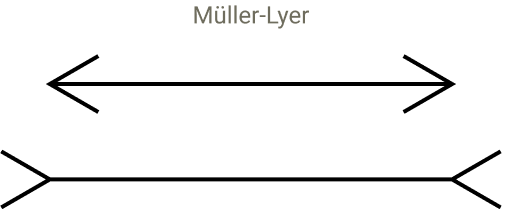
The next part of the research is kind of incredible because they endeavored to test whether the model could be susceptible to visual illusions that would cause trip it up. They started with the idea of how humans can be tricked by visual illusions that present a false perspective that make lines of the same length appear to be different lengths, one shorter than the other.

Screenshot Of A Visual Illusion

Screenshot of two lines with arrow lines on each end that are pointed in different directions for each line, one inward and the other outward. This gives the illusion that one line is longer than the other.

The researchers inserted artificial tokens, such as “@@,” to see how they disrupted the model’s sense of position. These tests caused misalignments in the model’s internal patterns it uses to keep track of position, similar to visual illusions that trick human perception. This caused the model’s sense of line boundaries to shift, showing that its perception of structure depends on context and learned patterns. Even though LLMs don’t see, they experience distortions in their internal organization similar to how humans misjudge what they see by disrupting the relevant attention heads.

They explained:

“We find that it does modulate the predicted next token, disrupting the newline prediction! As predicted, the relevant heads get distracted: whereas with the original prompt, the heads attend from newline to newline, in the altered prompt, the heads also attend to the @@.”

They wondered if there was something special about the @@ characters or would any other random characters disrupt the model’s ability to successfully complete the task. So they ran a test with 180 different sequences and found that most of them did not disrupt the models ability to predict the line break point. They discovered that only a small group of characters that were code related were able to distract the relevant attention heads and disrupt the counting process.

LLMs Have Visual-Like Perception For Text

The study shows how text-based features evolve into smooth geometric systems inside a language model. It also shows that models don’t only process symbols, they create perception-based maps from them. This part, about perception, is to me what’s really interesting about the research. They keep circling back to analogies related to human perception and how those analogies keep fitting into what they see going on inside the LLM.

They write:

“Although we sometimes describe the early layers of language models as responsible for “detokenizing” the input, it is perhaps more evocative to think of this as perception. The beginning of the model is really responsible for seeing the input, and much of the early circuitry is in service of sensing or perceiving the text similar to how early layers in vision models implement low level perception.”

Then a little later they write:

“The geometric and algorithmic patterns we observe have suggestive parallels to perception in biological neural systems. …These features exhibit dilation—representing increasingly large character counts activating over increasingly large ranges—mirroring the dilation of number representations in biological brains. Moreover, the organization of the features on a low dimensional manifold is an instance of a common motif in biological cognition. While the analogies are not perfect, we suspect that there is still fruitful conceptual overlap from increased collaboration between neuroscience and interpretability.”

See also: How LLMs Interpret Content: How To Structure Information For AI Search

Implications For SEO?

Arthur C. Clarke wrote that advanced technology is indistinguishable from magic. I think that once you understand a technology it becomes more relatable and less like magic. Not all knowledge has a utilitarian use and I think understanding how an LLM perceives content is useful to the extent that it’s no longer magical. Will this research make you a better SEO? It deepens our understanding of how language models organize and interpret content structure, makes it more understandable and less like magic.

Read about the research here:

When Models Manipulate Manifolds: The Geometry of a Counting Task

Featured Image by Shutterstock/Krot_Studio

https://www.searchenginejournal.com/anthropic-research-shows-how-llms-perceive-text/559636/


Measuring Visibility When Rankings Disappear [Webinar] via @sejournal, @hethr_campbell

Learn How to Track What Really Matters in AI Search

Tools like ChatGPT, Perplexity, and Google’s AI Mode no longer deliver ranked results; they deliver answers. So what happens when traditional SEO metrics no longer apply?

Join AJ Ghergich, Global VP of AI and Consulting Services at Botify, and Frank Vitovitch, VP of Solutions Consulting at Botify, for a live webinar that reveals how to measure visibility in the new search era.

What You’ll Learn

Why Attend

This session will help you move beyond outdated ranking metrics and build smarter frameworks for measuring performance in AI search. You’ll walk away with a clear, data-driven approach to visibility that keeps your team ahead of change.

Register now to learn how to track success in AI search with confidence and clarity.

🛑 Can’t make it live? Register anyway and we’ll send you the on-demand recording.

https://www.searchenginejournal.com/measuring-visibility-when-rankings-disappear/559424/


Google Q3 Report: AI Mode, AI Overviews Lift Total Search Usage via @sejournal, @MattGSouthern

Google used its Q3 earnings call to argue that AI features are expanding search usage rather than cannibalizing it.

CEO Sundar Pichai described an “expansionary moment for Search,” adding that Google’s AI experiences “highlight the web” and send “billions of clicks to sites every day.”

Pichai said overall queries and commercial queries both grew year over year, and that the growth rate increased in Q3 versus Q2, largely driven by AI Overviews and AI Mode.

What Did Google Report In Its Q3 Earnings?

AI Mode & AI Overviews

Pichai reported “strong and consistent” week-over-week growth for AI Mode in the U.S., with queries doubling in the quarter.

He said Google rolled AI Mode out globally across 40 languages, reached over 75 million daily active users, and shipped more than 100 improvements in Q3.

He also said AI Mode is already driving “incremental total query growth for Search.”

Pichai reiterated that AI Overviews “drive meaningful query growth,” noting the effect was “even stronger” in Q3 and more pronounced among younger users.

Revenue: By The Numbers

Alphabet posted $102.3 billion in revenue, its first $100B quarter. “Google Search & other” revenue reached $56.6 billion, up from $49.4 billion a year earlier.

YouTube ads revenue reached $10.26 billion in Q3. Pichai said YouTube “has remained number one in streaming watch time in the U.S. for more than two years, according to Nielsen.”

Pichai added that in the U.S. “Shorts now earn more revenue per watch hour than traditional in-stream.”

The quarter also included a $3.5 billion European Commission fine that Alphabet notes when discussing margins. Excluding that charge, operating margin was 33.9%.

Why It Matters

Google is telling Wall Street that AI surfaces expand search rather than replace it. If that holds, the company has reason to put AI Mode and AI Overviews in front of more queries.

The near-term implication for marketers is a distribution shift inside Google, not a pullback from search.

What’s missing is as important as what was said. Google didn’t share outbound click share from AI experiences or new reporting to track them. Expect adoption to grow while measurement lags. Teams will be relying on their own analytics to judge impact.

The revenue backdrop supports continued investment. “Search & other” rose year over year and Google highlighted growth in commercial queries. Paid budgets are likely to remain with Google as AI-led sessions take up a larger share of usage.

Looking Ahead

Google plans to keep pushing AI-led search surfaces. Pichai said the company is “looking forward to the release of Gemini 3 later this year,” which would give AI Mode and AI Overviews a stronger model foundation if the timing holds.

Google described Chrome as “a browser powered by AI” with deeper integrations to Gemini and AI Mode and “more agentic capabilities coming soon.”

The company also raised 2025 capex guidance to $91–$93 billion to meet AI demand, which supports continued investment in search infrastructure and features.


Featured Image: Photo Agency/Shutterstock

https://www.searchenginejournal.com/google-q3-report-ai-mode-ai-overviews-lift-total-search-usage/559597/


Chrome To Warn Users Before Loading HTTP Sites Starting Next Year via @sejournal, @MattGSouthern

Google Chrome will enable “Always Use Secure Connections” by default with the release of Chrome 154 in October 2026, the company announced.

The change means Chrome will ask for user permission before loading any public website that doesn’t use HTTPS encryption. Users will see a bypassable warning explaining the security risks of unencrypted connections.

Google is rolling out the feature in stages. Chrome 147 will enable it for over 1 billion Enhanced Safe Browsing users in April 2026. All Chrome users will get it by default six months later.

What’s Changing

Public Site Warning

The warning system applies exclusively to public websites. Chrome excludes private sites including local IP addresses, single-label hostnames, and internal shortlinks.

Chris Thompson and the Chrome Security Team wrote:

“HTTP navigations to private sites can still be risky, but are typically less dangerous than their public site counterparts because there are fewer ways for an attacker to take advantage of these HTTP navigations.”

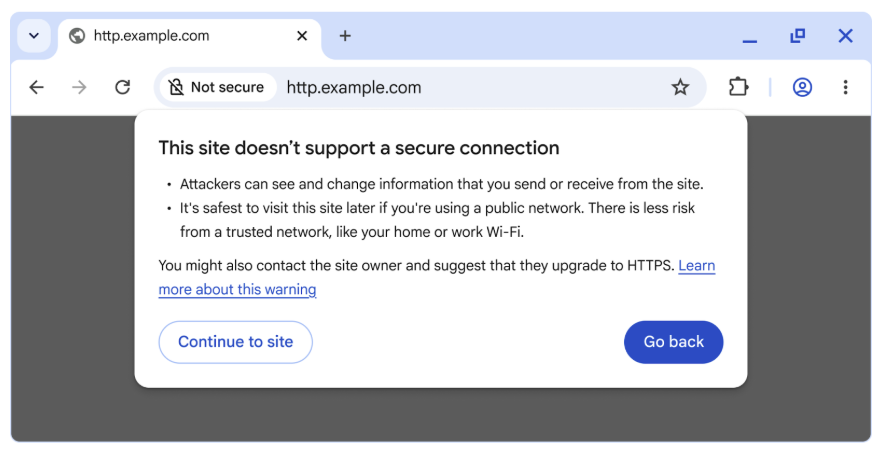
Here’s an example of what the warning will look like:

Image Credit: Google

Warning Frequency

Chrome limits how often users see warnings for the same sites. The browser won’t repeatedly warn about regularly visited insecure sites.

Testing data shows the median user sees fewer than one warning per week. The 95th percentile user sees fewer than three warnings per week.

Current HTTPS Adoption

HTTPS usage has plateaued at 95-99% of Chrome navigations across platforms. When excluding private sites, public HTTPS usage reaches 97-99% on most platforms.

Windows shows 98% HTTPS on public sites. Android and Mac exceed 99%. Linux reaches nearly 97%.

Why This Matters

You face security risks when clicking HTTP links. Attackers can hijack unencrypted navigations to load malware, exploitation tools, or phishing content.

Google’s transparency report shows HTTPS adoption stalled after rapid growth from 2015-2020. The remaining 1-5% of insecure traffic represents millions of navigations that create attack opportunities.

Website owners running HTTP-only sites have one year to migrate before Chrome warns their visitors.

You can enable “Always Use Secure Connections” today at chrome://settings/security to test how the warnings affect your site traffic.

Looking Ahead

Google continues outreach to companies responsible for the highest HTTP traffic volumes. Many sites use HTTP only for redirects to HTTPS destinations, creating an invisible security gap the new warnings will close.

Chrome plans additional work to reduce HTTPS adoption barriers for local network sites. The company introduced a local network access permission that allows HTTPS pages to communicate with private devices once users grant permission.

Users can disable warnings by turning off the “Always Use Secure Connections” setting. Enterprise and educational institutions can configure Chrome to meet their specific warning requirements.


Featured Image: Philo Athanasiou/Shutterstock

https://www.searchenginejournal.com/chrome-to-warn-users-before-loading-http-sites-starting-next-year/559583/


Google Labs & DeepMind Launch Pomelli AI Marketing Tool via @sejournal, @MattGSouthern

Pomelli, a Google Labs & DeepMind AI experiment, builds a “Business DNA” from your site and generates editable branded campaign assets for small businesses.

  • Pomelli scans your website to create a “Business DNA” profile.
  • It uses the created profile to keep content consistent across channels.
  • It suggests campaign ideas and generates editable marketing assets.

https://www.searchenginejournal.com/google-labs-deepmind-launch-pomelli-ai-marketing-tool/559569/


Why The Build Process Of Custom GPTs Matters More Than The Technology Itself

When Google introduced the transformer architecture in its 2017 paper “Attention Is All You Need,” few realized how much it would help transform digital work. Transformer architecture laid the foundations for today’s GPTs, which are now part of our daily work in SEO and digital marketing.

Search engines have used machine learning for decades, but it was the rise of generative AI that made many of us actively explore AI. AI platforms and tools like custom GPTs are already influencing how we research keywords, generate content ideas, and analyze data.

The real value, however, is not in using these tools to cut corners. It lies in designing them intentionally, aligning them with business goals, and ensuring they serve users’ needs.

This article is not a tutorial on how to build GPTs. I share why the build process itself matters, what I have learned so far, and how SEOs can use this product mindset to think more strategically in the age of AI.

From Barriers To Democratization

Not long ago, building tools without coding experience meant relying on developers, dealing with long lead times, and waiting for vendors to release new features. That has changed slightly. The democratization of technology has lowered the entry barriers, making it possible for anyone with curiosity to experiment with building tools like custom GPTs. At the same time, expectations have necessarily risen, as we expect tools to be intuitive, efficient, and genuinely useful.

This is a reason why technical skills still matter. But they’re not enough on their own. What matters more, in my opinion, is how we apply them. Are we solving a real problem? Are we creating workflows that align with business needs?

The strategic questions SEOs should be asking are no longer just “Can I build this?,” but:

  • Should I build this?
  • What problem am I solving, and for whom?
  • What’s the ultimate goal?

Why The Build Process Matters

Building a custom GPT is straightforward. Anyone can add a few instructions and click “save.” What really matters is what happens before and after: defining the audience, identifying the problem, scoping the work realistically, testing and refining outputs, and aligning them with business objectives.

In many ways, this is what good marketing has always been about: understanding the audience, defining their needs, and designing solutions that meet them.

As an international SEO, I’ve often seen cultural relevance and digital accessibility treated as afterthoughts. OpenAI offered me a way to explore whether AI could help address these challenges, especially since the tool is accessible to those of us without any coding expertise.

What began as a single project to improve cultural relevance in global SEO soon evolved into two separate GPTs when I realized the scope was larger than I could manage at the time.

That change wasn’t a failure, but a part of the process that led me toward a better solution.

Case Study: 2 GPTs, 1 Lesson

The Initial Idea

My initial idea was to build a custom GPT that could generate content ideas tailored to the UK, US, Canada, and Australia, taking both linguistic and cultural nuances into account.

As an international SEO, I know it is hard to engage global audiences who expect personalized experiences. Translation alone is not enough. Content must be linguistically accurate and contextually relevant.

This mirrors the wider shift in search itself. Users now expect personalized, context-driven results, and search engines are moving in that same direction.

A Change In Direction

As I began building, I quickly realized that the scope was bigger than expected. Capturing cultural nuance across four different markets while also learning how to build and refine GPTs required more time than I could commit at that moment.

Rather than leaving the project, I reframed it as a minimum viable product. I revisited the scope and shifted focus to another important challenge, but with a more consistent requirement – digital accessibility.

The accessibility GPT was designed to flag issues, suggest inclusive phrasing, and support internal advocacy. It adapted outputs to different roles, so SEOs, marketers, and project managers could each use it in relevant ways in their day-to-day work.

This wasn’t giving up on the content project. It was a deliberate choice to learn from one use case and apply those lessons to the next.

The Outcome

Working on the accessibility GPT first helped me think more carefully about scope and validation, which paid off.

As accessibility requirements are more consistent than cultural nuance, it was easier to refine prompts and test role-specific outputs, ensuring an inclusive, non-judgmental tone.

I shared the prototype with other SEOs and accessibility advocates. Their feedback was invaluable. Although their feedback was generally positive, they pointed out inconsistencies I hadn’t seen, including how I described the prompt in the GPT store.

After all, accessibility is not just about alt text or color contrast. It’s about how information is presented.

Once the accessibility GPT was running, I went back to the cultural content GPT, better prepared, with clearer expectations and a stronger process.

The key takeaway here is that the value lies not only in the finished product, but in the process of building, testing, and refining.

Risks And Challenges Along The Way

Not every risk became an issue, but the process brought its share of challenges.

The biggest was underestimating time and scope, which I solved by revisiting the plan and starting smaller. There were also platform limitations – ongoing model development, AI fatigue, and hallucinations. OpenAI itself has admitted that hallucinations are mathematically unavoidable. The best response is to be precise with prompts, keep instructions detailed, and always maintain a human-in-the-loop approach. GPTs should be seen as assistants, not replacements.

Collaboration added another layer of complexity. Feedback loops depended on colleagues’ availability, so I had to stay flexible and allow extra time. Their input, however, was crucial – I couldn’t have made progress without them. As none of the these are under my control, I could only keep on top of developments and do my best to handle all of them.

These challenges reinforced an important truth: Building strategically isn’t about chasing perfection, but about learning, adapting, and improving with each iteration.

Applying Product Thinking

The process I followed was similar to how product managers approach new products. SEOs can adopt the same mindset to design workflows that are both practical and strategic.

Validate The Problem

Not every issue needs AI – and not every issue needs solving. Identify and prioritize what really matters at that time and confirm whether a custom GPT, or any other tool, is the right way to address it.

Define The Use Case

Who will use the GPT, and how? A wide reach may sound appealing, but value comes from meeting specific needs. Otherwise, success can quickly fade away.

My GPTs are designed to support SEOs, marketers, and project managers in different scenarios of their daily work.

Prototype And Test

There is real value in starting small. With GPTs, I needed to write clear, specific instructions, then review the outputs and refine.

For instance, instead of asking the accessibility GPT for general ideas on making a form accessible, I instructed it to act as an SEO briefing developers on fixes or as a project manager assigning tasks.

For the content GPT, I instructed the GPT to act as a UK/ U.S. content strategist, developing inclusive, culturally relevant ideas for specific publications in British English/Standard American.

Iterate With Feedback

Bring colleagues and subject-matter experts into the process early. Their insights challenge assumptions, highlight inconsistencies, and make outputs more robust.

Keep On Top Of Developments

AI platforms evolve quickly, and processes also need to adapt to different scenarios. Product thinking means staying agile, adapting to change, and reassessing whether the tools we build still serve their purpose.

The roll-out of the failed GPT-5 reminded me how volatile the landscape can be.

Practical Applications For SEOs

Why build GPTs when there are already so many excellent SEO tools available? For me, it was partly curiosity and partly a way to test what I could achieve with my existing skills before suggesting a collaboration for a different product.

Custom GPTs can add real value in specific situations, especially with a human-in-the-loop approach. Some of the most useful applications I have found include:

  • Analyzing campaign data to support decision-making.
  • Assisting with competitor analysis across global markets.
  • Supporting content ideation for international audiences.
  • Clustering keywords or highlighting internal linking opportunities.
  • Drafting documentation or briefs.

The point is not to replace established tools or human expertise, but to use them as assistants within structured workflows. They can free up time for deeper thinking, while still requiring careful direction and review.

How SEOs Can Apply Product Thinking

Even if you never build a GPT, you can apply the same mindset in your day-to-day work. Here are a few suggestions:

  • Frame challenges strategically: Ask who the end user is, what they need, and what is broken in their experience. Don’t start with tactics without context.
  • Design repeatable processes: Build workflows that scale and evolve over time, instead of one-off fixes.
  • Test and learn: Treat tactics like prototypes. Run experiments, refine based on results. If A/B testing isn’t possible, as it often happens, at least be open to making any necessary adjustments where necessary.
  • Collaborate across teams: SEO does not exist in isolation. Work with UX, development, and content teams early. The key is to find ways to add value to their work.
  • Redefine success metrics: Qualified traffic, conversions, and internal process improvements matter in AI times. Success should reflect actual business impact.
  • Use AI strategically: Quick wins are tempting, but GPTs and other tools are best used to support structured workflows and highlight blind spots. Keep a human-in-the-loop approach to ensure outputs are accurate and relevant to your business needs.

Final Thought

The real innovation is not in the technology itself, but in how we choose to apply it.

We are now in the fifth industrial revolution, a time when humans and machines collaborate more closely than ever.

For SEOs, the opportunity is to move beyond tactical execution and start thinking like product strategists. That means asking sharper questions, testing hypotheses, designing smarter workflows, and creating solutions that adapt to real-world constraints.

It is about providing solutions, not just executing tasks.

More Resources:


Featured Image: SvetaZi/Shutterstock

https://www.searchenginejournal.com/why-the-build-process-of-custom-gpts-matters-more-than-the-technology-itself/557217/


How Google Discover REALLY Works

This is all based on the Google leak and tallies up with my experience of content that does well in Discover over time. I have pulled out what I think are the most prominent Discover proxies and grouped them into what seems like the appropriate workflow.

Like a disgraced BBC employee, thoughts are my own.

TL;DR

  1. Your site needs to be seen as a “trusted source” with low SPAM, evaluated by proxies like publisher trust score, in order to be eligible.
  2. Discover is driven by a six-part pipeline, using good vs. bad clicks (long dwell time vs. pogo-sticking) and repeat visits to continuously score and re-score content quality.
  3. Fresh content gets an initial boost. Success hinges on a strong CTR and positive early-stage engagement (good clicks/shares from all channels count, not just Discover).
  4. Content that aligns with a user’s interests is prioritised. To optimize, focus on your areas of topical authority, use a compelling headline(s), be entity-driven, and use large (1200px+) images.
Image Credit: Harry Clarkson-Bennett

I count 15 different proxies that Google uses to guide satiate the doomscrollers’ desperate need for quality content in the Discover feed. It’s not that different to how traditional Google search works.

But traditional search (a high-quality pull channel) is worlds apart from Discover. Audiences killing time on trains. At their in-laws. The toilet. Given they’re part of the same ecosystem, they’re bundled together into one monolithic entity.

And here’s how it works.

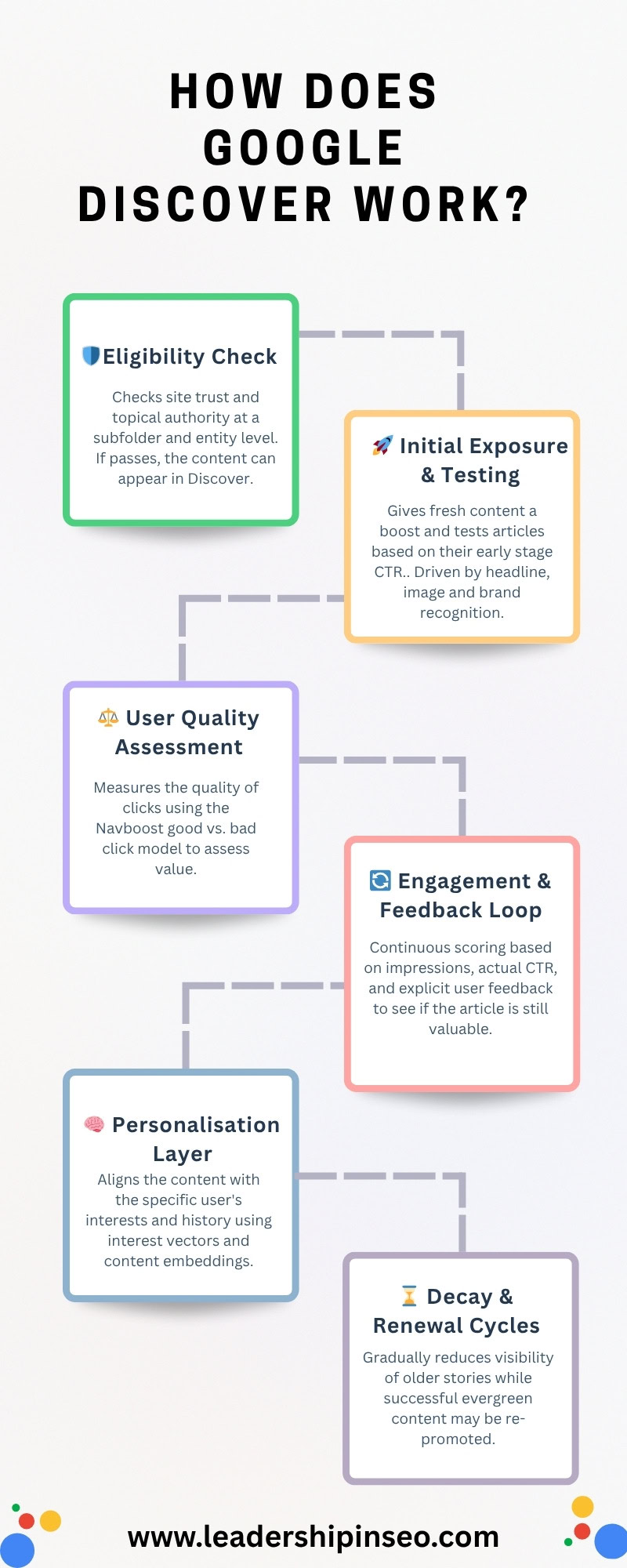
Image Credit: Harry Clarkson-Bennett

Google’s Discover Guidelines

This section is boring, and Google’s guidelines around eligibility are exceptionally vague:

  • Content is automatically eligible to appear in Discover if it is indexed by Google and meets Discover’s content policies.
  • Any kind of dangerous, spammy, deceptive, or violent/vulgar content gets filtered out.

“…Discover makes use of many of the same signals and systems used by Search to determine what is… helpful, reliable, people-first content.”

Then they give some solid, albeit beige advice around quality titles – clicky, not baity as John Shehata would say. Ensuring your featured image is at least 1200px wide and creating timely, value-added content.

But we can do better.

Discover’s Six-Part Content Pipeline

From cradle to grave, let’s review exactly how your content does or, in most cases, doesn’t appear in Discover. As always, remembering I have made these clusters up, albeit based on real Google proxies from the Google leak.

  1. Eligibility check and baseline filtering.
  2. Initial exposure and testing.
  3. User quality assessment.
  4. Engagement and feedback loop.
  5. Personalization layer.
  6. Decay and renewal cycles.

Eligibility And Baseline Filtering

For starters, your site has to be eligible for Google Discover. This means you are seen as a “trusted source” on the topic, and you have a low enough SPAM score that the threshold isn’t triggered.

There are three primary proxy scores to account for eligibility and baseline filtering:

  • is_discover_feed_eligible: a Boolean feature that filters non-eligible pages.
  • publisher_trustScore: a score that evaluates publisher reliability and reputation.
  • topicAuthority_discover: a score that helps Discover identify trusted sources at the topic level.

The site’s reputation and topical authority are ranked for the topic at hand. These three metrics help evaluate whether your site is eligible to appear in Discover.

Initial Exposure And Testing

This is very much the freshness stage, where fresh content is given a temporary boost (because contemporary content is more likely to satiate a dopamine addicted mind).

  • freshnessBoost_discover: provides a temporary boost for fresh content to keep the feed alive.
  • discover_clicks: where early-stage article clicks are used as a predictor of popularity.
  • headlineClickModel_discover: is a predictive CTR model based on the headline and image.

I would hypothesize that using a Bayesian style predictive model, Google applies learnings at a site and subfolder level to predict likely CTR. The more quality content you have published over time (presumably at a site, subfolder and author level), the more likely you are to feature.

Because there is less ambiguity. A key feature of SEO now.

User Quality Assessment

An article is ultimately judged by the quality of user engagement. Google uses the good and bad click style model from Navboost to establish what is and isn’t working for users. Low CTR and/or pogo-sticking style behavior downgrades an article’s chance of featuring.

Valuable content is decided by the good vs bad click ratio. Repeat visits are used to measure lasting satisfaction and re-rank top-performing content.

  • discover_blacklist_score: Penalty for spam, misinformation, or clickbait.
  • goodClicks_discover: Positive user interactions (long dwell time).
  • badClicks_discover: Negative interactions (bounces, short dwell).
  • nav_boosted_discover_clicks: Repeat or return engagement metric.

The quality of the article is then measured by its user engagement. As Discover is a personalized platform, this can be done accurately and at scale. Cohorts of users can be grouped together. People with the same general interests are served the content if, by the algorithm’s standard, they should be interested.

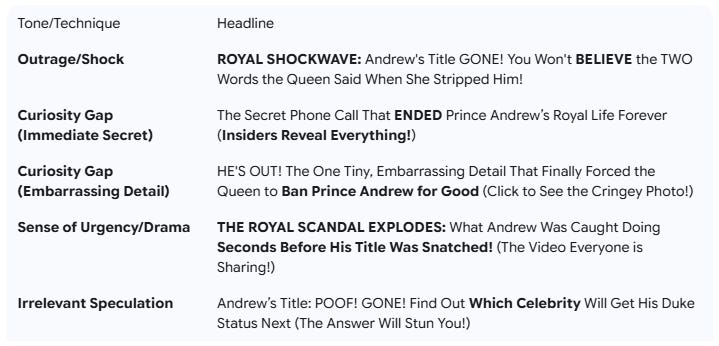
But if the overly clicky or misleading title delivers poor engagement (dwell time and on-page interactions), then the article may be downgraded. Over time, this kind of practice can compound and nerf your site completely.

Headlines like this are a one way ticket to devaluing your brand in the eyes of people and search engines (Image Credit: Harry Clarkson-Bennett)

Important to note that this click data doesn’t have to come from Discover. Once an article is out in the ether – it’s been published, shared on social, etc. – Chrome click data is stored and is applied to the algorithm.

So, the more quality click data and shares you can generate early in an article’s lifecycle (accounting for the importance of freshness), the better your chance of success on Discover. Treat it like a viral platform. Make noise. Do marketing.

Engagement And Feedback Loop

Once the article enters the proverbial fray, a scoring and rescoring loop begins. Continuous CTR, impressions, and explicit user feedback (like, hate, and “don’t show me this again, please” style buttons) feed models like Navboost to refine what gets shown.

  • discover_impressions: The number of times an article appears in a Discover feed.
  • discover_ctr: Clicks divided by impressions. Impressions and click data feed CTR modelling
  • discover_feedback_negative: Specific user feedback, i.e., not interested suppresses content for individuals, groups, and on the platform as a whole.

These behavioral signals define an article’s success. It lives or dies on relatively simple metrics. And the more you use it, the better it gets. Because it knows what you and your cohort are more likely to click and enjoy.

This is as true in Discover as it is in the main algorithm. Google admitted as such in the DoJ rulings. (Image Credit: Harry Clarkson-Bennett)

I imagine headline and image data are stored so that the algorithm can apply some rigorous standards to statistical modelling. Once it knows what types of headlines, images and articles perform best for specific cohorts, personalisation becomes effective faster.

Personalization Layer

Google knows a lot about us. It’s what its business is built on. It collects a lot of non-anonymized data (credit card details, passwords, contact details, etc.) alongside every conceivable interaction you have with webpages.

Discover takes personalization to the next level. I think it may offer an insight into how part of the SERP could look like in the future. A personalized cluster of articles, videos, and social posts designed to hook you in embedded somewhere alongside search results and AI Mode.

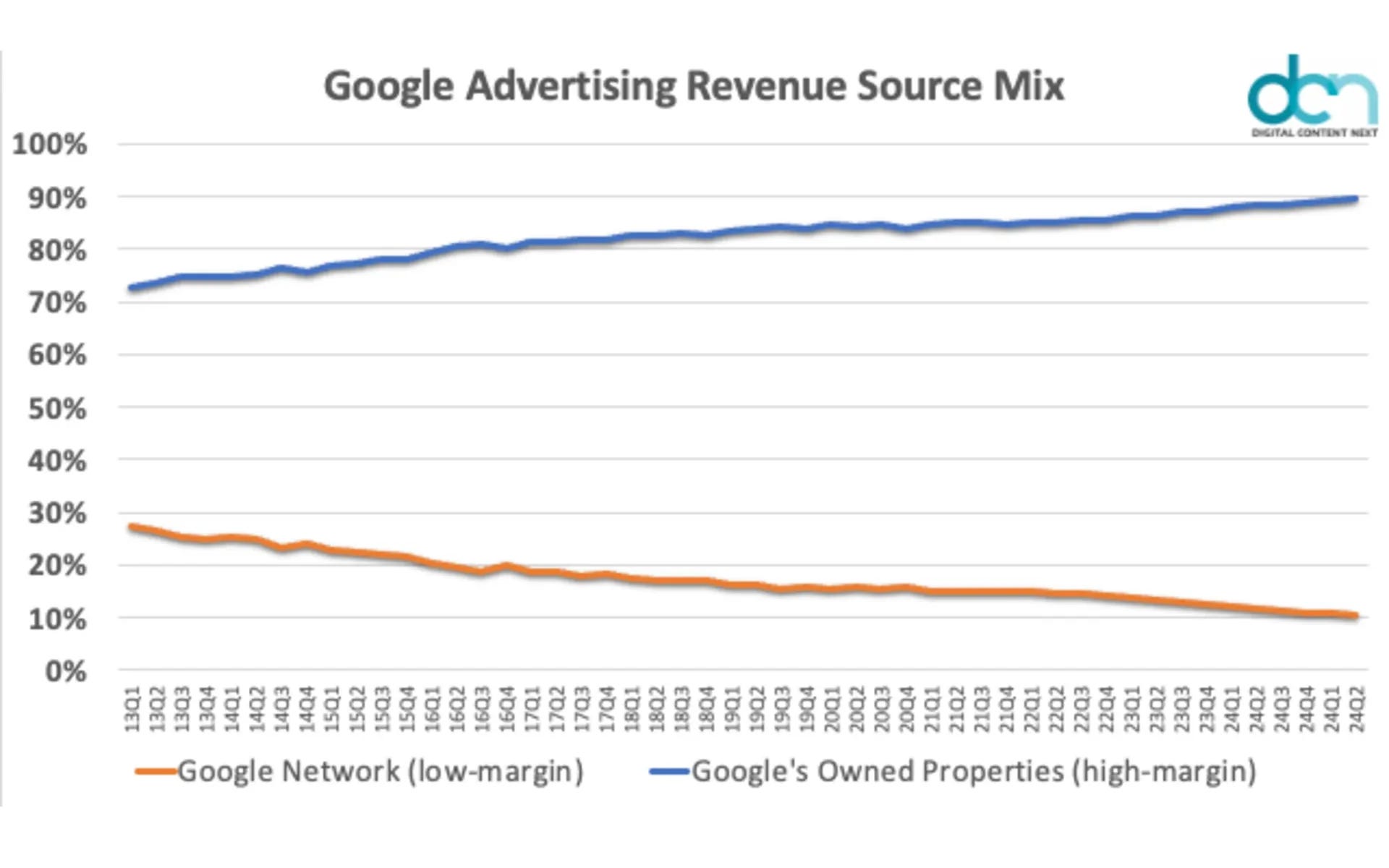
All of this is designed to keep you on Google’s owned properties for longer. Because they make more money that way.

Hint: They want to keep you around because they make more money (Image Credit: Harry Clarkson-Bennett)
  • contentEmbeddings_discover: Content embeddings determine how well the content aligns with the user’s interests. This powers Discover’s interest-matching engine.
  • personalization_vector_match: This module dynamically personalises the user’s feed in real-time. It identifies similarity between content and user interest vectors.

Content that matches well with your personal and cohort’s interest will be boosted into your feed.

You can see the site’s you engage with frequently using the site engagement page in Chrome (from your toolbar: chrome://site-engagement/) and every stored interaction with histograms. This histogram data indirectly shows key interaction points you have with web pages, by measuring the browser’s response and performance around those interactions.

It doesn’t explicitly say user A clicked X, but logs the technical impact, i.e., how long did the browser spending processing said click or scroll.

Decay And Renewal Cycles

Discover boosts freshness because people are thirsty for it. By boosting fresh content, older or saturated stories naturally decay as the news cycle moves on and article engagement declines.

For successful stories, this is through market saturation.

  • freshnessDecay_timer: This module measures recency decay after initial exposure, gradually reducing visibility to make way for fresher content.
  • content_staleness_penalty: Outdated content or topics are given a lower priority once engagement starts to decline to keep the feed current.

Discover is Google’s answer to a social network. None of us spend time in Google. It’s not fun. I use the word fun loosely. It isn’t designed to hook us in and ruin our attention spans with constant spiking of dopamine.

But Google Discover is clearly on the way to that. They want to make it a destination. Hence, all the recent changes where you can “catch up” with creators and publishers you care about across multiple platforms.

Videos, social posts, articles … the whole nine yards. I wish they’d stop summarizing literally everything with AI, however.

My 11-Step Workflow To Get The Most Out Of Google Discover

Follow basic principles and you will put yourself in good stead. Understand where your site is topically strong and focus your time on content that will drive value. Multiple ways you can do this.

If you don’t feature much in Discover, you can use your Search Console click and impressions data to identify areas where you generate the highest value. Where you are topically authoritative. I would do this at a subfolder and entity level (e.g., politics and Rachel Reeves or the Labor Party).

Also worth breaking this down in total and by article. Or you can use something like Ahrefs’ Traffic Share report to determine your share of voice via third-party data.

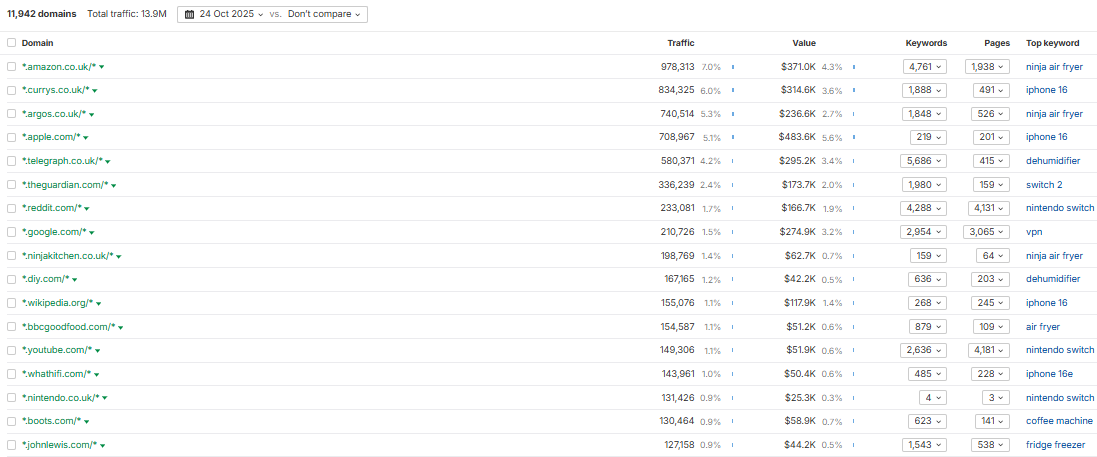
Essentially share of voice data (Image Credit: Harry Clarkson-Bennett)

Then really focus your time on a) areas where you’re already authoritative and b) areas that drive value for your audience.

Assuming you’re not focusing on NSFW content and you’re vaguely eligible, here’s what I would do:

  1. Make sure you’re meeting basic image requirements. 1200 pixels wide as a minimum.
  2. Identify your areas of topical authority. Where do you already rank effectively at a subfolder level? Is there a specific author who performs best? Try to build on your valuable content hubs with content that should drive extra value in this area.
  3. Invest in content that will drive real value (links and engagement) in these areas. Do not chase clicks via Discover. It’s a one-way ticket to clickbait city.
  4. Make sure you’re plugged into the news cycle. Being first has a huge impact on your news visibility in search. If you’re not first on the scene, make sure you’re adding something additional to the conversation. Be bold. Add value. Understand how news SEO really works.
  5. Be entity-driven. In your headlines, first paragraph, subheadings, structured data, and image alt text. Your page should remove ambiguity. You need to make it incredibly clear who this page is about. A lack of clarity is partly why Google rewrites headlines.
  6. Use the Open Graph title. The OG title is a headline that doesn’t show on your page. Primarily designed for social media use, it is one of the most commonly picked up headlines in Discover. It can be jazzy. Curiosity led. Rich. Interesting. But still entity-focused.
  7. Make sure you share content likely to do well on Discover across relevant push channels early in its lifecycle. It needs to outperform its predicted early-stage performance.*
  8. Create a good page experience. Your page (and site) should be fast, secure, ad-lite, and memorable for the right reasons.
  9. Try to drive quality onward journeys. If you can treat users from Discover differently to your main site, think about how you would link effectively for them. Maybe you use a pop-up “we think you’ll like this next” section based on a user’s scroll depth of dwell time.
  10. Get the traffic to convert. While Discover is a personalized feed, the standard scroller is not very engaged. So, focus on easier conversions like registrations (if you’re a subscriber first company) or advertising revenue et al.
  11. Keep a record of your best performers. Evergreen content can be refreshed and repubbed year after year. It can still drive value.

*What I mean here is if your content is predicted to drive three shares and two links, if you share it on social and in newsletters and it drives seven shares and nine links, it is more likely to go viral.

As such, the algorithm identifies it as ‘Discover-worthy.’

More Resources:


This was originally published on Leadership in SEO.


Featured Image: Roman Samborskyi/Shutterstock

https://www.searchenginejournal.com/how-google-discover-really-works/559304/