Make AI Writing Work for Your Content & SERP Visibility Strategy [Webinar] via @sejournal, @hethr_campbell

Are your AI writing tools helping or hurting your SEO performance?

Join Nadege Chaffaut and Crystie Bowe from Conductor on September 17, 2025, for a practical webinar on creating AI-informed content that ranks and builds trust.

You’ll Learn How To:

  • Engineer prompts that produce high-quality content
  • Keep your SEO visibility and credibility intact at scale
  • Build authorship and expertise into AI content workflows

Why You Can’t Miss This Session

AI can be a competitive advantage when used the right way. This webinar will give you the frameworks and tactics to scale content that actually performs.

Register Now

Sign up to get actionable strategies for AI content. Can’t make it live? Register anyway, and we’ll send you the full recording.

https://www.searchenginejournal.com/ai-writing-for-content-and-serp-visibility/554182/


Google Avoids Breakup As Judge Bars Exclusive Default Search Deals via @sejournal, @MattGSouthern

A federal judge outlined remedies in the U.S. search antitrust case that bar Google from using exclusive default search deals but stop short of forcing a breakup.

Reuters reports that Google won’t have to divest Chrome or Android, but it may have to share some search data with competitors under court-approved terms.

Google says it will appeal.

What The Judge Ordered

Judge Amit P. Mehta barred Google from entering or maintaining exclusive agreements that tie the distribution of Search, Chrome, Google Assistant, or the Gemini app to other apps, licenses, or revenue-share arrangements.

The ruling allows Google to continue paying for placement but prohibits exclusivity that could block rivals.

The order also envisions Google making certain search and search-ad syndication services available to competitors at standard rates, alongside limited data sharing for “qualified competitors.”

Mehta ordered Google to share some search data with competitors under specific protections to help them improve their relevance and revenue. Google argued this could expose its trade secrets and plans to appeal the decision.

The judge directed the parties to meet and submit a revised final judgment by September 10. Once entered, the remedies would take effect 60 days later, run for six years, and be overseen by a technical committee. Final language could change based on the parties’ filing.

How We Got Here

In August 2024, Mehta found Google illegally maintained a monopoly in general search and related text ads.

Judge Amit P. Mehta wrote in his August 2024 opinion:

“Google is a monopolist, and it has acted as one to maintain its monopoly.”

This decision established the need for remedies. Today’s order focuses on distribution and data access, rather than breaking up the company.

What’s Going To Change

Ending exclusivity changes how contracts for default placements can be made across devices and browsers. Phone makers and carriers may need to update their agreements to follow the new rules.

However, the ruling doesn’t require any specific user experience change, like a choice screen. The results will depend on how new contracts are created and approved by the court.

Next Steps

Expect a gradual rollout if the final judgment follows today’s outline.

Here are the next steps to watch for:

  • The revised judgment that the parties will submit by September 10.
  • Changes to contracts between Google and distribution partners to meet the non-exclusivity requirement.
  • Any pilot programs or rules that specify who qualifies as a “qualified competitor” and what data they can access.

Separately, Google faces a remedies trial in the ad-tech case in late September. This trial could lead to changes that affect advertising and measurement.

Looking Ahead

If the parties submit a revised judgment by September 10, changes could start about 60 days after the court’s final order. This might shift if Google gets temporary relief during an appeal.

In the short term, expect contract changes rather than product updates.

The final judgment will determine who can access data and which types are included. If the program is limited, it may not significantly affect competition. If broader, competitors might enhance their relevance and profit over the six-year period.

Also watch the ad tech remedies trial this month. Its results, along with the search remedies, will shape how Google handles search and ads in the coming years.

https://www.searchenginejournal.com/google-avoids-breakup-as-judge-bars-exclusive-default-search-deals/555080/


Internal Linking Grows Up: Evolving From Link Juice To Entity Maps via @sejournal, @Kevin_Indig

Let’s reminisce for a moment. Do you remember how, back in 2020, we all obsessed over “link juice” and PageRank flow as far as internal links are concerned?

In 2025, what matters more is how your internal links define the entities and relationships on your site.

Internal linking is no longer just about distributing authority. It’s about:

  • Building your own semantic map that Google can trust.
  • Reinforcing your topical authority.
  • Earning a place in an AI-search-forward landscape.

The last full guide I wrote on internal linking strategies was in 2020, and – well – much has happened since then (to say the least).

And most internal linking guides treat links as simple “traffic routers,” ignoring their role in building entity context.

So today, yes, I’m revisiting some of the basic building blocks of SEO, but we’re going to expand how we think about internal linking.

If you’re already deep into entity-first SEO and apply it to your internal linking tactics, skip ahead to the action items to ensure you’re implementing it well.

For everyone else, I’ll explain why tightening up your internal linking structure isn’t just table stakes. It’s one of the simplest core levers to influence organic visibility.
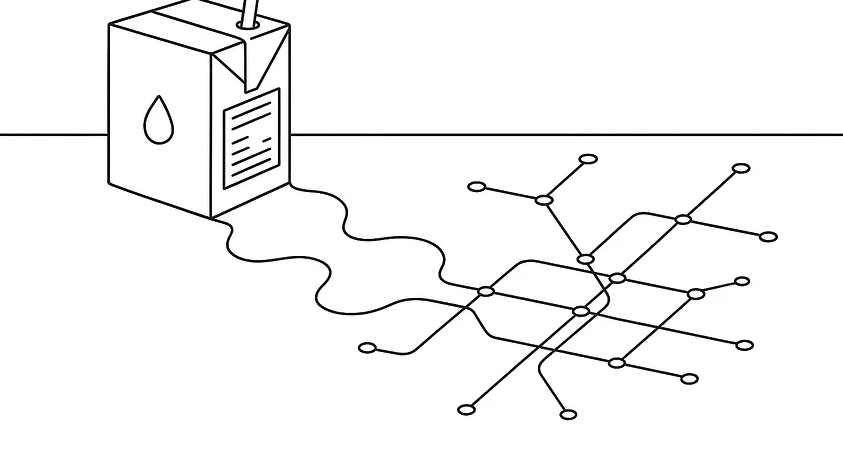
Image Credit: Kevin Indig

Boost your skills with Growth Memo’s weekly expert insights. Subscribe for free!

Internal linking is the age-old SEO practice of connecting one page on your site to another page, all on the same domain.

These links act like the roads or highways that guide users through your content. But they also help search engines understand how your pages relate.

In the past, we thought about internal links as “pipes” for PageRank.

Add enough links from your homepage or other strong, well-ranking pages, and you’d push authority toward the URLs you wanted to rank.

That view isn’t wrong; it’s just incomplete.

Today, internal links aren’t just distributing authority. They’re defining the semantic structure of your site.

Internal linking isn’t simply a practice that routes people (and bots/crawlers) to the pages you want them to go to.

In fact, when we think about internal linking this way is exactly when we start to half-ass the practice or let it sit on the back burner.

The words you use in anchor text and the way you connect hubs of related content all signal to search engines: These are the entities your brand wants to be known for.

Strategic internal linking can do three critical things for your site:

  1. Reinforce entity authority. You’re signaling to Google, and everyone else, which concepts you want associated with your brand.
  2. Improve index stability. Pages that are well-linked internally are more likely to be crawled often – and that means they stay indexed and are likely to show up in AI-generated results. (This is especially for Bing optimization, which seems to struggle more with indexing than Google. Bing is often forgotten when it comes to AEO/GEO because everyone assumes ChatGPT only uses Google, but it doesn’t.)
  3. Drive user engagement. Smart placement and descriptive anchors help users explore more of your related content, increasing engagement signals.

Put simply: Internal links aren’t just SEO plumbing. They’re how you build a discoverable, authoritative entity graph inside your own site.

Generative AI being infused into all modalities of search means Google and LLMs aren’t just hiking all over the web searching for crawlable/indexable pages — search engines and LLMs are mapping relationships between entities and judging your brand’s authority accordingly.

But currently, there’s some disagreement on whether or not LLMs can navigate your site through internal links.

My hypothesis? LLMs do form entity relationships via your strategic use of internal links. But probably not through traditionally “crawling” them like search engines do, and more purely based on text signals on the page.

And if that turns out to be true – keeping in mind that LLMs often use search engine results to ground themselves – internal linking also benefits LLM optimization/AEO/GEO mostly by improving Google/Bing ranks, which LLMs heavily rely on.

I dropped the question over on LinkedIn, you can check out the discussion there. But a few responses stood out. (Take a look at the full thread, but I also highly recommend following these pros to learn more from each of them.)

Dan Petrovic, founder and CEO of Dejan SEO, gave a detailed answer about the differences between a) the types of LLM crawlers and b) the different LLMs and how they behave.
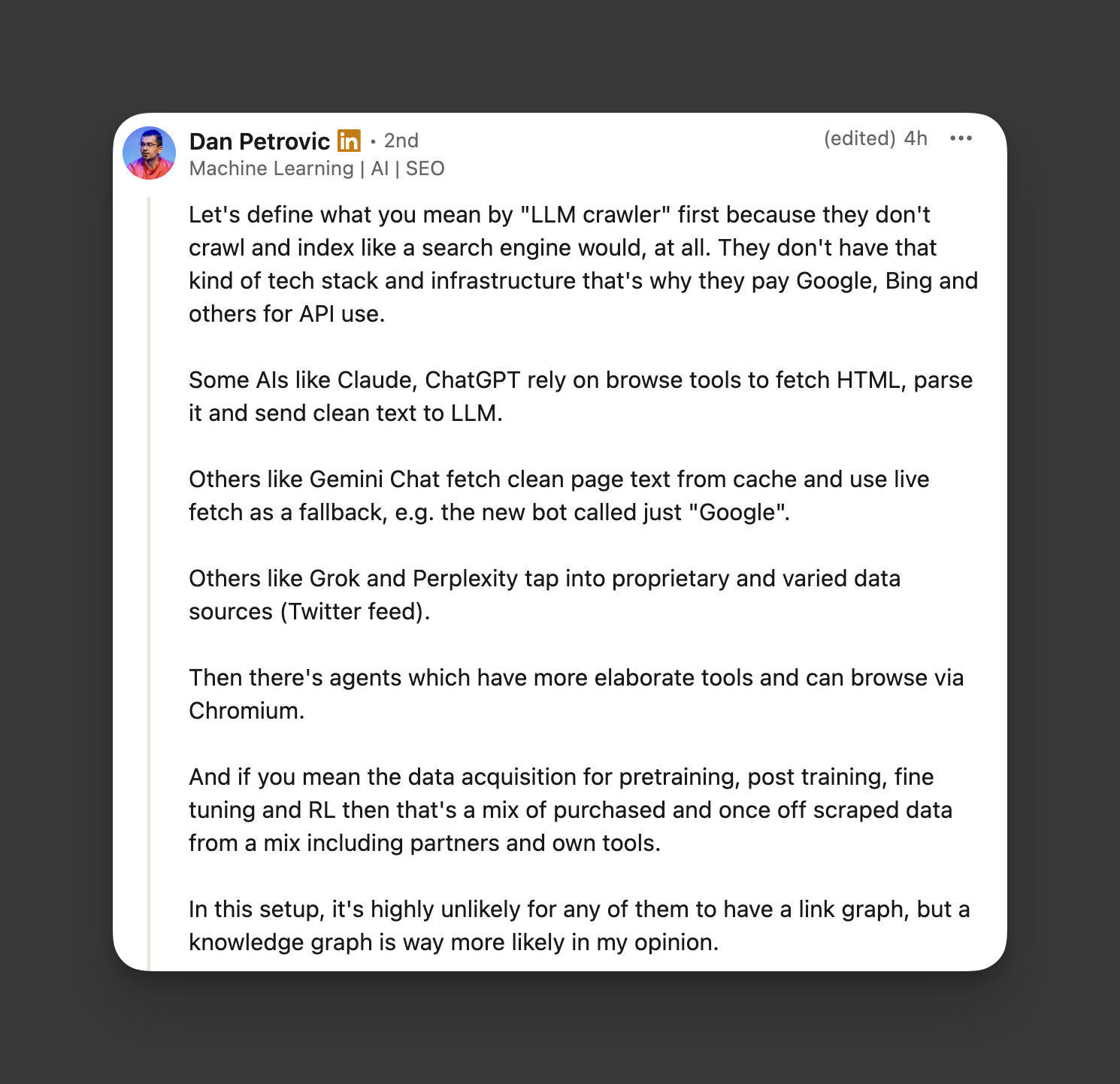
Image Credit: Kevin Indig

Lily Grozeva, head of SEO at Verto Digital, rightfully called out that we can all get the answer in our own logfiles.

Image Credit: Kevin Indig

Chee Lo, head of SEO at Trustpilot, shared his experience with Perplexity, which seems to be a bit more aggressive than other bots.
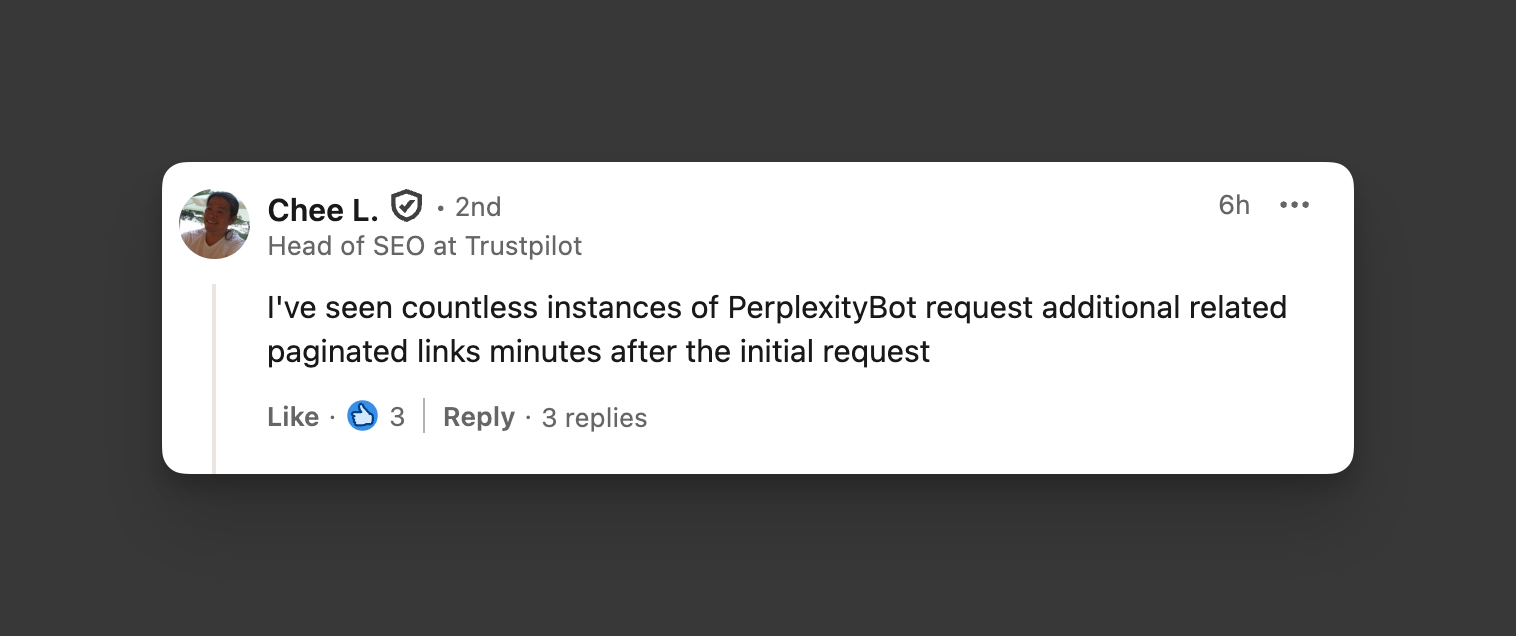
Image Credit: Kevin Indig

Sites with clear internal linking patterns that mirror how humans connect concepts are (in theory, more data will tell over time) better positioned to be included in AI-generated answers and entity-rich snippets.

Way back in 2019, I explained the following in Semantic content optimization with entities:

Entities are semantic, interconnected objects that help machines to understand explicit and implicit language. In simpler terms, they are words (nouns) that represent any type of object, concept, or subject … According to Cindy Krum and her fantastic entity series, Google seems to restructure its whole approach to indexing based on entities (while you’re at it, read AJ Kohn’s article about embeddings). Understanding entities and how Google uses them in search sharpens our standards for content creation, optimization, and the use of schema markup.

Entities are nouns like events, ideas, people, places, etc. They’re the building blocks of ideas and how those ideas relate to each other. (They’re not just “keywords.”)

Search engines and LLMS use semantic relationships between entities to (1) reduce ambiguity, (2) reinforce authority/canonical sources on your site, and (3) map out relationships between topics, features, services, and audiences across your site.

When you internally link pages together with strategically descriptive anchors, you’re telling search engines how your site fits together … and you’re training them on how entities across your site connect.

Therefore, by practicing internal linking through an entity-based lens, you’re creating stronger, clearer relationships and patterns for Google/search engines/LLMs to understand.

Entity-first SEO starts with defining the people, products, concepts, and places your brand “owns.”

If you’re a B2B SaaS company offering a CRM, those entities might include your:

  • Core product (CRM platform).
  • Features (pipeline management, email automation, reporting dashboards).
  • Use cases (sales enablement, customer support, marketing teams).
  • Personas/target ICPs (heads of sales at mid-market companies, startup founders scaling revenue teams, or enterprise IT buyers).

Taking this example, you’re going to think in terms of topic-first SEO:

  • Hub or pillar pages = parent entities. These are your central nodes – the definitive resource on a core concept. For a B2B SaaS CRM, it might be the CRM platform overview page.
  • Cluster pages = sub-entities. These are the supporting nodes that expand on the hub. For a CRM, the CRM hub branches into feature pages like pipeline management, email automation, and reporting dashboards.
  • Cross-link clusters to show relatedness. Don’t just point everything back to the hub – connect the clusters to each other to model real-world relationships. In the instance of the CRM, pipeline management integrates with email automation to shorten deal cycles.
  • Navigation and breadcrumbs reinforce hierarchy. The visible structure tells both users and Google how entities fit together. Example: Home → Products → CRM → Pipeline Management.
  • Include personas in the implementation. This reinforces the relationship: This persona → has this pain point → solved by this feature → within this product topic.

For example, look at this topic cluster map created with Screaming Frog:
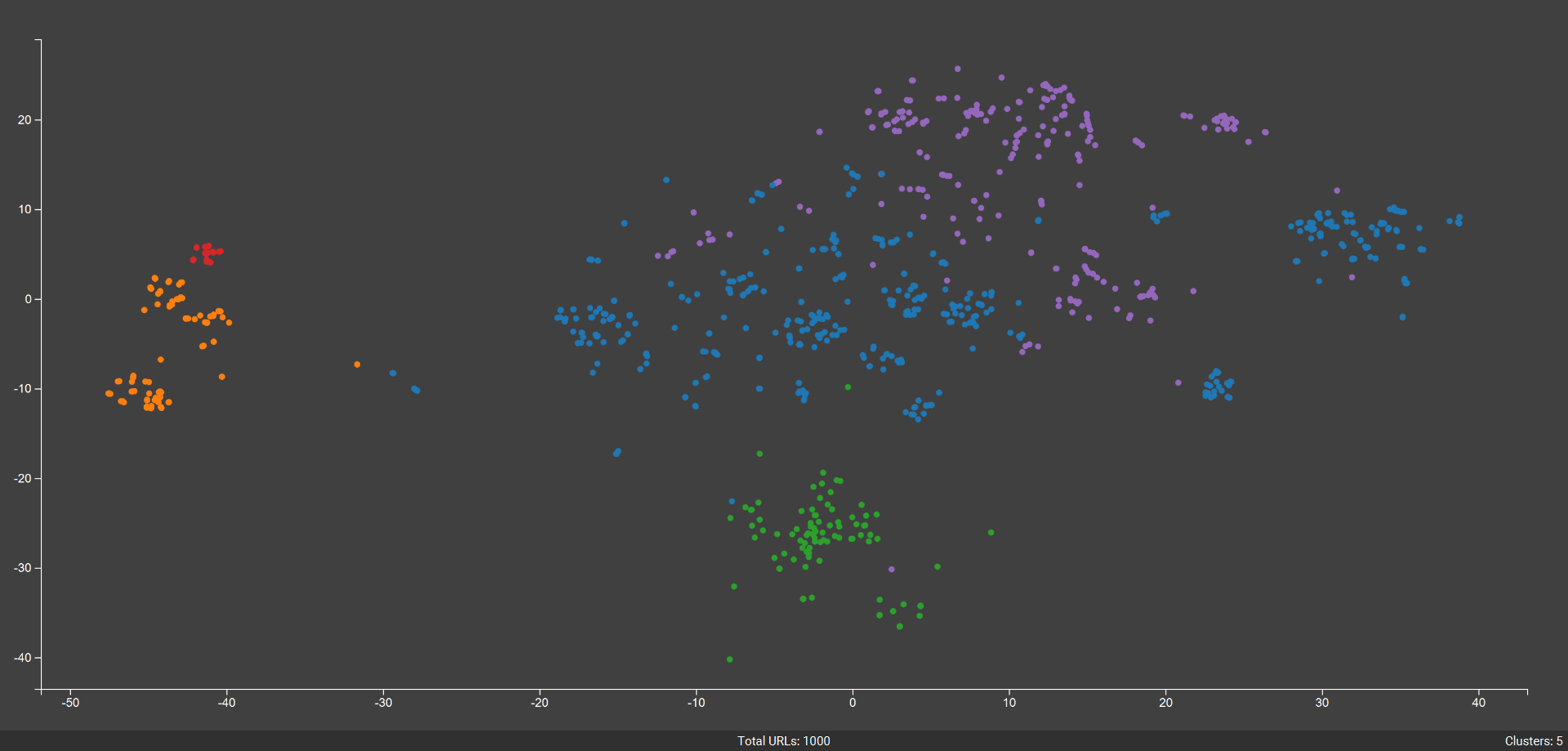
Image Credit: Kevin Indig

It shows two clusters with nodes very close together (red and orange) and three other clusters that are spread apart (green, blue, and purple). Guess which clusters outperform the others in organic search? Red and orange!

Here’s how you connect those entities into a meaningful structure in the copy on the page:

1. Anchor text = entity disambiguation.

Instead of linking with vague text, use descriptive anchors that clarify which entity the link refers to. For example, if your CRM has a feature page about pipeline management, link to it with “sales pipeline management CRM feature” language.

2. Consistency matters.

If you always link to that pipeline management page with variations like “pipeline automation tool,” “deal tracking software,” and “CRM feature,” you dilute the entity connection. (But variations like “pipeline management tool,” “sales pipeline management CRM feature,” and “pipeline management features” are derivatives.)

By sticking to clear, consistent anchors, you signal to Google that this is the page that defines “pipeline management” for your brand.

3. Context strengthens meaning.

The sentence or paragraph around the link can add semantic weight. For example:

“Our CRM includes pipeline management, so your sales team can track every deal from prospecting to close.”

That tells Google (and users) that pipeline management isn’t just a phrase; it’s a core feature within the CRM product.

4. Include personas.

Making personas a criterion for internal linking is a no-brainer, because from a psychological perspective, a link automatically signals “there’s more for you here.”

If your internal link is placed on the right word that triggers a response in your target ICPs (and the right areas of the page), it increases the chance of people staying on the site. It’s also just a better experience – and good customer service – to help site visitors find the right offering specifically for themselves, all with the goal to increase trust and the chances they take an action or convert.

If one of your ICPs is head of Sales at mid-market SaaS companies, you might internally link from a blog article like “10 Ways SaaS Sales Leaders Can Shorten Their Sales Cycle” directly to your pipeline management feature page, while using copy surrounding that link that explains how your offering solves this problem. That link makes the relationship explicit: This is the feature that solves this persona’s pain point.

Ultimately, think of every internal link as a connector in your brand’s knowledge graph.

Together, these links show how entities and topics (like CRM platform → pipeline management → sales enablement → head of sales persona) relate to each other, and why your site is authoritative on them.

Amanda Johnson jumping in here to add: Basically, show + tell people (and search engines/LLMs) what you want them to know via literal semantics. It really is that simple. No need to overthink this. Use clear, descriptive, accurate anchor text for the internally linked page, use it consistently, and give context as to how/why the page is linked there with surrounding copy.

Ultimately, if you practice internal linking thoughtfully and methodically, you end up with a better user experience and more thorough reinforcement of internal entity relationships (which can improve topical authority signals).

Worried that your most important pages aren’t getting enough visibility because you haven’t set up a clear linking structure? Following the guidance above will help you resolve this and set up a clear internal linking system.

And using tools that have internal link auditing (like Semrush, Ahrefs, Clearscope, Surfer, etc.) will help you implement your system. Some SEO tools also give page-level internal linking recommendations and copy suggestions to anchor the text to.

Internal linking hasn’t just been about crawlability for some time now.

By structuring links around topics, entities, (and even user journeys of your target personas), you communicate your site’s semantic map to Google and LLMs.


Featured Image: Paulo Bobita/Search Engine Journal

https://www.searchenginejournal.com/internal-linking-grows-up-evolving-from-link-juice-to-entity-maps/555021/


Stop Trying To Make GEO Happen via @sejournal, @cshel

“Stop trying to make GEO happen. It’s not going to happen.”

With apologies to Gretchen Wieners and the writers of “Mean Girls,” the line feels like the only way to start this conversation about a buzzword making the rounds: GEO (which is now, allegedly, supposed to mean Generative Engine Optimization).

This article grew out of a LinkedIn post/open plea I wrote recently about this furore, which unexpectedly took off – approaching 10,000 impressions, four dozen comments, and plenty of laughter at bad acronym ideas. Clearly, this struck a nerve with the SEO and marketing community.

On the surface, to be fair, the concept makes sense. We’re in a new era where AI-driven search engines are shaping how content is retrieved, summarized, and delivered. Adapting SEO strategies for that reality is important; however…

Nobody Will Say “G-E-O”

Acronyms survive if they’re pronounceable. If they aren’t easy to say aloud, and also happen to spell an actual word, people will say it like a word.

To my point, no one is going to spell out “G-E-O” when talking about Generative Engine Optimization. It simply doesn’t roll off the tongue nicely. Inevitably, it becomes the word “geo” – and that’s where the trouble starts.

The word geo is ancient. It comes from the Greek word gē (γη), meaning earth or ground. It’s the root of hundreds of words we already use every day: geography, geology, geothermal, geopolitics, geospatial, geotracking, geotagging, geomapping. In technology, it’s baked into concepts like geo-targeting and geo-fencing, and in all cases, geo explicitly means “the earth” in some form or another.

The linguistic baggage here is too heavy. There is no amount of wishful thinking that will make “gee-ee-oh” mean something not related to the earth.

The Branding Problem: Words Have Meaning

Words and acronyms aren’t blank slates. They carry cultural, historical, and linguistic connotations and memories that can’t be erased by decree.

Try to rebrand “GEO” and people’s brains will still instantly (or at least initially) read it as “geography.” They might pause and look at the context, and then decide “Oh, this must be G-E-O which means generative engine optimization, which is like S-E-O but for AI.” That’s a lot of work we are asking the public to do for three little letters.

It’s the same reason I could never (not that I would ever) convince our marketing team to rebrand our SEO plugin as an “FBI” plugin. No matter how hard we try to make FBI mean For Better Indexing, we are not going to be able to overcome the decades of heavy usage that says FBI means Federal Bureau of Investigation.

In this case, GEO doesn’t have decades of historical usage; it has literally millennia of meaning that IS NOT THIS. Hijacking an acronym with multiple centuries of usage is not innovation; it is confusion.

The SEO Problem: Competing With Entrenched Meaning

Let’s set branding aside and look at this purely from an SEO perspective.

Search engines reward authority, longevity, and relevance. The word geo has decades of backlinks, established search volume, and deeply entrenched usage. Every authoritative signal in Google’s system points to geo = geography/geographical/earth-related or adjacent.

Generative Engine Optimization will be competing against that established meaning forever. It won’t matter how many blog posts declare that “GEO is the new SEO” – the search results for “geo” will belong to geography, not generative optimization.

Then we can look beyond Google’s index – the training data behind large language models (LLMs) already “knows” that geo refers to Earth and geography, because that’s what the word has meant in every corpus of text for thousands of years. The idea that we can overwrite that meaning in a few quarters of (AI-generated) blog posts and conference talks is, frankly, wishful thinking.

Acronym Soup: Why Hijacking Fails

This isn’t the first time people have tried to coin a buzzword by hijacking an acronym. It never works. Acronyms only stick when they are:

  • Unique (no heavy pre-existing baggage).
  • Clear (people know, or can easily surmise, what they stand for).
  • Pronounceable (people can easily say them in conversation).

When they aren’t, they dissolve into acronym soup. Everyone gets confused, nobody adopts the term consistently, and the idea dies.

Humor Break: Acronyms We Can Safely Reject Now

Since I’m sure there will be a scramble to come up with something “better” than GEO, let me save you the trouble and pre-remove a few tempting, but alas already in use, options from the list.

  • FBI – For Better Indexing (all your queries are under surveillance).
  • PDF – Prompt-Driven Framework (optimized for clients who never open them).
  • BIO – Bot Interaction Optimization (because the LLMs need to “like” you).
  • CEO – Crawl Efficiency Orchestration (manage your bots like a boss).
  • URL – Unified Retrieval Layer (ranking starts at the root).
  • GPS – Generative Prompt Sequencing (your AI still needs directions).
  • API – Automated Prompt Injection (though to be fair, my brain always defaults to “armor piercing incendiaries” but that’s probably just a me problem).
  • HTML – Human-Tuned Model Language (teach the bots to “speak search”).
  • INFO – Intelligent Neural Findability Optimization (make your content “discoverable” to AI).
  • PRO – Prompt Response Optimization (win the answer box in AI).
  • EV – Enhanced Visibility (because apparently that’s the whole point).
  • SEO – Synthetic Engine Optimization (yes, we’ve come full circle).

They’re funny, but none of them should happen for all of the reasons outlined above.

What Actually Works When Naming Concepts

So, if GEO is a lost cause, what should we be doing instead?

1. Start Unique

  • Don’t hijack a word or acronym already in heavy use.
  • The cleanest acronyms are invented, not repurposed.

2. Make It Pronounceable

  • SEO works because people can say it.
  • SaaS (Software as a Service) works because it’s short and phonetically easy (“sass” in case you didn’t know).

3. Anchor It In Authority

  • Google’s own acronyms, like E-E-A-T (Experience, Expertise, Authoritativeness, Trustworthiness), stuck because Google itself enforced them.
  • A community can rally around a term, but only if it feels backed by authority or usefulness.

4. Check The SERPs First

  • Before you try to coin an acronym, search it.
  • If the first three pages of results are about something else entirely, you might be sunk before you begin.

The Bottom Line: Stop Trying To Make GEO Happen

Generative Engine Optimization as a concept makes sense, but GEO as an acronym is doomed.

It fails linguistically (nobody will say “G-E-O”), historically (the word is ancient and already claimed), and strategically (search engines and LLMs already associate “geo” with geography, not generative search).

If you want a new term to catch on, start with one that isn’t already taken. Otherwise, you’re not innovating language – you’re just creating acronym soup … and sabotaging your own visibility from day one.

So please, stop trying to make GEO happen. It’s not going to happen.

More Resources:


Featured Image: CHIEW/Shutterstock

https://www.searchenginejournal.com/stop-trying-to-make-geo-happen/554629/


Google: AI Mode Sees “Big Improvements” On STEM Queries via @sejournal, @MattGSouthern

Google says AI Mode now handles complex STEM questions better and surfaces key details sooner, timed for back to school.

  • Google rolled out an iterative update to AI Mode
  • AI Mode now handles complex STEM questions and delivers more concise responses.
  • The update arrives as students return to school.

https://www.searchenginejournal.com/google-ai-mode-sees-big-improvements-on-stem-queries/554985/


How to Use Google Ads Performance Max Channel Reporting via @sejournal, @brookeosmundson

For years, marketers have asked for better visibility into how individual channels contribute to Performance Max results.

Google has released a tutorial walking advertisers through its new Performance Max channel reporting. This reporting feature offers more transparency into how campaigns perform across Search, YouTube, Display, Gmail, Discover, and Maps.

With this new report, you can now dig deeper into performance by channel and format, making it easier to analyze results and troubleshoot.

Here’s a look at how to find the report and what you can do with it.

Where to Find Channel Performance Reporting

To find and access the channel reporting, head to your Google Ads account.

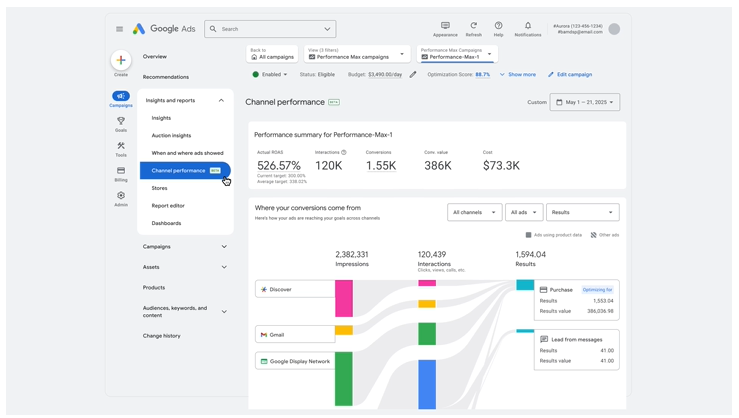
From there, navigate to: Campaign >> Insights & Reports >> Channel Performance

google ads performance max channel reportingImage credit: Google, April 2025

Once you’re there, you’ll see these items:

  • A performance summary overview
  • A channel-to-goals visualization
  • Channel distribution table.

These items provide more than just a static view of performance. You’re able to click on specific channels to drill down into related reports, like placements on the Google Display Network, or Search Terms from the Search channel.

Exploring the Reports and Visualizations

The channel performance page isn’t just a high-level dashboard. It provides several views and reports that give you more context on how your ads are performing across Google’s network. Here’s a closer look at the most useful areas:

Ad Format Views

Not every ad performs the same across channels, which is why Google lets you break results down by ad format.

For example, you can see how video ads perform on YouTube compared to product ads shown on Search. This helps you spot whether one creative type is pulling more weight and whether you need to adjust your creative mix or budgets to support higher-performing formats.

Product-Driven Insights

If you’re running Shopping or retail campaigns, this section shows how ads tied to product data perform across channels.

You can see Shopping ads on Search as well as dynamic remarketing ads on Display. This gives ecommerce advertisers a clearer picture of how product feeds contribute to results beyond just one channel.

Channel Distribution Table

This table is one of the most detailed reports in the new view. It includes impressions, clicks, interactions, conversions, conversion value, and cost, all broken down by channel.

You can customize the table to highlight the metrics that matter most to your goals, such as ROAS or CPA, and even segment results by ad format (like video versus product ads).

Since the table is downloadable, you can also share it with teams or clients for transparent reporting.

Status Column and Diagnostics

The status column acts as a built-in troubleshooting tool. It surfaces issues or recommendations related to specific channels or formats, such as diagnostic warnings if ads aren’t serving as expected.

By reviewing these, you can quickly identify where performance may be limited and take action to resolve issues before they affect results at scale.

Reviewing Single-Channel vs. Cross-Channel CPA

One important takeaway from Google’s tutorial is that looking at average CPA or ROAS for a single channel doesn’t tell the full story.

Performance Max uses marginal ROI optimization, bidding in real time for the most cost-efficient conversions across all channels.

Since users don’t interact with just one channel, this cross-channel view helps advertisers see the broader picture of how campaigns drive results.

That means when evaluating effectiveness, Google recommends to prioritize your goals and audiences over individual channel performance.

How Advertisers Can Benefit From Performance Max Channel Reporting

The new reporting doesn’t change how Performance Max works behind the scenes, but it does help you:

  • Understand which channels support your goals most effectively
  • Identify areas where specific ad formats or channels may need creative or budget adjustments
  • Communicate results more clearly with stakeholders by showing cross-channel contributions

With Search Partner Network reporting coming in the future, Google is signaling a continued investment in giving advertisers deeper visibility.

Performance Max remains a cross-channel campaign type, but channel reporting is a welcome step toward transparency. By digging into these reports, advertisers can better understand how ads perform across Google properties and make smarter optimization decisions.

https://www.searchenginejournal.com/how-to-use-google-ads-performance-max-channel-reporting/554944/


Google Adds Guidance On JavaScript Paywalls And SEO via @sejournal, @martinibuster

Google is apparently having trouble identifying paywalled content due to a standard way paywalled content is handled by publishers like news sites. It’s asking that publishers with paywalled content change the way they block content so as to help Google out.

Search Related JavaScript Problems

Google updated their guidelines with a call for publishers to consider changing how they block users from paywalled content. It’s fairly common for publishers to use a script to block non-paying users with an interstitial although the full content is still there in the code. This may be causing issues for Google in properly identifying paywalled content.

A recent addition to their search documentation about JavaScript issues related to search they wrote:

“If you’re using a JavaScript-based paywall, consider the implementation.

Some JavaScript paywall solutions include the full content in the server response, then use JavaScript to hide it until subscription status is confirmed. This isn’t a reliable way to limit access to the content. Make sure your paywall only provides the full content once the subscription status is confirmed.”

The documentation doesn’t say what problems Google itself is having, but a changelog documenting the change offers more context about why they are asking for this change:

“Adding guidance for JavaScript-based paywalls

What: Added new guidance on JavaScript-based paywall considerations.

Why: To help sites understand challenges with the JavaScript-based paywall design pattern, as it makes it difficult for Google to automatically determine which content is paywalled and which isn’t.”

The changelog makes it clear that the way some publishers use JavaScript for blocking paywalled content is making it difficult for Google to know if the content is or is not paywalled.

The change was an addition to a numbered list of JavaScript problems publishers should be aware of, item number 10 on their “Fix Search-related JavaScript Problems” page.

Featured Image by Shutterstock/Kues

https://www.searchenginejournal.com/google-adds-new-guidance-on-javascript-paywalls-and-seo/554918/


TablePress WordPress Plugin Vulnerability Affects 700,000+ Sites via @sejournal, @martinibuster

A vulnerability in the TablePress WordPress plugin enables attackers to inject malicious scripts that run when someone visits a compromised page. It affects all versions up to and including version 3.2.

TablePress WordPress plugin

The TablePress plugin is used on more than 700,000 websites. It enables users to create and manage tables with interactive features like sorting, pagination, and search.

What Caused The Vulnerability

The problem came from missing input sanitization and output escaping in how the plugin handled the shortcode_debug parameter. These are basic security steps that protect sites from harmful input and unsafe output.

The Wordfence advisory explains:

“The TablePress plugin for WordPress is vulnerable to Stored Cross-Site Scripting via the ‘shortcode_debug’ parameter in all versions up to, and including, 3.2 due to insufficient input sanitization and output escaping.”

Input Sanitization

Input sanitization filters what users type into forms or fields. It blocks harmful input, like malicious scripts. TablePress didn’t fully apply this security step.

Output Escaping

Output escaping is similar, but it works in the opposite direction, filtering what gets output onto the website. Output escaping prevents the website from publishing characters that can be interpreted by browsers as code.

That’s exactly what can happen with TablePress because it has insufficient input sanitization , which enables an attacker to upload a script , and insufficient escaping to prevent the website from injecting malicious scripts into the live website. That’s what enables the stored cross-site scripting (XSS) attacks.

Because both protections were missing, someone with Contributor-level access or higher could upload a script that gets stored and runs whenever the page is visited. The fact that a Contributor-level authorization is necessary mitigates the potential for an attack to a certain extent.

Plugin users are recommended to update the plugin to version 3.2.1 or higher.

Featured Image by Shutterstock/Nithid

https://www.searchenginejournal.com/tablepress-wordpress-plugin-vulnerability-affects-700000-sites/554909/


WordPress Ocean Extra Vulnerability Affects Up To 600,000 Sites via @sejournal, @martinibuster

An advisory was issued for the Ocean Extra WordPress plugin that is susceptible to stored cross-site scripting, which enables attackers to upload malicious scripts that execute on the site when a user visits the affected website.

Ocean Extra WordPress Plugin

The vulnerability affects only the Ocean Extra plugin by oceanwp, a plugin that extends the popular OceanWP WordPress theme. The plugin adds extra features to the OceanWP theme, such as the ability to easily host fonts locally, additional widgets, and expanded navigation menu options.

According to the Wordfence advisory, the vulnerability is due to insufficient input sanitization and output escaping.

Input Sanitization

Input sanitization is the term used to describe the process of filtering what’s input into WordPress, like in a form or any field where a user can input something. The goal is to filter out unexpected kinds of input, like malicious scripts**,** for example. This is something that the plugin is said to be missing (insufficient).

Output Escaping

Output escaping is kind of like input sanitization but in the other direction, a security process that makes sure that whatever is being output from WordPress is safe. It checks that the output doesn’t have characters that can be interpreted by a browser as code and subsequently executed, such as what is found in a stored cross-site scripting (XSS) exploit. This is the other thing that the Ocean Extra plugin was missing.

Together, the insufficient input sanitization and insufficient output escaping enable attackers to upload a malicious script and have it output on the WordPress site.

Users Urged To Update Plugin

The vulnerability only affects authenticated users with contributor-level privileges or higher, to a certain extent mitigating the threat level of this specific exploit. This vulnerability affects versions up to and including version 2.4.9. Users are advised to update their plugin to the latest version, currently 2.5.0.

Featured Image by Shutterstock/Nithid

https://www.searchenginejournal.com/wordpress-ocean-extra-vulnerability-affects-up-to-600000-sites/554900/


Google: AI Max For Search Has No Conversion Minimums via @sejournal, @MattGSouthern

Google states that AI Max for Search can run in low-volume accounts, confirming there’s no minimum conversion recommendation.

However, you must use a conversion-based Smart Bidding strategy for search-term matching to work.

The clarification was provided during Google’s Ads Decoded podcast, where product managers discussed recent launches.

What Google Said

In the “Ads Decoded” podcast episode, Ginny Marvin, Google’s Ads Product Liaison, addressed whether low-volume accounts can use AI Max.

Marvin stated:

“In earlier testing, we’ve seen that AI Max can be effective for accounts of varied sizes… And there’s no minimum conversion recommendation to enable AI Max, but keep in mind that you do need to use a conversion-based smart bidding strategy in order for search term matching to work.”

This smart bidding requirement ensures the system has signals to work with, even if conversion volume is low.

Hear hear full response in the video below:

[embedded content]

Where Smaller Accounts May See Gains

Google says advertisers “mostly using exact and phrase match keywords tend to see the highest uplift in conversions and conversion value” after enabling AI Max.

Keywordless matching can help smaller advertisers find opportunities without extensive research. AI Max identifies relevant search terms based on landing page content and existing ads.

For local campaigns, advertisers can use simple keywords instead of creating separate ones for each location. AI Max handles the geographic matching.

How AI Max Works In Search

AI Max pulls from more than just landing pages. It also uses ad assets and ad-group keywords to expand coverage and tailor RSA copy.

For English content, it’s capable of generating ad variations within brand guardrails.

Product manager Karen Zang described AI Max as an enhancer to existing work:

“I would view AI Max as an amplifier on the work that you’ve already put in… we’re just leveraging that to customize your ads.”

Product manager Tal Kabas framed AI Max as bringing Performance Max-level technology into Search:

“If you’re using all the best practices with AI Max… then it is PMax technology for Search. We wanted to basically bring that value to advertisers wherever they want to buy.”

Implementation Considerations

Small advertisers considering AI MAX should take these preparation steps into account.

First, ensure landing pages are current, as the AI uses them to generate ad variations. Poor or outdated landing page content can negatively impact the output, regardless of account size.

Second, use conversion tracking even if volume is low. While there are no minimums, having any conversion data helps. Smart bidding strategies, such as Target CPA or Target ROAS, must be in place for full functionality.

Third, start with campaigns that use exact and phrase match keywords, as Google’s data shows they benefit the most from AI Max.

Looking Ahead

AI Max is accessible to advertisers of all sizes.

The one-click implementation allows you to test AI Max without restructuring your campaigns. If results don’t meet your expectations, the feature can be disabled.

Google indicated this is the first phase of AI Max development, with more features planned.

https://www.searchenginejournal.com/google-ai-max-for-search-has-no-conversion-minimums/554894/