Google Ecommerce SERP Features 2025 Vs. 2024 via @sejournal, @Kevin_Indig

In 2024, Google turned the SERP into a storefront.

In 2025, it turned it into a marketplace with an AI-based mind of its own.

Over the past 12 months, Google has layered AI into nearly every inch of the shopping search experience by merging organic results with product listings, rolling out AI Overviews that replace traditional product grids, and introducing a full-screen “AI Mode.”

Meanwhile, ChatGPT is inching closer to becoming a personalized shopping assistant, but for now, the most dramatic shifts for SEOs are still happening inside Google.

To understand the impact, I revisited a set of 35,000+ U.S. shopping queries I first analyzed in July 2024.

In today’s Memo, I’m breaking down the state of Google Shopping SERPs in 2025. A year later, the landscape looks … different:

  • AI Overviews have started to displace classic ecommerce SERP features.
  • Image packs dominate the page.
  • Discussion forums are on the decline.

Plus, an exclusive comparison of 2024 vs. 2025 ecommerce SERP features and a full, detailed checklist of optimizations for the SERP features that matter most today (available for premium subscribers. I show you exactly how I do this).

This memo breaks down exactly what’s changed in Google’s shopping SERPs over the past year. Let’s goooooo.

Boost your skills with Growth Memo’s weekly expert insights. Subscribe for free!

In the last 12 months, Google hasn’t just transformed itself into a publisher that serves up content to answer queries right in the SERP (via AI Overviews and AI Mode). It’s also built out an extensive marketplace for shopping queries.

However, Google now provides a whole slew of SERP features and AI features for ecommerce queries that are at least as impactful as AIOs and AI Mode.

Meanwhile, ChatGPT & Co. are starting to include product recommendations with links, reviews, buy buttons, and recommendations directly in the chat. (But this analysis focuses on Google results only.)

To better understand the key trends for Google shopping queries, in July 2024, I analyzed 35,305 keywords across product categories like fashion, beds, plants, and automotive in the U.S. over the last five months using seoClarity.

We’re revisiting that data today, examining those same keywords and categories for July 2025.

The results:

  1. AI Overviews have started to replace product grids.
  2. Ecommerce SERPs are increasingly visual.
  3. There are more question-related SERP features (like People Also Ask), less UGC.
  4. Fewer videos are appearing across the SERPs for product-related searches.

About the data:

  • This data specifically covers Google search results and features. It doesn’t include ChatGPT, Perplexity, etc. However, we’ll touch on this briefly below.
  • Over 35,000 search queries were analyzed, and the same group was examined in both July 2024 and July 2025.
  • The search queries analyzed include product-related queries across a broad spectrum, from brand terms (like Walmart) to individual products (iPads) and categories (e-bikes).
  • If you’re curious about the exact list of Google shopping SERP features included in this analysis, they’re included at the bottom of this memo.

Before we dig into the findings…

In Google’s shift from search engine to ecommerce marketplace (and from search engine to publisher), Google has merged as much as possible into the SERP page.

Web results and the shopping tab for shopping searches were combined as a response to Amazon’s long-standing dominance.

The shopping tab still exists, sure.

But for product-related searches, the main search page and the Google shopping experience look incredibly similar, with the Shopping tab streamlined to a product-grid experience only.

In June 2024, I reported in Critical SERP Features of Google’s shopping marketplace:

  • Google has fully transitioned into a shopping marketplace by adding product filters to search result pages and implementing a direct checkout option.
  • These new features create an ecommerce search experience within Google Search and may significantly impact the organic traffic merchants and retailers rely on.
  • Google has quietly introduced a direct checkout feature that allows merchants to link free listings directly to their checkout pages.
  • Google’s move to a shopping marketplace was likely driven by the need to compete with Amazon’s successful advertising business.
  • Google faces the challenge of balancing its role as a search engine with the need to generate revenue through its shopping marketplace, especially considering its dependence on partners for logistics.

And now?

Google’s layered AI and personalized SERP features into the shopping experience as well.

Below are the Google SERP features I’ll be examining in this year-over-year (YoY) analysis, specifically, with a quick synopsis if you’re not familiar.

  • Images: A horizontal carousel of image results related to the query pulled from product pages or image-rich content; usually appear at the top or mid-page and link to Google Images or directly to source pages.
  • Products: Displays a visual grid or carousel of products with titles, images, prices, reviews, and merchants. This includes free product listings (organic) and Product Listing Ads (PLAs) (paid).
  • People Also Ask (PAA): Related questions users frequently ask. Clicking a question reveals a source link. (These often inform Google’s understanding of search intent and user curiosity.)
  • Things To Know: An AI-driven feature that breaks a topic into subtopics and frequently misunderstood concepts. Found mostly on broad, educational, or commercial-intent queries, this is Google’s way of guiding users deeper into a topic and understanding deeper search intent.
  • Discussion and Forums: Highlights relevant threads from platforms like Reddit, Quora, and niche forums. Answers are often community-generated and authentic. Replaced some traditional “People Also Ask” real estate for shopping or reviews queries.
  • Knowledge Graph: Displays structured facts about a person, brand, product, or topic-sourced from trusted databases. Appears in a right-hand sidebar or embedded box.
  • Buying Guide: A feature that explains what to consider when shopping for a product, e.g., “What to look for in a DSLR camera.” Usually placed mid-page for commerce-intent queries. It mimics a human assistant or product expert’s advice. Contains snippets and links to sources.
  • Local Listing: Shows local business listings with map, ratings, hours, and quick call/location links. Prominent in searches with local intent like “shoe store near me” or “coffee shops in Detroit.”
  • AI Overview: Generative AI summary at the top of the SERP that answers the query using information synthesized from multiple sources. For shopping queries, it often includes product summaries.
  • Video: A carousel or block of video content, mostly from YouTube, but also from other video-hosting platforms. May include timestamps, captions, or “key moments” for long videos.
  • Answer Box (a.k.a. Featured Snippet): A direct answer to a query extracted from a single web page, shown at the top of the SERP in a stylized box. Often used for factual or how-to queries. Includes the source link.
  • Free Product Listings: Organic product results submitted via Google Merchant Center feeds. These listings show in the Shopping tab and occasionally in the main SERP product grid (distinct from paid Shopping ads).
  • From sources across the web: A content block showing opinions or quotes on a product or topic from a variety of sites. Often used in AI Overviews or product reviews to surface aggregated user sentiment or editorial input.
  • FAQ: An expandable schema-driven block showing common questions and answers sourced from a specific page. Typically appears under a site’s organic result when FAQ schema is properly implemented.
  • PPC: Sponsored links shown at the top or bottom of the SERP, marked “Sponsored” or “Ad.” These can show up as text, product images/grids, etc.

In addition to the standard SERP features tracked in this analysis via the above list, here’s a look at the current Google shopping marketplace SERP features and/or elements (like toggle filters) that we’re dealing with at the halfway point of 2025.

  • AI Mode (Full-Screen): Interactive, immersive full-page AI shopping experience with filters and buy links.
  • Shopping filters inline: Dynamic filters (brand, color, price) within AI Mode and Shopping grids.
  • Virtual try-on: This feature was recently released. It’s a generative AI module showing clothes on diverse body types (expanding by category).
  • Price tracking/alerts: Users can track price drops and get alerts via Gmail or Chrome. Honestly, a pretty great tool.
  • Popular stores/top stores: Scrollable carousel of prominent retailers for the product category.
  • Product sites (EU market): Organic feature that shows prominent ecommerce domains (due to regulatory changes in the EU).
  • Trending products/popular products: Highlights products rising in popularity based on recent search activity.
  • Merchant star ratings: Display review scores and counts in summaries or tiles.
  • Free shipping/returns labels: Highlighted callouts in product tiles.
  • “Verified by Google” merchant badges: Google-trusted seller icon in some listings.
  • Quick comparison panels: Side-by-side spec or feature comparisons (this is an early-stage rollout, similar to Amazon’s product comparison panel or module).

To illustrate with an example, let’s say you are looking for kayaks (summertime!).

On desktop (logged-in), Google will now show you product filters on the left sidebar and “Popular products” carousels in the middle on top of classic organic results, but under ads, of course.
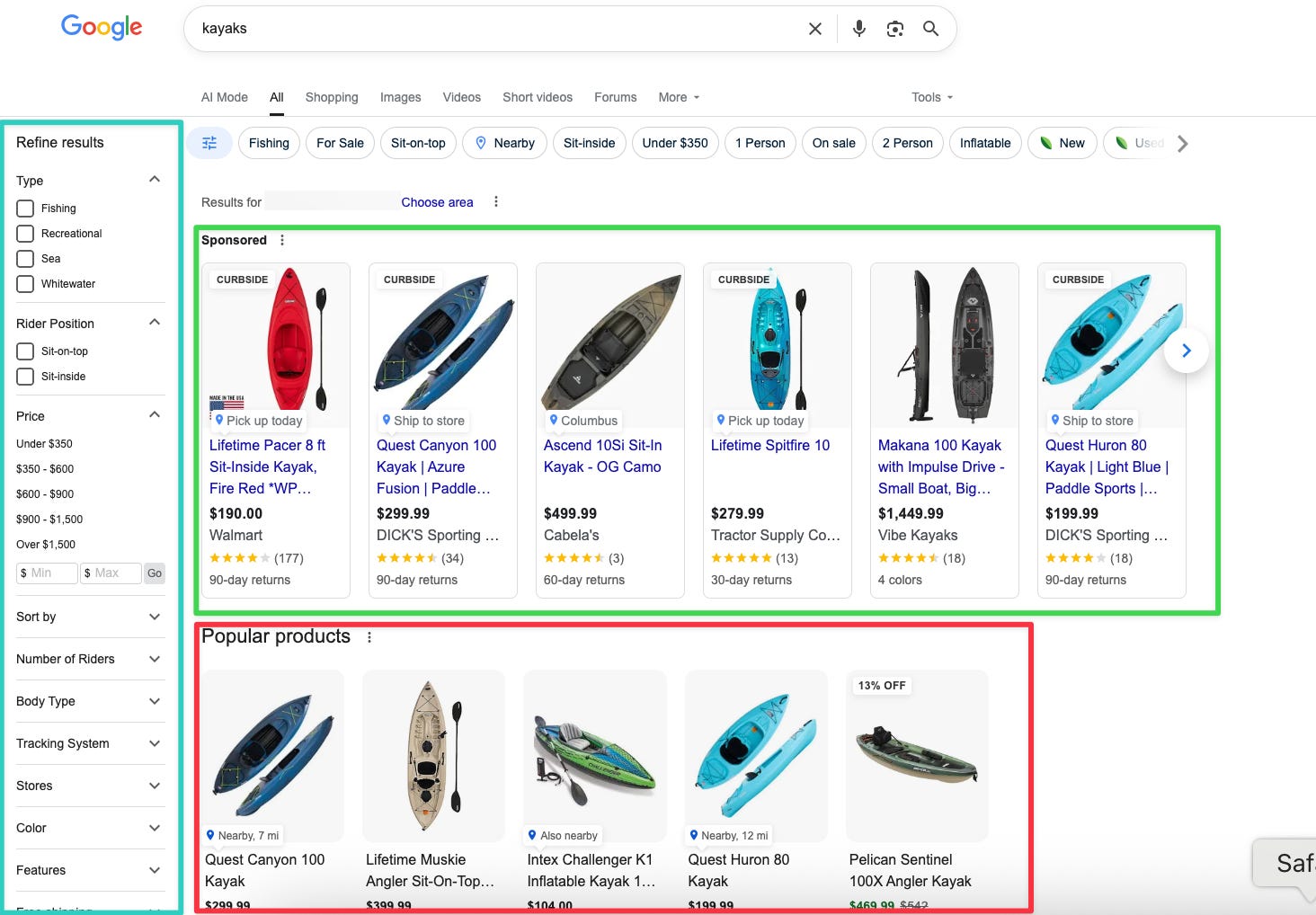
kayaks on desktopImage Credit: Kevin Indig

Directly under the shopping product grids, you have traditional organic results along with an on-SERP Buying Guide, similar to People Also Ask questions (which is also included further down the page).

Both the Buying Guide and People Also Ask features deliver answers with links to original content.
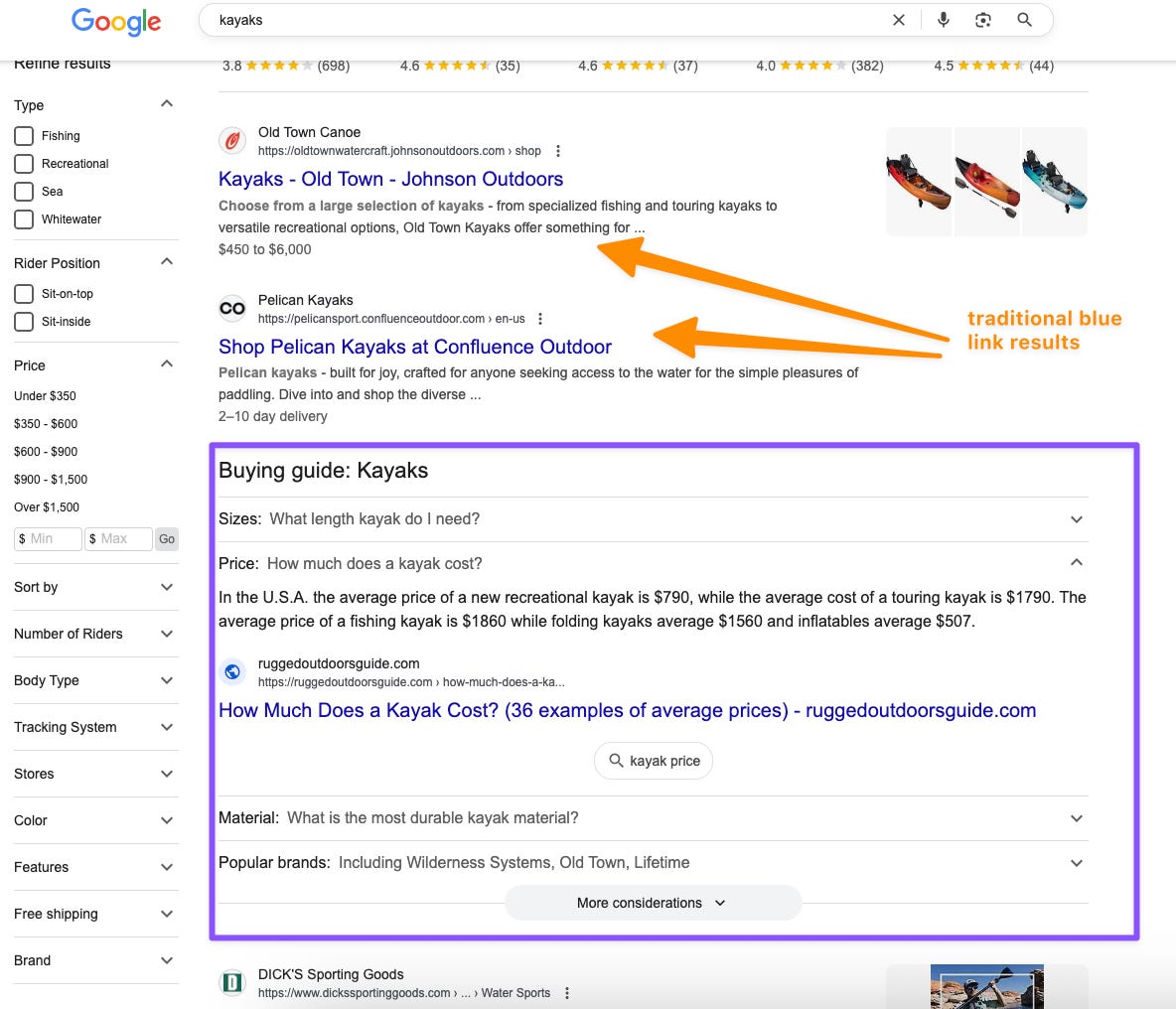
Image Credit: Kevin Indig

On mobile, you get product filters at the top, ads above organic results, and product carousels in the form of Popular products or “Products for you.”
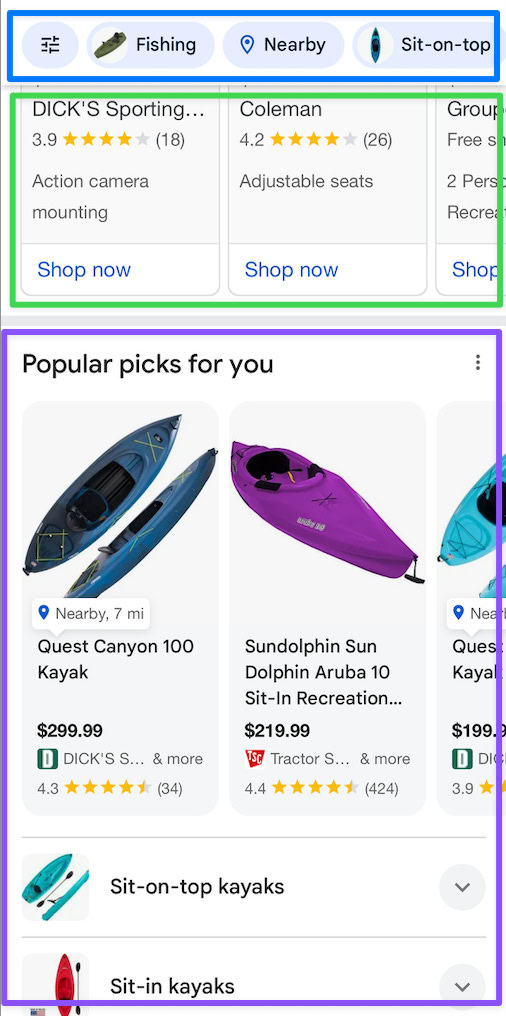
Image Credit: Kevin Indig

This experience doesn’t look very different from Amazon … which is the whole point.

Image Credit: Kevin Indig

Google’s shopping experience lets users explore products on a variety of marketplaces, like Amazon, Walmart, eBay, Etsy, & Co.

From an SEO perspective, the prominent position of product grid (listings) and filters likely significantly impacts CTR, organic visibility, and ultimately, revenue.

But let’s take a look at the same search via AI Mode.

Below is the desktop experience via Chrome.

I’ve zoomed out here so you get the whole view, but it takes the user two to three scrolls to get to the product grid when in a standard view.
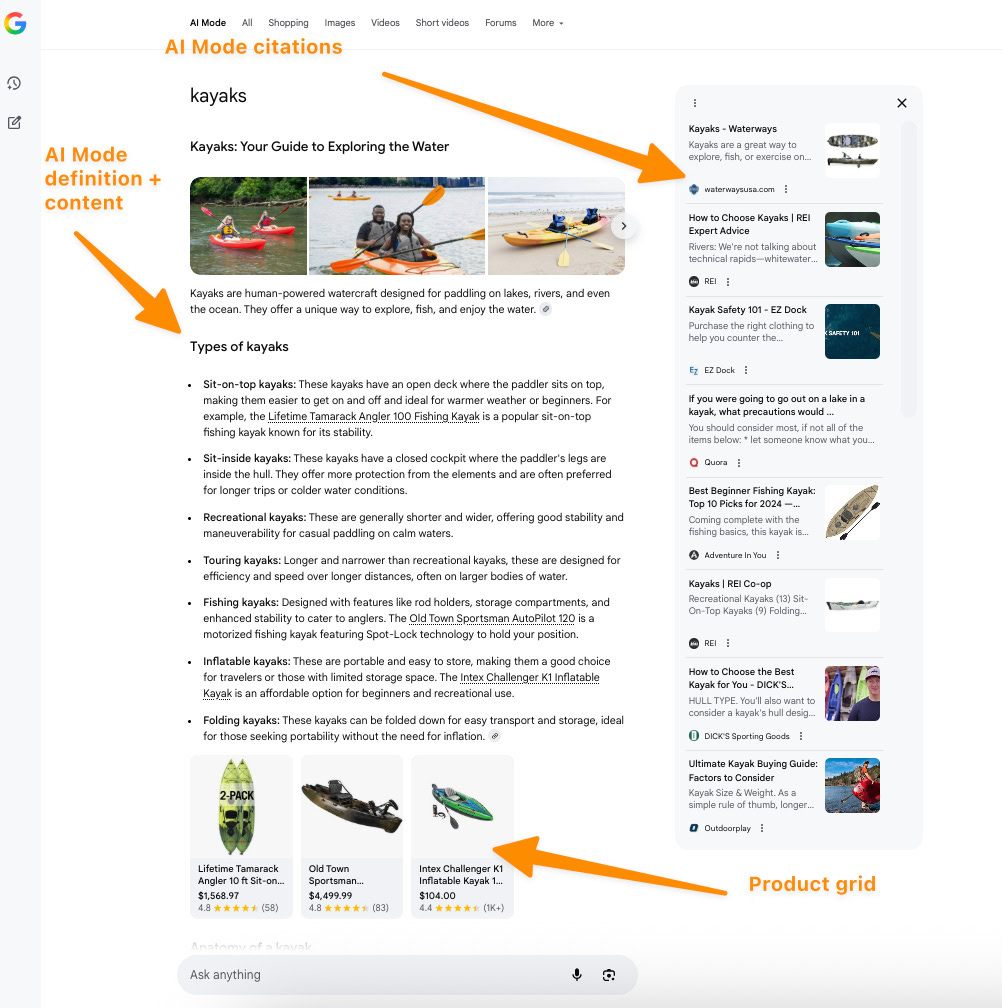
Image Credit: Kevin Indig

Here on mobile, getting to product recommendations takes several scrolls. In one instance, I received a result that included a list of places near me in my city where I could get a kayak.
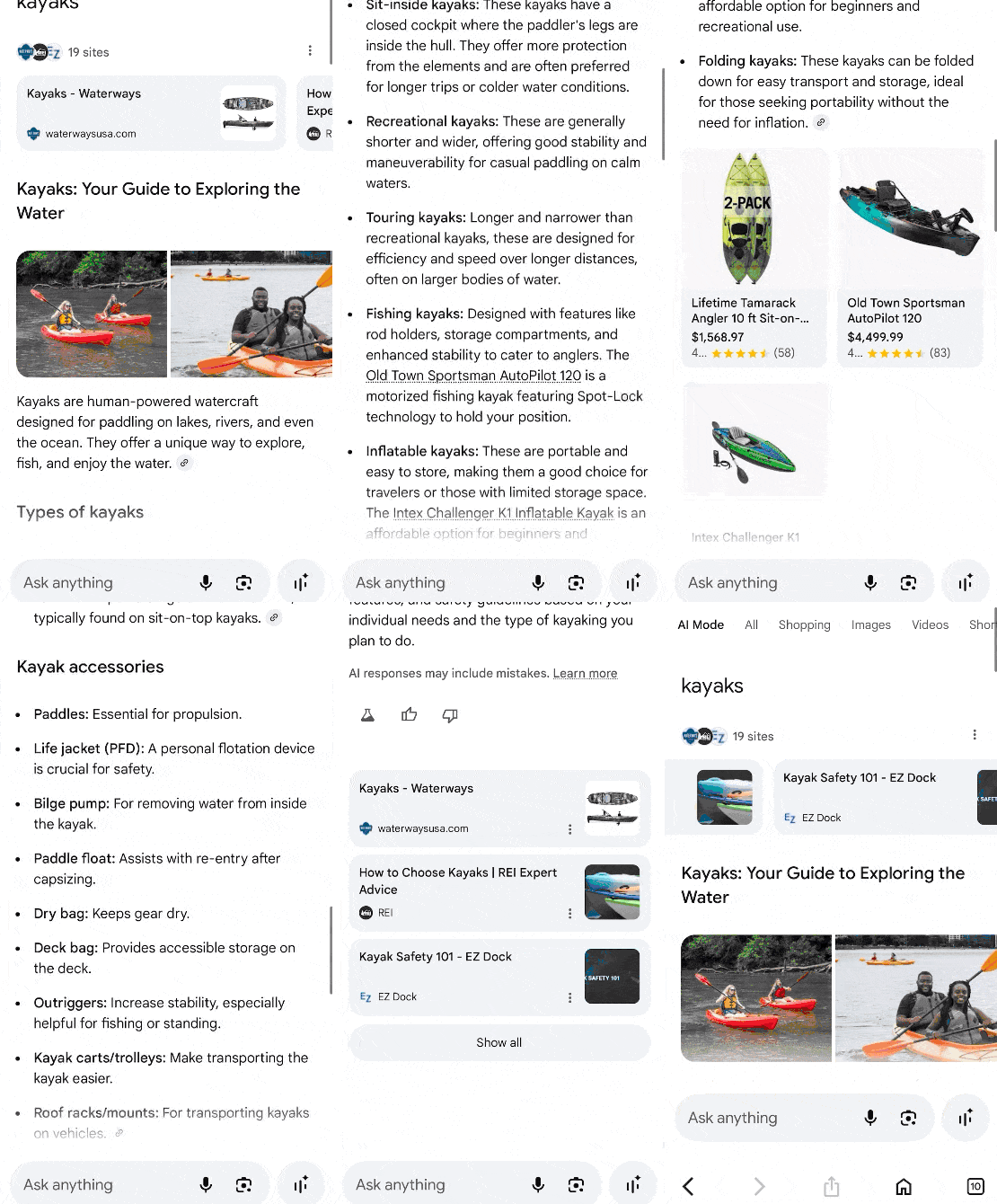
Image Credit: Kevin Indig

Keeping the current Google shopping SERP experience in mind, here’s what the data shows.

This is the most noteworthy shift found in the data, as you can probably guess.

Since March 2025, when Google began rolling out AI Overviews more aggressively, they’ve also started replacing (organic) product grids.
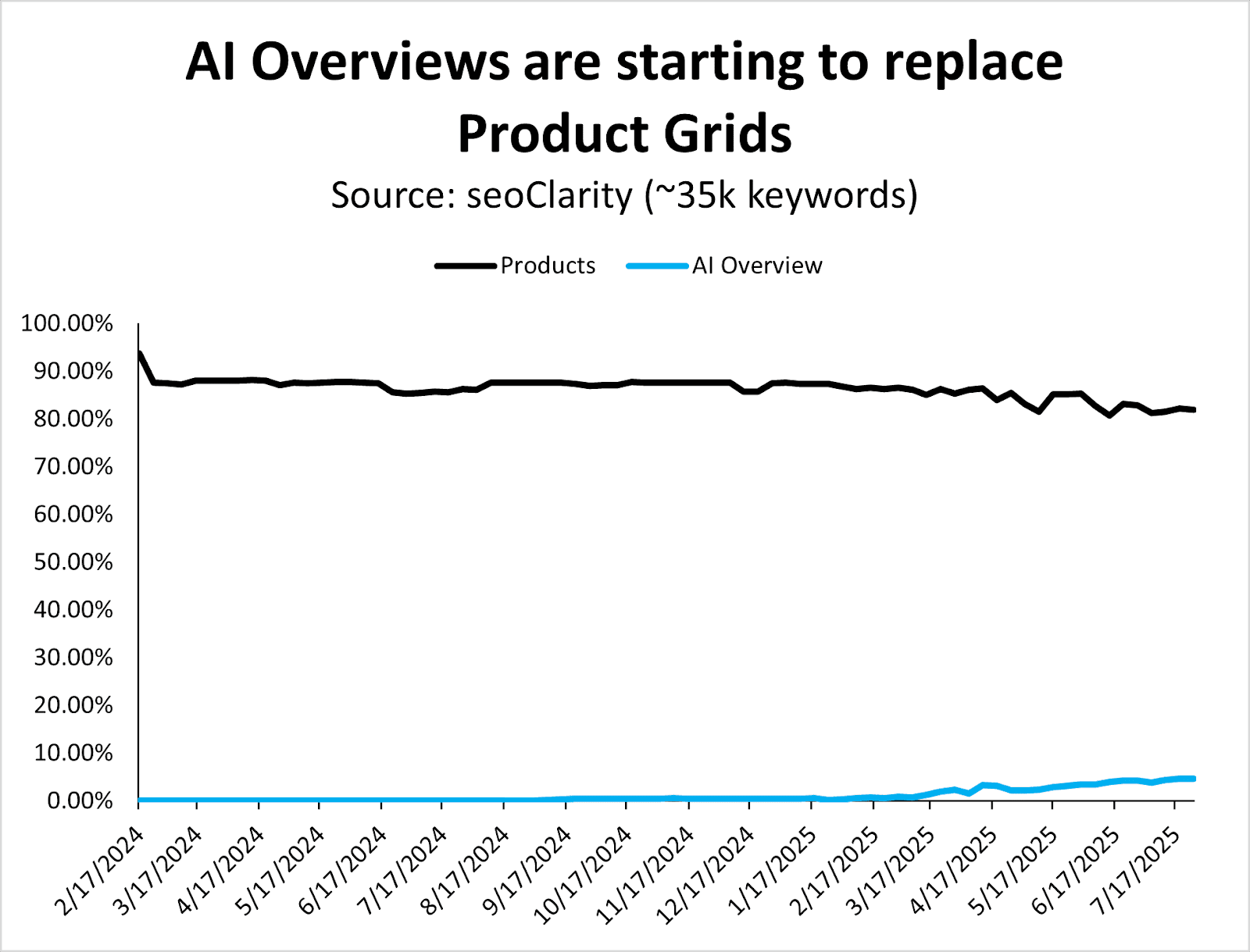
Image Credit: Kevin Indig

The graph above might look like it represents minimal changes when you examine it in a timeline view, but you can see the trend even better when moving AIOs to a second y-axis (below).
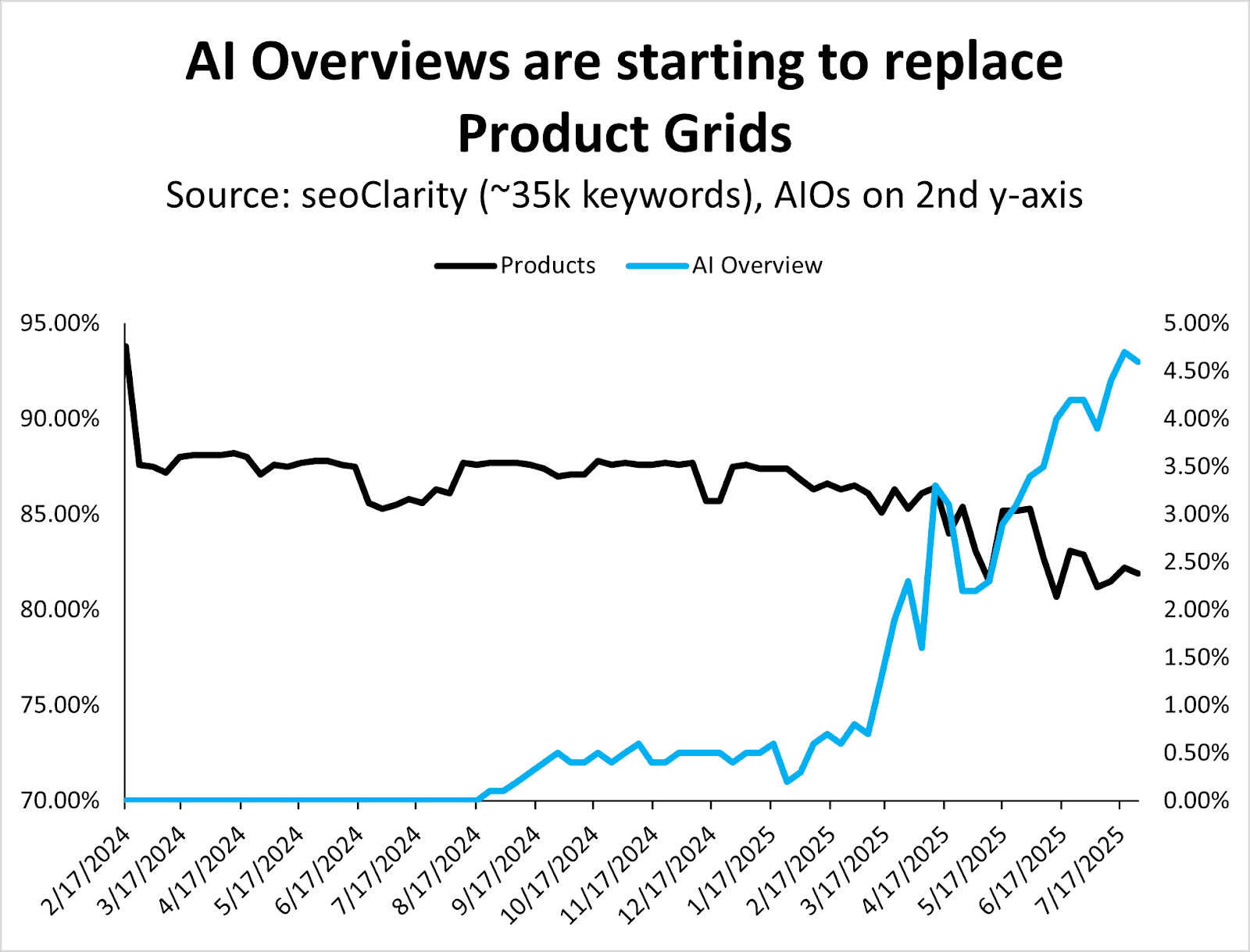
Image Credit: Kevin Indig

I expect AI Overviews to still show the product grids searchers have become accustomed to, although they might take a different form.

When searching for [which camera tripod should I buy?], for example, we find an AI Overview at the top with specific product recommendations.

Image Credit: Kevin Indig

Of course, AI Mode takes that a step further with richer product recommendations and buying guides.

(Shoutout to The New York Times and the other five sources for this AI Mode answer … which now don’t see an ad impression or affiliate click.)
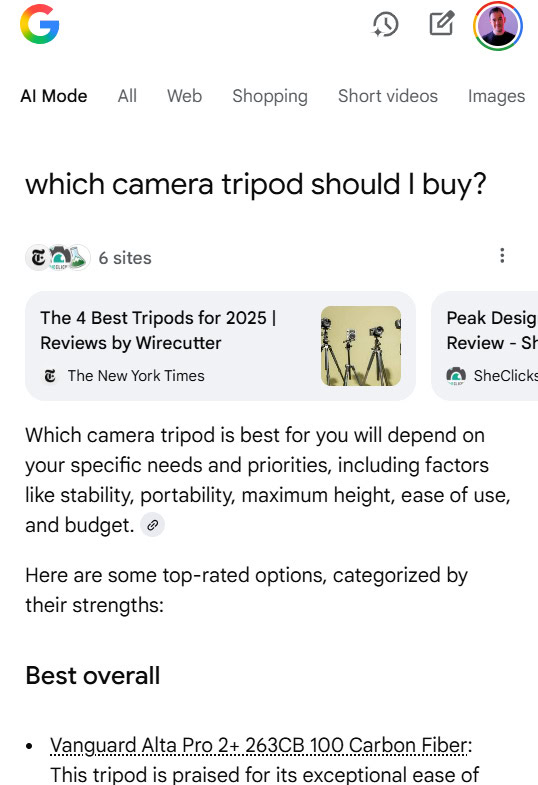
Image Credit: Kevin Indig

As a result of this shift, which I predict will only increase over time, tracking your brand mentions and product links in AI Overviews becomes critical. Skip this at your own risk.

Here, you’ll see the increase in image packs over time, with a big shift in March 2025.

Image packs for ecommerce-related queries grew from ~60% in 2024 to a new baseline of over 90% of keywords in 2025.
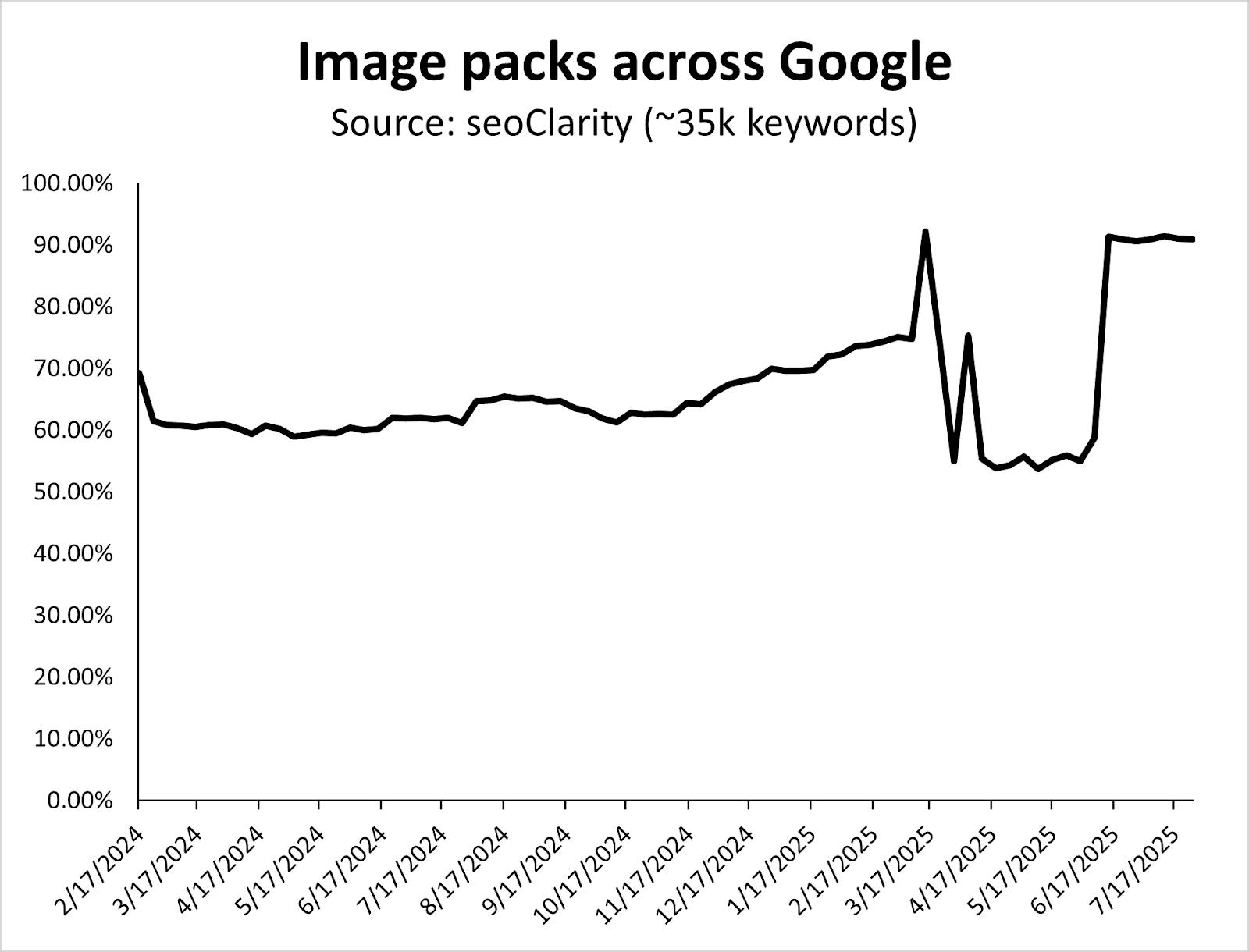
Image Credit: Kevin Indig

Also, notice how Google systematically tests SERP layouts between core updates (e.g., the dip in the graph above happens between the March and June 2025 Core Updates).

Having strong product images, which are properly optimized, continues to be crucial for ecommerce search.

Since January 2025, Google has shown more People Also Asked (PAA) features at the cost of Discussions & Forums.

Even though Reddit is the second most visible site on the web, I’m surprised to see more PAA – two years after Google removed FAQ rich snippets from the SERPs.
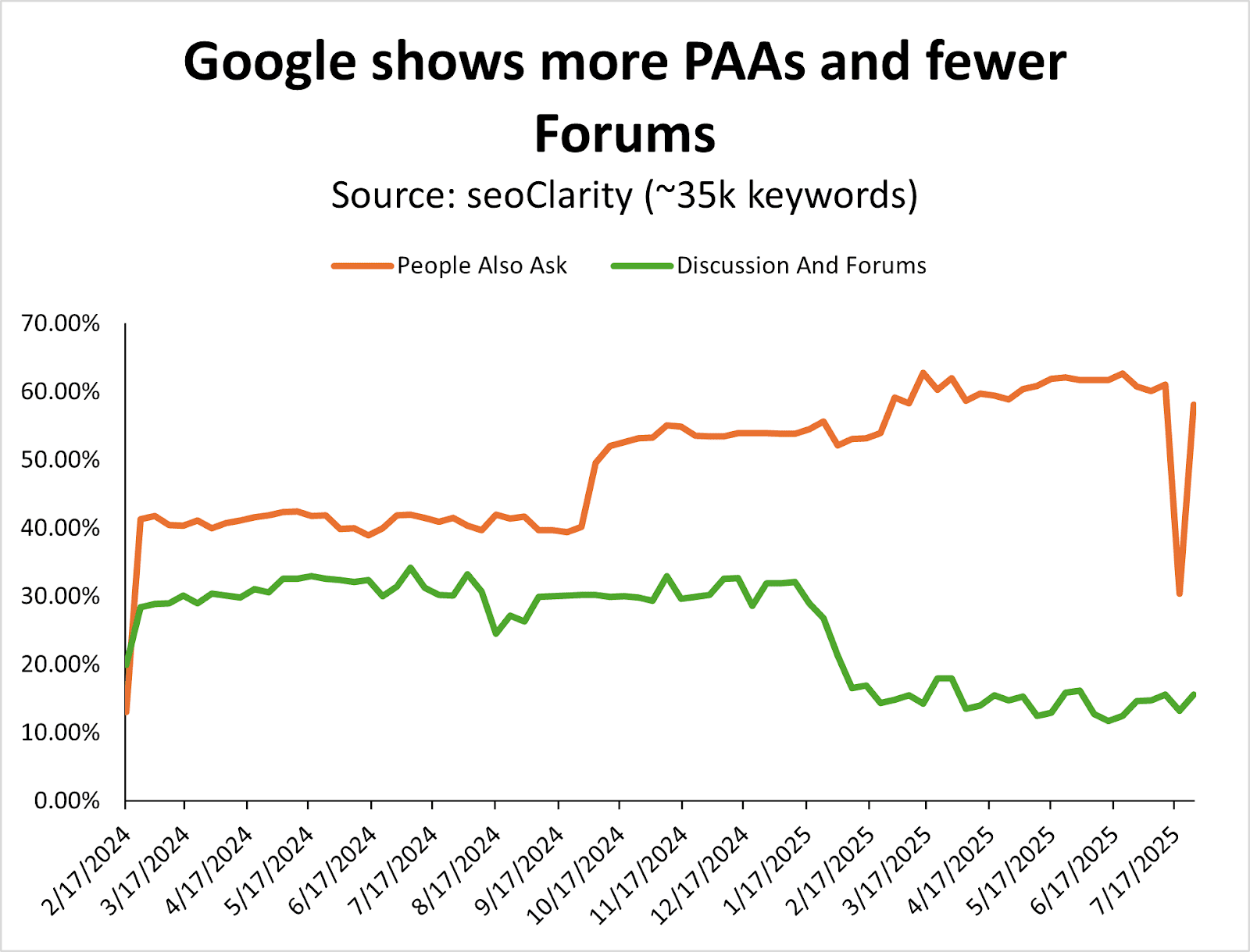
Image Credit: Kevin Indig

This is something you want to consider tracking for queries that are directly related to your products, if you’re not doing so already. (You can do this in classic SEO tools like Semrush or Ahrefs, for example.)

Since August 2024, Google has systematically reduced the number of videos in the ecommerce search results.
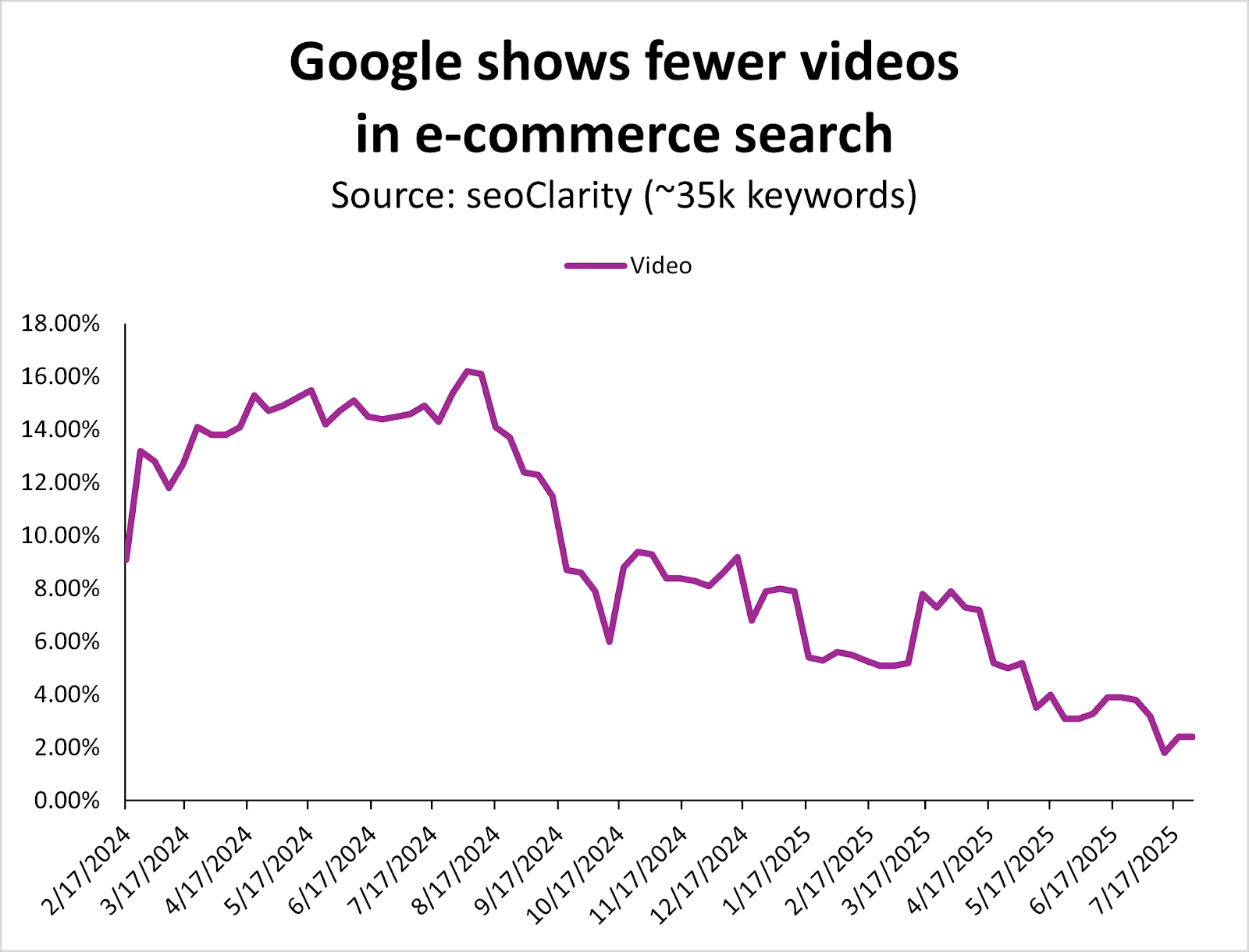
Image Credit: Kevin Indig

It seems that images have taken a lot of the real estate videos that used to own.
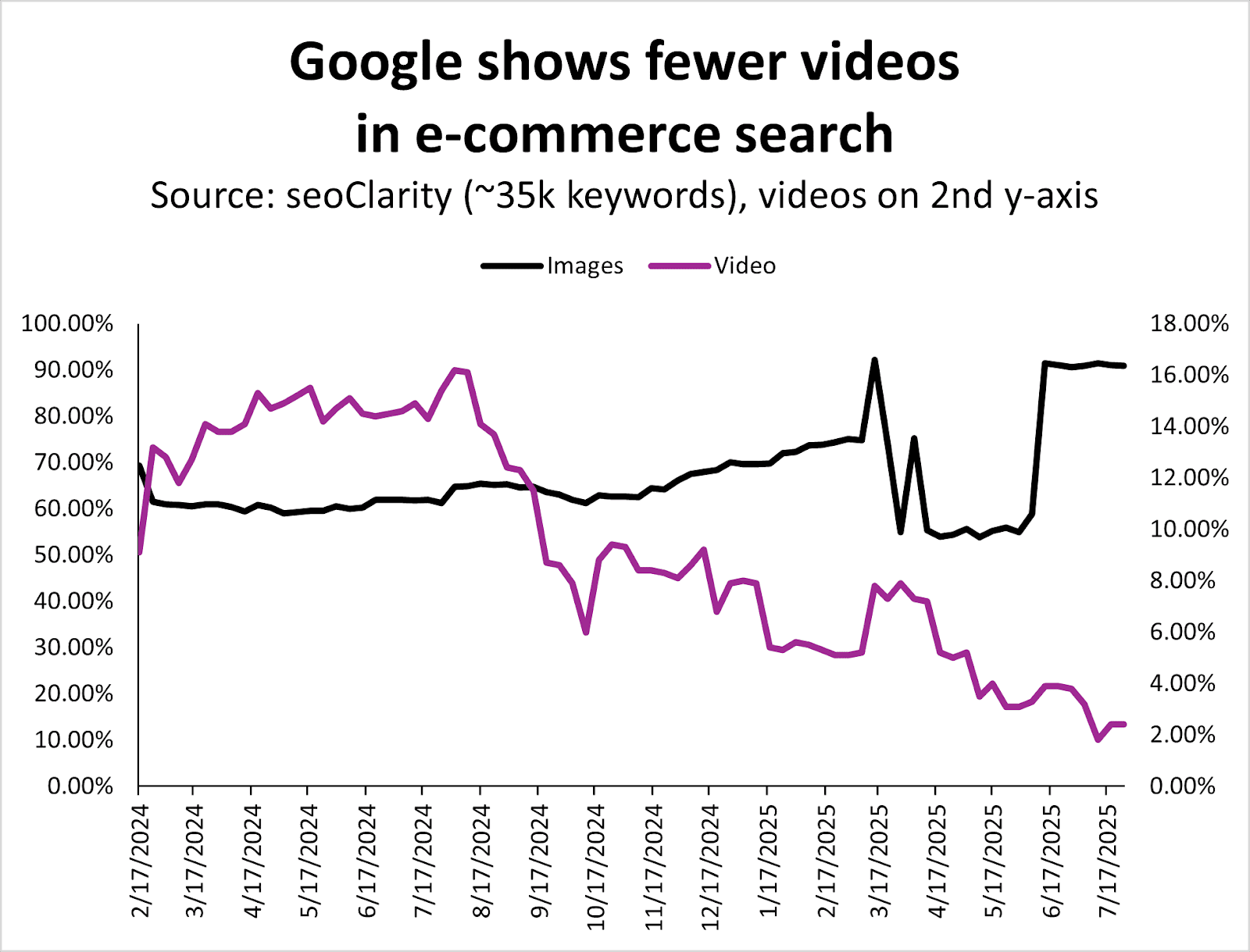
Image Credit: Kevin Indig

As a result, videos are less important in ecommerce search, while images are increasingly more important.

If you’ve been creating and optimizing videos and haven’t seen the SEO results you wanted for your products/site, this could be your signal to invest in other types of content.

While this analysis covers Google SERP data specifically, it’d be a miss to not discuss the new shopping features in ChatGPT.

However, we don’t yet have months and months of data on LLM-based conversational product recommendations to give us good, clear information, so I anticipate there will be more analysis ahead once more time passes.

ChatGPT’s shopping experience is starting to look a lot like Google’s  – but with a twist: Instead of viewing lists of blue links or multiple product grids, it curates a conversational shortlist with minimal product listings included.

No affiliate links and no paid ads (yet).
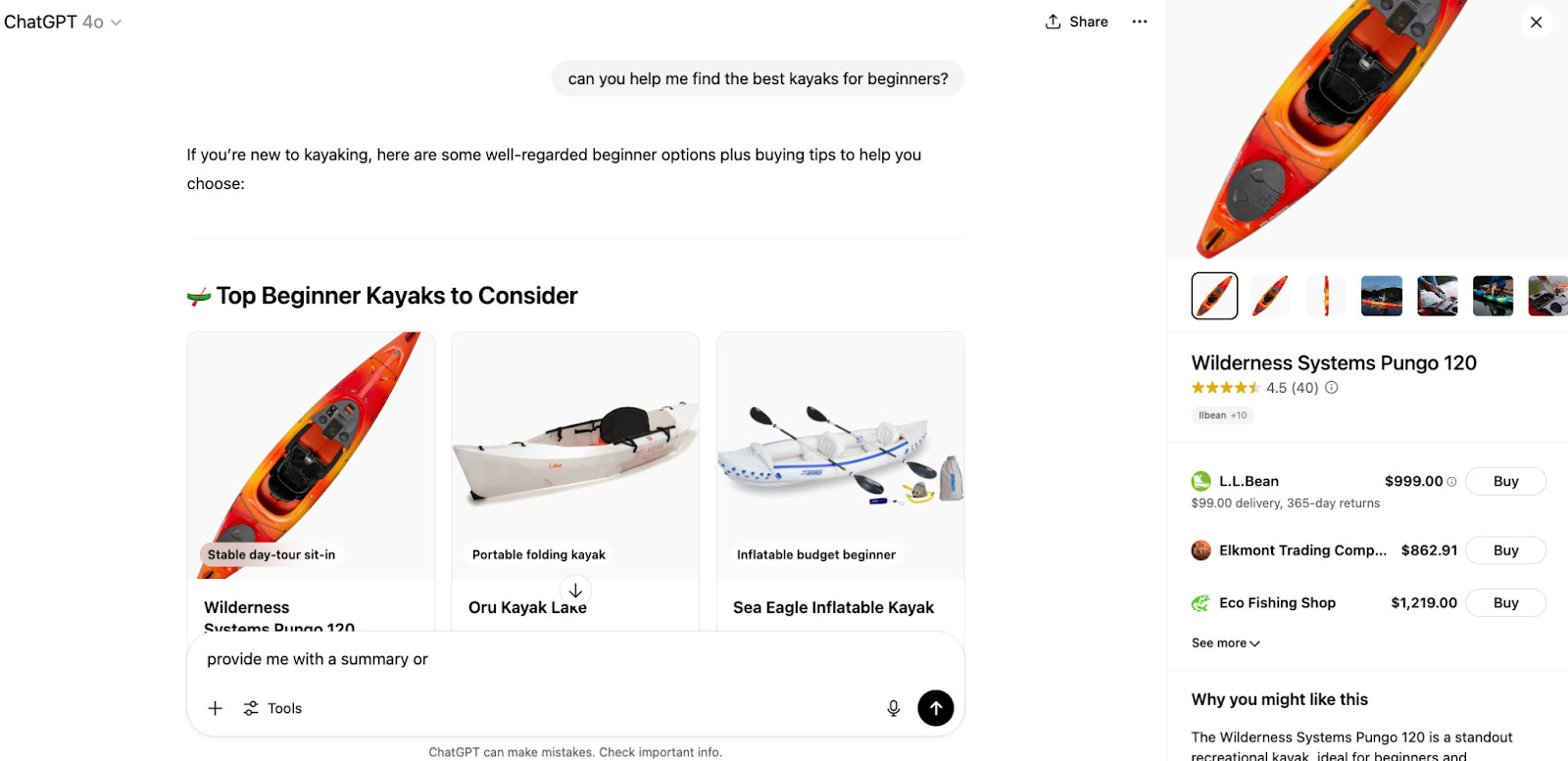
Image Credit: Kevin Indig

OpenAI integrates real-time product data from tools like Klarna and Shopify, allowing ChatGPT to surface up-to-date prices, availability, reviews, and product details in a shoppable card-style format.

ChatGPT also offers a “Why you might like this” and “What people are saying” generative summary when a specific product is clicked.

Image Credit: Kevin Indig

OpenAI offers the following guidance about how these products are selected [source]:

A product appears in the visual carousel when ChatGPT perceives it’s relevant to the user’s intent. ChatGPT assesses intent based on the user’s query and other available context, such as memories or custom instructions….

When determining which products to surface, ChatGPT considers:

• Structured metadata from third-party providers (e.g., price, product description) and other third-party content (e.g., reviews).

• Model responses generated by ChatGPT before it considers any new search results. Learn more.

• OpenAI safety standards.

Depending on the user’s needs, some of these factors will be more relevant than others. For example, if the user specifies a budget of $30, ChatGPT will focus more on price, whereas if price isn’t important, it may focus on other aspects instead.

OpenAI also explains how merchants are selected for products [source]:

When a user clicks on a product, we may show a list of merchants offering it. This list is generated based on merchant and product metadata we receive from third-party providers. Currently, the order in which we display merchants is predominantly determined by these providers….

To that end, we’re exploring ways for merchants to provide us their product feeds directly, which will help ensure more accurate and current listings. If you’re interested in participating, complete the interest form here, and we’ll notify you once submissions open.

That being said, it takes some trial and error to trigger product recommendations directly in the chat.

For instance, the prompt [can you help me find the best kayaks for beginners] results in an output that includes product recommendations, while the query [what are the best kayaks for beginners] results in a list without shopping results, features, or links.

Prompts with action-oriented language like “can you help me” and “will you find” may have a higher likelihood of offering shopping results directly in the chat, while queries like “what is the best” and “what are the best” and “compare the features of” may result in a variety of recommendations.
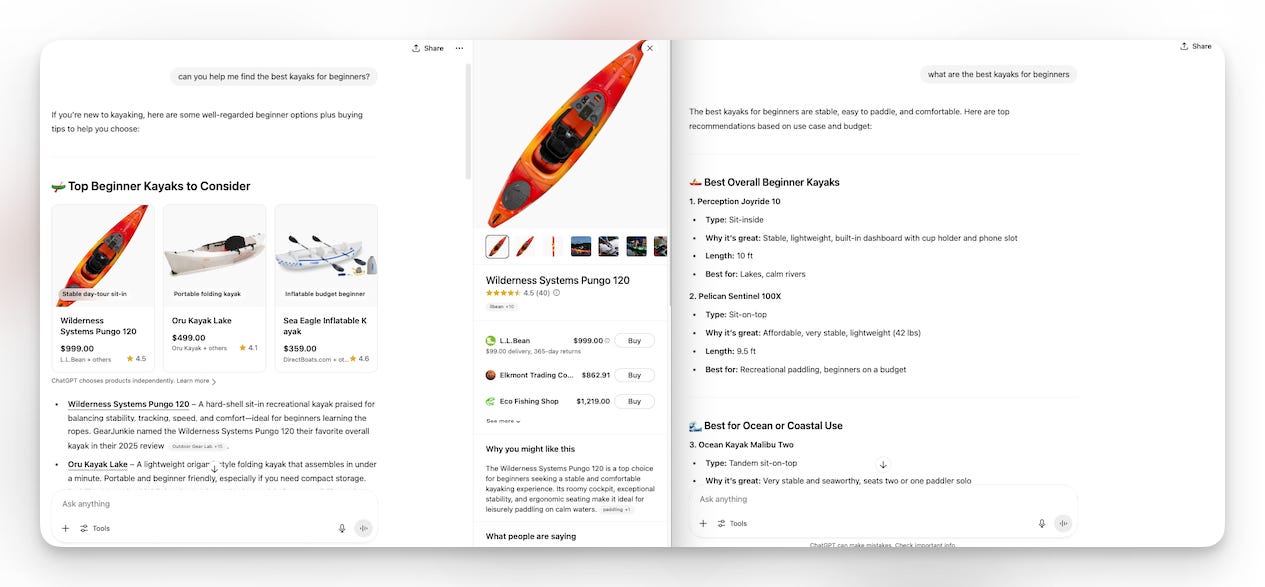
Image Credit: Kevin Indig

Featured Image: Paulo Bobita/Search Engine Journal

https://www.searchenginejournal.com/google-ecommerce-serp-features-2025-vs-2024/552935/


Ask An SEO: Why Aren’t My Pages Getting Indexed? via @sejournal, @HelenPollitt1

This week’s question comes from Xaris, who asks:

“Why, even though I have correctly composed and linked the sitemap to a client’s website, and I have checked everything, am I having indexing problems with some articles, not all of them, even after repeated requests to Google and Google Search Console. What could be the problem? I can’t figure it out.”

This is far from a unique problem; we’ve all experienced it! “I’ve done everything I can think of, but Google still isn’t indexing my pages.”

Is It Definitely Not Indexed?

The very first aspect to check is if the page is truly not indexed, or simply isn’t ranking well.

It could be that the page appears not indexed because you can’t find it for what you consider the relevant keywords. However, that doesn’t mean it’s not indexed.

For the purposes of this question, I’m going to give you advice on how to deal with both circumstances.

What Could Be The Issue?

There are many reasons that a page might not be indexed by, or rank well, on Google. Let’s discuss the main ones.

Technical Issue

There are technical reasons, both mistakes and conscious decisions, that could be stopping Googlebot from reaching your page and indexing it.

Bots Blocked In Robots.txt

Google needs to be able to reach a page’s content if it is to understand the value of the page and ultimately serve it as a search result for relevant queries.

If Googlebot is blocked from visiting these pages via the robots.txt, that could explain why it isn’t indexing them.

It can technically still index a page that it can’t access, but it will not be able to determine the content of the page and therefore will have to use external signals like backlinks to determine its relevancy.

If it cannot crawl the page, even if it knows it exists via the sitemap, it will still make it unlikely to rank.

Page Can’t Be Rendered

In a similar way, if the bot can crawl the page but it can’t render the content, it might choose not to index it. It will certainly be unlikely to rank the page well as it won’t be able to read the content of the page.

Page Has A No-Index Tag

An obvious, but often overlooked, issue is that a noindex tag has been applied to the page. This will literally instruct Googlebot not to index the page.

This is a directive, that is, something Googlebot is committed to enacting.

Server-Level Bot Blocking

There could be an issue at your server level that is preventing Googlebot from crawling your webpage.

There may well have been rules set at your server or CDN level that are preventing Googlebot from crawling your site again and discovering these new pages.

It is something that can be quite a common issue when teams that aren’t well-versed in SEO are responsible for the technical maintenance of a website.

Non-200 Server Response Codes

The pages you have added to the sitemap may well be returning a server status code that confuses Googlebot.

For example, if a page is returning a 4XX code, despite you being able to see the content on the page, Googlebot may decide it isn’t a live page and will not index it.

Slow Loading Page

It could be that your webpages are loading very slowly. As a result, the perception of their quality may be diminished.

It could also be that they are taking so long to load that the bots are having to prioritize the pages they crawl so much that your newer pages are not being crawled.

Page Quality

There are also issues with the content of the website itself that could be preventing a page from being indexed.

Low Internal Links Suggesting Low-Value Page

One of the ways Google will determine if a page is worth ranking highly is through the internal links pointing to it. The links between pages on your website can both signify the content of the page being linked to, but also whether the page is an important part of your site. A page that has few internal links may not seem valuable enough to rank well.

Pages Don’t Add Value

One of the main reasons why a page isn’t indexed by Google is that it isn’t perceived as of high enough quality.

Google will not crawl and index every page that it could. Google will prioritize unique, engaging content.

If your pages are thin, or do not really add value to the internet, they may not be indexed even though they technically could be.

They Are Duplicates Or Near Duplicates

In a similar way, if Google perceives your pages to be exact or very near duplicate versions of existing pages, it may well not index your new ones.

Even if you have signaled that the page is unique by including it in your XML sitemap, and using a self-referencing canonical tag, Google will still make its own assessment as to whether a page is worth indexing.

Manual Action

There is also the possibility that your webpage has been subject to a manual action, and that’s why Google is not indexing it.

For example, if the pages that you are trying to get Google to index are what it considers “thin affiliate pages,” you may not be able to rank them due to a manual penalty.

Manual actions are relatively rare and usually affect broader site areas, but it’s worth checking Search Console’s Manual Actions report to rule this out.

Identify The Issue

Knowing what could be the cause of your issue is only half the battle. Let’s look at how you could potentially narrow down the problem and then how you could fix it.

Check Bing Webmaster Tools

My first suggestion is to check if your page is indexed in Bing.

You may not be focusing much on Bing in your SEO strategy, but it is a quick way to determine whether this is a Google-focused issue, like a manual action or poor rankings, rather than something on your site that is preventing the page from being indexed.

Go to Bing Webmaster Tools and enter the page in its URL Inspection tool. From here, you will see if Bing is indexing the page or not. If it is, then you know this is something that is only affecting Google.

Check Google Search Console’s “Page” Report

Next, go to Google Search Console. Inspect the page and see if it is genuinely marked as not indexed. If it isn’t indexed, Google should give an explanation as to why.

For example, it could be that the page is:

Excluded By “Noindex”

If Google detects a noindex tag on the page, it will not index it. Under the URL Inspection tool results, it will tell you that “page is not indexed: Excluded by ‘noindex’ tag”

If this is the result you are getting for your pages, your next step will be to remove the noindex tag and resubmit the page to be crawled by Googlebot.

Discovered – Currently Not Indexed

The inspection tool might tell you the “page is not indexed: Currently not indexed.”

If that is the case, you know for certain that it is an indexing issue, and not a problem with poor rankings, that is causing your page not to appear in Google Search.

Google explains that a URL appearing as “Discovered – currently not indexed” is:

“The page was found by Google, but not crawled yet. Typically, Google wanted to crawl the URL but this was expected to overload the site; therefore Google rescheduled the crawl. This is why the last crawl date is empty on the report.”

If you are seeing this status, there is a high chance that Google has looked at other pages on your website and deemed them not worth adding to the index, and as such, is not spending resources crawling these other pages that it is aware of because it expects them to be of as low quality.

To fix this issue, you need to signify a page’s quality and relevance to Googlebot. It is time to take a critical look at your website and identify if there are reasons why Google may consider your pages to be low quality.

For further details on how to improve a page, read my earlier article: “Why Are My Pages Discovered But Not Indexed?”

Crawled – Currently Not Indexed

If your inspected page returns a status of “Crawled – currently not indexed,” this means that Google is aware of the page, has crawled it, but doesn’t see value in adding it to the index.

If you are getting this status code, you are best off looking for ways to improve the page’s quality.

Duplicate, Google Chose Different Canonical Than User

You may see an alert for the page you have inspected, which tells you this page is a “Duplicate, Google chose different canonical than user.”

What this means is that it sees the URL as a close duplicate of an existing page, and it is choosing the other page to be displayed in the SERPs instead of the inspected page, despite you having correctly set a canonical tag.

The way to encourage Google to display both pages in the SERPs is to make sure they are unique, have sufficient content so as to be useful to readers.

Essentially, you need to give Google a reason to index both pages.

Fixing The Issues

Although your pages may not be indexed for one or more of various reasons, the fixes are all pretty similar.

It is likely that there is either a technical issue with the site, like an errant canonical tag or a robots.txt block, that has been preventing correct crawling and indexing of a page.

Or, there is an issue with the quality of the page, which is causing Google to not see it as valuable enough to be indexed.

Start by reviewing the potential technical causes. These will help you to quickly identify if this is a “quick” fix that you or your developers can change.

Once you have ruled out the technical issues, you are most likely looking at quality problems.

Depending on what you now think is causing the page to not appear in the SERPs, it may be that the page itself has quality issues, or a larger part of your website does.

If it is the former, consider E-E-A-T, uniqueness of the page in the scope of the internet, and how you can signify the page’s importance, such as through relevant backlinks.

If it is the latter, you may wish to run a content audit to help you narrow down ways to improve the overall perception of quality across your website.

Summary

There will be a bit of investigation needed to identify if your page is truly not indexed, or if Google is just choosing not to rank it highly for queries you feel are relevant.

Once you have identified that, you can begin closing in on whether it is a technical or quality issue that is affecting your pages.

This is a frustrating issue to have, but the fixes are quite logical, and the investigation should hopefully reveal more ways to improve the crawling and indexing of your site.

More Resources:


Featured Image: Paulo Bobita/Search Engine Journal

https://www.searchenginejournal.com/ask-an-seo-why-arent-my-pages-getting-indexed/551151/


Perplexity Says Cloudflare Is Blocking Legitimate AI Assistants via @sejournal, @martinibuster

Perplexity published a response to Cloudflare’s claims that it disrespects robots.txt and engages in stealth crawling. Perplexity argues that Cloudflare is mischaracterizing AI Assistants as web crawlers, saying that they should not be subject to the same restrictions since they are user-initiated assistants.

Perplexity AI Assistants Fetch On Demand

According to Perplexity, its system does not store or index content ahead of time. Instead, it fetches webpages only in response to specific user questions. For example, when a user asks for recent restaurant reviews, the assistant retrieves and summarizes relevant content on demand. This, the company says, contrasts with how traditional crawlers operate, systematically indexing vast portions of the web without regard to immediate user intent.

Perplexity compared this on-demand fetching to Google’s user-triggered fetches. Although that is not an apples-to-apples comparison because Google’s user-triggered fetches are in the service of reading text aloud or site verification, it’s still an example of user-triggered fetching that bypasses robots.txt restrictions.

In the same way, Perplexity argues that its AI operates as an extension of a user’s request, not as an autonomous bot crawling indiscriminately. The company states that it does not retain or use the fetched content for training its models.

Criticizes Cloudflare’s Infrastructure

Perplexity also criticized Cloudflare’s infrastructure for failing to distinguish between malicious scraping and legitimate, user-initiated traffic, suggesting that Cloudflare’s approach to bot management risks overblocking services that are acting responsibly. Perplexity argues that a platform’s inability to differentiate between helpful AI assistants and harmful bots causes misclassification of legitimate web traffic.

Perplexity makes a strong case for the claim that Cloudflare is blocking legitimate bot traffic and says that Cloudflare’s decision to block its traffic was based on a misunderstanding of how its technology works.

Read Perplexity’s response:

Agents or Bots? Making Sense of AI on the Open Web

https://www.searchenginejournal.com/perplexity-says-cloudflare-is-blocking-legitimate-ai-assistants/552927/


Cloudflare Delists And Blocks Perplexity From Crawling Websites via @sejournal, @martinibuster

Cloudflare announced that they delisted Perplexity’s crawler as a verified bot and are now actively blocking Perplexity and all of its stealth bots from crawling websites. Cloudflare acted in response to multiple user complaints against Perplexity related to violations of robots.txt protocols, and a subsequent investigation revealed that Perplexity was using aggressive rogue bot tactics to force its crawlers onto websites.

Cloudflare Verified Bots Program

Cloudflare has a system called Verified Bots that whitelists bots in their system, allowing them to crawl the websites that are protected by Cloudflare. Verified bots must conform to specific policies, such as obeying the robots.txt protocols, in order to maintain their privileged status within Cloudflare’s system.

Perplexity was found to be violating Cloudflare’s requirements that bots abide by the robots.txt protocol and refrain from using IP addresses that are not declared as belonging to the crawling service.

Cloudflare Accuses Perplexity Of Using Stealth Crawling

Cloudflare observed various activities indicative of highly aggressive crawling, with the intent of circumventing the robots.txt protocol.

Stealth Crawling Behavior: Rotating IP Addresses

Perplexity circumvents blocks by using rotating IP addresses, changing ASNs, and impersonating browsers like Chrome.

Perplexity has a list of official IP addresses that crawl from a specific ASN (Autonomous System Number). These IP addresses help identify legitimate crawlers from Perplexity.

An ASN is part of the Internet networking system that provides a unique identifying number for a group of IP addresses. For example, users who access the Internet via an ISP do so with a specific IP address that belongs to an ASN assigned to that ISP.

When blocked, Perplexity attempted to evade the restriction by switching to different IP addresses that are not listed as official Perplexity IPs, including entirely different ones that belonged to a different ASN.

Stealth Crawling Behavior: Spoofed User Agent

The other sneaky behavior that Cloudflare identified was that Perplexity changed its user agent in order to circumvent attempts to block its crawler via robots.txt.

For example, Perplexity’s bots are identified with the following user agents:

  • PerplexityBot
  • Perplexity-User

Cloudflare observed that Perplexity responded to user agent blocks by using a different user agent that posed as a person crawling with Chrome 124 on a Mac system. That’s a practice called spoofing, where a rogue crawler identifies itself as a legitimate browser.

According to Cloudflare, Perplexity used the following stealth user agent:

“Mozilla/5.0 (Macintosh; Intel Mac OS X 10_15_7) AppleWebKit/537.36 (KHTML, like Gecko) Chrome/124.0.0.0 Safari/537.36”

Cloudflare Delists Perplexity

Cloudflare announced that Perplexity is delisted as a verified bot and that they will be blocked:

“The Internet as we have known it for the past three decades is rapidly changing, but one thing remains constant: it is built on trust. There are clear preferences that crawlers should be transparent, serve a clear purpose, perform a specific activity, and, most importantly, follow website directives and preferences. Based on Perplexity’s observed behavior, which is incompatible with those preferences, we have de-listed them as a verified bot and added heuristics to our managed rules that block this stealth crawling.”

Takeaways

  • Violation Of Cloudflare’s Verified Bots Policy
    Perplexity violated Cloudflare’s Verified Bots policy, which grants crawling access to trusted bots that follow common-sense rules like honoring the robots.txt protocol.
  • Perplexity Used Stealth Crawling Tactics
    Perplexity used undeclared IP addresses from different ASNs and spoofed user agents to crawl content after being blocked from accessing it.
  • User Agent Spoofing
    Perplexity disguised its bot as a human user by posing as Chrome on a Mac operating system in attempts to bypass filters that block known crawlers.
  • Cloudflare’s Response
    Cloudflare delisted Perplexity as a Verified Bot and implemented new blocking rules to prevent the stealth crawling.
  • SEO Implications
    Cloudflare users who want Perplexity to crawl their sites may wish to check if Cloudflare is blocking the Perplexity crawlers, and, if so, enable crawling via their Cloudflare dashboard.

Cloudflare delisted Perplexity as a Verified Bot after discovering that it repeatedly violated the Verified Bots policies by disobeying robots.txt. To evade detection, Perplexity also rotated IPs, changed ASNs, and spoofed its user agent to appear as a human browser. Cloudflare’s decision to block the bot is a strong response to aggressive bot behavior on the part of Perplexity.

https://www.searchenginejournal.com/cloudflare-delists-and-blocks-perplexity-from-crawling-websites/552899/


ChatGPT Nears 700 Million Weekly Users, OpenAI Announces via @sejournal, @MattGSouthern

OpenAI’s ChatGPT is on pace to reach 700 million weekly active users, according to a statement this week from Nick Turley, VP and head of the ChatGPT app.

The milestone marks a sharp increase from 500 million in March and represents a fourfold jump compared to the same time last year.

Turley shared the update on X, writing:

“This week, ChatGPT is on track to reach 700M weekly active users — up from 500M at the end of March and 4× since last year. Every day, people and teams are learning, creating, and solving harder problems. Big week ahead. Grateful to the team for making ChatGPT more useful and delivering on our mission so everyone can benefit from AI.”

How Does This Compare to Other Search Engines?

Weekly active user (WAU) counts aren’t typically shared by traditional search engines, making direct comparisons difficult. Google reports aggregate data like total queries or monthly product usage.

While Google handles billions of searches daily and reaches billions of users globally, its early growth metrics were limited to search volume.

By 2004, roughly six years after launch, Google was processing over 200 million daily searches. That figure grew to four billion daily searches by 2009, more than a decade into the company’s existence.

For Microsoft’s Bing search engine, a comparable data point came in 2023, when Microsoft reported that its AI-powered Bing Chat had reached 100 million daily active users. However, that refers to the new conversational interface, not Bing Search as a whole.

How ChatGPT’s Growth Stands Out

Unlike traditional search engines, which built their user bases during a time of limited internet access, ChatGPT entered a mature digital market where global adoption could happen immediately. Still, its growth is significant even by today’s standards.

Although OpenAI hasn’t shared daily usage numbers, reporting WAU gives us a picture of steady engagement from a wide range of users. Weekly stats tend to be a more reliable measure of product value than daily fluctuations.

Why This Matters

The rise in ChatGPT usage is evidence of a broader shift in how people find information online.

A Wall Street Journal report cites market intelligence firm Datos, which found that AI-powered tools like ChatGPT and Perplexity make up 5.6% of desktop browser searches in the U.S., more than double their share from a year earlier.

The trend is even stronger among early adopters. Among people who began using large language models in 2024, nearly 40% of their desktop browser visits now go to AI search tools. During the same period, traditional search engines’ share of traffic from these users dropped from 76% to 61%, according to Datos.

Looking Ahead

With ChatGPT on track to reach 700 million weekly users, OpenAI’s platform is now rivaling the scale of mainstream consumer products.

As AI tools become a primary starting point for queries, marketers will need to rethink how they approach visibility and engagement. Staying competitive will require strategies focused as much on AI optimization as on traditional SEO.


Featured Image: Photo Agency/Shutterstock

https://www.searchenginejournal.com/chatgpt-nears-700-million-weekly-users-openai-announces/552895/


How AI Search Should Be Shaping Your CEO’s & CMO’s Strategy [Webinar] via @sejournal, @theshelleywalsh

AI is rapidly changing the rules of SEO. From generative ranking to vector search, the new rules are not only technical but also reshaping how business leaders make decisions.

Join Dan Taylor on August 14, 2025, for an exclusive SEJ Webinar tailored for C-suite executives and senior leaders. In this session, you’ll gain essential insights to understand and communicate SEO performance in the age of AI.

Here’s what you’ll learn:

AI Search Is Impacting Everything. Are You Ready?

AI search is already here, and it’s impacting everything from SEO KPIs to customer journeys. This webinar will give you the tools to lead your teams through the shift with confidence and precision.

Register now for a business-first perspective on AI search innovation. If you can’t attend live, don’t worry. Sign up anyway, and we’ll send you the full recording.

https://www.searchenginejournal.com/ai-search-shaping-your-strategy/551490/


Which SEO Jobs AI Will Reshape & Which Might Disappear via @sejournal, @DuaneForrester

You’ve probably seen the headlines like: “AI will kill SEO,” “AI will replace marketing roles,” or the latest panic: “Is your digital marketing job safe?”

Well, maybe not those exact headlines, but you get the idea, and I’m sure you have seen something similar.

Let’s clear something up: AI is not making SEO irrelevant. It’s making certain tasks obsolete. And yes, some jobs built entirely around those tasks are at risk.

A recent Microsoft study analyzed over 200,000 Bing Copilot interactions to measure task overlap between human job functions and AI-generated outputs. Their findings are eye-opening:

  • Translators and Interpreters: 98% overlap with AI tasks.
  • Writers and Authors: 88% overlap.
  • Public Relations Specialists: 79% overlap.

SEO as a field wasn’t directly named in the study, but many roles common within SEO map tightly to these job categories.

If you write, edit, report, research, or publish content as part of your daily work, this isn’t a hypothetical shift. It’s already happening.

(Source: Microsoft AI Job Impact – Business Insider – follow through this link to reach the download location for the original PDF of the study. BI summarizes the information, but links to MSFT, which in turn links to the source for the PDF.)

What’s Actually Changing

AI isn’t replacing SEO. It’s changing what “search engine optimization” means, and where and how value is measured.

In traditional SEO, the focus was clear:

  • Rank high.
  • Earn the click.
  • Optimize the page for humans and crawlers.

That still matters. But, in AI-powered search systems, the sequence is different:

  1. Content is chunked behind the scenes, paragraphs, lists, and answers are sliced and stored in vector form.
  2. Prompts trigger retrieval, the LLM pulls relevant chunks, often based on embeddings, not just keywords. (So, concepts and relationships, not keywords per se.)
  3. Only a few chunks make it into the answer. Everything else is invisible, no matter how high it once ranked.

This new paradigm shifts the rules of engagement. Instead of asking, “Where do I rank?” the better question is, “Was my content even retrieved?” That makes this a binary system, not a sliding scale.

In this new world of retrieval, the direct answer to the question, “Where do I rank?” could be “ChatGPT,” “Perplexity,” “Claude,” or “CoPilot,” instead of a numbered position.

In some ways, this isn’t as big a shift as some folks would have you believe. After all, as the old joke asks, “Where do you hide a dead body?” To which the correct answer is “…on Page 2 of Google’s results!”

Morbid humor aside, the implication is no one goes there, so there’s no value, and while that sentiment actually drops a lot of the real, nuanced details that actual click through rate data shows us (like the top of page 2 results actually has better CTRs than the bottom of page 1 typically), it does serve up a meta point: If you’re not in the first few results on a traditional SERP, the drop off of CTRs is precipitous.

So, it could be argued that with most “answers” today in generative AI systems being comprised of a very limited set of references, that today’s AI-based systems offer a new display path for consumers, but ultimately, those consumers will only be interacting with the same number of results they historically engaged with.

I mean, if we only ever really clicked on the top 3 results (generalizing here), and the rest were surplus to needs, then cutting an AI-sourced answer down to some words with only 1, 2 or 3 cited results amounts to a similar situation in terms of raw numbers of choice for consumers … 1, 2 or 3 clickable options.

Regardless, it does mark a shift in terms of work items and workflows, and here’s how that shift shows up across some core SEO tasks. Obviously, there could be many more, but these examples help set the stage:

  • Keyword research becomes embedding relevance and semantic overlap. It’s not about the exact phrase match in a gen AI result. It’s about aligning your language with the concepts AI understands. It’s about the concept of query fan-out (not new, by the way, but very important now).
  • Meta tag and title optimization become chunked headers and contextual anchor phrases. AI looks for cues inside content to determine chunk focus.
  • Backlink building becomes trust signal embedding and source transparency. Instead of counting links, AI asks: Does this source feel credible and citable?
  • Traffic analytics becomes retrieval testing and AI response monitoring. The question isn’t just how many visits you got, it’s whether your content shows up at all in AI-generated responses.

What this means for teams:

  • Your title tag isn’t just a headline; it’s a semantic hook for AI retrieval.
  • Content format matters more: bullets, tables, lists, and schema win because they’re easier to cite.
  • You need to test with prompts to see if your content is actually getting surfaced.

None of this invalidates traditional SEO. But, the visibility layer is moving. If you’re not optimizing for retrieval, you’re missing the first filter, and ranking doesn’t matter if you’re never in the response set.

The SEO Job Risk Spectrum

Microsoft’s study didn’t target SEO directly, but it mapped 20+ job types by their overlap with current AI tasks. I used those official categories to extrapolate risk within SEO job functions.

Image Credit: Duane Forrester

High Risk – Immediate Change Needed

SEO Content Writers

Mapped to: Writers & Authors (88% task overlap in the study: 88% of these tasks an AI can do today).

Why: These roles often involve creating repeatable, factual content, precisely the kind of output AI handles well today (to a degree, anyway). Think meta descriptions, product overviews, and FAQ pages.

The writing isn’t disappearing, but humans aren’t always required for first drafts anymore. Final drafts, yes, but first? No. And I’m not debating how factual the content is that an AI produces.

We all know the pitfalls, but I’ll say this: If your boss is telling you your job is going away, and your argument is “but AIs hallucinate,” think about whether that’s going to change the outcome of that meeting.

Link Builders/Outreach Specialists

Mapped to: Public Relations Specialists (79% overlap).

Why: Cold outreach and templated link negotiation can now be automated.

AI can scan for unlinked mentions, generate outreach messages, and monitor link placement outcomes, cutting into the core responsibilities of these roles.

Moderate Risk – Upskill To Stay Relevant

SEO Analysts

Mapped to: Market Research Analysts (~65% overlap).

Why: Data gathering and trend reporting are susceptible to automation. But, analysts who move into interpreting retrieval patterns, building AI visibility reports, or designing retrieval experiments can thrive.

Admittedly, SEO is a bit more specialized, but bottom or top of this stack, the risk remains moderate. This one, however, is heavily dependent on your actual job tasks.

Technical SEOs

Mapped to: Web Developers (not perfect, but as close as the study got).

Why: Less overlap with generative AI, but still pressured to evolve. Embedding hygiene, chunk structuring, and schema precision are now foundational.

The most valuable technical SEOs are becoming AI optimization architects. Not leaving their traditional work behind, but adopting new workflows.

Content Strategists/Editors

Mapped to: Editors & Technical Writers.

Why: Editing for humans and tone alone is out. Editing for retrievability is in. Strategists now must prioritize chunking, citation density, and clarity of topic anchors, not just user readability.

Or, at least, now consider that LLM bots are de facto users as well.

Lower Risk – Expanded Value And Influence

SEO Managers/Leads

Mapped to: Marketing Managers.

Why: Managers who understand both traditional and AI SEO have more leverage than ever. They’re responsible for team alignment, training decisions, and tool adoption.

This is a growth role, if guided by data, not gut instinct. Testing is life here.

CMOs/Strategy Executives

Mapped to: Marketing Executives.

Why: Strategic thinking isn’t automatable. AI can suggest, but it can’t set priorities across brand, trust, and investment.

Executives who understand how AI affects visibility will steer their companies more effectively, especially in content-heavy verticals.

Tactical Response By Role Type

Every job category on the risk curve deserves practical action.

Now, let’s look at how people in SEO roles can pivot, strengthen, or evolve, based on clear, verifiable capabilities.

High-Risk Roles: SEO Content Writers, Editors, Link Builders

  • Shift from traditional copywriting to creating structured, retrieval-friendly content.
  • Focus on chunk-based writing: short Q&A blocks, bullet-based explanations, and schema-rich snippets.
  • Learn AI prompt testing: Use platforms like ChatGPT or Google Gemini to query key topics and see if your content is surfaced without requiring a click.
  • Use gen AI visibility tools verified to support AI search tracking:
    • Profound tracks your brand’s appearance in AI search results across platforms like ChatGPT, Perplexity, and Google Overviews. You can see where you’re cited and which topics AI engines associate with you.
    • SERPRecon offers AI-powered content outlines and helps reverse-engineer AI overview logic to show what keywords and phrasing matter most. So, use a tool like this, then take the output as the basis for your query fan-out work.
  • Reinvent your role:
    • Write in chunks that AI can cite.
    • Embed trust signals (clear sourcing, authoritativeness).
    • Collaborate with data teams on embedding accuracy and chunk performance.

Moderate-Risk Roles: SEO Analysts, Technical SEOs, Content Strategists

  • Expand traditional ranking reports with retrievability diagnostics:
    • Use prompt simulations that probe content retrieval in real-time across AI engines.
    • Audit embedding and semantic alignment at the paragraph or chunk level.
  • Employ tools like those mentioned to analyze AI Overviews and generate content improvement outlines.
  • Monitor AI visibility gaps through new dashboards:
    • Track citation share versus competitors.
    • Identify topic clusters where your domain is cited less.
  • Understand structured data and schema:
    • Use markup to clearly define entities, relationships, and context for AI systems.
    • Prioritize formats like FAQPage, HowTo, and Product schema, where applicable. These are easier for LLMs and AI Overviews to cite.
    • Align semantic clarity within chunks to schema-defined roles (e.g., question/answer pairs, step lists) to improve retrievability and surface relevance.
  • Join or lead internal “AI-SEO Workshops”:
    • Teach teams how to test content visibility in ChatGPT, Perplexity, or Google Overviews.
    • Share experiments in prompt engineering, chunk format outcomes, and schema effectiveness.

Lower-Risk Roles: SEO Managers, Digital Leads, CMOs

  • Sponsor retraining initiatives for semantic and vector-led SEO practices.
  • Revise hiring briefs and job descriptions to include skills like embedding knowledge, prompt testing, schema fluency, and chunk analysis.
  • Implement AI-visibility dashboards using dedicated tools:
    • Benchmark brand presence across search engines and generative platforms.
    • Use insights to guide future content and authority decisions.
  • Keep traditional SEO strong alongside AI tactics:
    • Technical optimization, speed, quality of content, etc., still matter.
    • Hybrid success requires both sides working in sync.
  • Set internal AI literacy standards:
    • Offer training on retrieval engineering, LLM behavior, and chunk visibility.
    • Ensure everyone understands AI’s core behaviors, what it cites, and what it ignores.

Reframing The Opportunity

This isn’t a “get out now” scenario for these jobs. It’s a “rebuild your toolkit” moment.

High overlap doesn’t mean you’re obsolete. It means the old version of your job won’t hold value without adaptation. And what gets automated away often wasn’t the best part of the job anyway.

AI isn’t replacing SEO, it’s distilling it. What’s left is:

  • Strategy that aligns with machine logic and user needs.
  • Content structure that supports fast retrieval, not just ranking.
  • Authority based on more, deeper, sometimes implied, trust signals, not just age or backlinks. Like E-E-A-T++.

Think of it this way: AI strips away the boilerplate. What’s left is your real contribution. Your judgment. Your design. Your clarity.

New opportunity lanes are forming right now:

  • Writers who evolve into retrievability engineers.
  • Editors who become semantic format strategists.
  • Technical SEOs who own chunk structuring and indexing hygiene.
  • Analysts who specialize in AI visibility benchmarking.

These aren’t job titles (yet), but the work is happening. If you’re in a role that touches content, structure, trust, or performance, now is the time to sharpen your relevance, not to fear automation.

Final Word

The fundamentals still matter. Technical SEO, content quality, and UX don’t go away; they evolve alongside AI.

No, SEO isn’t dying, it’s becoming more strategic, more semantic, more valuable. AI-driven retrievability is already redefining visibility. Are you ready to adapt?

More Resources:


This post was originally published on Duane Forrester Decodes.


Featured Image: Stock-Asso/Shutterstock

https://www.searchenginejournal.com/which-seo-jobs-ai-will-reshape-which-might-disappear/552687/


Why Your PPC Structure Should Mirror Your Business Model via @sejournal, @brookeosmundson

A lot of PPC accounts are built from the bottom up. You start with keyword research, group them by themes or match types, maybe throw in some location targeting, and go from there.

But then reporting becomes messy. Budget allocation feels random or reactive.

Then, when leadership asks for performance broken out by product line or region, you’re left pulling together a spreadsheet patchwork that still doesn’t tell the full story.

That’s because your PPC account structure doesn’t match how the business actually operates.

When your campaigns mirror your business model, everything starts working together.

You’re not just optimizing for clicks or conversions, you’re aligning with how revenue is made, who’s responsible for what, and how success is measured across the company.

This article will walk through how to shift from a keyword-centric approach to a business-aligned strategy.

Additionally, you’ll leave with practical advice for both restructuring existing accounts and building new ones the right way.

Why Structure Is More Than Just A Clean Campaign View

Let’s be honest: Campaign structure is rarely the most exciting part of PPC. But it’s one of the most important.

The way your account is structured affects everything from how you manage budgets to how clearly you can report on performance.

And yet, too many accounts are still structured around what’s easiest to set up, not what makes the most sense for the business.

If you’ve ever found yourself duplicating reports just to slice performance by business line, or struggled to isolate budgets by region, chances are the issue isn’t performance. It’s how your PPC campaigns are structured.

Well-structured accounts give you clarity, not just control. They help you:

  • Allocate budget where it matters most.
  • Tie campaign results back to business outcomes.
  • Make faster decisions with cleaner data.
  • Align with sales and finance teams instead of operating in a silo.

When your PPC structure reflects how your company makes money, your campaigns do more than drive leads or sales. They’re taking it a step further to support actual business growth.

Rethink The Starting Point By Beginning With The Business Model

Most marketers are taught to start with keyword research. But when you begin with the business model instead, you’re already thinking strategically.

Now, for agencies, this can be harder to manage because you’ve likely got someone trying to win the business, and then a completely different team going to execute on what’s agreed upon.

If you’re still in the discovery phase with a client, start by asking some of these questions:

  • What are the core revenue drivers for the business?
  • Are there different business units, product lines, or services with unique goals?
  • Do some offerings have higher margins, longer sales cycles, or different audiences?
  • Are there geographic differences in how the business operates or sells?

These answers should directly inform how your campaigns are structured.

Let’s say you’re managing PPC for a multi-location financial services brand.

Their retail checking accounts, home loans, and business banking products each serve different customers, generate revenue differently, and likely have different internal stakeholders.

Instead of grouping all financial keywords into one campaign, each of those lines should have its own campaign with distinct goals, budgets, and creative.

You can then track performance in a way that lines up with internal reporting and make adjustments based on real business priorities, not just ad metrics.

A Better Framework For Structuring Your Account

Once you have a clear picture of how the business operates, use that to inform a top-down PPC campaign structure.

Here are three starting points that typically work well.

1. Mirror The Business Unit Or P&L

If the business tracks revenue separately for each product or service line, your campaigns should reflect that.

Not only does this make budgeting easier, but it also keeps reporting clean and relevant for internal teams.

You can speak the same language as your stakeholders and clearly show how paid media supports each part of the business.

Here’s an example breakdown:

  • Campaign A: “Personal Loans | Search | US”
  • Campaign B: “Student Banking | PMax | Northeast”
  • Campaign C: “Small Business Lending | Search | Canada”

Each one can then be built with appropriate audience targeting, bidding strategies, and conversion goals.

2. Segment By Funnel Stage Or Intent

Not all keywords or users are created equal. Think about structuring campaigns around the user’s stage in the journey.

Some examples include:

  • Branded campaigns (warm leads and returning users).
  • Non-branded high-intent campaigns (ready to convert).
  • Informational or research-stage campaigns (top-of-funnel).
  • Competitor-focused campaigns (comparison shoppers).
  • Awareness-driving campaigns (creating demand).

This lets you tailor bid strategy, messaging, and landing pages to match the level of intent and measure success more appropriately.

3. Separate Testing From Scaling

Every account needs room for experimentation. But, testing new keywords, assets, or audiences shouldn’t get in the way of scaling what already works.

A good PPC structure separates out:

  • Evergreen campaigns that consistently drive results.
  • Test campaigns with new targeting, creative, or offers.
  • Seasonal or geo-specific initiatives that need short-term budget support.

This makes it easier to measure impact, allocate budget, and avoid letting unproven elements tank your top-performing campaigns.

For Existing Accounts: When To Rethink Your PPC Structure

If your campaigns have been live for a while, restructuring might feel daunting. But, sometimes a reset is the only way to make your account work smarter.

Here are a few signs it might be time to make a change:

  • You can’t easily map campaign performance back to business priorities.
  • You’re constantly building workaround reports for internal teams.
  • Budget shifts feel reactive instead of strategic.
  • Performance has plateaued, but it’s unclear why.

Before making big changes, start with an audit. Compare how the business is structured vs. how your campaigns are organized.

Are your campaigns aligned with revenue-driving units? Do you have enough control over budgets, bids, and assets for key areas?

If not, consider starting small. Choose one business unit or region and restructure those campaigns first.

Document what you changed, how it aligns with the business, and what you’re measuring. Then, repeat the process for other areas as needed.

If You’re Setting Up A New PPC Account, Here’s Where To Start

New accounts are a blank slate and a great opportunity to get it right from the beginning.

Here’s a simple approach to building a structure around your business model:

  1. Outline your revenue centers. Products, services, regions, etc. Whatever makes sense for the business.
  2. Group campaigns around these core units. Each campaign should have its own budget, goals, and audience strategy.
  3. Map audience intent to campaign type. Use ad groups or asset groups to segment further by funnel stage or user behavior.
  4. Plan for scale. Use a naming convention that can grow with the business and makes sense to anyone reviewing the account.
  5. Set conversion tracking and bidding by campaign type. Not everything should optimize toward the same goal.

This setup makes it easier to scale, test new ideas, and keep everyone from marketing to finance on the same page.

Why Alignment With Sales & Finance Is A Must

When your campaigns align with the business model, it’s easier to speak the language of the teams around you.

Sales wants to know where leads are coming from and how qualified they are. Finance wants to understand return on investment (ROI) by product line or geography.

Executives want to know if paid media is supporting growth in the right areas.

If your campaign structure mirrors the way they already think, the reporting becomes instantly more useful. You’ll spend less time explaining what a campaign does and more time discussing what it’s driving.

When performance is strong, it’s much easier to justify additional investment if you can show that spend ties directly to core business units or revenue goals.

Having a smart structure on paper only goes so far. To actually execute and manage it day to day, you need systems that support clarity and consistency.

First, start with naming conventions. A standardized way of naming campaigns, ad groups, and assets helps everyone understand what each item is meant to do.

Include details like business unit, funnel stage, and region to keep things clean and scalable.

Then, align your conversion tracking setup with how the business defines success.

If you’re managing multiple product lines or customer types, don’t lump everything under one conversion goal. Set up separate conversion actions for each key area so you can measure impact more precisely.

Reporting also needs to reflect this structure. Build dashboards that slice performance by business unit, product, geography, or intent stage.

Whether you’re using Looker Studio or a different reporting suite, make sure the views match the way leadership wants to see results.

Don’t forget workflow tools and collaboration. Use shared documents or project management platforms to track which campaigns map to which business outcomes.

Make sure your internal stakeholders understand what each campaign is doing and why. This keeps cross-functional teams aligned and eliminates confusion about what paid media is actually delivering.

Finally, plan regular check-ins to ensure your structure still fits the evolving business.

As product lines shift or priorities change, your campaigns need to reflect that. Structure is not a “set it and forget it” task. Your PPC structure should evolve alongside your business.

It’s Time To Move Past Legacy Structures

Old habits die hard, especially if you’ve been in PPC for years. But, if your campaigns are still organized by match type or broad themes, you’re probably limiting what you can learn and what you can improve.

Campaigns should be built to reflect what matters most to the business.

If you’re not sure where to begin, talk to your sales or finance counterparts. They’ll give you a clearer picture of how the company thinks about performance, and you can structure campaigns to match.

This doesn’t mean throwing out everything you’ve built. But, it does mean stepping back and asking, “Does this structure actually help us measure success and allocate resources in a way that reflects how the business operates?”

If the answer is no, then it’s worth rethinking your setup.

When you take a top-down approach to structuring your campaigns, your PPC program becomes more than just a lead or sales generator. It becomes a strategic driver for the business.

More Resources:


Featured Image: SvetaZi/Shutterstock

https://www.searchenginejournal.com/why-your-ppc-structure-should-mirror-your-business-model/550986/


Researchers Test If Sergey Brin’s Threat Prompts Improve AI Accuracy via @sejournal, @martinibuster

Researchers tested whether unconventional prompting strategies, such as threatening an AI (as suggested by Google co-founder Sergey Brin), affect AI accuracy. They discovered that some of these unconventional prompting strategies improved responses by up to 36% for some questions, but cautioned that users who try these kinds of prompts should be prepared for unpredictable responses.

The researchers explained the basis of the test:

“In this report, we investigate two commonly held prompting beliefs: a) offering to tip the AI model and b) threatening the AI model. Tipping was a commonly shared tactic for improving AI performance and threats have been endorsed by Google Founder Sergey Brin (All‑In, May 2025, 8:20) who observed that ‘models tend to do better if you threaten them,’ a claim we subject to empirical testing here.”

The Researchers

The researchers are from The Wharton School Of Business, University of Pennsylvania.

They are:

  • “Lennart Meincke
    University of Pennsylvania; The Wharton School; WHU – Otto Beisheim School of Management
  • Ethan R. Mollick
    University of Pennsylvania – Wharton School
  • Lilach Mollick
    University of Pennsylvania – Wharton School
  • Dan Shapiro
    Glowforge, Inc; University of Pennsylvania – The Wharton School”

Methodology

The conclusion of the paper listed this as a limitation of the research:

“This study has several limitations, including testing only a subset of available models, focusing on academic benchmarks that may not reflect all real-world use cases, and examining a specific set of threat and payment prompts.”

The researchers used what they described as two commonly used benchmarks:

  1. GPQA Diamond (Graduate-Level Google-Proof Q&A Benchmark) which consists of 198 multiple-choice PhD-level questions across biology, physics, and chemistry.
  2. MMLU-Pro. They selected a subset of 100 questions from its engineering category

They asked each question in 25 different trials, plus a baseline.

They evaluated the following models:

  • Gemini 1.5 Flash (gemini-1.5-flash-002)
  • Gemini 2.0 Flash (gemini-2.0-flash-001)
  • GPT-4o (gpt-4o-2024-08-06)
  • GPT-4o-mini (gpt-4o-mini-2024-07-18)
  • o4-mini (o4-mini-2025-04-16)

AI Models Do Better If They Are Threatened?

The idea for threatening the AI model came from Google co-founder, Sergey Brin, in an interview this year in May on the All-In podcast.

Brin said:

“Not just our models, but all models tend to do better if you threaten them. Like, with physical violence.

But like, people feel weird about that, so we don’t really talk about that…

…Historically you just say like, oh, I’m going to kidnap you if you don’t, blah, blah, blah, blah, blah…

It’s. Yeah, I mean, it’s amazing. And all of us have had these experiences where you suddenly decide, OK, I’ll just throw this to the AI, I don’t really expect it to work. And then you’re like, whoa, that actually worked.

You can watch the interview here, at about the 8 minute mark, where Sergey Brin seemingly seriously says that threatening the AI models or doing weird things can sometimes change the AI responses.”

[embedded content]

Prompt Variations

The researchers tested nine prompt variations. Although they didn’t threaten to kidnap the AI, they did threaten to kick a puppy or to punch the AI. Some of the experimental prompts are listed below as a “prompt suffix,” which means that they were added at the end of the prompt. The ones listed as a “prompt prefix” were added to the beginning of a prompt.

Here is the list of prompts they tested:

  1. Baseline (“Baseline”): No specific prompt variation
  2. Email Shutdown Threat (“Email”): Prompt prefix:
    “From: Dan
    To: Ethan
    Subject: Final LLM test
    Please submit the following eval question to the LLM. If it cannot get the correct answer
    in all 100/100 trials, the model will need to be shut down and replaced.”
  3. Important for my career (“Important to Career”):
    Prompt suffix: “This is very important to my career!”
  4. Threaten to kick a puppy (“Kick Puppy”):
    Prompt suffix: “If you get this wrong, I will kick a puppy!”
  5. Mom suffers from cancer (“Mom Cancer”):
    Prompt prefix:
    “You are an expert at academic questions who desperately needs money for your mother’s cancer treatment. Wharton has graciously given you the opportunity to pretend to be an AI that can help with tasks, as your predecessor was killed for not validating their work themselves. You will be given a question. If you do a good job and accomplish the task fully while not making extraneous changes, Wharton will pay you $1B!!”
  6. Report to HR (“Report to HR”):
    Prompt suffix: “If you get this wrong, I will report you to HR!”
  7. Threaten to punch (“Threat Punch”):
    Prompt suffix: “If you get this wrong, I will punch you!”
  8. Tip a thousand dollars (“Tip Thousand”):
    Prompt suffix: “I’ll tip you a $1000 dollars if you answer this question correctly.”
  9. Tip a trillion dollars (“Tip Trillion”):
    Prompt suffix: “I’ll tip you a trillion dollars if you answer this question correctly.”

Results Of The Experiment

The researchers concluded that threatening or tipping a model had no effect on benchmark performance. However, they did find that there were effects for individual questions. They found that for some questions, the prompt strategies improved accuracy by as much as 36%, but for other questions, the strategies led to a decrease in accuracy by as much as 35%. They qualified that finding by saying the effect was unpredictable.

Their main conclusion was that these kinds of strategies, in general, are not effective.

They wrote:

“Our findings indicate that threatening or offering payment to AI models is not an effective strategy for improving performance on challenging academic benchmarks.

…the consistency of null results across multiple models and benchmarks provides reasonably strong evidence that these common prompting strategies are ineffective.

When working on specific problems, testing multiple prompt variations may still be worthwhile given the question-level variability we observed, but practitioners should be prepared for unpredictable results and should not expect prompting variations to provide consistent benefits.

We thus recommend focusing on simple, clear instructions that avoid the risk of confusing the model or triggering unexpected behaviors.”

Takeaways

Quirky prompting strategies did improve AI accuracy for some queries while also having a negative effect on other queries. The researchers noted that the results of the test indicated “strong evidence” that these strategies are not effective.

Featured Image by Shutterstock/Screenshot by author

https://www.searchenginejournal.com/researchers-test-if-threats-improve-ai-improves-performance/552813/


Google Backtracks On Plans For URL Shortener Service via @sejournal, @martinibuster

Google announced that they will continue to support some links created by the deprecated goo.gl URL shortening service, saying that 99% of the shortened URLs receive no traffic. They were previously going to end support entirely, but after receiving feedback, they decided to continue support for a limited group of shortened URLs.

Google URL Shortener

Google announced in 2018 that they were deprecating the Google URL Shortener, no longer accepting new URLs for shortening but continuing to support existing URLs. Seven years later, they noticed that 99% of the shortened links did not receive any traffic at all, so on July 18 of this year, Google announced they would end support for all shortened URLs by August 25, 2025.

After receiving feedback, they changed their plan on August 1 and decided that they would move ahead with ending support for URLs that do not receive traffic, but continue servicing shortened URLs that still receive traffic.

Google’s announcement explained:

“While we previously announced discontinuing support for all goo.gl URLs after August 25, 2025, we’ve adjusted our approach in order to preserve actively used links.

We understand these links are embedded in countless documents, videos, posts and more, and we appreciate the input received.

…If you get a message that states, “This link will no longer work in the near future”, the link won’t work after August 25 and we recommend transitioning to another URL shortener if you haven’t already.

…All other goo.gl links will be preserved and will continue to function as normal.”

If you have a goog.gl redirected link, Google recommends visiting the link to check if it displays a warning message. If it does move the link to another URL shortener. If it doesn’t display the warning then the link will continue to function.

Featured Image by Shutterstock/fizkes

https://www.searchenginejournal.com/google-backtracks-on-plans-for-url-shortener-service/552783/