Vulnerability Uncovered In Wix Vibe Coding Platform via @sejournal, @martinibuster

Cloud security company Wiz discovered a critical flaw in Wix’s Base44 vibe coding platform that enabled attackers to bypass authentication and gain access to private enterprise applications. The relative simplicity of finding what should have been a secret app ID number, and using it to gain access, made the vulnerability a serious concern.

Exposed Sensitive Identification Number

An apparently randomly generated identification number, called an app_id, was embedded in public-facing paths such as the application URL and the manifest.json file. Attackers could use that data to generate a verified account, even when user registration was disabled. This bypassed the platform’s access controls, including Single Sign-On (SSO), which many organizations use for enterprise security.

The Wiz security report notes how easy it was to find the sensitive app_id numbers:

“When we navigate to any application developed on top of Base44, the app_id is immediately visible in the URI and manifest.json file path, all applications have their app_ids value hardcoded in their manifest path: manifests/{app_id}/manifest.json.”

Creating A Rogue Account Was Relatively Trivial

The vulnerability did not require privileged access or deep technical expertise. Once an attacker identified a valid app_id, they could use tools like the open source Swagger-UI to register a new account, receive a one-time password (OTP) via email, and verify the account without restriction.

From there, logging in through the application’s SSO flow granted full access to internal systems, despite the original access being restricted to specific users or teams. This process exposed a serious flaw in the platform’s assumption that the app_id would not be tampered with or reused externally.

Authentication Flaw Risked Exposure of Sensitive Data

Many of the affected apps were built using the popular Base44 vibe coding platform for internal use, supporting operations such as HR, chatbots, and knowledge bases. These systems contained personally identifiable information (PII) and were used for HR operations. The exploit enabled attackers to bypass identity controls and access private enterprise applications, potentially exposing sensitive data.

Wix Fixes Flaw Within 24 Hours

The cloud security company discovered the flaw by using a methodical process of examining public information for potential weak points, eventually culminating in finding the exposed app_id numbers, and from there creating the workflow for generating access to accounts. They next contacted Wix, which immediately fixed the issue.

According to the report published by the security company, there is no evidence that the flaw was exploited, and the vulnerability has been fully addressed.

Threat To Entire Ecosystems

The Wiz security report noted that the practice of vibe coding is proceeding at a rapid pace and with not enough time to address potential security issues, expressing the opinion that it creates “systemic risks” not just to individual apps but to “entire ecosystems.”

Why Did This Security Incident Happen?

Wix States It Is Proactive On Security

The report published a statement from Wix that states that they are proactive about security:

“We continue to invest heavily in strengthening the security of all products and potential vulnerabilities are proactively managed. We remain committed to protecting our users and their data.”

Security Company Says Discovery Of Flaw Was Simple

The report by Wiz describes the discovery as a relatively simple matter, explaining that they used “straightforward reconnaissance techniques,” including “passive and active discovery of subdomains,” which are widely accessible methods.

The security report explained that exploiting the flaw was simple:

“What made this vulnerability particularly concerning was its simplicity – requiring only basic API knowledge to exploit. This low barrier to entry meant that attackers could systematically compromise multiple applications across the platform with minimal technical sophistication.”

The existence of that report, in itself, raises the concern that if discovering the issue was “straightforward” and exploiting it had a “low barrier to entry,” how is it that Wix was proactive and yet this was not discovered?

  • If they had used a third-party security testing company, why hadn’t they discovered the publicly available app_id numbers?
  • The manifest.json exposure is trivial to detect. Why hadn’t that been flagged by a security audit?

The contradiction between a simple discovery/exploit process and Wix’s claimed proactive security posture raises a reasonable doubt about the thoroughness or effectiveness of their proactive measures.

Takeaways:

  • Simple Discovery and Exploitation:
    The vulnerability could be found and exploited using basic tools and publicly available information, with no need for advanced skills or insider access.
  • Bypassing Enterprise Controls:
    Attackers could gain full access to internal apps despite controls like disabled registration and SSO-based identity restrictions.
  • Systemic Risk from Vibe Coding:
    Wiz warns that fast-paced vibe coding platforms may introduce widespread security risks across application ecosystems.
  • Discrepancy Between Claims and Reality:
    The ease of exploitation contrasts with Wix’s claims of proactive security, prompting questions about the thoroughness of their security audits.

Wiz discovered that Wix’s Base44 vibe coding platform exposed a critical vulnerability that could have enabled attackers to bypass authentication and access internal enterprise applications.  The security company that discovered the flaw expressed the opinion that this incident highlights potential risks of insufficient security considerations, which can put entire ecosystems at risk.

Read the original report:

Wiz Research Uncovers Critical Vulnerability in AI Vibe Coding platform Base44 Allowing Unauthorized Access to Private Applications

Featured Image by Shutterstock/mailcaroline

https://www.searchenginejournal.com/vulnerability-uncovered-in-wix-vibe-coding-platform/552554/


PPC Audience Strategy: Targeting Vs. Observation (With Examples) via @sejournal, @brookeosmundson

If you’ve layered audiences into your Google Ads campaign and weren’t sure if you should select “targeting” or “observation,” you’re not alone.

While the Google and Microsoft platforms give decent explanations of the two modes, picking the wrong option can quietly sabotage performance.

This setting controls how your audience selections influence who sees your ads and how campaign data gets segmented. It’s a critical lever in your targeting strategy, not just a checkbox to breeze past.

This article will walk you through what each mode actually does, when to use one over the other, and how to avoid costly mistakes that many advertisers don’t catch until it’s too late.

Targeting Vs. Observation: What’s The Difference?

At its core, this setting determines how Google and Microsoft Ads use the audience data you apply to a campaign or ad group.

The “targeting” setting narrows your audience reach. Only people in the audience you’ve selected are eligible to see your ads.

The “observation” setting keeps your audience reach broad. Your ads are eligible to show to everyone, but the platforms track how the audience you’ve selected performs within that broader reach.

In a simpler approach: Targeting restricts your audience; observation observes it.

This setting is available for all Search, Display, and YouTube campaigns when utilizing audiences.

Demand Gen campaigns also utilize audiences, and while they don’t have “targeting” and “observation” modes, it allows you to choose your audience target, and turn on “Optimized targeting” as an option. That essentially expands your reach outside of your chosen audience.

When To Use Each Setting

The targeting and observation settings are vastly different. Each one can provide benefits to your PPC campaigns if you use them the right way.

When To Use The Targeting Setting

When you want to restrict your targeting to only the audience of your choice.

Examples Of Targeting-Only Strategies

  • Remarketing Campaigns: Only show ads to users who’ve already visited your site.
  • Customer Match Lists: Reach high-value customers or email subscribers with tailored messaging.
  • Search + Broad Keywords: This is common in B2B niche companies where they struggle to find volume. By utilizing a broad match + targeted audience strategy, you can end up with more qualified visitors.
  • YouTube or Display: Combine audience signals with creatives that speak directly to a group’s intent or behavior.

In these cases, limiting the audience is the goal. You’re willing to sacrifice scale to improve relevance and performance.

When To Use The Observation Setting

Observation is more passive, but still powerful. When you want to monitor the performance of a certain audience, without narrowing campaign reach.

Examples Of Observation-Only Strategies

  • Search campaigns using intent-based keywords: See how in-market audiences or affinity groups perform without shrinking your eligible reach.
  • Testing new audience segments: Add them in Observation mode to gather data before committing budget.
  • Using Smart Bidding: Observation mode allows Google to factor audience signals into its automated bidding models without you needing to manually adjust bids.

Once you see how certain audiences perform, you can layer in bid adjustments or even break them into dedicated campaigns or ad groups later.

As a general rule of thumb, I typically do not recommend Observation on any Display or YouTube campaign. This is because those campaigns are more awareness-focused, and targeting a proper audience is key.

There are many other use cases for using one setting or another, but this gives a good starting point if you’re just getting started.

Where To Find This Setting

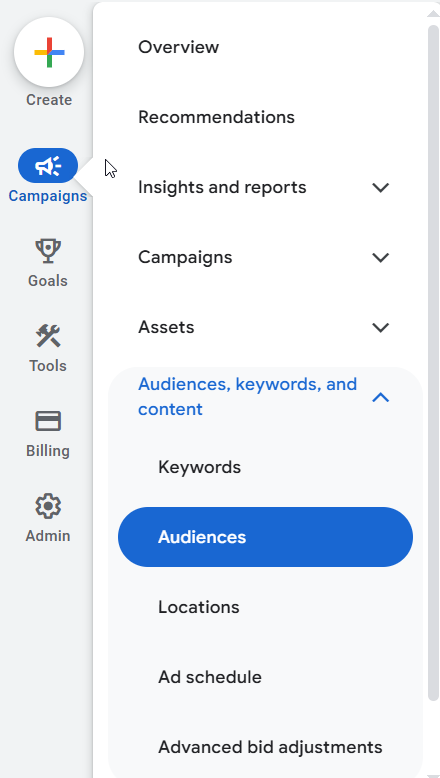
In the Google Ads interface, once you’re in the campaign you’d like to edit, navigate to the Audiences, keywords, and content tab on the left-hand side. Choose Audiences.

Note: You’ll want to decide if your PPC campaigns will have a campaign-wide audience target or ad group-wide audience target.

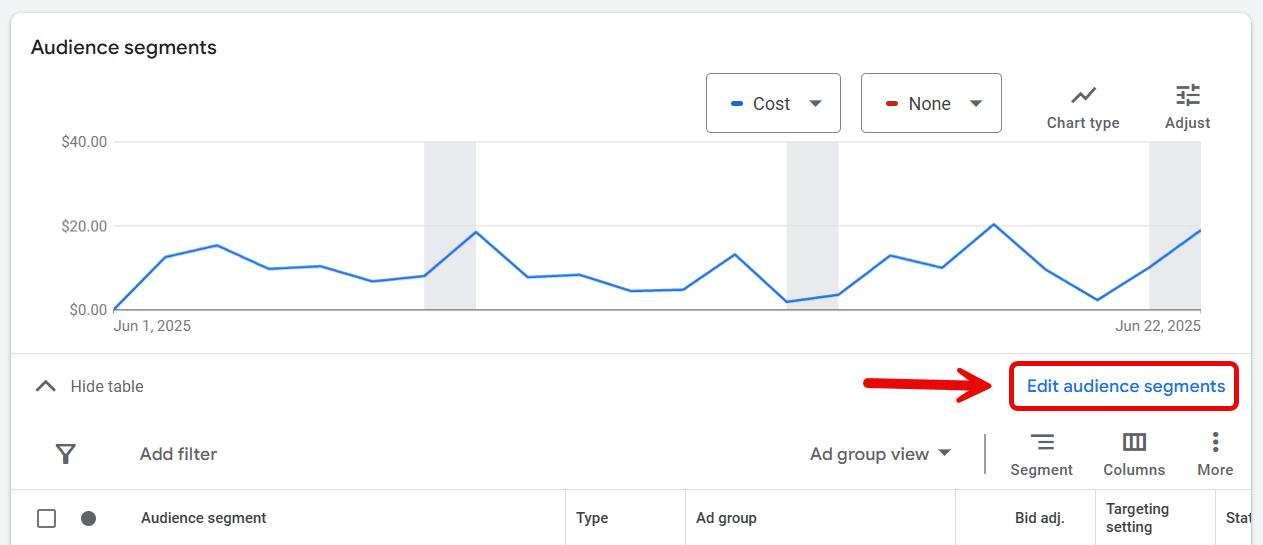
Google Ads audience targeting settingScreenshot from Google Ads by author, June 2025

From there, click on Edit Audience Segments to the right:

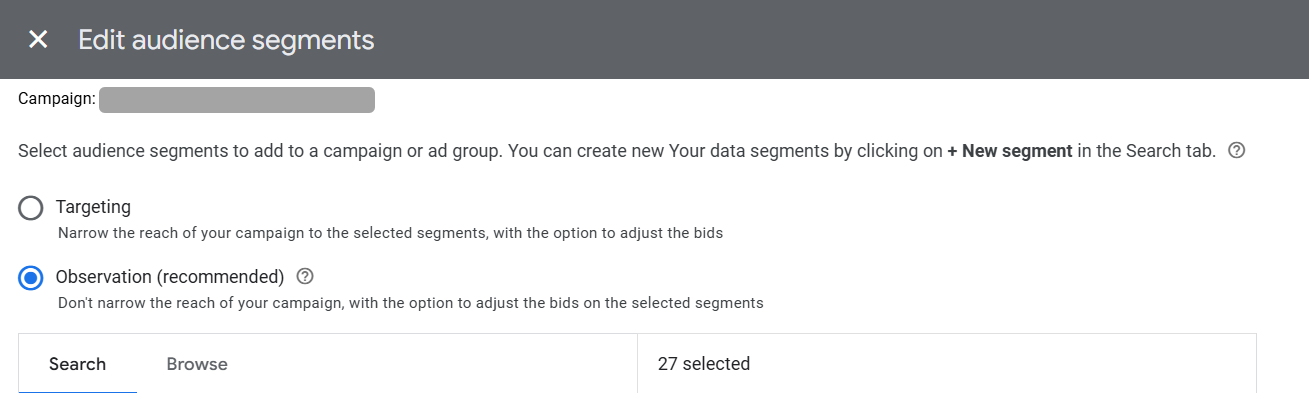
Google Ads audience targeting summaryScreenshot from Google Ads by author, June 2025

At the top, this is where you’ll have the option to choose between Targeting and Observation:

Screenshot from Google Ads by author, June 2025

In this example, I chose to use Observation due to not wanting to narrow the reach on a particular branded search campaign.

Where To Find In Microsoft Ads

Let’s not forget about Microsoft (Bing) Ads. Microsoft has the same feature capability as Google.

In the Microsoft Ads interface, navigate to the Audiences tab on the left-hand side (similar to Google).

From there, click Create Association.

Microsoft audience targeting optionsScreenshot from Microsoft Ads by author, June 2025

Once you’re in, you will scroll down to see the options. Microsoft does use a different language than Google with these features, but it accomplishes the same thing.

Microsoft options are Bid Only (compared to Observation in Google) and Target and Bid (compared to Targeting in Google).

Screenshot from Microsoft Ads by author, June 2025

Once you’ve set your desired target, there is the option to increase or decrease bids on your chosen audience(s).

Performance Examples

Now that you’re familiar with these targeting settings, let’s take a look at real-life examples of how these were implemented.

In the screenshot below, a client had only wanted to target existing customers of a different product for its larger “brand” search campaign.

After a month, results were minimal, so we decided to switch those Customer List audiences to “Observation Only” and see how it affected performance.

The performance after three months was clear: While the Customer List audiences had a higher click-through rate, conversion rate, and lower cost/conversion, we were severely limiting reach.

In the “Other” row, you’ll see that 89% of total conversions came from users not in those Customer List audiences!

In this case, “Observation” was the right setting for this campaign in order to have efficiency and scale reach.

Screenshot taken by author, June 2025

The ‘Optimized Targeting’ Mistake You Don’t Want To Make

If you’re a seasoned PPC marketer, it probably comes as no surprise that Google will sometimes hide automated features it doesn’t want you to find.

One feature in particular that can be difficult to locate is something called “Optimized Targeting.”

This feature is located in Google Display, YouTube, and Demand Gen campaigns (not Search).

Take this remarketing campaign, for example. Before we were able to find this “hidden” feature from Google, you’ll notice a stark difference in performance.

  • The remarketing audience only accounted for 578,000 impressions.
  • The display optimized targeting accounted for over 3 million impressions.
  • While there were some conversions, they came at a significant cost.
Screenshot taken by author, June 2025

In the case of remarketing, this setting should almost always be turned off. Why?

The whole point of remarketing is to re-engage users who are aware of you. If you’ve got specific messaging towards this group of people, you don’t want anyone else to see it.

If you’re building an awareness campaign, you may find this setting more useful. However, always be cautious.

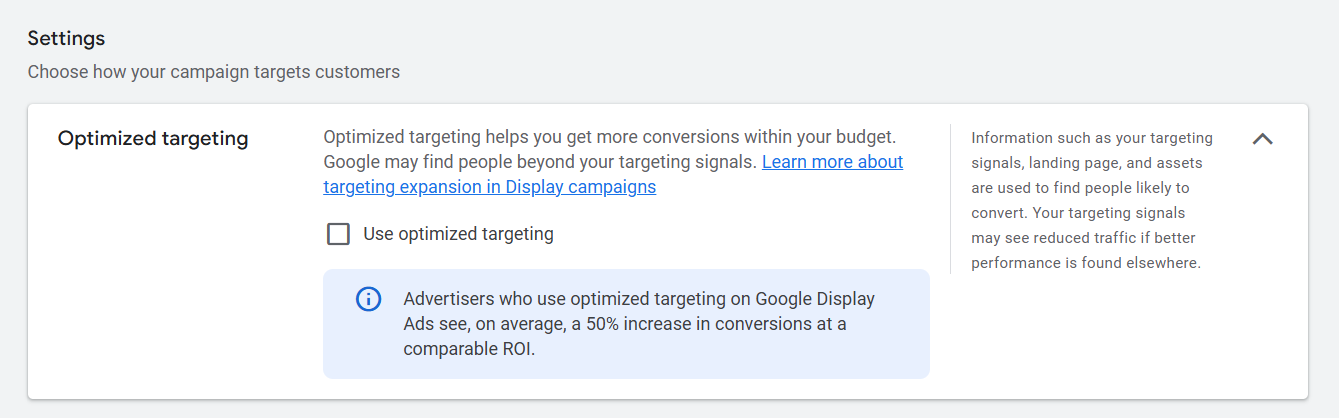
Where To Find And Turn Off The Setting

In a Display campaign, you’ll need to be in the specific ad group. So, if you have multiple ad groups, you’ll need to turn this off for each one.

Navigate to Ad Group Settings > Edit Ad Group Targeting.

Screenshot taken by author, June 2025

From there, you’ll see this box with an option to check the box.

Screenshot taken by author, June 2025

Audience Targeting Isn’t Just A Checkbox

Audience settings are often treated as a set-and-forget decision. But, the choice between targeting and observation has real implications on performance, scale, and optimization.

Take the time to test both approaches. Revisit your audience segments regularly. Don’t assume what worked six months ago still applies. Platforms evolve, so should your targeting strategy.

And if nothing else, make sure you’re intentional. Because this one dropdown setting? It can quietly influence every click, impression, and dollar spent.

More Resources:


Featured Image: Lerbank-bbk22/Shutterstock

https://www.searchenginejournal.com/targeting-observation-ppc/430438/


WooCommerce Customer Review Plugin Vulnerability Affects 80,000+ Sites via @sejournal, @martinibuster

An advisory was issued about a vulnerability in the Customer Reviews for WooCommerce plugin, which is installed on over 80,000 websites. The plugin enables unauthenticated attackers to launch a stored cross-site scripting attack.

Customer Reviews for WooCommerce Vulnerability

The Customer Reviews for WooCommerce plugin enables users to send customers an email reminder to leave a review and also offers other features designed to increase customer engagement with a brand.

Wordfence issued an advisory about a flaw in the plugin that makes it possible for attackers to inject scripts into web pages that execute whenever a user visits the affected page.

The exploit is due to a failure to “sanitize” inputs and “escape” outputs. Sanitizing inputs in this context is a basic WordPress security measure that checks if uploaded data conforms to expected types and removes dangerous content like scripts. Output escaping is another security measure that ensures any special characters produced by the plugin aren’t executable.

According to the official Wordfence advisory:

“The Customer Reviews for WooCommerce plugin for WordPress is vulnerable to Stored Cross-Site Scripting via the ‘author’ parameter in all versions up to, and including, 5.80.2 due to insufficient input sanitization and output escaping. This makes it possible for unauthenticated attackers to inject arbitrary web scripts in pages that will execute whenever a user accesses an injected page.”

Users of the plugin are advised to update to version 5.81.0 or newer version.

Featured Image by Shutterstock/Brilliant Eye

https://www.searchenginejournal.com/woocommerce-customer-review-plugin-vulnerability-affects-80000-sites/552544/


WordPress AI Engine Plugin Vulnerability Affects Up To 100,000 Websites via @sejournal, @martinibuster

A security advisory was issued for the AI Engine WordPress plugin, installed on over 100,000 websites, the fourth one this month. Rated 8.8, this vulnerability enables attackers with only subscriber-level authentication to upload malicious files when the REST API is enabled.

AI Engine Plugin: Fifth Vulnerability In 2025

This is the fourth vulnerability discovered in the AI Engine plugin in July, following the first one of the year discovered in June, making a total of five vulnerabilities discovered in the plugin so far in 2025. There were nine vulnerabilities discovered in 2024, one of which was rated 9.8 because it enabled unauthenticated attackers to upload malicious files, plus another rated 9.1 that also enabled arbitrary uploads.

Authenticated (Subscriber+) Arbitrary File Upload

The latest vulnerability enables authenticated file uploads. What makes this exploit more dangerous is that it requires only subscriber-level authentication for an attacker to take advantage of the security weakness. That isn’t as bad as a vulnerability that doesn’t require authentication, but it’s still rated 8.8 on a scale of 1 to 10.

Wordfence describes the vulnerability as being due to missing file type validation in a function related to the REST API in versions 2.9.3 and 2.9.4.

File type validation is a security measure typically used within WordPress to make sure that the content of a file matches the type of file being uploaded to the website.

According to Wordfence:

“This makes it possible for authenticated attackers, with Subscriber-level access and above, to upload arbitrary files on the affected site’s server when the REST API is enabled, which may make remote code execution possible.”

Users of the AI Engine plugin are recommended updating their plugin to the latest version, 2.9.5, or a newer version.

The plugin changelog for version 2.9.5 shares what was updated:

“Fix: Resolved a security issue related to SSRF by validating URL schemes in audio transcription and sanitizing REST API parameters to prevent API key misuse.

Fix: Corrected a critical security vulnerability that allowed unauthorized file uploads by adding strict file type validation to prevent PHP execution.”

Featured Image by Shutterstock/Jiri Hera

https://www.searchenginejournal.com/wordpress-ai-engine-plugin-vulnerability/552531/


Query Fan-Out Technique in AI Mode: New Details From Google via @sejournal, @MattGSouthern

In a recent interview, Google’s VP of Product for Search, Robby Stein, shared new information about how query fan-out works in AI Mode.

Although the existence of query fan-out has been previously detailed in Google’s blog posts, Stein’s comments expand on its mechanics and offer examples that clarify how it works in practice.

Background On Query Fan-Out Technique

When a person types a question into Google’s AI Mode, the system uses a large language model to interpret the query and then “fan out” multiple related searches.

These searches are issued to Google’s infrastructure and may include topics the user never explicitly mentioned.

Stein said during the interview:

“If you’re asking a question like things to do in Nashville with a group, it may think of a bunch of questions like great restaurants, great bars, things to do if you have kids, and it’ll start Googling basically.”

He described the system as using Google Search as a backend tool, executing multiple queries and combining the results into a single response with links.

This functionality is active in AI Mode, Deep Search, and some AI Overview experiences.

Scale And Scope

Stein said AI-powered search experiences, including query fan-out, now serve approximately 1.5 billion users each month. This includes both text-based and multimodal input.

The underlying data sources include traditional web results as well as real-time systems like Google’s Shopping Graph, which updates 2 billion times per hour.

He referred to Google Search as “the largest AI product in the world.”

Deep Search Behavior

In cases where Google’s systems determine a query requires deeper reasoning, a feature called Deep Search may be triggered.

Deep Search can issue dozens or even hundreds of background queries and may take several minutes to complete.

Stein described using it to research home safes, a purchase he said involved unfamiliar factors like fire resistance ratings and insurance implications.

He explained:

“It spent, I don’t know, like a few minutes looking up information and it gave me this incredible response. Here are how the ratings would work and here are specific safes you can consider and here’s links and reviews to click on to dig deeper.”

AI Mode’s Use Of Internal Tools

Stein mentioned that AI Mode has access to internal Google tools, such as Google Finance and other structured data systems.

For example, a stock comparison query might involve identifying relevant companies, pulling current market data, and generating a chart.

Similar processes apply to shopping, restaurant recommendations, and other query types that rely on real-time information.

Stein stated:

“We’ve integrated most of the real-time information systems that are within Google… So it can make Google Finance calls, for instance, flight data… movie information… There’s 50 billion products in the shopping catalog… updated I think 2 billion times every hour or so. So all that information is able to be used by these models now.”

Technical Similarities To Google’s Patent

Stein described a process similar to a Google patent from December about “thematic search.”

The patent outlines a system that creates sub-queries based on inferred themes, groups results by topic, and generates summaries using a language model. Each theme can link to source pages, but summaries are compiled from multiple documents.

This approach differs from traditional search ranking by organizing content around inferred topics rather than specific keywords. While the patent doesn’t confirm implementation, it closely matches Stein’s description of how AI Mode functions.

Looking Ahead

With Google explaining how AI Mode generates its own searches, the boundaries of what counts as a “query” are starting to blur.

This creates challenges not just for optimization, but for attribution and measurement.

As search behavior becomes more fragmented and AI-driven, marketers may need to focus less on ranking for individual terms and more on being included in the broader context AI pulls from.

Listen to the full interview below:

[embedded content]


Featured Image: Screenshot from youtube.com/@GoogleDevelopers, July 2025. 

https://www.searchenginejournal.com/query-fan-out-technique-in-ai-mode-new-details-from-google/552532/


Microsoft Adds Copilot Mode To Edge With Multi-Tab AI Analysis via @sejournal, @MattGSouthern

Microsoft launches Copilot Mode in Edge, introducing multi-tab AI analysis, voice navigation, and more features in development.

  • Copilot Mode brings AI tools to Microsoft’s Edge browser
  • Available tools include multi-tab content analysis, voice navigation, and a unified search/chat interface.
  • Features in development include task execution, topic-based organization, and a persistent AI assistant.

https://www.searchenginejournal.com/microsoft-adds-copilot-mode-to-edge-with-multi-tab-ai-analysis/552441/


OpenAI Study Mode Brings Guided Learning to ChatGPT via @sejournal, @MattGSouthern

OpenAI has launched a new feature in ChatGPT called Study Mode, offering a step-by-step learning experience designed to guide users through complex topics.

While aimed at students, Study Mode reflects a broader trend in how people use AI tools for information and adapt their search habits.

As more people start using conversational AI tools to seek information, Study Mode could represent the next step of AI-assisted discovery.

A Shift Toward Guided Learning

Activate Study Mode by selecting “Study and learn” from the tools in ChatGPT and ask a question.

Screenshot from: openai.com/index/chatgpt-study-mode/, July 2025.

Instead of giving direct answers, this feature promotes deeper engagement by asking questions, providing hints, and tailoring explanations to meet user needs.

Screenshot from: openai.com/index/chatgpt-study-mode/, July 2025.

Study Mode runs on custom instructions developed with input from teachers and learning experts. The feature incorporates research-based strategies, including:

  • Encouraging people to take part actively
  • Helping manage how much information people can handle
  • Supporting self-awareness and a desire to learn
  • Giving helpful and practical feedback.

Robbie Torney, Senior Director of AI Programs at Common Sense Media, explains:

“Instead of doing the work for them, study mode encourages students to think critically about their learning. Features like these are a positive step toward effective AI use for learning. Even in the AI era, the best learning still happens when students are excited about and actively engaging with the lesson material.”

How It Works

Study Mode adjusts responses based on a user’s skill level and context from prior chats.

Key features include:

  • Interactive Prompts: Socratic questioning and self-reflection prompts promote critical thinking.
  • Scaffolded Responses: Content is broken into manageable segments to maintain clarity.
  • Knowledge Checks: Quizzes and open-ended questions help reinforce understanding.
  • Toggle Functionality: Users can turn Study Mode on or off as needed during a conversation.

Early testers describe it as an on-demand tutor, useful for unpacking dense material or revisiting difficult subjects.

Looking Ahead

Study Mode is now available to logged-in users across Free, Plus, Pro, and Team plans, with ChatGPT Edu support expected in the coming weeks.

OpenAI plans to integrate Study Mode behavior directly into its models after gathering feedback. Future updates may include visual aids, goal tracking, and more personalized support.


Featured Image: Roman Samborskyi/Shutterstock

https://www.searchenginejournal.com/openai-study-mode-brings-guided-learning-to-chatgpt/552423/


Google AI Mode Update: File Uploads, Live Video Search, More via @sejournal, @MattGSouthern

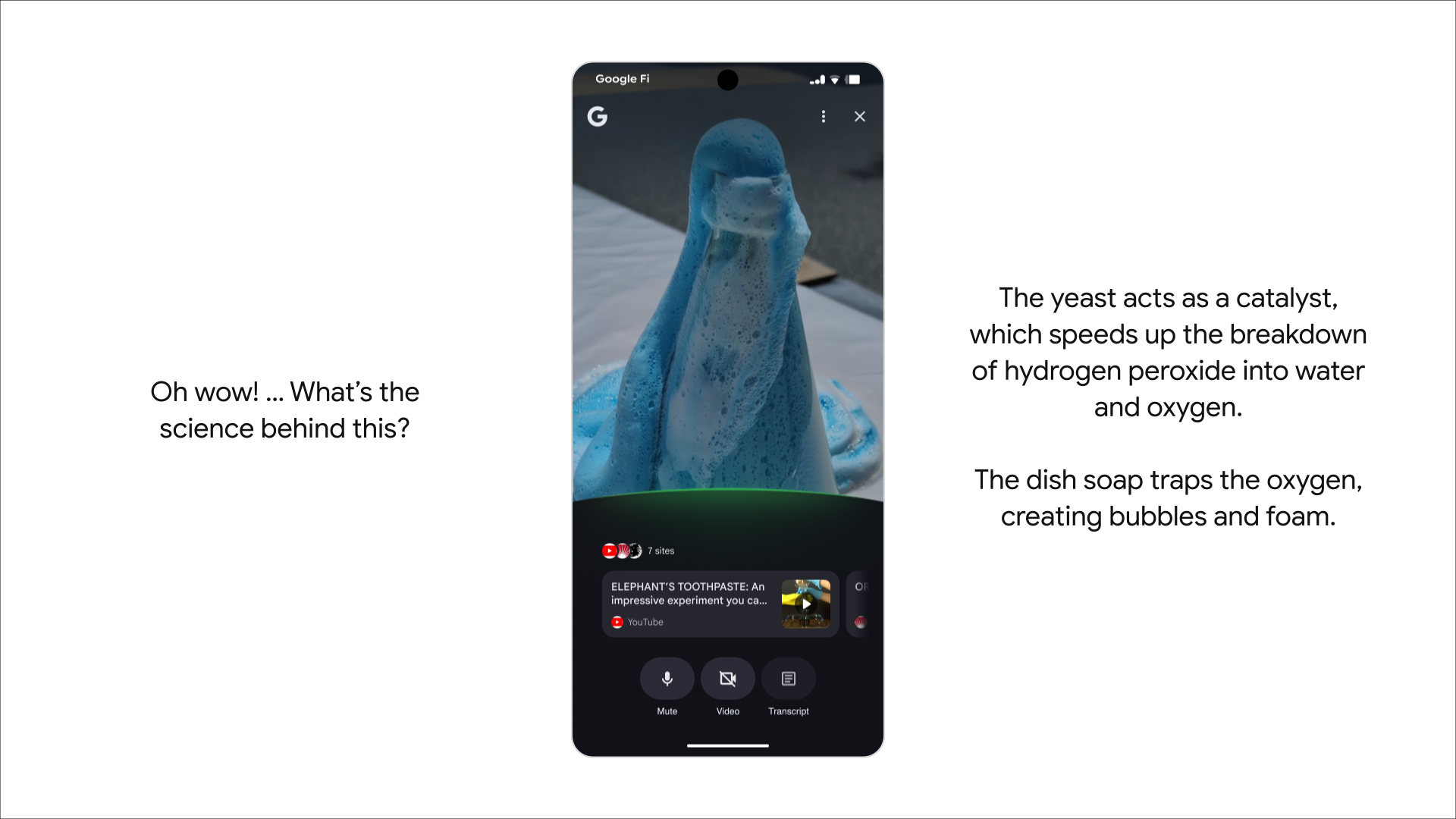
Google is expanding AI Mode in Search with new tools that include PDF uploads, persistent planning documents, and real-time video assistance.

The updates begin rolling out today, with the AI Mode button now appearing on the Google homepage for desktop users.

PDF Uploads Now Supported On Desktop

Desktop users can now upload images directly into search queries, a feature previously available only on mobile.

Support for PDFs is coming in the weeks ahead, allowing you to ask questions about uploaded files and receive AI-generated responses based on both document content and relevant web results.

For example, a student could upload lecture slides and use AI Mode to get help understanding the material. Responses include suggested links for deeper exploration.

Image Credit: Google

Google plans to support additional file types and integrate with Google Drive “in the months ahead.”

Canvas: A Tool For Multi-Session Planning

A new AI Mode feature called Canvas can help you stay organized across multiple search sessions.

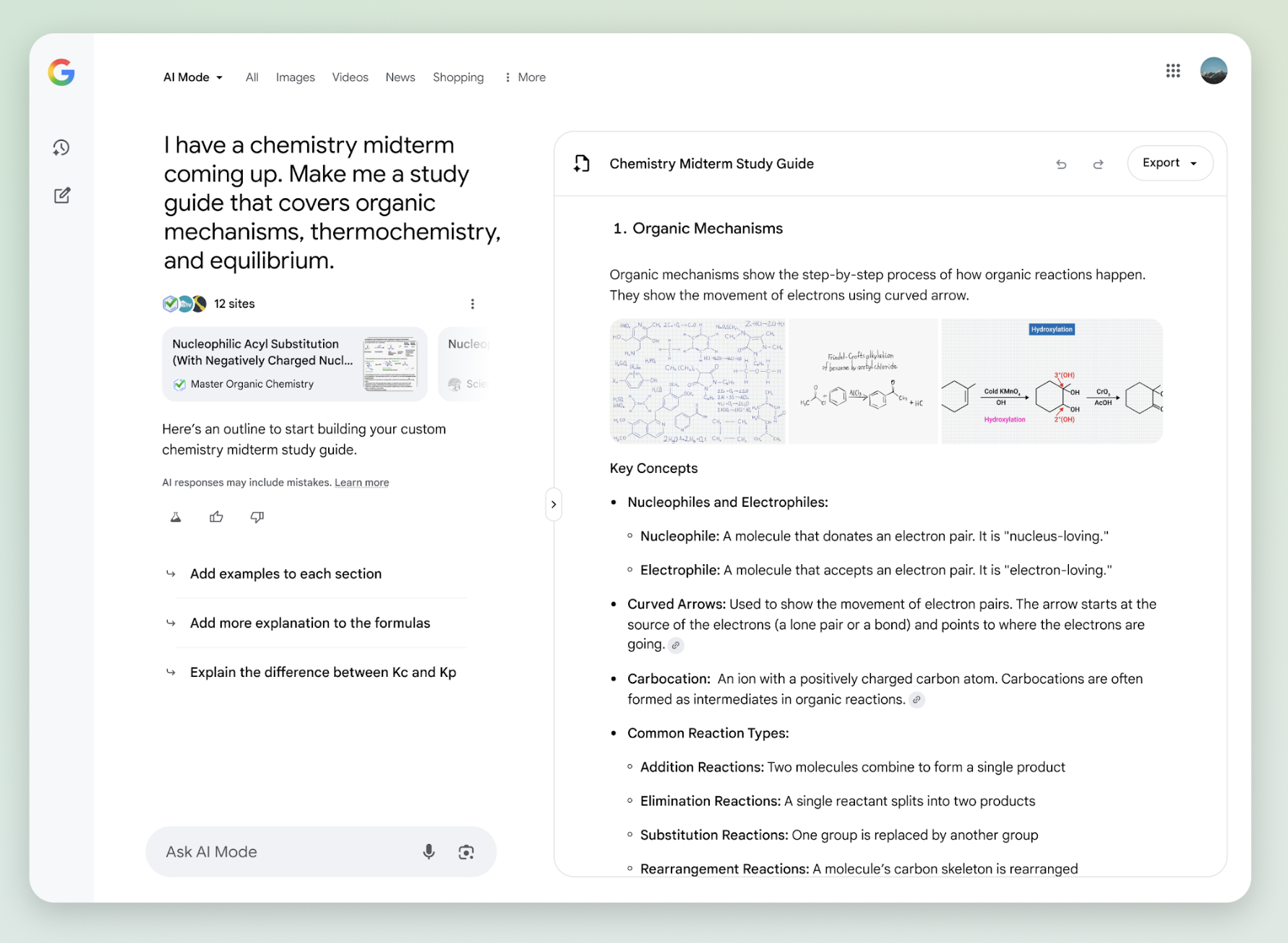
When you ask AI Mode for help with planning or creating something, you’ll see an option to “Create Canvas.” This opens a dynamic side panel that saves and updates as queries evolve.

Use cases include building study guides, travel itineraries, or task checklists.

Image Credit: Google

Canvas is launching for desktop users in the U.S. enrolled in the AI Mode Labs experiment.

Real-Time Assistance With Search Live

Search Live with video input also launches this week on mobile. This allows you to utilize AI Mode while pointing your phone camera at real-world objects or scenes.

The feature builds on Project Astra and is available through Google Lens. Start by tapping the ‘Live’ icon in the Google app, then engage in back-and-forth conversations with AI Mode using live video as visual context.

Image Credit: Google

Chrome Adds Contextual AI Answers

Lens is getting expanded desktop functionality within Chrome. Soon, you’ll see a “Ask Google about this page” option in the address bar.

When selected, it opens a panel where you can highlight parts of a page, like a diagram or snippet of text, and receive an AI Overview.

This update also allows follow-up questions via AI Mode from within the Lens experience, either through a button labeled “Dive deeper” or by selecting AI Mode directly.

Looking Ahead

These updates reflect Google’s vision of search as a multi-modal, interactive experience rather than a one-off text query.

While most of these tools are limited to U.S.-based Labs users for now, they point to a future where AI Mode becomes central to how searchers explore, learn, and plan.

Rollout timelines vary by feature. So keep a close eye on how these capabilities add to the search experience and consider how to adapt your content strategies accordingly.

https://www.searchenginejournal.com/google-ai-mode-update-file-uploads-live-video-search-more/552414/


Why A Site Deindexed By Google For Programmatic SEO Bounced Back via @sejournal, @martinibuster

A company founder shared their experience with programmatic SEO, which they credited for initial success until it was deindexed by Google, calling it a big mistake they won’t repeat. The post, shared on LinkedIn, received scores of supportive comments.

The website didn’t receive a manual action, Google deindexed the web pages due to poor content quality.

Programmatic SEO (pSEO)

Programmatic SEO (aka pSEO) is a phrase that encompasses a wide range of tactics that have automation at the heart of it. Some of it can be very useful, like automating sitewide meta descriptions, titles, and alt text for images.

pSEO is also the practice of using AI automation to scale content creation sitewide, which is what the person did. They created fifty thousand pages targeting long tail phrases, phrases that are not commonly queried. The site initially received hundreds of clicks and millions of impressions but the success was not long-lived.

According to the post by Miquel Palet (LinkedIn Profile):

“Google flagged our domain. Pages started getting deindexed. Traffic plummeted overnight.

We learned the hard way that shortcuts don’t scale sustainably.

It was a huge mistake, but also a great lesson.

And it’s one of the reasons we rebranded to Tailride.”

Thin AI Content Was The Culprit

A follow-up post explained that they believe the AI generated content backfired was because it was thin content, which makes sense. Thin content, regardless of how it was authored, can be problematic.

One of the posts by Palet explained:

“We’re not sure, but probably not because AI. It was thin content and probably duplicated.”

Rasmus Sørensen (LinkedIn profile), an experienced digital marketer shared his opinion that he’s seen some marketers pushing shady practices under the banner of pSEO:

“Thanks for sharing and putting some real live experiences forward. Programmatic SEO had been touted as the next best thing in SEO. It’s not and I’ve seen soo much garbage published the last few months and agencies claiming that their pSEO is the silver bullet.
It very rarely is.”

Joe Youngblood (LinkedIn profile) shared that SEO trends can be abused and implied that it is a viable strategy if done correctly:

“I would always do something like pSEO under the supervision of a seasoned SEO consultant. This tale happens all too frequently with an SEO trend…”

What They Did To Fix The site

The company founder shared that they rebranded the website to a new domain, redirecting the old domain to the new one, and focused their site on higher quality content that’s relevant to users.

They explained:

“Less pages + more quality”

A site: search for their domain shows that Google is now indexing their content, indicating that they are back on track.

Takeaways

Programmatic SEO can be useful if approached with an understanding of where the line is between good quality and “not-quality” content.

Featured Image by Shutterstock/Cast Of Thousands

https://www.searchenginejournal.com/why-website-deindexed-by-google-for-programmatic-seo-bounced-back/552179/


Why Is SureRank WordPress SEO Plugin So Popular? via @sejournal, @martinibuster

A new SEO plugin called SureRank, by Brainstorm Force, makers of the popular Astra theme, is rapidly growing in popularity. In beta for a few months, it was announced in July and has amassed over twenty thousand installations. That’s a pretty good start for an SEO plugin that has only been out of beta for a few weeks.

One possible reason that SureRank is quickly becoming popular is that it’s created by a trusted brand, much loved for its Astra WordPress theme.

SureRank By Brainstorm Force

SureRank is the creation of the publishers of many highly popular plugins and themes installed in many millions of websites, such as Astra theme, Ultimate Addons for Elementor, Spectra Gutenberg Blocks – Website Builder for the Block Editor, and Starter Templates – AI-Powered Templates for Elementor & Gutenberg, to name a few.

Why Another SEO Plugin?

The goal of SureRank is to provide an easy-to-use SEO solution that includes only the necessary features every site needs in order to avoid feature bloat. It positions itself as an SEO assistant that guides the user with an intuitive user interface.

What Does SureRank Do?

SureRank has an onboarding process that walks a user through the initial optimizations and setup. It then performs an analysis and offers suggestions for site-level improvements.

It currently enables users to handle the basics like:

  • Edit titles and meta descriptions
  • Custom write social media titles, descriptions, and featured images,
  • Tweak home page and, archive page meta data
  • Meta robot directives, canonicals, and sitemaps
  • Schema structured data
  • Site and page level SEO analysis
  • Automatic image alt text generation
  • Google Search Console integration
  • WooCommerce integration

SureRank also provides a built-in tool for migrating settings from other popular SEO plugins like Rank Math, Yoast, and AIOSEO.

Check out the SureRank SEO plugin at the official WordPress.org repository:

SureRank – SEO Assistant with Meta Tags, Social Preview, XML Sitemap, and Schema

Featured Image by Shutterstock/Roman Samborskyi

https://www.searchenginejournal.com/surerank-seo-plugin/552172/