Cloudflare Sparks SEO Debate With New AI Crawler Payment System via @sejournal, @MattGSouthern

Cloudflare’s new “pay per crawl” initiative has sparked a debate among SEO professionals and digital marketers.

The company has introduced a default AI crawler-blocking system alongside new monetization options for publishers.

This enables publishers to charge AI companies for access, which could impact how web content is consumed and valued in the age of generative search.

Cloudflare’s New Default: Block AI Crawlers

The system, now in private beta, blocks known AI crawlers by default for new Cloudflare domains.

Publishers can choose one of three access settings for each crawler:

  1. Allow – Grant unrestricted access
  2. Charge – Require payment at the configured, domain-wide price
  3. Block – Deny access entirely

      Crawlers that attempt to access blocked content will receive a 402 Payment Required response. Publishers set a flat, sitewide price per request, and Cloudflare handles billing and revenue distribution.

      Cloudflare wrote:

      “Imagine asking your favorite deep research program to help you synthesize the latest cancer research or a legal brief, or just help you find the best restaurant in Soho — and then giving that agent a budget to spend to acquire the best and most relevant content.

      Technical Details & Publisher Adoption

      The system integrates directly with Cloudflare’s bot management tools and works alongside existing WAF rules and robots.txt files. Authentication is handled using Ed25519 key pairs and HTTP message signatures to prevent spoofing.

      Cloudflare says early adopters include major publishers like Condé Nast, Time, The Atlantic, AP, BuzzFeed, Reddit, Pinterest, Quora, and others.

      While the current setup supports only flat pricing, the company plans to explore dynamic and granular pricing models in future iterations.

      SEO Community Shares Concerns

      While Cloudflare’s new controls can be changed manually, several SEO experts are concerned about the impact of making the system opt-out rather than opt-in.

      “This won’t end well,” wrote Duane Forrester, Vice President of Industry Insights at Yext, warning that businesses may struggle to appear in AI-powered answers without realizing crawler access is being blocked unless a fee is paid.

      Lily Ray, Vice President of SEO Strategy and Research at Amsive Digital, noted the change is likely to spark urgent conversations with clients, especially those unaware that their sites might now be invisible to AI crawlers by default.

      Ryan Jones, Senior Vice President of SEO at Razorfish, expressed that most of his client sites actually want AI crawlers to access their content for visibility reasons.

      Some Say It’s a Necessary Reset

      Some in the community welcome the move as a long-overdue rebalancing of content economics.

      “A force is needed to tilt the balance back to where it once was,” said Pedro Dias, Technical SEO Consultant and former member of Google’s Search Quality team. He suggests that the current dynamic favors AI companies at the expense of publishers.

      Ilya Grigorik, Distinguished Engineer and Technical Advisor at Shopify, praised the use of cryptographic authentication, saying it’s “much needed” given how difficult it is to distinguish between legitimate and malicious bots.

      Under the new system, crawlers must authenticate using public key cryptography and declare payment intent via custom HTTP headers.

      Managing Crawler Access: What You Can Do

      As Cloudflare’s new default settings take effect, there’s concern around losing visibility in AI search tools. But you have options to regain control.

      AI traffic may decline sharply if your domain blocks AI bots without you realizing it.

      Himanshu Sharma, digital analytics consultant and founder of OptimizeSmart, warned on X:

      “Expect a sharp decline in AI traffic reported by GA4 as Cloudflare blocks almost all known AI crawlers/bots from scraping your website content by default.”

      Sharma advised site owners to proactively review their Cloudflare settings:

      • Navigate to your Cloudflare dashboard
      • Go to Security > Bots
      • Find the “Block AI Training Bots” setting
      • Use the dropdown to change it from the default “Block all pages” to “Do not block (off)” if you want to allow AI crawlers

      This option allows you to decide whether you want to maintain visibility on AI-driven platforms or limit the use of content for training and responses.

      Looking Ahead

      Cloudflare’s pay-per-crawl system formalizes a new layer of negotiation over who gets to access web content, and at what cost.

      For SEO pros, this adds complexity: visibility may now depend not just on ranking, but on crawler access settings, payment policies, and bot authentication.

      While some see this as empowering publishers, others warn it could fragment the open web, where content access varies based on infrastructure and paywalls.

      If generative AI becomes a core part of how people search, and the pipes feeding that AI are now toll roads, websites will need to manage visibility across a growing patchwork of systems, policies, and financial models.


      Featured Image: Roman Samborskyi/Shutterstock

      https://www.searchenginejournal.com/cloudflare-sparks-seo-debate-with-new-ai-crawler-payment-system/550328/


      YouTube Adds New Viewer Metrics To Track Audience Loyalty via @sejournal, @MattGSouthern

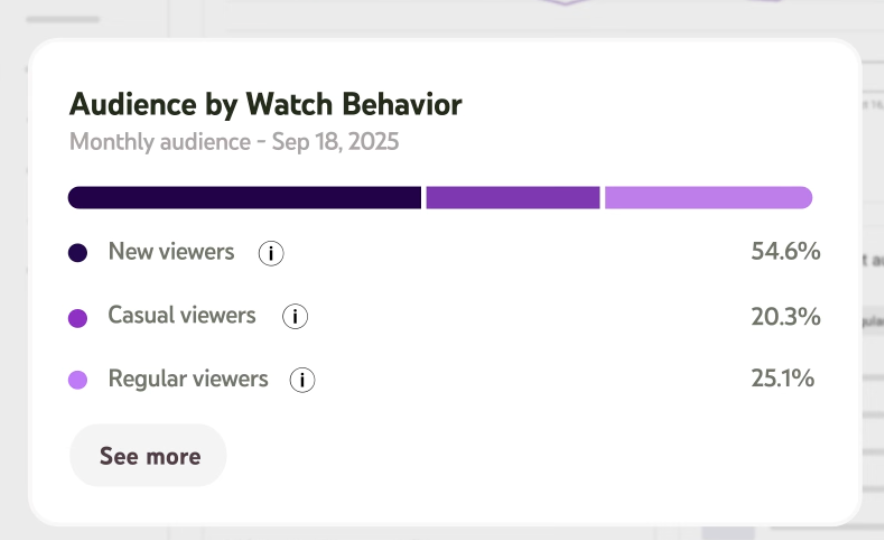
      YouTube is rolling out a new audience analytics feature that replaces the “returning viewers” metric with more detailed viewer categories.

      The update introduces three viewer types: new, casual, and regular. This is designed to help creators better understand who’s engaging with their content and how often.

      Breaking Down The New Viewer Categories

      YouTube now segments viewers into:

      • New viewers: People watching your content for the first time within the selected time period.
      • Casual viewers: Those who’ve watched between one and five months out of the past year.
      • Regular viewers: Viewers who have returned consistently for six or more months over the past 12 months.
      Screenshot from: YouTube.com/CreatorInsider, July 2025.

      In an announcment, YouTube clarifies:

      “These new categories provide a more nuanced understanding of viewer engagement and are not a direct equivalent of the previous returning viewers metric.”

      There are no changes to the definition of new viewers. The new segmentation applies across all video formats, including Shorts, VOD, and livestreams.

      What This Means

      The switch to more granular segmentation addresses a long-standing limitation in YouTube’s analytics.

      Previously, creators could only distinguish between new and returning viewers. That was a binary distinction that didn’t capture the full range of audience engagement.

      Now, with casual and regular viewer categories, creators can identify which viewers are sporadically engaged versus those who form a loyal base.

      YouTube cautioned that many channels may see a smaller percentage of regular viewers than expected, stating:

      “Regular viewers is a high bar to reach as it signifies viewers who have consistently returned to watch your content for 6 months or more in the past year.”

      Strategies For Building A Loyal Audience

      YouTube suggests that maintaining a strong base of regular viewers requires consistent publishing and community engagement.

      The platform recommends the following tactics:

      • Use community posts to stay visible between uploads
      • Respond to viewer comments
      • Host live premieres and join live chats
      • Maintain brand consistency across videos

      These strategies reflect broader trends in the creator economy, where sustained engagement is becoming more valuable than viral reach.

      Looking Ahead

      The new segmentation is now rolling out globally on both desktop and mobile, with availability expanding to all creators in the coming weeks.

      For marketers and brands, the added granularity offers a clearer picture of a creator’s influence and audience loyalty.

      As YouTube continues refining its analytics tools, the emphasis is shifting from raw numbers to actionable insights that help creators grow sustainable channels.


      Featured Image: Roman Samborskyi/Shutterstock

      https://www.searchenginejournal.com/youtube-adds-new-viewer-metrics-to-track-audience-loyalty/550289/


      Is Your Conversion Data Misleading You? 7 Common Google Ads Tracking Issues

      Conversion tracking tends to be one of those things advertisers set up once and then forget about, until something fails – big time.

      But in my 16 years of experience running Google Ads, I can confidently say it’s the single most important factor affecting PPC results. Way before campaign failure, when results first start lagging, faulty conversions are almost always to blame.

      So, whether you want to improve performance, or save a campaign that’s heading towards collapse, the starting point should be the same. Check your conversion data.

      Conversion data will only be useful for you if it’s accurate. Serious missteps can happen if you rely on Google Ads to optimize performance when it has misleading or incomplete conversion tracking.

      If your numbers are wrong, you’ll end up scaling the wrong campaigns, pausing the ones generating a positive return, or having a wrong idea of return on ad spend (ROAS) altogether – and this happens more often than you think.

      Here are seven of the most common causes of inaccurate or inconsistent conversion data in Google Ads, and what you can do to fix each one.

      1. Conversion Tracking Isn’t Set Up Properly

      Conversion tracking is often missing, duplicated, or firing in the wrong place. This is still one of the most common issues, and it can be the most damaging.

      For example, you may track a thank-you page where users refresh the screen three times. Your backend will have one sale, but in Google Ads, you’ll see three.

      Using reports like Repeat Rate is a great way to catch that error and ensure you fix it sooner rather than later.

      When tracking is unreliable, it’s impossible to optimize performance accurately. Campaign decisions are made on incomplete signals, and smart bidding models won’t have the data they need to learn effectively.

      Start by ensuring your conversion actions in Google Ads are appropriately defined.

      Use Google Tag Manager to centralize tracking across pages and platforms, and confirm accurate tag firing using Google’s Tag Assistant or built-in diagnostics.

      2. Tracking Low-Value Or Secondary Conversions

      Not all user actions are created equal – at least not when it comes to Google Ads optimization.

      Metrics like scroll depth, time on site, or video engagement can be helpful, but they shouldn’t be treated as primary conversion events in your ad account.

      These types of interactions are better as supporting metrics (secondary conversions). They can offer insights into how users engage with your landing page or website.

      This type of information is valuable, but it does not belong to the core set of conversion actions used to drive bidding decisions in Google Ads.

      When Google optimizes towards actions that don’t directly tie to revenue or qualified leads, you risk directing your budget towards activities that look great on a dashboard but don’t move the needle in your business.

      Instead, focus on tracking high-intent actions in your Google Ads account, like purchases, form submissions, or phone calls, and use the supporting metrics to help improve the user experience.

      3. Data Doesn’t Match Between Google Ads And GA4

      Discrepancies between platforms are expected, but that doesn’t mean they should be ignored. It’s common to see Google Ads report one number and Google Analytics 4 report another for the same conversion event.

      The root cause typically comes down to attribution model differences, reporting windows, or inconsistent event definitions.

      To reduce confusion, first ensure your Google Ads and GA4 accounts are correctly linked. Then, audit the attribution models in both platforms and understand how each system defines and credits conversions.

      GA4 uses data-driven attribution by default, whereas Google Ads may still be using last-click or another model (but now defaults to data-driven models for most accounts). Align conversion settings as much as possible to maintain consistency in your reporting.

      4. GCLID Is Missing Or Broken

      Google Ads can’t attribute conversions to a specific click if the GCLID isn’t passed through correctly, which will cause in-platform results to be lower.

      This issue tends to result from redirects, link shorteners, or forms that strip URL parameters.

      Fixing it starts with enabling auto-tagging in your account. Then, confirm that the GCLID is retained throughout the user journey, especially when forms span multiple pages or involve third-party integrations.

      Customer relationship management (CRM) systems and custom landing pages are often the culprits, so work with your developers to make sure GCLID values persist and aren’t overwritten.

      5. Privacy Settings And Consent Mode Are Blocking Data

      Unfortunately, privacy compliance has introduced new gaps in attribution. If a user declines consent, Google’s tags may not fire, leaving conversions untracked.

      This is particularly relevant in regions governed by GDPR, like the EU, and similar regulations.

      Consent Mode helps to bridge the gap. It adjusts how tags behave based on user permissions, allowing for some modeled data even without full cookie acceptance, making it a great solution.

      Pair that with first-party data strategies and server-side tagging where appropriate.

      Note, modeled conversions may take time to appear and don’t fully restore lost data, especially for smaller datasets or stricter consent regimes. But, it will help fill in the blanks responsibly.

      6. Offline Conversions Are Delayed Or Missing

      Offline conversions – like phone sales or in-store transactions – can be imported into Google Ads.

      But if you’re inconsistent with your upload process or if it lacks the proper identifiers, those conversions won’t map to the original ad click.

      Set up a schedule to upload offline conversions regularly, ideally on a daily or weekly basis. Include GCLID information and a timestamp with each entry to preserve click-level attribution.

      Once the data is uploaded, monitor for errors inside the Google Ads interface. Minor mismatches in format or missing fields can stop conversions from registering entirely.

      7. Tagging Conflicts Or Technical Errors

      Even when tracking is conceptually correct, technical issues can block it from functioning.

      Conflicting scripts, outdated plugins, or misplaced tags can all prevent conversion events from firing properly. These problems often go undetected until someone audits the data or sees a sudden drop in conversions.

      Use Tag Assistant or Google Tag Manager’s Preview Mode to audit your implementation regularly.

      Avoid conditional loading unless absolutely necessary, and coordinate with developers when other platforms – like Meta, HubSpot, or Salesforce – are active on the same pages.

      Final Thoughts

      Conversion tracking doesn’t exist in a vacuum, and it’s your job to make sure it plays well with the rest of your stack.

      Incomplete conversion data is a strategic liability. Feeding Google Ads AI the right signals can mean the difference between PPC growth and stagnation.

      By consistently auditing your setup and addressing these common issues, you’ll build cleaner data, glean better insights, and track your way to better performance.

      More Resources:


      Featured Image: TetianaKtv/Shutetrstock

      https://www.searchenginejournal.com/is-your-conversion-data-misleading-common-google-ads-tracking-issues/548098/


      New Google AI Mode: Everything You Need To Know & What To Do Next via @sejournal, @lorenbaker

      Is your SEO strategy ready for Google’s new AI Mode?

      Is your 2025 SERP strategy in danger?

      What’s changed between traditional search mode and AI mode? 

      Will Google’s New AI Mode Hurt Your Traffic?

      Watch our webinar on-demand as we explored early implications for click-through rates, organic visibility, and content performance so you can:

      • Spot AIO SERP triggers: Identify search types most likely to spark AI Overviews.
      • Analyze impact: Find out which industries are being hit hardest.
      • Audit AIO brand mentions: See which domains are dominating AI-generated answers.
      • Optimize visibility: Update your SEO strategy to stay competitive.
      • Accurately track AI traffic: Measure shifts in click-through rates, visibility, and content performance.

      In this actionable session, Nick Gallagher, SEO Lead at Conductor, gave actionable SEO guidance in this new era of search engine results page (SERPs). 

      Get recommendations for optimizing content to stay competitive as AI-generated answers grow in prominence.

      Google’s New AI Mode: Learn To Analyze, Adapt & Optimize

      Don’t wait for the SERPs to leave you behind.

      Watch on-demand to uncover if AI Mode will hurt your traffic, and what to do about it.

      View the slides below or check out the full webinar for all the details

      Join Us For Our Next Webinar!

      The Data Reveals: What It Takes To Win In AI Search

      Register now to learn how to stay away from modern SEO strategies that don’t work.

      https://www.searchenginejournal.com/is-google-about-to-bury-your-website-recap/548146/


      LLM Visibility Tools: Do SEOs Agree On How To Use Them? via @sejournal, @martinibuster

      A discussion on LinkedIn about LLM visibility and the tools for tracking it explored how SEOs are approaching optimization for LLM-based search. The answers provided suggest that tools for LLM-focused SEO are gaining maturity, though there is some disagreement about what exactly should be tracked.

      Joe Hall (LinkedIn profile) raised a series of questions on LinkedIn about the usefulness of tools that track LLM visibility. He didn’t explicitly say that the tools lacked utility, but his questions appeared intended to open a conversation

      He wrote:

      “I don’t understand how these systems that claim to track LLM visibility work. LLM responses are highly subjective to context. They are not static like traditional SERPs are. Even if you could track them, how can you reasonably connect performance to business objectives? How can you do forecasting, or even build a strategy with that data? I understand the value of it from a superficial level, but it doesn’t really seem good for anything other than selling a service to consultants that don’t really know what they are doing.”

      Joshua Levenson (LinkedIn profile) else answered saying that today’s SEO tools are out of date, remarking:

      “People are using the old paradigm to measure a new tech.”

      Joe Hall responded with “Bingo!”

      LLM SEO: “Not As Easy As Add This Keyword”

      Lily Ray (LinkedIn profile) responded to say that the entities that LLMs fall back on are a key element to focus on.

      She explained:

      “If you ask an LLM the same question thousands of times per day, you’ll be able to average the entities it mentions in its responses. And then repeat that every day. It’s not perfect but it’s something.”

      Hall asked her how that’s helpful to clients and Lily answered:

      “Well, there are plenty of actionable recommendations that can be gleaned from the data. But that’s obviously the hard part. It’s not as easy as “add this keyword to your title tag.”

      Tools For LLM SEO

      Dixon Jones (LinkedIn profile) responded with a brief comment to introduce Waikay, which stands for What AI Knows About You. He said that his tool uses entity and topic extraction, and bases its recommendations and actions on gap analysis.

      Ryan Jones (LinkedIn profile) responded to discuss how his product SERPRecon works:

      “There’s 2 ways to do it. one – the way I’m doing it on SERPrecon is to use the APIs to monitor responses to the queries and then like LIly said, extract the entities, topics, etc from it. this is the cheaper/easier way but is easiest to focus on what you care about. The focus isn’t on the exact wording but the topics and themes it keeps mentioning – so you can go optimize for those.

      The other way is to monitor ISP data and see how many real user queries you actually showed up for. This is super expensive.

      Any other method doesn’t make much sense.”

      And in another post followed up with more information:

      “AI doesn’t tell you how it fanned out or what other queries it did. people keep finding clever ways in the network tab of chrome to see it, but they keep changing it just as fast.

      The AI Overview tool in my tool tries to reverse engineer them using the same logic/math as their patents, but it can never be 100%.”

      Then he explained how it helps clients:

      “It helps us in the context of, if I enter 25 queries I want to see who IS showing up there, and what topics they’re mentioning so that I can try to make sure I’m showing up there if I’m not. That’s about it. The people measuring sentiment of the AI responses annoy the hell out of me.”

      Ten Blue Links Were Never Static

      Although Hall stated that the “traditional” search results were static, in contrast to LLM-based search results, it must be pointed out that the old search results were in a constant state of change, especially after the Hummingbird update which enabled Google to add fresh search results when the query required it or when new or updated web pages were introduced to the web. Also, the traditional search results tended to have more than one intent, often as many as three, resulting in fluctuations in what’s ranking.

      LLMs also show diversity in their search results but, in the case of AI Overviews, Google shows a few results that for the query and then does the “fan-out” thing to anticipate follow-up questions that naturally follow as part of discovering a topic.

      Billy Peery (LinkedIn profile) offered an interesting insight into LLM search results, suggesting that the output exhibits a degree of stability and isn’t as volatile as commonly believed.

      He offered this truly interesting insight:

      “I guess I disagree with the idea that the SERPs were ever static.

      With LLMs, we’re able to better understand which sources they’re pulling from to answer questions. So, even if the specific words change, the model’s likelihood of pulling from sources and mentioning brands is significantly more static.

      I think the people who are saying that LLMs are too volatile for optimization are too focused on the exact wording, as opposed to the sources and brand mentions.”

      Peery makes an excellent point by noting that some SEOs may be getting hung up on the exact keyword matching (“exact wording”) and that perhaps the more important thing to focus on is whether the LLM is linking to and mentioning specific websites and brands.

      Takeaway

      Awareness of LLM tools for tracking visibility is growing. Marketers are reaching some agreement on what should be tracked and how it benefits clients. While some question the strategic value of these tools, others use them to identify which brands and themes are mentioned, adding that data to their SEO mix.

      Featured Image by Shutterstock/TierneyMJ

      https://www.searchenginejournal.com/llm-visibility-tools-do-seos-agree-on-how-to-use-them/550267/


      Study: Google AI Mode Shows 91% URL Change Across Repeat Searches via @sejournal, @MattGSouthern

      A new study analyzing 10,000 keywords reveals that Google’s AI Mode delivers inconsistent results.

      The research also shows minimal overlap between AI Mode sources and traditional organic search rankings.

      Published by SE Ranking, the study examines how AI Mode performs in comparison to Google’s AI Overviews and the top 10 organic search results.

      “The average overlap of exact URLs between the three datasets was just 9.2%,” the study notes, illustrating the volatility.

      Highlights From The Study

      AI Mode Frequently Pulls Different Results

      To test consistency, researchers ran the same 10,000 keywords through AI Mode three times on the same day. The results varied most of the time.

      In 21.2% of cases, there were no overlapping URLs at all between the three sets of responses.

      Domain-level consistency was slightly higher, at 14.7%, indicating AI Mode may cite different pages from the same websites.

      Minimal Overlap With Organic Results

      Only 14% of URLs in AI Mode responses matched the top 10 organic search results for the same queries. When looking at domain-level matches, overlap increased to 21.9%.

      In 17.9% of queries, AI Mode provided zero overlap with organic URLs, suggesting its selections could be independent of Google’s ranking algorithms.

      Most Links Come From Trusted Domains

      On average, each AI Mode response contains 12.6 citations.

      The most common format is block links (90.8%), followed by in-text links (8.9%) and AIM SERP-style links (0.3%), which resemble traditional search engine results pages (SERPs).

      Despite the volatility, some domains consistently appeared across all tests. The top-cited sites were:

      1. Indeed (1.8%)
      2. Wikipedia (1.6%)
      3. Reddit (1.5%)
      4. YouTube (1.4%)
      5. NerdWallet (1.2%)

      Google properties were cited most frequently, accounting for 5.7% of all links. These were mostly Google Maps business profiles.

      Differences From AI Overviews

      Comparing AI Mode to AI Overviews, researchers found an average URL overlap of just 10.7%, with domain overlap at 16%.

      This suggests the two systems operate under different logic despite both being AI-driven.

      What This Means For Search Marketers

      The high volatility of AI Mode results presents new challenges and new opportunities.

      Because results can vary even for identical queries, tracking visibility is more complex.

      However, this fluidity also creates more openings for exposure. Unlike traditional search results, where a small set of top-ranking pages often dominate, AI Mode appears to refresh its citations frequently.

      That means publishers with relevant, high-quality content may have a better chance of appearing in AI Mode answers, even if they’re not in the organic top 10.

      To adapt to this environment, SEOs and content creators should consider:

      • Prioritizing domain-wide authority and topical relevance
      • Diversifying content across trusted platforms
      • Optimizing local presence through tools like Google Maps
      • Monitoring evolving inclusion patterns as AI Mode develops

      For more, see the full study from SE Ranking.


      Featured Image: Roman Samborskyi/Shutterstock

      https://www.searchenginejournal.com/study-google-ai-mode-returns-largely-different-results-across-sessions/550249/


      Google’s John Mueller: Core Updates Build On Long-Term Data via @sejournal, @MattGSouthern

      Google Search Advocate John Mueller says core updates rely on longer-term patterns rather than recent site changes or link spam attacks.

      The comment was made during a public discussion on Bluesky, where SEO professionals debated whether a recent wave of spammy backlinks could impact rankings during a core update.

      Mueller’s comment offers timely clarification as Google rolls out its June core update.

      Core Updates Aren’t Influenced By Recent Links

      Asked directly whether recent link spam would be factored into core update evaluations, Mueller said:

      “Off-hand, I can’t think of how these links would play a role with the core updates. It’s possible there’s some interaction that I’m not aware of, but it seems really unlikely to me.

      Also, core updates generally build on longer-term data, so something really recent wouldn’t play a role.”

      For those concerned about negative SEO tactics, Mueller’s statement suggests recent spam links are unlikely to affect how Google evaluates a site during a core update.

      Link Spam & Visibility Concerns

      The conversation began with SEO consultant Martin McGarry, who shared traffic data suggesting spam attacks were impacting sites targeting high-value keywords.

      In a post linking to a recent SEJ article, McGarry wrote:

      “This is traffic up in a high value keyword and the blue line is spammers attacking it… as you can see traffic disappears as clear as day.”

      Mark Williams-Cook responded by referencing earlier commentary from a Google representative at the SEOFOMO event, where it was suggested that in most cases, links were not the root cause of visibility loss, even when the timing seemed suspicious.

      This aligns with a broader theme in recent SEO discussions: it’s often difficult to prove that link-based attacks are directly responsible for ranking drops, especially during major algorithm updates.

      Google’s Position On The Disavow Tool

      As the discussion turned to mitigation strategies, Mueller reminded the community that Google’s disavow tool remains available, though it’s not always necessary.

      Mueller said:

      “You can also use the domain: directive in the disavow file to cover a whole TLD, if you’re +/- certain that there are no good links for your site there.”

      He added that the tool is often misunderstood or overused:

      “It’s a tool that does what it says; almost nobody needs it, but if you think your case is exceptional, feel free.

      Pushing it as a service to everyone says a bit about the SEO though.”

      That final remark drew pushback from McGarry, who clarified that he doesn’t sell cleanup services and only uses the disavow tool in carefully reviewed edge cases.

      Community Calls For More Transparency

      Alan Bleiweiss joined the conversation by calling for Google to share more data about how many domains are already ignored algorithmically:

      “That would be the best way to put site owners at ease, I think. There’s a psychology to all this cat & mouse wording without backing it up with data.”

      His comment reflects a broader sentiment. Many professionals still feel in the dark about how Google handles potentially manipulative or low-quality links at scale.

      What This Means

      Mueller’s comments offer guidance for anyone evaluating ranking changes during a core update:

      • Recent link spam is unlikely to influence a core update.
      • Core updates are based on long-term patterns, not short-term changes.
      • The disavow tool is still available but rarely needed in most cases.
      • Google’s systems may already discount low-quality links automatically.

      If your site has seen changes in visibility since the start of the June core update, these insights suggest looking beyond recent link activity. Instead, focus on broader, long-term signals, such as content quality, site structure, and overall trust.

      https://www.searchenginejournal.com/googles-john-mueller-core-updates-build-on-long-term-data/550241/


      Keywords Are Dead, But The Keyword Universe Isn’t via @sejournal, @Kevin_Indig

      Today’s Memo is a full refresh of one of the most important frameworks I use with clients – and one I’ve updated heavily based on how AI is reshaping search behavior…

      …I’m talking about the keyword universe. 🪐

      In this issue, I’m digging into:

      • Why the old way of doing keyword research doesn’t cut it anymore.
      • How to build a keyword pipeline that compounds over time.
      • A scoring system for prioritizing keywords that actually convert.
      • How to handle keyword chaos with structure and clarity.
      • A simple keyword universe tracker I designed that will save you hours of trial and error (for premium subscribers).

      Initiating liftoff … we’re heading into search space. 🧑‍🚀🛸

      Boost your skills with Growth Memo’s weekly expert insights. Subscribe for free!

      A single keyword no longer represents a single intent or SERP outcome. In today’s AI-driven search landscape, we need scalable structures that map and evolve with intent … not just “rank.”

      Therefore, the classic approach to keyword research is outdated.

      In fact, despite all the boy-who-cried-wolf “SEO is dead!” claims across the web, I’d argue that keyword-based SEO is actually dead, which I wrote about in Death of the Keyword.

      And it has been for a while.

      But the SEO keyword universe is not. And I’ll explain why.

      What A Keyword Universe Is – And Why You Need It

      A keyword universe is a big pool of language your target audience uses when they search that will help them find you.

      It surfaces the most important queries and phrases (i.e., keywords) at the top and lives in a spreadsheet or database, like BigQuery.

      Instead of hyperfocusing on specific keywords or doing a keyword sprint every so often, you need to build a keyword universe that you’ll explore and conquer across your site over time.

      One problem I tried to solve with the keyword universe is that keyword and intent research is often static.

      It happens maybe every month or quarter, and it’s very manual. A keyword universe is both static and dynamic. While that might sound counterintuitive, here’s what I mean:

      The keyword universe is like a pool that you can fill with water whenever you want. You can update it daily, monthly, quarter – whenever. It always surfaces the most important intents at the top.

      For the majority of brands, some keyword-universe-building tasks only need to be done once (or once on product/service launch), while other tasks might be ongoing. More on this below.

      Within your database, you’ll assign weighted scores to prioritize content creation, but that scoring system might shift over time based on changes in initiatives, product/feature launches, and discovering topics with high conversion rates.

      Image Credit: Kevin Indig

      To Infinity And Beyond

      The goal in building your keyword universe is to create a keyword pipeline for content creation – one that you prioritize by business impact.

      Keyword universes elevate the most impactful topics to the top of a list, which allows you to focus on planning capacity, like:

      • The number of published articles needed to comprehensively cover core topics.
      • Resources needed to cover essential topics in a competitive timeframe.
      • Roadmapping content formats and angles (e.g., long-form guides, comparison tables, videos, etc.).
      Image Credit: Kevin Indig

      A big problem in SEO is knowing which keywords convert to customers before targeting them.

      One big advantage of the keyword universe (compared to research sprints) is that new keywords automatically fall into a natural prioritization.

      And with the advent of AI in search, like AI Overviews/Google’s AI Mode, this is more important than ever.

      The keyword universe mitigates that problem through a clever sorting system.

      SEO pros can continuously research and launch new keywords into the universe, while writers can pick keywords off the list at any time.

      Think fluid collaboration.

      Image Credit: Kevin Indig

      Keyword universes are mostly relevant for companies that have to create content themselves instead of leaning on users or products. I call them integrators.

      Typical integrator culprits are SaaS, DTC, or publishing businesses, which often have no predetermined, product-led SEO structure for keyword prioritization.

      The opposite is aggregators, which scale organic traffic through user-generated content (UGC) or product inventory. (Examples include sites like TripAdvisor, Uber Eats, TikTok, and Yelp.)

      The keyword path for aggregators is defined by their page types. And the target topics come out of the product.

      Yelp, for example, knows that “near me keywords” and query patterns like “{business} in {city}” are important because that’s the main use case for their local listing pages.

      Integrators don’t have that luxury. They need to use other signals to prioritize keywords for business impact.

      Ready To Take On The Galaxy? Build Your Keyword Universe

      Creating your keyword universe is a three-step process.

      And I’ll bet it’s likely you have old spreadsheets of keywords littered throughout your shared drives, collecting dust.

      Guess what? You can add them to this process and make good use of them, too. (Finally.)

      Step 1: Mine For Queries

      Keyword mining is the science of building a large list of keywords and a bread-and-butter workflow in SEO.

      The classic way is to use a list of seed keywords and throw them into third-party rank trackers (like Semrush or Ahrefs) to get related terms and other suggestions.

      That’s a good start, but that’s what your competitors are doing too.

      You need to look for fresh ideas that are unique to your brand – data that no one else has…

      …so start with customer conversations.

      Dig into:

      • Sales calls.
      • Support requests.
      • Customer and/or target audience interviews.
      • Social media comments on branded accounts.
      • Product or business reviews.

      And then extract key phrasing, questions, and terms your audience actually uses.

      But don’t ignore other valuable sources of keyword ideas:

      • SERP features, like AIOs, PAAs, and Google Suggest.
      • Search Console: keywords Google tries to rank your site for.
      • Competitor ranks and paid search keywords.
      • Conversational prompts your target audience is likely to use.
      • Reddit threads, YouTube comments, podcast scripts, etc.
      Semrush’s list of paid keywords a site bids on (Image Credit: Kevin Indig)

      The goal of the first step is to grow our universe with as many keywords as we can find.

      (Don’t obsess over relevance. That’s Step 2.)

      During this phase, there are some keyword universe research tasks that will be one-time-only, and some that will likely need refreshing or repeating over time.

      Here’s a quick list to distinguish between repeat and one-time tasks:

      1. Audience-based research: Repeat and refresh over time – quarterly is often sufficient. Pay attention to what pops up seasonally.
      2. Product-focused research: Complete for the initial launch of a new product or feature.
      3. Competitor-focused research: Complete once for both business and SEO competitors. Refresh/update when there’s a new feature, product/service, or competitor.
      4. Location-focused research: Do this once per geographic location serviced and when you expand into new service locations

      Step 2: Sort And Align

      Step 2, sorting the long list of mined queries, is the linchpin of keyword universes.

      If you get this right, you’ll be installing a powerful SEO prioritization system for your company.

      Getting it wrong is just wasting time.

      Anyone can create a large list of keywords, but creating strong filters and sorting mechanisms is hard.

      The old school way to go about prioritization is by search volume.

      Throw that classic view out the window: We can do better than that.

      Most times, keywords with higher search volume actually convert less well – or get no real traffic at all due to AIOs.

      As I mentioned in Death of the Keyword:

      A couple of months ago, I rewrote my guide to inhouse SEO and started ranking in position one. But the joke was on me. I didn’t get a single dirty click for that keyword. Over 200 people search for “in house seo” but not a single person clicks on a search result.

      By the way, Google Analytics only shows 10 clicks from organic search over the last 3 months. So, what’s going on? The 10 clicks I actually got are not reported in GSC (privacy… I guess?), but the majority of searchers likely click on one of the People Also Asked features that show up right below my search result.

      Keeping that in mind about search volume, since we don’t know which keywords are most important for the business before targeting them – and we don’t want to make decisions by volume alone – we need sorting parameters based on strong signals.

      We can summarize several signals for each keyword and sort the list by total score.

      That’s exactly what I’ve done with clients like Ramp, the fastest-growing fintech startup in history, to prioritize content strategy.

      Image Credit: Kevin Indig

      Sorting is about defining an initial set of signals and then refining it with feedback.

      You’ll start by giving each signal a weight based on our best guess – and then refine it over time.

      When you build your keyword universe, you’ll want to define an automated logic (say, in Google Sheets or BigQuery).

      Your logic could be a simple “if this then that,” like “if keyword is mentioned by customer, assign 10 points.”

      Potential signals (not all need to be used):

      • Keyword is mentioned in customer conversation.
      • Keyword is part of a topic that converts well.
      • Topic is sharply related to direct offering or pain point your brand solves.
      • Mmonthly search volume (MSV)
      • Keyword difficulty (KD)/competitiveness
      • (MSV * KD) / CPC → I like to use this simple formula to balance search demand with competitiveness and potential conversion value.
      • Traffic potential.
      • Conversions from paid search or other channels.
      • Growing or shrinking MSV.
      • Query modifier indicates users are ready to take action, like “buy” or “download.”

      You should give each signal a weight from 0-10 or 0-3, with the highest number being strongest and zero being weakest.

      Your scoring will be unique to you based on business goals.

      Let’s pause here for a moment: I created a simple tool that will make this work way easier, saving a lot of time and trial + error. (It’s below!) Premium subscribers get full access to tools like this one, along with additional content and deep dives.

      But let’s say you’re prioritizing building content around essential topics and have goals set around growing topical authority. And let’s say you’re using the 0-10 scale. Your scoring might look something like:

      • Keyword is mentioned in customer conversation: 10.
      • Keyword is part of a topic that converts well: 10.
      • Topic is sharply related to direct offering or pain point your brand solves: 10.
      • MSV: 3.
      • KD/competitiveness: 6.
      • (MSV * KD) / CPC → I like to use this simple formula to balance search demand with competitiveness and potential conversion value: 5.
      • Traffic potential: 3.
      • Conversions from paid search or other channels: 6.
      • Growing or shrinking MSV: 4.
      • Query modifier indicates users are ready to take action, like “buy” or “download”: 7.

      The sum of all scores for each query in your universe then determines the priority sorting of the list.

      Keywords with the highest total score land at the top and vice versa.

      New keywords on the list fall into a natural prioritization.

      Important note: If your research shows that sales are connected to queries related to current events, news, updates in research reports, etc., those should be addressed as soon as possible.

      (Example: If your company sells home solar batteries and recent weather news increases demand due to a specific weather event, make sure to prioritize that in your universe ASAP.)

      Amanda’s thoughts: I might get some hate for this stance, but if you’re a new brand or site just beginning to build a content library and you fall into the integrator category, focus on building trust first by securing visibility in organic search results where you can as quickly as you can.

      I know, I know: What about conversions? Conversion-focused content is crucial to the long-term success of the org.

      But to set yourself apart, you need to actually create the content that no one is making about the questions, pain points, and specific needs your target audience is voicing.

      If your sales team repeatedly hears a version of the same question, it’s likely there’s no easy-to-find answer to the question – or the current answers out there aren’t trustworthy. Trust is the most important currency in the era of AI-based search. Start building it ASAP. Conversions will follow.

      Step 3: Refine

      Models get good by improving over time.

      Like a large language model that learns from fine-tuning, we need to adjust our signal weighting based on the results we see.

      We can go about fine-tuning in two ways:

      1. Anecdotally, conversions should increase as we build new content (or update existing content) based on the keyword universe prioritization scoring.

      Otherwise, sorting signals have the wrong weight, and we need to adjust.

      2. Another way to test the system is a snapshot analysis.

      To do so, you’ll run a comparison of two sets of data: the keywords that attract the most organic visibility and the pages that drive the most conversions, side-by-side with the keywords at the top of the universe.

      Ideally, they overlap. If they don’t, aim to adjust your sorting signals until they come close.

      Tips For Maintaining Your Keyword Universe

      Look, there’s no point in doing all this work unless you’re going to maintain the hygiene of this data over time.

      This is what you need to keep in mind:

      1. Once you’ve created a page that targets a keyword in your list, move it to a second tab on the spreadsheet or another table in the database.

      That way, you don’t lose track and end up with writers creating duplicate content.

      2. Build custom click curves for each page type (blog article, landing page, calculator, etc.) when including traffic and revenue projections.

      Assign each step in the conversion funnel a conversion rate – like visit ➡️newsletter sign-up, visit ➡️demo, visit ➡️purchase – and multiply search volume with an estimated position on the custom click curve, conversion rates, and lifetime value. (Fine-tune regularly.)

      Here’s an example: MSV * CTR (pos 1) * CVRs * Lifetime value = Revenue prediction

      3. GPT for Sheets or the Meaning Cloud extension for Google Sheets can speed up assigning each keyword to a topic.

      Meaning Cloud allows us to easily train an LLM by uploading a spreadsheet with a few tagged keywords.

      GPT for Sheets connects Google Sheets with the OpenAI API so we can give prompts like “Which of the following topics would this keyword best fit? Category 1, category 2, category 3, etc.”

      LLMs like Chat GPT, Claude, or Gemini have become good enough that you can easily use them to assign topics as well. Just prompt for consistency!

      4. Categorize the keywords by intent, and then group or sort your sheet by intent. Check out Query Fan Out to learn why.

      5. Don’t build too granular and expansive of a keyword universe that you can’t activate it.

      If you have a team of in-house strategists and three part-time freelancers, expecting a 3,000 keyword universe to feel doable and attainable is … an unmet expectation.

      Your Keyword Universe Is Designed To Explore

      The old way of doing SEO – chasing high-volume keywords and hoping for conversions – isn’t built for today’s search reality.

      Trust is hard to earn. (And traffic is hard to come by.)

      The keyword universe gives you a living, breathing SEO operating system. One that can evolve based on your custom scoring and prioritization.

      Prioritizing what’s important (sorting) allows us to literally filter through the noise (distractions, offers, shiny objects) and bring us to where we want to be.

      So, start with your old keyword docs. (Or toss them out if they’re irrelevant, aged poorly, or simply hyper-focused on volume.)

      Then, dig into what your customers are really asking. Build smart signals. Assign weights. And refine as you go.

      This isn’t about perfection. It’s about building a system that actually works for you.

      And speaking of building a system…

      Keyword Universe Tracker (For Premium Subscribers)

      For premium Growth Memo subscribers, we’ve got a tool that will help save you time and score queries by unique priority weights that you set.

      Image Credit: Kevin Indig

      More Resources: 


      Featured Image: Paulo Bobita/Search Engine Journal

      https://www.searchenginejournal.com/keywords-are-dead-but-the-keyword-universe-isnt/550188/



      Ask An SEO: How Can I Turn Low-Converting Traffic Into High-Value Sessions? via @sejournal, @kevgibbo

      This week’s Ask an SEO question comes from an ecommerce site owner who’s experiencing a common frustration:

      “Our ecommerce site has decent traffic but poor conversion rates. What data points should we be analyzing first, and what are two to three quick conversion rate optimization (CRO) wins that most companies overlook?”

      This is a great question. Having good traffic but poor conversion rates is really frustrating for ecommerce site managers.

      You’ve successfully managed to get hundreds or even thousands of people onto your landing pages, but only a tiny proportion of them turn into paying customers.

      What’s going wrong, and what can you do about it?

      I’ve broken down my tips as follows:

      • Start with your bigger picture goals.
      • Double-check your targeting.
      • Data points to analyze.
      • Simulate the user journey.
      • Quick CRO wins.

      Thinking About The Bigger Picture First

      Before answering your question, I think it’s valuable to take a step back and think about your approach to running your site – and what your goals are.

      People often get lots of low-quality traffic for the following kinds of reasons:

      • They’re attracting the wrong kinds of people.
      • They’re using paid ads ineffectively.
      • The content on the site gets clicks, but doesn’t solve visitors’ needs.
      • The site is confusing, unclear, or even annoying to use.

      For me, conversion is always built on the same key fundamentals:

      • Quality over quantity: There’s no value in having millions of visitors if none of them convert. I’ve worked on ecommerce sites where we implemented changes that made traffic drop dramatically. However, the quality of the remaining traffic was much higher, meaning conversion rates – and revenue – soared.
      • Focus on user experience (UX): It’s really important to understand the user journey from inception to conversion. What’s helping people navigate your site, and what’s hindering them? Often, this is simply about returning to the basics of UX. High-value sessions come from relevance, ease, and trust – all of which are fully within your control.

      So, before making changes, I’d encourage you to step back and think about your goals and objectives for the site. Everything else will feed into that.

      What’s Realistic?

      It’s helpful to have a benchmark for what your conversion rate should be.

      According to Shopify data, the average ecommerce site conversion rate is 1.4%. A very good rate is 3.2% or above, while very few sites hit more than 5%.

      Double-Check Your Targeting

      A common reason people get high traffic but low conversions is due to problems with their targeting. Essentially, they’re attracting the wrong kinds of site visitors.

      For example, you might run a site selling tennis memorabilia. But most of the traffic you get is from people searching for tickets to tennis tournaments. As a consequence, most visitors bounce.

      If this is the case, it’s time to rethink your SEO. Are you ranking for the right keywords? Are your landing pages aligned with the top queries for those search terms? Making changes here can make a big difference.

      However, if your targeting is correct but conversion is still off, it’s time to look into CRO.

      5 Kinds Of Conversion Rate Data To Analyze

      By analyzing how people navigate your site, you can start to build a picture of how they’re using it – and which features of your site or the user journey are turning visitors off.

      If you’re using a store builder like Shopify, Wix, or Squarespace, you should have access to quite a lot of CRO data within the dashboard. On older sites, it can be a bit trickier to figure these things out.

      There are lots of metrics that can give you insights into conversion rates. But the following information is often most telling:

      1. User Behavior Metrics

      • Bounce rate and exit rate: This is especially important for key pages (such as product and checkout).
      • Scroll depth: Are users seeing your calls to action and product info?
      • Heatmaps: Are users interacting with intended elements?
      • Entry points: Are there commonalities between entrances for users who aren’t converting versus those who are converting? If so, this may indicate a specific issue with certain user journeys.

      2. Conversion Funnel Drop-Off

      • Abandonment: Where are users abandoning the funnel (e.g., product page → add to cart → checkout)?
      • Granularity: I’d also recommend looking at abandonment rates for each step.

      3. Device & Browser Performance

      • Device: Conversion rate by device (mobile often underperforms).
      • Operating system: Technical glitches in specific browsers/OS versions can quietly hurt conversions.

      4. Site Speed & Core Web Vitals

      • Page load time: This directly affects conversions, especially on mobile.
      • Track it: Use tools like Google PageSpeed Insights or Lighthouse.

      5. On-Site Search Behavior

      • What are people searching for?
      • Are searches returning relevant results?
      • High search exit rate often signals poor relevance or UX.

      This can seem like a lot of work! However, what you’re really looking for is a basic benchmark for each of the above points that you can plug into a spreadsheet.

      You only need to gather this data once. Then, it’s just a case of seeing how changes you make affect those scores.

      For example, say you have a high cart abandonment rate of 90%. You might decide to make some simple changes to the process (e.g., letting users check out as a guest). You’ll then be able to see what effect your change has had.

      Simulate The User’s Journey

      This is all about putting yourself in your users’ shoes. I’m often surprised by how few ecommerce site owners do this, yet you can’t understand what’s going wrong if you don’t use the site like a user would.

      Simulating user journeys often exposes glaring usability issues.

      For example, it’s quite common to land on a category page for, say, sports T-shirts, and find it’s full of broken links. You click on a T-shirt that looks good, but it leads to a 404. That’s such a turn-off to potential customers.

      There are, of course, endless possible ways that people can navigate your site. I’d prioritize a handful of your most popular products and try to imagine how people would go through the process of buying them.

      Here are some of the things to look out for:

      Landing Page (First Impression)

      • Is the value proposition clear within five seconds?
      • Are headlines concise and benefit-driven?
      • Is there a clear CTA above the fold?
      • Are distractions minimized (pop-ups, autoplay, clutter)?

      Navigation And Search

      • Is site navigation intuitive and consistent?
      • Can users find products in three clicks or fewer?
      • Are filters/sorting options clear and responsive?

      Category Pages

      • Is key info shown (price, reviews, quick add)?
      • Is the layout clean (think about devices here, mobile responsiveness, font size, etc.)?
      • Are products visible above the fold?

      Product Detail Pages

      • Are product titles, descriptions, and photos compelling and complete?
      • Is the price, shipping, and returns information visible without scrolling?
      • Are reviews and ratings visible and credible?
      • Is the “Add to Cart” button obvious and persistent?

      Cart And Checkout

      • Is the cart editable (quantity, remove item)?
      • Are total costs (including shipping/tax) shown upfront?
      • Can users check out as a guest?
      • Are there too many form fields? (Trim non-essentials.)
      • Are payment options clearly presented and working?

      Speed

      Quick CRO Wins That Are Often Overlooked

      Conversion rate optimization doesn’t always require a root-and-branch site upgrade.

      Here are some simple tweaks you can make that can be surprisingly impactful.

      Improve Product Page Microcopy And Visual Hierarchy

      If a user lands on a product page, it’s crucial to communicate key information to them. Yet, for many products, people have to scroll below the fold to find the information they need.

      • Show total price, shipping, and returns at the top of the page.
      • Have a clear image of the product (you’d be amazed, but this doesn’t always happen).
      • Spell out the product name, color, type, and other information.
      • Add urgency (“Only 3 left!”), real-time interest (“27 people viewed this today”), or social proof (UGC, ratings) near the CTA.

      Make It Easy To Buy

      It can sometimes be surprisingly difficult for people to know how to actually buy things on ecommerce sites, particularly when using mobile. I’d recommend:

      • Making the “Add to Cart” button sticky on mobile. Make sure it’s in a clear, bold, contrasting color.
      • Add subtle animations or color shifts to draw attention.
      • Show trust badges (e.g., secure checkout, money-back guarantee).

      Make It Easier To Find Items

      Any ecommerce site today should have a search bar where people can look for products. Help people find products by offering auto-suggestions with images and categories.

      I’d also recommend tracking no-results queries and fixing them with redirects or better tagging. You might also want to promote high-converting products in the top results.

      Simplify The Checkout Experience

      A poor checkout experience can be a real killer for conversion. The priority here is almost always about making things as easy as possible for buyers.

      • Remove non-critical fields (phone number, company name).
      • Offer guest checkout as default.
      • Add progress indicators to reduce perceived friction.

      Use Exit-Intent Offers Wisely

      Exit-intent technology can be very helpful, at least on some kinds of websites.

      However, it’s important to use it thoughtfully and appropriately (what makes sense on a fast-fashion website won’t look as good on a luxury goods store).

      Instead of broad discounts, use behavioral targeting. Here are some options:

      • Offer a free shipping incentive only to high-cart-value exits.
      • Show email capture pop-ups only after a period of inactivity or product page scrolling.
      • Use exit-intent popups with tailored offers (e.g., “Complete your order now and get 10% off”).
      • Send a three-part abandoned cart email flow (reminder, offer, scarcity, i.e., “Items going fast!”)

      A Final Note: Test It First

      Last but not least, I’d always recommend A/B testing before rolling out whole site changes.

      If you’ve tweaked a certain part of the user journey or the layout of a landing page, trial it for a week or so and see what results you get.

      This avoids making damaging changes that harm conversion rates (and take a long time to rectify).

      Preaching To The Converters

      I hope these ideas for converting more of your ecommerce site’s visitors have helped.

      As I’ve shown, there are tons of potential CRO techniques you can use, and it can get a bit overwhelming.

      However, it’s often more straightforward than it seems, and you can often start with small steps that make a difference.

      One of the reasons ecommerce site management can be so rewarding is the ability to experiment and see how small changes can make a big difference. Good luck!

      More Resources:


      Featured Image: Paulo Bobita/Search Engine Journal

      https://www.searchenginejournal.com/ask-an-seo-how-to-turn-low-converting-traffic-into-high-value-sessions/549073/


      Google’s Trust Ranking Patent Shows How User Behavior Is A Signal via @sejournal, @martinibuster

      Google long ago filed a patent for ranking search results by trust. The groundbreaking idea behind the patent is that user behavior can be used as a starting point for developing a ranking signal.

      The big idea behind the patent is that the Internet is full of websites all linking to and commenting about each other. But which sites are trustworthy? Google’s solution is to utilize user behavior to indicate which sites are trusted and then use the linking and content on those sites to reveal more sites that are trustworthy for any given topic.

      PageRank is basically the same thing only it begins and ends with one website linking to another website. The innovation of Google’s trust ranking patent is to put the user at the start of that trust chain like this:

      User trusts X Websites > X Websites trust Other Sites > This feeds into Google as a ranking signal

      The trust originates from the user and flows to trust sites that themselves provide anchor text, lists of other sites and commentary about other sites.

      That, in a nutshell, is what Google’s trust-based ranking algorithm is about.

      The deeper insight is that it reveals Google’s groundbreaking approach to letting users be a signal of what’s trustworthy. You know how Google keeps saying to create websites for users? This is what the trust patent is all about, putting the user in the front seat of the ranking algorithm.

      Google’s Trust And Ranking Patent

      The patent was coincidentally filed around the same period that Yahoo and Stanford University published a Trust Rank research paper which is focused on identifying spam pages.

      Google’s patent is not about finding spam. It’s focused on doing the opposite, identifying trustworthy web pages that satisfy the user’s intent for a search query.

      How Trust Factors Are Used

      The first part of any patent consists of an Abstract section that offers a very general description of the invention that that’s what this patent does as well.

      The patent abstract asserts:

      • That trust factors are used to rank web pages.
      • The trust factors are generated from “entities” (which are later described to be the users themselves, experts, expert web pages, and forum members) that link to or comment about other web pages).
      • Those trust factors are then used to re-rank web pages.
      • Re-ranking web pages kicks in after the normal ranking algorithm has done its thing with links, etc.

      Here’s what the Abstract says:

      “A search engine system provides search results that are ranked according to a measure of the trust associated with entities that have provided labels for the documents in the search results.

      A search engine receives a query and selects documents relevant to the query.

      The search engine also determines labels associated with selected documents, and the trust ranks of the entities that provided the labels.

      The trust ranks are used to determine trust factors for the respective documents. The trust factors are used to adjust information retrieval scores of the documents. The search results are then ranked based on the adjusted information retrieval scores.”

      As you can see, the Abstract does not say who the “entities” are nor does it say what the labels are yet, but it will.

      Field Of The Invention

      The next part is called the Field Of The Invention. The purpose is to describe the technical domain of the invention (which is information retrieval) and the focus (trust relationships between users) for the purpose of ranking web pages.

      Here’s what it says:

      “The present invention relates to search engines, and more specifically to search engines that use information indicative of trust relationship between users to rank search results.”

      Now we move on to the next section, the Background, which describes the problem this invention solves.

      Background Of The Invention

      This section describes why search engines fall short of answering user queries (the problem) and why the invention solves the problem.

      The main problems described are:

      • Search engines are essentially guessing (inference) what the user’s intent is when they only use the search query.
      • Users rely on expert-labeled content from trusted sites (called vertical knowledge sites) to tell them which web pages are trustworthy
      • Explains why the content labeled as relevant or trustworthy is important but ignored by search engines.
      • It’s important to remember that this patent came out before the BERT algorithm and other natural language approaches that are now used to better understand search queries.

      This is how the patent explains it:

      “An inherent problem in the design of search engines is that the relevance of search results to a particular user depends on factors that are highly dependent on the user’s intent in conducting the search—that is why they are conducting the search—as well as the user’s circumstances, the facts pertaining to the user’s information need.

      Thus, given the same query by two different users, a given set of search results can be relevant to one user and irrelevant to another, entirely because of the different intent and information needs.”

      Next it goes on to explain that users trust certain websites that provide information about certain topics:

      “…In part because of the inability of contemporary search engines to consistently find information that satisfies the user’s information need, and not merely the user’s query terms, users frequently turn to websites that offer additional analysis or understanding of content available on the Internet.”

      Websites Are The Entities

      The rest of the Background section names forums, review sites, blogs, and news websites as places that users turn to for their information needs, calling them vertical knowledge sites. Vertical Knowledge sites, it’s explained later, can be any kind of website.

      The patent explains that trust is why users turn to those sites:

      “This degree of trust is valuable to users as a way of evaluating the often bewildering array of information that is available on the Internet.”

      To recap, the “Background” section explains that the trust relationships between users and entities like forums, review sites, and blogs can be used to influence the ranking of search results. As we go deeper into the patent we’ll see that the entities are not limited to the above kinds of sites, they can be any kind of site.

      Patent Summary Section

      This part of the patent is interesting because it brings together all of the concepts into one place, but in a general high-level manner, and throws in some legal paragraphs that explain that the patent can apply to a wider scope than is set out in the patent.

      The Summary section appears to have four sections:

      • The first section explains that a search engine ranks web pages that are trusted by entities (like forums, news sites, blogs, etc.) and that the system maintains information about these labels about trusted web pages.
      • The second section offers a general description of the work of the entities (like forums, news sites, blogs, etc.).
      • The third offers a general description of how the system works, beginning with the query, the assorted hand waving that goes on at the search engine with regard to the entity labels, and then the search results.
      • The fourth part is a legal explanation that the patent is not limited to the descriptions and that the invention applies to a wider scope. This is important. It enables Google to use a non-existent thing, even something as nutty as a “trust button” that a user selects to identify a site as being trustworthy as an example. This enables an example like a non-existent “trust button” to be a stand-in for something else, like navigational queries or Navboost or anything else that is a signal that a user trusts a website.

      Here’s a nutshell explanation of how the system works:

      • The user visits sites that they trust and click a “trust button” that tells the search engine that this is a trusted site.
      • The trusted site “labels” other sites as trusted for certain topics (the label could be a topic like “symptoms”).
      • A user asks a question at a search engine (a query) and uses a label (like “symptoms”).
      • The search engine ranks websites according to the usual manner then it looks for sites that users trust and sees if any of those sites have used labels about other sites.
      • Google ranks those other sites that have had labels assigned to them by the trusted sites.

      Here’s an abbreviated version of the third part of the Summary that gives an idea of the inner workings of the invention:

      “A user provides a query to the system…The system retrieves a set of search results… The system determines which query labels are applicable to which of the search result documents. … determines for each document an overall trust factor to apply… adjusts the …retrieval score… and reranks the results.”

      Here’s that same section in its entirety:

      • “A user provides a query to the system; the query contains at least one query term and optionally includes one or more labels of interest to the user.
      • The system retrieves a set of search results comprising documents that are relevant to the query term(s).
      • The system determines which query labels are applicable to which of the search result documents.
      • The system determines for each document an overall trust factor to apply to the document based on the trust ranks of those entities that provided the labels that match the query labels.
      • Applying the trust factor to the document adjusts the document’s information retrieval score, to provide a trust adjusted information retrieval score.
      • The system reranks the search result documents based at on the trust adjusted information retrieval scores.”

      The above is a general description of the invention.

      The next section, called Detailed Description, deep dives into the details. At this point it’s becoming increasingly evident that the patent is highly nuanced and can not be reduced to simple advice similar to: “optimize your site like this to earn trust.”

      A large part of the patent hinges on a trust button and an advanced search query:  label:

      Neither the trust button or the label advanced search query have ever existed. As you’ll see, they are quite probably stand-ins for techniques that Google doesn’t want to explicitly reveal.

      Detailed Description In Four Parts

      The details of this patent are located in four sections within the Detailed Description section of the patent. This patent is not as simple as 99% of SEOs say it is.

      These are the four sections:

      1. System Overview
      2. Obtaining and Storing Trust Information
      3. Obtaining and Storing Label Information
      4. Generated Trust Ranked Search Results

      The System Overview is where the patent deep dives into the specifics. The following is an overview to make it easy to understand.

      System Overview

      1. Explains how the invention (a search engine system) ranks search results based on trust relationships between users and the user-trusted entities who label web content.

      2. The patent describes a “trust button” that a user can click that tells Google that a user trusts a website or trusts the website for a specific topic or topics.

      3. The patent says a trust related score is assigned to a website when a user clicks a trust button on a website.

      4. The trust button information is stored in a trust database that’s referred to as #190.

      Here’s what it says about assigning a trust rank score based on the trust button:

      “The trust information provided by the users with respect to others is used to determine a trust rank for each user, which is measure of the overall degree of trust that users have in the particular entity.”

      Trust Rank Button

      The patent refers to the “trust rank” of the user-trusted websites. That trust rank is based on a trust button that a user clicks to indicate that they trust a given website, assigning a trust rank score.

      The patent says:

      “…the user can click on a “trust button” on a web page belonging to the entity, which causes a corresponding record for a trust relationship to be recorded in the trust database 190.

      In general any type of input from the user indicating that such as trust relationship exists can be used.”

      The trust button has never existed and the patent quietly acknowledges this by stating that any type of input can be used to indicate the trust relationship.

      So what is it? I believe that the “trust button” is a stand-in for user behavior metrics in general, and site visitor data in particular. The patent Claims section does not mention trust buttons at all but does mention user visitor data as an indicator of trust.

      Here are several passages that mention site visits as a way to understand if a user trusts a website:

      “The system can also examine web visitation patterns of the user and can infer from the web visitation patterns which entities the user trusts. For example, the system can infer that a particular user trust a particular entity when the user visits the entity’s web page with a certain frequency.”

      The same thing is stated in the Claims section of the patent, it’s the very first claim they make for the invention:

      “A method performed by data processing apparatus, the method comprising:
      determining, based on web visitation patterns of a user, one or more trust relationships indicating that the user trusts one or more entities;”

      It may very well be that site visitation patterns and other user behaviors are what is meant by the “trust button” references.

      Labels Generated By Trusted Sites

      The patent defines trusted entities as news sites, blogs, forums, and review sites, but not limited to those kinds of sites, it could be any other kind of website.

      Trusted websites create references to other sites and in that reference they label those other sites as being relevant to a particular topic. That label could be an anchor text. But it could be something else.

      The patent explicitly mentions anchor text only once:

      “In some cases, an entity may simply create a link from its site to a particular item of web content (e.g., a document) and provide a label 107 as the anchor text of the link.”

      Although it only explicitly mentions anchor text once, there are other passages where it anchor text is strongly implied, for example, the patent offers a general description of labels as describing or categorizing the content found on another site:

      “…labels are words, phrases, markers or other indicia that have been associated with certain web content (pages, sites, documents, media, etc.) by others as descriptive or categorical identifiers.”

      Labels And Annotations

      Trusted sites link out to web pages with labels and links. The combination of a label and a link is called an annotation.

      This is how it’s described:

      “An annotation 106 includes a label 107 and a URL pattern associated with the label; the URL pattern can be specific to an individual web page or to any portion of a web site or pages therein.”

      Labels Used In Search Queries

      Users can also search with “labels” in their queries by using a non-existent “label:” advanced search query. Those kinds of queries are then used to match the labels that a website page is associated with.

      This is how it’s explained:

      “For example, a query “cancer label:symptoms” includes the query term “cancel” and a query label “symptoms”, and thus is a request for documents relevant to cancer, and that have been labeled as relating to “symptoms.”

      Labels such as these can be associated with documents from any entity, whether the entity created the document, or is a third party. The entity that has labeled a document has some degree of trust, as further described below.”

      What is that label in the search query? It could simply be certain descriptive keywords, but there aren’t any clues to speculate further than that.

      The patent puts it all together like this:

      “Using the annotation information and trust information from the trust database 190, the search engine 180 determines a trust factor for each document.”

      Takeaway:

      A user’s trust is in a website. That user-trusted website is not necessarily the one that’s ranked, it’s the website that’s linking/trusting another relevant web page. The web page that is ranked can be the one that the trusted site has labeled as relevant for a specific topic and it could be a web page in the trusted site itself. The purpose of the user signals is to provide a starting point, so to speak, from which to identify trustworthy sites.

      Experts Are Trusted

      Vertical Knowledge Sites, sites that users trust, can host the commentary of experts. The expert could be the publisher of the trusted site as well. Experts are important because links from expert sites are used as part of the ranking process.

      Experts are defined as publishing a deep level of content on the topic:

      “These and other vertical knowledge sites may also host the analysis and comments of experts or others with knowledge, expertise, or a point of view in particular fields, who again can comment on content found on the Internet.

      For example, a website operated by a digital camera expert and devoted to digital cameras typically includes product reviews, guidance on how to purchase a digital camera, as well as links to camera manufacturer’s sites, new products announcements, technical articles, additional reviews, or other sources of content.

      To assist the user, the expert may include comments on the linked content, such as labeling a particular technical article as “expert level,” or a particular review as “negative professional review,” or a new product announcement as ;new 10MP digital SLR’.”

      Links From Expert Sites

      Links and annotations from user-trusted expert sites are described as sources of trust information:

      “For example, Expert may create an annotation 106 including the label 107 “Professional review” for a review 114 of Canon digital SLR camera on a web site “www.digitalcameraworld.com”, a label 107 of “Jazz music” for a CD 115 on the site “www.jazzworld.com”, a label 107 of “Classic Drama” for the movie 116 “North by Northwest” listed on website “www.movierental.com”, and a label 107 of “Symptoms” for a group of pages describing the symptoms of colon cancer on a website 117 “www.yourhealth.com”.

      Note that labels 107 can also include numerical values (not shown), indicating a rating or degree of significance that the entity attaches to the labeled document.

      Expert’s web site 105 can also include trust information. More specifically, Expert’s web site 105 can include a trust list 109 of entities whom Expert trusts. This list may be in the form of a list of entity names, the URLs of such entities’ web pages, or by other identifying information. Expert’s web site 105 may also include a vanity list 111 listing entities who trust Expert; again this may be in the form of a list of entity names, URLs, or other identifying information.”

      Inferred Trust

      The patent describes additional signals that can be used to signal (infer) trust. These are more traditional type signals like links, a list of trusted web pages (maybe a resources page?) and a list of sites that trust the website.

      These are the inferred trust signals:

      “(1) links from the user’s web page to web pages belonging to trusted entities;
      (2) a trust list that identifies entities that the user trusts; or
      (3) a vanity list which identifies users who trust the owner of the vanity page.”

      Another kind of trust signal that can be inferred is from identifying sites that a user tends to visit.

      The patent explains:

      “The system can also examine web visitation patterns of the user and can infer from the web visitation patterns which entities the user trusts. For example, the system can infer that a particular user trusts a particular entity when the user visits the entity’s web page with a certain frequency.”

      Takeaway:

      That’s a pretty big signal and I believe that it suggests that promotional activities that encourage potential site visitors to discover a site and then become loyal site visitors can be helpful. For example, that kind of signal can be tracked with branded search queries. It could be that Google is only looking at site visit information but I think that branded queries are an equally trustworthy signal, especially when those queries are accompanied by labels… ding, ding, ding!

      The patent also lists some kind of out there examples of inferred trust like contact/chat list data. It doesn’t say social media, just contact/chat lists.

      Trust Can Decay or Increase

      Another interesting feature of trust rank is that it can decay or increase over time.

      The patent is straightforward about this part:

      “Note that trust relationships can change. For example, the system can increase (or decrease) the strength of a trust relationship for a trusted entity. The search engine system 100 can also cause the strength of a trust relationship to decay over time if the trust relationship is not affirmed by the user, for example by visiting the entity’s web site and activating the trust button 112.”

      Trust Relationship Editor User Interface

      Directly after the above paragraph is a section about enabling users to edit their trust relationships through a user interface. There has never been such a thing, just like the non-existent trust button.

      This is possibly a stand-in for something else. Could this trusted sites dashboard be Chrome browser bookmarks or sites that are followed in Discover? This is a matter for speculation.

      Here’s what the patent says:

      “The search engine system 100 may also expose a user interface to the trust database 190 by which the user can edit the user trust relationships, including adding or removing trust relationships with selected entities.

      The trust information in the trust database 190 is also periodically updated by crawling of web sites, including sites of entities with trust information (e.g., trust lists, vanity lists); trust ranks are recomputed based on the updated trust information.”

      What Google’s Trust Patent Is About

      Google’s Search Result Ranking Based On Trust patent describes a way of leveraging user-behavior signals to understand which sites are trustworthy. The system then identifies sites that are trusted by the user-trusted sites and uses that information as a ranking signal. There is no actual trust rank metric, but there are ranking signals related to what users trust. Those signals can decay or increase based on factors like whether a user still visits those sites.

      The larger takeaway is that this patent is an example of how Google is focused on user signals as a ranking source, so that they can feed that back into ranking sites that meet their needs. This means that instead of doing things because “this is what Google likes,” it’s better to go even deeper and do things because users like it. That will feed back to Google through these kinds of algorithms that measure user behavior patterns, something we all know Google uses.

      Featured Image by Shutterstock/samsulalam

      https://www.searchenginejournal.com/googles-trust-ranking-patent-shows-how-user-behavior-is-a-signal/550203/