Sam Altman: ChatGPT Has Evolved Beyond A “Google Replacement” via @sejournal, @MattGSouthern

OpenAI CEO Sam Altman says ChatGPT has moved beyond being a Google alternative. Instead, the platform is increasingly focused on helping users complete complex tasks and workflows.

Speaking at Y Combinator, Altman described how ChatGPT has changed over time.

“For a long time ChatGPT was like a Google replacement… it still felt like a more advanced version of search.”

Now, he said, users can ask the AI to perform complex work like a junior employee.

“You can really give a task to code interpreter for example or to deep research… and come back to you with like a proposal.”

This shift signals a new direction for ChatGPT that could affect how businesses and marketers use AI.

Not Just Search Anymore

Altman emphasized that ChatGPT is no longer just about retrieving information. The goal now is to help users get work done.

Altman said:

“It’s like a very junior employee that can work on something for like a short period of time.”

While the platform gets considerable traffic, Altman said ChatGPT.com is now the fifth most visited site in the world, he downplayed the idea that it’s competing with Google Search.

Instead, OpenAI is building a tool that can connect to user data, complete tasks, and act proactively.

Memory & Persistent AI Assistants

A step toward this vision is ChatGPT’s memory feature. Altman called it his favorite feature so far this year.

This lets the AI remember previous conversations and user preferences, acting more like a personal assistant than a chatbot.

“I think memory is the first time where people can sort of see that coming.”

Altman described a future where the assistant knows when to notify users and when to take action automatically.

Reasoning & Workflow Automation

New models like GPT-4o and O3 are designed to handle more complex reasoning and workflows.

“Right now we’re in an interesting time where the product overhang relative to what the models are capable of is here…”

Altman said the technology is moving faster than most businesses can adapt to it. He sees untapped potential in how AI could support work like marketing, data analysis, and content development.

Balancing the Vision

While Altman outlined an ambitious vision, there’s reason to be cautious.

Tools like ChatGPT face limitations like hallucinated outputs, lack of persistent memory across all contexts, and occasional reasoning failures. This is all detailed in OpenAI’s own reports.

That means, even with tools like Code Interpreter or GPT-4o, complex tasks still require hands-on oversight.

The shift away from search competition may also reflect the difficulty of challenging Google’s market dominance. Instead, OpenAI may be trying to define a new space for AI-powered task automation.

Looking Ahead

As AI tools like ChatGPT gain new features, they may change how marketers, developers, and everyday users complete tasks.

However, much of this vision depends on overcoming current limitations and delivering reliable performance across different use cases.

Altman shared that ChatGPT will soon support the Model Context Protocol (MCP). This allows it to pull data directly from tools and platforms businesses already use.

These integrations further support ChatGPT’s positioning as an assistant platform rather than a search engine alternative.

For now, marketers should focus on utilizing AI tools alongside, not instead of, traditional platforms like search engines. The two can serve different purposes in the same strategy.

Listen to the full interview with Sam Altman below:

[embedded content]

https://www.searchenginejournal.com/sam-altman-chatgpt-has-evolved-beyond-a-google-replacement/549707/


YouTube Analytics Updated With Saved Reports & New Interface via @sejournal, @MattGSouthern

YouTube is rolling out updates to its Advanced Mode analytics in YouTube Studio.

The changes are designed to make data easier to access and interpret, particularly for creators and marketers who may not use these tools regularly.

Among the new features are custom report saving and a simplified interface that reduces visual clutter without removing functionality.

YouTube’s Advanced Analytics: What’s New?

New Interface

YouTube’s analytics team walked through the updates in a recent video, which you can see below:

[embedded content]

The redesigned layout includes a new sidebar that puts filters, breakdowns, and metric selectors in one place. This allows you to make changes from any analytics page.

Save Your Favorite Reports

You can now save custom report configurations. This feature eliminates the need to reset filters and metrics every time you check the same data.

After configuring a report, click the Save button and assign a name to the report. Saved reports are accessible from the top navigation and are private to the logged-in user on that channel.

For example, a creator monitoring traffic sources for long-form content can save that specific setup and return to it without rebuilding the report.

Smarter Search & Filtering

The update improves how you find and sort content in Advanced mode:

  • Search by title: Quickly locate specific videos within analytics.
  • New sorting options: Sort by video length or publish date.
  • Multi-metric selection: Add or remove several metrics at once.
  • Hide chart view: Focus on data tables without visual distractions.

The updated breakdown picker includes options like geography, content type, and revenue sources. New filters help narrow down data to the most useful metrics.

Easier Access to Common Reports

YouTube has added shortcuts to frequently used reports. These include:

  • First 24 Hours: Compare video performance during the first day after publishing.
  • Audience Retention: Access viewer engagement data more easily.
  • Comparison tools: Compare metrics, videos, content groups, or audience segments like age and gender.

Like other reports, these can also be saved for future use.

Why This Matters

These changes make it easier to track performance without needing to reconfigure data views.

For example, the ability to compare playlists and demographic groups can support more targeted content planning. Saved reports help streamline recurring tasks like client reporting or internal reviews.

Teams can also experiment with formats and strategies more efficiently by using the built-in comparison tools to analyze what works best.

Availabilitiy

The updates are rolling out to creators gradually. Once available, the redesigned Advanced Mode can be accessed from any analytics page in YouTube Studio.

https://www.searchenginejournal.com/youtube-analytics-updated-with-saved-reports-new-interface/549665/


Google AI Mode And The Future Of Search Monetization: Ads, Prompts, And The Post-Keyword Era via @sejournal, @siliconvallaeys

Google AI Mode, which officially launched in May 2025 and is now available to all U.S. users without a waitlist, represents a significant step forward in how we engage with search.

Powered by Gemini 2.5, this new interface moves beyond AI Overviews by introducing a persistent, conversational assistant that blends AI-generated insights with traditional search results.

Users can toggle between classic results and AI-driven summaries, follow up on queries, and explore longer, more exploratory conversations, all within a single interface.

Unlike AI Overviews or the earlier Search Generative Experience (SGE), which provided a single AI-generated answer for a traditional search query, AI Mode is more similar to ChatGPT in that it fosters a conversational approach to finding answers.This marks a change in how people interact with search, moving from short, isolated keywords to more natural prompts that sound like how we talk and think.

AI Mode supports rich interactions and longer queries, encouraging a deeper and more nuanced engagement with information. And when user behavior shifts, advertisers must adapt how they reach users with relevant solutions and offers.

Think back to how Enhanced Campaigns forced advertisers to get ready for the explosion in mobile device usage.

We’re now at another junction where advertisers and Google must work together to evolve how we operate to remain successful. That means reconsidering everything from targeting and attribution to monetization and ad design.

An example of Google AI Mode to research running shoesAI Mode Interface (Screenshot from Google, June 2025)

In this post, I share my thoughts on what AI Mode signals for the future of search, how it challenges long-standing digital advertising models, and why marketers need to adapt fast or risk being left behind.

Strategic Motives: Innovation Vs. Defense

Is Google pushing AI Mode because it sees an opportunity or because it’s responding to pressure from OpenAI and others? The answer is likely both.

Google’s technical leadership is well-established.

DeepMind, a Google company, helped invent the transformer model that underpins GPT. Its Gemini family of models has matured rapidly.

At Google Marketing Live 2025, Sundar Pichai stated that Gemini had taken the lead as the top-performing model, a claim supported by LM Arena’s leaderboard.

Still, Google moves cautiously. As a market leader under regulatory scrutiny, it can’t afford missteps.

The innovation is real, but so is the strategy to protect its dominance by making AI part of its core products before others can take the lead.

I believe Google’s technology is among the best in the world. However, as the company is in the spotlight, they have to be more measured.

Regulatory scrutiny, scale, and legacy expectations mean it can’t move as fast as emerging players, but that doesn’t mean it will always be chasing the lead.

Prompt Complexity And Memory: The Challenge Of Targeting

How users like to find answers is changing from clicking around on a search results page to interacting with an AI assistant.

This evolution from search engine to answer engine introduces a new layer of complexity for advertisers. Prompts in AI Mode aren’t just text; they’re conversations rich with personal context and memory.

Take a user engaging in a long session with AI Mode. Their conversation might include several prompts in a row like this:

  • “I’m running my first marathon in LA and need good shoes. What do you recommend?”
  • “By the way, I have plantar fasciitis. I’m not trying to break records, I just need something that won’t wreck my knees.”
  • “I’m not a fan of bland colors. What brands have something more vibrant in their current line-up?”

The assistant understands the goal and tailors responses to match medical considerations, intent, and emotional tone.

It might include surface stability shoes, recommended inserts, and even factor in training timelines or the expected weather in the city where the marathon will take place.

Now contrast that with a short prompt: “running shoes.”

Simple on the surface, except the assistant remembers that just yesterday, I was at the Adidas store talking to a clerk about shoe fit via my bee.computer wearable, and I used my Ray-Ban Meta glasses to snap a few images of colors I liked.

While this use case is not quite there yet in the real world, I am personally using this technology now, and it’s just a matter of time until all the pieces are connected and the advertiser scenario I described will become real.

Then we’ll see the assistant pick up right where I left off, using multimodal memory to enrich the response with past conversations and visual preferences.

Neither of these interactions can be matched with traditional keyword-based targeting. The assistant’s memory and personalization turn every query into a unique moment.

For advertisers, it’s not just about what was typed; it’s about what the assistant knows.

This creates a richer opportunity for advertisers, but there is a challenge related to targeting because Google Ads was built for keyword advertising, not prompt advertising – and this creates a disconnect.

From Keywords To Prompts: Why The Old Model No Longer Fits

Google Ads was initially built around a simple idea: Match ads to user searches through keywords.

Advertisers bid on terms users might type into the search bar (like “running shoes” or “cheap flights”), and the system will serve relevant ads based on those inputs.

But AI Mode is changing the language of search. Instead of short, isolated keywords, users are starting to use full, conversational prompts that reflect how they naturally speak.

These prompts are often longer, more specific, and packed with nuance that the original ad system wasn’t designed to handle.

To keep things running, Google has introduced a behind-the-scenes workaround: “synthetic keywords.”

These are machine-generated representations that attempt to map modern prompts back into the keyword framework advertisers still rely on. It’s a clever patch, but ultimately a temporary one.

As prompts continue to evolve in complexity and variety, and as memory and personalization shape every query, the keyword as a stable targeting anchor is becoming harder to rely on.

That puts pressure on the entire ad ecosystem. The old model is still functioning, but it’s increasingly out of sync with how people search.

A new system, one built natively for prompts, context, and memory, will eventually need to take its place.

Rethinking Ads In AI Mode: What Comes After Clicks?

The shift toward AI-assisted browsing brings another major challenge: fewer clicks.

If users get what they need from the assistant itself, the need to visit websites diminishes, weakening the foundations of the cost-per-click (CPC) business model.
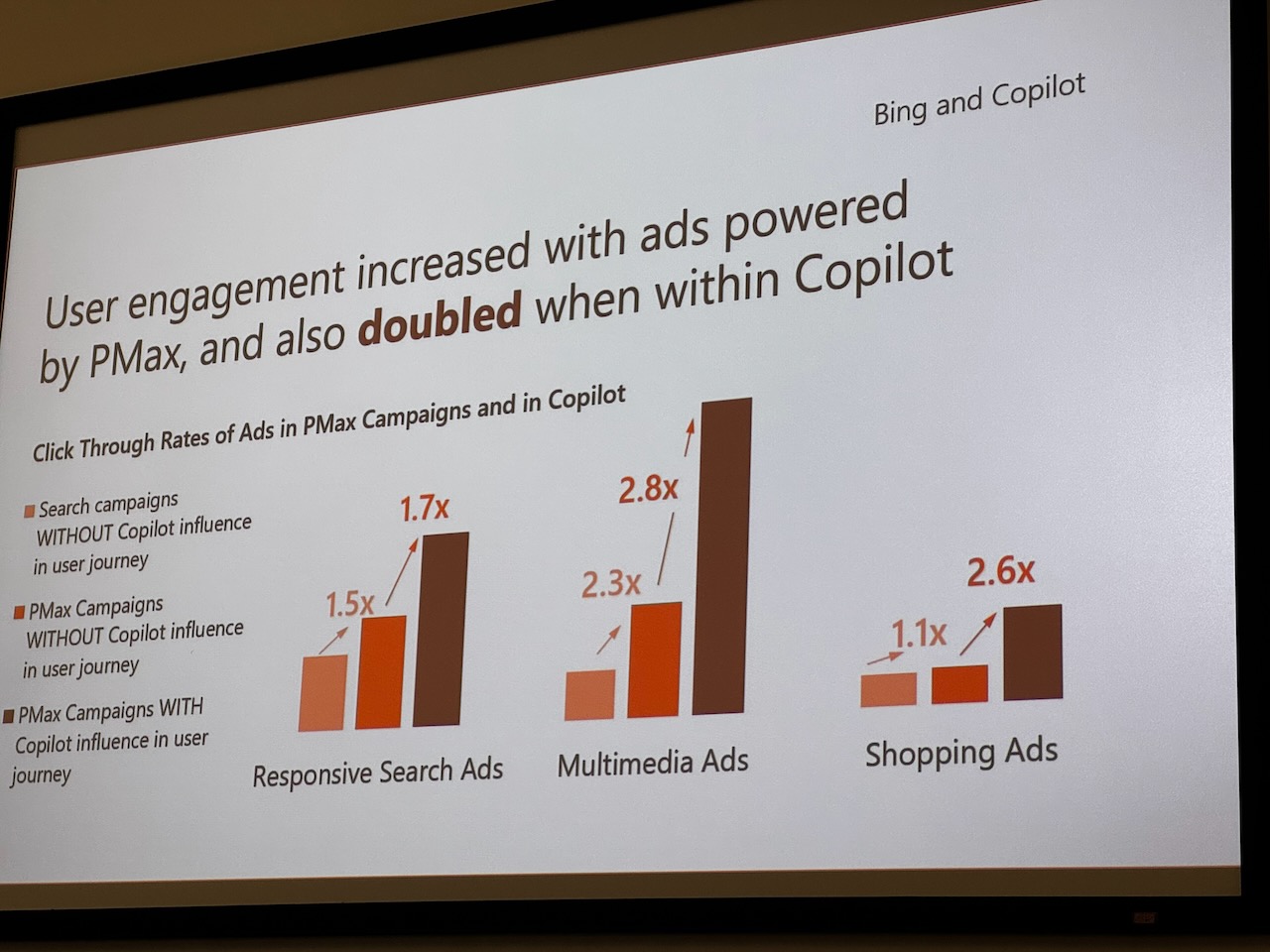
User engagement on ads when using copilot in searchSlide by Microsoft at Accelerate Roadshow LA, June 2025

But clicks will be more relevant because, unlike in the past, where a click was a user’s initial exploration of your offer, they will now be better informed and further along in their research by the time they visit your site for the first time.

Microsoft research found that purchasing behaviors increased by 53% within 30 minutes of a Copilot interaction, underscoring just how powerful, timely, and AI-embedded suggestions can be.

To stay relevant, ads must feel like part of the conversation. They can’t be disruptive or detached. They need to be embedded, responsive, and helpful, appearing when and where they make the most sense.

Newer performance data shows that ad engagement doubled in some formats when served through Copilot, especially in PMax-powered Shopping and Multimedia Ads.

Crucially, Microsoft has dialed back the volume of ad impressions in Copilot, choosing instead to show ads only when they’re predicted to be highly relevant and useful.

The result? Fewer, better-placed ads that drive stronger outcomes, a model that hints at where Google AI Mode could be headed.

Google has done this before. Its introduction of AdWords transformed ads from flashy banners into useful information. AI Mode demands a similar evolution, one that turns helpfulness into performance.

So, if the traditional way Google makes money becomes broken, let’s look at some options for how they might bridge the gap.

Conversion Inside The Conversation: The Rise Of Affiliate Models And Agents

The most frustrating part for consumers using AI agents to find something to buy is the final step after determining what they want.

Now, they need to hunt for where to buy it, enter a credit card, and deal with the usual minutiae of buying something online.

A better user experience, especially for smaller purchases, would be to tell the agent, “I like it, buy it!” and have the item arrive at your doorstep the next day.

While this zero-click scenario is the best user experience, it is also the most problematic in a CPC world.

This opens the door for reconsidering affiliate and commission-based advertising models. Instead of paying for attention, advertisers pay for action.

Ads become decision-making partners, not just traffic generators. It’s a better fit for how assistants work: focused, efficient, and user-first.

While this wouldn’t be Google’s first attempt at commission-based monetization (previous efforts, such as Buy on Google, Shopping Actions, and Google Express, ultimately shut down due to limited merchant adoption and weak consumer uptake), those models lacked the personalized context that AI Mode now enables.

Even vertical-specific experiments like commission bidding for Hotel Price Ads (retired in 2024) followed the same pattern: strong in theory, but missing the behavioral depth to sustain engagement.

With memory-driven prompts, real-time user needs, and multimodal signals in play, the conditions may finally be right for performance-based pricing to scale in a meaningful, consumer-aligned way.

Monetization Models: Why Subscriptions Aren’t The Future

Monetizing AI-powered search is a hot topic. Startups like Neeva by Sridhar Ramaswamy (Former Google Ads Chief) attempted to replace ads with subscriptions, but user adoption fell short.

Even OpenAI, with its paid ChatGPT Pro tier, sees a vast majority of users opting for free access.

The pattern is clear: Most users won’t pay for general-purpose search tools. Even companies leading in AI anticipate that advertising will remain the dominant revenue stream.

Google’s ad model, tested and refined for decades, is still the best-positioned approach – if it can evolve to match the new user behavior.

Ads In AI Mode

Google has already said it will have ads in AI mode.

To maximize the likelihood of your ads appearing in this environment, it’s advisable to utilize Google’s AI-centric tools, including AI Max in search campaigns, Performance Max, and Demand Gen.

Employing broad match keywords is also crucial, as they facilitate connections with conversational prompts rather than traditional keywords.

However, with the potential decrease in click-through rates, a pertinent question arises: Can fewer clicks on ads sustain the revenue model?

Despite this challenge, I anticipate that advertising will remain the primary revenue stream, even within AI Mode.

It’s noteworthy that OpenAI’s CEO, Sam Altman, has expressed reservations about incorporating ads into AI experiences.

In a conversation with Ben Thompson, Altman stated:

“Currently, I am more excited to figure out how we can charge people a lot of money for a really great automated software engineer or other kind of agent than I am making some number of dimes with an advertising-based model… I kinda just don’t like ads that much.”

Similarly, Google’s co-founders, Larry Page and Sergey Brin, initially opposed the idea of advertising on their search engine. In their 1998 research paper, “The Anatomy of a Large-Scale Hypertextual Web Search Engine,” they wrote:

“We expect that advertising-funded search engines will be inherently biased towards the advertisers and away from the needs of the consumers.”

Despite these initial reservations, both OpenAI and Google have recognized the practicalities of monetization. Google makes nearly 78% of its revenue from ads as of 2024, illustrating its evolution from the original stance of its founders.

So, while the methods and philosophies around advertising in AI experiences have evolved, the necessity for effective monetization strategies remains paramount.

Conclusion: Betting On AI-Powered Ad Innovation

Soon, helping consumers at the moment of relevance won’t be about search and keywords anymore; it’ll be about context, and  AI-powered interactions driven by memory, intent, and dialogue.

The early signals are promising: Users respond better when ads are useful, not intrusive.

Microsoft’s experience with Copilot shows that when generative systems deliver fewer but more relevant ads, engagement and conversions rise.

Google’s opportunity is to take those lessons further, baking utility and timing into its AI-native monetization engine.

It’s not about building the flashiest assistant; it’s about earning trust at the moments that matter.

If the assistant can deliver value and drive outcomes without breaking the flow, that’s the model that wins.

I have no doubt that Google and other ad platforms will find ways to appropriately monetize these advertising opportunities, even if there will be fewer impressions for each consumer journey.

The fundamentals of advertising at the moment of relevance haven’t changed, but our tactics will need to evolve fast. Prompts, not keywords, are the new starting point – and that changes the game.

More Resources:


Featured Image: Lana Sham/Shutterstock

https://www.searchenginejournal.com/google-ai-mode-and-the-future-of-search-monetization/548601/




5 High-Impact Ways To Integrate Traditional & Digital Marketing For A Personalized Buyer Experience via @sejournal, @alexanderkesler

As emerging technologies, particularly AI, reshape B2B marketing strategies, many organizations are shifting resources toward digital transformation to remain competitive.

However, sidelining traditional marketing tactics to prioritize innovation can be a costly misstep.

Traditional channels such as print, direct mail, billboards, and events have considerable value, particularly when they are thoughtfully integrated with digital strategies and real-time demand intelligence.

Combining traditional and digital approaches offers a unique advantage, namely the ability for a brand to stand out in the sea of sameness.

Experiences that blend the old with the new are more likely to capture attention, foster trust, and drive meaningful engagement.

By aligning traditional media with digital insights and delivery systems, marketers can create a cohesive brand-to-demand experience – one that resonates with today’s self-directed, risk-averse buyers.

Here are five high-impact ways to integrate traditional and digital marketing for a more personalized and effective buyer experience.

1. Intent Data Intelligence + One-To-One Conversations

When fueled by intent data intelligence, the cold calls of yesterday become the insight-driven conversations of tomorrow.

Intent data empowers organizations to identify where prospects are within the buyer’s journey and to gauge their level of interest in specific solutions.

This approach transcends cold outreach, enabling marketers and sales teams to engage with prospects who are actively exhibiting buying intent signals.

Before initiating outreach, Go-To-Market (GTM) teams can use intent data to identify:

  • Prospects actively researching or seeking a solution.
  • Competing vendors under consideration.
  • Behavioral signals that reveal sales readiness or indicate the need for a longer nurture path.
  • Current challenges, questions, and priority search topics shaping buyer decisions.

Organizations can begin capturing meaningful intent signals directly from their own client relationship manager (CRM) and digital ecosystem.

Key first-party intent signals include:

  • Visits to solution-specific or pillar pages on your website.
  • Keyword searches aligned with your offerings.
  • Email engagement metrics, particularly open and click-through rates.

Once foundational tracking is established, GTM teams should consider enhancing their database with firmographic and technographic data.

When integrated thoughtfully into your GTM strategy, intent intelligence allows you to engage buyers with relevant messaging, transforming passive prospects into sales-ready opportunities.

2. Print Media + Deep Media Nurturing

The most effective B2B marketers are meeting the demands of cautious, self-directed buying groups by orchestrating deep media presence that aligns with how prospects prefer to research and engage.

Yet, according to our own Q4 2024 market research, only 22% of marketing teams prioritize the creation of buyer enablement materials, highlighting a significant gap between awareness-building efforts and buyer-centric strategies that support purchase decisions.

The most progressive strategies integrate AI-powered targeting, first-party intent data, and omnichannel delivery systems to ensure buyers receive value at every stage of their journey.

We know that on average, 33-50% of buyers go through seven or more pieces of content during the purchase process. Print media offers a distinct opportunity to break through this noise and command attention.

When informed by behavioral insights and demand intelligence, print media can be strategically activated in niche publications consumed by your target buying groups, delivering a high return on investment.

Here is how B2B buyer intelligence enhances print media experiences:

  • Predictive analytics and intent signals identify which accounts are most likely to purchase, enabling marketers to prioritize them for print media activation.
  • Generative AI enables personalization at scale by adapting core messaging across different print formats and channels.
  • QR codes integrated into compelling print advertisements bridge the physical and digital experience, allowing for trackable engagement and follow-up opportunities.
  • Print-on-demand and programmatic print technologies make it possible to deliver hyper-personalized physical content with the same agility and precision as digital campaigns.

For marketers focused on brand-to-demand integration, combining technology-enabled media strategies with high-trust formats, such as print, provides a unique and differentiated way to capture buyer attention.

3. Events + ABX

Ensuring that key accounts receive a personalized follow-up experience through an Account-Based Experience (ABX) strategy is an effective way to bridge traditional event marketing with modern, buyer-centric engagement.

ABX enables marketers to connect with prospects before, during, and after an event, creating a cohesive journey that adds value at every stage.

Before the event, contacts can be engaged with targeted nurture streams that build interest and provide relevant insights, effectively “priming” them with content that addresses common pain points, frequently asked questions, or industry trends.

This not only enhances their readiness to engage at the event, but also empowers them with the context to have more meaningful conversations on-site.

For example, if a prospect receives content around B2B buyer advocacy in pre-event nurture, they may arrive at the booth with a deeper understanding of the topic and specific questions in mind.

This creates an opportunity for sales to engage in more relevant, high-value discussions, transforming a standard booth interaction into strategically qualified engagement.

By extending the event experience beyond the show floor, ABX ensures that traditional marketing efforts are amplified through intent-driven, personalized interactions.

This leads to stronger relationships, clearer value exchange, and accelerated pipeline progression.

4. Billboards/Posters + Geotargeting + Nurture

To maximize the effectiveness of traditional advertising platforms such as billboards and posters, marketers can integrate geotargeting to bridge physical impressions with digital engagement.

Geotargeting enables the delivery of tailored follow-up content based on a viewer’s location, allowing billboard placements to align strategically with key account locations, such as near a corporate headquarters or an industry event venue.

When paired with compelling creatives and a clear call to action, such as a short, memorable URL or QR code, billboards can guide viewers to personalized landing pages that extend the message and encourage deeper interaction.

These landing pages can be tailored by industry, buyer stage, or intent signals, further enhancing relevance and conversion potential.

At a more advanced level, mobile location data can be used to identify devices that have passed by a billboard.

This type of geotargeting enables marketers to retarget those individuals with personalized digital nurture campaigns, reinforcing the original message across multiple touchpoints.

By combining location-specific placement with digital activation, billboards evolve from static awareness tools into measurable components of a modern ABX strategy that drives engagement and accelerates pipeline.

5. Direct Mail + Buyer Intelligence

When executed with precision and relevance, direct mail can be a powerful tool for re-engaging prospects who have become unresponsive to digital touchpoints.

A well-timed physical asset can prompt renewed interest, particularly when guided by demand and buyer intelligence.

Technology can play a critical role in elevating direct mail from a generic outreach method in the following ways:

  • Intent data and predictive analytics, together forming deep data intelligence about the prospect or account, identify when a buying group is entering an active research or purchasing stage, ensuring that direct mail is sent at the most strategic moment.
  • AI-driven personalization enables messaging tailored to a recipient’s industry, role, behavior patterns, or known tech stack.
  • Programmatic print technology allows for scalable, real-time production of customized assets such as postcards, letters, or dimensional mailers, triggered by specific prospect actions or buying signals.
  • Integrated measurement platforms unify physical and digital engagement data, allowing marketers to continuously optimize campaigns.
  • QR codes and custom landing pages extend the journey, creating a seamless transition from physical to digital.

If five follow-up emails have failed to elicit a response, a sixth is unlikely to succeed. However, a timely and thoughtful piece of direct mail, such as a handwritten note, a tailored infographic, or a personalized token of value, can break through resistance and reinitiate dialogue.

Beyond performance metrics, direct mail also builds trust. When buyers feel recognized and understood, they are more inclined to engage, respond, and move forward in their buying journey.

As part of a broader demand strategy, direct mail plays a key role in creating high-impact, memorable moments that differentiate your brand from the competition.

Key Takeaways

  • Intent data intelligence turns cold outreach into warm conversations by leveraging behavioral signals to prioritize high-value prospects and boost efficiency.
  • ABX transforms events into full-funnel experiences through pre-nurture, contextual engagement, and tailored follow-up.
  • Direct mail, enhanced by demand intelligence and personalization, cuts through digital noise and re-engages prospects with targeted, tangible touchpoints.
  • With geotargeting, personalization, and integrated measurement, even traditional media becomes seamlessly trackable and conversion-ready.

More Resources:


Featured Image: JMiks/Shutterstock

https://www.searchenginejournal.com/high-impact-ways-to-integrate-traditional-and-digital-marketing/546459/


How Much Code Should SEO Pros Know? Google Weighs In via @sejournal, @MattGSouthern

Google’s Martin Splitt and Gary Illyes recently addressed a common question in search marketing: how technical do SEO professionals need to be?

In a Search Off the Record podcast, they offered guidance on which technical skills are helpful in SEO and discussed the long-standing friction between developers and SEO professionals.

Splitt noted:

“I think in order to optimize a system or work with a system so deeply like SEOs do, you have to understand some of the characteristics of the system.”

However, he clarified that strong coding skills aren’t a requirement for doing effective SEO work.

The Developer-SEO Divide

Splitt, who regularly speaks at both developer and SEO events, acknowledged that the relationship between these groups can sometimes be difficult.

Splitt says:

“Even if you go to a developer event and talk about SEO, it is a strained relationship you’re entering.”

He added that developers often approach SEO conversations with skepticism, even when they come from someone with a developer background.

This disconnect can cause real-world problems.

Illyes shared an example of a large agency that added a calendar plugin across multiple websites, unintentionally generating “100 million URLs.” Google began crawling all of them, creating a major crawl budget issue.

What SEO Pros Need To Know

Rather than recommending that SEO professionals learn to code, Splitt advises understanding how web technologies function.

Splitt states:

“You should understand what is a header, how does HTTPS conceptually work, what’s the certificate, how does that influence how the connection works.”

He also advised being familiar with the differences between web protocols, such as HTTP/2 and HTTP/1.1.

While SEO pros don’t need to write in programming languages like C, C++, or JavaScript, having some awareness of how JavaScript affects page rendering can be helpful.

Context Matters: Not All SEOs Need The Same Skills

Google also pointed out that SEO is a broad discipline, and the amount of technical knowledge needed can vary depending on your focus.

Splitt gave the example of international SEO. He initially said these specialists might not need technical expertise, but later clarified that internationalization often includes technical components too.

“SEO is such a broad field. There are people who are amazing at taking content international… they specialize on a much higher layer as in like the content and the structure and language and localization in different markets.”

Still, he emphasized that people working in more technical roles, or in generalist positions, should aim to understand development concepts.

What This Means

Here’s what the discussion means for SEO professionals:

  • Technical understanding matters, but being able to code is not always necessary. Knowing HTTP protocols, HTML basics, and how JavaScript interacts with pages can go a long way.
  • Your role defines your needs. If you’re working on content strategy or localization, deep technical knowledge might not be essential. But if you’re handling site migrations or audits, that knowledge becomes more critical.
  • Context should guide your decisions. Applying advice without understanding the “why” can lead to problems. SEO isn’t one-size-fits-all.
  • Cross-team collaboration is vital. Google’s comments suggest there’s still a divide between developers and SEO teams. Improving communication between these groups could prevent technical missteps that affect rankings.

Looking Ahead

As websites become more complex and JavaScript frameworks continue to grow, technical literacy will likely become more important.

Google’s message is clear: SEOs don’t need to become developers, but having a working understanding of how websites function can make you far more effective.

For companies, closing the communication gap between development and marketing remains a key area of opportunity.

Listen to the full podcast episode below:

[embedded content]


Featured Image: Roman Samborskyi/Shutterstock

https://www.searchenginejournal.com/how-much-code-should-seo-pros-know-google-weighs-in/549499/


How to Build a Brand That Truly Connects

If your brand doesn’t resonate on a deep level with your target audience, then pouring time and energy into aesthetics and clever messaging is a waste of resources.

Real brand power is based on your brand’s identity: knowing who you are as a company, and how your ideal customer experiences life in relation to your offering.

Search Engine Journal’s Editor-in-Chief Katie Morton sits down with Mordy Oberstein, founder of Unify Brand Marketing, to go deeper on how to build a brand with a solid foundation.

Watch the video or read the full transcript below.

[embedded content]

Start With Brand Identity

Katie Morton: Hello, everybody. It is I, Katie Morton, Editor-in-Chief of Search Engine Journal, and I’m here today with Mordy Oberstein, who is the founder of Unify Brand Marketing.

So, Mordy, what are we going to talk about today?

Mordy Oberstein: Hi there, everybody. Last time we spoke about what brand marketing is fundamentally and how to approach it. Today, I’m gonna talk about how to actually develop a brand and run through that process.

We’re gonna try to be jargon-free about what brand development actually looks like and what the stages are, and how they should all flow one into the other.

Katie: That sounds great. OK, so what’s the first concept?

Brand Therapy: Don’t Fear a Niche

Mordy: OK, this is where I think brands get really messed up. If you feel like you’ve lost traction, like you don’t have direction or you’re all over the place – whatever it is – most problems come down to this issue, which is… (I’m not going to say the jargon word) but it comes down to: Who are you?

And this is where you’re doing therapy for your brand. You’re trying to figure out who you are in a real, deep way. Kind of what we talked about last time – about building some meaning for yourself. You need to think about: Who are you? Where do you want to be? How do you want to be seen? How are you seen? How do you want to be seen going forward?

This is the part where it gets a little bit scary. I’m going to ask you: What scares you? Because this is where brands kind of feel like, “Maybe we’re going to pigeonhole ourselves.” But you’re not.

I’m not going to use the identity word – wait, I said identity – used jargon. Darn it!

This is where you kind of feel like maybe we’re going to pigeonhole ourselves if we have too much of a pigeonhole kind of audience. Don’t. It’s scary, but you have to do it.

This is where brands get off the rails. You have to understand who you are in a real way, because who you are rolls right into who you’re for.

Know Your Core Audience

Mordy: If I was dating my wife back in the day and my wife didn’t like sports at all, I’d be like, “Oh, my wife’s not for me. I’m a sports nut,” which is not true. That’s not how dating actually works.

Knowing who you are rolls right into: Who are you for?

Once you know who you are, the next step is: Who’s actually interested in you? Who’s your core audience? And this is a direct outcome of who you are, which is why it’s important.

The next stage in brand development – once you know who you are and who you’re for (that doesn’t mean you have to be only for them, but they’re your core) – is what problems does that audience have?

And by problems, I don’t mean USPs (which I know is a jargon word, but I’m going to use it so we know what we’re talking about). I’m not talking about pain points.

I’m talking about: What’s going on in their lives as it generally relates to your product or service?

Let me give you an example: Minivans. Why do I always use minivans? If I was making minivans, I would want to know: What’s the context? What’s the life situation of the parent or guardian driving and schlepping these kids around? What’s happening in their lives around the product?

It’s not a pain point. It’s not a USP. It’s what’s happening in the life of your audience, as it relates to generally speaking about the product/service, whatever you do.

Now that you know that, the next step in brand development is: How do you fit those needs?

This is where your “USP stuff” kind of comes in. And by the way, everything here should align from who you are to your audience, to what their problems are, to how do you fit those needs (because you know who you are now, obviously)?

Build From The Ground Up, Messaging Comes Last

Mordy: Because of who you are, how do you now solve those problems that your audience or people or consumers are dealing with in their lives? Now, once you know that, stage five would be, how do you actually communicate that? Or rather, what’s important about that to communicate?

We now know who we are. We now know who we’re for. We now know what the problems and the life situation is of the people we’re for. And we know how we solve and deal with those situations with who we are as a product, as a service, as an offering.

What’s important to tell the audience about who we are and how we solve their problems?

Don’t try to refine it here. Don’t try to have it snappy and snippy. Nothing catchy. No taglines. Just what’s important conceptually as a framework to communicate to your audience.

What’s conceptually important – what should the audience understand?

And the last step is to refine that. It’s not going to come in one shot. It’ll take multiple iterations to do it. It’s not going to be perfect, and you’ll never be 100% happy with it. It’s better that it’s honest and genuine than it is perfect.

If we want to zoom out and use the jargon, we just ran through:

  • Creating brand identity.
  • Using identity to define the target audience.
  • Understanding the audience’s life context.
  • Positioning the offering.
  • Developing key messaging.
  • And then refining the message.

Katie: I like it.

Mordy: No jargon, I almost got through it!

SaaS Doesn’t Have To Mean Utility

Katie: I think it speaks to our audience to use a little bit of jargon in there. And speaking of that, I’m sure a lot of people you talk to and a lot of people in the Search Engine Journal universe are SaaS, software as a service.

I like the minivan example because it’s easy to wrap your head around. It’s an obvious life circumstance. You just say that word ‘minivan’ and it’s giving you a picture of being married with a bunch of kids, driving them around. You say one word, and it paints this whole picture. With SaaS, it’s so different.

And what would it be like, as a thought exercise to go through this, if you invent a software that’s a rabbit food feeding timer?

Mordy: Okay. A set that feeds your rabbit on a timer.

Katie: Something that’s life-oriented, right? Like, think about our universe, which is really kind of abstract, right? In terms of people’s day-to-day. And they’re really using software, probably in a professional sense, and probably not in their home life for the most part, let’s say like a marketing software or, you know, ads like PPC.

Mordy: I consult for a marketing software, so I’m not going to use a marketing software because I’m biased. Let’s say I use like a video editor tool – does that work?

Katie: Yeah, that works.

Mordy: All right, cool.

Brand Identity is the Foundation

Mordy: First of all, the most important thing is where I think brands get everything wrong. It’s not like one stage, and you go from stage one, which is brand identity to messaging refinement, which is, what, stage six?

Don’t think of it as a line. I did one, and now I go to the next one, then I go to the next one. Think of it like you’re stacking a building. You’re building a building.

The foundation is a brand identity, and then you build the next floor, the next floor, the next – and the top floor, the roof is the refinement that everybody can see from the helicopter.

But they’re not—if you imagine they’re in a helicopter looking down on this roof – they can’t see all of the other layers, but you can. And you have to start with brand identity.

And this – particularly for a SaaS tool – because SaaS, it’s really easy to get stuck in being a utility. “We’re just a utility.”

The problem with being a utility is that there’s no actual connection. And as soon as somebody else finds another utility that’s better, cheaper, or whatever, they’ll move. There’s no loyalty, which is literally what I did… I used another tool. I found it a little bit cumbersome. The pricing wasn’t super clear, so I moved to this one.

Now, I don’t love this one, by the way. If something else came along, I would totally move to the other one.

There’s no identity. I don’t know what separates CapCut from the other one I was using.

I don’t use Camtasia anymore only because I have an old license. I don’t want to pay for a new one. So if I’m going to pay for a new one, I find it a little bit cumbersome.

I have no actual loyalty to any of these platforms because I don’t know who they are and what makes them different.

You know why I don’t know who they are and what makes them different? Because they don’t know who they are.

A Connection With Your Audience Gains Customer Loyalty

Katie: If they worked on connecting with you as a brand and developed that emotional bond, you’d be more likely to stick with them, even if something better came out, a better feature.

Mordy: Because it’d be more for me. Right. They have to ask themselves – and I can’t do this for them – I don’t even know anything about it other than the tool. Someone recommended it to me and I use it.

They have to figure out: Why are you doing this? Why do you want to do this outside of making money? Why do you find this meaningful?

“Oh, because…” Let’s just say, “Because we help. Because we are into the idea of being able to do X, Y, and Z.”

Oh, okay, CapCut. Let’s just say their big thing is (because I use this part of their tool, so I like it—they automatically remove my background and put a new one):

“We’re all about people who don’t have a professional setup feeling like they have a professional setup.”

That’s just really important because we see the value in that. “We want to democratize video content,” etc. That would be an actual brand identity.

So now I know who I’m for. I’m not for a professional. I’m a big brand, I have a whole studio, I’m Coca-Cola, I have a whole in-house studio on site. [I’m not for them.] I’m for this audience.

Now, what are their problems, and what’s going on with them, and what’s happening with them?

Now it’s kind of easier to see.

“I really want to create professional-level content, but I don’t have the skills to do it.” I’m also not an idiot, either. So I kind of know what it’s supposed to look like. I kind of know what it’s supposed to be. I don’t have the time. I don’t have the technical know-how. I don’t want to pay anybody to do it.

These are my problems. How do you come in and solve that?

Katie: So it’s like the entire market proposition is tied into that.

Mordy: But they only realize to talk to me about my problems, and how they solve my problems, once they figure out who they were first.

But everybody skips that step. Everyone goes right to the roof—because that’s the only thing you can see.

Katie: That’s fascinating, Mordy. Brick by brick – you’ve got to stack it up before you get to the helicopter view.

Mordy: Gotcha. It’ll all come crumbling down at a certain point. The messaging won’t work. It’ll all fall apart. That sounds really doomsday-ish.

Katie: It does. But I do think that I will be checking out CapCut’s branding – to see what are they doing over there?

All I know is their little logo that I see frequently at the end of some of my favorite creators.

Mordy: So that’s good branding. It’s not great branding, but better than nothing.

Katie: Exactly. Better than nothing.

Wrapping Up: Shout Brand From The Rooftops

Well, Mordy, this has been very enlightening, and I want to thank you for coming on and sharing with me today.

What’s next?

Mordy: I was going to shout “brand!” from the rooftops. That was so like a dad joke.

Next time, we’re going to dive deeper into Stage One, which is building brand identity, and what that actually looks like, and how you do it.

Katie: That’d be fantastic. All right, everybody, thanks for joining us. And check us out: searchenginejournal.com.

Mordy, what’s your website?…

Mordy: Oh, I should know this – good branding! unifybrandmarketing.com.

Katie: Awesome. All right. See you next time, everybody.

Katie & Mordy: Bye!

More Resources:


Featured Image: Paulo Bobita/Search Engine Journal

https://www.searchenginejournal.com/how-to-develop-a-brand-that-connects/549274/


Best WordPress SEO Tools & Plugins For Enterprise Sites

When it comes to enterprise SEO, you need more than just the basics. You need tools that scale, provide deep insights, and plug seamlessly into your WordPress ecosystem.

Enterprise businesses require a scalable, credible, and reliable website. While many organizations invest in expensive platforms that consume a significant portion of their budget and come with limited support, WordPress offers a powerful alternative without the hefty annual software fees.

The latest version of WordPress (6.8) has been downloaded over 28 million times. There are also over 59,000 plugins and 13,000 free themes.

This is a testament to the core WordPress development team’s ability to improve the platform and meet modern business needs.

Let me break down the best WordPress SEO tools as I see them that will help your enterprise site boost rankings, improve core web vitals, and gain visibility in even the most competitive markets.

Top 8 WordPress Plugins And Tools For Enterprise Sites

WordPress plugins and tools can assist in optimizing your site and improve site security, performance, and speed.

But, with so many different plugins and tools in the market today, how do you choose the right ones that will improve your site’s visibility?

To help you avoid an SEO disaster, let’s take a look at the top WordPress tools and plugins for search optimization of enterprise brands.

1. All In One SEO (AIOSEO)

Made popular by over 3 million users, AIOSEO offers a comprehensive toolkit and setup wizard for you to establish SEO settings for your website quickly.

The checklist includes features like meta tag generators, titles, descriptions, rich snippets, schema markup, and XML sitemaps.

For tech-savvy users, AIOSEO gives you complete control of robots.txt, local SEO, RSS videos, and video and photo optimizations. It also allows enterprises to assign user roles to employees or contractors.

2. BrightEdge

BrightEdge provides AI-powered data-driven solutions to help you manage your SEO and content performance to convert more users into customers.

You can leverage BrightEdge throughout every stage of content optimization: discovering your target audience’s search demand, creating impactful content, and measuring results to scale.

With powerful data insights like share of voice, opportunity forecasting, and ContentIQ, your content is more likely to capture your audience’s attention and boost SEO efforts.

This is especially effective for sites with complex structures or multiple departments contributing content.

3. Semrush

Semrush allows you to find all the organic keywords and search terms that your website can rank.

It also provides a competitive analysis of how your competitors rank, so you know how to gain an edge over their SEO strategy.

Our enterprise clients using Semrush reduced keyword blind spots by ~64% after refining their strategy using the Keyword Magic Tool.

With Semrush’s Writing Assistant Tool, you can also improve your existing WordPress content with targeted focus keywords to help you make the top 10 results.

I, however, like their backlink tracking capabilities the best.

4. Yoast SEO

In our work across dozens of enterprise WordPress deployments, Yoast SEO lets you easily update descriptions, titles, and social media images throughout your website.

With a user-friendly platform, Yoast SEO automatically creates an XML sitemap to make it easier for search engines to crawl your website and import data from other plugins.

You also have complete control of your site breadcrumbs and premium loading times. (While Yoast is the gold standard, I would also highly consider RankMath.)

5. Ahrefs

Ahrefs is an all-in-one SEO tool that helps optimize your website, analyze industry content, and study your customers’ top keywords to help you improve.

With Ahrefs, you can track your ranking progress and learn from your competitors’ content to deliver a high-ranking website that builds authority.

Additionally, Ahrefs offers enterprise-level support with unique features, including multiple user seats, personalized customer support, daily updates, and more, to help your business grow globally.

6. NitroPack

With over 240,000 websites using NitroPack, it’s a popular performance plugin.

NitroPack helps increase your speed score by 60% and improves your core web vitals, which can provide a better experience to users.

Enterprise teams we work with prioritize core web vitals for performance and SEO.

One client we worked with in the energy sector saw a 42% boost in mobile conversions after optimizing core web vitals with NitroPack.

It offers advanced features such as caching, a built-in CDN, and HTML optimization on a user-friendly platform.

7. MonsterInsights

Instead of relying on SEO assumptions, MonsterInsights provides you with all the insights you need to improve search rankings by connecting Google Analytics to your WordPress site.

MonsterInsights shows you top content, how users interact on your site, and connects ecommerce SEO.

Also, MonsterInsights provides over 100 data points to help you make better marketing decisions through real-time analytics.

Bonus Tool: DemandSphere

In my recent experience, DemandSphere has been a valuable tool for managing SEO at scale, especially when working with enterprise clients across multiple regions or business units.

Its AI-powered insights helped me surface priority keywords and content gaps, especially across large or multi-regional sites.

In one case, we used its predictive models to reorganize a content roadmap, which led to measurable improvements in mid-funnel visibility.

One of the features I find especially useful is the ability to segment data by market or product line, which helps clarify where to focus our efforts.

Is WordPress Good For Enterprises?

Here are a few reasons why WordPress is great for enterprises:

  • Ongoing support as opposed to proprietary systems that provide more flexibility and customization.
  • Robust content editing experience with WordPress Gutenberg and accessibility standards.
  • High-level security that keeps you protected against cyberattacks.
  • Scalable infrastructure with consistent themes and plugins to help reach your goals.
  • Huge cost savings by not having to pay hefty licensing costs compared to competitors like Adobe, Magento, and HubSpot.

Since WordPress is open-source software, your business has access to an endless pool of designers, developers, and specialized agencies, along with a massive community that is always ready to collaborate, innovate, and troubleshoot together.

With millions of WordPress websites live, the user community allows you to leverage best practices and implement them within your own system, instead of relying on inconsistent customer service or a limited FAQ page from closed-off systems.

WordPress includes several built-in features that help you better optimize your site, and has many plugins that can support SEO (some mentioned above).

These are a few reasons why WordPress can support the SEO for an enterprise site:

  • Permalinks: Customize your permalinks with targeted keywords to increase your click-through rate.
  • Metadata: Automatically add title and meta description to every post or page on your website to improve your position.
  • Images: Optimize your images by using keywords in the ALT text, description, and caption, and improve your page speed by editing the size.
  • User experience: Develop a well-designed site that enhances the user experience to increase page views, conversions, and session times.
  • Site speed: Select the right themes and plugins that help you maintain a fast-loading time.
  • Mobile-friendly: Use a mobile-responsive theme to ensure it’s the same quality as the desktop version for a better user experience.
  • Social media: Increase your brand visibility by including social media share and follow buttons on your website.
  • Integration: Seamlessly integrate your WordPress site with other software like G Suite, Google Analytics, ConvertKit, and more.

Scale Your WordPress Enterprise Website With SEO

Is WordPress enterprise-ready?

Combined with powerful plugins and themes, WordPress’s content management system is more than ready to handle the needs of a complex enterprise website.

With WordPress, you can scale your website with flexible infrastructure and reliable SEO features.

We’ve implemented this setup across various industries, including manufacturing, healthcare, and legal, each with its own unique technical and SEO requirements.

WordPress is one of the best platforms for SEO. Not only does the system provide SEO features, but the available plugins also make it easy for your website to start building authority and boost its overall rankings.

Continue optimizing and adapting to maintain long-term growth. The key is to keep your SEO strategy evolving to keep up with the changes in the industry.

More Resources:


Featured Image: hasan as’ari/Shutterstock

https://www.searchenginejournal.com/wordpress-seo-tools-plugins-for-enterprise-sites/546474/


How To Efficiently Plan A WordPress Site

The most exciting moment of your new WordPress project is right at the beginning. You have an idea that one day, you hope will soon be shared with the world. But it can also be overwhelming.

WordPress has countless plugins that do pretty much everything under the sun. In fact, the WordPress ecosystem has doubled in terms of plugin submissions in 2025.

So, which ones should you use?

In this post, I will talk through how I plan to build a WordPress website.

Why You Should Plan A WordPress Site

To plan a WordPress site really is a must-do process that reduces the risk of the project spiralling in time and cost.

Spending an hour or two following a simple checklist, like the one I’ve detailed below, puts you and the client on the same page when building the website.

Time and again, I’ve seen projects that’ve undefined elements that need to be factored in, which eliminates potential scope creep.

It will also give you a list of tasks, so as well as avoiding scope creep, you can easily transfer the elements of your plan into your project management tool as tasks and milestones. That will speed up development time.

Define Your WordPress Website Goals

The first thing you should do is define the goals of the website. The easiest way to begin this process is to ask yourself the following two questions:

  1. Where are your visitors most likely to come from?
  2. What do you wish them to do when you’re on the website?

Assuming that the site is a brochure site, then more than likely, you’d want your visitors to come from search engines, and you want them to contact you.

That way, you’ll need a plugin like Yoast SEO or Gravity Forms.

You may have other goals, like growing a newsletter or an ecommerce store. Or you may get traffic from a social media platform that your blog needs to integrate with.

Each of these needs to be defined, as this will help define your tech stack.

Goals Defined? Great. Now, Plan The Layout

Once you’ve defined your goals, you need to think about the layout and what custom work you will need to do.

When building your site, I prefer to think of templates, rather than pages.

You don’t need a template for every blog post, for example. If you are building a website for a solicitor, for example, all services it offers (e.g., Conveyancing/Wills & Probate) could run off a similar template, cutting build time.

This is not necessarily true if you’re using a page builder, as sometimes page builders treat each individual page separately.

You could also look at custom post types and taxonomies for certain pages.

For example, if you have a “Meet the Team” page, then every person could be their own post. This makes maintenance a lot easier, as it allows a new team member to be easily integrated without too much trouble.

Testimonials work well as a custom post type as you can create a “bank” of them to use throughout the site.

Once you’ve got the structure of the site and what you are using to build it, that should be the templates.

Generally, for a brochure site with a blog and a “Meet the Team” section, you would have the following templates:

  1. Home Page Template.
  2. About Page Template.
  3. Contact Us Page Template.
  4. News Post Template (Single).
  5. News Post Template (Archive).
  6. Team Member Template (Single).
  7. Team Member Template (Archive).
  8. Catch All Template.

The “Catch All” template I find useful as it’s used for pages that are present but don’t need much design, something like a Terms & Conditions or your Privacy Policy pages.

I tend to start with these first, as you can build a header/footer easily enough here.

Finally, you may want to consider whether you have multiple languages or if you have different regional offices. A large site may be better suited for a multisite, rather than an individual WordPress installation.

Once done, you should have a WordPress theme and a WordPress plugin ready to build.

My general thought is that any WordPress functionality you wish to retain when redesigning should be in a plugin, rather than a theme.

Things like definitions of custom post types or SEO changes you make programmatically are ideal for a custom plugin.

Depending on the complexity of the project, it could mean that you split functionality into a number of plugins.

For example, I have an ecommerce site where their custom invoicing is in one plugin, and the voucher management is in another plugin. There is also the “helper” plugin that has minor performance improvements and a custom post type.

Don’t Forget The Ancillaries!

Of course, a well-built WordPress theme, with a range of custom and supporting plugins, is just the beginning. Your website needs content.

If you are a marketing agency, you may be responsible for the creation of the content, but what about imagery? It’s a good idea to define in the WordPress site planning things like who is responsible for the content.

If you are using the content of the old site, it’s a good idea to define who handles the migration, or at the very least be aware if it’s transferable – not all content systems are!

Other things to define in your WordPress site plan are training, who will have access to the site, and what level. Ideally, you want as few administrators as possible.

If you are pushing a new design to an existing site, there’s an approach of making everybody but yourself authors or editors, and see who complains about lacking access. That works remarkably well!

The First Step Comes With Experience

In reality, the more you create plans and pitches for WordPress websites, the more refined your toolset and your planning process become.

I already know the tools I’ll be using for the next 10, maybe 20 sites, with often very little variance among them. What works for a solicitor’s website will probably work for a cleaning firm.

I have a core group of about five to 10 plugins and two to three themes that I use, and then I add extra plugins as needed.

Those plugins are personal to me, but over time, you’ll build your own list of plugins. Doing so will make WordPress site planning far more efficient.

More Resources:


Featured Image: one photo/Shutterstock

https://www.searchenginejournal.com/how-to-efficiently-plan-a-wordpress-site/547884/


TikTok Ban Delayed Again, Will Remain Active Until September via @sejournal, @MattGSouthern

TikTok will remain operational in the U.S. through September 17, as negotiations over a potential ownership deal continue.

President Donald Trump issued a third executive order delaying enforcement of the TikTok ban, giving the Chinese-owned platform another 90 days to operate in the U.S.

The move was confirmed in a White House briefing and TikTok’s official statement.

The extension allows continued access while the administration attempts to broker a U.S.-based ownership deal.

White House Confirms Platform Remains Active

White House Press Secretary Karoline Leavitt confirmed that the extension is meant to keep TikTok operational during negotiations.

Leavitt said:

“He’s making an extension so we can get this deal done. He also wants to protect Americans’ data and privacy… and he believes we can do both at the same time.”

Trump announced the order on Truth Social, continuing his pattern of last-minute executive actions.

TikTok briefly went offline in January when the congressional ban first took effect, but was reinstated.

Pattern Of Delays

This marks the third extension since the ban was passed by Congress. The second came in April when a deal seemed near, until China withdrew support following Trump’s tariff announcement.

By pausing enforcement, the order enables platform distributors and infrastructure providers to continue working with TikTok during negotiations.

TikTok acknowledged the extension with thanks:

“We are grateful for President Trump’s leadership and support… as we continue to work with Vice President Vance’s Office.”

Public Opinion Shifting

Support for a TikTok ban is softening. According to Pew Research data:

  • Only one-third of Americans now support a ban, down from 50% in 2023.
  • Another third oppose the ban, while the remaining third are undecided.
  • Among ban supporters, 80% cite data security as the top concern.

What This Means

TikTok’s ongoing availability gives marketers continued access to its audience.

Still, uncertainty persists. Marketers using TikTok should:

  • Continue investing in TikTok for short-term campaigns
  • Monitor the September 17 deadline closely
  • Prepare backup strategies across other social platforms

TikTok’s situation remains fluid, but the platform’s growth and political momentum suggest a negotiated outcome is likely, rather than an abrupt shutdown.


Featured Image: Charles-McClintock Wilson/Shutterstock

https://www.searchenginejournal.com/tiktok-ban-delayed-again-will-remain-active-until-september/549402/


Aligning The CIO, CFO & CMO For Search‑Driven ROI via @sejournal, @TaylorDanRW

The traditional linear path from awareness to conversion is no longer the norm.

Users today interact with generative engines like ChatGPT, Gemini, and Perplexity, as well as voice interfaces and proprietary search platforms that bypass the familiar search engine results pages (SERPs) entirely.

In this landscape, classic SEO tactics alone are no longer enough.

AI compresses the consideration phase by combining information from multiple sources into a single trusted output. A user no longer needs to review 10 blue links and click through to various websites.

Instead, they ask a question and receive a concise, reasonably tailored response. This change forces brands to reassess their approach to competing for visibility.

Visibility within AI-generated results is driven less by paid placement and more by a mix of expert content, credible signals, and structured data.

Brands need to focus on the depth and clarity of their expert-led content, build strong reputational signals across third-party platforms, and ensure their use of schema and structured data supports inclusion in AI summaries.

They must also prioritize being referenced in the knowledge bases and datasets these AI systems rely on.

As discovery becomes more conversational and context-led, users no longer refine keywords. They follow intent-led journeys. Discovery is shifting from a focus on ranking to one of relevance.

To remain visible, organizations must realign their digital strategies to align with how generative models perceive trust and authority.

This requires joined-up efforts across technology, finance, and brand leadership, with specific responsibilities falling to the Chief Information Officer (CIO), Chief Financial Officer (CFO), and Chief Marketing Officer (CMO) – the C-level triumvirate.

The CIO

Structured machine-readable data is essential for visibility in AI-driven search.

The CIO plays a crucial role in ensuring that content is accessible and optimized across the systems on which AI models rely.

This includes enabling discoverability across platforms, offering APIs and knowledge graphs that large language models can use, and upholding data security and compliance when sharing information.

Modernizing content infrastructure is vital. Enterprise content must be indexable, high-performing, and properly structured to ensure optimal search results.

Beyond the web, CIOs must consider how enterprise knowledge is externalized and leveraged. Are internal repositories accessible in structured formats? Is brand data mapped to schemas recognized by AI systems? Can content be updated in real-time to maintain accuracy?

CIOs must also work closely with legal and compliance teams to ensure effective collaboration and compliance.

Together, they need to define governance rules for exposing data to AI models, set rate limits and permissions, and use synthetic or anonymized data when required.

True agility is not just about building flexible systems; it’s also about embracing change. It is about creating AI-native structures that support clean data flows, reduce technical debt, and prepare for how emerging technologies will consume information.

The CFO

Traditionally, marketing spending has been assessed through direct attribution. However, AI search enables complex, non-linear journeys and ambient brand exposure that may not result in clicks but still significantly influence buying decisions.

CFOs must update financial models to reflect these softer signals. Budgets should focus on readiness, high-quality content, strong data structures, and AI-aligned infrastructure rather than just media spending.

Attribution models must include interactions with AI systems, even when those are indirect.

Mentions or recommendations by AI engines build brand trust and influence intent, even without a direct click. These harder-to-measure moments still matter and should be included in attribution models and long-term planning.

CFOs should approve investment in ongoing content creation, structured knowledge bases, and systems that help AI access and trust their content.

Like building physical infrastructure, this work offers lasting benefits and positions the brand for visibility as AI search becomes the norm.

The challenge is to shift from short-term performance to long-term discoverability and influence.

The CMO

In an AI-driven search world, visibility is shaped by more than just brand storytelling. It depends on how the brand is reflected in the data that powers these systems.

AI models combine answers from multiple sources, meaning the brand narrative is heavily influenced by third-party data, structured content, and the quality of information shared across the web.

The CMO must ensure the brand becomes the trusted answer, not just another mention. This involves managing messaging across all content areas, including earned, owned, and partner-based content, while ensuring that citations, expert profiles, and trusted content are indexed and referenced.

Strategic visibility needs clear, joined-up messaging. AI rewards consistency and authority. Fragmented messaging weakens both.

That is why CMOs need to bring together PR, product marketing, and content teams to create a unified narrative that AI can recognize and rely on.

Accurate strategic positioning means the brand is present before the user arrives, built into the answers AI provides. This is about planning for visibility at the knowledge level, not just the content level.

In a world of automated systems and answer engines, this is where trust and competitive edge are built.

Reporting On AI-Driven Visibility: Metrics That Matter

To keep leadership aligned and justify investment, organizations need useful cross-functional metrics that reflect visibility in AI-led environments. These indicators matter across CIO, CFO, and CMO roles.

  • Share of Voice: Measures brand presence across AI platforms compared to competitors. Useful for CMOs watching narrative authority.
  • Organic Traffic Value: Assigns a value to organic traffic by estimating what the same reach would cost through paid ads. Important for CFOs tracking return.
  • Presence in AI Summaries and Snapshots: Tracks how often the brand appears in AI answers or summaries. It helps gauge marketing and strategic visibility.
  • LLM Prompt Coverage: Checks how discoverable content is across known large language model datasets and guides CIOs in content infrastructure planning.
  • Non-Click Influence Metrics: Captures mentions, impressions, and indirect interactions in AI systems. Signals have a broader impact on user choices.
  • Entity Graph Coverage: Tracks inclusion in structured databases like Google Knowledge Graph or Wikidata. Reflects data readiness and visibility.

By linking these metrics to executive goals, financial impact, technical performance, and brand strategy, organizations can ensure that their AI search efforts are effective and measurable.

Executive Alignment Is Non-Negotiable

AI search is not just another channel. It is a new space for enterprise visibility. Success depends on joined-up action across leadership. The CIO must build compliant, scalable systems.

The CFO must back smart investments in discoverability. The CMO must craft a brand story that AI can understand.

A real advantage emerges when these roles are united around a single strategy, combining technical flexibility, financial foresight, and a straightforward narrative.

When leadership is aligned, organizations do not just react to AI – they leverage it.

In a world where visibility comes from connected data, the winning brands will treat discoverability not as a marketing goal but as a core part of how they operate and lead.

More Resources:


Featured Image: Roman Samborskyi/Shutterstock

https://www.searchenginejournal.com/aligning-the-cio-cfo-cmo-for-search-driven-roi/548999/