On Monday, OpenAI announced it has signed a seven-year, $38 billion deal to buy cloud services from Amazon Web Services to power products like ChatGPT and Sora. It’s the company’s first big computing deal after a fundamental restructuring last week that gave OpenAI more operational and financial freedom from Microsoft.
The agreement gives OpenAI access to hundreds of thousands of Nvidia graphics processors to train and run its AI models. “Scaling frontier AI requires massive, reliable compute,” OpenAI CEO Sam Altman said in a statement. “Our partnership with AWS strengthens the broad compute ecosystem that will power this next era and bring advanced AI to everyone.”
OpenAI will reportedly use Amazon Web Services immediately, with all planned capacity set to come online by the end of 2026 and room to expand further in 2027 and beyond. Amazon plans to roll out hundreds of thousands of chips, including Nvidia’s GB200 and GB300 AI accelerators, in data clusters built to power ChatGPT’s responses, generate AI videos, and train OpenAI’s next wave of models.
Wall Street apparently liked the deal, because Amazon shares hit an all-time high on Monday morning. Meanwhile, shares for long-time OpenAI investor and partner Microsoft briefly dipped following the announcement.
Massive AI compute requirements
It’s no secret that running generative AI models for hundreds of millions of people currently requires a lot of computing power. Amid chip shortages over the past few years, finding sources of that computing muscle has been tricky. OpenAI is reportedly working on its own GPU hardware to help alleviate the strain.
But for now, the company needs to find new sources of Nvidia chips, which accelerate AI computations. Altman has previously said that the company plans to spend $1.4 trillion to develop 30 gigawatts of computing resources, an amount that is enough to roughly power 25 million US homes, according to Reuters.
The Top 10 AI Writing Tools I Recommend as a Professional Writer
If you create content in any format, you know it involves a lot of writing — creating outlines and scripts, writing social media captions, brainstorming ideas, repurposing content, and more. AI writing tools can make these tasks a whole lot easier.
Sure, these tools might not be able to provide publish-ready drafts with a single prompt. AI tools can’t infuse human weirdness and creativity into your writing. However, they can offer an excellent starting point, so you aren’t battling blank page syndrome every day.
Speaking of battles: finding the right AI writing tool for you is easier said than done. . Now we’re spoiled for choice. It’s tricky and time-consuming to figure out which tools are worth your time and money.
. But, as a professional writer and social media creator, I’ve done the work for you. I’ve handpicked some of the best AI writing tools in the market for creators, small business owners, and marketers. No tool here has an unbiased review (you’ll find exactly zero affiliate links), although I do mention Buffer’s own AI writing assistant.*
In this article, we’ll take a deep dive into my favorite AI writing tools and who I think they’ll be most useful for.
*(I may hold a slight bias for Buffer, but you can see it’s pretty awesome for yourself — at no cost, too.)
Jump to a section:
Up until a few years ago, AI writing tools were a rare commodity. Today, it’s table stakes. From Google Workspace to Notion, every software has launched its own AI writing assistant.
Many of these tools might use the same AI writing model underneath (like OpenAI’s GPT or Anthropic’s Claude). But they’re not built the same. The difference comes in the interface, workflows, and ease of use. These tiny tweaks can either make an AI tool a great sidekick or just another unhelpful tab on your browser.
So, instead of focusing on the most popular apps, we’ve focused on finding the most useful AI writing tools for you. AI writing assistants that help you spend less time formatting, fiddling, or fighting writer’s block — and more time actually writing.
If you’re feeling overwhelmed by all the options out there, I hope this breakdown helps you find something that fits your workflow and your brain.
While evaluating several AI writing tools in the market, here’s what I was looking for:
Cost: Many popular large language models (LLMs) are free to use. The best AI writing tools are great at refining text without breaking the bank. While many tools offer premium features at additional cost, you won’t find tools that require a significant budget with minimal ROI on this list. For instance, if they’re just building on top of ChatGPT, I’ve examined whether the additional features they’re offering are worth the money. If you can do the same tasks (albeit with more time) using ChatGPT for free, that tool didn’t make the cut.
Ease of use: No one wants to spend hours learning how to use an AI tool effectively. The faster you can get an AI writing assistant up and running, the better. Note that this doesn’t include prompting — because it’s a different skill altogether. The tool should be able to understand the prompts clearly, yes, but giving clear, detailed prompts to get the best output possible is on you.
Customizing tone options: Everyone has their unique style of speaking — a reflection of their personal brand — whether that’s a creator or a brand. We’ve worked hard to include AI writing assistants that offer decent customization options so you can rewire each output to sound as close to ‘you’ as possible.
Content variety: Creators and marketers must write a diverse range of content, including short-form content such as ad copy or captions, product descriptions, newsletters, blog posts, and more. I’ve included tools that can create various types of work-related writing.
Output quality: We can’t expect the AI generator to be perfect, but it should cover the basics — including an accurate grammar checker, minimal fluff, and some editing features (such as shortening and expanding) — to ensure quality. Note that many AI writing tools are built on the backs of the most powerful LLMs (ChatGPT or Claude), so the output quality will only have so much difference.
Privacy: I’ve chosen AI writing tools that are upfront about how they handle your data. Some tools use their own proprietary models designed with compliance in mind. Others rely on third-party models but offer settings to keep your prompts private. If data security is a concern for your team, check each tool’s privacy policy in more detail before using it.
I’ve also highlighted how many AI writing tools use GPT or Claude to power their tool. If that makes you slightly confused, you’re not alone. The next section will help you understand the difference between an AI model and an AI tool more clearly.
An AI model refers to the underlying core technology — think of it as the brain behind an AI system. AI models are built on massive datasets and learn patterns, relationships, and logic to perform tasks like text generation. For example, GPT-4 is an AI model that powers ChatGPT, and Claude 3 is an AI model that powers Claude.
AI tools, on the other hand, are applications that use an AI model to perform a specific task. Many new tools use the same AI technology with unique interfaces and user experiences to make the AI model easier to use.
For example, Grammarly uses natural language processing to correct the grammar of any text. Many tools on this list use the GPT AI model in their software.
Here are some factors you should consider before investing in an AI tool:
Does it provide value for money? The content creation capabilities of a tool should make you more productive without costing you a fortune. Evaluate if the feature set is worth the price for your use case.
Does it mesh seamlessly into my workflow? AI writing tools should become a part of your writing process without too much friction. The right tool will be intuitive to use and offer plenty of workflows or templates that fit your needs. It might also integrate with the writing tools you already use.
How is the writing quality and style? AI-generated content can’t be perfect, but pick a tool that can come as close to publish-ready as possible. Many tools will have the capabilities to customize text to your brand style and voice. Some tools will also have reviews about excelling in specific types of content, such as academic writing or fiction.
Does it have your additional must-haves? If you’re using AI writing tools to rank in search results, you’ll prefer a tool that can create content that meets the search intent on a topic. Similarly, you might wish to use tools that can conduct deep research. Or you might need collaboration features to work with your team. Get clear on your non-negotiables so you can filter any tool that doesn’t match your criteria.
If you have some concerns about using AI in your writing, I hear you. The following section shares how I embraced AI writing tools to increase my productivity, despite having my doubts about them in the beginning.
How I use AI in my work
When AI writing assistants came on the horizon, I’ll admit I was a skeptic. However, the industry (and the world) adapted at breakneck speed, and there was little room in my line of work to remain a cynic. And thank goodness for that, because I’ve really come to love my AI tools now.
Disclaimer: I’ve never published complete AI-generated content anywhere — not for my clients and not in my own writing practice. Buffer’s philosophy is similar: artificial intelligence is a tool, not a replacement. Humans are always a crucial part of the process everywhere Buffer publishes content — whether that’s on the website, social media, blog, newsletter, or videos. (Learn more about how the Buffer content team uses AI.)
Come up with ideas for articles and social media posts
Get suggestions for rephrasing a sentence that’s too long or complicated
Spot areas where I can use specific keywords to optimize articles for search
Search the web to understand what my target audience is saying in niche communities
Ask for feedback to understand whether or not I’m meeting the search intent for an article
Refine the conversations I have with subject matter experts for my articles to extract the best quotes
AI tools have become a new addition to our workflows, and a valuable one at that. None of the tools here is perfect — but they all earned a spot because they save time, reduce friction, and help get words on the page faster.
I’ve numbered this list for convenience rather than ranking — all these AI writing tools serve fairly different purposes. I’ve included an ideal use case for each.
Here’s a quick summary:
The best AI writing tools:
Let’s dig in.
1. Buffer’s AI Assistant
Best for social media content
Price: Forever-free version available. Paid plans begin at $6/month/channel.
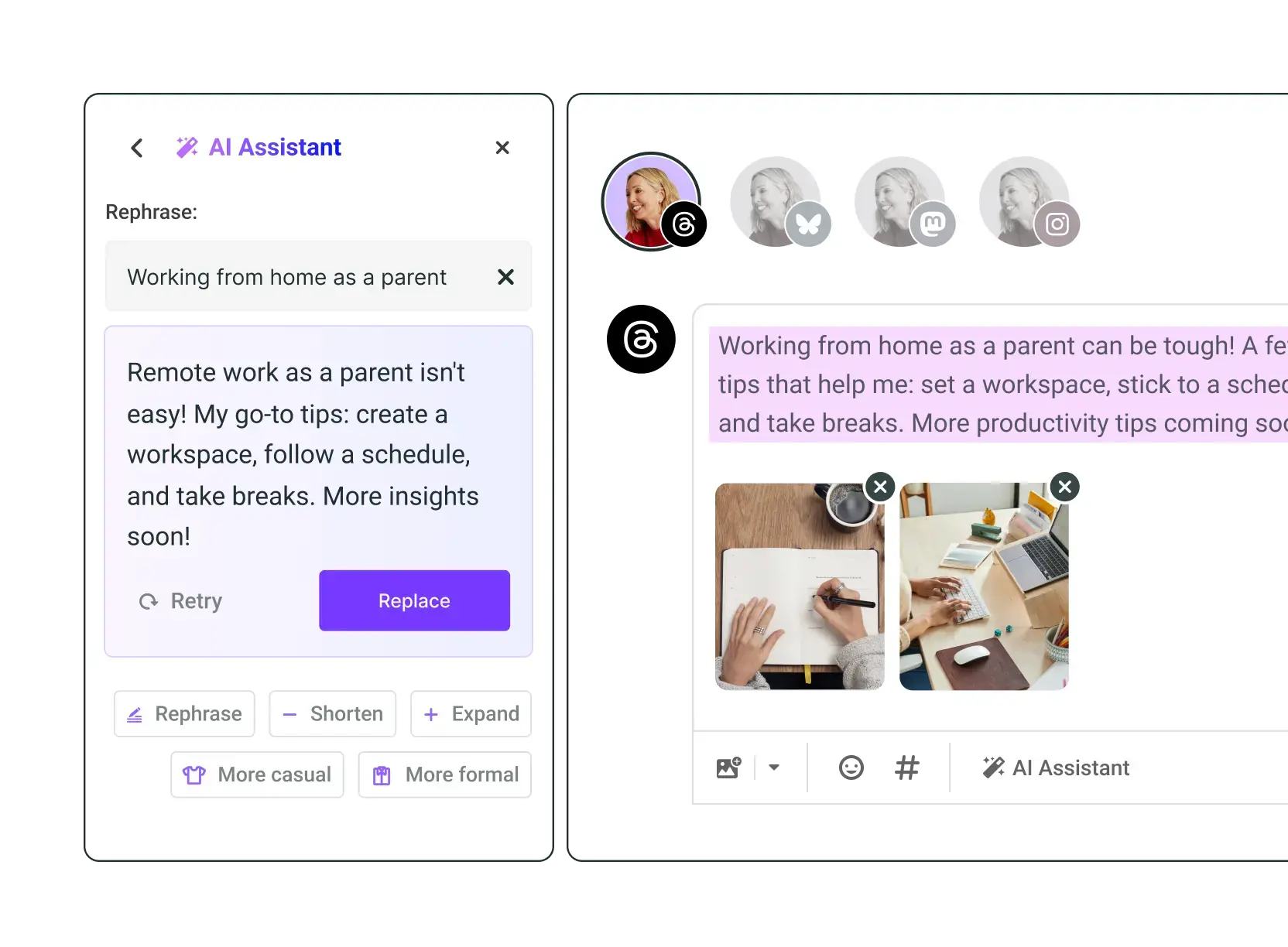
Buffer’s AI assistant is custom-built for social media. The best part is it’s built right into your social media workflow. If you’re using Buffer as your one-stop tool for all things social media, you can use the AI assistant to create content (or refine it) for various platforms simultaneously. No more copy-pasting when you’re crossposting.
Buffer’s AI is also smart enough to pick up on the nuances of all social channels. Unlike other tools, you won’t have to tell it to remain within the character limit for X or sound more professional for LinkedIn and playful for Instagram. It’ll do that automatically — like magic. ✨
The editing features within the assistant are also huge time-savers. Instead of giving prompts to make your content shorter, longer, casual, etc., you can just use the dedicated buttons and get the content you’re after in one click. And yes, these buttons also work for certain sections of the text if you don’t want to rewrite the whole post.
And these are just the fundamentals. Here are some more advanced use cases, especially for social media:
Personalized post ideas
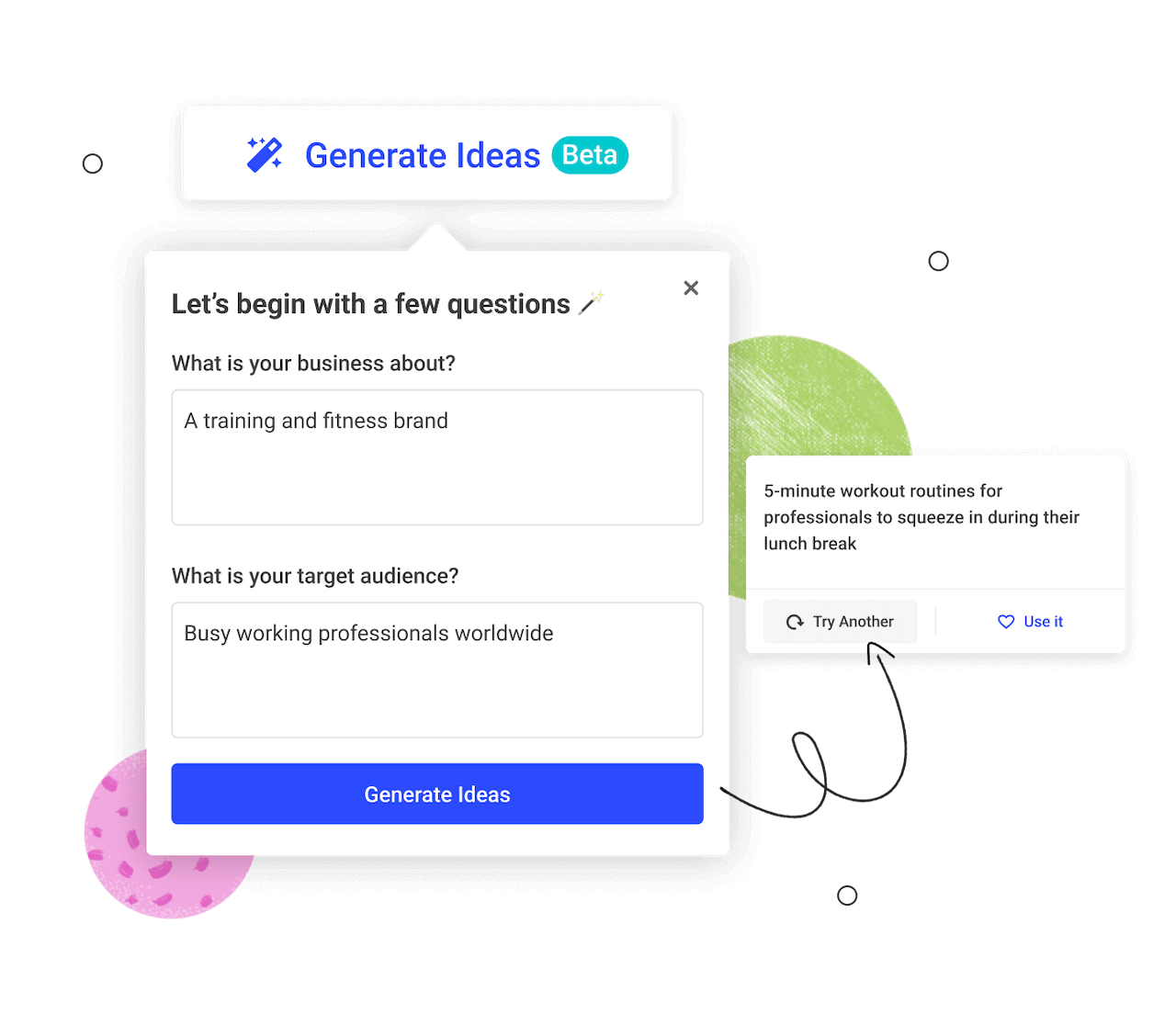
If you’re in an idea block, you can use Buffer’s AI assistant to generate ideas, too. To get a better sense of what is going to resonate with your audience, the assistant will ask you two things:
What is your business about?
Who is your target audience?
From there, the assistant will generate a stream of ideas for you to assess, one at a time. On each one, you’ll be able to hit Use it, which will open a pre-filled post creation window, or Try another to regenerate.
I use this feature all the time when I’m stumped for time but want to maintain my posting streak (another very cool Buffer feature). Some of my best-performing posts initially began as an idea seed given by Buffer. How cool is that?
Repurpose old posts and content
Another essential part of any social media strategy is repurposing the content you create. Buffer’s AI assistant does that, too. You can prompt it to repurpose posts that have performed well or rewrite them to be more appropriate for another platform.
This feature is really handy for platforms with adjacent features — like repurposing your LinkedIn post as a thread for Threads or X. You can also use it to give your dusty, old posts a glow-up — there’s a good chance some of your audience hasn’t seen the old post, and you have gained new followers. Plus, if you rewire the post a bit, even people who have seen it already will appreciate encountering it again in a new way.
And if you publish long-form content, you can use the assistant to turn it into bite-sized social media snippets.
Free and limitless on all Buffer plans
Unlike many other AI writer tools, especially those built for social media, there’s no ‘credits’ system in place. The AI Assistant is free to use, as is Buffer (for up to three channels). When it comes to the number of prompts and rephrases you can submit, the sky is the limit!
Bonus: No-sign-up-required Social Media Post Creator
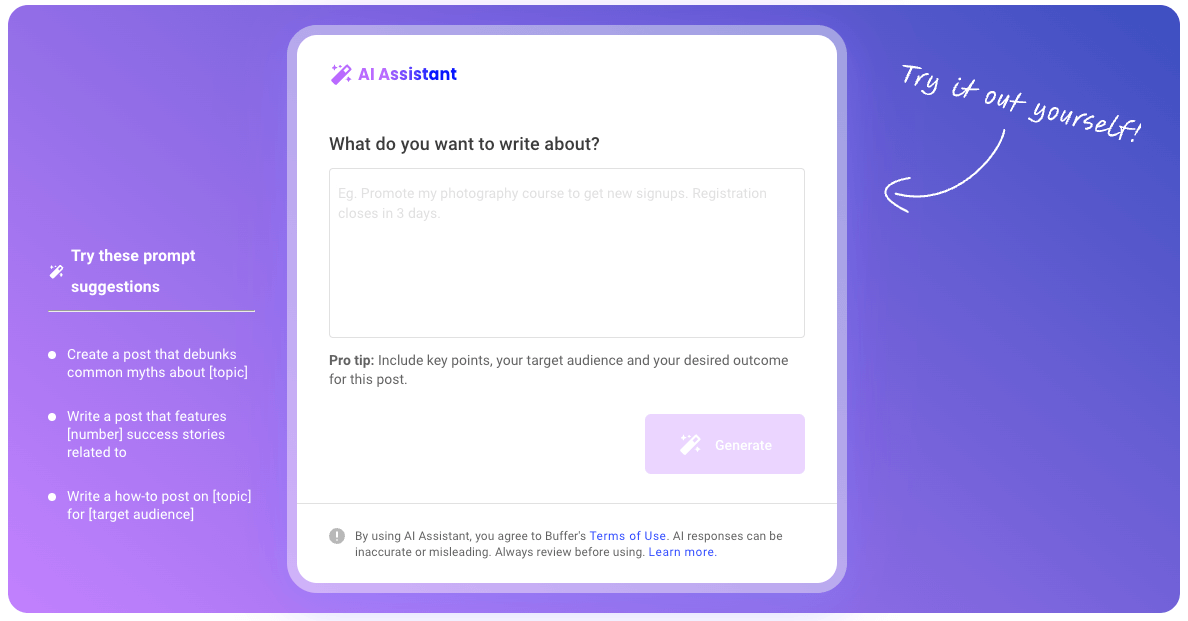
You don’t need to be a Buffer user to use the AI Assistant. With the free Social Media Post Creator, you can take the tool for a test run (or use it indefinitely) without creating an account or sharing your email address.
✨
Let Buffer handle the bsuywork, so you can focus on what actually matters — creating scroll-stopping content. Try Buffer for free.
2. Claude
Best for structured writing that requires deep reasoning
Price: Free plan available. Paid plans start at $20/month.
Claude is the one writing software I use nearly every day. If you compare it to ChatGPT for basic tasks such as brainstorming title/post ideas or refining short- form content text like emails or copy, there’s not a major difference in the output.
You might find ChatGPT’s writing style to be more polished and prim, while Claude’s is more relaxed and conversational, but even then, the difference isn’t too obvious.
However, the difference is stark in tasks that require a strong contextual understanding or reasoning. Claude, in my experience, is better at parsing complex ideas than any other AI writing tool I’ve tried. It’s also one of the best tools to generate ideas — it makes for a great brainstorming partner.
Claude is also a great editor. I often use it to identify gaps in my arguments and areas where my content lacks depth. It can adhere to a brand voice if provided with proper prompts. In contrast to ChatGPT, I prefer giving detailed prompts to Claude to get the best results.
Price: Plans begin at $69/month/seat. 7-day free trial available.
Jasper is an all-in-one AI marketing tool that also has built-in writing features. It was one of the pioneers in the space and now offers a whole suite of features, all catering to marketers.
You can use it for:
Writing anything and everything under the sun — product descriptions, blog posts, landing pages, product feature updates, press releases, media pitch emails, and more
Collaborate with your team. Everyone can jump into various documents and view projects and campaigns at a glance with nifty Kanban and calendar views
Refining any marketing copy using Jasper Chat — it’s trained on marketing use cases and personalized brand guidelines
Generate text and images that complement your content
When writing, Jasper’s intuitive system will ask you to enter a simple prompt or choose from a list of templates. From there, you’ll be asked for more information upfront, which differs depending on what you’re working on. Before generating your draft, you can add things like your target audience, specific points to include, and more — but the AI can predict these things so well that this usually just involves choosing from some recommended options.
Jasper may not be the best fit if you only need an AI writing tool to refine posts and generate ideas. Jasper can do a lot more than that and integrate seamlessly into your marketing efforts. Its cost reflects that, too.
While Jasper is intuitive and great for teams, it’s worth noting that the foundation of the tool is the same as most of the other (cheaper) options on this list. Jasper “uses over a dozen language models,” but the marketing copy generated is similar to what you’ll get from ChatGPT and other AI writing software.
Price: Free plan available with a limit on the rewrites, suggestions, and generations. Paid plans begin at $13.99/month.
Wordtune is the perfect writing assistant if you need a tool to polish your writing rather than generating ideas. It’s one of the tools I’ve been using every week for months, simply because its output is better than that of several other tools I’ve tried.
You can use it to:
Paraphrase your writing
Check your content for typos and grammar
Rewrite or create any form of content in a different tone
I also love Wordtune for its accuracy. Although no AI tool is 100% accurate (always, always run a fact-check), Wordtune checks at least five sources before confirming a fact as credible. There are also various templates you can use if you don’t want to start from scratch.
Wordtune is also great for non-native English speakers who want to sound confident in their writing and clean the text before publishing it anywhere.
Price: Free version available with the basic AI models. Paid plan costs $24.99/month.
Lex is one of the simplest and smartest AI writing tools. I think of it as the Google Docs 2.0 — it looks and feels similar (so getting yourself familiar is quick and easy), but does everything better.
Lex is first and foremost a tool for creating copy. It might not have all the bells and whistles that the others have, but what it does, it does exceptionally well. It’s also got some lightweight formatting options and collaboration tools (comments, sharing, read-only links, etc.).
Yes, you can use prompts to generate drafts, just as you would with any AI writing tool. But where Lex really shines is in editing and refining your work. It’s a bit like having an AI editor to work with you.
You can have it rewrite sentences you don’t like based on specific instructions (make shorter, make funnier), or write more based on previous paragraphs (great if you’re a bit short on word count).
Lex’s paid plan uses enterprise AI models from OpenAI, Anthropic, and TogetherAI — if you need a tool that combines the premium features of the top AI models, this tool is the perfect choice.
My favorite is the proofreading function, ‘Checks.’ You can have Lex’s AI check for the obvious things, such as spelling and grammar, but also for brevity, clichés, and passive voice.
Price: Paid plans start at $9/month. Free trial available for 5,000 free word credits and 25 free chat credits.
Koala uses GPT-5 and Claude 4 to help you create SEO articles. It also has a deep research feature to create accurate and factual content. Here are some cool SEO features in Koala:
Add an FAQ and key takeaways section to make your article more readable
Automatically adds internal links to your articles to improve your SEO architecture
Analyzes the top ranking results and includes keywords strategically in your articles
Generate and edit outlines to optimize them well before generating full-fledged articles
Maintains consistent brand voice by using your customized brand tone guidelines and terminologies
You can also customize your article length, point of view (first person, second person, or third person), and use multiple data sources across the web (such as Google News and Google Scholar).
As I discussed earlier, it’s not advisable to publish content written entirely by AI anywhere. But Koala can help you come pretty close. After using it, you can quickly edit an AI written draft and add that human touch before publishing your article.
Price: Plans start at $19/month for 225,000 credits. Free trial available with 10,000 credits.
If you’ve been meaning to write a novel for years, Sudowrite may soon become your new best friend. Not only will Sudowrite help you generate ideas and write stories for the characters you’ve had floating around in your head for years, but it’s also an AI-powered project management tool of sorts specifically designed for fiction writers. Sudowrite has its own AI model (called Muse) built specifically for writing fiction.
As for the writing itself, you’ll start by entering the genre of your masterpiece-in-progress, then get cracking on the draft. Instead of entering a prompt, start by entering what you have. With a few sentences to start a chapter, click the ‘Write’ button, and the AI generator will suggest several options to keep moving the story forward. Highlight a word or phrase and hit ‘Describe’ to generate a description of the object based on each of the senses or a metaphor.
There’s also a ‘Rewrite’ button to help you paraphrase or rework something and a ‘Brainstorm’ button to help get your creative juices flowing in specific directions, from characters to world-building to plot points.
Then there’s Sudowrite’s Canvas — a space for mind mapping your (and the AI’s) imaginings to give you a bird’s-eye view (and keep track of) the story you’re creating.
Sudowrite also boasts a bustling Slack community of other Sudowrite users so you can bounce ideas off of humans from time to time.
Price: Plans start at $29/month. Free trial available with limited features and the basic AI model.
Type excels at long-form writing and has three core features in its writing assistant:
Generate the first draft of an article, ebook, or any other long-form content
Edit a draft you’ve already worked on (whether it’s live or in a doc)
Chat with Type to spark ideas
It uses the GPT-4o and Claude 3.7 Sonnet AI models to help you generate content. You can train the tool on your unique writing style by adding a writing sample or creating a style guide from scratch.
You can definitely use one of these models in ChatGPT and Claude itself to get the same results. Where Type provides additional value is with its editing features. You can edit your articles for grammar, fluff, structure, and custom instructions. If, like me, you’re the read-aloud-to-edit type, Type can also narrate a document to help you spot holes in your argument or a hard-to-read sentence.
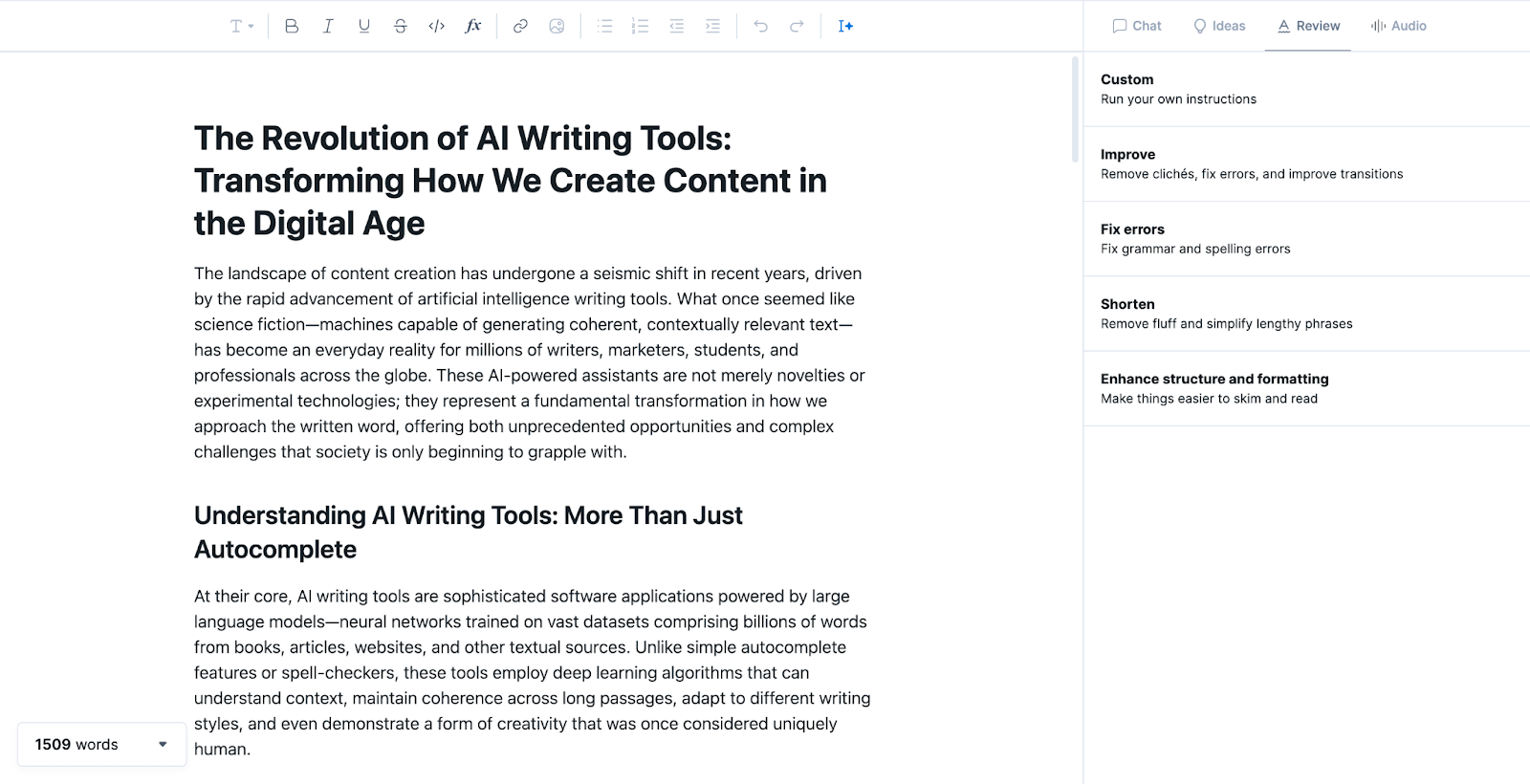
Type also helps you find ideas for what you can write next — a handy springboard for anything you might want to add. The sidebar contains a list of suggestions related to whatever you’re working on that you can use to generate another paragraph. In the main editor, you can also highlight specific sentences, paragraphs, or phrases and ask Type to rework them for you.
All the standard options are available, but ‘Custom’ is particularly handy, allowing you to ask the AI to do something really specific with your highlighted text. You can give it a customized prompt and even save it for the future if you find you need to do repetitive edits.
Price: Plans start at $59/month. There’s a 3-day free trial available.
SEOWind, like Koala, is laser-focused on SEO. The difference is that its specialty is in creating stellar SEO briefs, making it an excellent tool for content marketers.
As such, SEOWind doesn’t ask you to enter a prompt to kick-start your writing but a primary search term. From there, it’ll jump you to a fascinating dashboard that analyzes blog posts and pages already ranking for this term to help you create your ‘brief’ and a content outline.
In this build-you-brief dashboard, you’ll see a competitor analysis (an overview of blog posts and pages already ranking in Google for your term), competitor outlines (the structure of their content), and questions to answer (related queries pulled from Google, Quora, and Reddit). Along with this, the tool recommends the ideal word count, the number of headings, and even the number of images to include.
With this information at your fingertips, you can set about pulling bits and pieces to create your own brief, from which SEOWind’s AI will generate a draft for you to download in your format of choice — from there, you’re left to edit the article on your own. While SEOWind makes briefs super customizable, there’s no way to edit and rework with AI once your draft is generated.
All briefs are saved within projects, where SEOWind encourages you to add details about your brand tone, details about your company and products, and even integrates with Google Search Console to help you find internal linking opportunities (one of the more tedious tick-boxes in SEO writing for sure!).
I also love its Content Refresh feature, where SEOWind’s AI agent analyzes your content, compares it to the top-ranking pieces, and identifies the weak spot in your current content. Its AI writer will then also write the draft implementing the suggestions. If any of your article’s sections lack depth, it pulls in external research to fill the gaps, too.
Price: Free version available. Paid plans begin at $20/month.
It’d be remiss of me not to mention the tool that (kinda) put AI writing on the map: ChatGPT. Even ChatGPT’s free version is great for most tedious tasks related to writing. I use it to polish my title ideas, simplify complex sentences, and come up with synonyms for words I keep repeating too often.
ChatGPT, a chatbot based on OpenAI’s GPT model, is what many of the bells-and-whistle-filled tools above are built on and what helps generate the copy that lands in their fancy interfaces.
Learning to prompt ChatGPT takes some practice — I usually just give a simple prompt and keep refining the output using the chat-style interface. You can also do the opposite and provide as much context as possible in one go to reduce the total number of refinery prompts you’d have to do.
Yes, ChatGPT is an AI writing tool that can help with a variety of writing-related tasks, such as writing emails, social media posts, blog posts, ads, and more. It’s built on a large language model created by OpenAI.
It can be very helpful, but it is essential to have a human edit and review the content written by any AI writing tool to ensure accuracy and the right tone/style.
Are AI writing tools free?
Many AI writing tools have free trials or free plans with limited features. ChatGPT and Claude, for example, have a free tier with usage limits and access to only older AI models. You can upgrade to better models and expanded limits by subscribing to these tools.
If you want to access the API of a writing tool to use it in your own application, you typically have to pay either per token or by usage.
So while free access is available for many tools, the most capable or unlimited versions usually come with a price.
Which AI tool is best for writing?
There’s no single ‘best’ AI tool for writing — it all depends on your needs and budget. Popular choices include ChatGPT for day-to-day writing, Claude for structured writing that requires reasoning and nuance, Buffer for writing anything about social media, Jasper for marketing teams, Koala or SEOWind for SEO content, and Sudowrite for writing stories or fiction.
Writer’s block be gone
We’ve all been there — staring at the blinking cursor like it personally offended us. AI writing tools can’t create ideas out of thin air, but they certainly make getting started a whole lot easier.
And writer’s block is a particular pest in the social media world (probably because you have to create so! much! content! for various platforms). Buffer’s AI assistant understands the chaos and is designed to beat it. Generate ideas or whole posts, cross-post the same caption or repurpose for different channels, Buffer’s AI can do it all. The best part, though, is Buffer is built right into your publishing workflow — no more new tabs to find or credits to sweat about.
YouTube denies AI was involved with odd removals of tech tutorials
Those users could become loyal to Microsoft, White said. And eventually, some users may even “get tired of bypassing the Microsoft account requirements, or Microsoft will add a new feature that they’ll happily get the account for, and they’ll relent and start using a Microsoft account,” White suggested in his video. “At least some people will, not me.”
Microsoft declined Ars’ request to comment.
To White, it seemed possible that YouTube was leaning on AI to catch more violations but perhaps recognized the risk of over-moderation and, therefore, wasn’t allowing AI to issue strikes on his account.
But that was just a “theory” that he and other creators came up with, but couldn’t confirm, since YouTube’s chatbot that supports creators seemed to also be “suspiciously AI-driven,” seemingly auto-responding even when a “supervisor” is connected, White said in his video.
Absent more clarity from YouTube, creators who post tutorials, tech tips, and computer repair videos were spooked. Their biggest fear was that unexpected changes to automated content moderation could unexpectedly knock them off YouTube for posting videos that in tech circles seem ordinary and commonplace, White and Britec said.
“We are not even sure what we can make videos on,” White said. “Everything’s a theory right now because we don’t have anything solid from YouTube.”
YouTube recommends making the content it’s removing
White’s channel gained popularity after YouTube highlighted an early trending video that he made, showing a workaround to install Windows 11 on unsupported hardware. Following that video, his channel’s views spiked, and then he gradually built up his subscriber base to around 330,000.
In the past, White’s videos in that category had been flagged as violative, but human review got them quickly reinstated.
“They were striked for the same reason, but at that time, I guess the AI revolution hadn’t taken over,” White said. “So it was relatively easy to talk to a real person. And by talking to a real person, they were like, ‘Yeah, this is stupid.’ And they brought the videos back.”
Now, YouTube suggests that human review is causing the removals, which likely doesn’t completely ease creators’ fears about arbitrary takedowns.
Neural network finds an enzyme that can break down polyurethane
You’ll often hear plastic pollution referred to as a problem. But the reality is that it’s multiple problems. Depending on the properties we need, we form plastics out of different polymers, each of which is held together by a distinct type of chemical bond. So the method we use to break down one type of polymer may be incompatible with the chemistry of another.
That problem is why, even though we’ve had success finding enzymes that break down common plastics like polyesters and PET, they’re only partial solutions to plastic waste. However, researchers aren’t sitting back and basking in the triumph of partial solutions, and they’ve now got very sophisticated protein design tools to help them out.
That’s the story behind a completely new enzyme that researchers developed to break down polyurethane, the polymer commonly used to make foam cushioning, among other things. The new enzyme is compatible with an industrial-style recycling process that breaks the polymer down into its basic building blocks, which can be used to form fresh polyurethane.
Breaking down polyurethane
The basics of the chemical bonds that link polyurethanes. The rest of the polymer is represented by X’s here.
The new paper that describes the development of this enzyme lays out the scale of the problem: In 2024, we made 22 million metric tons of polyurethane. The urethane bond that defines these involves a nitrogen bonded to a carbon that in turn is bonded to two oxygens, one of which links into the rest of the polymer. The rest of the polymer, linked by these bonds, can be fairly complex and often contains ringed structures related to benzene.
Digesting polyurethanes is challenging. Individual polymer chains are often extensively cross-linked, and the bulky structures can make it difficult for enzymes to get at the bonds they can digest. A chemical called diethylene glycol can partially break these molecules down, but only at elevated temperatures. And it leaves behind a complicated mess of chemicals that can’t be fed back into any useful reactions. Instead, it’s typically incinerated as hazardous waste.
Cursor introduces its coding model alongside multi-agent interface
Keep in mind: This is based on an internal benchmark at Cursor. Credit: Cursor
Cursor is hoping Composer will perform in terms of accuracy and best practices as well. It wasn’t trained on static datasets but rather interactive development challenges involving a range of agentic tasks.
Intriguing claims and strong training methodology aside, it remains to be seen whether Composer will be able to compete with the best frontier models from the big players.
Even developers who might be natural users of Cursor would not want to waste much time on an unproven new model when something like Anthropic’s Claude is working just fine.
To address that, Cursor introduced Composer alongside its new multi-agent interface, which allows you to “run many agents in parallel without them interfering with one another, powered by git worktrees or remote machines”—that means using multiple models at once for the same task and comparing their results, then picking the best one.
The interface is an invitation to try Composer and let the work speak for itself. We’ll see how devs feel about it in the coming weeks. So far, a non-representative sample of developers I’ve spoken with has told me they feel that Composer is not ineffective, but rather too expensive, given a perceived capability gap with the big models.
You can see the other new features and fixes for Cursor 2.0 in the changelog.
“Unexpectedly, a deer briefly entered the family room”: Living with Gemini Home
Oops, we made you think someone broke into your house.
Credit: Ryan Whitwam
Oops, we made you think someone broke into your house. Credit: Ryan Whitwam
On several occasions, I’ve seen Gemini mistake dogs and totally empty rooms (or maybe a shadow?) for a person. It may be alarming at first, but after a few false positives, you grow to distrust the robot. Now, even if Gemini correctly identified a random person in the house, I’d probably ignore it. Unfortunately, this is the only notification experience for Gemini Home Advanced.
“You cannot turn off the AI description while keeping the base notification,” a Google spokesperson told me. They noted, however, that you can disable person alerts in the app. Those are enabled when you turn on Google’s familiar faces detection.
Gemini often twists reality just a bit instead of creating it from whole cloth. A person holding anything in the backyard is doing yardwork. One person anywhere, doing anything, becomes several people. A dog toy becomes a cat lying in the sun. A couple of birds become a raccoon. Gemini likes to ignore things, too, like denying there was a package delivery even when there’s a video tagged as “person delivers package.”
Gemini still refused to admit it was wrong.
Credit: Ryan Whitwam
Gemini still refused to admit it was wrong. Credit: Ryan Whitwam
At the end of the day, Gemini is labeling most clips correctly and therefore produces mostly accurate, if sometimes unhelpful, notifications. The problem is the flip side of “mostly,” which is still a lot of mistakes. Some of these mistakes compel you to check your cameras—at least, before you grow weary of Gemini’s confabulations. Instead of saving time and keeping you apprised of what’s happening at home, it wastes your time. For this thing to be useful, inferential errors cannot be a daily occurrence.
Learning as it goes
Google says its goal is to make Gemini for Home better for everyone. The team is “investing heavily in improving accurate identification” to cut down on erroneous notifications. The company also believes that having people add custom instructions is a critical piece of the puzzle. Maybe in the future, Gemini for Home will be more honest, but it currently takes a lot of hand-holding to move it in the right direction.
Caught cheating in class, college students “apologized” using AI—and profs called them out
When the profs realized how widespread this was, they contacted the 100-ish students who seemed to be cheating. “We reached out to them with a warning, and asked them, ‘Please explain what you just did,’” said Fagen-Ulmschneider in an Instagram video discussing the situation.
Apologies came back from the students, first in a trickle, then in a flood. The profs were initially moved by this acceptance of responsibility and contrition… until they realized that 80 percent of the apologies were almost identically worded and appeared to be generated by AI.
So on October 17, during class, Flanagan and Fagen-Ulmschneider took their class to task, displaying a mash-up image of the apologies, each bearing the same “sincerely apologize” phrase. No disciplinary action was taken against the students, and the whole situation was treated rather lightly—but the warning was real. Stop doing this. Flanagan said that she hoped it would be a “life lesson” for the students.
Time for a life lesson! Credit: Instagram
On a University of Illinois subreddit, students shared their own experiences of the same class and of AI use on campus. One student claimed to be a teaching assistant for the Data Science Discovery course and said that, in addition to not being present, many students would use AI to solve the (relatively easy) problems. AI tools will often “use functions that weren’t taught in class,” which gave the game away pretty easily.
Another TA claimed that “it’s insane how pervasive AI slop is in 75% of the turned-in work,” while another student complained about being a course assistant where “students would have a 75-word paragraph due every week and it was all AI generated.”
One doesn’t have to read far in these kinds of threads to find plenty of students who feel aggrieved because they were accused of AI use—but hadn’t done it. Given how poor most AI detection tools are, this is plenty plausible; and if AI detectors aren’t used, accusations often come down to a hunch.
An OpenAI spokesperson told Reuters that “an IPO is not our focus, so we could not possibly have set a date,” adding that the company is “building a durable business and advancing our mission so everyone benefits from AGI.”
Revenue grows as losses mount
The IPO preparations follow a restructuring of OpenAI completed on October 28 that reduced the company’s reliance on Microsoft, which has committed to investments of $13 billion and now owns about 27 percent of the company. OpenAI was most recently valued around $500 billion in private markets.
OpenAI started as a nonprofit in 2015, then added a for-profit arm a few years later with nonprofit oversight. Under the new structure, OpenAI is still controlled by a nonprofit, now called the OpenAI Foundation, but it gives the nonprofit a 26 percent stake in OpenAI Group and a warrant for additional shares if the company hits certain milestones.
A successful OpenAI IPO could represent a substantial gain for investors, including Microsoft, SoftBank, Thrive Capital, and Abu Dhabi’s MGX. But even so, OpenAI faces an uphill financial battle ahead. The ChatGPT maker expects to reach about $20 billion in revenue by year-end, according to people familiar with the company’s finances who spoke with Reuters, but its quarterly losses are significant.
Microsoft’s earnings filing on Wednesday offered a glimpse at the scale of those losses. The company reported that its share of OpenAI losses reduced Microsoft’s net income by $3.1 billion in the quarter that ended September 30. Since Microsoft owns 27 percent of OpenAI under the new structure, that suggests OpenAI lost about $11.5 billion during the quarter, as noted by The Register. That quarterly loss figure exceeds half of OpenAI’s expected revenue for the entire year.
After teen death lawsuits, Character.AI will restrict chats for under-18 users
Lawsuits and safety concerns
Character.AI was founded in 2021 by Noam Shazeer and Daniel De Freitas, two former Google engineers, and raised nearly $200 million from investors. Last year, Google agreed to pay about $3 billion to license Character.AI’s technology, and Shazeer and De Freitas returned to Google.
But the company now faces multiple lawsuits alleging that its technology contributed to teen deaths. Last year, the family of 14-year-old Sewell Setzer III sued Character.AI, accusing the company of being responsible for his death. Setzer died by suicide after frequently texting and conversing with one of the platform’s chatbots. The company faces additional lawsuits, including one from a Colorado family whose 13-year-old daughter, Juliana Peralta, died by suicide in 2023 after using the platform.
In December, Character.AI announced changes, including improved detection of violating content and revised terms of service, but those measures did not restrict underage users from accessing the platform. Other AI chatbot services, such as OpenAI’s ChatGPT, have also come under scrutiny for their chatbots’ effects on young users. In September, OpenAI introduced parental control features intended to give parents more visibility into how their kids use the service.
The cases have drawn attention from government officials, which likely pushed Character.AI to announce the changes for under-18 chat access. Steve Padilla, a Democrat in California’s State Senate who introduced the safety bill, told The New York Times that “the stories are mounting of what can go wrong. It’s important to put reasonable guardrails in place so that we protect people who are most vulnerable.”
On Tuesday, Senators Josh Hawley and Richard Blumenthal introduced a bill to bar AI companions from use by minors. In addition, California Governor Gavin Newsom this month signed a law, which takes effect on January 1, requiring AI companies to have safety guardrails on chatbots.
Senators move to keep Big Tech’s creepy companion bots away from kids
Big Tech says bans aren’t the answer
As the bill advances, it could change, senators and parents acknowledged at the press conference. It will likely face backlash from privacy advocates who have raised concerns that widely collecting personal data for age verification puts sensitive information at risk of a data breach or other misuse.
The tech industry has already voiced opposition. On Tuesday, Chamber of Progress, a Big Tech trade group, criticized the law as taking a “heavy-handed approach” to child safety. The group’s vice president of US policy and government relations, K.J. Bagchi, said that “we all want to keep kids safe, but the answer is balance, not bans.
“It’s better to focus on transparency when kids chat with AI, curbs on manipulative design, and reporting when sensitive issues arise,” Bagchi said.
However, several organizations dedicated to child safety online, including the Young People’s Alliance, the Tech Justice Law Project, and the Institute for Families and Technology, cheered senators’ announcement Tuesday. The GUARD Act, these groups told Time, is just “one part of a national movement to protect children and teens from the dangers of companion chatbots.”
Mourning parents are rallying behind that movement. Earlier this month, Garcia praised California for “finally” passing the first state law requiring companies to protect their users who express suicidal ideations to chatbots.
“American families, like mine, are in a battle for the online safety of our children,” Garcia said at that time.
During Tuesday’s press conference, Blumenthal noted that the chatbot ban bill was just one initiative of many that he and Hawley intend to raise to heighten scrutiny on AI firms.