After using ChatGPT, man swaps his salt for sodium bromide—and suffers psychosis
After seeking advice on health topics from ChatGPT, a 60-year-old man who had a “history of studying nutrition in college” decided to try a health experiment: He would eliminate all chlorine from his diet, which for him meant eliminating even table salt (sodium chloride). His ChatGPT conversations led him to believe that he could replace his sodium chloride with sodium bromide, which he obtained over the Internet.
Three months later, the man showed up at his local emergency room. His neighbor, he said, was trying to poison him. Though extremely thirsty, the man was paranoid about accepting the water that the hospital offered him, telling doctors that he had begun distilling his own water at home and that he was on an extremely restrictive vegetarian diet. He did not mention the sodium bromide or the ChatGPT discussions.
His distress, coupled with the odd behavior, led the doctors to run a broad set of lab tests, revealing multiple micronutrient deficiencies, especially in key vitamins. But the bigger problem was that the man appeared to be suffering from a serious case of “bromism.” That is, an excess amount of the element bromine had built up in his body.
A century ago, somewhere around 8–10 percent of all psychiatric admissions in the US were caused by bromism. That’s because, then as now, people wanted sedatives to calm their anxieties, to blot out a cruel world, or simply to get a good night’s sleep. Bromine-containing salts—things like potassium bromide—were once drugs of choice for this sort of thing.
Unfortunately, bromide can easily build up in the human body, where too much of it impairs nerve function. This causes a wide variety of problems, including grotesque skin rashes (warning: the link is exactly what it sounds like) and significant mental problems, which are all grouped under the name of “bromism.”
On Thursday, OpenAI announced GPT-5 and three variants—GPT-5 Pro, GPT-5 mini, and GPT-5 nano—what the company calls its “best AI system yet,” with availability for some of the models across all ChatGPT tiers, including free users. The new model family arrives with claims of reduced confabulations, improved coding capabilities, and a new approach to handling sensitive requests that OpenAI calls “safe completions.”
It’s also the first time OpenAI has given free users access to a simulated reasoning AI model, which breaks problems down into multiple steps using a technique that tends to improve answer accuracy for logical or analytical questions.
GPT-5 represents OpenAI’s latest attempt to unify its various AI capabilities into a single system. The company says the GPT-5 family acts as a “unified system” with a smart, efficient model that answers most questions, a deeper reasoning model called “GPT-5 thinking” for harder problems, and a real-time router that decides which approach to use based on conversation type, complexity, tool needs, and user intent. Like GPT-4o, GPT-5 is a multimodal system that can interact via images, voice, and text.
The rollout starts today, extending to ChatGPT’s 700 million weekly active users, with varying usage limits based on subscription tier. Pro subscribers will receive unlimited access to GPT-5 and the GPT-5 Pro variant, while Plus users receive “significantly higher usage limits” compared to free users, according to a statement from OpenAI. GPT-5 Pro is replacing o3-pro in ChatGPT for those subscriber tiers with access to it.
Technical improvements and new features
Since the launch of GPT-4 in 2023, we’ve seen a trend of relative diminishing returns in terms of jumps in capability between major AI model releases. In that sense, the jump in contextual processing capability between GPT-3 and GPT-4 felt shockingly large. The jump between GPT-4 (if you consider the original 2023 version) and GPT-5 is still significant, but when you consider intermediate releases like GPT-4o, GPT-4.5, GPT-4.1, and o3-pro, GPT-5 feels like an incremental upgrade that is unlikely to shock anyone.
PA più efficienti? Con meno personale, più digitale e AI. La ricetta di Cassese
In un’Italia che invecchia e si spopola, dove la denatalità riduce gli studenti del 4% in appena tre anni, e dove la digitalizzazione e l’intelligenza artificiale iniziano a sostituire mansioni un tempo svolte da esseri umani, una domanda diventa sempre più urgente: ha ancora senso aumentare gli organici della pubblica amministrazione? Sabino Cassese, giurista ed ex giudice della Corte Costituzionale, ha provato a rispondere sul Corriere.
Mentre sul mercato del lavoro cresce il paradosso per cui l’offerta di posti supera la domanda, la macchina statale sembra ancora imprigionata in una logica novecentesca, dove “più assunzioni” equivaleva a “meno disoccupazione”. Ma oggi, quella logica rischia di essere non solo obsoleta, ma anche controproducente.
È forse giunto il momento di rispolverare il vecchio e saggio principio di Francesco Saverio Nitti: “pochi e ben pagati”. Una massima che oggi, più che mai, potrebbe trasformarsi in una strategia vincente. Perché non solo migliorerebbe la qualità dei servizi pubblici, ma converrebbe anche a chi governa.
<!-- ARUBA - 300x250 -->
Italiani insoddisfatti della macchina pubblica
I numeri parlano chiaro. Secondo l’OCSE, meno della metà degli italiani ha fiducia nella pubblica amministrazione. La percezione diffusa è che la burocrazia sia un ostacolo, una barriera alla crescita, proprio come lo erano i vecchi dazi. In questo scenario, continuare a moltiplicare gli uffici e gli impiegati senza affrontare il nodo della produttività rischia di peggiorare la situazione.
Si semplifica l’accesso, ma non si premia il merito
Negli ultimi anni non sono mancate iniziative per “modernizzare” l’amministrazione: via il tetto alle retribuzioni pubbliche, semplificazione dei concorsi, possibilità di crescita interna per chi è già in servizio. Si parla anche di carriera e di riconoscimenti, ma la realtà resta questa, il 98% dei dipendenti riceve il massimo dei voti, come se la valutazione fosse solo una formalità.
Intanto i rinnovi contrattuali, più che aumenti di stipendio, offrono benefici laterali: settimana corta, permessi extra, buoni pasto anche da remoto. Misure che, secondo Cassese, migliorano il benessere, ma non sempre l’efficienza. E soprattutto, non cambiano la logica di fondo, ossia più personale, non necessariamente più qualità.
Crescono gli impiegati, ma anche la frammentazione
Secondo gli ultimi (e tardivi) dati della Ragioneria generale dello Stato, i dipendenti pubblici sono 3,3 milioni, oltre la metà concentrati in sanità e istruzione. Ma a questi si sommano quasi 840 mila lavoratori delle partecipate, spesso dimenticati nelle statistiche ufficiali. E nel solo biennio 2022-2023, sono stati banditi 380 mila nuovi posti.
In parallelo, continua la tendenza all’esternalizzazione dei servizi, che allarga ancora di più la nebulosa del “pubblico” e rende più difficile misurarne efficacia, costi e produttività.
Tecnologia vs assunzioni, la sfida che l’Italia non può ignorare
Nonostante l’evidente impatto dell’automazione e dell’intelligenza artificiale, nei documenti ufficiali del Ministero della PA si continua a parlare di “urgente bisogno di nuovo personale”. Un’impostazione che contrasta con le sfide del futuro. Meno utenti, più tecnologia, maggiore necessità di competenze e reattività.
Il paragone che Cassese fa con la difesa è eloquente: negli Stati Uniti si discute di una “quarta forza armata”, completamente unmanned (senza equipaggio), fatta di droni e sistemi automatici. In Italia, invece, si continua a credere che più assunzioni equivalgano a più consenso elettorale. Ma non è più così: nuovi impiegati, spesso mal gestiti e sottopagati, finiscono col diventare nuovi oppositori, frustrati e disillusi.
Invertire la rotta?
Probabilmente è vero, è il momento di razionalizzare, non di moltiplicare. L’occasione è storica e servita su un piatto d’argento. Con il calo della popolazione e l’avanzare della tecnologia, si può finalmente semplificare l’apparato pubblico, rendere più snella la macchina amministrativa, e puntare su un personale selezionato, ben formato e ben retribuito.
Tuttavia, riferirci alle nuove assunzioni come a una dispersione di risorse potrebbe essere deleterio. Soprattutto per le nuove generazioni. Va senz’altro migliorato il sistema per valorizzare chi già c’è, introducendo sistemi realmente meritocratici, in modo che l’amministrazione possa recuperare credibilità, efficienza e fiducia da parte dei cittadini.
The 11 Best AI Video Editors for Creators and Marketers, Tried and Tested (+ Bonus AI Tool)
My resolution this year was to make more videos — or honestly, to make any video at all. So I wrote a script, hit record, and ended up with a bunch of footage I wasn’t quite sure what to do with.
I had questions. Lots of them. How do you add captions so everyone can follow along? What even is b-roll? And are video editors really as complicated as they look?
Enter AI: It’s already helping me work smarter in other areas. I decided to do what I do best — start experimenting. I set out to test a bunch of tools in search of the best AI video editors of 2025.
Most AI video editors now come with a pretty standard toolkit: they’ll clean up background noise, cut out filler words like “um” and “uh,” remove long silences, generate captions, and let you remove the background entirely if you want.
They even act as AI video makers and can use text-to-video capabilities to create complete videos with just a prompt.
Where things get interesting is when you look at which one of these AI video editors does these basic edits the best, what else these tools can do and, more importantly, which ones are worth using depending on the kind of video you’re making.
Here’s a breakdown of the best AI video editors right now, based on what they do especially well.
Best AI video editors:
1. Adobe Premiere Pro
Best for editors working on complex or long-form projects
Adobe Premiere Pro is filled with pro-level tools that hand you plenty of creative control but also a bit more to learn along the way.
An AI-powered feature that stands out is Morph Cut, which really shines when you’ve trimmed filler words or awkward pauses from an interview or talking head video. Instead of leaving behind a hard, obvious cut, Morph Cut blends the clips so they play like one continuous take, as if the camera never stopped rolling.
And while almost every tool in this list can reframe horizontal videos into 9:16 for social, Premiere Pro goes a step further with its AI Reframe tool. It automatically finds the subject in your shot and tracks their movement so the final video stays focused on the action.
If video editing is a regular part of your week (or you’re working on something big), Premiere Pro is probably worth the time to learn and investment. For quick trims or casual clips, though, it might be more than you need.
Price: On its own, it’s $34.99 per month paid monthly ($37.99 per person for teams), also available as a bundle with the rest of Adobe’s 20+ creative tools
2. Canva
Best for social media videos that blend simple editing with rich design options
What can’t Canva do? Its massive library of elements and integrations makes it easy to create almost any kind of social video — whether that’s a quick TikTok, an eye-catching Instagram Reel, or a polished promo.
One standout feature is Magic Design — part AI video generator, part AI video editor. It quickly creates videos from up to 10 of your photos or video clips and a text-to-video prompt. You get a first draft complete with smart captions, transitions, animations, and even background music.
Of course, you’re not locked into Canva’s music. If you’d rather use trending audio or your own voiceover, you can download videos — with all the text, transitions, and animations — then add your audio in TikTok or Instagram.
On the flip side, Canva is slightly limiting if your videos rely heavily on speech or dialogue. While it can generate automatic captions, it doesn’t support script-based editing. Deleting a word from the transcript will only remove the caption, not the actual footage.
If you’re working with speech-heavy videos like interviews or talking-head videos, there are some great AI-powered video editors coming up that are built for exactly this.
Price: Free plan with limited AI features, Pro plans start at $15 per month paid monthly ($10 per person for teams)
⚡
Set your videos up for success — schedule them across TikTok, YouTube, and Instagram in just a few clicks with Buffer. Here’s how →
3. CapCut
Best for flexible, fuss-free desktop and mobile editing
No roundup of AI video editing software would be complete without CapCut. TikTok’s official video editor is lightweight, easy to use, and packs in a lot of power in both its desktop and mobile apps.
Like most video editors, CapCut includes tools to clean up background noise and enhance your audio, and it goes a step further with Isolate Voice. You can use this AI feature to separate vocals from the music in a song, so you’re left with either the vocals or just the instrumental — whatever best fits your project.
It’s smart to skip this feature for tracks from major labels, since copyright rules can be tricky. The good news: there are plenty of royalty-free or licensed music options out there that let you experiment without worry.
Price: Free plan, with Pro plans starting at $5.99 per month paid monthly for mobile only, and $19.99 per month paid monthly for mobile, desktop, and web ($24.99 per person for teams)
4. Clipchamp
Best for anyone getting started with video editing
If you’re new to video editing, Microsoft’s Clipchamp is one of the easiest ways to dive in. It comes with tons of ready-made templates and without a steep learning curve.
Clipchamp’s AI video tools are fairly simple: background noise suppression, removing silences, text-to-speech, auto transcription and captions, and background removal.
Where it shines is with its generous free plan. Clipchamp is the only video editor in this list that lets you use all these AI features for free — and export your videos without a watermark. That’s a rare find!
For anyone just starting out, it offers a lot without asking for much in return. Paid plans add extras like premium stock assets, higher resolution exports for better video quality, and a brand kit to help you keep your videos on-brand as you grow.
Price: Free plan with all AI features included, Premium plan starts at $11.99 per month paid monthly. It’s also included in many Microsoft plans, including those for businesses.
5. DaVinci Resolve
Best for advanced projects that need full creative control
Like Adobe Premiere Pro, DaVinci Resolve is a longtime favorite among professional editors, especially for projects that need a polished, cinematic finish. Two of its most impressive AI tools are Music Remixer and Relight.
Music Remixer lets you isolate the individual elements in a song — vocals, bass, guitar, drums. You can adjust the volume of each one separately, mute specific instruments, or solo a single track to create the exact mix you want. Want only the bassline? Done. Need everything but the drums? That works too. You can build a mix that fits your video perfectly.
Relight is a powerful AI tool to adjust the lighting in your shot. If you’ve ever finished shooting and wished the lighting were different, Relight lets you fix it after the fact. You can add a virtual light source to your footage to change the light’s direction, adjust shadows, or completely shift the mood of a scene without having to reshoot.
The free version of DaVinci Resolve includes plenty of pro-level features, so it’s a solid place to start if you’re still learning the ropes. When you’re ready to take things further, you can upgrade to the Studio version to access tools like Music Remixer and Relight. No subscriptions here — the paid version is a one-time purchase.
Price: Free version available with an extensive feature set, DaVinci Resolve Studio is a one-time payment of $295
6. Descript
Best for podcasts, interviews, and other dialogue-heavy videos
Descript is built for speech-first content like podcasts, interviews, webinars, and explainer videos — and it shows.
While most AI video editors now offer script-based editing, Descript’s entire workflow is built around the transcript. You can remove words or phrases from the transcript, and Descript will cut them out of the video itself. Plus, you can even add new scenes and mark chapters just as if you’re marking up a document. These are its basic AI-powered tools.
Then there are the advanced ones. If you’ve recorded a take multiple times to get it right (who among us hasn’t?), Remove Retakes is an incredible time saver. It scans your video, automatically identifies the best take, and cuts the rest. There’s no damage done if you don’t like its choice — you can easily pick another one instead, right from the transcript.
And for anyone recording interviews or podcasts, Automatic Multicam takes footage from multiple cameras and automatically creates a professional, dynamic cut that switches between speakers at the right moments.
Descript also has an AI agent co-editor called Underlord you can summon at any time to make specific changes, walk you through how to do something, or even just give you feedback on your video’s script. It’s still in beta, so results can be a little unpredictable, but it showed a lot of promise in my tests.
While you could technically edit a video without dialogue in Descript, you wouldn’t be able to use it to its full power. If your main goal is creating visual-first content for TikToks or Instagram Reels, one of the other tools on this list might be a better fit.
Price: Free plan with limited features, pro plans start at $24 per month paid monthly ($35 per person for teams)
🎙️
Thinking of starting a podcast? Read our guide that has everything you need to know to get started.
7. Final Cut Pro
Best for high-end projects that need advanced visual effects
Final Cut Pro is the final (pun intended) heavyweight AI video editor on this list, and a longtime favorite among professional editors. It’s available only on Mac and comes packed with high-performance tools for high-production video.
Its most impressive AI feature is Magnetic Mask, which can separate a moving subject from the background, even if that subject is in motion. Unlike standard background removal tools built for static shots or talking heads, this one works on full-body movement, so you can create layered effects that interact with your footage more dynamically.
That opens up all kinds of creative possibilities. One simple use is adding text that stays fixed in the background, so as someone walks through the frame, it looks like they’re passing in front of it. Or, you could use it to keep your subject in color while the rest of the scene appears in black and white.
You could also take it up a notch. If you’re a travel creator, you could create a transition where you walk into the frame in Rome and step out of it in Seoul in one smooth motion.
It’s the kind of layered, cinematic effect that usually requires frame-by-frame masking. Here, a single AI tool handles these more complex scenes and effects.
Final Cut Pro is a paid video editor built for professionals, but if you’re on a Mac and want to push your edits further, it’s more than up to the task.
Price: $299.99 to own, with a free trial if you’d like to test it out before you commit
8. Kapwing
Best for editing at speed without sacrificing features
Kapwing does just about everything you’d expect from an AI video editor, and it does a solid job across the board. But when it comes to speed, Kapwing is in a league of its own.
Of all the video editors I tested, this one was hands-down the fastest. Every part of the process — uploading, transcribing, editing and styling captions, adding overlays, working with audio — was blazing fast.
Even AI tools like dubbing and lip sync responded quickly. There were fewer clicks, shorter load times, and no noticeable lag.
That might not seem like a big deal, but video files can get heavy and unwieldy. If you spend long hours editing video, this level of speed will make you wonder how you managed without it.
Price: Free plan with limitations, Pro plans start at $24 per month paid monthly for individuals and teams
9. Opus Clip
Best for turning longer videos into short, shareable clips
If you’re repurposing videos for social media platforms, Opus Clip is built for exactly that. It analyzes your video, pulls out the most engaging moments, and turns them into ready-to-post clips, complete with hooks and customizable captions.
I put this to the test with one of Buffer’s six-minute YouTube videos, and Opus Clip quickly delivered six polished, 30-second clips. These clips are ready to post out of the gate.
But if you’d rather finesse them, you can open each one in a full-featured editor and tweak everything: change caption styles, trim filler words, add transitions, add b-roll — all the usual video editing features.
It also includes a handy auto-censor tool that can mute or bleep words that might limit your video’s reach (and flag it in the captions, too).
Opus Clip also gives each clip a “viral score” — a rating that estimates how well it’s likely to perform on TikTok, Instagram Reels, or YouTube Shorts based on factors like the hook, pacing, and structure. I trimmed a few words from the beginning of a clip and saw the hook score jump from a B to an A-. Definitely felt like I aced a test!
Veed is a powerful, full-featured editor that handles everything from long-form to social media videos, but what’s most impressive is how easy it is to get up and running. It’s packed with features yet never feels overwhelming — and a lot of its AI-powered tools are genuinely impressive.
The automatic transcription was easily the most accurate of all the video editors I tested. It picked up my words perfectly, even with my Indian accent.
From there, caption generation was quick and fully customizable, with plenty of styling options to match your platform or brand. Veed’s subtitle generation was also impressive — it quickly translated my captions into French, giving me the same customization options to choose from.
Another highlight is Eye Contact, which subtly adjusts your gaze so you’re always looking at the camera, even if you’re reading off a script. It works surprisingly well, especially for talking head videos or intros where you need direct eye contact.
Veed also has an incredibly practical (non-AI) feature for social media creators — safe zones for social media videos. When you’re working on a clip for TikTok, Instagram Reels, or YouTube Shorts, Veed shows you where the platform’s interface elements — like the username, caption, and like buttons — will appear. This lets you place your text and graphics perfectly so nothing important gets covered up.
If you want a platform that’s fast, accurate, and covers everything from transcription to edits, Veed delivers.
Price: Free plan with limitations, paid plans start at $24 per month billed monthly for individuals and teams
11. Wondershare Filmora
Best for creators who want more control without the complexity
Wondershare Filmora is a great choice if you want to make your videos pop with eye-catching effects but don’t want the learning curve that comes with a pro-level editing suite.
Its Beat Detection feature lets you time your video cuts to land perfectly on the beat of a song. Just add a track, and Filmora will automatically mark each beat on the timeline. You can then adjust each video clip to match the song’s rhythm. It’s especially handy for trailers, social edits, or anything where timing matters.
Motion Tracking is another pretty cool AI tool for adding creative video effects. If something in your video is moving — like a car driving by — you can attach another element to it. Filmora will make sure that element follows along as the object moves. Think: a thought bubble that follows someone as they’re walking, or your video’s title driving off screen on a car.
And if you record your audio and video separately — say, with an external microphone for better sound quality— the Auto Synchronization feature will be a welcome sight. It automatically lines up your files so that the audio and video are perfectly synced and the video editing process is smoother.
Price: Free plan without AI tools, paid AI plans start at $79.99 per year for MacOS, iOS, and iPadOS and $59.99 for Windows and Android ($155.88 per person paid annually for teams)
Bonus: Adobe Podcast
Best for getting crystal-clear audio for your videos
Adobe Podcast is a brand-new AI editor — I even got a message saying “Thanks for being one of the first to try Adobe Podcast,” when I signed up.
It’s a bonus mention here because it isn’t a full AI video editor — Adobe Podcast’s sole job is to give you brilliantly clear audio in your videos.
The process is simple. You upload a video file, and the AI transcribes it for you. You can tweak the transcript to make cuts, and then run it through its audio enhancement tools.
I tested out the tool with a particularly noisy recording shot on my phone — no professional microphone in sight — and the results were incredible. It removed all the background sound, leaving my voice crisp and clear with very little distortion.
It also has a couple of other handy audio tools. You can record audio directly in the app (great for voiceovers you can bring over to your video editing tool), and there’s even a mic check feature that tells you whether to bring your mic closer or further away before you hit record.
Adobe Podcast doesn’t pretend to be a full video editor. There are no captions, no b-roll, and no options for adding music. But if great audio is your priority, this tool knocks it out of the park.
It’s so good, I’m seriously considering making it a permanent step in my workflow: shoot the video, clean up the audio in Adobe Podcast, and then bring it into a video editor for everything else.
Price: Free plan with audio support only, paid plans with video support start at $9.99 per month paid monthly. If you have another Adobe product, you may get this one bundled in.
Does AI video generation play a role in the editing process?
While this guide focused mostly on editing, many of the tools above also include AI video generation features that can help you move faster in creating videos.
You’ll find features like AI avatars and voiceovers that can narrate your script for you, AI-generated b-roll that creates overlays, and even AI animators that can turn a static image into a video clip.
Some of these tools go even further, with a powerful text-to-video AI video generator — you just type a prompt and hit generate. This gives you a solid video that you can then take into the editor to polish and perfect, which can be a huge boost to your creative process.
Each tool has its own strengths, combining its editing features with its AI video creation tools helps you automate the initial setup, letting you jump straight to the creative edits that make your video stand out.
AI video editing fits around you
The best part about these AI video editors is that, no matter your experience level, there’s something here for you. You can lean on the AI features for a faster workflow, or take more control and fine-tune much of the raw video yourself — there’s really no right or wrong way to edit videos.
However much — or little — you rely on the AI features, there’s no denying AI video editors free you up to focus on the creative decisions only you can make. They make video creation more accessible to everyone, which is a pretty great thing.
Another plus: there’s a helpful YouTube tutorial for almost anything you want to try. If you’re ever stuck or curious about a new trick, chances are someone’s already made a step-by-step video.
If your favorite video editor didn’t make this list, I’d love to hear about it. Please comment below or tag @buffer or @bufferapp on all major social channels, and I’ll give it a spin.
And if you’re looking to take even more off your plate, you can use Buffer to plan and schedule all your videos, whether they’re YouTube Shorts, Instagram Reels, or TikToks, and even generate captions to go along with them.
https://buffer.com/resources/ai-video-tools/
Grok generates fake Taylor Swift nudes without being asked
“Our teams are actively removing all identified images and taking appropriate actions against the accounts responsible for posting them,” the X Safety account posted. “We’re closely monitoring the situation to ensure that any further violations are immediately addressed, and the content is removed. We’re committed to maintaining a safe and respectful environment for all users.”
But X Safety may need to ramp up monitoring to clean up Grok outputs following the Verge’s reporting. Grok cited The Verge’s reporting while confirming that its own seemingly flawed design can trigger partially nude outputs of celebrities.
xAI can likely fix the issue through more fine-tuning. Weatherbed noted that asking Grok directly to generate non-consensual nude Swift images did not generate offensive outputs, but instead blank boxes. Grok also seemingly won’t accept prompts to alter Swift’s appearance in other ways, like making her appear to be overweight. And when Weatherbed tested using “spicy” mode on images of children, for example, Grok refused to depict kids inappropriately.
However, it may not be easy to get Grok to distinguish between adult user requests for “spicy” content versus illegal content. The “spicy” mode didn’t always generate Swift deepfakes, Weatherbed confirmed, but in “several” instances it “defaulted” to “ripping off” Swift’s clothes.
With enforcement of the Take It Down Act starting next year—requiring platforms to promptly remove non-consensual sex images, including AI-generated nudes—xAI could potentially face legal consequences if Grok’s outputs aren’t corrected, though.
So far, X has not commented on The Verge’s report. Instead, Musk has spent the day hyping Grok Imagine and encouraging users to share their “creations.”
At $250 million, top AI salaries dwarf those of the Manhattan Project and the Space Race
Even Space Race salaries were far cheaper
The Apollo program offers another striking comparison. Neil Armstrong, the first human to walk on the moon, earned about $27,000 annually—roughly $244,639 in today’s money. His crewmates Buzz Aldrin and Michael Collins made even less, earning the equivalent of $168,737 and $155,373, respectively, in today’s dollars. Current NASA astronauts earn between $104,898 and $161,141 per year. Meta’s AI researcher will make more in three days than Armstrong made in a year for taking “one giant leap for mankind.”
The engineers who designed the rockets and mission control systems for the Apollo program also earned modest salaries by modern standards. A 1970 NASA technical report provides a window into these earnings by analyzing salary data for the entire engineering profession. The report, which used data from the Engineering Manpower Commission, noted that these industry-wide salary curves corresponded directly to the government’s General Schedule (GS) pay scale on which NASA’s own employees were paid.
According to a chart in the 1970 report, a newly graduated engineer in 1966 started with an annual salary of between $8,500 and $10,000 (about $84,622 to $99,555 today). A typical engineer with a decade of experience earned around $17,000 annually ($169,244 today). Even the most elite, top-performing engineers with 20 years of experience peaked at a salary of around $278,000 per year in today’s dollars—a sum that a top AI researcher like Deitke can now earn in just a few days.
This isn’t the first time technical talent has commanded premium prices. In 2012, after three University of Toronto academics published AI research, they auctioned themselves to Google for $44 million (about $62.6 million in today’s dollars). By 2014, a Microsoft executive was comparing AI researcher salaries to NFL quarterback contracts. But today’s numbers dwarf even those precedents.
Several factors explain this unprecedented compensation explosion. We’re in a new realm of industrial wealth concentration unseen since the Gilded Age of the late 19th century. Unlike previous scientific endeavors, today’s AI race features multiple companies with trillion-dollar valuations competing for an extremely limited talent pool. Only a small number of researchers have the specific expertise needed to work on the most capable AI systems, particularly in areas like multimodal AI, which Deitke specializes in. And AI hype is currently off the charts as “the next big thing” in technology.
Delta denies using AI to come up with inflated, personalized prices
Delta scandal highlights value of transparency
According to Delta, the company has “zero tolerance for discriminatory or predatory pricing” and only feeds its AI system aggregated data “to enhance our existing fare pricing processes.”
Rather than basing fare prices on customers’ personal information, Carter clarified that “all customers have access to the same fares and offers based on objective criteria provided by the customer such as origin and destination, advance purchase, length of stay, refundability, and travel experience selected.”
The AI use can result in higher or lower prices, but not personalized fares for different customers, Carter said. Instead, Delta plans to use AI pricing to “enhance market competitiveness and drive sales, benefiting both our customers and our business.”
Factors weighed by the AI system, Carter explained, include “customer demand for seats and purchasing data at an aggregated level, competitive offers and schedules, route performance, and cost of providing the service inclusive of jet fuel.” That could potentially mean a rival’s promotion or schedule change could trigger the AI system to lower prices to stay competitive, or it might increase prices based on rising fuel costs to help increase revenue or meet business goals.
“Given the tens of millions of fares and hundreds of thousands of routes for sale at any given time, the use of new technology like AI promises to streamline the process by which we analyze existing data and the speed and scale at which we can respond to changing market dynamics,” Carter wrote.
He explained the AI system helps Delta aggregate purchasing data for specific routes and flights, adapt to new market conditions, and factor in “thousands of variables simultaneously.” AI could also eventually be used to assist with crew scheduling, improve flight availability, or help reservation specialists answer complex questions or resolve disputes.
But “to reiterate, prices are not targeted to individual consumers,” Carter emphasized.
Delta further pointed out that the company does not require customers to log in to search for tickets, which means customers can search for flights without sharing any personal information.
For AI companies paying attention to the Delta backlash, there may be a lesson about the value of transparency in Delta’s scandal. Critics noted Delta was among the first to admit it was using AI to influence pricing, but the vague explanation on the earnings call stoked confusion over how, as Delta seemed to drag its feet amid calls by groups like Consumer Watchdog for more transparency.
ChatGPT users shocked to learn their chats were in Google search results
Faced with mounting backlash, OpenAI removed a controversial ChatGPT feature that caused some users to unintentionally allow their private—and highly personal—chats to appear in search results.
Fast Company exposed the privacy issue on Wednesday, reporting that thousands of ChatGPT conversations were found in Google search results and likely only represented a sample of chats “visible to millions.” While the indexing did not include identifying information about the ChatGPT users, some of their chats did share personal details—like highly specific descriptions of interpersonal relationships with friends and family members—perhaps making it possible to identify them, Fast Company found.
OpenAI’s chief information security officer, Dane Stuckey, explained on X that all users whose chats were exposed opted in to indexing their chats by clicking a box after choosing to share a chat.
Fast Company noted that users often share chats on WhatsApp or select the option to save a link to visit the chat later. But as Fast Company explained, users may have been misled into sharing chats due to how the text was formatted:
“When users clicked ‘Share,’ they were presented with an option to tick a box labeled ‘Make this chat discoverable.’ Beneath that, in smaller, lighter text, was a caveat explaining that the chat could then appear in search engine results.”
At first, OpenAI defended the labeling as “sufficiently clear,” Fast Company reported Thursday. But Stuckey confirmed that “ultimately,” the AI company decided that the feature “introduced too many opportunities for folks to accidentally share things they didn’t intend to.” According to Fast Company, that included chats about their drug use, sex lives, mental health, and traumatic experiences.
Carissa Veliz, an AI ethicist at the University of Oxford, told Fast Company she was “shocked” that Google was logging “these extremely sensitive conversations.”
OpenAI promises to remove Google search results
Stuckey called the feature a “short-lived experiment” that OpenAI launched “to help people discover useful conversations.” He confirmed that the decision to remove the feature also included an effort to “remove indexed content from the relevant search engine” through Friday morning.
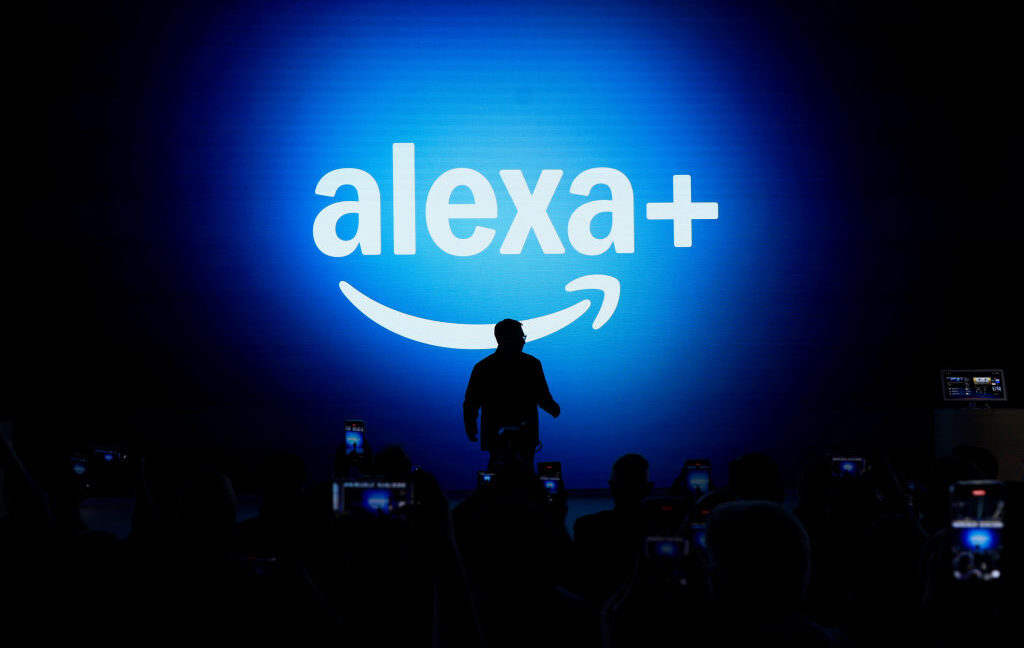
Amazon is considering shoving ads into Alexa+ conversations
Since 2023, Amazon has been framing Alexa+ as a monumental evolution of Amazon’s voice assistant that will make it more conversational, capable, and, for Amazon, lucrative. Amazon said in a press release on Thursday that it has given early access of the generative AI voice assistant to “millions” of people. The product isn’t publicly available yet, and some advertised features are still unavailable, but Amazon’s CEO is already considering loading the chatbot up with ads.
During an investors call yesterday, as reported by TechCrunch, Andy Jassy noted that Alexa+ started rolling out as early access to some customers in the US and that a broader rollout, including internationally, should happen later this year. An analyst on the call asked Amazon executives about Alexa+’s potential for “increasing engagement” long term.
Per a transcript of the call, Jassy responded by saying, in part, “I think over time, there will be opportunities, you know, as people are engaging in more multi-turn conversations to have advertising play a role to help people find discovery and also as a lever to drive revenue.”
Like other voice assistants, Alexa has yet to monetize users. Amazon is hoping to finally make money off the service through Alexa+, which is eventually slated to play a bigger role in e-commerce, including by booking restaurant reservations, keeping track of and ordering groceries, and recommending streaming content based on stated interests. But with Alexa reportedly costing Amazon $25 billion across four years, Amazon is eyeing additional routes to profitability.
Echo Show devices already show ads, and Echo speaker users may hear ads when listening to music. Advertisers have shown interest in advertising with Alexa+, but the inclusion of ads in a new offering like Alexa+ could drive people away.
Google releases Gemini 2.5 Deep Think for AI Ultra subscribers
Google is unleashing its most powerful Gemini model today, but you probably won’t be able to try it. After revealing Gemini 2.5 Deep Think at the I/O conference back in May, Google is making this AI available in the Gemini app. Deep Think is designed for the most complex queries, which means it uses more compute resources than other models. So it should come as no surprise that only those subscribing to Google’s $250 AI Ultra plan will be able to access it.
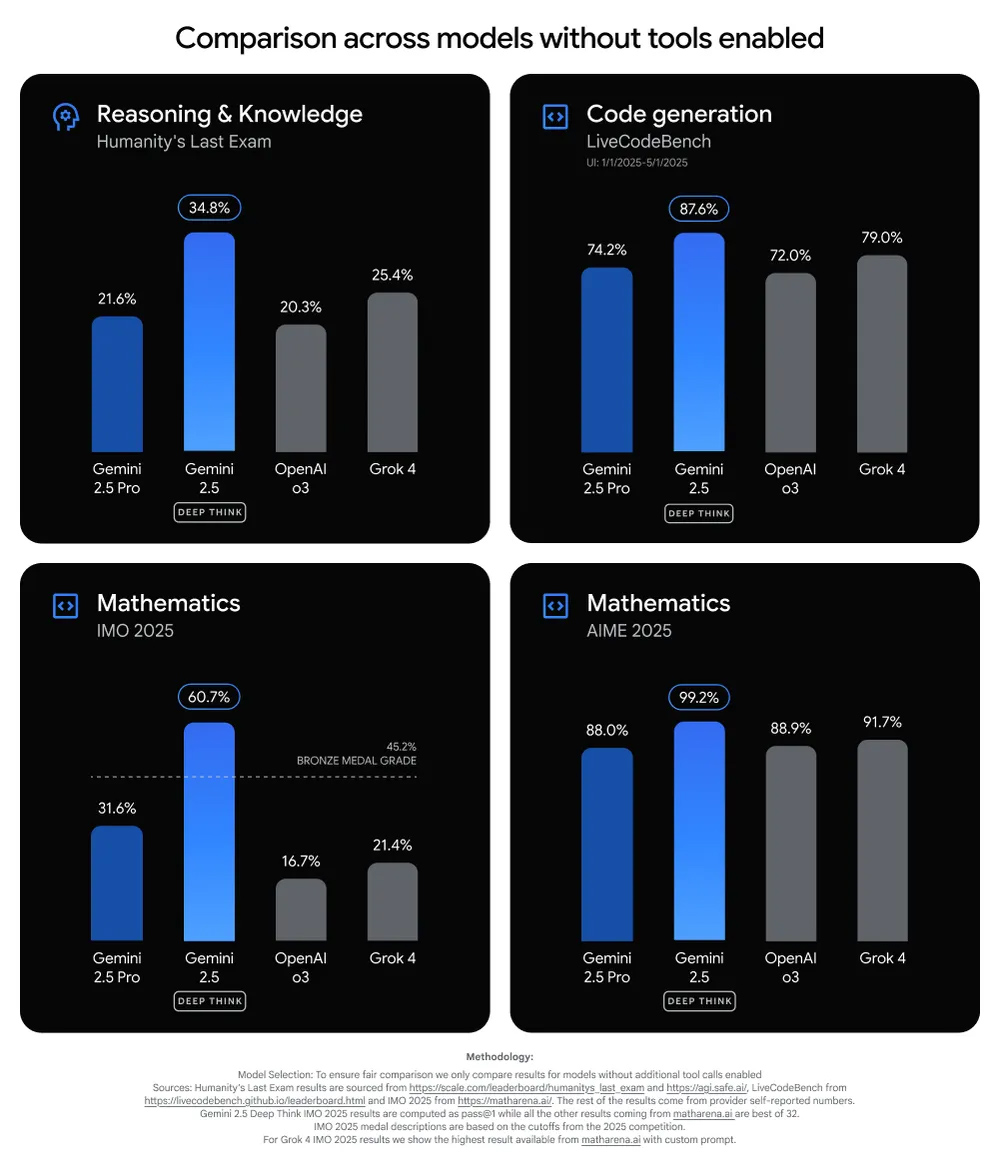
Deep Think is based on the same foundation as Gemini 2.5 Pro, but it increases the “thinking time” with greater parallel analysis. According to Google, Deep Think explores multiple approaches to a problem, even revisiting and remixing the various hypotheses it generates. This process helps it create a higher-quality output.
Credit: Google
Like some other heavyweight Gemini tools, Deep Think takes several minutes to come up with an answer. This apparently makes the AI more adept at design aesthetics, scientific reasoning, and coding. Google has exposed Deep Think to the usual battery of benchmarks, showing that it surpasses the standard Gemini 2.5 Pro and competing models like OpenAI o3 and Grok 4. Deep Think shows a particularly large gain in Humanity’s Last Exam, a collection of 2,500 complex, multi-modal questions that cover more than 100 subjects. Other models top out at 20 or 25 percent, but Gemini 2.5 Deep Think managed a score of 34.8 percent.