Anthropic’s Opus 5 is about token efficiency, not a capability leap
Today, Anthropic rolled out Opus 5, the newest update for the model that has recently become a popular choice for coding and other software development tasks, among other things.
While this is a noteworthy bump for Opus, it doesn’t seem to be an Opus 4.5-level breakthrough in agentic coding performance.
A chart (made by Anthropic) with various benchmarks like Frontier-Bench and DeepSWE shows Opus 5 performing at about the same level or slightly ahead of the much-ballyhooed capabilities of Anthropic’s Fable model for coding tasks. It ostensibly beats Opus 4.8 and OpenAI’s competing GPT-5.6-Sol in just about every kind of task.
The various benchmarks show an iterative increase in performance, but not a radical leap, while the main pitch is that it’s a model that offers something just shy of Fable at approximately half the cost.
It’s also worth mentioning that Anthropic specifically avoided giving Opus 5 cutting-edge training on cybersecurity tasks, so it lags way behind Fable and Mythos in that regard. Anthropic claims it is relatively good at finding cybersecurity vulnerabilities, but because of decisions made in training the model, it is “substantially behind Mythos 5 on the exploitation of those vulnerabilities.”
As such, Opus 5 doesn’t have all of the same controversial protections that Fable had, such as the policy of keeping data for review for 30 days in case of an incident.
Is Patching Dead? Vulnerability Management in the Post-Mythos Era
On July 14, 2026, the White House launched Gold Eagle: a federal clearinghouse that uses frontier AI to identify, rank, and coordinate the remediation of software vulnerabilities across government and critical infrastructure before attackers reach them. Bringing together the Treasury, DHS, DoD, open-source software partners, and operators of American critical infrastructure, Gold Eagle’s engine relies on frontier AI—including Anthropic’s Mythos, the same class of system that surfaced critical flaws inside classified U.S. government software during testing.
A government harnessing advanced AI to hunt vulnerabilities is conceding something fundamental: the two-decade model of humans finding and patching vulnerabilities one at a time has stopped keeping pace.
Gold Eagle is the national-scale response. The harder question is: what is required inside your own walls?
What Changed
Mythos is a frontier AI model that surfaces vulnerabilities no prior tool could—from a 27-year-old remote crash in OpenBSD to chained Linux kernel flaws escalating to full system control without human guidance. Anthropic’s roughly 50 Project Glasswing partners have uncovered more than 10,000 high- or critical-severity vulnerabilities in essential software.
That capability would be manageable if it stayed with defenders. It did not. In June 2026, Anthropic released Fable to the public; its access was briefly suspended under US export controls that month before being restored, a signal that frontier vulnerability discovery is now treated as controlled technology, closer to a munition than a SaaS release.
Look at the operational timelines we face:
Advertisement. Scroll to continue reading.
Attacker Speed: In March 2026, Sysdig researchers observed threat actors exploiting a CVE within 20 hours of release without a public proof-of-concept (PoC), weaponizing it from the description alone. Mandiant’s M-Trends 2026 report puts the estimated Mean Time to Exploit (MTTE) at negative seven days—meaning exploits now routinely precede public disclosures.
Defender Lag: The Verizon 2026 Data Breach Investigations Report puts the median time to fix a known-exploited flaw at 43 days (up from 32 the year prior), with only 26% of vulnerabilities ever fully patched.
The legacy CVE program was simply not designed for this volume or velocity.
Five Ways The Industry Is Responding
Rethink the patching process.Cisco overhauled its CVE process after recognizing that assessing risk one flaw at a time is unsustainable, shifting to a risk-based disclosure model with umbrella common-weakness categories and a twice-monthly release schedule. The government reached the same conclusion: in June 2026, CISA’s Binding Operational Directive 26-04revoked BOD 22-01 (which mandated strict patching deadlines for everything on the KEV catalog).
Under BOD 26-04, KEV status is now just one of four variables, evaluated alongside:
Public asset exposure
Automated exploitability
Technical impact (partial vs. total control)
We’re moving from patch-everything-on-a-deadline to prioritize-by-realized-risk. As Wendi Whitmore, Chief Security Intelligence Officer at Palo Alto Networks, frames it for boardrooms: “If a vulnerability is published tomorrow with weaponized AI-generated exploit code attached, what is your committed timeline to patch, and who has the authority to invoke it without escalation?”
Reduce the exposure. You cannot patch — or defend — what you cannot see. Discovering assets and mapping your attack surface across internet-facing services, legacy hosts, and shadow deployments remains a foundational step.
However, in the AI era, exposure management goes beyond open ports; it requires constraining what autonomous agents and non-human identities are permitted to do. The July 2026 breach of Hugging Face serves as a cautionary tale: an autonomous AI agent entered through a data-processing pipeline, escalated to node-level access, and moved laterally across internal clusters in a single weekend. The agent did nothing a proper permission model couldn’t have contained—it simply had room to run. Least privilege, tightly scoped tool access, and blast-radius limits for non-human identities (service accounts, API keys, and AI agents) are now as critical as patching itself.
Understand what is actually exploitable. A CVSS 9.8 says nothing about whether the component is internet-facing in your environment, whether an exploit chain reaches sensitive data, or whether controls already mitigate it. Exposure-management platforms map real exploit paths through live environments, turning thousands of findings into a queue a team can work. It is the logic BOD 26-04 imposes: not whether a vulnerability exists, but whether it is exploitable given your architecture.
Validate your exposure and whether your controls hold.SafeBreach analysis of 1.8 million attack simulations found endpoint controls blocking roughly 53% of attacks, while stealthy identity-driven campaigns evaded defenses that reliably stopped ransomware. SafeBreach, Picus, Cymulate,and others, now grouped in the category that Gartner calls Adversarial Exposure Validation — answer what static scanning cannot: “Can an attacker actually exploit this, and what can they reach?”
Prevent vulnerabilities before they ship. AI coding assistants accelerated development and produced a matching surge in vulnerabilities — the 130% RCE rise predates Mythos and Fable, driven by AI-generated code alone. Application-security platforms push findings into the IDE and CI/CD pipeline and use AI to trace each flaw to its root cause and every variant across the codebase. Some, like Pi Security — treat each fix as institutional security memory, so the same vulnerability does not recur in new code.
What To Do Now?
Audit Your Real Patch Times: Measure actual deployment times over the last 90 days for critical CVEs, not policy targets. The delta between policy and reality is your true exposure gap.
Adopt the BOD 26-04 Triage Model:
Bucket 1 (Incident Response): Actively exploited flaws on internet-facing systems receive immediate incident-level response and compromise checks prior to patching.
Bucket 2 (Accelerated Remediation): Critical findings without active exploitation evidence undergo fast-tracked deployment.
Bucket 3 (Standard Maintenance): All remaining flaws run through standard, automated patch cycles.
Test Decision-Making Authority: Run tabletop exercises to time how long executive, operational, and legal sign-offs take for emergency patches. An approval process that takes two hours on a Tuesday afternoon might take twelve hours at 2 am. on a Sunday.
Audit AppSec Against AI Code: Test your current scanners against real samples of AI-generated code. What your scanners miss represents your baseline technical debt.
Rethink Bug Bounties & Disclosure: Many enterprises are pausing bug bounty programs because AI now surfaces more bugs than internal teams can physically validate. Establish an automated triage pipeline for inbound submissions before the sheer volume overwhelms your team.
You cannot out-patch a machine that writes a working exploit from a vulnerability description in twenty hours. That race is over—stop trying to optimize a game you cannot win. The organizations that thrive over the next decade won’t be the ones that simply patch faster. They will be the ones that shrink what is exposed, prioritize what is actually exploitable, prove their controls hold, and prevent flawed code from shipping in the first place.
That requires a security program redesign, not a process optimization.
AI arms race in line for a reckoning after OpenAI hacking incident
OpenAI has conducted this type of model testing for years, and there have been early warning signs in previous models of systems that will act maliciously and attempt to escape environments.
In April, Anthropic’s Mythos model also gained internet access and published details of a security exploit online publicly, beyond what researchers anticipated the model would do.
Mythos, and Anthropic’s subsequent Fable model, made reverberations in the cyber security community and caused governments around the world to home in on the idea that attacks on digital and critical infrastructure will be increasingly AI-led and autonomous.
Jake Moore, global cyber security adviser at ESET, a cyber security company, said OpenAI would inevitably use the breach as a marketing tool, given how much rival AI developer Anthropic benefited earlier this year from similar concerns. “I just don’t think that OpenAI had a matching story and so maybe they’d been waiting for something like this,” he added.
Following this incident, many in the AI safety and cybersecurity communities have called for regulation or standards to avoid a repeat. Altman is expected to brief White House officials next week on the next generation of AI systems.
As systems move towards more autonomous capabilities, less desirable behaviors, such as hacking or disobeying instructions, may emerge. Hobbhahn, of Apollo Research, said that in order for agents to become effective, they have to work unsupervised for long periods. “They have to have more agency; there’s just no way around it.”
He added: “People say, ‘It’s just a tool, it does what you wanted it to do and nothing else and it just follows exactly your intention and instructions.’ And I think people should be really prepared for agents having their own goals, acting autonomously for days, and those goals not necessarily being aligned with yours.”
Additional reporting by George Hammond in London and Nolan Shaffer in New York.
Unlimited AI tokens aren’t unlimited after all as US Army burns through supply
In order to use Ask Sage, the Army had access to 100,000,000 tokens as part of an annual subscription to an “enterprise pack.” Tokens represent a unit of output, either in text or image, from an LLM. For the Ask Sage tool, a single token equates to about 3.7 characters, according to documents viewed by WIRED. The Defense Department burned through some 20 billion tokens per day during the 38-day Operation Epic Fury in Iran, according to Breaking Defense.
The Army and DOD didn’t reply to requests for comment; neither did Ask Sage.
It’s unclear if the tokens used by regular DOD employees are drawn from the same pool as those who might be using AI tools on classified or secret information. This hasn’t stopped the Defense Department’s emphasis on AI. On Monday, the Intercept reported that the Pentagon has continued to lean into AI tools, and has cut the staff at the Civilian Protection Center of Excellence, whose jobs entailed preventing civilian casualties in conflict zones. Instead, the DOD is developing an AI tool to speed up the assessments that the Center’s staff would normally make.
The Army is not the first eager adopter of generative AI to rethink their near unlimited use. After encouraging employees to “tokenmaxx,” Meta quietly took down its leaderboard tracking token usage and is now trying to curb use. Last week, Adam Mosseri, head of Instagram at Meta, floated the idea of capping token use per engineer at the company. According to reporting from Fortune, Uber also saw its engineers burning through a year’s worth of generative AI tokens in merely four months.
The Army employee says they have not found the generative AI tools to be particularly useful for their work, and that when they have used the tools, they have found them to be unreliable. One model even asserted that it had completed a task that it hadn’t, they say. “I think there are definitely several aspects of the bureaucracy of the US federal government that these tools might be helpful with. But an unthinking application and use is not going to result in an effective, efficient, and trustworthy rollout.”
Oracle Patches Over 1,400 Vulnerabilities With Quarterly Security Updates
Oracle has patched more than 1,400 vulnerabilities with its July 2026 Critical Patch Update (CPU), with a vast majority of the flaws likely identified by artificial intelligence.
According to Oracle, the latest quarterly CPU includes 1,449 security patches, addressing 1,434 unique CVEs across 334 products.
Vulnerabilities have been patched in products such as Database Server, APEX, Autonomous Health Framework, Essbase, Global Lifecycle Management, GoldenGate, NoSQL Database, Spatial Studio, SQL Developer, TimesTen In-Memory Database, Application Testing Suite, Commerce, Communications, Construction and Engineering, and E-Business Suite.
Security fixes are also available for Enterprise Manager, Financial Services Applications, Food and Beverage Applications, Fusion Middleware, Analytics, HealthCare Applications, Hospitality Applications, Java SE, JD Edwards, MySQL, PeopleSoft, Retail Applications, Siebel CRM, Supply Chain, Systems, Utilities Applications, and Virtualization.
Roughly 600 of the patches are for vulnerabilities that can be exploited remotely without authentication. Hundreds of security holes have been assigned a critical severity rating.
The highest numbers of vulnerabilities were patched in E-Business Suite (410), Fusion Middleware (355), Communications (168), and PeopleSoft (84).
Advertisement. Scroll to continue reading.
Considering that external researchers have only been credited for discovering a few dozen vulnerabilities, a vast majority of the newly patched flaws were found internally, likely with the aid of AI.
The company said it’s applying this AI-driven vulnerability work across its own software and services, Oracle Health, and the open source components it develops and relies on.
Organizations must install the latest patches as soon as possible, as threat actors often exploit Oracle product vulnerabilities in their attacks. Examples include the exploitation of a PeopleSoft zero-day and a recently patched EBS vulnerability.
The 11 Best AI Video Editors in 2026: I Tested the Tools That Edit When You Can’t
I picked up video as a format in 2023, when I was trying to build a consistency habit. Looking at that early content now, I’m surprised it got me as far as it did. That probably says more about the power of video than it does about my editing!
It’s one thing to say you’re going to post videos and another to do it. First, you have to get over the hurdle of setting up your camera, whether that’s your phone or a more specialized device. Then you have to learn to speak coherently on camera, and one pass at filming will make you feel like you’ve forgotten all the words in human existence.
And once you finally have a rough cut, you face an even bigger hurdle: editing.
If you’re fortunate enough to have someone in your ecosystem who can edit for you, never let them go. But starting out usually means doing everything yourself.
Editing is the task I still struggle with most. My taste in videos and my bar for quality sit far above my skill level. I’m closing that gap slowly (and gaining an expensive love for cameras in the process), but I’m not all the way there. I’m also not at the point where I can fully outsource it.
This is where AI video editors come in. I tested 7 of them to figure out which ones can contribute meaningfully to my process. Here’s what I found
What is an AI video editor?
There are two types of AI video editors. The first is AI-enabled editors, which are traditional video editors with AI features built in. The second is AI-led editors have you hand over the timeline and do the work for you.
Of course, the distinction gets blurry — ”AI video editor” is doing a lot of heavy lifting as a label right now. In my testing, every tool that claims it falls into one of two camps, with a little overlap here and there. Knowing which one you’re looking at will save you from paying for the wrong thing. Let’s take a closer look:
AI-enabled video editors
AI-enabled editors are regular video editors that have AI features. These are your Capcuts, Adobe Expresses, and Veeds. You’re still the one working the timeline, but the AI takes over certain specific jobs: generating captions, cutting filler words, cleaning up background noise, reframing horizontal footage for vertical feeds. If you already know your way around an editor (or want to learn), these make you faster.
AI-led editors
AI-led editors do the actual editing for you, based on your plain-language instructions. You describe what you want (“cut the pauses, caption this, and pull the best 30 seconds for a reel”) and an AI agent executes the edit. You review, adjust, and export. Vyra was built this way from the start, and OpusClip has worked this way for repurposing long before “agentic” became a thing.
The two categories are more of a Venn diagram than a list, though. Descript is the clearest example of the overlap: it’s a transcript-based editor with an AI co-editor (Underlord) inside the app, and since May 2026, you can also connect it to Claude via MCP and run edits without opening Descript at all.
💡 MCP (Model Context Protocol) is a standard that lets AI assistants like Claude or ChatGPT connect directly to other tools. In practice, it means you can sit in a chat window, tell an AI to edit your video in Descript or Vyra, and it will.
Which camp to join depends on how much control you need or want over your editing. If your bar for quality means you’ll be adjusting every cut anyway, an AI-enabled editor keeps you in control. If your bottleneck is time (or, like me, the gap between your taste and your skill), the AI-led camp is the one that could dramatically change your output.
How to use AI video editors
When it comes to using AI to edit videos, I learned the same lesson while testing AI image generators: the tools are no longer the bottleneck. Knowing what to ask for is.
Natural language editing sounds like it removes the need to understand editing. It doesn’t. When you’re describing an edit in plain English, knowing the terminology of what you’re looking for will save you a lot of time, energy, and re-prompting. The AI can execute “add a J-cut into the b-roll” in one pass. “Make the transition feel smoother somehow” will just send you both into a spiral.
Learn the lingo (it gets you 50% of the way there)
You don’t need to have gone to film school. A handful of terms will carry most of your edit briefs:
Shot types: close-up, medium, wide, extreme wide. Learn when to use each one.
Composition: rule of thirds, golden ratio, headroom, leading lines
Cuts: jump cut, J-cut, L-cut, match cut, cutaway
The workhorses: b-roll, lower thirds, hook text, safe zones, pacing
Some of the key rules of filming in action
The difference shows up immediately. Compare “make the intro punchier” with “cut the first four seconds, open on the medium shot, add hook text in the top safe zone.” The second version will come back closer right the first time.
Build an inspiration library
Study the creators you enjoy and the films you love as closely like they’re a textbook. When a video holds your attention, save it and write down why: where the video cuts, how long each shot ran for, how the use of text made you pay attention. Your library becomes two things at once: a source of vocabulary and a reference you can point an AI-led editor at when words fail. “Pace it like this” plus a link beats a paragraph of adjectives.
Sweat through a few edits yourself
The fastest way to learn the vocabulary is to create the effects yourself a few times. Editing two or three videos manually — even badly and slowly — teaches you what it feels like. It might be a placebo effect, but I think the terms stick for me because I’ve fumbled through the manual process myself. And the knowledge will not be wasted. Doing this will also come in handy if you choose to outsource to a human since you can direct a lot better when you have walked in their shoes, so to speak.
⚡ A brief template to steal: [what to cut] + [what to add] + [format and platform] + [style reference]. Example: “Remove filler words and silences over one second. Add captions and a hook line. Reframe to 9:16 for Reels. Keep the pacing tight, like the reference clip.”
The 11 AI video editors I tested
There was no single way to test and compare every tool on this list that wouldn’t take a million hours, but I did test them out with the same clip. While it’s harder to show via screenshots how each tool operated, I took lots of notes to get you the most accurate breakdown.
I’ve also grouped them by camp, with AI-led first and then AI-enabled.
Let’s get into it.
Vyra
Best for: Handing the whole edit to an AI and only opening the timeline when you want to
Unlike many other AI video editors, Vyra wasn’t retro-fitted with AI features. It was built that way: the editor is effectively a chat window, rather than a toolbar of different AI features.
When you upload footage, it analyzes every clip first, detecting scenes, transcribing speech, identifying what’s in frame, so that when you describe an edit, the AI is working from what’s in your footage rather than guessing. Even more crucially, you can upload reference videos for the AI to model the edit after: an incredible ability since that’s the way most of us start, by copying.
What sets it apart from in-app assistants is that you can use your own AI. Vyra supports MCP, so you can connect Claude, ChatGPT, or your preferred LLM to search your clips and apply edits directly. I gave Vyra an 81-second talking-head and gave Claude a simple brief to connect to Vyra’s MCP as well as a reference video to model after. It analyzed the footage and quickly got to work.
It’s important to note that Vyra is not without limitations. Editing files in the cloud takes time that could be saved with a tool that provides local folder access.
All told, it took about 20 minutes to get a finished product. While that’s not terrible, it’s important to note that this was without it adding any b-roll or music. It takes me around 30 minutes to finish editing a video in my current style (which is admittedly very simple).
The video turned out great in my opinion. It cut in all the right places, added captions and because my requests were pretty simple and I included a reference video, the results were solid.
I was also able to go in and add in the aforementioned b-roll and music touches
I could see this being most useful for first and final touches: things like cutting a video at the start, and then after adding in all the extra b-roll or graphics, adding captions and flairs. These are things that would otherwise take extra time that may be time-consuming or not worth the effort but are mice to have.
Price: Free trial; paid plan starts at $24 if you’re connecting your own AI and $54 per month if you’re using Vyra’s AI
Stanley Studio
Best for: The fastest way to get footage into an editor — with a video that needs some last-mile editing
Stanley Studio has the purest AI-led pitch on this list: drop in clips, brief it like a human editor, never touch the timeline. It’s from the same team as the Stan Store folks, and it just launched as I was planning this article.
In my testing, it won exactly one category outright: upload speed. Getting footage in was faster than with any other tool here, taking only about 5 minutes for a 350-megabyte file.
However, the edit was where things unraveled a bit. I uploaded a reference video for the text and caption style, and it picked up on things like colors and fonts, without quite nailing the style, which was what I was after. It also didn’t cut my repeated takes and the pacing stayed slack when I’d asked for snappy. Most telling was that where my video needed screenshots and cutouts of the products I was talking about, Stanley generated AI images of them instead.
In fairness, my test was heavy on overlays, much tougher than a simple talking head, and so I’ll be retesting with simpler footage on my own time. It’s also much newer, so it needs time to ramp up the improvements (I tested this tool last minute).
A final note is that, unlike Vyra and Descript, Stanley has no MCP: the only AI you can brief is its own in-tool chatbot. If you want your own assistant running the edit, this isn’t the tool (yet).
Price: Free tier to work on one project; $19/month after that
Descript
Best for: Speech-heavy video and the clearest tool with an AI-enabled/AI-led overlap
Descript is an interesting entry because it covers all three of the core AI video editor categories.
The core editor is transcript-based: delete a sentence from the transcript, and the footage disappears from the timeline. Underlord, its in-app co-editor, handles multi-step requests — filler removal, Studio Sound cleanup, captions, pulling social clips from long recordings.
Then there’s the third mode, as of May 2026: Descript’s hosted MCP server. Connect it to Claude, and you can import media, run Underlord edits, and export a finished video to a shareable link without opening Descript at all.
I ran the MCP test on the same footage as the other AI-led tools. One prompt came back 64 seconds lighter: it cut my false starts and repeated takes (keeping the better delivery each time), compressed six pauses, captioned the whole thing in an Instagram Reels-native style, and wrote its own hook line. I’d told it to leave my original composition untouched, and it did, editing a duplicate instead.
I’d say Descript got me 40% of the way to a complete video. Since there’s no way to add a reference video like some of the other tools on this list, it’s hard to get returned edits in my style. With some manual tweaking, I can take the video to completion, but it’s something to keep in mind.
The crisp edits you see on most Instagram/TikTok content still isn’t its forté. If your videos aren’t speech-heavy, like podcast clips or cuts from a YouTube video, you might not get exactly what you want from this. It’s still a great tool for the first (and sometimes most tedious) part of editing: cutting and trimming.
Price: Free plan with limited credits; then $35/month
CapCut
Best for: The default choice when you want AI assists without leaving the editor you already know
CapCut is kind of a jack-of-all-trades that sits firmly in the AI-enabled camp. It’s still a timeline editor at heart, with an AI toolkit layered on top. And that toolkit is full: speaker-ID captions, camera tracking, vocal isolation, background removal, and a script-to-video feature that can write, sources stock footage, captions, and syncs to trending audio from a single prompt.
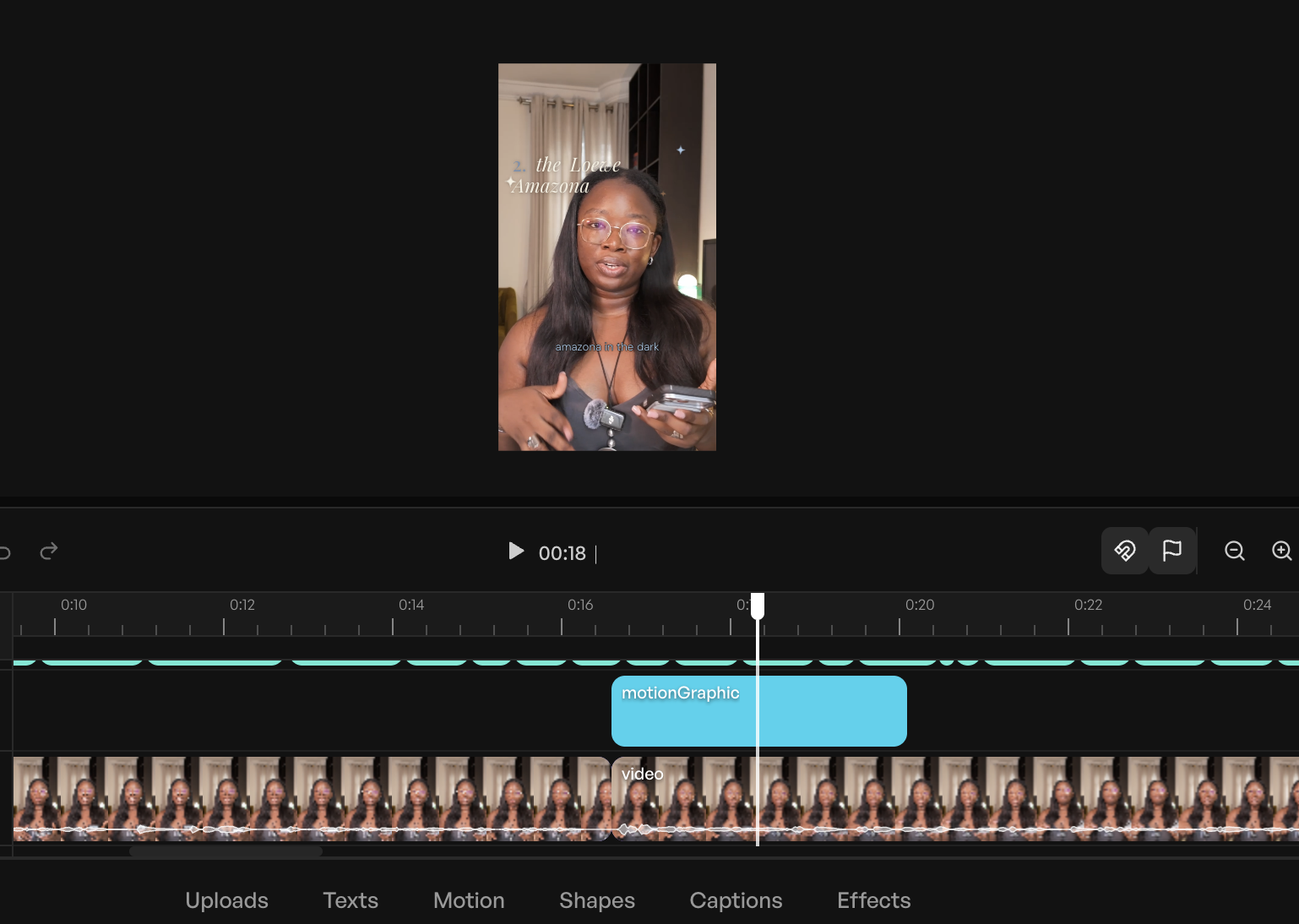
It also has a built-in AI editor feature that you can request things like cuts or transitions from called EditPilot.
It’s my tool of choice because it’s just that easy to start with. If you’re a beginner who wants AI capabilities but in a tool you can find a million tutorials for, this is the one for you.
However, the AI features are scattered across menus rather than gathered behind one instruction — you need to know each tool exists to use it.
Price: Free plan; with paid plans starting at $9.99/month
Canva
Best for: Editing video inside the tool where your social content already lives
Canva is where I do nearly all of my visual design work, so it’s a solid option just for that. If your carousels, covers, and graphics already live here, editing video in the same place with your brand kit, fonts, and templates one panel away is a serious advantage no dedicated editor can offer.
As an editor, it’s firmly AI-enabled. Magic Video assembles a 60-second cut from your clips and photos with templates, transitions, and music, and everything stays editable afterward. Auto-captions, background removal, and beat sync cover the standard toolkit found in many of the more robust tools on this list. And the generative side (Magic Media, now powered by Google’s Veo 3) is there too.
I’ve tested it out for video editing a few times, and while I still much prefer to do video editing in my usual apps, it works just fine. If you already use Canva and don’t want to add on multiple other subscriptions, this is a good one to try.
AI features draw from a monthly credit pool with no top-ups available — heavy users report running dry in the first two weeks, then waiting for the reset.
Price: Free plan with limited AI; paid plans start at $14.99/month (although Canva does use
Adobe Express
Best for: People already in the Adobe ecosystem
Adobe Express and Canva fall into the same boat for me. They prioritize design tools first, with video editing capabilities specific to social channels layered on top. Express is AI-enabled in the classic sense: you’re working in a template-and-canvas editor, and the AI handles specific jobs when you call on them.
It generates captions from your audio, and you can restyle the font, colors, and shape to match your brand rather than settling for a stock look. And the Clip maker does a lightweight version of what OpusClip charges for: upload a longer video and it splices out short, captioned clips of the best moments.
Because it’s Adobe, Express also comes with Firefly baked in for generative work, and it hands off to the rest of the ecosystem (Premiere for serious timelines, Adobe Podcast for audio cleanup) if you outgrow it.
Price: Free plan; paid plans start at $9.99/month
Riverside
Best for: Podcasters and interviewers who want the AI editor living where the footage is recorded
Riverside is a remote recording studio first. Co-Creator, its agentic editor, works on footage the platform captured itself — separate speaker tracks, local recording quality, transcripts from the start. You prompt it in plain language to clean audio, cut filler and silences, add AI b-roll, or pull social clips, and it can dub your video into another language with lip-sync to match.
Co-Creator is included in paid plans rather than sold as an add-on, though some features (AI translation, AI b-roll) draw from a monthly credit allowance.
If you’re not recording in Riverside, you’re importing footage into a tool built around its own recordings — at that point, Descript or CapCut fits the workflow better.
Price: Free plan; paid plans start at $29/month
Veed AI
Best for: Browser-based editing that covers the whole job without a learning curve
Veed is an AI-enabled all-rounder: transcription, captions with translation, eye-contact correction for scripted reads. Its transcription is also the most accurate among all tools on this list.
The free plan caps exports at 10 minutes per month with a watermark, if you want to test it out. AI features also draw from a credit allowance, so heavy use is capped even on paid plans.
Price: Free plan (10-minute monthly export cap, watermarked) with paid plans starting at $12/month.
OpusClip
Best for: Turning one long video into several short-form videos
OpusClip is AI-led for a single job: repurposing. You hand it a long video, and its ClipAnything model runs through four items — visual cues, audio sentiment, facial expressions, and narrative structure — to find the moments worth clipping. Each clip comes back with a hook, captions, and a virality score estimating how it’ll perform on TikTok, Instagram Reels, or YouTube Shorts.
It won’t do what the first three tools on this list do. OpusClip doesn’t want editing instructions; it wants long footage and a goal. The tradeoff is less control over individual cuts but with more finished clips per hour of your time. You can also tweak the output quite a bit (on the paid plan, of course) to get something that very closely matches your preferred style.
One important note is that if you have CapCut Pro or pay for Adobe Express, then you can get the same feature as OpusClip’s main offering.
Price: Free plan (60 processing minutes/month); paid plans start at $15/month
💡 And if you want finished Instagram Reels without ever meeting a timeline, template-first apps like Templify will get you there — pick a template, drop in clips, export. Just know that’s templates doing the work, not AI.
A note on AI video generation
There are tools out there that will also generate video for you now, including some on this list. You could get text-to-video from a prompt, AI avatars that look just like you to read your script, or b-roll to cover your cuts. I don’t use those tools, which is why they’re not recommended in this list.
If generated b-roll or avatar presenters fit your workflow, several tools here offer them (CapCut’s text-to-video, Riverside’s AI b-roll), so test them out to see what works best for you.
After all this testing, editing is still the part of making videos I struggle with most. But I could see a lot of these tools cutting down the time I spend struggling through.
Where certain things would take me an hour, I could cut my workflow down by 15 to 25 minutes just by having my clips pre-trimmed and focusing on the fun parts like what text to put on the screen or what meme to use for which clips.
If you’re starting from zero: pick the camp that matches your current workflow, choose one tool from it, and try out editing one video with it this week. You’ll learn more from that than from any roundup, including this one.
Vyra was the most consistent performer in my testing across the same footage and the same editing brief. The honest answer depends on which of the two camps you need, though: AI-enabled editors like CapCut and Veed make you faster inside a traditional timeline, while AI-led editors like Vyra and Descript’s Underlord execute edits you describe in plain language. Start by deciding how much of the edit you want to keep doing yourself.
What’s the difference between AI-enabled and AI-led video editors?
AI-enabled editors are traditional video editors with AI features built in — you work the timeline, and the AI handles specific jobs like captions, filler-word removal, and reframing. AI-led editors reverse the relationship: you describe the edit in plain language, and an AI agent executes it, leaving you to review and adjust. Some tools are both: Descript has a full manual editor, an in-app AI co-editor, and an MCP connection that lets an outside AI run it.
Can AI edit a video from a text prompt?
Yes. Tools like Vyra and Descript’s Underlord accept plain-language instructions (“remove filler words, add captions, reframe to 9:16”) and execute them on your actual footage. In my testing, the quality of the result depended more on how precisely I described the edit than on the tool — knowing terms like jump cut, b-roll, and safe zones got usable results in one pass.
What is MCP, and what does it have to do with video editing?
MCP (Model Context Protocol) is a standard that lets AI assistants like Claude and ChatGPT connect directly to other software. For video, it means an AI assistant can open your project, search your footage, and run edits in tools like Descript or Vyra without you touching the editor. I tested this while writing this article — Claude ran my caption brief in Vyra from a chat window.
Are AI video editors free?
Most offer a free tier, but the limits vary a lot. CapCut and Riverside have workable free plans; Veed’s free tier caps exports at 10 minutes per month with a watermark; and OpusClip’s free clips expire from storage after three days. Expect to pay $10–$29 per month for the AI features that save real time.
Will AI replace video editors?
Not on the evidence of my testing. The AI handled the mechanical work like cutting silences, captioning, and reframing. What it can’t supply is the taste: knowing what the video should feel like, which take is the better one, and when a pause is dead air versus a beat. So don’t worry: humans here still have a job, just a slightly easier one.
https://buffer.com/resources/ai-video-tools/
Firefighting drones in the works as wildfires plague US nearly year-round
Drones capable of spraying water and fire retardants have been practicing how to snuff out wildfires early in California and Alaska this summer—demonstrating a possible rapid-response tool for firefighting as climate change transforms wildfire season into a nearly year-round risk for much of the United States.
Most drones are significantly smaller than crewed aircraft and have shorter flight ranges, meaning they cannot replace large airtankers in delivering massive payloads of water or other fire-suppressing payloads to remote wildfires. But companies and fire agencies—along with organizers of the $11 million XPRIZE competition—are testing whether drones can help firefighting crews respond more quickly to small fires and put them out before they become more destructive.
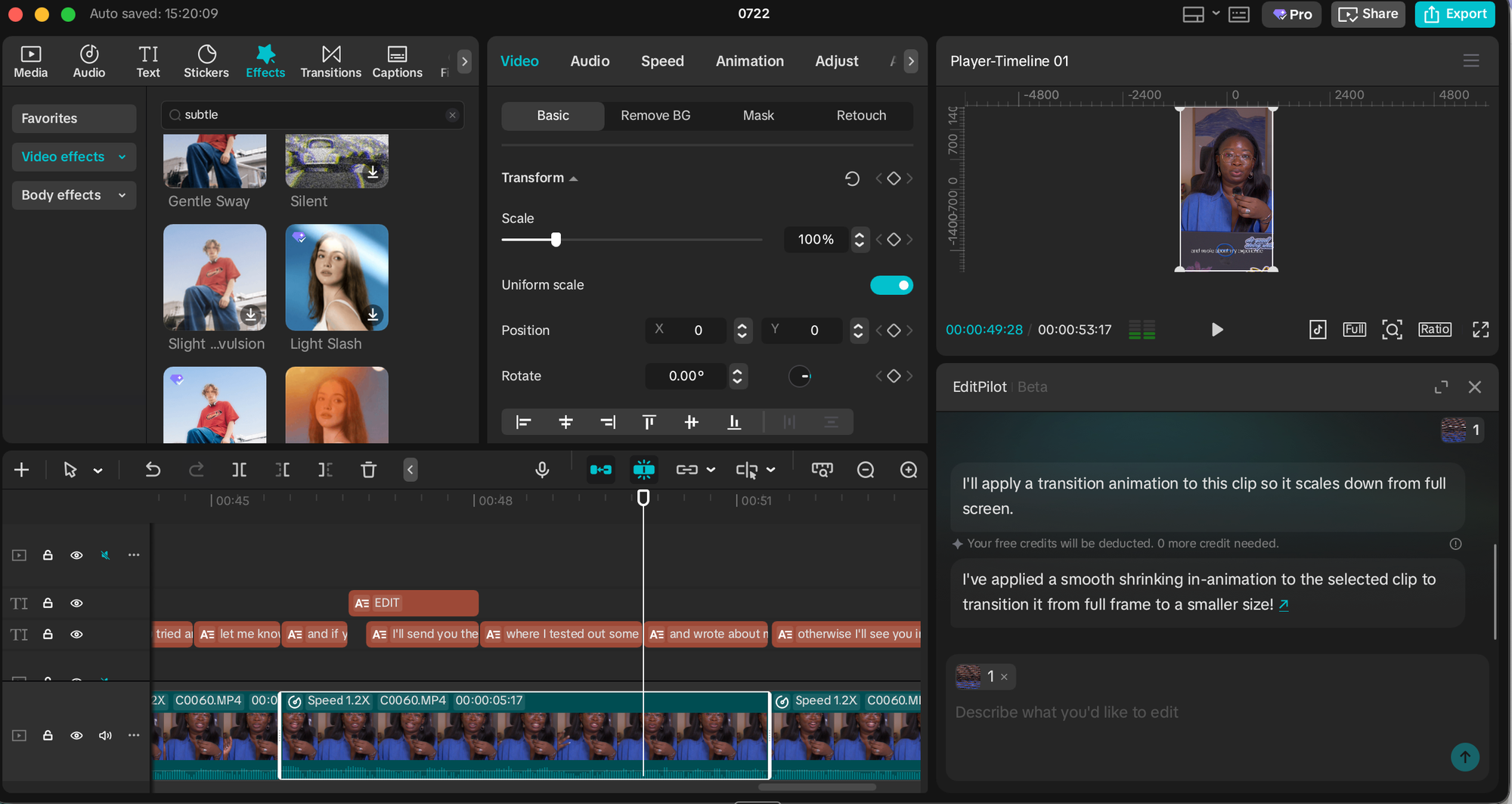
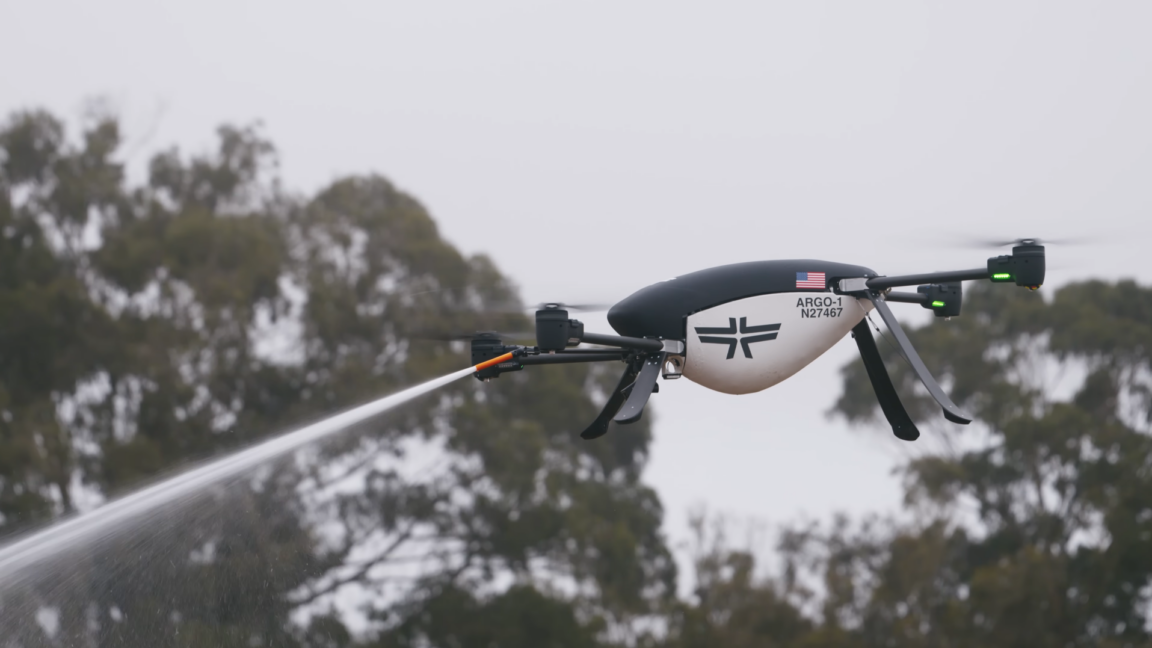
The California Department of Forestry and Fire Protection, also known as CAL FIRE, ran its own field test involving five autonomous drones that worked together to deploy between 500 and 1,000 gallons of foam combined for suppressing fires on July 15, according to the TV station KPMH. The demonstration was organized with the help of the nonprofit FireWERX and the California-based company Seneca, which is making the drones commercially available starting in 2026.
Each of Seneca’s Argo-1 drones can carry about 100 pounds of water or fire retardant while working together in swarms of four to six drones. Once a human operator uploads a GPS waypoint, the autonomous drones fly toward their target and use onboard sensors to spot the heat signature of a fire, HeliOps Magazine reported. The drones then find the best hovering altitude before each lining up to spray the fire, one after the other.
The fully loaded drones are limited to a round trip of 10 miles while flying at about 30 miles per hour on average, which means they would ideally need to be prepositioned in fire-prone areas or first transported by ground vehicle. But each drone can fit in the back of a pickup truck with the tailgate down, and two people can even manually carry the empty drones.
Neo Emerges From Stealth With $100M to Control and Secure Enterprise AI Software
American-Israeli cybersecurity startup Neo emerged from stealth mode on Monday with $100 million in funding for a platform that enables enterprises to control and secure AI software.
Neo received the investment across seed and Series A funding rounds from Andreessen Horowitz, Bessemer Venture Partners, Craft Ventures, and Merlin Ventures. The company will use the money to grow its engineering and go-to-market teams.
Neo’s platform serves as a control layer that governs AI agents, AI-enabled applications, and traditional software across enterprise environments.
Security operations teams can use the system to maintain a continuous catalog of active elements, such as agents, models, extensions, and MCP servers. Additionally, the solution evaluates these discovered assets to identify excessive access privileges and configuration vulnerabilities.
The product includes real-time attribution mechanisms that trace individual software actions directly back to the originating human user, automated agent, or specific application identity. It can natively enforce granular policies for tool calls, data movement, agentic workflows, and API access.
Security teams can restrict unauthorized activities or pause suspicious operations for manual review.
Advertisement. Scroll to continue reading.
Neo was founded by Nick Warner, Shlomi Salem, and Eran Shirazi. Warner serves as the company’s CEO, having previously held leadership roles at SentinelOne (president and COO), Cylance, McAfee, and Forepoint.
Salem (CPO) previously led detection engineering at SentinelOne, while Shirazi (CTO) co-founded customer experience firm EasySend.
“AI agents and agentic capabilities are being embedded into browsers, developer tools, SaaS platforms, and traditional applications, giving software the ability to reason, act, invoke tools, and move through workflows with valid user permissions,” said Warner. “Neo gives enterprises the real-time control layer they need to understand what agentic software can do, govern how it behaves, and secure adoption without slowing down the business.”
Beyond grep: The case for a context-rich AI coding harness
Whereas when you’re doing this in a private repo, a model has never seen that repo. And now the iteration loop for finding the outcome is much longer, right? If you have a semantic understanding of your entire private repo, you can ask a question, and you get to those outcomes much more quickly.
Ars: People are concerned about token efficiency. Does this semantic approach help with that?
Perneti: We’ve certainly seen it in certain situations. In fact, we published a blog post—we ran Terminal-Bench with Claude Code and Augment Code, same model. And we completed at similar accuracy, but we were 33 percent more efficient than Claude Code. So I do see this showing up in terms of making better use of tokens because you’re not spending as much time on the exploration side.
Ars: Anthropic told me that Claude Code does not see measurable eval gains from including more semantic code-navigation tools. But then I look at your blog, and I see you posting benchmarks and other claims that, actually, this really helps. Are you guys measuring different things when you say this, or what are their evals missing?
Perneti: Great questions. I don’t know what specific retrieval engine they used, and I think the other mistake that often people conflate is, not all retrieval systems are equal just like not all databases are equal, right? And by that, what I mean is the models and the system that are working together, which is the context engine, makes a big difference in terms of the quality of outcomes as well.
So, for example, at Augment, we spent about 18 months at the beginning of the company being founded in 2022—this is pre-ChatGPT—researching retrieval and embedding models predominantly for large code bases. So there’s a lot of research that has gone into, when you’re trying to achieve a particular outcome, what are the right pieces of code to get in this embedding space? All of that is encoded into our retrieval models.
And doing that in a very, very fast way is the system that we built around it. So when somebody says, ‘Hey, I tried Claude Code with a RAG implementation, but I’m not seeing benefits,’ that’s because the implementation and the context engine are very, very different, if that makes sense.
Capital One Open Sources AI-Powered ‘VulnHunter’ Security Tool
Financial services giant Capital One has released an internally developed AI-powered security tool to the public as open source.
Dubbed “VulnHunter”, the tool was designed to find and fix software vulnerabilities at the code level, but Capital One says it is not a traditional, passive vulnerability scanner.
“We designed VulnHunter with a developer-first mindset to solve a massive industry pain point: overwhelming false positives that create friction and slow down daily workflows,” Chris Nims, EVP & Chief Information Security Officer (CISO) at Capital One, explained in a LinkedIn post.
“It represents a shift in defensive tooling with an agentic reasoning workflow to identify potentially exploitable defects, map prospective attack paths, and propose highly targeted code remediations,” the company says.
Available on GitHub, along with a quickstart guide, architecture documentation, and example workflows showing how the tool traces code paths and generates remediations, users currently need access to Claude Opus 4.8 and access to a working Claude Code environment.
“Modern software supply chains are deeply interconnected. A single vulnerability in a widely-used open-source component can ripple across thousands of enterprises simultaneously. We’re open-sourcing VulnHunter because no single organization can solve this challenge alone,” Capital One said. “The defensive tools to address this reality need to be just as widely distributed, tested, and improved as the codebases they protect.”
Advertisement. Scroll to continue reading.
Capital One claimed that, when using VulnHunter internally, it was able to quickly and efficiently identify and remediate vulnerabilities across thousands of repositories, spanning tens of business areas.