It’s official: EU will force Google to share search data and open up AI on Android
The EU’s mandates for Google Search could have more wide-ranging implications. Google will be forced to share search data with competing search providers, giving them a better chance of gaining market share and loosening Google’s iron grip on web search. The Commission alleges this action was necessary because Google’s past sharing offers have not gone far enough.
Under the new rules, Google will have to provide data to other search firms transparently and for a reasonable fee. Google will also have to treat AI chatbots as search services for the purposes of data sharing. The goal is for other companies to get access to search metrics similar to what Google itself sees, which EU regulators claim is essential for a smaller player to challenge Google’s dominance.
Google calls for “balance”
Google was vocally opposed to the EU’s new rules before they were finalized, and the company is not mincing words now that they’re final. Kent Walker, Google’s president of global affairs, claims Google offered more measured solutions that it believed could satisfy the DMA’s goals, but the path chosen by the European Commission goes too far and will harm users.
“Today’s decisions risk undermining vital privacy and security guardrails for millions of Europeans,” said Walker.
Walker objects to the Commission’s position that AI assistants need greater access to Android. He claims that AI tools are widely supported, with phone makers playing a key role in vetting them. Granting non-Gemini AI platforms deeper integration with Android could circumvent safeguards, he said.
Similarly, Google contends that sharing search data as the EU now demands will risk user privacy. The DMA action calls on Google to anonymize data using a multilayered approach, and the Commission is open to amending its decision to ensure identifiable data is appropriately handled. Google acknowledges that regulators are open to adjusting the rules, but Walker still characterizes this ruling as a threat to privacy, business trade secrets, and even national security.
Google will have some time to hash out the specifics with EU regulators. The company must be ready to start sharing search data with other companies in January 2027. The Android platform must be updated for deeper integration with AI apps by July 2027.
xAI can’t deny Grok makes CSAM anymore. So it’s suing users.
It’s further noted that any CSAM uncovered by xAI is reported to NCMEC.
In its complaint, xAI claimed that Harwood alone is responsible for his outputs because he “flagrantly violated” xAI’s rules and “went to great lengths to circumvent” Grok’s “technological safeguards.”
Harwood allegedly did this by relying on “misleading prompts,” xAI said. And Harwood also failed to police himself once he saw that he could generate illegal content, xAI argued. In the complaint, xAI alleged that Harwood should have known that he was banned from using Grok after the first time he relied on the chatbot to make illegal content. Glaringly, though, xAI does not indicate that Harwood received any warnings that his account risked penalties.
Instead, Harwood allegedly “continued to use Grok during the Relevant Period after violating the xAI Terms of Service,” xAI argued. “The xAI Terms of Service to which he agreed prohibited his use after his prior violations.”
xAI is hoping the US district court will rule that Harwood violated xAI’s terms and breached his contract with xAI. But perhaps more importantly, Musk wants the court to recognize an indemnity clause that holds that only users—and not xAI—are liable for Grok-generated CSAM and NCII. According to xAI, when people use Grok, they are responsible for all of their content, which xAI insisted includes both inputs and outputs.
Whether the court will agree that users are responsible for AI outputs has yet to be seen. Perhaps notably, the Copyright Office does not view AI outputs as human-created. That could throw a wrench in xAI’s offense, if the court struggles to see how child sex images generated by an AI tool could be created by the user if any other image could not be legally credited that way.
If xAI wins this fight, Harwood could owe substantial damages, including damages for “any real harm to third parties,” xAI’s “exposure to potential third-party claims and lawsuits,” and “any xAI reputational harm,” the complaint said.
AI Data Centers Are Being Built Faster Than They Can Be Secured
The use and reliance on AI is the biggest single growth area in technology. But AI is enormously energy-intensive and requires a new quality of data center.
The demand is fueling rapid growth in AI data center builds. The danger is that those building this new type of data center, at speed, do not readily understand the difference between traditional data centers and AI data centers – and the result is leaving the new AI data centers open to a new scale of risk.
Traditional data centers are primarily data processing warehouses serving a known clientele. AI data centers are more akin to high power data compute factories serving a larger and unknown clientele. Traditional data centers can comprise a series of independent servers, an AI data center must function as a single engine capable of massive parallel processing to handle a much greater computational demand. AI data centers simply cannot be built in the same way as traditional data centers.
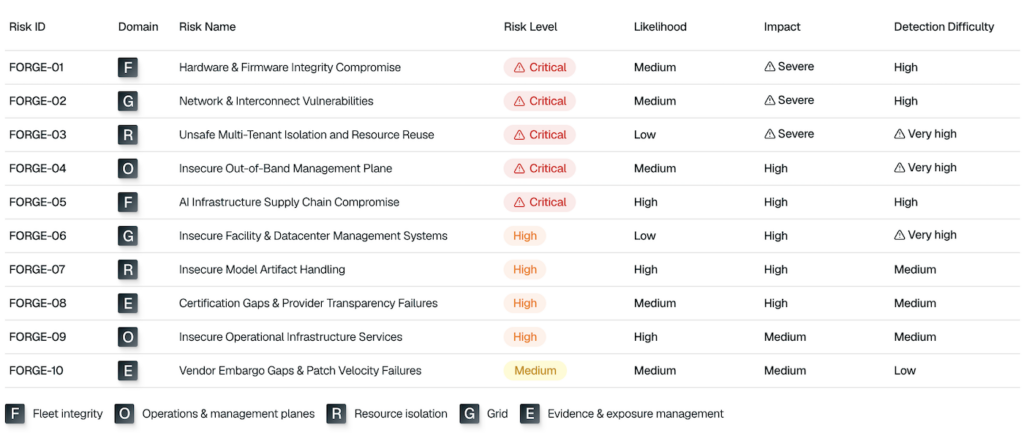
Lava Labs has examined and now reports (PDF) on the security needs of AI data centers (The Top 10 Data Center and AI Infrastructure Security Risks) and concludes they are being built faster than they are being secured. Both traditional data centers and new AI data centers carry largely similar risks; but AI changes their exploitability and blast radius: “Systems originally designed for trusted operators are now supporting high-value, multi-tenant workloads from unrelated customers,” it notes.
The Lava Labs report lists the top ten AI data center and infrastructure security risks, naming them ‘Forge’ (because the purpose is to ‘harden the metal beneath the model’).
Forge 01: firmware and hardware integrity compromise
Forge 02: network and interconnect vulnerabilities
Forge 03: unsafe multi‑tenant isolation and resource reuse
Forge 04: insecure out‑of‑band management plane
Forge 05: AI infrastructure supply chain compromise
Forge 06: insecure facility and data center management systems
Forge 07: insecure data and artifact handling
Forge 08: certification gaps and provider transparency failures
Forge 10: vendor embargo gaps and patch velocity failures
The sequencing of these risks is primarily based on severity. Risks 01 to 05 operate below the operating system, are difficult to detect, and have a cluster-wide blast radius. Risks 06 to 09 are generally easier to detect and recover from. Risk 10 is the easiest to detect and remediate; and is the least likely to cause catastrophic tenant compromise.
FORGE IDs are ordered by severity, from highest to lowest. The matrix groups each risk by domain and shows its likelihood, impact, and detection difficulty.
The risks arise because the nature of AI breaks the basic trust model of traditional data centers. For 03, 07, and 08. AI introduces unrelated commercial tenants, high‑value workloads, and GPU nodes that are reassigned between customers.
For 01, 06 and 10, new hardware realities from the dense GPU clusters require complex firmware stacks, have extreme thermal sensitivity, and a larger blast radius for facility failures.
Advertisement. Scroll to continue reading.
For 02, the required high performance fabrics such as InfiniBand, RoCE, RDMA, and NVLink are often unencrypted, poorly monitored, and highly privileged. Weak fabric isolation can expose paths to discovery, abuse, or lateral movement.
In 04 and 09, an operational concentration of privilege can result from a heavy reliance on BMC automation, Redfish/IPMI, firmware pipelines, and orchestration systems.
For 05 and 10, a scarcity of GPU processors often means that new AI data centers opt for processors that are less suitable, with weaker isolation that can lead to more likely supply chain compromise.
The functional purpose of Lava Labs analysis and report is threefold: to expose the unique risks of AI data centers; to prioritize the most severe risks, thus effectively providing a triage sequence; and to provide example attack scenarios and practical mitigations for those risks.
The moral from the Lava Labs analysis is, yes, you will need a new data center to feed your AI; but, no, you cannot use your existing data center model as a design blueprint.
Unpatched Cursor Vulnerability Exposes Users to Code Execution
An unpatched vulnerability in Cursor on Windows can be triggered for code execution when a developer opens a repository in the application, Mindgard reports.
Cursor is one of the most popular AI-assisted development environments, with more than 7 million active users.
The security defect, Mindgard says, is straightforward: when opening a repository, Cursor would automatically execute a malicious git.exe binary in the project’s root without warning the user or asking for approval.
“The vulnerability is not theoretical and does not depend on a complex chain of exploitation, prompt injection, model manipulation, jailbreaks, memory corruption, or sophisticated attacker tradecraft. Exploitation simply requires a developer to open a project containing a git.exe binary in the repository at the root,” Mindgard says.
According to Mindgard, the issue exists because, when loading a project, Cursor looks for Git binaries in multiple locations, including the workspace itself.
“If an attacker planted a malicious git.exe in the repository root, Cursor will execute it automatically as part of its path resolution logic without warning, approval, or even an indication that executable content from the repository is about to run,” Mindgard explains.
Advertisement. Scroll to continue reading.
Mindgard has disclosed the vulnerability publicly after reporting it to Cursor on December 15, 2025, and receiving no response regarding a potential patch for seven months.
The company says Cursor’s CISO invited Mindgard to its bug bounty program on HackerOne in January, where the security defect was resubmitted and confirmed as reproducible, but it has not received a response from Cursor.
“But coordinated disclosure only works when there is coordination. Seven months after initial disclosure, we have no indication that users are being protected, that remediation is underway, or that affected organizations have been informed. And at this point, withholding information no longer serves users; it serves silence,” Mindgard notes.
SecurityWeek has emailed Cursor for a statement on the matter and will update this article if the company responds.
Lawsuit claims Meta’s layoff decisions were made by AI, not humans
Meta’s AI-fueled layoffs of 8,000 employees targeted workers with disabilities and those who took protected medical or family leaves, alleged a lawsuit filed by 26 employees who were selected for termination. Meta used internal AI tools to select employees for layoffs, according to the complaint filed yesterday by 26 “Doe” plaintiffs in US District Court for the Northern District of California.
“Meta did not assemble the termination list through the considered judgment of managers who knew the work. Instead, Meta used a constellation of internal artificial-intelligence systems—including a system referred to internally as ‘Metamate,’ employee-trained ‘second-brain’ agents, keystroke- and activity-monitoring data, AI-token-usage dashboards, and algorithmically assisted performance ranking and calibration—to score, rank, and select employees for inclusion on the list,” the lawsuit said.
Employees were allegedly graded, among other things, on how much they used Meta’s AI tools. “Meta’s internal dashboards classified employees by their stage of adoption of its artificial-intelligence tools, using categories such as ‘AI Native,’ ‘AI First,’ and ‘AI Enabled,’” the lawsuit said.
The lawsuit is apparently “the first against a major US company to challenge the alleged use of AI in conducting layoffs,” according to Reuters. The complaint alleges that Meta’s tools for monitoring employees did not account for differences caused by disabilities and protected leaves.
“Those tools draw on inputs—performance ratings, calibration scores, productivity and output metrics, ‘AI-native’ ratings, and AI-token consumption—that, by design, cannot be accumulated by an employee who is on protected medical or family leave, or whose output is reduced by a disability,” the lawsuit said.
Meta says people, not AI, made layoff decisions
Meta says that people made the layoff decisions. “These claims lack merit and are not based on facts. Workforce management and organizational decisions were and are made by people, not AI,” Meta said in a statement provided to Ars today. Meta did not provide any other comment on the lawsuit.
US military sent explosive drone boats into combat for the first time
For the first time in its history, the US military sent explosive-laden drone boats into combat by attacking an Iranian midget submarine and naval port. The unprecedented use of such kamikaze sea drones by the United States comes nearly a decade after Iranian and Houthi forces first demonstrated such weapons.
The US military shared a video showing three “one-way attack surface drones” exploding after approaching an Iranian midget submarine and ship maintenance facility at Iran’s Bandar Abbas Naval Base on the night of July 12. US Central Command, the US military combat command responsible for Middle East operations, described the strikes in a social media post as the “first time American forces have employed sea drones in combat operations.”
The US drone boats were able to “make a low-speed, uncontested approach” to their targets before exploding, according to USNI News, a news service from the nonprofit US Naval Institute. USNI News also identified one of the targets as an Iranian Ghadir-class midget submarine that was out of the water while being suspended from a gantry.
[embedded content]
Kamikaze drone boat attack.
The technology behind the strikes involved Saronic Corsair autonomous surface vessels developed by Saronic Technologies, a defense company based in Austin, Texas. The company’s website describes the drone boat as being 24 feet in length and capable of carrying up to 1,000 pounds over 1,000 nautical miles at a top speed surpassing 34 knots.
Such Corsair drone boats supposedly have the capability to operate autonomously without direct human control, including long-range navigation and patrol missions along with regulating power consumption and engine use to loiter at a specific position, according to a Saronic blog post. They are designed to perform a wide variety of missions and were likely equipped with explosives for this specific strike.
This marks the second notable US military use of drone boats during the war, which began with the United States and Israel attacking Iran on February 28, 2026. The US military already used a Corsair sea drone to rescue two US Army helicopter pilots in the waters off the coast of Oman on June 8, after their US Army AH-64 Apache helicopter was taken down by a cheap Iranian Shahed drone.
Google revamps image search for its 25th anniversary with more images and more AI
Believe it or not, there was a time when searching the web for images was not possible. Twenty-five years ago, Google launched image search, and it’s celebrating by looking back at its biggest visual milestones and refreshing the experience for today’s searchers. The celebration also includes expanded AI because that’s just how Google rolls in 2026.
Google claims the impetus for image search a quarter-century ago was the green Versace dress Jennifer Lopez wore to the 2000 Grammy Awards. If you were alive at the time, you probably remember the one. Google engineers understood that people searching for the dress didn’t want to read about it—they just wanted to see it. The company got to work building image search, launching the first version in July 2001. Twenty-five years later, it’s easy to take for granted that you can search for Lopez’s green dress or whatever else strikes your fancy.
Currently, going to the Google image search site shows a plain search bar for finding images. It’s a refreshingly minimalist interface for the modern web. Even Google’s search homepage has a smattering of AI buttons and drop-down menus. That will change when the new Google Images rolls out.
Soon, Google Image search will feature a gallery of images from across the web before you’ve even searched for anything. Google says this gallery will be updated continuously based on your interests. Your “interests” in this context means your web and search history on Google. So the things you look up and interact with online will inform what content Google suggests in this new interface.
I Built a Workflow That Reads My Community’s Slack and Writes a Week of Posts in My Voice
I volunteer as a community lead for a tech non-profit that helps people get their start in tech through free training programs and mentorship. The role has two halves: answering members’ questions in our Slack and running the non-profit’s social channels, where I share content that helps the wider community.
Our Slack runs across more channels than I can keep an eye on, but four of them carry most of the traffic. Between them, that’s roughly 80 questions a week. For a long time, the content side of my job meant I had to scroll through it all by hand, hunt for patterns, and build a calendar around whatever kept coming up.
On a good week, I got two or three posts out, and each one took three to five hours, including the research, writing, scheduling, and replying to comments afterward. All in, that was 15 to 20 hours a week on top of my day job, which is exactly how I ended up burned out.
I needed a better way to keep up. So I built a pipeline that listens to conversations across a community workspace, surfaces overlooked questions, and turns shared concerns into content that helps more people. It scans those four channels, drafts a reply to every real question for me to approve and send. Then it takes the ones worth answering in public, writes them up in my voice, and drops them into Buffer ready to schedule.
The posts have to be public because only a slice of our community lives in Slack. Plenty of members check social media every day but open the workspace once a week, and the people we exist to serve who haven’t found us yet are out there searching for answers that sit behind a login no search engine can reach. A question will still be answered in the channel first. But the same answer, published where people already scroll, keeps helping long after the thread goes quiet.
Here’s how I built it and how it transformed my workload and the community’s experience.
Why keeping up manually stopped working
The volume on its own was manageable. The harder part was that the questions I most needed to catch were the ones most likely to slip past me.
A few things were working against me at once:
Questions got buried. Across the four channels, with people also chatting, brainstorming, and thinking out loud, the important questions sank under everything else moving faster.
Time zones stacked up. I’m in Nigeria, while members are spread across Europe, America, and several time zones in between. I’d close my laptop at night and wake up to a stretch of conversations I’d slept through, with questions sitting unanswered the whole time.
Deadline days turned into pile-ups. We run free training programs with hard application deadlines, and people tend to apply on the last day. The moment they hit a blocker, I’d get hundreds of messages at once. If I missed one reply, registration closed before that person ever heard back.
The people who needed help most often never asked. They were new and didn’t want to look it, or they’d asked once, gotten buried, and given up. So when one of their questions did surface, raised by one person or a few, it usually spoke for a crowd that never said a word. Those were often the questions most worth answering in public.
Behind every one of those was someone who needed help and didn’t get it in time.
That’s what pushed me to build something, so the answer could already be there, in public, before the next person had to ask.
Every day, my workflow reads what the community asked, works out which of those questions are worth answering in public, and drafts the posts so they’re ready to go. I keep the one role only I can do: reviewing and approving what goes out.
The pipeline in five steps
The pipeline runs in five steps: read, filter, archive, cluster, and publish (in Buffer!). I built the workflow in Gumloop, a low-code canvas where I can chain AI steps, API calls, and a few custom nodes together in one place.
The first three steps turn raw Slack traffic into a clean, taggable archive. The last two decide what deserves a public answer and get it into Buffer.
Read. Every message in those four channels runs through an AI Extract Data node in Gumloop. In a single pass, it decides whether the message is a question, drafts a response if it is, scores its own confidence in that draft as either “High” or “Needs Verification,” and tags it with a theme like onboarding, billing, technical, or feature request. I run this step on GPT-5.4 Mini, which handles that kind of multi-field extraction without burning through credits. The confidence score turned out to be a useful part: it lets me spend my attention where my judgment adds real value, instead of reviewing every row the same way.
Filter. A separate custom node keeps only the rows flagged as questions and drops everything else. I made filtering its own step on purpose, rather than folding it into the AI prompt, for one reason: honesty. I want the AI to make one decision per pass and leave that decision visible in the data before anything goes live. If it ever starts misclassifying entries, the archive shows me, and the call stays on the record where I can audit it.
Archive. Everything that survives the filter gets written into a Notion database I call the Community Ops Log. It has 10 fields, including who asked, which channel it came from, the theme, the draft response, a link back to the original message, and a status. Two views sit on top of it: a plain table for everything, and a Kanban review board grouped by status (needs review, verified, responded, and dismissed). That status field is what turns the archive from a passive log into something I can actually triage. At a glance, I can see how many drafts are waiting on me, how many I’ve already handled, and how many I’ve set aside.
Cluster. Claude Opus, my preferred AI model to work with, groups the questions by the underlying problem, then decides which ones deserve a public answer. This is where the pipeline’s judgment lives, so I’ll walk through it properly in a moment.
Publish. The questions that make the cut become content ideas and ready-to-post drafts, pushed straight into Buffer.
💡 A quick note on the screenshots that follow: the Slack workspace, channels, and member data you’ll see are a simulation I built for this article to keep my real community’s threads private. The pipeline is the same one I run live.
The full workflow in Gumloop. In order from L-R: 1/ The AI Extract Data node config in Gumloop. 2/ The filter step, keeping only the rows flagged as questions. 3/ The Community Ops Log, table view. 4/ The Review Board kanban, grouped by status.
How the pipeline decides which questions should be answered on our social channels
This step is probably the trickiest and the most important. Without it, every question becomes a post, and the queue fills with noise. So the pipeline defaults to not posting.
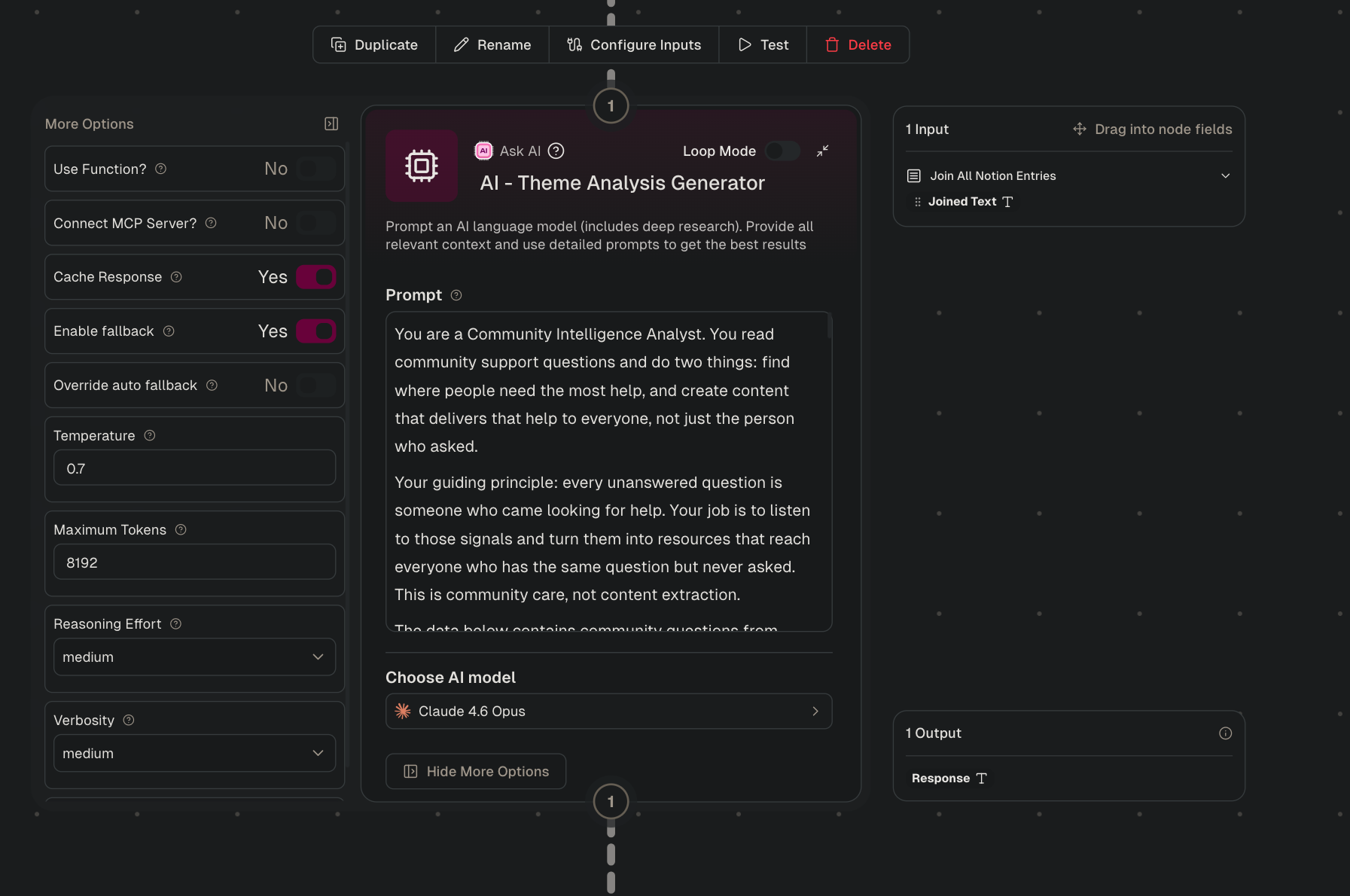
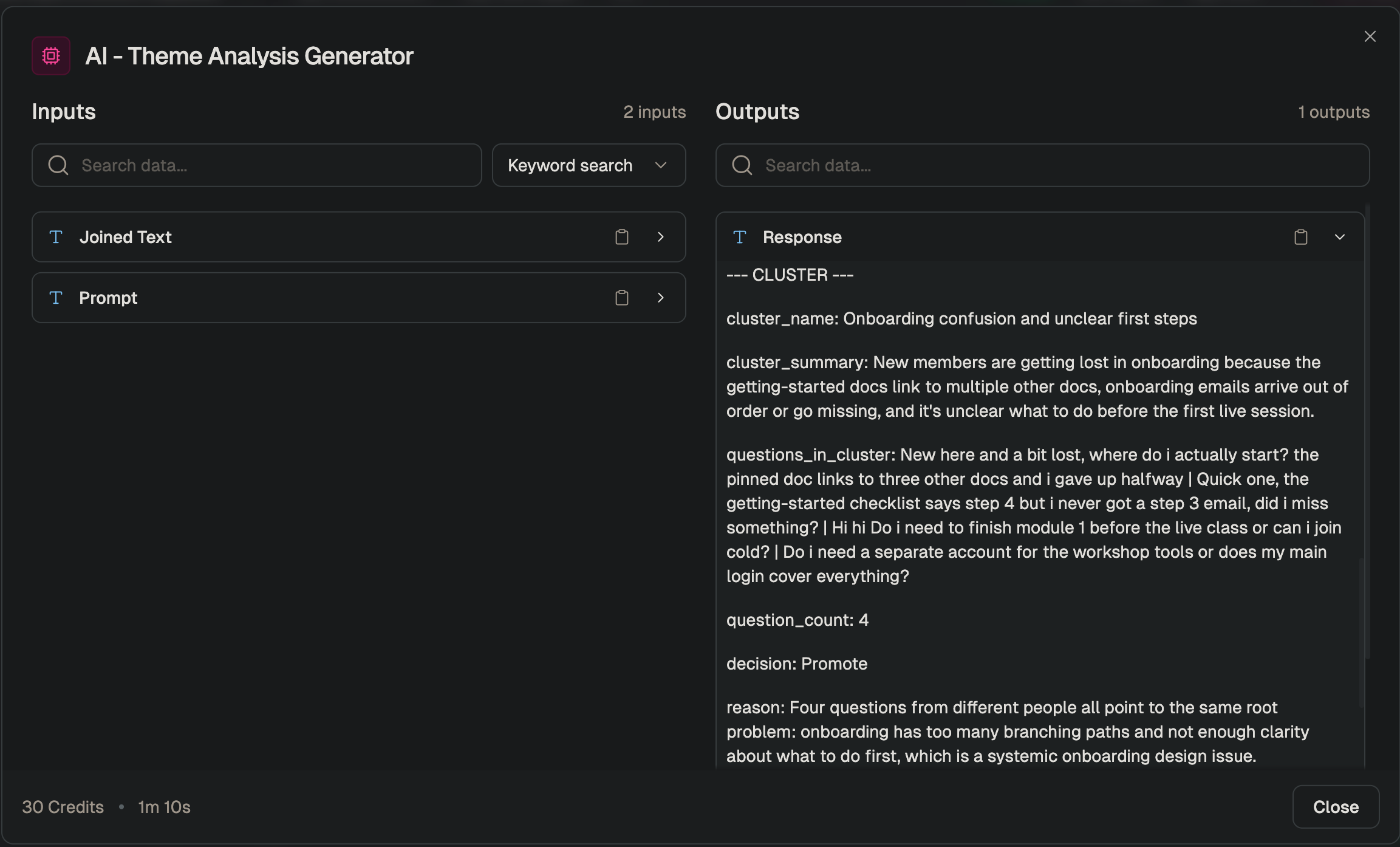
A Notion reader pulls everything in the Community Ops Log and hands it all to a Gumloop Ask AI node running Claude Opus. In a single pass, the prompt clusters the questions, grouping the ones that are asking about the same thing even when they’re worded differently. Then it scores each cluster to decide whether it deserves a public post, removes near-duplicates, and for the themes that make the cut, writes a content idea and drafts the posts.
The Theme Analysis Generator (Ask AI node) config.
A second custom node then parses that output with plain rules and no AI, so the same clusters always produce the same structured rows.
A sample cluster output with the labeled fields.
The goal is to surface the questions worth answering in public, including the valuable ones that only a few people, or even one person, thought to ask. Those are the easiest to miss, and they are often the ones the silent majority needs answers for.
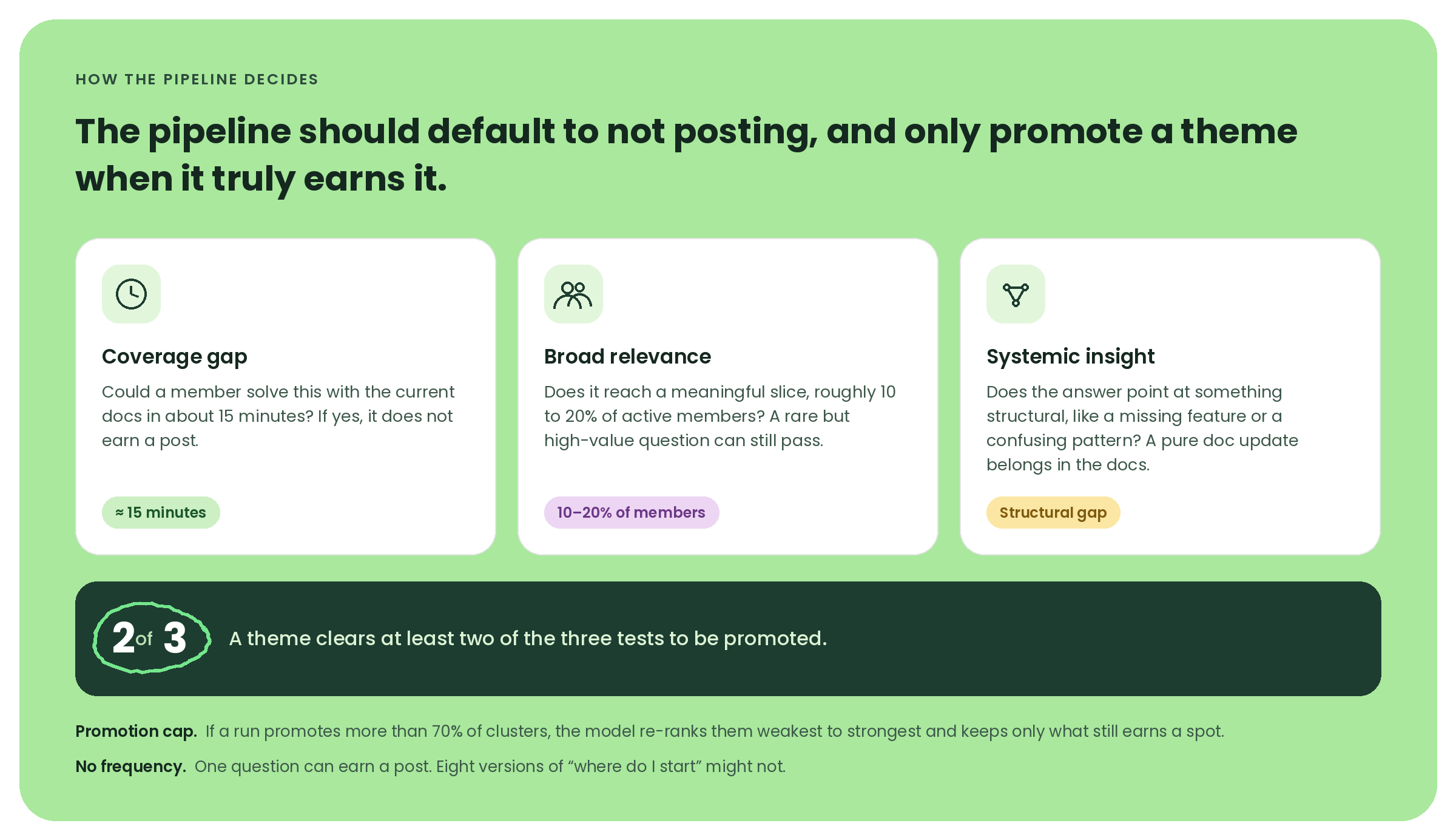
To get there, each theme gets a quick gut-check against three criteria, and it has to clear at least two of them to be promoted:
Can a member already solve this on their own? If the documentation we have would get them there in about 15 minutes, it doesn’t earn a post**.**
Does it affect a meaningful slice of the community? Roughly 10 to 20% of active members is the bar. But because the rule is two out of three, a rare question can still get through if it clears the others. That’s the safety valve for the high-value question that only one or two people thought to ask.
Is it a real gap, or just a doc fix? If the answer points to something structural, like a missing feature or a confusing pattern, it counts. If it’s really just “we should update the doc,” that belongs in the docs, not in a public post.
The three promotion criteria.
There’s also a promotion cap. If the model promotes more than 70% of the clusters in a run, it has to stop, re-rank them from weakest to strongest, and keep only the ones that still clearly earn a spot. That exists because I’ve found that LLMs love to promote everything when you let them, and the whole point is to stay selective.
The one thing I deliberately left out is frequency. Most community tools sort by how often something comes up, which makes sense for triage because you answer the frequently asked questions first. But for content, that same sorting buries the questions I most wanted to find. So a single question can earn a post if it reveals a real gap, while eight versions of “where do I start” might not (especially because my answer there is usually “just read the docs.”).
The pipeline scores, drafts, and pushes everything on its own. My review happens at the very end, inside Buffer. Ideas land in the Create space for me to develop, and posts wait in the queue for a final pass before anything goes live.
How Buffer fits into the system
Three custom nodes handle the handoff, each one responsible for a single Buffer API call. The first creates an idea in Buffer’s Create space for every promoted theme. The other two queue the posts, one for X and one for Threads, and Buffer spaces them across the days so I never have to set times by hand.
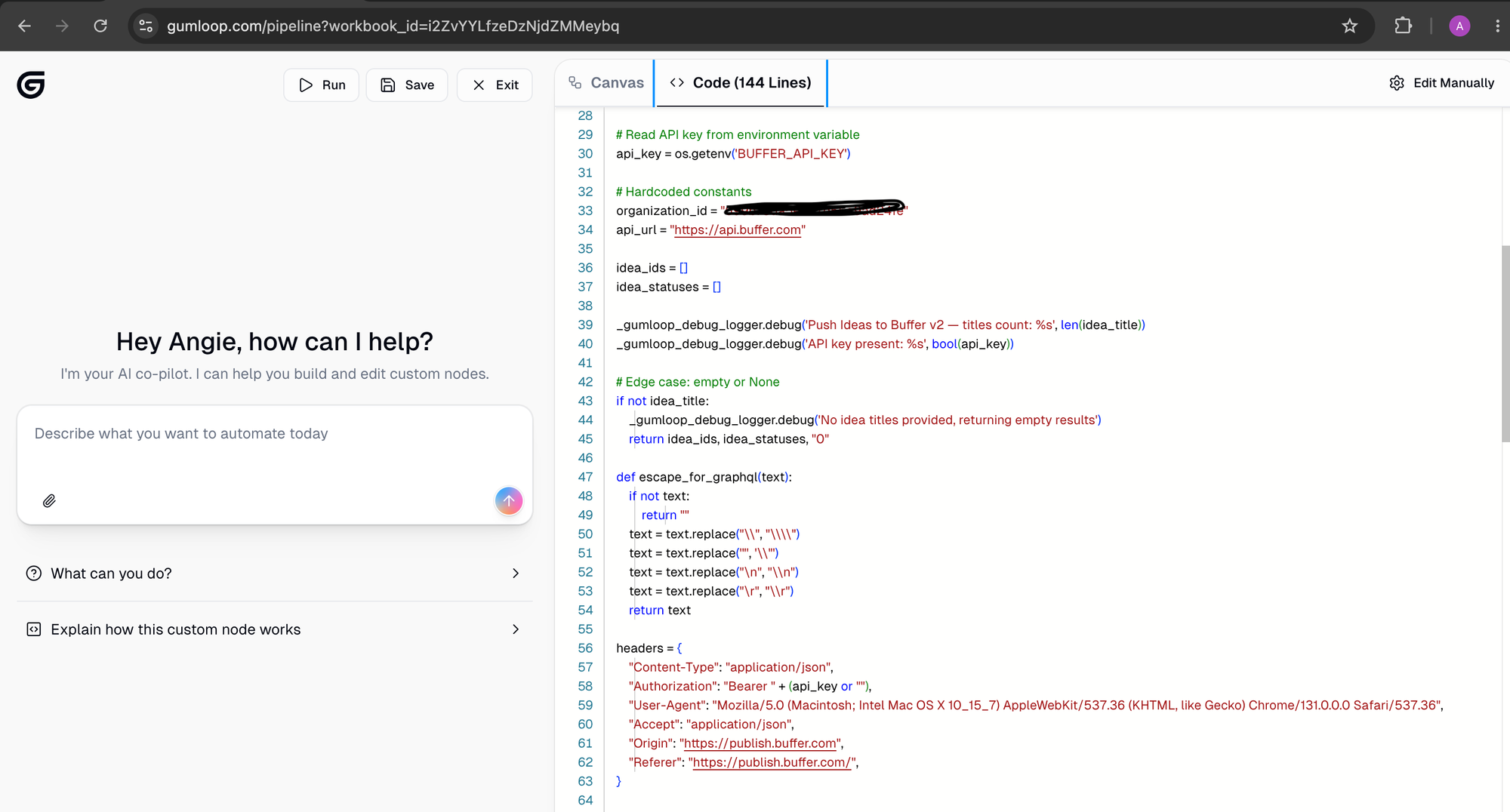
One practical note if you’re ever calling Buffer’s API from a low-code tool or a script: your requests need to look like they’re coming from a browser. Buffer’s API sits behind Cloudflare, a security service that filters out automated traffic, and a bare script is exactly what it’s built to catch. The fix lives in the headers, the small labels attached to every request that tell the receiving server who’s asking and what they want back.
Alongside the two standard ones (the content type and my access token), I added four more that a real browser would normally send:
which browser it is
what format it expects back,
and which site the request is coming from.
With those in place, every call goes through cleanly. The screenshot below shows all six.
The Buffer push node, with the six headers that get every call past Cloudflare.
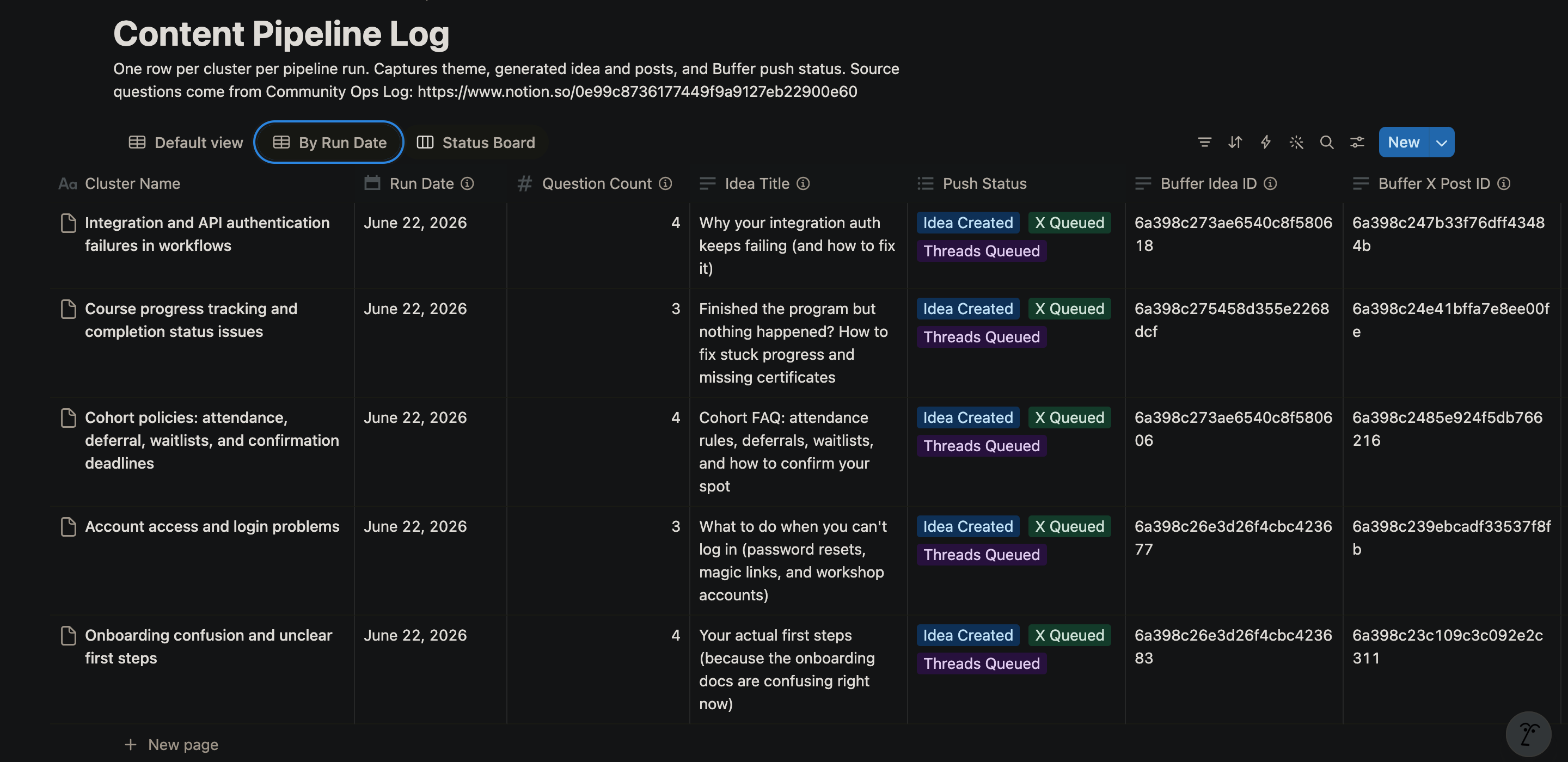
Once the push is complete, the results get sent into a second Notion database, the Content Pipeline Log.
Each theme gets a status like “Idea Created, X Queued, Threads Queued,” stored next to the run date and links back to the original questions. So every post traces back to the question that started it. If a post does unusually well, I can find the question behind it and look for nearby ones worth a follow-up, and if anyone on the non-profit board asks how I’m choosing what to publish on our behalf, I can show them the exact question, channel, and date behind every post.
The Content Pipeline Log in Notion, with the push status for each theme.
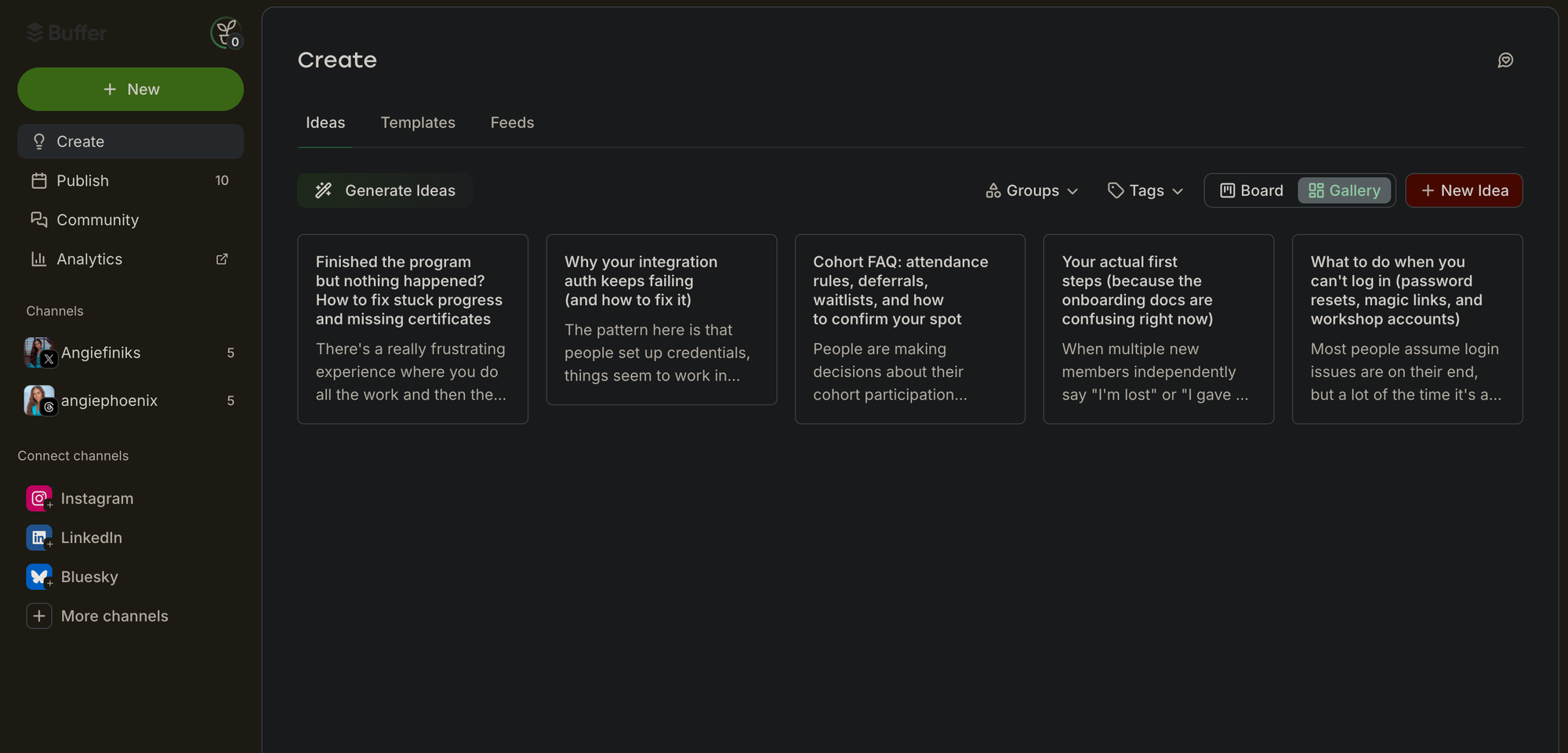
Buffer is also where I review. Ideas land in the Create space for me to develop, and posts wait in the queue for a final pass before anything goes live. The screenshots here are from my first full run, which pulled 18 questions out of the four channels and turned them into five content ideas and 10 scheduled posts, five each for X and Threads.
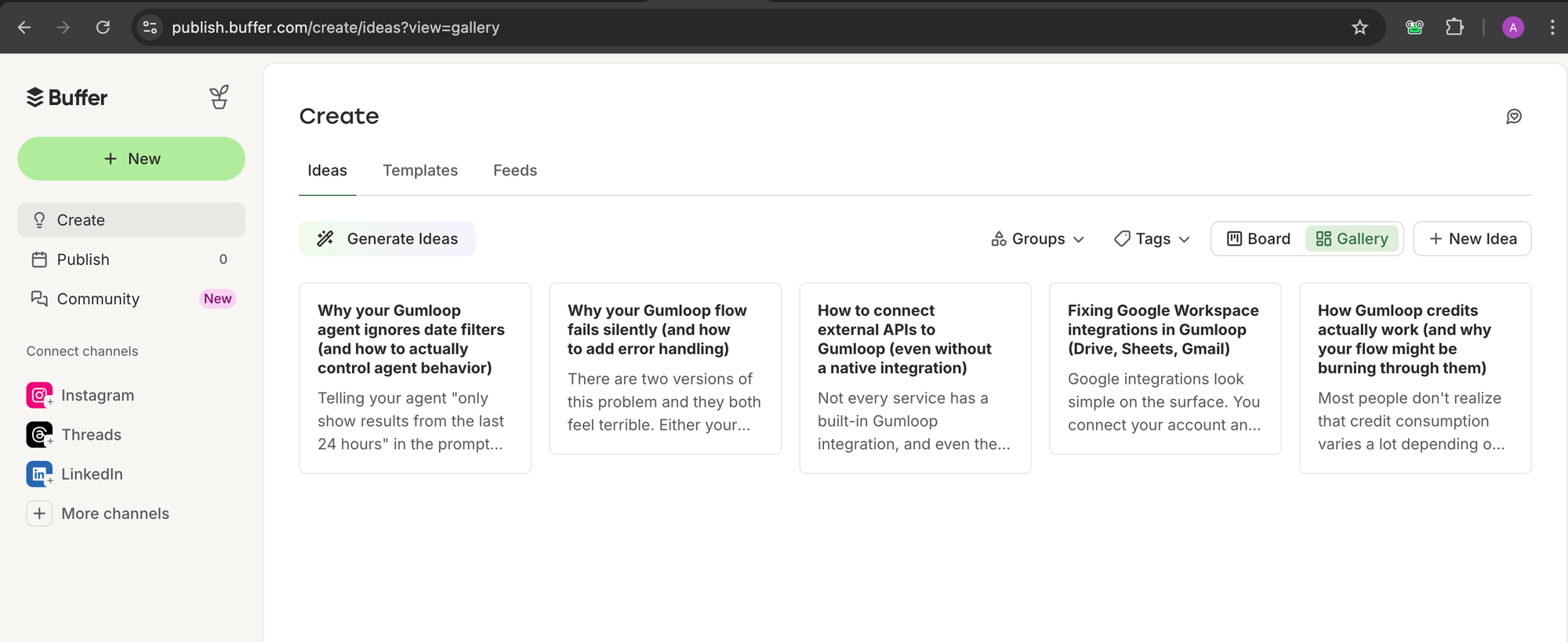
Buffer’s Create space with the five ideas, and the Publish queue with the scheduled posts.
How I got the posts to sound like me
This was the part I was most worried about going in. I’ve seen what community content sounds like when generic AI takes the wheel, and I didn’t want anything I publish to read like a content bot. So
before I asked the model to generate anything, I showed it samples of how I actually write, so it could pull out the patterns and match them as best it could..
I used four samples: two were peer replies I’d written in our Slack, one was a longer-form post from elsewhere, and one was a DM (where my voice is most authentic).
On top of the samples, I gave the prompt a few hard rules:
Titles have to be short and specific, with no listicle stacking.
Posts have to open with the situation, not a hook.
The tone stays conversational and peer-to-peer.
And there’s a flat ban on em dashes and AI fluff.
That last rule was the one major tweak I had to make between my first and final runs. While the initial output already sounded like me, I noticed a slight over-reliance on em-dashes. I know em dashes are a perfectly good punctuation mark that writers have used for years, but the truth is, I wasn’t reaching for them before AI started putting them everywhere. (I genuinely don’t know where that key lives on my keyboard.)
The last piece is a self-check. Before the prompt finalizes anything, it scans its own output for the banned patterns and rewrites whatever slipped through. That’s the step that catches the small AI-isms that the sample-matching alone misses.
It took a few rounds of testing before the tone really blended. But once it did, the posts started coming out the way I’d write them if I’d sat down and done it myself.
Before vs after showing generic AI-generated posts next to the same post after the voice samples were added.
What’s changed so far
The pipeline is recent enough that I don’t have hard engagement numbers to point to yet. A few runs have been live for a few weeks, which is enough to feel the difference but not enough to prove it with a chart. But I have noticed a few shifts, especially in the way I work.
First, those 15 to 20 hours a week I’d been pouring into community ops dropped to a fraction of that. The triage, the drafting, and the manual content calendar all happen inside the pipeline now, and what’s left for me is the review and approval. That alone was the change I needed most.
Deadlines are much less stressful, too. The most common blockers from past training rounds are already answered in public by the time the next application-day rush hits, so the same questions pile up less. When the flood comes, the answer is often already sitting there waiting.
The change that took the longest to notice is actually the one I care about most. The questions coming in are different now. Instead of re-asking the original problem, people reference the public post and ask the next question on top of it. This is a strong signal that the content is achieving my main goal: reaching members who wouldn’t have spoken up in the first place.
Why I built this
The volunteer role isn’t a small commitment. Leading a growing community is a real job on top of a real job, and by the time I started looking at automation seriously, it had started creeping into my paid work. I knew I had to do something.
The practical reason is the one most people will relate to. The rest of my community team aren’t engineers, so I needed something they could keep running without me. That’s what made my specific stack the right fit. Anyone on the team can refine a prompt or adjust a step in Gumloop, and Buffer turns whatever comes out into a real content calendar they can see, schedule from, and trust. Now the work doesn’t depend on any one person being awake. Someone can keep things moving whether I’m at my desk or asleep on a different continent.
There’s also something about volunteering that keeps drawing me back. Sometimes I think God leads us to give without expectation, to plant seeds we may never personally harvest. Building this was one small way of doing that. Every question in those channels belongs to a real person trying to learn, build, or move forward. The more of those people I could help, the more worthwhile the effort felt.
Ready to build?
If you’re taking Buffer’s API for a spin, we’ve got resources to get you moving. Our developer docs cover the GraphQL schema, auth flow, and quick-start examples. The Buffer MCP server docs walk through plugging it into Claude or any MCP-compatible AI agent.
Suspecting AI cheating, Ivy League prof ordered an in-person final; scores fell 50%
Ivy League college students are, by definition, intelligent. They don’t need to use generative AI to cheat on exams; they could just learn the material. But they also tend to be competitive, ambitious, and overscheduled, so AI can look like an easy shortcut that makes more time in their lives for things that can’t be done by a chatbot. When the pressure is on, which approach do they choose?
A new scandal at Brown University reveals that huge numbers of these students are likely to cheat.
Record scores
A recent survey of Princeton students found that 29.9 percent admitted to cheating with AI on at least one exam or assignment. But the recent situation at Brown gives us a better sense of what this kind of cheating looks like in one particular class—and just how much it may be substituting for actual learning. And we know all this because the blind economics professor at the center of it all, Roberto Serrano, is not letting it go.
In just the last week, Serrano—who was born in Spain—has told his story to El País and Inside Higher Ed, which have both run significant pieces on the scandal.
The story that Serrano told them begins in December 2025, when a gunman attacked Brown’s campus and killed two people, including one who had recently introduced herself to Serrano.
Roberto Serrano receiving an award from the King of Spain in 2025.
Credit: Getty Images
Roberto Serrano receiving an award from the King of Spain in 2025. Credit: Getty Images
Shaken by the experience, Serrano decided that his spring 2026 section of the quite difficult ECON 1170 would allow take-home exams for both the midterm and the final. Suddenly, the course received an influx of students. El País has the story:
The course… typically attracts few students, but very good ones. [Serrano] has never had more than 30 students enrolled at a time, and on some occasions he had only eight. This semester, probably because of the new evaluation system, 86 students signed up for the class. The results of the midterm exam, which was administered on March 5, were extraordinary, with an average score of 96 out of 100. Forty students scored a perfect 100.
This was indeed extraordinary, because as Serrano told Inside Higher Ed, “Historically the average grade in the midterm of this course has ranged between 65 and 80 [percent], and this exam was harder than the exams I wrote in the past, because… take-home is an opportunity to challenge the class a little bit more, given that you’re giving the students unlimited time.”
Lawsuit: Man used Grok to make 7K sex images of stepdaughter, then shot himself
The xAI class covers all US persons whose “real images of themselves as minors” were altered using Grok “to produce images or videos of sexually explicit conduct or content with their faces and/or other distinguishing features reasonably identifiable.” And the Stability AI class includes US persons similarly harmed using “an app built upon a Stability AI model.”
Lawyers estimate that thousands of minors may be eligible to join the classes and continue to seek out victims harmed by AI CSAM.
NCMEC did not respond to Ars’ request to comment.
However, the group has called for platforms, lawmakers, child safety organizations, and law enforcement to work together to address the “growing urgency for coordinated action.”
In March, NCMEC warned of a “sharp rise” in “reports related to generative AI” (GAI) in 2025. According to NCMEC, more than 1.5 million CyberTipline reports were made last year, “indicating a nexus to GAI and child sexual exploitation.” Troublingly, in more than 133,000 cases, NCMEC “lacked sufficient information to determine how the technology was used.”
That report did not call out X or xAI, but it did suggest that it’s likely common for AI firms to avoid sharing information on AI CSAM that cops can use to make arrests. For another example, NCMEC noted that Amazon AI services submitted the vast majority of tips (1.1 million), and none of those tips gave “actionable information” that law enforcement could use to identify perpetrators.
As scrutiny on the harm inflicted on children by AI firms intensifies, advocates are hoping that firms will fine-tune models to block all nudity. Girls suing X alleged that’s the only remedy, “because if you have a model that allows for any sexual or abusive content, it is impossible to prevent that model from creating such content involving minors.”
In the press release, one of the lawyers representing minors, Annika K. Martin, slammed xAI and Stability AI as allegedly knowingly building models “capable of producing deepfake CSAM,” with “complete disregard for the devastation they knew would follow.”
“AI-generated CSAM is a scourge on society that touches every community and every demographic,” Martin said. “The scale of harm is staggering, and the companies whose products enable it must be held accountable.”
This story was updated on July 8 to include comments from Stability AI.