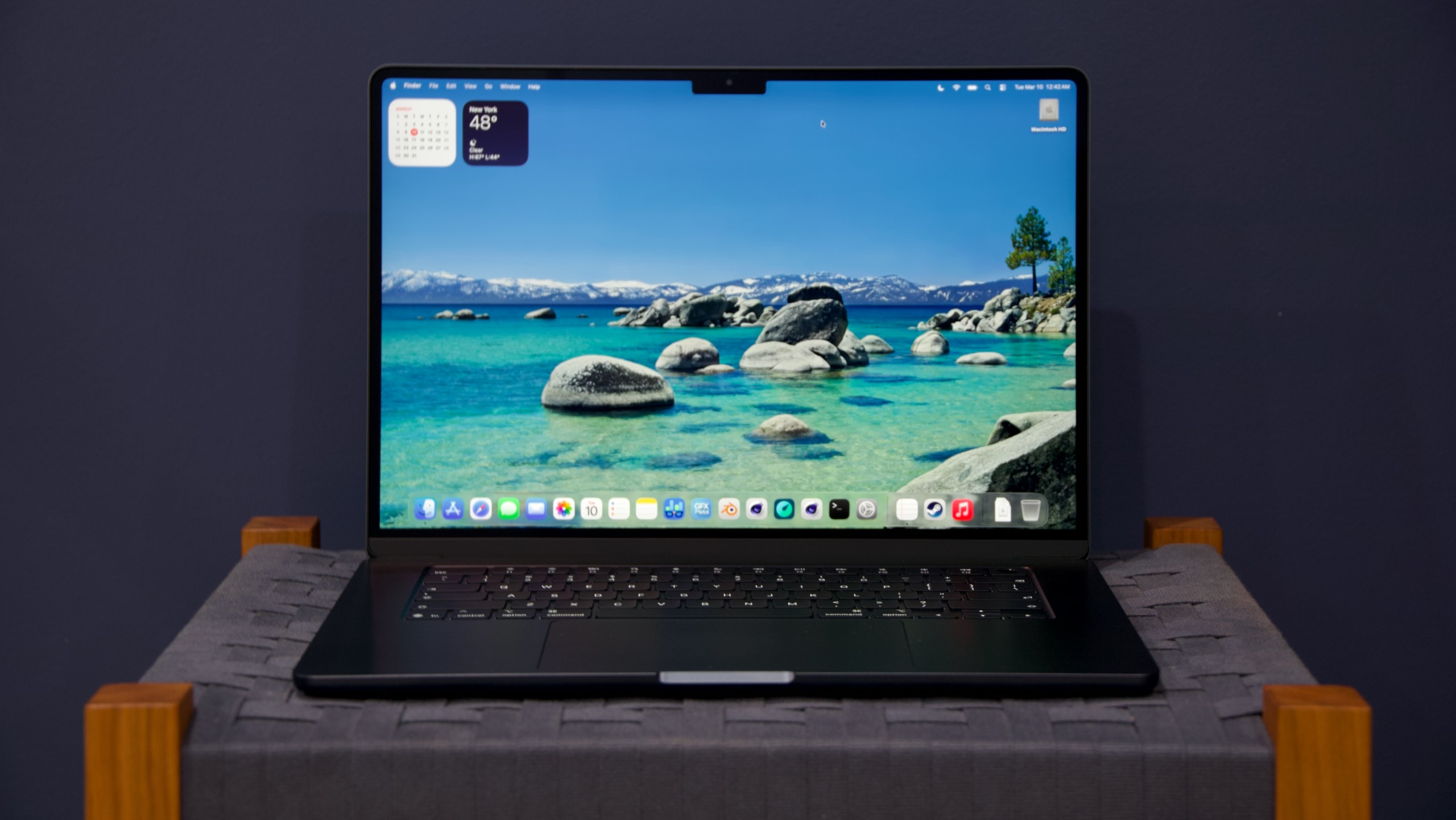
M5 MacBook Air review: Still the best MacBook for almost everybody

The MacBook Pro retains some key functional advantages over the Air. All Pro models have more ports, including native HDMI and SD card readers. They get somewhat larger, considerably nicer displays, with high-refresh-rate ProMotion and HDR support, a much higher maximum brightness, and a matte nano-texture display option. Even setting the M5 Pro and M5 Max aside, the basic M5 version can be quite a bit faster than the M5 Air for some workloads because it has a fan to keep it cool. Storage can go as high as 8TB, and RAM can go up to 128GB.

But what these things have in common is that they’re well above and beyond what most people, even many creative and technical professionals, are asking from their laptops. These days, the main reason to go with a MacBook Pro is that you affirmatively want one or more of those extra things. There are fewer reasons to be unwillingly upsold to a Pro because of one or two make-or-break features missing from the Air.

It’s also mostly pretty easy to describe the kind of user each MacBook is for, which is a huge improvement from the Mac’s mid-2010s nadir, when the aging non-Retina Air, the nice-but-underpowered 12-inch MacBook, and the too-expensive 13-inch MacBook Pro were all fighting over the same $1,000-to-$1,500-ish price band and all came with frustrating trade-offs and compromises.

Performance: Twice as fast as M1, mostly

The Apple Silicon era gave Apple’s baseline Macs a huge performance boost compared to the low-voltage Intel processors of MacBooks past. That performance also came with dramatically extended battery life. As long as you were running Apple Silicon or universal binaries rather than relying on Rosetta’s app translation, upgrading from an Intel Mac has always been pretty much all upside.

The upgrades since then have been strictly incremental, considered year-over-year. Each new generation of chip has brought some kind of low double-digit performance improvement over the prior generation, never enough to merit an upgrade all by itself. But they’ve stacked on top of each other year after year, and we’ve arrived at a point where the M5 Air is finally just about twice as fast as the M1 version.

https://arstechnica.com/gadgets/2026/03/m5-macbook-air-review-still-the-best-macbook-for-almost-everybody/


Apple’s MacBook Neo makes repairs easier and cheaper than other MacBooks

Apple’s MacBook Neo is the company’s first serious effort to break into the sub-$1,000 laptop business, challenging midrange Windows laptops and Chromebooks with its $599 starting price and its focus on build quality rather than high-end performance.

One less-advertised change that may make the Neo more appealing to businesses, schools, and the accident-prone is that its internal design is a bit more modular and easier to repair than other modern MacBooks. That’s our takeaway after spending some time thumbing through the official MacBook Neo repair documentation that Apple published on its support site this week.

Replacements for pretty much any component in the Neo are simpler and involve fewer steps and tools than in the M5 MacBook Air. That includes the battery, which in the MacBook Air is attached to the chassis with multiple screws and adhesive strips but which in the Neo comes out relatively easily after you get some shielding and flex cables out of the way.

But the most significant change in the Neo is that the keyboard is its own separate component. For essentially all modern MacBooks, going back at least as far as the late-2000s unibody aluminum MacBook designs, the keyboard has been integrated into the top part of the laptop case and is extremely difficult, if not impossible, to replace independently.

Apple refers to this big, unified component as the “top case,” and anyone who has ever had to pay to repair one out of warranty can attest to how expensive they are. For the old M1 MacBook Air, a top case from Apple’s first-party self-service parts store will run you about $220 after you send the old defective part back to Apple. For the 14-inch MacBook Pro, Apple will only sell you a top case replacement along with a battery, which costs a whopping $440 after you send the old component back to the company.

https://arstechnica.com/gadgets/2026/03/more-modular-design-makes-macbook-neo-easier-to-fix-than-other-apple-laptops/


Testing Apple’s 2026 16-inch MacBook Pro, M5 Max, and its new “performance” cores

If you’re interested in a slightly wider-ranging review of the new MacBook Pros, I’ll point you toward reviews of the M1, M3, and M4 generation models, as well as the one for the low-end 14-inch MacBook Pro with the standard M5 (now $100 more expensive than it was before, but with 1TB of base storage instead of 512GB).

Apple is using the same external design for these laptops that it has been using since 2021—it’s aging pretty well, and we still mostly like it, especially compared to late-Intel-era MacBook Pros. There’s just not much else to say about the design that hasn’t been said.

M5 Max benchmarks

In our testing, the fully enabled M5 Max’s single-core performance is about 10 percent higher than the fully enabled version of the M4 Max in last year’s 16-inch MacBook Pro. The multi-core performance improvements are more variable (Cinebench R23, which shows a 30 percent improvement, seems to be an outlier), but most tests also show a modest 10 or 12 percent improvement.

Graphics performance improvements are slightly more robust, measuring between 20 and 35 percent depending on the test. Apple suggests you may see more uplift on GPU compute workloads that can leverage the neural accelerator Apple has built into each M5-family GPU core.

The jump from the M4 Max to the M5 Max isn’t quite as large, expressed as a percentage, as it has been for the last couple generations; both M3 Max and M4 Max were big leaps from what had come before. But assuming you’re upgrading from an M1 or M2-based Pro, you’ll still be taking a big leap. Fears that stepping down from 12 of Apple’s best-performing CPU cores (in M4 Max) to just six of the best-performing cores are also a bit overblown, based on these results.

Compared to the basic M5 in the 14-inch MacBook Pro, the M5 Max’s single-core performance is roughly the same, which is in keeping with how Apple usually does things—stepping up to higher-end chips gets you better multi-core and graphics performance, but Apple doesn’t push the clock speeds upward on the individual cores the way that Intel or AMD do with their higher-end processors.

https://arstechnica.com/gadgets/2026/03/testing-apples-2026-16-inch-macbook-pro-m5-max-and-its-new-performance-cores/


Feds take notice of iOS vulnerabilities exploited under mysterious circumstances

Coruna is also notable for its use by three distinct hacking groups. Google first detected its use in February of last year in an operation conducted by a “customer of a surveillance vendor.” The vulnerability exploited, tracked as CVE-2025-23222, had been patched 13 months earlier. In July 2025, a “suspected Russian espionage group” exploited CVE-2023-43000 in attacks planted on websites that were frequented by Ukrainian targets. Last December, when it was used by a “financially motivated threat actor from China,” Google was able to retrieve the complete exploit kit.

“How this proliferation occurred is unclear, but suggests an active market for ‘second hand’ zero-day exploits,” Google wrote. “Beyond these identified exploits, multiple threat actors have now acquired advanced exploitation techniques that can be re-used and modified with newly identified vulnerabilities.”

Google researchers went on to write:

We retrieved all the obfuscated exploits, including ending payloads. Upon further analysis, we noticed an instance where the actor deployed the debug version of the exploit kit, leaving in the clear all of the exploits, including their internal code names. That’s when we learned that the exploit kit was likely named Coruna internally. In total, we collected a few hundred samples covering a total of five full iOS exploit chains. The exploit kit is able to target various iPhone models running iOS version 13.0 (released in September 2019) up to version 17.2.1 (released in December 2023).

The 23 exploits, along with the code names and other information, are:

Type Codename Targeted versions (inclusive) Fixed versions CVE
WebContent R/W buffout 13 → 15.1.1 15.2 CVE-2021-30952
WebContent R/W jacurutu 15.2 → 15.5 15.6 CVE-2022-48503
WebContent R/W bluebird 15.6 → 16.1.2 16.2 No CVE
WebContent R/W terrorbird 16.2 → 16.5.1 16.6 CVE-2023-43000
WebContent R/W cassowary 16.6 → 17.2.1 16.7.5, 17.3 CVE-2024-23222
WebContent PAC bypass breezy 13 → 14.x ? No CVE
WebContent PAC bypass breezy15 15 → 16.2 ? No CVE
WebContent PAC bypass seedbell 16.3 → 16.5.1 ? No CVE
WebContent PAC bypass seedbell_16_6 16.6 → 16.7.12 ? No CVE
WebContent PAC bypass seedbell_17 17 → 17.2.1 ? No CVE
WebContent sandbox escape IronLoader 16.0 → 16.3.116.4.0 (<= A12) 15.7.8, 16.5 CVE-2023-32409
WebContent sandbox escape NeuronLoader 16.4.0 → 16.6.1 (A13-A16) 17.0 No CVE
PE Neutron 13.X 14.2 CVE-2020-27932
PE (infoleak) Dynamo 13.X 14.2 CVE-2020-27950
PE Pendulum 14 → 14.4.x 14.7 No CVE
PE Photon 14.5 → 15.7.6 15.7.7, 16.5.1 CVE-2023-32434
PE Parallax 16.4 → 16.7 17.0 CVE-2023-41974
PE Gruber 15.2 → 17.2.1 16.7.6, 17.3 No CVE
PPL Bypass Quark 13.X 14.5 No CVE
PPL Bypass Gallium 14.x 15.7.8, 16.6 CVE-2023-38606
PPL Bypass Carbone 15.0 → 16.7.6 17.0 No CVE
PPL Bypass Sparrow 17.0 → 17.3 16.7.6, 17.4 CVE-2024-23225
PPL Bypass Rocket 17.1 → 17.4 16.7.8, 17.5 CVE-2024-23296

CISA is adding only three of the CVEs to its catalog. They are:

  • CVE-2021-30952 Apple Multiple Products Integer Overflow or Wraparound Vulnerability
  • CVE-2023-41974 Apple iOS and iPadOS Use-After-Free Vulnerability
  • CVE-2023-43000 Apple Multiple products Use-After-Free Vulnerability

CISA is directing agencies to “apply mitigations per vendor instructions, follow applicable… guidance for cloud services, or discontinue use of the product if mitigations are unavailable.” The agency went on to warn: “These types of vulnerabilities are frequent attack vectors for malicious cyber actors and pose significant risks to the federal enterprise.”

https://arstechnica.com/security/2026/03/cisa-adds-3-ios-flaws-to-its-catalog-of-known-exploited-vulnerabilities/


Apple users in the US can no longer download ByteDance’s Chinese apps

In recent years, however, Apple has been developing more sophisticated mechanisms to identify where an App Store user is physically located. In 2023, the tech outlet 9to5Mac reported that Apple devices had created a new system called “countryd” to precisely determine a person’s location based on “data such as current GPS location, country code from the Wi-Fi router, and information obtained from the SIM card.”

Observers theorized that the new system was created in response to the European Union’s Digital Markets Act, which went into effect in 2024 and required Apple to begin allowing people in the EU to download apps from third-party app marketplaces. Apple complied with the EU regulation, but it restricted the accessibility of alternative app stores only to people physically in the territory of the EU.

The exact mechanism Apple uses to enable geoblocking of iPhone apps is unclear, says Friso Bostoen, assistant professor of law at Tilburg University who has studied the effect of EU regulations on Apple. “Presumably, there’s some on-device processing saying, ‘Look, this phone is somewhere in the EU borders, so you get an eligibility green check mark.’” And if the device detects that an EU resident leaves the region for more than 90 days, according to Apple’s policy, that eligibility is withdrawn, Bostoen says.

The new restriction on ByteDance apps in the US resembles the EU-specific geographical restrictions that were previously reported. Some ByteDance users have said that they are able to circumvent the restrictions by using virtual private networks, which allow people to spoof their device’s location, but the work-arounds aren’t foolproof.

“Apple may use the IP address of your Internet connection to approximate your location in order to determine whether certain apps that are subject to legal restrictions in some regions can be made available to you,” the App Store’s legal terms explicitly state. But according to online archives of the terms page, this specific sentence was added at the end of January 2025, shortly after the company first removed ByteDance apps from the US version of the App Store.

So far, there’ve been few instances of Apple actually implementing technical capabilities to geoblock users. “However, you could think about this having some wider spillover effects if this becomes the more general way of ensuring that apps that shouldn’t be available indeed aren’t available,” Bostoen says. “If Apple gets more sophisticated about blocking access in a way that cannot simply be circumvented with a VPN, obviously citizens in those places are now left with much less liberty.”

This story originally appeared on wired.com.

https://arstechnica.com/tech-policy/2026/03/apple-users-in-the-us-can-no-longer-download-bytedances-chinese-apps/


Apple’s 512GB Mac Studio vanishes, a quiet acknowledgment of the RAM shortage

If the only thing you had to go off was Apple’s string of product announcements this week, you’d have little reason to believe that there is a historic AI-driven memory and storage supply crunch going on. Some products saw RAM and storage increases at the same prices as the products they replaced; others had their prices increased a bit but came with more storage than before as compensation. And there’s the MacBook Neo, which at $599 was priced toward the low end of what Apple-watchers expected.

But even a company with Apple’s scale and buying power can’t totally defy gravity. At some point between March 4 and now, Apple quietly removed the 512GB RAM option from its top-tier M3 Ultra Mac Studio desktop. Pricing for the 256GB configuration has also increased, from $1,600 to $2,000. The Tech Specs page on Apple’s support site still acknowledges the existence of the 512GB configuration, but both the Apple Store page and the list of available configurations have removed any mention of it.

We’ve asked Apple to comment on the disappearance of the 512GB Mac Studio and will update this article if we receive a response.

It’s rare for Apple to pull any configurations of products it sells, aside from removing higher-capacity storage options for older iPhones after new ones come out. More commonly, the company will just increase its shipping estimates to reflect the supply chain backlog.

The 512GB Mac Studio was not a mass-market machine—adding that much RAM also required springing for the most expensive M3 Ultra model, which brought the system’s price to a whopping $9,499.

https://arstechnica.com/gadgets/2026/03/apples-512gb-mac-studio-vanishes-a-quiet-acknowledgement-of-the-ram-shortage/


MacBook Neo hands-on: Apple build quality at a substantially lower price

MacBook Air-ish

The MacBook Neo sticks closely to the design language Apple has been using for recent MacBook Airs and Pros.

Andrew Cunningham

The words “MacBook Neo” don’t appear anywhere on the outside of the machine.

Andrew Cunningham

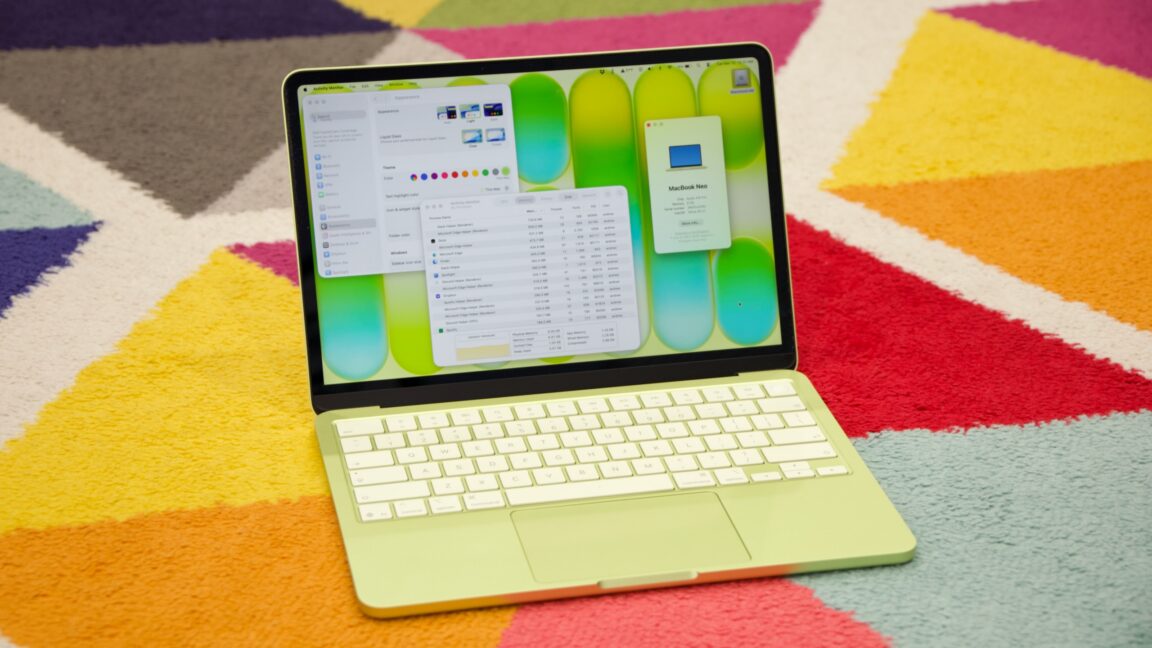
I had assumed, based on Apple’s history with its lower-end iPads and iPhones, that Apple would essentially reuse the design of the old M1 MacBook Air for this new MacBook. The Neo does share quite a few things in common with that older design, including a 13-inch notchless display, a 2.7 lb weight, and a lack of MagSafe connector. But this is actually a new design after all, one that’s more in line with the current Pro and Air iterations.

The Neo is a flat rectangular slab of aluminum with softly rounded edges, more like the current Airs and Pros than the wedge-shaped design of the old M1 Air (also like modern Airs, the words “MacBook Neo” appear nowhere on the exterior of the computer—the name only exists in stores and in software).

The low-end iPad can feel a bit cheap or hollow, partly because of the small gap between the front glass and the non-laminated LCD display underneath. But holding and interacting with the Neo feels substantially the same as interacting with an Air. It is, however, slightly thicker—an even 0.5 inches, up from 0.44 inches for the M4 Air.

The non-backlit keyboard is a bit of a bummer, although Apple has tried to keep it legible by shifting from white-on-black keycaps to darker legends on a lighter background. But the typing feel is similar to the Air, and we’re told the scissor switches have the same amount of key travel as the switches in the Air keyboards.

The keyboard and trackpad are mostly standard Apple fare, but the trackpad doesn’t support Force Touch haptics and feels a bit less solid than the Airs and Pros.

Andrew Cunningham

Two USB-C ports, two different sets of capabilities. At least the headphone jack (pictured next to one of the two side-firing speakers) is still present and accounted for.

Andrew Cunningham

The multi-touch trackpad is a little weirder. It looks a lot like Apple’s other trackpads, but it actually has a physical clicking mechanism rather than the haptic feedback Apple has used in its laptop trackpads and Magic Trackpads for years. That means there’s no Force Click functionality and no controls for adjusting the firmness or noisiness of the clicking sensation.

https://arstechnica.com/gadgets/2026/03/macbook-neo-hands-on-apple-build-quality-at-a-substantially-lower-price/


M5 Pro and M5 Max are surprisingly big departures from older Apple Silicon

The second die is where the two chips differ; the M5 Pro gets up to 20 GPU cores, a single media encoding/decoding engine, and a memory controller with up to 307 GB/s of bandwidth. The M5 Max gets up to 40 GPU cores, a pair of media encoding/decoding engines, and a memory controller that provides up to 614 GB/s of memory bandwidth (note that everything in the GPU die seems to be doubled, implying that Apple is, in fact, sticking two M5 Pro GPUs together to make one M5 Max GPU).

Apple’s spec sheets now list three distinct types of CPU cores: “super” cores, performance cores, and efficiency cores.

Credit: Apple

Apple’s spec sheets now list three distinct types of CPU cores: “super” cores, performance cores, and efficiency cores. Credit: Apple

Apple is also introducing a third distinct type of CPU core beyond the typical “performance cores” and “efficiency cores” that were included in older M-series processors.

At the top, you have “super cores,” which is Apple’s new M5-era branding for what it used to call “performance cores.” This change is retroactive and also applies to the regular M5; Apple’s spec sheet for the M5 MacBook Pro used to refer to the big cores as “performance cores” but now calls them “super cores.”

At the bottom of the hierarchy, you still have “efficiency cores” that are tuned for low power usage. The M5 still uses six efficiency cores, and unlike the super cores, they haven’t been rebranded since yesterday. These cores do help with multi-core performance, but they prioritize lower power usage and lower temperatures first, since they need to fit in fanless devices like the iPad Pro and MacBook Air.

And now, in the middle, we have a new type of “performance core” used exclusively in the M5 Pro and M5 Max.

These are, in fact, a new, third type of CPU core design, distinct from both the super cores and the M5’s efficiency cores. They apparently use designs similar to the super cores but prioritize multi-threaded performance rather than fast single-core performance. Apple’s approach with the new performance cores sounds similar to the one AMD uses in its laptop silicon: it has larger Zen 4 and Zen 5 CPU cores, optimized for peak clock speeds and higher power usage, and smaller Zen 4c and Zen 5c cores that support the same capabilities but run slower and are optimized to use less die space.

https://arstechnica.com/gadgets/2026/03/m5-pro-and-m5-max-are-surprisingly-big-departures-from-older-apple-silicon/


New MacBook Airs come with M5, double the storage, and higher starting prices

Most of Apple’s laptop lineup is getting refreshed today—the high-end MacBook Pros are getting M5 Pro and M5 Max chip refreshes, and the MacBook Air is getting upgraded with an M5.

The more significant update might be the storage, though: Apple is bumping the Air’s base storage from 256GB up to 512GB, and Apple says the storage will be up to twice as fast as the M4 MacBook Air.

But that’s also increasing the Air’s starting price from $999 to $1,099 for the 13-inch model, and from $1,199 to $1,299 for the 15-inch model. Whether you describe this as a price increase or a price cut depends on your point of view; the 512GB version of the M4 MacBook Air would have cost you $1,199. But for people who just want the cheapest Air and don’t particularly care about the specs, the pricing is now $100 higher than it was before.

Apple is offering two versions of the M5 in the new Airs: one with 8 GPU cores enabled, and one with all 10 GPU cores enabled. Upgrading to the fully enabled chip will run you an extra $100, and you’ll also need to have the fully enabled chip to step up to the 24GB or 32GB RAM upgrades or the 1TB, 2TB, or 4TB storage upgrades. All versions of the M5 include a total of four high-performance cores—now dubbed “super cores”—and six efficiency cores.

An Apple N1 Wi-Fi and Bluetooth chip rounds out the internal upgrades.

Like the other products Apple has announced so far this week, the new MacBook Airs will be available for preorder on March 4, and you’ll be able to get them on March 11.

The new MacBook Airs are part of a string of announcements that Apple is making this week in the run-up to a “special experience” event on Wednesday morning. So far, the company has also announced a new iPhone 17e, an updated iPad Air with an M4 chip and additional RAM, new MacBook Pros, and updated Studio Displays.

Increasing the starting price of the MacBook Air, incidentally, leaves even more room in Apple’s lineup for the new, cheaper MacBook that the company is said to be planning. If Apple is planning to launch this cheaper MacBook this week, the announcement will likely come tomorrow.

https://arstechnica.com/gadgets/2026/03/new-macbook-airs-come-with-m5-double-the-storage-and-higher-starting-prices/


Apple intros M5 Pro and Max MacBook Pros and its first new monitors in years

Apple updated its low-end MacBook Pro with the Apple M5 chip back in October, but the higher-end 14-inch and 16-inch Pros stuck with the M4 Pro and M4 Max chips. This morning, Apple circled back and updated the rest of the lineup, adding the M5 Pro and M5 Max to the higher-end machines and bumping the base storage—the M5 Pro now comes with 1TB of storage by default, while M5 Max chips come with 2TB of storage by default. The internal storage is said to be “up to 2x faster” than the previous-generation Pros. Apple is also bumping the base storage for the M5 MacBook Pro from 512GB to 1TB.

Unlike Apple’s other announcements this week, though, these upgrades also come with increases to their starting prices; the 14-inch MacBook Pro with an M5 Pro chip now starts at $2,199 instead of $1,999, and the 16-inch model with an M5 Pro chip starts at $2,699 instead of $2,499. The M5 MacBook Pro now starts at $1,699, up from $1,599. Granted, you’re getting double the storage of those old base models, but you no longer have the option to pay less if you don’t need 1TB of space.

The M5 Pro and M5 Max look like fairly major updates from the M4 Pro and M4 Max. Both use an 18-core CPU with six higher-performing cores and 12 lower-performing cores, but Apple is changing how it talks about each kind of core. The high-performance cores are now called “super cores,” a change that Apple says will retroactively apply to the high-performance cores in the basic Apple M5. The M5 has four of them, and M5 Pro and M5 Max have six.

Apple says the 12 other CPU cores in the M5 Pro and M5 Max are an “all-new performance core that is optimized to deliver greater power-efficient, multithreaded performance for pro workloads.” These appear to be different from the efficiency cores used in M5 and older Apple chips. Apple didn’t make direct generation-over-generation performance comparisons, but it did say that M5 Pro and M5 Max “deliver up to 2.5x higher multithreaded performance than M1 Pro and M1 Max.”

https://arstechnica.com/gadgets/2026/03/apple-intros-m5-pro-and-max-macbook-pros-and-its-first-new-monitors-in-years/