Several people said Wang had also advocated placing greater emphasis on proprietary models over Meta’s longstanding open source approach.
Wang has tried to build support for his vision by cultivating a non-hierarchical start-up culture inside TBD. On a recent podcast, he argued that “the very small team where everyone is ‘cracked’ is always going to move faster than the large org where responsibility is distributed,” using gamer slang to describe highly talented engineers.
He also hosts regular boba tea-fuelled happy hours to foster camaraderie inside the secretive group, according to insiders.
Meta’s broader workforce has experienced a less convivial period. Wang’s first year has coincided with restructurings and rounds of layoffs across the company, seeking to offset the cost of its AI spending spree.
Some employees have also protested company plans to install tracking software that would capture their computer usage in order to train AI models. Meta on Tuesday told staff in a memo, seen by the FT, that it would roll back parts of the plan following the backlash.
Muse Spark has also been deployed primarily inside Meta’s own products, making it difficult for outsiders to assess. Wang had indicated that some external companies would receive access through a private API, but that rollout has been limited.
The model was trained using some third-party open-source models, including Chinese ones. Some insiders have compared aspects of the system with DeepSeek’s latest model, although the extent of any similarities remains disputed.
Muse Spark has been praised for visual understanding, but Wang has acknowledged it trails rivals in coding. Several employees said staff asked to test the model for software development tasks continued to prefer Anthropic’s Claude.
Future Meta models are expected to focus on coding, completing agentic tasks, and more advanced multimodal capabilities, including video generation.
“It was a rough start for him to find his power at the company,” said one associate. “But he’s found his groove.”
Pechino alza il muro tecnologico: stop alla vendita di Manus a Meta. La fine dell’hub di Singapore
La guerra fredda tecnologica tra Stati Uniti e Cina si arricchisce di un nuovo, fondamentale capitolo. Non parliamo più solamente di dazi sui microchip o di divieti di esportazione di hardware strategico da parte di Washington, ma di un vero e proprio intervento a gamba tesa di Pechino sulle dinamiche societarie dell’Intelligenza Artificiale. Il governo cinese ha infatti opposto un veto insindacabile all’acquisizione da 2 miliardi di dollari della promettente startup IA Manus da parte del colosso americano Meta.
Per approfondire:
Per assicurarsi che il messaggio venisse recepito senza fraintendimenti, le autorità hanno inoltre imposto un divieto di espatrio ai fondatori dell’azienda. Un monito chiaro: il libero mercato, a certe latitudini, termina esattamente dove iniziano gli interessi strategici del Politburo.
La chiusura della “Scappatoia di Singapore”
Fino a ieri, la prassi per molte startup cinesi di successo era ben collaudata. Un’azienda nasceva in patria, sviluppava la propria tecnologia sfruttando l’eccellente bacino di talenti STEM locali a costi competitivi, e poi, al momento di capitalizzare, creava una holding a Singapore. Questo escamotage giuridico e finanziario permetteva di aggirare i rigidi controlli del Partito, rendendo l’azienda “digeribile” per i giganti della Silicon Valley pronti a staccare assegni miliardari.
Con il caso Manus, Pechino ha deciso di chiudere questa porta, e lo ha fatto sbattendola. L’innovazione strategica non si vende agli americani, tantomeno tramite comode triangolazioni nel sud-est asiatico. Il governo cinese si è evidentemente stufato di fungere da incubatore a basso costo per tecnologie che finiscono per arricchire il portafoglio brevetti degli avversari geopolitici.
Le ricadute economiche: il Keynesismo tecnologico di Pechino
Lasciar fuggire un’eccellenza nell’IA significa perdere non solo capitale umano, ma un fondamentale moltiplicatore di produttività futura. Trattenere Manus con la forza è un atto di “protezionismo strategico” che mira a mantenere le esternalità positive dell’innovazione all’interno del mercato domestico e che corrisponde a quanto fanno gli USA con Nvidia, a cui è vietato esportare certi chip particolarmente avanzati.
Tuttavia, c’è un rovescio della medaglia tutt’altro che trascurabile. Bloccare le exit milionarie rischia di disincentivare pesantemente i futuri investimenti di venture capital nel Paese. Quale fondo di investimento estero, o anche locale, vorrà rischiare capitali nelle startup di Pechino sapendo di non poter monetizzare l’investimento vendendo al miglior offerente sul mercato globale? Il rischio è un progressivo inaridimento dei capitali di rischio privati, che costringerà lo Stato a intervenire massicciamente con fondi pubblici per sostenere l’intero ecosistema dell’innovazione.
Il colpo alla strategia di Meta
Dall’altra sponda del Pacifico, Mark Zuckerberg incassa una sconfitta strategica notevole. Il modello di crescita di Meta (e di gran parte di Big Tech) si è storicamente fondato su un principio semplice: se non riesci a sviluppare un’innovazione internamente in tempi rapidi, compra chi lo ha già fatto. Basti pensare a Instagram o WhatsApp.
L’impossibilità di fagocitare Manus e le sue tecnologie IA “chiavi in mano” avrà ricadute dirette sui bilanci di Menlo Park. Nello specifico:
Aumento del CAPEX: Meta sarà costretta a dirottare maggiori capitali verso la Ricerca e Sviluppo interna. La crescita organica è intrinsecamente più lenta e assorbe più risorse liquide rispetto a un’acquisizione netta.
Ritardi sul Time-to-Market: In un settore dove i mesi equivalgono ad anni, dover ricostruire internamente le architetture sviluppate da Manus potrebbe far perdere a Meta terreno prezioso nella rincorsa contro concorrenti come OpenAI o Google.
Fine dello shopping asiatico: Le aziende americane dovranno rassegnarsi a cercare (e pagare molto più care) le acquisizioni in Nord America o in Europa, riducendo i margini di manovra finanziaria.
Il veto su Manus certifica la completa “balcanizzazione” dell’Intelligenza Artificiale. Si va verso due ecosistemi tecnologici separati e non comunicanti. L’IA non è più considerata un semplice software, ma un’infrastruttura critica di sicurezza nazionale. E in questo nuovo scacchiere, le acquisizioni internazionali libere sono ormai un ricordo del passato. Il blocco cinese potrebbe significare la fortuna per altri poli avanzati dell’informatica, dalla
But while Meta was more or less alone among big tech companies in making significant investments in the metaverse, it’s just one of many companies throwing boatloads of money at the AI revolution. And Meta’s yearslong spending spree on the metaverse pales in comparison to what the company is throwing at AI this year alone.
Still, with Meta reportedly planning spending cuts of up to 30 percent for its metaverse division, it’s clear where the company’s focus lies for the immediate future. So when you look at the rising prices for the VR headsets that now seem to be a waning part of Meta’s focus, just remember that Meta’s own ever-shifting priorities have helped lead us to this point.
The new prices for Meta’s Quest headsets in the US are as follows:
Quest 3S (128GB): $350 (previously $300, up 16.7 percent)
Quest 3S (256GB): $450 (previously $400, up 12.5 percent)
Quest 3 (512GB): $600 (previously $500, up 20 percent)
Facebook wasn’t really on my radar as a place to make money. Instagram, sure. TikTok, absolutely. But Facebook felt like the platform I used to keep up with my high school friends, rather than the one I’d turn to for creator income.
But things are changing! Facebook has been making a lot of effort to lure over creators from other platforms — especially when it comes to monetization.
As a nano creator, I’ve been keeping a close eye on this for several months now. Brand partnerships make up a small part of my income, but most platforms’ native monetization features are woefully out of reach for me as a small creator.
So Facebook piqued my interest. The idea that I could earn money from content I’m already making was enough to send me down a research rabbit hole.
This article is what I came back with. Down the rabbit hole we go!
Jump to a section:
Can you actually make money on Facebook?
Short answer: yes, and increasingly so.
Facebook paid creators nearly $3 billion in 2025 through its monetization programs — a 35% increase from the year before, and the platform’s highest annual payout ever. The number of creators earning more than $10,000 a year on Facebook grew by over 30% year-over-year, too.
What’s changed recently is that Facebook no longer limits payouts to video creators. Through its Content Monetization program, creators now earn from reels, stories, photos, and text posts. In 2025, about 60% of total payouts went to reels, with the remaining 40% split across other formats. So even if you’re not making videos, there’s still a path to earning.
Whether you’re a creator exploring a new platform, a small business owner looking for an additional revenue stream, or someone (like me) who’s curious about making money as a nano creator, Facebook has more options than most people realize.
How Facebook monetization works
There are four different routes to native monetization on Facebook (that is, earning money from Facebook itself). The most straightforward is Facebook Content Monetization, but creators can also earn by joining the Creator Fast Track Program, earning Stars, or setting up subscriptions.
Let’s start with the main one, Facebook Content Monetization. It’s an invite-only program that pays creators based on how their content performs. It used to be limited to in-stream ads on longer videos, but it’s expanded a lot in recent months to include reels, photos, text posts, and even stories.
It works a bit like YouTube monetization — you post eligible content, and Facebook places ads in and around that content. You earn a share of the ad revenue based on performance.
Then there’s the Creator Fast Track program, which seems to be a bit of a sub-program for eligible folks. No performance-based earnings here — creators get paid just to post. Still, it’s a bit trickier to get into than general monetization.
Stars are completely different — and ‘gifted’ to creators by fans. They’re a bit like tips. For every star earned, Meta pays out $0.01 USD.
Then, subscriptions are a bit like having an exclusive Patreon for your Facebook superfans.
Subscriptions are the only one of these native monetization options that are exclusive to Facebook pages. The rest are available to Facebook professional mode profiles as well.
In all cases, creators can check (and withdraw!) their earnings in their dashboard or in the Meta Business Suite (pages only), along with metrics to help them understand which posts made bank, and which didn’t.
These aren’t the only ways to earn, however — more on that in a sec.
💡
Switch to a professional profile on Facebook: A professional profile unlocks monetization tools, audience insights, and the Professional Dashboard — and you don’t lose your existing friends or personal content. To switch: open the Facebook app, go to your profile, tap the three dots (⋯) menu, and look for Turn on professional mode. One thing to know: turning on professional mode makes your profile public by default.
Facebook monetization requirements
Before you can earn from Facebook’s official programs, you’ll need to meet a couple of requirements. These vary depending on the monetization tool you’re going after.
Here’s a big-picture look at them all, but I’ll give the comprehensive list in the section below.
In all cases, you’ll need to have either a professional personal profile or a Facebook Page and be in good standing with Partner Monetization Policies and Community Standards.
Almost all these programs are available pretty widely globally, except Fast Track — that one’s only open to folks in the US and Canada (🥲).
Stars (fan tipping) is the most accessible — you need 500 followers for 30 consecutive days and to be in an eligible country.
FacebookContent Monetization program is invite-only and… less clear. Facebook says invites are ‘sent out periodically,’ but has not shared eligibility criteria.
Fan subscriptions require at least 10K followers (or 250+ return viewers), plus 50K post engagements or 180K watch minutes in the last 60 days.
The Creator Fast Track program is really for established creators on other platforms. You need at least 20K followers on Instagram, YouTube, or TikTok, and at least 30K video views in the last 60 days.
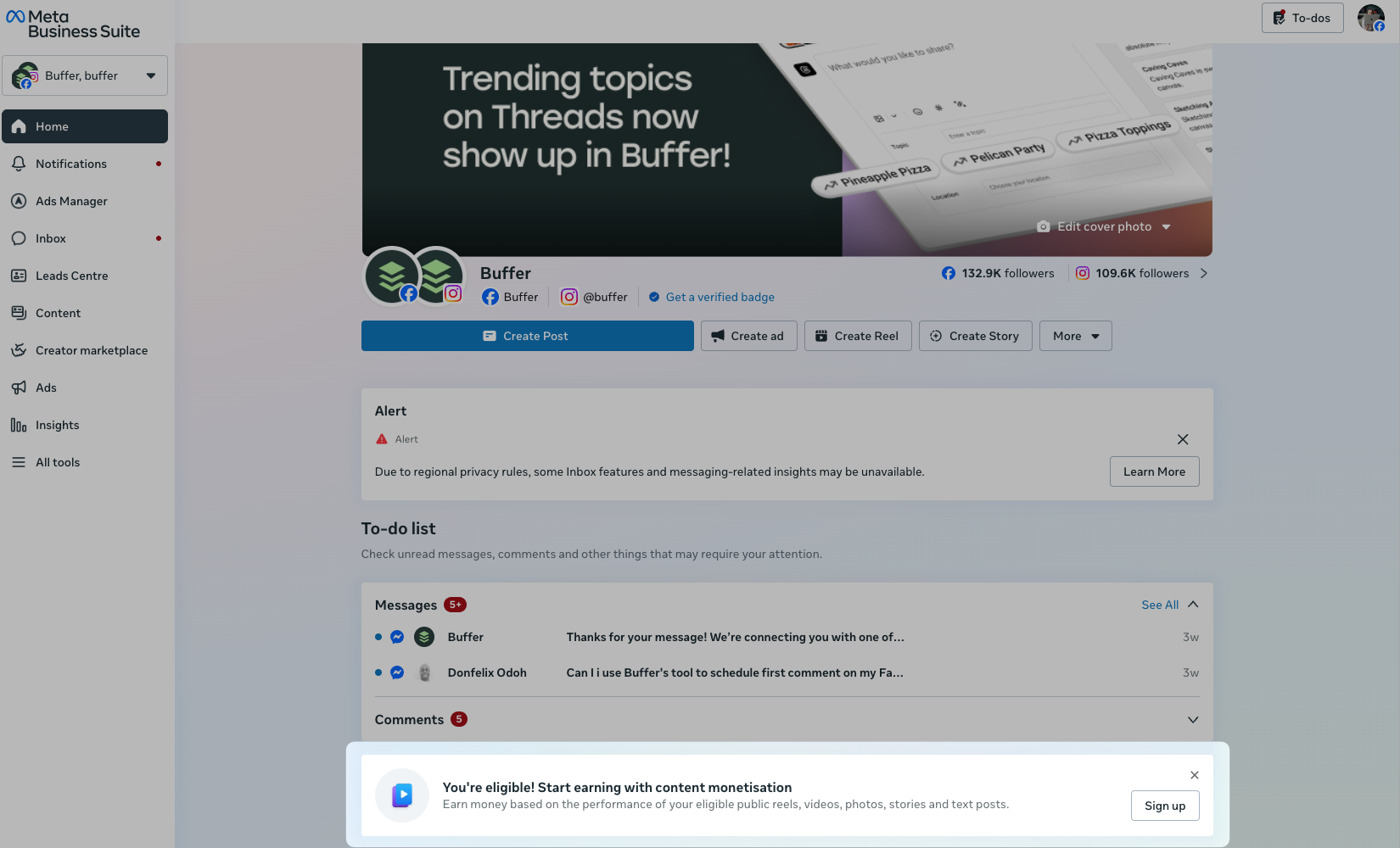
When you’re eligible, you’ll see an invite like the one below in Meta Business Suite (for pages) or in your creator dashboard (for professional profiles).
Yes, there are a couple of hoops to jump through (I’m right there with you!), but there are other ways to make money on Facebook we haven’t touched on yet.
Here’s a comprehensive list on all the ways to make money on Facebook as a creator.
🌱
Need to get serious about posting on Facebook? Buffer can help! Plan and schedule posts, reply to comments, and review your analytics from a single dashboard. Sign up free →
7 ways to make money on Facebook
Here’s a full round-up of all the ways creators and influencers and earn on Facebook.
1. Join the Content Monetization program
This is the big one — Facebook’s flagship monetization program that pays creators for all types of content, not just video. If you can get invited, it’s the most direct way to earn from content you’re already posting.
The program works by placing ads around your content, and you earn a share of that ad revenue. What makes it really cool is the format flexibility. While reels are the highest earning format, photos, text posts, and stories all qualify.
Eligibility: Content Monetization is currently invite-only. The best way to improve your chances is to switch to a professional profile, use a page, or post consistently and build engagement. Facebook has been gradually expanding access, so it’s worth checking your Professional Dashboard regularly.
2. Apply for Creator Fast Track
This is brand new — Meta launched Creator Fast Track in March 2026, and it’s designed specifically for established creators who are new to (or returning to) Facebook. The pitch: guaranteed pay just for posting reels, plus increased reach to help you build a Facebook audience faster.
The program pays out monthly, with tiers based on your follower count on Instagram, TikTok, or YouTube:
20,000-99,999 followers: $100-$450/month
100,000-999,999 followers: $1,000/month
1,000,000+ followers: $3,000/month
To unlock your payout each month, you need to post 15 eligible reels on Facebook, uploaded across at least 10 separate days. There are no Facebook view counts to hit.
Bonus: You can crosspost content you’ve already made for other platforms. It just needs to be your original work and not already posted on Facebook. So you may not even have to make new content.
On top of the guaranteed pay, accepted creators get increased reach on eligible reels (very appealing as well) and immediate access to Content Monetization. That means you can earn even more from the performance of your content, and you stay in the Content Monetization program after Creator Fast Track ends.
Eligibility: To be eligible, you need to live in the US or Canada, be 18 or older, have (or create) a Facebook Page with an account that’s at least 30 days old, and not have posted a Facebook reel in the past six months. You’ll also need at least 20K followers and 30K video views in the last 60 days on Instagram, TikTok, or YouTube.
3. Collect Stars from fans
Stars are Facebook’s tipping feature — viewers can buy Stars for $0.01 each and send them to creators during live streams, on reels and for other content. If you get 5,000 Stars, that’s $50.
It might not mean loads of money, but it’s pretty accessible. You only need 500 followers for 30 consecutive days to be eligible, which puts it within reach for a lot of creators who aren’t close to the thresholds for other programs yet. It’s especially valuable for creators who do live content — Q&As, tutorials, behind-the-scenes streams — where audiences feel personally connected enough to tip.
To enable Stars, head to Creator Studio, select Creative Tools, then Live Dashboard, and toggle Stars on.
Eligibility: You need at least 500 followers for 30 consecutive days, and you need to be in an eligible country (though it’s pretty widely available!). Stars are available on both Facebook Pages and professional mode profiles, and there’s no minimum view count or engagement threshold — which is why it’s the most accessible of Facebook’s native monetization options. You do need to be 18+ and have a payout account set up to actually receive earnings.
4. Set up fan subscriptions
Fan subscriptions let you put some content behind a paywall for a monthly fee that you set. Think of it as a mini-membership: subscribers might get exclusive behind-the-scenes content, early access to posts, subscriber-only Lives, or special badges.
The eligibility requirements are steeper — you’ll need at least 10K followers and strong recent engagement. But if you’ve built a dedicated audience, the recurring nature of subscriptions makes your income a lot more predictable than ad revenue (which can swing wildly month to month).
A word of advice from creators who’ve done this well: make sure the subscription price reflects the value. Research what other creators in your niche charge. Too high and you’ll alienate followers; too low and you’re undervaluing your work.
Eligibility: You’ll need at least 10K followers (or 250+ return viewers), plus 50K post engagements or 180K watch minutes in the last 60 days. Subscriptions are only available on Facebook Pages — not professional mode profiles. You also need to be 18+ and in an eligible country. Availability is broad; there are only a handful of countries that aren’t on the list. Check here for your specific country’s status.
5. Partner with brands on sponsored content
If you take one thing away from this article, let it be this: You don’t need to have thousands of followers to earn from brand partnerships. As a creator with under 30K followers on all my platforms combined, I can personally attest to this! gets off soap box
You don’t need to be in any official monetization program, either — you just need an audience that a brand wants to reach. This is how a lot of creators (including me, as a nano creator) earn the bulk of their income.
My best partnerships have come from one of two ways:
Personally reaching out to a brand I love and want to create content about
Tagging a brand in content I’ve already made about their product
There’s a third option, and that’s applying for a creator program or marketplace like Collabstr, Passionfroot, or Aspire.io — there are hundreds of marketplaces out there that help match brands with creators, and they’re worth exploring for sure.
Once you’ve landed a partnership (yay, you!) you should explicitly label it as such on Facebook. When creating a post, tap the handshake icon at the bottom of the composer, search for the brand’s Page, and tag them. This adds a “Paid partnership with [Brand Name]” label to your post. There’s also a toggle to let the brand boost the post as an ad, which many will want — it’s worth discussing upfront.
Eligibility (for paid partnership label): Any creator with a professional mode profile or Facebook Page can use the paid partnership label. Creator Marketplace has its own thresholds (1,000+ followers and engagement minimums). For the brand deals themselves, there’s no official follower minimum — it comes down to what brands are looking for.
6. Set up a Facebook Shop
If you have an established product line (physical or digital), a Facebook Shop lets people browse and buy without leaving the app. You can tag products directly in your posts, reels, and stories to make content shoppable.
This pairs well with the creator monetization tools — imagine earning ad revenue on a reel while also driving product sales from tagged items in that same reel. For small business owners, it turns Facebook from a marketing channel into a direct sales channel.
Eligibility: Facebook Shops are available in the US, Canada, Mexico, Brazil, UK, and most of Western Europe (France, Germany, Italy, Spain, Netherlands, Sweden, Denmark, Norway, Switzerland, and others), plus Australia, India, Indonesia, Japan, South Korea, Taiwan, and Thailand. You’ll need to comply with Meta’s Commerce Policies, have an online store or product catalog, and demonstrate trustworthiness through an authentic, established presence on the platform.
7. Promote affiliate products
Affiliate marketing involves sharing products you use and earning a commission when someone buys through your link. Commission rates typically fall between 5% and 25%, depending on the program and product category.
The setup is simple: find affiliate programs in your niche (search “[your niche] + affiliate program” or check whether your favorite brands offer one), get approved, create your referral links, and share them in your Facebook posts and video descriptions. Just be transparent about affiliate relationships — your audience will appreciate the honesty, and it’s required by law in many countries anyway.
You can also tap into Facebook Affiliate Partnerships, a native system that lets creators tag shoppable products directly inside posts and reels and earn commissions on qualifying stuff. It’s currently available with Amazon (US), Shopee (Singapore, Malaysia, Vietnam, Indonesia, Philippines, Thailand, Brazil, Taiwan), and Mercado Libre (Brazil, Mexico), with eBay and Temu in the US expected to follow.
Eligibility: There’s no follower minimum for traditional affiliate marketing — anyone can share affiliate links in their posts. You can link existing affiliate accounts through Meta Business Suite and manage everything from your Professional Dashboard.
[embedded content]
How to get paid on Facebook
Once you’ve earned money through any of Facebook’s official programs, you’ll need to set up your payout account.
Here’s how it works:
Facebook processes payments monthly, usually between the 17th and the 22nd of each month for earnings from the prior month. There are two payout thresholds depending on the monetization tool: $25 for some features and $100 for others. Payment options vary by country but typically include bank transfer and PayPal.
To set up your payout information: go to your Professional Dashboard, navigate to Monetization settings, and follow the prompts to add your bank account or payment method. Make sure your tax information is up to date too — Facebook requires this before processing any payments.
🌍
A note for international creators: payout availability varies by country. This is one of the things I’m personally keeping an eye on as someone in South Africa — not all monetization features are available everywhere, and payout methods can differ. Check Facebook’s help center on monetization eligibility for the most current list of supported countries.
A few more bits and bobs to help you earn and grow
Getting monetized is the first step — growing what you earn comes down to a couple of things I keep coming back to in my own research.
The biggest one is consistency across formats. Facebook rewards creators who show up regularly, and with Content Monetization paying for reels, photos, text posts, and stories, you’re not boxed into video.
Our data on the best times to post on Facebook can help you figure out when to publish for maximum reach. And if you’re already creating for other platforms, crossposting to Facebook is one of the easiest ways to expand your earnings without doubling your workload — tools like Buffer make that pretty painless (have you tried our duplicate feature? swoon).
The other thing worth mentioning: Facebook is actively prioritizing original content and cracking down on reposted and spammy stuff. Original content qualifies for higher monetization rates too, so there’s a direct financial incentive to create for the platform rather than just reshare.
Understanding how the Facebook algorithm works helps here — the more your content gets distributed, the more qualified views you earn, and the more you get paid.
I’m still early in my own Facebook experiment, but the monetization options are more developed than I expected going in — and they’re growing fast. If you’re a creator who’s been sleeping on Facebook (like I was), it might be worth a second look.
Facebook monetization FAQ
How many followers do you need to make money on Facebook?
It depends on which monetization tool you’re using. Stars has the lowest bar at 500 followers for 30 consecutive days. Fan subscriptions need 10K (or 250 return viewers). The Content Monetization program’s exact threshold isn’t publicly listed, while the Creator Fast Track Program requires at least 20K on other platforms.
How many views do you need to start earning on Facebook?
For in-stream ads, you need at least 600K minutes viewed in the last 60 days. For the Content Monetization program, Facebook uses “qualified views” as the metric — not every view counts toward earnings. Only unique views that last around 5 seconds will count as qualified, for example.
Do Facebook Reels make money?
Yes — and they’re the top earner. Reels accounted for about 60% of total creator payouts on Facebook in 2025. They’re monetized through the Content Monetization program via ads that play before, during, or after your reel.
Can you make $500 a day on Facebook?
Technically possible, but not where most people start. Earning $500 daily would take some combination of very high view counts, strong CPMs, a successful product operation, or solid brand deals. Most creators start small and build — which isn’t a bad thing. Consistent smaller earnings from content you’re already making add up faster than you’d expect.
What’s the minimum payout on Facebook?
Either $25 or $100, depending on the monetization feature. Payments go out monthly, usually between the 17th and 22nd.
Should I switch to a professional profile on Facebook?
If you’re looking to earn money, you’ll need create a Facebook Page, or convert your personal Facebook profile into a professional profile. If you already have followers there, I’d go this route. It unlocks monetization tools, audience insights, and the Professional Dashboard.
How do I switch to a professional profile on Facebook?
Open the Facebook app, go to your profile, tap the three dots (⋯) menu, and look for Turn on professional mode. It takes about 30 seconds, and you can switch back to a personal profile at any time. Once it’s on, you’ll see a new “Professional Dashboard” option in your menu — that’s where you’ll manage monetization, check eligibility, and track your content’s performance.
One thing to know: turning on professional mode makes your profile public by default. Your existing posts stay with their original privacy settings, but new posts will default to public. If you’d rather keep a separate presence for your creator content, setting up a Facebook Page is the other option — and the only one that supports fan subscriptions.
How do I check if I’m eligible for Facebook monetization?
Open your Professional Dashboard on Facebook, go to the Monetization tab, then Content Monetization on Meta Business Suite (for pages), navigate to All Tools > Monetization. If you’re not eligible yet, you’ll be able to turn on a notification for if (when!) you get invited.
Replying to Your Comments on Facebook Boosts Engagement
Facebook is a new frontier for me. I’ve been having loads of fun over the past few months experimenting with the shiny new features Facebook has launched to woo creators.
Facebook itself may not be all that shiny, but there’s no denying that it’s enormous. And for a lot of creators, small business owners, and marketers, it’s a great place to find new audiences.
I’ll be honest, though: even Facebook has over three billion monthly active users, and I’m… not reaching even a teeny tiny fraction of them. My content performance has been hit and miss.
So when Buffer’s senior data scientist, Julian Winternheimer, dug into over a million Facebook posts as part of his cross-platform comment engagement study, I was really curious to see what he’d find.
Could being super on top of replying to comments help me boost my reach?
Short answer: Yes! Long answer: Yes, potentially… Let’s unpack that.
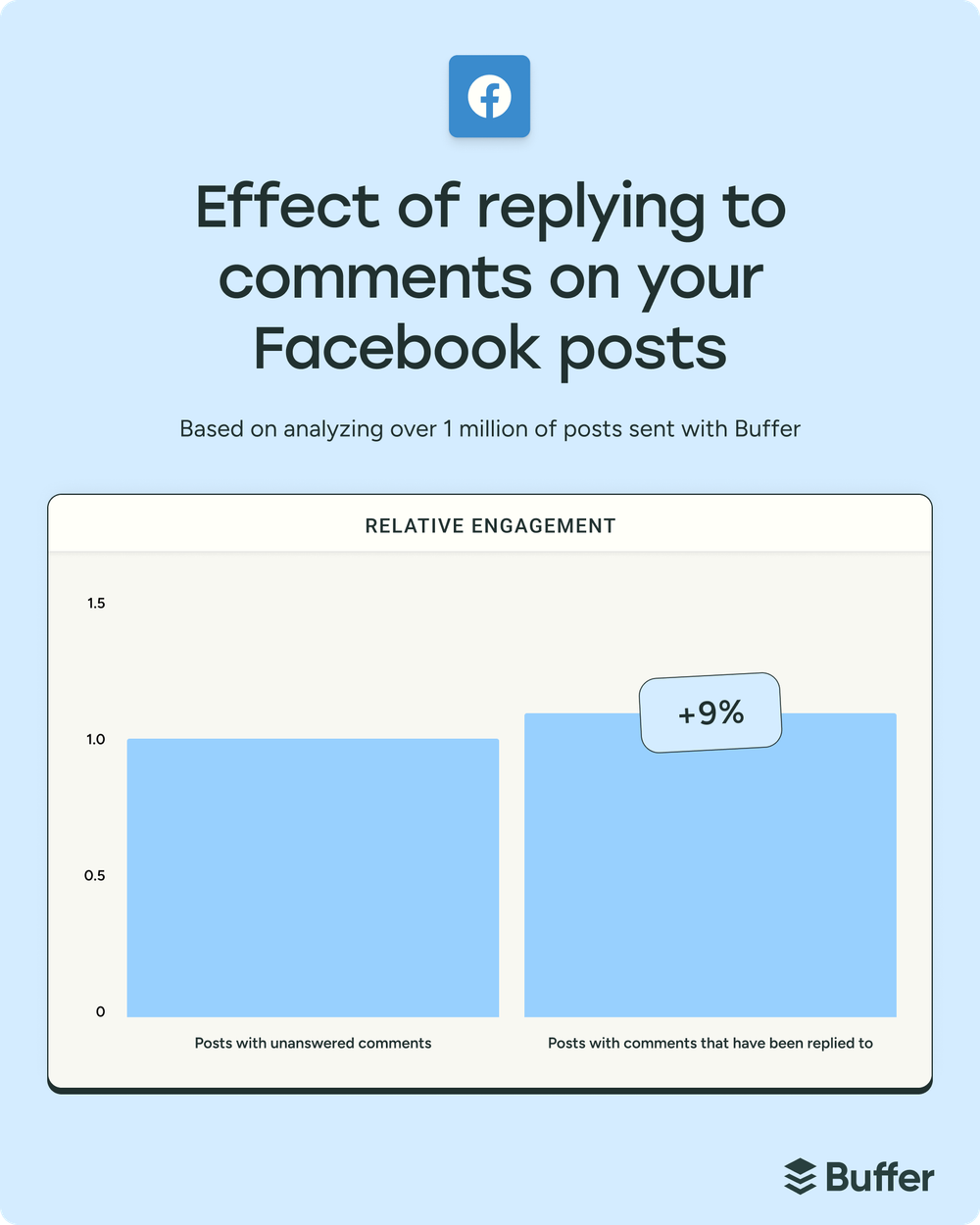
Posts where creators replied to comments received about 9.5% more reactions than posts where they didn’t. That might not sound like a jaw-dropping number — especially compared to the 42% lift Julian found on Threads or the 30% on LinkedIn — but on a platform as mature and broad as Facebook, a consistent single-digit lift across a million posts is nothing to wave away.
What I find most interesting about this data is what it reveals beneath the surface. The raw numbers actually suggest the opposite at first glance — and it took some smart statistical analysis to uncover what’s really going on.
Jump to a section:
How we analyzed the data
Let’s get nerdy. Julian pulled around one million Facebook posts that received at least one comment, spanning accounts of all sizes and niches.
Rather than comparing big Facebook Pages to small ones (which would tell us very little), he compared each account to its own performance over time. The method — called a fixed-effects regression model — holds constant all the things that make each account different: audience size, niche, location, posting frequency. All of that gets baked into the baseline.
So instead of asking “Do Facebook Pages that reply get more engagement than pages that don’t?” we’re asking: “Does this specific Facebook Page perform better when it replies versus when it doesn’t?”
He also ran a Z-score analysis as a second check — measuring how far above or below “normal” each post performed for that specific account. Both methods pointed in the same direction, which gives us a lot more confidence in the finding.
A few things worth keeping in mind before we get into the numbers: we can’t say with absolute certainty that replying causes higher reactions. It’s possible that posts that naturally perform well attract more activity, and creators are simply more motivated to reply when there’s a buzzing comment section.
Julian’s dataset also measures reactions specifically (likes, loves, hahas, etc.) rather than total engagement — a deliberate choice to avoid the circularity of including comments in an engagement metric that’s testing the effect of comments.
That said, the pattern shows up across all six platforms Julian analyzed, with lifts ranging from 5% to 42%. That kind of cross-analysis consistency is something data scientists love to see. It makes the findings that much more convincing.
Julian’s fixed-effects model — covering over 1 million posts across 97,427 Facebook profiles — found that posts with replied-to comments receive approximately 9.5% more reactions on average.
The effect is statistically significant (p < 0.001, for the stats-inclined among us).
The Z-score analysis backed this up. About 53.8% of Facebook Pages performed better when they replied. In other words, posts with replied-to comments sat slightly above each account’s usual performance level, while posts without replied comments hovered right at baseline.
That “53.8%” number is worth pausing on. It’s a slimmer majority than what Julian found on Instagram (63%) or LinkedIn (83%). Facebook’s effect is statistically significant, but it’s more modest — which tracks with the platform’s broader, more mature engagement patterns.
Some fun behind-the-scenes stuff: If we just looked at the raw median numbers, posts without replied-to comments actually have slightly higher median reactions (22) than those with replies (16). On the surface, that seems to contradict everything I just said.
But that comparison is misleading — it’s mixing together Facebook Pages of wildly different sizes and activity levels. Once Julian controlled for those differences and compared each account to itself, things looked very different (and gave us the numbers I shared above).
Why this matters for Facebook
Facebook is a different beast compared to newer, more conversation-forward platforms like Threads or LinkedIn.
The Facebook algorithm prioritizes what it calls “meaningful interactions” — and comments, particularly back-and-forth exchanges, are one of the strongest signals of that. When you reply to a comment, you’re creating a conversation thread that signals to the algorithm that your post is sparking real discussion, not just passive scrolling.
There are a few reasons why this likely translates into higher reactions:
Extended visibility. Comment threads keep posts active in the feed longer. Every reply is another signal fire to the algorithm that might resurface the post for the commenter’s connections — and for anyone else who’s previously interacted with your page.
Relationship signals. Facebook tracks interaction history between accounts. When you consistently reply to someone’s comments, the platform registers that connection and is more likely to show your future posts to them. Over time, these micro-interactions compound.
Social proof. An active comment section with replies from the creator or brand signals that there’s a real person behind the Page. People are more likely to stop scrolling and react when they see that the creator is actually present in the conversation.
The 9.5% lift might feel modest next to Threads’ 42%, but context matters. Facebook’s sheer scale means that even a small percentage increase in reactions can translate to meaningfully more people seeing and engaging with your content. And unlike some platform-specific tactics, replying to comments is something you can start doing right now with zero additional tools, budget, or strategy overhaul.
If you’re managing a Facebook Page alongside other platforms (who isn’t?), keeping up with comments can feel like another full-time job.
Here are a few approaches that have helped me keep on top of my comments across Instagram, LinkedIn, Threads, YouTube, TikTok, and Facebook:
Time block your replies
Rather than trying to respond to every single comment (which can quickly become unsustainable as you grow), dedicate two 10-to-15-minute windows each day for comment engagement. Mid-morning and early evening tend to work well — you’ll catch comments from both the morning scrollers and the after-work crowd.
Prioritize conversations
A “thanks!” reply is fine, but it’s not what drives the engagement flywheel. Try asking a follow-up question or adding a detail that keeps the thread going. “Great question — have you tried…” or “That’s a good point, we actually found that…” are the kinds of replies that tend to generate more activity.
Reply while the post is fresh (if you can)
Like most platforms, Facebook’s algorithm gives early engagement heavy weight. If you can get into the comments within the first couple of hours after posting, you’re more likely to spark additional reactions while the post is still being distributed. (This is where posting at times when you’re actually available to engage becomes a real strategic advantage.)
Use a tool that keeps everything in one place
If you’re active on Facebook and a couple of other platforms, bouncing between apps to manage comments gets old fast. Buffer’s Community tab pulls all your comments across platforms into a single dashboard — and you can reply directly from there without opening Facebook and getting pulled into the feed. It’s free for up to three social accounts.
There’s also a Comment Score feature that tracks your reply consistency over time — think of it like a streak tracker for engagement. It helps turn commenting from something you remember to do sporadically into an actual habit.
Julian’s cross-platform analysis covered millions of posts, and Facebook’s 9.5% reaction lift sits at the lower end of the spectrum. But “lower end” doesn’t mean it’s not helpful — it’s fitting for a platform where engagement patterns are broader and more varied than on conversation-first networks like Threads.
What I keep coming back to with this data — across Facebook and every other platform Julian analyzed — is how refreshingly simple the takeaway is. You don’t need to crack some secret code or find a loophole in the algorithm. You’re just showing up for the people who showed up for you.
The 9.5% lift isn’t guaranteed for every Facebook Page (remember, around 54% of profiles in Julian’s study saw positive effects), but the odds tilt in your favor if you’re willing to put in the time. And on a platform with Facebook’s reach, even a modest, consistent boost in reactions can make a real difference over time.
Meta, YouTube must pay $3M to woman who got hooked on apps as a child
On Wednesday, a Los Angeles jury ordered Meta and YouTube to pay $3 million in damages to a young woman who successfully argued that the companies’ social media apps were designed to addict children.
Meta will pay the majority of the fine, 70 percent, while YouTube-owner Google is on the hook for 30 percent, the jury decided.
During the six-week trial, the jury heard that Meta and Google designed apps with features like auto-play, infinite scroll, and algorithmic recommendations to keep kids online. Feeling trapped in a cycle of constantly using these apps caused the plaintiff, known as K.G.M., “crippling mental distress,” CNBC reported. She developed “severe body dysmorphia, depression, and suicidal thoughts,” and every notification that came through made it harder to stop logging in.
At the trial, Meta and Google tried to deflect from the role that apps played in K.G.M.’s mental decline, arguing that she used the apps to cope with mental health problems that “stemmed from a turbulent childhood and related family issues,” CNBC reported.
Internal documents revealed to the jury showed that Meta’s employees openly discussed how addictive design features were, bragging that “teens can’t switch off from Instagram even if they want to.” One employee even declared, “oh my gosh yall IG is a drug,” while likening all social media platforms to “pushers.”
However, Instagram chief Adam Mosseri declined to acknowledge on the stand that K.G.M. had become addicted to Meta apps, instead suggesting that her usage was merely “problematic.”
Along similar lines, YouTube Vice President of Engineering Cristos Goodrow argued that YouTube could not be liable for her harms because it was “not designed to maximize time.” The platform also maintained throughout the trial that it is not a social media site.
Meta loses trial after arguing child exploitation was “inevitable” on its apps
A jury has been deliberating for more than a week in that case, and though they’ve reached a decision on liability, they’re currently deadlocked on the amount of financial damages to award. On Monday, they confirmed to a judge that they can’t reach consensus for one of the defendants, a Los Angeles NBC affiliate reported, but it’s unclear which.
In a separate federal trial in California, parents and multiple school districts are targeting Meta and other apps for allegedly causing mental health harms to kids.
While some social media companies have chosen to settle rather than endure costly legal battles over child safety, Meta has stuck these fights out. Unsurprisingly, Meta’s spokesperson confirmed to Ars on Tuesday that the company plans to appeal the New Mexico verdict.
“We respectfully disagree with the verdict and will appeal,” Meta’s spokesperson said. “We work hard to keep people safe on our platforms and are clear about the challenges of identifying and removing bad actors or harmful content. We will continue to defend ourselves vigorously, and we remain confident in our record of protecting teens online.”
Torrez remains intent on proving that Meta can and should do more to protect kids, he told CNBC Tuesday. He’s hoping that any changes required in New Mexico will alter how Meta’s apps are used around the world.
“One of the things that I am really focused on is how we can change the design features of these products, at least within New Mexico, and that would create a standard that could then be modeled elsewhere in the country, and, frankly, around the world,” Torrez said.
Best Time to Post on Facebook — New Data from 14M Posts
Every few years, someone declares that Facebook is dead. And then 3 billion people log in anyway.
When it comes to social media platforms, Facebook is as crowded as they come. The social network currently has 3 billion active users — so almost a third of the world’s population has a Facebook account they use regularly.
Crowded as it may be, it’s still a powerful social media marketing platform for businesses and creators — it’s why I’ve recently added Facebook into my social media crossposting strategy.
I already have some Instagram content that I think will resonate on Facebook, and I’m experimenting with crossposting it there. With all that solid content locked and loaded, one of the first things I defined in my shiny new Facebook social media strategy was when to post for maximum engagement.
When it comes to the Facebook algorithm, engagement — reactions, comments, shares, and likes — is a strong signal that your content is valuable and that more people will enjoy having it in their Facebook news feeds.
The higher your engagement, the higher your reach tends to be — and the greater your chance of achieving your social media goals, whether that means driving traffic to your website, making a sale, or simply growing your Facebook following.
So, how do you pinpoint the best time to post on Facebook for your audience, especially if you’re just starting out (or you’ve dusted off an old Facebook account, like me)?
The first place I looked was our data.
The Buffer data team has analyzed the performance of more than 14 million Facebook posts sent via Buffer by businesses, creators, and influencers to pinpoint the best time to post on Facebook, the best day to post on Facebook, and which days and times are best avoided.
Ready to jump in?
Key takeaways
Peak posting time: The single best time to post is Thursday at 9 a.m., with Wednesday and Sunday mornings also delivering strong engagement.
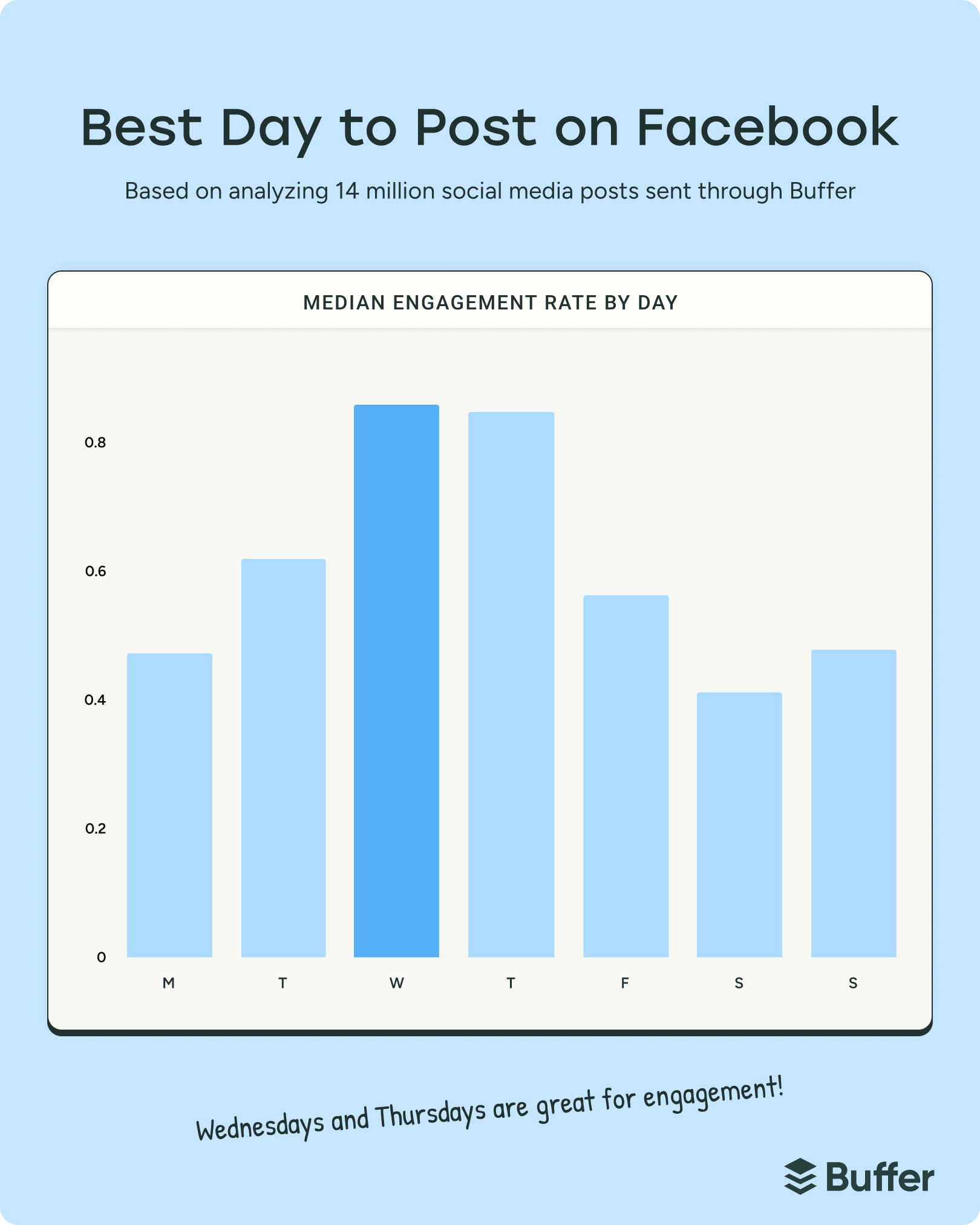
Best day: Wednesday is the top-performing day for Facebook engagement overall, with Thursday and Tuesday following close behind.
Morning advantage: Engagement peaks during morning hours (6 a.m. – 11 a.m.) on weekdays, with afternoons (12 p.m. – 5 p.m.) consistently showing the lowest engagement across most days.
Avoid the weekend: Saturday is the worst day to post on Facebook, with engagement dropping significantly compared to mid-week — Sunday performs slightly better but still trails weekdays.
Jump to a section:
Is there a best time to post on Facebook?
There’s no magic, universal best time to post on Facebook, during which your content is guaranteed to go viral (if only it were that easy).
The best time to post on Facebook — or any social media platform — always depends on your audience and how they engage with your content.
That said, our data analysis has picked up some definitive links between posting times and high engagement rates, which could be a great starting point if you’re new to Facebook.
My advice is to use these times as a springboard for experimentation — that’s exactly what I’ve been doing for the past few weeks. Luckily, we have plenty of high-engagement times on Facebook, so there are plenty of options for your posting schedule.
The best times to post on Facebook
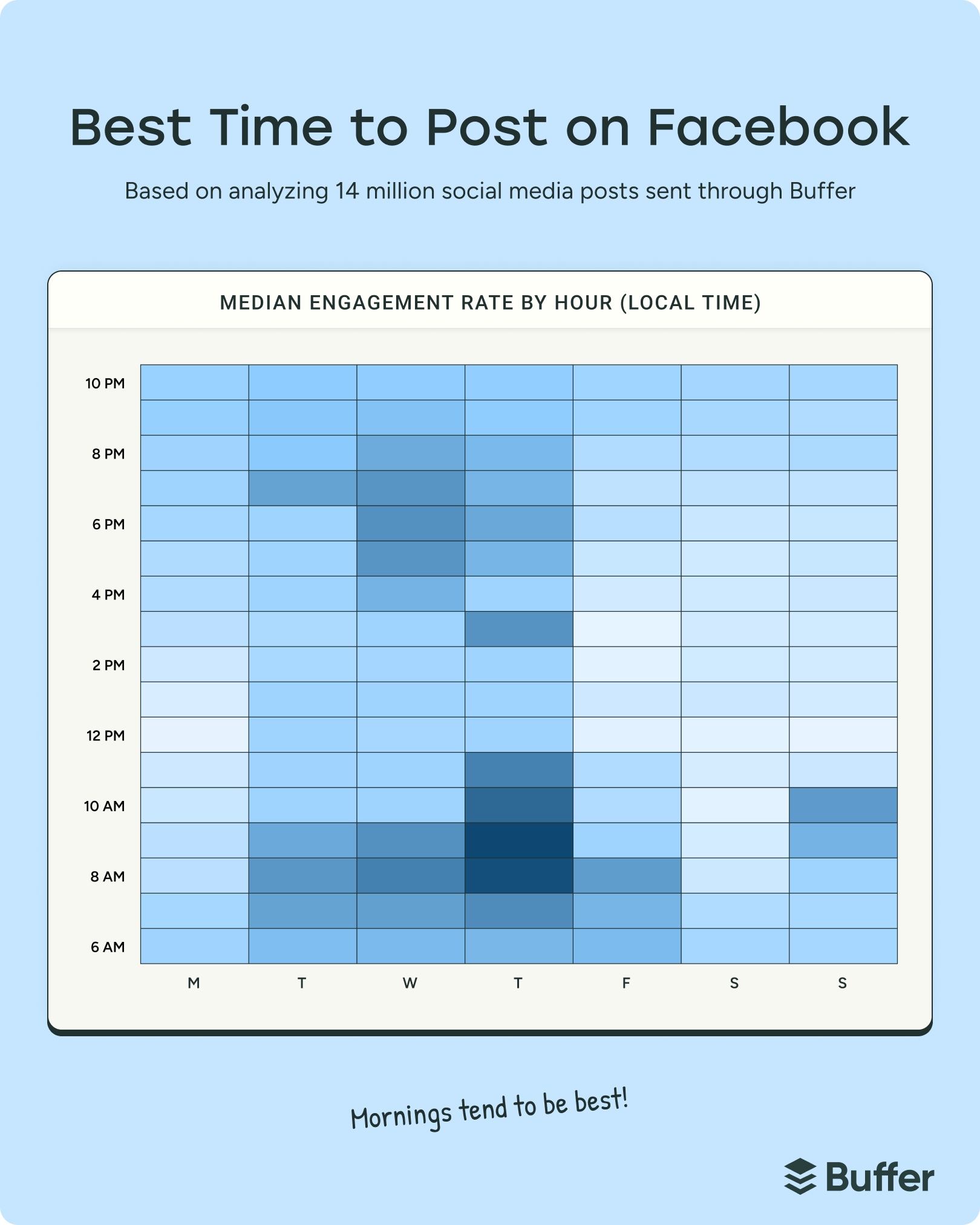
According to Buffer data from analyzing 14 million posts, the best time to post on Facebook is 9 a.m. on Thursday. Our analysis showed that mid-morning on Thursday consistently delivers the highest engagement of the week.
The data reveals that morning posting times tend to perform best — we pinpointed other hotspot times on Thursday at 8 a.m. and 10 a.m., which round out the top three posting times.
🌅 Overall, posting in the morning hours between 6 a.m. and 11 a.m. on weekdays gets solid engagement, as you’ll see from our analysis.
The data shows that engagement remains strong through mid-morning, with a slight peak around the 8-10 a.m. window. Performance tends to drop off during the afternoon hours (12 p.m. – 5 p.m.), making these generally the worst times to post.
It’s helpful to consider these posting times in the context of general audience behavior as part of your overall posting strategy — which is why I always tend to turn to demographics.
The largest demographic of Facebook users is aged 25-34 (closely followed by ages 35-44). This suggests that users are more likely to check their Facebook News Feeds during their morning routine or early work hours, making it an ideal time to post.
A fascinating report by the Pew Research Center found that an overwhelming majority (93%) say keeping up with friends and family is a reason why they use Facebook. By comparison, the primary use case for other social media platforms like Instagram (86%) and TikTok (95%) is entertainment.
With this in mind, it makes sense that morning hours see strong engagement on Facebook, where users check in to catch up with loved ones — a higher priority than a mindless scroll through, say, some Instagram Reels.
Weekend behavior shows lower performance overall, with Saturday and Sunday seeing notably less engagement than weekdays (more on this below).
🌍
Wait, what timezone? To make this data easier to understand, our data team has done some mathematical magic to make the recommended time zones universally applicable. In other words, no need to convert. Whether you’re in EST (Eastern Standard Time), PST (Pacific Standard Time), or IST (Indian Standard Time), the times apply to you.
The best time to post on Facebook at a glance
Monday: 9 p.m., 10 p.m., 7 p.m.
Tuesday: 8 a.m., 7 p.m., 7 a.m.
Wednesday: 8 a.m., 9 a.m., 6 p.m. 🥈
Thursday: 9 a.m., 8 a.m., 10 a.m. 🥇
Friday: 8 a.m., 7 a.m., 6 a.m.
Saturday: 10 p.m., 6 a.m., 9 p.m.
Sunday: 10 a.m., 9 a.m., 8 a.m. 🥉
The best time to post on Facebook on Monday
The best time to post on Facebook on Monday is 9 p.m., followed by 10 p.m., and then 7 p.m. Monday evening sees strong engagement, though it’s worth noting that Monday overall ranks among the lower-performing days of the week.
The best time to post on Facebook on Tuesday
The best time to post on Facebook on Tuesday is 8 a.m., followed by 7 p.m., then 7 a.m. Tuesday shows a strong morning performance, with early hours delivering solid engagement rates.
The best time to post on Facebook on Wednesday
The best time to post on Facebook on Wednesday is 8 a.m., followed by 9 a.m., then 6 p.m. Wednesday consistently shows strong performance throughout the day and ranks as the second-best day overall for Facebook engagement.
The best time to post on Facebook on Thursday
The best time to post on Facebook on Thursday is 9 a.m. — the single best posting time across the entire week. Other peak times on Thursday include 8 a.m. and 10 a.m., making Thursday morning the golden window for Facebook engagement.
The best time to post on Facebook on Friday
The best time to post on Facebook on Friday is 8 a.m., with other strong posting times at 7 a.m. and 6 a.m. Friday maintains solid morning engagement, though performance begins to taper as the weekend approaches.
The best time to post on Facebook on Saturday
The best time to post on Facebook on Saturday is 10 p.m., with other peak times at 6 a.m. and 9 p.m. However, Saturday overall shows significantly lower engagement compared to weekdays, making it one of the least optimal days to post.
The best time to post on Facebook on Sunday
The best time to post on Facebook on Sunday is 10 a.m., followed by 9 a.m. and 8 a.m. While Sunday morning shows decent engagement, overall Sunday performance is lower than weekdays, making it the third-best day of the week but still trailing significantly behind mid-week posting.
⚡
This is where social media scheduling tools like Buffer really shine. Experiment by systematically going through the times on the list above, scheduling posts in those slots, and then tracking their performance to see what works best for your specific audience. Sign up for free →
The best day to post on Facebook
The best day of the week to post on Facebook is Wednesday — posts shared on the platform mid-week tend to see the highest engagement overall.
Thursday comes in a very close second, with Tuesday rounding out the top three. The data shows that mid-week posting (Tuesday through Thursday) consistently outperforms both the beginning and end of the week.
There is a noticeable dip in content posted on the weekend. Saturday is the worst day of the week to post on Facebook, with engagement dropping significantly compared to weekday performance. Sunday shows slightly better engagement than Saturday, but still falls well below the mid-week sweet spot.
The pattern is clear: if you’re looking to maximize engagement, focus your posting schedule on the middle of the week, particularly Wednesday and Thursday mornings.
Get the best times to post on Facebook right in Buffer
You could add these times to a spreadsheet or set reminders on your phone, whatever works for you. But if you really want to work smarter, not harder, you can create an automatic optimal posting schedule right in Buffer. It’s really easy to set up, too.
You can automatically set these recommended times for Facebook and your other social media platforms. They’ll appear as posting slots in your queue and calendar, making it super easy for you to schedule posts at the best times.
It’ll take you less than a minute to set up:
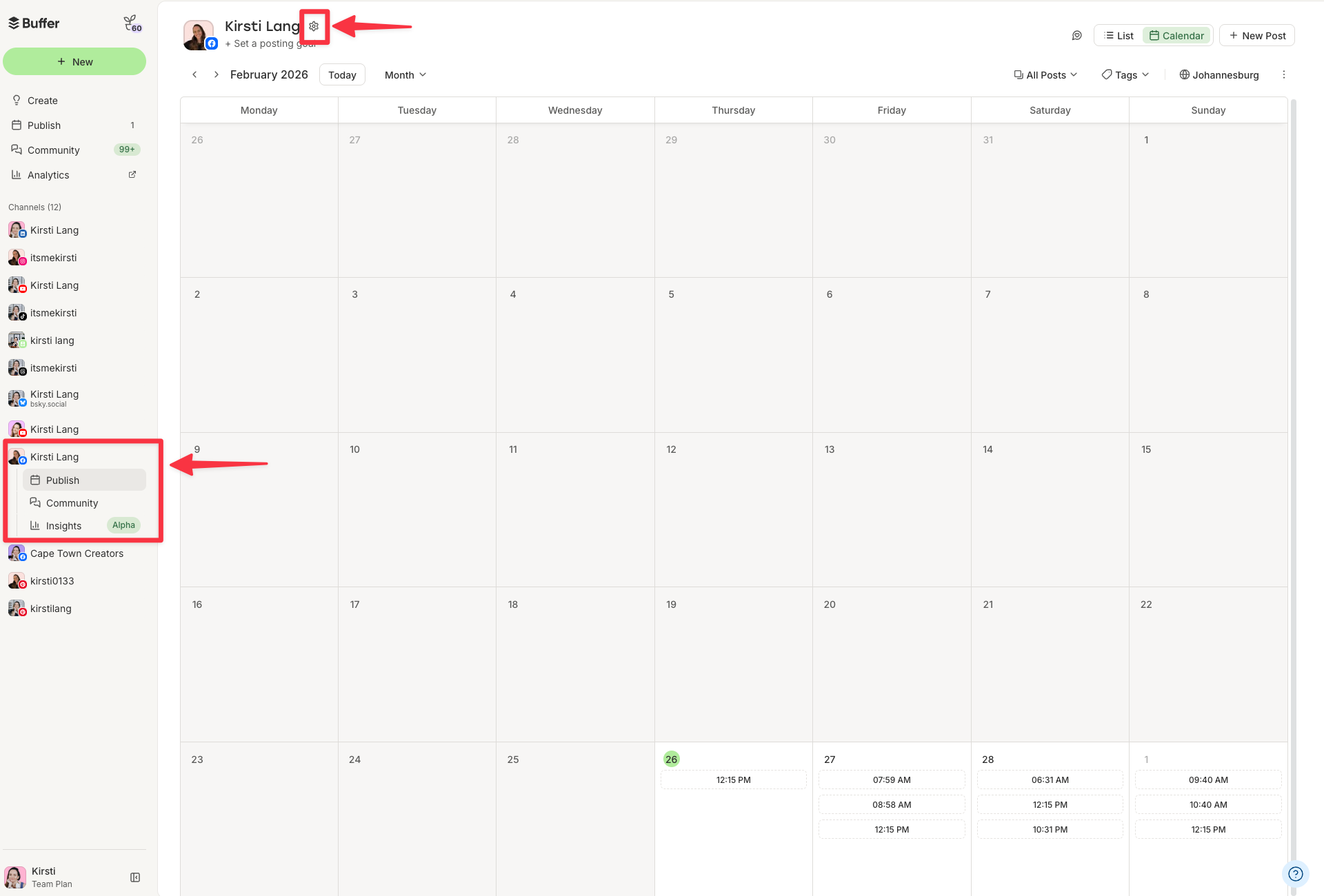
Select Facebook on your channels list on the left.
Click on the settings (gear) icon above the calendar.
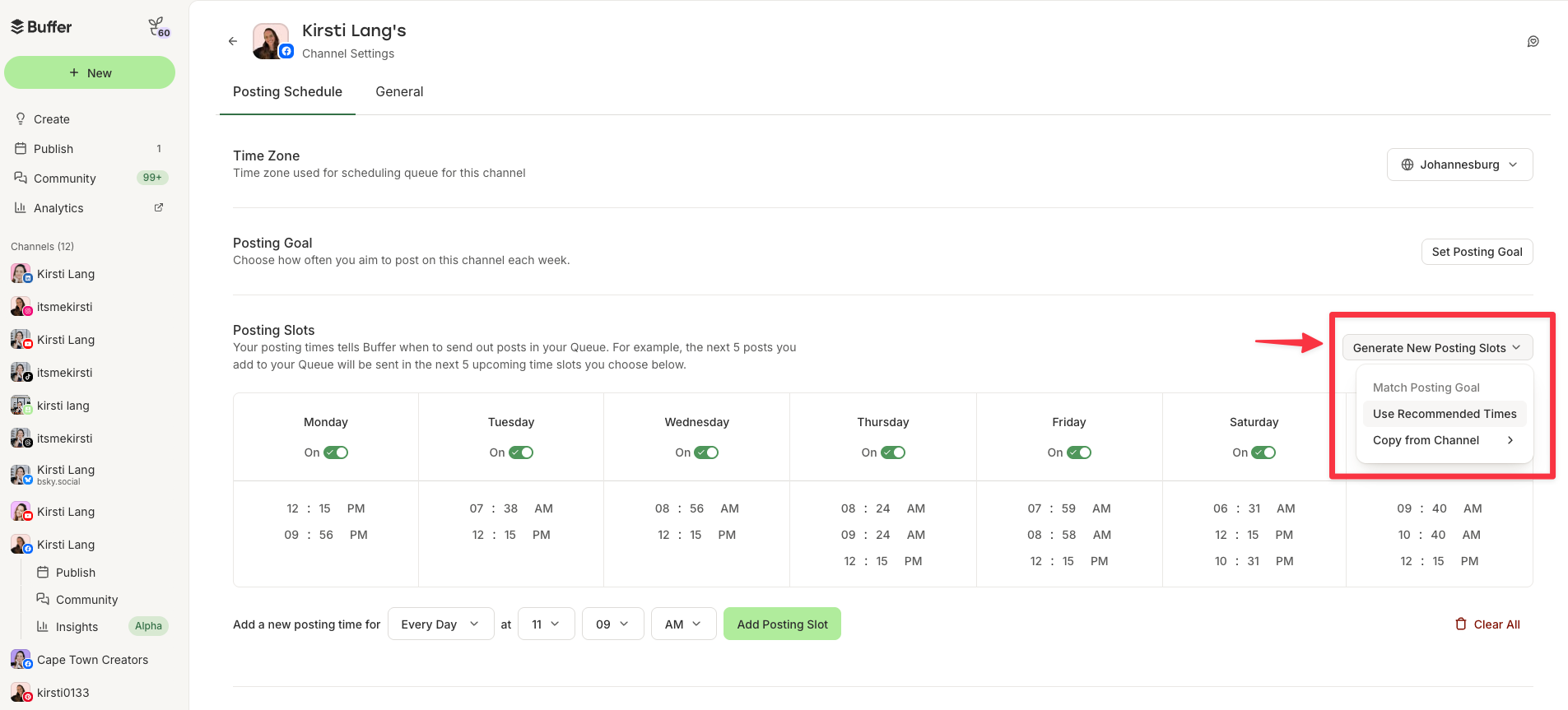
Scroll to Posting Schedule and under Posting Times, click the Generate New Posting Times button.
Then Use Recommended Posting Times.
The schedule will automatically update to include the best posting times for the week, based on our latest analysis of millions of Facebook posts.
The next time you schedule a post, you can easily choose one of these high engagement slots. No more guessing!
Your checklist for high-performing Facebook posts
Figuring out the best time to post on Facebook can be helpful, but it’s not the ultimate secret to Facebook success (again, if only it were that simple!).
As we unpack in our guide to the Facebook algorithm, there are several other things you can do to give your content the best possible chance of reaching more people. Here’s a high-level overview:
Share content that prompts conversations: Producing high-quality content should always be your priority on social media. Tap into your Facebook Insights or analytics in Buffer to stay on top of the content that resonates most with your audience. Remember: Facebook likes authentic accounts that contribute to their community and create meaningful interactions.
Cultivate authentic relationships with your fans: Reacting and replying to comments and always responding timeously to DMs is only half the battle — be sure to be thoughtful and authentic in your replies to really connect with your audience.
Experiment with different content types: While photos generally perform best, your target audience might respond better to something else. Text, photos, GIFs, Reels — be sure to try them all more than once.
Tap into user-generated (UGC) content and mentions: When people tag you in posts, take notice. This is a perfect opportunity to share their content as user-generated content — with their permission, of course.
Aim to be on users’ ‘Favorite’ lists: Facebook users can take more control of their feeds with the Favorite list feature. Encourage your fans to add you to that list so they never miss your content.
Don’t resort to clickbait or engagement bait: Clickbait is exaggerated, over-sensationalized content that doesn’t deliver on its promise. Engagement bait uses captions or photos that contain phrases like, “Like this if you like dogs better, share this if you like cats better.” Facebook regularly updates its algorithm to downrank content like this, making it a terrible way to attempt to get maximum engagement.
Verify all the news you share: Another thing the Facebook algorithm doesn’t like: fake news. Facebook is vigilant in identifying misinformation and takes strict action against violators, potentially leading to removal from the platform.
Stick to Facebook’s Community Standards: Facebook takes its Community Standards seriously. The algorithm is pretty good at weeding out posts that violate these rules, but even if a post manages to skirt under the radar, Facebook users can report it and have it taken down anyway. Getting strikes against your account like this could impact future content performance.
When in doubt, always remember: Facebook’s algorithm values what users value.
“Facebook’s goal is to make sure that you see posts from the people, interests, and ideas that you find valuable,” the company says. “Whether that content comes from people you’re already connected to or from those you may not yet know.”
While our data shows that Thursday at 9 a.m. is your best bet for maximum engagement, the real magic happens when you combine optimal timing with quality content and authentic community building. Use these insights as your starting point, then fine-tune based on your unique audience’s behavior. Tools like Buffer can help you schedule posts at these peak times and track what works best for your specific community — taking some of that admin work off your plate so you can focus on creating content that truly resonates.
Paid advertising on social media can be incredibly powerful if you’re battling to reach the right audience — especially when you need to tap into very specific demographics.
The Facebook algorithm can be tricky to figure out, especially when you’re just starting out as a small business owner, creator, or social media manager. That’s where Facebook advertising comes in — it helps you reach your audience more reliably.
That’s why, when it comes to social media strategy, understanding how to advertise on Facebook can be such a valuable skill to have in your social media toolkit.
Key takeaways
Massive reach: Facebook offers access to over 3 billion monthly active users across Facebook and Instagram.
Precision targeting: Advertisers can target users based on specific demographics, behaviors, and life events, or use Meta Advantage+ AI for automated targeting.
Centralized management: All campaigns are managed through Meta Ads Manager, requiring a verified payment method and a Facebook Page.
Flexible budgeting: You can set daily or lifetime budgets.
Real-time tracking: Use the Meta Pixel to track website conversions and adjust campaigns based on live performance data.
Jump to a section:
Why advertise on Facebook?
If you want precision, scale, and measurable results, Facebook advertising delivers on all three.
Target customers accurately
Facebook has tons of user data, and the good news is, you can tap into it when targeting your audience.
When creating a Facebook Ad, you can get specific with demographics about Facebook users like gender, location, and age. Where Facebook differentiates itself from other platforms with ads, though, is through lifestyle-based targeting options, like:
Interests
Behaviors (like recent purchases)
Education and job history
Income
Political affiliation
Major life events
Spoken languages
Want to let AI handle the heavy lifting? Meta’s Meta Advantage+ features (released in 2023) learn from your ad performance in real time. According to Meta, this will help to “maximize the performance benefits of AI in your ad campaigns and maximize the value of each ad impression.”
Get powerful results
Learning how to run Facebook ads is easy once you’ve mastered Meta Ads Manager — and results tend to happen quickly.
Facebook’s global advertising revenue reached $156.8 billion in 2025, and the average Facebook ad now reaches 2,417 users per $10 spent — a 5% increase in reach efficiency year-over-year.
According to Wordstream, the paid ad channels with the highest reported ROI rate are Facebook ads and Google ads.
Reach billions across Facebook and Instagram
Because Meta owns both Facebook and Instagram, their platforms are easily integrated. This means that ads can be run simultaneously on both platforms, giving you access to even more social users, even if you aren’t active on Instagram.
Track ad performance in real-time
While Meta got rid of its full Facebook Analytics platform in 2021, it still has excellent resources for understanding ad performance, including reach, engagement, conversions, and more metrics. This data is updated in real-time, so you can adjust your campaigns based on performance.
Another significant benefit of Facebook’s current analytics is the ability to add the Meta Pixel to your website. Most content management platforms allow you to easily add this piece of code to your website and track the effectiveness of your Facebook ads. You can monitor user behavior and create specific target audiences for future Facebook advertising campaigns.
Define your advertising goals before you start
Before you dive in, it helps to think about why you’re advertising and what you’re hoping to achieve. By determining your measure of success ahead of going live with ads, you’ll be able to decide which ad objective is best for your needs.
For example, if you want to increase your mobile app’s downloads through Facebook ads, your success metric could be 100 downloads in the first month. If it’s lead generation you’re after, success could be measured by a larger email list. You should think about your reason for advertising before you create a campaign.
How to advertise on Facebook
All of Facebook’s ad campaigns run through the Meta Ads Manager tool, so learning how to run ads on Facebook means getting to grips with it. The good news is that once you get the hang of it, it’s pretty straightforward to use. We’ll walk you through everything in this step-by-step guide to how to advertise on Facebook.
Getting started with Meta Ads Manager
When you sign up for Facebook, you’re given a personal ad account ID by default. You can see this ID by going to Ads Manager and looking in the upper left-hand corner.
To use Meta Ads Manager, you need a verified payment method and:
A Facebook Page or
To be an admin, editor, or advertiser on someone else’s page
If you do not have a page for your business, you can follow Facebook’s steps to set one up. Any page you create will be automatically given an ad account.
If you already have an existing ad account for your page but want to create a new one, you’ll need a Business Manager account. You can create a new ad account once you sign up for Business Manager.
We’ll walk through the desktop version here, but don’t worry — we’ll cover mobile options later in this guide.
Here’s a time-saver: bookmark this direct link to Meta Ads Manager so you can jump right in whenever you need it. You will be brought directly into the Meta Ads Manager for your personal ad account. If you manage multiple ad accounts, use the account drop-down menu to pick the right account.
To navigate to Ads Manager right from your business page, head to the left sidebar and click on the Ad Center drop-down arrow of any Facebook Page, then choose All Ads from the drop-down. At the bottom of that page is an option to click Ads Manager.
Click on Facebook’s Ads Manager to get started. You will be brought to your Facebook Ad Accounts page, where there will be a quick overview of your ad account(s). If you have access to more than one ad account, select the account where you wish to run ads.
If you’d rather use a mobile device, aMeta Ads Manager app is available for Apple and Android.
How to create a Facebook ad
Let’s walk through how to create your first Facebook ad, step-by-step. We’ll use the latest version of Meta Ads Manager.
1. Create ad
Click the green Create Ad button to get started with your first ad.
Meta will take you to a page where you will be prompted to choose a buying type and campaign objective.
2. Choose your buying type
Meta’s ads have two different buying types: Auction and Reservation (formerly Reach and Frequency). Here’s Meta’s explainer for both:
Auction: Offers more choice, efficiency, and flexibility, with less predictable results. Ads can be placed across Facebook, Messenger, Instagram, and Meta Audience Network.
Reservation: Lets you plan and buy your campaigns in advance, with predictable performance goals and more control over your frequency controls. Ads can be placed on Facebook and Instagram.
The key differences between the two lie in your campaign setup and campaign objectives. For example, an Auction ad allows for various campaign objectives, while Reservation only has two: awareness and engagement.
Not sure which one to pick? Meta’s guidance here can help you figure out what works best for your needs.
3. Choose your campaign objective
Meta and Facebook let you set up your ads with your ultimate goal in mind. There are six you can choose from:
Awareness: Your ad will be shown to people most likely to remember them. According to Meta, this goal type is good for reach, brand awareness, video views, and store location awareness.
Traffic: This ad type will send people to a specific destination, like your website, an event, or a download link. It’s best for link clicks, landing page views, and calls.
Engagement: This ad type will make you more likely to receive messages, in-app purchases, likes, and comments. It’s also great for video views, conversions, and calls.
Leads: Your ad may help you collect info from potential customers. It’s good for forms, conversions, and calls.
App promotion: Get more users for your app or encourage current users to keep using it.
Sales: Find people who are likely to buy your product or service. This route is obviously great for conversions and in-app sales.
4. Pick a name for your ad campaign
Once you’ve selected your marketing objective, you’ll be asked to name your campaign. Be sure to make your campaign name recognizable to everyone working on the ads.
5. Declare your ad category
Different regions have different advertising rules, particularly when it comes to categories like credit, employment, housing, social issues, elections, or politics. If your ad falls into one of these buckets, it’s worthwhile declaring it here to ensure it remains compliant with Facebook’s and various countries’ advertising standards.
6. Decide whether to turn on A/B testing
At this point in the process, you’ll be able to turn on the A/B test feature, where you can try out different images, text, audiences, or placements to maximize your ad performance. The full setup for this will come later in the process — this toggle just turns it on.
7. Decide whether to use Advantage+ campaign budget
This feature, only available if you choose the Auction buying option, means Facebook will automatically find the best available opportunities for results across your ad sets and distribute your campaign budget in real time to get those results.
Advantage+ campaign budget (formerly called campaign budget optimization) is best suited for campaigns with at least two ad sets.
8. Set your performance goal
Facebook now allows you to get super specific about the ultimate goals of your ad. Each campaign goal mentioned in step 3 has a separate set of specific targets — for example, Awareness has everything from the broader ‘Maximize reach’ to the hyper-specific ‘Maximize two-second continuous video views.’
If you’re new to Facebook ads, it’s worth trialing the broader options before zeroing in on specific targets that lend themselves to your goals and the content you share.
9. Define your ad spend and schedule
When you set an ad budget, it’s important to remember that this figure represents the maximum amount of money you want to spend. You can set your budget per day or as a total amount for the campaign.
Daily: A daily budget sets a limit on what you spend each day on your ads. Facebook will use your set criteria to find the right place and time to show your ad to your target audience. Once your budget is reached, the ads stop running for the day. The cycle starts again on the next day.
Lifetime: A lifetime budget is the maximum you’ll spend the entire time you run your ad campaign. You give Facebook a number and an end date, and it will spend the money based on ad performance. Once your budget is reached, the campaign ends.
Hit the Next button to go to the next part of the setup.
10. Customize your target audience
Meta recently made some changes to its audience customization settings in Ads Manager, which is why things may look a little different nowadays if you’re a regular user.
Previously, marketers could zero in on everything from location to behavior and interests; now, you can choose only three options: location, age, and language.
But if you want to get more specific than that, fear not: the new Meta Advantage+ audience feature does all the ad targeting for you.
Here’s how it works:
“Meta’s AI uses numerous pieces of information to find your audience, evolving constantly as it learns. For example:
Past conversions
Meta Pixel data
Interactions with previous ads
Our latest model innovations analyze millions of signals to find the right message, for the right audience, at the right time.”
Good news for the Meta Ads Manager veterans who know their target audiences inside out and want to reach them. As you can see, your custom audiences are still available in the ad creation wizard, and you can even switch back to the original audience options.
11. Choose your ad placements
Ad placement defines where your ad appears for your target audience. Meta has made similar changes to its placement tools, with the AI-powered Advantage+ placements to help maximize your ad reach.
However, you can still decide on ad placement yourself by selecting the Manual placements option in the screenshots above. When you do, you’ll see the options below become available to you:
There are several options across the Meta suite of social platforms:
Feeds: Get high visibility for your business with ads in feeds.
Stories, status, and reels: Tell a rich, visual story with immersive, full-screen vertical ads
In-stream: Quickly capture people’s attention while they’re watching videos.
Search results: Get visibility for your business as people search.
Messages: Send offers or updates to people already connected to your business.
Apps and sites: Expand your reach with ads in external apps and websites
In the next window, you can choose which Meta social media profiles you want the ads to run on.
13. Choose your ad format
Under Ad setup, you’ll be able to create a new ad, use an existing post, or use any mock-ups you have in Meta’s Creative Hub.
Once you’ve made that selection, choose whether your ad will feature a single image or video, a carousel (multi-image or video post), or a collection (a group of products that becomes a full-screen experience on mobile).
14. Add your media and copy
Now comes the fun part: adding your images and videos.
Upload your photos or clips — carousel ads, video ads, they’re all created right here.
In this area, you can also switch up the ad copy and ad creative you use in each section of the Meta apps, if you want to tailor the experience for each platform.
Lower down in this section, you can choose music for the formats where this is applicable (check out our article on trending Instagram audio to help guide your choice!)
You’ll also be able to add your ad copy with the various text options in this section — don’t forget to include an applicable call-to-action (CTA).
15. Choose your destination
As you’ll have come to expect by now, you’ll have a host of interesting options to play with when it comes to your ad destination — where Facebook sends people when they click on your ad.
There’s Instant Experience (formerly Canvas) — a fast-loading, mobile-optimized experience. These offer a way for Facebook to keep your audience in their app. In other words, they’re a simple, dynamic landing page, form, or lookbook you can create with Facebook.
Of course, you can also choose your website link and even add your own UTM tracking parameter.
On top of that, you can send people directly to your inbox in Facebook Messenger, Instagram, or WhatsApp.
16. Publish your ad
To submit your ad, click the ‘Publish’ button at the bottom right-hand corner of the page.
Once your ad is submitted, Facebook will hold your post so they can review it to make sure it fits it specs and doesn’t violate their community guidelines. Expect it to be reviewed within 24 hours. You’ll receive a confirmation email from Facebook once the ad is live.
How much does it cost to create a Facebook ad?
Here’s the simple answer: you’ll only pay what you want to spend. (Though the specifics can get a bit more nuanced.) The budget you set in step 9 above is what you’ll spend on the ad — however, the mileage you get from that spend can vary quite a lot.
According to data from Wordstream, the average cost per click (CPC) on Facebook ads across all industries is $0.70 for traffic campaigns, and $1.92 for lead campaigns, compared to $5.26 in Google Ads.
CPC varies significantly by industry. Here is a breakdown of the highest and lowest average costs:
Business category
Traffic campaigns – average CPC
Leads campaigns – average CPC
Arts and entertainment
$0.49
$1.08
Attorneys and legal services
$0.86
$4.10
Beauty and personal care
$0.74
$3.06
Education and instruction
$0.86
$1.65
Furniture
$0.85
$2.18
Health and fitness
$0.80
$2.64
Home and home improvement
$0.99
$2.23
Industrial and commercial
$0.86
$1.80
Personal services
$1.00
$2.08
Physicians and surgeons
$0.82
$2.23
Real estate
$0.91
$1.57
Restaurants and food
$0.72
$0.74
Sports and recreation
$0.41
$1.07
Get strategic with your Facebook ads
Now that you’ve nailed the basics of creating a Facebook ad, you can start experimenting to see what works best for your audience.
For each step above, pausing and thinking back to your goals is helpful. Make sure everything you define and create aligns with your own measure of success. Not sure what your audience wants to see? That’s totally normal, and Facebook has tools to help you figure it out.
Facebook has plenty of tools for A/B split testing, so you can compare ads side by side to find out what works. From there, keep an eye on how your ads perform and don’t be afraid to experiment. The data will show you what’s working — and what might need a tweak.
FAQ about advertising on Facebook
How much does it cost to advertise on Facebook?
Facebook ads work on a flexible budget. You can set a daily or lifetime budget and only spend what you’re comfortable with. On average, cost per click (CPC) varies by industry, but many traffic campaigns fall under $1 per click. Your total cost depends on your audience, competition, and goals.
Is $5 a day enough for Facebook ads?
Yes, $5 a day is enough to test a campaign. While it may not deliver massive reach, it can help you gather early data, test creatives, and see how your audience responds. Start small, measure results, and increase your budget once you know what’s working.
Are Facebook ads worth it for small businesses?
They can be — especially if you need predictable reach. Organic posts don’t always reach your full audience, but paid ads let you target specific people based on interests, behaviors, and demographics.
What’s the difference between boosting a post and running a Facebook ad?
Boosting a post is a simplified way to promote existing content directly from your Facebook Page. Running a Facebook ad through Meta Ads Manager gives you more advanced targeting, budget control, placements, and performance tracking.
How long does it take for Facebook ads to work?
Most ads start delivering impressions within hours, but meaningful performance data typically takes a few days. Facebook’s system also goes through a learning phase, where it tests your ad with different users. For best results, allow at least 3–7 days before making major changes.
Do I need a business page to run Facebook ads?
Yes. To run ads through Meta Ads Manager, you need a Facebook Page and a verified payment method. If you’re managing ads for someone else, you’ll need admin, editor, or advertiser access to their page.
How do I target the right audience on Facebook?
You can target by location, age, and language, and use tools like custom audiences or Meta Advantage+ audience to refine delivery. The key is to start with a clear idea of who your ideal customer is, then test and refine based on performance data.
What is Meta Advantage+ in Facebook ads?
Meta Advantage+ uses AI to optimize your audience targeting, placements, and budget distribution automatically. Instead of manually narrowing your audience, Advantage+ analyzes performance data in real time to find people most likely to complete your goal.
How do I measure Facebook ad performance?
Use Meta Ads Manager to track metrics like reach, clicks, conversions, and cost per result. For deeper tracking, install the Meta Pixel on your website to measure actions like purchases or sign-ups. Focus on metrics tied directly to your campaign goal.
How long does Facebook take to approve ads?
Most ads are reviewed within 24 hours. During this time, Facebook checks your ad for compliance with advertising policies and community standards. You’ll receive a notification once your ad is approved and live.
Platforms bend over backward to help DHS censor ICE critics, advocates say
“The nature and content of the Defendants’ communications with these technology companies” is “critical for determining whether they crossed the line from governmental cajoling to unconstitutional coercion,” EFF’s complaint said.
EFF Senior Staff Attorney Mario Trujillo told Ars that the EFF is confident it can win the fight to expose government demands, but like most FOIA lawsuits, the case is expected to move slowly. That’s unfortunate, he said, because ICE activity is escalating, and delays in addressing these concerns could irreparably harm speech at a pivotal moment.
Like users, platforms are seemingly victims, too, FIRE senior attorney Colin McDonnell told Ars.
They’ve been forced to override their own editorial judgment while navigating implicit threats from the government, he said.
“If Attorney General Bondi demands that they remove speech, the platform is going to feel like they have to comply; they don’t have a choice,” McDonnell said.
But platforms do have a choice and could be doing more to protect users, the EFF has said. Platforms could even serve as a first line of defense, requiring officials to get a court order before complying with any requests.
Platforms may now have good reason to push back against government requests—and to give users the tools to do the same. Trujillo noted that while courts have been slow to address the ICEBlock removal and FOIA lawsuits, the government has quickly withdrawn requests to unmask Facebook users soon after litigation began.
“That’s like an acknowledgement that the Trump administration, when actually challenged in court, wasn’t even willing to defend itself,” Trujillo said.
Platforms could view that as evidence that government pressure only works when platforms fail to put up a bare-minimum fight, Trujillo said.