How to Run Facebook Ads: 2026 Beginner’s Guide

Paid advertising on social media can be incredibly powerful if you’re battling to reach the right audience — especially when you need to tap into very specific demographics.

Which is where Facebook really shines. With over 3 billion monthly active users, it’s no surprise that Facebook is the go-to social media platform for running ads.

The Facebook algorithm can be tricky to figure out, especially when you’re just starting out as a small business owner, creator, or social media manager. That’s where Facebook advertising comes in — it helps you reach your audience more reliably.

That’s why, when it comes to social media strategy, understanding how to advertise on Facebook can be such a valuable skill to have in your social media toolkit.

Key takeaways

  • Massive reach: Facebook offers access to over 3 billion monthly active users across Facebook and Instagram.
  • Precision targeting: Advertisers can target users based on specific demographics, behaviors, and life events, or use Meta Advantage+ AI for automated targeting.
  • Centralized management: All campaigns are managed through Meta Ads Manager, requiring a verified payment method and a Facebook Page.
  • Flexible budgeting: You can set daily or lifetime budgets.
  • Real-time tracking: Use the Meta Pixel to track website conversions and adjust campaigns based on live performance data.

Jump to a section:

Why advertise on Facebook?

If you want precision, scale, and measurable results, Facebook advertising delivers on all three.

Target customers accurately

Facebook has tons of user data, and the good news is, you can tap into it when targeting your audience.

When creating a Facebook Ad, you can get specific with demographics about Facebook users like gender, location, and age. Where Facebook differentiates itself from other platforms with ads, though, is through lifestyle-based targeting options, like:

  • Interests
  • Behaviors (like recent purchases)
  • Education and job history
  • Income
  • Political affiliation
  • Major life events
  • Spoken languages

Want to let AI handle the heavy lifting? Meta’s Meta Advantage+ features (released in 2023) learn from your ad performance in real time. According to Meta, this will help to “maximize the performance benefits of AI in your ad campaigns and maximize the value of each ad impression.”

Get powerful results

Learning how to run Facebook ads is easy once you’ve mastered Meta Ads Manager — and results tend to happen quickly.

Facebook’s global advertising revenue reached $156.8 billion in 2025, and the average Facebook ad now reaches 2,417 users per $10 spent — a 5% increase in reach efficiency year-over-year.

According to Wordstream, the paid ad channels with the highest reported ROI rate are Facebook ads and Google ads.

Reach billions across Facebook and Instagram

Because Meta owns both Facebook and Instagram, their platforms are easily integrated. This means that ads can be run simultaneously on both platforms, giving you access to even more social users, even if you aren’t active on Instagram.

Track ad performance in real-time

While Meta got rid of its full Facebook Analytics platform in 2021, it still has excellent resources for understanding ad performance, including reach, engagement, conversions, and more metrics. This data is updated in real-time, so you can adjust your campaigns based on performance.

Another significant benefit of Facebook’s current analytics is the ability to add the Meta Pixel to your website. Most content management platforms allow you to easily add this piece of code to your website and track the effectiveness of your Facebook ads. You can monitor user behavior and create specific target audiences for future Facebook advertising campaigns.

Define your advertising goals before you start

Before you dive in, it helps to think about why you’re advertising and what you’re hoping to achieve. By determining your measure of success ahead of going live with ads, you’ll be able to decide which ad objective is best for your needs.

For example, if you want to increase your mobile app’s downloads through Facebook ads, your success metric could be 100 downloads in the first month. If it’s lead generation you’re after, success could be measured by a larger email list. You should think about your reason for advertising before you create a campaign.

How to advertise on Facebook

All of Facebook’s ad campaigns run through the Meta Ads Manager tool, so learning how to run ads on Facebook means getting to grips with it. The good news is that once you get the hang of it, it’s pretty straightforward to use. We’ll walk you through everything in this step-by-step guide to how to advertise on Facebook.

Getting started with Meta Ads Manager

When you sign up for Facebook, you’re given a personal ad account ID by default. You can see this ID by going to Ads Manager and looking in the upper left-hand corner.

To use Meta Ads Manager, you need a verified payment method and:

  1. A Facebook Page or
  2. To be an admin, editor, or advertiser on someone else’s page

If you do not have a page for your business, you can follow Facebook’s steps to set one up. Any page you create will be automatically given an ad account.

If there is a page you wish to advertise for created by someone else, you need to ask the page admin to assign you an admin, editor, or advertiser role on the page.

If you already have an existing ad account for your page but want to create a new one, you’ll need a Business Manager account. You can create a new ad account once you sign up for Business Manager.

We’ll walk through the desktop version here, but don’t worry — we’ll cover mobile options later in this guide.

Here’s a time-saver: bookmark this direct link to Meta Ads Manager so you can jump right in whenever you need it. You will be brought directly into the Meta Ads Manager for your personal ad account. If you manage multiple ad accounts, use the account drop-down menu to pick the right account.
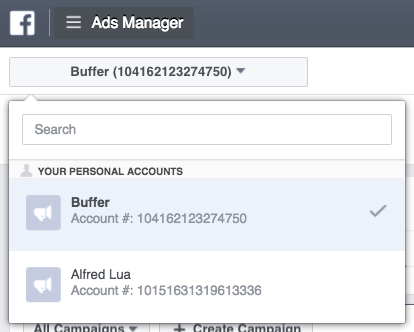
Facebook Ads Manager account dropdown showing ad accounts and campaign options, illustrating how to advertise on Facebook through business account settings.

To navigate to Ads Manager right from your business page, head to the left sidebar and click on the Ad Center drop-down arrow of any Facebook Page, then choose All Ads from the drop-down. At the bottom of that page is an option to click Ads Manager.
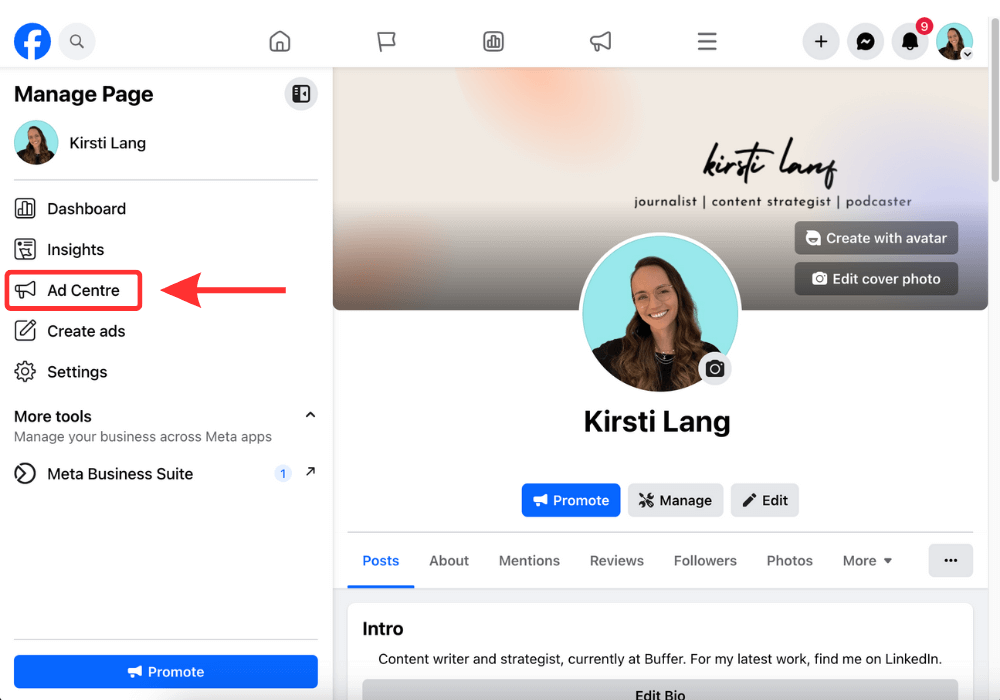
Facebook Page dashboard highlighting Ad Centre in the sidebar, showing steps for how to advertise on Facebook through page promotion and ad management tools.

Click on Facebook’s Ads Manager to get started. You will be brought to your Facebook Ad Accounts page, where there will be a quick overview of your ad account(s). If you have access to more than one ad account, select the account where you wish to run ads.

If you’d rather use a mobile device, a Meta Ads Manager app is available for Apple and Android.
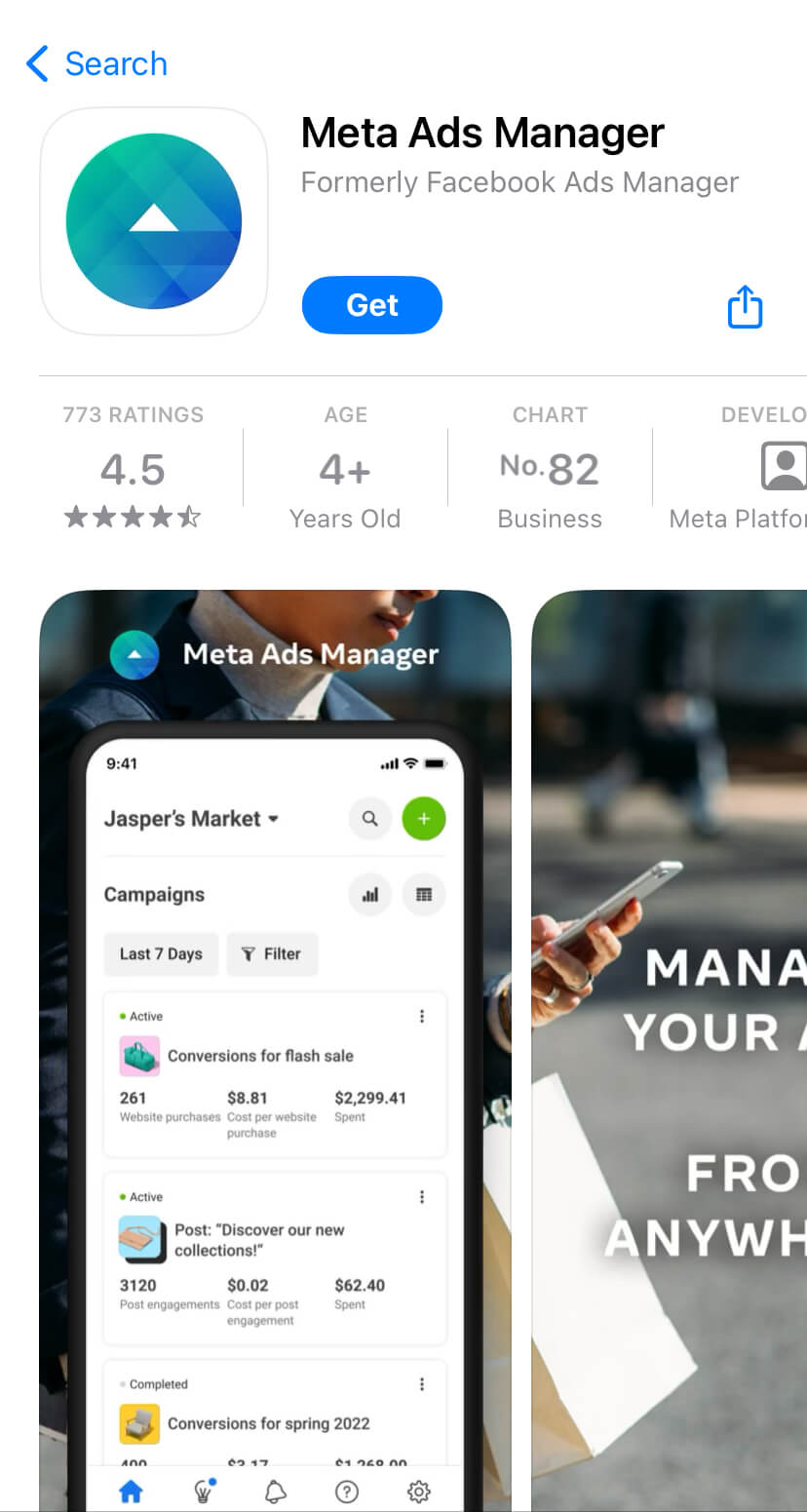
App Store listing for Meta Ads Manager app on iPhone, showing campaign dashboard and mobile tools for how to advertise on Facebook and manage ads on the go

How to create a Facebook ad

Let’s walk through how to create your first Facebook ad, step-by-step. We’ll use the latest version of Meta Ads Manager.

1. Create ad

Click the green Create Ad button to get started with your first ad.
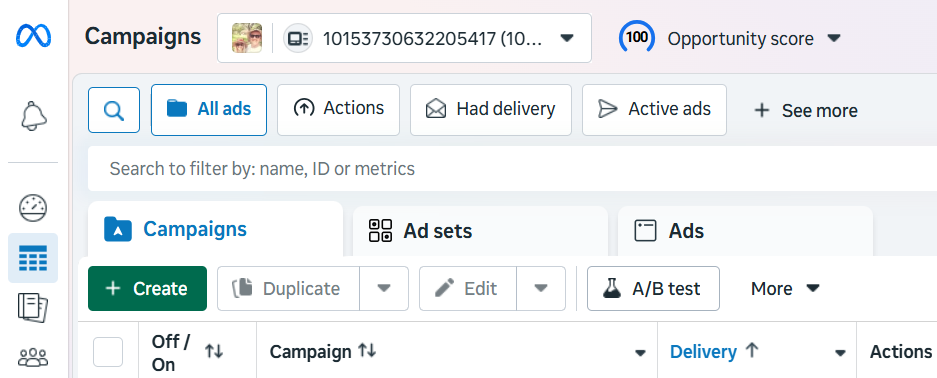
Meta Ads Manager campaign dashboard showing create, ad sets, and ads tabs, demonstrating how to advertise on Facebook using campaign management tools.

Meta will take you to a page where you will be prompted to choose a buying type and campaign objective.

2. Choose your buying type 

Meta’s ads have two different buying types: Auction and Reservation (formerly Reach and Frequency). Here’s Meta’s explainer for both:

Auction: Offers more choice, efficiency, and flexibility, with less predictable results. Ads can be placed across Facebook, Messenger, Instagram, and Meta Audience Network.

Reservation: Lets you plan and buy your campaigns in advance, with predictable performance goals and more control over your frequency controls. Ads can be placed on Facebook and Instagram.

The key differences between the two lie in your campaign setup and campaign objectives. For example, an Auction ad allows for various campaign objectives, while Reservation only has two: awareness and engagement.

Not sure which one to pick? Meta’s guidance here can help you figure out what works best for your needs.
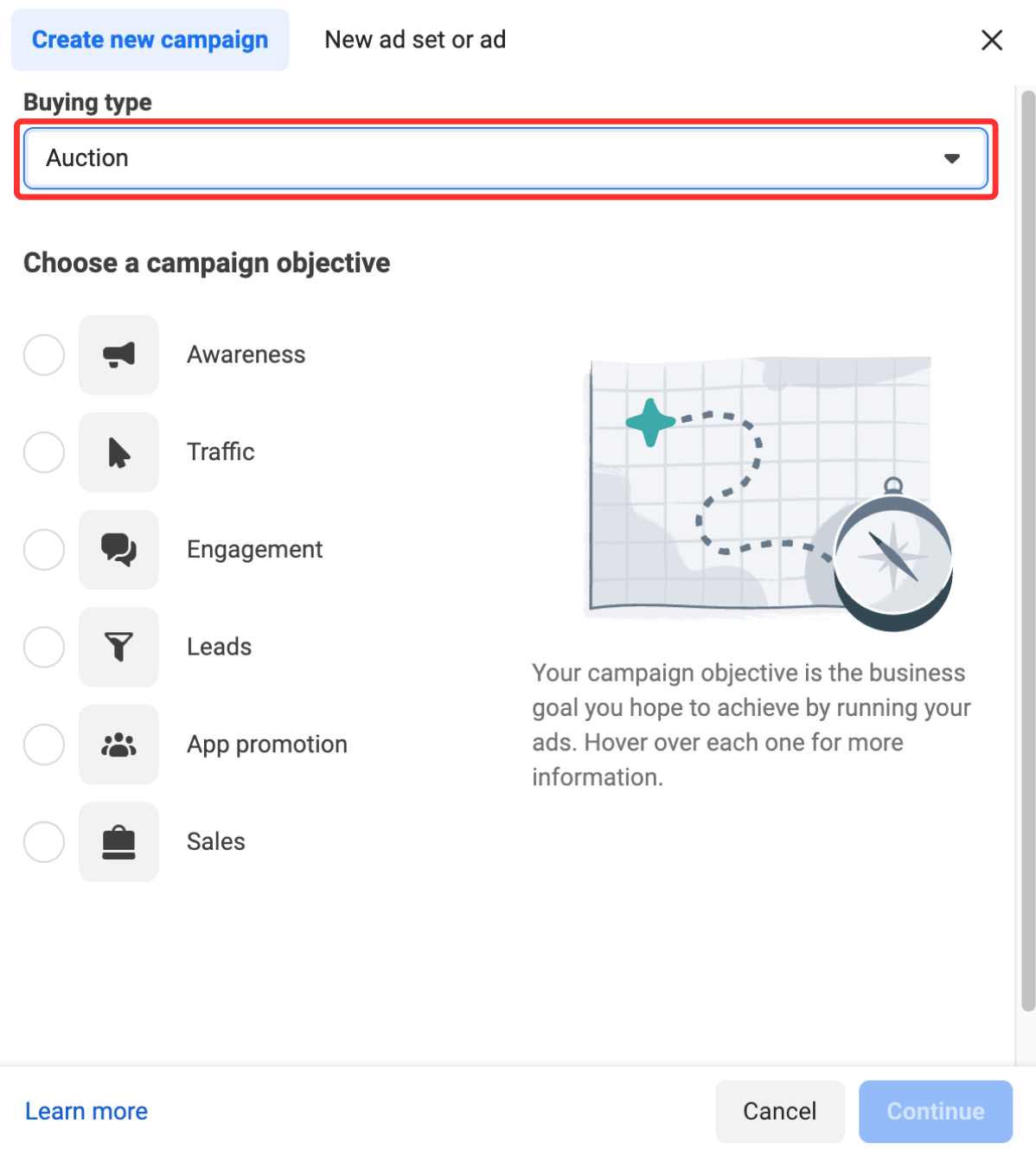
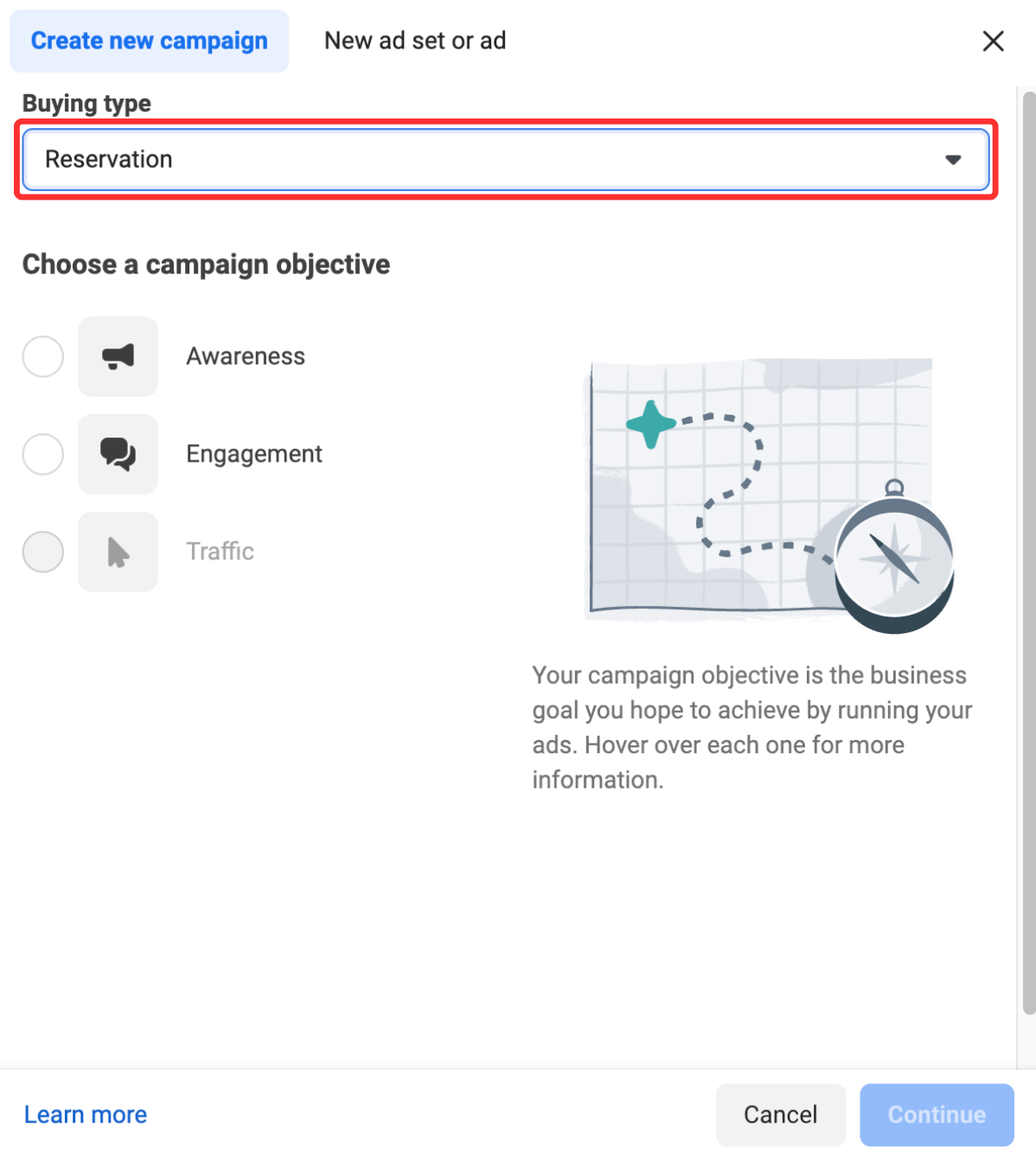
3. Choose your campaign objective

Meta and Facebook let you set up your ads with your ultimate goal in mind. There are six you can choose from:

  1. Awareness: Your ad will be shown to people most likely to remember them. According to Meta, this goal type is good for reach, brand awareness, video views, and store location awareness. 
  2. Traffic: This ad type will send people to a specific destination, like your website, an event, or a download link. It’s best for link clicks, landing page views, and calls. 
  3. Engagement: This ad type will make you more likely to receive messages, in-app purchases, likes, and comments. It’s also great for video views, conversions, and calls. 
  4. Leads: Your ad may help you collect info from potential customers. It’s good for forms, conversions, and calls. 
  5. App promotion: Get more users for your app or encourage current users to keep using it. 
  6. Sales: Find people who are likely to buy your product or service. This route is obviously great for conversions and in-app sales. 

4. Pick a name for your ad campaign

Once you’ve selected your marketing objective, you’ll be asked to name your campaign. Be sure to make your campaign name recognizable to everyone working on the ads. 
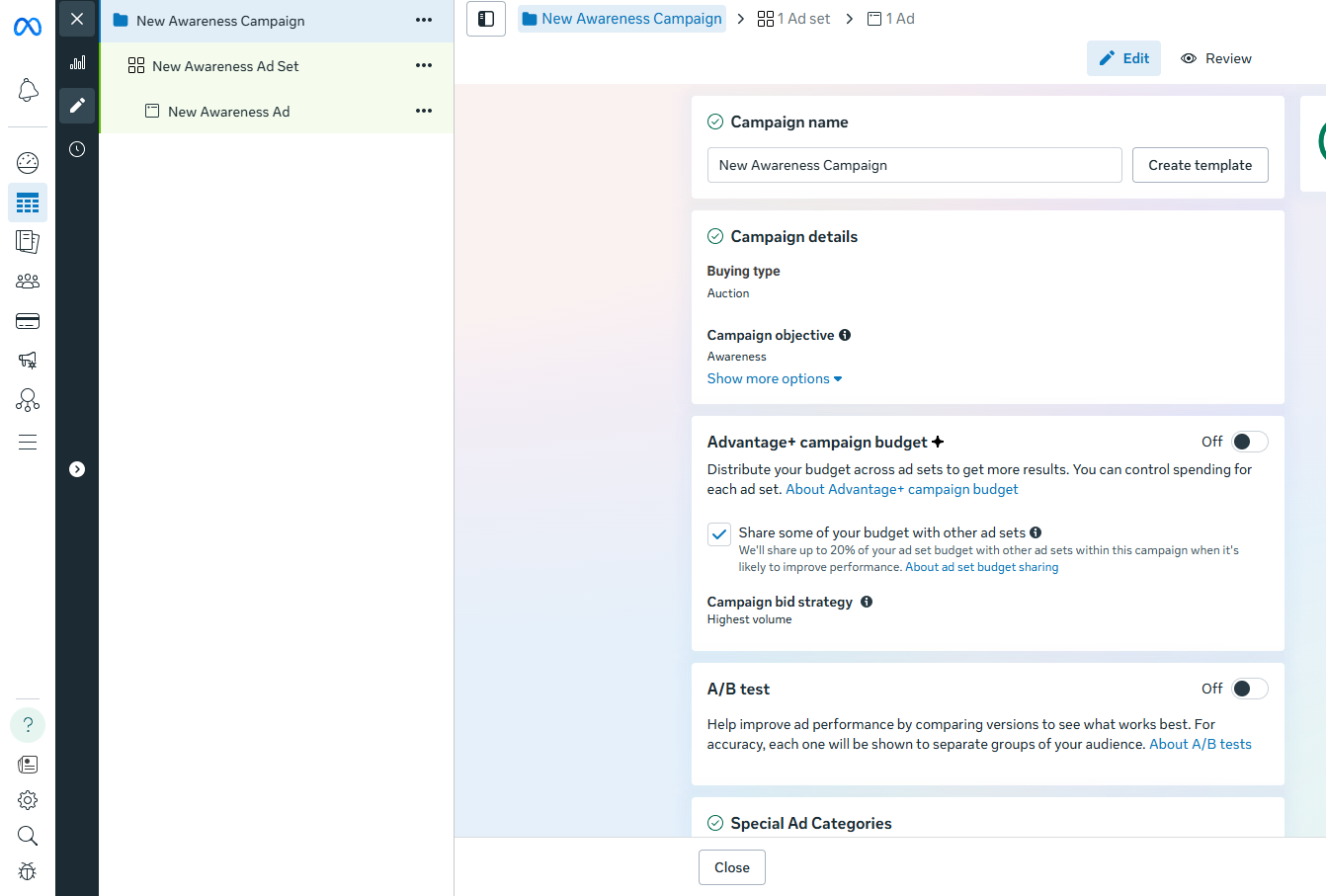
Meta Ads Manager campaign setup screen showing awareness objective, budget options, and A/B testing tools for how to advertise on Facebook effectively.

5. Declare your ad category

Different regions have different advertising rules, particularly when it comes to categories like credit, employment, housing, social issues, elections, or politics. If your ad falls into one of these buckets, it’s worthwhile declaring it here to ensure it remains compliant with Facebook’s and various countries’ advertising standards.
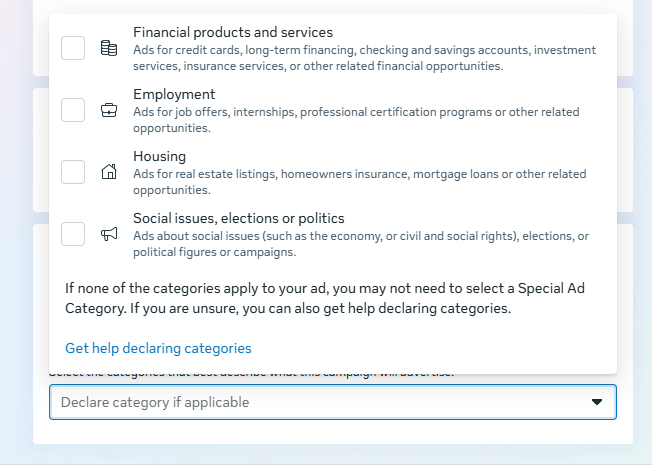
Meta Ads Manager Special Ad Categories selection screen for finance, employment, housing, and politics, explaining compliance steps for how to advertise on Facebook.

6. Decide whether to turn on A/B testing

At this point in the process, you’ll be able to turn on the A/B test feature, where you can try out different images, text, audiences, or placements to maximize your ad performance. The full setup for this will come later in the process — this toggle just turns it on.
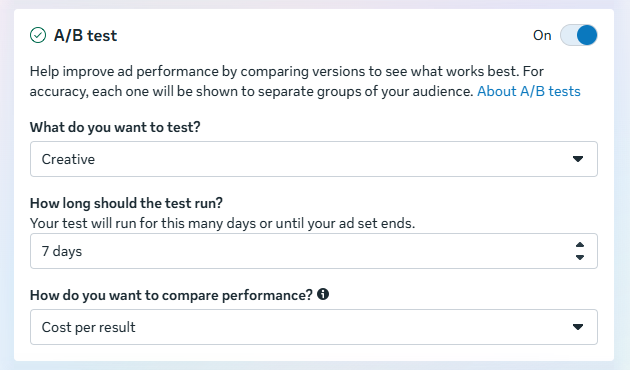
Meta Ads Manager A/B test settings panel showing creative testing, duration, and cost per result options for how to advertise on Facebook effectively.

7. Decide whether to use Advantage+ campaign budget

This feature, only available if you choose the Auction buying option, means Facebook will automatically find the best available opportunities for results across your ad sets and distribute your campaign budget in real time to get those results. 

Advantage+ campaign budget (formerly called campaign budget optimization) is best suited for campaigns with at least two ad sets.
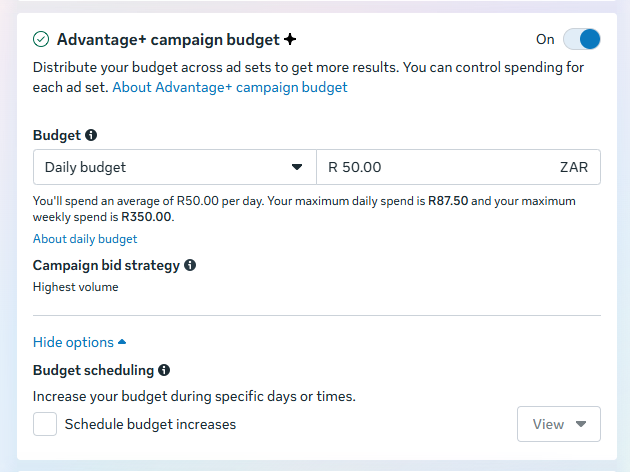
Meta Ads Manager Advantage+ campaign budget settings showing daily budget, bid strategy, and scheduling options for how to advertise on Facebook efficiently.

8. Set your performance goal

Facebook now allows you to get super specific about the ultimate goals of your ad. Each campaign goal mentioned in step 3 has a separate set of specific targets — for example, Awareness has everything from the broader ‘Maximize reach’ to the hyper-specific ‘Maximize two-second continuous video views.’ 

If you’re new to Facebook ads, it’s worth trialing the broader options before zeroing in on specific targets that lend themselves to your goals and the content you share.
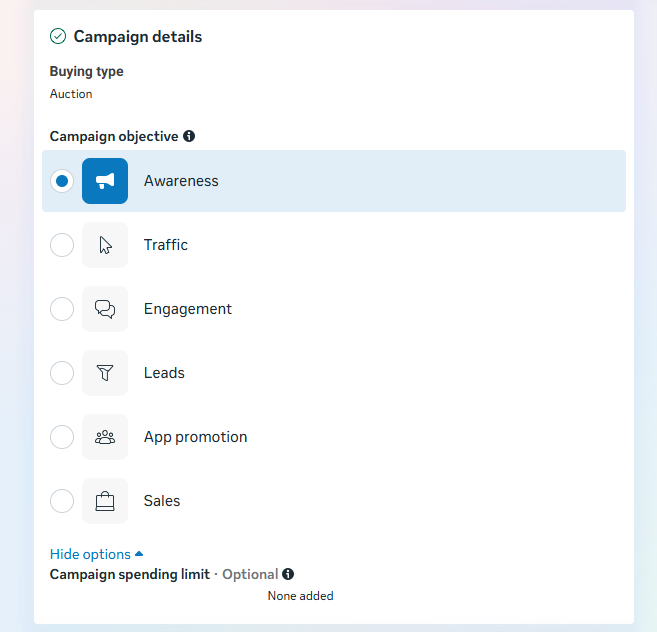
Meta Ads Manager campaign objective selection screen highlighting awareness, traffic, engagement, leads, app promotion, and sales options for how to advertise on Facebook.

9. Define your ad spend and schedule

When you set an ad budget, it’s important to remember that this figure represents the maximum amount of money you want to spend. You can set your budget per day or as a total amount for the campaign.

  • Daily: A daily budget sets a limit on what you spend each day on your ads. Facebook will use your set criteria to find the right place and time to show your ad to your target audience. Once your budget is reached, the ads stop running for the day. The cycle starts again on the next day.
  • Lifetime: A lifetime budget is the maximum you’ll spend the entire time you run your ad campaign. You give Facebook a number and an end date, and it will spend the money based on ad performance. Once your budget is reached, the campaign ends.

Hit the Next button to go to the next part of the setup.

10. Customize your target audience

Meta recently made some changes to its audience customization settings in Ads Manager, which is why things may look a little different nowadays if you’re a regular user.

Previously, marketers could zero in on everything from location to behavior and interests; now, you can choose only three options: location, age, and language.
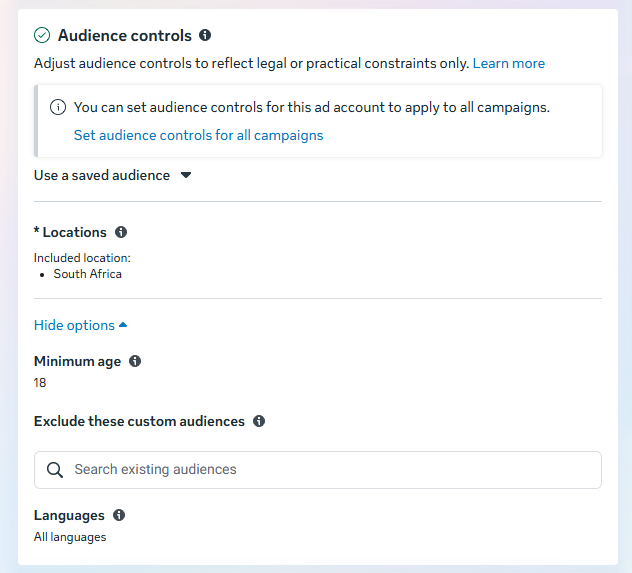
Meta Ads Manager audience controls screen showing location, age, language, and custom audience settings for how to advertise on Facebook with targeted campaigns.

But if you want to get more specific than that, fear not: the new Meta Advantage+ audience feature does all the ad targeting for you. 

Here’s how it works:

“Meta’s AI uses numerous pieces of information to find your audience, evolving constantly as it learns. For example:

  • Past conversions
  • Meta Pixel data
  • Interactions with previous ads

Our latest model innovations analyze millions of signals to find the right message, for the right audience, at the right time.”

Meta Ads Manager Advantage+ audience settings showing age, gender, and detailed targeting options for how to advertise on Facebook with AI-driven audience selection.

Good news for the Meta Ads Manager veterans who know their target audiences inside out and want to reach them. As you can see, your custom audiences are still available in the ad creation wizard, and you can even switch back to the original audience options.

11. Choose your ad placements

Ad placement defines where your ad appears for your target audience. Meta has made similar changes to its placement tools, with the AI-powered Advantage+ placements to help maximize your ad reach.

Meta Ads Manager placements settings showing manual placements across Facebook, Instagram, Messenger, and Audience Network for how to advertise on Facebook effectively.

However, you can still decide on ad placement yourself by selecting the Manual placements option in the screenshots above. When you do, you’ll see the options below become available to you:
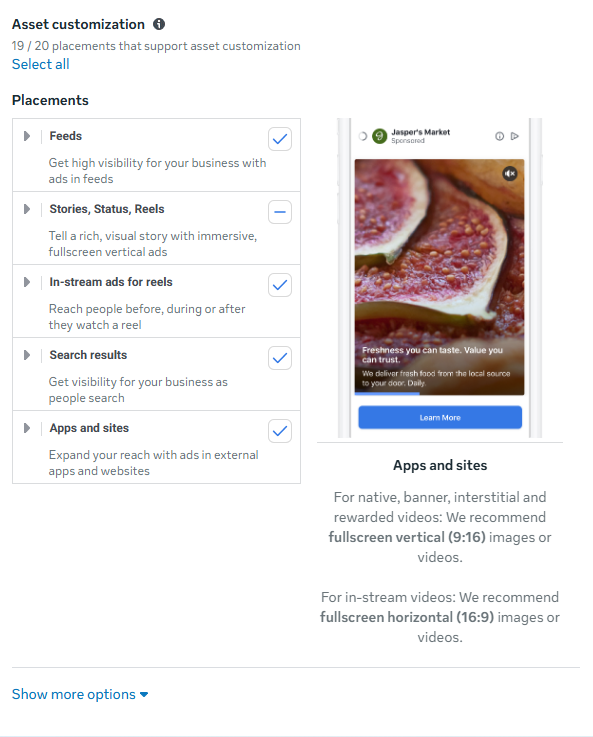
Meta Ads Manager asset customization and placements screen showing feeds, stories, reels, and apps settings for how to advertise on Facebook across multiple placements.

There are several options across the Meta suite of social platforms:

  • Feeds: Get high visibility for your business with ads in feeds.
  • Stories, status, and reels: Tell a rich, visual story with immersive, full-screen vertical ads
  • In-stream: Quickly capture people’s attention while they’re watching videos.
  • Search results: Get visibility for your business as people search.
  • Messages: Send offers or updates to people already connected to your business.
  • Apps and sites: Expand your reach with ads in external apps and websites

For more, check out Facebook’s guide to ad placement.

12. Choose your social accounts

In the next window, you can choose which Meta social media profiles you want the ads to run on. 
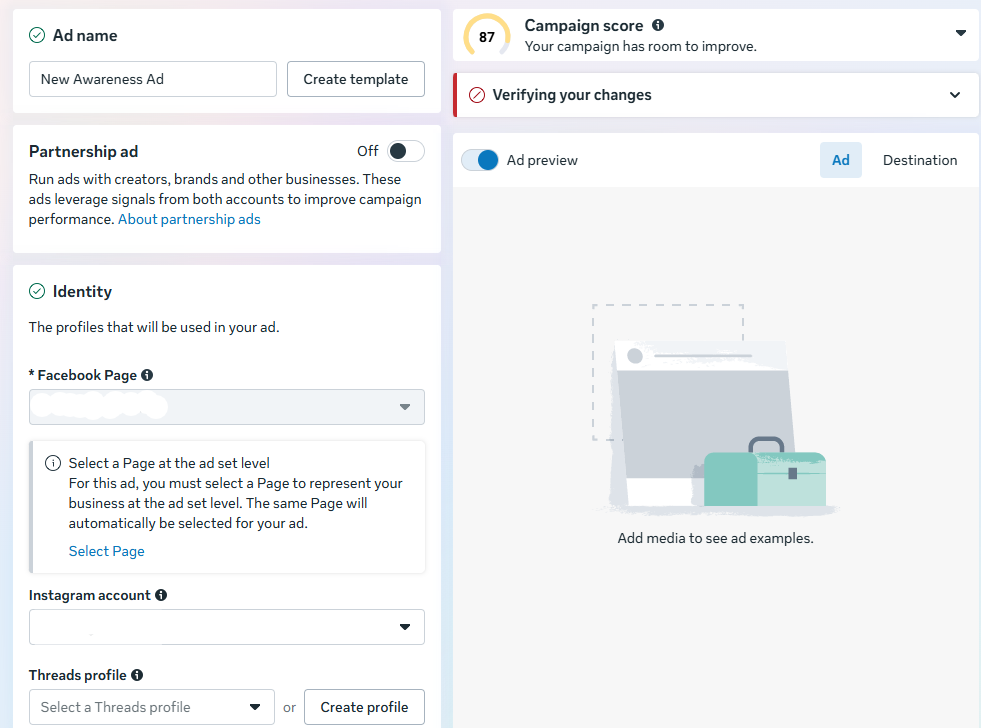
Meta Ads Manager ad creation screen showing ad name, identity settings, Facebook Page selection, and preview panel for how to advertise on Facebook effectively.

13. Choose your ad format

Under Ad setup, you’ll be able to create a new ad, use an existing post, or use any mock-ups you have in Meta’s Creative Hub.

Once you’ve made that selection, choose whether your ad will feature a single image or video, a carousel (multi-image or video post), or a collection (a group of products that becomes a full-screen experience on mobile). 
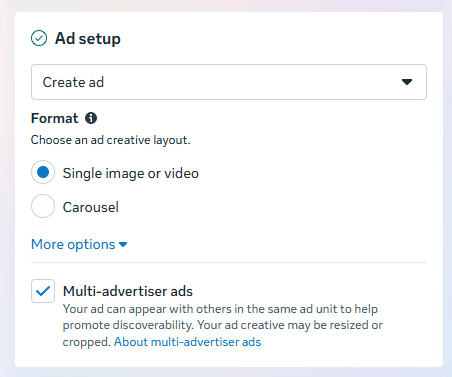
Meta Ads Manager ad setup screen showing single image or carousel format options and multi advertiser ads setting for how to advertise on Facebook effectively.

14. Add your media and copy

Now comes the fun part: adding your images and videos.

Upload your photos or clips — carousel ads, video ads, they’re all created right here. 
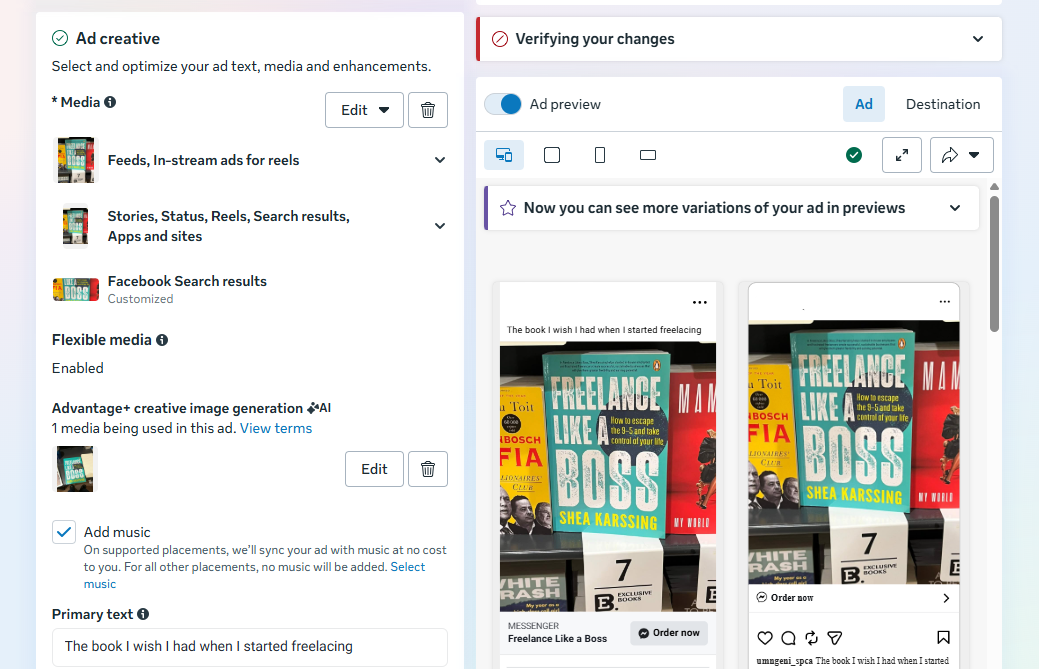
Meta Ads Manager ad creative panel showing media selection, flexible media, primary text, and preview options for how to advertise on Facebook with engaging visuals.

In this area, you can also switch up the ad copy and ad creative you use in each section of the Meta apps, if you want to tailor the experience for each platform.

Lower down in this section, you can choose music for the formats where this is applicable (check out our article on trending Instagram audio to help guide your choice!)

You’ll also be able to add your ad copy with the various text options in this section — don’t forget to include an applicable call-to-action (CTA).

15. Choose your destination 

As you’ll have come to expect by now, you’ll have a host of interesting options to play with when it comes to your ad destination — where Facebook sends people when they click on your ad.
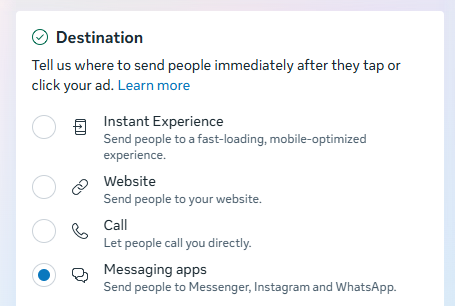
Meta Ads Manager destination settings showing website, instant experience, call, and messaging apps options for how to advertise on Facebook and drive conversions.

There’s Instant Experience (formerly Canvas) — a fast-loading, mobile-optimized experience. These offer a way for Facebook to keep your audience in their app. In other words, they’re a simple, dynamic landing page, form, or lookbook you can create with Facebook. 

Screenshot showing how to advertise on Facebook with Facebook Interactive Experiences

Of course, you can also choose your website link and even add your own UTM tracking parameter.

On top of that, you can send people directly to your inbox in Facebook Messenger, Instagram, or WhatsApp.

16. Publish your ad

To submit your ad, click the ‘Publish’ button at the bottom right-hand corner of the page.

Once your ad is submitted, Facebook will hold your post so they can review it to make sure it fits it specs and doesn’t violate their community guidelines. Expect it to be reviewed within 24 hours. You’ll receive a confirmation email from Facebook once the ad is live.

How much does it cost to create a Facebook ad?

Here’s the simple answer: you’ll only pay what you want to spend. (Though the specifics can get a bit more nuanced.) The budget you set in step 9 above is what you’ll spend on the ad — however, the mileage you get from that spend can vary quite a lot.

According to data from Wordstream, the average cost per click (CPC) on Facebook ads across all industries is $0.70 for traffic campaigns, and $1.92 for lead campaigns, compared to $5.26 in Google Ads.

CPC varies significantly by industry. Here is a breakdown of the highest and lowest average costs:

Business category Traffic campaigns – average CPC Leads campaigns – average CPC
Arts and entertainment $0.49 $1.08
Attorneys and legal services $0.86 $4.10
Beauty and personal care $0.74 $3.06
Education and instruction $0.86 $1.65
Furniture $0.85 $2.18
Health and fitness $0.80 $2.64
Home and home improvement $0.99 $2.23
Industrial and commercial $0.86 $1.80
Personal services $1.00 $2.08
Physicians and surgeons $0.82 $2.23
Real estate $0.91 $1.57
Restaurants and food $0.72 $0.74
Sports and recreation $0.41 $1.07

Get strategic with your Facebook ads

Now that you’ve nailed the basics of creating a Facebook ad, you can start experimenting to see what works best for your audience.

For each step above, pausing and thinking back to your goals is helpful. Make sure everything you define and create aligns with your own measure of success. Not sure what your audience wants to see? That’s totally normal, and Facebook has tools to help you figure it out.

Facebook has plenty of tools for A/B split testing, so you can compare ads side by side to find out what works. From there, keep an eye on how your ads perform and don’t be afraid to experiment. The data will show you what’s working — and what might need a tweak.

FAQ about advertising on Facebook

How much does it cost to advertise on Facebook?

Facebook ads work on a flexible budget. You can set a daily or lifetime budget and only spend what you’re comfortable with. On average, cost per click (CPC) varies by industry, but many traffic campaigns fall under $1 per click. Your total cost depends on your audience, competition, and goals.

Is $5 a day enough for Facebook ads?

Yes, $5 a day is enough to test a campaign. While it may not deliver massive reach, it can help you gather early data, test creatives, and see how your audience responds. Start small, measure results, and increase your budget once you know what’s working.

Are Facebook ads worth it for small businesses?

They can be — especially if you need predictable reach. Organic posts don’t always reach your full audience, but paid ads let you target specific people based on interests, behaviors, and demographics.

What’s the difference between boosting a post and running a Facebook ad?

Boosting a post is a simplified way to promote existing content directly from your Facebook Page. Running a Facebook ad through Meta Ads Manager gives you more advanced targeting, budget control, placements, and performance tracking.

How long does it take for Facebook ads to work?

Most ads start delivering impressions within hours, but meaningful performance data typically takes a few days. Facebook’s system also goes through a learning phase, where it tests your ad with different users. For best results, allow at least 3–7 days before making major changes.

Do I need a business page to run Facebook ads?

Yes. To run ads through Meta Ads Manager, you need a Facebook Page and a verified payment method. If you’re managing ads for someone else, you’ll need admin, editor, or advertiser access to their page.

How do I target the right audience on Facebook?

You can target by location, age, and language, and use tools like custom audiences or Meta Advantage+ audience to refine delivery. The key is to start with a clear idea of who your ideal customer is, then test and refine based on performance data.

What is Meta Advantage+ in Facebook ads?

Meta Advantage+ uses AI to optimize your audience targeting, placements, and budget distribution automatically. Instead of manually narrowing your audience, Advantage+ analyzes performance data in real time to find people most likely to complete your goal.

How do I measure Facebook ad performance?

Use Meta Ads Manager to track metrics like reach, clicks, conversions, and cost per result. For deeper tracking, install the Meta Pixel on your website to measure actions like purchases or sign-ups. Focus on metrics tied directly to your campaign goal.

How long does Facebook take to approve ads?

Most ads are reviewed within 24 hours. During this time, Facebook checks your ad for compliance with advertising policies and community standards. You’ll receive a notification once your ad is approved and live.

More Facebook resources

https://buffer.com/resources/facebook-ads-beginners-guide/



Platforms bend over backward to help DHS censor ICE critics, advocates say

“The nature and content of the Defendants’ communications with these technology companies” is “critical for determining whether they crossed the line from governmental cajoling to unconstitutional coercion,” EFF’s complaint said.

EFF Senior Staff Attorney Mario Trujillo told Ars that the EFF is confident it can win the fight to expose government demands, but like most FOIA lawsuits, the case is expected to move slowly. That’s unfortunate, he said, because ICE activity is escalating, and delays in addressing these concerns could irreparably harm speech at a pivotal moment.

Like users, platforms are seemingly victims, too, FIRE senior attorney Colin McDonnell told Ars.

They’ve been forced to override their own editorial judgment while navigating implicit threats from the government, he said.

“If Attorney General Bondi demands that they remove speech, the platform is going to feel like they have to comply; they don’t have a choice,” McDonnell said.

But platforms do have a choice and could be doing more to protect users, the EFF has said. Platforms could even serve as a first line of defense, requiring officials to get a court order before complying with any requests.

Platforms may now have good reason to push back against government requests—and to give users the tools to do the same. Trujillo noted that while courts have been slow to address the ICEBlock removal and FOIA lawsuits, the government has quickly withdrawn requests to unmask Facebook users soon after litigation began.

“That’s like an acknowledgement that the Trump administration, when actually challenged in court, wasn’t even willing to defend itself,” Trujillo said.

Platforms could view that as evidence that government pressure only works when platforms fail to put up a bare-minimum fight, Trujillo said.

https://arstechnica.com/tech-policy/2026/02/platforms-bend-over-backward-to-help-dhs-censor-ice-critics-advocates-say/


“IG is a drug”: Internal messages may doom Meta at social media addiction trial

However, Kuhl ruled that platforms will have the opportunity to counter experts’ opinions at trial, while reminding social media companies that “ultimately, the critical question of causation is one that must be determined by the jury.” Only one expert’s testimony was excluded, Social Media Victims Law Center noted, a licensed clinical psychologist deemed unqualified.

“Testimony by Bagot as to design features that were employed on TikTok as well as on other social media platforms is directly relevant to the question of whether those design features cause the type of harms allegedly suffered by K.G.M. here,” Kuhl wrote.

That means that a jury will get a chance to weigh Bagot’s opinion that “social media overuse and addiction causes or plays a substantial role in causing or exacerbating psychopathological harms in children and youth, including depression, anxiety and eating disorders, as well as internalizing and externalizing psychopathological symptoms.”

The jury will also consider the insights and information Bejar (a fact witness and former consultant for the company) will share about Meta’s internal safety studies. That includes hearing about “his personal knowledge and experience related to how design defects on Meta’s platforms can cause harm to minors (e.g., age verification, reporting processes, beauty filters, public like counts, infinite scroll, default settings, private messages, reels, ephemeral content, and connecting children with adult strangers),” as well as “harms associated with Meta’s platforms including addiction/problematic use, anxiety, depression, eating disorders, body dysmorphia, suicidality, self-harm, and sexualization.” 

If K.G.M. can convince the jury that she was not harmed by platforms’ failure to remove content but by companies “designing their platforms to addict kids” and “developing algorithms that show kids not what they want to see but what they cannot look away from,” Bergman thinks her case could become a “data point” for “settling similar cases en masse,” he told Barrons.

“She is very typical of so many children in the United States—the harms that they’ve sustained and the way their lives have been altered by the deliberate design decisions of the social media companies,” Bergman told the Post.

https://arstechnica.com/tech-policy/2026/01/tiktok-settles-hours-before-landmark-social-media-addiction-trial-starts/


Zuck stuck on Trump’s bad side: FTC appeals loss in Meta monopoly case

For Meta, the renewed fight comes at a time when most tech companies are walking tightropes to avoid any possible retaliation from Trump, not just social platforms. After defeating the FTC last fall, Meta’s chief legal officer, Jennifer Newstead, didn’t dunk on the FTC but coolly celebrated the ruling for recognizing that “Meta faces fierce competition.” In the same breath, Newstead also seemed to want to take the opportunity to remind the Trump administration that Meta was a friend.

“Our products are beneficial for people and businesses and exemplify American innovation and economic growth,” Newstead said. “We look forward to continuing to partner with the Administration and to invest in America.”

Similarly, this week, Meta has offered a rather neutral response to the FTC’s announcement. Asked for comment on the FTC’s decision to appeal, Meta’s spokesperson simply told Ars that James Boasberg, the US district judge who sided with Meta, got it right the first time, then repeated one of Trump’s favorite refrains from tech companies.

“The District Court’s decision to reject the FTC’s arguments is correct and recognizes the fierce competition we face,” Meta’s spokesperson said. “We will remain focused on innovating and investing in America.”

FTC blamed judge for loss

Political tensions have remained at the center of the case, perhaps peaking after Boasberg’s ruling.

In November, Simonson criticized Boasberg, telling CNBC that “the deck was always stacked against us with Judge Boasberg, who is currently facing articles of impeachment.”

That push to impeach Boasberg came from Republican lawmaker Brandon Gill, who alleged the judge was abusing his power to censor conservatives, but no actions have been taken since the proposed resolution was submitted to a House committee that month. Republicans, including Trump’s attorney general, Pam Bondi, have complained that Boasberg is a rogue partisan judge, but Boasberg so far has withstood their attacks while continuing to settle cases. Trump’s Truth Social tirades against the judge required a long fact-checking piece from PBS.

https://arstechnica.com/tech-policy/2026/01/zuck-stuck-on-trumps-bad-side-ftc-appeals-loss-in-meta-monopoly-case/


Inside the Facebook Algorithm in 2026: All the Updates You Need to Know

Inside the Facebook Algorithm in 2026: All the Updates You Need to Know

Remember the early days of Facebook, around 2006, when posts appeared in (mostly) chronological order when you opened the platform?

Well, things look a bit different 20 years later.

Facebook began as a place to share updates and photos with friends and family, putting the ‘social’ in social media. Today, it has evolved into a full-fledged platform for community building and business growth.

People can follow creators and brands, join communities and groups, and promote events on the platform. Instead of just text and photo posts, there are now disappearing stories, reels, live streams, and much more.

With so many new features available, it makes sense that the Facebook algorithm — the ranking system that uses machine learning to arrange content in users’ feeds — has changed too.

What used to be one chronological feed is now a set of different feeds — and multiple feeds means multiple algorithms. These algorithms work together to decide what content users see when they open the app.

Understanding how the Facebook algorithms work is a solid start to getting your content seen by as many people as possible. When you know what Facebook looks for when showing posts to users, you can make more thoughtful decisions about what, when, and why you post.

In this article, I’ll unpack everything we know about how the Facebook algorithms work, and I’ll share some tips you can use to get your content the reach it deserves.

⚡
Want to save time on Facebook? Buffer's Facebook scheduling and analytics tools help you plan and schedule posts for pages and groups all in one place.

How the Facebook algorithm works

The Facebook algorithm was created so that the Meta-owned platform shows users more interesting, relevant content that’s tailored to them and keeps them scrolling longer. 

“Facebook’s goal is to make sure that you see posts from the people, interests, and ideas that you find valuable, whether that content comes from people you’re already connected to or from those you may not yet know,” the company says.

To that end, there are three different types of content that will make it into users’ feeds:

  1. Connected content — content from the people they're friends with or are following, groups they've joined, and pages they've liked.
  2. Recommended content — content Facebook thinks they’ll be interested in from pages and people they don't already follow.
  3. Ads — content people see because of targeting, rather than the algorithm.

Since this post is about the Facebook algorithm and not Facebook ads, I'll unpack the first two here.

How the Facebook algorithm ranks connected content

If a user is your friend (for personal profiles) or likes your Facebook Page or profile (for businesses and creators), your content may show up in their home feed when they open the app as part of the connected content system.

Here’s how Facebook evaluates and ranks your content:

1. Checks what posts are available

The algorithm looks at all the content that could show up in a user’s feed. This includes content shared by their friends, the pages they follow, and the groups they’ve joined.

Right from the get-go, content that violates Facebook’s Community Standards is excluded (more on this below).

2. Examines key signals

The second thing the Facebook algorithm does is look at ranking factors called ‘signals’ to decide how relevant a piece of content will be to that particular user. There are thousands of possible signals Facebook considers that are based on both user behavior and the post itself.

Here are some examples:

The Facebook feed algorithm might look at how often someone’s seen similar types of content recently (like photos or videos) and how much time they’re spending on their feed. It also takes into account factors related to the post, like how many comments or reactions it has and how long the comments are, on average.

Importantly, it also looks at how likely someone is to interact with the person who shared the post, especially if they’re friends or in a group. That prediction is based on things like past interactions between them, both in public (like comments or reactions) and in DMs.

The Facebook Stories algorithm might look at how often someone views stories in general and how many stories (or sets of stories) they’ve watched from different people or pages. It also pays attention to whether they’ve missed any stories from a person or page they follow, how many photos or videos are in a story set, and if they’ve ever replied to that person or page’s stories with a message.

3. Makes predictions

Each of those thousands of signals is then used to make “personalized predictions about which content [users will] find most relevant and valuable.”

In other words, the algorithm looks at users’ past behavior to make predictions about whether they’ll be interested in your post and likely to interact with it.

For example, if you run a brand Facebook Page that they follow and visit often, and they regularly share your posts, Facebook knows they’re a fan. They probably want to see more of your content in their feed.

A less obvious example: If a user likes shopping in the afternoons and reacts to more branded posts during that time, Facebook will use that as an indicator to surface more branded posts during that time.

💡
Facebook ranking isn’t a one-and-done situation. The ranking system is constantly evolving based on the behavior of users.

4. Scores each post

After all that, the algorithm gives each piece of content a ‘relevance score’. The higher the relevance score, the higher in the feed it will surface. 

At this point, the algorithm also mixes up the content to keep things feeling fresh — for example, it spaces out posts from the same creator or page so that users’ feeds aren’t filled with back-to-back content from one account (no matter how big a fan they may be).

Once all the connected content has been logged, analyzed, and ranked, the algorithm then starts to throw recommended content into the mix.

Facebook's recommended content system gives brands and creators a chance to draw in new fans and followers without any ad spend. It helps people in your target audience — even those who don’t follow you yet — discover the public content you share to your creator profile, brand page, group, or event.

Just like the connected content in the feed, recommendations are personalized — no two Facebook users will see exactly the same thing.

Facebook uses the same four-step ranking process for recommended content as it does for connected content, but with a different, equally large set of signals.

The feed recommendations algorithm might look at the type of post (like photo or video), how long someone watched it on their phone, and whether they’ve tapped ‘Show more’ on similar posts in the past six months. It also considers how often they’ve liked posts about a certain topic in the past 30 days, and whether they’ve shared posts from that person or page before.

The Facebook reels algorithm might look at how many reels someone has watched from a specific creator or page, which ones they’ve clicked to view in full screen, and which ones they’ve watched all the way through. It also considers factors like the video’s length, what topic the reel is tagged with, and whether the user has liked reels on a similar topic before.

Facebook has also shared detailed guidance on where it draws the line when it comes to recommendations, and certain types of content may be excluded. Since recommended posts are shown to people who may not already follow you, it makes sense that Facebook applies some pretty strict filters to keep that experience safe, relevant, and respectful.

To increase your chances of getting your content recommended to new users, it’s worth familiarizing yourself with — and sticking to — their rules.

Facebook applies two sets of standards here.

The first is its Community Standards, which are baseline rules for what’s allowed on the platform. Content that violates these rules is removed entirely.

You’ll find the full list in Facebook’s Transparency Centre (which is a must-read for all marketers and creators), but here are a few common examples of content that violates these standards (and will be removed):

Still, if your content doesn’t overtly violate one of these rules, that doesn’t mean it’s eligible for recommendation.

Facebook has a second layer of standards: the Recommendations Guidelines. These apply to content that is allowed on the platform but doesn’t meet the higher bar for being recommended to Facebook users who don’t already follow you. In other words, the post might stay up, but it won’t get shown to a wider audience through feeds or suggestions.

Five categories of content are technically allowed on Facebook but may not be eligible for recommendations:

  1. Content that makes it harder for Facebook to maintain a safe community — for example, posts that talk about self-harm, suicide, or eating disorders; are sexually explicit; or promote regulated products.
  2. Sensitive or low-quality content about health or finance — like exaggerated health claims (such as “miracle cures”), cosmetic procedure promotions, or business models that may be misleading or deceptive, such as payday loans or “risk-free” investments.
  3. Content that users generally dislike — including things like clickbait, engagement bait (such as “like this if you agree”), or overly promotional contests or giveaways.
  4. Content from sources that lack transparency — such as news content without clear authorship or publishing information.
  5. False or misleading content — including fake news or claims that have been debunked by independent fact-checkers, such as widely disproved health or vaccine-related misinformation.

9 best practices for creating successful Facebook content

There's no surefire way to ‘beat’ the Facebook algorithm, but there are plenty of things you can do to increase your chances of success on the platform. Here's our list of best practices for generating reach and engagement on Facebook.

1. Stick to a consistent posting schedule

There’s a reason this advice has stuck around: posting regularly to your social media platforms continues to be one of the best ways to grow your audience. Even Tom Alison, Head of Facebook, has called this out as a tip for creators looking for success on the platform: “Posting more can help you break through,” he said in a video.

Consistency helps people stay familiar with your content, gives them more chances to engage with it, and makes it easier for Facebook to understand what kind of posts you’re sharing.

The numbers back this up too. Buffer’s analysis of data from more than 100,000 social media users found that people who posted consistently received five times more engagement per post compared to inconsistent posters. Even a moderately consistent rhythm saw four times more engagement than inconsistency.

You don’t have to post multiple times (or even once) a day to be consistent. What matters is finding a rhythm that works for you — and sticking to it — so that your audience knows when to expect something from you.

2. Share content that invites engagement

As with all social platforms, producing high-quality content that resonates with your audience should always be your first social media marketing goal. Posts that feel thoughtful, genuine, and relevant are far more likely to get people to pause, react, or share — and every interaction sends a signal to the algorithm that users want to see more of it.

Facebook puts it simply: before you hit publish, ask yourself, “Would people share my story with their friends or recommend it to others?” That one question can help you stay focused on creating content that feels meaningful to your target audience.

There's no cheat sheet for what that looks like — every audience is different, after all — but let the metrics guide you here. When posts don’t perform as well as you hoped, try to get to the root of why by analyzing the info available in Facebook Insights.

Facebook Page Insights are now housed in your Page Dashboard, which you can find by clicking on your profile photo in the top right.

Inside the Facebook Algorithm in 2026: All the Updates You Need to Know

From your dashboard, you’ll find a high-level overview of your content views, engagement performance, and follower growth. Click on Insights in the left sidebar for more detailed data.

Inside the Facebook Algorithm in 2026: All the Updates You Need to Know

To go deeper still, click All Tools and scroll down to Meta Business Suite.

Inside the Facebook Algorithm in 2026: All the Updates You Need to Know

This will take you to a page like the one below, where you’ll also get a look at your Instagram content analytics if you have a connected profile.

Inside the Facebook Algorithm in 2026: All the Updates You Need to Know

You can also go directly to Meta Business Suite Insights at https://business.facebook.com/.

When it comes to content that resonates, users value accurate, authentic content, Facebook says. “We work hard to understand what type of posts people consider genuine so we can rank them higher in the feed. We work to understand what kinds of content people find misleading or sensational, and work to make sure that people see those less.”

Between text-based posts, photos, GIFs, carousels, reels, and live videos, there are plenty of content types you can choose from. Mix them up to find what strikes a chord with your audience so you can learn what they want to see more of.

3. Treat engagement like a two-way conversation

Have I mentioned how much the Facebook algorithm loves engagement? While posting great content is important, what happens after that matters just as much for generating engagement.

This can be as simple as replying to messages and leaving thoughtful responses or reacting to comments. Whether you’re an influencer, creator, or brand, these small actions show you’re present — and that’s something the algorithm notices.

Engaging with your target audience should be baked into your marketing strategy, and Facebook suggests replying to comments and messages within 24 hours. That sends a signal that you’re actively engaged with your audience, and not just posting and ghosting.

This approach will create a ripple effect: the more deeply connected your followers feel to your brand (business or personal), the more likely they are to like, comment on, or share your new content.

💡
Stay on top of comments on your Facebook Page with Buffer's new Community feature.

4. Share formats that perform on Facebook

According to a 2025 report from Meta, nearly 98% of the posts that US-based users viewed — whether from accounts they followed or not — didn’t include a link. In other words, most of what appears in people’s feeds is content they can view without leaving the platform.

That includes reels, photos, carousels, and text-based posts that share key information in the post itself — like the vast majority of content that people are seeing when they open the app.

Links aren’t off-limits, but they’re better used selectively. If you do include one in a post, avoid linking to what Facebook considers “low-quality web experiences,” such as pages with a poor mobile experience and a high ratio of ads to content or sites that ask for unnecessary personal data.

Facebook deprioritizes posts with these kinds of links, which can make them less likely to appear on people’s feeds.

5. Embrace video

Short-form video content — especially reels — continues to be one of the fastest ways to grow on Facebook, according to Tom Alison. And in October 2025, Facebook shared that the algorithm is “now surfacing 50% more reels from creators published that day.”

Reels that are under 90 seconds long can show up in more places across the app, including the Reels tab and section on the home feed. Plus, Facebook Reels have a bit of an edge on the platform as they have a separate feed for users (right next to ‘Home’ in the app) consisting almost entirely of recommended content.

Here’s our everything-and-the-kitchen-sink guide to Facebook Reels to get you started.

Inside the Facebook Algorithm in 2026: All the Updates You Need to Know
Facebook’s ‘Reels’ Feed — formerly ‘Video’ — gets special attention in the app.

Another bonus point in short-form video content’s favor: it can be cross-posted to Instagram Reels or even repurposed for YouTube Shorts and TikTok.

You can also go live on Facebook to connect with people in real-time. Live video is a chance to answer questions, share updates, host interviews, or take your audience behind the scenes of business or creator journey.

You’ll need to meet a couple of requirements first: your account must be at least 60 days old and have 100 followers before you can start a live session.

Once the live video ends, you have 30 days to download a copy before Facebook deletes it. From there, you can repurpose the best moments into shorter clips for reels (or video on other social media platforms) to keep reaching people after the live broadcast is over.

📈
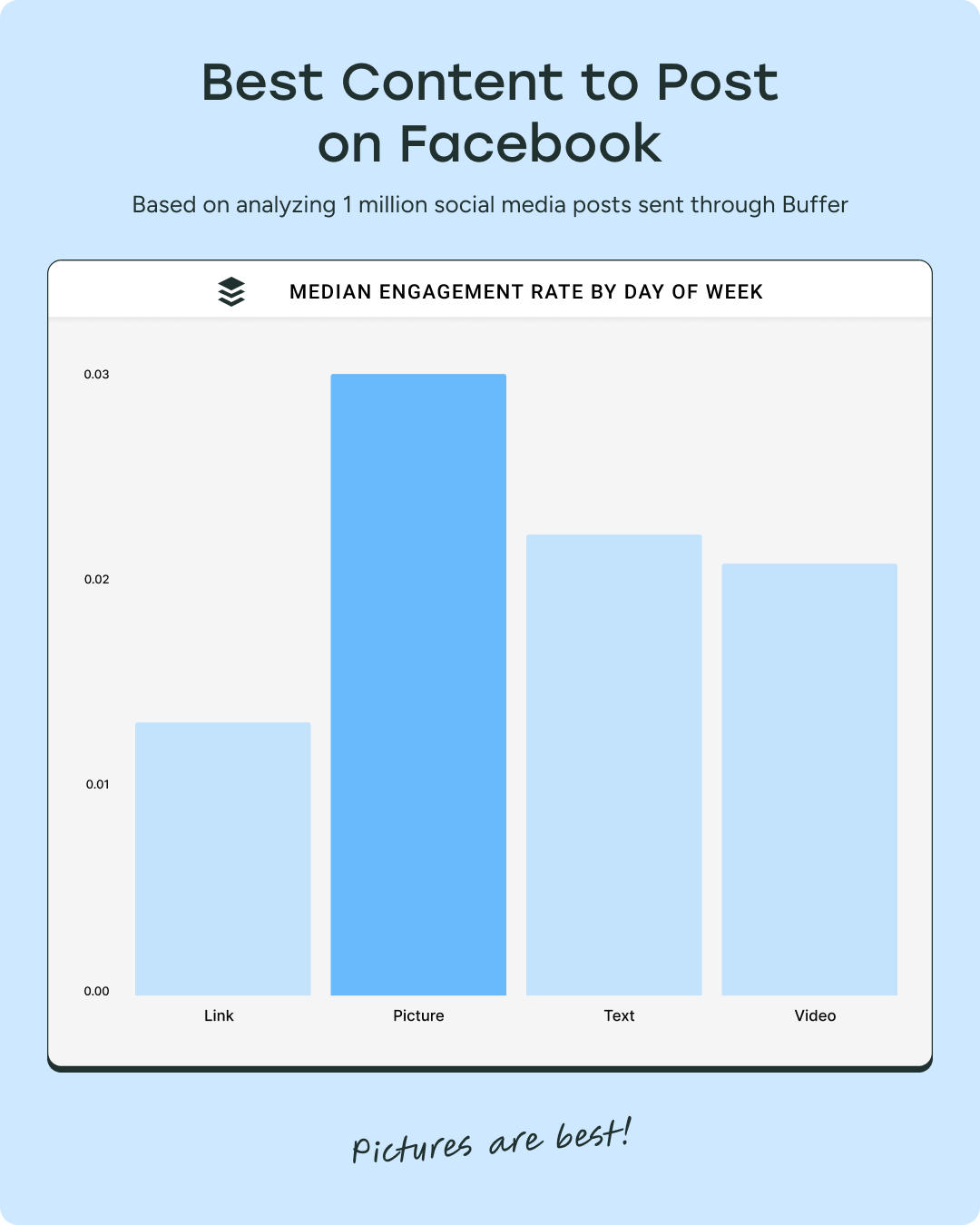
Although Facebook is pushing video, our data found that photos on Facebook are the winner when it comes to median engagement.

6. Share user-generated content

When people tag you in posts, take notice: this is a perfect opportunity to share that post as UGC (or user-generated content) — with their permission, of course. UGC helps show followers real experiences with your brand, while also giving the original poster a little recognition in return.

Reviews are another great source of content. If someone’s left a thoughtful review of your business on sites like Trustpilot or Yelp, you can turn it into a short Facebook post and tag the person in a caption. It’s a simple way to show social proof — and it might even bring in a new follower (if the reviewer wasn't following you to begin with).

7. Create meaningful conversations

Posts that spark meaningful interactions are more likely to get noticed, not just by your audience but by the Facebook algorithm too. Facebook likes authentic accounts that contribute to their community and help start or sustain thoughtful conversations.

That doesn’t mean every post needs to be deep or discussion-heavy. It simply means thinking beyond one-way updates or promotions. Facebook’s goal is to “bring people closer together and build relationships,” so posting overly promotional content that doesn't get comments or shares won't help your ranking. Instead of talking at your audience, aim to talk with them — ask questions, share ideas people can respond to, or invite your followers to weigh in on something.

Interacting with other people’s posts helps too. Joining relevant conversations shows you’re there to engage and be part of the community instead of simply broadcasting.

8. Avoid clickbait and engagement bait

Inside the Facebook Algorithm in 2026: All the Updates You Need to Know

Facebook regularly updates its algorithm to pinpoint posts that fall into the clickbait and spammy links category. 

Clickbait is content that is exaggerated, over-sensationalized, and borderline spam. It promises a result but doesn't deliver — think headlines like “The one fruit you need to stay young”, which is an obvious tactic because this magical fruit doesn’t exist.

Some clickbait links can cross the line into fake news, especially when they make claims that are both exaggerated and untrue. Fake news has been rampant on Facebook, so they've been doubling down on looking for signals that indicate misinformation or misdirection since 2018. 

Posting fake news for whatever purpose — creating false urgency, fostering fear — is against Facebook’s Community Standards, and repeated offenses can get you banned from the platform.

Not all clickbait is false. A post might use a sensationalist headline to grab attention without spreading misinformation — like “You’ll never guess what happened to this man out walking his dog,” even if the story ends up being true but underwhelming. Still, it goes against Facebook’s recommendations guidelines, and the Facebook algorithm will demote these in the feed.

Engagement bait, on the other hand, uses captions or photos that contain phrases like, “Like this if you like dogs better, share this if you like cats better.” It’s mostly harmless, but it doesn’t create any meaningful interactions — and it often feels spammy. This also goes against the recommendations guidelines, and the Facebook algorithm will demote these posts too.

9. Follow Facebook’s Community Standards

We've talked about this, but it bears repeating. Facebook takes its Community Standards very seriously. The algorithm is pretty good at weeding out posts that violate these rules, but even if a post manages to skirt under the radar, Facebook users can report it and have it taken down anyway. 

If your posts get removed or reported repeatedly, the overall “score” of your profile will also go down, which will lessen the visibility of your posts. In some cases, Facebook can also remove you from the platform entirely.

Don't try to game the Facebook algorithm — work with it

There you have it: there’s no shortcut to Facebook success. Yes, it’s a long game. But high-quality, engagement-driving content that doesn’t violate any guidelines is the best way to play it.

With Buffer, you can plan, publish, and analyze Facebook content that works with the algorithm — all from one place.

You’ll be watching those follower numbers climb in no time.

→ Get started for free.

FAQ about the Facebook algorithm

How does the Facebook algorithm work?

The Facebook algorithm uses machine learning to decide which posts appear in each user’s feed. It looks at thousands of signals — like past interactions, post type, and engagement — to predict what content someone is most likely to find relevant and valuable.

What types of content does Facebook prioritize?

Facebook prioritizes content that sparks meaningful engagement, such as comments, shares, and longer viewing time. Native formats like photos, text posts, reels, and videos generally perform better than posts that send people off the platform.

Do Facebook Reels get more reach?

Often, yes. Reels have their own dedicated feed and are heavily recommended to users who don’t already follow you. Short-form video — especially under 90 seconds — is one of the fastest ways to reach new audiences on Facebook.

How important is engagement for the Facebook algorithm?

Very. Engagement is one of the strongest signals Facebook uses when ranking content. Posts that encourage genuine interaction — thoughtful comments, replies, and shares — are more likely to be shown to more people.

What content is not eligible for Facebook recommendations?

Even if a post follows Facebook’s Community Standards, it may still be excluded from recommendations if it’s clickbait, engagement bait, misleading, overly promotional, or covers sensitive topics like health or finance without credible context.

Can you “beat” the Facebook algorithm?

There’s no shortcut or hack. The best way to work with the algorithm is to post consistently, create content your audience genuinely cares about, engage in conversations, and follow Facebook’s guidelines.

More Facebook resources

https://buffer.com/resources/facebook-algorithm/


Meta wins monopoly trial, convinces judge that social networking is dead

Other factors stemmed from social changes, the judge suggested, describing the fourth factor as a trend where Meta app users started feeling “increasingly bored by their friends’ posts.”

“Longtime users’ friend lists” start fresh, but over time, they “become an often-outdated archive of people they once knew: a casual friend from college, a long-ago friend from summer camp, some guy they met at a party once,” Boasberg wrote. “Posts from friends have therefore grown less interesting.”

Then came TikTok, the fifth factor, Boasberg said, which forced Meta to “evolve” Facebook and Instagram by adding Reels.

And finally, “those five changes both caused and were reinforced by a change in social norms, which evolved to discourage public posting,” Boasberg wrote. “People have increasingly become less interested in blasting out public posts that hundreds of others can see.”

As a result of these tech advancements and social trends, Boasberg said, “Facebook, Instagram, TikTok, and YouTube have thus evolved to have nearly identical main features.” That reality undermined the FTC’s claims that users preferred Facebook and Instagram before Meta shifted its focus away from friends-and-family content.

“The Court simply does not find it credible that users would prefer the Facebook and Instagram apps that existed ten years ago to the versions that exist today,” Boasberg wrote.

Meta apps have not deteriorated, judge ruled

Boasberg repeatedly emphasized that the FTC failed to prove that Meta has a monopoly “now,” either actively or imminently causing harms.

The FTC tried to win by claiming that “Meta has degraded its apps’ quality by increasing their ad load, that falling user sentiment shows that the apps have deteriorated and that Meta has sabotaged its apps by underinvesting in friend sharing,” Boasberg noted.

https://arstechnica.com/tech-policy/2025/11/meta-wins-monopoly-trial-convinces-judge-that-social-networking-is-dead/


What Is a Good Facebook Engagement Rate? Data From 52 Million+ Posts

One of the most common questions creators and brands ask: “Is my engagement rate good?”

The answer depends on your follower count. A 5% engagement rate looks very different for a neighborhood café with 500 fans than for a news publisher with half a million.

That’s why we analyzed 52 million Facebook posts across 213,000 accounts with over 6.9 billion engagements collectively, to see how engagement rates shift by follower tier. The result was a clear picture of what “good” looks like — from under 1,000 followers all the way up to 1 million or more.

⚡ Want to explore more metrics like reach, posting frequency, and growth rate? Check out our Facebook benchmarks tool.

🔢 The average Facebook account today

  • Median engagement rate: 3.8%
  • Average posting frequency: 34 posts per month (~1 per day)
  • Average follower growth rate: 0.5% per month
  • Median reach per post: 365

This is the “typical” Facebook account. But averages only tell part of the story. The more useful insight comes when you compare your own performance to accounts of a similar size.

🧮 Learn how we calculate engagement rates in What is Engagement Rate?

🪜 Engagement rates by follower tier

Here are the engagement rates to expect at each follower tier on Facebook from nano to mega accounts.

0 – 1K followers: Early traction is personal

  • Engagement rate: 8.8%
  • Posting frequency: 19 posts/month or 4 to 5 posts per week
  • Growth rate: 0.7% per month
  • Median reach per post: 21

At this stage, engagement is at its peak because your audience is mostly people you know — friends, family, and early customers. They interact heavily, which makes the rate look high.

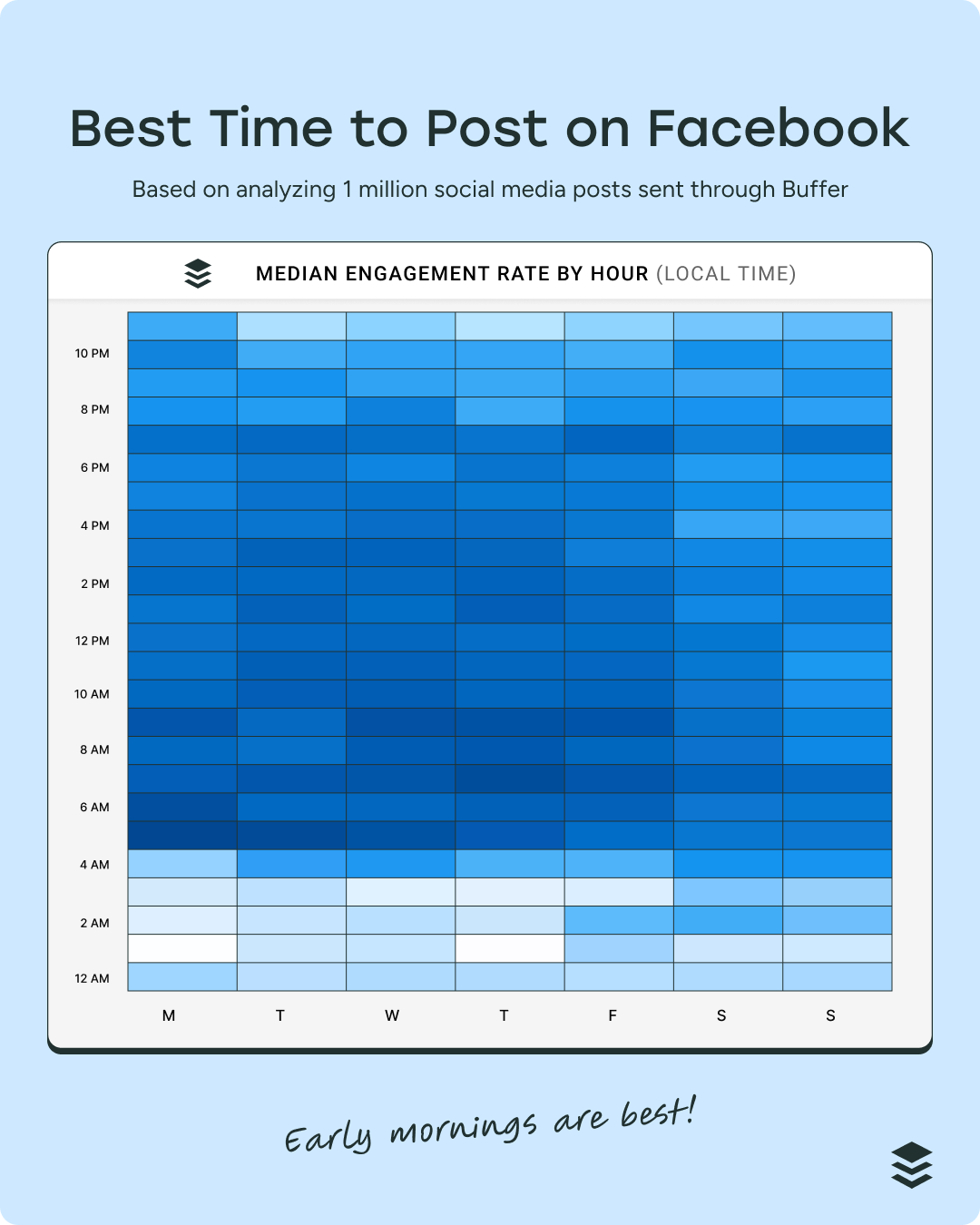
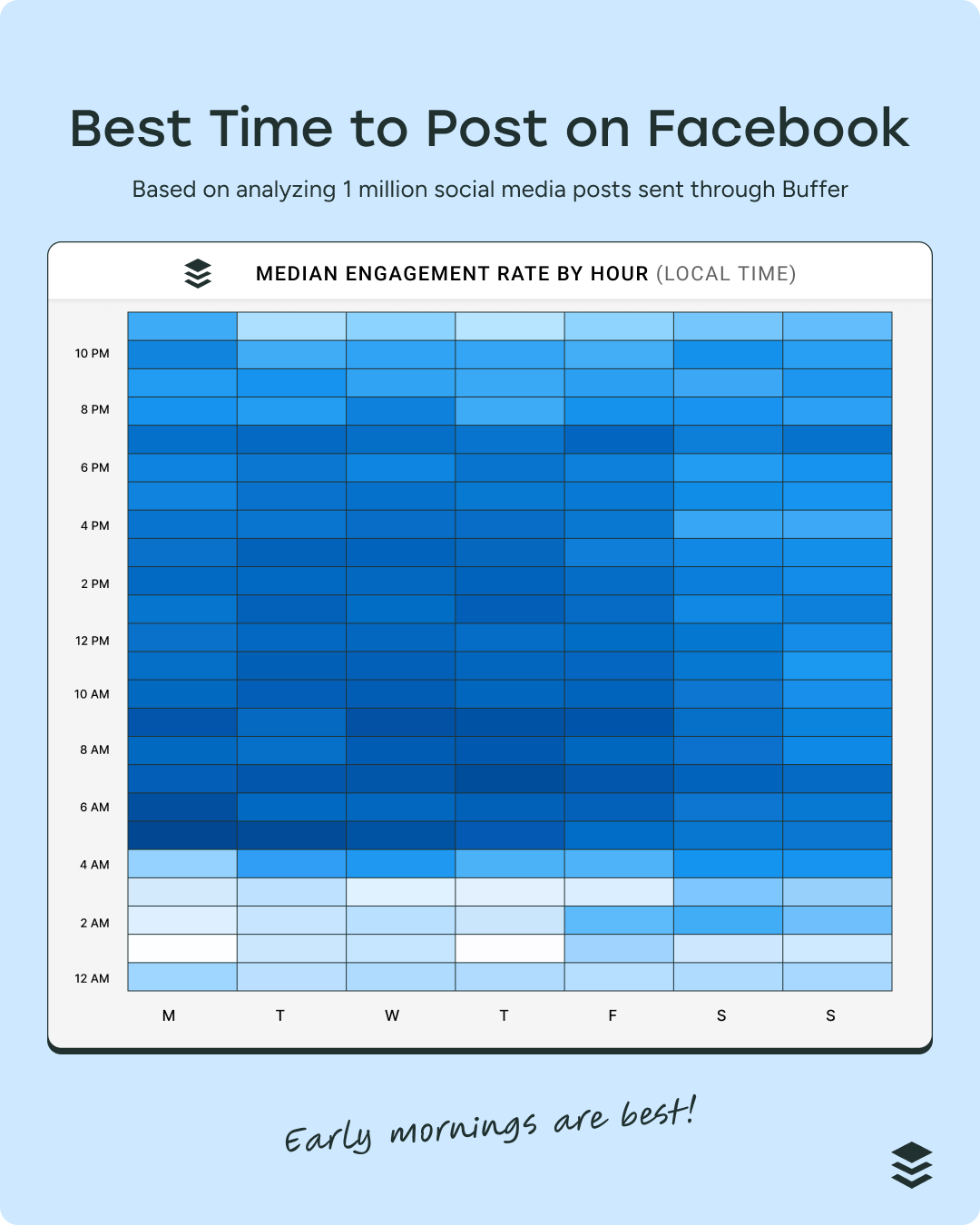
According to Buffer data, the best time to post on Facebook is 5 a.m. on Monday. Posts shared in the early morning generally get the highest media engagement of the entire week.

best time to post on facebook

🟢 Do this: Use this stage to build the habit of posting consistently. Experiment with different formats (links, text, images, video) and track what sparks the most interaction. Don’t overthink performance — consistency is the real win here.

📖 Learn more about your best time to post in Best Time to Post on Facebook: Updated for 2025

1 – 5K followers: Broadening your circle

  • Engagement rate: 5.6%
  • Posting frequency: 23 posts/month or ~5 per week
  • Growth rate: 0.1% per month
  • Median reach per post: 129

As your audience expands beyond your close circle, engagement naturally dips. That’s not a failure — it’s a sign that you’re starting to reach a wider, less personally connected group.

🟢 Do this: Keep up a steady posting rhythm and start noting which types of posts perform better. At this stage, optimization matters: look at your top-performing posts and create variations.

5 – 10K followers: Finding repeatable wins

  • Engagement rate: 4.7%
  • Posting frequency: 35 posts/month (~1 per day)
  • Growth rate: 0.2%/month
  • Median reach per post: 271

Engagement rates continue to dip slightly, but you’re now reaching hundreds per post. This is where patterns start to emerge — you’ll likely notice certain topics, visuals, or formats consistently outperforming others.

Note the content types that perform best. We found that posts with photos tend to get 34.7% more engagement than text-based posts and 43.8% more engagement than video posts.

best content to post on facebook

🟢 Do this: Identify repeatable formats (like templates, series, or hooks) to scale without reinventing the wheel each week.

📖 Learn more about which formats perform best in Data Shows Best Content Format on Social Platforms in 2025: Millions of Posts Analyzed

10 – 50K followers: Momentum with scale

  • Engagement rate: 4.6%
  • Posting frequency: 56 posts/month (~2 per day)
  • Growth rate: 0.5%/month
  • Median reach per post: 629

At this level, you’re getting real traction — thousands of people reached monthly. Engagement rate holds steady, but the raw number of interactions is far larger.

🟢 Do this: Consider boosting posts that are already doing well to extend reach. Organic engagement is strong here, but ads can amplify your winners.

📖 Learn more about how to boost your content in How to Run Facebook Ads: Beginner’s Guide to Advertising on Facebook

50 – 100K followers: Audience maturity

  • Engagement rate: 4.3%
  • Posting frequency: 107 posts/month (~3 to 4 per day)
  • Growth rate: 0.2%/month
  • Median reach per post: 1,646

Your content is reaching thousands, but growth slows and posting frequency climbs. This reflects how competitive the feed is at higher levels.

🟢 Do this: Focus on quality signals (comments and shares) over vanity metrics. They carry more weight in Facebook’s algorithm at this scale.

100 – 500K followers: High visibility, lower rate

  • Engagement rate: 3.9%
  • Posting frequency: 179 posts/month (~6 per day)
  • Growth rate: 0.1%/month
  • Median reach per post: 2,846

Here, engagement looks lower in percentage terms, but each post still pulls in thousands of interactions. Maintaining quality and volume becomes the real challenge.

🟢 Do this: Build systems — whether through scheduling tools, templates, or a content team — to sustain posting without sacrificing quality.

📖 Start with scheduling and add it to your system with How to Schedule Facebook Posts in 3 Easy Ways (+ Save Hours Every Week)

500K – 1M followers: Scale brings pressure

  • Engagement rate: 4.2%
  • Posting frequency: 302 posts/month (~10 per day)
  • Growth rate: 0.0%/month
  • Median reach per post: 8,800

At this point, reach skyrockets, but growth plateaus. Engagement percentages tick up slightly, but at such scale, maintaining connection is hard.

🟢 Do this: Prioritize content that builds loyalty — community posts, live sessions, behind-the-scenes — instead of just volume.

1M+ followers: Huge reach, steady rates

  • Engagement rate: 3.8%
  • Posting frequency: 436 posts/month (~14 per day)
  • Growth rate: 0.7%/month
  • Median reach per post: 15,683

Massive audiences mean massive baseline reach. But engagement plateaus, and volume is extreme. At this tier, systems and teams are often essential.

🟢 Do this: Balance reach with trust. Be selective about sponsored posts and prioritize formats that spark meaningful interactions.

Why engagement changes as accounts grow

Smaller accounts often see higher engagement because audiences are tighter-knit and more personal — your parents, extended family and best friend from kindergarten.

As follower counts climb, engagement rates dip — but absolute interactions grow.

That’s why the most useful benchmark is the one that matches your tier, not accounts 10x your size.

What these benchmarks mean for you

With a sharp focus on Facebook, you can see steady growth on Facebook.

  • For small accounts: focus on building habits and experimenting.
  • For mid-sized accounts: optimize your content mix and double down on formats that work.
  • For larger accounts: invest in systems, retaining audience loyalty, and sustainable workflows.

Growth on Facebook isn’t linear — but consistency pays off at every stage.

🤔 Curious how your account stacks up? Explore the full dataset with our Facebook benchmarks tool.

https://buffer.com/resources/facebook-benchmarks/


EU accuses Meta of violating content rules in move that could anger Trump

FTC Chairman Andrew Ferguson recently warned Meta and a dozen social media and technology companies that “censoring Americans to comply with a foreign power’s laws, demands, or expected demands” may violate US law. Ferguson’s letters said the EU’s Digital Services Act and other laws “incentivize tech companies to censor worldwide speech.”

Meta told media outlets that “we disagree with any suggestion that we have breached the DSA, and we continue to negotiate with the European Commission on these matters.” Meta also said it made changes to comply with the DSA.

“In the European Union, we have introduced changes to our content reporting options, appeals process, and data access tools since the DSA came into force and are confident that these solutions match what is required under the law in the EU,” Meta said.

TikTok, Meta accused of restricting data access

The EC also said it preliminarily found that both Meta and TikTok violated their DSA obligation to grant researchers adequate access to public data.

“The Commission’s preliminary findings show that Facebook, Instagram and TikTok may have put in place burdensome procedures and tools for researchers to request access to public data. This often leaves them with partial or unreliable data, impacting their ability to conduct research, such as whether users, including minors, are exposed to illegal or harmful content,” the announcement said.

The data-access requirement “is an essential transparency obligation under the DSA, as it provides public scrutiny into the potential impact of platforms on our physical and mental health,” the EC said.

In a statement provided to Ars, TikTok said it is committed to transparency and has made data available to nearly 1,000 research teams. TikTok said it may be impossible to comply with both the DSA and the General Data Protection Regulation (GDPR).

“We are reviewing the European Commission’s findings, but requirements to ease data safeguards place the DSA and GDPR in direct tension. If it is not possible to fully comply with both, we urge regulators to provide clarity on how these obligations should be reconciled,” TikTok said.

https://arstechnica.com/tech-policy/2025/10/trump-tariff-threats-havent-stopped-eu-from-cracking-down-on-meta/


16 Facebook Statistics to Know for 2025

As a marketer, you might have heard that Gen Z prefers TikTok, Instagram is trendier and so on. But Facebook is far from flailing. It’s the biggest social network in the world — by a large margin.

Gen Z prefers TikTok, Instagram is trendier, and new platforms are emerging to capture attention. But the data says different: Facebook isn’t merely hanging on, it’s the biggest social network in the world.

With over 3 billion monthly active users, Facebook sits at the center of Meta’s ecosystem and is one of the most important channels for marketers thanks to its highly effective ads. Its user base spans nearly every demographic and region, making it a platform that businesses can’t ignore, even as newer apps dominate headlines.

This roundup covers who uses Facebook in 2025, what performs, and how it shows up in consumer behavior and creator campaigns.

Facebook’s user base is massive (and more diverse than you might think)

Despite endless debates about whether Facebook is “for older generations” or “losing relevance,” the numbers don’t lie: Facebook is the biggest social platform in the world.

Facebook still dominates with over 3 billion monthly users

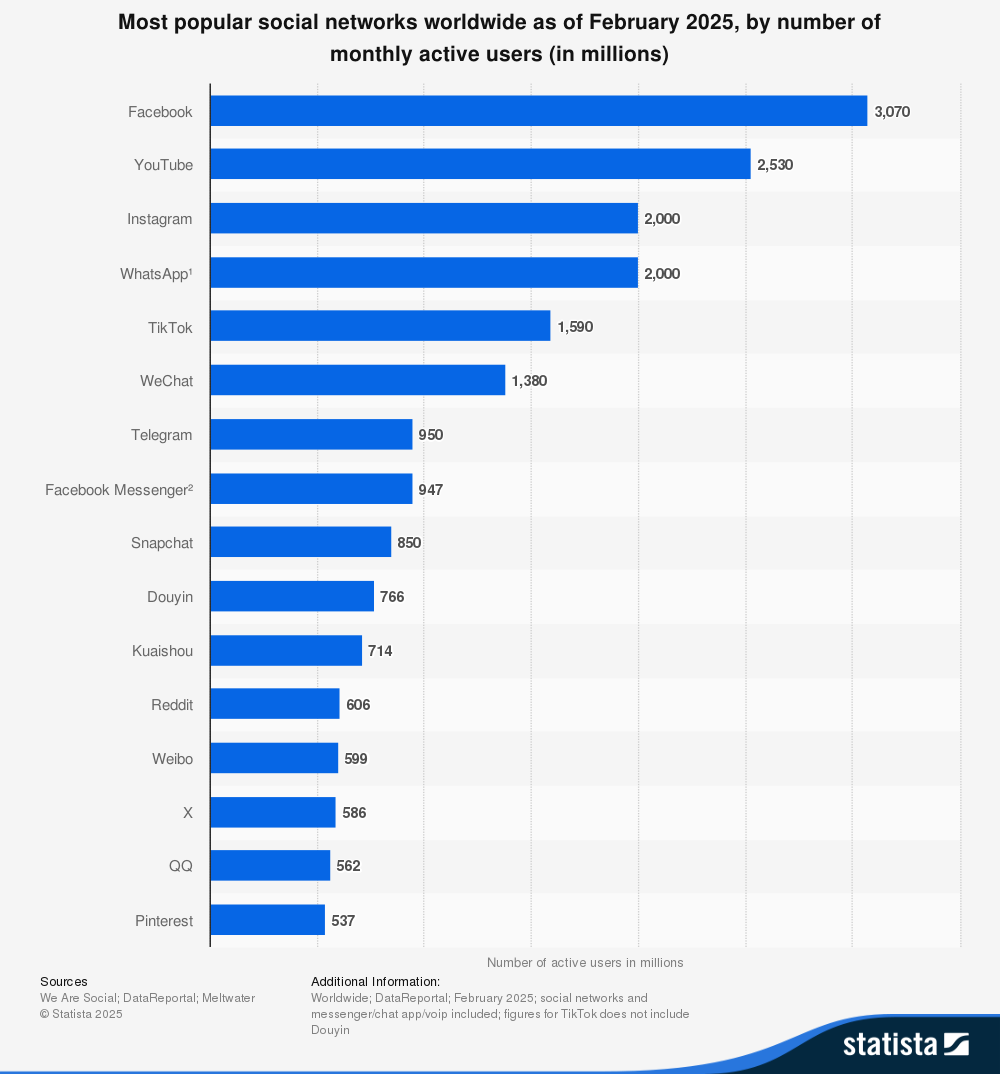
According to Statista, as of Q2 2024, it had 3.07 billion monthly active users — nearly 40% of the global population.

Horizontal bar chart ranking platforms by active users (in millions): Facebook (3,070M), YouTube (2,530M), Instagram (2,000M), WhatsApp (2,000M), TikTok (1,590M), WeChat (1,380M), Telegram (950M), Facebook Messenger (947M), Snapchat (850M), Douyin (766M), Kuaishou (714M), Reddit (606M), Weibo (599M), X/Twitter (586M), QQ (562M), Pinterest (537M).

Scale matters here — no platform can match Facebook’s reach and demographics. And if you zoom out to Meta’s family of apps (the parent company of Facebook), the numbers get even larger.

An estimated 90% of social media users worldwide have a Facebook account, and across Meta’s family of apps — including Instagram, Messenger, and WhatsApp — 3.48 billion people log in daily, according to Statista, 2025.

So if you’re wondering whether your audience is on Facebook, the answer is likely: yes.

Facebook’s global audience skews slightly male

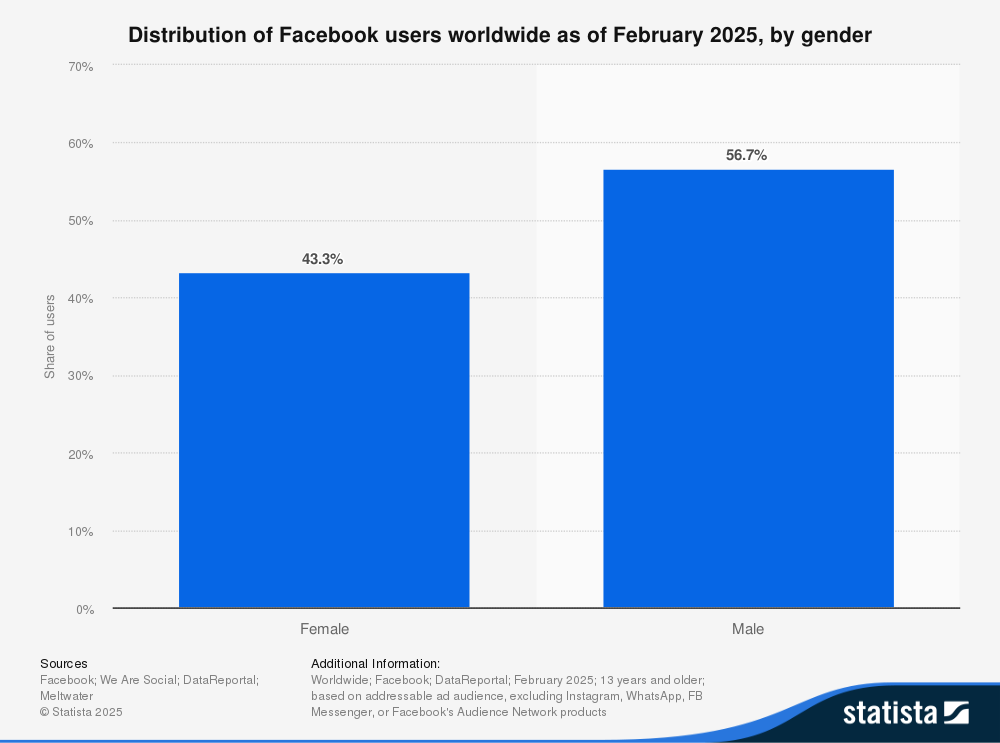
According to Statista, 2025, 56.8% of Facebook’s audience identifies as male, while 43.2% identifies as female.

If you’re tailoring content to a specific audience, this skew is worth keeping in mind — especially compared to more balanced platforms like Instagram.

Bar chart showing 43.3% female users and 56.7% male users.

💡

Note: The data we have access to only includes binary gender options (male and female). No additional gender identities were captured or reported.

Millennials make up Facebook’s core audience

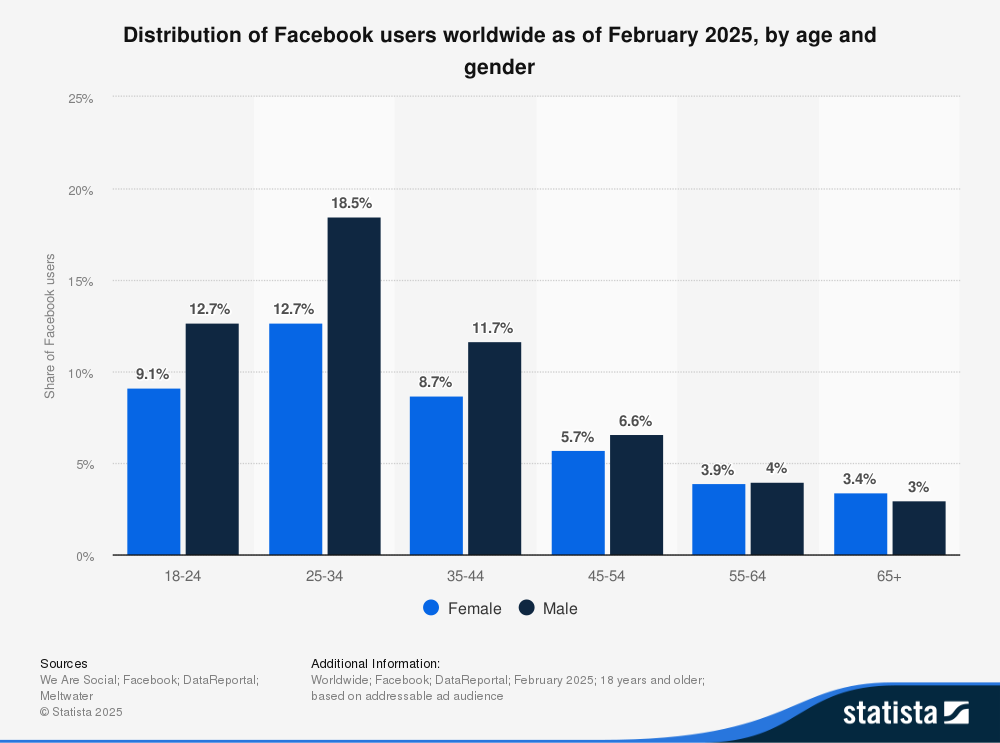
Facebook’s largest demographic is men aged 25–34, who account for 18.5% of users, as shared by Statista, 2025.

In fact, millennials between 25 and 44 make up just over half of the platform’s audience — a reminder that the group who first fueled Facebook’s rise are still highly active.

Bar chart showing usage by age group and gender: Ages 18–24: 9.1% female, 12.7% male Ages 25–34: 12.7% female, 18.5% male Ages 35–44: 8.7% female, 11.7% male Ages 45–54: 5.7% female, 6.6% male Ages 55–64: 3.9% female, 4% male Ages 65+: 3.4% female, 3% male.

But younger audiences aren’t absent. Men aged 18–24 are the second-largest user group, showing that Facebook continues to play a role in Gen Z’s digital mix (even if they spend more time overall on TikTok or Instagram, as shared by DataReportal, 2023).

At the other end of the age spectrum, only 6.1% of users are over 65, despite Facebook’s reputation as the “boomer app.”

The average social media user spends 36 minutes per day on Facebook

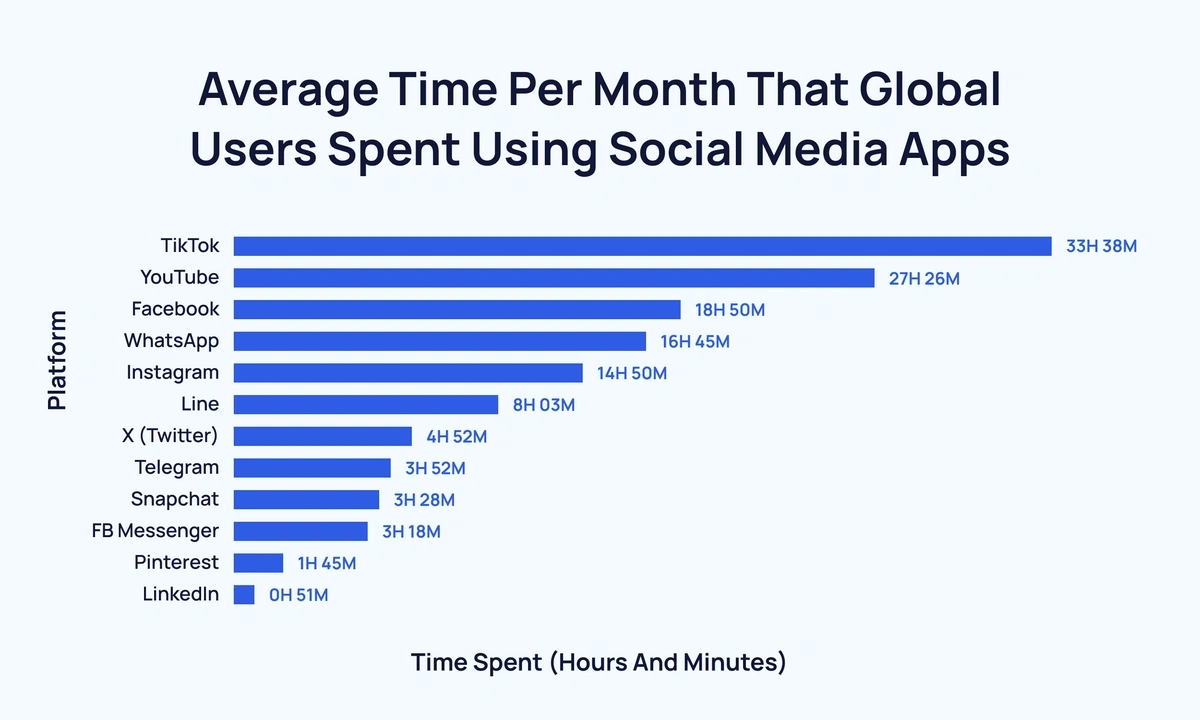
For the average social media user, Facebook is still part of their routine — nearly 19 hours a month, according to DataReportal, 2023.

That puts it behind apps like TikTok (33 hours, 38 minutes) and YouTube (27 hours, 26 minutes), but it’s far from being “checked once in a while.”

Horizontal bar chart: TikTok 33h 38m, YouTube 27h 26m, Facebook 18h 50m, WhatsApp 16h 45m, Instagram 14h 50m, Line 8h 03m, X (Twitter) 4h 52m, Telegram 3h 52m, Snapchat 3h 28m, FB Messenger 3h 18m, Pinterest 1h 45m, LinkedIn 51m.
Image Source

This doesn’t mean that you need to add Facebook to your strategy. But if you’re marketing to millennials, Gen X, or even older groups, Facebook still commands meaningful daily attention.

India leads the world in Facebook users

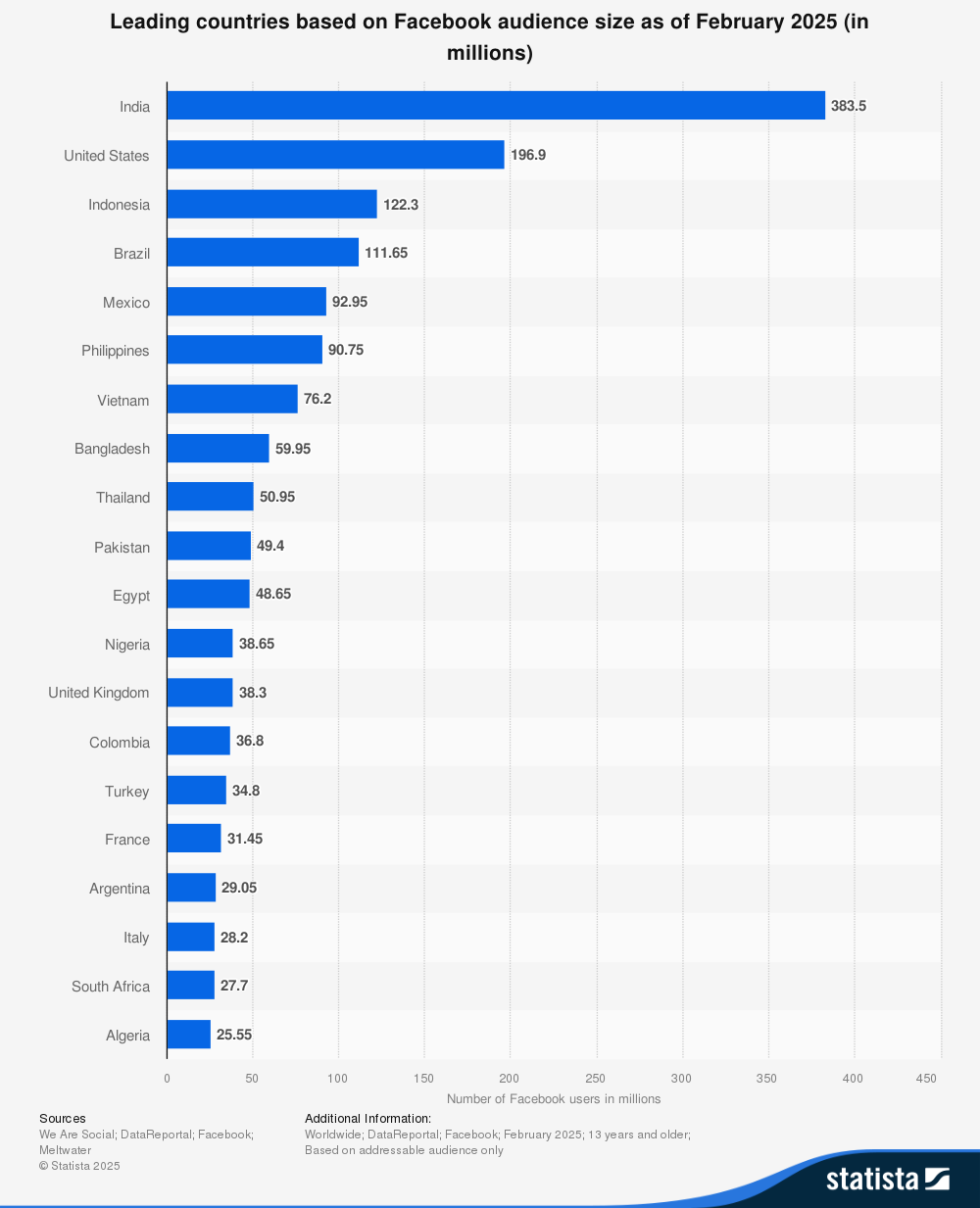
Facebook may be global, but its audience isn’t spread evenly. India tops the list with 383 million users (more than the entire U.S. population), according to Statista, 2025. To put it in perspective, if India’s Facebook audience were a country, it would be the third largest in the world.

Bar chart showing top countries: India (383.5M), US (196.9M), Indonesia (122.3M), Brazil (111.65M), Mexico (92.95M), Philippines (90.75M), Vietnam (76.2M), Bangladesh (59.95M), Thailand (50.95M), Pakistan (49.4M), Egypt (48.65M), Nigeria (38.65M), UK (38.3M), Colombia (36.8M), Turkey (34.8M), France (31.45M), Argentina (29.05M), Italy (28.2M), South Africa (27.7M), Algeria (25.55M).

Other major markets include the United States (196.9 million), Indonesia (122.3 million), and Brazil (111.65 million).

Together, these four countries make up a massive share of Facebook’s active audience and highlight where the platform has the most reach.

This means Facebook isn’t just a Western platform — its influence is strongest in large, mobile-first markets. If you’re looking to grow internationally, these countries are where your campaigns could see the biggest impact.

How people use Facebook

Knowing who’s on Facebook is only half the picture — the real insight comes from how people actually use it.

While the platform may not influence cultural conversation at the same scale as TikTok or X, Facebook is still deeply woven into daily routines.

For the creators, business owners, and marketers who rely on the platform, that mix of habitual use and massive reach means Facebook isn’t fading into the background. It’s just being used differently than it once was.

Facebook is still one of the most visited sites in the world

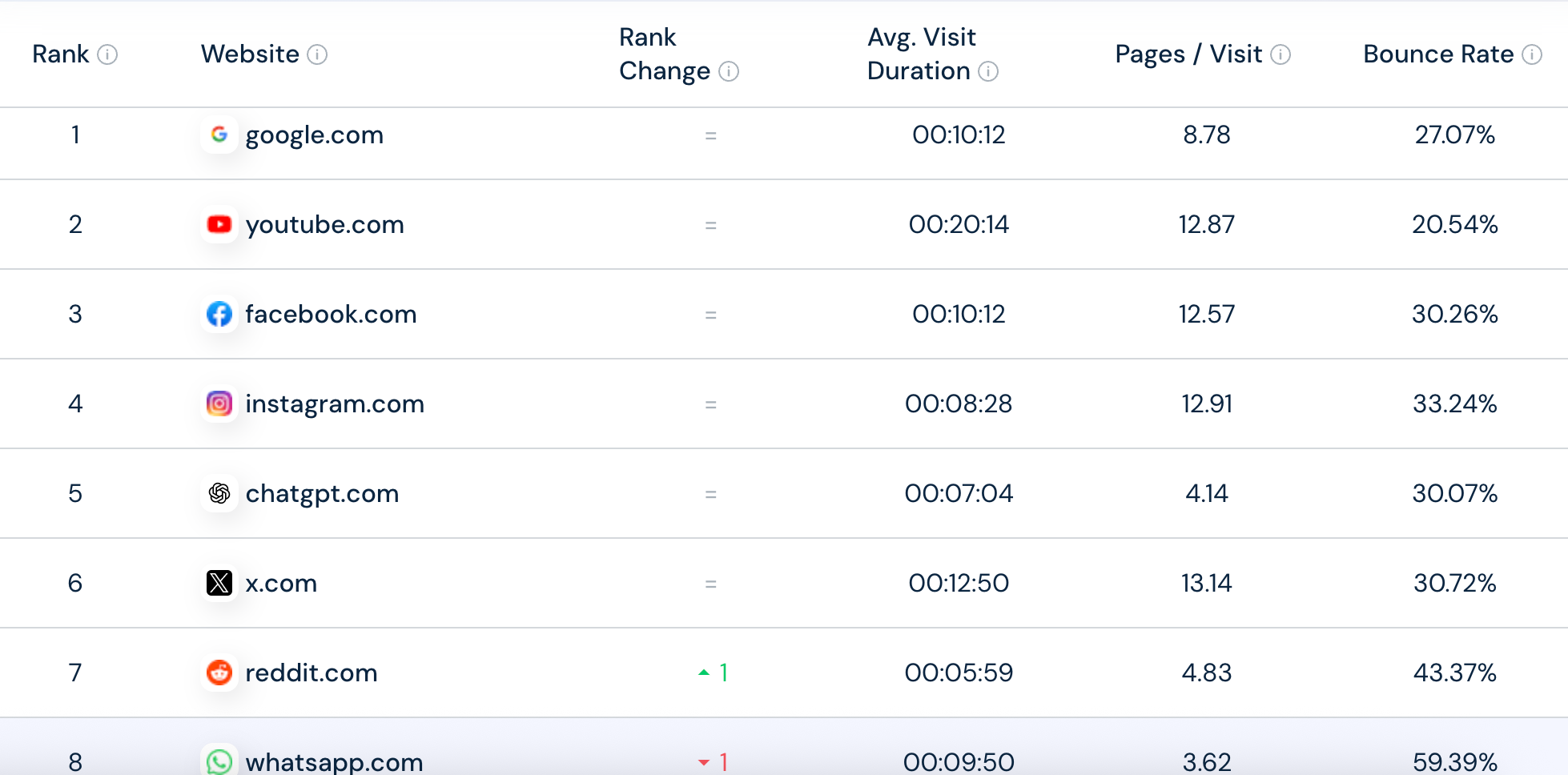
Despite how long it’s been around — or maybe because of that — Facebook remains a daily habit for billions. According to Similarweb, it’s the third most-visited website globally, behind only Google and YouTube. That puts it ahead of newer heavyweights like TikTok and Instagram.

Table showing global website rankings

This ranking shows that even if people spend less time per session than on other platforms, they keep coming back — often multiple times a day.

Most people use Facebook only on their phones

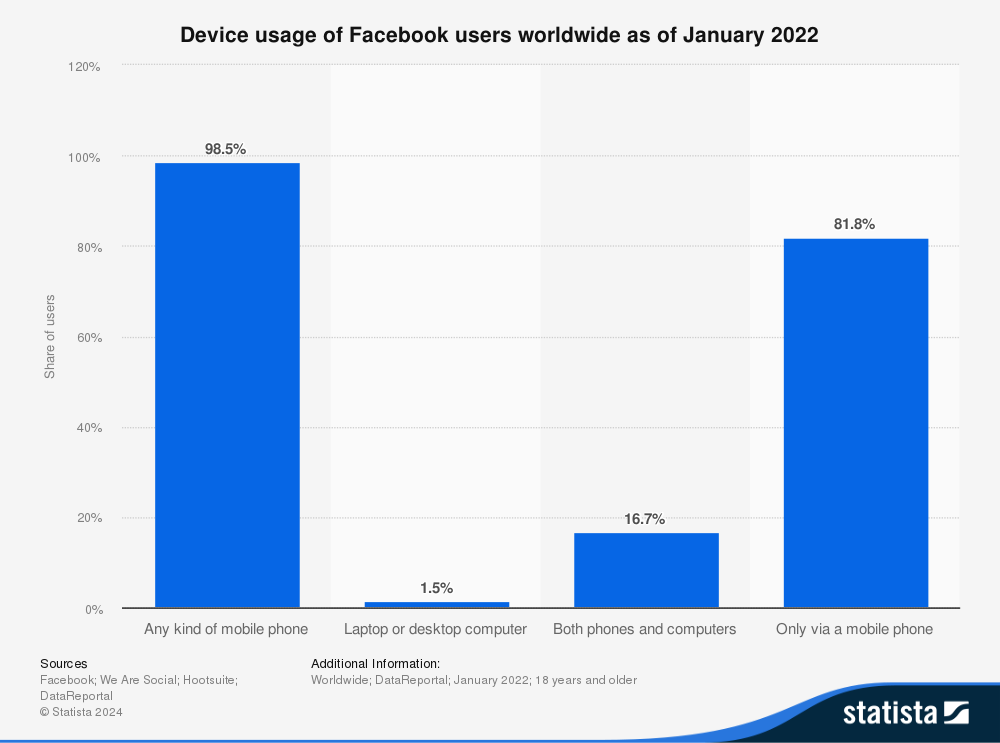
Like every major social platform, Facebook has gone mobile-first. Today, 81.8% of users access Facebook exclusively through their phones, while just 1.5% use desktop only, according to Statista, 2024. The rest split their time between the two.

Bar chart showing 98.5% of users access Facebook via any kind of mobile phone, 1.5% via laptop or desktop only, 16.7% via both phones and computers, and 81.8% only via a mobile phone.

That dominance of mobile matters for both creators and brands. Content needs to be designed for vertical scrolling, grabbing attention in the first few seconds, and encouraging interactions.

Stories draw half a billion daily users

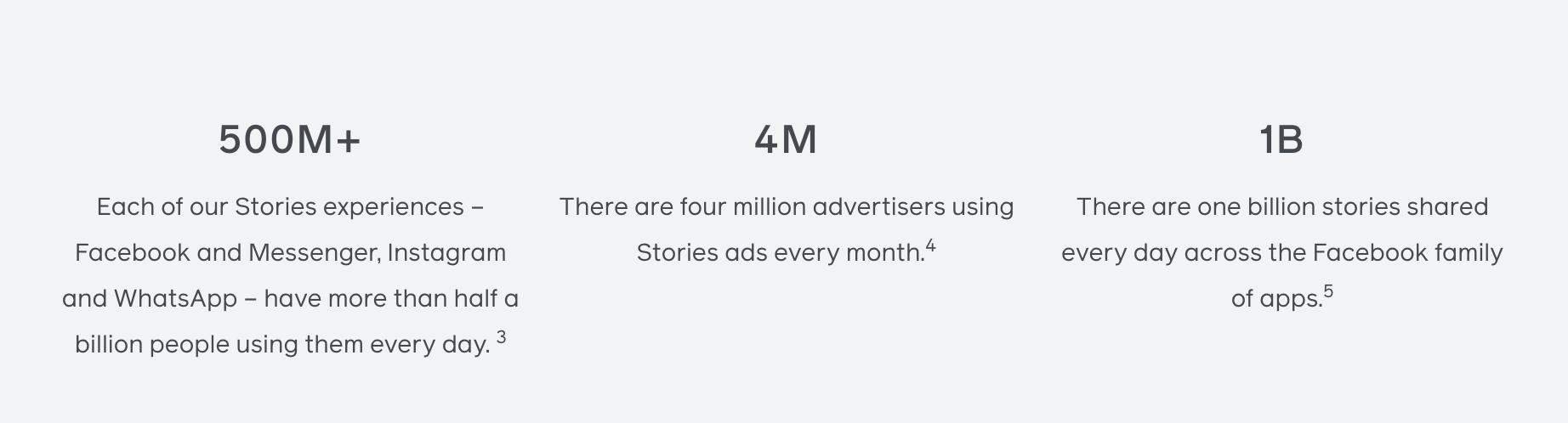
Even as Meta shifts its content focus toward reels, across its platforms, Facebook Stories haven’t faded. According to the platform, more than 500 million people use stories every day, making it one of the platform’s most consistent features.

Infographic with three stats: 500M+ people use Stories daily across Facebook, Messenger, Instagram, and WhatsApp. 4M advertisers use Stories ads each month. 1B stories are shared daily across Facebook’s family of apps.
Image Source

Stories thrive because they’re quick, casual, and mobile-native. They don’t require polished production or long watch times — they’re designed to disappear, which makes them feel more authentic.

That’s also why advertisers love them: stories provide a way to meet audiences in the flow of their daily scrolling without demanding too much attention.

Content performance and engagement

Not all Facebook posts perform the same. It’s vital to know which content types perform best and capture attention on the platform.

Facebook posts have one of the highest average engagement rates across social platforms

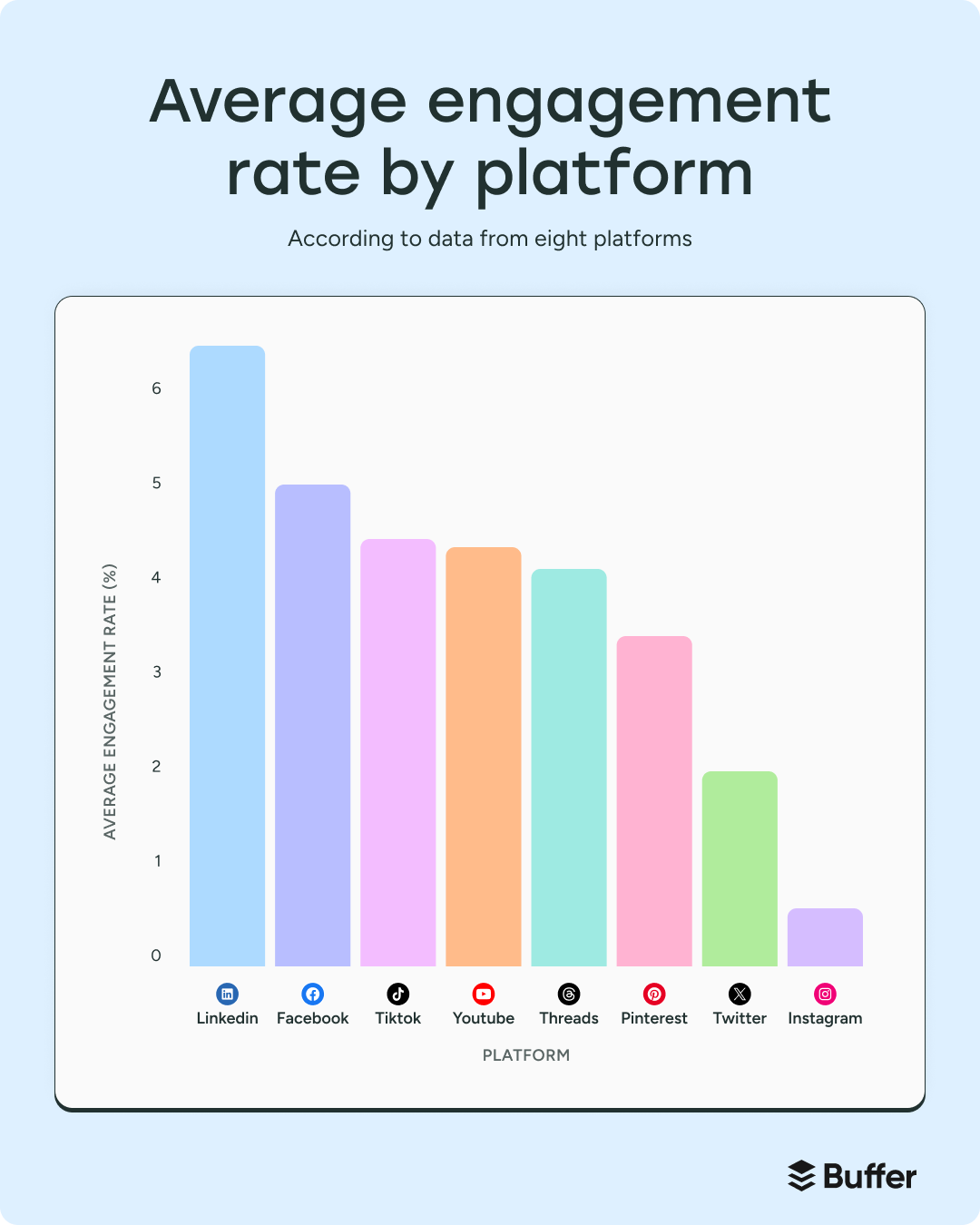
According to Buffer’s 2025 engagement rate study, Facebook posts average a 5.07% engagement rate — the second-highest across major social platforms, behind only LinkedIn (6.50%). That puts Facebook ahead of TikTok (4.86%), YouTube (4.41%), and Instagram (1.16%).

Bar chart comparing average engagement rates: LinkedIn (~6.5%), Facebook (~5%), TikTok (~4.7%), YouTube (~4.5%), Threads (~4%), Pinterest (~3.5%), Twitter (~3%), Instagram (~1%).

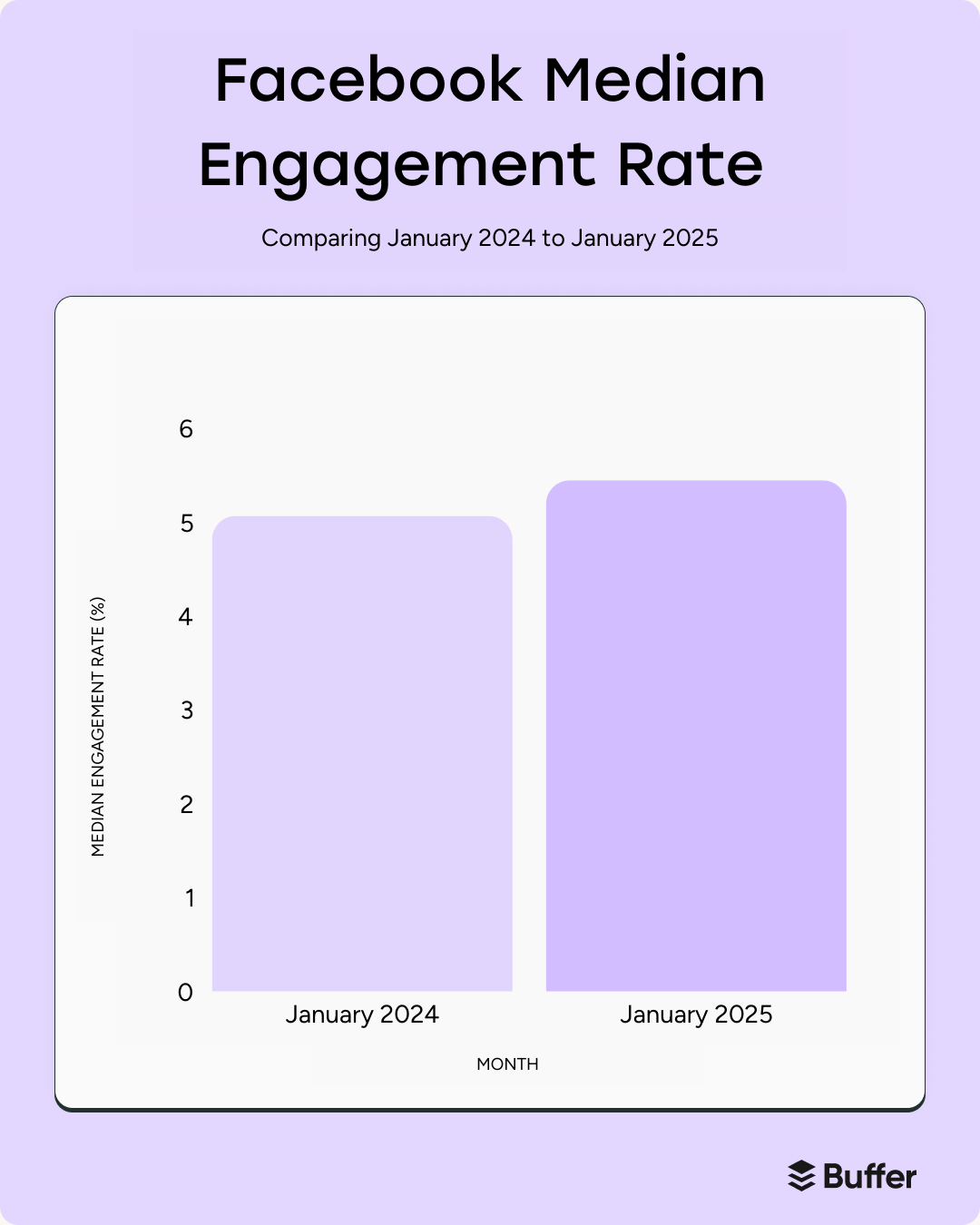
Notably, engagement on Facebook has held steady. While its siblings, Instagram and Threads, saw major swings in interaction patterns, Facebook held strong at around 5.45%.

Bar chart comparing median engagement rate: slightly over 5% in January 2024 vs just under 5% in January 2025, showing a small decline.

Much of this comes down to how its core audience uses the platform and Meta’s continued investment in new content and monetization features.

Photos and albums outperform other post types

Despite Meta’s big push into video, photos are still the strongest performers on Facebook.

In our 2025 analysis, pictures earned 35% more engagement than text posts and nearly 44% more than videos, making them the clear winners on the feed.

Bar chart showing median engagement rate by content type. Pictures have the highest engagement (~0.03), followed by text and video (~0.02), while links have the lowest (~0.015). Caption reads “pictures are best.”

Text posts came in second, edging out video by about 6.7%, while posts with links landed firmly in last place.

This ranking makes sense: Facebook’s feed has always rewarded quick, scroll-stopping visuals. A single photo or carousel is easier to consume than a video that requires sound or a link that pulls users out of the app. Even as Facebook Reels gain traction, images remain the format most likely to spark visible interactions.

In other words, on Facebook, simple visuals still punch above their weight.

Video is still a breakout format on Facebook

Static visuals may top the charts for engagement, but video remains one of Facebook’s fastest-growing formats. Forty percent of all time spent on Facebook and Instagram is dedicated to watching videos, according to eMarketer.

And when it comes to short-form specifically, Facebook Reels now reach an estimated 616.8 million people — nearly a third of the platform’s ad inventory, according to DataReportal, 2023.

Meta has been explicit about its focus here: Reels are reshared 3.5 billion times every day across Facebook and Instagram (Meta Creators, 2025).

That combination of reach and shareability has quickly made video the platform’s most dynamic content type, even if photos still dominate the feed.

The best time to post on Facebook is early morning

If you’re wondering when to post to get eyes on your content, early mornings can help you stand out.

Buffer’s 2025 analysis of more than 1 million posts shows that the single best time to post is 5 a.m. on Monday, with other strong slots on Tuesday at 5 a.m. and Thursday at 7 a.m.

Heatmap chart showing median engagement rate by hour and day of the week, based on 1 million posts. Darker shades represent higher engagement. The chart highlights early mornings (around 4–6 AM local time) across all days as the best times to post. Caption reads “Early mornings are best.”

Why so early? It comes down to behavior. Facebook’s largest demographic is adults aged 25–34, followed closely by 35–44 — groups most likely to check their feeds before work or right as they wake up.

Even if your post isn’t seen immediately, early-morning publishing lets it percolate in the feed so it’s waiting when users log on.

Wednesday is the best day to post on Facebook

When it comes to days of the week, mid-week wins. Posts shared on Wednesday see the highest overall engagement, edging out Thursday and Tuesday.

On the flip side, weekends lag behind — posts on Sunday average 15% less engagement than those shared mid-week.

Bar chart showing median engagement rate by day of the week. Engagement is relatively steady across all days, with Wednesday slightly higher than others. Caption reads “Wednesday is slightly better.”

While the difference between weekdays is small, the pattern is clear: Facebook thrives when people are in their workweek routines, not when they’re switching off.

If timing is part of your strategy, aim for mid-week mornings to give your posts the best chance of landing.

Posting more doesn’t mean more engagement

It’s tempting to think that more posts equal more traction, but Facebook’s data tells a different story.

RivalIQ’s 2024 benchmarks show that posting frequency has little impact on engagement rates.

Across industries, the median posting frequency on Facebook is 4.69 posts per week, and the median engagement rate is just 0.063%.

The brands in the top 25% for engagement post almost the exact same amount — 4.6 posts per week — but see engagement rates three times higher (0.19%).

The state of creators and brands on Facebook

While TikTok and Instagram tend to dominate influencer conversations, Facebook still plays a surprisingly big role in creator marketing.

Brands post an average of 43 times per month on Facebook

Across industries, the median posting frequency on Facebook works out to about 43 posts per month — roughly 1.5 posts per day (Socialinsider, 2024). That cadence reflects the platform’s rhythm: steady enough to stay visible in the feed, but not so frequent that it overwhelms audiences.

Still, frequency alone doesn’t guarantee engagement. Some brands see better results by posting less often but focusing on higher-quality content. Others thrive with daily posting because their audiences expect a constant flow of updates, promotions, or community news.

In practice, it’s about balance. Think of the 43-post benchmark as a starting point — then layer in timing, content mix, and quality. The brands that succeed on Facebook don’t just keep up a steady stream; they make each post worth stopping for.

Nano- and micro-influencers provide the best ROI

According to Shopify, here are the average cost per post for different influencer tiers:

  • Nano: $100 to $1,500
  • Micro: $1,000 to $6,000
  • Mid: $1,000 $15,000
  • Macro: $5,000 $40,000
  • Mega: $10,000+

For brands with tighter budgets, nano- and micro-influencers offer the strongest ROI. Their audiences may be smaller, but they’re often more engaged and more niche, making campaigns feel authentic rather than forced.

What these Facebook statistics mean for your strategy in 2025

With more than 3 billion monthly users and a role in everything from daily habits to shopping and influencer marketing, Facebook remains the backbone of social media.

The platform’s integration into the everyday lives of social media users places it in an interesting position compared to its peers. It’s where discovery, connection, and commerce quietly overlap.

You don’t need to treat Facebook like TikTok or reinvent your content to fit in with it. Instead, lean into the formats that perform and match your posting rhythm to your audience’s habits.

https://buffer.com/resources/facebook-statistics/


Zuckerberg’s AI hires disrupt Meta with swift exits and threats to leave

“While TBD Labs is still relatively new, we believe it has the greatest compute-per-researcher in the industry, and that will only increase,” Meta said.

Wang and other former Scale staffers have struggled with some of the idiosyncratic ways of working at Meta, according to someone familiar with his thinking, for example having to adjust to not having revenue goals as they once did as a startup.

Despite teething problems, some have celebrated the leadership shift, including the appointment of popular entrepreneur and venture capitalist Friedman as head of Products and Applied Research, the team tasked with integrating the models into Meta’s own apps.

The hiring of Zhao, a top technical expert, has also been regarded as a coup by some at Meta and in the industry, who feel he has the decisiveness to propel the company’s AI development.

The shake-up has partially sidelined other Meta leaders. Yann LeCun, Meta’s chief AI scientist, has remained in the role but is now reporting into Wang.

Ahmad Al-Dahle, who led Meta’s Llama and generative AI efforts earlier in the year, has not been named as head of any teams. Cox remains chief product officer, but Wang reports directly into Zuckerberg—cutting Cox out of overseeing generative AI, an area that was previously under his purview.

Meta said that Cox “remains heavily involved” in its broader AI efforts, including overseeing its recommendation systems.

Going forward, Meta is weighing potential cuts to the AI team, one person said. In a memo shared with managers last week, seen by the Financial Times, Meta said that it was “temporarily pausing hiring across all [Meta Superintelligence Labs] teams, with the exception of business critical roles.”

Wang’s staff would evaluate requested hires on a case-by-case basis, but the freeze “will allow leadership to thoughtfully plan our 2026 headcount growth as we work through our strategy,” the memo said.

© 2025 The Financial Times Ltd. All rights reserved. Not to be redistributed, copied, or modified in any way.

https://arstechnica.com/ai/2025/08/zuckerbergs-ai-hires-disrupt-meta-with-swift-exits-and-threats-to-leave/