How to Schedule Facebook Posts in 3 Easy Ways (+ Save Hours Every Week)

I run a Facebook group called Freelancers Who Work Smart, Not Hard, but, for ages, I managed it the hard way, not the smart way.

The hard way looks like this: trying to remember to post regularly (when I sometimes can’t even remember what day of the week it is), coming up with some of my best ideas at 3 a.m. (before promptly falling asleep and forgetting them), and posting sporadically with neither consistency nor strategy. Days or even weeks (eek) would go by without me posting, and the group would lose momentum. 

Somewhat ironically, things changed when I went on maternity leave. Before taking three months off work, I scheduled two posts a week to keep the group active while I was dealing with diapers. In doing this, the group ended up becoming more active than it’s ever been!

So in the interest of working smarter, not harder — whether you run a Facebook Page or Facebook Group — let me walk you through how you might be able to set up a similar process. 

In this guide, I’ll cover the main advantages of scheduling Facebook posts and explain exactly how to schedule posts on Facebook to improve your posting consistency and content performance.

Jump to a section:

5 benefits of scheduling Facebook posts 

Whether you’re trying to increase brand awareness, grow your audience, build community, or generate leads (or all four!), there are many benefits to scheduling your Facebook posts in advance. 

1. Maintain consistency 

Where content is king, consistent content is the trusted advisor the king can’t live without. It’s simple: When you post regularly, your audience knows what to expect and when to expect it. And you stay top of mind so they don’t forget who you are and what you do. 

The numbers back this up. Buffer’s data scientist, Julian Winterhiemer, analyzed engagement across all platforms Buffer supports — Instagram, Facebook, TikTok, LinkedIn, Bluesky, Threads, X, YouTube, Mastodon, and Pinterest. And, guess what? The most consistent posters received 5 times more engagement per post than users who posted inconsistently.

From my own small and less impressive dataset, I can definitively say that scheduling = consistency. Check out my stats below. I was on maternity leave (with scheduled posts) from May 1st to July 31st. There’s clearly a lot more activity happening in the former half of the chart compared to when I relied on my ad-hoc posting (after August 1st).
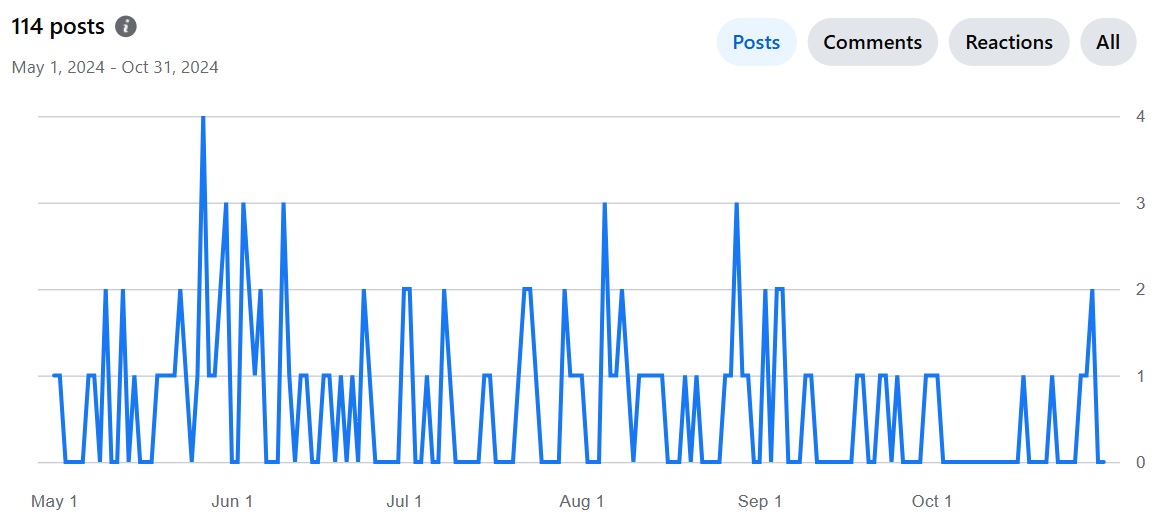
So scientifically and anecdotally, scheduling posts consistently is your secret weapon for building an engaged, loyal audience.

2. Create higher-quality content 

The beauty of scheduling your posts is that it gives you the gift of time. 

Instead of scrambling to come up with something on the fly, you can plan ahead and make sure each post is thoughtfully crafted and not just checking the box of, “Oh heck, I need to post something before people think I’ve disappeared.” (Yes, I am speaking from personal experience.)

Scheduling forces you to slow down and focus on quality, rather than rushing through a post at the last minute just because you need to get something out there. 

When you take the time to consider your content carefully, it shows. Your posts will be more intentional, more aligned with your goals, and ultimately more effective at connecting with your audience. Plus, you’ve got a buffer (no pun intended) to refine things before hitting ‘publish.’

3. Be more efficient and save time 

I’ve touched on this above, but time is your most valuable resource. And posting on Facebook can take a lot of it, especially if you’re creating your posts one by one on the day you plan to share them. 

Then there’s the fact that constantly switching between tasks isn’t just inefficient; it’s a brain-drainer too. Did you know multitasking makes you slower, less accurate, and more mentally drained? I certainly don’t need that in my life, and I doubt you do either. 

When you schedule your posts ahead of time, you can batch your work, reducing the mental load of having to post on the fly and breaking your flow. By setting aside an hour or two to plan your content for the week, you’ll save time, preserve your focus, and ensure that each post is on point. Efficiency for the win!

As I mentioned earlier, I created my content in batches before I went on maternity leave, which made the task more manageable. So much so, that it’s the most consistent I’ve ever been, despite being away from my desk. 

4. Optimize reach by posting at the best time for your audience

Part of your content strategy involves figuring out the best time to post on Facebook for maximum engagement.

Julian was kind enough to dig into the data here on this, too. He pored over the performance of more than 1 million Facebook posts sent via Buffer by businesses, creators, and influencers to pinpoint the best time to post on Facebook, the best day to post on Facebook, plus the best-performing content on Facebook.

According to Buffer data, the best time to post on Facebook is 5 a.m. on Monday.

Note that this doesn’t necessarily mean this is when audiences are up and consuming your content — it’s likely that posts need some time to gain momentum on the feed.

Regardless, it means the best-performing posts were shared at that time. If that isn’t a great reason to schedule your Facebook content, I don’t know what else is! 
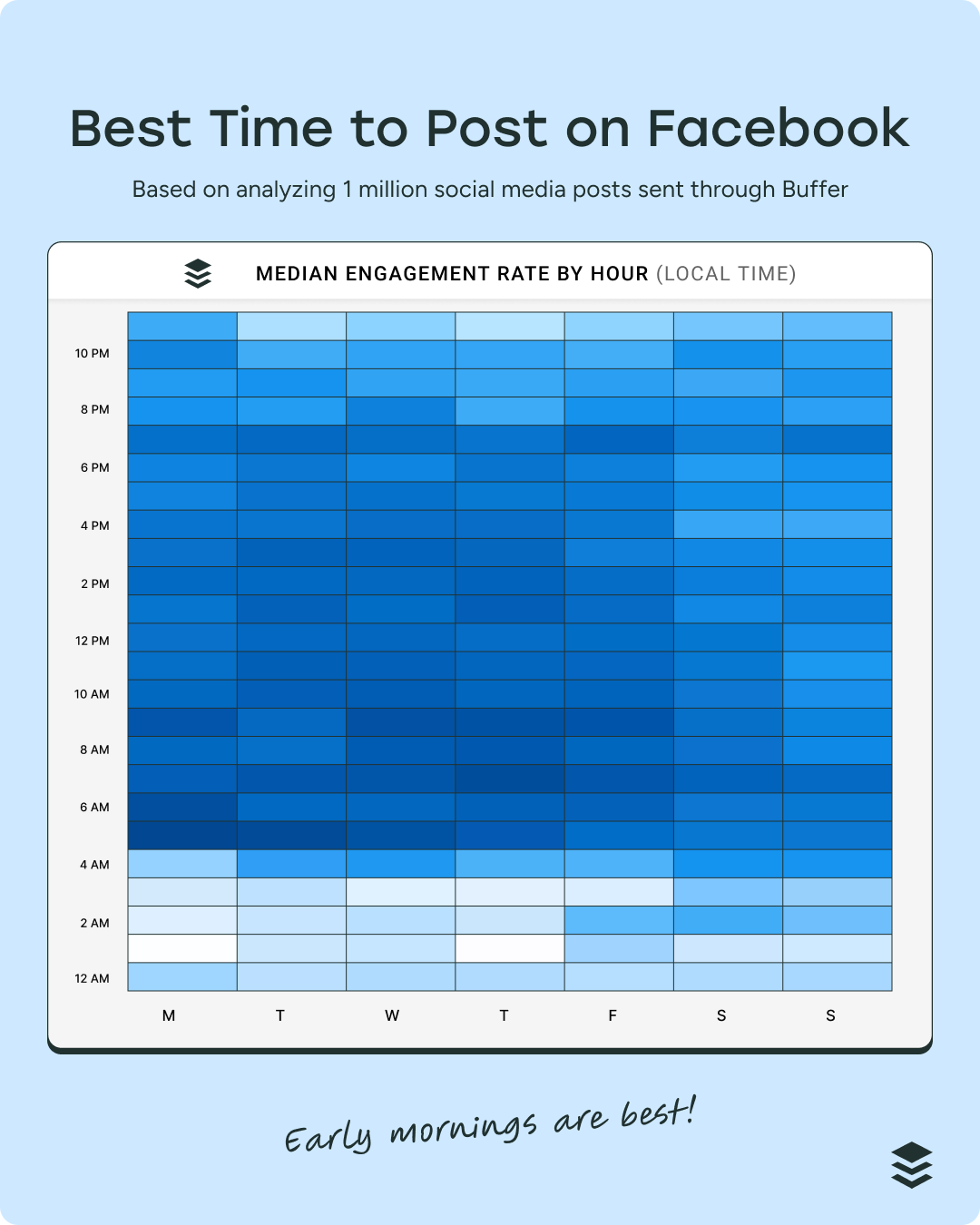
heatmap graphs showing the best time to post on Facebook

Here’s a crucial caveat: There’s no universally optimal time to post, as it will also depend on your business and its circumstances. The best time to post on Facebook — or any social media platform — always depends on your audience. 

In my group, for example, I’m reaching two primary time zones: SAST and CAT, so I need to find a time that works for both. I aim to hit the South African audience at lunchtime, and the US audience first thing in the morning as they start their day. 

5. Better content planning and control

I know that random posting can feel a bit like throwing spaghetti at the wall to see what sticks. But when you schedule posts, you’re in the driver’s seat. 

You can plan strategically, making sure your content is spaced out in a way that keeps things fresh and engaging. This also allows you to plan for time-sensitive content, ensuring it goes out when it’s most relevant. 

It’s also much easier to maintain a consistent voice and style when you’re in control of your posting schedule. Instead of lashing out with something spicy and off-brand because you’ve had a bad day, planning and scheduling ahead gets you in the flow of creating thoughtful, on-brand content that reflects your values and resonates with your audience.

For me, scheduling Facebook posts provides peace of mind that everything’s taken care of, leaving me with more brain space to a) do my real job, and b) focus on creating even more awesome content. 

Now that we’ve covered the ‘why’ of Facebook scheduling, let’s dive into the ‘how:’

How to schedule a post on Facebook using Buffer 

Let’s start with the most feature-rich scheduling route, a social media management tool like Buffer.

Here’s how to schedule using Buffer in four simple steps:

  1. Go to your Buffer dashboard.
  2. Select your Facebook Page or group.
  3. Craft your Facebook post.
  4. Schedule your post.

1. Go to your Buffer dashboard

Once you’ve signed up for Buffer and connected your Facebook account, you’ll see your Buffer dashboard:
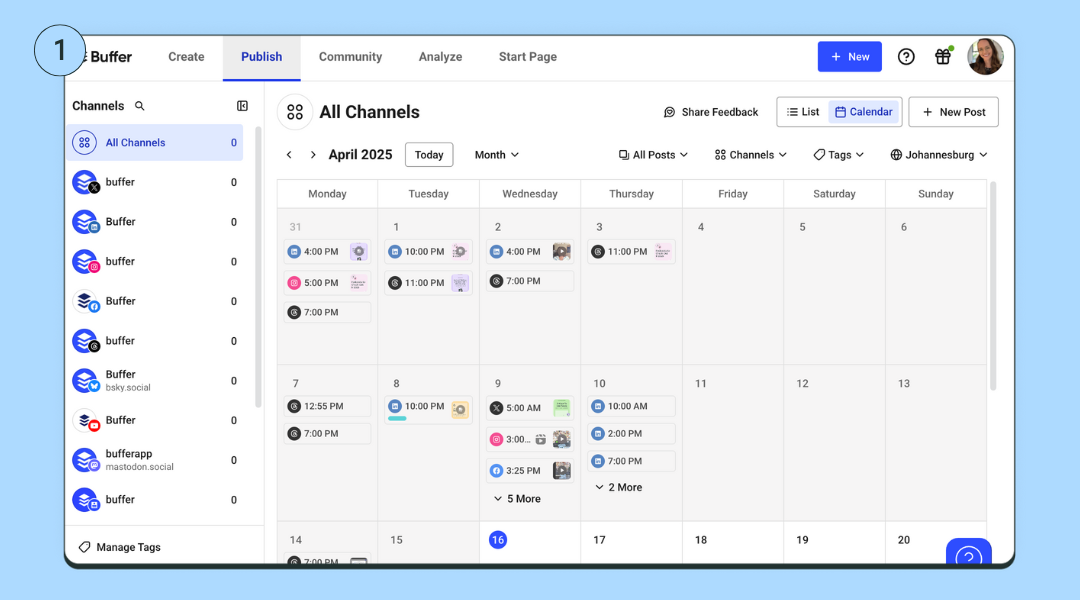
screenshots showing How to Schedule Facebook Posts in Buffer

2. Select your Facebook Page or group 

Select the Facebook Page or profile you want to post to, in the left-side column. Click on the ‘+ New’ create post button on the top right-hand side of your screen, then choose ‘Post.’
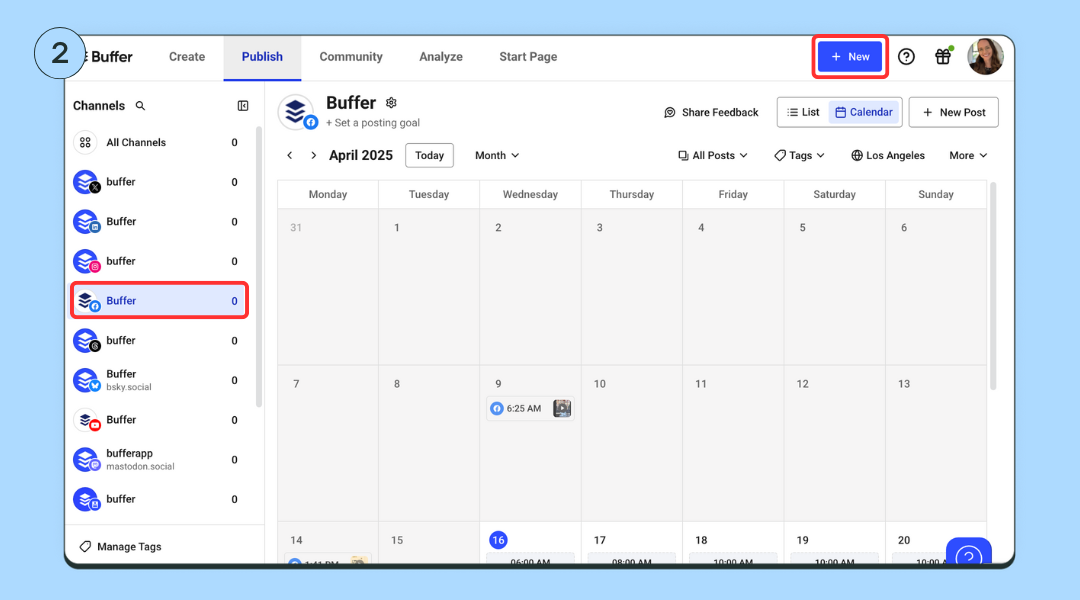
screenshots showing How to Schedule Facebook Posts in Buffer

3. Create your Facebook post

A popup where you can craft your post will appear. (You can also add any other channels you have connected to crosspost your content elsewhere.)

Use an idea you’ve generated or create from scratch. Choose ‘Post,’ ‘Reel, or ‘Story,’ depending on what content you want to post. Upload your media and add your caption.
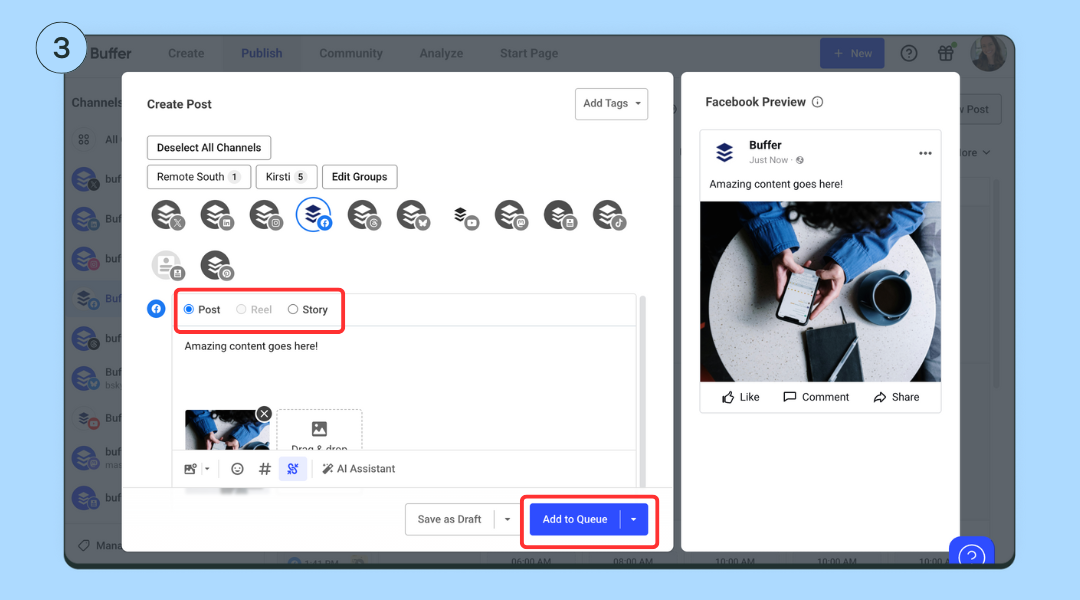
screenshots showing How to Schedule Facebook Posts in Buffer

4. Schedule your post

Once you’ve crafted your post, you have a few scheduling options:

  • Add to Queue (default): Add the post to the next available posting time on your posting schedule.
  • Schedule Posts: Schedule the post for a specific date and time.
  • Share Now: Share the post immediately.
  • Share Next: If you are on one of our paid plans, you can add the post to the top of your queue and have it published next.

📌 Quick tips:

  • To auto-publish your post at a specific time, make sure the ‘Automatic’ option is selected.
  • To schedule Facebook Group posts, you’ll need to choose ‘Notify Me’ to get a notification when the time comes to post.

Will using scheduling tools affect my engagement?

No, using scheduling tools will not negatively impact your engagement. In fact, consistency — something scheduling tools help you maintain — can improve your reach and engagement. 

Research has shown that posts scheduled via third-party tools may even achieve higher engagement compared to posts published natively. 

While scheduling posts doesn’t guarantee success on its own, it ensures that your content goes out at optimal times and frees up time for you to focus on creating and interacting with your audience. Engagement drops when users neglect to respond to comments or focus on posting frequently without considering content quality.

The bottom line is that with good content, proper timing, and active engagement, using scheduling tools can be a great way to enhance your social media presence.

How to schedule a post on Facebook on the app

If you have a Facebook Page, a profile in professional mode, or a Facebook Group, you can create, schedule, and manage posts directly on the Facebook app.

How to schedule a post on your page or professional profile:

  1. At the top of your feed, page, or profile, tap ‘What’s on your mind?’
  2. Create your post.
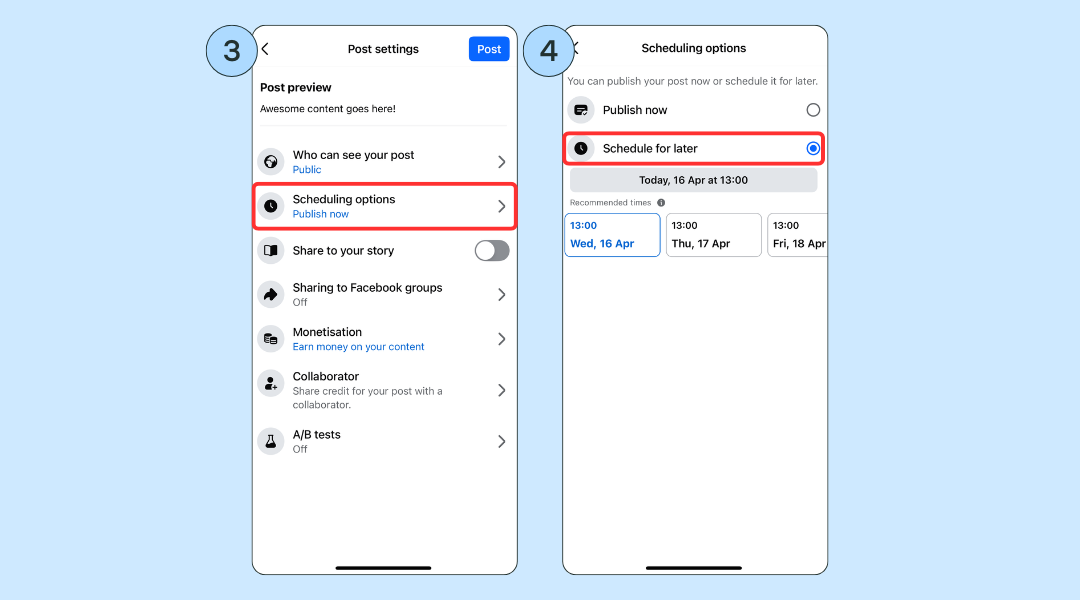
  3. Tap ‘Next’ to open post settings and scheduling options.
  4. You can then choose a time to publish your post or use the recommended times.
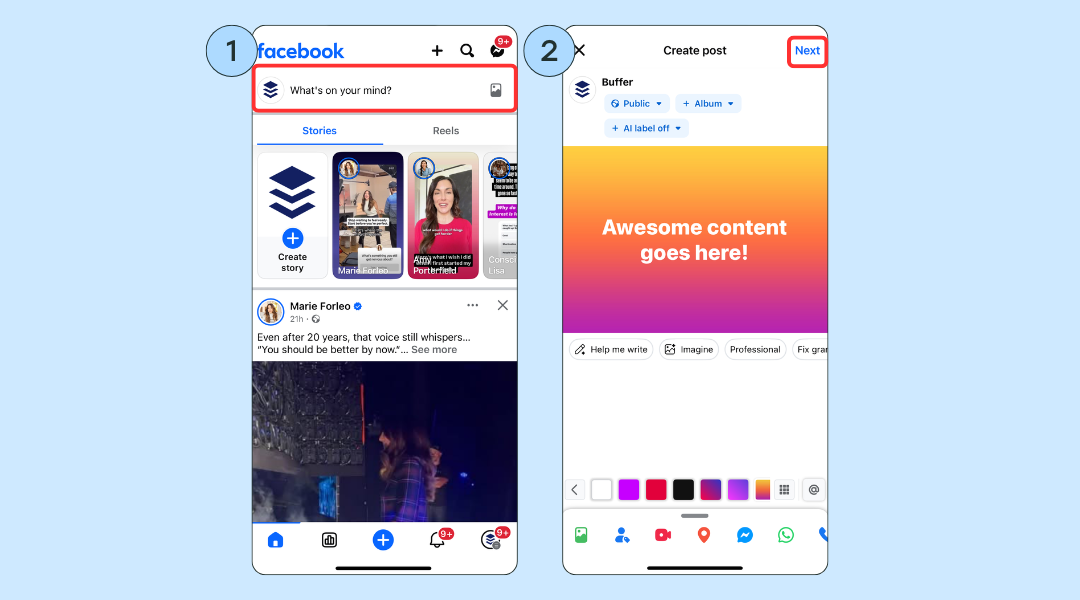
screenshots showing How to Schedule Facebook Posts

⚡️ Pro tip: To see all your scheduled posts, tap ‘Manage Posts’ on your page or profile.

How to schedule a Facebook Group post:

  1. Tap ‘Write something’ in your group and create your post. 
  2. Tap the calendar icon to set a date and time, then ‘Schedule’. 
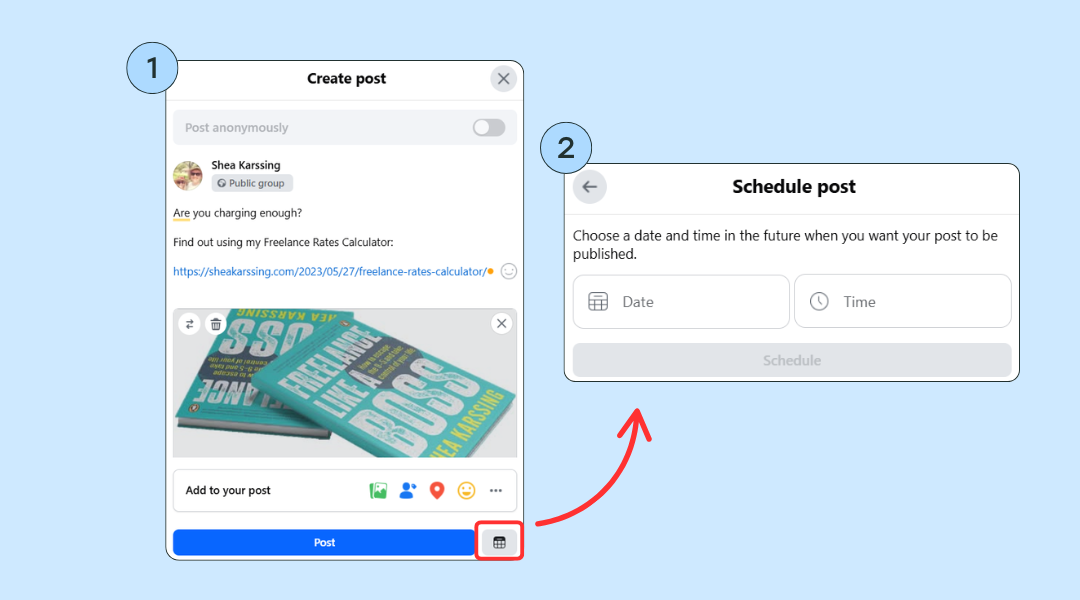
How to schedule a post on Facebook using Meta Business Suite

Meta Business Suite is a free tool from Meta that lets you manage your Facebook and Instagram content in one place.

Compared to Facebook’s native scheduling, Business Suite gives you more control and lets you post to both platforms at once, though it is a bit more complicated to use.

  1. Navigate to the business page you manage.
  2. Click on ‘Meta Business Suite’ on the left-hand menu or at business.facebook.com.
  3. In the Business Suite dashboard, choose ‘Planner’.
  4. Click ‘Create post’: Choose where you want to publish (Facebook, Instagram, or both), then write your post, add media, and links.
  5. Scroll down to ‘Scheduling options’ and toggle ‘Set date and time’.
  6. Pick the date and time you want the post to go live.
  7. Click ‘Schedule’ to confirm.

📌 Note: Meta Business Suite currently does not allow posting or scheduling to Facebook Groups.

Comparing the three scheduling options at a glance

Feature

Native

Buffer

Meta Business Suite

Supported Platforms

Facebook, Instagram

Facebook, Instagram, Twitter (X), LinkedIn, TikTok, Pinterest, YouTube, Google Business Profile, Bluesky, Mastodon, Threads

Facebook, Instagram

Facebook Group post scheduling

Yes

Yes – with mobile notifications

No

Content Scheduling

Yes – Limited to Facebook & Instagram

Yes – Centralized dashboard for multi-platform scheduling

Yes – Limited to Facebook & Instagram

Scheduling Features

Basic scheduling with limited options

Advanced scheduling options with features like queue management and optimal timing suggestions

Basic scheduling capabilities without advanced queue management

Create space

No – No central content library or idea board available

Yes – Dedicated dashboard to save and organize ideas, photos, GIFs, PDFs, videos, links, or text so you can quickly turn them into posts later

No – No central content library or idea board available

AI Assistance

No

Yes – AI Assistant helps write, rephrase, and generate post ideas based on prompts

Yes – AI suggestions for captions and post improvements for Facebook/Instagram.

Content Repurposing

No

Yes – Composer allows you to tailor posts for each platform, ensuring your content is optimized for different audiences

No

Customized Landing Page

No 

Yes – Create a Start Page in minutes

No

Team Collaboration

No 

Yes – Draft approvals, comments, role assignments

No

Focused Scheduling

No – Must navigate through Facebook

Yes  – Third-party tool helps avoid distractions from social platforms

No – Must navigate through Facebook or Instagram apps

Access to Latest Features

Yes – Immediate access to platform-specific features

Indirect  – May not always have immediate access to platform-specific features

Yes – Immediate access to Facebook & Instagram updates

Ease of Use

Simple interface, but can feel limited

Simple, clean interface with centralized dashboard

Can be complex to navigate, especially for beginners

Pricing

Free

Free plan available with premium features at affordable rates ($5/month)

Free

How to edit or delete a scheduled Facebook post

Spotted a spelling error to fix? Or perhaps circumstances have changed (is TikTok banned or not?!) and you no longer need the post at all? Good news; you can edit or delete a scheduled Facebook post. Here’s how: 

On Facebook: 

To change a post after you’ve scheduled it, tap ‘Manage Posts’, then delete the post and recreate it.

On Buffer: 

Tap your profile picture to head over to your page, then tap the ‘Settings and activity’ menu icon on the top right (the three horizontal lines).

  1. Tap ‘Scheduled content.’
  2. Here, you’ll find a list of the Facebook content you have scheduled. Tap on the one you want to edit.
  3. Tap on the three dots on the top right-hand side of the post.
  4. In this menu, you’ll have the option to delete, edit, and reschedule your post, or even post it right away by tapping ‘Share now.’

On Meta Business Suite:

Go to business.facebook.com and select your page. On desktop, from the left-hand menu, click ‘Planner’ or ‘Content’ > ‘Posts & stories’. On mobile, tap the calendar icon or navigate to Scheduled Posts.

  1. Use the calendar view or filter options to locate the post you want to edit.
  2. Click on the post.
  3. Click the three dots to select ‘Edit’ or ‘Delete’. 
  4. Make your desired changes and save or confirm deletion. 

5 quick tips for scheduling Facebook posts 

1. How often to post

We recommend posting to Facebook one or two times a day.

Action step: Plan out 5–7 high-quality posts per week in your scheduler. 

2. Best time to post

Our data suggests that early weekday mornings are the best time to post on Facebook. 

⚡️ Action step: Use Buffer’s Analyze feature to help you find the best times to post.

3. What can and can’t be scheduled

There are some post types that can’t be scheduled directly through third-party tools like Buffer.

Things that can be scheduled

  • Text updates
  • Images (up to four images with Buffer)
  • Videos
  • Links
  • Stories and reels (with mobile notifications)

Things that cannot be scheduled

  • Photo albums
  • Events
  • Check-ins
  • GIFs
  • Polls 

⚡️ Action step: Double-check each post type before scheduling. 

4. Stay consistent with goals and streaks

Buffer’s posting goals and streaks features help users stay consistent, which improves reach and builds audience trust over time.

⚡️ Action step: Set a posting goal in Buffer and use the streak tracker to keep yourself accountable.

5. Track analytics and engagement

Analyzing post performance helps you improve future content. 

⚡️ Action step: Use Buffer’s analytics dashboard to track engagement, reach, and click-through rates across posts. Repurpose or expand on what worked and ditch what didn’t.

Over to you 

There you have it; scheduling posts on Facebook makes it easier to stay consistent, grow your audience, and smash your social media goals. From my own experience, I highly recommend exploring how a scheduling tool like Buffer can help you work smarter, not harder. 

More Facebook resources 

https://buffer.com/resources/how-to-schedule-facebook-posts/
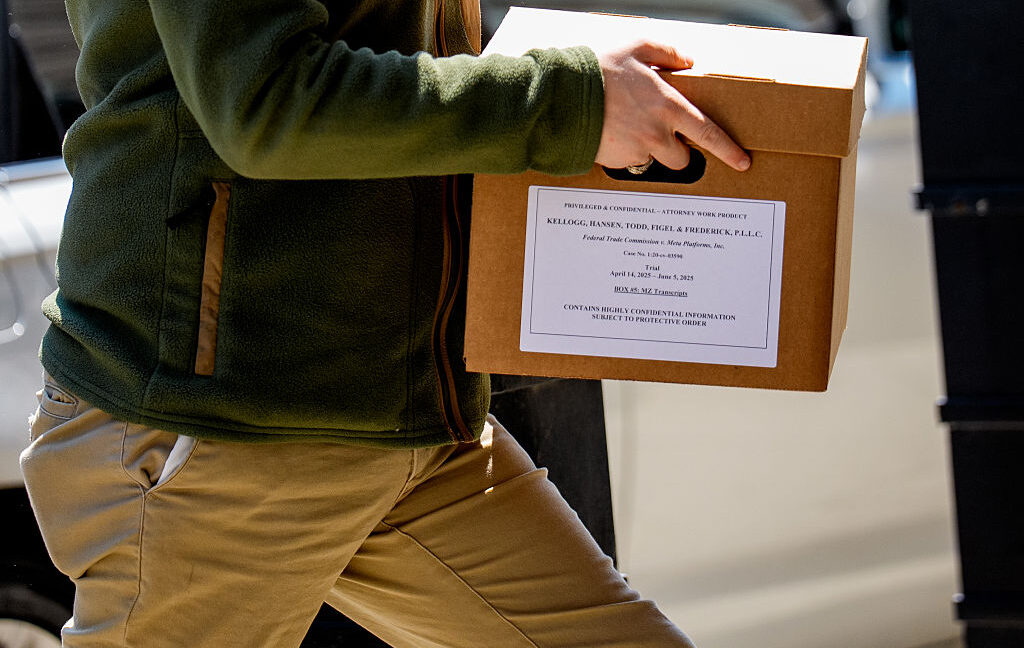


Zuckerberg’s 2012 email dubbed “smoking gun” at Meta monopoly trial

Still, for Meta, the stakes are high, as the FTC could pursue a breakup of the company, including requiring Meta to spin off WhatsApp and Instagram. Losing Instagram would hit Meta’s revenue hard, as Instagram is supposed to bring in more than half of its US ad revenue in 2025, eMarketer forecasted last December.

The trial is expected to last eight weeks, but much of the most-anticipated testimony will come early. Facebook’s former chief operating officer, Sheryl Sandberg, as well as Kevin Systrom, co-founder of Instagram, are expected to testify this week.

All unsealed emails and exhibits will eventually be posted on a website jointly managed by the FTC and Meta, but Ars was not yet provided a link or timeline for when the public evidence will be posted online.

Meta mocks FTC’s “ad load theory”

The FTC is arguing that Meta overpaid to acquire Instagram and WhatsApp to maintain an alleged monopoly in the personal social networking market that includes rivals like Snapchat and MeWe, a social networking platform that brands itself as a privacy-focused Facebook alternative.

In opening arguments, the FTC alleged that once competition was eliminated, Meta then degraded the quality of its platforms by limiting user privacy and inundating users with ads.

Meta has defended its acquisitions by arguing that it has improved Instagram and WhatsApp. At trial, Meta’s lawyer Hansen made light of the FTC’s “ad load theory,” stirring laughter in the reportedly packed courtroom, Benedict posted on X.

“If you don’t like an ad, you scroll past it. It takes about a second,” Hansen said.

Meanwhile, Newstead, who reportedly attended opening arguments, argued in her blog that “Instagram and WhatsApp provide a model for what successful acquisitions can achieve: Meta has made Instagram and WhatsApp better, more reliable and more secure through billions of dollars and millions of hours of investment.”

https://arstechnica.com/tech-policy/2025/04/ftcs-monopoly-case-hinges-on-zuckerbergs-damaging-texts-emails/


Inside the Facebook Algorithm in 2025: All the Updates You Need to Know

Remember good old chronological news feeds? Back in the early days of Facebook, circa 2006 or so, posts were shown pretty much in order of recency when you opened up the social media platform.

Well, things look a bit different nearly twenty years later.

What started as a place for sharing updates and photos with friends and family — putting the ‘social’ in social media — has grown into a full-fledged content platform.

Facebook has evolved from personal profiles to a space where people can follow creators and brands, join communities and groups, and promote events. Instead of just text and photo posts, there are now disappearing stories, reels, live streams, and much more.

With so many new features available on the platform, it makes sense that the Facebook algorithm — the ranking system that uses machine learning to arrange content in users’ feeds — has changed too.

What used to be one chronological feed is now a set of different feeds — and multiple feeds means multiple algorithms. These algorithms work together to decide what content users see when they open the app.

The Facebook algorithm is the lifeblood of one of the original social networks. It’s what makes the platform so more-ish — so it’s no surprise that it’s developed an almost mythical status for brands and creators. Is there a secret to getting your content seen by as many people as possible? 

Understanding how the Facebook algorithms work is a solid start. When you know what Facebook looks for when showing posts to users, you can make more thoughtful decisions about what, when, and why you post.

In this article, I’ll unpack everything we know about how the Facebook algorithms work, and I’ll share some tips you can use to get your content the reach it deserves.

How the Facebook algorithm works in 2025

The Facebook algorithm was created so that the Meta-owned platform shows users more interesting, relevant content that’s tailored to them and keeps them scrolling longer. 

“Facebook’s goal is to make sure that you see posts from the people, interests, and ideas that you find valuable, whether that content comes from people you’re already connected to or from those you may not yet know,” the company says.

To that end, there are three different types of content that will make it into users’ feeds:

  1. Connected content — content from the people they’re friends with or are following, groups they’ve joined, and pages they’ve liked.
  2. Recommended content — content Facebook thinks they’ll be interested in from pages and people they don’t already follow.
  3. Ads — content people see because of targeting, rather than the algorithm.

Since this post is about the Facebook algorithm and not Facebook ads, I’ll unpack the first two here.

How the Facebook algorithm ranks connected content

If a user is your friend (for personal profiles) or likes your Facebook Page or profile (for businesses and creators), your content may show up in their home feed when they open the app as part of the connected content system.

Here’s how Facebook evaluates and ranks your content:

1. Checks what posts are available

In the first part of this process, the algorithm looks at all the content that could show up in a user’s feed. This includes content shared by their friends, the pages they follow, and the groups they’ve joined.

Right from the get-go, content that violates Facebook’s Community Standards is excluded (more on this below).

2. Looks at signals

The second thing the Facebook algorithm does is look at ranking factors called ‘signals’ to decide how relevant a piece of content will be to that particular user. There are thousands of possible signals Facebook considers that are based on both user behavior and the post itself. Here are some examples. 

The Facebook feed algorithm might look at how often someone’s seen similar types of content recently (like photos or videos) and how much time they’re spending on their feed. It also takes into account factors related to the post, like how many comments or reactions it has and how long the comments are, on average. 

Importantly, it also looks at how likely someone is to interact with the person who shared the post, especially if they’re friends or in a group. That prediction is based on things like past interactions between them, both in public (like comments of reactions) and in DMs.

The Facebook stories algorithm might look at how often someone views stories in general and how many stories (or sets of stories) they’ve watched from different people or pages. It also pays attention to whether they’ve missed any stories from a person or page they follow, how many photos or videos are in a story set, and if they’ve ever replied to that person or page’s stories with a message.

3. Making predictions

Each of those thousands of signals is then used to make “personalized predictions about which content [users will] find most relevant and valuable.”

In other words, the algorithm looks at users’ past behavior to make predictions about whether they’ll be interested in your post and likely to interact with it.

For example, if you run a brand Facebook Page that they follow and visit often, and they regularly share your posts, Facebook knows they’re a fan. They probably want to see more of your content in their feed.

A less obvious example: If a user likes shopping in the afternoons and reacts to more branded posts during that time, Facebook will use that as an indicator to surface more branded posts during that time.

💡

Facebook ranking isn’t a one-and-done situation. The ranking system is constantly evolving based on the behavior of users.

4. Scoring the content

After all that, the algorithm gives each piece of content a ‘relevance score’. The higher the relevance score, the higher in the feed it will surface. 

At this point, the algorithm also mixes up the content to keep things feeling fresh — for example, it spaces out posts from the same creator or page so that users’ feeds aren’t filled with back-to-back content from one account (no matter how big a fan they may be).

Once all the connected content has been logged, analyzed, and ranked, the algorithm then starts to throw recommended content into the mix.

How the Facebook algorithm ranks ‘unconnected content’ for recommendations

Facebook’s recommended content system gives brands and creators a chance to draw in new fans and followers without any ad spend. It helps people in your target audience — even those who don’t follow you yet — discover the public content you share to your creator profile, brand page, group, or event.

Just like the connected content in the feed, recommendations are personalized — no two Facebook users will see exactly the same thing.

Facebook uses the same four-step ranking process for recommended content as it does for connected content, but with a different, equally large set of signals.

The feed recommendations algorithm might look at the type of post (like photo or video), how long someone watched it on their phone, and whether they’ve tapped ‘Show more’ on similar posts in the past six months. It also considers how often they’ve liked posts about a certain topic in the past 30 days, and whether they’ve shared posts from that person or page before.

The Facebook reels algorithm might look at how many reels someone has watched from a specific creator or page, which ones they’ve clicked to view in full screen, and which ones they’ve watched all the way through. It also considers factors like the video’s length, what topic the reel is tagged with, and whether the user has liked reels on a similar topic before.

Facebook has also shared detailed guidance on where it draws the line when it comes to recommendations, and certain types of content may be excluded. Since recommended posts are shown to people who may not already follow you, it makes sense that Facebook applies some pretty strict filters to keep that experience safe, relevant, and respectful. 

To increase your chances of getting your content recommended to new users, it’s worth familiarizing yourself with — and sticking to — their rules. 

Facebook applies two sets of standards here.

The first is its Community Standards, which are baseline rules for what’s allowed on the platform. Content that violates these rules is removed entirely. 

You’ll find the full list in Facebook’s Transparency Center (which is a must-read for all marketers and creators), but here are a few common examples of content that violates these standards (and will be removed):

Still, if your content doesn’t overtly violate one of these rules, that doesn’t mean it’s eligible for recommendation. 

Facebook has a second layer of standards: the Recommendations Guidelines. These apply to content that is allowed on the platform but doesn’t meet the higher bar for being recommended to Facebook users who don’t already follow you. In other words, the post might stay up, but it won’t get shown to a wider audience through feeds or suggestions.

Five categories of content are technically allowed on Facebook but may not be eligible for recommendations:

  1. Content that makes it harder for Facebook to maintain a safe community — for example, posts that talk about self-harm, suicide, or eating disorders; are sexually explicit; or promote regulated products.
  2. Sensitive or low-quality content about health or finance — like exaggerated health claims (such as “miracle cures”), cosmetic procedure promotions, or business models that may be misleading or deceptive, such as payday loans or “risk-free” investments.
  3. Content that users generally dislike — including things like clickbait, engagement bait (such as “like this if you agree”), or overly promotional contests or giveaways.
  4. Content from sources that lack transparency — such as news content without clear authorship or publishing information.
  5. False or misleading content — including fake news or claims that have been debunked by independent fact-checkers, such as widely disproved health or vaccine-related misinformation.

9 best practices for creating successful Facebook content

There’s no surefire way to ‘beat’ the Facebook algorithm, but there are plenty of things you can do to increase your chances of success on the platform. Here’s our list of best practices for generating reach and engagement on Facebook.

1. Stick to a consistent posting schedule

There’s a reason this advice has stuck around: posting regularly to your social media platforms continues to be one of the best ways to grow your audience. Even Head of Facebook Tom Alison has called this out as a tip for creators looking for success on Facebook: “Posting more can help you break through,” he said in one video. 

Consistency helps people stay familiar with your content, gives them more chances to engage with it, and makes it easier for Facebook to understand what kind of posts you’re sharing.

The numbers back this up too. Buffer’s analysis of data from more than 100,000 social media users found that people who posted consistently received five times more engagement per post compared to inconsistent posters. Even a moderately consistent rhythm saw four times more engagement than inconsistency.

You don’t have to post multiple times (or even once) a day to be consistent. What matters is finding a rhythm that works for you — and sticking to it — so that your audience knows when to expect something from you.

2. Create content that people want to engage with

As with all social platforms, producing high-quality content that resonates with your audience should always be your first social media marketing goal.

Posts that feel thoughtful, genuine, and relevant are far more likely to get people to pause, react, or share — and every interaction sends a signal to the algorithm that users want to see more of it. 

Facebook puts it simply: before you hit publish, ask yourself, “Would people share my story with their friends or recommend it to others?” That one question can help you stay focused on creating content that feels meaningful to your target audience.

There’s no cheat sheet for what that looks like — every audience is different, after all — but let the metrics guide you here. When posts don’t perform as well as you hoped,, try to get to the root of why by analyzing the info available in Facebook Insights. 

Facebook Page Insights are now housed in your Page Dashboard, which you can find by clicking on your profile photo in the top right.

Screenshot showing how to navigate to Facebook Page Insights

From your dashboard, you’ll find a high-level overview of your content performance. Click on See more insights on the top right for more.

Screenshot showing how to navigate to Facebook Page Insights

To go deeper still, click the Go to Meta Business Suite button.

Screenshot showing how to navigate to Facebook Page Insights

This will take you to a page like the one below, where you’ll also get a look at your Instagram content analytics if you have a connected profile.

Screenshot showing how to navigate to Facebook Page Insights

To go directly to Meta Business Suite Insights, click on your profile photo from the Facebook home page, then hit the Meta Business Suite button.

Screenshot showing how to navigate to Facebook Page Insights

When it comes to content that resonates, users value accurate, authentic content, Facebook says. “We work hard to understand what type of posts people consider genuine so we can rank them higher in the feed. We work to understand what kinds of content people find misleading or sensational, and work to make sure that people see those less.”

Between text-based posts, photos, GIFs, carousels, reels, and live videos, there are plenty of content types you can choose from. Mix them up to find what strikes a chord with your audience so you can learn what they want to see more of.

3. Treat engagement like a two-way conversation

Have I mentioned how much the Facebook algorithm loves engagement? While posting great content is important, what happens after that matters just as much for generating engagement.

This can be as simple as replying to messages and leaving thoughtful responses or reacting to comments. Whether you’re an influencer, creator, or brand, these small actions show you’re present — and that’s something the algorithm notices. 

Engaging with your target audience should be baked into your marketing strategy, and Facebook suggests replying to comments and messages within 24 hours. That sends a signal that you’re actively engaged with your audience, and not just posting and ghosting.

This approach will create a ripple effect: the more deeply connected your followers feel to your brand (business or personal), the more likely they are to like, comment on, or share your new content.

4. Share posts that work on Facebook

According to a 2024 report from Meta, nearly 98% of the posts users viewed — whether from accounts they followed or not — didn’t include a link. In other words, most of what appears in people’s feeds is content they can view without leaving the platform. 

That includes reels, photos, carousels, and text-based posts that share key information in the post itself — like the vast majority of content that people are seeing when they open the app.

Links aren’t off-limits, but they’re better used selectively. If you do include one in a post, avoid linking to what Facebook considers “low-quality web experiences,” such as pages with a poor mobile experience and a high ratio of ads to content or sites that ask for unnecessary personal data.

Facebook deprioritizes posts with these kinds of links, which can make them less likely to appear on people’s feeds.

5. Embrace video content

Short-form video content — especially reels — continues to be one of the fastest ways to grow on Facebook, according to Tom Alison. Reels that are under 90 seconds long can show up in more places across the app, including the video tab, the reels section on the home feed, and the “Creators to Follow” section.

Facebook has also made it clear that originality matters, and reels and videos that you film or create tend to get wider distribution than reposted reels.

That doesn’t mean you need a full production setup or documentary-quality video to get noticed. Simple, original video content still gets noticed. 

Plus, Facebook videos have a bit of an edge on the platform as they have a separate feed for users (right next to ‘Home’ in the app) consisting almost entirely of recommended content. 

Here’s our everything-and-the-kitchen-sink guide to Facebook Reels to get you started.

Screenshot showing placement of Facebook video feed

Facebook’s ‘Video’ Feed — formerly ‘Watch’ — gets special attention in the app.

Another bonus point in short-form video content’s favor: it can be cross-posted to Instagram Reels or even repurposed for YouTube Shorts and TikTok.

You can also go live on Facebook to connect with people in real-time. Live video is a chance to answer questions, share updates, host interviews, or take your audience behind the scenes of business or creator journey.

You’ll need to meet a couple of requirements first: your account must be at least 60 days old and have 100 followers before you can start a live session.

Once the live video ends, you have 30 days to download a copy before Facebook deletes it. From there, you can repurpose the best moments into shorter clips for reels (or video on other social media platforms) to keep reaching people after the live broadcast is over. 

6. Post user-generated content

When people tag you in posts, take notice: this is a perfect opportunity to share that post as UGC (or user-generated content) — with their permission, of course. UGC helps show followers real experiences with your brand, while also giving the original poster a little recognition in return.

Reviews are another great source of content. If someone’s left a thoughtful review of your business on sites like TrustPilot or Yelp, you can turn it into a short Facebook post and tag the person in a caption. It’s a simple way to show social proof — and it might even bring in a new follower (if the reviewer wasn’t following you to begin with).

7. Publish posts that create meaningful conversations

Posts that spark meaningful interactions are more likely to get noticed, not just by your audience but by the Facebook algorithm too. Facebook likes authentic accounts that contribute to their community and help start or sustain thoughtful conversations. 

That doesn’t mean every post needs to be deep or discussion-heavy. It simply means thinking beyond one-way updates or promotions. Facebook’s goal is to “bring people closer together and build relationships,” so posting overly promotional content that doesn’t get comments or shares won’t help your ranking. Instead of talking at your audience, aim to talk with them — ask questions, share ideas people can respond to, or invite your followers to weigh in on something. 

Interacting with other people’s posts helps too. Joining relevant conversations shows you’re there to engage and be part of the community instead of simply broadcasting.

8. Don’t use clickbait and engagement bait

Facebook regularly updates its algorithm to pinpoint posts that fall into the clickbait and spammy links category. 

Clickbait is content that is exaggerated, over-sensationalized, and borderline spam. It promises a result but doesn’t deliver — think headlines like “The one fruit you need to stay young”, which is an obvious tactic because this magical fruit doesn’t exist.

Some clickbait links can cross the line into fake news, especially when they make claims that are both exaggerated and untrue. Fake news has been rampant on Facebook, so they’ve been doubling down on looking for signals that indicate misinformation or misdirection since 2018. 

Posting fake news for whatever purpose — creating false urgency, fostering fear — is against Facebook’s Community Standards, and repeated offenses can get you banned from the platform.

Not all clickbait is false. A post might use a sensationalist headline to grab attention without spreading misinformation — like “You’ll never guess what happened to this man out walking his dog,” even if the story ends up being true but underwhelming. Still, it goes against Facebook’s recommendations guidelines, and the Facebook algorithm will demote these in the feed.

Engagement bait, on the other hand, uses captions or photos that contain phrases like, “Like this if you like dogs better, share this if you like cats better.” It’s mostly harmless, but it doesn’t create any meaningful interactions — and it often feels spammy. This also goes against the recommendations guidelines, and the Facebook algorithm will demote these posts too.

9. Don’t violate Facebook’s Community Standards

We’ve talked about this, but it bears repeating. Facebook takes its Community Standards very seriously. The algorithm is pretty good at weeding out posts that violate these rules, but even if a post manages to skirt under the radar, Facebook users can report it and have it taken down anyway. 

If your posts get removed or reported repeatedly, the overall “score” of your profile will also go down, which will lessen the visibility of your posts. In some cases, Facebook can also remove you from the platform entirely.

Don’t try to game the Facebook algorithm — work with it

There you have it: there’s no shortcut to Facebook success. Yes, it’s a long game. But high-quality, engagement-driving content that doesn’t violate any guidelines is the best way to play it. You’ll be watching those follower numbers climb in no time.

https://buffer.com/resources/facebook-algorithm/


Best Time to Post on Facebook: We Analyzed 1 Million Posts

When it comes to social media platforms, Facebook is as crowded as they come. The social network currently has a staggering 3 billion active users — so almost a third of the world population has a Facebook account they use regularly.

Crowded as it may be, it’s still a powerful social media marketing platform for businesses and creators — if you have the right social media strategy in place.

Part of that content strategy involves figuring out the best time to post on Facebook for maximum engagement.

When it comes to the Facebook algorithm, engagement — reactions, comments, shares, and the like — is a strong signal that your content is valuable and that more people will enjoy having it in their Facebook news feeds.

The higher your engagement, the higher your reach tends to be — and the greater your chance of achieving your social media goals, whether that means driving traffic to your website, making a sale, or simply gaining a new follower.

So, how do you pinpoint the best time to post on Facebook for your audience, especially if you’re just starting out?

Well, you’ve come to the right place.

The Buffer brainiacs (read: our brilliant data scientist, Julian Winternheimer) have poured over the performance of more than 1 million Facebook posts sent via Buffer by businesses, creators, and influencers in the past year to pinpoint the best time to post on Facebook, the best day to post on Facebook, plus the best-performing content on Facebook.

In short, expect plenty of helpful recommendations backed by our own data to help you optimize your posting schedule to give your social media content the best chance of success.

Ready to jump in?

Jump to a section:

[embedded content]

Is there a best time to post on Facebook?

Let’s start with a caveat: There’s no magic, universal best time to post on Facebook, during which your content is guaranteed to go viral (if only it were that easy).

The best time to post on Facebook — or any social media platform — always depends on your audience — I’ll dig into how you can figure that out below.

That said, our data analysis has picked up some definitive links between posting times and high engagement rates, which could be a great starting point if you’re new to Facebook.

My advice is to use these times as a springboard for experimentation. Luckily, you have plenty of high-engagement times on Facebook to choose from as part of your digital marketing strategy.

The best times to post on Facebook

According to Buffer data, the best time to post on Facebook is 5 a.m. on Monday. Our analysis showed that the early bird really does catch the worm engagement, with posts shared in the early morning getting the highest media engagement of the entire week.

Morning posting times tend to perform the best — we pinpointed other hotspot times on Tuesday at 5 a.m. and Thursday at 7 a.m., which rank in second and third place in our best time to post list respectively.

🌅 Overall posting in the early morning, between 5 a.m. and 7 a.m. on weekdays get solid engagement, as you’ll see from the heatmap graph below.

A heatmap graph inidcating the best time to post on facebook is early on weekday mornings

The darkest slots represent the time slots with the highest engagement rates and, we extrapolate, the best time to post on Facebook. The light to white blocks are the time slots with the lowest engagement — times that are perhaps left out of your posting schedule.

Posting times tend to stay strong through the mid-morning until around midday (with a slight peak around lunch breaks) when they start to drop down towards the evening

It’s helpful to consider these posting times in the context of general audience behavior as part of your overall posting strategy — which is why I always tend to turn to demographics.

The largest demographic of Facebook users is aged 25-34 (closely followed by ages 35-44). This suggests that users are more likely to check their Facebook News Feeds before they start their workday, as soon as they wake up in the morning, making it the best time to post.

A fascinating report by the Pew Research Center found that an overwhelming majority (93%) say keeping up with friends and family is a reason why they use Facebook. By comparison, the primary use case for other social media platforms like Instagram (86%) and TikTok (95%) is entertainment.

With this in mind, it makes sense that the first social media platform users check in the morning is Facebook, where they’ll likely find the latest updates from loved ones — a higher priority than a mindless scroll through, say, some Instagram Reels.

Note that this doesn’t necessarily mean 5 a.m. is when people are seeing your Facebook posts. It’s likely the content needs time to percolate on the news feed, and your fans and followers will find it there when they log on to the platform at a more reasonable hour.

Weekend behavior is similar, though don’t expect maximum engagement on Saturday and Sunday. Post performance is significantly lower when the workweek is over (more on this below).

🌎

To make this data easier to understand, our data scientist Bufferoo has done some mathematical magic to make the recommended time zones universally applicable. In other words, no need to convert. Whether you’re in EST (Eastern Standard Time), PST (Pacific Standard Time), or IST (Indian Standard Time), the times apply to you.

The best time to post on Facebook at a glance

  • Monday: 5 a.m. 🥇
  • Tuesday: 5 a.m. 🥈
  • Wednesday: 5 a.m.
  • Thursday: 7 a.m. 🥉
  • Friday: 9 a.m.
  • Saturday: 7 a.m.
  • Sunday: 7 a.m.

The best time to post on Facebook on Monday

The best time to post on Facebook on Monday is 5 a.m. followed by 6 a.m., and then 9 a.m. Monday morning saw the maximum engagement in our study, making it the best time to post on Facebook for the entire week.

The best time to post on Facebook on Tuesday

The best time to post on Facebook on Tuesday is also 5 a.m., followed by more optimal posting times at 6 a.m., then 9 a.m. — an exact blueprint of Monday.

The best time to post on Facebook on Wednesday

The best time to post on Facebook on Wednesday, according to our data, is also 5 a.m., followed by 7 a.m., then 10 a.m.

The best time to post on Facebook on Thursday

The best time to post on Facebook on Thursday is a little later than the rest of the week at 7 a.m., with other peak posting times at 9 a.m., and 5 a.m.

The best time to post on Facebook on Friday

The best time to post on Facebook on Friday is also a little later, at 9 a.m., followed by 7 a.m., then 6 a.m.

The best time to post on Facebook on Saturday

The best time to post on Facebook on Saturday is 7 a.m., with other peak times at 9 a.m., then 6 a.m. However, these posting times are not as great as the high spots on weekdays, above, and engagement pales in comparison.

The best time to post on Facebook on Sunday

The best time to post on Facebook on Sunday is also 7 a.m., with other solid posting times at 9 a.m. and 6 a.m. Facebook posts shared on Sunday, however, tend to get the lowest engagement of the week, so you might want to shift your social media posts to another day for maximum engagement.

⚡

This is where social media scheduling tools like Buffer really shine. Experiment by systematically going through the times on the list above, scheduling posts in those slots, and then tracking their performance to see what works best for your specific audience.

The best day to post on Facebook

The best day of the week to post on Facebook is Wednesday — posts shared on the platform mid-week tend to see the highest engagement overall.

A bar graph that shows the best day to post on facebook for engagement. Wednesday's bar is the highest.

That said, there is not all that much in it when it comes to posting on Facebook on weekdays, as you can see from the graph above — all of them yield great engagement.

Thursday and Tuesday come in second and third place, respectively, but just a smidge above Monday and Friday.

There is a more noticeable dip, however, in content posted on the weekend. The worst day of the week to post on Facebook is Sunday. Facebook posts shared on Sunday tend to get 15% less engagement than posts shared on Wednesday. Saturday is also not the best day to post on Facebook, when posts shared see 10.4% less engagement.

The best type of content to post on Facebook

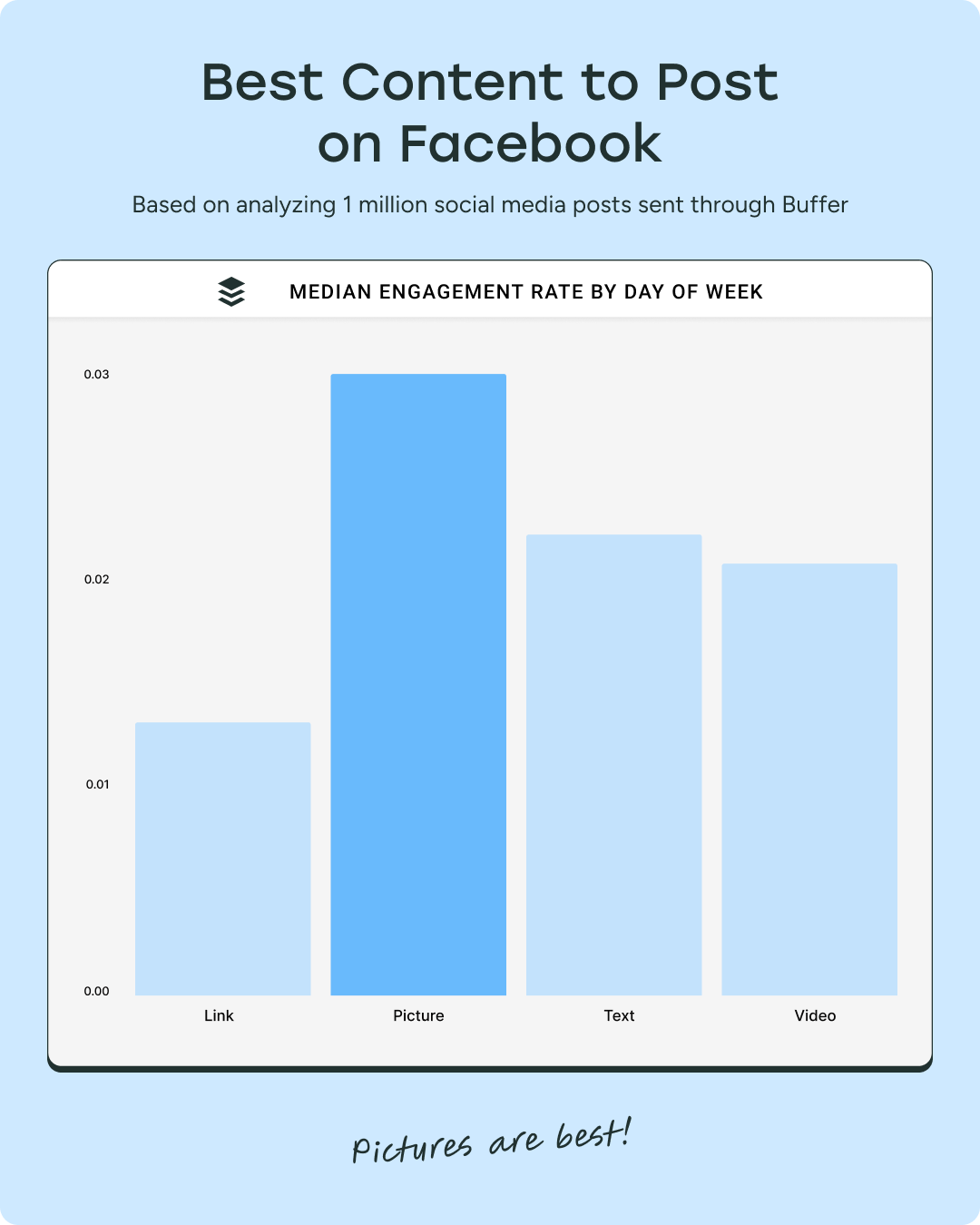
A bar graph that shows the best content to post on facebook for engagement. The bar for pictures is the highest.

Interestingly, the best type of content to post for engagement on Facebook is not videos but photos. Our analysis found that posts with images or photos tended to get the most engagement on Facebook, with text-based posts coming in second place.

Posts with photos tend to get 34.7% more engagement than text-based posts and 43.8% more engagement than video posts.

As you can see, video posts came in third place. Surprising as it may be, it lines up with what we found in another recent analysis on Instagram, in which we discovered that it was photo carousels, not Instagram Reels, that got the most engagement on Facebook.

Reels, however, tended to get the most reach, and I theorized why this may be the case in the article. (We’re running a comparison on Facebook and will report back here with the data soon!)

The worst-performing content on Facebook’s News Feed is link-only posts (not surprising, given that Facebook wants to keep its users in the app).

The best time for you to post on Facebook

While the Facebook post times above are a great jumping-off point, they may not necessarily reflect the habits of your target audience — which is where figuring out your unique best time to post on Facebook comes in.

Pinpointing times that your audience is more likely to be active and engaging is an important part of social media management. To find yours, it’s worth digging into Meta Business Suite.

How to find your best time to post on Facebook with Meta Business Suite

Meta Business Suite, the Facebook and Instagram analytics tool, comes with a bit of a learning curve (we’ve got a full guide to Meta Business Suite if you’ve never used it before).

Facebook does have Facebook Insights, a pared-down tool within Facebook to check out a handful of page performance metrics, which might be enough for the casual creator.

Still, if you’re managing a Facebook Page and don’t plan to use a social media analytics tool like Buffer to help, it’s well worth getting to grips with the more in-depth Meta Business Suite.

It also offers some, well, valuable insights that even Facebook Insights doesn’t have — like showing when your followers on most active on the platform. These numbers can be a helpful clue in narrowing down your personal best time to post on Facebook.

Here’s how to find that data:

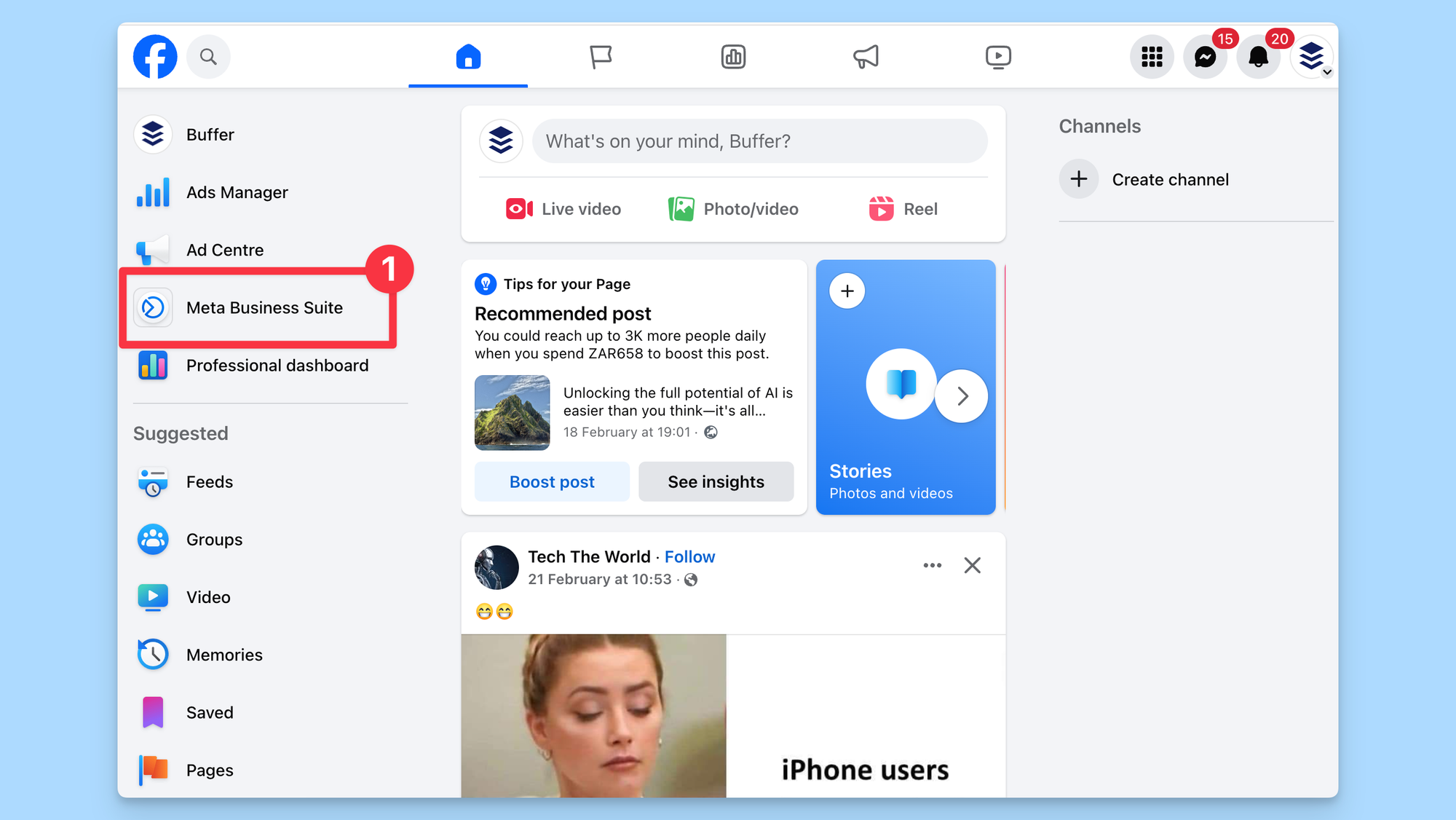
There are several ways to access Meta Business Suite. My preferred route is via Facebook itself. (Make sure you’re logged in via your Facebook Page, not your personal profile.)

  1. Click on Meta Business Suite on the menu on the left.
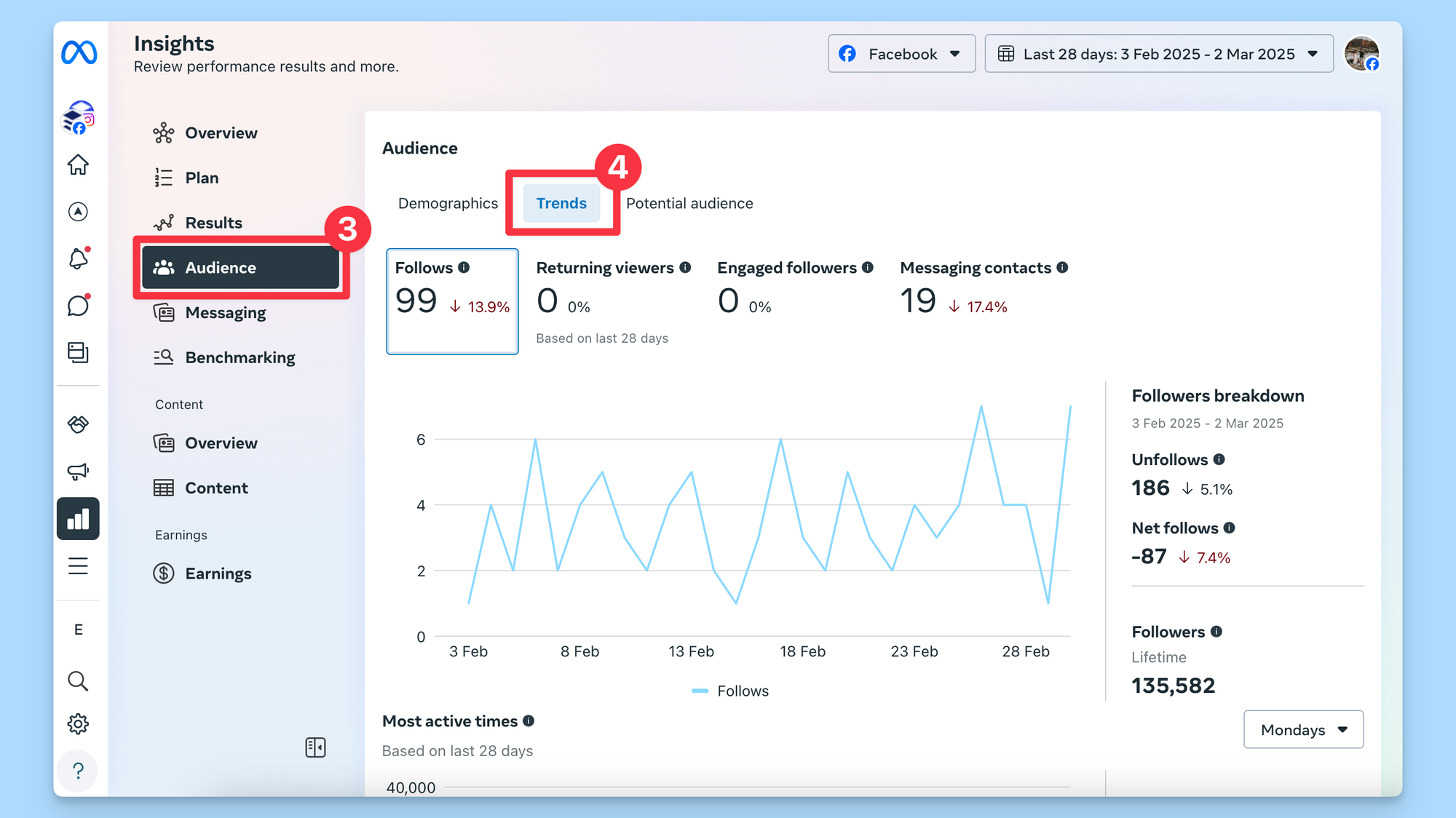
  1. Click on Insights on the menu on the left.
  1. Click on Audience on the left,
  2. Choose Trends above the graph.
  1. Scroll down to Most active times. Here, you’ll find when your current followers use Facebook. You can use the button on the right to switch between different days of the week.

Note that this doesn’t necessarily indicate the best time to post on Facebook to reach your audience, just when they’re most likely to be online.

If you’re going this route, I suggest experimenting with some of the peak times and days to note which slots get the maximum engagement, helping you pinpoint your best time to post on Facebook.

Your checklist for high-performing Facebook posts

Figuring out the best time to post on Facebook can be helpful, but it’s not the ultimate secret to Facebook success (again, if only it were that simple!).

As we unpack in our guide to the Facebook algorithm, there are plenty of other things you can do to give your content the best possible chance of reaching more people. Here’s a high-level overview:

  1. Share content that prompts conversations: Producing high-quality content should always be your priority on social media. Tap into your Facebook Insights or analytics in Buffer to stay on top of the content that resonates the most with your audience. Remember: Facebook likes authentic accounts that contribute to their community and create meaningful interactions.
  2. Cultivate authentic relationships with your fans: Reacting and replying to comments and always responding timeously to DMs is only half the battle — be sure to be thoughtful and authentic in your replies to really connect with your audience.
  3. Experiment with different content types: While video may perform best generally, your target audience might respond better to something else. Text, photos, GIFS, Reels — be sure to try them all more than once.
  4. Tap into user-generated (UGC) content and mentions: When people tag you in posts, take notice. This is a perfect opportunity to share their content as user-generated content — with their permission, of course.
  5. Aim to be on users’ ‘Favorite’ lists: Facebook users can take more control of their feeds with the Favorite list feature. Encourage your fans to add you to that list so they never miss your content.
  6. Don’t resort to clickbait or engagement bait: Clickbait is exaggerated, over-sensationalized content that doesn’t deliver on its promise. Engagement bait uses captions or photos that contain phrases like, “Like this if you like dogs better, share this if you like cats better.” Facebook regularly updates its algorithm to downrank content like this, making it a terrible way to attempt to get maximum engagement.
  7. Verify all the news you share: Another thing the Facebook algorithm doesn’t like: fake news. Facebook is vigilant in identifying misinformation and takes strict action against violators, potentially leading to removal from the platform.
  8. Stick to Facebook’s Community Standards: Facebook takes its Community Standards seriously. The algorithm is pretty good at weeding out posts that violate these rules, but even if a post manages to skirt under the radar, Facebook users can report it and have it taken down anyway. Getting strikes against your account like this could impact future content performance.

When in doubt, always remember: Facebook’s algorithm values what users value.

“Facebook’s goal is to make sure that you see posts from the people, interests, and ideas that you find valuable,” the company says. “Whether that content comes from people you’re already connected to or from those you may not yet know.”

https://buffer.com/resources/best-time-to-post-on-facebook/


Facebook Now Deletes Live Videos After 30 Days via @sejournal, @MattGSouthern

Facebook now deletes live videos after 30 days, offering tools to download or transfer content before removal.

  • Facebook will delete live videos after 30 days.
  • Users can download or transfer videos to save them.
  • New tools make managing live video content easier.

https://www.searchenginejournal.com/facebook-now-deletes-live-videos-after-30-days/540132/


Ondata di licenziamenti in Meta: la scure cala anche sui dipendenti con ottime valutazioni

L’ultima tornata di licenziamenti in Meta ha lasciato il segno, non solo per il numero di dipendenti coinvolti – quasi 4.000 – ma anche per le modalità e le categorie di lavoratori colpiti.

Sebbene l’azienda avesse inizialmente motivato i tagli come una strategia per snellire l’organico e concentrarsi sui dipendenti meno performanti, le testimonianze raccolte da Business Insider dipingono un quadro ben diverso. Sembra infatti che a perdere il posto siano stati anche lavoratori che, fino a poco tempo prima, avevano ricevuto valutazioni positive sulle loro prestazioni.

Evidentemente la volontà di fare utili e di mostrare buone prestazioni finanziarie ha avuto la meglio su ogni altra considerazione.

Valutazioni positive, licenziamento inatteso

Business Insider ha parlato con otto dipendenti licenziati, i quali hanno dichiarato di aver ricevuto valutazioni “Al di Sopra delle Aspettative” o “In Linea con le Aspettative” nelle loro recensioni di metà anno 2024. Queste valutazioni rappresentavano il livello intermedio nel sistema di valutazione a tre livelli di Meta, indicando una performance soddisfacente e in linea con le aspettative aziendali. La sorpresa e la confusione di questi dipendenti sono state enormi quando hanno appreso di essere inclusi nella lista dei licenziamenti.

La situazione si fa ancora più paradossale considerando che, secondo quanto riportato da questi stessi dipendenti, le loro valutazioni sarebbero state improvvisamente declassate a “Soddisfa la Maggior Parte”, uno dei livelli inferiori nel sistema di valutazione di fine anno di Meta.

Questo declassamento, percepito come repentino e immotivato, li ha resi, di fatto, eleggibili per i licenziamenti di lunedì. Per ovvie ragioni di riservatezza e timore di ripercussioni, i dipendenti hanno chiesto di rimanere anonimi.

La strategia interna: tagliare ovunque per raggiungere gli obiettivi

La decisione di licenziare un numero così elevato di dipendenti rientra in un piano più ampio di Meta, annunciato a gennaio, che prevede il taglio di circa il 5% della forza lavoro. Sebbene la comunicazione ufficiale parlasse di “tagliare i rami secchi”, ovvero i dipendenti meno performanti, una direttiva interna inviata ai manager da Hillary Champion, direttrice delle risorse umane di Meta, e visionata da Business Insider, rivela una strategia più ampia e meno selettiva. Questa direttiva autorizzava infatti i manager a includere nei tagli anche dipendenti con valutazioni più alte, qualora non fosse stato possibile raggiungere gli obiettivi di riduzione del personale agendo solo sui dipendenti con le valutazioni più basse.

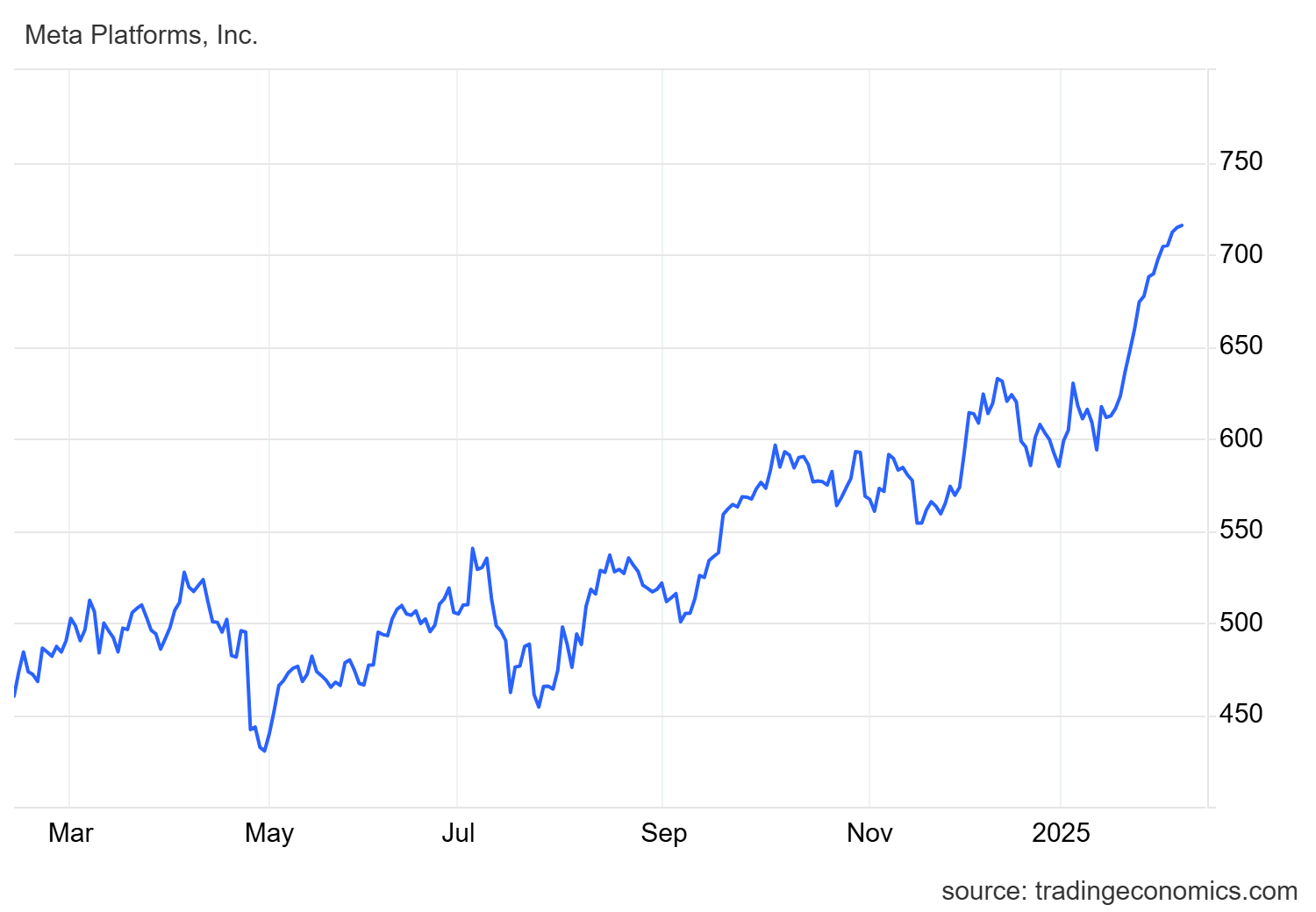
Meta Facebook quaotazioni

Questa direttiva, rimasta inizialmente confinata ai vertici aziendali, ha colto di sorpresa molti dipendenti quando si sono ritrovati inclusi nei licenziamenti. Un dipendente ha raccontato a Business Insider: “Quando ho ricevuto l’email, sono rimasto sorpreso, soprattutto perché ho sempre avuto ottime valutazioni e non c’erano segnali di problemi negli ultimi sei mesi.”

Il paradosso di Meta: tagliare per investire nell’IA

Dietro a questa ondata di licenziamenti si cela la strategia di Mark Zuckerberg di snellire la forza lavoro di Meta, mentre l’azienda investe miliardi di dollari nei settori dell’intelligenza artificiale e della realtà virtuale. I tagli potrebbero diventare un evento annuale, con Meta intenzionata a “fare pulizia” regolarmente tra i dipendenti considerati meno performanti.

Parallelamente, l’azienda prevede di aumentare le assunzioni di ingegneri specializzati in machine learning per rafforzare il suo impegno nel campo dell’IA. Siamo evidentemeente però davanti anche a un caso in cui la AI sta comportanto un taglio nei posti di lavoro.

La frustrazione e il timore per il futuro

Molti dipendenti licenziati si sentono traditi dalla narrazione pubblica di Meta, che ha presentato i tagli come mirati esclusivamente ai dipendenti con performance costantemente basse. Il contrasto tra questa narrazione e la realtà dei fatti, che vede licenziati anche dipendenti precedentemente ben valutati, genera frustrazione e rabbia.

Alcuni dipendenti hanno condiviso sulla piattaforma di comunicazione interna di Meta, Workplace, screenshot delle loro valutazioni passate, mostrando performance positive e in linea con le aspettative per anni, prima del declassamento improvviso. Un dipendente, licenziato poco dopo il rientro dal congedo parentale, ha mostrato una valutazione “Al di Sopra delle Aspettative” ricevuta all’inizio del 2024. “Sono super confuso su come sono stato licenziato,” ha scritto, “Penso ancora che sia un errore.”

La sensazione diffusa tra i dipendenti è quella di essere stati strumentalizzati e di vedere la propria reputazione professionale danneggiata dalla narrazione aziendale che li dipinge come “low performer”. “La parte più difficile è che Meta dichiara pubblicamente di tagliare i dipendenti meno performanti, quindi ci sentiamo come se avessimo la lettera scarlatta sulla schiena,” ha confessato un altro dipendente a Business Insider. “La gente deve sapere che non siamo dei lavativi.”

Un altro dipendente ha aggiunto: “Sfido apertamente la narrazione di Meta di tagliare solo i dipendenti meno performanti. Faccio davvero fatica a credere di essere stato un dipendente di basso livello, basandomi sui feedback che ho ricevuto in passato dal mio manager.” Un ulteriore dipendente ha addirittura affermato che il suo manager non gli aveva dato alcun segnale che il suo posto di lavoro fosse a rischio.

Resta l’amaro in bocca per i dipendenti di Meta che, nonostante le valutazioni positive e l’impegno profuso, si ritrovano improvvisamente senza lavoro, vittime di una strategia aziendale che sembra privilegiare i numeri e i bilanci rispetto al valore delle persone.


Telegram

Telegram
Grazie al nostro canale Telegram potete rimanere aggiornati sulla pubblicazione di nuovi articoli di Scenari Economici.

⇒ Iscrivetevi subito ⇐


MindsMinds

https://scenarieconomici.it/ondata-di-licenziamenti-in-meta-la-scure-cala-anche-sui-dipendenti-con-ottime-valutazioni/


AI haters build tarpits to trap and trick AI scrapers that ignore robots.txt

Currently, Aaron predicts that Nepenthes might be most attractive to rights holders who want AI companies to pay to scrape their data. And many people seem enthusiastic about using it to reinforce robots.txt. But “some of the most exciting people are in the ‘let it burn’ category,” Aaron said. These people are drawn to tools like Nepenthes as an act of rebellion against AI making the Internet less useful and enjoyable for users.

Geuter told Ars that he considers Nepenthes “more of a sociopolitical statement than really a technological solution (because the problem it’s trying to address isn’t purely technical, it’s social, political, legal, and needs way bigger levers).”

To Geuter, a computer scientist who has been writing about the social, political, and structural impact of tech for two decades, AI is the “most aggressive” example of “technologies that are not done ‘for us’ but ‘to us.'”

“It feels a bit like the social contract that society and the tech sector/engineering have had (you build useful things, and we’re OK with you being well-off) has been canceled from one side,” Geuter said. “And that side now wants to have its toy eat the world. People feel threatened and want the threats to stop.”

As AI evolves, so do attacks, with one 2021 study showing that increasingly stronger data poisoning attacks, for example, were able to break data sanitization defenses. Whether these attacks can ever do meaningful destruction or not, Geuter sees tarpits as a “powerful symbol” of the resistance that Aaron and Nagy readily joined.

“It’s a great sign to see that people are challenging the notion that we all have to do AI now,” Geuter said. “Because we don’t. It’s a choice. A choice that mostly benefits monopolists.”

Tarpit creators like Nagy will likely be watching to see if poisoning attacks continue growing in sophistication. On the Iocaine site—which, yes, is protected from scraping by Iocaine—he posted this call to action: “Let’s make AI poisoning the norm. If we all do it, they won’t have anything to crawl.”

https://arstechnica.com/tech-policy/2025/01/ai-haters-build-tarpits-to-trap-and-trick-ai-scrapers-that-ignore-robots-txt/


Reddit won’t interfere with users revolting against X with subreddit bans

Reddit is staying out of the current revolt against social media website X and, to a lesser degree, Meta, on its platform.

Since Tuesday, hundreds of subreddits have discussed and/or implemented bans against the site formerly called Twitter, as reported by 404 Media. Dozens of subreddits have already agreed to disallow the sharing of any links to X, with moderators (volunteer Reddit users) agreeing to enforce the bans.

The trend seemed to start among subreddits focused on sports-related topics, like the subreddits for the NFL, the Vancouver Canucks NHL team, and the Liverpool Football Club, as reported by Mashable. However, as of today, subreddits of various topics are discussing X bans. Reddit users in support of X bans like the one instituted by r/londonontario have pointed to various reasoning, including not being able to see tweet links without having an X account, Elon Musk appearing to make a Nazi salute at the presidential inauguration on Monday (as cited by r/Christianity’s and r/newjersey’s bans, for example), and general dislike for Musk and/or how he runs X.

Yesterday, the mods of r/Seahawks, for example, enacted a rule that bans sharing links to X but allows X videos that aren’t AI-generated, per a post from one of the subreddit’s moderators yesterday:

… we feel that social media platform owners and investors have a responsibility to remain out of the political, social and economic media forum for the benefit and neutrality of they’re [sic] business and services they provide. The internet has never been a place of free speech and it never will be. We are all accountable for things we do and say. We would hope you all understand the dynamics of this decision and stay to talk Seahawks football.

Reddit won’t interfere

Ars Technica reached out to Reddit for a response to X bans and whether such bans could be interpreted as breaking any of Reddit’s rules. Reddit users will recall that when moderators were recently viewed by Reddit as breaking Reddit rules at scale (by making subreddits read-only or private in protest of Reddit’s new API access rules and pricing), Reddit responded by removing moderators that refused to re-open protesting subreddits. This time, though, moderators’ actions are aboveboard.

https://arstechnica.com/gadgets/2025/01/reddit-wont-interfere-with-users-revolting-against-x-with-subreddit-bans/


Meta to cut 5% of employees deemed unfit for Zuckerberg’s AI-fueled future

Anticipating that 2025 will be an “intense year” requiring rapid innovation, Mark Zuckerberg reportedly announced that Meta would be cutting 5 percent of its workforce—targeting “lowest performers.”

Bloomberg reviewed the internal memo explaining the cuts, which was posted to Meta’s internal Workplace forum Tuesday. In it, Zuckerberg confirmed that Meta was shifting its strategy to “move out low performers faster” so that Meta can hire new talent to fill those vacancies this year.

“I’ve decided to raise the bar on performance management,” Zuckerberg said. “We typically manage out people who aren’t meeting expectations over the course of a year, but now we’re going to do more extensive performance-based cuts during this cycle.”

Cuts will likely impact more than 3,600 employees, as Meta’s most recent headcount in September totaled about 72,000 employees. It may not be as straightforward as letting go anyone with an unsatisfactory performance review, as Zuckerberg said that any employee not currently meeting expectations could be spared if Meta is “optimistic about their future performance,” The Wall Street Journal reported.

Any employees affected will be notified by February 10 and receive “generous severance,” Zuckerberg’s memo promised.

This is the biggest round of cuts at Meta since 2023, when Meta laid off 10,000 employees during what Zuckerberg dubbed the “year of efficiency.” Those layoffs followed a prior round where 11,000 lost their jobs and Zuckerberg realized that “leaner is better.” He told employees in 2023 that a “surprising result” from reducing the workforce was “that many things have gone faster.”

“A leaner org will execute its highest priorities faster,” Zuckerberg wrote in 2023. “People will be more productive, and their work will be more fun and fulfilling. We will become an even greater magnet for the most talented people. That’s why in our Year of Efficiency, we are focused on canceling projects that are duplicative or lower priority and making every organization as lean as possible.”

https://arstechnica.com/tech-policy/2025/01/meta-says-5-staff-cut-is-critical-to-further-ai-social-media/


Elon Musk could be China’s pick to buy TikTok, report says

TikTokers could also flock to YouTube, which remains one of the most profitable platforms for creators on the planet. But that would surely rile some YouTube users who dislike YouTube Shorts clogging up the homepage.

Rather than move to a popular US app, however, many contrarian TikTokers are eyeing other Chinese-owned apps, including ByteDance-owned Lemon8. Both Lemon8 and an app owned by another Chinese company called Xiaohongshu—which Americans know as Red Note—reached the top two spots in Apple’s App Store rankings Monday, Business Insider reported.

On Red Note, TikTokers are gathering under a hashtag, “TikTokrefugee,” The New York Times reported. As of Tuesday, the hashtag had been viewed more than 100 million times and referenced in 2.5 million comments.

According to a Times review of TikTok videos, TikTokers said they were moving to Red Note because “they wanted to show they do not share Washington’s concerns about TikTok’s ties to China.” But TikTokers could be in for a rude awakening if TikTok is banned and the Chinese-owned app they choose as their new home quickly becomes the next app to be blocked in the US within a few months.

Under the Protecting Americans from Foreign Adversary Controlled Applications Act that would force TikTok’s sale or require a ban, any “foreign adversary controlled” social media app with more than 1 million monthly active users could be banned. ByteDance and TikTok are both singled out by the law, meaning any meaningful spike in US users on other ByteDance apps would likely trigger scrutiny.

It’s unclear if Red Note would be as easily targeted by the government, but any Chinese-owned social media app that meets very basic requirements—allowing more than a million monthly active users to share content that can be viewed by others—could potentially be banned if the Supreme Court upholds the law.

An analyst at the market research company Emarketer, Jasmine Enberg, told The Independent that TikTokers recommending apps like Lemon8 “may not be aware of the possible implications for the other ByteDance apps because the law does not identify them.”

https://arstechnica.com/tech-policy/2025/01/elon-musk-could-be-chinas-pick-to-buy-tiktok-report-says/