Video games invade the art world in MoMA’s Never Alone exhibition

Video games... in a museum?!
Enlarge / Video games… in a museum?!

A crowd of people gathers to spectate. Everyone is smiling, cheering on the Pac-Man player as she rushes through a maze, evading ghosts in a quest for pellets and fruit.

The people aren’t in an arcade—they’re in a gallery at the Museum of Modern Art (MoMA) in New York City. Outside the gallery space, a screen worthy of Times Square flashes between the 36 video games in MoMA’s new exhibition Never Alone: Video Games as Interactive Design.

Paola Antonelli, senior curator of architecture and design at MoMA and one of the minds behind Never Alone, speaks with passion about the exhibit. “It’s a show about interaction design, and video games are some of the purest, clearest examples of interaction design,” she told me.

Never Alone is about how engagement with interactive design (which includes video games, among other things) shapes how we behave, learn, and interact with the world. It’s also an exploration of how video games can connect us and create communities, as the crowd gathered around the Pac-Man player demonstrates.

More than art

The debate over whether video games count as “art” is a tired and boring one. It’s also one MoMA generally evades, treating video games as interactive design objects at their core, even though they have artistic elements. In design, what you see is what you get; in art, things are murkier.

<a href="https://cdn.arstechnica.net/wp-content/uploads/2022/10/MoMA_NeverAlone_cover-1609x2000.jpg" class="enlarge" data-height="2000" data-width="1609" alt="Cover of the booklet published alongside the Never Alone: Video Games as Interactive Design exhibit.”><img alt="Cover of the booklet published alongside the Never Alone: Video Games as Interactive Design exhibit.” src=”https://rassegna.lbit-solution.it/wp-content/uploads/2022/11/video-games-invade-the-art-world-in-momas-never-alone-exhibition-1.jpg” width=”300″ height=”373″ srcset=”https://rassegna.lbit-solution.it/wp-content/uploads/2022/11/video-games-invade-the-art-world-in-momas-never-alone-exhibition-2.jpg 2x”>
Enlarge / Cover of the booklet published alongside the Never Alone: Video Games as Interactive Design exhibit.

But avoiding the a-word doesn’t mean video games are treated as “lesser” by the museum. In Thoughts on Interactive Design, Jon Kolko defines interactive design as “the creation of a dialogue between a person and a product, system, or service. This dialogue is both physical and emotional in nature and is manifested in the interplay between function and technology as experienced over time.”

Kolko’s definition is a guiding principle that informs Never Alone and its focus on allowing visitors to interact with its games. Art objects in a museum are often consigned to be viewed from afar, creating something of a barrier between the viewer and the work. In Never Alone, by contrast, a lot of time, effort, and consideration was taken to make the exhibit as accessible and interactive as possible.

For instance, the platforms where the controllers and other input devices are placed are intentionally positioned at a low level so that everyone, regardless of height or physical condition, can play. Games are also presented in a way that they can be seen by others; Paul emphasized that “games are as much about watching other people play as they are playing yourself, and it becomes this social thing. So we wanted to make sure there were as many opportunities as possible for that.”

https://arstechnica.com/?p=1891639


NASCAR driver stuns racing world with a move learned from Nintendo GameCube

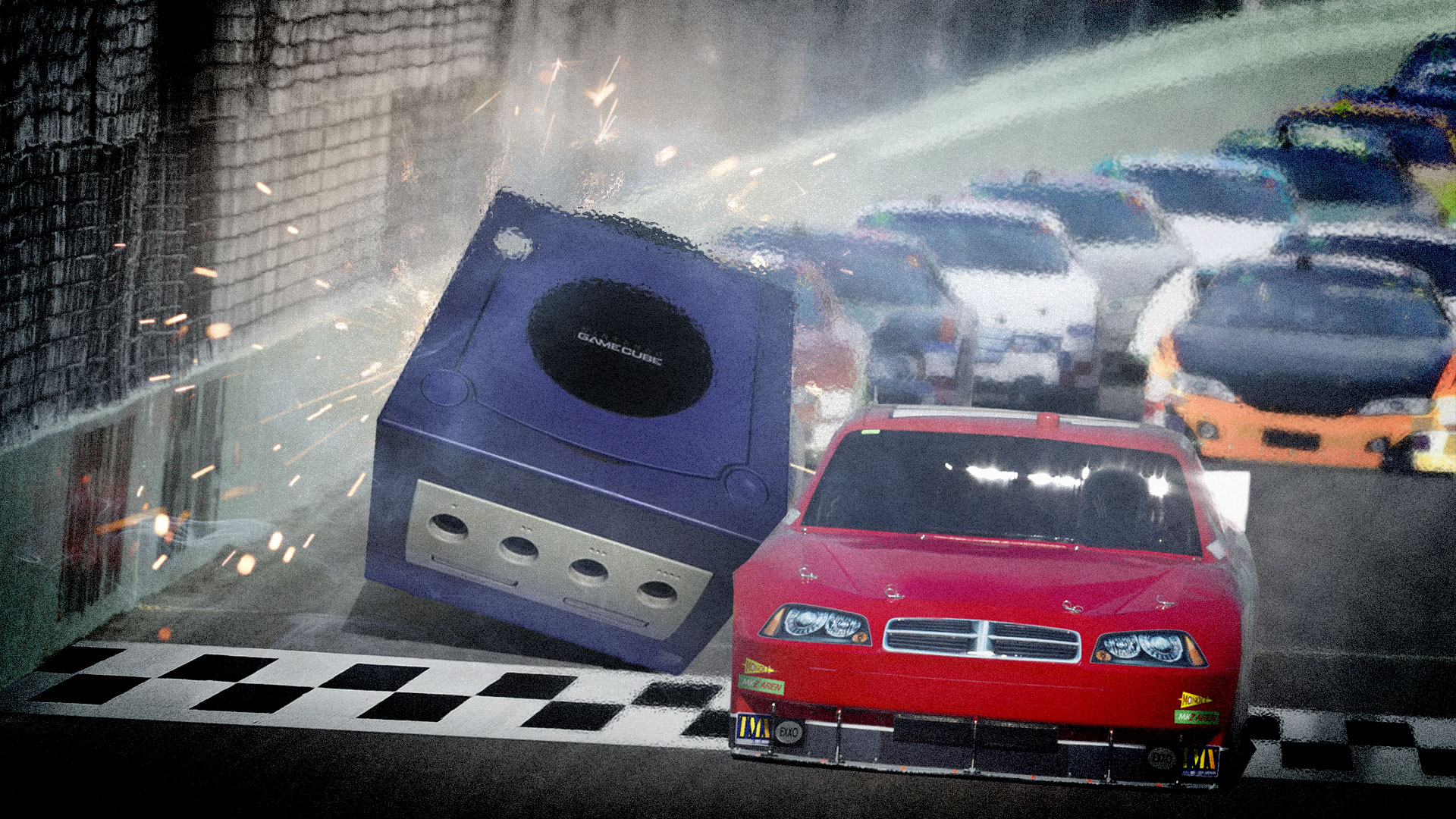
In a stunning move, a Nintendo GameCube pulls ahead of the pack.
Enlarge / In a stunning Photoshop move, a Nintendo GameCube pulls ahead of the pack.
Aurich Lawson / Getty Images

On Sunday, NASCAR driver Ross Chastain made history with an unprecedented wall-riding maneuver that qualified him for a championship race and set the record for the fastest lap on the track at 18.845 seconds. Remarkably, Chastain said he learned the move playing NASCAR 2005 on the Nintendo GameCube when he was a kid.

The maneuver happened at the Xfinity 500 race hosted at Martinsville Speedway in Ridgeway, Virginia. Martinsville is a half-mile short track built in 1947 that is well known for its tight, shallow-banked turns that usually require heavy braking to negotiate.

During the final lap of the race, Chastain found himself in 10th place but needed to pick up two positions to earn enough points to qualify for the Championship race on November 6. Instead of slowing down on the turn, Chastain stayed in fifth gear and gunned it, riding the outside wall and passing five cars to finish the race in fith place.

In a post-race interview with NBC Sports, Chastain said, “I played a lot of NASCAR 2005 on the GameCube with Chad [Chastain’s brother] growing up, and you can get away with it, and I never knew if it would actually work. I did that when I was 8 years old.”

The game Chastain is referring to is likely NASCAR 2005: Chase For the Cup, released in September 2004 for GameCube. Chastain, born in December 1992, would have been 12 at the time. To check out the technique, we ran NASCAR 2005 in the Dolphin emulator on a PC, selected the Martinsville track where Chastain pulled off his move, and rode the wall. It is indeed possible in the game, although it takes a great deal of skill and a little luck to use the technique to pull ahead as Chastain did.

[embedded content]
Ross Chastain explains his GameCube inspiration in a post-race interview.

To understand the advantage of Chastain’s move, a little knowledge of racing physics comes in handy. Typically, when taking a tight turn on a racetrack, drivers brake to counteract forces that push their cars toward the outside of the track. This braking action dramatically slows them down on the turn. This time, instead of slowing down for the turn, Chastain kept his car in fifth gear, hugged the wall, let go of the wheel, and allowed the wall to hold his car in place—no brakes necessary. That’s how he passed five cars and set a 75-year lap record.

<a href="https://cdn.arstechnica.net/wp-content/uploads/2022/11/nascar_2005_wall_riding.jpg" class="enlarge" data-height="1071" data-width="1440" alt="Ars scientists re-created Chastain's wall-riding move in NASCAR 2005 for GameCube. It slows you down and damages your car, but under the right circumstances, it could provide an advantage.”><img alt="Ars scientists re-created Chastain's wall-riding move in NASCAR 2005 for GameCube. It slows you down and damages your car, but under the right circumstances, it could provide an advantage.” src=”https://rassegna.lbit-solution.it/wp-content/uploads/2022/11/nascar-driver-stuns-racing-world-with-a-move-learned-from-nintendo-gamecube-1.jpg” width=”640″ height=”476″ srcset=”https://rassegna.lbit-solution.it/wp-content/uploads/2022/11/nascar-driver-stuns-racing-world-with-a-move-learned-from-nintendo-gamecube-2.jpg 2x”>
Enlarge / Ars scientists re-created Chastain’s wall-riding move in NASCAR 2005 for GameCube. It slows you down and damages your car, but under the right circumstances, it could provide an advantage.
Benj Edwards / Ars Technica

Of course, a move like that comes at a cost, which is probably why it hasn’t been tried—at least not successfully—until now. Chastain faced guaranteed damage to the finish of his car from scraping the wall and potentially catastrophic failure if his car happened to hit a protruding obstruction. “Once I got against the wall, I basically let go of the wheel and just hoped I didn’t catch the turn four access gate or something crazy,” Chastain said, “But I was willing to do it.”

For now, the racing world is equal parts amazed, surprised, and even a little worried that Chastain’s move might become a regular technique going forward. For now, Chastain likely appreciates the attention as he prepares for the Championship on November 6—thanks to the Nintendo GameCube.

https://arstechnica.com/?p=1894158


Testing suggests faulty cable may be to blame for melting RTX 4090 connectors

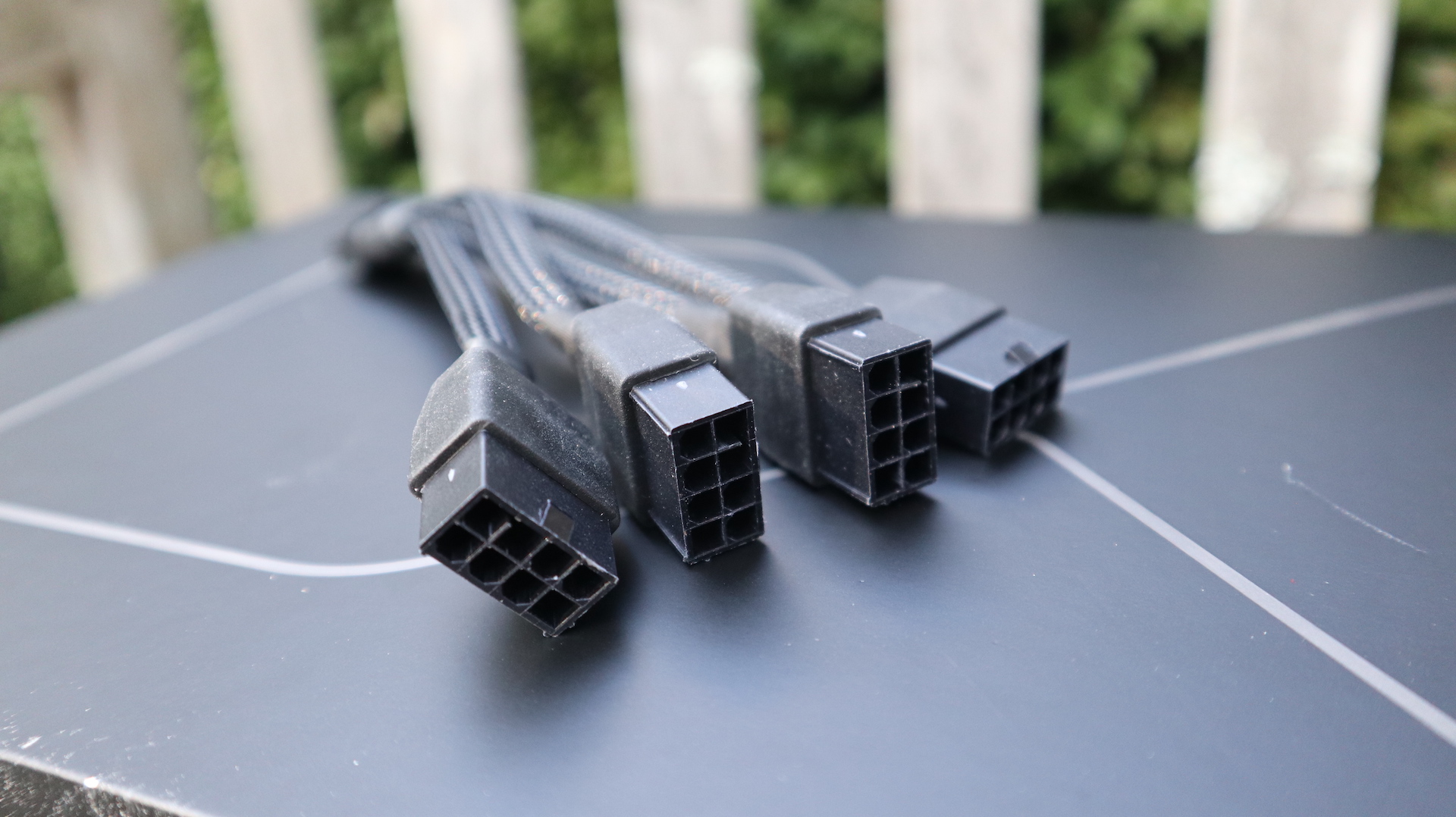
The power adapter for the RTX 4090 feeds four 8-pin power connectors into a single 12VHPWR connector.
Enlarge / The power adapter for the RTX 4090 feeds four 8-pin power connectors into a single 12VHPWR connector.
Sam Machkovech

Earlier this week, a couple of Reddit users reported that the power connectors for their expensive new Nvidia GeForce RTX 4090 GPUs had partially melted and that Nvidia was looking into the issue. Since then, at least nine additional Reddit users have posted about the same problem with the 16-pin power connector (a thread collecting all information on the problem is here).

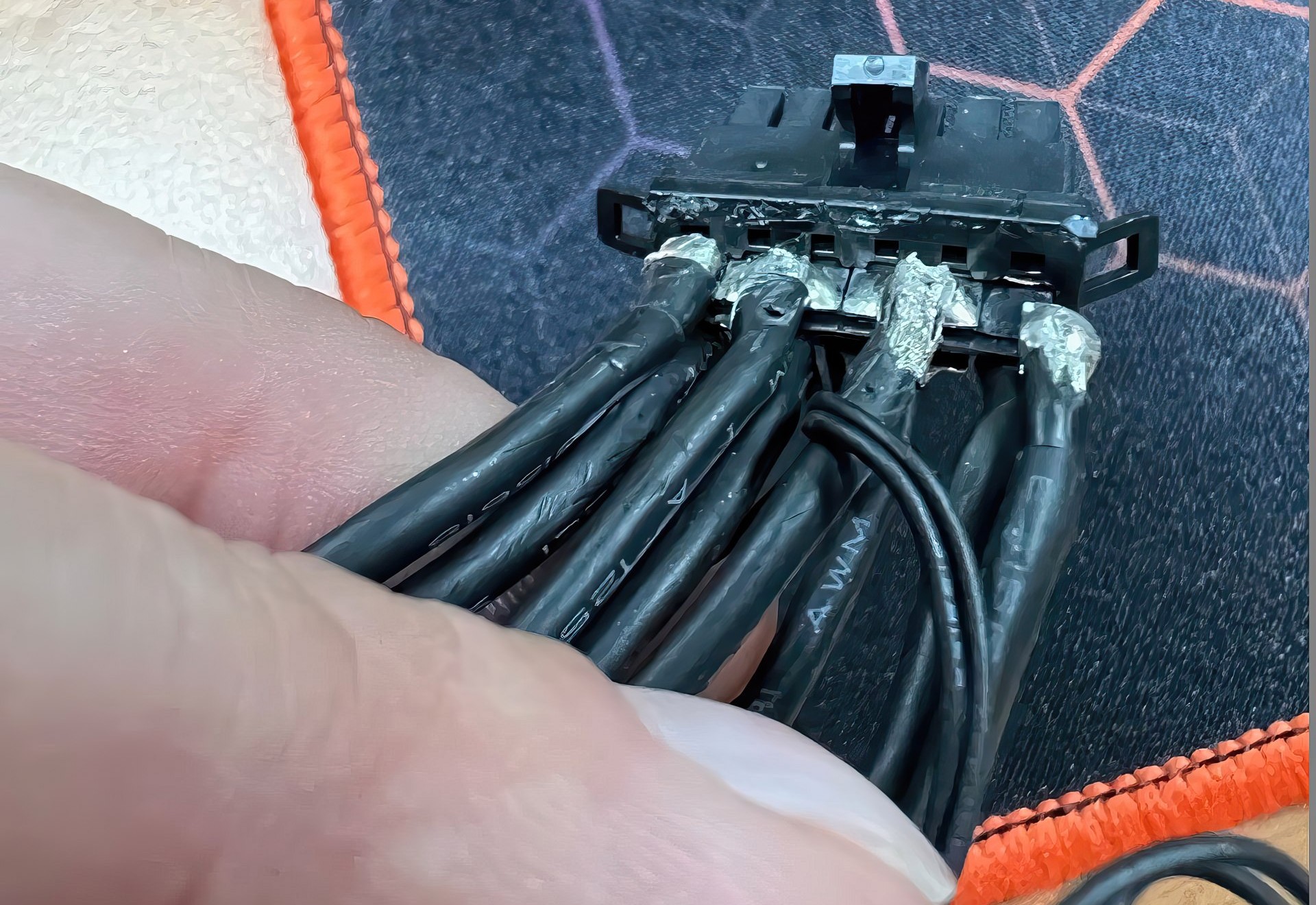
Igor Wallossek of the German-language hardware site Igor’s Lab has also performed additional testing, and said that the power adapter cable (rather than the GPUs or the 12VHPWR connector) may be to blame for the problems. The adapter, which is apparently manufactured by a company called Astron and was provided by Nvidia to all of its board partners, uses “a total of four thick 14AWG wires distributed over a total of six contacts,” with a thin solder base that Wallossek says can be damaged easily when the cables are moved or bent.

The solder inside of Nvidia's power adapter cable can be damaged if the cables are moved or bent too much.
Enlarge / The solder inside of Nvidia’s power adapter cable can be damaged if the cables are moved or bent too much.

“If, in the worst case, the two outer wires break off, the entire current in the middle flows through the remaining two wires,” Wallossek wrote. “The fact that this then becomes really hot does not have to be explained separately.”

Contrast Nvidia’s adapter cable to the 12VHPWR cable provided with a Be Quiet! Dark Power Pro 13 power supply, one of a few newer ATX 3.0 PSU models with a 12VHPWR cable that connects right to the PSU rather than relying on an adapter. The cable is thicker than the one in Nvidia’s adapter because every pin has its own wire, but it also runs cool and delivers reliable power to the GPU.

Wallossek also said that Nvidia told its partners to send all affected cards back to Nvidia for further investigation and testing. We asked Nvidia about this problem and the investigation earlier this week and will update if we receive new information.

https://arstechnica.com/?p=1893799


Meta Quest Pro review: For those with more money than sense

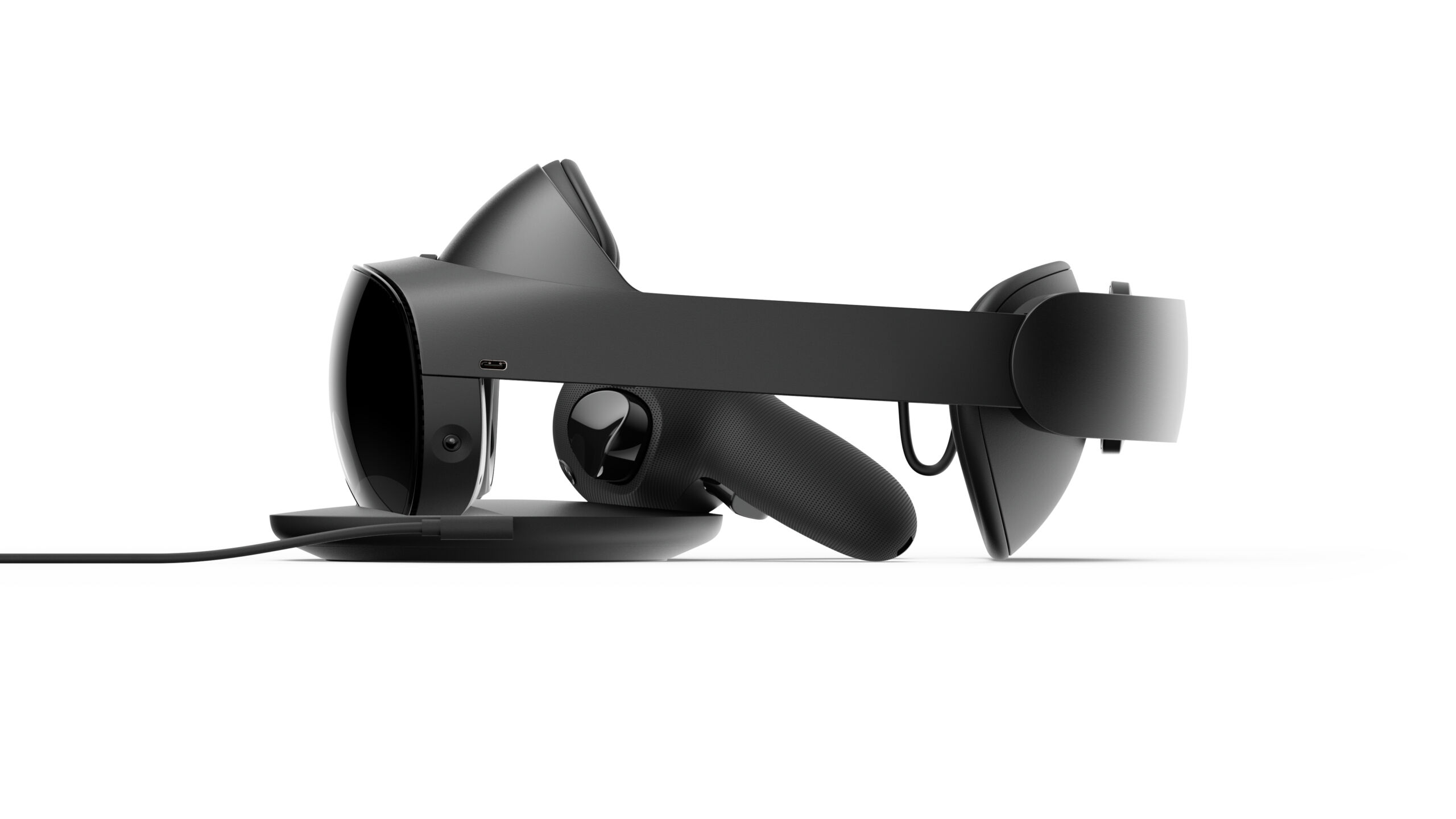
Looking like a million bucks... or at least 1500...
Enlarge / Looking like a million bucks… or at least 1500…

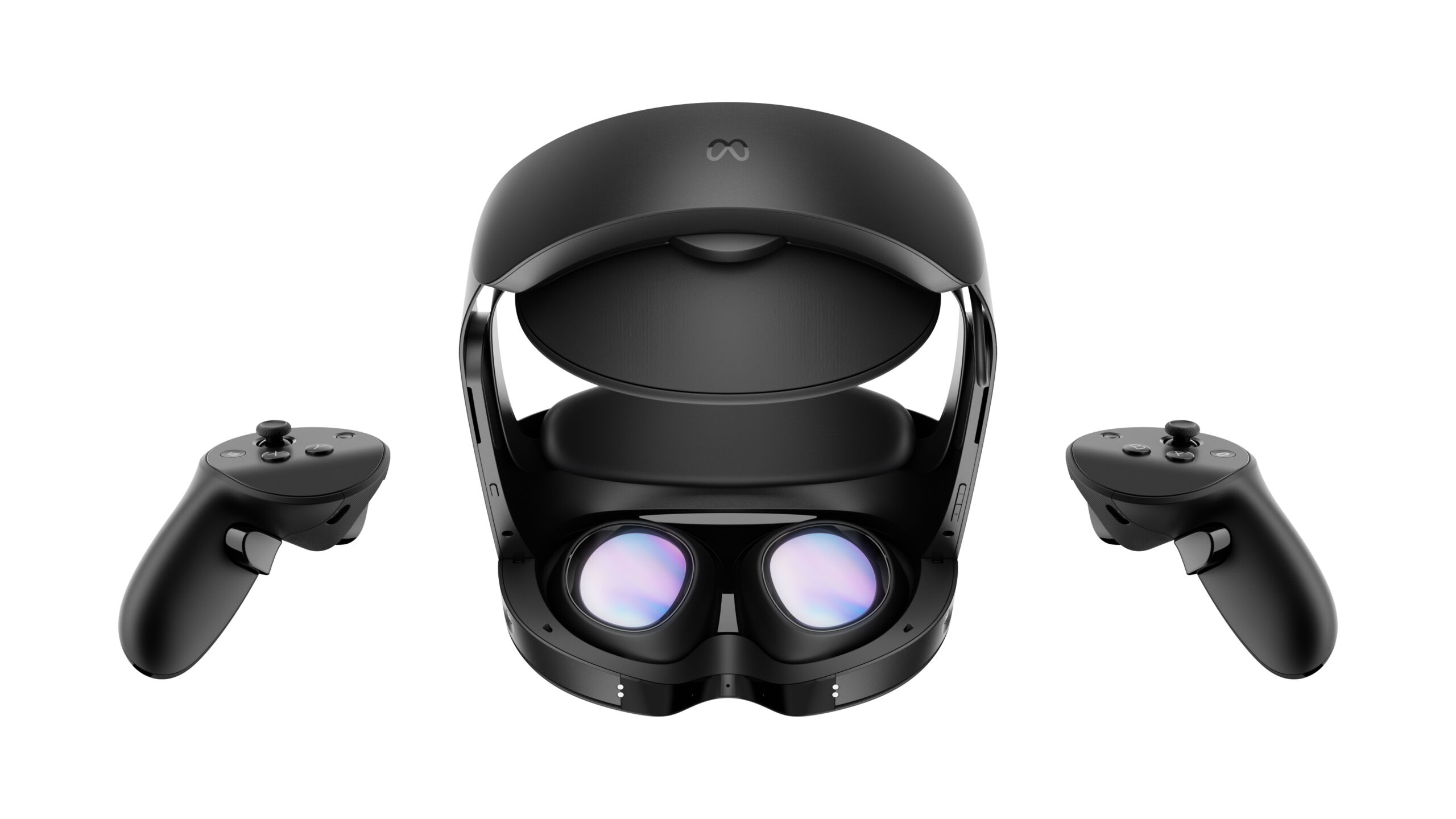
At this point in the history of tech product marketing, consumers generally know what it means when a company sticks the word “Pro” at the end of a device name. From iPads and AirPods to the Microsoft Surface and Galaxy Watch, “Pro” models generally offer the same underlying device and core platform with a few “nice to have” top-of-the-line features for enthusiast users who want the best experience.

To get those Pro features, consumers generally have to pay a “Pro premium” of somewhere between 25 to 60 percent over the most expensive “non-Pro” model of the same product. Even the biggest Pro-version outliers we could find in the tech world barely top a 100 percent increase over their non-Pro progenitors.

Despite the name, the Meta Quest Pro doesn’t really belong in the same marketing universe as these previous “Pro” products. Meta’s new standalone VR headset costs $1,500 at launch, a whopping 275 percent more than its $400 predecessor, the Meta Quest 2 (which has sold quite well for its still-young market segment). The premium increases to 400 percent if you compare the Quest Pro to the $300 Meta was asking for a Quest 2 just a few months ago.

That kind of price increase justifiably sets sky-high expectations for the new device. A product that costs nearly four times as much as its predecessor needs to offer some truly unique and luxury features that early adopters feel they can’t live without. For that price premium, this should be the kind of upgrade that makes people wonder how they ever felt satisfied with the old model in the first place.

Look into my eyes
Enlarge / Look into my eyes

That is decidedly not the case here. New Quest Pro features like a full-color passthrough camera and the ability to read a user’s facial expressions feel too experimental and underbaked for a marquee product. And while there are distinct improvements in comfort and screen clarity here, they’re less impactful than we’d expect for the price (and, honestly, for the passage of time since the Quest 2’s 2020 launch).

After spending a few days with a retail Quest Pro unit, we’re left wondering who, exactly, this product is for.

Feels good, man

Headset specs
Quest Pro Quest 2
Weight 722 g 503 g
Resolution (per eye) 1800×1920 1800×1920
Refresh rate 90 Hz 90 Hz
Field of view (H) 106 degrees 104 degrees
Field of view (V) 96 degrees 98 degrees
Processor Snapdragon XR2+ Snapdragon XR2
RAM 12GB 6GB
Internal storage 256GB 128GB

After opening your $1,500 package, putting a Quest Pro on your head feels distinctly nicer than wearing either of the previous Quest headsets. The flimsy “ski goggles” strap that sealed those old headsets to your face has been replaced with two semi-spherical cushions, one that sits on your forehead and one that tightens to the back of your skull with an easy-to-use dial.

Instead of resting heavily above the bridge of your nose, the Quest Pro display hovers comfortably just in front of your face at a distance that can be easily adjusted with its own dial. This is a significant improvement—with the bulk of the weight resting on the forehead, the unit feels much more secure and better balanced than previous Quest headsets, especially during extended use.

That said, the Quest Pro does not achieve the “wear it all day” ideal that some VR boosters might hope for. The headset’s 722 grams (which is significantly heavier than the stock Quest 2) start to become apparent on your forehead around the one-hour mark, especially as you wrinkle your forehead or move your eyebrows. Still, I found this pressure pretty bearable—I wasn’t tearing the headset off in pain after 60 minutes or anything—and it was certainly preferable to the more significant pinch around the eyes and nose of previous Quest headsets.

https://arstechnica.com/?p=1893495


Nvidia RTX 4090’s power draw may be too much for its power connector to handle

Nvidia RTX 4090’s power draw may be too much for its power connector to handle
Sam Machkovech

Nvidia’s $1,599 GeForce RTX 4090 is an incredibly powerful graphics card, but its performance comes at the cost of high power draw. Like a few of the RTX 3000-series cards, Nvidia uses a new kind of 16-pin 12VHPWR power connector to supply all that power to the card—you can plug up to four 8-pin GPU power cables into the 12VHPWR adapter, which then plugs into the connector on the GPU, saving some board space.

But at least two RT 4090 users are now reporting that their 12VHPWR connectors have overheated and melted during use. These complaints are sourced from Reddit (via Tom’s Hardware), so take them with a grain of salt—we don’t know the exact configuration of either user’s PC setup. The specific model of graphics card (a Gigabyte RTX 4090 Gaming OC for one user, an Asus RTX 4090 TUF Gaming OC Edition for the other), the power supply, and any number of other factors could have contributed to the connectors overheating.

For its part, Nvidia told Tom’s that it is “investigating the reports” and that the company is “in contact with the first owner” and planned to reach out to the other. We’ve followed up with Nvidia and will update this article if the company has more information to share.

Tom’s Hardware speculates that the issue could be caused by a bend in the cable too close to the power connector, causing some of its pins to “misalign” or come unseated, potentially creating an uneven power load across the pins. We’ll keep an eye on the issue until it’s clearer whether these were one-off user failures or a sign of a more systemic problem with the RTX 4090 series.

https://arstechnica.com/?p=1892574


Bayonetta 3 review: An updated, over-the-top spectacle

Did you miss me?
Enlarge / Did you miss me?


Jumping between worlds, mastering new powers, adding unique and powerful weapons to your arsenal, and realizing that true strength comes from your bonds with others—Bayonetta 3 boasts a formula that would sound familiar to any Kingdom Hearts fan, which is somewhat appropriate considering both series have an almost decade-long gap between their second and third releases.

In its third entry, the Bayonetta series sees some real forward momentum that was missing from the second, especially in terms of its story. The first Bayonetta was a flashy introduction to our titular hero and her crew of vaguely unsavory friends and acquaintances, setting a precedent for time travel and other instances of reality-bending within its world. Its sequel was more focused on the bonds between Bayonetta and her loved ones, with a narrative that focused too much on explaining the first game. Eight years later, Bayonetta 3 takes some bold steps forward while keeping all the sexy swagger we’ve come to expect from the giant Umbra Witch.

A spectacular fantasy, emphasis on “spectacle”

We open on Bayonetta and Enzo (a stereotypical Italian gangster gone family man) on a shopping spree in New York City. Unsurprisingly, the witch has dragged him along to carry her bags in return for a past pro bono job. We get our first taste of Jennifer Hale voicing this role, and despite all of the recent controversy, she offers a quality interpretation of the character. I was expecting “British Commander Shepard,” but Hale lived up to her iconic status, managing to give her own take on the witch that felt true to the character.

Shortly after Jeanne reappears, sporting an updated look and a sick motorcycle, her entrance is quickly overshadowed by a giant wave that quickly starts to completely submerge the city. The witches, along with Rodin—who now has a pizza side gig in addition to managing The Gates of Hell—try to determine the cause of the disaster and soon encounter new, gooey, green enemies that aren’t from Paradiso (Heaven) or Inferno (Hell). This poses a bit of a problem for Bayonetta, as her demonic contracts require her to provide angels for feeding, and these creatures don’t seem to count. But as an ancient and powerful witch, Bayonetta still has a few tricks up her sleeve.

The Umbra Witch still pulls off plenty of impressive acrobatics.
Enlarge / The Umbra Witch still pulls off plenty of impressive acrobatics.

We’re quickly introduced to the first of this game’s new mechanics: Demon Slaves. By doing an extended dance and ripping her own heart out of her chest, Bayonetta is able to extend the limits of her usual agreements with the contracted demons (just go with it). This makes the demons more powerful as well, allowing them to fully manifest to fight alongside her during the game’s combat sequences.

Eventually, Bayonetta encounters a new villain called Singularity, who has the same glowing green energy as those grunts and is apparently jumping through different realities and destroying them in order to make theirs the only one in existence. The only way to stop the destruction of every reality but one is to gather five Chaos Gears.

A young woman named Viola knows that these items are vital to saving their worlds, but she doesn’t actually know how to use them. The only one who does is Dr. Sigurd, who has gone missing. So Bayonetta takes Viola to gather the Chaos Gears while Jeanne goes to look for the doctor. From here, the game is split into main and side chapters. In the main chapters, you play Bayonetta and Viola’s journey, while the side chapters follow Jeanne as she infiltrates an enemy facility in search of Dr. Sigurd.

https://arstechnica.com/?p=1892583


We were not wowed by our first Meta Quest Pro experience

Quest Pro headset on display.
Enlarge / Out of the case and ready to demo.


Even virtual reality’s biggest boosters may hesitate at the idea of spending nearly $1,500 for the Meta Quest Pro without trying it first. Fortunately, a retail partnership means that people can try the upcoming Quest Pro at select Best Buy locations during weekend demos.

After checking out one of those demos, though, we came away largely unimpressed with our first impressions. Even if the Quest Pro’s new features end up justifying its massive price (and more time with a retail unit later this week should help answer that question fully), our retail demo did not put Meta’s best foot forward.

Where do I go?

Upon entering Best Buy in Columbia, Maryland, on Sunday, I didn’t find any signage suggesting that there was any special VR demo going on inside the store. Instead, I had to search the aisles until I found a lonely Quest display in an unloved back corner of the store, complete with a Quest 2 and Quest Pro under glass. Nearby, a demo staffer leaned on a counter playing with his phone next to a demo unit in a charging stand. When I approached, he said I was the first person all weekend who had expressed any interest in a demo (though one more came to see what it was about while I was in the headset).

The Meta Quest kiosk sitting in an unloved corner of a local Best Buy, complete with Quest Pro display.
Enlarge / The Meta Quest kiosk sitting in an unloved corner of a local Best Buy, complete with Quest Pro display.

There was no special room or specific area set aside for the Quest demo at the store. Instead, the demo staffer awkwardly guided me to a small section of bare carpet where I stood unceremoniously between a tower of retail shelving and a pile of boxed 4K TVs. When shoppers and workers ended up crossing through that area during my setup, I got redirected to another section of carpet even further toward the corner of the store. There, I had to set up my own virtual “guardian” to mark the safe operating space and highlight walls and other obstructions for various “augmented reality” experiences.

To make matters worse, about 15 minutes into my demo, a peaceful meditation session in Tripp VR was interrupted by an abrupt “powering down” message when the headset ran out of charge. The demo staffer apologized, saying the unit “was at zero percent when I got it” and hadn’t been plugged in for very long before our demo. I took a quick shopping break and came back to a fully charged unit, but the Quest Pro still largely botched its one chance at a first impression.

Like a museum piece under glass.
Enlarge / Like a museum piece under glass.

A Quest for comfort

Demo-specific issues aside, putting on the Quest Pro is a noticeably more comfortable experience than previous Quest headsets. The flimsy straps on those earlier units have been replaced with a thick headband and large, semicircular cushions that rest on the forehead and the back of the skull. Once it’s wrapped around your eyes, an easy-to-turn knob in the rear gets a fit that feels secure without being too tight.

This new design means the “ski goggles” pressure that old Quest headsets exert on the area around your eyes is almost completely gone here. While the Quest Pro exerted a little bit of pressure on the bridge of my nose, it was no more distracting than wearing a pair of sunglasses. I could even reach up and scratch my nose without taking off the headset, thanks to a new open-bottomed design that allows much better airflow as well (the demo unit did have magnetic “blinders” pre-installed on the sides, though, to eliminate real-world distractions. I had to ask to have them popped off).

While I only spent about an hour total in the Quest Pro during my demo, I felt like I could have kept it on indefinitely without complaining.

The Quest Pro also has some nice quality-of-life improvements when it comes to getting the headset positioned for perfect visual focus. The headset’s inward-facing cameras automatically detected my interpupillary distance and told me to adjust the system’s lenses inward to match (which I did by simply reaching up through the bottom of the headset and sliding in a smooth but solid motion). The headset also told me that it was sitting too low in front of my eyes, and that I should tilt it upward and retighten for a better view.

With everything in focus, though, I have to say I was more than a little underwhelmed with the Quest Pro’s display. While the image was perhaps a little sharper than I was used to on previous Quest headsets, it was a far cry from the high-end clarity boost you’d expect from a high-end headset. The change was most apparent only in my peripheral vision, where images remained crisp and clear with no distortion even when casting sideward glances at the limits of the display.

My first experience with the full-color passthrough camera was not a good one, either—my view of the outside world jittered back and forth a few apparent inches as I tried to set up my playspace. While the issues corrected themselves relatively quickly, it was still a jarring start to the experience.

https://arstechnica.com/?p=1892497


Slow Roads offers a chill, endless driving experience in your browser

A screenshot of Slow Roads.
Enlarge / Slow Roads lets you drive through infinite dynamically generated landscapes in an easy-going way.
Ars Technica

A few days ago, an Edinburgh, Scotland-based developer named Anslo announced Slow Roads, a free, easygoing driving game with procedurally generated scenic landscapes that runs in a web browser. It’s available at slowroads.io and requires no logins or installs to play.

Many driving video games lock you into rules that can make driving feel stressful, which is great if you’re in a competitive mood. But sometimes you might want to just relax and enjoy the ride. That’s where Slow Roads comes in. In the game, you can’t crash, fail, or lose. The road stretches on forever as scenic landscapes zip by. If you steer off the road, press “R” to reset your car’s position onto the pavement. Even roads are optional: Drive off-road or underwater if you want.

The game runs in Chrome, Firefox, Safari, and Edge browsers.

The driving controls in Slow Roads are simple. Use the standard WASD keys or the arrow keys on your keyboard to operate your vehicle. “W” (or up arrow) is accelerate, “S” (or down arrow) is brake. “A” and “D” (or left and right arrows) handle the steering. You can give your car a boost by holding Shift or double-tapping “W”. Additionally, “C” changes the camera angle, and “Q” and “E” cycle through available weather and lighting conditions. And if keyboard controls aren’t your thing, you can switch to mouse-based steering instead.

Anslo built Slow Roads using a 3D JavaScript library called three.js, and the developer goes into detail describing the game’s technical back-end in a Medium post, including generating the infinite map on the fly and handling physics. It’s a fairly sophisticated technical demo that also happens to be fun.

Upon first playing, it’s obvious that graphics aren’t the point of Slow Roads, and that works to its advantage. It features minimalist visuals and sound effects in part because the game can be taxing for some machines. “The engine is pushing the boundary of what is reasonable for a browser game,” writes Anslo in a Slow Roads FAQ. “Though optimizations are consistently being added.”

If Slow Roads is sluggish for you and you have a good GPU in your machine, make sure GPU hardware acceleration is enabled in your browser. For example, in Chrome, click the ellipses (three dots) button and open Settings. Next, click the “System” menu in the sidebar, then flip the switch beside “Use hardware acceleration when available” into the “on” position.

Anslo considers the game essentially complete but is soliciting donations that might fund feature additions such as improved weather effects (such as rain), more vehicle types, and controller support. There are no plans for an open source release now, but it has not been ruled out. In the meantime, Anslo is committed to keeping Slow Roads “freely available and free from adverts,” according to the game’s About page. “Enjoy this as a respite from run-away capitalism.”

https://arstechnica.com/?p=1892326


Marvel drops official trailer for Ant-Man and the Wasp: Quantumania

[embedded content]
Paul Rudd returns as Scott Lang in Ant-Man and the Wasp: Quantumania.

The Lang/van Dyne family embarks on an exciting new adventure in the subatomic realm in the first official trailer for Ant-Man and the Wasp: Quantumania. As we’ve reported previously, next month’s release of Black Panther: Wakanda Forever will mark the end of Phase Four of what’s officially being called The Multiverse Saga (encompassing Phases Four, Five, and Six). Quantumania will kick off Phase Five.

We saw some preview footage at both San Diego Comic-Con and D23, featuring a villainous version of Kang (Jonathan Majors), a time-traveling adversary of the multiverse first introduced as He Who Remains during the finale of the first season of Loki. (Majors has said that the Kang in the film is not the same as He Who Remains.) That footage also showed Scott Lang/Ant-Man (Paul Rudd) confronting Kang, who apparently was holding Scott’s now-teenage daughter Cassie (Kathryn Newton) captive. Kang promised to release Cassie if Scott helped him retrieve something that has been stolen from him.

Otherwise, we know little about the film, except that the four main characters are returning. So is Randall Park as FBI agent Jimmy Woo, Scott’s former parole officer, as well as Gregg Turkington as Scott’s former Baskin-Robbins boss, Dale. Per the official premise:

Superhero partners Scott Lang and Hope Van Dyne (Evangeline Lilly) return to continue their adventures as Ant-Man and the Wasp. Together with Hope’s parents Hank Pym (Michael Douglas) and Janet Van Dyne (Michelle Pfeiffer), the family finds themselves exploring the Quantum Realm, interacting with strange new creatures, and embarking on an adventure that will push them beyond the limits of what they thought was possible.

There is going to be a cameo appearance by MODOK, and Bill Murray has been cast in an as-yet-undisclosed villainous role. We get the briefest glimpse of his character in the new trailer, which is set to the dulcet tones of Elton John’s “Goodbye Yellow Brick Road.” It opens with a montage of Scott cheerfully going about his day, basking in the collective admiration from locals for his superhero work with the Avengers—even if some people mistake him for Spider-Man. It happens.

Things seem pretty peachy on the home front, too, with Cassie working on a new invention that she proudly shows off to the Lang/Van Dyne clan: “It’s like a satellite for deep space, but quantum.” Janet—who was lost in the quantum realm for years until her re-emergence in Ant-Man and the Wasp—immediately looks concerned. “You’re sending a signal down to the quantum realm? Turn it off. Now.”

But it’s too late. The whole family gets sucked into the quantum realm, which looks very different from its previous incarnations in the MCU. It seems to be a technologically advanced futuristic city of sorts. Clearly, Janet has been keeping a big secret about her time there, describing the realm as “a secret universe beneath ours.” Enter Kang, who promises Scott that he can get the family home—if Scott helps Kang in return. We’re guessing that’s a trade-off that comes with some pretty significant repercussions.

Ant-Man and the Wasp: Quantumania hits theaters on February 17, 2023.

Marvel Studios

Listing image by YouTube/Marvel Studios

https://arstechnica.com/?p=1892377


Capcom’s Resident Evil 4 Remake modernizes some now-dated gameplay tropes

Leon brings a knife to a zombie fight.
Enlarge / Leon brings a knife to a zombie fight.

Game design has come a long way since Resident Evil 4 first hit the GameCube and PlayStation 2 in 2005. That’s why the upcoming remake of the game, highlighted during Capcom’s Resident Evil Showcase Thursday night, will be “modernizing the playfeel,” according to producer Yoshiaki Hirabayashi, by updating mechanics that might seem dated to a modern audience.

Watching gameplay footage from that event, one of the most immediately apparent changes is the ability to move and shoot at the same time, something that was previously possible only in the recent virtual reality version of the game. That might seem like a necessary part of any action-oriented third-person shooter today, but Resident Evil 4 still had one foot in the more awkward “stand your ground” shooting of its PlayStation 1 predecessors when it launched. The more modern control scheme should make the remake feel a bit more dynamic.

The new footage also showed off Leon’s new knife parry move, which lets him fend off attacks from encroaching undead Ganados with a quick slash. Even the fearsome Chainsaw Man can be temporarily held off with a well-timed parry.

[embedded content]
The Resident Evil Showcase highlighted new gameplay footage from the upcoming remake.

Don’t expect to lean on the knife too heavily, though; Eurogamer’s preview notes that the blade has a Breath of the Wild-style durability system that will lead it to break from overuse. The knife can also be used for follow-up attacks (including a Last of Us-style plunge into an undead neck) or emergency escapes when grappling with an enemy.

More stealth, fewer QTEs

During the event, we also saw Leon using a new crouch ability to sneak through dark hallways and stealthily avoid the monsters searching for him. Hands-on impressions from journalists who played a short demo suggest you can use this ability to sneak up on enemies and take them out with stealth attacks from behind.

But don’t expect this to turn into a Thief-style game where silent takedowns are the norm. GameSpot’s hands-on impressions note that “the rampage of villagers hunting you down is still inevitable” in the demo’s village scene.

The remake also seems to be taking a more modern stance on quick time events, the lightly interactive cutscenes during which players have to press specific buttons when a prompt flashes on-screen. While those Shenmue-style interactions were very fashionable at the time of Resident Evil 4‘s initial release, Hirabayashi tells IGN that there will be “barely any” such QTEs in the upcoming remake.

“I can say that there aren’t prompts to press buttons mid-cutscene,” Hirabayashi said. “However, there are times when you need to press a button based on a situation.”

[embedded content]
A new story trailer for Resident Evil 4 Remake.

Some story beats seem to be changed this time around as well. GameSpot notes that a famous scene in which Leon can rescue a dog from a bear trap has been altered in the remake; the dog is now just a crow-addled corpse by the time Leon arrives.

Other changes are more subtle. Players will still have to use all their space-management skills to arrange bulky items in an attaché case, for instance, but crafting ammunition and healing items from raw components is now a bit more streamlined during the action. Hirabayashi also tells IGN that players will be able to customize their briefcase with various charms and colors.

And while Resident Evil 4‘s famous “What’re you buying” merchant is largely unchanged in this remake, he will now trade in “rare gems” that players can find and exchange for special items.

Resident Evil 4 Remake is expected to launch on March 24, 2023, on PS4, PS5, Xbox Series X/S, and PC.

https://arstechnica.com/?p=1891965