Twitter services are offline, including clicking on links, viewing images and more

Twitter services are currently not fully working right now, the issue started at about 11:50 am ET on March 6, 2023. The issues include clicking on links on tweets, to loading images, to logging into some Twitter services, like TweetDeck.

Links broken. When you click on a link from a published tweet, you’re taken to an error message page that reads:

{"errors":[{"message":"Your current API plan does not include access to this endpoint, please see https://developer.twitter.com/en/docs/twitter-api for more information","code":467}]}

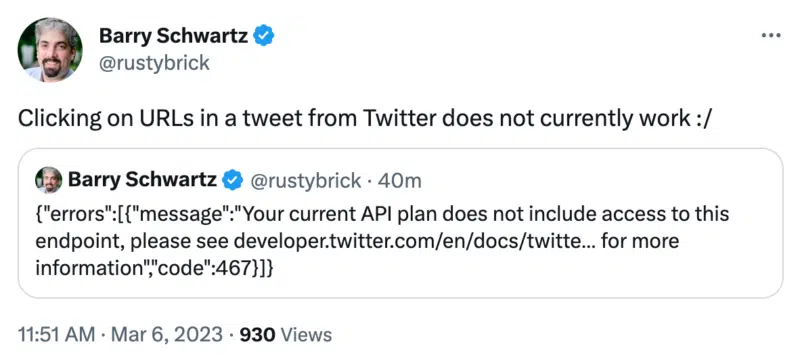
I noticed this going down a bit after 11:50 and posted about it on Twitter, where else?

Tweet 800x359

I cannot embed the tweet here right now, so that is a screenshot of this tweet.

Not just links. It is not just links that are not working but also images, logging into some services, using the Twitter API and other features that may require use of the Twitter API.

Why we care. If you are promoting content or services right now on Twitter, you might want to delay those efforts until users can click on those links and fully access your tweets.

Stay tuned as I suspect Twitter is working on the issue, as there are a lot of reports complied about the issue and growing.

Twitter working on a fix. Twitter posted, saying, “Some parts of Twitter may not be working as expected right now. We made an internal change that had some unintended consequences. We’re working on this now and will share an update when it’s fixed.”

Fixed at 12:55pm ET. After about an hour of Twitter outages, it seems like Twitter has restored the issues.


Related stories

New on Search Engine Land

@media screen and (min-width: 800px) { #div-gpt-ad-3191538-7 { display: flex !important; justify-content: center !important; align-items: center !important; min-width:770px; min-height:260px; } } @media screen and (min-width: 1279px) { #div-gpt-ad-3191538-7 { display: flex !important; justify-content: center !important; align-items: center !important; min-width:800px!important; min-height:440px!important; } }

About the author

Barry Schwartz

Barry Schwartz a Contributing Editor to Search Engine Land and a member of the programming team for SMX events. He owns RustyBrick, a NY based web consulting firm. He also runs Search Engine Roundtable, a popular search blog on very advanced SEM topics. Barry can be followed on Twitter here.

https://searchengineland.com/twitter-services-are-offline-including-clicking-on-links-viewing-images-and-more-393942


LinkedIn: How to Turn On Open to Work

.article-native-ad { border-bottom: 1px solid #ddd; margin: 0 45px; padding-bottom: 20px; margin-bottom: 20px; } .article-native-ad svg { color: #ddd; font-size: 34px; margin-top: 10px; } .article-native-ad p { line-height:1.5; padding:0!important; padding-left: 10px!important; } .article-native-ad strong { font-weight:500; color:rgb(46,179,178); }

Hear from the Big Ten Conference CIO on how they create a unified data strategy to amp up fan engagement and drive sales.
Register for this webinar, sponsored by Snowflake, on March 14.

LinkedIn’s Open to Work feature allows users to tell other LinkedIn members and/or recruiters that they’re interested in new work opportunities. Users can decide whether this information is shared with everyone on LinkedIn or only recruiters. If a user decides to share this information with everyone on LinkedIn, an “Open to Work” banner will be added to their profile picture.

Our guide will show you how to turn on the “Open to Work” feature on your LinkedIn profile.

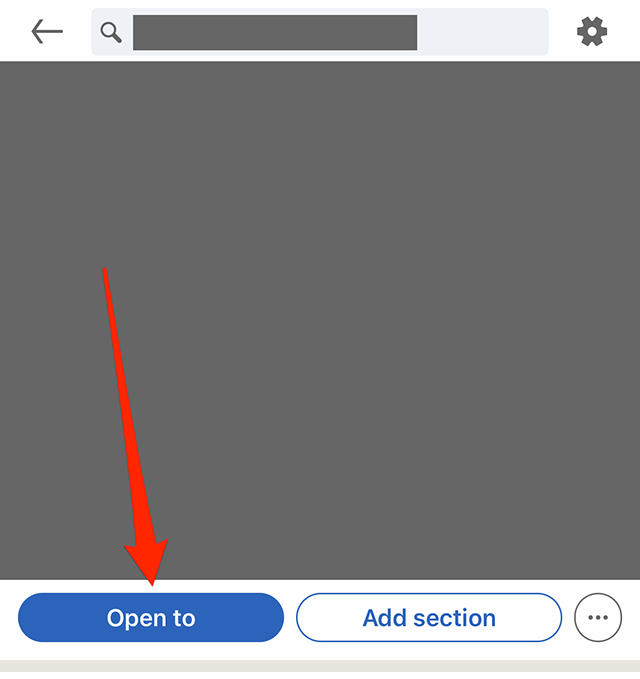
Step 1: On you LinkedIn profile, tap the “Open to” button to the left of the “Add section” button.

image

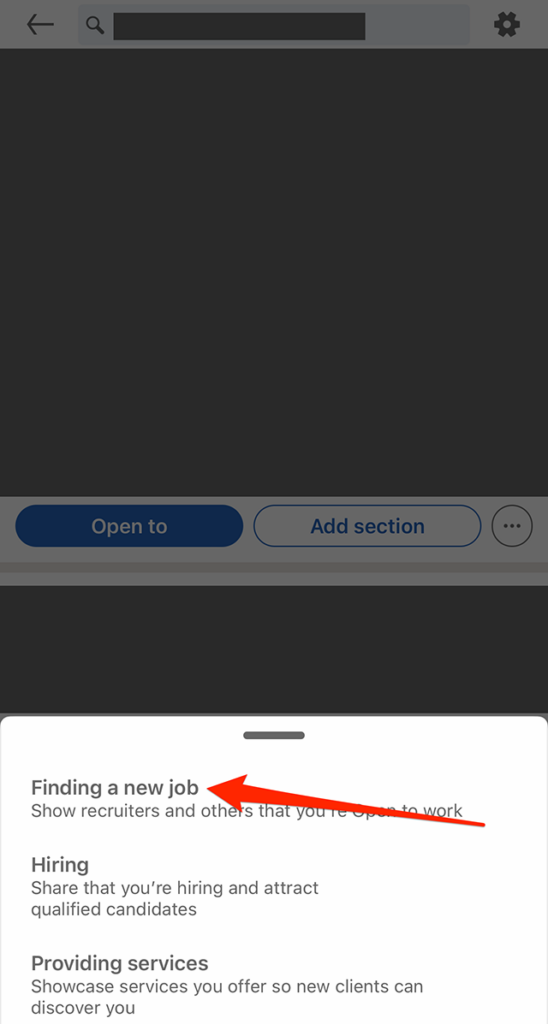
Step 2: Tap “Finding a new job” on the window that appears at the bottom of the screen.

image

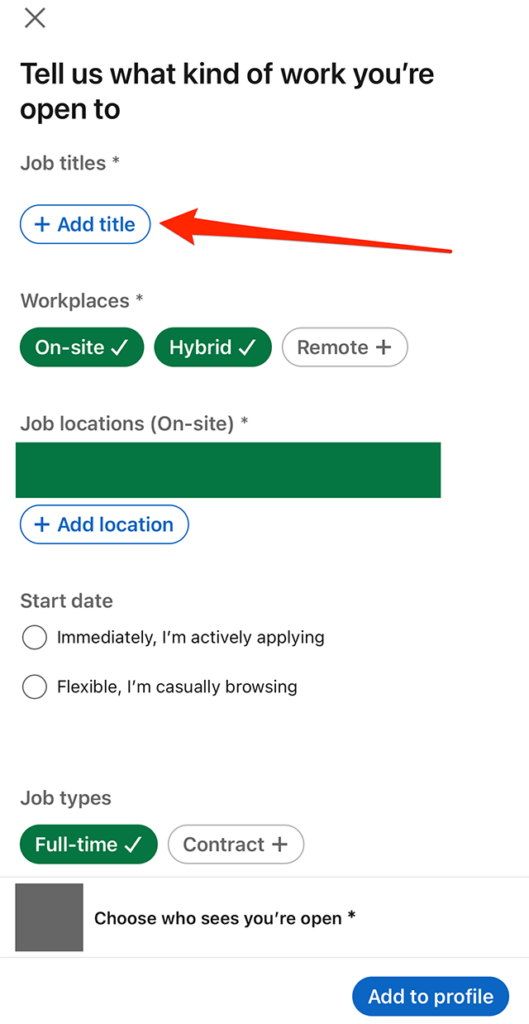
Step 3: Fill out the form with the job title(s), job location(s) and other details you’d like to share.

image

Step 4: Once you’re done filling out your desired information, tap “Choose who sees you’re open” near the bottom of the…

#paywall-subscribe { margin:0; padding: 1rem 2.4rem; } #paywall-subscribe .holder { background-color:#eee; border:15px solid #f2f2f2; padding:30px; margin:0 auto!important; text-align:center; } #paywall-subscribe a.underline { color:#000; text-decoration:underline; } #paywall-subscribe img { margin-bottom:10px; width: 140px!important; height: auto!important; } #paywall-subscribe h3 { font-weight:bold; font-size:16px; text-transform:uppercase; width:80%; margin:0 auto; margin-bottom:20px; text-align:center; } #paywall-subscribe h3 span { display:block; font-size:14px; } #paywall-subscribe h2 { font-weight:800; font-size:24px; text-transform:uppercase; } #paywall-subscribe p { font-size: 16px; color:#000; padding: 0; } #paywall-subscribe .cta { margin-top:20px; margin-bottom:10px; font-size:14px; text-transform:capitalize; color: #fff; background-color: #E50000; border:none; padding:12px 28px; text-decoration:none; -webkit-transition: .3s ease; -moz-transition: .3s ease; -o-transition: .3s ease; -ms-transition: .3s ease; transition: .3s ease; } #paywall-subscribe .cta:hover { color: #fff; background-color: #181818; transform: scale(1.02); } #paywall-subscribe .already-a-member { font-size:14px; } @media (max-width: 1024px) { #paywall-subscribe .holder { border:12px solid #f2f2f2; padding:25px; } #paywall-subscribe img { width: 120px!important; } } @media (max-width: 768px) { #paywall-subscribe .holder { border:10px solid #f2f2f2; padding:20px; } #paywall-subscribe img { width: 100px!important; } #paywall-subscribe h3 { font-size:14px; } #paywall-subscribe h3 span { font-size:12px; } #paywall-subscribe h2 { font-size:18px; } #paywall-subscribe p { font-size:14px; } #paywall-subscribe .cta { font-size:12px; padding:10px 24px; } #paywall-subscribe .already-a-member { font-size:11px; } } AW+

WORK SMARTER – LEARN, GROW AND BE INSPIRED.

Subscribe today!

To Read the Full Story Become an Adweek+ Subscriber

View Subscription Options

Already a member? Sign in

https://www.adweek.com/programmatic/linkedin-how-to-turn-on-open-to-work/


Marketers Prove Skeptical of Advertising In Chat-Based Search Engines


.article-native-ad { border-bottom: 1px solid #ddd; margin: 0 45px; padding-bottom: 20px; margin-bottom: 20px; } .article-native-ad svg { color: #ddd; font-size: 34px; margin-top: 10px; } .article-native-ad p { line-height:1.5; padding:0!important; padding-left: 10px!important; } .article-native-ad strong { font-weight:500; color:rgb(46,179,178); }

Hear from the Big Ten Conference CIO on how they create a unified data strategy to amp up fan engagement and drive sales.
Register for this webinar, sponsored by Snowflake, on March 14.

As Microsoft and Google race to integrate the next wave of language artificial intelligence into their respective search engines, the push has left agencies with questions about what these new conversational platforms will mean for how ads are served.

So-called large language model AI systems like ChatGPT could offer users a more interactive way to access information on the web. But how Microsoft and Google will seek to monetize their huge investments in this technology with paid placements is so far unclear to ad buyers.

Microsoft seems to be considering advertisements in the form of links listed at the end of the answer to a given query, according to what advertisers have seen within the current Bing AI platform. Meanwhile, buyers say Google has not disclosed any details about how ads will work within its own Bard AI, a chatbot designed to compete with Microsoft’s new GPT-powered Bing. 

But concerns remain about how monetization will fit into the flow of chatbot conversation, if it will prove effective and whether the technology might fall short with people in the same ways that previous attempts to reinvent the search experience have.

“I’m most skeptical about the potential of ChatGPT to disrupt ads in a meaningful way,” said Sam Tomlinson, executive vice president at ad agency Warschawski.

Positions of ad formats and new data 

The ad format that Microsoft has already suggested placing an ad at the end of a chatbot query, leaves marketers unconvinced.

It’s not clear at what point in the conversation an ad might be served, said Aaron Levy, vp of paid search at performance agency Tinuiti. The pricing is also unclear, given that there would likely be fewer impressions for any given chat compared to a search query since conversational formats are more complex.

Marketers can also imagine other ways AI chat-driven search could lead to advertising. Bing’s chatbot could include links that go to relevant Bing searches, where users would then be served with ads, said Michael Cohen, evp of performance media at Horizon Media. The technique, known as search arbitrage, has also been employed by Ask.com and Yellow Pages. 

But adopting ad formats similar to what’s currently available is a missed opportunity.

“If you are trying to disrupt search, you have to do it in a meaningful way versus a slapdash way like putting links at the bottom,” Tomlinson said. “[If you do that], you’ve just swapped out content at the top.”

Advertisers also ponder what data Microsoft and Google will be able to access to power their tech.

With chatbots, people will spend more time interacting with content on the search engine’s site versus mostly interacting with content once they click on a link, potentially providing the tech firms, and in turn, advertisers, new reams of data.

“Can you show me the query?” Tomlinson said. “We could deploy that against other aspects of our strategy, like content strategy and search engine optimization and product strategy.”

Comparisons to voice-based search 

For all the potential AI has to upend search, the format has proved very sticky over the years.

Agency veterans tend to compare AI-based search to voice-based search. Tech giants similarly heralded the advent of digital assistants as a means to put a more conversational interface on a search into which ads could be interspersed.

But the format never reached the type of consumer adoption it would have needed to become a major advertising channel in its own right.

Generative AI-based search might not be entirely analogous, but it does share some of the challenges around placing ads in a more inherently conversational setting.

“It’s being marketed as a paradigm shift, and it kind of is, if it takes,” Levy said. “Voice search never quite got there. This isn’t quite the same. It’s a stepping stone instead of a big leap, like going screenless would have been with voice search.”

One of the problems with voice search was that it lacked the same feedback loop by which Google text search learns from each user’s behavior and becomes more efficient as a result, according to Tomlinson.

“By the time you got the answer, it was stupid,” Tomlinson said. “And you went to a regular Google search to get the answer.”

Google’s dilemma

Google—which is a lot more reliant on text-based search for ad revenue—has also rolled out a variety of features in the past decade that have transformed the search experience to serve information more directly to people within its walled garden. Results formats like Featured Snippets, the Knowledge Graph sidebar and the People Also Ask box pull and highlight information directly from websites on the results page itself.

Notably, none of these features offer paid advertising because they tend to be more strictly informational in nature, said Levy.

Still, Google has been pushing further into ads that live exclusively on the results page in recent years, said Levy, including formats like Local Service ads, in which the entire transaction with a nearby small business takes place within Google’s site. Such offerings could provide a model for a more native form of conversational AI ad.

.font-primary { } .font-secondary { } #meter-count { position: fixed; z-index: 9999999; bottom: 0; width:96%; margin: 2%; -webkit-border-radius: 4px; -moz-border-radius: 4px; border-radius: 4px; -webkit-box-shadow: 0 0px 15px 4px rgba(0,0,0,.2); box-shadow:0 0px 15px 4px rgba(0,0,0,.2); padding: 15px 0; color:#fff; background-color:#343a40; } #meter-count .icon { width: auto; opacity:.8; } #meter-count .icon svg { height: 36px; width: auto; } #meter-count .btn-subscribe { font-size:14px; font-weight:bold; padding:7px 18px; color: #fff; background-color: #E50000; border:none; text-transform: capitalize; } #meter-count .btn-subscribe:hover { color: #fff; opacity:.8; } #meter-count .btn-signin { font-size:14px; font-weight:bold; padding:7px 14px; color: #fff; background-color: #121212; border:none; text-transform: capitalize; } #meter-count .btn-signin:hover { color: #fff; opacity:.8; } #meter-count h3 { color:#fff!important; letter-spacing:0px!important; margin:0; padding:0; font-size:16px; line-height:1.5; font-weight:700; margin: 0!important; padding: 0!important; } #meter-count h3 span { color:#E50000!important; font-weight:900; } #meter-count p { font-size:14px; font-weight:500; line-height:1.4; color:#eee!important; margin: 0!important; padding: 0!important; } #meter-count .close { color:#fff; display:block; position:absolute; top: 4px; right:4px; z-index: 999999; } #meter-count .close svg { display:block; color:#fff; height:16px; width:auto; cursor:pointer; } #meter-count .close:hover svg { color:#E50000; } #meter-count .fw-600 { font-weight:600; } @media (max-width: 1079px) { #meter-count .icon { margin:0; padding:0; display:none; } } @media (max-width: 768px) { #meter-count { margin: 0; -webkit-border-radius: 0px; -moz-border-radius: 0px; border-radius: 0px; width:100%; -webkit-box-shadow: 0 -8px 10px -4px rgba(0,0,0,0.3); box-shadow: 0 -8px 10px -4px rgba(0,0,0,0.3); } #meter-count .icon { margin:0; padding:0; display:none; } #meter-count h3 { color:#fff!important; font-size:14px; } #meter-count p { color:#fff!important; font-size: 12px; font-weight: 500; } #meter-count .btn-subscribe, #meter-count .btn-signin { font-size:12px; padding:7px 12px; } #meter-count .btn-signin { display:none; } #meter-count .close svg { height:14px; } }

Enjoying your content? You Have 1 Free Article Left.

Register to continue reading!

https://www.adweek.com/programmatic/marketers-prove-skeptical-of-advertising-in-chat-based-search-engines/


LinkedIn: How to Schedule a Post


.article-native-ad { border-bottom: 1px solid #ddd; margin: 0 45px; padding-bottom: 20px; margin-bottom: 20px; } .article-native-ad svg { color: #ddd; font-size: 34px; margin-top: 10px; } .article-native-ad p { line-height:1.5; padding:0!important; padding-left: 10px!important; } .article-native-ad strong { font-weight:500; color:rgb(46,179,178); }

Hear from the Big Ten Conference CIO on how they create a unified data strategy to amp up fan engagement and drive sales.
Register for this webinar, sponsored by Snowflake, on March 14.

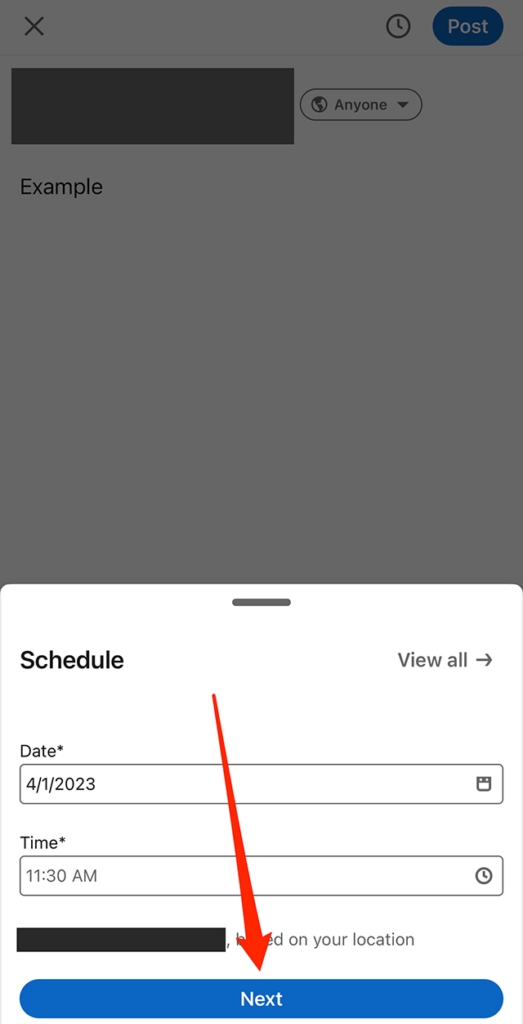
LinkedIn allows users to schedule posts to go live at a desired date and time.

Our guide will show you how to schedule a post in the LinkedIn mobile application.

Note: These screenshots were captured in the LinkedIn app on iOS.

Step 1: On LinkedIn’s post creation screen, tap the clock icon near the top-right corner of the screen.

image

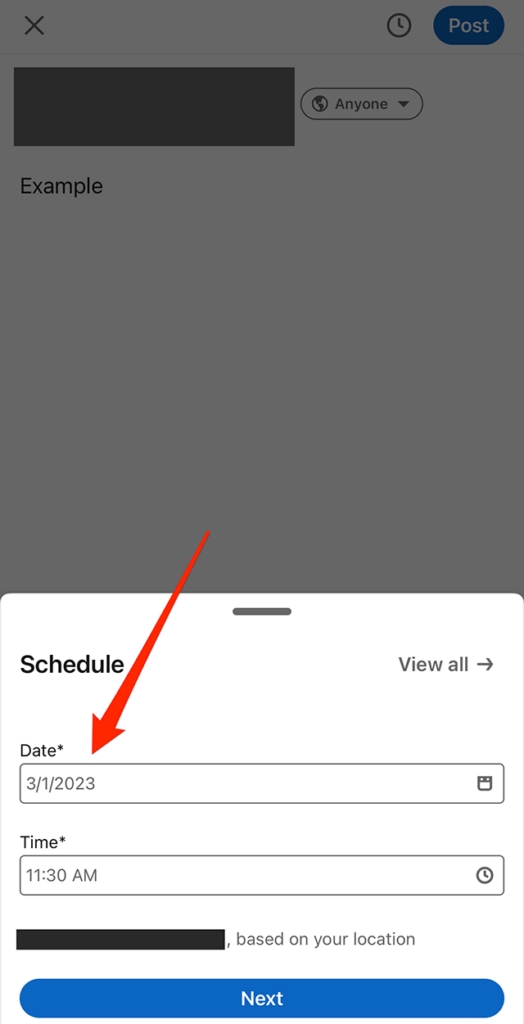
Step 2: Tap the date and time fields near the bottom of the screen to set when the post will go live.

image

Step 3: When you’re done setting the date and time for the post, tap the “Next” button at the bottom of the screen.

image

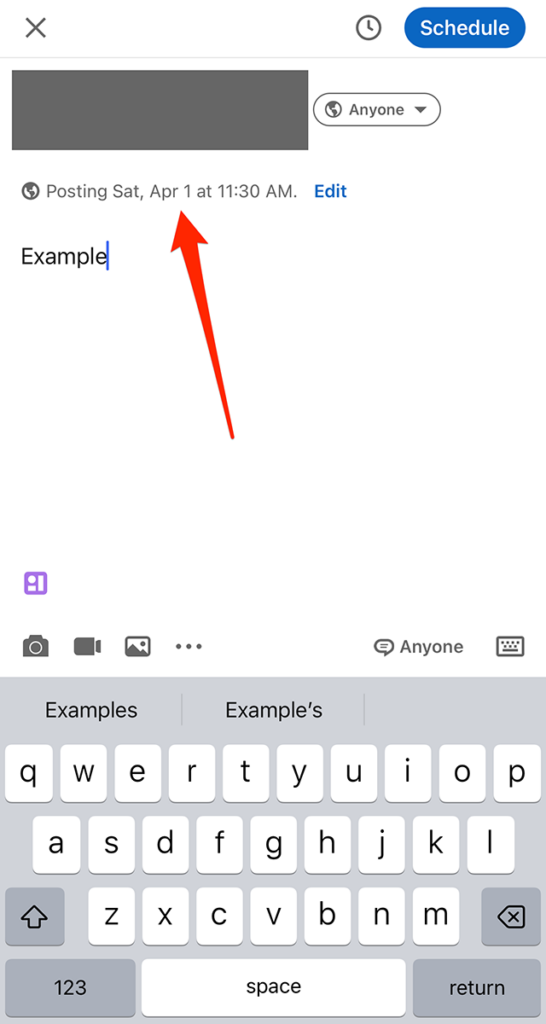
From there, you can continue editing your post as you normally would before scheduling it.

image
.font-primary { } .font-secondary { } #meter-count { position: fixed; z-index: 9999999; bottom: 0; width:96%; margin: 2%; -webkit-border-radius: 4px; -moz-border-radius: 4px; border-radius: 4px; -webkit-box-shadow: 0 0px 15px 4px rgba(0,0,0,.2); box-shadow:0 0px 15px 4px rgba(0,0,0,.2); padding: 15px 0; color:#fff; background-color:#343a40; } #meter-count .icon { width: auto; opacity:.8; } #meter-count .icon svg { height: 36px; width: auto; } #meter-count .btn-subscribe { font-size:14px; font-weight:bold; padding:7px 18px; color: #fff; background-color: #E50000; border:none; text-transform: capitalize; } #meter-count .btn-subscribe:hover { color: #fff; opacity:.8; } #meter-count .btn-signin { font-size:14px; font-weight:bold; padding:7px 14px; color: #fff; background-color: #121212; border:none; text-transform: capitalize; } #meter-count .btn-signin:hover { color: #fff; opacity:.8; } #meter-count h3 { color:#fff!important; letter-spacing:0px!important; margin:0; padding:0; font-size:16px; line-height:1.5; font-weight:700; margin: 0!important; padding: 0!important; } #meter-count h3 span { color:#E50000!important; font-weight:900; } #meter-count p { font-size:14px; font-weight:500; line-height:1.4; color:#eee!important; margin: 0!important; padding: 0!important; } #meter-count .close { color:#fff; display:block; position:absolute; top: 4px; right:4px; z-index: 999999; } #meter-count .close svg { display:block; color:#fff; height:16px; width:auto; cursor:pointer; } #meter-count .close:hover svg { color:#E50000; } #meter-count .fw-600 { font-weight:600; } @media (max-width: 1079px) { #meter-count .icon { margin:0; padding:0; display:none; } } @media (max-width: 768px) { #meter-count { margin: 0; -webkit-border-radius: 0px; -moz-border-radius: 0px; border-radius: 0px; width:100%; -webkit-box-shadow: 0 -8px 10px -4px rgba(0,0,0,0.3); box-shadow: 0 -8px 10px -4px rgba(0,0,0,0.3); } #meter-count .icon { margin:0; padding:0; display:none; } #meter-count h3 { color:#fff!important; font-size:14px; } #meter-count p { color:#fff!important; font-size: 12px; font-weight: 500; } #meter-count .btn-subscribe, #meter-count .btn-signin { font-size:12px; padding:7px 12px; } #meter-count .btn-signin { display:none; } #meter-count .close svg { height:14px; } }

Enjoying your content? You Have 1 Free Article Left.

Register to continue reading!

https://www.adweek.com/programmatic/linkedin-how-to-schedule-a-post/


TikTok’s New Audio Catalog Caters to Brands on a Budget


.article-native-ad { border-bottom: 1px solid #ddd; margin: 0 45px; padding-bottom: 20px; margin-bottom: 20px; } .article-native-ad svg { color: #ddd; font-size: 34px; margin-top: 10px; } .article-native-ad p { line-height:1.5; padding:0!important; padding-left: 10px!important; } .article-native-ad strong { font-weight:500; color:rgb(46,179,178); }

Hear from the Big Ten Conference CIO on how they create a unified data strategy to amp up fan engagement and drive sales.
Register for this webinar, sponsored by Snowflake, on March 14.

As consumers become increasingly supportive of brand underdogs and TikTok small businesses boom, the platform is playing into this evolving allegiance and refreshing its historic facilitation of unexpected virality and account discovery. 

As an audio-first platform that rewards users who creatively adopt viral sounds, TikTok is nurturing small businesses by expediting their creative processes and boosting their shot at virality. In its partnership with Elias Audio Branding, a subsidiary of Universal Production Music, the platform has crafted 10 custom sounds that include a combination of music, voice overs and directional cues that can be used in organic and paid content. The audio cache is part of TikTok’s vast Commercial Music Library, which brands can consult for pre-cleared sounds to avoid the licensing process. Since its launch, Sounds For Business have ranked in the top 1% of sounds with the top creates, views, likes and shares in the library of 1.5 million songs.

Borrowing language from long-established TIkTok trends, titles including “Pack an Order,” “Meet The Team” and “Reasons To Shop Small” offer social media managers starting points for introducing content formats that users have already approved. 

Elevating time optimization

Clint Wetherill and Scott Adams, who own a full-service real estate brokerage firm, have amassed 112,000 followers by using TikTok to promote their podcast. Wetheril, who predicted that 25% of the business’ sales will come directly from TikTok in the next year, acknowledged the audio library as a useful template for accelerating content creation. 

“Spreading basic financial literacy isn’t necessarily our field of business, but it’s what TikTok is asking for,” said Wetheril. “We saw that it’s what the community wants and needs, but it’s hard to always come up with these ideas and script and shoot when you’re running a full-time business” 

Among small businesses that run ads on the platform, 78% say they’ve realized a positive ROI, according to software marketplace Capterra’s 2022 TikTok marketing survey. TikTok has worked to celebrate this success—the platform recently elevated local businesses through its Gridiron Grub Contest, selecting three winners based on content with “creativity, storytelling and food appeal.” One recipient was Empamamas owner Stephanie Swanz, who uses TikTok to both entertain consumers and educate them about her product.

TikTok’s Promote feature, which was introduced earlier this month, provides users with more ways of boosting their content organically and offers specific benefits to small businesses—they can use new location services to directly target their local communities and accounts that rely on individual customer interactions to make sales that drive traffic directly to their inboxes. Instead of sticking to big brands or their typical purchasing patterns, 58% of users say they discover new brands and products on the platform, posing an opportunity for TikTok to please both consumers and businesses by catalyzing business growth. 

.font-primary { } .font-secondary { } #meter-count { position: fixed; z-index: 9999999; bottom: 0; width:96%; margin: 2%; -webkit-border-radius: 4px; -moz-border-radius: 4px; border-radius: 4px; -webkit-box-shadow: 0 0px 15px 4px rgba(0,0,0,.2); box-shadow:0 0px 15px 4px rgba(0,0,0,.2); padding: 15px 0; color:#fff; background-color:#343a40; } #meter-count .icon { width: auto; opacity:.8; } #meter-count .icon svg { height: 36px; width: auto; } #meter-count .btn-subscribe { font-size:14px; font-weight:bold; padding:7px 18px; color: #fff; background-color: #2eb3b2; border:none; text-transform: capitalize; margin-right:10px; } #meter-count .btn-subscribe:hover { color: #fff; opacity:.8; } #meter-count .btn-signin { font-size:14px; font-weight:bold; padding:7px 14px; color: #fff; background-color: #121212; border:none; text-transform: capitalize; } #meter-count .btn-signin:hover { color: #fff; opacity:.8; } #meter-count h3 { color:#fff!important; letter-spacing:0px!important; margin:0; padding:0; font-size:16px; line-height:1.5; font-weight:700; margin: 0!important; padding: 0!important; } #meter-count h3 span { color:#E50000!important; font-weight:900; } #meter-count p { font-size:14px; font-weight:500; line-height:1.4; color:#eee!important; margin: 0!important; padding: 0!important; } #meter-count .close { color:#fff; display:block; position:absolute; top: 4px; right:4px; z-index: 999999; } #meter-count .close svg { display:block; color:#fff; height:16px; width:auto; cursor:pointer; } #meter-count .close:hover svg { color:#E50000; } #meter-count .fw-600 { font-weight:600; } @media (max-width: 1079px) { #meter-count .icon { margin:0; padding:0; display:none; } } @media (max-width: 768px) { #meter-count { margin: 0; -webkit-border-radius: 0px; -moz-border-radius: 0px; border-radius: 0px; width:100%; -webkit-box-shadow: 0 -8px 10px -4px rgba(0,0,0,0.3); box-shadow: 0 -8px 10px -4px rgba(0,0,0,0.3); } #meter-count .icon { margin:0; padding:0; display:none; } #meter-count h3 { color:#fff!important; font-size:14px; } #meter-count p { color:#fff!important; font-size: 12px; font-weight: 500; } #meter-count .btn-subscribe, #meter-count .btn-signin { font-size:12px; padding:7px 12px; } #meter-count .btn-signin { display:none; } #meter-count .close svg { height:14px; } }

Enjoying Adweek’s Content? Register for More Access!

https://www.adweek.com/programmatic/tiktok-audio-catalog-caters-to-small-businesses/


LinkedIn: How to Stop Auto-Play Videos on Mobile


.article-native-ad { border-bottom: 1px solid #ddd; margin: 0 45px; padding-bottom: 20px; margin-bottom: 20px; } .article-native-ad svg { color: #ddd; font-size: 34px; margin-top: 10px; } .article-native-ad p { line-height:1.5; padding:0!important; padding-left: 10px!important; } .article-native-ad strong { font-weight:500; color:rgb(46,179,178); }

Get the scoop from strategic media pros at Disney, YouTube and more just in time for upfront season at Convergent TV, March 21–22. Learn more.

By default, videos will automatically play as users come across them in the LinkedIn mobile application. However, users have the option to prevent videos from automatically playing.

Our guide will show you how to stop videos from automatically playing in the LinkedIn mobile app.

Note: These screenshots were captured in the LinkedIn app on iOS.

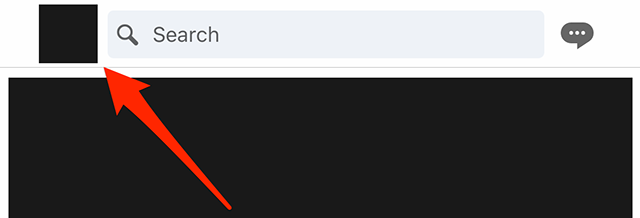
Step 1: Tap your profile picture in the top-left corner of the screen.

image

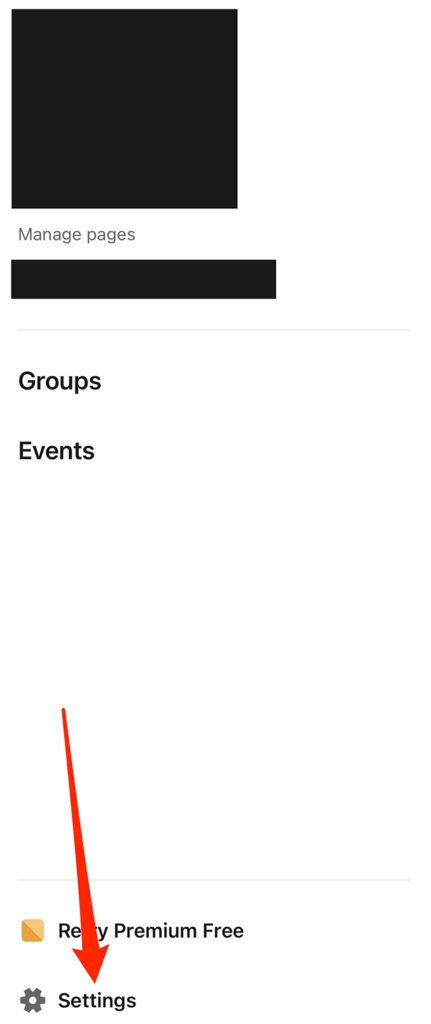
Step 2: Tap “Settings” at the bottom of LinkedIn’s side menu.

image

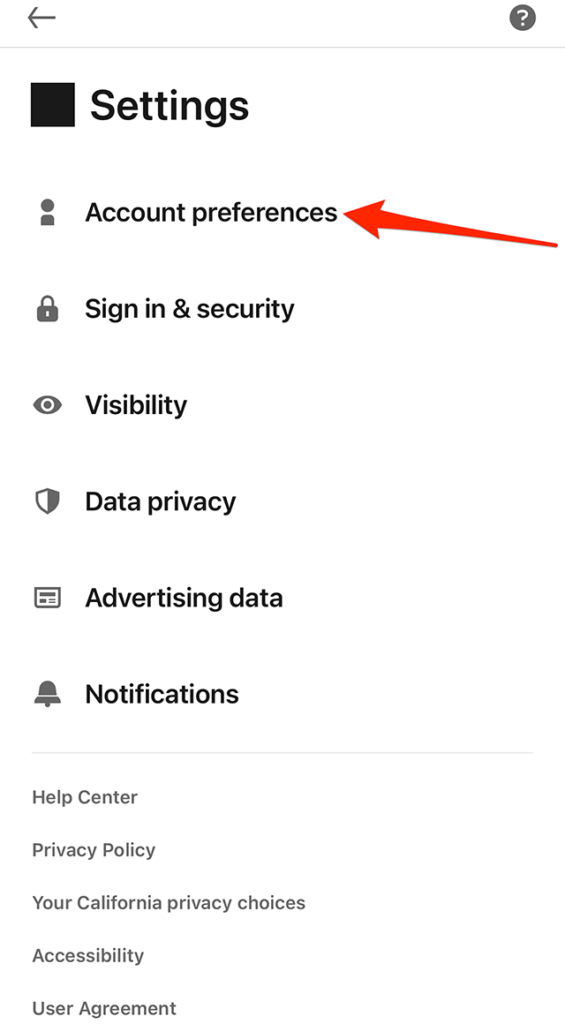
Step 3: Tap “Account preferences.”

image

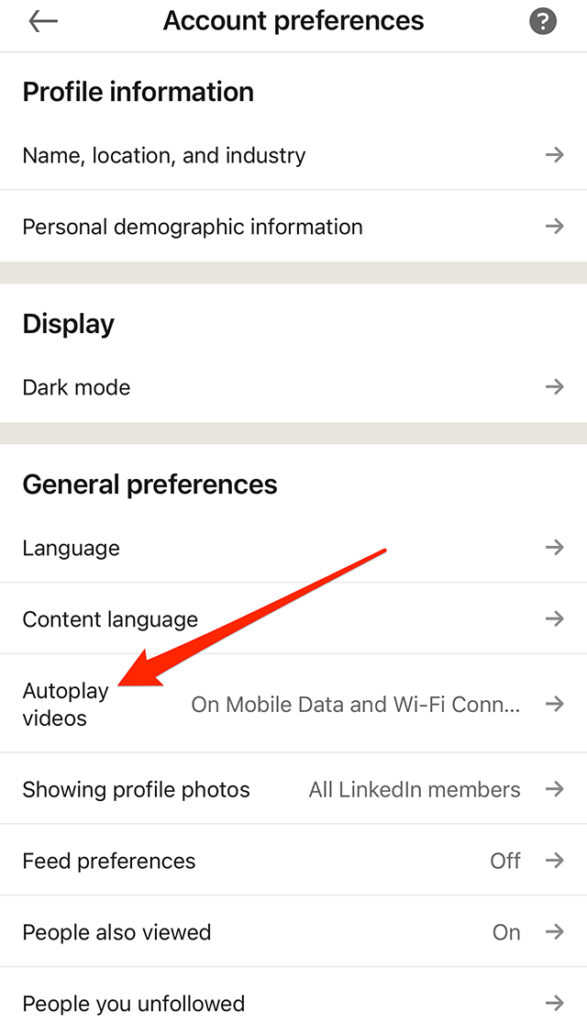
Step 4: Under the “General preferences” section, tap “Autoplay videos.”

image

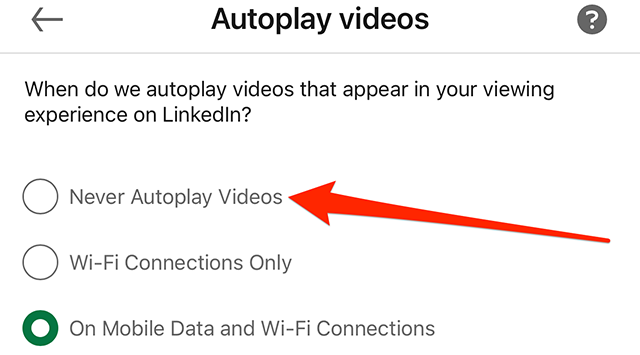
Step 5: Tap “Never Autoplay Videos” to stop videos from automatically playing on LinkedIn. You can also tap “Wi-Fi Connections Only” to prevent videos from automatically playing unless your device is connected to Wi-Fi.

image

This guide was first published in March 2018 and was updated in February 2023.

.font-primary { } .font-secondary { } #meter-count { position: fixed; z-index: 9999999; bottom: 0; width:96%; margin: 2%; -webkit-border-radius: 4px; -moz-border-radius: 4px; border-radius: 4px; -webkit-box-shadow: 0 0px 15px 4px rgba(0,0,0,.2); box-shadow:0 0px 15px 4px rgba(0,0,0,.2); padding: 15px 0; color:#fff; background-color:#343a40; } #meter-count .icon { width: auto; opacity:.8; } #meter-count .icon svg { height: 36px; width: auto; } #meter-count .btn-subscribe { font-size:14px; font-weight:bold; padding:7px 18px; color: #fff; background-color: #2eb3b2; border:none; text-transform: capitalize; margin-right:10px; } #meter-count .btn-subscribe:hover { color: #fff; opacity:.8; } #meter-count .btn-signin { font-size:14px; font-weight:bold; padding:7px 14px; color: #fff; background-color: #121212; border:none; text-transform: capitalize; } #meter-count .btn-signin:hover { color: #fff; opacity:.8; } #meter-count h3 { color:#fff!important; letter-spacing:0px!important; margin:0; padding:0; font-size:16px; line-height:1.5; font-weight:700; margin: 0!important; padding: 0!important; } #meter-count h3 span { color:#E50000!important; font-weight:900; } #meter-count p { font-size:14px; font-weight:500; line-height:1.4; color:#eee!important; margin: 0!important; padding: 0!important; } #meter-count .close { color:#fff; display:block; position:absolute; top: 4px; right:4px; z-index: 999999; } #meter-count .close svg { display:block; color:#fff; height:16px; width:auto; cursor:pointer; } #meter-count .close:hover svg { color:#E50000; } #meter-count .fw-600 { font-weight:600; } @media (max-width: 1079px) { #meter-count .icon { margin:0; padding:0; display:none; } } @media (max-width: 768px) { #meter-count { margin: 0; -webkit-border-radius: 0px; -moz-border-radius: 0px; border-radius: 0px; width:100%; -webkit-box-shadow: 0 -8px 10px -4px rgba(0,0,0,0.3); box-shadow: 0 -8px 10px -4px rgba(0,0,0,0.3); } #meter-count .icon { margin:0; padding:0; display:none; } #meter-count h3 { color:#fff!important; font-size:14px; } #meter-count p { color:#fff!important; font-size: 12px; font-weight: 500; } #meter-count .btn-subscribe, #meter-count .btn-signin { font-size:12px; padding:7px 12px; } #meter-count .btn-signin { display:none; } #meter-count .close svg { height:14px; } }

Enjoying Adweek’s Content? Register for More Access!

https://www.adweek.com/media/linkedin-heres-how-to-stop-auto-play-videos-on-mobile/


LinkedIn: How to Turn Off Creator Mode on Mobile


.article-native-ad { border-bottom: 1px solid #ddd; margin: 0 45px; padding-bottom: 20px; margin-bottom: 20px; } .article-native-ad svg { color: #ddd; font-size: 34px; margin-top: 10px; } .article-native-ad p { line-height:1.5; padding:0!important; padding-left: 10px!important; } .article-native-ad strong { font-weight:500; color:rgb(46,179,178); }

Introducing the Adweek Podcast Network. Access infinite inspiration in your pocket on everything from career advice and creativity to metaverse marketing and more. Browse all podcasts.

LinkedIn’s “Creator Mode” offers professionals an exclusive set of features that were designed for users who want to build a following on the social networking platform. Once someone turns on Creator Mode on their LinkedIn profile, they can later turn Creator Mode off if they’d rather revert to the traditional LinkedIn experience.

Our guide will show you how to turn off Creator Mode while using the LinkedIn mobile application.

Note: These screenshots were captured in the LinkedIn app on iOS.

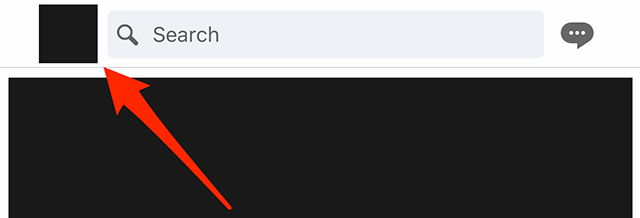
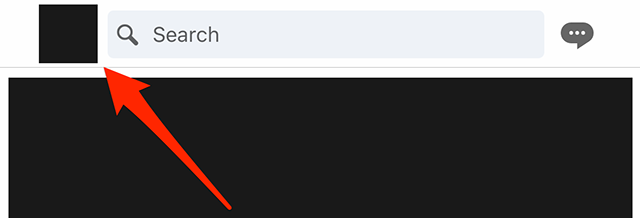
Step 1: Tap your profile picture in the top-left corner of the screen.

image

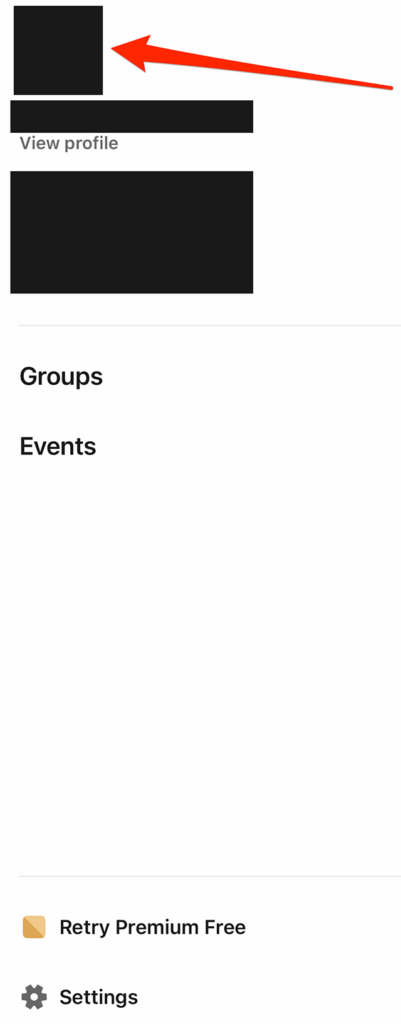
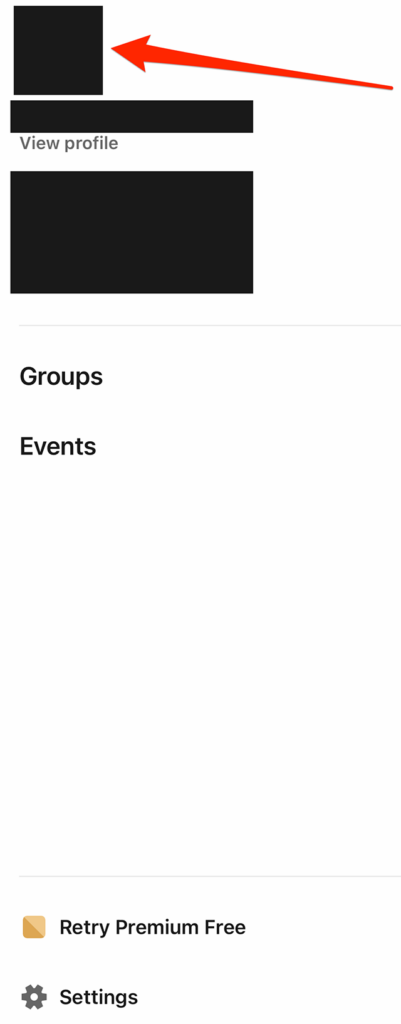
Step 2: Tap your profile picture on LinkedIn’s side menu to go to your profile. Note: You can also tap “View profile” under your name on this menu to go to your profile.

image

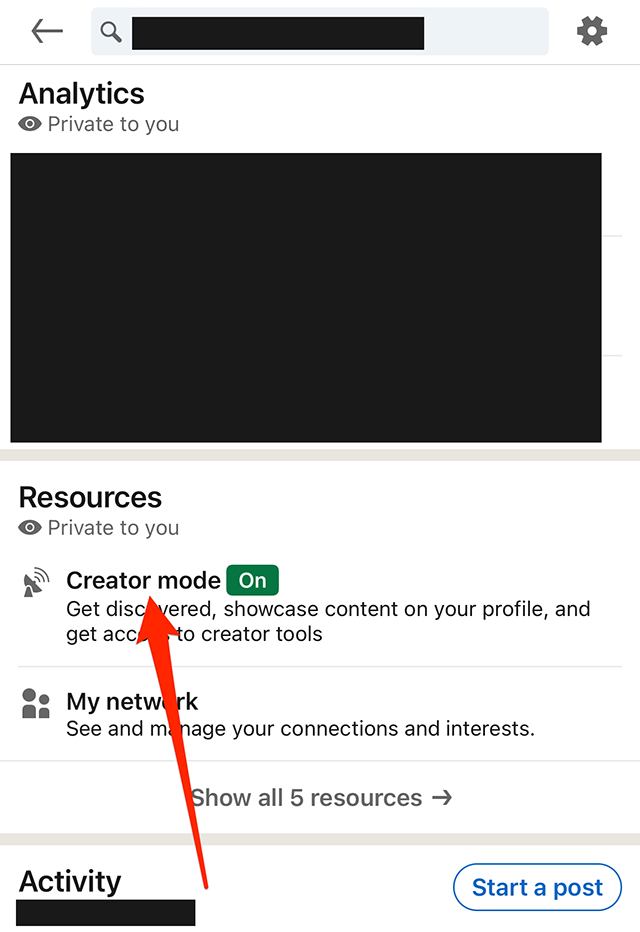
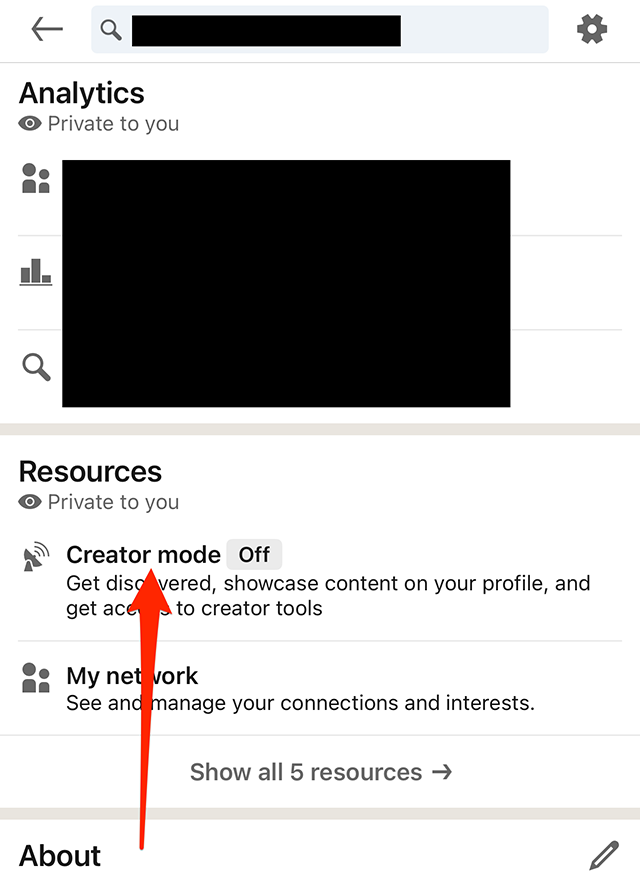
Step 3: Scroll down to the “Resources” section and tap “Creator mode.”

image

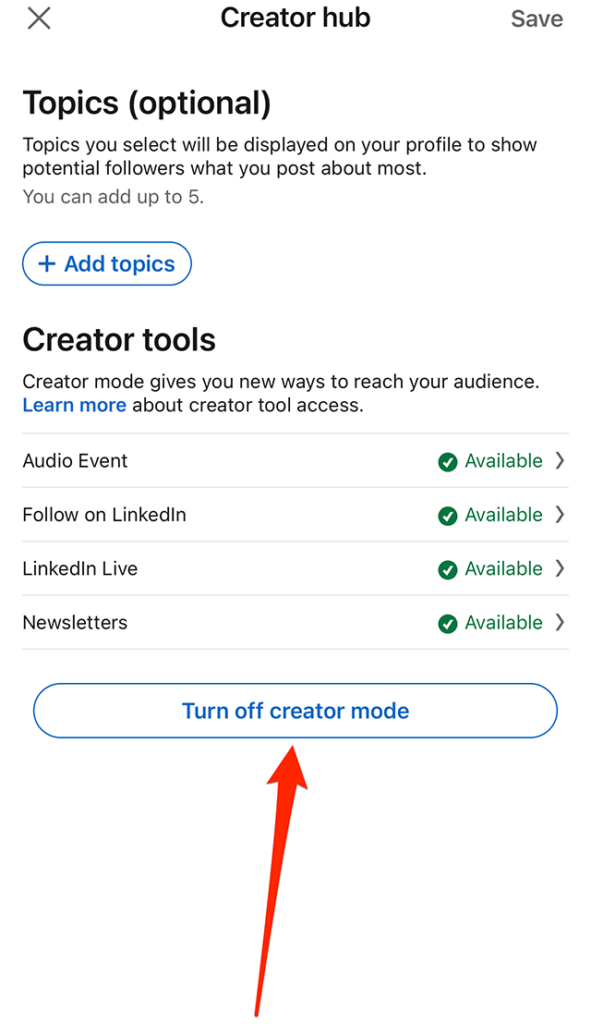
Step 4: Tap the “Turn off creator mode” button.

image

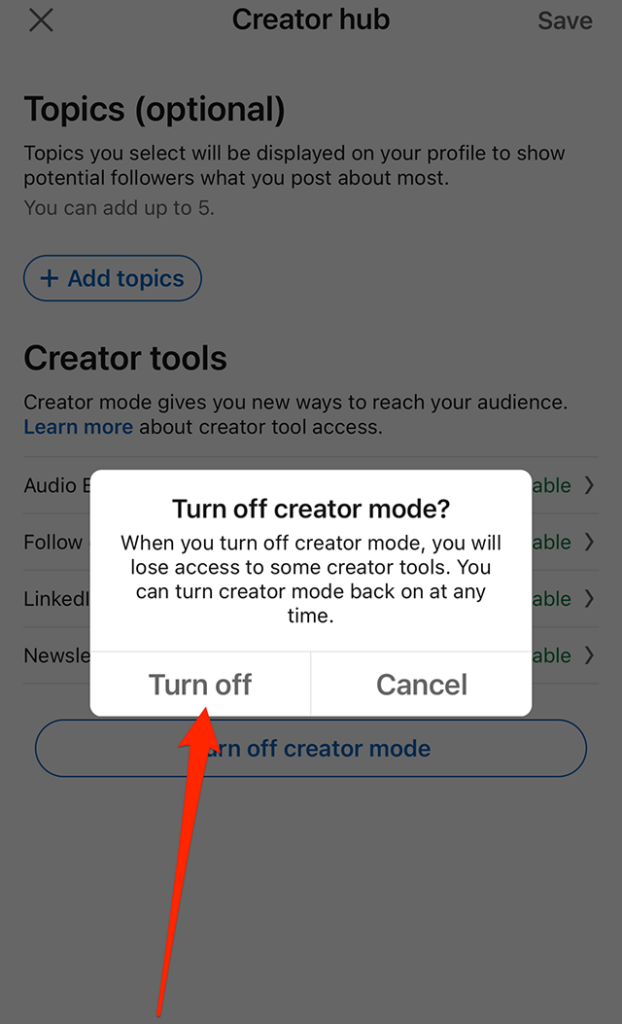
Step 5: Tap the “Turn off” button on the confirmation window that appears to turn off Creator Mode on your profile.

image
.font-primary { } .font-secondary { } #meter-count { position: fixed; z-index: 9999999; bottom: 0; width:96%; margin: 2%; -webkit-border-radius: 4px; -moz-border-radius: 4px; border-radius: 4px; -webkit-box-shadow: 0 0px 15px 4px rgba(0,0,0,.2); box-shadow:0 0px 15px 4px rgba(0,0,0,.2); padding: 15px 0; color:#fff; background-color:#343a40; } #meter-count .icon { width: auto; opacity:.8; } #meter-count .icon svg { height: 36px; width: auto; } #meter-count .btn-subscribe { font-size:14px; font-weight:bold; padding:7px 18px; color: #fff; background-color: #2eb3b2; border:none; text-transform: capitalize; margin-right:10px; } #meter-count .btn-subscribe:hover { color: #fff; opacity:.8; } #meter-count .btn-signin { font-size:14px; font-weight:bold; padding:7px 14px; color: #fff; background-color: #121212; border:none; text-transform: capitalize; } #meter-count .btn-signin:hover { color: #fff; opacity:.8; } #meter-count h3 { color:#fff!important; letter-spacing:0px!important; margin:0; padding:0; font-size:16px; line-height:1.5; font-weight:700; margin: 0!important; padding: 0!important; } #meter-count h3 span { color:#E50000!important; font-weight:900; } #meter-count p { font-size:14px; font-weight:500; line-height:1.4; color:#eee!important; margin: 0!important; padding: 0!important; } #meter-count .close { color:#fff; display:block; position:absolute; top: 4px; right:4px; z-index: 999999; } #meter-count .close svg { display:block; color:#fff; height:16px; width:auto; cursor:pointer; } #meter-count .close:hover svg { color:#E50000; } #meter-count .fw-600 { font-weight:600; } @media (max-width: 1079px) { #meter-count .icon { margin:0; padding:0; display:none; } } @media (max-width: 768px) { #meter-count { margin: 0; -webkit-border-radius: 0px; -moz-border-radius: 0px; border-radius: 0px; width:100%; -webkit-box-shadow: 0 -8px 10px -4px rgba(0,0,0,0.3); box-shadow: 0 -8px 10px -4px rgba(0,0,0,0.3); } #meter-count .icon { margin:0; padding:0; display:none; } #meter-count h3 { color:#fff!important; font-size:14px; } #meter-count p { color:#fff!important; font-size: 12px; font-weight: 500; } #meter-count .btn-subscribe, #meter-count .btn-signin { font-size:12px; padding:7px 12px; } #meter-count .btn-signin { display:none; } #meter-count .close svg { height:14px; } }

Enjoying Adweek’s Content? Register for More Access!

https://www.adweek.com/programmatic/linkedin-how-to-turn-off-creator-mode-on-mobile/


Linked: How to Turn On Creator Mode on Mobile


.article-native-ad { border-bottom: 1px solid #ddd; margin: 0 45px; padding-bottom: 20px; margin-bottom: 20px; } .article-native-ad svg { color: #ddd; font-size: 34px; margin-top: 10px; } .article-native-ad p { line-height:1.5; padding:0!important; padding-left: 10px!important; } .article-native-ad strong { font-weight:500; color:rgb(46,179,178); }

Introducing the Adweek Podcast Network. Access infinite inspiration in your pocket on everything from career advice and creativity to metaverse marketing and more. Browse all podcasts.

LinkedIn features a “Creator Mode” designed for professionals who want to grow a following by sharing content on the professional social network. When a user turns on “Creator Mode” on their LinkedIn profile, they’ll receive access to exclusive features, such as the ability to add hashtags below their headline that will tell other users more about them.

Our guide will show you how to turn on Creator Mode while using the LinkedIn mobile application.

Note: These screenshots were captured in the LinkedIn app on iOS.

Step 1: Tap your profile picture in the top-left corner of the screen.

image

Step 2: Tap your profile picture on LinkedIn’s side menu to go to your profile. Note: You can also tap “View profile” under your name on this menu to go to your profile.

image

Step 3: Scroll down to the “Resources” section and tap “Creator mode.”

image

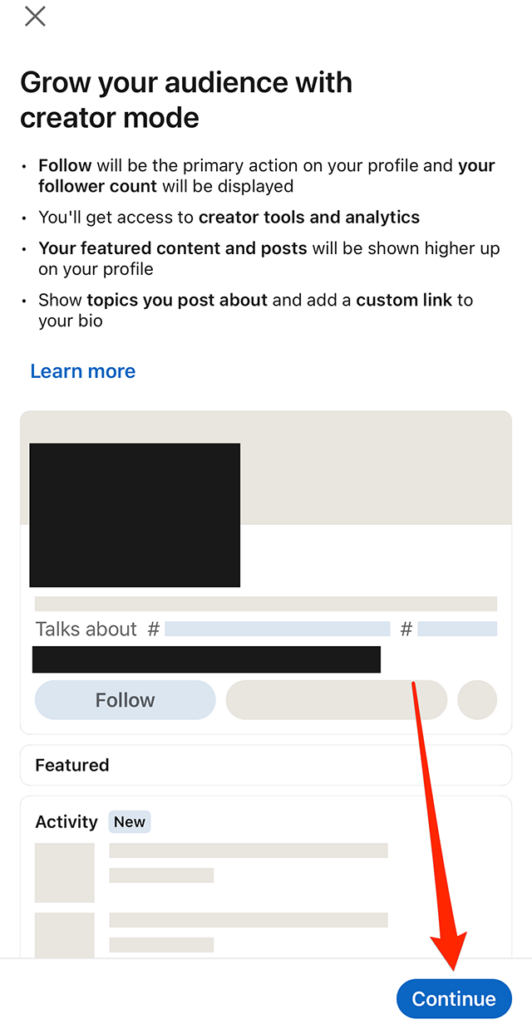
Step 4: LinkedIn will give you information about Creator Mode. Tap “Continue” in the bottom-right corner of the screen to continue.

image

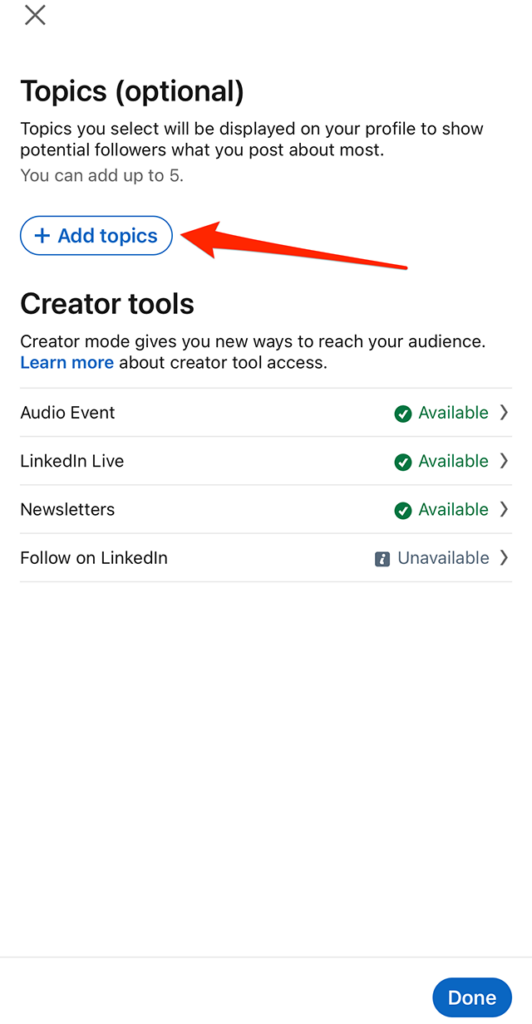
Step 5: Tap the “Add topics” button if you want to add hashtags to your profile related to the topics you focus on. You can also skip this step for now and add topics to your profile later, if you’d prefer.

image

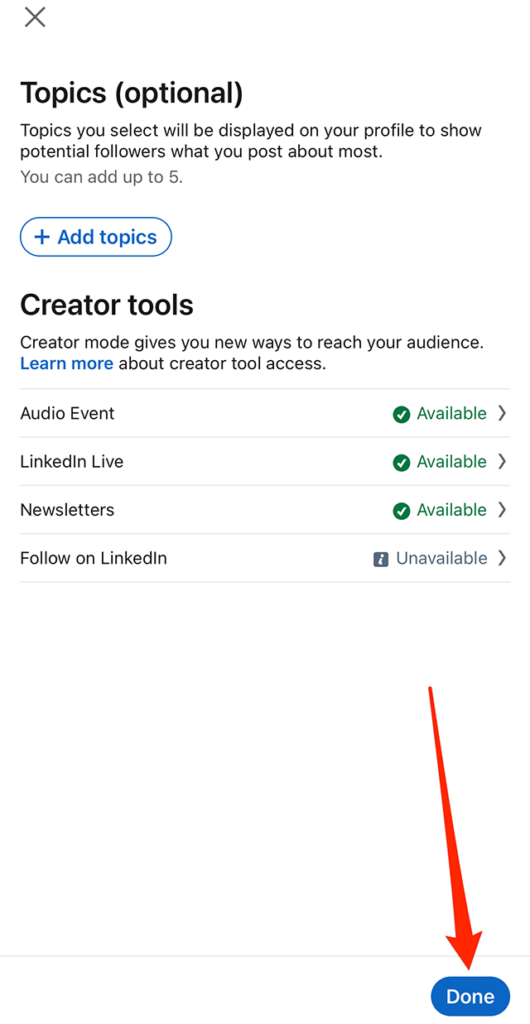
Step 6: When you’re done selecting topics (or if you want to skip that step for now), tap the “Done” button in the bottom-right corner of the screen.

image

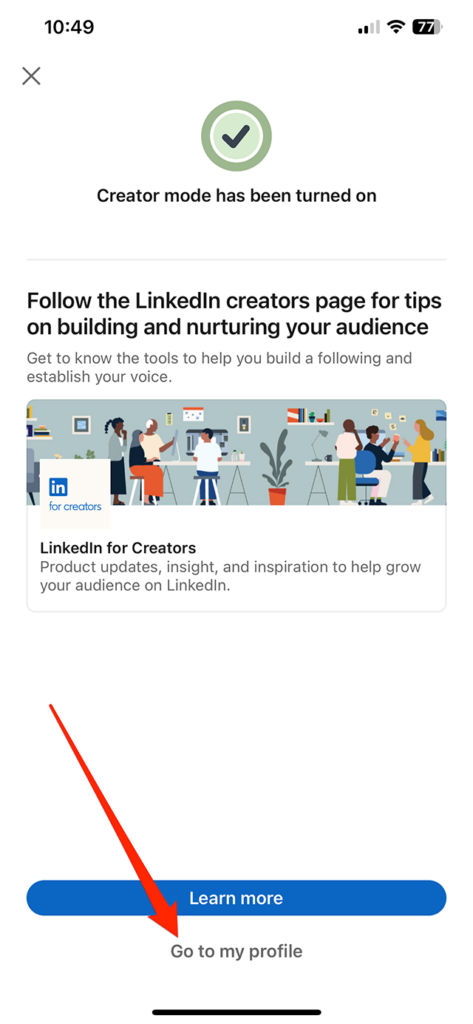
Step 7: Once you turn on Creator Mode, you’ll be encouraged to follow the “LinkedIn for Creators” page. Tap the “Learn more” button at the bottom of the screen if you’d like to instantly jump to this page, or tap “Go to my profile” to finish this process.

image
.font-primary { } .font-secondary { } #meter-count { position: fixed; z-index: 9999999; bottom: 0; width:96%; margin: 2%; -webkit-border-radius: 4px; -moz-border-radius: 4px; border-radius: 4px; -webkit-box-shadow: 0 0px 15px 4px rgba(0,0,0,.2); box-shadow:0 0px 15px 4px rgba(0,0,0,.2); padding: 15px 0; color:#fff; background-color:#343a40; } #meter-count .icon { width: auto; opacity:.8; } #meter-count .icon svg { height: 36px; width: auto; } #meter-count .btn-subscribe { font-size:14px; font-weight:bold; padding:7px 18px; color: #fff; background-color: #2eb3b2; border:none; text-transform: capitalize; margin-right:10px; } #meter-count .btn-subscribe:hover { color: #fff; opacity:.8; } #meter-count .btn-signin { font-size:14px; font-weight:bold; padding:7px 14px; color: #fff; background-color: #121212; border:none; text-transform: capitalize; } #meter-count .btn-signin:hover { color: #fff; opacity:.8; } #meter-count h3 { color:#fff!important; letter-spacing:0px!important; margin:0; padding:0; font-size:16px; line-height:1.5; font-weight:700; margin: 0!important; padding: 0!important; } #meter-count h3 span { color:#E50000!important; font-weight:900; } #meter-count p { font-size:14px; font-weight:500; line-height:1.4; color:#eee!important; margin: 0!important; padding: 0!important; } #meter-count .close { color:#fff; display:block; position:absolute; top: 4px; right:4px; z-index: 999999; } #meter-count .close svg { display:block; color:#fff; height:16px; width:auto; cursor:pointer; } #meter-count .close:hover svg { color:#E50000; } #meter-count .fw-600 { font-weight:600; } @media (max-width: 1079px) { #meter-count .icon { margin:0; padding:0; display:none; } } @media (max-width: 768px) { #meter-count { margin: 0; -webkit-border-radius: 0px; -moz-border-radius: 0px; border-radius: 0px; width:100%; -webkit-box-shadow: 0 -8px 10px -4px rgba(0,0,0,0.3); box-shadow: 0 -8px 10px -4px rgba(0,0,0,0.3); } #meter-count .icon { margin:0; padding:0; display:none; } #meter-count h3 { color:#fff!important; font-size:14px; } #meter-count p { color:#fff!important; font-size: 12px; font-weight: 500; } #meter-count .btn-subscribe, #meter-count .btn-signin { font-size:12px; padding:7px 12px; } #meter-count .btn-signin { display:none; } #meter-count .close svg { height:14px; } }

Enjoying Adweek’s Content? Register for More Access!

https://www.adweek.com/programmatic/linked-how-to-turn-on-creator-mode-on-mobile/


The GA4 migration deadline is right around the corner

Feb 28 1920x1080 1 800x450

Google is sunsetting Universal Analytics (UA) on July 1st. Starting in March, Google will automatically create Google Analytics 4 (GA4) properties for any customer who does not set up a GA4 property with basic settings.

If you do not opt-out of auto migration by February 28, 2023, Google will transition your UA account to GA4 without any custom strategy. To ensure accurate tracking and analysis, you should make the switch to GA4 now and customize the setup as needed.

GA4 is much more than just a new “version” of Google Analytics. It’s a completely new platform – built from the ground up to collect, process, and report on data differently than before. Migrating to GA4 is a complex and integral process that requires strategic planning and expert implementation.

Need help? This 5-minute GA4 preparation guide from MoreVisibility will provide the insight and assistance you need to get started. Visit Digital Marketing Depot to download the GA4 Preparation Guide.


Related stories

New on Search Engine Land

@media screen and (min-width: 800px) { #div-gpt-ad-3191538-7 { display: flex !important; justify-content: center !important; align-items: center !important; min-width:770px; min-height:260px; } } @media screen and (min-width: 1279px) { #div-gpt-ad-3191538-7 { display: flex !important; justify-content: center !important; align-items: center !important; min-width:800px!important; min-height:440px!important; } }

About the author

Digital Marketing Depot

Digital Marketing Depot is a resource center for digital marketing strategies and tactics. We feature hosted white papers and E-Books, original research, and webcasts on digital marketing topics — from advertising to analytics, SEO and PPC campaign management tools to social media management software, e-commerce to e-mail marketing, and much more about internet marketing. Digital Marketing Depot is a division of Third Door Media, publisher of Search Engine Land, MarTech, and producer of the conference series Search Marketing Expo and MarTech. Visit us at http://digitalmarketingdepot.com.

https://searchengineland.com/the-ga4-migration-deadline-is-right-around-the-corner-393606


TikTok: How to Use Dark Mode on the Web


.article-native-ad { border-bottom: 1px solid #ddd; margin: 0 45px; padding-bottom: 20px; margin-bottom: 20px; } .article-native-ad svg { color: #ddd; font-size: 34px; margin-top: 10px; } .article-native-ad p { line-height:1.5; padding:0!important; padding-left: 10px!important; } .article-native-ad strong { font-weight:500; color:rgb(46,179,178); }

Social Media Week returns May 16–18. Join as leading brands and agencies share strategies for marketing within the creator economy. Register now to get an early bird discount.

By default, when users access TikTok through a web browser, the website with be in “Light” mode with a white background and black text. However, users have the option to turn on “Dark mode,” which will turn the website’s background black and the text white.

Our guide will show you how to switch to Dark mode while using TikTok on the web.

Step 1: If you’re logged into the TikTok website, click your profile picture in the top-right corner of the site.

image

If you’re not logged in to the TikTok website, click the three dots in the top-right corner of the website.

image

Step 2: Click the gray toggle to the right of “Dark mode” to turn on Dark mode on the TikTok website. Note: You can repeat these steps in the future if you ever want to turn off Dark mode. Also note, if you’re not logged into the TikTok website, this drop-down menu will have fewer options above “Dark mode.”

image
.font-primary { } .font-secondary { } #meter-count { position: fixed; z-index: 9999999; bottom: 0; width:96%; margin: 2%; -webkit-border-radius: 4px; -moz-border-radius: 4px; border-radius: 4px; -webkit-box-shadow: 0 0px 15px 4px rgba(0,0,0,.2); box-shadow:0 0px 15px 4px rgba(0,0,0,.2); padding: 15px 0; color:#fff; background-color:#343a40; } #meter-count .icon { width: auto; opacity:.8; } #meter-count .icon svg { height: 36px; width: auto; } #meter-count .btn-subscribe { font-size:14px; font-weight:bold; padding:7px 18px; color: #fff; background-color: #2eb3b2; border:none; text-transform: capitalize; margin-right:10px; } #meter-count .btn-subscribe:hover { color: #fff; opacity:.8; } #meter-count .btn-signin { font-size:14px; font-weight:bold; padding:7px 14px; color: #fff; background-color: #121212; border:none; text-transform: capitalize; } #meter-count .btn-signin:hover { color: #fff; opacity:.8; } #meter-count h3 { color:#fff!important; letter-spacing:0px!important; margin:0; padding:0; font-size:16px; line-height:1.5; font-weight:700; margin: 0!important; padding: 0!important; } #meter-count h3 span { color:#E50000!important; font-weight:900; } #meter-count p { font-size:14px; font-weight:500; line-height:1.4; color:#eee!important; margin: 0!important; padding: 0!important; } #meter-count .close { color:#fff; display:block; position:absolute; top: 4px; right:4px; z-index: 999999; } #meter-count .close svg { display:block; color:#fff; height:16px; width:auto; cursor:pointer; } #meter-count .close:hover svg { color:#E50000; } #meter-count .fw-600 { font-weight:600; } @media (max-width: 1079px) { #meter-count .icon { margin:0; padding:0; display:none; } } @media (max-width: 768px) { #meter-count { margin: 0; -webkit-border-radius: 0px; -moz-border-radius: 0px; border-radius: 0px; width:100%; -webkit-box-shadow: 0 -8px 10px -4px rgba(0,0,0,0.3); box-shadow: 0 -8px 10px -4px rgba(0,0,0,0.3); } #meter-count .icon { margin:0; padding:0; display:none; } #meter-count h3 { color:#fff!important; font-size:14px; } #meter-count p { color:#fff!important; font-size: 12px; font-weight: 500; } #meter-count .btn-subscribe, #meter-count .btn-signin { font-size:12px; padding:7px 12px; } #meter-count .btn-signin { display:none; } #meter-count .close svg { height:14px; } }

Enjoying Adweek’s Content? Register for More Access!

https://www.adweek.com/social-marketing/tiktok-how-to-use-dark-mode-on-the-web/