TikTok: How to Stop Users From Using Your Videos in Stickers


.article-native-ad { border-bottom: 1px solid #ddd; margin: 0 45px; padding-bottom: 20px; margin-bottom: 20px; } .article-native-ad svg { color: #ddd; font-size: 34px; margin-top: 10px; } .article-native-ad p { line-height:1.5; padding:0!important; padding-left: 10px!important; } .article-native-ad strong { font-weight:500; color:rgb(46,179,178); }

Social Media Week returns May 16–18. Join as leading brands and agencies share strategies for marketing within the creator economy. Register now to get an early bird discount.

TikTok users can control whether or not others can use their videos to create stickers.

Our guide will show you how to change who can use your TikTok videos to create stickers.

Note: These screenshots were captured in the TikTok app on iOS.

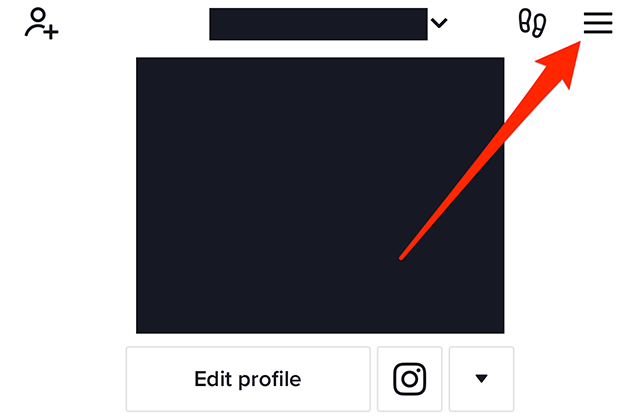
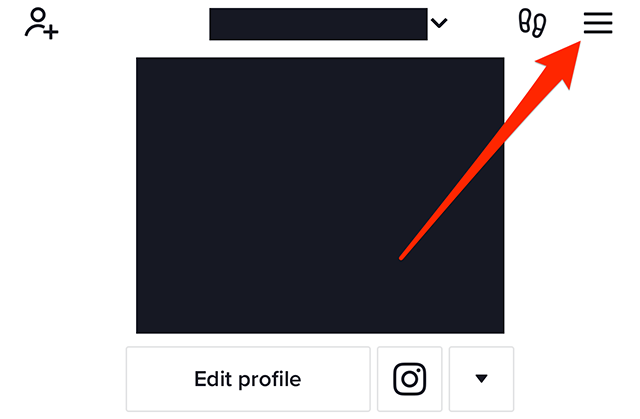
Step 1: On your TikTok profile, tap the three horizontal lines in the top-right corner of the screen.

image

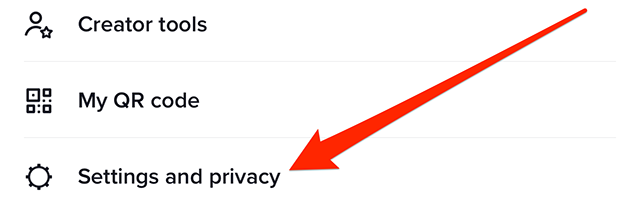
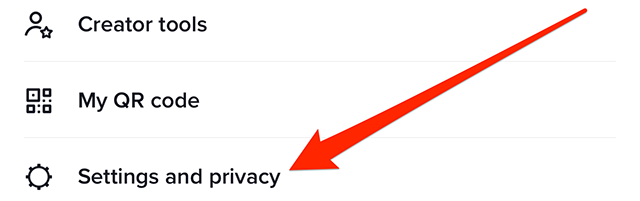
Step 2: Tap “Settings and privacy.”

image

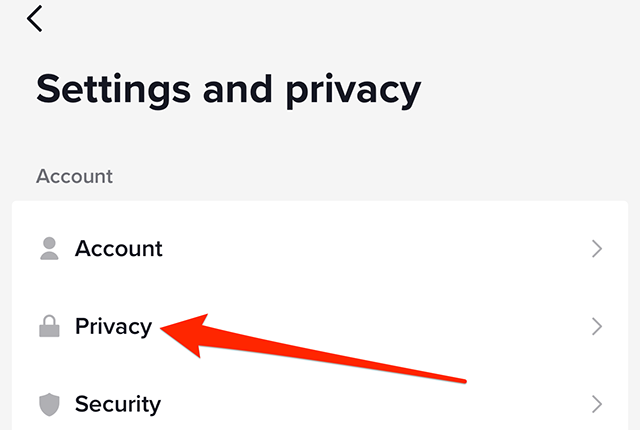
Step 3: Tap “Privacy.”

image

Step 4: Under the “Interactions” section, tap “Stickers.”

image

Step 5: Tap “Everyone,” “Followers that you follow back” or “Only me,” depending on your preference.

image
.font-primary { } .font-secondary { } #meter-count { position: fixed; z-index: 9999999; bottom: 0; width:96%; margin: 2%; -webkit-border-radius: 4px; -moz-border-radius: 4px; border-radius: 4px; -webkit-box-shadow: 0 0px 15px 4px rgba(0,0,0,.2); box-shadow:0 0px 15px 4px rgba(0,0,0,.2); padding: 15px 0; color:#fff; background-color:#343a40; } #meter-count .icon { width: auto; opacity:.8; } #meter-count .icon svg { height: 36px; width: auto; } #meter-count .btn-subscribe { font-size:14px; font-weight:bold; padding:7px 18px; color: #fff; background-color: #2eb3b2; border:none; text-transform: capitalize; margin-right:10px; } #meter-count .btn-subscribe:hover { color: #fff; opacity:.8; } #meter-count .btn-signin { font-size:14px; font-weight:bold; padding:7px 14px; color: #fff; background-color: #121212; border:none; text-transform: capitalize; } #meter-count .btn-signin:hover { color: #fff; opacity:.8; } #meter-count h3 { color:#fff!important; letter-spacing:0px!important; margin:0; padding:0; font-size:16px; line-height:1.5; font-weight:700; margin: 0!important; padding: 0!important; } #meter-count h3 span { color:#E50000!important; font-weight:900; } #meter-count p { font-size:14px; font-weight:500; line-height:1.4; color:#eee!important; margin: 0!important; padding: 0!important; } #meter-count .close { color:#fff; display:block; position:absolute; top: 4px; right:4px; z-index: 999999; } #meter-count .close svg { display:block; color:#fff; height:16px; width:auto; cursor:pointer; } #meter-count .close:hover svg { color:#E50000; } #meter-count .fw-600 { font-weight:600; } @media (max-width: 1079px) { #meter-count .icon { margin:0; padding:0; display:none; } } @media (max-width: 768px) { #meter-count { margin: 0; -webkit-border-radius: 0px; -moz-border-radius: 0px; border-radius: 0px; width:100%; -webkit-box-shadow: 0 -8px 10px -4px rgba(0,0,0,0.3); box-shadow: 0 -8px 10px -4px rgba(0,0,0,0.3); } #meter-count .icon { margin:0; padding:0; display:none; } #meter-count h3 { color:#fff!important; font-size:14px; } #meter-count p { color:#fff!important; font-size: 12px; font-weight: 500; } #meter-count .btn-subscribe, #meter-count .btn-signin { font-size:12px; padding:7px 12px; } #meter-count .btn-signin { display:none; } #meter-count .close svg { height:14px; } }

Enjoying Adweek’s Content? Register for More Access!

https://www.adweek.com/social-marketing/tiktok-how-to-stop-users-from-using-your-videos-in-stickers/


TikTok: How to Clear Your Downloads


.article-native-ad { border-bottom: 1px solid #ddd; margin: 0 45px; padding-bottom: 20px; margin-bottom: 20px; } .article-native-ad svg { color: #ddd; font-size: 34px; margin-top: 10px; } .article-native-ad p { line-height:1.5; padding:0!important; padding-left: 10px!important; } .article-native-ad strong { font-weight:500; color:rgb(46,179,178); }

Social Media Week returns May 16–18. Join as leading brands and agencies share strategies for marketing within the creator economy. Register now to get an early bird discount.

The TikTok mobile application allows users to clear space on their devices by removing the content they’ve downloaded in the app. This includes content such as effects and filters users have previously downloaded.

Our guide will show you how to clear your downloads in the TikTok mobile app.

Note: These screenshots were captured in the TikTok app on iOS.

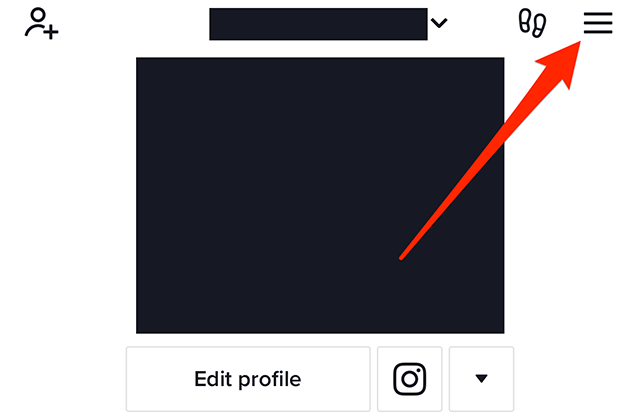
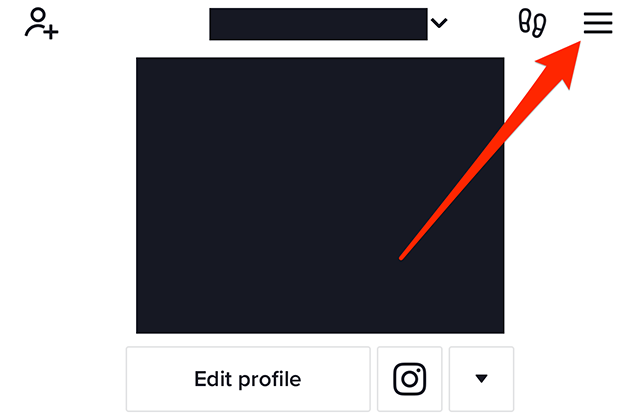
Step 1: On your TikTok profile, tap the three horizontal lines in the top-right corner of the screen.

image

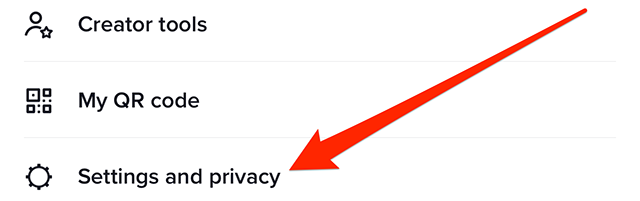
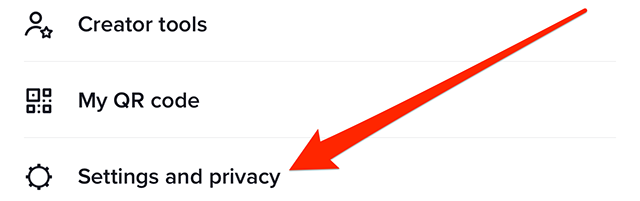
Step 2: Tap “Settings and privacy.”

image

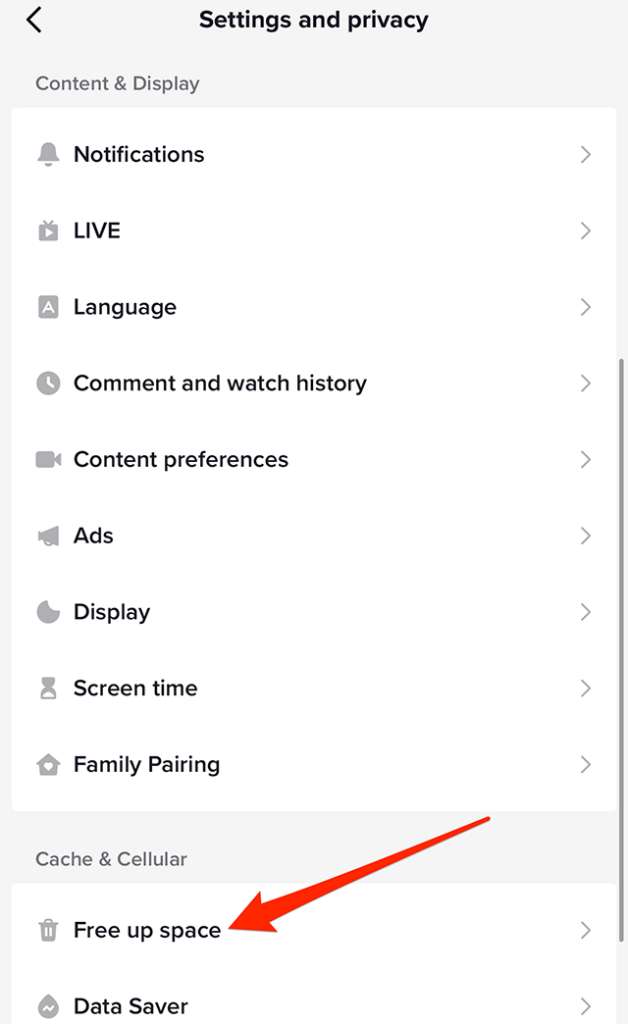
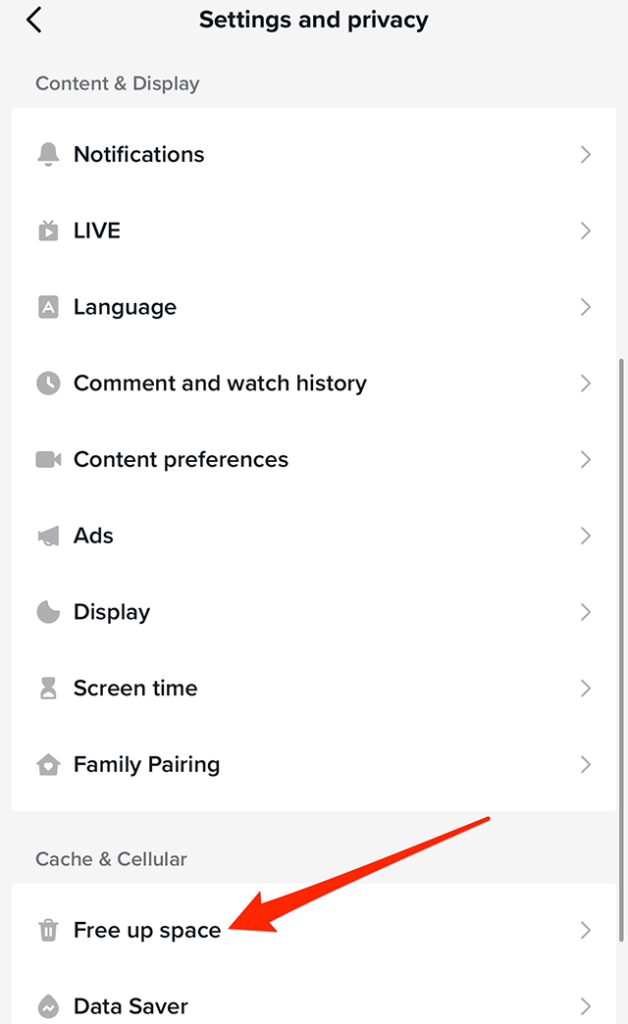
Step 3: Scroll down to the “Cache & Cellular” section and tap “Free up space.”

image

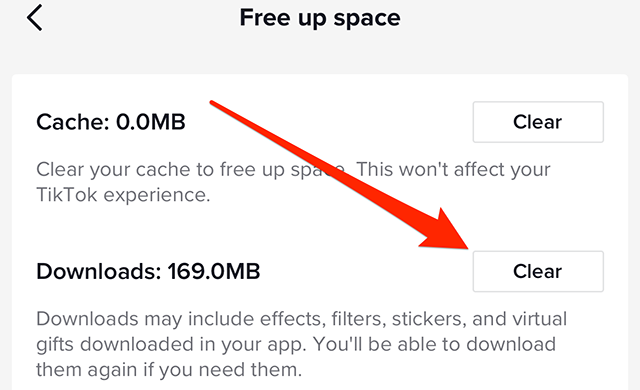
Step 4: Tap the “Clear” button to the right of “Downloads.”

image

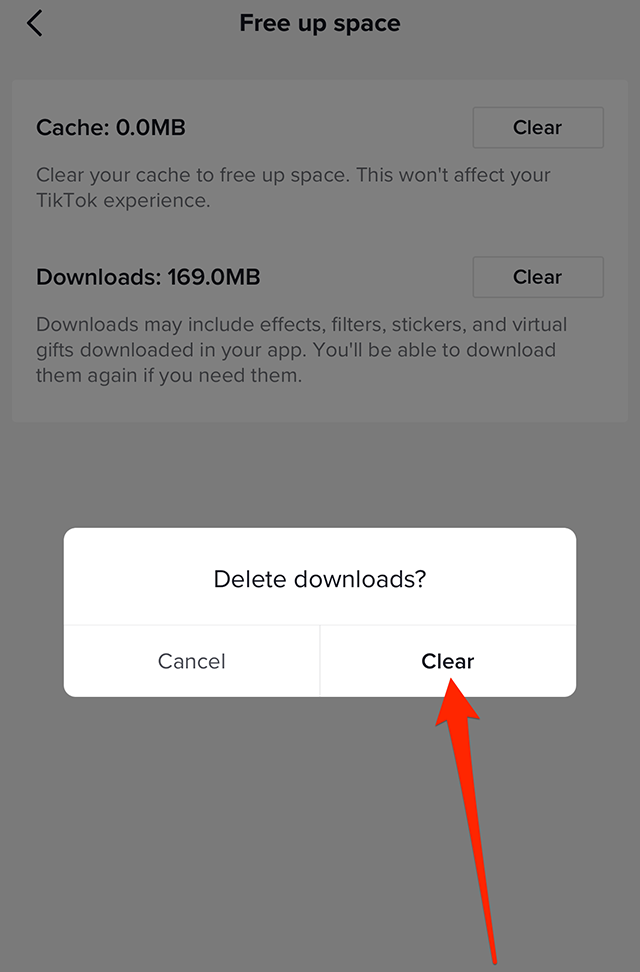
Step 5: Tap the “Clear” button on the confirmation window that appears to remove your downloads.

image
.font-primary { } .font-secondary { } #meter-count { position: fixed; z-index: 9999999; bottom: 0; width:96%; margin: 2%; -webkit-border-radius: 4px; -moz-border-radius: 4px; border-radius: 4px; -webkit-box-shadow: 0 0px 15px 4px rgba(0,0,0,.2); box-shadow:0 0px 15px 4px rgba(0,0,0,.2); padding: 15px 0; color:#fff; background-color:#343a40; } #meter-count .icon { width: auto; opacity:.8; } #meter-count .icon svg { height: 36px; width: auto; } #meter-count .btn-subscribe { font-size:14px; font-weight:bold; padding:7px 18px; color: #fff; background-color: #2eb3b2; border:none; text-transform: capitalize; margin-right:10px; } #meter-count .btn-subscribe:hover { color: #fff; opacity:.8; } #meter-count .btn-signin { font-size:14px; font-weight:bold; padding:7px 14px; color: #fff; background-color: #121212; border:none; text-transform: capitalize; } #meter-count .btn-signin:hover { color: #fff; opacity:.8; } #meter-count h3 { color:#fff!important; letter-spacing:0px!important; margin:0; padding:0; font-size:16px; line-height:1.5; font-weight:700; margin: 0!important; padding: 0!important; } #meter-count h3 span { color:#E50000!important; font-weight:900; } #meter-count p { font-size:14px; font-weight:500; line-height:1.4; color:#eee!important; margin: 0!important; padding: 0!important; } #meter-count .close { color:#fff; display:block; position:absolute; top: 4px; right:4px; z-index: 999999; } #meter-count .close svg { display:block; color:#fff; height:16px; width:auto; cursor:pointer; } #meter-count .close:hover svg { color:#E50000; } #meter-count .fw-600 { font-weight:600; } @media (max-width: 1079px) { #meter-count .icon { margin:0; padding:0; display:none; } } @media (max-width: 768px) { #meter-count { margin: 0; -webkit-border-radius: 0px; -moz-border-radius: 0px; border-radius: 0px; width:100%; -webkit-box-shadow: 0 -8px 10px -4px rgba(0,0,0,0.3); box-shadow: 0 -8px 10px -4px rgba(0,0,0,0.3); } #meter-count .icon { margin:0; padding:0; display:none; } #meter-count h3 { color:#fff!important; font-size:14px; } #meter-count p { color:#fff!important; font-size: 12px; font-weight: 500; } #meter-count .btn-subscribe, #meter-count .btn-signin { font-size:12px; padding:7px 12px; } #meter-count .btn-signin { display:none; } #meter-count .close svg { height:14px; } }

Enjoying Adweek’s Content? Register for More Access!

https://www.adweek.com/social-marketing/tiktok-how-to-clear-your-downloads/


TikTok: How to Clear Your Cache


.article-native-ad { border-bottom: 1px solid #ddd; margin: 0 45px; padding-bottom: 20px; margin-bottom: 20px; } .article-native-ad svg { color: #ddd; font-size: 34px; margin-top: 10px; } .article-native-ad p { line-height:1.5; padding:0!important; padding-left: 10px!important; } .article-native-ad strong { font-weight:500; color:rgb(46,179,178); }

Social Media Week returns May 16–18. Join as leading brands and agencies share strategies for marketing within the creator economy. Register now to get an early bird discount.

The TikTok mobile application allows users to clear their cache on the video-sharing platform in order to free up space on their device.

Our guide will show you how to clear your cache in the TikTok mobile app.

Note: These screenshots were captured in the TikTok app on iOS.

Step 1: On your TikTok profile, tap the three horizontal lines in the top-right corner of the screen.

image

Step 2: Tap “Settings and privacy.”

image

Step 3: Scroll down to the “Cache & Cellular” section and tap “Free up space.”

image

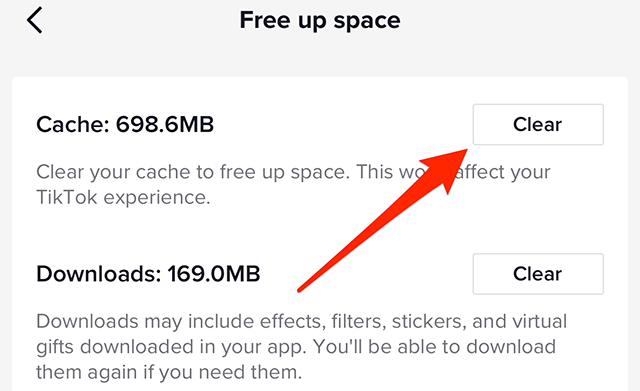
Step 4: Tap the “Clear” button to the right of “Cache.”

image

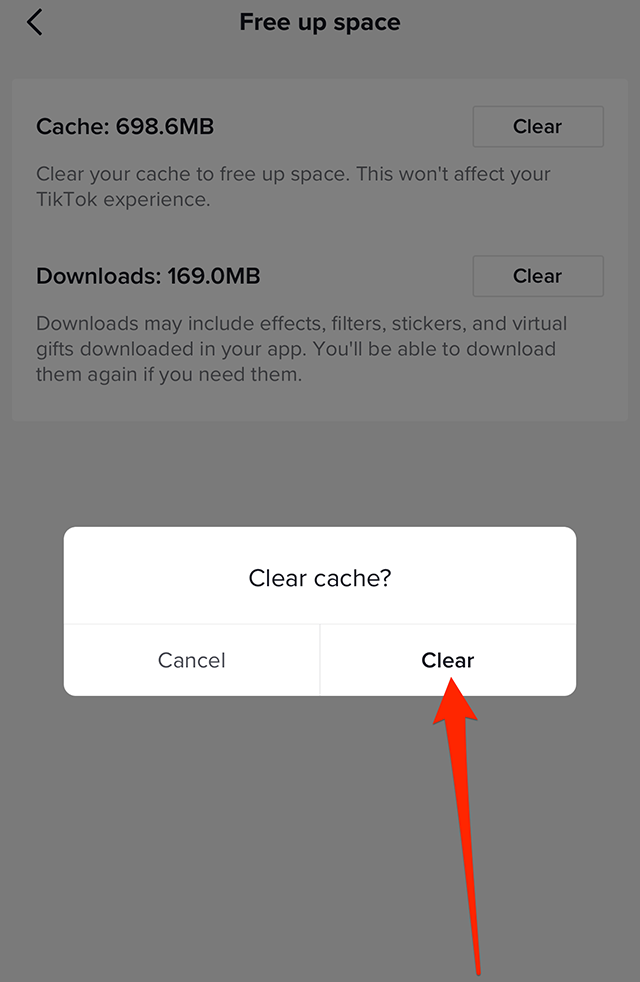
Step 5: Tap the “Clear” button on the confirmation window that appears to clear your cache.

image

This guide was first published in April 2019 and was updated in February 2023.

https://www.adweek.com/social-marketing/tiktok-heres-how-to-clear-your-cache/


TikTok: How to Play TikTok Trivia


.article-native-ad { border-bottom: 1px solid #ddd; margin: 0 45px; padding-bottom: 20px; margin-bottom: 20px; } .article-native-ad svg { color: #ddd; font-size: 34px; margin-top: 10px; } .article-native-ad p { line-height:1.5; padding:0!important; padding-left: 10px!important; } .article-native-ad strong { font-weight:500; color:rgb(46,179,178); }

Social Media Week returns May 16–18. Join as leading brands and agencies share strategies for marketing within the creator economy. Register now to get an early bird discount.

From Feb. 22 – 26, TikTok will host TikTok Trivia, a live game show experience on the video-sharing platform that will allow users to answer trivia questions for the chance to win real cash prizes.

TikTok Trivia is only available to users aged 18+ in the United States.

Our guide will show you how to play TikTok Trivia in the TikTok mobile application.

Note: These screenshots were captured in the TikTok app on iOS.

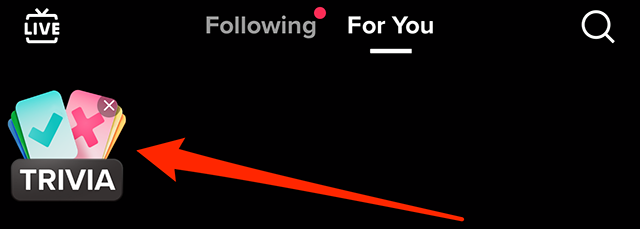
Step 1: Open the TikTok application and tap the “Trivia” icon in the top-left corner of your “For You” feed.

image

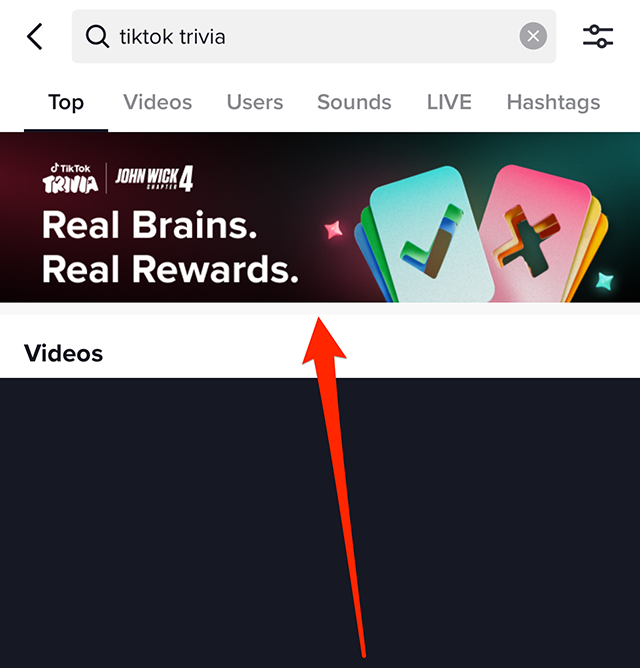
If you’ve already tapped the “x” icon to remove this icon from your feed, you can access TikTok Trivia by searching for “TikTok Trivia” on the app’s search menu and tapping the banner that appears near the top of the screen.

image

Step 2: You’ll see a window that will tell you you need to be at least 18 years old to participate in TikTok Trivia. Tap “Continue” on this window to move on.

image

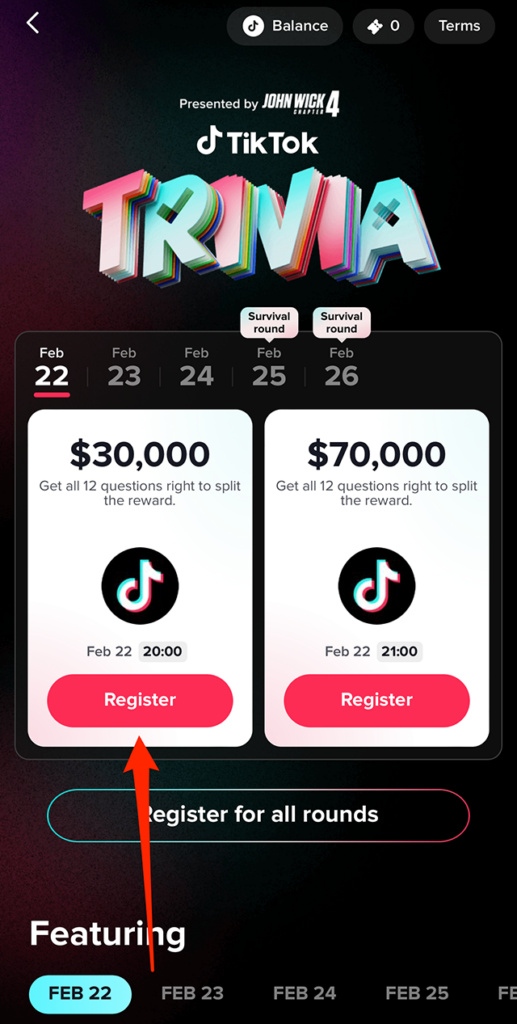
Step 3: You’ll see the schedule of trivia rounds that will take place between Feb. 22 – 26. Tap “Register” under each round to sign up to participate. Or, tap “Register for all rounds” to register for every round that’s currently available. Note: Once you register to play TikTok Trivia, you’ll need to return to the TikTok app during each live trivia round to participate in the game.

image
.font-primary { } .font-secondary { } #meter-count { position: fixed; z-index: 9999999; bottom: 0; width:96%; margin: 2%; -webkit-border-radius: 4px; -moz-border-radius: 4px; border-radius: 4px; -webkit-box-shadow: 0 0px 15px 4px rgba(0,0,0,.2); box-shadow:0 0px 15px 4px rgba(0,0,0,.2); padding: 15px 0; color:#fff; background-color:#343a40; } #meter-count .icon { width: auto; opacity:.8; } #meter-count .icon svg { height: 36px; width: auto; } #meter-count .btn-subscribe { font-size:14px; font-weight:bold; padding:7px 18px; color: #fff; background-color: #2eb3b2; border:none; text-transform: capitalize; margin-right:10px; } #meter-count .btn-subscribe:hover { color: #fff; opacity:.8; } #meter-count .btn-signin { font-size:14px; font-weight:bold; padding:7px 14px; color: #fff; background-color: #121212; border:none; text-transform: capitalize; } #meter-count .btn-signin:hover { color: #fff; opacity:.8; } #meter-count h3 { color:#fff!important; letter-spacing:0px!important; margin:0; padding:0; font-size:16px; line-height:1.5; font-weight:700; margin: 0!important; padding: 0!important; } #meter-count h3 span { color:#E50000!important; font-weight:900; } #meter-count p { font-size:14px; font-weight:500; line-height:1.4; color:#eee!important; margin: 0!important; padding: 0!important; } #meter-count .close { color:#fff; display:block; position:absolute; top: 4px; right:4px; z-index: 999999; } #meter-count .close svg { display:block; color:#fff; height:16px; width:auto; cursor:pointer; } #meter-count .close:hover svg { color:#E50000; } #meter-count .fw-600 { font-weight:600; } @media (max-width: 1079px) { #meter-count .icon { margin:0; padding:0; display:none; } } @media (max-width: 768px) { #meter-count { margin: 0; -webkit-border-radius: 0px; -moz-border-radius: 0px; border-radius: 0px; width:100%; -webkit-box-shadow: 0 -8px 10px -4px rgba(0,0,0,0.3); box-shadow: 0 -8px 10px -4px rgba(0,0,0,0.3); } #meter-count .icon { margin:0; padding:0; display:none; } #meter-count h3 { color:#fff!important; font-size:14px; } #meter-count p { color:#fff!important; font-size: 12px; font-weight: 500; } #meter-count .btn-subscribe, #meter-count .btn-signin { font-size:12px; padding:7px 12px; } #meter-count .btn-signin { display:none; } #meter-count .close svg { height:14px; } }

Enjoying Adweek’s Content? Register for More Access!

https://www.adweek.com/social-marketing/tiktok-how-to-play-tiktok-trivia/


Misinformation, Antitrust and Copyright Loom as Regulatory Hurdles For AI and ChatGPT


.article-native-ad { border-bottom: 1px solid #ddd; margin: 0 45px; padding-bottom: 20px; margin-bottom: 20px; } .article-native-ad svg { color: #ddd; font-size: 34px; margin-top: 10px; } .article-native-ad p { line-height:1.5; padding:0!important; padding-left: 10px!important; } .article-native-ad strong { font-weight:500; color:rgb(46,179,178); }

Did someone say Andy Cohen? Join industry veterans and emerging voices at Convergent TV March 21-22 and upgrade your media strategy. Register now to save 35%.

With generative artificial intelligence tools upending the media and marketing industry, Adweek reporters felt it prudent to ask one of them, ChatGPT, whether it was compliant with GDPR, the 5-year-old data protection and privacy law in the European Union.

The response: “As an AI language model, I do not collect or process personal data, nor do I have access to any data storage. Therefore, I do not fall under the scope of the General Data Protection Regulation (GDPR) and do not have to comply with its regulations. However, the companies or organizations that use my services to process personal data are responsible for ensuring GDPR compliance and should implement appropriate measures to protect the personal data they collect and process.”

A caveat: AI chatbots can be volatile and tend to respond differently to the same question. It’s nearly impossible to confirm the veracity of its answers. Still, the onus is on the companies using these tools to be compliant. And here, there are many gray areas.

Beyond GDPR, futurists and industry experts flag potential regulatory concerns around misinformation, antitrust and copyright, partly because of AI’s open-source nature and how the tools are trained.

“AI has become an open source and many companies are building models on top of other models,” said Michael Liu, head of innovation for media company Carat Interactive. “But it’s going to be hard to regulate that.”

As more brands and agencies tinker with generative AI, 70% of enterprise CMOs will identify accountability for ethical AI in marketing as their top concern by 2025, per Gartner. Meanwhile, regulators are getting more muscular with company’s data governance and anti-competitive practices.

“Questions [are rising] about what data OpenAI is storing versus what data is it spitting out,” said Gary Kibel, a privacy and data security lawyer of Davis and Gilbert. “If it’s storing any information, that creates bigger issues.”

Attribution and trademark infringement

Currently, there are numerous cases where brands are using ChatGPT for creative idea generation.

“I could envision a world where two competitive brands are using OpenAI to write taglines for their new products,” said Stephanie Bunnell, svp of marketing at Aki Technologies, an Inmar Intelligence company. “I can’t personally verify that those ChatGPT outputs wouldn’t be exactly the same.”

If you were to ask ChatGPT something, you can’t know its source data…there’s a gazillion source data.

Michael Liu, head of innovation for media company Carat Interactive

Similarly, brand agency Tanj created an AI naming assistant, Chat Namer, using ChatGPT’s language model to churn out brand names. But the tool can’t yet account for trademark capabilities.

“Based on what ChatGPT knows, it’s spitting out the names of brands that already exist in the world,” said Scott Milano, the agency’s managing director. This could give rise to trademark infringement lawsuits.

Meanwhile Carat Interactive is one agency paying attention to ChatGPT’s content attribution.

“If you were to ask ChatGPT something, you can’t know its source data…there’s a gazillion source data,” said Liu.

Disinformation researchers have flagged concerns that ChatGPT will be able to easily and quickly spread false information. For marketers who rely on this AI tool for copy output or to build a consumer-facing tool based on its API, the threat of disinformation can have damaging reputational impacts on their brand.

Additionally, Bunnell said that if a brand uses an open-source chatbot versus its own closed, verified chatscript, it may increase the odds of a brand-unsafe dialogue.

Publishers’ antitrust crusade

Currently, OpenAI has fed ChatGPT around 300 billion words scraped from across the internet, including articles, books, websites and posts.

Much has been said about how AI-enhanced search engines can either scrape—and not compensate—information from various publishers, or outperform them to the point where there is less of a need for the influx of certain intent-based media brands.

“There’s going to be some regulation that’s going to attempt to address this,” said Liu, adding that ChatGPT’s emergence could be seen as anticompetitive to some publishers.

GDPR data minimization at odds with data scraping

European regulators are considering placing ChatGPT in a high-risk category under its AI Act that has yet to become a law. This category questions the safety components of the tool. As a result, high-risk AI systems will be subject to strict obligations, such as risk assessments, before they enter the market.

As for GDPR, it’s unclear whether large language models like ChatGPT can be developed in a GDPR-compliant manner whose principles include data minimization and the right to be forgotten.

“In theory, with a precise enough dataset, you could meet the law’s requirements,” said Robert Bateman, head of content at GRC World Forums, a company that runs events on governance, risk, and compliance. “But it’s hard to see how this would work when scraping data at such a large scale.”

Still, if someone who requests OpenAI to delete their personal data is unhappy with the response, that could trigger an investigation that draws attention to wider compliance issues.

“It’s all speculation, but there are data protection authorities across Europe who are not averse to making highly consequential decisions,” said Bateman.
.font-primary { } .font-secondary { } #meter-count { position: fixed; z-index: 9999999; bottom: 0; width:96%; margin: 2%; -webkit-border-radius: 4px; -moz-border-radius: 4px; border-radius: 4px; -webkit-box-shadow: 0 0px 15px 4px rgba(0,0,0,.2); box-shadow:0 0px 15px 4px rgba(0,0,0,.2); padding: 15px 0; color:#fff; background-color:#343a40; } #meter-count .icon { width: auto; opacity:.8; } #meter-count .icon svg { height: 36px; width: auto; } #meter-count .btn-subscribe { font-size:14px; font-weight:bold; padding:7px 18px; color: #fff; background-color: #2eb3b2; border:none; text-transform: capitalize; margin-right:10px; } #meter-count .btn-subscribe:hover { color: #fff; opacity:.8; } #meter-count .btn-signin { font-size:14px; font-weight:bold; padding:7px 14px; color: #fff; background-color: #121212; border:none; text-transform: capitalize; } #meter-count .btn-signin:hover { color: #fff; opacity:.8; } #meter-count h3 { color:#fff!important; letter-spacing:0px!important; margin:0; padding:0; font-size:16px; line-height:1.5; font-weight:700; margin: 0!important; padding: 0!important; } #meter-count h3 span { color:#E50000!important; font-weight:900; } #meter-count p { font-size:14px; font-weight:500; line-height:1.4; color:#eee!important; margin: 0!important; padding: 0!important; } #meter-count .close { color:#fff; display:block; position:absolute; top: 4px; right:4px; z-index: 999999; } #meter-count .close svg { display:block; color:#fff; height:16px; width:auto; cursor:pointer; } #meter-count .close:hover svg { color:#E50000; } #meter-count .fw-600 { font-weight:600; } @media (max-width: 1079px) { #meter-count .icon { margin:0; padding:0; display:none; } } @media (max-width: 768px) { #meter-count { margin: 0; -webkit-border-radius: 0px; -moz-border-radius: 0px; border-radius: 0px; width:100%; -webkit-box-shadow: 0 -8px 10px -4px rgba(0,0,0,0.3); box-shadow: 0 -8px 10px -4px rgba(0,0,0,0.3); } #meter-count .icon { margin:0; padding:0; display:none; } #meter-count h3 { color:#fff!important; font-size:14px; } #meter-count p { color:#fff!important; font-size: 12px; font-weight: 500; } #meter-count .btn-subscribe, #meter-count .btn-signin { font-size:12px; padding:7px 12px; } #meter-count .btn-signin { display:none; } #meter-count .close svg { height:14px; } }

Enjoying Adweek’s Content? Register for More Access!

https://www.adweek.com/media/misinformation-antitrust-and-copyright-loom-as-regulatory-hurdles-for-ai-and-chatgpt/


TikTok: How to Change Who Can Comment on Your Videos


.article-native-ad { border-bottom: 1px solid #ddd; margin: 0 45px; padding-bottom: 20px; margin-bottom: 20px; } .article-native-ad svg { color: #ddd; font-size: 34px; margin-top: 10px; } .article-native-ad p { line-height:1.5; padding:0!important; padding-left: 10px!important; } .article-native-ad strong { font-weight:500; color:rgb(46,179,178); }

Did someone say Andy Cohen? Join industry veterans and emerging voices at Convergent TV March 21-22 and upgrade your media strategy. Register now to save 35%.

By default, TikTok allows all users to leave comments on the videos someone shares. However, creators have the ability to change who can comment on their videos if they’d like to prevent certain users from being able to comment.

Our guide will show you how to change who can comment on your videos on TikTok.

Note: These screenshots were captured in the TikTok application on iOS.

Step 1: On your TikTok profile, tap the three horizontal lines in the top-right corner of the screen.

image

Step 2: Tap “Settings and privacy.”

image

Step 3: Tap “Privacy.”

image

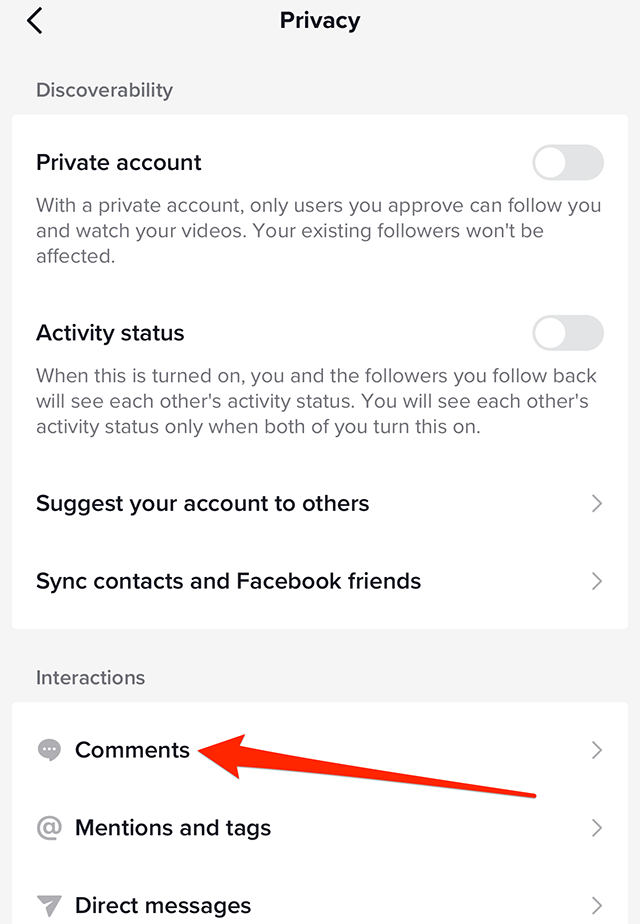
Step 4: Under the “Interactions” section, tap “Comments.”

image

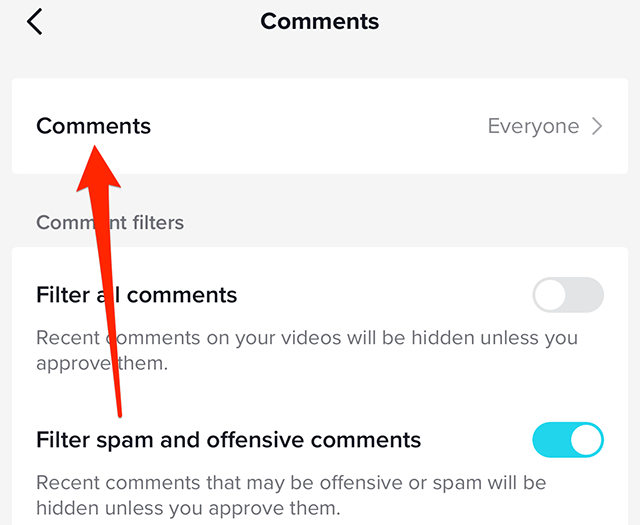
Step 5: Tap “Comments” near the top of the screen.

image

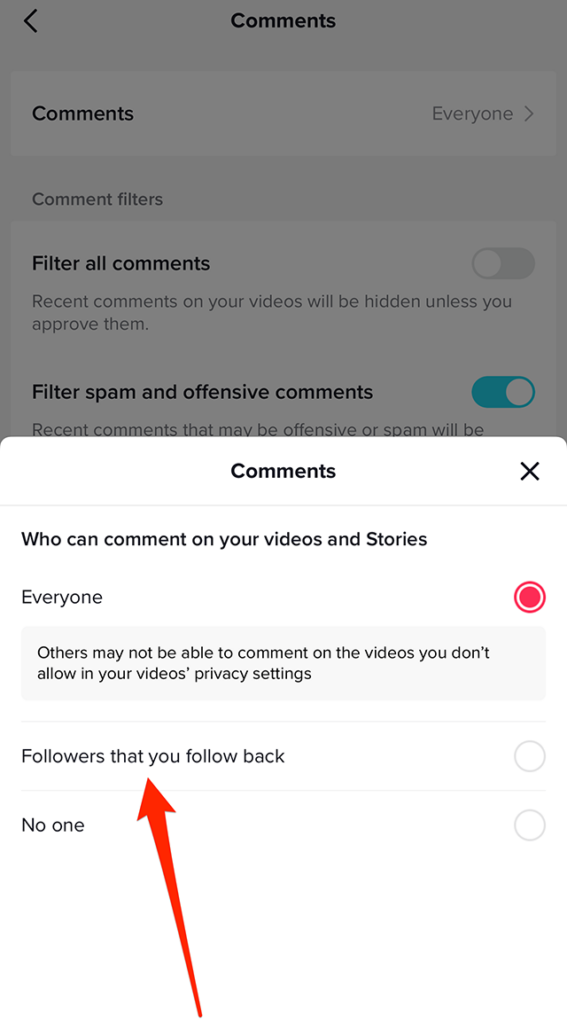
Step 6: Tap “Everyone,” “Followers that you follow back” or “No one,” depending on your preference.

image

This guide was first published in March 2019 and was updated in February 2023.

.font-primary { } .font-secondary { } #meter-count { position: fixed; z-index: 9999999; bottom: 0; width:96%; margin: 2%; -webkit-border-radius: 4px; -moz-border-radius: 4px; border-radius: 4px; -webkit-box-shadow: 0 0px 15px 4px rgba(0,0,0,.2); box-shadow:0 0px 15px 4px rgba(0,0,0,.2); padding: 15px 0; color:#fff; background-color:#343a40; } #meter-count .icon { width: auto; opacity:.8; } #meter-count .icon svg { height: 36px; width: auto; } #meter-count .btn-subscribe { font-size:14px; font-weight:bold; padding:7px 18px; color: #fff; background-color: #2eb3b2; border:none; text-transform: capitalize; margin-right:10px; } #meter-count .btn-subscribe:hover { color: #fff; opacity:.8; } #meter-count .btn-signin { font-size:14px; font-weight:bold; padding:7px 14px; color: #fff; background-color: #121212; border:none; text-transform: capitalize; } #meter-count .btn-signin:hover { color: #fff; opacity:.8; } #meter-count h3 { color:#fff!important; letter-spacing:0px!important; margin:0; padding:0; font-size:16px; line-height:1.5; font-weight:700; margin: 0!important; padding: 0!important; } #meter-count h3 span { color:#E50000!important; font-weight:900; } #meter-count p { font-size:14px; font-weight:500; line-height:1.4; color:#eee!important; margin: 0!important; padding: 0!important; } #meter-count .close { color:#fff; display:block; position:absolute; top: 4px; right:4px; z-index: 999999; } #meter-count .close svg { display:block; color:#fff; height:16px; width:auto; cursor:pointer; } #meter-count .close:hover svg { color:#E50000; } #meter-count .fw-600 { font-weight:600; } @media (max-width: 1079px) { #meter-count .icon { margin:0; padding:0; display:none; } } @media (max-width: 768px) { #meter-count { margin: 0; -webkit-border-radius: 0px; -moz-border-radius: 0px; border-radius: 0px; width:100%; -webkit-box-shadow: 0 -8px 10px -4px rgba(0,0,0,0.3); box-shadow: 0 -8px 10px -4px rgba(0,0,0,0.3); } #meter-count .icon { margin:0; padding:0; display:none; } #meter-count h3 { color:#fff!important; font-size:14px; } #meter-count p { color:#fff!important; font-size: 12px; font-weight: 500; } #meter-count .btn-subscribe, #meter-count .btn-signin { font-size:12px; padding:7px 12px; } #meter-count .btn-signin { display:none; } #meter-count .close svg { height:14px; } }

Enjoying Adweek’s Content? Register for More Access!

https://www.adweek.com/media/tiktok-heres-how-to-change-who-can-comment-on-your-videos/


Instagram: How to Use End-to-End Encryption in Chats


.article-native-ad { border-bottom: 1px solid #ddd; margin: 0 45px; padding-bottom: 20px; margin-bottom: 20px; } .article-native-ad svg { color: #ddd; font-size: 34px; margin-top: 10px; } .article-native-ad p { line-height:1.5; padding:0!important; padding-left: 10px!important; } .article-native-ad strong { font-weight:500; color:rgb(46,179,178); }

Social Media Week returns May 16–18. Join as leading brands and agencies share strategies for marketing within the creator economy. Register now to get an early bird discount.

Instagram is currently rolling out end-to-end encryption for direct message conversations on the photo- and video-sharing platform. This feature adds additional security to a user’s conversations. Users have the option to activate end-to-end encryption for each of their conversations individually.

Our guide will show you how to use end-to-end encryption in conversations in the Instagram mobile app.

Note: These screenshots were captured in the Instagram app on iOS.

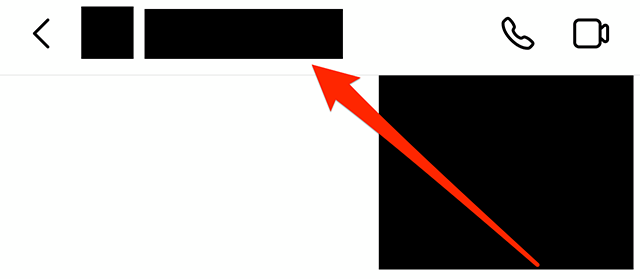
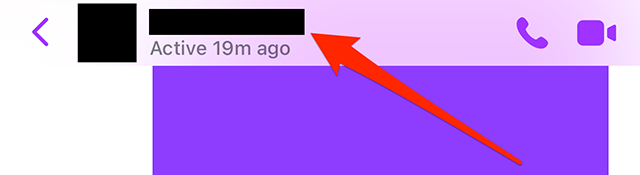
Step 1: Open the existing Instagram conversation you want to manage and tap the conversation name at the top of the screen.

image

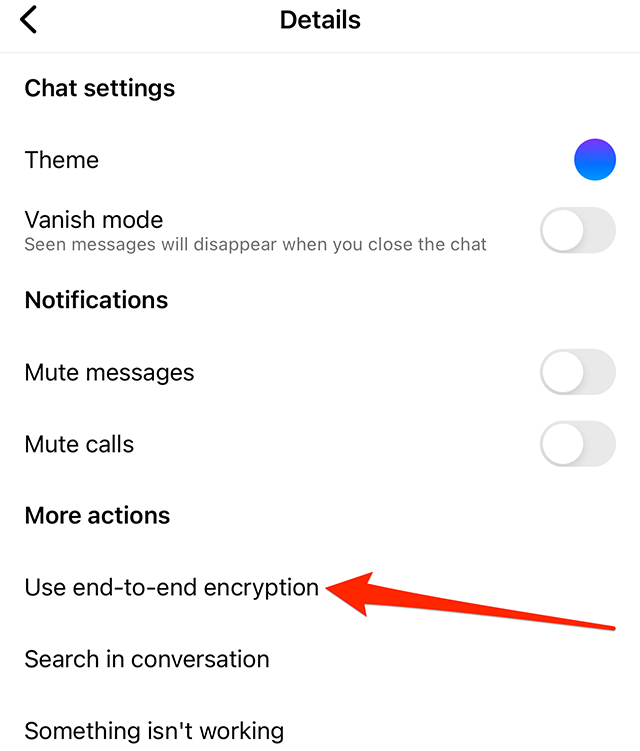
Step 2: Under the “More actions” section, tap “Use end-to-end encryption.”

image

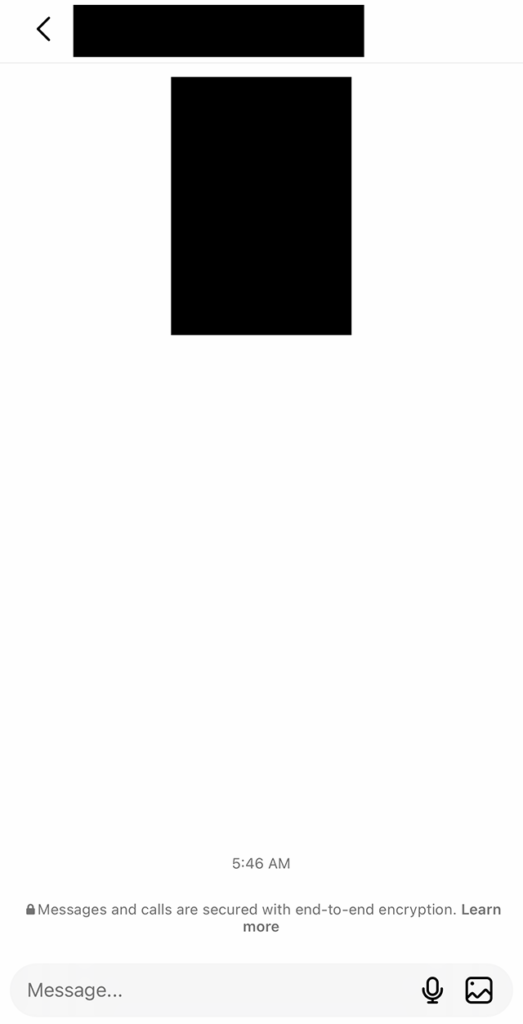
This will take you to a new conversation with the same user, which is protected by the end-to-end encryption feature. On this screen, you can send messages and other content to the user as you previously would.

image

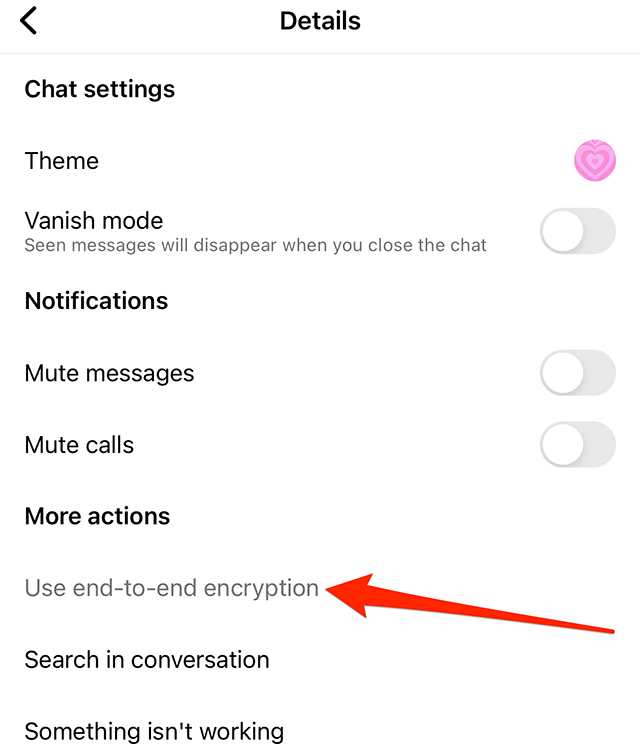
Note: If you have access to end-to-end encryption but the “Use end-to-end encryption” text in Step 2 is gray, rather than black, it means the other person has yet to receive access to this feature. In this case, you won’t be able to use end-to-end encryption in this conversation until the user receives access.

image
.font-primary { } .font-secondary { } #meter-count { position: fixed; z-index: 9999999; bottom: 0; width:96%; margin: 2%; -webkit-border-radius: 4px; -moz-border-radius: 4px; border-radius: 4px; -webkit-box-shadow: 0 0px 15px 4px rgba(0,0,0,.2); box-shadow:0 0px 15px 4px rgba(0,0,0,.2); padding: 15px 0; color:#fff; background-color:#343a40; } #meter-count .icon { width: auto; opacity:.8; } #meter-count .icon svg { height: 36px; width: auto; } #meter-count .btn-subscribe { font-size:14px; font-weight:bold; padding:7px 18px; color: #fff; background-color: #2eb3b2; border:none; text-transform: capitalize; margin-right:10px; } #meter-count .btn-subscribe:hover { color: #fff; opacity:.8; } #meter-count .btn-signin { font-size:14px; font-weight:bold; padding:7px 14px; color: #fff; background-color: #121212; border:none; text-transform: capitalize; } #meter-count .btn-signin:hover { color: #fff; opacity:.8; } #meter-count h3 { color:#fff!important; letter-spacing:0px!important; margin:0; padding:0; font-size:16px; line-height:1.5; font-weight:700; margin: 0!important; padding: 0!important; } #meter-count h3 span { color:#E50000!important; font-weight:900; } #meter-count p { font-size:14px; font-weight:500; line-height:1.4; color:#eee!important; margin: 0!important; padding: 0!important; } #meter-count .close { color:#fff; display:block; position:absolute; top: 4px; right:4px; z-index: 999999; } #meter-count .close svg { display:block; color:#fff; height:16px; width:auto; cursor:pointer; } #meter-count .close:hover svg { color:#E50000; } #meter-count .fw-600 { font-weight:600; } @media (max-width: 1079px) { #meter-count .icon { margin:0; padding:0; display:none; } } @media (max-width: 768px) { #meter-count { margin: 0; -webkit-border-radius: 0px; -moz-border-radius: 0px; border-radius: 0px; width:100%; -webkit-box-shadow: 0 -8px 10px -4px rgba(0,0,0,0.3); box-shadow: 0 -8px 10px -4px rgba(0,0,0,0.3); } #meter-count .icon { margin:0; padding:0; display:none; } #meter-count h3 { color:#fff!important; font-size:14px; } #meter-count p { color:#fff!important; font-size: 12px; font-weight: 500; } #meter-count .btn-subscribe, #meter-count .btn-signin { font-size:12px; padding:7px 12px; } #meter-count .btn-signin { display:none; } #meter-count .close svg { height:14px; } }

Enjoying Adweek’s Content? Register for More Access!

https://www.adweek.com/social-marketing/instagram-how-to-use-end-to-end-encryption-in-chats/


Messenger: How to Change the Text Tone for a Chat


.article-native-ad { border-bottom: 1px solid #ddd; margin: 0 45px; padding-bottom: 20px; margin-bottom: 20px; } .article-native-ad svg { color: #ddd; font-size: 34px; margin-top: 10px; } .article-native-ad p { line-height:1.5; padding:0!important; padding-left: 10px!important; } .article-native-ad strong { font-weight:500; color:rgb(46,179,178); }

Social Media Week returns May 16–18. Join as leading brands and agencies share strategies for marketing within the creator economy. Register now to get an early bird discount.

Messenger allows users to choose from a variety of “text tone” notification sounds in each of their conversations. The “text tone” is the notification sound that plays when a user receives a new message in a conversation.

Our guide will show you how to change the text tone in a chat in the Messenger mobile application.

Note: These screenshots were captured in the Messenger app on iOS.

Step 1: Open the Messenger conversation you want to customize and tap the conversation name at the top of the screen.

image

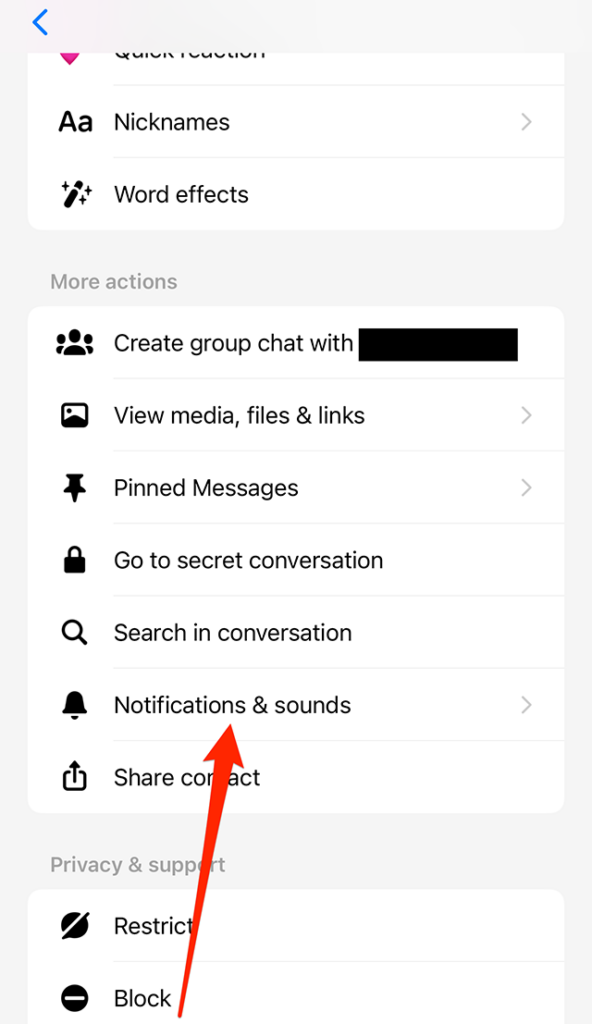
Step 2: Under the “More actions” section, tap “Notifications & sounds.”

image

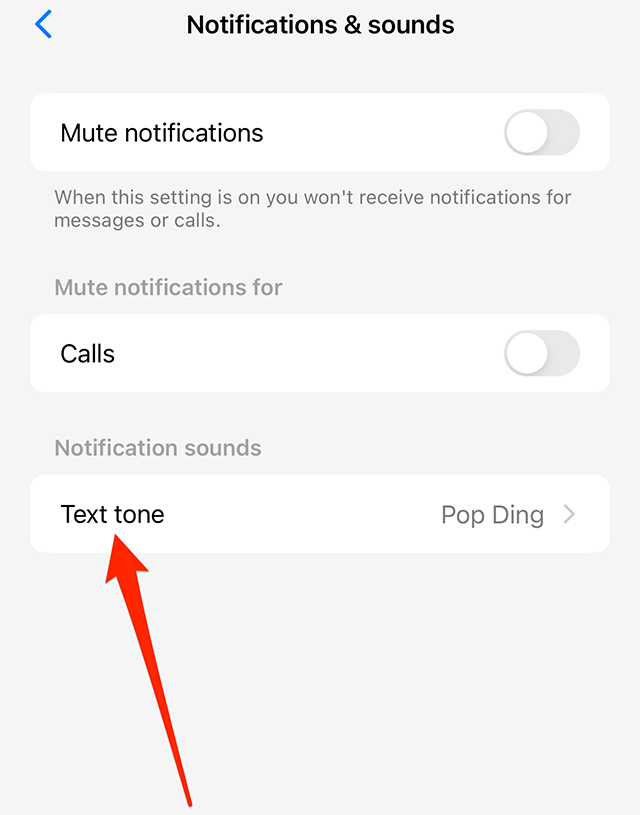
Step 3: Tap “Text tone.”

image

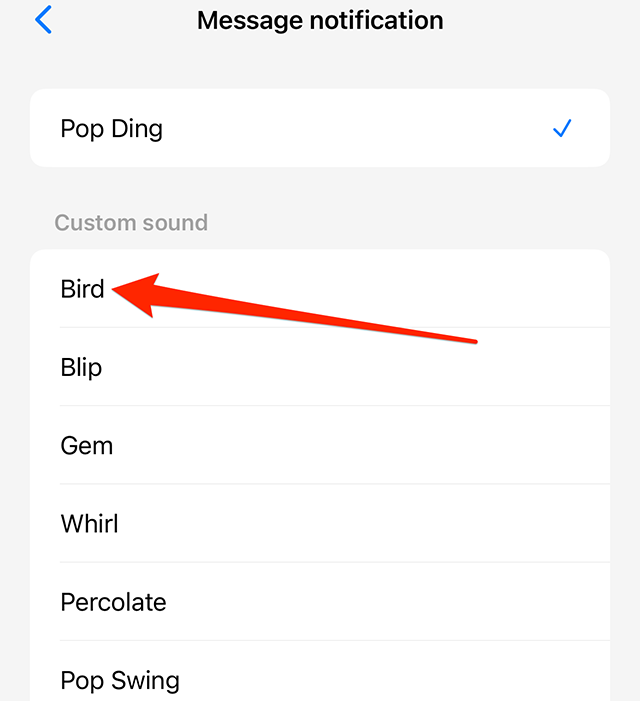
Step 4: Tap one of the sound options to select it. Note: You can tap each tone option to preview it before making your final selection.

image
.font-primary { } .font-secondary { } #meter-count { position: fixed; z-index: 9999999; bottom: 0; width:96%; margin: 2%; -webkit-border-radius: 4px; -moz-border-radius: 4px; border-radius: 4px; -webkit-box-shadow: 0 0px 15px 4px rgba(0,0,0,.2); box-shadow:0 0px 15px 4px rgba(0,0,0,.2); padding: 15px 0; color:#fff; background-color:#343a40; } #meter-count .icon { width: auto; opacity:.8; } #meter-count .icon svg { height: 36px; width: auto; } #meter-count .btn-subscribe { font-size:14px; font-weight:bold; padding:7px 18px; color: #fff; background-color: #2eb3b2; border:none; text-transform: capitalize; margin-right:10px; } #meter-count .btn-subscribe:hover { color: #fff; opacity:.8; } #meter-count .btn-signin { font-size:14px; font-weight:bold; padding:7px 14px; color: #fff; background-color: #121212; border:none; text-transform: capitalize; } #meter-count .btn-signin:hover { color: #fff; opacity:.8; } #meter-count h3 { color:#fff!important; letter-spacing:0px!important; margin:0; padding:0; font-size:16px; line-height:1.5; font-weight:700; margin: 0!important; padding: 0!important; } #meter-count h3 span { color:#E50000!important; font-weight:900; } #meter-count p { font-size:14px; font-weight:500; line-height:1.4; color:#eee!important; margin: 0!important; padding: 0!important; } #meter-count .close { color:#fff; display:block; position:absolute; top: 4px; right:4px; z-index: 999999; } #meter-count .close svg { display:block; color:#fff; height:16px; width:auto; cursor:pointer; } #meter-count .close:hover svg { color:#E50000; } #meter-count .fw-600 { font-weight:600; } @media (max-width: 1079px) { #meter-count .icon { margin:0; padding:0; display:none; } } @media (max-width: 768px) { #meter-count { margin: 0; -webkit-border-radius: 0px; -moz-border-radius: 0px; border-radius: 0px; width:100%; -webkit-box-shadow: 0 -8px 10px -4px rgba(0,0,0,0.3); box-shadow: 0 -8px 10px -4px rgba(0,0,0,0.3); } #meter-count .icon { margin:0; padding:0; display:none; } #meter-count h3 { color:#fff!important; font-size:14px; } #meter-count p { color:#fff!important; font-size: 12px; font-weight: 500; } #meter-count .btn-subscribe, #meter-count .btn-signin { font-size:12px; padding:7px 12px; } #meter-count .btn-signin { display:none; } #meter-count .close svg { height:14px; } }

Enjoying Adweek’s Content? Register for More Access!

https://www.adweek.com/social-marketing/messenger-how-to-change-the-text-tone-for-a-chat/


Ownership Will Define the New Era of Black Influence


.article-native-ad { border-bottom: 1px solid #ddd; margin: 0 45px; padding-bottom: 20px; margin-bottom: 20px; } .article-native-ad svg { color: #ddd; font-size: 34px; margin-top: 10px; } .article-native-ad p { line-height:1.5; padding:0!important; padding-left: 10px!important; } .article-native-ad strong { font-weight:500; color:rgb(46,179,178); }

Social Media Week returns May 16–18. Join as leading brands and agencies share strategies for marketing within the creator economy. Register now to get an early bird discount.

Signal. Telegram. Mastodon. Discord. Geneva. We’ve recently seen a sudden surge in the social media sector, possibly due to the tenets of Web3, as people ditch larger platforms and flock to ones that provide better security, tighter data privacy and less algorithmic manipulation. The niche subcultures these newer platforms cultivate, focused around specific topics and industries, serve as a throwback to the early internet, rife with forums like Yahoo! Groups and Reddit.

But for Black users, creators and developers, the exodus to smaller, closed social networks isn’t just motivated by a need for security. It’s driven by a quest for ownership. By launching proprietary apps and communities, Black creatives are able to reclaim culture, gatekeeping it from brands looking to appropriate norms and rehash them without providing credit. This is important to consider in a world where the pay gap between Black and white influencers is 22%, and where Black users are 35% more likely to trust any Black media over any general media.

Black-owned social networks offer increasingly equitable methods of monetizing content, more moderation and less censorship, offering digital safe spaces for Black users to present their most authentic selves. This means gaining and maintaining audience trust and credibility. An example of this is Spill, a forthcoming Black-owned social app that aims to prioritize culture, inclusivity and pay equity. Founded by ex-Twitter employees Alphonzo “Phonz” Terrell and DeVaris Brown, Spill has integrated blockchain in order to credit creators for their ideas as well to compensate them for content that goes viral on the platform. Set to launch this quarter, it already has over 50,000 users on its waitlist. There’s also Valence, a social platform for Black professionals frequently compared to LinkedIn, which has raised $7 million from investors.

Pretty much any tech platform can attract a Black audience—Clubhouse proved that—but the difference with these Black-owned apps is that they are built from the start with Black inclusivity in mind, making them more likely to stand the test of time.

But what does all of this mean for marketers? Should CMOs drop “Big Social” from their multicultural marketing mixes for good? Are the days of social executives using Twitter lookalike audiences to target “followers of Fenty Beauty” gone? Not necessarily—but it does mean that marketing leaders must begin to integrate Black-owned communities and apps into marketing plans in a way that is authentic and sustained.

Research and segmentation 

The best place to start is researching the Black audience segments you’d like to target based on the level of alignment with your brand. Just like the users in any other audience, recognize that Black users are not a monolith—we are gamers, comic book nerds, musicians, consultants, scientists, historians and more. We all have different purchasing habits, attitudes toward brands and intersections with other identities. Once you have created personas that include these variables and have identified segments that align with your goals, find out where your target users live online. This might be on Black-owned apps, but it could also be in newsletter mailing lists, on blogs or on websites directly. Many of these channels address specific segments of the Black community—for example, Black Girl Gamers, a multiplatform community of over 8,000 Black women that share a passion for gaming.

Once you have figured out the networks you’d like to tap into, the next step is to learn the rules for brands engaging within these spaces. Each Black online community has its own unique set of rules, guidelines and ways of speaking. For example, Black Twitter, the community of Twitter users that discusses Black culture, has made mainstream a variety of terms including “tea” and “on fleek.” The growth in Black-owned communities will result in even more unique dialects online, perhaps driven by companies like Spill, which is “leaning into meme culture” throughout its user experience. Brand leaders should learn these vernaculars, not as a means to co-opt or appropriate them, but to better understand themes and trends that make their audiences tick. This, before enlisting Black employees or agencies to create content that resonates.

Quality beats quantity 

Whether or not smaller, community-focused platforms are the future of social media is generally a point of contention for marketing leaders. Some state that the small scale of these platforms mean they can never beat Twitter when it comes to audience reach. But when it comes to multicultural marketing, quality definitely beats quantity. For minoritized audiences, scale isn’t achieved by putting out a message to as many as possible, but by reaching the people who are most likely to engage with or act upon a message. This might mean developing a presence within multiple smaller, targeted networks rather than just one or two larger ones. Digital strategist Sara Wilson coined these smaller networks “digital campfires”—according to Wilson, “If social media can feel like a crowded airport terminal where everyone is allowed, but no one feels particularly excited to be there, digital campfires offer a more intimate oasis where smaller groups of people are excited to gather around shared interests.”

A key benefit for companies that involve digital campfires in their marketing is the ability to reach people in a highly engaged state rather than when they’re mindlessly scrolling. Black users choose to be a part of a community—they don’t choose to be a part of an audience.

Leverage influencer communities 

It isn’t just Black tech leaders who are building their own communities to have more autonomy over their content and its monetization. Black influencers are, too. As more and more Black influencers consider their futures on platforms like Instagram and TikTok, creator-owned apps and newsletters should not be ignored.

Boasting an Instagram following of over a million users, Black lifestyle influencer and tech entrepreneur Hannah Bronfman has launched beauty and wellness community app HBFIT to have more freedom over what she shares online. On a recent podcast, Bronfman enthused, “I don’t know where Instagram is going to be in five years. Long-form content and storytelling is what I truly love to do, and there’s not really a platform anywhere for that, so I thought I’d make it myself. This isn’t like a Patreon. This is my own app that I own, and I think that is starting to look like what, maybe, the future of influencing is.”

Overall, the benefits of companies that adopt a community-led multicultural marketing approach, in contrast to one led by Big Social, shouldn’t be taken lightly. You’ll be able to convert Black users into long-standing brand advocates by reaching them in more inclusive environments where they are fairly compensated for their ideas.

https://www.adweek.com/social-marketing/ownership-will-define-the-new-era-of-black-influence/


Instagram: How to Search for Messages in Chats on Mobile


.article-native-ad { border-bottom: 1px solid #ddd; margin: 0 45px; padding-bottom: 20px; margin-bottom: 20px; } .article-native-ad svg { color: #ddd; font-size: 34px; margin-top: 10px; } .article-native-ad p { line-height:1.5; padding:0!important; padding-left: 10px!important; } .article-native-ad strong { font-weight:500; color:rgb(46,179,178); }

Learn how the creator economy is transforming the marketing landscape, and how to cultivate partnerships to grow engaged communities at Social Media Week: The Creatorverse, May 16–18 in NY. Register now to secure your early bird pass.

Instagram allows users to search for specific messages in conversations, rather than requiring them to scroll through their message history to find something that was previously said.

Our guide will show you how to search for messages in chats in the Instagram mobile application.

Note: These screenshots were captured in the Instagram app on iOS.

Step 1: Open the conversation containing the message(s) you want to find and tap the conversation name at the top of the screen.

image

Step 2: Under the “More actions” section, tap “Search in conversation.”

image

Step 3: Type your search query in the search bar that appears on the screen. Note: On iOS, you can tap the “Search” button in the bottom-right corner of your device’s keyboard to perform your search after you’ve typed your query.

image

From there, you’ll see a list of search results that match your query. If you tap a message in the search results, the app will take you back to the conversation where you can view the message in its original context.

image
.font-primary { } .font-secondary { } #meter-count { position: fixed; z-index: 9999999; bottom: 0; width:96%; margin: 2%; -webkit-border-radius: 4px; -moz-border-radius: 4px; border-radius: 4px; -webkit-box-shadow: 0 0px 15px 4px rgba(0,0,0,.2); box-shadow:0 0px 15px 4px rgba(0,0,0,.2); padding: 15px 0; color:#fff; background-color:#343a40; } #meter-count .icon { width: auto; opacity:.8; } #meter-count .icon svg { height: 36px; width: auto; } #meter-count .btn-subscribe { font-size:14px; font-weight:bold; padding:7px 18px; color: #fff; background-color: #2eb3b2; border:none; text-transform: capitalize; margin-right:10px; } #meter-count .btn-subscribe:hover { color: #fff; opacity:.8; } #meter-count .btn-signin { font-size:14px; font-weight:bold; padding:7px 14px; color: #fff; background-color: #121212; border:none; text-transform: capitalize; } #meter-count .btn-signin:hover { color: #fff; opacity:.8; } #meter-count h3 { color:#fff!important; letter-spacing:0px!important; margin:0; padding:0; font-size:16px; line-height:1.5; font-weight:700; margin: 0!important; padding: 0!important; } #meter-count h3 span { color:#E50000!important; font-weight:900; } #meter-count p { font-size:14px; font-weight:500; line-height:1.4; color:#eee!important; margin: 0!important; padding: 0!important; } #meter-count .close { color:#fff; display:block; position:absolute; top: 4px; right:4px; z-index: 999999; } #meter-count .close svg { display:block; color:#fff; height:16px; width:auto; cursor:pointer; } #meter-count .close:hover svg { color:#E50000; } #meter-count .fw-600 { font-weight:600; } @media (max-width: 1079px) { #meter-count .icon { margin:0; padding:0; display:none; } } @media (max-width: 768px) { #meter-count { margin: 0; -webkit-border-radius: 0px; -moz-border-radius: 0px; border-radius: 0px; width:100%; -webkit-box-shadow: 0 -8px 10px -4px rgba(0,0,0,0.3); box-shadow: 0 -8px 10px -4px rgba(0,0,0,0.3); } #meter-count .icon { margin:0; padding:0; display:none; } #meter-count h3 { color:#fff!important; font-size:14px; } #meter-count p { color:#fff!important; font-size: 12px; font-weight: 500; } #meter-count .btn-subscribe, #meter-count .btn-signin { font-size:12px; padding:7px 12px; } #meter-count .btn-signin { display:none; } #meter-count .close svg { height:14px; } }

Enjoying Adweek’s Content? Register for More Access!

https://www.adweek.com/social-marketing/instagram-how-to-search-for-messages-in-chats-on-mobile/