Yahoo Partners With Scope3 to Offset Carbon Emissions in Media Buying


Yahoo is offering a global carbon-neutral private marketplace (PMP) thanks to its latest ad tech partnership with Scope3.

With Scope3’s Green Media Products available within Yahoo’s supply-side platform (SSP), brands and agencies allocate spend towards GMP, Scope3 then measures the emissions associated with the campaign once it has run, and the publishers and ad sellers then contribute to Scope3’s chosen carbon-removal projects.

GMP is billed as carbon-neutral media and aims to price carbon into decisions that will, in theory, incentivize lower emissions. Other partners include IndexExchange, Sharethrough and OpenX.

“It’s important that we’re able to listen and be able to deliver what [clients] are looking for … It’s a great way to start 2023,” said Yahoo chief revenue officer Elizabeth Herbst-Brady. According to Herbst-Brady, the partnership has been in the works for a few months.

According to Scope3 co-founder and chief executive officer Brian O’Kelley, what’s being measured every time a GMP campaign runs via Yahoo is “a list of every domain, every app, country, region, device, network, what format and the size of the ad. Then we have an application programming interface (API) that converts that line by line into carbon.”

For comparison, a standard ad campaign in the U.S., a 15-second creative generates nearly 220Wh per 1000 impressions, which is 80g of CO2e per 1000 impressions, according to sustainability measurement firm Impact+.

When it comes to carbon emissions in ad tech, agreeing on standard measurements has been the sticking point.

“These are very early stages of how we’re thinking about green media products,” Herbst-Brady told Adweek.

In November, Teads announced its partnership with Scope3, with the platform’s co-chief executive officer Jeremy Arditi saying the industry is in the early stages of finding common benchmarks.

Elsewhere, Vox Media launched Concert Green Marketplace in an effort to reduce carbon emissions through its supply-side platform (SSP) this week, also powered by Scope3. 

Since its launch in December 2021, Scope3 has measured campaigns for nearly 30 companies and has measured carbon emissions for over 1 trillion impressions. Scope3’s GMP launched in June 2022.

“The fact that [Yahoo] would do it early and make a big investment in this before the market was fully developed just gives you a sense of how important this is going to be in 2023,” said O’Kelley.

.font-primary { } .font-secondary { } #meter-count { position: fixed; z-index: 9999999; bottom: 0; width:96%; margin: 2%; -webkit-border-radius: 4px; -moz-border-radius: 4px; border-radius: 4px; -webkit-box-shadow: 0 0px 15px 4px rgba(0,0,0,.2); box-shadow:0 0px 15px 4px rgba(0,0,0,.2); padding: 15px 0; color:#fff; background-color:#343a40; } #meter-count .icon { width: auto; opacity:.8; } #meter-count .icon svg { height: 36px; width: auto; } #meter-count .btn-subscribe { font-size:14px; font-weight:bold; padding:7px 18px; color: #fff; background-color: #E50000; border:none; text-transform: capitalize; } #meter-count .btn-subscribe:hover { color: #fff; opacity:.8; } #meter-count .btn-signin { font-size:14px; font-weight:bold; padding:7px 14px; color: #fff; background-color: #121212; border:none; text-transform: capitalize; } #meter-count .btn-signin:hover { color: #fff; opacity:.8; } #meter-count h3 { color:#fff!important; letter-spacing:0px!important; margin:0; padding:0; font-size:16px; line-height:1.5; font-weight:700; margin: 0!important; padding: 0!important; } #meter-count h3 span { color:#E50000!important; font-weight:900; } #meter-count p { font-size:14px; font-weight:500; line-height:1.4; color:#eee!important; margin: 0!important; padding: 0!important; } #meter-count .close { color:#fff; display:block; position:absolute; top: 4px; right:4px; z-index: 999999; } #meter-count .close svg { display:block; color:#fff; height:16px; width:auto; cursor:pointer; } #meter-count .close:hover svg { color:#E50000; } #meter-count .fw-600 { font-weight:600; } @media (max-width: 1079px) { #meter-count .icon { margin:0; padding:0; display:none; } } @media (max-width: 768px) { #meter-count { margin: 0; -webkit-border-radius: 0px; -moz-border-radius: 0px; border-radius: 0px; width:100%; -webkit-box-shadow: 0 -8px 10px -4px rgba(0,0,0,0.3); box-shadow: 0 -8px 10px -4px rgba(0,0,0,0.3); } #meter-count .icon { margin:0; padding:0; display:none; } #meter-count h3 { color:#fff!important; font-size:14px; } #meter-count p { color:#fff!important; font-size: 12px; font-weight: 500; } #meter-count .btn-subscribe, #meter-count .btn-signin { font-size:12px; padding:7px 12px; } #meter-count .btn-signin { display:none; } #meter-count .close svg { height:14px; } }

Enjoying your content? You Have 1 Free Article Left.

Register to continue reading!

https://www.adweek.com/programmatic/yahoo-partners-with-scope3-to-offset-carbon-emissions-in-media-buying/


Twitter Product Engineering Lead Behnam Rezaei Departs

While the revolving door has slowed at Twitter of late, as there aren’t that many people left to go through it, product engineering lead Behnam Rezaei took his turn Tuesday after roughly five-and-a-half years with the company.

Rezaei tweeted about his departure Wednesday, saying in the comments that it was a personal decision, and the company was not undergoing another round of layoffs.

He joined Twitter in August 2017 as senior director of engineering, and he was promoted to product engineering lead in November after Elon Musk took over the company.

Prior to Twitter, Rezaei spent more than 10 years as founder and chief technology officer of technology startup NetSeer, which provided concept-based advertisement targeting solutions for advertisers and publishers and was acquired by Inuvo in February 2017.

Rezaei said in his tweet that he plans to take some time off and go “back to being a full-time papa bear.”

He was also complimentary of Musk, writing in his series of tweets, “It started with managing a recommendation team, then building a data-informed growth org with some of the best people at Twitter, leading to consistent causal audience growth. Then working with machine learning experts across the company to accelerate personalization and artificial intelligence in the core product and, most recently, working with Elon Musk to transform the company toward his vision and texting about product ideas or bugs with him at 3 a.m.”

Rezaei added, “I also learned from up close Elon Musk’s framework to scale the efficiency of a startup to a midsize company to achieve the unachievable. Thank you, Elon.”

He tweeted, “My respect and gratitude to great tweeps and engineers of the past who built Twitter’s core product and infrastructure. This site being here despite all the odds is proof of your excellence. #lovewhereyouworked My kudos to all the amazing people currently at Twitter. Your hard work, brilliance and the heart you bring to work every day to push the mission forward are the most unappreciated stories of the year. Be good, do good work and support each other. I will be rooting for you.”

.font-primary { } .font-secondary { } #meter-count { position: fixed; z-index: 9999999; bottom: 0; width:96%; margin: 2%; -webkit-border-radius: 4px; -moz-border-radius: 4px; border-radius: 4px; -webkit-box-shadow: 0 0px 15px 4px rgba(0,0,0,.2); box-shadow:0 0px 15px 4px rgba(0,0,0,.2); padding: 15px 0; color:#fff; background-color:#343a40; } #meter-count .icon { width: auto; opacity:.8; } #meter-count .icon svg { height: 36px; width: auto; } #meter-count .btn-subscribe { font-size:14px; font-weight:bold; padding:7px 18px; color: #fff; background-color: #E50000; border:none; text-transform: capitalize; } #meter-count .btn-subscribe:hover { color: #fff; opacity:.8; } #meter-count .btn-signin { font-size:14px; font-weight:bold; padding:7px 14px; color: #fff; background-color: #121212; border:none; text-transform: capitalize; } #meter-count .btn-signin:hover { color: #fff; opacity:.8; } #meter-count h3 { color:#fff!important; letter-spacing:0px!important; margin:0; padding:0; font-size:16px; line-height:1.5; font-weight:700; margin: 0!important; padding: 0!important; } #meter-count h3 span { color:#E50000!important; font-weight:900; } #meter-count p { font-size:14px; font-weight:500; line-height:1.4; color:#eee!important; margin: 0!important; padding: 0!important; } #meter-count .close { color:#fff; display:block; position:absolute; top: 4px; right:4px; z-index: 999999; } #meter-count .close svg { display:block; color:#fff; height:16px; width:auto; cursor:pointer; } #meter-count .close:hover svg { color:#E50000; } #meter-count .fw-600 { font-weight:600; } @media (max-width: 1079px) { #meter-count .icon { margin:0; padding:0; display:none; } } @media (max-width: 768px) { #meter-count { margin: 0; -webkit-border-radius: 0px; -moz-border-radius: 0px; border-radius: 0px; width:100%; -webkit-box-shadow: 0 -8px 10px -4px rgba(0,0,0,0.3); box-shadow: 0 -8px 10px -4px rgba(0,0,0,0.3); } #meter-count .icon { margin:0; padding:0; display:none; } #meter-count h3 { color:#fff!important; font-size:14px; } #meter-count p { color:#fff!important; font-size: 12px; font-weight: 500; } #meter-count .btn-subscribe, #meter-count .btn-signin { font-size:12px; padding:7px 12px; } #meter-count .btn-signin { display:none; } #meter-count .close svg { height:14px; } }

Enjoying your content? You Have 1 Free Article Left.

Register to continue reading!

https://www.adweek.com/media/twitter-product-engineering-lead-behnam-rezaei-departs/


Twitter Reverses Its Ban on Political Ads


In its latest series of reversed policies, Twitter plans to lift its longstanding ban on political ads “in the coming weeks” and let marketers serve cause-based advertising or ads that educate people or take action on social and economic topics. While some political ad buyers welcome the move, Twitter has work to do to encourage advertisers back to the platform.

“We believe that cause-based advertising can facilitate a public conversation around important topics. Today, we’re relaxing our ads policy for cause-based ads in the U.S.,” Twitter’s Safety account tweeted on Tuesday.

Other platforms such as Facebook and YouTube allow for paid political content.

The platform’s ban on ads from advocacy groups and politicians has been in place since 2019. This policy reversal, however, comes as 70% of the platform’s advertisers fled Twitter. Advertising serves as the main source of revenue for the platform, accounting for 90% of its $5.1 billion turnover in 2021. However, Elon Musk’s takeover in October last year led to a surge in hate speech and misinformation on the platform making advertisers wary. Musk has since attempted to mollify marketers.

Still, Twitter’s move is piquing marketer interest, especially those catering to an energetic community base.

“Twitter plays a large part in driving the news of the day. It’s an echo chamber for society’s loudest voices,” said Reid Vineis, vp of digital at Republican political ad firm Majority Strategies. “So, Twitter advertising will be especially helpful for public affairs advertisers who want to shape the narrative on a particular legislative or regulatory issue.”

This move could open up some revenue for Twitter as it attempts to lure advertisers back on the platform. However, the U.S. has no national elections scheduled in 2023. Additionally, Twitter’s former CFO Ned Segal tweeted that political advertising accounted for less than $3 million in the 2018 midterm election.

Meanwhile, Google and Facebook still dominate political advertising. However, media buyers have greatly diversified ad spend in recent years, with streaming television, text messaging and organic content creation playing a larger role.

As Twitter’s future looks uncertain, and as users have left, competing platforms have rolled out Twitter-adjacent features, such as Cohost and Mastadon. Despite peaks in users, these aren’t “real options” for marketers who would have previously used paid reach to find Twitter’s unique audiences, said Aaron Grote, vp of digital products at Stirista.

“Since Twitter’s ecosystem has already adapted to not having paid political ads, that won’t cause a lot of confusion or strategy changes [for marketers],” he said.

Further, Twitter has not positioned itself as a strong direct-response platform, and many brand-building marketers have left, so it has work to do if it wants to turn that interest into ad dollars.

“Political ad buyers are looking for units and experiences that can change opinions,” said Vineis. “The platform needs to demonstrate it not only is a safe environment for causes and candidates but that it is effective at changing voters’ minds.”

.font-primary { } .font-secondary { } #meter-count { position: fixed; z-index: 9999999; bottom: 0; width:96%; margin: 2%; -webkit-border-radius: 4px; -moz-border-radius: 4px; border-radius: 4px; -webkit-box-shadow: 0 0px 15px 4px rgba(0,0,0,.2); box-shadow:0 0px 15px 4px rgba(0,0,0,.2); padding: 15px 0; color:#fff; background-color:#343a40; } #meter-count .icon { width: auto; opacity:.8; } #meter-count .icon svg { height: 36px; width: auto; } #meter-count .btn-subscribe { font-size:14px; font-weight:bold; padding:7px 18px; color: #fff; background-color: #2eb3b2; border:none; text-transform: capitalize; margin-right:10px; } #meter-count .btn-subscribe:hover { color: #fff; opacity:.8; } #meter-count .btn-signin { font-size:14px; font-weight:bold; padding:7px 14px; color: #fff; background-color: #121212; border:none; text-transform: capitalize; } #meter-count .btn-signin:hover { color: #fff; opacity:.8; } #meter-count h3 { color:#fff!important; letter-spacing:0px!important; margin:0; padding:0; font-size:16px; line-height:1.5; font-weight:700; margin: 0!important; padding: 0!important; } #meter-count h3 span { color:#E50000!important; font-weight:900; } #meter-count p { font-size:14px; font-weight:500; line-height:1.4; color:#eee!important; margin: 0!important; padding: 0!important; } #meter-count .close { color:#fff; display:block; position:absolute; top: 4px; right:4px; z-index: 999999; } #meter-count .close svg { display:block; color:#fff; height:16px; width:auto; cursor:pointer; } #meter-count .close:hover svg { color:#E50000; } #meter-count .fw-600 { font-weight:600; } @media (max-width: 1079px) { #meter-count .icon { margin:0; padding:0; display:none; } } @media (max-width: 768px) { #meter-count { margin: 0; -webkit-border-radius: 0px; -moz-border-radius: 0px; border-radius: 0px; width:100%; -webkit-box-shadow: 0 -8px 10px -4px rgba(0,0,0,0.3); box-shadow: 0 -8px 10px -4px rgba(0,0,0,0.3); } #meter-count .icon { margin:0; padding:0; display:none; } #meter-count h3 { color:#fff!important; font-size:14px; } #meter-count p { color:#fff!important; font-size: 12px; font-weight: 500; } #meter-count .btn-subscribe, #meter-count .btn-signin { font-size:12px; padding:7px 12px; } #meter-count .btn-signin { display:none; } #meter-count .close svg { height:14px; } }

Enjoying Adweek’s Content? Register for More Access!

https://www.adweek.com/programmatic/twitter-reverses-ban-on-political-ads/


Clubhouse: How to Rename a House

Clubhouse’s “Houses” feature allows users to create private groups that they can invite other users to join. Once a user creates a House, they’ll have the option to rename the House in the future.

Our guide will show you how to rename a House in the Clubhouse mobile application.

Note: These screenshots were captured in the Clubhouse app on iOS.

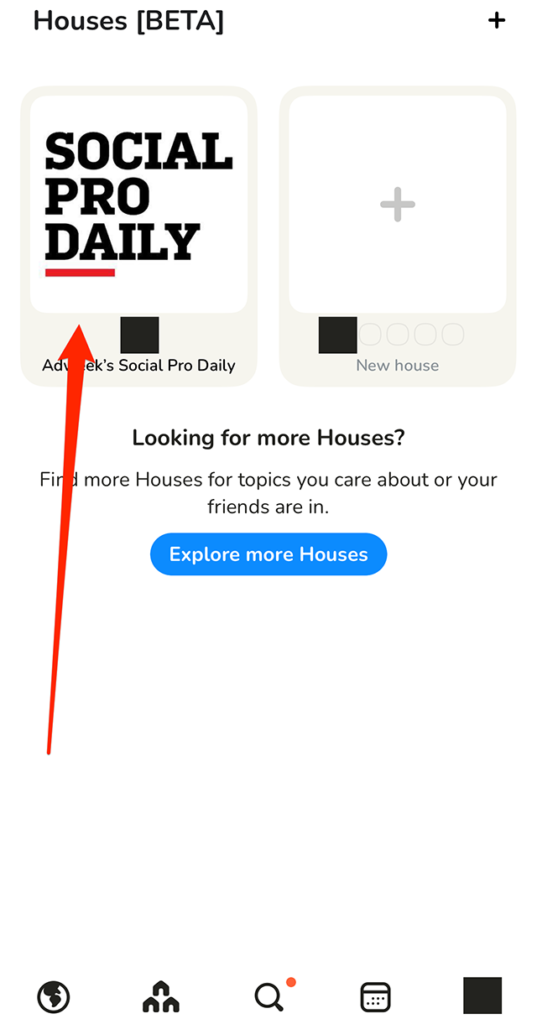
Step 1: On Clubhouse’s “Houses” screen, tap the House you want to rename.

image

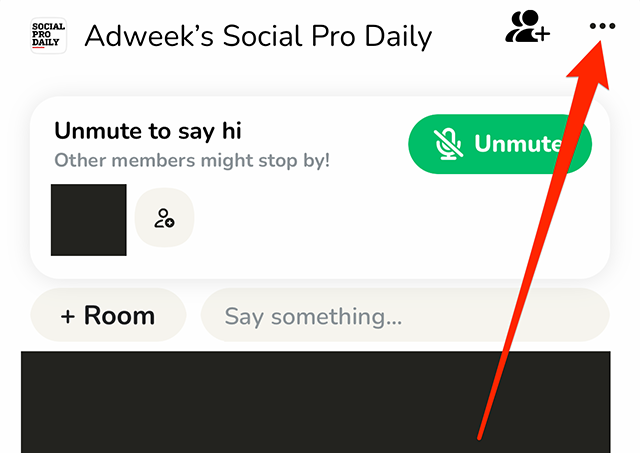
Step 2: Tap the three dots in the top-right corner of the screen.

image

Step 3: Tap the House’s current name.

image

Step 4: Type your desired changes to the House’s name.

image

Step 5: Tap “Save” to save your changes to the House’s name.

image
#paywall-subscribe { margin:0; padding: 1rem 2.4rem; } #paywall-subscribe .holder { background-color:#eee; border:15px solid #f2f2f2; padding:30px; margin:0 auto!important; text-align:center; } #paywall-subscribe a.underline { color:#000; text-decoration:underline; } #paywall-subscribe img { margin-bottom:10px; width: 140px!important; height: auto!important; } #paywall-subscribe h3 { font-weight:bold; font-size:16px; text-transform:uppercase; width:80%; margin:0 auto; margin-bottom:20px; text-align:center; } #paywall-subscribe h3 span { display:block; font-size:14px; } #paywall-subscribe h2 { font-weight:800; font-size:24px; text-transform:uppercase; } #paywall-subscribe p { font-size: 16px; color:#000; padding: 0; } #paywall-subscribe .cta { margin-top:20px; margin-bottom:10px; font-size:14px; text-transform:capitalize; color: #fff; background-color: #E50000; border:none; padding:12px 28px; text-decoration:none; -webkit-transition: .3s ease; -moz-transition: .3s ease; -o-transition: .3s ease; -ms-transition: .3s ease; transition: .3s ease; } #paywall-subscribe .cta:hover { color: #fff; background-color: #181818; transform: scale(1.02); } #paywall-subscribe .already-a-member { font-size:14px; } @media (max-width: 1024px) { #paywall-subscribe .holder { border:12px solid #f2f2f2; padding:25px; } #paywall-subscribe img { width: 120px!important; } } @media (max-width: 768px) { #paywall-subscribe .holder { border:10px solid #f2f2f2; padding:20px; } #paywall-subscribe img { width: 100px!important; } #paywall-subscribe h3 { font-size:14px; } #paywall-subscribe h3 span { font-size:12px; } #paywall-subscribe h2 { font-size:18px; } #paywall-subscribe p { font-size:14px; } #paywall-subscribe .cta { font-size:12px; padding:10px 24px; } #paywall-subscribe .already-a-member { font-size:11px; } } AW+

WORK SMARTER – LEARN, GROW AND BE INSPIRED.

Subscribe today!

To Read the Full Story Become an Adweek+ Subscriber

View Subscription Options

Already a member? Sign in

https://www.adweek.com/media/clubhouse-how-to-rename-a-house/


What Marketers Need to Consider for 2023 While Weathering Twitter’s Maelstrom

Whether Elon Musk remains at the helm of Twitter or hands over the reins to someone else—Myspace founder Tom Anderson, anyone?—the platform is in for more seismic changes following the mogul’s $44 billion acquisition of the platform in October.

After eliminating or accepting the semi-voluntary resignations of more than half the platform’s prior staff (an estimated 3,800 people), Musk and the remaining team have set off on a collision course of shifting policies and features, eliminating, reimplementing and adjusting their way to a new future for the platform.

#paywall-subscribe { margin:0; padding: 1rem 2.4rem; } #paywall-subscribe .holder { background-color:#eee; border:15px solid #f2f2f2; padding:30px; margin:0 auto!important; text-align:center; } #paywall-subscribe a.underline { color:#000; text-decoration:underline; } #paywall-subscribe img { margin-bottom:10px; width: 140px!important; height: auto!important; } #paywall-subscribe h3 { font-weight:bold; font-size:16px; text-transform:uppercase; width:80%; margin:0 auto; margin-bottom:20px; text-align:center; } #paywall-subscribe h3 span { display:block; font-size:14px; } #paywall-subscribe h2 { font-weight:800; font-size:24px; text-transform:uppercase; } #paywall-subscribe p { font-size: 16px; color:#000; padding: 0; } #paywall-subscribe .cta { margin-top:20px; margin-bottom:10px; font-size:14px; text-transform:capitalize; color: #fff; background-color: #E50000; border:none; padding:12px 28px; text-decoration:none; -webkit-transition: .3s ease; -moz-transition: .3s ease; -o-transition: .3s ease; -ms-transition: .3s ease; transition: .3s ease; } #paywall-subscribe .cta:hover { color: #fff; background-color: #181818; transform: scale(1.02); } #paywall-subscribe .already-a-member { font-size:14px; } @media (max-width: 1024px) { #paywall-subscribe .holder { border:12px solid #f2f2f2; padding:25px; } #paywall-subscribe img { width: 120px!important; } } @media (max-width: 768px) { #paywall-subscribe .holder { border:10px solid #f2f2f2; padding:20px; } #paywall-subscribe img { width: 100px!important; } #paywall-subscribe h3 { font-size:14px; } #paywall-subscribe h3 span { font-size:12px; } #paywall-subscribe h2 { font-size:18px; } #paywall-subscribe p { font-size:14px; } #paywall-subscribe .cta { font-size:12px; padding:10px 24px; } #paywall-subscribe .already-a-member { font-size:11px; } } AW+

WORK SMARTER – LEARN, GROW AND BE INSPIRED.

Subscribe today!

To Read the Full Story Become an Adweek+ Subscriber

View Subscription Options

Already a member? Sign in

https://www.adweek.com/social-marketing/marketers-weathering-twitters-maelstrom/


Clubhouse: How to Change Your Notification Settings for a House


Clubhouse is currently testing a “Houses” feature that allows users to create private Houses, or groups that can only be joined via invitation. Each House features its own notification settings, which are separate from the application’s regular notification settings. These House notification settings allow users to choose which alerts they want to receive that are related to the House.

Our guide will show you how to change your notification settings for a House in the Clubhouse mobile app.

Note: These screenshots were captured in the Clubhouse app on iOS.

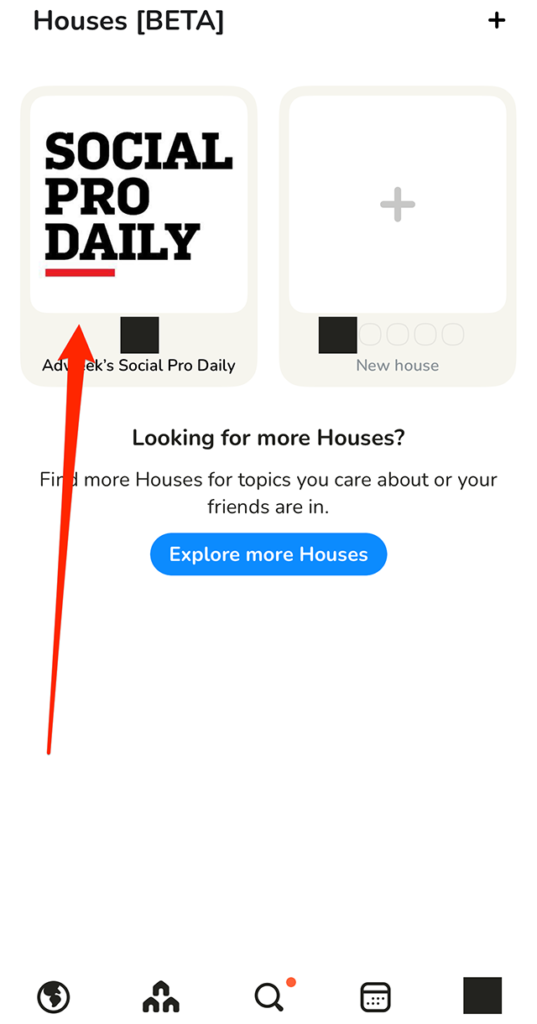
Step 1: On Clubhouse’s House screen, tap the desired House.

image

Step 2: Tap the three dots in the top-right corner of the screen.

image

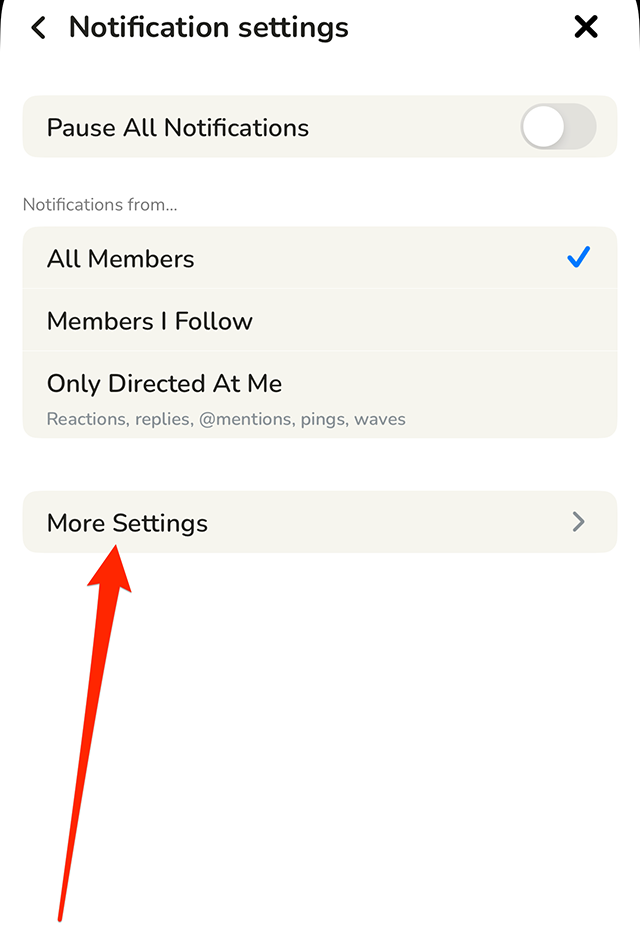
Step 3: Tap “Notification settings.”

image

From there, you can pause all notifications from the House or tell Clubhouse to only send you notifications related to certain members in the House. You can also tap “More Settings” to view more notification settings you can manage.

image
.font-primary { } .font-secondary { } #meter-count { position: fixed; z-index: 9999999; bottom: 0; width:96%; margin: 2%; -webkit-border-radius: 4px; -moz-border-radius: 4px; border-radius: 4px; -webkit-box-shadow: 0 0px 15px 4px rgba(0,0,0,.2); box-shadow:0 0px 15px 4px rgba(0,0,0,.2); padding: 15px 0; color:#fff; background-color:#343a40; } #meter-count .icon { width: auto; opacity:.8; } #meter-count .icon svg { height: 36px; width: auto; } #meter-count .btn-subscribe { font-size:14px; font-weight:bold; padding:7px 18px; color: #fff; background-color: #2eb3b2; border:none; text-transform: capitalize; margin-right:10px; } #meter-count .btn-subscribe:hover { color: #fff; opacity:.8; } #meter-count .btn-signin { font-size:14px; font-weight:bold; padding:7px 14px; color: #fff; background-color: #121212; border:none; text-transform: capitalize; } #meter-count .btn-signin:hover { color: #fff; opacity:.8; } #meter-count h3 { color:#fff!important; letter-spacing:0px!important; margin:0; padding:0; font-size:16px; line-height:1.5; font-weight:700; margin: 0!important; padding: 0!important; } #meter-count h3 span { color:#E50000!important; font-weight:900; } #meter-count p { font-size:14px; font-weight:500; line-height:1.4; color:#eee!important; margin: 0!important; padding: 0!important; } #meter-count .close { color:#fff; display:block; position:absolute; top: 4px; right:4px; z-index: 999999; } #meter-count .close svg { display:block; color:#fff; height:16px; width:auto; cursor:pointer; } #meter-count .close:hover svg { color:#E50000; } #meter-count .fw-600 { font-weight:600; } @media (max-width: 1079px) { #meter-count .icon { margin:0; padding:0; display:none; } } @media (max-width: 768px) { #meter-count { margin: 0; -webkit-border-radius: 0px; -moz-border-radius: 0px; border-radius: 0px; width:100%; -webkit-box-shadow: 0 -8px 10px -4px rgba(0,0,0,0.3); box-shadow: 0 -8px 10px -4px rgba(0,0,0,0.3); } #meter-count .icon { margin:0; padding:0; display:none; } #meter-count h3 { color:#fff!important; font-size:14px; } #meter-count p { color:#fff!important; font-size: 12px; font-weight: 500; } #meter-count .btn-subscribe, #meter-count .btn-signin { font-size:12px; padding:7px 12px; } #meter-count .btn-signin { display:none; } #meter-count .close svg { height:14px; } }

Enjoying Adweek’s Content? Register for More Access!

https://www.adweek.com/media/clubhouse-how-to-change-your-notification-settings-for-a-house/


TikTok Begins Extending 18+ Age Gate to Creators of Short-Form Video

TikTok rolled out audience controls for live creators last year, enabling them to restrict their content to viewers 18 and older, and the video creation platform said last week that it was extending that option to creators of short-form video worldwide over the coming weeks.

The company said in a blog post, “To be clear: Our policies still fully apply to creators who use this feature, and we will remove content that contains nudity and other violations of our community guidelines. We regularly educate creators about our policies because it takes a village to create a space where everyone feels welcome and safe.”

TikTok also recently joined forces with Bumble and Meta, partnering with StopNCII.org to help stop the spread of non-consensual intimate imagery and prevent content identified through that partnership from being posted on its platform.

The platform began introducing Content Levels last July as a way to prevent users between the ages of 13 and 17 with teen accounts from seeing content containing adult innuendo, profanity or sexually suggestive fare, and TikTok said last week that the feature prevented teen accounts from viewing more than 1 million overtly sexually suggestive videos in the past 30 days alone.

TikTok wrote in its blog post, “Our goal has always been to make sure our community, especially teens on our platform, has a safe, positive and joyful experience when they come to TikTok. We’ve already taken significant strides to help ensure that their feeds are full of content that is appropriate for them, and these improvements mark an important next step to meet that goal.”

.font-primary { } .font-secondary { } #meter-count { position: fixed; z-index: 9999999; bottom: 0; width:96%; margin: 2%; -webkit-border-radius: 4px; -moz-border-radius: 4px; border-radius: 4px; -webkit-box-shadow: 0 0px 15px 4px rgba(0,0,0,.2); box-shadow:0 0px 15px 4px rgba(0,0,0,.2); padding: 15px 0; color:#fff; background-color:#343a40; } #meter-count .icon { width: auto; opacity:.8; } #meter-count .icon svg { height: 36px; width: auto; } #meter-count .btn-subscribe { font-size:14px; font-weight:bold; padding:7px 18px; color: #fff; background-color: #2eb3b2; border:none; text-transform: capitalize; margin-right:10px; } #meter-count .btn-subscribe:hover { color: #fff; opacity:.8; } #meter-count .btn-signin { font-size:14px; font-weight:bold; padding:7px 14px; color: #fff; background-color: #121212; border:none; text-transform: capitalize; } #meter-count .btn-signin:hover { color: #fff; opacity:.8; } #meter-count h3 { color:#fff!important; letter-spacing:0px!important; margin:0; padding:0; font-size:16px; line-height:1.5; font-weight:700; margin: 0!important; padding: 0!important; } #meter-count h3 span { color:#E50000!important; font-weight:900; } #meter-count p { font-size:14px; font-weight:500; line-height:1.4; color:#eee!important; margin: 0!important; padding: 0!important; } #meter-count .close { color:#fff; display:block; position:absolute; top: 4px; right:4px; z-index: 999999; } #meter-count .close svg { display:block; color:#fff; height:16px; width:auto; cursor:pointer; } #meter-count .close:hover svg { color:#E50000; } #meter-count .fw-600 { font-weight:600; } @media (max-width: 1079px) { #meter-count .icon { margin:0; padding:0; display:none; } } @media (max-width: 768px) { #meter-count { margin: 0; -webkit-border-radius: 0px; -moz-border-radius: 0px; border-radius: 0px; width:100%; -webkit-box-shadow: 0 -8px 10px -4px rgba(0,0,0,0.3); box-shadow: 0 -8px 10px -4px rgba(0,0,0,0.3); } #meter-count .icon { margin:0; padding:0; display:none; } #meter-count h3 { color:#fff!important; font-size:14px; } #meter-count p { color:#fff!important; font-size: 12px; font-weight: 500; } #meter-count .btn-subscribe, #meter-count .btn-signin { font-size:12px; padding:7px 12px; } #meter-count .btn-signin { display:none; } #meter-count .close svg { height:14px; } }

Enjoying Adweek’s Content? Register for More Access!

https://www.adweek.com/media/tiktok-begins-extending-18-age-gate-to-creators-of-short-form-video/


Clubhouse: How to Add a Description to a House

Clubhouse allows users to create “Houses,” private groups that are only accessible via an invitation. Once a user creates a House, they can add a description to the House to give other users more information about the group.

Our guide will show you how to add a description to a House in the Clubhouse mobile application.

Note: These screenshots were captured in the Clubhouse app on iOS.

Step 1: On Clubhouse’s “Houses” screen, tap the House you want to customize.

image

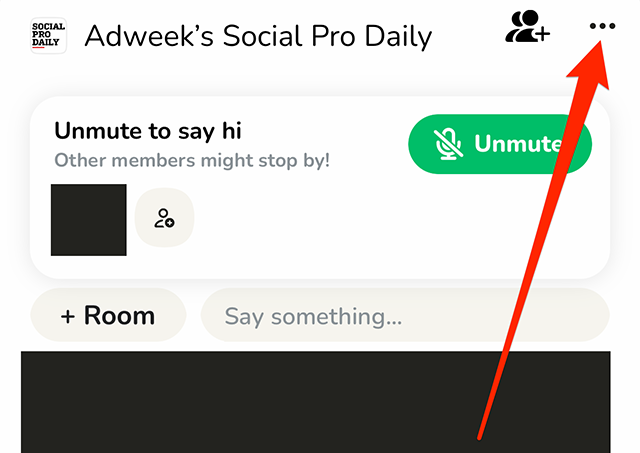
Step 2: Tap the three dots in the top-right corner of the screen.

image

Step 3: Tap “Description.”

image

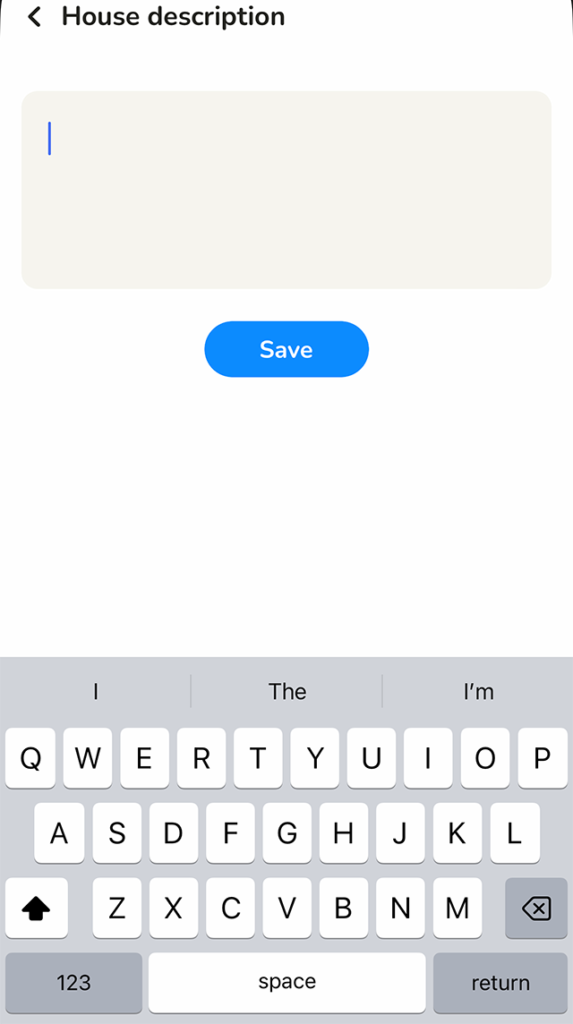
Step 4: Type your desired description for the House.

image

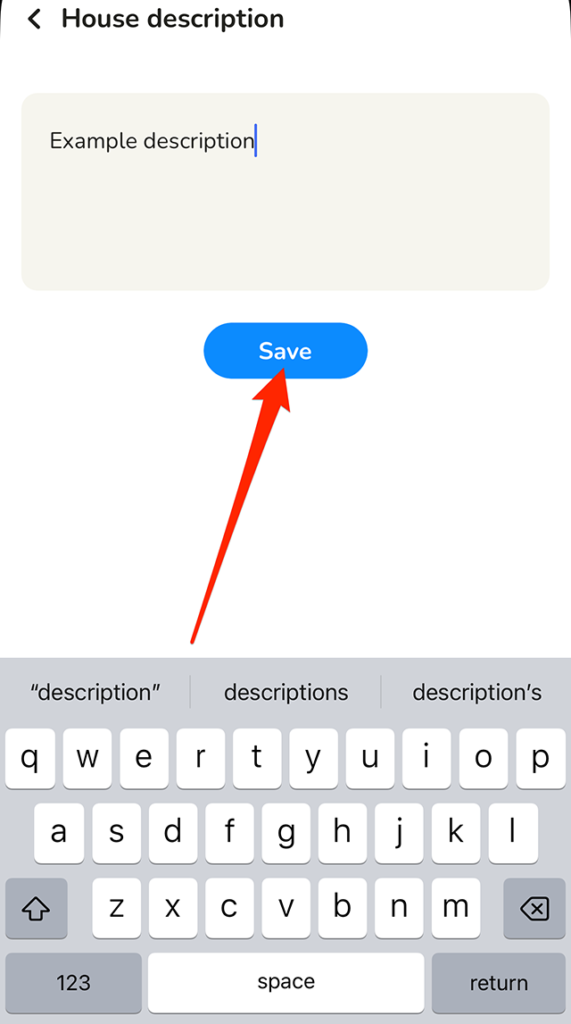
Step 5: Tap the “Save” button under the description text-entry field to save your changes.

image
#paywall-subscribe { margin:0; padding: 1rem 2.4rem; } #paywall-subscribe .holder { background-color:#eee; border:15px solid #f2f2f2; padding:30px; margin:0 auto!important; text-align:center; } #paywall-subscribe a.underline { color:#000; text-decoration:underline; } #paywall-subscribe img { margin-bottom:10px; width: 140px!important; height: auto!important; } #paywall-subscribe h3 { font-weight:bold; font-size:16px; text-transform:uppercase; width:80%; margin:0 auto; margin-bottom:20px; text-align:center; } #paywall-subscribe h3 span { display:block; font-size:14px; } #paywall-subscribe h2 { font-weight:800; font-size:24px; text-transform:uppercase; } #paywall-subscribe p { font-size: 16px; color:#000; padding: 0; } #paywall-subscribe .cta { margin-top:20px; margin-bottom:10px; font-size:14px; text-transform:capitalize; color: #fff; background-color: #E50000; border:none; padding:12px 28px; text-decoration:none; -webkit-transition: .3s ease; -moz-transition: .3s ease; -o-transition: .3s ease; -ms-transition: .3s ease; transition: .3s ease; } #paywall-subscribe .cta:hover { color: #fff; background-color: #181818; transform: scale(1.02); } #paywall-subscribe .already-a-member { font-size:14px; } @media (max-width: 1024px) { #paywall-subscribe .holder { border:12px solid #f2f2f2; padding:25px; } #paywall-subscribe img { width: 120px!important; } } @media (max-width: 768px) { #paywall-subscribe .holder { border:10px solid #f2f2f2; padding:20px; } #paywall-subscribe img { width: 100px!important; } #paywall-subscribe h3 { font-size:14px; } #paywall-subscribe h3 span { font-size:12px; } #paywall-subscribe h2 { font-size:18px; } #paywall-subscribe p { font-size:14px; } #paywall-subscribe .cta { font-size:12px; padding:10px 24px; } #paywall-subscribe .already-a-member { font-size:11px; } } AW+

WORK SMARTER – LEARN, GROW AND BE INSPIRED.

Subscribe today!

To Read the Full Story Become an Adweek+ Subscriber

View Subscription Options

Already a member? Sign in

https://www.adweek.com/media/clubhouse-how-to-add-a-description-to-a-house/


Facebook: How to Hide Your Friends List


By default, Facebook users may be able to see the people someone else has befriended on the social networking platform. However, users have the option to hide their friends list from other users if they’d rather keep this list private.

Our guide will show you how to stop others from being able to view your Facebook friends list.

Note: These screenshots were captured in the Facebook application on iOS.

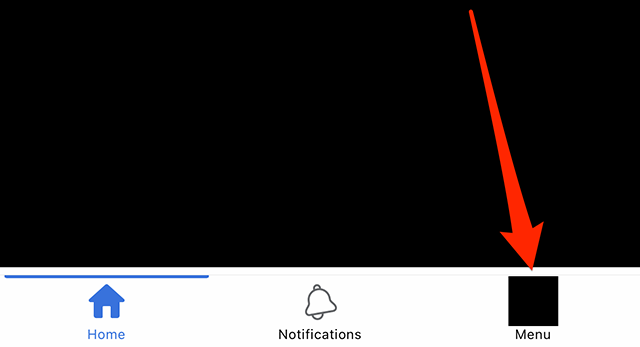
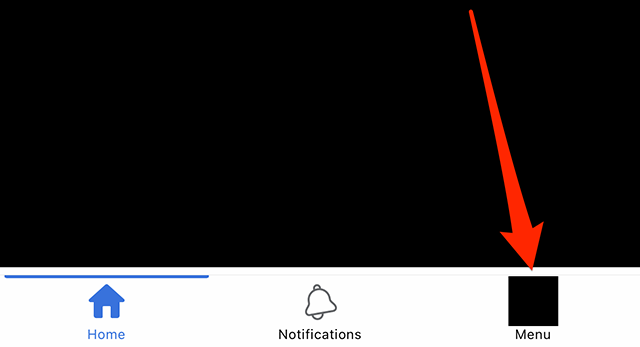
Step 1: Tap the “Menu” icon in Facebook’s bottom navigation bar.

image

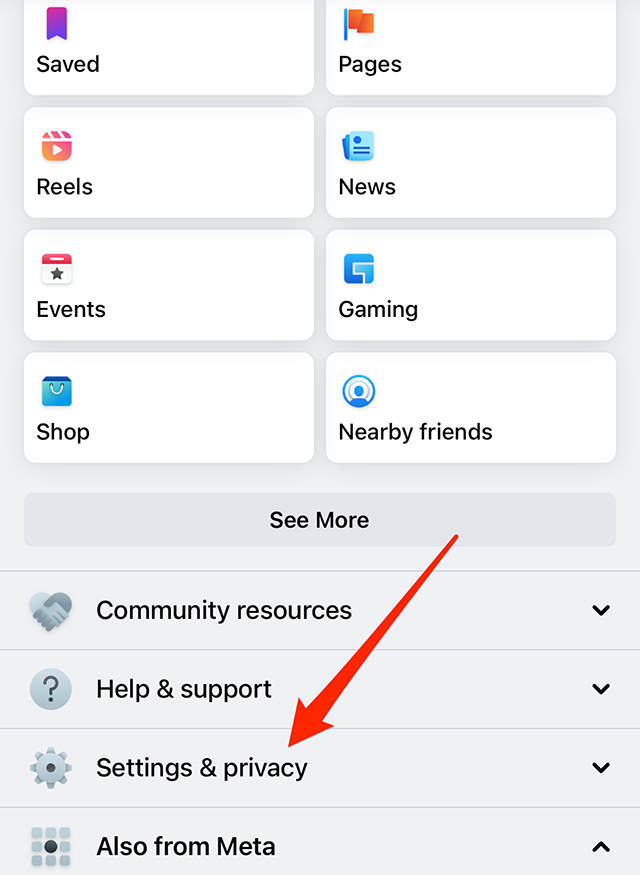
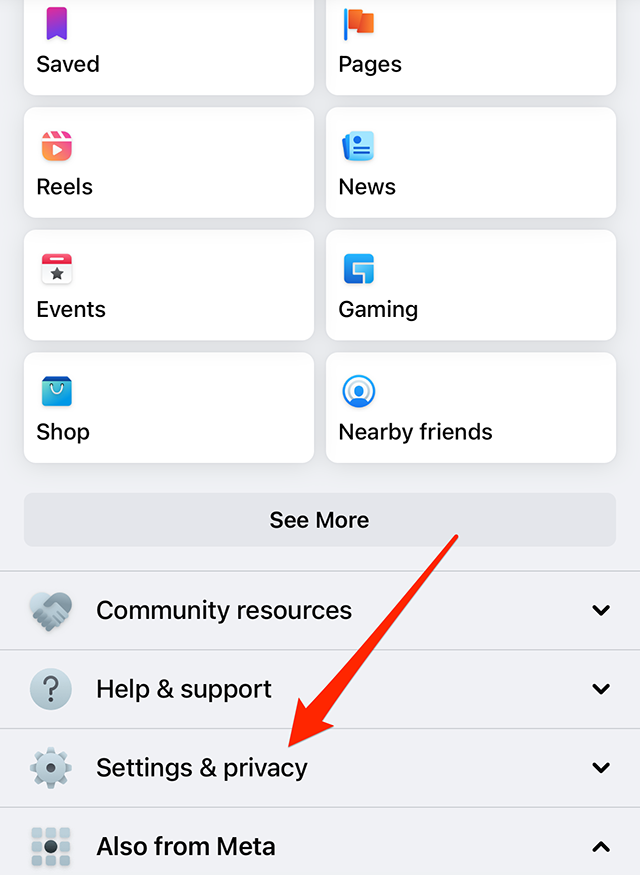
Step 2: Scroll down and tap “Settings & privacy.”

image

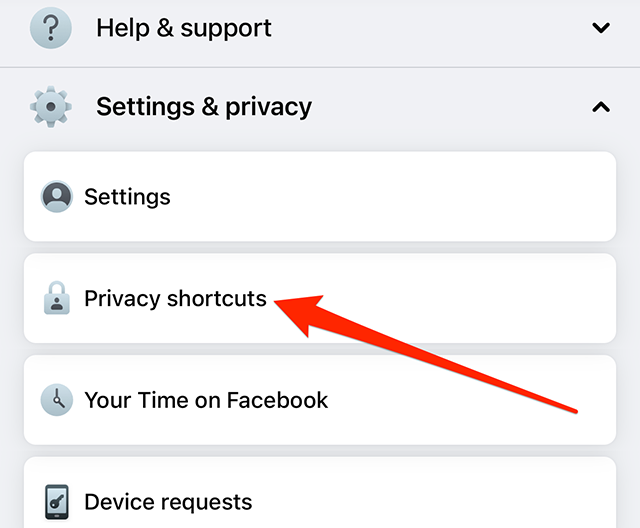
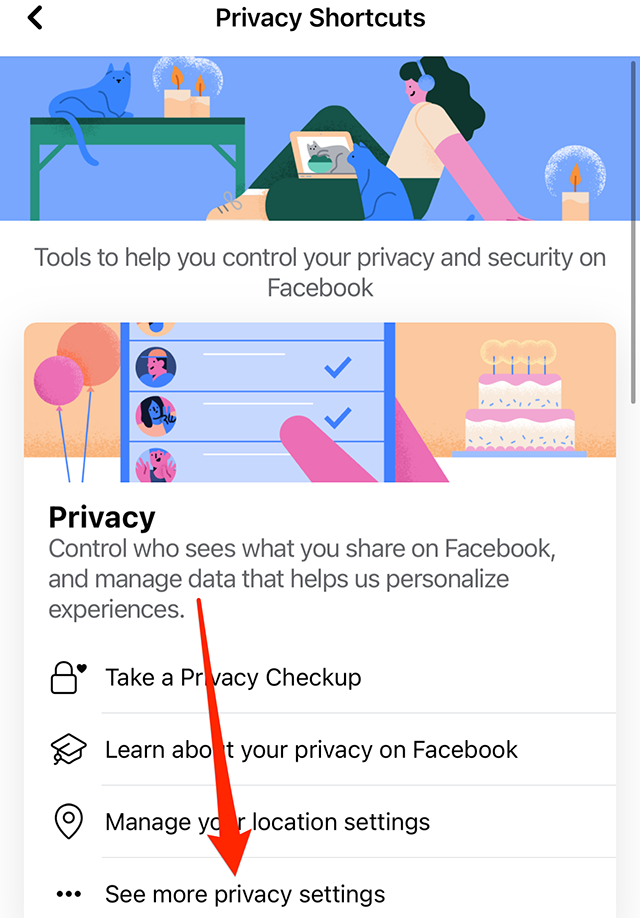
Step 3: Tap “Privacy shortcuts.”

image

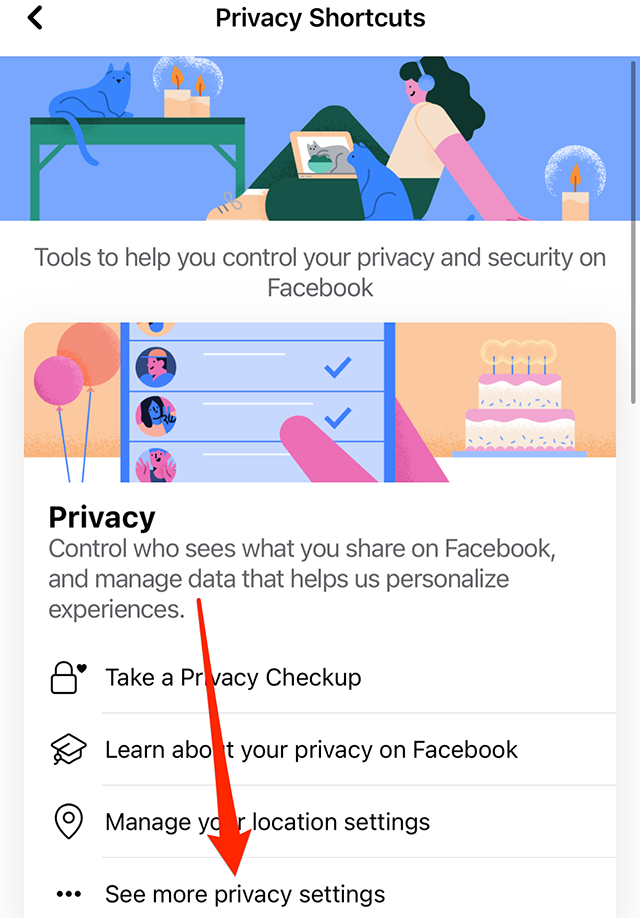
Step 4: Tap “See more privacy settings.”

image

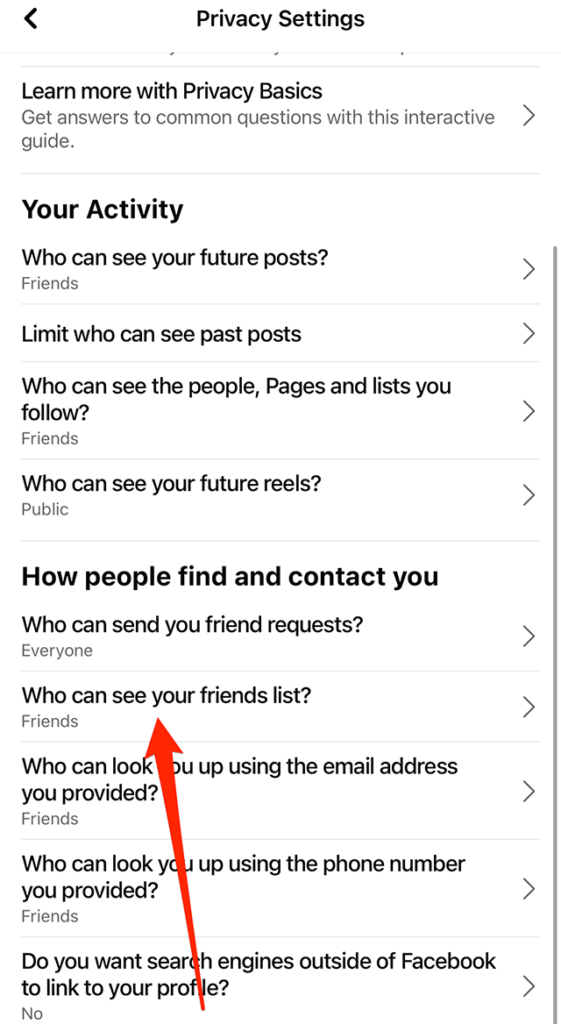
Step 5: Under the “How people find and contact you” section, tap “Who can see your friends list?”

image

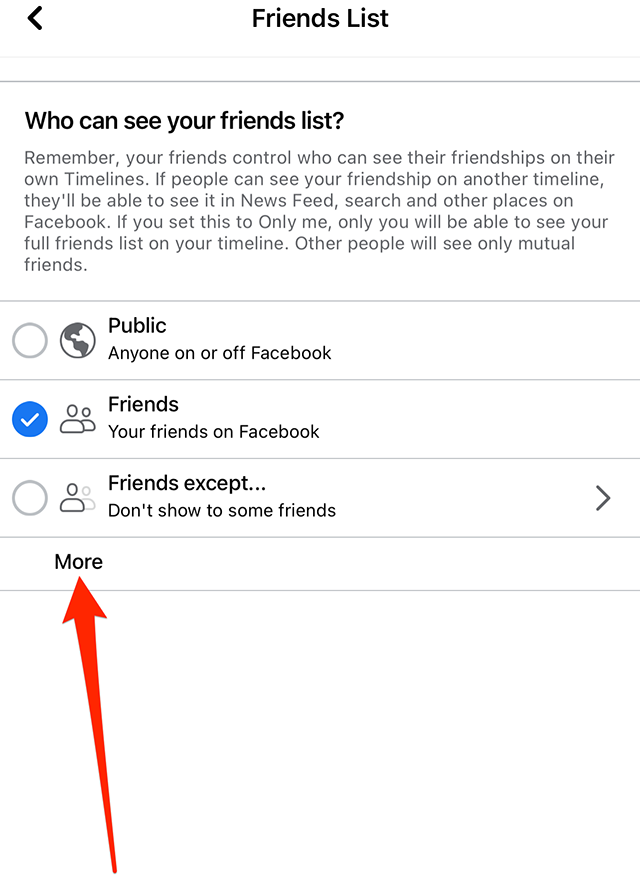
Step 6: Tap “Public,” “Friends,” or “Friends except…,” depending on your preference. You can also tap “More” to view two more options: “Specific friends” and “Only me.” Finally, if you tap “More,” you can tap “See All” to view one more option: “Close friends.”

image

This guide was first published in May 2017 and was updated in December 2022.

.font-primary { } .font-secondary { } #meter-count { position: fixed; z-index: 9999999; bottom: 0; width:96%; margin: 2%; -webkit-border-radius: 4px; -moz-border-radius: 4px; border-radius: 4px; -webkit-box-shadow: 0 0px 15px 4px rgba(0,0,0,.2); box-shadow:0 0px 15px 4px rgba(0,0,0,.2); padding: 15px 0; color:#fff; background-color:#343a40; } #meter-count .icon { width: auto; opacity:.8; } #meter-count .icon svg { height: 36px; width: auto; } #meter-count .btn-subscribe { font-size:14px; font-weight:bold; padding:7px 18px; color: #fff; background-color: #E50000; border:none; text-transform: capitalize; } #meter-count .btn-subscribe:hover { color: #fff; opacity:.8; } #meter-count .btn-signin { font-size:14px; font-weight:bold; padding:7px 14px; color: #fff; background-color: #121212; border:none; text-transform: capitalize; } #meter-count .btn-signin:hover { color: #fff; opacity:.8; } #meter-count h3 { color:#fff!important; letter-spacing:0px!important; margin:0; padding:0; font-size:16px; line-height:1.5; font-weight:700; margin: 0!important; padding: 0!important; } #meter-count h3 span { color:#E50000!important; font-weight:900; } #meter-count p { font-size:14px; font-weight:500; line-height:1.4; color:#eee!important; margin: 0!important; padding: 0!important; } #meter-count .close { color:#fff; display:block; position:absolute; top: 4px; right:4px; z-index: 999999; } #meter-count .close svg { display:block; color:#fff; height:16px; width:auto; cursor:pointer; } #meter-count .close:hover svg { color:#E50000; } #meter-count .fw-600 { font-weight:600; } @media (max-width: 1079px) { #meter-count .icon { margin:0; padding:0; display:none; } } @media (max-width: 768px) { #meter-count { margin: 0; -webkit-border-radius: 0px; -moz-border-radius: 0px; border-radius: 0px; width:100%; -webkit-box-shadow: 0 -8px 10px -4px rgba(0,0,0,0.3); box-shadow: 0 -8px 10px -4px rgba(0,0,0,0.3); } #meter-count .icon { margin:0; padding:0; display:none; } #meter-count h3 { color:#fff!important; font-size:14px; } #meter-count p { color:#fff!important; font-size: 12px; font-weight: 500; } #meter-count .btn-subscribe, #meter-count .btn-signin { font-size:12px; padding:7px 12px; } #meter-count .btn-signin { display:none; } #meter-count .close svg { height:14px; } }

Enjoying your content? You Have 1 Free Article Left.

Register to continue reading!

https://www.adweek.com/media/facebook-heres-how-to-prevent-other-users-from-viewing-your-friends-list/


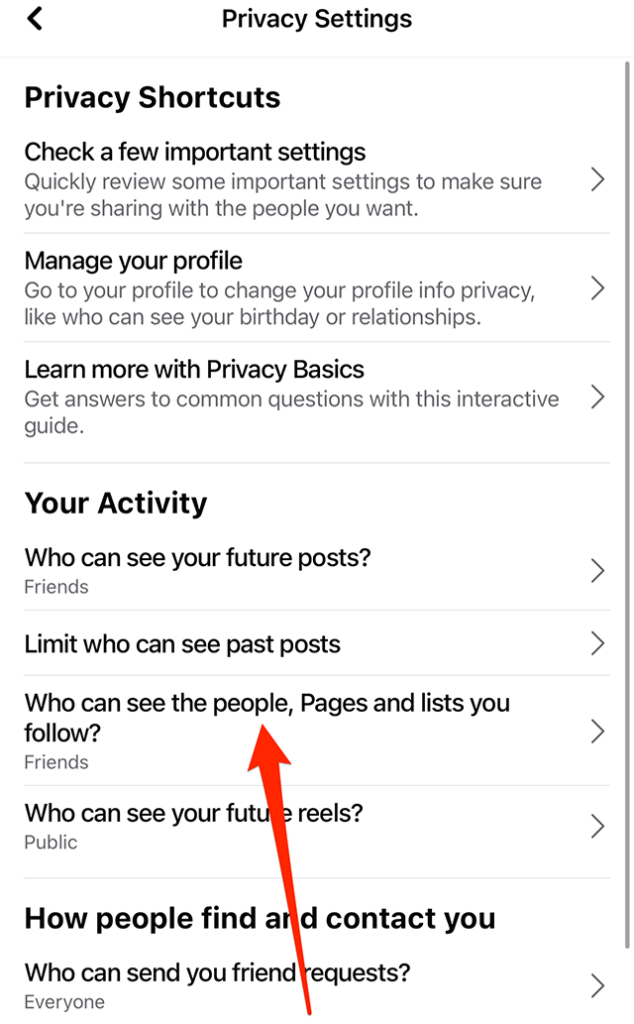
Facebook: How to Stop Users From Seeing the Things You Follow

By default, users may be able to see the people, Pages and lists another user follows on Facebook. However, users have the option to hide these items from others so they can’t see them.

Our guide will show you how to change who can see the people, Pages and lists you follow on Facebook.

Note: These screenshots were captured in the Facebook app on iOS.

Step 1: Tap the menu icon in Facebook’s bottom navigation bar.

image

Step 2: Scroll down and tap “Settings & privacy.”

image

Step 3: Tap “Privacy shortcuts.”

image

Step 4: Under the “Privacy” section, tap “See more privacy settings.”

image

Step 5: Under the “Your Activity” section, tap “Who can see the people, Pages and lists you follow?”

image

Step 6: Tap “Public,” “Friends” or “Friends except…” depending on your preference.

#paywall-subscribe { margin:0; padding: 1rem 2.4rem; } #paywall-subscribe .holder { background-color:#eee; border:15px solid #f2f2f2; padding:30px; margin:0 auto!important; text-align:center; } #paywall-subscribe a.underline { color:#000; text-decoration:underline; } #paywall-subscribe img { margin-bottom:10px; width: 140px!important; height: auto!important; } #paywall-subscribe h3 { font-weight:bold; font-size:16px; text-transform:uppercase; width:80%; margin:0 auto; margin-bottom:20px; text-align:center; } #paywall-subscribe h3 span { display:block; font-size:14px; } #paywall-subscribe h2 { font-weight:800; font-size:24px; text-transform:uppercase; } #paywall-subscribe p { font-size: 16px; color:#000; padding: 0; } #paywall-subscribe .cta { margin-top:20px; margin-bottom:10px; font-size:14px; text-transform:capitalize; color: #fff; background-color: #E50000; border:none; padding:12px 28px; text-decoration:none; -webkit-transition: .3s ease; -moz-transition: .3s ease; -o-transition: .3s ease; -ms-transition: .3s ease; transition: .3s ease; } #paywall-subscribe .cta:hover { color: #fff; background-color: #181818; transform: scale(1.02); } #paywall-subscribe .already-a-member { font-size:14px; } @media (max-width: 1024px) { #paywall-subscribe .holder { border:12px solid #f2f2f2; padding:25px; } #paywall-subscribe img { width: 120px!important; } } @media (max-width: 768px) { #paywall-subscribe .holder { border:10px solid #f2f2f2; padding:20px; } #paywall-subscribe img { width: 100px!important; } #paywall-subscribe h3 { font-size:14px; } #paywall-subscribe h3 span { font-size:12px; } #paywall-subscribe h2 { font-size:18px; } #paywall-subscribe p { font-size:14px; } #paywall-subscribe .cta { font-size:12px; padding:10px 24px; } #paywall-subscribe .already-a-member { font-size:11px; } } AW+

WORK SMARTER – LEARN, GROW AND BE INSPIRED.

Subscribe today!

New Year Offer: Use Promo Code “SAVE25NYE” on an Annual Subscription to Save 25%

View Subscription Options

Already a member? Sign in

https://www.adweek.com/media/facebook-heres-how-to-stop-users-from-seeing-the-things-you-follow/