Google’s Product Feed Strategy Points To The Future Of Retail Discovery via @sejournal, @brookeosmundson

For years, many advertisers treated product feeds as a channel task tied mainly to Shopping campaigns.

If you were running Shopping ads, feed optimization likely got attention. If you weren’t, it often slipped behind priorities for the PPC campaigns you were running.

Now, that approach is starting to show its age.

Google’s recent Ads Decoded podcast episode suggests that mindset may need to change. Product data was discussed in connection with free listings, AI-powered search experiences, YouTube formats, Lens, virtual try-on, and newer e-commerce surfaces still evolving.

That reflects a much broader role than many advertisers have historically assigned to their feed.

Google appears to be positioning product data as a larger part of how products are discovered across its platforms, not just how Shopping campaigns perform.

Advertisers who still view Merchant Center as a side task may be underestimating how much visibility now starts with product data.

The more interesting question is what that shift tells us about where Google wants retail advertising to go next.

Merchant Center Is Starting To Look Like Retail Infrastructure

What stood out most in the podcast was how broadly Google described the role of Merchant Center data.

Nadja Bissinger, General Product Manager of Retail on YouTube, described Merchant Center feeds as the “backbone that powers organic and ads experiences,” adding that merchants should submit the most robust product data possible to increase discoverability.

That is a wider role than many advertisers have traditionally associated with Merchant Center.

Google said in a 2025 retail insights piece that people shop across Google more than 1 billion times per day. It also highlighted Search, YouTube, Maps, and visual discovery as key parts of modern shopping journeys. That helps explain why reusable product data is becoming more valuable than channel-specific assets alone.

Google also said Google Lens now sees more than 20 billion visual searches per month, and 1 in 4 Lens searches carry commercial intent. That is another signal that structured product data is becoming more important outside traditional Shopping ads.

For years, many brands viewed Merchant Center as a necessary setup for Shopping campaigns. Google now appears to be positioning it as a core input for how products are surfaced across its platforms.

That should change how feed work is prioritized internally.

Feed optimization is no longer just a PPC responsibility. It can influence:

  • Organic visibility
  • Merchandising strategy
  • Creative presentation
  • Promotions
  • How products appear in newer AI-led experiences.

For larger organizations, that may require closer coordination between paid media, SEO, e-commerce, merchandising, and product teams.

For smaller brands, it may be as simple as giving feed quality the same level of attention already given to ad copy, landing pages, and campaign structure.

Many advertisers still treat feed work as cleanup work. That mindset is becoming expensive as product data plays a larger role in who gets seen across Google.

Why Is Google Pushing Product Data So Hard Right Now?

Google’s direction here makes sense when you look at where its retail products are heading.

The company wants more e-commerce activity to happen across Search, YouTube, Maps, AI experiences, and future agentic tools. To support that expansion, it needs merchant data that is accurate, structured, and easy to reuse across different surfaces (as Google refers to them as).

Google has financial reasons to expand e-commerce activity beyond traditional ad clicks. In their 2025 Q4 Earnings Release, they reported a 17% growth in Google Search, and YouTube revenue across ads and subscriptions over $60 billion.

A strong feed helps Google understand:

  • What a product is
  • Who it is for
  • What makes it different
  • Where it is available
  • What it costs
  • How the product should be presented

That matters even more as retail experiences, paid or organic, become more visual, more personalized, and more automated.

Traditional search ads leaned heavily on keywords, headlines, and landing pages. Newer e-commerce formats can also depend on product images, attributes, ratings, promotions, availability, shipping details, and other feed inputs that help match products to user intent.

Better data can lead to better experiences for users. It can also create more places where merchants can appear across Google’s properties.

Google is building more e-commerce surfaces, and product data is the fuel behind them. Advertisers who ignore that may keep optimizing campaigns while missing the larger shift happening around them.

Is Google Prepping For A More Strategic Shift?

From my perspective, there is a larger strategic shift behind Google’s product data push.

I don’t see this as a routine push for better feeds or cleaner campaign inputs. I see Google working to become more of a growth engine for advertisers, with a role that reaches beyond media buying and campaign delivery.

That expansion is moving into areas that shape business performance, including merchandising, product discovery, pricing visibility, local commerce, measurement, and newer purchase-ready experiences.

Google is not only trying to improve how ads run. It appears to be building a deeper position in how products are surfaced, how demand is created, how buying decisions are influenced, and how performance is measured.

My view is that the more Google becomes embedded across those moments, the more connected it becomes to broader business growth rather than media performance alone.

Why Many Advertisers Are Still Measuring Feed Value Wrong

One reason feed optimization still gets deprioritized is simple: many teams are using an outdated scorecard.

Google cited a 33% conversion uplift for advertisers using Demand Gen with product feeds during the podcast discussion. Even if results vary by account, it is another sign that feed quality is being tied to campaign types beyond classic Shopping ads.

If the main question is whether Shopping ROAS improved last week, it becomes easy to undervalue the broader impact of stronger product data.

That measurement approach came from a time when feeds were more closely tied to Shopping campaigns. Google is now using the same data across a much wider set of retail experiences, including discovery surfaces, visual placements, AI-led results, and other formats that do not fit neatly into one campaign report.

That creates a gap between where feed work adds value and where many teams are looking for it.

A stronger title may improve discoverability. Better imagery can increase engagement in visual placements. Accurate pricing and promotions can improve click appeal. Richer attributes can help Google better understand relevance. Availability data can support local and omnichannel visibility.

Those gains may show up across multiple touchpoints, assisted paths, and blended performance trends rather than one Shopping dashboard.

That is why some advertisers continue to underinvest in feed quality. The value is there, but their reporting model was built for an earlier version of Google.

As Google expands where products can appear, feed optimization deserves to be measured more like a visibility and growth lever, not just a Shopping maintenance task.

One of the more important quotes from the podcast came from Ginny Marvin, Google Ads Liaison, as she wrapped up the episode:

Merchants with the most structured, high quality data foundations will be positioned to win.

Winning will not come from uploading a feed once and forgetting about it for months at a time.

It comes from treating product data as an ongoing optimization just like your existing campaigns.

What Google’s AI Max Focus May Be Signaling About Search

One of the more revealing parts of the podcast was how often Search strategy was discussed through the lens of AI Max for Search, while traditional standard Search campaigns were barely mentioned.

During the episode, Firas Yaghi, Global Product Lead for Retail Solutions, talked about how advertisers should be thinking about different campaign types:

I think the role of each campaign really depends on your high level objective. Whether you’re prioritizing cross channel efficiency, granular control or hybrid approach that balances top line sales with OKRs.

He mentioned a lot around Performance Max, Demand Gen, with a little bit of AI Max for Search.

I would avoid treating that as proof that standard Search is going away. There is still clear value in campaigns built around tighter search control, brand protection, and proven high-intent terms.

At the same time, it’s hard to ignore the direction of Google’s messaging.

When Google talks about growth, expansion, and newer retail opportunities, the conversation increasingly centers on AI-assisted campaign types. We have seen similar signals elsewhere, including Google’s announcement that Dynamic Search Ads will upgrade into AI Max for Search and that AI Max represents the next step for search expansion.

My read is that standard Search remains important, but it is no longer the only story Google wants advertisers thinking about.

The company appears to be steering incremental growth toward campaign types that rely on broader matching, stronger inputs, automation, and first-party signals.

I think that Search strategies built around legacy structures will become less competitive over time. I’m not confident enough yet to say that standard Search campaigns will go away completely in the near future, but the increasing signals around keyword-less technology has me thinking more changes for Search campaigns are bound to happen.

What This Means For Your Campaigns

The bigger risk for PPC managers is assuming the teams responsible for merchandising or product data already understand how much feed quality can affect campaign performance.

In many organizations, merchandising, e-commerce, product, or development teams control what goes into Merchant Center. Their priorities may be centered on inventory, pricing, site operations, or category management, not media efficiency or visibility across Google.

That is where PPC managers can add real value.

If product information is influencing how products appear across paid, organic, and AI-led surfaces, someone needs to connect those decisions to marketing outcomes. PPC managers are often in the best position to do that because they can see changes in impressions, traffic quality, conversion trends, and missed opportunities firsthand.

That may mean bringing examples into weekly meetings, showing where missing attributes are limiting reach, flagging weak imagery, highlighting pricing issues, or sharing results from tests that improved performance.

You may not own the feed, but you can help the business understand why it deserves greater priority and where better inputs can improve campaign results.

Put More Focus On Inputs That Can Scale Performance

Many teams spend valuable time on small bid changes, minor budget moves, or endless rounds of creative tweaks while core product data remains incomplete or outdated.

Those tasks still have value, but the upside is often limited when the underlying product information is weak.

If titles are thin, images are poor, attributes are missing, or product details are outdated, fixing those gaps may create more value than another round of minor account adjustments.

Add Feed Health To Regular Performance Reviews

Most reporting cycles focus on spend, ROAS, CPA, and conversion volume.

Those metrics are important, but they do not always show whether product data is helping or limiting visibility.

Feed health deserves a place in regular reviews. Look at disapprovals, missing fields, image quality, pricing accuracy, promotional coverage, and product-level gaps with the same discipline used for media metrics.

Broaden How You Test For Growth

Many retail accounts still treat Search, Shopping, YouTube, and newer campaign types as separate lanes.

Google’s recent direction suggests those lines are becoming less rigid.

Growth testing should include where products can appear across newer surfaces, how feeds support Demand Gen and AI-led placements, and whether stronger product data can unlock reach that existing campaigns are not capturing today.

Treat Better Product Data As A Competitive Advantage

Some advertisers will wait until these newer placements are fully mature before investing seriously in feed quality.

While that delay may be costly for them, your proactiveness can pay off significantly.

What PPC Professionals Are Saying

Recent LinkedIn discussions suggest many practitioners are viewing feed quality as a larger performance lever.

Comments from the podcast episode have been overall positive and has many marketers agreeing that feed management needs to be routine.

Zhao Hanbo commented:

Really interesting to see how something that used to feel mostly like ad ops plumbing is now becoming core infra for AI commerce.

Sophie Westall had similar sentiments, stating that “feed quality is quickly becoming a core part of overall media strategy, not just a hygiene task.”

In a recent LinkedIn post, Menachem Ani said that by fixing a product feed, “campaigns start working harder without touching a single bid.”

More marketers appear to be focusing less on isolated settings and more on the quality of the data – regardless if they’re running paid campaigns or not.

What Comes Next For Retail Marketers

Some advertisers will hear Google’s renewed focus on product data and assume it mainly matters for brands running Shopping campaigns.

That interpretation misses how much wider the opportunity has become.

Google is quickly expanding how products can show up across paid placements, organic surfaces, visual experiences, and newer AI-led formats. As that happens, feed quality becomes more connected to visibility and performance than many teams have historically assumed.

In many organizations, product data still gets treated as maintenance work. It gets attention when something breaks or when Shopping results decline, then falls back down the priority list.

That approach may be harder to justify going forward.

Product data needs a larger role in planning, testing, and cross-functional discussions because it can influence far more than one campaign type.

Read more resources:


Featured Image: Summit Art Creations/Shutterstock

https://www.searchenginejournal.com/googles-product-feed-strategy-points-to-the-future-of-retail-discovery/572291/


Google’s Product Feed Strategy Points To The Future Of Retail Discovery via @sejournal, @brookeosmundson

For years, many advertisers treated product feeds as a channel task tied mainly to Shopping campaigns.

If you were running Shopping ads, feed optimization likely got attention. If you weren’t, it often slipped behind priorities for the PPC campaigns you were running.

Now, that approach is starting to show its age.

Google’s recent Ads Decoded podcast episode suggests that mindset may need to change. Product data was discussed in connection with free listings, AI-powered search experiences, YouTube formats, Lens, virtual try-on, and newer e-commerce surfaces still evolving.

That reflects a much broader role than many advertisers have historically assigned to their feed.

Google appears to be positioning product data as a larger part of how products are discovered across its platforms, not just how Shopping campaigns perform.

Advertisers who still view Merchant Center as a side task may be underestimating how much visibility now starts with product data.

The more interesting question is what that shift tells us about where Google wants retail advertising to go next.

Merchant Center Is Starting To Look Like Retail Infrastructure

What stood out most in the podcast was how broadly Google described the role of Merchant Center data.

Nadja Bissinger, General Product Manager of Retail on YouTube, described Merchant Center feeds as the “backbone that powers organic and ads experiences,” adding that merchants should submit the most robust product data possible to increase discoverability.

That is a wider role than many advertisers have traditionally associated with Merchant Center.

Google said in a 2025 retail insights piece that people shop across Google more than 1 billion times per day. It also highlighted Search, YouTube, Maps, and visual discovery as key parts of modern shopping journeys. That helps explain why reusable product data is becoming more valuable than channel-specific assets alone.

Google also said Google Lens now sees more than 20 billion visual searches per month, and 1 in 4 Lens searches carry commercial intent. That is another signal that structured product data is becoming more important outside traditional Shopping ads.

For years, many brands viewed Merchant Center as a necessary setup for Shopping campaigns. Google now appears to be positioning it as a core input for how products are surfaced across its platforms.

That should change how feed work is prioritized internally.

Feed optimization is no longer just a PPC responsibility. It can influence:

  • Organic visibility
  • Merchandising strategy
  • Creative presentation
  • Promotions
  • How products appear in newer AI-led experiences.

For larger organizations, that may require closer coordination between paid media, SEO, e-commerce, merchandising, and product teams.

For smaller brands, it may be as simple as giving feed quality the same level of attention already given to ad copy, landing pages, and campaign structure.

Many advertisers still treat feed work as cleanup work. That mindset is becoming expensive as product data plays a larger role in who gets seen across Google.

Why Is Google Pushing Product Data So Hard Right Now?

Google’s direction here makes sense when you look at where its retail products are heading.

The company wants more e-commerce activity to happen across Search, YouTube, Maps, AI experiences, and future agentic tools. To support that expansion, it needs merchant data that is accurate, structured, and easy to reuse across different surfaces (as Google refers to them as).

Google has financial reasons to expand e-commerce activity beyond traditional ad clicks. In their 2025 Q4 Earnings Release, they reported a 17% growth in Google Search, and YouTube revenue across ads and subscriptions over $60 billion.

A strong feed helps Google understand:

  • What a product is
  • Who it is for
  • What makes it different
  • Where it is available
  • What it costs
  • How the product should be presented

That matters even more as retail experiences, paid or organic, become more visual, more personalized, and more automated.

Traditional search ads leaned heavily on keywords, headlines, and landing pages. Newer e-commerce formats can also depend on product images, attributes, ratings, promotions, availability, shipping details, and other feed inputs that help match products to user intent.

Better data can lead to better experiences for users. It can also create more places where merchants can appear across Google’s properties.

Google is building more e-commerce surfaces, and product data is the fuel behind them. Advertisers who ignore that may keep optimizing campaigns while missing the larger shift happening around them.

Is Google Prepping For A More Strategic Shift?

From my perspective, there is a larger strategic shift behind Google’s product data push.

I don’t see this as a routine push for better feeds or cleaner campaign inputs. I see Google working to become more of a growth engine for advertisers, with a role that reaches beyond media buying and campaign delivery.

That expansion is moving into areas that shape business performance, including merchandising, product discovery, pricing visibility, local commerce, measurement, and newer purchase-ready experiences.

Google is not only trying to improve how ads run. It appears to be building a deeper position in how products are surfaced, how demand is created, how buying decisions are influenced, and how performance is measured.

My view is that the more Google becomes embedded across those moments, the more connected it becomes to broader business growth rather than media performance alone.

Why Many Advertisers Are Still Measuring Feed Value Wrong

One reason feed optimization still gets deprioritized is simple: many teams are using an outdated scorecard.

Google cited a 33% conversion uplift for advertisers using Demand Gen with product feeds during the podcast discussion. Even if results vary by account, it is another sign that feed quality is being tied to campaign types beyond classic Shopping ads.

If the main question is whether Shopping ROAS improved last week, it becomes easy to undervalue the broader impact of stronger product data.

That measurement approach came from a time when feeds were more closely tied to Shopping campaigns. Google is now using the same data across a much wider set of retail experiences, including discovery surfaces, visual placements, AI-led results, and other formats that do not fit neatly into one campaign report.

That creates a gap between where feed work adds value and where many teams are looking for it.

A stronger title may improve discoverability. Better imagery can increase engagement in visual placements. Accurate pricing and promotions can improve click appeal. Richer attributes can help Google better understand relevance. Availability data can support local and omnichannel visibility.

Those gains may show up across multiple touchpoints, assisted paths, and blended performance trends rather than one Shopping dashboard.

That is why some advertisers continue to underinvest in feed quality. The value is there, but their reporting model was built for an earlier version of Google.

As Google expands where products can appear, feed optimization deserves to be measured more like a visibility and growth lever, not just a Shopping maintenance task.

One of the more important quotes from the podcast came from Ginny Marvin, Google Ads Liaison, as she wrapped up the episode:

Merchants with the most structured, high quality data foundations will be positioned to win.

Winning will not come from uploading a feed once and forgetting about it for months at a time.

It comes from treating product data as an ongoing optimization just like your existing campaigns.

What Google’s AI Max Focus May Be Signaling About Search

One of the more revealing parts of the podcast was how often Search strategy was discussed through the lens of AI Max for Search, while traditional standard Search campaigns were barely mentioned.

During the episode, Firas Yaghi, Global Product Lead for Retail Solutions, talked about how advertisers should be thinking about different campaign types:

I think the role of each campaign really depends on your high level objective. Whether you’re prioritizing cross channel efficiency, granular control or hybrid approach that balances top line sales with OKRs.

He mentioned a lot around Performance Max, Demand Gen, with a little bit of AI Max for Search.

I would avoid treating that as proof that standard Search is going away. There is still clear value in campaigns built around tighter search control, brand protection, and proven high-intent terms.

At the same time, it’s hard to ignore the direction of Google’s messaging.

When Google talks about growth, expansion, and newer retail opportunities, the conversation increasingly centers on AI-assisted campaign types. We have seen similar signals elsewhere, including Google’s announcement that Dynamic Search Ads will upgrade into AI Max for Search and that AI Max represents the next step for search expansion.

My read is that standard Search remains important, but it is no longer the only story Google wants advertisers thinking about.

The company appears to be steering incremental growth toward campaign types that rely on broader matching, stronger inputs, automation, and first-party signals.

I think that Search strategies built around legacy structures will become less competitive over time. I’m not confident enough yet to say that standard Search campaigns will go away completely in the near future, but the increasing signals around keyword-less technology has me thinking more changes for Search campaigns are bound to happen.

What This Means For Your Campaigns

The bigger risk for PPC managers is assuming the teams responsible for merchandising or product data already understand how much feed quality can affect campaign performance.

In many organizations, merchandising, e-commerce, product, or development teams control what goes into Merchant Center. Their priorities may be centered on inventory, pricing, site operations, or category management, not media efficiency or visibility across Google.

That is where PPC managers can add real value.

If product information is influencing how products appear across paid, organic, and AI-led surfaces, someone needs to connect those decisions to marketing outcomes. PPC managers are often in the best position to do that because they can see changes in impressions, traffic quality, conversion trends, and missed opportunities firsthand.

That may mean bringing examples into weekly meetings, showing where missing attributes are limiting reach, flagging weak imagery, highlighting pricing issues, or sharing results from tests that improved performance.

You may not own the feed, but you can help the business understand why it deserves greater priority and where better inputs can improve campaign results.

Put More Focus On Inputs That Can Scale Performance

Many teams spend valuable time on small bid changes, minor budget moves, or endless rounds of creative tweaks while core product data remains incomplete or outdated.

Those tasks still have value, but the upside is often limited when the underlying product information is weak.

If titles are thin, images are poor, attributes are missing, or product details are outdated, fixing those gaps may create more value than another round of minor account adjustments.

Add Feed Health To Regular Performance Reviews

Most reporting cycles focus on spend, ROAS, CPA, and conversion volume.

Those metrics are important, but they do not always show whether product data is helping or limiting visibility.

Feed health deserves a place in regular reviews. Look at disapprovals, missing fields, image quality, pricing accuracy, promotional coverage, and product-level gaps with the same discipline used for media metrics.

Broaden How You Test For Growth

Many retail accounts still treat Search, Shopping, YouTube, and newer campaign types as separate lanes.

Google’s recent direction suggests those lines are becoming less rigid.

Growth testing should include where products can appear across newer surfaces, how feeds support Demand Gen and AI-led placements, and whether stronger product data can unlock reach that existing campaigns are not capturing today.

Treat Better Product Data As A Competitive Advantage

Some advertisers will wait until these newer placements are fully mature before investing seriously in feed quality.

While that delay may be costly for them, your proactiveness can pay off significantly.

What PPC Professionals Are Saying

Recent LinkedIn discussions suggest many practitioners are viewing feed quality as a larger performance lever.

Comments from the podcast episode have been overall positive and has many marketers agreeing that feed management needs to be routine.

Zhao Hanbo commented:

Really interesting to see how something that used to feel mostly like ad ops plumbing is now becoming core infra for AI commerce.

Sophie Westall had similar sentiments, stating that “feed quality is quickly becoming a core part of overall media strategy, not just a hygiene task.”

In a recent LinkedIn post, Menachem Ani said that by fixing a product feed, “campaigns start working harder without touching a single bid.”

More marketers appear to be focusing less on isolated settings and more on the quality of the data – regardless if they’re running paid campaigns or not.

What Comes Next For Retail Marketers

Some advertisers will hear Google’s renewed focus on product data and assume it mainly matters for brands running Shopping campaigns.

That interpretation misses how much wider the opportunity has become.

Google is quickly expanding how products can show up across paid placements, organic surfaces, visual experiences, and newer AI-led formats. As that happens, feed quality becomes more connected to visibility and performance than many teams have historically assumed.

In many organizations, product data still gets treated as maintenance work. It gets attention when something breaks or when Shopping results decline, then falls back down the priority list.

That approach may be harder to justify going forward.

Product data needs a larger role in planning, testing, and cross-functional discussions because it can influence far more than one campaign type.

Read more resources:


Featured Image: Summit Art Creations/Shutterstock

https://www.searchenginejournal.com/googles-product-feed-strategy-points-to-the-future-of-retail-discovery/572291/


Should You Use Auto-Generated Creative? – Ask A PPC via @sejournal, @navahf

It won’t surprise anyone that most advertisers are hesitant to use auto-generated creative from ad platforms. Auto-generated ads fall into the following categories:

  • Customer-in-the-loop (CITL): Assets are generated based on inputs like a website URL or a user prompt. The advertiser always has a choice as to whether or not they want to include these assets in their campaigns.
  • Dynamic composition: Ads are composed at serving time in different formats based on existing groups of assets, with performant winners selected and scaled (i.e., how Performance Max works). May or may not include AI-generated assets based on customer preferences.
  • Auto-generated: New assets or ads are generated after a campaign is launched based on inputs like URLs, search queries, or existing videos to improve performance. These assets are not reviewed and approved by advertisers before serving, but can generally be viewed and controlled in reporting.

Even advertisers who embrace automation in bidding, targeting, and budget allocation often draw a firm line when it comes to creative.

Image from author, April 2026

That resistance usually comes from a few places:

  • Quality concerns due to generic copy instead of product/service-specific.
  • Brand compliance requirements.
  • A strong desire to maintain creative ownership.
  • Discomfort with the idea of ads going live without a human signing off on every variation.

Yet, auto-generated creative can sometimes perform just as well as, if not better than, human-created assets. A 2025 study found that autogenerated ads had a 19% better CTR.

These performance gains aren’t new; AI ads have been meeting or exceeding human creative as early as 2018.

Three text ads: one made by a human, the others autogenerated (Image from author, April 2026)
Results of three ads from a logistics company over 30 days (Image from author, April 2026)

That performance edge comes from two core advantages.

First, auto-generated creative is highly adaptable. It can flex across formats and placements in ways that would be time-consuming or impractical for humans to manage manually.

Second, it is bias-free in its willingness to apply the creative most likely to perform for humans searching in a profitable way, rather than the semantic syntax we think will succeed.

This article is not about declaring auto-generated creative right or wrong. There is no universal answer. Whether leaning into it makes sense will always depend on business constraints, brand rules, and personal comfort levels.

What we are going to do is walk through a practical framework you can use to decide whether auto-generated creative is worth testing for your business, and how to use platform tools to better understand how well your site and messaging are being interpreted by AI systems.

Before we get into it, an important disclosure. I am a Microsoft Advertising employee. The guidance here is intended to be platform-agnostic, but I will reference a few Microsoft-specific tools that are free to use and particularly helpful for understanding how your site is being interpreted by machines and humans alike.

The Case For Using Auto-Generated Creative

The number one reason to consider auto-generated creative is simple: time savings.

At its core, auto-generated creative takes your existing assets and adapts them to meet the formatting and placement needs of different inventory. Instead of building bespoke creative for every surface, you allow the system to reassemble what you already have in ways that let you reach more people with less manual effort.

The inputs for auto-generated creative typically come from your website, your existing ads, and, in some cases, proven concepts that are broadly applicable across advertisers. You can also apply brand style guides to ensure fonts, colors, and creative (including tone of voice) are compliant with brand standards.

Image from author, April 2026

Advertisers who are able to say yes to auto-generated creative often see faster campaign ramp-up. Eligibility for more placements means more opportunities to enter auctions, and fewer bottlenecks make it easier for the system to test and learn which creative works best in which contexts.

Because auto-generated creative allows advertisers to be eligible for more placements (with Ad Rank determining the ad shown), it naturally has access to more impressions. More impressions create more opportunities to win auctions, which can translate into incremental volume that would have been difficult to capture using tightly controlled, manually built assets alone.

Auto-generated creative does not have to be all-or-nothing. There is also a hybrid approach where humans partner with AI systems. That can mean using in-platform tools from Google or Microsoft, or external AI tools, to help generate ideas, headlines, or variations that are then reviewed, approved, and manually uploaded.

Some advertisers draw a distinction between AI-assisted ideation and auto-generated creative. In practice, if you are using AI at any point to help create or shape ad messaging, there is already an element of automation in the process.

The Case Against Using Auto-Generated Creative

There are absolutely valid reasons to opt out.

The most pressing is brand compliance. If your organization requires explicit approval for every piece of creative before spend can occur, allowing systems to dynamically generate variations may simply not be permissible.

That said, many platforms provide preview tools that show examples of how creative may appear.

Image from author, April 2026

If you are willing to explore those previews and lean into tools like brand kits that enforce fonts, colors, and tone, it may be possible to secure internal approval where it previously felt impossible.

Another reason advertisers shy away from auto-generated creative is reliance on proven assets with no tolerance for variation. Sometimes budget approval is contingent on using specific creative that has already demonstrated performance, and there is no room to test alternatives.

Image from author, April 2026

It is worth noting, however, that auto-generated creative already relies heavily on your existing assets. If the primary concern is avoiding untested messaging, allowing your site content and proven ads to inform the system can help mitigate that risk.

Bonus Tip: Using Auto-Generated Creative To Understand How AI Sees You

One of the most underrated benefits of campaigns like Performance Max, Dynamic Search Ads, and other feed or keywordless-based formats is that they reveal how well platforms understand your site and landing pages.

Image from author, April 2026

If you strongly disagree with the creative shown in previews for AI Max, Performance Max, or similar formats, that is a warning sign. Running budget to those pages risks confusing users if the system’s interpretation does not align with your intended messaging.

These tools can function as diagnostic instruments, not just delivery mechanisms.

Image from author, April 2026

You can go a step further by pairing them with behavioral analysis tools like Microsoft Clarity, which shows how users actually interact with your site. When creative interpretation and user behavior do not line up, the issue is often not the ads, but the underlying content.

Another advantage of modern campaign creation tools is their built-in AI editing capabilities. Even if you never allow auto-generated creative to go live, you can still use these tools to explore tone shifts, rewrites, and messaging ideas that inform your manual creative work.

Image from author, April 2026

There are many use cases for these systems beyond automation alone. Insight generation is one of the most valuable.

Final Takeaways

At its core, the decision to lean into auto-generated creative comes down to whether your brand is allowed to test.

If the answer is yes, there is little downside to experimenting. Auto-generated creative is largely built from your existing assets, and poor results are often a signal that your landing pages or messaging need refinement anyway.

If the answer is no, whether due to brand compliance, limited testing bandwidth, or the need to lock spend behind proven creative, it is entirely reasonable to opt out.

Used thoughtfully, it can save time, unlock scale, and surface insights about how your brand is understood by machines and users alike. Used blindly, it can create risk. The goal is not blind trust, but informed experimentation.

Hope you found this helpful, and I’ll see you next month for another edition of Ask the PPC.

More Resources:


Featured Image: Paulo Bobita/Search Engine Journal

https://www.searchenginejournal.com/ask-a-ppc-should-you-use-autogenerated-creative/571280/


Google Is Replacing Dynamic Search Ads With AI Max via @sejournal, @brookeosmundson

Google just announced the deprecation of Dynamic Search Ads (DSA) and is officially moving its legacy capabilities into AI Max.

Starting in September, eligible campaigns using Dynamic Search Ads (DSA), automatically created assets (ACA), and campaign-level broad match settings will automatically upgrade to AI Max.

While advertisers have speculated about this change for months, the update is now official.

If you’re running Dynamic Search Ads, automatically created assets (ACA), and/or campaign-level broad match settings, keep reading to understand how your campaigns will be affected.

DSA Features Migrating Into AI Max

Beginning in September, advertisers will no longer be able to create new DSA campaigns through Google Ads, Google Ads Editor, or the Google Ads API. Existing eligible campaigns will be migrated automatically.

Google positions AI Max as the next generation of DSA.

Historically, DSA helped advertisers capture additional search demand beyond their keyword lists by using website content to generate headlines and choose landing pages. That made it useful for large sites, inventory-heavy businesses, and advertisers looking for broader query coverage.

AI Max keeps that concept but adds more signals and controls.

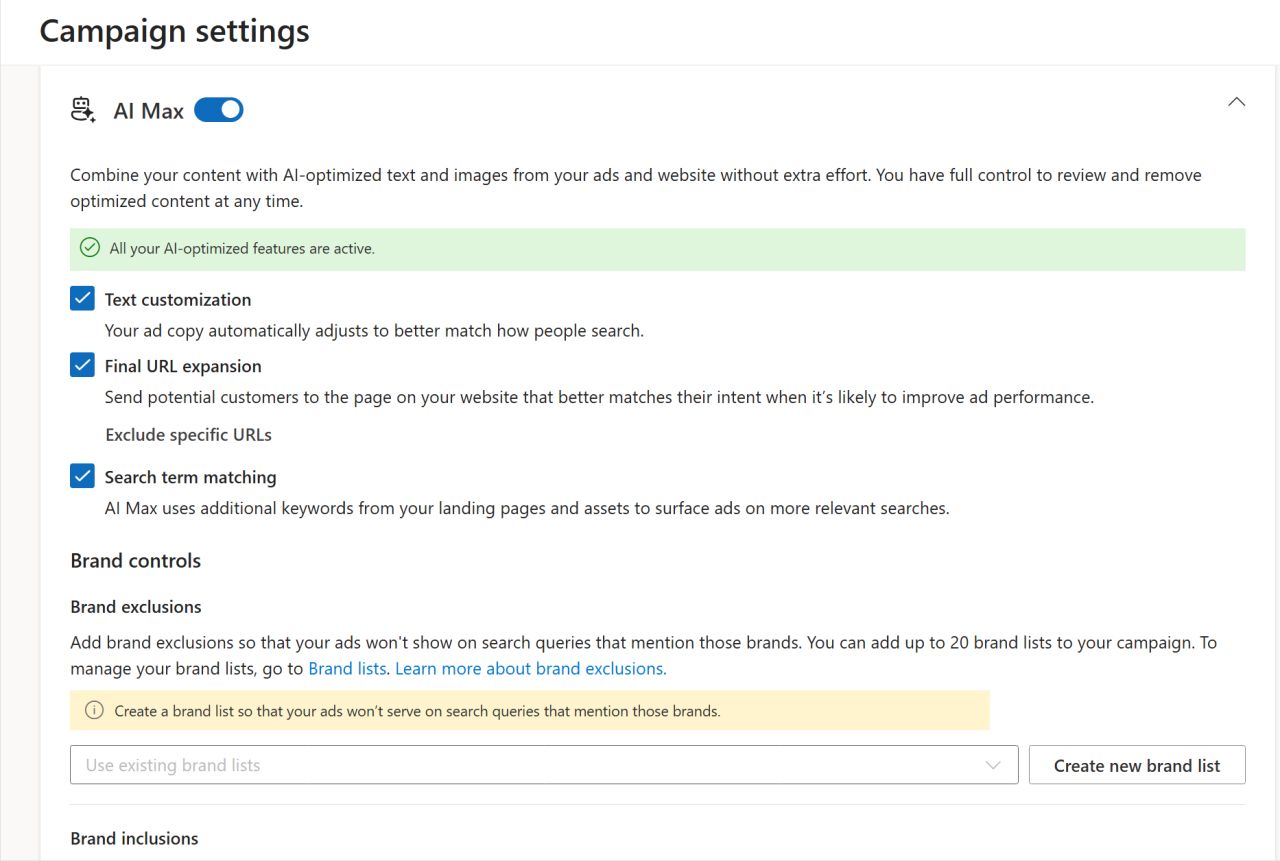
According to Google, AI Max combines advertiser assets, landing page content, and broader intent signals to help match ads to more relevant queries. It also adds controls such as:

  • Brand controls
  • Location controls
  • Text guidelines
  • Search term matching
  • Text customization
  • Final URL expansion
Image credit: Google, April 2026

Google says campaigns using the full AI Max feature suite see an average of 7% more conversions or conversion value at a similar CPA or ROAS compared with using search term matching alone.

Google is also splitting the transition into two phases.

Phase 1: Voluntary Upgrades

Google announced that upgrade tools for existing DSA users are rolling out this week.

DSA advertisers will receive tools to move historical settings and data into new standard ad groups. ACA and campaign-level broad match users may see in-platform prompts to upgrade to AI Max.

Phase 2: Automatic Upgrades

Starting in September, remaining eligible campaigns with legacy settings will be upgraded automatically.

Google says all eligible upgrades are expected to finish by the end of September.

It’s important to note how legacy settings will be automatically migrated over to AI Max settings:

  • DSA users will have all three AI Max features enabled by default (search term matching, text customization, final URL expansion)
  • ACA users will have two AI Max features enabled by default (search term matching and text customization)
  • Campaign-level broad match users will have just search term matching enabled by default

What Advertisers Can Do To Prepare For The AI Max Transition

If you still rely on Dynamic Search Ads, now is the time to review where those campaigns sit in your account and how much value they drive.

Some advertisers use DSA as a core growth lever. Others use it as a low-maintenance catch-all for incremental growth. Your next steps may differ depending on that role.

#1. Review Your DSA Performance Now

Before the automatic upgrades begin, pull recent performance data for your DSA campaigns.

Look at conversions, assisted conversions, search terms, landing pages, and efficiency metrics. That baseline will help you judge whether performance changes after migration are positive, neutral, or negative.

#2. Upgrade On Your Timeline Before Automatic Upgrades

Google is encouraging advertisers to move early, and there is a practical reason for that.

A voluntary upgrade gives you more control over settings, structure, and testing than waiting for an automatic migration.

If DSA is important to your business, it makes sense to evaluate the upgrade before September.

#3. Test AI Max Impact

Google recommends using one-click experiments because they give advertisers a cleaner way to compare performance before making a full rollout decision. While I haven’t tried this yet, I will be testing it myself in the coming months.

Even if AI Max improves results on average, averages do not guarantee results in every account. Lead generation, e-commerce, local services, and B2B advertisers may all see different outcomes.

Run controlled tests where possible and compare against your existing baseline.

#4. Lean Into Additional Controls

Many advertisers asked for more steering options in search automation, and Google has listened to our feedback. AI Max includes more controls than legacy DSA.

Spend time understanding brand settings, location controls, and text guidance. Those inputs may matter as much as the automation itself.

#5. Watch Search Match and Landing Page Quality

Once you’ve migrated your DSAs to AI Max, watch closely for the search terms your campaigns are now matching with. How does it compare to past DSA performance?

You’ll also want to pay attention to the landing pages used (if final URL expansion is turned 0n), lead quality, and conversion paths.

Looking Ahead

Dynamic Search Ads have helped advertisers scale beyond their current keyword lists for years. Now, Google is folding that capability into its broader AI Max framework.

The clearest next step is to review where DSA is still active in your account and decide whether to migrate on your own timeline or wait for the automatic upgrade.

The real focus should be protecting performance during the transition and understanding where AI Max improves results, or where it needs tighter management control.

https://www.searchenginejournal.com/google-is-replacing-dynamic-search-ads-with-ai-max/571949/


How To Measure PPC Performance When AI Controls The Auction via @sejournal, @brookeosmundson

For most of the history of paid search, performance measurement followed a clear cause-and-effect relationship.

Advertisers controlled the inputs inside their campaigns like bid strategies, keyword and campaign structure, ad copy, and landing pages. All these factors contributed to conversion performance in some shape or form.

When performance changed, the explanation was usually traceable. For example, a new keyword theme improved conversion rates. Or, a bidding strategy increased efficiency.

That simple cause-and-effect framework is breaking down in real time, and has been for a while.

Over the past several months, Google has accelerated its transition toward AI-driven campaign types like Performance Max, Demand Gen, or assets inside those like AI Max or AI-driven ad creative components.

Not only do these change how campaigns are set up and managed, but they also change how performance must be measured.

Advertisers increasingly receive conversions from queries they did not explicitly target, from creative assets that are automatically assembled, and from placements distributed across multiple channels. In this environment, measuring performance by analyzing individual campaign inputs becomes less useful.

The real challenge is understanding how automated systems generate outcomes.

This article provides a measurement framework for that reality. It explains what has changed in advertising platforms, how PPC teams can evaluate performance when automation controls more of the auction, and how practitioners can communicate results clearly to leadership.

The Current Measurement Crisis In PPC

Right now, most discussions about AI in PPC tend to focus on automation features like campaign types, targeting capabilities, ad creative development, and bid strategy expansion.

But, there’s a deeper shift happening in measurement but not talked about as much.

Automation introduces a larger set of variables influencing each auction. When the platforms make targeting, bidding, placement decisions (and more) dynamically, isolating the impact of individual campaign inputs becomes difficult.

Recent platform updates have not only changed how campaigns are managed, but also how performance should be interpreted. The connection between action and outcome is less direct, and in many cases, partially obscured.

Several platform developments illustrate why traditional measurement methods are becoming less reliable.

AI Max Expands Queries Beyond Keyword Lists

In my opinion, AI Max represents Google’s most aggressive step toward intent-driven matching.

Instead of relying solely on advertiser-defined keywords, AI systems evaluate contextual signals, user behavior patterns, and historical performance data to match ads with queries that may not exist in the account.

Not only that, but AI Max goes beyond search terms. It also has the ability to change your ad assets for more tailored messaging when Google deems appropriate.

For PPC managers, this introduces a structural shift in how to measure performance. Conversions may originate from queries that were never explicitly targeted.

And we knew that something like this was coming. Back in 2023, Google first publicly used the word “keywordless” in communications when talking about Search and Performance Max.

Source: Mike Ryan, X.com, March 2026

For example, a retailer who bids on “trail running shoes” may now appear for search terms like:

  • “best shoes for rocky terrain running”
  • “ultra marathon footwear”
  • “durable hiking running hybrids”

These queries reflect the same intent, but they don’t map cleanly back to the original keyword strategy.

Instead of trying to force these queries into keyword-level reporting, try analyzing performance by grouping into intent clusters. By evaluating conversion rate and revenue at the category level, teams can maintain strategic clarity even as query matching expands.

Google Ads already does a decent job of this in the Insights tab within the platform. They have a “Search terms insights” report that groups queries into “Search category,” where you can see conversions and search volume.

Screenshot by author, March 2026

Performance Max Distributes Spend Across Multiple Channels

Performance Max can further complicate measurement by distributing budget across Search, YouTube, Display, Discover, Gmail, and Maps.

Up until last year, there was little-to-no transparency in how spend was allocated across those channels. Back in April 2025, Google launched the long-awaited feature of channel reporting to the PMax campaign type. It now shows channel-level reporting, better search terms data, and expanded asset performance metrics.

For example, say you have a $40,000 monthly PMax campaign budget and see this channel breakdown:

Channel Spend Conversions
Search $18,500 310
YouTube $10,200 82
Display $7,100 45
Discover $4,200 28

If Search drives the majority of conversions, but YouTube consumes a large portion of spend, PPC marketers could try the following:

  • Test separating out branded search outside of PMax.
  • Refine asset groups to improve search alignment.
  • Run controlled experiments comparing PMax vs. Search.

Measurement becomes an exercise in interpreting how the system allocates spend rather than controlling each placement.

Ads Are Beginning To Appear Inside AI Conversations

Conversational search introduces an entirely new layer of complexity into PPC measurement.

Google is now testing shopping results embedded directly within AI Mode, allowing users to compare products without leaving the interface.

Google isn’t the only one doing this. ChatGPT announced on Jan. 16, 2026, that it would begin testing ads for its Free and Go users in the United States.

No matter which platform is running or testing ads in AI conversations, it’s clear that the measurement gap hasn’t been solved, and leaves many PPC managers with unanswered questions.

In my own recent search, I came across ads at the end of an AI Mode thread when I searched “noise cancelling headphones”:

So, if I were to click on one of those sponsored ads but convert at a later time, that attribution is unclear right now. Will my conversion be measured from the AI recommendation, the product listing click, or a later branded search?

These journeys challenge traditional attribution models, which were built around linear click paths rather than multi-step AI interactions.

Why Traditional PPC Metrics Are No Longer Enough

Many PPC reporting dashboards still rely on communicating metrics like impressions, clicks, conversion rate, and return on ad spend.

While some of those metrics remain useful, they no longer tell the full user story when bringing in automated and AI-driven environments.

These three shifts explain why.

1. Attribution Windows Are Expanding

AI-assisted search increases both the length and complexity of user journeys.

Research from Google and Boston Consulting Group show that “4S behaviors” (streaming, scrolling, searching, and shopping) have completely reshaped how users discover and engage with brands.

When AI introduces product recommendations earlier in a user’s journey, the time between initial interaction and conversion often grows. This could be because that user is still at the beginning of their research phase. Just because you’re introducing a product earlier, does not mean that they’ll be ready to purchase it any earlier.

So, what can marketers do about that gap now? Here are a few helpful tips to better understand how users are engaging with your business:

  • Review conversion lag reports in Google Ads.
  • Analyze time-to-conversion in GA4. Are there any differences or shifts in the last three, six, or nine months?
  • Extend attribution windows to 60-90 days where appropriate.

This ensures automated systems receive more accurate feedback on what (and when they) drive conversions.

Organic Search Is Losing Click Share

Search results now include everything from AI Overviews, scrollable shopping modules at the top, and expanded ad placements across all devices.

Where does that leave organic listings?

A study conducted by SparkToro and Datos found that nearly 60% of Google searches end without a click.

This reduces organic traffic even more and shifts more demand capture towards paid media.

From a measurement standpoint, PPC should be evaluated alongside organic performance when possible.

Tracking blended search revenue provides a more accurate view of total search performance, rather than isolating paid channels.

AI Systems Optimize For Outcomes Rather Than Inputs

Traditional PPC management focused on inputs like keywords, bids, and ad copy to influence performance directly.

AI systems work differently. Instead of optimizing individual levers, they evaluate large sets of signals in real-time to determine which combinations are most likely to drive conversions.

This changes what measurement needs to do. Instead of asking which specific keyword or bid strategy adjustment improved performance, marketers need to evaluate whether the platform is producing the right business outcomes.

As platforms take over more of the execution, measurement has to focus less on the mechanics and more on whether automation is driving profitable, meaningful results.

The New Measurement Stack For AI-Driven PPC

If AI is now controlling more of the auction, then PPC teams need a different way to evaluate performance.

The old measurement stack was built around visibility into campaign inputs. You could look at keyword performance, search terms, ad copy, device segmentation, and bid adjustments to understand what was working. That model starts to fall apart when automation is making many of those decisions on your behalf.

The replacement becomes a new measurement stack that advertisers should look at in these four layers:

  • Profitability.
  • Incrementality.
  • Blended acquisition efficiency.
  • First-party conversion quality.

Together, these give marketers a more accurate picture of whether automation is actually helping the business grow.

Start With Profit, Not Just ROAS

ROAS still has value, but it should no longer be treated as the primary success metric in highly automated campaigns.

The problem is that AI-driven systems are often very good at capturing demand that already exists. That can make campaign efficiency look strong on paper, even if the business is not gaining much incremental value.

A campaign with a 700% ROAS may still be underperforming if it is primarily driving low-margin products, repeat purchasers, or orders that would have happened anyway.

That is why profitability should sit at the top of the measurement stack.

Instead of asking, “Did this campaign generate enough revenue?” marketers should be asking, “Did this campaign generate profitable revenue?”

For ecommerce brands, this could mean incorporating:

  • Contribution margin.
  • Product margin by category.
  • Average order profitability.
  • New customer revenue vs. returning customer revenue.

A simple starting point is to compare campaign revenue against both ad spend and cost of goods sold.

For lead gen advertisers, the same principle applies, just different incorporations:

  • Qualified lead rate.
  • Sales acceptance rate.
  • Close rate by campaign.
  • Revenue per opportunity.

If AI is optimizing toward cheap conversions that never turn into revenue, the system is learning the wrong lesson.

Add Incrementality To Separate Demand Capture From Demand Creation

The second layer of the stack is incrementality. This is where many PPC measurement frameworks still fall short.

Automation can be highly effective at finding conversions, but that does not automatically mean it is generating new business. In many cases, AI systems are simply getting better at intercepting users who were already on their way to converting.

If your campaign is mostly capturing existing demand, performance may look strong inside the ad platform while actual business lift remains modest.

This is why incrementality testing has become much more important in the AI era.

For PPC teams, this means at least part of measurement should be designed to answer: “Would this conversion have happened without the ad?”

You don’t need an enterprise-level media mix modeling to get started. A few practical approaches include:

  • Geo holdout tests. Pause or reduce spend in a small set of markets while maintaining normal activity elsewhere.
  • Use Google incrementality testing. Google reduced the minimum of testing incrementality in its platform to just $5,000, making it more affordable for many advertisers.
  • Branded search suppression tests. In select markets or windows, test the impact of reducing branded spend where brand demand is already strong.

Answering this question does not mean automation is bad. It means PPC teams need a better way to distinguish between platform efficiency and true business lift.

Use Blended CAC To Measure Search More Realistically

The third layer of the new measurement stack is blended acquisition efficiency.

As AI Overviews, AI Mode, and other search changes continue to reduce traditional organic click opportunities, PPC should not be measured in a vacuum.

That is especially true for brands where paid and organic search are increasingly working together to capture the same demand.

A campaign may appear less efficient in-platform while still playing a critical role in maintaining total search visibility and revenue.

That is where blended customer acquisition cost (CAC) becomes useful.

Blended CAC looks at total acquisition spend across relevant channels and divides it by the total number of new customers acquired.

The formula for this is simple:

Total acquisition spend ÷ total new customers = blended CAC

This gives leadership a much more realistic picture of what it actually costs to grow the business.

It also helps PPC managers explain why paid search may need to carry more weight when organic search visibility declines due to AI-driven search features.

In other words, this metric helps move the conversation away from “Did Google Ads hit target ROAS?” and toward “What is it costing us to acquire a customer across modern search systems?”

Make First-Party Conversion Quality The Foundation

The final layer of the stack is first-party data quality. This is the part many advertisers still underestimate.

As platforms automate more of the targeting, bidding, and matching logic, the quality of the signals you send back becomes even more important. If the platform is deciding who to show ads to and which conversions to optimize toward, your job is to make sure it is learning from the right outcomes.

That means not all conversions should be treated equally.

If a lead form completion, low-value purchase, repeat customer order, and high-margin new customer sale are all fed back into the system the same way, automation will optimize toward volume, not value.

For PPC teams, that means the measurement stack should include a serious review of conversion quality inputs, including:

  • Offline conversion imports.
  • CRM-based revenue mapping.
  • New vs. returning customer segmentation.
  • Lead quality or opportunity-stage imports.
  • Customer lifetime value indicators where available.

This is where measurement and optimization start to overlap.

If the wrong conversions are being measured, the wrong outcomes will be optimized.

That is why first-party data is not just a reporting issue. It is the foundation of the entire AI-era measurement stack.

What To Show Your CMO Or Clients

One of the most difficult aspects of managing automated campaigns is explaining performance to leadership teams.

Executives often expect reporting frameworks built around the mechanics of traditional campaign management. In automated environments, those indicators tell only a small part of the story.

A more effective reporting structure focuses on three layers that connect advertising performance to business outcomes.

The first layer should always focus on the metrics that leadership teams care about most. Revenue growth, contribution margin, and customer acquisition cost provide a direct connection between marketing activity and company performance. These indicators allow executives to evaluate marketing investments in the same framework they use to evaluate other business decisions.

Instead of presenting keyword-level reports, PPC leaders should begin with a clear summary of how paid media contributed to revenue and profit during the reporting period. If revenue increased by 18% quarter over quarter while customer acquisition costs remained stable, that outcome provides a far more meaningful signal than any individual campaign metric.

The second layer of reporting should explain how paid media contributes to the broader acquisition ecosystem. As AI-driven search experiences reshape the visibility of organic results, paid media often carries a larger share of the responsibility for capturing demand.

Blended customer acquisition cost provides an effective way to communicate this relationship. By combining marketing spend across channels and dividing it by the total number of new customers acquired, organizations gain a clearer understanding of the overall efficiency of their acquisition strategy.

This approach also helps executives understand how paid search interacts with organic search, social advertising, and other marketing channels. Rather than evaluating PPC in isolation, leadership can see how the entire acquisition system performs.

The final layer of reporting should focus on experimentation and strategic insights. Automated systems constantly evolve, and the best way to evaluate them is through structured experimentation.

Reports should include summaries of campaign experiments, including:

  • The hypotheses tested.
  • The metrics evaluated.
  • The outcomes observed.

For example, if enabling AI-driven query expansion increased conversion volume while maintaining acceptable acquisition costs, that result provides valuable guidance for future campaign structure decisions.

Equally important is identifying metrics that are becoming less relevant.

Keyword-level performance reports, average ad position, and manual bid adjustments were once central components of PPC reporting. In automated campaign environments, those metrics often provide little strategic value. Continuing to emphasize them can distract leadership from the outcomes that truly matter.

Effective reporting in the AI era should emphasize growth, profitability, and strategic learning rather than operational mechanics.

Measurement Gaps That Still Exist

Despite improvements in automation and reporting transparency, several emerging advertising experiences remain difficult to measure.

One example is the growing presence of personalized offers within AI-driven shopping experiences. Google’s Direct Offers feature allows retailers to surface dynamic discounts during AI-generated shopping recommendations. While the feature may influence purchase decisions, advertisers currently have limited visibility into how frequently those offers appear or how strongly they influence conversion behavior.

Without that visibility, marketers cannot easily determine whether the discounts are generating incremental revenue or simply reducing margins on purchases that would have occurred anyway.

Another emerging measurement challenge involves conversational commerce. Google has begun exploring “agentic commerce” systems where AI assistants help users research and purchase products across multiple retailers.

In these environments, the user journey may involve several conversational prompts before a purchase occurs. The traditional concept of an ad impression or click may become less meaningful when AI systems guide the user through a multi-step research process.

As these experiences evolve, marketers will need new attribution models capable of evaluating influence across conversational journeys rather than isolated interactions.

These developments highlight the importance of ongoing experimentation and advocacy from advertisers. Measurement frameworks will need to evolve alongside the platforms themselves.

The Future Of PPC Measurement

Automation has changed the mechanics of paid advertising, but it has not eliminated the need for strategic oversight.

If anything, the role of human expertise has become more important.

AI systems are extremely effective at executing campaigns across large datasets and complex auctions. What they cannot do on their own is define the business outcomes that matter most or interpret performance within the broader context of organizational growth.

The most effective PPC teams are adapting to this reality. Instead of focusing exclusively on the mechanics of campaign management, they are investing more effort in defining profitability metrics, designing incrementality tests, and building reporting frameworks that connect advertising performance to business outcomes.

Measurement in the AI era will look different from the measurement frameworks that defined the early years of paid search. The focus will shift away from controlling individual campaign inputs and toward understanding how automated systems generate value for the business.

For PPC practitioners and marketing leaders alike, that shift represents the next stage in the evolution of paid media strategy.

More Resources:


Featured Image: Roman Samborskyi/Shutterstock

https://www.searchenginejournal.com/how-to-measure-ppc-performance-when-ai-controls-the-auction/570184/


Building An In-House PPC Team: Why A Hybrid Model May Protect Your Ad Spend via @sejournal, @LisaRocksSEM

AI and automation in ad platforms are well established. Google Ads and Microsoft Advertising are heavily invested in automated features, and the technical barrier to entry has never been lower. However, that accessibility comes with a tradeoff.

Two common challenges surface when bringing a PPC team in-house:

  1. Campaigns are easier to launch than they are to explain and analyze.
  2. Machine-driven decisions risk going unquestioned without an outside perspective.

Those challenges point to something CMOs probably already know: Automation doesn’t eliminate the need for human judgment. It raises the requirements for it. Even with strong AI tools in place, experienced PPC practitioners are still writing strategy, creating ad copy, and manually updating targeting.

This article covers two structural paths for managing that reality.

  1. All in-house means your internal team manages PPC end-to-end, with no agency or external consultant involved.
  2. Hybrid means your internal team handles day-to-day execution and internal oversight while an external specialist or consultant provides strategy, auditing, and a second set of eyes.

Both models can work. The goal is to match machine automation with human accountability and independent performance checks. Without that structure, an in-house team can end up in a bubble where the ad platform’s suggestions dictate all of the optimization decisions.

Is Your Organization Ready? What To Assess Before You Hire

Before you post a job description, determine whether your company is ready to manage the technical work that comes with modern PPC search ads. Hiring an internal team is a long-term commitment.

The Shift In Daily Tasks

The role of the search marketer is shifting from manual campaign creation to evaluating and guiding automated systems. The human role is increasingly about checking what the AI creates and stepping in to do the work the ad platform can’t do well on its own.

That last part matters so much more than most job descriptions reflect. In my experience, AI-generated ad copy is often not platform-ready, and strategy still requires a human who understands the brand, the profit model, and the customer. If your candidates are only talking about managing manual bids and features, they may not be ready for the current landscape. You need people who can navigate automated systems and know when to override them.

Input And Data Quality

Because AI success depends on signal strength, an in-house PPC team’s value is directly tied to their ability to connect and maintain clean data. Ad platforms rely on:

  • Conversion tracking.
  • CRM integration.
  • Audience modeling.
  • Bidding inputs.

Tools such as Google Ads Data Manager (connecting external products inside Google Ads) and offline conversion uploads mean managing data should be a core responsibility of in-house PPC specialists.

Poorly configured conversion tracking or incomplete data signals can lead automated bidding to optimize toward low-value actions, if the data isn’t managed effectively in-house. You can’t expect a machine to give you good results if you’re feeding it bad information.

If You Are Hiring, Look For These Skills

If you’ve decided to build fully in-house, hiring criteria should shift toward business data management and the ability to work alongside AI without taking every single suggestion.

1. Understanding Business Margins

Most PPC managers haven’t had to think in depth about COGS (Cost of Goods Sold) or return rates, but that’s changing.

The bar is rising for in-house hires. A team that can connect ad spend to net profit, not just revenue, is far better positioned to make smart decisions as automation takes over the mechanical work.

2. Owning The Post-Click Experience

The PPC team must care about what happens after the user lands on the site. Creative quality and landing page performance are directly tied to conversions and what the algorithm learns over time.

AI-driven traffic efficiency can be thrown off by a poor landing page experience. Your internal hires should have a working knowledge of landing page testing and website user experience.

3. Ad Copy And Strategic Judgment

AI can generate ad copy, but it can create variations that are missing marketing strategy or brand-ready messaging. Your team needs to evaluate, rewrite, and at times reject what the ad platform produces.

The same applies to strategy. Automated systems optimize toward the goals you set, but setting the right goals and interpreting performance still require a skilled human. Hire for that judgment, not just ad platform knowledge.

4. Technical Data Strategy

Your team needs to know how to build and maintain first-party data connections, such as CRM data and customer match uploads.

Your team’s job is to ensure the right signals are flowing to the right campaigns at the right time. Technical data competency should be a core requirement for the job.

Why A Hybrid Model May Work Better

Even when hiring and data processes are going well, blind spots can happen inside fully internal teams. Three issues can show up:

  • Brand blindness from working primarily inside a single account.
  • Lack of independent auditing on spend and profit.
  • Difficulty pushing back on ad platform pressure.

An external perspective adds accountability that internal teams can have trouble providing for themselves. In an environment where so many features are automated, that accountability matters more because teams don’t tend to deep dive into the automations.

1. The Problem With Brand Blindness

Internal teams are focused on one brand. That focus builds deep expertise, but it can limit perspective. For example, when performance changes, it’s difficult to determine whether the change reflects a platform-wide trend, an industry shift, or a campaign-specific issue.

Working across many industries gives specialist consultants a reference point that internal teams may not have. They can tell you if a performance drop is happening to everyone in the industry or just to you.

2. The Need For Independent Auditing

An external partner acts as an independent auditor for your search spend. They can help confirm that internal goals line up with actual business profit rather than ad platform metrics.

It’s easy for internal teams to grow comfortable and focus on vanity metrics like ROAS (Return on Ad Spend). An objective third party can help show you exactly how much actual profit your search spend is generating.

3. Managing Ad Platform Pressure

Internal teams are the primary target for PPC ad platform representatives. These reps frequently push recommendations such that are auto-applied and display network serving that eat up budgets and prioritize the platform’s revenue over your business.

Independent experts are less likely to follow these suggestions without questioning them. They provide the pushback needed to ensure spend is justified by performance, not the platform’s optimization score.

Structuring The Partnership For Success

Consider a division of labor that draws on internal brand knowledge and external expertise. This hybrid approach offers the most protection for your ad spend.

What The In-House Team Should Own

  • Data Ownership: Managing the privacy and quality of your customer signals.
  • Creative Guidance: Ensuring brand voice stays consistent across AI-generated ads.
  • Ad Copy and Strategy: Writing, evaluating, and refining what the ad platform produces.
  • Sales Coordination: Connecting PPC spend with internal inventory levels and sales cycles.

What The External Specialist Should Own

  • Strategic Roadmap: Providing a long-term view of where the search industry is heading.
  • Advanced Analysis: Proving the true value of your spend through profit-based measurement.
  • Objective Auditing: Serving as an independent check against ad platform recommendations.

Successful PPC teams in an AI-first search environment won’t be worried about who automated the fastest. They’ll be more thoughtful and strategic about defining what the machine does and what a human approves.

Matching Structure To Accountability

The decision to go fully in-house or hybrid isn’t permanent. What matters is that your structure matches the level of accountability your ad spend requires.

If your team has clean data, strong hiring, and the ability to question what the ad platform suggests, a fully in-house model can work. But if no one is challenging the machine’s recommendations, you have a gap that’s hard to fix from the inside.

A hybrid model doesn’t mean your internal team isn’t capable. It means you’re building in a check that protects your budget from blind spots.

Whatever you choose, the people managing your PPC need to understand your business at the profit level, not just the platform level. Automation handles the mechanics. Your team handles the judgment.

More Resources:


Featured Image: ImageFlow/Shutterstock

https://www.searchenginejournal.com/building-an-in-house-ppc-team-why-a-hybrid-model-may-protect-your-ad-spend/569020/


What SMEC’s Data Reveals About AI Max Performance via @sejournal, @brookeosmundson

Since Google introduced AI Max for Search campaigns, most of the discussion has focused on Google’s own benchmarks.

Those benchmarks suggest advertisers can expect meaningful conversion growth without major efficiency changes. But like many platform statistics, they leave open questions about how the feature behaves inside mature accounts.

To get a clearer view, Mike Ryan, Head of Ecommerce Insights at Smarter Ecommerce (SMEC), analyzed performance data from more than 250 Search campaigns using AI Max.

The findings provide a useful reality check for advertisers testing the feature, especially for e-commerce accounts where Google hasn’t published official performance benchmarks.

AI Max Often Runs Alongside Other Automation

One of the first patterns SMEC identified is how AI Max is being deployed in real accounts.

Nearly half of advertisers testing AI Max are also running Dynamic Search Ads (DSA) and Performance Max campaigns at the same time.

That overlap creates a surprising amount of redundancy.

In the dataset analyzed by SMEC:

  • 1 in 6 advertisers used AI Max together with DSA
  • 1 in 4 advertisers used AI Max alongside Performance Max
  • Nearly 50% of accounts ran all three simultaneously

This raises an important operational challenge.

Each of these campaign types is designed to expand reach beyond existing keywords. When they run in parallel, they can compete for the same queries or split conversion data across multiple campaigns.

That fragmentation can make performance analysis harder and may interfere with how Smart Bidding models learn.

Google’s official position is that advertisers should worry less about overlap and focus on business goals. In theory, ad rank determines which campaign ultimately serves the ad.

In practice, though, advertisers still need clear campaign structures to maintain visibility into where conversions are coming from.

Most AI Max Query Expansion Still Comes From Exact Match Keywords

Another interesting finding from Ryan’s research was how AI Max interacts with keyword match types.

After analyzing one million AI Max impressions, the study found the following distribution:

  • Exact Match: 80.11%
  • Phrase Match: 19.52%
  • Broad Match: 0.38%

Many advertisers assume AI Max operates primarily as an extension of Broad Match. Instead, the data shows it most often expands outward from existing Exact Match keywords.

In other words, AI Max frequently takes a tightly defined keyword and broadens the set of queries considered relevant.

That behavior aligns with Google’s broader push toward intent matching rather than strict keyword matching.

However, it also means advertisers need strong visibility into the queries being captured through these expansions.

Without active search term monitoring, accounts may begin matching against queries that were never part of the original keyword strategy.

AI Max Drives More Revenue, But At A Higher Cost Per Conversion

Google’s official messaging around AI Max claims advertisers can expect around a 14% increase in conversions or conversion value at similar efficiency levels.

SMEC’s data provides the first meaningful benchmark for how that claim holds up in ecommerce campaigns.

Across the 250 campaigns analyzed, AI Max generated:

  • Median revenue uplift: +13% conversion value
  • Median CPA increase: +16%

The conversion value increase lands remarkably close to Google’s non-retail claim.

However, the cost side tells a more nuanced story.

Incremental conversions generated through AI Max tend to cost more than baseline keyword traffic.

As Ginny Marvin explained in response to advertiser questions, incremental volume typically follows the law of diminishing returns. Once high-intent queries are already covered by curated keyword sets, additional growth comes from less predictable or less efficient queries.

In other words, the next marginal conversion will often cost more than the first.

For advertisers, the key takeaway is that AI Max behaves more like a volume expansion layer than a pure efficiency optimization.

ROAS Outcomes Vary Dramatically Across Accounts

While the median ROAS impact of AI Max appears neutral overall, the distribution of outcomes across accounts is unusually wide.

SMEC found performance ranged from:

  • 42% above baseline ROAS
  • 35% below baseline ROAS

Only 22% of campaigns landed close to their original ROAS targets.

The remaining 78% either overperformed or underperformed significantly.

That suggests AI Max performance is highly dependent on individual account structure, keyword coverage, and campaign configuration.

Legacy Keyword Structures Can Cause AI Max Cannibalization

Another pattern uncovered in the research involves AI Max interacting unexpectedly with existing Broad Match keywords.

In some accounts, AI Max matched against Broad Match queries far more frequently than expected.

Examples included:

  • 49% overlap with Broad Match queries in one account
  • 63% overlap in another account

SMEC found the root cause often comes from legacy Broad Match Modified (BMM) keywords.

When Google migrated BMM to Broad Match several years ago, many of those keywords continued behaving more like Phrase Match. AI Max then expands on those matches, creating the appearance of overlap.

Cleaning up legacy keyword structures can significantly clarify reporting and reduce confusion when evaluating AI Max performance.

Final Thoughts on AI Max Study

The SMEC data reinforces something most experienced advertisers already understand.

Expansion layers can drive more volume. But that volume rarely comes at the same efficiency as your core keyword set.

AI Max appears to follow that same pattern. The campaigns analyzed saw a median 13% lift in conversion value, but those incremental conversions came at a higher cost.

For advertisers testing the feature, the takeaway is fairly straightforward. Treat AI Max as a controlled expansion layer, not a replacement for the foundation of your Search campaigns.

Those interested in the full analysis can explore SMEC’s complete AI Max guide, which breaks down the methodology and additional findings in more detail.

https://www.searchenginejournal.com/what-smecs-data-reveals-about-ai-max-performance/568866/


Microsoft’s Publisher Marketplace, Google Tag Update & Multi-Party Approvals – PPC Pulse via @sejournal, @brookeosmundson

Welcome to PPC Pulse. This week’s PPC updates come from both Microsoft and Google, all dedicated to more “behind the scenes” work.

Microsoft announced a new Content Publisher Marketplace, where it is starting to rethink how content is compensated amid the increased use of AI.

On the Google front, Google now says the standard tag is no longer the recommended setup. And in a rare security upgrade, Google Ads rolled out multi-party approvals to protect accounts from unauthorized activity.

Here’s what matters for advertisers and why.

Microsoft Ads Announces Publisher Content Marketplace

On February 3, Microsoft Ads and Microsoft AI introduced the Publisher Content Marketplace. The platform is designed to keep high-quality content publishers at the forefront of AI-driven experiences. The marketplace creates a new, transparent licensing system between content publishers and AI builders.

In the blog announcement, Tim Frank, corporate vice president of Microsoft AI Monetization, explained the need for this:

“The open web was built on an implicit value exchange where publishers made content accessible, and distribution channels – like search – helped people find it. That model does not translate cleanly to an AI-first world, where answers are increasingly delivered in a conversation. At the same time, much of the authoritative content lives behind paywalls or within specialized archives. As the AI web grows, publishers need sustainable, transparent ways to govern how their premium content is used and to license it when it makes the most sense.”

The platform allows publishers to define their own licensing terms and get paid based on how their content is used in AI responses. AI builders, in turn, get scalable access to licensed content without needing individual agreements with every publisher.

According to the announcement, Microsoft’s testing with Copilot showed that premium content “meaningfully improves response quality.” The marketplace includes usage-based reporting so publishers can see where their content is being used and how it’s valued.

Why This Matters For Advertisers

The launch of Publisher Content Marketplace matters less for what it does right now and more for what it signals about where AI advertising might be headed.

If premium content becomes a differentiator for AI platforms, the quality of the information feeding those systems could directly impact things like ad relevance and targeting.

For advertisers, that means the platforms with better content licensing deals may end up with better-performing ad products. It also suggests that Microsoft is betting on a future where AI answers aren’t just pulling from the open web but from curated, licensed content sources that have economic incentives to keep their information accurate and current.

Additionally, if Microsoft can differentiate Copilot’s ad inventory based on content quality while Google is still negotiating those types of relationships, it creates an opportunity for Microsoft to position itself as the premium option for certain verticals.

What PPC Professionals Are Saying

Navah Hopkins, Microsoft Ads liaison, also shared the announcement on LinkedIn and highlighted how “content ownership and respect for human autonomy are foundational to getting the AI web right.” Her perspective emphasized content quality over volume, which aligns with Microsoft’s positioning against competitors who may prioritize reach over accuracy.

Christoph Waldstein, senior client director Strategic Sales at Microsoft, also showed his support for the marketplace, stating, “Great to see so many premium partners join us to keep content quality high in an Agentic world!”

The marketplace is voluntary to join, so it will be interesting to see how many publishers opt in and whether the content licensing creates improvements in customer quality for advertisers running on Microsoft.

Google Says Standard Tag Is No Longer The Recommended Setup

Google communicated through various channels, including YouTube Shorts and LinkedIn, that the standard tag setup is no longer the recommended configuration for advertisers.

From the sounds of it, it appears that standard client-side tagging is being phased out in favor of Google Tag Gateway or full server-side tagging setups.

Tag Gateway works by serving Google tags from your own domain instead of from Google’s servers. This approach improves data accuracy by reducing the impact of browser privacy features and ad blockers, extends cookie lifespans in restrictive browsers like Safari, and positions the tracking infrastructure as first-party rather than third-party.

The platform is also promoting Tag Gateway through partnerships and integrations like Webflow, which automate much of the configuration that previously required technical expertise.

With Google Ads for Webflow, marketers can now  connect campaign performance to first-party data, as well as launch and optimize campaigns inside the Webflow dashboard.

Google stated that they’re bringing in more integrations to other platforms soon.

Why This Matters For Advertisers

The practical implication is that advertisers who haven’t upgraded their tagging infrastructure are likely seeing degraded data quality without realizing it. As browsers continue tightening privacy restrictions, that gap is likely going to widen.

Looking at Google’s choice of communication channels for this update, it feels like right now this is more of a technical “recommendation” to get more advertisers on board. My assumption is that it will become mandatory in the future.

To me, it signals that accounts that choose to run on outdated tag configurations won’t have the best data signal strength to compete in automated bidding environments where data quality has a huge impact on performance. That was also echoed in the first episode of Ads Decoded last week, where they talked a lot about data strength.

Google also touts that the upgrade to Tag Gateway is “effortless,” where advertisers can set this up with the CDN or CMS of their choice directly in Google Ads, Google Analytics, or Google Tag Manager. They’re removing a barrier for many small businesses, hoping to get more advertisers on board quicker.

What PPC Professionals Are Saying

Most comments on Google’s LinkedIn post are in agreement with the move to Google Tag Gateway.

Alexandr Stambari, performance marketing specialist at ASBC Moldova, gave good feedback, but also provided some critical potential gaps in transparency that I’m sure many advertisers would also ask:

“The move toward first-party tagging and Google tag gateway makes sense in today’s environment, especially with increasing cookie restrictions and a stronger focus on AI-driven optimization.

At the same time, it would be great to see more transparency on where the actual uplift comes from — the technology itself versus overall improvements in models and media mix. For many advertisers, the entry barrier (infrastructure, resources, and implementation clarity) is still not entirely clear.”

However, some PPCers are against using Google Tag Gateway and have been talking about it before Google posted their videos about it.

In a post last week, Luc Nugteren, tracking specialist, said he’s not using Google Tag Gateway because “server-side tagging offers more benefits” and because SST “isn’t restricted to Google and enables you to use a custom loader, it will help you measure more.”

Google Ads Introduces Multi-Party Approval For Account Changes

Google Ads rolled out multi-party approval (MPA), a security feature that requires a second administrator to verify high-risk account changes before they take effect. The feature was first spotted by Hana Kobzova, founder of PPCNewsFeed.com, who shared the update on LinkedIn.

Multi-party approval applies to actions like adding new users, removing existing users, or changing user roles within an account. When someone initiates one of these changes, all eligible administrators receive an in-product notification to approve or deny the request. There are no email notifications currently, which means administrators need to check the platform directly to see pending approvals.

Requests expire after 20 days if no action is taken. The system automatically blocks expired requests, and the person who initiated the change needs to restart the process if the action is still necessary. Read-only roles are exempt from the approval process.

Why This Matters For Advertisers

This seems like the right move from Google after multiple reports of account owners or agency owners have had their Google Ads accounts hacked.

While it may add some extra friction in operations, it’s more of a justified annoyance in the name of security.

For agencies managing multiple client accounts, the operational impact could be significant. If every user addition or role change requires coordination between two administrators, that adds time to onboarding processes and makes emergency access requests more complicated.

The lack of email notifications is a notable gap. Administrators who don’t log into Google Ads regularly may not see pending approval requests until they’ve already expired, which could create delays for legitimate account changes. Google will likely add email support based on user feedback, but for now, it’s a manual check-in process.

The other consideration is what happens when the only other administrator is unavailable. Google’s support documentation makes it clear that support teams can’t approve or deny requests on behalf of account owners, which means if your backup admin is on vacation or no longer with the company, you’re stuck until they respond or the request expires.

What PPC Professionals Are Saying

Many advertisers seem to be in favor of this move by Google.

Dan Kabakov, founder of Online Labs, stated:

“About time Google addressed this. The account hijacking attacks over the past few months have been brutal for agencies.”

Ana Kostic, co-founder of Bigmomo, said that “it’s a bit annoying but it’s much better than the alternative,” while in the comments Fintan Riordan, founder of VouchFlow.ai said he is “glad to see Google taking this seriously.”

Theme Of The Week: Infrastructure Upgrades May Become Requirements

This week’s updates share a common thread: What used to be optional infrastructure improvements are likely becoming baseline requirements for running competitive advertising campaigns.

Microsoft’s Publisher Content Marketplace is building the foundation for how content gets licensed in an AI-first ecosystem. Google’s push away from standard tags toward Tag Gateway is (not quite) forcing advertisers to upgrade their measurement infrastructure. And multi-party approval is adding procedural safeguards that change how account administration works.

In each case, the platforms are signaling that the old way of doing things is no longer sustainable.

More Resources:


Featured Image: beast01/Shutterstock

https://www.searchenginejournal.com/ppc-pulse-microsofts-publisher-marketplace-google-tag/566641/


15 Fixes To Improve Low Conversion Rates In Google Ads via @sejournal, @brookeosmundson

Many Google Ads accounts generate steady traffic but struggle to turn that traffic into outcomes the business actually values, such as purchases, qualified leads, or demo requests.

That disconnect usually isn’t caused by a lack of demand or a broken platform. It’s more often the result of small, fixable issues across the account that quietly compound over time.

Keyword targeting drifts. Ad copy loses alignment with landing pages. Bid strategies stop matching how users actually convert.

None of these problems feel dramatic on their own, but together they can pull conversion rates down and make performance harder to scale.

The good news?

Improving conversion rates in Google Ads rarely requires rebuilding an account from scratch. In most cases, it comes down to tightening fundamentals, being more intentional with the levers already in place, and using performance data with a bit more discipline.

This article walks through 15 practical ways PPC managers can improve Google Ads conversion rates using changes that are realistic to implement and straightforward to test. The goal isn’t more traffic. It’s getting better results from the traffic you already pay for.

1. Implement Proper Conversion Tracking

This first one seems like a no-brainer, but it’s often overlooked by many accounts.

The only way to understand whether your Google Ads campaigns are performing or not performing is to properly set up conversion tracking.

The most common ways Google Ads conversion tracking is implemented are through:

The other key component to proper conversion tracking is identifying what conversions make sense to track.

Oftentimes, brands have one big conversion in mind. For ecommerce, that is likely a purchase or a sale. For B2B companies, it’s likely a lead or a demo signup.

But what about all the other available touchpoints before a customer makes that leap?

Consider tracking “micro” conversions on your sites to really identify the positive impact your PPC campaigns have.

Examples of “micro” conversions to track include:

  • Email newsletter signups.
  • Free samples.
  • Whitepaper download.
  • Webinar signup.
  • And more.

Taking a step back from the ins and outs of the platforms helps you hone in through the lens of a consumer. Setting up accurate measurements from the purchase journey can make a big impact on how you structure and optimize your Google Ads campaigns.

2. Optimize Keyword Lists

The second way to help increase Google Ads conversion rates is continuous optimization of keyword lists.

The Google Ads search terms report is a perfect tool for this. Not only can you see what users are searching for, in their own words, that leads to conversions, but you can also see what is not converting.

We’ll get to negative keywords later.

A Google Ads search terms report with click and conversion rate data.
Screenshot taken by author, January 2026

Keep in mind which match types you’re using throughout the keyword optimization process.

Broad match keywords have the biggest leniency when it comes to what types of searches will show for your ad. It also has the largest reach because of its flexible nature.

Turning some of your top-performing Broad match keywords into Exact match can help increase those Quality Scores, which can lead to lower cost per click (CPCs) and better efficiency for your campaigns.

3. Match Ad Copy To Landing Pages

Alright, so you’ve gotten a user to click on your ad. Great!

But you’re finding that not a lot of people are actually purchasing. What gives?

Surely, it must be a problem with the PPC campaigns.

Not always.

Typically, one of the most common reasons users leave a website right after clicking on an ad has to do with a mismatch of expectations.

Simply put, what the user was promised in an ad was not present or prominent on the landing page.

A great way to optimize conversion rates is to ensure the landing page copy is tailored to match your PPC ad copy.

Doing this ensures a relatively seamless user experience, which can help speed up the purchase process.

4. Use Clear Call-To-Action

If a user isn’t performing the actions you’d expect to after clicking on an ad, it may be time to review your ad copy.

Since the emergence of Responsive Search Ads (RSAs), I’ve seen many redundant headlines and generic calls-to-action (CTAs).

No wonder a user doesn’t know what you want them to do!

When creating CTAs either in ad copy or on the landing page, keep these principles in mind:

  • Use action-oriented language that clearly communicates what you want them to do.
  • For landing pages, make sure the CTA button is visually distinct and easily clickable. It helps if a CTA is shown before a user has to scroll down to find it.
  • Test different CTAs to determine what resonates best with users.

Examples of action-oriented CTA language could sound like:

  • “Download Now.”
  • “Request A Quote.”
  • “Shop Now.”

Try steering away from generic language such as “Learn More” unless you’re truly running a more top-of-funnel (TOF) campaign.

5. Optimize For Mobile

With mobile phones so prevalent in our society, it’s shocking how many websites are still not optimizing their mobile experience!

Creating a landing page with desktop top-of-mind should really be revisited, given that mobile traffic has overtaken desktop.

So, what can you do to help increase your conversion rates on mobile?

  • Use a responsive web design to accommodate different mobile layouts.
  • Make sure the site speed has fast loading times.
  • Create any mobile-specific features, like CTA placement, to make sure it’s easily viewable for users.
  • Optimize form fills on mobile devices.

6. Experiment With Ad Copy Testing

Ad copy is one of the biggest levers you can control in your PPC campaigns.

Even slight changes or tweaks to a headline or description can have a big impact on CTR and conversion rates.

Having multiple ad copy variants is crucial when trying to understand what resonates most with users.

Part of the beauty of Google’s Responsive Search Ads is the number of headline inputs you can have at once. Google’s algorithm then determines the best-performing ad copy combinations to increase conversion rates.

Google Ads also has tools built into the platform for more controlled testing if that is a route you want to take.

You can create ad variants or create an experiment directly in Google Ads for more precise A/B testing.

A screenshot of where to find Google Ads Experiments in the online interface.
Screenshot taken by author, January 2026

It’s also important to test one element at a time to isolate the impact of each change. Testing too many elements at once can muddy up analysis.

7. Utilize Ad Assets

Ad assets are a great way to help influence a click to your website, which can help improve conversion rates.

Assets like callouts, structured snippets, and sitelinks can provide additional detail that couldn’t be shown in headlines or descriptions.

When your Ad Rank is higher, you have a better likelihood of showing ad assets, which helps increase the overall visibility of your ad.

Your ad assets can be customized to fit your campaign goals, and can even show specific promotions, special product features, and social proof like seller ratings.

8. Don’t Be Shy With Negative Keywords

A sound negative keyword strategy is one of the best ways to improve Google Ads conversion rates.

You may be wasting your paid search budget on keywords that aren’t producing conversions.

You may also notice that some broad keywords have gone rogue and are triggering your ads for terms they definitely shouldn’t be showing up for!

As mentioned earlier, the search terms report can help mitigate a lot of these types of keywords.

You can choose to add negative keywords at the following levels:

  • Ad group.
  • Campaign.
  • Negative keyword lists to apply to campaigns.

You also have the ability to add negative keywords as broad, phrase, or exact match.

Alleviating poor-performing keywords allows your budget to optimize for your core keyword sets that lead to conversions.

9. Set Proper Bid Strategies

The type of bid strategy you choose for your Google Ads campaigns can make or break performance.

In recent years, Google has moved towards its fully automated bidding strategies, using machine learning to align performance with the chosen goal and bid strategy.

Currently, Google has four Smart Bidding strategies focused on conversion-based goals:

  • Target CPA (Cost-Per-Action): Helps increase conversions while targeting a specific CPA.
  • Target ROAS (Return on Ad Spend): Helps increase conversions while targeting a specific ROAS.
  • Maximize Conversions: Optimizes for conversions, not focused on a target ROAS outcome, and spends the entire budget.
  • Maximize Conversion Value: Optimizes for conversion value, not focused on a target ROAS outcome, and spends the entire budget.

Choosing the right bidding strategy is just one piece of the puzzle.

The inputs of the chosen bid strategy are just as important, where more context is needed to have a successful campaign.

For example, suppose you choose a Target CPA bid strategy for a search campaign and set the target CPA to $50.

However, in that campaign, you notice that your average CPC ranges anywhere from $10-$20.

Suddenly, your impressions go down, and you’re not sure what’s happening!

It could be your bid strategy inputs.

In the example above, if you have high CPCs but set your target CPA to just slightly higher than the CPCs, that means you need to have a stellar conversion rate in order to stay within that $50 CPA threshold.

Additionally, many make the mistake of setting the same target CPA for all campaigns, regardless of brand or non-brand intent.

Most often, non-brand keywords will have much higher CPAs than brand terms, so the inputs should be set accordingly based on performance.

Make sure you set your Target CPA thresholds high enough initially for the campaigns to gather information to meet expectations.

10. Add Audience Segmentation

As keyword match types tend to get looser, there is more emphasis on leveraging audience segmentation to reach the right people.

Using audience segments allows you to tailor your ads towards specific groups or utilize audiences as exclusions so your ads aren’t triggered.

Examples of audience segments within Google Ads include:

  • Demographics: Can be based on gender, age, household income, education, and other areas.
  • Interests and behaviors: Based on hobbies, lifestyle choices, website browsing behavior, and purchase history.
  • Actively researching or planning: Based on a user’s past or recent purchase intent.
  • Past interactions with your business: Can be based on previous engagements like website visits, add-to-cart, other online interactions, existing customer relationship management (CRM) data, and more.

By segmenting audiences within your PPC campaigns, you can customize ad messaging based on those segments.

This can lead to maximizing relevance and engagement, ultimately increasing conversion rates.

You can also use insights from GA4 to inform your segmentation strategy to identify high-value audience segments.

11. Create A Retargeting Strategy

On average, ecommerce conversion rates range from 2.5-3%.

That means 97% of people leave a website without purchasing. Talk about a missed opportunity!

With a retargeting strategy in place, you have the opportunity to win back those missed customers and turn them into your brand champions.

Retargeting keeps track of website or app visitors who don’t take the desired action you’d like them to. You can create retargeting lists as niche or as broad as you prefer, but keep in mind that audiences must be a certain size before they’re eligible to use.

Examples of utilizing retargeting could be:

  • Creating segmented lists of users based on certain category pages of a website.
  • Users who have added an item to their cart but didn’t purchase it.
  • Users who have viewed at least three to five pages.

These segments can be used to create retargeting campaigns, which show those users ads to help increase the likelihood of them converting. Be sure to set those ad frequencies within the campaign so you don’t annoy your audience, though!

12. Offer Incentives

These days, shoppers are more accustomed to expecting a discount whenever they purchase.

There’s certainly an argument that programming people to buy only during a sale can diminish a product’s value perception.

However, there are strategies that can boost sales and conversion rates without devaluing the product.

If possible, try making the offers more personal towards the user and their behavior.

Additionally, you can set smaller windows of sale times and incorporate real-time purchase behavior so users can see how many people have taken advantage of the sale.

13. Choose The Right Location Settings

One of the easiest ways to waste precious PPC dollars is to set up location targeting wrong.

Google Ads offers multiple ways to geo-target locations within the campaign settings to help reach your goals.

Location targeting allows you to set specific locations for your ads to show, including:

  • City.
  • Region.
  • State.
  • Country.
  • Radius.

For example, if you have products that can only be purchased in the United States, you would likely target “United States” within the campaign setting.

Nowadays, it’s not as easy as just choosing “United States” (in this example). This is where advanced settings come in.

Within the Google campaign settings, you have two location-targeting options:

  • Presence or interest: People in, regularly in, or who’ve shown interest in your targeted location.
  • Presence: People in or regularly in your targeted locations.
Google Ads location targeting options.
Screenshot taken by author, January 2026

In the example above, it would make sense to choose “Presence” – otherwise, the campaign could show ads in areas where the products aren’t available.

If users in those countries click on the ad but see they can’t purchase when they get to the website, that is a recipe for poor conversion rates.

14. Use Social Proof To Build Trust

Brands can leverage social proof in their Google Ads campaigns to help boost conversion rates.

The goal of using social proof is to incorporate elements that demonstrate positive sentiment from customers, endorsements, or validation that the customer’s needs will be met.

There are many ways brands can add social proof to their campaigns:

  • Seller ratings ad asset.
  • Callout ad assets.
  • Adding customer reviews and testimonials to the landing page.
  • Share case studies and success stories on the landing page.

Additionally, strategies like creating limited-time offers with an emphasis on social proof can help boost sales and conversion rates.

This could mean showing in real-time how many customers have taken advantage of the offer, which creates urgency for the customer to act.

Focusing on social proof and validation can build trust, credibility, and confidence among potential customers – ultimately leading to higher conversion rates.

15. Schedule Your Ads Based On Performance

Ad scheduling is an underestimated tool in Google Ads that helps improve conversion rates.

The beauty of ad scheduling is that you can control when your ad will or will not show.

Make sure to have ample budget and schedule ads when potential customers are most actively searching and are more engaged.

This can lead to higher effectiveness of the campaign and increased conversion rates.

For example, if you run a B2B software company, it’s highly unlikely that potential customers are searching in the middle of the night.

Optimize your spend by not showing ads at certain times of the day (such as the middle of the night) or days of the week (like weekends).

Google Ads scheduling capabilities.
Screenshot taken by author, January 2026

If you’re not sure how to start optimizing campaigns by time, consider the following:

  • Use tools like GA4 to understand when most purchases are happening on the website.
  • Look for trends like website traffic, conversion times, engagement rates, etc., by time.
  • Align your ad schedule with peak business operations times, especially if customer service is involved.
  • Adjust ad schedules around key events like holidays or peak seasonality.

Turning Conversion Rate Optimization Into A Habit

Improving conversion rates in Google Ads is rarely tied to a single optimization or setting change. Strong performance usually comes from a series of small decisions that are reviewed, tested, and refined over time.

When those decisions stop getting attention, efficiency tends to slip, even in accounts with solid traffic and budgets.

The most effective PPC teams treat conversion rate optimization as an ongoing process rather than a one-time project. They regularly question assumptions, revisit historical decisions, and adjust based on how users behave today, not how the account was originally built.

If there’s one takeaway from these 15 tactics, it’s that better results don’t always come from spending more. They come from making the traffic you already earn more relevant, more intentional, and easier to convert.

More Resources:


Featured Image: Billion Photos/Shutterstock

https://www.searchenginejournal.com/15-fixes-to-improve-low-conversion-rates-in-google-ads/561023/


4 Reasons Your Google Ads Clicks Are Down & What You Can Do via @sejournal, @brookeosmundson

A click drop in your Google Ads account can feel like the floor just moved under your account.

Not because clicks are considered more of a vanity metric. But because most sites still convert just a small slice of visitors.

Shopify, believe that 2.5-3% is an average benchmark for industry leaders (although not backed with data), whereas a recent study of Shopify sites by Littedata found the average CTR was just 1.4%.

So, when click volume drops, you’re not just losing traffic. You’re losing future conversions you were counting on, and you’re handing extra shots to competitors.

The fix usually is not one magic lever. You need a quick, disciplined diagnosis:

  • Did you lose eligibility (Quality Score)?
  • Did you lose reach (impressions)?
  • Were there disruptions in performance with changes (like testing new ads)?
  • Or did you get squeezed by competition?

This article walks through the four most common causes, plus what to do next.

What Is CTR?

One of the metric definitions that hasn’t changed over the years in Google Ads is CTR.

CTR is a relatively simple formula: The number of clicks that your ad receives divided by the number of times your ad is shown (clicks ÷ impressions).

While CTR is a simple calculation, this is one of the more vital metrics to help analyze performance.

Think again if you thought CTR could only be used to gauge compelling ad copy.

So, what is the purpose of CTR? Some applications of using CTR include:

  • Measuring the relevance and quality of ads.
  • Identifying the competitiveness of keywords and ads.
  • Analyzing gaps between campaign budgets and keyword bids.

When your CTR is suffering, this has a direct impact on click volume.

Now that CTR has been defined and we have use cases for the metric, you’re probably wondering, “What is a good CTR?”

A recent study from Wordstream by LocaliQ noted that the average CTR for search was 6.66% across all industries.

If your average CTR isn’t stacking up to industry averages, don’t fret! Follow these comprehensive tips to help get your CTR and click volume back up to par.

Why Is My Click Volume Decreasing?

Can’t explain the sudden dip in click performance? Here are some of the common reasons to help identify the cause.

1. Did Your Quality Score Recently Drop?

While the Quality Score metric shouldn’t be considered the “end all be all,” this often underlooked metric may be a root cause of click volume decline.

Quality Score measures these key components of your ad:

  • Expected CTR.
  • Ad relevance.
  • Landing page relevance.

Google Ads shows you a relatively detailed view of each of these areas, so you’re not left guessing what you should focus on optimizing.

Screenshot taken from a Google Ads report, January 2026

Quality Score matters because it directly impacts how often your ads are eligible to show. Not only that, but it also affects how much you’re paying per click.

Solution: Optimize Quality Score based on the “grades” Google gives you for your keywords.

Some of these fixes may be easier to implement (such as new ad copy), but if you need to optimize your landing page, that may take time and other resources.

A thorough guide to optimizing Quality Score can be found here.

Read more: Which Metrics Matter In PPC?

2. Low Impressions

If your CTR has remained steady but is seeing click volume decrease, the main issue is this: decreased impressions.

There can be multiple factors for a sudden decrease in impressions, but here are the most common:

Seasonality

If you have a seasonal product, you’re naturally going to have dips and peaks in demand.

If searches go down for your particular industry, your keywords’ impressions will also decrease.

Updated Bidding Strategy

If you’ve recently modified your bidding strategy, there could be a misalignment between your daily budget vs. your target ROAS/CPA/CPC goal.

Any significant gaps in expectations here can cause a stark decline in impressions.

For example, if you set your bidding to a $50 CPA goal for competitive keywords but typically see a $150 CPA, this will cause almost instant volatility in impressions.

The way CPA and ROAS strategies work is to throttle impressions to users who are not likely to convert to your goal.

New Negative Keywords

Like many advertisers, you’ve had to tighten up your negative keywords. This is due to Google loosening restrictions on keyword match types.

However, you may have accidentally restricted too much on negative keywords. This can result in lost impressions because of conflicting negatives.

So, what can you do to combat low impressions?

Solution: Aside from any seasonality issues, review your current bidding strategies and ensure the targets are aligned (and realistic) to your performance goals.

Additionally, comb through your negative keyword lists to identify any conflicts that are hindering your ad from showing.

Read more: Smart Bidding In Google Ads: In-Depth Guide

3. New Ads

So you’ve written shiny new ad copy and implemented it across the board. You’re excited to see your improved ad copy outperform your previous ads.

But, you’ve discovered the opposite happens, and your click volume plummets.

What gives?

Essentially, any time you make an update to your campaigns, and especially ad copy, you’ve set your campaign back into learning mode. During this time, you may expect to see volatility in performance. You may see CTR drop while Google’s algorithm learns what resonates best with users.

Obviously, this is not ideal for any advertiser. You’ve spent the time to perfect a new copy and are watching it perform worse. So, what can we learn from this scenario?

Solution: A/B test your new ads before pausing all “old” ads. This can help reduce the inevitable performance volatility of pausing all old ads and replacing them with new ones.

You can read this helpful guide, if you’re not sure where to start with A/B testing.

Read more: How To Write Better Ad Copy When Google Ads Uses AI-Assisted Features

4. Your Competitors Outbid You

Competition isn’t something that you can control. They may have a larger budget or more interesting ad copy than you. All of these items are out of your control.

What you can control is how you respond to competition.

Say your maximum CPC on a keyword is set to $5, but you notice a competitor is consistently showing above you. This most likely means that the competitor is outbidding you.

Solution: If you have the budget capacity, a simple remedy would be to be more aggressive in your bidding strategy. This can help increase impression and click volume as you show up more often.

Read more about how to use Smart Bidding effectively here.

Another example is if a competitor has a better ad copy than you. Say you’re selling a similar product, but a competitor has a promotion while you don’t. Which ad do you think will likely get more clicks?

Most likely, the promotional ad.

Solution: If you are not/cannot run a promotion, review your ad copy to identify how you can stand out from the competition.

Make sure you’re using all relevant ad extensions to help increase ad rank and real estate on the page. Consistently check the Ad Preview Tool to make sure your ad is still the most attractive on the page.

Read more: Tips For Running Competitor Campaigns In Paid Search

A Click Drop Is A Signal, Not A Verdict

When clicks fall, your job is not to panic. Your job is to isolate the reason quickly, then act with intent.
Here’s the simple mental checklist I use when I’m trying to get an account steady again:

  • If Quality Score slipped, focus on expected CTR, relevance, and landing page alignment before you touch bids.
  • If impressions dropped, sanity-check budgets, targets, and negative keyword conflicts first.
  • If new ads underperform, stop the “all at once” swap and move back to controlled testing.
  • If competitors get louder, tighten your message, improve your offer framing, and make sure assets are fully built out.

Click volume usually comes back when you stop treating it like a mystery and start treating it like a diagnosis. The goal is not “more clicks at any cost.” It’s restoring qualified visibility you can actually convert.

More Resources:


Featured Image: Roman Samborskyi/Shutterstock

https://www.searchenginejournal.com/reasons-your-google-ads-clicks-are-down-what-you-can-do/561021/