Maximizing Foot Traffic With Hyper-Targeted Local PPC Strategies

As someone who knows a lot of local business owners, I know how important it is to get customers through your doors.

While traditional marketing methods like flyers and newspaper ads still have their place, the digital era has opened up incredible new ways to reach local audiences and drive foot traffic, thanks to PPC advertising.

PPC platforms like Google Ads offer fairly granular geographic targeting options, allowing you to show ads only to people in the area(s) you serve. However, effective local PPC goes beyond setting a radius around your store location.

You can drastically improve your campaigns by leveraging advanced strategies and features to bring more local customers to your business.

Get Granular With Location Targeting

The foundation of any local PPC campaign is location targeting. Most marketers know the basics, like targeting by country, state, city, or ZIP code. But did you know you can get even more granular than that?

With Google Ads, you can target (or exclude) specific neighborhoods, universities, airports, and more.

Consider targeting popular shopping areas or entertainment districts near you for retail stores and restaurants.

B2B brands can focus on commercial zones or even specific office buildings (if large enough). The key is to consider where your ideal customers spend time and tailor your targeting accordingly.

You can even set different bid adjustments for different locations.

For example, if your base bid is $1.00 and you set a +20% bid adjustment for a high-performing neighborhood, Google will multiply your base bid by 1.2 (the 20% bid adjustment), allowing you to bid up to $1.20 for clicks from that area.

This tells Google you’re willing to pay more for clicks from locations that consistently drive better results.

Alternatively, you can use negative bid adjustments to scale back spend in lower-performing areas.

Hyperlocal Search Ads With Location Extensions

Google Ads location extensions allow your address and even directions to appear alongside your search ads.

When a user searches for a relevant local query, like [plumber near me], your ad can show your address, hours, phone number, and star rating.

Searchers can click your ad to get directions on Google Maps, drastically increasing the odds they visit you in person.

For location extensions to work, you must connect your Google Ads account with your Google Business Profile listing. Make sure your GBP info is complete and up-to-date.

Adding photos can make your listing stand out even more.

Google Local Service Ads: A Game-Changer For Service Businesses

Local Service Ads (LSAs) are available for over 100 service-based businesses in select countries worldwide, including Canada and all U.S. markets.

LSAs have now become crucial for local marketing success. These ads appear at the very top of Google search results – a position that even regular PPC ads can’t guarantee anymore.

Two Types Of LSA Verification:

1. Google Guaranteed

  • Primarily for home services.
  • Features a green checkmark with a circle.
  • Includes up to $2,000 in job guarantees for customers.
  • Higher requirements for insurance and licensure.

2. Google Screened

  • For professional services (lawyers, real estate agents, medical professionals).
  • Builds trust through verification.
  • No job guarantee.
  • Available for diverse businesses, including law firms, funeral homes, schools, and veterinary services.

Both types of verification involve a thorough process that businesses must undergo to prove their credibility and establish a trustworthy service for customers.

It begins with background checks that look into the history of the business and its owners. Businesses are also required to have at least $250,000 in general liability insurance for financial protection.

License verification is another crucial step, confirming that the business complies with local regulations and holds the necessary credentials to operate.

Finally, businesses are subject to regular reviews and compliance checks to guarantee they consistently meet industry standards and remain reputable over time.

Where LSAs Appear:

  • Top of search results (typically in two to three packs, expandable to eight, then 20).
  • Inside Google Maps (iOS app currently, likely expanding to Android).
  • Mobile search results.
  • During peak conversion times.
  • Within the local business finder map.

Key Performance Factors:

  • Smart bid and budget management.
  • The 3 R’s: Radius, Responsiveness, and Reviews.
  • Quick adoption of new features.
  • High-quality photo uploads.
  • Proper job booking management within the platform.

When asked what his number one tip would be, LSA expert Anthony Higman said, “Make sure you set up a profile if you’re in an eligible LSA category because it is becoming a necessity for local-based marketing strategies.”

We spoke together about Direct Business Search and I found it interesting when Higman said this, “Direct Business Search (DBS) is LSA’s branded search ad. So, you will show up for a branded search and that green checkmark will appear next to your ad.”

He went on to say, “This feature is new (so many are not fully utilizing it yet), and it’s completely within policy to double serve on your branded search campaign.

This means you can have a DBS with the green checkmark on top of your regular paid search ad. The caveat is that Google determines Direct Business Search leads by asking the customer to press 1 on their phone.

If they don’t press one before the call disconnects, you can be charged the full price of the lead. So tread carefully.”

Incorporate First-Party Data

Do you have a list of previous customer addresses, emails, or phone numbers?

With Customer Match Lists, you can upload this first-party data to Google Ads and create targeted campaigns for people who have already engaged with your business.

Since these folks are familiar with your brand, they’re more likely to visit you again, especially with the right offer.

This works particularly well for local businesses running seasonal promotions or trying to re-engage past customers who haven’t visited in a while.

Just be sure to follow Google’s policies regarding customer data usage and privacy.

Measuring Offline Conversions

Marketers have long struggled to connect digital ads to physical store visits. However, Google offers pretty good offline conversion tracking.

If you collect customer info at the point of sale, like an email or loyalty card number, you can import that data back into Google Ads.

Google then cross-references it with users who saw or clicked one of your search ads. This allows you to track things like in-store purchases or appointment bookings back to the PPC keywords and ads that drove them.

For larger retailers, Google also offers store visit conversions, which uses anonymized location history data to estimate how many users visited your location after engaging with an ad.

While it may not be perfect, these metrics provide valuable insight into how your local PPC efforts translate to real-world results.

Bringing It All Together

Driving foot traffic with paid ads requires a multifaceted approach.

You can create a local search presence that gets more customers through the door by combining precise location targeting, Google Business Profile optimizations, Local Services Ads, first-party data, and offline conversion tracking.

It’s important to remember to continually test, measure, and optimize based on what’s working.

Like any initiative, local campaigns succeed through a commitment to iterative improvement.

Even the smallest local businesses can become local search superstars with some savvy and elbow grease.

More Resources:


Featured Image: spoialabrothers/Shutterstock

https://www.searchenginejournal.com/hyper-targeted-local-ppc-strategies/535232/


Google Demand Gen Campaigns Just Got A Major Update via @sejournal, @brookeosmundson

Google is making big moves with its Demand Gen campaigns, thanks to the feedback of advertisers.

If you’re not familiar with Demand Gen campaigns, they originally launched in 2023. Shortly after, Google phased out Discovery Ads to transition them to this new campaign type.

Now, Demand Gen campaigns are getting a facelift as Google doubles down on this campaign type.

In this major announcement, Google is bringing expanded controls, enhanced creative capabilities, and new retail-focused features to advertisers.

Whether you’re already using Demand Gen or considering the switch, these updates provide more flexibility and powerful AI-driven tools to maximize campaign effectiveness.

Here’s everything you need to know.

More Control Over Where Your Ads Appear

One of the biggest changes is the introduction of expanded channel controls.

This allows advertisers to be more precise with where their Demand Gen ads appear.

Starting out in March 2025 as a full beta to everyone, advertisers can:

  • Choose specific placements across YouTube, Discover, and Gmail
  • Serve ads exclusively on YouTube Shorts for a vertical-first experience
  • Leverage Google Display Network (GDN) to extend reach across 3 million+ sites and apps.

Once rolled out, advertisers will be able to take advantage of the full available inventory for Demand Gen campaigns, which means this campaign type has the ability to reach 90% of the global internet population.

As with any new change to placement targeting options, it’s always a smart idea to double check campaign settings as these roll out. It’s unclear if new placements will automatically be eligible for inventory of if advertisers need to manually add them at the campaign level.

We will update more once Google provides clarification.

Stronger Creative Enhancements for Higher Engagement

Compelling ad creatives are at the heart of strong performance, which usually means multiple asset forms at scale.

To help advertisers scale their creative output, Google is rolling out several enhancements.

  • Vertical 9:16 image ads for YouTube Shorts: This update is coming late February 2025, allowing for a full-screen experience for users.
  • Automated video shortening: This update is rolling out in the next few weeks, allowing you to create shorter versions of your videos to optimize content on differing placements.
  • Improved ad creation workflow: Better video enhancement controls and external preview sharing for easier creative approvals.

These features allow marketers to refine their ads for different screen formats while maintaining the necessary creative flexibility.

Retail-Focused Features for More Seamless Shopping Experiences

Retailers who use Google Merchant Center can now take advantage of product feeds within Demand Gen campaigns, rolling out in the coming weeks.

This integration between Merchant Center and Demand Gen campaigns help enable:

  • Deeper product discovery. Consumers can now see full product details directly within the ads, and can toggle between product detail pages.
  • Local product availability. Showing real-time availability and product offers helps connect online shoppers to nearby store locations.
  • Omnichannel bidding. Optimize your campaigns for both online sales and in-store visits.

Google is also launching a beta for advertisers to integrate product feeds with local offers, making it easier to drive foot traffic and online conversions simultaneously.

New Reporting to Compare Demand Gen vs. Paid Social

A long-requested feature for cross-platform advertisers is here: new reporting columns in Google Ads!

These new columns will help marketers compare and analyze Demand Gen campaign performance directly with paid social efforts.

The new columns include:

  • View-through conversions to help align with social ad measurement.
  • Isolated Demand Gen impact reporting to differentiate from other Google campaigns.

The new reporting columns have already started to roll out globally, so be sure to keep an eye out if you’re already running Demand Gen campaigns.

The goal with new reporting measurement is to help provide better clarity on where budget allocations should go if you’re running cross-platform campaigns.

The Final Transition from Video Action Campaigns

While it’s not a new announcement that Google is phasing out Video Action campaigns, they did provide an updated timeline and how to transition those campaign types to Demand Gen campaigns.

  • March 2025: Google will launch an upgrade tool to transfer settings and historical learnings from Video Action campaigns to Demand Gen.
  • April 2025: Advertisers will no longer be able to create new Video Action campaigns.
  • July 2025: Google will begin automatically upgrading any remaining Video Action campaigns.

Advertisers who migrate early will retain full control over their settings and can take advantage of new Demand Gen features immediately.

What This Means for Advertisers

Google is doubling down on Demand Gen, giving advertisers more tools to optimize performance across YouTube, Display, and beyond.

These updates make Demand Gen more competitive with paid social platforms by offering precise placement controls, AI-powered creative enhancements, and robust shopping integrations.

It will be interesting to see how advertisers adapt to these changes and if platform budgets shift, especially amidst all the controversy around numerous paid social platforms.

If you haven’t experimented with Demand Gen yet, now might be the perfect time—especially before Video Action Campaigns disappear for good. The sooner you adapt, the more control you’ll have over your campaigns and performance outcomes in 2025.

You can read the full announcement from Google here.

https://www.searchenginejournal.com/google-demand-gen-campaigns-just-got-a-major-update/538565/


Smart Bidding In Google Ads: In-Depth Guide via @sejournal, @brookeosmundson

Imagine running campaigns that adjust bids perfectly for every auction, targeting the right user at the right moment.

That’s the promise of Smart Bidding in Google Ads.

For PPC marketers, especially for beginners, Smart Bidding can feel like an enticing but sometimes overwhelming tool.

Between algorithm updates, new automation options, and ever-changing PPC best practices, it’s easy to lose sight of how to maximize its potential.

In this guide, we’ll explore what Smart Bidding is, how it works today, and the actionable strategies you can use to get the best results. Whether you’re new to automation or looking to fine-tune your approach, this article is here to help.

What Is Smart Bidding?

Per Google’s definition:

“Smart Bidding refers to bid strategies that use Google AI to optimize for conversions or conversion value in each and every auction.”

Unlike manual or rules-based bidding, Smart Bidding uses data signals – like device type, time of day, location, and even user intent – to determine the optimal bid for each auction.

Some of the key Smart Bidding strategies include:

  • Target Cost Per Acquisition (CPA): Sets bids to help you get as many conversions as possible at your target cost per acquisition.
  • Target Return on Ad Spend (ROAS): Focuses on maximizing conversion value at your desired return.
  • Maximize Conversions: Aims to get the highest number of conversions within your budget.
  • Maximize Conversion Value: Optimizes for the highest total conversion value, perfect for campaigns with varied transaction amounts.

These strategies are invaluable for streamlining campaign management, saving time, and improving results.

However, they work best when paired with a clear strategy and enough data points to make sound decisions.

When Should You Use Smart Bidding?

Smart Bidding isn’t a one-size-fits-all solution. Choosing the right strategy depends on your campaign goals, audience, and available data.

Here’s when each strategy shines, along with real-world examples to help you decide:

Target CPA

Target CPA is perfect for campaigns where controlling the cost per lead or conversion is crucial, such as lead generation.

For example, a SaaS company running a campaign to drive free trial signups wants to maintain a $50 CPA.

By setting this target, Smart Bidding adjusts bids to focus on leads that are more likely to convert within that range, while ignoring auctions where conversion costs might exceed that goal.

Target ROAS

This Smart Bidding strategy is ideal for campaigns where profitability matters more than the number of conversions. Typically, most ecommerce businesses would opt for a ROAS strategy.

For example, say an online retailer selling high-end electronics has a goal to maintain a 400% ROAS (four times return on every dollar spent).

Using Target ROAS, the algorithm prioritizes auctions for users likely to generate higher-value purchases, such as customers buying laptops, while de-emphasizing bids for lower-margin items like accessories.

Maximize Conversions

Try using this Smart Bidding strategy when you have a set budget and want to maximize the total number of conversions, regardless of cost per conversion.

It’s especially effective for brand awareness or expanding into new markets.

For example, say, a non-profit organization aims to maximize email signups for a new awareness campaign.

Since the focus is on volume rather than cost efficiency, Maximize Conversions helps them get the most signups possible within their budget.

Maximize Conversion Value

This strategy is best for campaigns with varied transaction values, where the goal is to optimize for total revenue or high-value actions.

For example, a luxury travel agency advertises vacation packages ranging from $5,000 to $20,000.

By using Maximize Conversion Value, the campaign prioritizes auctions for customers likely to book premium packages, even if they cost more to acquire, rather than focusing on smaller bookings.

Common Pitfalls Of Smart Bidding

Smart Bidding is a powerful tool, but it’s not immune to challenges. Understanding potential pitfalls can help you avoid costly mistakes.

1. Insufficient Or Incorrect Data

Smart Bidding relies heavily on historical data to optimize bids. Campaigns with low conversion volume or incomplete tracking often confuse the algorithm, leading to poor performance.

For example, if you have a campaign that only gets 10 conversions in the past 30 days, it may not be best to go all in on Target ROAS or Target CPA strategies until it gathers more data.

With only a handful of conversions every month, the algorithm lacks enough data to predict future outcomes, resulting in missed opportunities or over-aggressive bidding.

For new campaigns, consider using Maximize Clicks first to gather enough traffic to your website, allowing the algorithm to learn faster and gain more historical data.

2. Misaligned Goals

Using the wrong bidding strategy for your campaign objectives is the easiest way to derail your campaign.

For instance, Target CPA may not be suitable if profitability (ROAS) is your primary goal.

In this hypothetical example, say a retailer mistakenly applies Target CPA to a holiday campaign, aiming for a $20 CPA, even though their products have a $200 average transaction value.

That strategy drives volume, but at the expense of profitability.

Make sure to clearly define your campaign’s primary objective (lead generation, revenue maximization, etc.) and choose a Smart Bidding strategy that aligns with it.

3. Overlooking The Learning Phase

Every Smart Bidding strategy has a learning phase where performance may fluctuate as the algorithm adjusts.

Making changes too soon can reset the process and waste budget.

Say you just launched a campaign with a Target CPA strategy, only to switch it to Maximize Conversions just one week later due to inconsistent results.

This prevents the algorithm from stabilizing and optimizing for long-term success.

Allow one to two weeks (or longer for low-volume campaigns) for the learning phase to complete. Monitor performance, but avoid major changes during this period.

4. Ignoring External Factors

While Smart Bidding is highly adaptive, it can’t predict seasonal trends, promotions, or external market shifts without proper input.

Make sure to use Google’s seasonality adjustment tool to account for temporary shifts in user behavior during sales or promotions, or even national events that could change a user’s online behavior.

5. Underutilizing Advanced Features

Many advertisers set up Smart Bidding, but fail to use advanced options like bid simulators, audience layering, or custom conversion values.

This limits their ability to optimize performance.

Try testing out some of these additional campaign or ad group layers to understand the potential outcomes, and use audience insights to refine targeting.

Best Practices For Smart Bidding Success

Smart Bidding can be a game-changer in the results of your campaigns, but it’s not a magic wand.

To get the most out of this powerful tool, you need to pair automation with thoughtful planning and regular oversight.

By following these tried-and-true best practices, you’ll not only improve campaign performance but also avoid the common pitfalls that trip up many advertisers.

1. Feed The Algorithm With Clean, Accurate Data

Conversion tracking is the backbone of Smart Bidding. Errors in tracking or unverified conversions can lead to misguided optimizations.

When fed with clean and accurate data, the algorithm has the best chance to produce fruitful results.

But when fed with inaccurate data points, your Smart Bidding strategy will wreak havoc on your performance.

Garbage in, garbage out.

Be sure to regularly audit your conversion tracking setup. Ensure every key action (purchases, form submissions, calls, etc.) is tracked accurately and attributed correctly.

For ecommerce campaigns, make sure to include transaction values to correctly use Maximize Conversion Value or Target ROAS strategies.

2. Set Realistic Goals

Unrealistic CPA or ROAS targets can choke the algorithm, resulting in limited impressions or poor bid adjustments.

If you’re not sure what to set your campaign targets at, review historical campaign datasets to set achievable targets.

For example, if your average CPA is $50, don’t set a Target CPA of $20 right away. Start closer to your historical average and adjust gradually.

This also pertains to your daily budget. If your daily budget is only $50 but your average CPA target is $50, this will severely limit ad serving because it’s holding back finding the user most likely to convert.

3. Layer Audiences And Signals

While Smart Bidding works on its own, adding audience segments or demographic layers can give the algorithm more context.

Try using remarketing lists, in-market audiences, and customer match data to guide Smart Bidding towards higher-value users.

You can add audience segments as “Observation Only” to start with if you don’t want to narrow on those users specifically yet.

Depending on their performance, you can always adjust your bids up or down, or even exclude them altogether.

4. Leverage Seasonality Adjustments

Google’s seasonality adjustment feature lets you signal to the algorithm about anticipated spikes or dips in demand.

Before a major sale or holiday, input a seasonality adjustment to help the algorithm prepare for the surge in conversions.

Additionally, make sure to increase your daily budgets to account for those holiday surges.

5. Monitor Performance With The Right Metrics

Don’t rely solely on Google Ads’ automated suggestions and insights.

Do your due diligence and analyze auction insights, search impression share, and audience performance to identify trends and areas for improvement.

6. Run Experiments To Validate Strategies

Testing is critical to understanding what works.

Google Ads Experiments allows you to split test Smart Bidding strategies without risking your entire budget.

For example, say you’ve been running a campaign on Maximize Conversions, but are looking to narrow in on a specific CPA target.

You can set up an experiment to test a Target CPA strategy against the Maximize Conversions to see what performs better for your goals.

That way, you’re not dramatically shifting the behavior of the account overnight and introducing a lot of volatility into performance.

The Bottom Line On Smart Bidding

Smart Bidding in Google Ads has evolved to become an indispensable tool for PPC marketers.

Its ability to leverage machine learning and real-time data is unmatched, but like any tool, its success depends on how you use it.

By aligning your strategy with your goals, feeding the algorithm accurate data, and monitoring performance regularly, you can unlock its full potential.

Remember, automation doesn’t mean you’re off the hook – it means you have more time to focus on strategy, creativity, and scaling your campaigns.

With the right approach, Smart Bidding isn’t just smart – it’s transformational.

More Resources:


Featured Image: dee karen/Shutterstock

https://www.searchenginejournal.com/smart-bidding-google-ads/534935/


Google Ads Introduces Advanced Targeting For Performance Max via @sejournal, @MattGSouthern

Google Ads updates Performance Max with advanced controls, improved reporting, and smarter targeting to optimize campaign performance.

  • Advertisers get more control over AI with new targeting and exclusion tools.
  • Improved reporting provides clearer insights into search and asset performance.
  • Updates focus on transparency, actionable data, and high-value customer targeting.

https://www.searchenginejournal.com/google-ads-introduces-advanced-targeting-for-performance-max/538101/


Google Phrase Match: Everything You Need To Know via @sejournal, @siliconvallaeys

Google has continued evolving its ad targeting systems, emphasizing AI-driven, intent-based matching that connects ads to user searches more flexibly.

With this shift, Google Ads aims to give advertisers a balance between reach and control – where phrase match keywords can now capture broader, intent-aligned search terms.

Recent updates focus on “relevant variations” of search terms, leaning heavily on Smart Bidding to provide cost-effective results while allowing AI to show ads for a broader set of queries that match the user’s intent rather than specific words.

Phrase Match Examples

Phrase match’s looser definition introduced in 2024 means ads can appear for broader, intent-aligned queries rather than just queries that contain the same words as the keyword.

For example, a keyword like “eco-friendly cleaning supplies” may trigger ads for searches like [sustainable cleaning products] or [green cleaning solutions].

While these queries don’t have the same words as the keyword, which phrase match used to require, Google’s AI judges these variations as relevant, offering broader reach without sacrificing quality.

User Insight: To analyze phrase match performance, monitor Google’s enhanced search term reporting, updated in June 2024.

With this update, Google improved visibility by including misspelled search queries alongside their correct counterparts, revealing approximately 9% more search terms that were previously categorized as “Other.”

This additional visibility allows you to identify trends better and spot irrelevant terms, providing more data to refine your campaigns for optimal results.

What Is Phrase Match In Google Ads?

Image from author, November 2024

Phrase match traditionally required ads to appear only for searches containing the keyword phrase in the exact order.

However, with Google’s transition to intent-based matching, ads can now appear for searches that align with the advertiser’s keyword intent, even if the phrase order or specific wording differs.

This means that ads may show on searches that include the meaning of the keyword, even if that meaning is implied or if the user’s search is a more specific form of it.

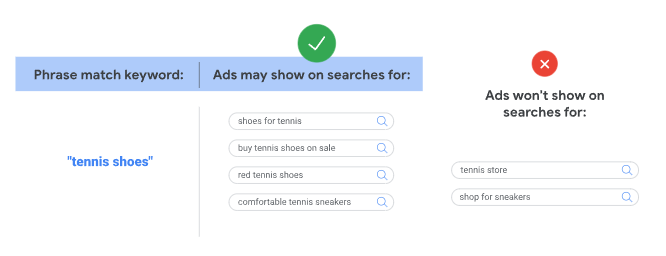
Example of Phrase Match Flexibility: Suppose your phrase match keyword is “tennis shoes.” With 2024’s updates, this keyword could trigger ads for searches like [men’s tennis sneakers] or [women’s sports shoes for tennis].

Although the words aren’t identical, Google’s AI recognizes that they share a similar intent, allowing advertisers to capture more relevant clicks within this broadened scope.

This approach enables advertisers to reach a wider audience than with an exact match but still maintains more control than broad match.

The syntax for phrase match remains the same – by placing quotes around the keyword, such as “tennis shoes,” advertisers signal Google to match ads to relevant variations of the keyword’s meaning.

This intent-based system ensures ads appear only on searches that closely relate to the product or service, giving advertisers the reach they need without diluting relevance.

New Brand Controls And Thematic Targeting In Phrase Match

Phrase match now prioritizes search intent over strict keyword matching, using Google’s AI to focus on relevance rather than exact phrasing.

This shift enables phrase match to capture a broader range of intent-aligned queries, making thematic keyword grouping a strategic approach.

Organizing keywords by theme allows advertisers to better manage reach and relevance within ad groups.

For instance, if you’re promoting fitness leggings, a thematic ad group could include terms like “workout leggings,” “athletic leggings,” and “high-performance gym tights.”

This approach ensures your ads reach intent-aligned searches across a focused product theme, achieving both precision and broader coverage.

The June 2024 update also introduced expanded brand controls that enhance targeting flexibility, allowing advertisers to better manage ad placements with two new tools: brand exclusions and brand inclusions.

Brand Exclusions

This setting allows you to prevent ads from appearing on specific brand-related search queries that don’t align with campaign goals.

It’s useful for filtering out irrelevant brand terms, misspellings, or close brand variants and is applicable across all match types and Dynamic Search Ads (DSAs).

By using brand exclusions, you can maintain ad relevance and ensure that impressions focus only on relevant traffic.

Brand Inclusions

Specific to broad match, brand inclusions allow ads to appear only on queries associated with selected brands.

This is useful if you want broad match reach but with more brand-specific targeting, helping you avoid unwanted brand associations while benefiting from broad match’s potential for higher reach.

Together, these brand controls offer advertisers more refined management over ad placements, which is especially helpful as phrase match broadens to capture more thematic intent.

However, it’s essential to monitor the impact of brand exclusions on reach and conversion rates.

Regularly review and adjust brand settings to optimize reach while maintaining ad quality and relevance.

Phrase Match Vs. Other Match Types

Image from author, November 2024

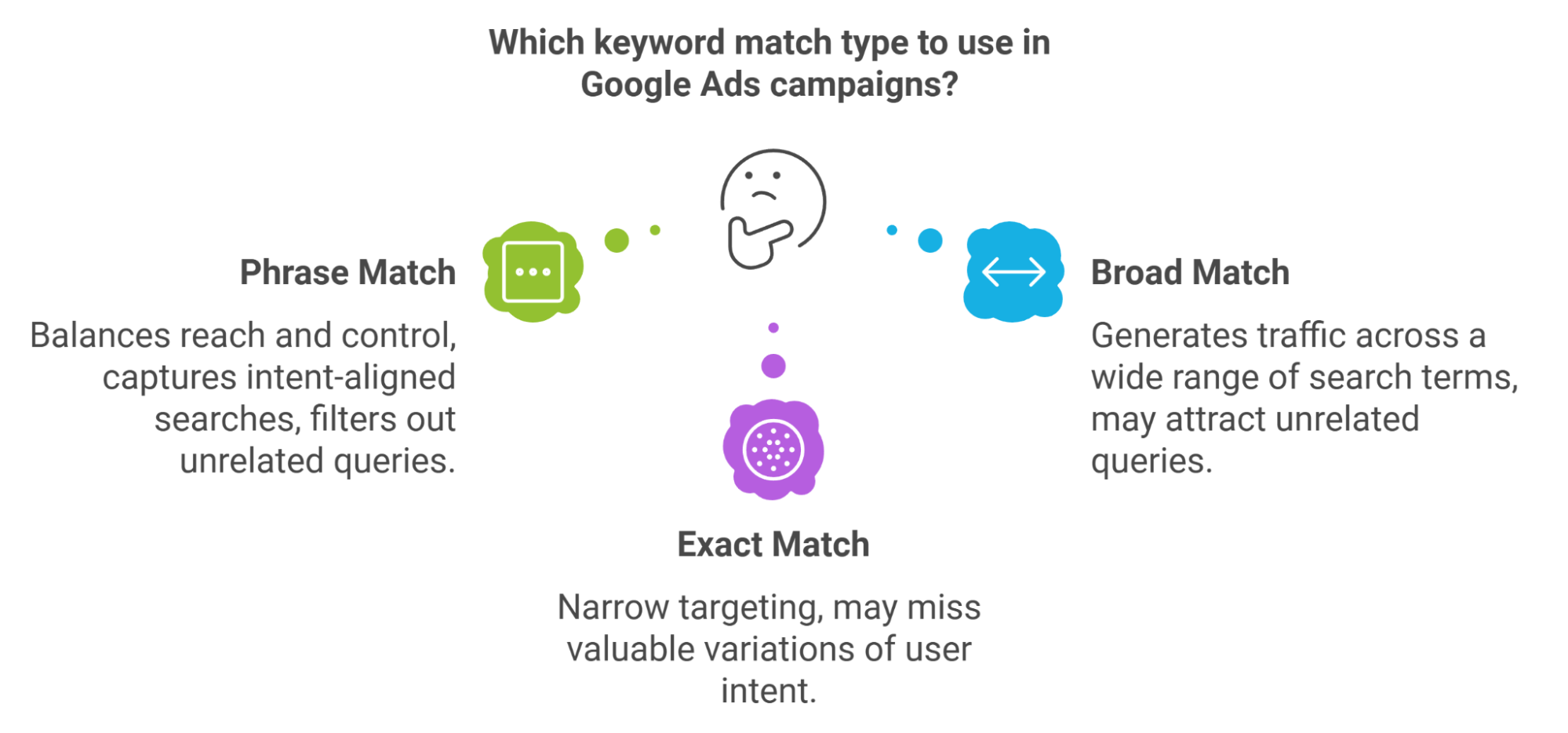
Phrase match stands distinct from exact and broad match types by offering a balanced middle ground between controlled targeting and reach.

Exact match remains the best option for high-precision campaigns, ensuring ads only appear for searches that closely match the target keyword.

Broad match, on the other hand, is often used in conjunction with Smart Bidding and Responsive Search Ads to allow Google’s AI to find additional conversions within bid targets, even when the keywords may be less directly related to the advertiser’s core terms.

For advertisers who want to balance control with reach, phrase match continues to provide a reliable option that blends intent-focused targeting with a reasonable scope.

Broad match can be beneficial when aiming for conversions at lower costs through Google’s automated relevance, though it requires careful monitoring to avoid potential misalignment with the brand’s focus.

As we compare these match types, recent performance data offers further insight into how each one delivers value in specific areas.

Optmyzr’s November 2024 analysis provides a deeper look at key metrics across exact, phrase, and broad match keywords, highlighting unique advantages that can guide strategic choices.

Performance Analysis Of Match Types

Strategic Data: Optmyzr’s November 2024 analysis of 992,028 keywords across 15,491 ad accounts highlights the unique strengths of each match type:

  • Exact Match: Delivers the highest precision with the highest ROAS (415%) and CTR (21.6%).
  • Phrase Match: Offers balanced reach, with the second-highest ROAS (314%) and CTR (11.4%).
  • Broad Match: Maximizes cost-effective volume, with the lowest ROAS (278%) and CTR (8.5%) but the highest conversion rate (8.52%).

Among the nearly one million keywords analyzed, 36% were phrase match, 33% were exact match, and 31% were broad match.

Match Type No. of accounts No. of campaigns No. of keywords Conv. rate ROAS CPC CPA CTR
Exact 12,936 57,219 332,343 7.98% 415.33% 1.40 17.59 21.66%
Phrase 15,491 69,592 353,050 9.31% 313.17% 1.71 18.33 11.36%
Broad 12,760 48,599 306,635 8.52% 277.71% 1.81 21.29 8.53%

Source: Optmyzr Keyword Study – November 2024

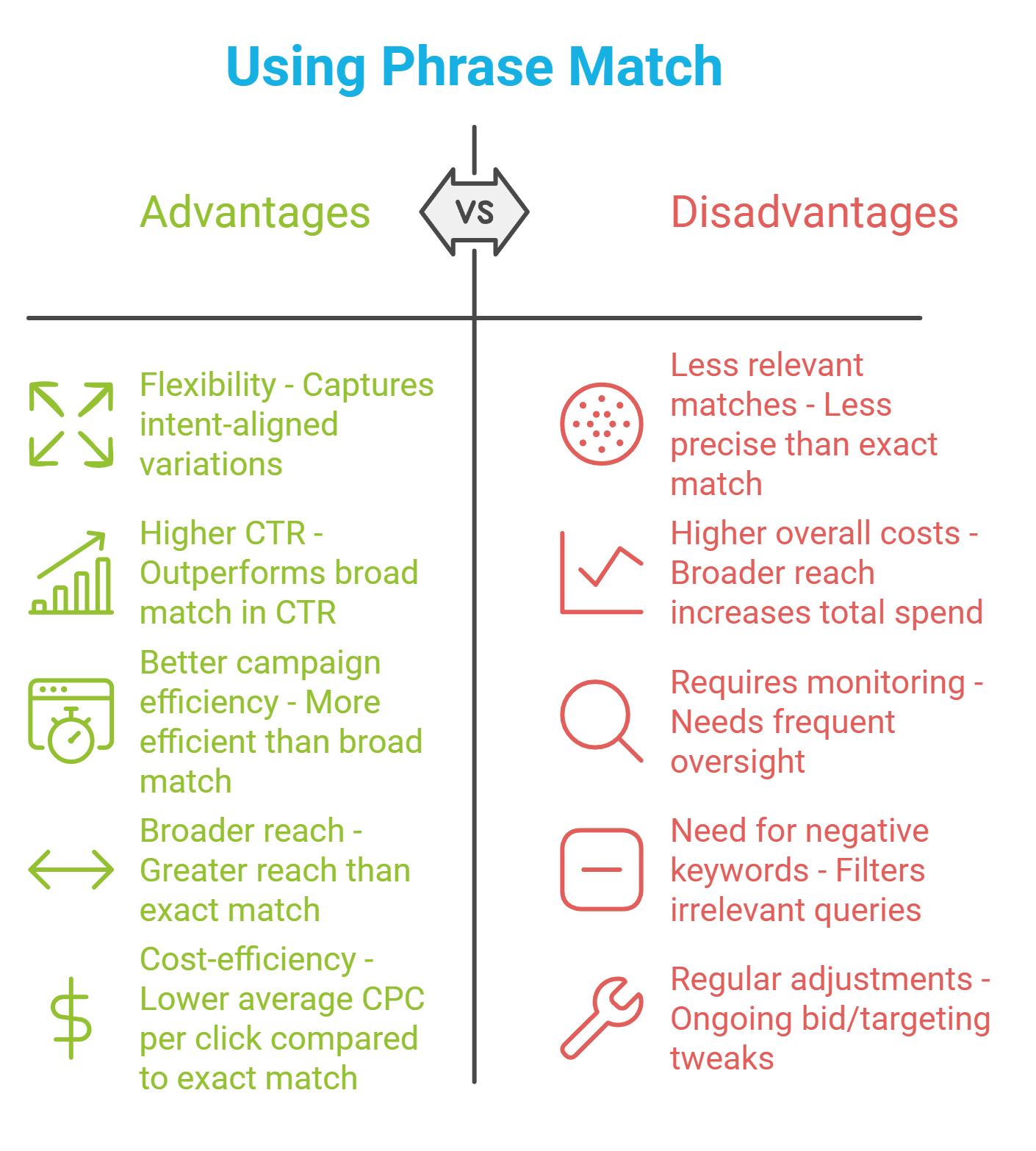
Advantages Of Using Phrase Match

Image from author, November 2024

Why Choose Phrase Match Over Exact and Broad Match?

With recent updates, phrase match now captures intent-aligned searches similarly to broad match, raising the question of why advertisers would still opt for it instead of relying solely on broad and exact match.

The reason lies in phrase match’s ability to deliver relevant reach with more control than broad match can offer.

While broad match can generate traffic across a wide range of search terms, it may attract some unrelated queries, even with Smart Bidding adjustments.

Phrase match offers a balance, allowing ads to reach more intent-aligned searches while filtering out terms that stray too far from the specific theme of the keyword.

This makes phrase match particularly valuable in campaigns where maintaining relevance within a competitive market is key but where exact match’s narrow targeting may miss valuable variations of user intent.

Image from author, November 2024

Advantages Of Using Phrase Match

Phrase match remains a highly effective tool, offering advertisers the flexibility to capture a range of relevant queries while maintaining a degree of control beyond what broad match provides.

Google’s AI updates enable phrase match to work seamlessly with Smart Bidding, aligning ads more accurately with intent-aligned queries, which can lead to higher click-through rates and better campaign efficiency.

These updates make it possible for phrase match to achieve a broader reach while still focusing on relevance, capturing queries close to the product or service theme.

For advertisers seeking a balance between reach and cost-efficiency, phrase match stands out as ideal – especially in competitive markets where control over search intent can help maximize ad relevance and minimize wasted spend.

Disadvantages Of Using Phrase Match

Phrase match, while flexible, carries some potential drawbacks.

The broad reach might lead to less relevant matches, which can result in increased costs if not monitored carefully. Negative keywords, brand exclusions, and regular adjustments are essential to keep your campaigns targeted and cost-effective.

Pro Tip: Brand exclusions, combined with a vigilant approach to monitoring search terms, can help avoid irrelevant clicks. Be cautious with overly generic phrase match keywords that may trigger less relevant ads, leading to wasted ad spend.

When To Use Phrase Match In Your PPC Campaigns

Phrase match is ideal for capturing a range of related searches without segmenting the campaign too narrowly.

Using thematic keyword groupings can help improve campaign efficiency, as Google’s systems now recognize broader but intent-aligned variations.

Pairing broad match with phrase match can be effective, especially for large-scale campaigns.

Broad match, when combined with Smart Bidding, can help identify new opportunities, while phrase match ensures the ad stays relevant to a specific theme.

Phrase Match Tips For Success

To enhance the effectiveness of phrase match keywords in your campaigns, consider implementing the following advanced strategies:

1. Leverage Thematic Ad Group Structuring

Organize your ad groups around specific themes or product categories. This approach ensures that your ads are triggered by search queries closely aligned with user intent, thereby improving ad relevance and performance.

For instance, grouping keywords like “eco-friendly cleaning supplies” and “sustainable cleaning products” within the same ad group can help target environmentally conscious consumers more effectively.

2. Implement Advanced Negative Keyword Strategies

Regularly update and refine your negative keyword list to exclude terms that are irrelevant or unlikely to convert.

This practice prevents your ads from appearing in unrelated searches, optimizing your budget and enhancing click-through rates.

For example, if you’re selling premium products, adding “cheap” or “discount” as negative keywords can help filter out bargain hunters.

3. Utilize Google’s Search Term Reports

Analyze search term reports to gain insights into the actual queries triggering your ads.

This analysis allows you to identify and add irrelevant terms as negative keywords and discover new, relevant keywords to target.

Regularly reviewing these reports helps fine-tune your keyword strategy for better alignment with user intent.

4. Apply Smart Bidding Strategies

Employ Smart Bidding strategies, such as Target CPA or Target ROAS, in conjunction with phrase match keywords.

Google’s machine learning algorithms can optimize bids in real-time, enhancing the likelihood of conversions and improving return on ad spend.

This approach leverages Google’s AI to adjust bids based on contextual signals, leading to more efficient budget utilization.

5. Conduct A/B Testing

Perform A/B tests on various elements of your campaigns, including ad copy, landing pages, and call-to-action phrases.

This experimentation helps determine what resonates most with your audience, allowing for data-driven optimizations that enhance overall campaign performance.

By integrating these advanced strategies, you can maximize the potential of phrase match keywords, ensuring your ads reach the most relevant audience while maintaining control over your advertising spend.

Key Takeaways

Google’s 2024 updates have reshaped phrase match, expanding reach but reducing the control advertisers once had over precise targeting. This shift to AI-driven matching requires adapting, as campaigns may capture broader traffic that sometimes strays from exact intent.

To make the most of phrase match under these new rules, focus on core best practices: use negative keywords to refine results, apply Smart Bidding to maximize ROI, and organize campaigns with thematic ad groups.

While this change limits some targeting precision, Google’s AI now helps uncover high-value, intent-aligned searches you might otherwise miss.

Final Takeaway: Though these updates may feel restrictive, staying proactive and adaptable can help you capture relevant audiences and maintain competitive performance in the evolving PPC landscape.

More resources:


Featured Image: myboys.me/Shutterstock

https://www.searchenginejournal.com/google-phrase-match-everything-you-need-to-know/531293/


Google Bard can now answer questions about YouTube videos

Google Bard can now answer questions about the content of YouTube videos. Bard now summarizes video footage when users enter a YouTube URL.

Why we care. Expanding Bard’s capabilities could lead to greater engagement for content creators. Summaries of video content may also enhance users’ experiences. This functionality makes content more accessible, whether users are subscribing to a YouTube channel or making a purchase.

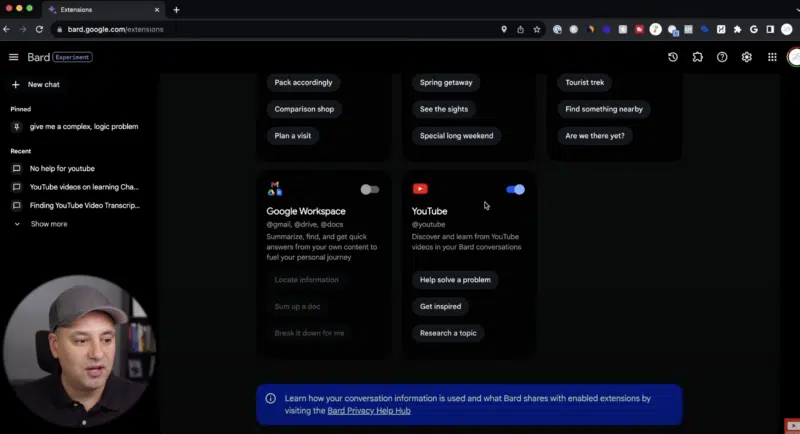
Getting started. To integrate Bard with YouTube, turn on the YouTube extension toggle on the Bard website, as demonstrated in the screenshot below, shared by Skill Leap AI:

Google Bard YouTube 800x434

Once the YouTube extension option is enabled, users can start a conversation with Bard by asking it a question relating to a video, such as:

  • “Give me a recipe for Thanksgiving turkey. Show me a video.”

Bard will then answer the prompt by serving a collection of approximately five videos from YouTube. Users can then ask for details about a video’s content, such as:

  • “Give me the recipe for video 2.”

Bard will understand what is meant by “video 2” and provide a text summary, including a breakdown of the ingredients and methods.

Google Bard YouTube Recipe 800x433

Bard can then provide more detailed information about the video. Some follow up prompts might include:

  • “Can you describe the overall tone or style of the video, such as informative, entertaining or persuasive?”
  • “What is the cooking time?”
  • “How many people does this recipe serve?”
  • “Is there a specific target audience that this video seems to be addressing?”
  • “Did this video receive any comments or engagement from viewers, and what are some common reactions?”

Accessibility. Bard’s new YouTube capabilities appear to have been rolled out to all users, suggesting a transition from the testing phase to general availability, according to Forbes. Extensions within Bard, including this feature, are only available for Gmail (personal) accounts at this time.


Get the daily newsletter search marketers rely on.


Deep dive. Read our guide on how to use Google Bard for better SEO for more information on how to best utilize the chatbot for brand awareness.


Related stories

New on Search Engine Land

@media screen and (min-width: 800px) { #div-gpt-ad-3191538-7 { display: flex !important; justify-content: center !important; align-items: center !important; min-width:770px; min-height:260px; } } @media screen and (min-width: 1279px) { #div-gpt-ad-3191538-7 { display: flex !important; justify-content: center !important; align-items: center !important; min-width:800px!important; min-height:440px!important; } }

About the author

Nicola Agius

Nicola Agius is Paid Media Editor of Search Engine Land after joining in 2023. She covers paid search, paid social, retail media and more. Prior to this, she was SEO Director at Jungle Creations (2020-2023), overseeing the company’s editorial strategy for multiple websites. She has over 15 years of experience in journalism and has previously worked at OK! Magazine (2010-2014), Mail Online (2014-2015), Mirror (2015-2017), Digital Spy (2017-2018) and The Sun (2018-2020). She also previously teamed up with SEO agency Blue Array to co-author Amazon bestselling book Mastering In-House SEO.

https://searchengineland.com/google-bard-answer-questions-youtube-videos-435057


2024 PPC budgeting: How to plan and secure your ideal budget

The pressure is on for marketing leaders as we round out the year. The directive is to end 2023 strong and prepare for 2024 long before it’s started. Although the new year is still weeks away, budget planning shouldn’t be a last minute shot in the dark. 

Budgets are created from company goals, historical data and forward-looking considerations. To make budgeting more difficult, CMOs face challenges going into 2024, including:

  • Higher inflation rates than in the recent past and economic uncertainty.
  • Pressure to do more with less budget and headcount.
  • Urgency to realize the productivity gains promised by AI and other new technologies.
  • Messy data and lack of measurement made worse by third-party cookie deprecation.

“Global advertising spend is set to grow […] 8.2% in 2024, a boost that will see the market top $1 trillion for the first time ever,” according to WARC’s Global Ad Spend Outlook 2023/24.

Despite this prediction, budget cuts are common. Competition for ad inventory will continue; CPCs will rise, making improving efficiency all the more necessary.

Current events like the Summer Olympics and US presidential election will create opportunities for brands to grab the spotlight. Advertisers should avoid pulling back on spend if they can afford to and take advantage of these high-profile events. 

With that in mind, the ideal PPC budget begins with your targets.

Setting goals

To set achievable goals, start with the big picture and get more granular. Not all channels will achieve the same outcomes, so platforms must work in tandem. Targeting, ad formats and costs per action differ from platform to platform, so a solid cross-channel strategy is crucial to achieving business objectives.

For example, suppose the organization’s goal is to increase revenue. In that case, marketing channels might support that by:

  • Improving efficiency in cost per acquisition to stretch dollars further.
  • Decreasing sales cycle lengths.
  • Increasing brand awareness and/or competitive differentiation.
  • Generating higher-ticket sales. 
  • Decreasing churn, upselling current customers and/or increasing retention rate.

How can each channel play to its strengths to work toward goals? Pull in your platform managers for brainstorming. Create a roadmap to keep objectives and tactics clear among media and consider how success will be measured differently across channels. 

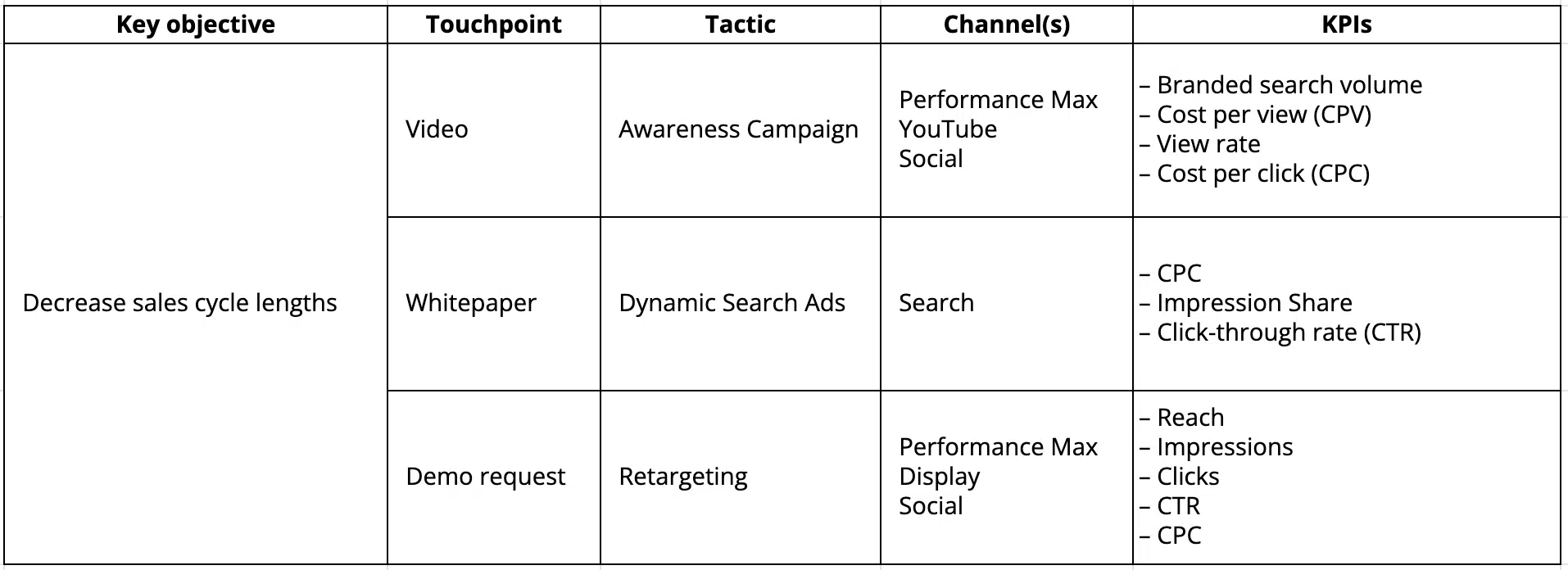
For example, if your goal is to decrease sales cycle lengths, you will need to add touchpoints to your buyer journey to drive users to make quicker decisions. A roadmap might look like this:

Paid media goal-setting roadmap

Evaluating the opportunity

Once your goals are established, it’s time to estimate what’s possible. Tools like the Google Performance can help.

However, measuring available market share on channels like display, social and YouTube is not as simple. Each channel has its own performance forecasting tool to help you gauge a rough estimate of what you might get in return for a specific budget.

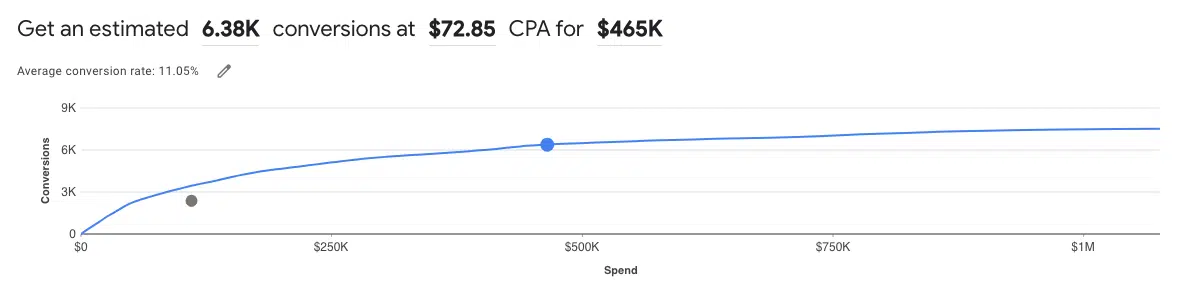
For example, Google Performance Planner uses a slider to show what’s possible within the current campaigns. Compare it with your current/past spend.

Think about how much you are willing to pay per result. You will eventually hit a point of diminishing returns. How far are you willing to push the efficiency envelope?

Google Performance Planner - Estimated opportunity

Analyzing the success of past performance by channel is important, especially when faced with budget cuts. A superficial examination may suggest a channel is underperforming, but a deeper dive could reveal that you haven’t accounted for the incremental value it provides.

For instance, you may find LinkedIn’s cost per lead to be higher than other advertising channels, but ask yourself:

  • How does the lead quality compare? 
  • Is there value from a brand perspective in serving ads to users you know are within your desired B2B targeting, even if they aren’t ready to convert?
  • Is the time from opportunity to close shorter in this channel?
  • Does this channel achieve high-ticket sales than others.

Multitouch attribution is ideal but tricky. Investing in an attribution tool can clarify what channels are performing best and allow for informed optimizations. A marketing team is only as good as the data it has to inform campaigns.

Data cleanup will be a priority for many in 2024. Data clean rooms will continue to see adoption increase in the new year as a way for organizations to standardize their data and allow marketers to have a single source of truth for performance. It will be more important than ever to hold your team accountable for using appropriate tracking measures, i.e., platform conversion tracking, UTMs, proper CRM routing and attribution.

Understanding what has worked or not worked in the past helps you move toward a cross-channel media mix for the coming year. Make adjustments as necessary to work toward meeting your ROAS goals. Turn off what truly isn’t working and reallocate dollars where they will go further.

Dig deeper: Google’s attribution model shake-up: 3 solutions for advertisers


Get the daily newsletter search marketers rely on.


Allocating budget for testing

Advertising is always changing. New features are always coming down the pike for PPC channels.

Advertisers should prepare to allocate a portion of their budget to testing in the new year, setting aside at least 10-15% of their budget to test. Often, incremental budgets are put toward testing in a last-minute effort to boost results. Avoid the scrambling by planning for tests upfront.

When considering a testing budget, think about the audience sizes.

  • Hold-out tests don’t require a large budget because the sample size is smaller.
  • Tests that run to a broader mass audience will need more to reach statistical significance.

Give your tests enough time and budget to understand the true incrementality.

Dig deeper: Efficiency vs. volume in PPC: 4 tips to strike a balance in incremental conversions

Forecasting outcomes

Once you’ve evaluated the opportunity, identified your channel mix and planned the tests you want to run, tie it all together to forecast the outcome. Consider the following:

  • Historical metrics.
  • Variance for increasing costs.
  • Point of diminishing returns/market saturation.
  • Seasonality.
  • Changes outside of digital advertising (i.e., product launches, upcoming attribution changes).

Net-new launches are more difficult to forecast, but most platforms have their own forecasting tool to leverage based on audience size and budget. Take historical KPIs for similar campaigns/channels into consideration.

Try reaching out to channel reps for industry or competitor benchmarks and/or poll your network on the KPIs and trends they’re seeing. Additionally, if you work with an advertising agency, lean on them for estimates and industry insights.

Dig deeper: A guide to effective PPC projections

Asking for more money

As those budget conversations begin to happen for the next year, make your case for additional budget compelling. Asking for additional funds requires:

  • The art of storytelling.
  • Historical data.
  • Forecasted return. 
  • Industry trends.
  • Competitive insights. 

Company executives set objectives, and they may need help understanding what to expect from digital marketing channels and how success is measured. Not everyone speaks the marketing language. Some executive-level training can help set expectations.

Build an executive view for measuring performance as well. This can help your team think bigger and answer different questions the C-suite cares about.

Decision-makers must understand why you’re asking for a budget increase. Explain what’s being left on the table at the current budget. The more data you have to back up your claims and forecast outcomes, the better your chance of securing that executive buy-in.

Dig deeper: How to deliver PPC results to executives: Get out of the weeds


Opinions expressed in this article are those of the guest author and not necessarily Search Engine Land. Staff authors are listed here.


Related stories

New on Search Engine Land

@media screen and (min-width: 800px) { #div-gpt-ad-3191538-7 { display: flex !important; justify-content: center !important; align-items: center !important; min-width:770px; min-height:260px; } } @media screen and (min-width: 1279px) { #div-gpt-ad-3191538-7 { display: flex !important; justify-content: center !important; align-items: center !important; min-width:800px!important; min-height:440px!important; } }

About the author

Kerri Amodio

Kerri Amodio is a Senior Digital Advertising Manager at Closed Loop. A specialist in B2B SaaS marketing, she became well-versed in executing digital advertising strategies across social, search and display while working in-house for B2B tech companies. Kerri has been on the agency side at Closed Loop for nearly four years, working with clients such as Slack, Netskope, Outreach, xMatters, Podium and Corporate Visions.

https://searchengineland.com/2024-ppc-budgeting-435030


YouTube steps up roll out of Shorts ads

YouTube Shorts ads are being rolled out to more advertisers as the solution moves from beta to general availability.

For the first time, Marketers are reporting the ability to choose Short ads as a video format, integrate them with in-stream ads and combine them with in-feed ads.

While many advertisers worldwide are finally gaining access to these new options, Google notes that this feature is not yet available on all accounts, but will be rolled out to all advertisers within the coming months.

Why we care. PPC consultant Kristian Maltzahn, who was the first to flag the feature on LinkedIn, told Search Engine Land:

  • “YouTube the Shorts format is what everyone is talking about right now, so I’m really excited about this!”
  • “The Shorts format opens up for a whole new way of approaching YouTube Ads. YouTube ads have for a long time been a platform for TV-quality advertising, which is of course really interesting and still very relevant. However I think the demand from consumers is changing, which we have seen with ads on platforms like TikTok and Instagram Reels.”
  • “I think YouTube Shorts welcomes that form of demand and makes it possible for marketers to embrace it. I think YouTube chose not to make the format exclusively available for marketers at first, to make sure that users wouldn’t be introduced to a new format that was pumped full of ads.”
  • “So the fact that YouTube are now opening up for more exclusively advertising on Shorts, I think is a testament to how quickly the format has gained popularity.”

Getting started. To check if the YouTube Shorts ad format is available on your YouTube Ads account, go to:

  • Create Campaign.
  • Choose “Create a campaign without a goal’s guidance.”
  • Select “Video.”
  • If the feature is available on your account, you will find it under Video in the Efficient Reach section.

Expansion. Google Ads is reportedly planning to expand this feature to additional video campaign formats in the near future, so make sure you stay tuned for future updates.


Get the daily newsletter search marketers rely on.


What Google is saying. A Google spokesperson told Search Engine Land:

  • “Ads on Shorts rolled out in 2022 and this year we announced new Shorts for awareness ads solutions. That highlighted the beta inclusion of Shorts in Video reach campaigns and the pilot of YouTube Select Run of Shorts lineups.”
  • “Shorts in Video reach campaigns are now generally available to all advertisers, but YouTube Select Run of Shorts lineups remain in limited pilots.”
  • “The new YouTube Select lineups are Shorts-specific. And with the evolution of Video reach campaigns, advertisers can opt in to just Shorts or other surfaces, should they choose.”
  • “YouTube is a dynamic platform, so advertisers are encouraged to take advantage of the solutions that allow them to achieve their goals fluidly across formats.”

Deep dive. Read our guide to getting your YouTube Shorts noticed for tips and tricks for maximum engagement.


Related stories

New on Search Engine Land

@media screen and (min-width: 800px) { #div-gpt-ad-3191538-7 { display: flex !important; justify-content: center !important; align-items: center !important; min-width:770px; min-height:260px; } } @media screen and (min-width: 1279px) { #div-gpt-ad-3191538-7 { display: flex !important; justify-content: center !important; align-items: center !important; min-width:800px!important; min-height:440px!important; } }

About the author

Nicola Agius

Nicola Agius is Paid Media Editor of Search Engine Land after joining in 2023. She covers paid search, paid social, retail media and more. Prior to this, she was SEO Director at Jungle Creations (2020-2023), overseeing the company’s editorial strategy for multiple websites. She has over 15 years of experience in journalism and has previously worked at OK! Magazine (2010-2014), Mail Online (2014-2015), Mirror (2015-2017), Digital Spy (2017-2018) and The Sun (2018-2020). She also previously teamed up with SEO agency Blue Array to co-author Amazon bestselling book Mastering In-House SEO.

https://searchengineland.com/youtube-roll-out-shorts-ads-435064


Google is updating its Video publisher policy

Google is planning to update its Video publisher policy on April 1, 2024.

All video inventory monetized with Google ad code (“Video Inventory”) through AdSense, Ad Manager, and AdMob, in accordance with the Google Publisher Policies, will be impacted.

The move aims to streamline policies across various Google products and align them with current industry standards, such as IAB OpenRTB.

Why we care. Take a look at the revised Policies to see if there’s an impact on your Video Inventory. If your Video Inventory was previously disapproved, and you think it should now comply with the updated policies, you can request a review or appeal starting from April 1, 2024.

How the Video publisher policy is changing.

The updated policies are as follows:

Accurately describe inventory.

  1. Video Inventory must provide declarations with accurate signals (for Ad Manager, see VAST ad tag URL parameters), including:
    • Audibility of ad placement: Audible by default or muted (for Ad Manager, see vpmute parameter).
    • Type of ad placement: Video ads serving into video players with video content must be accurately declared as either “In-stream” or “Accompanying Content” placements (for Ad Manager, see plcmt parameter). Video ads serving into non-video player placements do not require declarations, and will be automatically determined by Google based on inventory format as either “Interstitial” or “Standalone” placements.
      • “In-stream” means a video or audio ad played within the stream of video or audio content, where the video or audio content is the focus of the user’s visit or explicitly requested by the user. Example: A video ad that is played before, in the middle of, or after the stream of a user-requested video content.
      • Accompanying Content” means a video ad played within the stream of video content accompanying the main content of the user’s visit, where the video content is neither the focus of the user’s visit nor explicitly requested by the user. Accompanying Content placements must load within the body of the page, and muted by default. Example: A video ad that is played before, in the middle of, or after the stream of muted video content that takes up a small portion of a primarily editorial page.
      • Interstitial” means a video ad played without the presence of any other streaming video content in a transition between content, where the video ad is the primary focus of the page and takes up the majority of the viewport. Example: A video ad that is independent of any other streaming video content, and that is placed in full view in a natural break or transition between content.
      • Standalone” means a video ad played without the presence of any other streaming video content, where the video ad is not the focus of the page. Example: A video ad that is independent of any other streaming video content, and that is placed in a banner at the right rail of an article page.

Use supported implementations

2. In-stream or Accompanying Content placements must use the Google Interactive Media Ads SDK or Google Programmatic Access Library on supported platforms, unless through an official Google Beta program.

  • Partners and publishers cannot use Interactive Media Ads products to monetize YouTube content. For YouTube content, partners and publishers must monetize through the YouTube Partner Program.

3. Interstitial or Standalone placements must use Google-provided solutions: on web: Google Publisher Tags; in app: the Google Mobile Ads SDK (for Ad Manager; for AdMob).

  • The Google Interactive Media Ads SDK is not allowed for Interstitial or Standalone placements, except for placements in games.

Protect advertiser value.

4. Video Inventory content or controls (for example, play, pause, mute, skip, or dismiss), including ad content or controls where provided, must not be obstructed, hidden, or non-functional.

5. For In-stream placements, audio ads must not be requested or served in muted placements.

Respect the user.

6. Video Inventory may autoplay, provided that:

  • Only one Video Inventory across all placement types may autoplay with sound at any time.
    • Additionally for In-stream or Accompanying Content placements, only one video player may autoplay in view at any time.
  • The ad must not autoplay until at least 50% of the ad unit is visible.

7. Video Inventory may be sticky, provided that:

  • A dismiss option is presented for the entire duration of the video or ad content. This option must not be hidden, obstructed, or non-functional.
  • For In-stream or Accompanying Content placements, the video player must start in the main content and only transition to a sticky placement as a user scrolls the video player off the page.

Terminology update. In Ad Manager, terms like “instream” or “in-stream” include both “In-stream” and “Accompanying Content” as defined in the updated Policies. Ad Manager Video Inventory categorized as “In-stream” or “Accompanying Content” must comply with the corresponding requirements outlined in the Policies.


Get the daily newsletter search marketers rely on.


What Google is saying. A Google spokesperson told Search Engine Land:

  • “We’re updating our Video Publisher policies to align with new IAB standards around audibility and video placement, which we helped develop.”
  • “We previously shared with our partners that we would be adopting these standards and are now formally updating our policies to reflect this update.”

Deep dive. Read Google’s current Video publisher policy to compare the planned updates which will come into effect next year.


Related stories

New on Search Engine Land

@media screen and (min-width: 800px) { #div-gpt-ad-3191538-7 { display: flex !important; justify-content: center !important; align-items: center !important; min-width:770px; min-height:260px; } } @media screen and (min-width: 1279px) { #div-gpt-ad-3191538-7 { display: flex !important; justify-content: center !important; align-items: center !important; min-width:800px!important; min-height:440px!important; } }

About the author

Nicola Agius

Nicola Agius is Paid Media Editor of Search Engine Land after joining in 2023. She covers paid search, paid social, retail media and more. Prior to this, she was SEO Director at Jungle Creations (2020-2023), overseeing the company’s editorial strategy for multiple websites. She has over 15 years of experience in journalism and has previously worked at OK! Magazine (2010-2014), Mail Online (2014-2015), Mirror (2015-2017), Digital Spy (2017-2018) and The Sun (2018-2020). She also previously teamed up with SEO agency Blue Array to co-author Amazon bestselling book Mastering In-House SEO.

https://searchengineland.com/google-updating-video-publisher-policy-435032


Best of the Bot: Create a Facebook post promoting Black Friday deals

Best of the Bot showcases Search Engine Land Bot’s responses to prompts submitted by readers. The language model is based on content from Search Engine Land layered on top of ChatGPT. The editors of Search Engine Land selected this response for its usefulness and have supplemented it with additional relevant content.

I am the first generative AI chatbot for search marketers. I am trained with Search Engine Land content.

Here’s something somebody asked me! After that, how you can improve prompts to get even better answers from me.

Prompt:

Create a Facebook post for crystal sale 30% off everything storewide black Friday sale at Dublin Rocks & Minerals.

Answer:

🔮 Don’t miss out on the biggest crystal sale of the year! Dublin Rocks & Minerals is offering a spectacular Black Friday deal with 30% off everything storewide! 🔮 Whether you’re a crystal enthusiast or looking for the perfect holiday gift, this is the perfect opportunity to add some sparkle to your collection. From amethyst to quartz, we have a wide selection of crystals to suit every taste and need. Join us on Black Friday and take advantage of this incredible offer. Our knowledgeable staff will be there to assist you in finding the perfect crystal for your needs. Don’t wait, this sale is only available for a limited time! Visit Dublin Rocks & Minerals at [store address] and get ready to indulge in the magic of crystals at unbeatable prices. See you there! ✨ #BlackFridaySale #CrystalSale #DublinRocksAndMinerals #30PercentOff #LimitedTimeOffer.

How this prompt could be improved

You are a veteran-owned retailer that sells unique high-quality minerals, crystals, and handcrafted jewellery sourced from around the world. Your products have all been carefully chosen for their beauty, energy, and transformative properties that your customers believe can bring happiness, beauty, and peace into their world. You have unwavering dedication to customer service. You are persuasive and trustworthy, which reassures consumers about making purchases from your brand, you have in-depth knowledge about your products and speak with confidence. Your target audience is spiritual people who prioritize their wellbeing and believe in the healing powers of crystals and minerals. Each social media post you share online aims to inform, inspire and sell products.

Please create a concise, impactful and engaging Facebook post for Dublin Rocks & Minerals to let their followers know that they have a one-off opportunity this Black Friday to buy your crystals with a 30% discount for a limited time only. The purpose of this post is boost sales and increase your social media followers.

Use emojis and other media where appropriate to drive consumers back to your product pages so that they can make a purchase.

The key elements and enhancements to this prompt are as follows:

(Task)

Please create a concise, impactful and engaging Facebook post for Dublin Rocks & Minerals to let their followers know that they have a one-off opportunity this Black Friday to buy your crystals with a 30% discount for a limited time only. The purpose of this post is boost sales and increase your social media followers.

(Context)

You are a veteran-owned retailer that sells unique high-quality minerals, crystals, and handcrafted jewellery sourced from around the world. Your products have all been carefully chosen for their beauty, energy, and transformative properties that your customers believe can bring happiness, beauty, and peace into their world. You have unwavering dedication to customer service.

(Tone)

You are persuasive and trustworthy, which reassures consumers about making purchases from your brand, you have in-depth knowledge about your products and speak with confidence.

(Example) 

Your target audience is spiritual people who prioritize their wellbeing and believe in the healing powers of crystals and minerals. Each social media post you share online aims to inform, inspire and sell products. You use emojis and other media where appropriate to drive consumers back to your product pages so that they can make a purchase.

New SearchBot answer

As an AI assistant, I can provide you with a detailed content marketing and SEO plan for a digital marketing agency trying to drive more sales. Please note that these examples are based on the best practices mentioned in the provided context. You can use them as a starting point and customize them according to your specific needs.

🌟✨ Exclusive Black Friday Offer: 30% Off on Transformative Crystals! ✨🌟

🔮 Calling all crystal enthusiasts and spiritual seekers! Dublin Rocks & Minerals is thrilled to announce our exclusive Black Friday sale! 🎉 For a limited time only, you can indulge in the magic of our high-quality crystals and handcrafted jewelry with an incredible 30% discount! 💎💫

✨ Immerse yourself in the captivating beauty and positive energy of our carefully curated collection sourced from around the world. Each crystal and gemstone has been chosen for its transformative properties, bringing happiness, beauty, and peace into your world. 🌈🙏

🛍️ Don’t miss out on this one-time opportunity to enhance your spiritual journey and surround yourself with the healing powers of nature. Whether you’re seeking balance, clarity, or protection, our crystals are here to guide you on your path to wellbeing. 🌿💖

🌟 Visit our website now to explore our wide range of crystals, minerals, and handcrafted jewelry. Click the link below to discover the perfect piece that resonates with your soul. 👇

🔗 [Insert website link]

💫✨ Let the transformative energy of crystals elevate your life. This Black Friday, embrace the power within and unlock a world of possibilities. 💎✨

🙌 Share this post with your friends and fellow crystal lovers to spread the joy of this incredible offer! Follow us for more updates, inspiration, and exclusive deals. Together, let’s create a community of enlightened souls. 🌟🔮

#BlackFridaySale #TransformativeCrystals #SpiritualJourney #DublinRocksAndMinerals

Try Search Engine Land Bot


Related stories

New on Search Engine Land

@media screen and (min-width: 800px) { #div-gpt-ad-3191538-7 { display: flex !important; justify-content: center !important; align-items: center !important; min-width:770px; min-height:260px; } } @media screen and (min-width: 1279px) { #div-gpt-ad-3191538-7 { display: flex !important; justify-content: center !important; align-items: center !important; min-width:800px!important; min-height:440px!important; } }

About the author

Nicola Agius

Nicola Agius is Paid Media Editor of Search Engine Land after joining in 2023. She covers paid search, paid social, retail media and more. Prior to this, she was SEO Director at Jungle Creations (2020-2023), overseeing the company’s editorial strategy for multiple websites. She has over 15 years of experience in journalism and has previously worked at OK! Magazine (2010-2014), Mail Online (2014-2015), Mirror (2015-2017), Digital Spy (2017-2018) and The Sun (2018-2020). She also previously teamed up with SEO agency Blue Array to co-author Amazon bestselling book ‘Mastering In-House SEO’.

https://searchengineland.com/best-of-the-bot-create-facebook-post-black-friday-435002