YouTube rolls out ‘For You’ feed to creators’ channels

YouTube is rolling out a personalized ‘For You’ section on the home tab of creators’ channels.

From November 20, whoever visists your channel will be greeted with a tailored list of recommended videos, comprising a “mix of content from your channel based on the viewer’s watch history.”

The platform is encouraging creators to review their settings and select formats before the launch.

Why we care. The ‘For You’ section has the potential to boost viewer engagement on your channel, opening the door to increased revenue. Additionally, it facilitates greater content discovery, amplifying brand awareness among your audience.

Retaining control. Creators can control this new feature by toggling it on or off in the channel settings. For more detailed customization, they can click “more settings” in the “recommendations for your viewers” section. From there, creators can choose to display only shorts, livestreams, or full videos—or a combination of two. They also have the option to include all content or just the most recent material.

C4wfFFsjGcvfc2FpWQJsYVUWk Ee1fR1ZGV IglYYjAwtVfeUz52J1GShX5H6a06p40=w895

What YouTube is saying. A YouTube spokesperson said in a statement:

  • “The ‘For you’ section gives your audience a tailored experience when visiting your channel home tab.”
  • “This section surfaces a mix of personalised content based on what the individual viewer has watched. You can choose what types of content to show, as well as select to show only content recently posted within the past 12 months.”

Deep dive. Read YouTube’s guide on how to Customise your YouTube channel layout for more information.


Related stories

New on Search Engine Land

@media screen and (min-width: 800px) { #div-gpt-ad-3191538-7 { display: flex !important; justify-content: center !important; align-items: center !important; min-width:770px; min-height:260px; } } @media screen and (min-width: 1279px) { #div-gpt-ad-3191538-7 { display: flex !important; justify-content: center !important; align-items: center !important; min-width:800px!important; min-height:440px!important; } }

About the author

Nicola Agius

Nicola Agius is Paid Media Editor of Search Engine Land after joining in 2023. She covers paid search, paid social, retail media and more. Prior to this, she was SEO Director at Jungle Creations (2020-2023), overseeing the company’s editorial strategy for multiple websites. She has over 15 years of experience in journalism and has previously worked at OK! Magazine (2010-2014), Mail Online (2014-2015), Mirror (2015-2017), Digital Spy (2017-2018) and The Sun (2018-2020). She also previously teamed up with SEO agency Blue Array to co-author Amazon bestselling book ‘Mastering In-House SEO’.

https://searchengineland.com/youtube-for-you-section-cretor-channels-434427


YouTube’s ad blocker crackdown could be breaking EU privacy laws

YouTube’s ad blocker crackdown could be illegal in the EU.

The platform has been using JavaScript code to detect ad-blocking extensions without asking users for consent first, claims privacy expert, Alexander Hanff – who has filed an official complaint with the Irish Data Protection Commission (DPC)

The alleged act could mean YouTube is violating EU privacy laws – however, Google is denying the charge.

What Hanff is saying. Hanff told the Verge:

  • “AdBlock detection scripts are spyware — there is no other way to describe them and as such it is not acceptable to deploy them without consent.”
  • “I consider any deployment of technology which can be used to spy on my devices is both unethical and illegal in most situations.”

Why we care. If YouTube is found to be in violation of EU privacy laws, users will be able to continue blocking ads, which could have a significant impact on reach for advertisers. However, it’s important to consider that users who have no interest in watching your ad may be of low value to your campaign as they are less likely to convert into customers.

Breaking laws. Hanff claims that YouTube is violating Article 5.3 of the ePrivacy Directive, which states that websites must ask for consent before storing or accessing a user’s information on a device, including:

  • The cookies you intend to use.
  • The purposes for which you intend to use them;
  • Any third parties who may also process information stored in or accessed from the user’s device; and
  • The duration of any cookies you wish to set.

Hanff claims that YouTube is also breaching the Universal Declaration of Human Rights.

Next steps. The Irish DPC has reportedly already acknowledged Hanff’s complaint and has since exchanged “a number of emails” with him. Hanff has said that he wants YouTube to be banned from using ad blocking detection tools.

YouTube Premium. YouTube users currently have the option to pay $13.99 a month for an ad-free subscription, alternatively, they can watch videos for free but with the inclusion of ads. Permitting ad-blocking technology on the platform is likely to impact YouTube Premium sign-ups.

Detecting ad blockers. A website knows if you’re using an ad blocker when it can’t access its ad-server resources or if the content it’s trying to download is rejected or hidden. Alternatively, some sites use a small piece of JavaScript code to check if it can trigger an ad blocker and reach the browser.


Get the daily newsletter search marketers rely on.


What YouTube is saying. A YouTube spokesperson told Search Engine Land:

  • “The use of ad blockers violate YouTube’s Terms of Service. We’ve launched a global effort to urge viewers with ad blockers enabled to allow ads on YouTube or try YouTube Premium for an ad free experience.” 
  • “Ads support a diverse ecosystem of creators globally and allow billions to access their favorite content on YouTube. We will of course cooperate fully with any questions or queries from the DPC.”
  • “YouTube’s ad blocking detection does not access information stored in the device but rather identifies whether ads have been served but not played.”
  • “YouTube’s ad-supported model supports a diverse ecosystem of creators and provides billions of people globally with access to content for free with ads. YouTube creators receive the majority of ad revenue for long form videos on YouTube.”

Deep dive. Read our report on YouTube’s intensifying crackdown on ad blockers for more information.


Related stories

New on Search Engine Land

@media screen and (min-width: 800px) { #div-gpt-ad-3191538-7 { display: flex !important; justify-content: center !important; align-items: center !important; min-width:770px; min-height:260px; } } @media screen and (min-width: 1279px) { #div-gpt-ad-3191538-7 { display: flex !important; justify-content: center !important; align-items: center !important; min-width:800px!important; min-height:440px!important; } }

About the author

Nicola Agius

Nicola Agius is Paid Media Editor of Search Engine Land after joining in 2023. She covers paid search, paid social, retail media and more. Prior to this, she was SEO Director at Jungle Creations (2020-2023), overseeing the company’s editorial strategy for multiple websites. She has over 15 years of experience in journalism and has previously worked at OK! Magazine (2010-2014), Mail Online (2014-2015), Mirror (2015-2017), Digital Spy (2017-2018) and The Sun (2018-2020). She also previously teamed up with SEO agency Blue Array to co-author Amazon bestselling book ‘Mastering In-House SEO’.

https://searchengineland.com/youtube-crackdown-ad-blocker-breaking-eu-laws-434400


Why this advertiser doesn’t trust Amazon Ads

Amazon Ads should not be trusted – that’s according to digital marketing expert, Bryan Porter.

The Co-Founder and Chief eCommerce Officer at Simple Modern claims his company has spent $14 million on Amazon ads over the years and describes the investment as a “waste”.

Explaining his comments, he says:

  • “Amazon ads take credit for sales that would’ve happened organically. Like 40%. Dramatically inflating performance.”
  • “Ads convert on relevant keywords. Good products organically rank on relevant keywords. Almost all ads are capturing some organic sales.”
  • “More Amazon ads shenanigans? They show your ads on your other product listings. You pay for customers to click between your listings while Amazon ads takes credit for the sale.”

Why we care. When Amazon ads cannibalize organic sales, it means less revenue for the same advertising cost. Efficient ad spend is essential for maximizing profitability and ensuring that the marketing budget is used effectively.

Testing. Sharing his experience on LinkedIn, Porter claims that his company decided to conduct some Amazon ad experiments last year by shutting off campaigns for three months. As expected, revenue did drop – but interestingly this figure was “not even close” to the loss in ad sales reported by Amazon.

New direction. Porter says that his ad testing has transformed his company’s ad strategy and so has decided to share some of his top tips:

  • Grouping ad keywords. Porter explains that you can’t gauge a campaign’s true performance when all keywords are mixed together. Some keywords make a big impact (over 90%), while others have a smaller effect (less than 20%). To get a clearer picture, he recommends organizing keywords into three categories:
    • Competitors.
    • Generic.
    • Branded.
  • Targeting a 3 ROAS. Porter suggests “running branded campaigns at a 20 ROAS because 80% of sales are capturing organic demand.”
  • View Ads as Investments.If investing in inventory or product development brings better returns, allocate your ad budget accordingly.
  • Embrace competition. Relying too much on Amazon ads is a weakness, according to Porter. If you find yourself overspending, focus on improving your product or listing for better organic rankings. Building a strong brand is the ultimate advantage.

Get the daily newsletter search marketers rely on.


What Amazon is saying. Search Engine Land has reached out to Amazon for comment.

Deep dive. Read our Search Engine Land report on Amazon’s latest earnings to find out how much revenue ads generated for the company in the third quarter of 2023.


Related stories

New on Search Engine Land

@media screen and (min-width: 800px) { #div-gpt-ad-3191538-7 { display: flex !important; justify-content: center !important; align-items: center !important; min-width:770px; min-height:260px; } } @media screen and (min-width: 1279px) { #div-gpt-ad-3191538-7 { display: flex !important; justify-content: center !important; align-items: center !important; min-width:800px!important; min-height:440px!important; } }

About the author

Nicola Agius

Nicola Agius is Paid Media Editor of Search Engine Land after joining in 2023. She covers paid search, paid social, retail media and more. Prior to this, she was SEO Director at Jungle Creations (2020-2023), overseeing the company’s editorial strategy for multiple websites. She has over 15 years of experience in journalism and has previously worked at OK! Magazine (2010-2014), Mail Online (2014-2015), Mirror (2015-2017), Digital Spy (2017-2018) and The Sun (2018-2020). She also previously teamed up with SEO agency Blue Array to co-author Amazon bestselling book ‘Mastering In-House SEO’.

https://searchengineland.com/advertiser-doesnt-trust-amazon-ads-434265


Offline conversion tracking: 7 best practices and testing strategies

Offline conversion tracking (OCT) is one advertising tool that can help you get more from your PPC spend. 

In brief, advertisers use offline conversion tracking when they integrate CRM data on customer lifetime value (LTV) / purchase history (ecommerce) or down-funnel lead activity (B2B) into Google, Meta and/or LinkedIn campaigns to get valuable insights or tell the algorithms more about their very best customers – and how to find more users like them.

If you’re even doing the basics of using OCT data in your ad campaigns, you’re ahead of the curve.

But to truly nail your competitive advantages, start using the following list of OCT best practices and testing techniques.

1. Assign values to your conversion events

Believe it or not, many B2B advertisers don’t know when a lead is worth to them. If you can’t calculate the value of a lead, demo request, booked meeting, etc., you won’t be able to use OCT with much precision, so let’s start by defining values.

To start calculating your values, work backward based on real sales data to calculate the average worth of events along the buying journey. That mindset alone will help you stop focusing on getting the most leads for your spend, which typically leads to spam.

Some ad platforms will allow you to optimize towards more than one conversion action at a time (which I’ll cover in a second). Numerical values tell the platforms which action is the higher priority while feeding more information to the platforms to dial in bidding like tROAS.

2. Test optimizing for one or multiple actions in Google

Google allows advertisers to optimize for one or multiple conversion actions at the campaign or account level. If you have enough volume, it’s always best practice to start by trying to optimize campaigns for your most valuable action (usually closed/won sales).

That said, it’s pretty common to lose enough data density as you move down the funnel to get out of the volume range.

If you don’t have enough volume at a certain conversion stage, you can test optimizing for multiple actions, including the highest-value stage and the next-most-valuable stage that gets you to your volume goal.

For example:

  • If you don’t have enough MQLs, combine leads and MQLs.
  • If you don’t have enough opportunities, combine SQLs and opportunities (and maybe bring MQLs into it if you need a volume push). 

3. Test different bidding strategies in Google

I’ve seen different bidding strategies work for different clients. I recommend testing a few to see what will work best for you. Use these guidelines:

  • If you have lower volume, testing Max Conversions with multiple conversions can be a great way to feed the system enough data to use automated bidding.
  • If you have enough volume to focus on one offline conversion, testing tCPA bidding is a good place to start.
  • If you’ve calculated values for each conversion action, you can test max conversion value with multiple conversions to help the algorithm understand which actions are more meaningful.
  • If you’re able to dynamically bring in values for offline actions like opportunities or closed won deals, tROAS bidding can be a great way to dial in your return.

Get the daily newsletter search marketers rely on.


4. Test Google’s Performance Max if volume allows

I use healthy skepticism in my approach to Performance Max, especially in lead gen and B2B campaigns where we’re not (yet) forced to use it.

That said, as a goal-based campaign type that allows performance advertisers to access all of their Google Ads inventory from a single campaign, it is worth testing Performance Max with OCT-powered campaigns if:

  • Your search campaigns are fully funded (which is to say, you’re not borrowing budget from effective search campaigns to test Performance Max)
  • You have more than 30 offline conversions in the last 30 days.

If neither of those conditions is true, save Performance Max testing for another day.

5. Get granular with Custom Columns

Once you have defined your conversion events (which could also be categorizations, like MQL, SQL or opportunities), I highly recommend you set up Custom Columns.

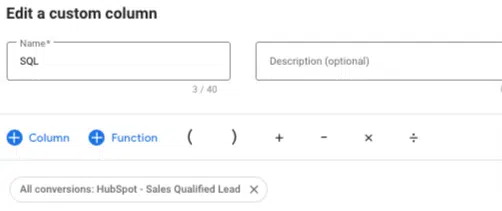
On Google, you can create custom columns that segment specific conversion actions, which makes it easier to realize performance and analyze data.

Google Ads - Custom Columns

Use the All conversions metric, as shown above, and select a specific action to study the data related to it – which is especially useful when you set up additional columns to calculate cost/conversion and conversion rate.

Google’s Custom Columns lets you sort and visualize your data, whether you’re looking at keywords, search queries, demographic data, location data, or other reports inclusive of offline data. You’ll be able to spot the weak/inefficient stages of your purchase journey very quickly.

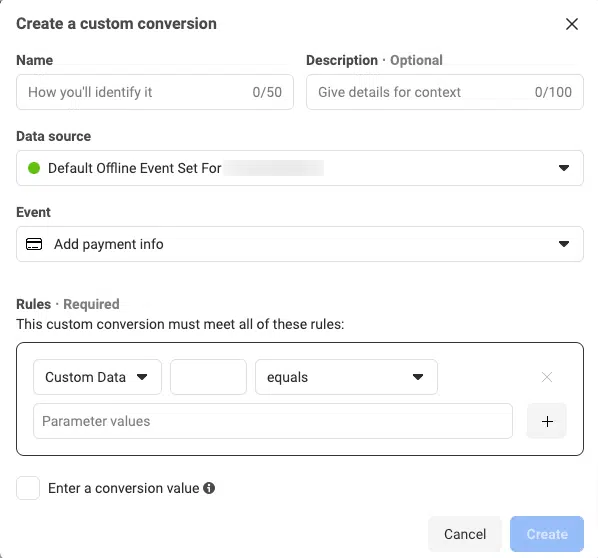
Custom Columns work a little differently on Facebook. To have easy visibility in each of your offline actions on Facebook, you’ll need to either associate each offline action with a unique standard offline event (recommended) or create a custom conversion to avoid aggregated reporting.

Facebook Ads - Custom Columns

Either of these methods will create a built-in column to track these actions separately, along with cost/conversion and value, although you’ll need to create custom columns for conversion rate,

Similar to Google, once you have these views created, you’ll be able to more easily filter, visualize and analyze data.

You’ll actually get more nuance with Facebook, which is now providing detailed reporting that shows which demographics, placements, devices and geos are producing conversions.

Facebook doesn’t (yet) let you optimize for offline conversions, so the main value in using OCT on the platform is the insights you’ll be able to glean from its reporting.

6. Weigh lead gen vs. conversion-focused events on LinkedIn

When incorporating offline conversions for LinkedIn, consider whether you’d like to use lead gen campaigns (on the LinkedIn platform), conversion-focused campaigns that drive traffic to your website, or both.

If you’re running lead gen campaigns, LinkedIn will still focus on the lead gen objective. Still, the platform allows you to measure the number of offline conversions coming from these campaigns, which makes in-platform optimization easier.

If you’re running conversion-focused campaigns, you can incorporate offline conversions and set campaigns to optimize around them.

Either way, setting up OCT may show you in short order which conversion event is providing to be more efficient in producing high-quality leads.

Dig deeper: 5 ways to improve PPC lead quality

7. Roll up your sleeves and get analytical

As with most discussions about analytics, I could go on forever with your options here.

Whether you are or aren’t optimizing for offline actions, analyzing offline data can help uncover interesting insights for your business on just about any platform.

Studying which keywords, ads, campaigns, or creative themes are driving offline conversions helps you uncover the following areas:

  • Where you may be wasting spend (i.e., if you’re driving many leads with no down-funnel movement).
  • Where you should invest more (i.e., in places where you’re driving a few leads of uniformly high quality).
  • Where you should reevaluate your strategy and consider dialing in ad copy to qualify the right users or landing page experience, among other levers.

The above conclusions are a great start, but Google and Facebook provide many other data points, like demographics, geos, and devices, to help you learn more about your advertising campaigns.

Get ahead in PPC with these OCT best practices

There’s a lot to keep track of here, especially if you’re new to the practice of OCT. 

But remember its main benefit: you’re helping the algorithms use your advertising spend to find more valuable customers. 

In a landscape where advertisers have fewer manual controls than before, finding ways to get more out of your money (or your clients’ money) is worth some extra elbow grease.

Dig deeper: 5 best practices for tracking offline conversions in Google Ads


Opinions expressed in this article are those of the guest author and not necessarily Search Engine Land. Staff authors are listed here.


Related stories

New on Search Engine Land

@media screen and (min-width: 800px) { #div-gpt-ad-3191538-7 { display: flex !important; justify-content: center !important; align-items: center !important; min-width:770px; min-height:260px; } } @media screen and (min-width: 1279px) { #div-gpt-ad-3191538-7 { display: flex !important; justify-content: center !important; align-items: center !important; min-width:800px!important; min-height:440px!important; } }

About the author

Laura Schiele

Laura Schiele, Head of Paid Acquisition at Jordan Digital Marketing, has nearly a decade of experience in paid media strategy and execution in both agency and in-house accounts and uses advanced analytics skills to scale growth within efficiency goals across Google, LinkedIn, Facebook, and more. Laura manages a large team of paid media experts remotely from her home in Burlington, VT.

https://searchengineland.com/offline-conversion-tracking-best-practices-testing-strategies-434211





Google Performance Max adds new AI features

Google is set to roll out new AI features in Performance Max for all U.S. advertisers by the end of the year.

Marketers will be able to use the technology to generate text and image assets for campaigns using prompts within a matter of seconds.

PMax will take performance data into consideration when suggesting certain assets for campaigns to help ads perform across all of Google’s inventory and formats.

Why we care. Generative AI can help advertisers deliver fast results, save money and provide the freedom to explore different creative directions instantly.

Leveraging AI. Google explained that its new PMax generative AI features can be used in two ways:

  • Text generation: Agencies and brands can create new headlines, descriptions, and images to test fresh creative ideas alongside their current ones. Additionally, they can employ image editing to experiment with different versions of both existing and generated images.
  • Image generation: For businesses with limited creative resources, you can use a few prompts to bring your creative ideas to reality and swiftly produce high-quality image assets for your campaign. These assets can serve as the basis for your creative concepts, and image editing allows you to effortlessly experiment with new versions to enhance your impact and insights.

Retaining control. Google reassures advertisers that, while using AI to generate creatives, they will retain control. Advertisers can enhance both generated and existing assets with AI-based image editing within Google Ads. This enables teams to experiment with different versions of their main images on a larger scale. For instance, an agency can easily update a client’s images to reflect various winter scenes for the holiday shopping season.

Moving forward. By early 2024, all accounts will be able to edit images using the Google Ads asset library. Shareable previews for all assets, including generated ones, are on the way. This will streamline the creative review process, making it simpler for agencies and in-house marketing teams to share creative ideas, according to Google.

Safety and transparency. Any images produced with generative AI, including PMax, will be clearly marked as AI-generated by Google. The search engine is also using SynthID to watermark its AI-generated images subtly, including standard metadata to show they’re AI-generated.

Combating misuse of generative AI. Google Ads has set up safeguards to stop its systems from dealing with inappropriate or sensitive requests or suggesting ads that break its company policies. Every ad made using generated content is checked against Google’s Ads policies before it goes live. If it doesn’t comply, the company will take necessary actions.


Get the daily newsletter search marketers rely on.


What Google is saying. A Google spokesperson said:

  • “As we bring these generative AI capabilities into Performance Max, we hope you’re empowered to build new ads at a scale greater than ever before across all of Google’s performance inventory and formats, all while bringing your creative vision to life.”
  • “Our goal is to help marketers of all sizes drive greater performance. We want to help you generate and try creative concepts — whether that’s experimenting with new types of images and messaging or building your creatives from scratch.”
  • “You’re always in control and can decide which assets you want to add to your campaign and any images generated will be unique to your business or client. Google AI will never create two identical images.”

Deep dive. Visit the Google Ads Help Center for more information on asset generation in Performance Max and Google’s AI Essentials.


Related stories

New on Search Engine Land

@media screen and (min-width: 800px) { #div-gpt-ad-3191538-7 { display: flex !important; justify-content: center !important; align-items: center !important; min-width:770px; min-height:260px; } } @media screen and (min-width: 1279px) { #div-gpt-ad-3191538-7 { display: flex !important; justify-content: center !important; align-items: center !important; min-width:800px!important; min-height:440px!important; } }

About the author

Nicola Agius

Nicola Agius is Paid Media Editor of Search Engine Land after joining in 2023. She covers paid search, paid social, retail media and more. Prior to this, she was SEO Director at Jungle Creations (2020-2023), overseeing the company’s editorial strategy for multiple websites. She has over 15 years of experience in journalism and has previously worked at OK! Magazine (2010-2014), Mail Online (2014-2015), Mirror (2015-2017), Digital Spy (2017-2018) and The Sun (2018-2020). She also previously teamed up with SEO agency Blue Array to co-author Amazon bestselling book ‘Mastering In-House SEO’.

https://searchengineland.com/google-performance-max-ai-features-434261


Google rolls out new shopping features to boost conversions

Google is rolling out new features to help brands engage with shoppers this holiday season:

  • A new deals hub.
  • New pricing tools.
  • The annual Holiday 100.

Why we care. Marketers should stay current with Google’s new features to expand their avenues for reaching potential customers, broaden their reach, and potentially improve conversions for a better return on investment (ROI).

New deals hub. Google has launched this new spot for exclusive shopping deals. The search engine’s deals hub has been designed to make it easy for consumers to discover discounted products from various websites in one location.

DD Mobile Header Animated 1 2

New pricing features. Google is launching several new pricing capabilities to encourage conversions, including:

  • A dedicated deals page that organizes millions of deals from thousands of brands and retailers in one place.
  • A “resume browsing” card on Chrome on desktop that shows shoppers products they recently viewed on shopping sites.
  • A new Discount tag icon in the the Chrome address bar to see available coupon codes from
    the site that shoppers are visiting.

In addition, merchants will be able to manage where their new deals are shown across Google within the Merchant Center settings.

Price Insights In Chrome 603x600

Annual Holiday 100 list. Google is also launching its annual list of 100 gift ideas and insights based on trending searches throughout the year. Here, consumers will be able to explore shopping trends and gift ideas across categories like Wellness Essentials, Accessories, Home & Garden, Electronics, Travel, Stocking Stuffers, and Toys & Games.


Get the daily newsletter search marketers rely on.


What Google is saying. A Google spokesperson said in a statement:

  • “There are 4x more searches for deals during the holiday season than other times of year.”
  • “With these new and expanded features, we’re making it easier to know what deals are out there — and how they stack up against each other — so consumers can shop their savviest this year.”

Deep dive. Visit Google’s announcement in full for more information.


Related stories

New on Search Engine Land

@media screen and (min-width: 800px) { #div-gpt-ad-3191538-7 { display: flex !important; justify-content: center !important; align-items: center !important; min-width:770px; min-height:260px; } } @media screen and (min-width: 1279px) { #div-gpt-ad-3191538-7 { display: flex !important; justify-content: center !important; align-items: center !important; min-width:800px!important; min-height:440px!important; } }

About the author

Nicola Agius

Nicola Agius is Paid Media Editor of Search Engine Land after joining in 2023. She covers paid search, paid social, retail media and more. Prior to this, she was SEO Director at Jungle Creations (2020-2023), overseeing the company’s editorial strategy for multiple websites. She has over 15 years of experience in journalism and has previously worked at OK! Magazine (2010-2014), Mail Online (2014-2015), Mirror (2015-2017), Digital Spy (2017-2018) and The Sun (2018-2020). She also previously teamed up with SEO agency Blue Array to co-author Amazon bestselling book ‘Mastering In-House SEO’.

https://searchengineland.com/google-new-shopping-features-boost-conversions-434267


Amazon’s ‘secret ad pricing scheme’ revealed in previously redacted documents

The US Federal Trade Commission has published previously redacted information detailing why it’s suing Amazon.

New documents detail a secret algorithm codenamed “Project Nessie”, which allegedly leveraged deceptive practices to boost consumer prices by more than $1 billion – including deliberately making Amazon search worse. Chairman Jeff Bezos reportedly approved this strategy.

Why we care. If Amazon is found guilty of charging brands high fees for showing irrelevant ads that hurt the user experience, advertisers may want to consider moving their ad spend to other platforms for a healthier return on investment and more effective ad placement.

Degrading search results. The Commission claims that Amazon’s service quality declined as it shifted from prioritizing relevant, organic search results on its online storefront (as originally directed by its founder and then-CEO Jeff Bezos), to now featuring pay-to-play advertisements. The organization says Amazon bosses knew this created “harm to users” by making it “almost impossible for high quality,
helpful organic content to win over barely relevant sponsored content.”

Junk Ads. The commission alleges that sellers are now required to pay for advertising to reach Amazon’s large online shopper base, resulting in less relevant search results and higher-priced products for shoppers. These Junk Ads are allegedly referred to as “defects” by Bezos and his staff – despite sellers paying substantial fees for them.

The impact of Junk Ads. An Amazon executive shared examples highlighting how displaying junk ads instead of organic search results negatively impacted the shopping experience during internal discussions, according to the Commission. Some results were clearly unrelated to what the customer was looking for, like an LA Lakers t-shirt ad appearing in a search for “Seahawks t-shirt.” Others were just strange, such as “Buck urine” showing up as the first Sponsored Products slot for “water bottles.”

Rejecting guard rails to protect customers. Amazon allegedly consistently rejected the idea of implementing “guardrails” on ads to protect the customer experience. Senior executives at Amazon emphasized that advertising should not be limited by additional rules, even if there were flaws in this approach.

Bezos ‘prioritizing cash over service’. Bezos reportedly directed his executives to accept more “defect” ads as he wanted to prioritize advertising revenue over improved customer services, according to the Commission. Prioritizing maximum advertising profit had effectively become the guiding principle, despite its shortcomings, according to one senior executive.

Raising prices for consumers. The Commission claims that Amazon’s pay-to-play ecosystem increases the cost for sellers – an expense which is then infiltrated down to consumers. An Amazon executive reportedly said:

  • “[T]his extra cost is likely to be passed down to the customer and result in higher prices for customers.”

‘Penalties’ for competitive Sellers. Additionally, Amazon’s alleged anti-discounting behavior penalizes sellers who offer lower prices on other online platforms with lower fees. As a result, many sellers establish their prices on Amazon, even with higher fees, as the minimum price across the internet.

Consumers pay the price. By inundating its search results with paid ads, Amazon guides shoppers towards pricier products. A 2018 study acknowledged that increased advertising makes it harder for customers to find lower-cost products, and as advertising grows, it significantly affects the overall site’s average sales price (ASP).

Alleged anti-competitive conduct. Amazon reportedly employs an algorithm created by former executive Jeff Wilke to prevent other online stores from lowering prices, aiming to deter price competition and maintain higher prices in the market. This approach involves mimicking competitors’ pricing changes to avoid losing market share. It results in less price competition and potentially higher prices for consumers. According to the commission:

  • “This conduct is meant to deter rivals from attempting to compete on price altogether – competition that could bring lower prices to tens of millions of American households.”

Stopping competition. Amazon introduced Seller Fulfilled Prime (SFP) in 2015 to expand Prime-eligible products for shoppers, boost sales, and support its growth. SFP allowed sellers to offer Prime-eligible products without using Amazon’s Fulfillment by Amazon services. While sellers liked SFP, Amazon closed its enrolment in 2019 because they reportedly saw it was fostering competition and undermining their market dominance.

Ad revenue. Andy Jassy, Amazon CEO, announced last week that the company’s ad revenue had “grown robustly” – up 26% to surpass $12 billion.

What Amazon is saying. Search Engine Land has contacted Amazon for comment. Tim Doyle, Amazon spokesman, told us:

  • “The FTC claims that an old Amazon pricing algorithm called Nessie is an unfair method of competition that led to raised prices for consumers. This grossly mischaracterizes this tool.”
  • “Nessie was used to try to stop our price matching from resulting in unusual outcomes where prices became so low that they were unsustainable. The project ran for a few years on a subset of products, but didn’t work as intended, so we scrapped it several years ago.”

Get the daily newsletter search marketers rely on.


What the Federal Trade Commission is saying: A spokesperson for the department said in its complaint:

  • “In a competitive world, Amazon’s decision to raise prices and degrade services would create an opening for rivals and potential rivals to attract business, gain momentum, and grow. But Amazon has engaged in an unlawful monopolistic strategy to close off that possibility.”
  • “This case is about the illegal course of exclusionary conduct Amazon deploys to block competition, stunt rivals’ growth, and cement its dominance. The elements of this strategy are mutually reinforcing.”
  • “Amazon’s course of conduct has unlawfully entrenched its monopoly position in both relevant markets. According to an industry source, Amazon now captures more sales than the next fifteen largest U.S. online retail firms combined. Yet Amazon has violated the law not by being big, but by how it uses its scale and scope to stifle competition.”

Deep dive. Read the Federal Trade Commission’s revised redacted complaint in full for more information.


Related stories

New on Search Engine Land

@media screen and (min-width: 800px) { #div-gpt-ad-3191538-7 { display: flex !important; justify-content: center !important; align-items: center !important; min-width:770px; min-height:260px; } } @media screen and (min-width: 1279px) { #div-gpt-ad-3191538-7 { display: flex !important; justify-content: center !important; align-items: center !important; min-width:800px!important; min-height:440px!important; } }

About the author

Nicola Agius

Nicola Agius is Paid Media Editor of Search Engine Land after joining in 2023. She covers paid search, paid social, retail media and more. Prior to this, she was SEO Director at Jungle Creations (2020-2023), overseeing the company’s editorial strategy for multiple websites. She has over 15 years of experience in journalism and has previously worked at OK! Magazine (2010-2014), Mail Online (2014-2015), Mirror (2015-2017), Digital Spy (2017-2018) and The Sun (2018-2020). She also previously teamed up with SEO agency Blue Array to co-author Amazon bestselling book ‘Mastering In-House SEO’.

https://searchengineland.com/amazon-secret-pricing-scheme-redacted-documents-434241


Amazon Ads for lead generation: What advertisers need to know

Amazon represents nearly 20% of U.S. search advertising share and $12 billion in ad revenue in Q3 2023 alone. If you sell on Amazon (or could sell on Amazon), odds are there’s an increasing chunk of ad spend being directed there.

While Amazon is synonymous with ecommerce, lead generation verticals are finally getting access to the platform’s second-to-none audience targeting. The campaigns are display-only (for now), but they still represent a huge opportunity for engagement. 

In this article, we’ll delve into setting up Amazon ads, their unique appeal in this privacy-first world, and the significant shifts they bring to ad channel strategies.

Note: This piece was written while the Amazon non-endemic ad channel was in beta. As features emerge, we’ll strive to update this article accordingly.

What are Amazon non-endemic ads?

Amazon’s non-endemic ads grant non-Amazon sellers (i.e., lead gen advertisers) the opportunity to target Amazon’s audience. Currently, this ad channel supports:

  • Travel. 
  • Automotive. 
  • Local services. 
  • Restaurants.
  • Education. 

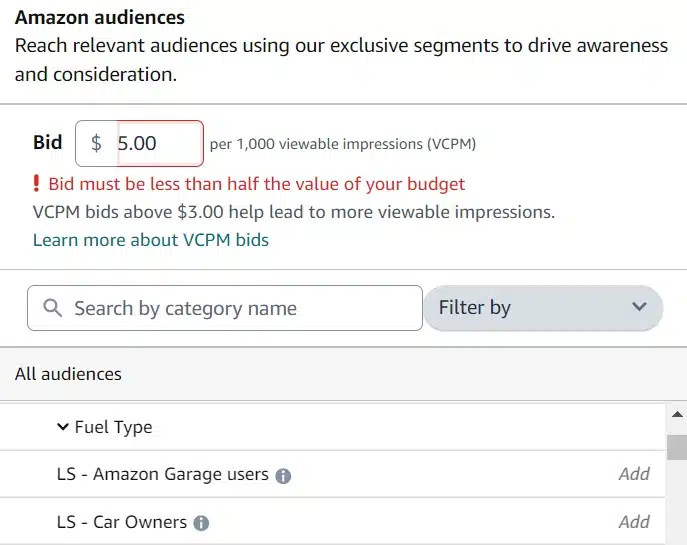
Advertisers define their bids at the audience level, pairing them with creatives set at the campaign level. Bids cannot surpass 50% of your daily budget. Additionally, the audiences you target will function as “or” statements.  

Amazon audiences for non-Amazon sellers

For example, if you target “Users using Amazon Garage” and “Mazda cars,” you’ll set a bid for each. Your campaign will be eligible to target both (rather than users who meet both criteria). 

I strongly suggest only adding multiple audiences to the same ad group if you’re truly OK with all audiences seeing the same creative. Otherwise, you will be served better by splitting them into separate ad groups. 

Amazon provides an audience market share preview. This represents the total number, not a forecast based on your set budget.

Arguably, this is a more informative metric as it gives stakeholders a clearer understanding of the potential market.

Amazon audience market share preview

These ads serve on Amazon and Amazon’s third-party network, which includes Twitch and IMDb. 

Much like Google Display, you have the choice to pay per click or vCPM (cost per thousand impressions). Having tested both, I’d encourage those focused on actual engagement to opt for CPC, while those who are more interested in brand lift to opt for vCPM. 

At the time of writing, location targeting is somewhat restricted. Despite this, you can target individuals, cities, states or entire countries. Notably, this solution is currently exclusive to the U.S.

  • Important: The verification process is mandatory. Amazon has incorporated this as a protective measure for both advertisers and consumers.

Get the daily newsletter search marketers rely on.


Why is this channel interesting?

If you’re a Google-first or paid social lead gen brand, Amazon’s model might seem like it’s coming out of left field. Amazon’s audiences are at the heart of its offering.

As the privacy-first web has forced ad channels to innovate, Amazon has built-in protections to future-proof its audiences.

The platform offers incredibly detailed audience insights without targeting specific individuals, instead focusing on in-depth cohorts. These cohorts can be based on:

  • Viewing specific products.
  • Engaging with Amazon technology/subsidiaries (i.e., Whole Foods)/
  • Purchasing patterns. 

Some verticals get incorrectly flagged by Google Ads and Meta Ads. 

For instance, some advertisers are flagged as financial services merely because they mention no credit required. 

Auto gets hit with this a lot, which is why it’s unsurprising Amazon is choosing to focus on it. 

Additionally, local services that are on the line (like lawyers and wellness centers) have a much easier time than on Google or Meta. This is due to the specific product focus vs. ideas people look for.

The best way to think of this channel is as incremental ad spend and volume. 

If you’ve allocated 10-15% of your budget for experimental campaigns, Amazon ads are an excellent fit. 

If visual content campaigns have been straining your budget, this channel might help regain control and target more deliberately.

Setting up Amazon campaigns

Clearing the verification process is pivotal to the setup. Once that’s achieved, the subsequent steps are pretty straightforward. Ensure you register with your company’s official legal name.

If you are setting up the account on behalf of a client, make sure you build in time for them to enter payment information. Otherwise, the billing profile behaves much the same as on other networks. 

Note that you will not be able to save/start your campaigns until you have billing information added.

The majority of the campaign work is tied to creative and audience selection. 

Creative can either be made through Shutterstock images or by uploading your own. Note that there is limited editing functionality, so you’ll need to add the images in the correct sizes.

Note that part of your creative will be written text. Treat this like a long headline from Google Display (90 characters). 

Once you have your creative, you can pick your audiences. You’ll be able to manually select them, or search. Note that you won’t be able to add them to your campaign and get audience size forecasts if your bid exceeds 50% of your daily budget.

Campaigns can be configured to go after leads (only conversion event is available now), views or clicks. Depending on which you choose will determine whether you’re set up for CPC or vCPM. 

Why non-Amazon sellers should consider Amazon Ads

Amazon has built one of the best audience pools available on the market. While the campaigns are display only for now, they still represent a massive opportunity for those trying to reach more challenging cohorts of people. 

While all verticals they support are interesting, the biggest opportunity will be for:

  • Auto due to the integration with Amazon Garage.
  • Local services that can benefit from product purchase patterns. 

Dig deeper: 5 reasons Amazon Ads is better than Google Ads for ecommerce


Opinions expressed in this article are those of the guest author and not necessarily Search Engine Land. Staff authors are listed here.


Related stories

New on Search Engine Land

@media screen and (min-width: 800px) { #div-gpt-ad-3191538-7 { display: flex !important; justify-content: center !important; align-items: center !important; min-width:770px; min-height:260px; } } @media screen and (min-width: 1279px) { #div-gpt-ad-3191538-7 { display: flex !important; justify-content: center !important; align-items: center !important; min-width:800px!important; min-height:440px!important; } }

About the author

Navah Hopkins

A veteran of the digital marketing industry and “Top 25 PPC Expert,” she began as an SEO in 2008, transitioning to PPC in 2012. She manages the strategy and execution of paid media campaigns, as well as helping brands build relationships with profitable partners and customers. Throughout her career, Navah makes a point to give back and loves sharing lessons learned on the international speaking circuit as well as local universities. She is a frequent contributor to several publications and in 2019, she became a founding member of the Paid Search Association.

https://searchengineland.com/amazon-ads-lead-generation-434142


Google launches new Ad Review Centre for AdSense Ad Manager and AdMob

Google has rolled out a new Ad Review Centre for AdSense, Ad Manager and AdMob.

Five major changes have been added to the platform – all aimed at improving the user experience for advertisers.

Below is a breakdown of what’s new.

New Features:

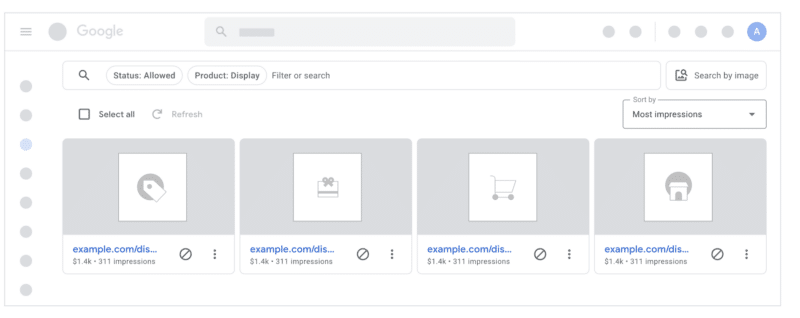
  1. Larger area to view ads. The new Ad Review Centre features an improved layout to maximise the area that you have for viewing ads.
  2. New, easy-to-use filters. Google has added new filters to make it quicker and simpler to select statuses like ‘Allowed’ and ‘Blocked’.
  3. Bulk actions are easier: The search engine has also introduced a prominent ‘Select all’ button so it’s now easier to take actions on pages of ads.
  4. Simplified image search. The new Ad Review Centre has rolled out a more prominent ‘Search by Image’ button and improved the search results. It also now shows image search requirements in the image selection dialogue.
  5. Improved detail view: Lastly, the platform has also updated the detail view by adding an expandable ‘Ad info’ area with more metadata and a new ‘Related ads’ tab to make it quicker to find related ads.

Why we care. These new features have been introduced to enhance the efficiency of ad management, simplifying the advertiser’s tasks and potentially saving them valuable time in the process.

What Google is saying. A Google Ads spokesperson said in a statement:

  • “We’re super excited to introduce the new Ad Review Centre for AdSense, Ad Manager and AdMob.”
  • “We’ve spent a lot of time listening to feedback from publishers and partners alike, and we’ve made several investments to improve the experience for everyone.”

Deep dive. Visit the Ad Review Centre overview for more information.

The post Google launches new Ad Review Centre for AdSense Ad Manager and AdMob appeared first on Search Engine Land.

https://searchengineland.com/google-new-ad-review-centre-adsense-ad-manager-and-admob-434199


Google Ads Editor version 2.5 rolls out with 16 new features

Google has rolled out its Ads Editor version 2.4, with 16 new features and updates for advertisers to utlize to improve the efficiency of their capaigns.

Below is a breakdown of what’s new.

New Features:

  1. App Install Ads deep links. You can add app deep links to App Install Ads using the App URL field, just like with App Engagement Ads.
  2. Automatically created Ad Strength assets. Ad Strength of responsive search ads will take automatically created assets into account to ensure that Ad Strength results are accurate.
  3. Asset source in asset report. The “Asset source” column is now available for channel level, asset group level, and ad level asset reports. This column enables you to differentiate between automatically created assets and advertiser provided assets.
  4. Additional fields in Discovery product ads. Discovery product ads now support the following additional fields:
    • Videos
    • Long headline
    • Path 1
    • Path 2
  5. In-feed video ads. Editor now works with in-feed video ads for Discovery campaigns, combining features of Discovery and responsive display ads.
  6. Text mode for selecting videos. You can now switch between video picker and text mode in the video asset library. Previously, Editor v2.4 used a video picker to select videos for ads. With text mode, you can directly enter video IDs to choose videos.
  7. Campaign level broad match. Editor now supports the broad match keywords campaign setting. When activated for a campaign, only broad match keywords can be used, and any existing non-broad match keywords will be converted to broad match.
  8. Video view campaigns. Editor now supports Video view campaigns, which are Video campaigns with Target CPV bid strategy and multi-format video ads.
  9. Search themes in Performance Max campaigns. Editor now works with search themes in Performance Max campaigns. These themes help you share important insights with Google AI about your customers’ searches and the topics that drive conversions for your business.
  10. Replace Text tool for product groups. You can now use the Replace Text tool to change text across all parts of a product group. For instance, you can quickly correct a consistently misspelled brand name throughout your product groups.
  11. Device targeting in Discovery campaigns. You can now enable mobile carrier targeting, and campaign level device bid adjustments for desktop, mobile, tablet, and TV in Discovery campaigns. For bid adjustments, the only adjustments allowed are 0% and -100%.
  12. Brand settings for Search and PMax campaigns. Editor now supports brand settings for Search and Performance Max campaigns, specifically:
    • Brand restrictions for Search
    • Brand exclusions for Performance Max
  13. Dynamic Search Ads features in PMax. Editor now supports features related to Dynamic Search Ads in Performance Max campaigns, including:
    • Adding Dynamic Search Ads in Performance Max campaigns.
    • Specifying page feeds to use in your Performance Max campaigns.
    • Supporting webpage targeting for asset groups.
  14. Ad format controls for Video reach campaigns. You can now choose the ad formats that show for Video reach campaigns, including:
    • In-stream ads
    • In-feed ads
    • Shorts ads
  15. Demand Gen ad group level location and language. You can now set language and location targeting for Demand Gen campaigns at the ad group level. Remember that you can only choose the targeting level when creating the campaign, and you can’t modify it later.
  16. PMax dynamic Search Ads upgrade tool. You can track each campaign’s migration status in the tool, but keep in mind that Google Ads Editor won’t be accessible until the migration finishes. Once the migration is done, the tool downloads draft campaigns and identifies any failed upgrades. It also highlights errors, like missing assets. After fixing these errors, the recommendations are applied immediately.

Get the daily newsletter search marketers rely on.

<input type="hidden" name="utmMedium" value="“> <input type="hidden" name="utmCampaign" value="“> <input type="hidden" name="utmSource" value="“> <input type="hidden" name="utmContent" value="“> <input type="hidden" name="pageLink" value="“> <input type="hidden" name="ipAddress" value="“>

Processing…Please wait.

function getCookie(cname) { let name = cname + "="; let decodedCookie = decodeURIComponent(document.cookie); let ca = decodedCookie.split(';'); for(let i = 0; i <ca.length; i++) { let c = ca[i]; while (c.charAt(0) == ' ') { c = c.substring(1); } if (c.indexOf(name) == 0) { return c.substring(name.length, c.length); } } return ""; } document.getElementById('munchkinCookieInline').value = getCookie('_mkto_trk');


Why we care. The new features have been designed to give advertisers greater control, simplify the editing process, and enhance the efficiency and overall performance of your Google Ads campaigns.

Deep dive. Read Google's full list of changes for more information.

The post Google Ads Editor version 2.5 rolls out with 16 new features appeared first on Search Engine Land.

https://searchengineland.com/google-ads-editor-2-5-new-features-434167