The Way Your Agency Handles Leads Will Define Success in 2026 [Webinar] via @sejournal, @hethr_campbell

If you’ve made it this far, driving leads is no longer a challenge for you. 

The real issue is what happens after your leads come in. 

Are you seeing more missed calls than usual? 

Worried about not being able to follow up in time and losing the sale?

Poor handoffs of hot leads to your sales team cause leads to go cold, meaning your marketing budget spend is going to waste.

As speed-to-lead becomes a critical factor in conversion, agencies are being asked to prove ROI when clients struggle to respond fast enough. This disconnect is forcing teams to rethink how lead handling fits into campaign performance and long-term client trust.

In this session, Anthony Milia, President of Milia Marketing, and Bailey Beckham Constantino, Senior Partner Marketing Manager at CallRail, share how agencies are using AI to improve: 

  • Closing & conversion rates.
  • Client communication speed.

What You’ll Learn

Why Attend?

This webinar provides practical guidance for agencies looking to protect performance and demonstrate real results. You will gain clear examples and frameworks to improve conversions and client confidence heading into 2026.

Register now to see how AI-driven lead handling is shaping agency success in 2026.

🛑 Can’t make it live? Register anyway, and we’ll send you the on demand recording.

https://www.searchenginejournal.com/the-way-your-agency-handles-leads/565772/


Google Ads Using New AI Model To Catch Fraudulent Advertisers via @sejournal, @martinibuster

Google published a research paper about a new AI model for detecting fraud in the Google Ads system that’s a strong improvement over what they were previously using. What’s interesting is that the research paper, dated December 31, 2025,  says that the new AI is deployed, resulting in an improvement in the detection rate of over 40 percentage points and achieving 99.8% precision on specific policies.

ALF: Advertiser Large Foundation Model

The new AI is called ALF (Advertiser Large Foundation Model), the details of which were published on December 31, 2025. ALF is a multimodal large foundation model that analyzes text, images, and video, together with factors like account age, billing details, and historical performance metrics.

The researchers explain that many of these factors in isolation won’t flag an account as potentially problematic, but that comparing all of these factors together provides a better understanding of advertiser behavior and intent.

They write:

“A core challenge in this ecosystem is to accurately and efficiently understand advertiser intent and behavior. This understanding is critical for several key applications, including matching users with ads and identifying fraud and policy violations.

Addressing this challenge requires a holistic approach, processing diverse data types including structured account information (e.g., account age, billing details), multi-modal ad creative assets (text, images, videos), and landing page content.

For example, an advertiser might have a recently created account, have text and image ads for a well known large brand, and have had a credit card payment declined once. Although each element could exist innocently in isolation, the combination strongly suggests a fraudulent operation.”

The researchers address three challenges that previous systems were unable to overcome:

1. Heterogeneous and High-Dimensional Data
Heterogeneous data refers to the fact that advertiser data comes in multiple formats, not just one type. This includes structured data like account age and billing type and unstructured data like creative assets such as images, text, and video. High-dimensional data refers to the hundreds or thousands of data points associated with each advertiser, causing the mathematical representation of each one to become high-dimensional, which presents challenges for conventional models.

2. Unbounded Sets of Creative Assets
Advertisers could have thousands of creative assets, such as images, and hide one or two malicious ones among thousands of innocent assets. This scenario overwhelmed the previous system.

3. Real-World Reliability and Trustworthiness
The system needs to be able to generate trustworthy confidence scores that a business has malicious intent because a false positive would otherwise affect an innocent advertiser. The system must be expected to work without having to constantly retune it to catch mistakes.

Privacy and Safety

Although ALF analyzes sensitive signals like billing history and account details, the researchers emphasize that the system is designed with strict privacy safeguards. Before the AI processes any data, all personally identifiable information (PII) is stripped away. This ensures that the model identifies risk based on behavioral patterns rather than sensitive personal data.

The Secret Sauce: How It Spots Outliers

The model also uses a technique called “Inter-Sample Attention” to improve its detection skills. Instead of analyzing a single advertiser in a vacuum, ALF looks at “large advertiser batches” to compare their interactions against one another. This allows the AI to learn what normal activity looks like across the entire ecosystem and make it more accurate in spotting suspicious outliers that don’t fit into normal behavior.

Alf Outperforms Production Benchmarks

The researchers explain that their tests show that ALF outperforms a heavily tuned production baseline:

“Our experiments show ALF significantly outperforms a heavily tuned production baseline while also performing strongly on public benchmarks. In production, ALF delivers substantial and simultaneous gains in precision and recall, boosting recall by over 40 percentage points on one critical policy while increasing precision to 99.8% on another.”

This result demonstrates that ALF can deliver measurable gains across multiple evaluation criteria under actual real-world production conditions, rather than just in offline or benchmarked environments.

Elsewhere they mention tradeoffs in speed:

“The effectiveness of this approach was validated against an exceptionally strong production baseline, itself the result of an extensive search across various architectures and hyperparameters, including DNNs, ensembles, GBDTs, and logistic regression with feature cross exploration.

While ALF’s latency is higher due to its larger model size, it remains well within the acceptable range for our production environment and can be further optimized using hardware accelerators. Experiments show ALF significantly outperforms the baseline on key risk detection tasks, a performance lift driven by its unique ability to holistically model content embeddings, which simpler architectures struggled to leverage. This trade-off is justified by its successful deployment, where ALF serves millions of requests daily.”

Latency refers to the amount of time the system takes to produce a response after receiving a request, and the researcher data shows that although ALF increases this response time relative to the baseline, the latency remains acceptable for production use and is already operating at scale while delivering substantially better fraud detection performance.

Improved Fraud Detection

The researchers say that ALF is now deployed to the Google Ads Safety system for identifying advertisers that are violating Google Ads policies. There is no indication that the system is being used elsewhere such as in Search or Google Business Profiles. But they did say that future work could focus on time-based factors (“temporal dynamics”) for catching evolving patterns. They also indicated that it could be useful for audience modeling and creative optimization.

Read the original PDF version of the research paper:

ALF: Advertiser Large Foundation Model for Multi-Modal Advertiser Understanding

Featured Image by Shutterstock/Login

https://www.searchenginejournal.com/google-alf-advertiser-large-foundation-model/564510/


Why Every Google Ads Account Needs To Run Scripts

Most PPC marketers love talking about automation, Smart Bidding, and the latest AI-powered magic Google rolls out. But the truth is that none of those shiny features can save your account from the actual threats: human error, broken websites, overspending budgets, bad conversion data, brand safety violations … the list goes on and on.

That’s where Google Ads scripts come in.

Scripts are the unglamorous robots behind the scenes. They automate grunt work, protect your budget, enforce account hygiene, and alert you before a minor issue becomes a five-figure disaster. They’re free, easy to use, safe to test, and thanks to modern large language models, anyone can build or customize them – even without coding skills!

If you manage Google Ads accounts and you’re not using scripts, you’re working too hard and taking unnecessary risks.

I am here to tell you today: Every account should have Google Ads scripts running. Here’s why:

1. Automate The Grunt Work (The Tedious Tasks That Eat Your Life)

Every PPC professional has a short list of tasks they love … and a very long list of tasks they tolerate out of necessity. Scripts exist for that second list – the repetitive, time-draining, soul-evaporating work that must get done but doesn’t require human creativity.

Let’s look at some examples and include some free scripts.

Budget Pacing

Google has a very relaxed attitude toward daily budgets. One day, it only spends 60% of your daily budget; the next day, it decides to impress you with a 180% increased spend. Great. But not if your client expects a steady pace and has strict budget requirements.

A pacing script brings sanity by monitoring both daily and month‑to‑date spend, projecting where your budget will land by the end of the period, and alerting you whenever Google begins to overspend or drift off pace. It highlights pacing issues early and gives you room to adjust budgets proactively – or even automate those adjustments entirely.

Instead of hoping Google behaves, pacing scripts make sure your budget does.

Fixing Your Product Feeds

Any ecommerce manager will tell you: Feeds break constantly, usually at the worst possible moment (think Black Friday, or Christmas, anyone?).

Instead of leaving you to manually sift through thousands of items, scripts take on the heavy lifting. They can flag missing or invalid GTINs long before they cause disapprovals, detect broken product URLs that quietly tank performance, and surface best-selling items that have suddenly been disapproved.

Scripts also help uncover missing attributes such as sizes or colors (details that matter for relevance), and can even rewrite product titles dynamically using real search term data to improve impression quality and match user intent more effectively.

In short, Google Ads scripts help you maintain a clean, high-performing product feed that supports both Shopping and Performance Max success.

Automated Reporting

Manual reporting is tolerable for one account. Maybe two. Beyond that? No thanks.

The PPC Manager who screams “I love creating client reports” … be sure to tell me when you find one.

Instead of forcing you to manually assemble slides, screenshots, and spreadsheets, scripts take over the entire reporting pipeline. They can automatically export daily, weekly, and monthly performance reports, push the data directly into Google Sheets, and generate clean performance summaries without you lifting a finger. They also build trend dashboards that stay updated in real time, and can even work alongside an LLM to prepare and send a client email that includes the report, along with a short, auto‑generated overview of the key highlights.

You get reporting consistency without sacrificing your weekends.

2. Boost Account Performance & Cut Wasted Spend

Scripts don’t just save time; they actively improve performance. They reveal inefficiencies humans overlook and take action instantly.

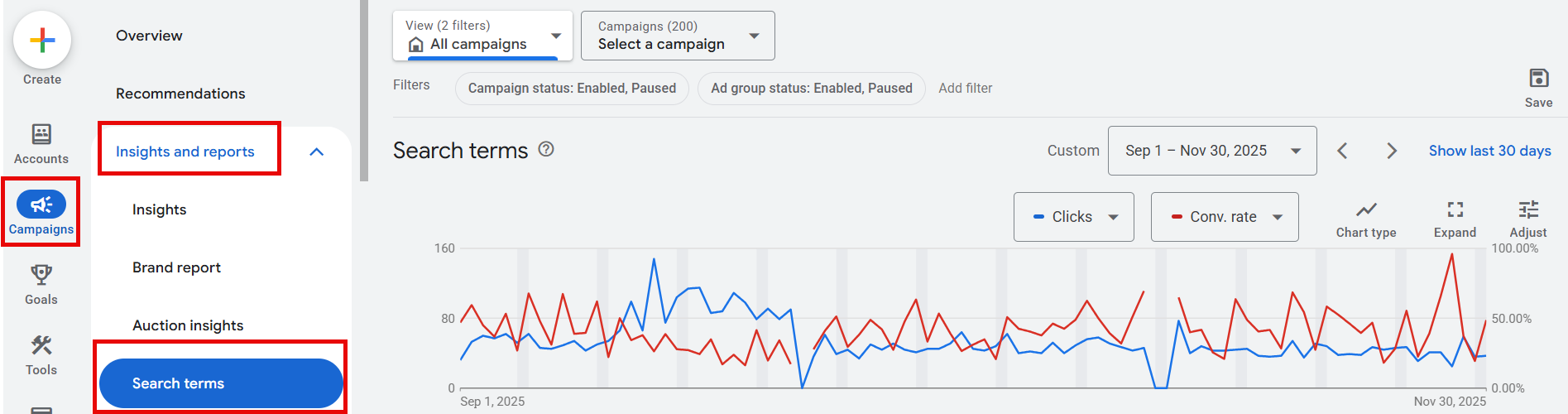
Search Term Analysis & N-Gram Exclusions

N-gram analysis is one of the most underrated PPC tactics. It breaks queries into word chunks so you can identify patterns of waste.

Instead of manually combing through endless search term reports, a script can take over the entire process by pulling all queries, breaking them into n‑grams (small one‑, two‑, or three‑word patterns) and analyzing which of those patterns consistently fail to convert. It then identifies common waste phrases and can even auto‑suggest or apply negative keywords based on what it finds.

If “free,” “DIY,” or “near me” is burning budget across thousands of queries, you’ll know. And you’ll fix it.

Pausing Non-Converting Products in Shopping & PMax

No one has time to manually audit thousands of SKUs.

Scripts can automatically pause products after X spend without conversions, or down-bid poor performers by automatically placing them in a different campaign with higher tROAS and lower max CPC bids.

This is especially critical for PMax, which happily spends on products you wish it wouldn’t.

Excluding Bad Display Placements

Display inventory is unpredictable, and if you’ve ever taken a serious look at your placements report, you already know how messy it can get.

Click fraud, lead fraud, and brand safety violations are, unfortunately, daily realities in the Display ecosystem.

This is exactly where scripts earn their keep. Instead of leaving you to manually sift through questionable placements, a script can automatically detect low-quality inventory and remove it from your campaigns. It can identify and exclude MFA sites, pages associated with CSAM or malware risks, and the endless parade of children’s apps that chew through budget without producing meaningful leads. By continuously filtering out these problem areas, scripts can reduce Display waste anywhere from 20% to 60%, depending on your country and account setup.

Your brand will thank you.

3. Prevent Costly Mistakes Before They Burn Money

Scripts excel at catching issues early – before your budgets vanish or Smart Bidding crashes.

Broken Link Checker

A broken URL instantly tanks performance, and this is exactly where a link-checker script proves invaluable.

Instead of relying on manual checks, the script automatically crawls all your final URLs, scanning them for issues such as 404 errors, unexpected redirects, or pages that load so slowly they might as well be broken. When it detects a problem, it alerts you immediately, long before wasted spend or frustrated users pile up.

You avoid burning budget and annoying potential customers.

Out-Of-Stock Ad Pausing

Buying clicks to products that aren’t available is classic ecommerce pain.

Yes, a well-managed Shopping feed usually prevents this, but for standard Search ads, you’re on your own unless you automate the checks.

This is where scripts step in. They continuously monitor your product pages to detect when items go out of stock, when certain variants become unavailable, or when products are fully discontinued. Once a problem is spotted, the script automatically pauses the affected ads and then resumes them the moment stock returns, protecting both your budget and user experience.

Conversion Tracking Monitor

When conversion tracking breaks, everything breaks – and this is especially true for Google’s Smart Bidding, which becomes completely misaligned the moment your tracking data goes off.

A monitoring script can catch these issues early by watching for sudden drops in conversions, or unexpected spikes caused by duplicates. The script detects missing enhanced conversions, offline conversions that stop importing, or irregularities in how your tags are firing. It flags these problems the moment they appear, so you can intervene before Smart Bidding optimizes itself into chaos.

Trust me: When conversion tracking breaks, you want to be the first to know.

Some Personal Real-Life Examples

If the examples above haven’t convinced you yet, let me share some personal examples of how scripts saved my neck.

Account Down Alerts (The Friday 4:55 PM Nightmare Scenario)

Every PPC manager has lived this.

A real account alert in one of my clients’ accounts: “Your ads have stopped running – You reached your monthly account spend limit. To get your ads running again, increase your ad spend.”

This message arrived late on a Friday. No one was looking at the account at that time. Google didn’t send out an email.

If it weren’t for my script, we wouldn’t have noticed the issue until Monday, and the client would lose out on the weekend revenue.

Scripts can also act as “real-time account-down watchdogs” by alerting you when your ads suddenly stop serving, when billing fails, and payments can’t be processed, or when monthly or campaign-level spend caps are unexpectedly hit. They also catch situations where Google’s suspension policies kick in or when campaigns shut off without warning for any number of reasons. Instead of discovering these issues hours (or days!) later, scripts make sure you know the moment something breaks.

Here’s the thing: Google’s notifications aren’t always timely. Script alerts are.

Change History Monitoring (Protecting Your Account From Humans)

Some of the most dangerous changes made inside a Google Ads account come from people who shouldn’t have access, from automated third-party tools, or simply from changes that happen unnoticed over a weekend by some auto-applied suggestion.

A real-life example illustrates this perfectly: One of my clients installed a third-party tracking tool on a Saturday, and the tool quietly modified the account’s tracking templates. Those seemingly small edits broke conversion tracking entirely. If it had gone unnoticed, OCI would have been misaligned and Smart Bidding would’ve optimized against faulty conversion data, performance would certainly go down the drain. This is exactly the kind of situation scripts help prevent.

My Change History alert script flagged the edit instantly and luckily warned us before real damage was done.

Monitoring changes in your account is not paranoia. This is survival.

No Excuse Not To Use Scripts

There is literally no downside to using scripts, and they’re completely free to run. Scripts are safe because Google’s built-in Preview mode lets you test everything before making actual changes. They’re also incredibly easy to use since most scripts require nothing more than a simple copy-paste to get started. And if you want to customize them, they’re flexible as well; you can modify or extend almost any script with the help of AI in just a few seconds.

Between Google’s documentation, open‑source script libraries, LLMs, and other tools, creating or customizing scripts has never been easier.

Final Takeaway: Scripts Are Now Essential PPC Infrastructure

Running Google Ads without scripts is like flying a plane with half your instruments turned off. Sure, you might land safely – but why take that chance?

If you care about PPC performance, reliability, or sanity, Google Ads scripts aren’t optional. They’re your watchdog, your analyst, your QA system, and your 24/7 protection against angry clients/bosses.

Stop wasting budget. Stop working harder than you need to. Start scripting.

More Resources:


Featured Image: Accogliente Design/Shutterstock

https://www.searchenginejournal.com/why-every-google-ads-account-needs-to-run-scripts/562922/


Google Disputes Report Claiming Ads Are Coming To Gemini In 2026 via @sejournal, @MattGSouthern

Google is publicly pushing back on an Adweek report that claimed the company told advertising clients it plans to bring ads to its Gemini AI chatbot next year.

Dan Taylor, Google’s Vice President of Global Ads, responded directly on X shortly after the story published, calling the report inaccurate and denying any plans to monetize the Gemini app.

The Original Report

Adweek’s Trishla Ostwal reported that Google had informed advertising clients about plans to introduce ads to Gemini. According to the exclusive story, Google representatives held calls with at least two advertising clients indicating that ad placements in Gemini were targeted for a 2026 rollout.

The agency buyers who spoke to Adweek remained anonymous. They said details on ad formats, pricing, and testing were unclear, and that Google had not shared prototypes or technical specifications about how ads would appear in the chatbot.

Notably, the report said this plan would be separate from advertisements in AI Mode, Google’s AI-powered search experience.

Google’s Response

Taylor disputed the claims publicly on X, writing: “This story is based on uninformed, anonymous sources who are making inaccurate claims. There are no ads in the Gemini app and there are no current plans to change that.”

Google’s official AdsLiaison account amplified the denial, reiterating that there are no ads in the Gemini app and no current plans to add them, and pointing out that ads currently appear in AI Overviews in English in the US, with expansion to more English-speaking countries, and are being tested in AI Mode.

Logan Kilpatrick, who works on Google’s Gemini team, responded to Taylor’s post with “thanks for clarifying!!”

Where Google Is Monetizing AI

While the Gemini app itself remains ad-free according to Google, the company is actively monetizing other AI-powered search experiences.

Google began showing ads in AI Overviews earlier this year and has been expanding that program to additional English-speaking countries. The company also continues testing advertisements within AI Mode.

Why This Matters

The question of how AI chatbots will be monetized has become increasingly relevant as these products gain mainstream adoption. Google, OpenAI, and other AI companies face pressure to generate revenue from expensive-to-run conversational AI products.

Just last week, code discovered in ChatGPT’s Android app suggested OpenAI may be building an advertising framework, though the company has not confirmed any plans to introduce ads.

For now, Google maintains that Gemini users won’t see ads in the chatbot app. Whether that position changes as the AI landscape evolves remains to be seen.

https://www.searchenginejournal.com/google-disputes-report-claiming-ads-are-coming-to-gemini-in-2026/562831/


Google Performance Max Adds Waze Ads And Channel Reporting via @sejournal, @MattGSouthern

Google adds Waze ads to Performance Max for store goals in the U.S. and rolls out channel performance reporting, with search partner reporting coming soon.

  • Waze ads are now available in PMax for store goals.
  • Channel performance reporting is rolling out across PMax, with search partner reporting and MCC access coming soon.
  • No extra setup is required.

https://www.searchenginejournal.com/google-performance-max-adds-waze-ads-and-channel-reporting/560167/


Holiday PPC Guide 2025: Advanced Strategies For Smarter Bidding, Budgets & Audiences via @sejournal, @siliconvallaeys

The holiday this year brings more competition than ever, but the shopper journey is also shifting. Consumers begin research weeks earlier, often starting in October, and rely on conversational AI or chatbot-style searches to compare products. Microsoft’s holiday insights show that shopping behavior kicks off in October, with many November and December conversions originating from clicks made weeks earlier.

The funnel is changing shape: wider at the top as more shoppers browse early, but shorter at the bottom as they move quickly once urgency kicks in. The key lesson is that PPC strategy must nurture intent early and be ready for compressed buying cycles when urgency arrives.

Holiday shoppers are beginning earlier, researching longer, and converting later. The funnel is wider than ever, but also shorter once the urgency hits.

Bidding: Winning The Ad Auction

Don’t Fear Expensive Clicks, Fear Unprofitable Ones

Holiday auctions bring higher cost-per-click (CPCs), a natural result of more advertisers competing for limited inventory. Success is not about avoiding CPC increases but maintaining strong return on ad spend (ROAS) and protecting profit margins. Teika Metrics’ Black Friday and Cyber Monday (BFCM) data confirms that CPCs climb seasonally, especially on Black Friday and Cyber Monday.

Smart Bidding goals should be tied to profitability, not just revenue, and portfolio bidding can help balance volatility across campaigns. Microsoft and Google also recommend applying seasonality bid adjustments before major holidays so automation anticipates conversion spikes.

Pro Tip: Set seasonality adjustments 24-48 hours before and after Black Friday and Cyber Monday to help Smart Bidding avoid over- or under-reacting.

Smart Bidding With Guardrails: Train The Machine

Automation is powerful, but it is not infallible. It needs monitoring and guardrails. Trust tROAS or tCPA when conditions are stable, but ensure you have bid limits (through portfolio bidding) and guardrails to alert you about unusual performance during peak periods when volatility spikes.

Real-World Example: Last BFCM, a large retailer client of ours using offline conversion import (OCI) saw conversions suddenly vanish. Optmyzr automation flagged the anomaly right away, revealing a Google-side glitch in OCI reporting. Without that safeguard, Smart Bidding would have assumed conversions had dried up and slashed bids during the most important shopping week of the year. Guardrails prevented disaster.

Key Take: Automation doesn’t eliminate risk; it changes the type of risk. Without guardrails, a data glitch can quietly sabotage your bids. With guardrails, you catch it before it becomes a disaster.

Inventory And Feed-Aware Bidding: Don’t Burn Budget On Out-Of-Stock

Holiday shoppers expect items to be in stock, priced competitively, and available with fast delivery. Automating feed hygiene to pause out-of-stock products is essential. Structuring campaigns by margin allows for different tROAS bids that achieve your target profitability.

Pro Tip: If your price is not competitive, shift spend toward SKUs where you can compete on both offer and margin.

And before you worry about bids, ensure the feed can win the impression. Tighten mobile-friendly titles and human-readable attributes (e.g., use “light brown,” not obscure color names), add seasonal terms like “Black Friday deals,” and fix disapprovals early so you don’t lose visibility when auctions heat up.

Create label taxonomies that align with your profit strategy, like “hero products,” “doorbusters,” “low-margin,” “last-chance,” so you can direct bids and budgets to what actually drives profits.

Case Study Insight: When Amazon briefly exited the Google Ads auction, Optmyzr’s analysis showed other advertisers gained clicks at lower CPCs, but ROAS did not improve. Shoppers were expecting Amazon, and when they did not find it, they often failed to convert with alternatives. Winning an auction is meaningless if the offer and expectations do not align.

Budgeting: Flexibility Wins

Turn On Campaigns Now And Control Delivery With Budgets

I normally recommend pausing campaigns that are not needed, rather than reducing their budgets to a very low amount to keep them active. Advertisers sometimes use budget rather than status to “pause” a campaign because they fear the dreaded learning period that may kick in when a campaign is enabled after an extensive period of inactivity.

Pausing does not erase Google’s memory, since “learning” reflects new auction contexts rather than forgotten history. Longer pauses, however, risk drift as consumer behavior shifts. The bigger issue is that paused campaigns with new ads will not undergo review until they are re-enabled, which can delay serving during crucial moments.

So during BFCM, there are good reasons to use budget rather than status because it keeps campaigns actively learning about shifts in consumer behavior, and it ensures new creatives go into the approval process.

Holiday Pitfall Alert: Do not pause campaigns with unapproved creatives close to Black Friday. Get ads reviewed in advance.

Intraday Pacing: Don’t Get Fooled By Conversion Lag

Static daily budgets can be damaging in volatile holiday conditions. Dynamic pacing using scripts or APIs is a better approach, especially when aligned with key milestones like Black Friday, Cyber Monday, shipping cutoffs, and last-minute windows.

On Black Friday and Cyber Monday, pacing must be monitored throughout the day. Hourly reporting in Google Ads makes this possible, but advertisers must also account for conversion lag.

Looking at last year’s data, conversions appear smooth by the hour because lag has already resolved. On the day, however, conversions will often appear behind pace even when clicks and impressions are aligned. Saving hourly reports as the day unfolds will provide a baseline for analyzing lag in future years.

Pro Tip: Do not confuse lag with poor performance. Cutting budgets midday can mean missing the evening conversion surge.

Lock in your total Q4 budget and earmark a supplemental pool for Black Friday, Cyber Monday, and the biggest shopping weekends. Expect higher CPCs and raise day caps accordingly so campaigns don’t exhaust at noon. Finally, audit your automations – safety scripts that pause or cap spend are helpful, but if they fire at the wrong time during BFCM, they can suppress profitable traffic.

Targeting

Audience Signals Are Your Multiplier

First-party data goes beyond CRM lists. It includes your business’s unit economics, such as pricing and profit margins, which can guide automation toward profitability rather than vanity ROAS.

Key Take: First-party data is not only about who your customers are, but also includes all your business data, including how you price. Leverage this to guide when you run ads and how much you bid.

Microsoft has a unique feature that Google doesn’t have: impression-based remarketing, which allows advertisers to retarget users who saw their ads but did not click. This expands reach to pre-qualified audiences and often reduces costs. Combining CRM imports, impression-based remarketing, and profit-based bidding provides automation with richer signals.

Keywords And Keywordless Targeting

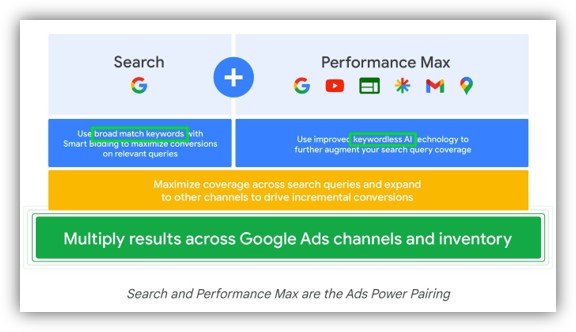
With match types getting broader every year, and the growth in keywordless campaign types like Performance Max, advertiser control over queries is eroding. This trend will continue as users shift from keyword searches to prompting, and Google eventually replaces synthetic keywords with a more precise targeting system.

Performance Max is performing well, and we shared details about what trends are working best in our PMax study. AI Max, on the other hand, doesn’t feel quite as ready for primetime, though there is unverified speculation that a September 2025 algorithm update improved performance significantly. Test AI Max using Experiments before setting it loose on your BFCM traffic this year.

Creative: Stand Out In Crowded Auctions

Ads That Win Auctions: CTR Beats Clever Copy

Auctions for bottom-of-the-funnel search ads reward click-through rate (CTR) and predicted CTR, not witty copy. Coverage and clarity matter most. Ad headlines, descriptions, and assets (formerly ad extensions) should be updated with current promotions, shipping cutoffs, and urgency messaging.

However, with 15 potential headlines that Google can choose from for your ad, controlling what is most important to include in messaging requires pinning during BFCM.

Optmyzr’s soon-to-be-published 2025 Responsive Search Ads (RSA) study shows that advertisers who pin multiple variations to the same position achieve better ROAS. Pinning one element restricts the machine too much, while no pinning gives it too much freedom. Multi-asset pinning balances human guidance with algorithmic optimization. Google’s RSA guidance confirms that variation improves performance.

Pro Tip: Plan RSAs in waves and use multi-asset pinning to balance brand strategy with system optimization.

Keep It Fresh: Creative Burnout Happens Faster In Q4

Shoppers tire quickly of repetitive ads, especially in Demand Gen campaigns. But even search ads should be kept fresh, and ads should be staged in waves to appeal to Black Friday and Cyber Monday shoppers, and reflect shipping cutoffs, last-minute gifts, and post-holiday clearance as the holidays approach.

Pre-loading assets ensures they are reviewed and ready to serve. Countdown customizers and promotion extensions can reinforce urgency, but messaging must stay consistent with site offers to maintain trust.

Pro Tip: Schedule creative waves in advance. Do not wait until Cyber Monday morning to swap assets.

Competitive Insights

Competitor Surge Alerts: Auction Insights As A Warning

Auction Insights is a powerful diagnostic tool. Google’s Auction Insights report reveals shifts in competitor behavior, such as impression share surges. Monitoring these trends in November helps advertisers react quickly, whether by increasing brand defense or positioning directly against rivals.

Auction Insights is your battlefield radar for Q4. Ignore it, and you could be blindsided.

Post-Holiday: Turn December Buyers Into January Fans

January Is Your PPC Lab: Retain, Don’t Just Acquire

Holiday buyers are the most expensive to acquire but can become the most profitable if nurtured in Q1. Segment holiday-only versus year-round buyers using customer relationship management (CRM) and ad data, then run loyalty and cross-sell campaigns. Feeding learnings back into bidding and audience systems ensures automation improves over time.

Holiday buyers are the most expensive you will ever acquire. Retarget them in January to make them more profitable.

Final Thoughts

Holiday PPC is the ultimate stress test. CPC inflation, automation, budgets, audiences, creative, competition, and fraud all converge at once. Winning requires guiding automation with better inputs, protecting profitability with strong signals, and owning your message at a time when keyword precision is fading. Prepare early, pace carefully, and place guardrails everywhere they matter most.

Checklist Summary

  • Expect CPC inflation in Q4. Optimize for profit and ROAS, not cheap clicks.
  • Set seasonality bid adjustments and add guardrails so Smart Bidding doesn’t misfire on BFCM.
  • Treat budgets as fluid with intraday pacing. Don’t confuse conversion lag with underperformance.
  • Use first-party data beyond CRM lists. Profit margins and pricing strategy are key signals.
  • Microsoft’s impression-based remarketing lets you retarget high-intent searchers who never clicked.
  • Make creative your control lever in a PMax and broad-match world. Use multi-asset RSA pinning.
  • Monitor Auction Insights, watch for fraud/MFA, and turn expensive Q4 buyers into Q1 loyalists.

More Resources:


Featured Image: Roman Samborskyi/Shutterstock

https://www.searchenginejournal.com/holiday-ppc-guide-advanced-strategies/557692/


PPC Trends 2026: AI, Automation, And The Fight For Visibility via @sejournal, @MattGSouthern

If you manage PPC campaigns, you’ve seen it. Platforms are making more decisions without asking you first.

Campaign types keep consolidating into AI-first formats like Performance Max and Demand Gen. The granular controls you used to rely on keep disappearing or moving behind automation.

A year ago, Performance Max still felt experimental. Now it’s often the default option, with AI generating ad copy, and automation selecting audiences based on signals you can’t always see. When performance drops, you have fewer levers to pull and less visibility into what’s actually happening.

It can be disorienting to some, and the trend isn’t reversing.

We asked PPC professionals how they’re navigating this shift. Most aren’t pessimistic about AI-first campaigns. Many have found ways to work with platform automation without surrendering the strategic thinking that drives results.

You can use AI tools without losing your expertise in the process.

4 Key Findings From Industry Professionals

We surveyed professionals from agency, platform, and consultancy backgrounds for this year’s report. Clear patterns emerged in how they’re adapting to AI-first campaign management.

1. AI Tools Save Time But Still Need Babysitting

Most professionals now use AI daily for tasks like keyword research and ad copy variations. The tools are good enough to integrate into workflows.

But there’s a catch. Over half identify “inaccurate, unreliable, or inconsistent output quality” as the biggest limitation. AI accelerates production, but it hasn’t replaced the need for human oversight.

One contributor noted that in regulated industries where legal review is required, AI outputs often can’t be used without heavy editing.

The professionals who get results are the ones treating AI as an assistant, not a replacement.

2. “Control” Means Something Different Now

You can’t control exact search terms the way you used to. You can’t set precise bids on individual keywords or force campaigns to follow rigid parameters.

Several contributors argue you still have meaningful control, it just operates differently than before. One Google Ads coach compared it to giving a teenager the destination address and trusting they can navigate there, even if they take a few wrong turns along the way.

The new version of control means setting clear business objectives and providing high-quality conversion data. If your conversion tracking is messy or incomplete, AI will optimize toward the wrong goals.

3. Measurement Got More Honest (And More Uncomfortable)

Cookie deprecation was canceled in Chrome, but measurement challenges haven’t disappeared. What’s changed is how practitioners talk about attribution.

One agency founder admitted that focusing too heavily on perfect attribution might have been a strategic mistake. “Your marketing strategy should hold up even if granular tracking disappears.”

Other contributors emphasize that first-party data collection with proper consent is now essential for survival, especially in lead generation models.

Revenue remains the most reliable source of truth when platform-reported metrics conflict.

The most durable measurement approach involves choosing a limited set of reliable lenses rather than attempting to reconcile data from every available source.

4. Platform-Generated Creative Performs Better Than You’d Think

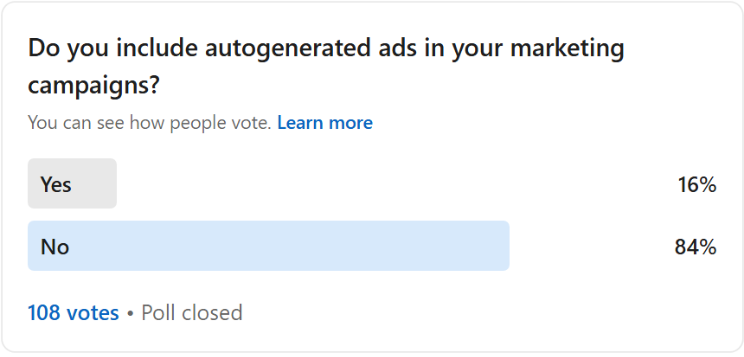
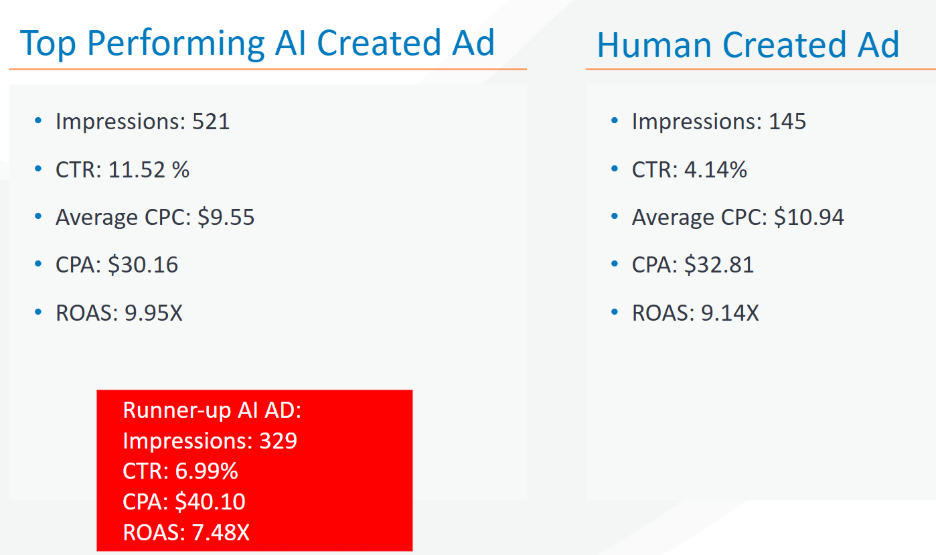
This finding surprises people. Several contributors report that AI-generated creative assets can perform competitively with human-created versions when they’re prompted effectively.

But “when prompted effectively” is doing substantial work in that sentence.

Quality depends heavily on how well you prompt the tools and how much brand context you provide. The tools still struggle with maintaining consistent brand voice and meeting legal compliance requirements in regulated industries.

Visual generation continues to need improvement, though contributors note it’s getting better for ecommerce product photography.

Most teams have settled on a hybrid workflow where AI handles idea generation and creates variations while humans manage final approval and anything requiring nuanced brand voice.

What Makes This Report Different

Previous years focused on specific platform changes or new features. This year’s questions dig into strategy.

How do you maintain visibility when platforms reduce transparency? What measurement techniques still work when attribution is murky? How do you adapt creative workflows when AI can generate assets on demand?

The contributors include:

  • Brooke Osmundson, Director of Growth Marketing, Smith Micro Software.
  • Gil Gildner, Agency Co-Founder, Discosloth.
  • Navah Hopkins, Product Liaison, Microsoft.
  • Jonathan Kagan, Director of Search & Media Strategy, Amsive.
  • Mike Ryan, Head of Ecommerce Insights, Smarter Ecommerce.
  • Jyll Saskin Gales, Google Ads Coach, Inside Google Ads.

The answers reflect an industry adapting in real time. Some contributors have embraced AI-first workflows fully, while others remain cautious about surrendering too much control. All are experimenting constantly because the platforms aren’t slowing down.

Why Download This Now

If you’re managing campaigns, you’re already wrestling with these challenges. Are you approaching them with a clear strategy, or just reacting to each platform change as it happens?

This report will show you how experienced professionals at agencies, platforms, and consultancies are thinking through the same problems you’re facing right now.

Download PPC Trends 2026 to see how industry professionals are adapting their strategies, maintaining accountability in automated campaigns, and finding ways to make AI-first advertising work without losing the strategic expertise that separates successful campaigns from mediocre ones.

PPC Trends 2026


Featured Image: Paulo Bobita/Search Engine Journal

https://www.searchenginejournal.com/ppc-trends-2026-ai-automation-and-the-fight-for-visibility/558870/


Google Redesigns How Search Ads Are Labeled via @sejournal, @brookeosmundson

Google is rolling out a change to how ads appear in Search, and this time it’s focused on clarity and user control.

Text ads will now be grouped under a single “Sponsored results” label that stays visible as you scroll. In addition, a new “Hide sponsored results” option lets users collapse the entire ad block with one click.

This update doesn’t change how ads are served or ranked, but it does change how they’re presented to users. Even small interface updates can influence how people interact with search results, so advertisers should pay attention to how this evolves over time.

A Look at the New Sponsored Label on Google Search

Previously, each text ad showed a small “Sponsored” label at the top of each ad.

Now, Google is grouping all text ads together with a single header that clearly signals where the sponsored section begins and ends. That label remains visible even if the user scrolls down the page.

While doing a Search in the wild, the new format appeared, even with just one ad:

New 'Sponsored Result' layout on Google Ads search result.Screenshot taken by author

Google is also extending this approach to other formats. For example, Shopping placements will use a “Sponsored products” label.

On results that include AI Overviews, the sponsored section can appear above or below the AI-generated content, but it will still follow the same grouping and labeling format.

The most noticeable addition is the ability to collapse all sponsored results. Not every user will hide the section, but the option itself introduces a new behavior that didn’t exist before.

Google noted that these updates are rolling out globally to users on both desktop and mobile

Why This Matters to Advertisers

From a performance perspective, the underlying mechanics are unchanged. Bidding, Quality Score, ranking, and the maximum number of ads (up to four in a block) all remain the same.

That said, grouping ads together can influence how users perceive them.

When ads are visually separated from organic listings, the difference between the two becomes more intentional.

Users who skim results may pause and decide whether to interact with the sponsored block at all. For lower-intent searches, this could result in fewer casual clicks. For higher-intent queries, the impact may be minimal.

This puts more pressure on the quality of the ad itself. Clear value propositions, relevant messaging, and strong alignment with search intent will matter even more.

Ranking at the top will still be valuable, but visibility alone won’t guarantee engagement if users are more aware of what they’re clicking.

While the update is primarily visual, advertisers should keep an eye on performance once it fully rolls out across mobile and desktop. A few areas to watch include:

  • Changes in CTR or Impression-to-Click patterns
  • Differences in engagement based on query intent
  • Any vertical-specific impact where users are more likely to hide ads

Early shifts may be small, but trends could emerge over time as users adjust to the new layout.

Why Did Google Make This Change?

Google notes that these changes were driven by user testing and feedback. The goal is to create a more consistent and transparent experience across all ad formats. It also reflects increasing expectations around clarity in search results as AI-generated content becomes more common.

By making it easier to recognize sponsored content, Google is signaling that paid placements can be both visible and trustworthy, as long as they’re clearly labeled.

This approach may help maintain long-term confidence in search results as the interface continues to evolve.

Moving Towards a More Transparent SERP

Google’s update reinforces a larger shift: how ads appear on the page is becoming just as important as where they appear.

The auction logic and placement limits remain the same, but the experience around ads is becoming more clearly defined for users.

As presentation evolves, it’s reasonable to expect user behavior to follow. Some people will ignore the change. Others may start to be more selective about when they engage with ads.

This puts more weight on relevance, clarity, and value in the message itself.

Advertisers don’t need to overhaul their campaign structure or bidding strategy because of this change. Instead, the focus should be on tightening creative quality, aligning closely with intent, and paying attention to early performance shifts.

Even if the impact is subtle at first, updates like this often lead to gradual behavior changes over time.

Search has always been a balance between visibility and trust. Advertisers who adapt early and continue to prioritize useful, high-quality messaging will be in the best position to maintain performance as the SERP continues to evolve.

https://www.searchenginejournal.com/google-redesigns-how-search-ads-are-labeled/558173/


Get Your Ad Campaigns Ready Before Black Friday via @sejournal, @brookeosmundson

For most PPC marketers, the weeks leading up to Black Friday aren’t just doing busy work. They’re loaded with decisions, deadlines, and last-minute requests.

If you’re managing Google Ads, Microsoft Ads, or any ad platform in between, this time of year can either be a strong finish or a missed opportunity.

The difference usually comes down to planning.

If you’re looking to approach Black Friday with a more structured and thoughtful strategy, keep reading. This article focuses on what you can control (like budgets, campaign builds, and feed readiness) and includes specific examples across platforms to help you avoid common pitfalls.

Let’s start with what to revisit from last year.

Take The Time To Audit Last Year’s Wins And Pitfalls

Before building anything new, it’s worth taking a closer look at last year’s performance.

The strategy here isn’t about copying old campaigns; it’s about understanding where they overdelivered, where they stalled out, and how the landscape might have changed since then.

In Google Ads, start with the attribution reports. Look beyond just last-click conversions and examine how various campaign types contributed throughout the funnel.

If Performance Max campaigns played more of an assist role, that should inform how you structure them this year.

If Standard Shopping capped out early or certain product categories were underrepresented, those are fixable issues.

You can also use auction insights to see when competitors ramped up spend, or whether you lost impression share due to budget or rank. These reports offer useful context if you’re planning to scale this year but didn’t last year.

If you’re using Microsoft Ads, review audience and device performance to see where volume shifted.

Holiday behavior isn’t always the same across platforms. What worked well on Google may not have translated to Bing or Meta, and vice versa.

The goal is to identify specific opportunities, not just assume last year’s playbook will hold up.

Build Early, Even If You’re Not Launching Yet

There’s value in building out your campaigns well in advance of Black Friday, even if you don’t plan to activate them until closer to the sale.

Whether you’re launching new campaigns or just updating ads in existing ones, getting ahead on structure gives you time to QA creative, troubleshoot disapprovals, and coordinate across teams.

If you’re planning to reuse existing campaigns, you can still stay organized using labels. For example:

  • Apply labels to new Responsive Search Ads (RSAs) that include holiday-specific copy or promotions.
  • Label sitelinks, callouts, or promo assets that reference Black Friday offers.
  • Tag ad groups or asset groups that are tied to limited-time sale messaging.

Using a clear naming convention makes it easier to filter, review, and schedule changes across campaigns without confusion.

If you want to automate this even further, you can create automated rules based on labels.

For example, you can set a rule to enable all ads with your Black Friday label at 12:01 a.m. on November 28. You can also set up rules to pause those same ads at the end of the promotion, reducing the chance that outdated messaging stays live.

You’d also want to create an automated rule to run to pause all non-Black Friday ads at the same time. This ensures that only your promo ads are running during Black Friday season.

If you end up creating Black Friday-specific campaigns, you can easily set start and end dates on them to ensure they only run during the allotted time.

While you don’t have complete scheduling control at the ad or asset level across platforms, you can use a combination of labels, automated rules, or campaign/ad group start and end dates. These give you enough flexibility to manage most scenarios without scrambling the morning of your launch.

If you’re running Meta Ads, be sure to upload your Black Friday creative and audience setups well in advance. Platforms are slower to review and approve ads during peak periods, and early delivery data will help the algorithm optimize once you start increasing budgets.

Give Smart Bidding Better Direction

Most advertisers are using some sort of Smart Bidding for their campaigns, especially around Black Friday. That doesn’t mean you should take a hands-off approach, though.

If you’re using Google Ads, consider seasonality adjustments if you’re planning for a short-term sale or expect a sudden fluctuation in conversion rates. These adjustments tell Google to expect better-than-usual performance during a specific window, and can help avoid underspending during flash sales.

Seasonality adjustments are currently available for these campaign types that use either a Target ROAS or Target CPA bid strategy:

  • Search.
  • Shopping.
  • Display.

If you’re using seasonality adjustments for conversion rates, then you can choose between these campaign types:

  • Search.
  • Display.
  • Shopping.
  • Performance Max.
  • App (in beta).

That said, they’re not suited for every situation. If you’re running a longer sale or have limited historical volume, the adjustment could cause more volatility than good.

For broader holiday performance, make sure your campaigns have enough data to support Smart Bidding decisions. Review the “Bid Strategy Report” and watch for signs of limited learning or constrained budgets.

Pushing into a critical promo window without stabilized bidding can lead to inefficient spend, especially with newer campaigns.

Check Your Product Feed Before It Becomes A Problem

It’s easy to focus on campaign settings and forget that your product feed is powering everything from standard Shopping campaigns to Performance Max. If it’s not accurate or timely, your best offers might not show up correctly.

In Google Merchant Center, navigate to the Diagnostics tab and resolve any disapprovals or mismatched pricing issues. These often spike around holidays when sale prices don’t sync correctly or out-of-stock products remain active.

Make sure your feed includes items like:

  • Up-to-date GTINs and product identifiers.
  • Attributes like ‘sale_price’ and ‘sale_price_effective_date’ for promotions.
  • High-quality images that meet platform guidelines.
  • Clear shipping and availability details.

If you’re running Performance Max campaigns, review the Listing Groups report to ensure your most valuable products are getting served. Many advertisers find that certain SKUs get minimal impressions due to budget spread or structural issues.

This is also a good time to upload holiday-themed creative assets, including lifestyle images and product videos. These can improve performance in placements like YouTube and Discover, which tend to ramp during PMax campaigns in Q4.

The more you control the feed and asset side, the less you have to worry about automation making subpar choices when competition is highest.

Expect Things To Break, And Plan Around That

Black Friday campaigns don’t always go according to plan.

Promo pages fail to update. Budgets cap out early. Tracking drops off mid-day. It’s worth thinking through what could go wrong now, while you still have time to build a backup plan.

Start with some of the basics in campaign planning:

  • Double-check conversion actions in Google Ads and Google Analytics 4. Make sure no duplicate events are being counted, and key actions like purchases, add-to-cart, and email sign-ups are being tracked.
  • Test final URLs on mobile and desktop. If you’re using promo pages, confirm they’re live and loading quickly. A slow checkout experience during Black Friday Cyber Monday (BFCM) will almost always tank performance.
  • Pre-schedule creative updates where possible. You don’t want to be manually swapping sitelinks or headlines in the middle of a surge.
  • Double-check your automated rules. If you’re using rules to enable sale ads and pausing evergreen ads, make sure to have the platform(s) email you with any changes so you can confirm with confidence the right ads are being shown at the right time.
  • Set up alerts for unusual activities. If campaigns showcase a sudden ROAS drop, zero conversions, or unusual spend, you’ll want to be alerted in real-time. Even something as simple as a budget cap hitting before 10 a.m. can throw off the day if it goes unnoticed.

The more you can troubleshoot before launch week, the fewer fires you’ll need to put out when things are moving fast.

Don’t Shut Down Campaigns The Minute Cyber Monday Ends

It’s common for brands to ramp hard through Cyber Monday, then pause everything until January. But, many shoppers are still active well into December, especially those looking for last-minute gifts or deals that weren’t available earlier.

Based on previous personal experience, Google Ads auction data may show that competition could dip after Cyber Monday and shopping intent doesn’t disappear. Conversion rates often stay steady through the first two weeks of December, particularly for brands with fast shipping or digital products.

Rather than winding down completely, consider updating your messaging to reflect the urgency. Swap out “Black Friday” language for “Still Time to Save” or “Guaranteed Delivery Before Christmas.” Countdown ads and shipping deadline assets work well here.

If you’re running remarketing campaigns, exclude recent purchasers and focus on users who visited key pages but didn’t convert. These audiences tend to convert at lower cost-per-acquisition (CPA) during post-Cyber sales, especially if you’ve got gift cards or bundled offers to promote.

December also gives you a chance to build audience pools for Q1. Visitors from BFCM campaigns can be remarketed to in January for loyalty or cross-sell efforts. Just make sure your campaign structure allows for clean audience segmentation.

Planning Ahead Is Still Your Best Defense

Black Friday doesn’t reward last-minute execution. It rewards structure, preparation, and proactive troubleshooting.

The platforms are going to do what they do. Smart Bidding will make the best decisions based on your inputs. Asset groups will mix and match in ways you can’t fully control.

But, what you can control, like budgets, tracking, and product feed health, still has a major impact on your campaign performance.

Getting your campaigns in order early gives you the breathing room to monitor performance, scale what’s working, and catch issues before they snowball.

And when something inevitably breaks or shifts unexpectedly, you’ll already have a plan in place.

More Resources:


Featured Image: Roman Samborskyi/Shutterstock

https://www.searchenginejournal.com/get-your-ad-campaigns-ready-before-black-friday/556374/


How AI is Helping Brands Convert More Customers [Webinar] via @sejournal, @hethr_campbell

Turn insights into smarter conversions and higher ROI.

AI is changing how customers convert. Are your landing pages and CRO strategies keeping up? 

Each missed lead is lost revenue. 

Relying on traditional tactics is no longer enough.

Join Laura Beussman, CMO of CallRail, and Ryan Johnson, CPO of CallRail, for a live webinar where you’ll learn how top marketing leaders are using AI to prioritize leads, optimize funnels, and drive measurable growth.

What You’ll Learn

  • How to automatically prioritize and convert your best leads.
  • How to spot funnel drop-off points that are costing revenue.
  • CRO tactics to make your marketing funnel work smarter, not harder.
  • How to identify the exact messaging that boosts conversions and ROI.

Why Attend

This webinar will give you the tools to capture more leads, surface actionable insights from interactions, remove friction slowing conversions, and automate your CRO playbook for ongoing growth.

Register now to gain actionable strategies for faster, smarter conversions with AI.

🛑 Can’t attend live? Register anyway, and we’ll send you the full recording.

https://www.searchenginejournal.com/ai-helping-brands-convert-more-customers/557455/