Is your brand guilty of greenwashing in your Google Ads?

Greenwashing happens when a company tries to trick customers into thinking they’re environmentally friendly to attract their business. It can happen on purpose or by mistake due to poor planning and lack of awareness.

Many big brands, from Nestle to Starbucks, have been caught greenwashing. It’s a prevalent problem within some industries, such as fast fashion.

This article explores the risks and consequences of greenwashing, plus tips to ensure your Google Ads don’t mislead consumers into thinking your brand is environmentally friendly.

Example of a greenwashing ad from Coca-Cola

Why brands should watch out for greenwashing in marketing

Ensure your organization isn’t found to be greenwashing in any of its marketing materials – including making claims on your website or other forms of marketing such as Google Ads.

Greenwashing can anger consumers and bring unwanted bad PR and a potential fine or penalization.

In the UK, a recently passed bill means that the Competition and Markets Authority (CMA) will have the power to impose fines of up to 10% of annual global turnover. 

Meanwhile, in the U.S., the Federal Trade Commission (FTC) has published its own Green Guides that cover the topic in more detail. 

While these aren’t enforceable laws, that doesn’t mean your organization will be safe from prosecution outside of the U.S.

So, if you’re managing the Google Ads on behalf of a client or are working in-house, you’ll want to make sure your Google Ads aren’t greenwashing, too.

Greenwashing claim with U.S.-based organization upheld in the UK 

In the UK there was a recent case of greenwashing found involving 4AIR, an aviation sustainability organization based in Cleveland, Ohio. 

What was interesting here was that the claim was upheld by the Advertising Standards Authority (ASA) which regulates advertising in the UK, so the ad was viewed outside of the U.S..

The ad, in this case, was targeting or visible to users in the UK, so the ASA was able to intervene.

The ruling was targeted around the wording used in the Google Ad, which included statements like: 

  • “Eco-Friendly Aviation – Future of Sustainable Aviation”
  • “Learn How To Turn Flying Into A Force For Good With A 4AIR Rating. Industry-Leading Standard For Sustainability In Private Aviation. Sustainability. Aviation Industry”
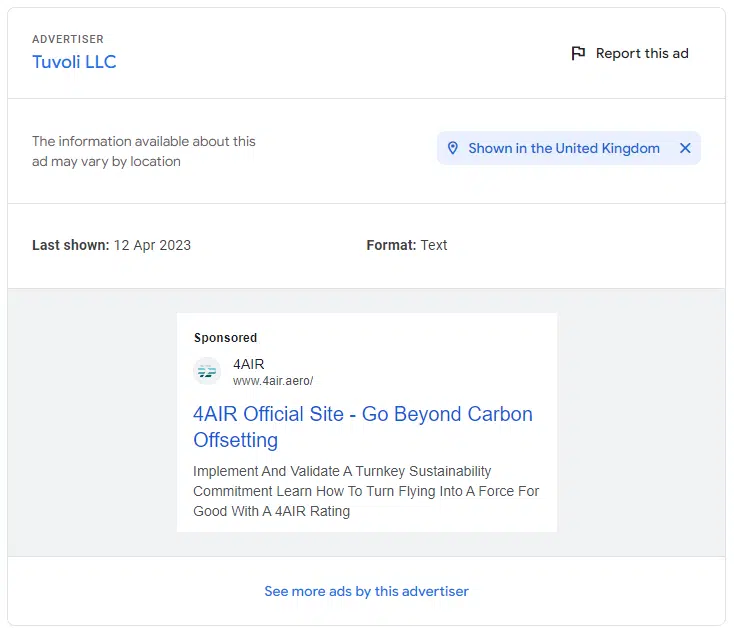
4AIR Google Ad
Screenshot taken from Google’s Ad Transparency Library

The ad itself was picked up by the ASA’s Active Ad Monitoring system, which “uses AI to proactively search for online ads that might break the rules.” 

This means that unsubstantiated claims, or exaggerated environmental claims as is the case here, can easily be detected by the ASA. 

Simply put, they don’t have to wait for someone to make a complaint about a particular ad, as was the case previously.

In this instance, and luckily for 4AIR, the outcome was that they simply must not make similar claims that can’t be substantiated again in the future.


Get the daily newsletter search marketers rely on.


Risks of using Google’s Dynamic Search Ads feature

The Dynamic Search Ads feature will use content found on a site to target ads, select keywords and potentially create ad headlines. 

According to the Google Transparency Library, 4AIR used some Dynamic Search Ads.

Many brands, particularly in ecommerce, might use Dynamic Search Ads within their Google Ads account.

They’re particularly handy for sites with a big inventory of products that often update, requiring constant management of the ads.

If used on a site that may be making unsubstantiated environmental claims or greenwashing, this may mean Google is inadvertently greenwashing on your behalf. 

This is why keeping a close eye on your ads account is always important, especially if you opt in to use Dynamic Search Ads. 

If you navigate to the Search terms report under Dynamic Ad Targets, you should see the terms Google has been using within your campaign.
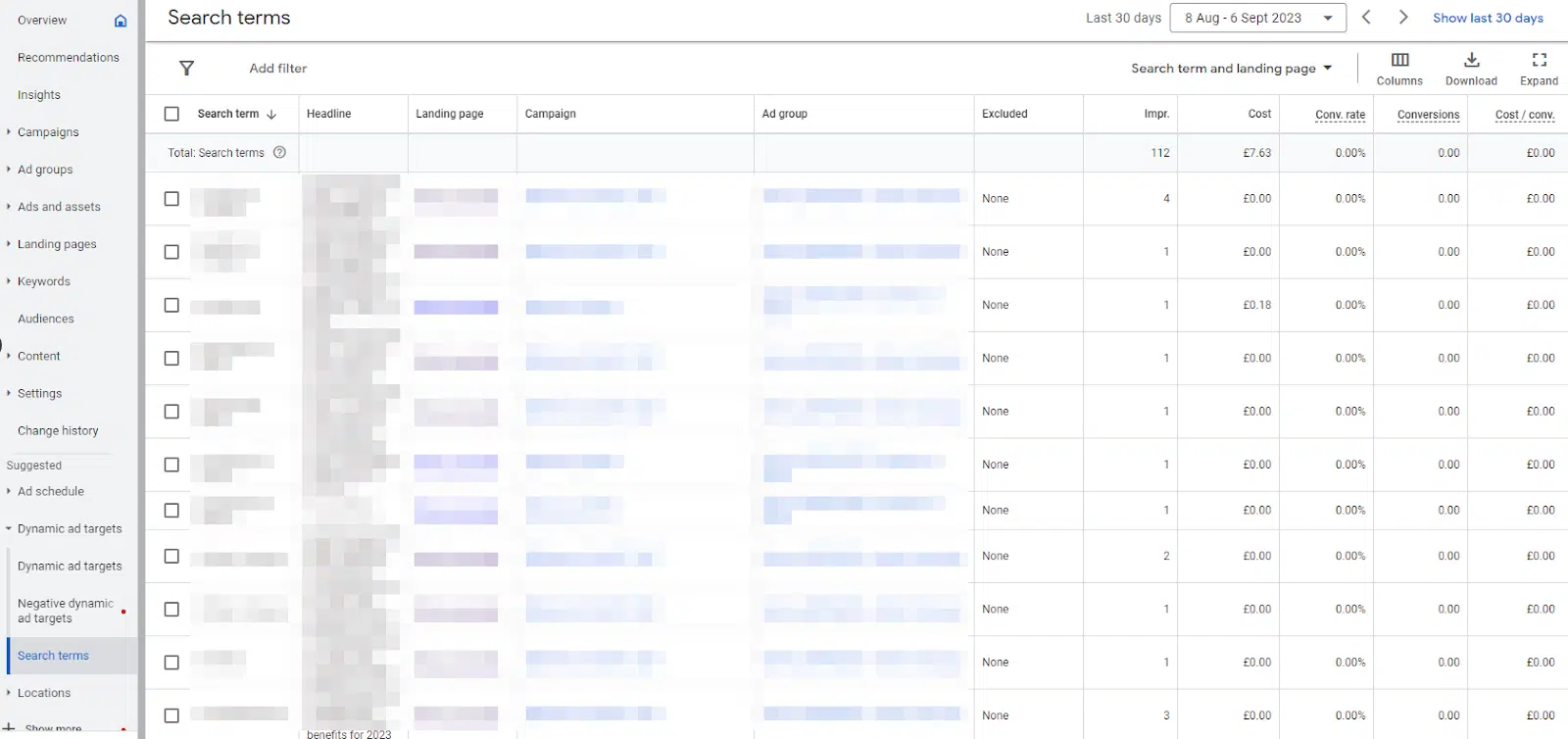
Search terms report - Dynamic Ad Targets

In this case, 4AIR did appear to be using this dynamic ad form, but it’s hard to say if that was the cause of them being picked up by the ASA. 

Ultimately, the fact their website contained those bold claims will have led to the same result anyway.

How to check if your business may be greenwashing in your Google Ads

I spoke with sustainability marketing consultant Slavina Dimitrova to find out what brands can do to ensure they’re not caught unwittingly greenwashing.

  • Brands should “be particularly wary of using broad sustainability terms like ‘eco-friendly’ or ‘good for the planet’ without thoroughly checking they can define and evidence them in the context of the whole business and full product or service life cycle,” she said.
  • “Greenwashing might not only be limited to the phrases you use in your ad copy, on your website or other marketing and communications channels or platforms. Even the colors, images, packaging and logos used might be misleading. If, for example, you’re using a green leaf motif or an image of the earth near copy comprising of a vague statement, such as ‘protecting the world’s future,'” she added.

It’s unlikely that most businesses set out to greenwash consumers intentionally. In most cases, they’re likely not tracking, monitoring or assessing the environmental and social impacts across the full life cycle of their products or services and their whole business.

They may genuinely believe they are doing “the right thing” or caring about the environment without actually having the hard data to back up the claims they’re making. 

So, it’s essential to get proper sustainability audits by people with sufficient expertise completed prior to claiming that your brand is good for the environment

Some questions to ask yourself might include:

  • Are you making any big environmental claims in your Google Ads?
  • Do you know if your company has completed an Environment, Social and Governance (ESG) audit?
  • Does anyone within the company sign off on ad/creative copy before publishing?

Where to check within your Google Ads account

The first places to check are within any of your search campaigns. These will be within the text ads themselves, which typically get the most visibility.

Ad assets 
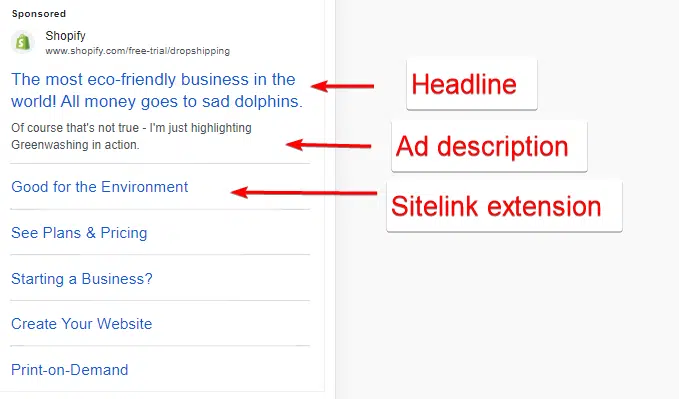
Ad assets to check
Screenshot of a false ad that I mocked up showcasing greenwashing in action.

You should check your assets, particularly Callout and Sitelink assets.

Sitelink assets are a good spot to check as this gives you additional room below your main search ad to expand your messaging, linking to specific pages on your site. 

You can access these by selecting Search Campaign > Ads and assets > Assets > Sitelink.
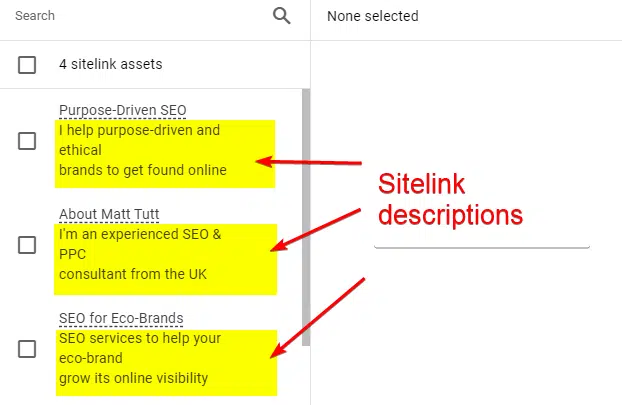
Sitelink descriptions to check
What your Sitelink Descriptions look like within the Google Ads interface

Note that sometimes these are not fully displayed. You may just see the title of the sitelink (as shown in the mock-up ad previously), whereas descriptions can also be included. 

Callout assets might be a common place to greenwash. Since you’ve only got 25 characters to work with, you may be tempted to add short phrases like “eco-friendly” or similar. 

It’s OK to use that term as long as you can measure and prove you are.

You can access these by selecting Search Campaign > Ads and assets > Assets > Callout.

Another false ad I’d created with the Callout assets field highlighted

Display and video campaigns

It might be easy to forget to check any display campaigns, including display and video campaigns. 

If you’ve had banners created in-house or by a third-party agency, hopefully, the messaging included would have been reviewed and approved before getting designed.

Google Ads has quite a powerful display ad builder tool, so it would be wise to check the messaging you’ve selected there if you’re using that. Luckily, it would be simple enough to tweak this and rebuild those ads if necessary. 

The same advice applies to video if using the Google Ads Video Builder.

Could the Google Ads interface warn of greenwashing?

What if, before an ad goes live, Google was to check for any greenwashing claims and flag or warn of any potential issues before allowing ads to go live?

This may not be a popular choice, and it’s unlikely Google would intervene in this way as local laws will probably vary too much. 

If the ASA’s AI technology can detect greenwashing within live ads, I imagine it wouldn’t be too hard for Google to do something similar. 

Avoid the high cost of greenwashing in Google Ads

To avoid inadvertently engaging in greenwashing, carefully scrutinize your advertising materials, including Google Ads, for any potentially misleading claims.

Sustainability claims should be substantiated through thorough audits and data-backed evidence. Also, consider your products and services’ broader environmental and social impacts and ensure your claims align with your practices.


Opinions expressed in this article are those of the guest author and not necessarily Search Engine Land. Staff authors are listed here.


Related stories

New on Search Engine Land

@media screen and (min-width: 800px) { #div-gpt-ad-3191538-7 { display: flex !important; justify-content: center !important; align-items: center !important; min-width:770px; min-height:260px; } } @media screen and (min-width: 1279px) { #div-gpt-ad-3191538-7 { display: flex !important; justify-content: center !important; align-items: center !important; min-width:800px!important; min-height:440px!important; } }

About the author

Matt Tutt

Matt Tutt is an SEO consultant that specialises in helping Purpose Driven and ClimateTech companies get found online. Passionate about anything that aims to help the environment, he’s been working as an SEO for over 10 years. Outside of work he can usually be found in his garden, attempting to grow anything that could be considered edible.

https://searchengineland.com/greenwashing-google-ads-433121



Personal connection is key to your marketing team’s success

Many managers overlook a key opportunity: getting to know their team better.

This is the secret to success for search marketing teams.

This article explores the significance of truly knowing your team and provides steps to initiate a deeper understanding for improved relationships and job performance.

I am not an HR manager and have never worked in HR. Still, I have managed people in some capacity over the years and have a strong interest in the psychology behind human behavior – that is what I’m pulling from for this article. If you are uncertain about appropriate employee questions, don’t hesitate to consult your HR team.

Why knowing your team on a deeper level matters

In some ways, I’m writing to advocate for those who (like me) wished their managers took the time to understand them as individuals rather than maintaining superficial relationships that neglect their preferences, strengths and career aspirations.

I’m mainly referring to a direct manager, but in some cases, even higher-level managers and department leads should share the responsibility of understanding their team.

It never made sense to me how to build a successful team without truly knowing them. How else can you create a high-performing team?

A rockstar team has trust and respect as a foundation, but that is merely table stakes.

When you understand your employees’ backgrounds, address their motivations, and invest time in challenging and teaching them, you’re paving the way to individual growth and team success.

As a search marketing manager, here are some questions you can ask to learn more about your team.

What are their previous work experiences?

This question will help you:

  • Know more about the work they’ve done in the past and their experience in other work environments. 
  • Give you insight into their past experiences and what they can bring to your team now. 

Granted, this is typically asked during interviews before hiring. But I find that my managers rarely remember or know the real extent of the work that I’ve actually done. 

This is a key question to build on. Don’t just ask about one particular job. Ask about all the roles they’ve held, and feel free to discuss more about each role.

What do they enjoy most about what they do?

Asking this can reveal your employee’s motivations and what makes them tick. This helps you assign work they enjoy, ultimately improving retention. 

Some people work just for money, and that’s OK. But it’s still important to ask so you can better support them. 

What skills do they want to improve?

All your employees have skills, and you would be hard-pressed to find a good, motivated employee who doesn’t want to improve their skills. 

In some positions I’ve held, I was dying to acquire new skills and build upon my current skills, but I felt like I never had the time in my workday to do so. 

Often, I was afraid to assert myself more and wished my managers would have asked. 

Asking this question will benefit the employee and help you round out your team’s skills by identifying skill gaps.

You’ll know where you may be able to have your team teach other members of your team new skills.

Dig deeper: 5 leadership traps new SEO team managers should avoid


Get the daily newsletter search marketers rely on.


Ask them future state questions

Beyond the “where do you see yourself in five years” question, ask your employees what they see in their future in terms of career. 

This may get them to open up about some hangups they may have now in their current position. 

It could also be a chance for you to learn about other positions in the company they may be interested in (which isn’t necessarily a bad thing!).

Getting to know your marketing team on a deeper level

These aren’t questions that are always covered in a performance review (although some could be), but they are important questions to ask your team that often go unasked. 

Knowing the answers to these questions is pivotal and will help you learn more about your team’s motivations and build a solid foundation of trust and respect. 

When I know a manager cares about me and my future, I am willing to put in more work and stick around. 

When I feel like a manager could care less, I have no reason to stick around or care about them.

Investing time in asking your team these questions allows you to witness the impactful changes just a few simple questions can bring about.

I hope you find value in adding some of these questions to your list to ask your team or that it helped spark even more questions or thoughts about improving your overall team dynamic.

Dig deeper: Marketing leadership: The dangers of ego


Opinions expressed in this article are those of the guest author and not necessarily Search Engine Land. Staff authors are listed here.


Related stories

New on Search Engine Land

@media screen and (min-width: 800px) { #div-gpt-ad-3191538-7 { display: flex !important; justify-content: center !important; align-items: center !important; min-width:770px; min-height:260px; } } @media screen and (min-width: 1279px) { #div-gpt-ad-3191538-7 { display: flex !important; justify-content: center !important; align-items: center !important; min-width:800px!important; min-height:440px!important; } }

About the author

Rachel Fredrickson (Howe)

Rachel Fredrickson (Howe) is a Search Engine Land contributing writer and is based out of Milwaukee, Wisconsin. She has been in the digital marketing space for over ten years working with Fortune 500 brands to mom and pop shops helping them with all things digital with a focus on SEO. In 2017, she was a runner-up and finalist for the Brightedge SEO & Content Award for her work on OfficeChairs.com. She currently works as an SEO Contractor at Milwaukee Tool and is looking for a full-time gig (shameless plug). When not working, she enjoys spending time with her husband and their four fur babies and working on home DIY projects.

https://searchengineland.com/nurture-marketing-teams-success-personal-connection-433116


Google Ads rolls out Demand Gen to all customers globally

Google Ads has started rolling out Demand Gen globally so that all customers now have access.

Described as the “next generation of Discovery campaigns,” it comes with new features, inventory, and insights, as well as an enhanced ad creation flow.

In addition, Discovery ads upgrades are beginning this week and will continue to be implemented through early next year.

Why we care. Demand Gen is an effective tool when it comes to reaching new audiences and offers more creativity than its predecessor. Discovery campaigns only allowed images, carousels, or product data feed for creatives, however, Demand Gen lets you use videos, including both regular YouTube videos and Shorts, giving advertisers more choice when it comes to creating content that will appeal most to their audience.

What is Demand Gen? Demand Gen is an AI-powered tool that was built to specifically help social platform advertisers by streamlining the process of discovering and converting consumers through visually engaging content. The Google Ads feature was designed to help generate conversions, site visits and actions across entertainment-focused touchpoints such as YouTube (including Shorts), Discover, and Gmail.

Engaging new audiences. Demand Gen can help you to discover new potential customers who may not be acquainted with your brand through the new Lookalike segments features. Advertisers can then maximize performance further by choosing the bidding strategy that fits best with your goals, such as clicks, conversions or website actions.

Creating ads tailored for your audience. Demand Gen can achieve 3X higher click-through rates, at a 61% lower cost per action (CPA) when compared to paid social campaigns, according to Google. It’s able to achieve this by offering a range of different formats so that brands can tailor their content better to their audience, from short-form videos to carousels.

Product feeds for retailers. Demand Gen can combine videos with images and text from your catalogs to show products to potential customers that are most suited to their interests and match their search intent.

Demand Gen best practices. Search Engine Land contributor Menachem Ani,  Founder of JXT Group, took part in the Demand Gen beta test before its general rollout and has shared some best practice guidance, including:

  • Campaign management suggestions.
  • Working with client and leadership tips.
  • Setting realistic expectations.

Read Ani’s new article – Google Demand Gen campaigns: Migration and best practices – offers more insights, including what to expect from Demand Gen and advice on budget management.

What has Google said? Vidhya Srinivasan, VP & GM in Google Ads (Search Ads & Ads on Google Experiences), said in a statement:

  • “The way consumers discover products is shifting — decisions are made throughout the funnel. To keep up with this evolving media landscape, social advertisers need to adapt their strategies to deliver results.”
  • “Demand Gen campaigns can help you capture the interest of billions of users as they spend time on YouTube and Google’s visually immersive touchpoints. The engaging creatives can spur action while our audience and bidding solutions help you nurture interest with more potential customers.”

Related stories

New on Search Engine Land

@media screen and (min-width: 800px) { #div-gpt-ad-3191538-7 { display: flex !important; justify-content: center !important; align-items: center !important; min-width:770px; min-height:260px; } } @media screen and (min-width: 1279px) { #div-gpt-ad-3191538-7 { display: flex !important; justify-content: center !important; align-items: center !important; min-width:800px!important; min-height:440px!important; } }

About the author

Nicola Agius

Nicola Agius is Paid Media Editor of Search Engine Land after joining in 2023. She covers paid search, paid social, retail media and more. Prior to this, she was SEO Director at Jungle Creations (2020-2023), overseeing the company’s editorial strategy for multiple websites. She has over 15 years of experience in journalism and has previously worked at OK! Magazine (2010-2014), Mail Online (2014-2015), Mirror (2015-2017), Digital Spy (2017-2018) and The Sun (2018-2020). She also previously teamed up with SEO agency Blue Array to co-author Amazon bestselling book ‘Mastering In-House SEO’.

https://searchengineland.com/google-ads-demand-gen-globally-433100


Google Demand Gen campaigns: Migration and best practices

Demand Gen campaigns – the shiny new tool in the Google Ads toolbox – will become available to the PPC public starting this month.

Those lucky enough to be part of the beta test have seen and experienced firsthand what Demand Gen offers, though deeper insight is still some time away.

While we’re still testing Demand Gen and will be for the foreseeable future, I have had enough time with it to better explain:

  • How Demand Gen works and its differences from Discovery, which it replaces.
  • What to expect with the rollout and how to approach it.
  • Advice on Demand Gen campaign and budget management.

I hope my experiences with Demand Gen can provide some context as you navigate this new territory.

Demand Gen explained

When Demand Gen becomes available in your accounts, you’ll give up your ability to create Discovery campaigns. This is because it directly replaces Discovery campaigns, which are much less algorithmic and have fewer inventory types.

Demand Gen leans into automation and machine learning to do most heavy lifting like Performance Max. Both campaigns use algorithmic targeting, whereas their previous iterations allowed you to select your targeting settings more freely.

But where Performance Max is a full-funnel campaign, Demand Gen (as the name implies) focuses largely on driving awareness and filling the top end of your funnel.

Using Performance Max without a data feed, and only creative assets with audience signals, is somewhat similar to what Demand Gen tries to do.

That setup pushes out Image, Display, and Video ads across all the different networks (except for Shopping). It’s still more focused on bottom-of-funnel conversions than Demand Gen, whose primary goal is to create new demand.

With Demand Gen, you can still add your audiences and create lookalikes, something new to Google that anyone familiar with Meta Ads will recognize. This works by seeding the system with a list – customers, email subscribers, people who take pixel-based actions on your website – and targeting people who closely match it.

It’s a good way of finding new audiences, exactly what Google has said Demand Gen seeks to do. If we compare Demand Gen with its predecessor, the biggest differentiator is creative. Discovery only allowed creatives built using images, carousels of images, or your product data feed. Demand Gen lets you add video; not only standard YouTube videos but also Shorts.

It doesn’t take a linguist to figure out that Demand Gen is Google’s attempt to help advertisers generate demand, since Google Ads has typically been seen as a channel to capture demand as people are looking for something.

It seems that’s a reputation they want to shake because even the interface is built like a paid social campaign, bearing several similarities to how Meta Ads structures their product.

But because this is new to Google, remember that Demand Gen will not do the best job of pushing someone from initial awareness straight to purchase.

You will see a lower reported ROAS than you would with a similar campaign on Meta; this is the nature of generating demand via different Google products (like YouTube or Gmail) instead of a social media platform.

Does that mean Demand Gen is actually driving less revenue? To be determined – you’ll have to look at third-party revenue and attribution tools to figure that out.


Get the daily newsletter search marketers rely on.


Demand Gen migration guide

By looking back at how Performance Max rolled out, we can learn what we might expect from Demand Gen.

Google is in forward-thinking mode as they retire many of the manual controls we’ve become familiar with. The PPC paradigm continues to shift in favor of automation and machine learning, and advertisers who embrace this change will be at the forefront of progress.

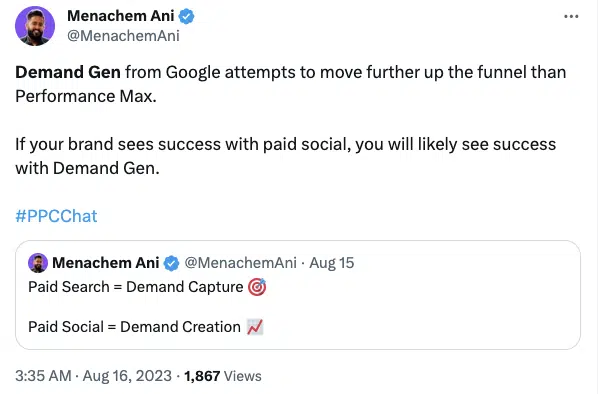
Menachem Ani on X

We’ve seen that Google is willing to be very aggressive to push us in that direction, even with a new product like Performance Max (which I believe is still relatively raw). But they continue to implement improvements on a constant basis, with plenty of new updates on the roadmap.

The good news is that Google has been taking inputs and feedback from advanced practitioners quite seriously. We’ve seen proof of this in the form of changes to the Performance Max product over the last year or so that originated from conversations with the PPC community.

While I’m personally happy to see that engagement grow, trust in Google is in short supply these days for valid reasons. This isn’t helped by the fact that they’re moving us to a world where we tell them our objective and provide the right data inputs, and they make the magic happen.

But whatever your feelings, the facts are this shift is going to continue because that’s what Google wants. If we want to stay on board, we need to get on board.

What we can learn from the Performance Max rollout

Performance Max ended up cannibalizing Local and Smart Shopping campaigns, and it will now absorb a third campaign type: Read Google’s announcement on upgrading Dynamic Search to Performance Max, which I believe will eventually be retired.

Performance Max also allows you to create audience signals – including ones built off the people you target with Demand Gen campaigns – but will ultimately target whoever it feels is a good fit, whenever it feels is the right time.

And just as we’ve seen Gmail Sponsored Promotions absorbed by Discovery campaigns, we should expect a similar pattern of cannibalization, independence, and deprecation for Discovery with Demand Gen.

Dig deeper: How to harness DSA wins in Performance Max

Demand Gen best practices

Campaign management suggestions

Google has made recommendations for Demand Gen bidding and budget goals, which we’re still testing:

  • Target CPA should be 2x your standard campaign performance.
  • Daily budget should be:

These are the suggested benchmarks to give the campaign space to operate and find interested new audiences. But they mean that Demand Gen is effectively off-limits (or a money suck) for accounts and brands with smaller budgets.

Google’s other advice is to give Demand Gen between four and six weeks to factor in conversion delays and allow for a data-gathering learning period. Combined with their budget suggestions, the math won’t often check out on smaller budgets.

Historically, Google has recommended setting your budget at 5x your Target CPA; that’s something we’ve found to work with Demand Gen. Since they want larger budgets to give it more space, similar to YouTube Ads, it may not work well for most smaller campaigns.

We’re seeing Demand Gen fit (so far) in an account that wants to layer something on top of its maxed-out Search, Shopping, and Performance Max. We’re still testing, but at this time, for smaller advertisers with smaller budgets, it may not drive enough conversions to merit a long-term spot in the media mix.

Working with clients and leadership

As with any new campaign from Google, getting clients and bosses on board with Demand Gen will be a challenge for many marketers.

Some clients like to be part of beta programs and try exciting new things. They know that if you find a win before the rest of the market even comes looking, your first movers’ advantage will set you up well.

We’ve seen that with Performance Max and many other Google beta programs, so we know which of our clients are like that and pitch them accordingly.

For other clients – especially with larger accounts – you always want to be testing new things anyway; at that level, you need to unlock new opportunities constantly.

We try to use about 10% of the overall budget (no more) to try different things continuously. It could be a new campaign of an existing campaign type, testing new keywords in a Search campaign, testing a new Performance Max setup, or any place we see or think there might be new opportunities.

It’s important to keep your testing budget to a reasonable figure, like 10% of overall spend, because experiments that go poorly can throw off your entire account’s performance.

Setting realistic expectations

Demand Gen is new, and its primary goal is to get in front of new audiences. So it’s fair to expect fewer conversions with a higher CPA or lower ROAS, and not necessarily measure this campaign the same way you would measure Search or Performance Max.

MenachemAni on X - Sep 6

In larger accounts, it always helps to allocate a portion of the budget to address upper-funnel audiences – especially if you’ve got a good nurture program in place.

With a six-figure monthly budget covering Search, Shopping and Meta, you want to ensure you’re also driving net new awareness – video views, website visits, branded search.

That fresh demand is critical, but it has to come from somewhere and is never free.

Examples from managing Demand Gen during the beta

I’ve been fortunate enough to get my hands on Demand Gen earlier than most advertisers, and I’ve taken advantage of that early access to try it in a few accounts. Here are three examples of those early experiments and what we learned.

(It’s worth noting that just like with Performance Max, you’ve got to have pieces in place to block spam from coming through with lead generation – connecting your CRM, adding a reCAPTCHA to your form, etc.)

Example 1: Lead gen/ecommerce hybrid

For this account, we migrated a long-running Discovery campaign targeting warm audiences – like website visitors and subscribers – as well as more broad audiences – like custom intent, affinity, and interests.

Once we started to ramp up that campaign, it improved enough that we could actually measure conversions at a decent ROAS and leads at a healthy CPA. My guess is that’s because it had so much historical data when we made the switch.

This is one use case we’re really happy with and will continue ramping up.

Example 2: Lead gen with low spend

In a second lead gen account, we’re testing a brand-new Demand Gen campaign at $50-100 per day that has just started driving conversions, but at a very low conversion rate. From what I’m seeing, small budgets may struggle even with strong signals.

Google’s suggestion is to set your budget at 15x your expected CPA, so it could be that we have to test that.

Example 3: Lead gen with moderate spend

Our third test account – also lead gen – spends a modest $1,500 a day and definitely struggles more. It drives traffic and conversions, but the Target CPA is a bit higher than we expected.

It’s too soon to say definitively, but it seems that you need a slightly larger budget for Demand Gen. We’re still determining the reality of the situation. If you manage low-spending accounts, you should too once you get access.

Get your plans in order – you’ve got 6 months

It’s October, which means Google will have begun giving advertisers and accounts access to Demand Gen. That process will run for the next six months, giving you enough time to start making preparations for the switch.

Discovery Ads timeline
Timeline from Google Ads Help

For now, your focus should be on setting up creative testing frameworks.

There are no experts on Demand Gen campaigns other than the folks who built it. To the rest of us marketers and media buyers, it’s a new puzzle that we’re figuring out together.

And despite my findings, you should not assume that you’ll have to drop five figures a day to make Demand Gen work without testing it to see if that’s really the case.

If one thing remains true about Google Ads, it’s that they’re always capable of surprises.


Opinions expressed in this article are those of the guest author and not necessarily Search Engine Land. Staff authors are listed here.


Related stories

New on Search Engine Land

@media screen and (min-width: 800px) { #div-gpt-ad-3191538-7 { display: flex !important; justify-content: center !important; align-items: center !important; min-width:770px; min-height:260px; } } @media screen and (min-width: 1279px) { #div-gpt-ad-3191538-7 { display: flex !important; justify-content: center !important; align-items: center !important; min-width:800px!important; min-height:440px!important; } }

About the author

Menachem Ani

Menachem Ani, Founder of JXT Group, is a digital advertising expert with over a decade of success developing high-impact marketing strategies for online retailers and lead-generation clients.

https://searchengineland.com/google-demand-gen-campaigns-migration-and-best-practices-433014


9 salary negotiation tips for search marketers

Whether you’re working in SEO, PPC or somewhere in between, salaries are always a contentious subject. They can be hard to talk about, challenging to quantify and difficult to change.

There are a lot of guides out there that help with salary negotiations, but in this article, I want to talk specifically about negotiating your marketing salary.

Difficulties with marketing salaries

There are some critical complexities to marketing jobs that make it trickier to benchmark appropriate salaries.

There is no industry standard

Unlike other professions, which have a national body and associated grades, there is no standardization for marketing roles. As such, it can be difficult to attribute salary bands inter-company.

Job titles have little consistency

A VP of marketing in one company could be the junior level account manager, but in another, the most senior marketer. 

Due to the lack of consistency in titling, it can be hard to identify the seniority of roles and, therefore, the rough salary bands that would be appropriate.

Recent years have seen huge fluctuations

During the COVID-19 pandemic, plenty of roles were made redundant.

Events managers, experiential marketers and out-of-home (OOH) advertising executives all saw reduced employment opportunities as countries experienced lockdowns. 

On the other hand, SEOs saw a steep rise in demand for their skillset as more companies explored online trading. 

With lockdowns and restrictions ending, the levels of these roles changed again. As a marketing discipline becomes more or less in demand, salaries will change to compensate. 

Some marketing channels can be misunderstood

Less marketing-savvy companies often advertise one role to cover three or more distinct specializations, all for bottom-of-the-market salaries. 

Even those companies that value the skillsets of marketers more accurately may struggle to understand the sheer complexity and range of knowledge and experience required to excel in a role. This can lead to huge under-valuing of marketers. 


Get the daily newsletter search marketers rely on.


Knowing that marketing salaries can be hard to navigate from an employer’s perspective, how should you ensure you’re fairly compensated for your knowledge and experience as an employee?

The following nine tips can be loosely categorized as follows:

  • Know what you bring to the table.
  • Know what’s realistic.
  • Identify and demonstrate what’s valuable to the company.
  • Stick to your boundaries.

Know what you bring to the table

We’ll start with the side of salary negotiations that, for some, can be very difficult – accurately valuing their own skillset.

We can assume that if you are in the position of negotiating a salary, you have either already been offered the job or you work for the company and are hoping to secure a raise. 

In either case, congratulations! The company must already think you are suitable for the role. However, that doesn’t stop them from trying to secure your services at the most economical price.

Knowing what you bring to the table is key to having the bargaining power and confidence to negotiate a fair salary. This doesn’t just mean how much direct experience you have of the role you have landed. 

Tip 1: Demonstrate your experience in the industry

Don’t underestimate how much employers value candidates who have knowledge and experience within their sector. 

You may also find that some industries will struggle to hire marketing professionals, and your willingness to join that industry can command a higher salary. 

If you have worked within notoriously difficult industries like gambling, adult entertainment or pharmaceuticals in the past, you might well be able to demand a higher salary because of it. This can be down to the perception of difficulty in marketing within these industries.  

Tip 2: Promote your prior experience in – and out of – similar roles

Your years of experience in a role might feel like an obvious bargaining chip when negotiating salary. However, don’t forget that an employer might also benefit from the knowledge and experience you gained outside of the role you are applying for.

Just because your prior job titles may not have sounded similar to the role you are negotiating now doesn’t mean the skills you learned there aren’t directly relevant.

Review your CV and compare it to the role you are applying for. Pick out the elements in your work history that match the ad.

Look beyond the obvious and consider transferable skills like communication, problem-solving and stakeholder management.

Dig deeper: 13 essential SEO skills you need to succeed

Tip 3: Highlight extra skills outside of your job specification

Also, think about the skills that you have acquired over the years that might not be listed in the job description, but you imagine will be critical for success in the role anyway.

This can be particularly useful if you are more junior in your career and lack directly relevant experience in similar roles. 

Consider what you learned through volunteering roles or your first weekend and summer jobs.

They might be a million miles away from the marketing industry, but chances are you will have learned lessons through them that can put you in good stead for your current career. 

Know what is realistic

It’s one thing to know your worth in terms of the skills and experience you can bring to a company, it’s another to value that in the employment market accurately. 

Unfortunately, salaries are capped by what employers are willing to pay their staff. 

Tip 4: Be familiar with the industry benchmarks

Do some research when considering your salary. You may have been paid above or below average in the job you are leaving, which could skew your view of an acceptable salary. 

Look at job ads in your geographic area that require similar skills and experience and plot out the bottom and top ranges of salaries. 

Make sure you don’t identify like-for-like roles just on the job title alone. As mentioned earlier, there is often no standardization, and you might be comparing your role with one for a more senior or junior candidate. 

Similarly, keep an eye on the industry these jobs are for. You are unlikely to see charity roles paying the same as ones in tech or finance.

Have a look at salary benchmarking reports like the following. 

These can give you an objective view of your market. Remember that different countries will have vastly different salaries, so don’t compare U.S. with UK salaries, for instance. 

Tip 5: Find out the internal salary ranges

During the process of applying for a role, it is always helpful to find out the salary range being offered. This isn’t always possible. 

Some companies will wait for the candidate to make the first move concerning salary and won’t want to tip their hand for fear of offering more than they could have gotten away with. 

This is why it’s important to consider Tip 4 first, so you know what your skills and experience are worth in the open market.  

Some companies will operate with banding for roles. For example, a senior SEO specialist might be a level 4 on the company’s career level chart and a junior SEO, a level 2.

You could ask the recruiter for that information if they are unwilling to divulge the exact salary band. This might give you some insight into where the role fits within the operational hierarchy of the company and, therefore, what ceiling the salary might have. 

If you can find out the salary range, try to identify what makes the top of the band achievable.

Is the company seeking additional “nice to haves” to award the top salary? Perhaps it is reserved for people with experience in their particular industry. 

Once you know what skills command the higher salary, you can highlight them in your CV and interviews. 

Identify and demonstrate the values of the company

As many of us know from job interviews, sometimes what a company really wants isn’t explicitly detailed in the job ad or early conversations with recruiters. 

Unfortunately, hiring managers won’t always know what they want from a successful candidate until they have interviewed a few people to compare with. 

This can mean that you are left not knowing what is important to a company in regard to the role and, therefore, will struggle to highlight your suitability for it and why you deserve the salary you are requesting. 

Interviews can be a good opportunity to explore these values more. 

Ask the interviewers what “successful” looks like in the role or even the characteristics of their top-performing colleagues. 

This will give you the necessary insight into the traits and behaviors that the company appreciates.  

Tip 6: Demonstrate how you live up to those values

Once you know what is valuable to a company, you must identify how to add that through the role. 

For example, perhaps “initiative” is something that the company holds in high regard. You could use the interview process to highlight how you use your initiative throughout your work. 

Use examples from previous work experience to demonstrate how you embody the company’s values. Give evidence of projects or situations where you showed those values. 

For example, if “transparency” is important to the company, you can talk about a time when you owned up to a mistake you made. 

Your compatibility with the company, not just the job proficiency, will make you an even more attractive candidate. With that comes the opportunity to be awarded a higher salary. 

Stick to your boundaries

When negotiating your salary, you must know what your absolute minimum is. This isn’t just the lowest salary you can afford to take.

It means identifying what is important to you in a role to feel respected and valued and what the remuneration package would need to be to assist with that. 

If you go into negotiations knowing your boundaries, it will make saying “no” to a job easier. 

Tip 7: Consider other benefits that will make up for a lower salary

There may be good reason to take a lower salary in some circumstances. 

You may be moving into a slightly different role where you have less experience and, therefore, are starting at a more junior level. The opportunity to grow in new skills may warrant a reduction in your salary.

There could be other tangible benefits, like great health coverage, more paid holidays, shorter working hours or gym membership, that you feel are a good trade-off for taking a lower salary.

Tip 8: Identify other good points about the company that allows for a lower salary

You may be moving to an industry you are passionate about. Perhaps you are joining a charity and feel that the satisfaction from helping the cause is enough to make up for lower pay. 

Make sure that you factor this into your salary expectations when considering your boundaries. 

Tip 9: Decide how little is enough for you to walk away

Having worked through the above tips, you should now understand how much you are willing to take – or remain in – a job for.  

Remember this during the negotiating process. You may feel pressure to not lose the role due to asking for more money. You might not want to appear too financially motivated.

Joining a company and immediately feeling like you should be asking for a pay raise will not work, nor will it help you positively embed yourself in the company. However, working and feeling underpaid will not be sustainable for you either.

You will likely be better off turning down a role that cannot close the gap between their offer and your minimum salary expectations.

Empower yourself in marketing salary talks

You deserve to be paid what you are worth.

Use the above tips to identify what that is, to factor in any mitigating circumstances and to arrive at a figure you are willing to take a job for. 

Once you know what that number is, negotiating for it is a case of demonstrating why you add value to the company above other candidates and how you working there will be greatly impactful. 

If there is too big a divide between what the company is willing to pay and what you feel your skills and experience are worth in that role, you may be better off walking away from it. 


Opinions expressed in this article are those of the guest author and not necessarily Search Engine Land. Staff authors are listed here.


Related stories

New on Search Engine Land

@media screen and (min-width: 800px) { #div-gpt-ad-3191538-7 { display: flex !important; justify-content: center !important; align-items: center !important; min-width:770px; min-height:260px; } } @media screen and (min-width: 1279px) { #div-gpt-ad-3191538-7 { display: flex !important; justify-content: center !important; align-items: center !important; min-width:800px!important; min-height:440px!important; } }

About the author

Helen Pollitt

Helen is a senior SEO with over a decade’s experience in the industry. She has a passion for equipping teams and training individuals in SEO strategy and tactics. Helen is often seen on stage at conferences delivering talks about digital marketing.

https://searchengineland.com/negotiating-salary-search-marketing-432979


Google Keyword Planner drops keyword forecasting

Google Ads is no longer maintaining individual and ad group keyword forecasting in Keyword Planner.

Few advertisers were using these features so the platform decided to retire them, according to Ginny Marvin, Google’s Ad Liaison, on X (formerly known as Twitter).

However, campaign-level forecasts and historical keyword-level data are still available.

Why we care. By discontinuing the maintenance of individual and ad group keyword forecasting, advertisers lose access to related insights, including metrics like spend, which could affect how they make informed decisions and optimize advertising strategies effectively.

How Keyword Planner works. Keyword Planner is a tool that can indicate a keyword’s performance potential. Google uses past search data to predict possible future outcomes for a set of keywords based on your budget. These estimates can then be used to help you decide how to group your keywords and set bids.


Get the daily newsletter search marketers rely on.


What Google said. Ginny Marvin said on X (formerly known as Twitter):

  • “Few advertisers were using individual & ad group keyword forecasting in Keyword Planner so as of this summer we’re no longer maintaining these forecasts in our system.”
  • “Campaign-level forecasts & historical keyword-level data are still available.”

Deep dive. Read Google’s Keyword Planner guide for more information.


Related stories

New on Search Engine Land

@media screen and (min-width: 800px) { #div-gpt-ad-3191538-7 { display: flex !important; justify-content: center !important; align-items: center !important; min-width:770px; min-height:260px; } } @media screen and (min-width: 1279px) { #div-gpt-ad-3191538-7 { display: flex !important; justify-content: center !important; align-items: center !important; min-width:800px!important; min-height:440px!important; } }

About the author

Nicola Agius

Nicola Agius is Paid Media Editor of Search Engine Land after joining in 2023. She covers paid search, paid social, retail media and more. Prior to this, she was SEO Director at Jungle Creations (2020-2023), overseeing the company’s editorial strategy for multiple websites. She has over 15 years of experience in journalism and has previously worked at OK! Magazine (2010-2014), Mail Online (2014-2015), Mirror (2015-2017), Digital Spy (2017-2018) and The Sun (2018-2020). She also previously teamed up with SEO agency Blue Array to co-author Amazon bestselling book ‘Mastering In-House SEO’.

https://searchengineland.com/google-keyword-planner-stops-forecasting-individual-ad-group-keywords-432993


6 tips to track and analyze PPC results

Whether you have just built your first search campaign or have already set up thousands, once you hit the “launch” button, you’re probably already thinking about how to effectively track and share the results of your efforts.

There are dozens of metrics you can use to review PPC performance depending on your business objectives. 

While the wealth of data points may seem overwhelming, here are six tips to consider as you navigate PPC performance tracking and glean valuable insights.

  • What are your main campaign goals?
  • What metrics are important?
  • How are you pacing to your budget?
  • Is your bid strategy achieving its target?
  • Who is your primary audience for performance reports?
  • What automated reports can you set up to do some heavy lifting for you?

1. Goals

It’s important to start any reporting rooted in your primary and secondary goals or key performance indicators (KPIs) important to your company or client. 

Suppose you’re tasked with improving attributable revenue every quarter. In that case, it won’t be very helpful to send over a report covering how much your landing page traffic has increased year-to-date. 

Tracking results rooted in the same one or two KPIs over time will have the most meaning to your stakeholders and help you make the most impactful optimizations over time. 

For the purpose of this article, let’s say conversion volume is your primary KPI, and conversion rate is your secondary KPI.

Dig deeper: 5 outdated marketing KPIs to toss and what to reference instead

2. Metrics

Once you’ve confirmed your KPIs, consider the most important metrics to include in your weekly or monthly performance checks. 

If you’re primarily interested in conversion volume, conversions will be your main metric to include in your analysis, and insights should be rooted in conversion data. Conversion rate will be a secondary indicator of performance. 

Suppose conversions have decreased, but conversion rates have increased. In that case, it’s a good time to dig into your audience lists or regional targeting to see what archetypes of customers are driving higher conversion rates or more qualified conversions.

3. Pacing

Budget flighting is a bullet point to include in every performance recap or report. 

Suppose you’re pacing well to your primary goal (conversion volume), but you’re over-pacing your daily or monthly budgets. In that case, it may be time to request more budget for paid search efforts, especially if your cost per conversion (a tertiary goal here) is efficient compared to previous periods or not considered important to your stakeholders. 

If you are under-pacing and conversion volume is strong, it’s time to look for growth opportunities in keyword expansion and other channel types or potentially decrease your paid search budgets and shift to higher scaling channels.


Get the daily newsletter search marketers rely on.


4. Bidding

Your bid strategy is a great data point to include in your performance analysis and, ideally, should correspond with your primary goal. 

If you’re using Maximize conversion bidding to reach your conversion volume goal, amazing! 

If you’re using something like a Target cost per acquisition (tCPA) or Target return on ad spend (tROAS), consider how changing the bid targets will help you reach your goal. 

There are always reasons your bid strategy may not directly reach your primary goal, but you should prioritize alignment as much as possible.

5. Audiences

When tracking and analyzing your campaign performance, it’s helpful to consider who will be digesting performance data. 

If it’s just you and your team, you’re probably pulling a different level of reporting than you would for a C-suite meeting or your client’s boss’s boss.

The biggest thing any audience will be looking for is an action item and insight they can translate to other channels. 

If one ad drives the highest volume of conversions this month, can that copy be reused for an email campaign or Meta ad?

Since you’re the expert in the room (or on the email thread), it’s up to you to break down PPC performance into digestible and actionable tasks for the wider team you’re sharing data with.

Avoid using too many acronyms that your audience may not be familiar with or sharing insight that reads or sounds like the following:

  • “CPCs are decreasing MoM, CVR is flat, CTR is increasing, and CPA is within 5% of QoQ goals, so we should increase the tROAS by 14%.” 

After seeing this, someone’s head may start spinning and never stop.

Instead, try: 

  • “Our ad copy that contains more educational content about what our company does is performing better – 40% more conversions – than the ad that’s highlighting this month’s sale.”
  • “Let’s add more assets – sitelinks, callouts, images – to further qualify users before they get to our site.”
  • “This may also be a helpful insight for our web team to include some of this language on the landing page we’re sending potential customers to and for our social media channels to incorporate educational content in short video form.”

Dig deeper: 3 steps for effective PPC reporting and analysis

6. Automated reports

Alright, you’ve established your KPIs, pulled in your relevant metrics as columns in the engine of your choice,  assessed your budget pacing, checked your bid strategies, and delivered an amazing PPC report to your wider team. Great work! 

In an age of automation, how much can be set up to be sent directly to your inbox every week or month? 

In Google Ads, Microsoft Ads, or SA360, you can set up a report with your preferred date range, columns, calculated fields, and any other data layers you may need. 

Go into Reports > Custom reports > Schedule report. Then, input the necessary cadence and email information that will be helpful for you to start your analysis next time.

I’d always recommend using your ads platform as a starting point and finishing your deep dive either in your data source (Looker, Datorama, etc.) or omnichannel platform (SA 360, Skai, etc.) for cross-channel learnings after unearthing your paid search findings.

Dig deeper: 3 ways to stay on top of PPC performance

Glean meaningful insights to inform your PPC campaigns 

Tracking and analyzing PPC performance is no small feat. There’s a wealth of data, seasonality trends, and variables that can impact how campaigns behave. 

As paid search experts, we must translate numbers into stories, next steps, and testing proposals to scale an account and generate learnings for a wider team. There is much to unpack, but it’s also the most foundational part of our role. 

Starting with these six considerations will help you find your footing and deliver the best insights possible. 


Opinions expressed in this article are those of the guest author and not necessarily Search Engine Land. Staff authors are listed here.


Related stories

New on Search Engine Land

@media screen and (min-width: 800px) { #div-gpt-ad-3191538-7 { display: flex !important; justify-content: center !important; align-items: center !important; min-width:770px; min-height:260px; } } @media screen and (min-width: 1279px) { #div-gpt-ad-3191538-7 { display: flex !important; justify-content: center !important; align-items: center !important; min-width:800px!important; min-height:440px!important; } }

About the author

Grace Mante

Grace Mante is a paid search expert who has worked with over 100 clients across nearly every vertical (yes, even concrete drainage solutions). She’s managed budgets anywhere from $1k-$100M per quarter, and loves to find ways to make search best practices work for niche businesses. When she’s not diving into rabbit holes about the future of AI, she is chasing annual reading goals and trying to get outside for as many long walks as possible.

https://searchengineland.com/tracking-analyzing-ppc-results-432929


Reddit expands its learning hub with new features, courses and certifications

Reddit has updated its on-demand learning hub with new features, courses and certifications.

The platform has rolled out a new “Boost 2.0 Certification Program” as a second module in its Fundamentals training course to teach advertisers how to drive maximum campaign success.

Reddit designed the new courses to help advertises level up their knowledge of its ad offering and develop a deeper understanding of its:

  • Audiences
  • Unique targeting capabilities
  • Ad formats

Why we care. These free training sessions offer advertisers insider knowledge directly from Reddit’s team on best practices on the platform, revealing how to fully leverage Reddit Ads for maxmum campaign performance.

What’s new? The Boost Certification Program injects up to three hours of additional educational content to the Reddit Fundamental training course. The new modules include:

  • Measurement on Reddit: This module will focus on Reddit’s first and third-party measurement tools, as well as how to measure the overall performance of campaigns.
  • Auction Fundamentals: This chapter teaches how to choose a winning bid, strategies for budget allocation, and aims to provide a deeper understanding of the factors influencing campaign performance.
  • Optimize Performance: Reddit uses this module to provide guidance on how to leverage data to improve campaign results, make ad group-level adjustments to drive results, and implement best practices to optimize ads. 
  • Hack Your Creative: This module highlights unique creative techniques you can use to engage with Reddit’s 100,000+ communities.
  • Find Your People: Navigating Reddit Communities: Features strategies for advertisers to actively engage with Reddit communities and customize their ads to provide added value. 
  • Launch Mode: Testing Formulas: Analyze winning strategies to help your brand identify creatives and messaging that will drive campaign results on Reddit. 

Upon completion. Participants who complete the course will be awarded an official Reddit Ads Formula certification, as well as the option to make a Reddit-funded donation to a charity, via the platform’s Karma Kash initiative.

Why now? Reddit has expanded its training course in response to increased demand from clients who want to take their Reddit education further. The platform’s previous courses had an overall satisfaction rating of 4.5 out of 5, with 87% of participants reporting having a better understanding of Reddit’s ad offerings as a result of their participation.


Get the daily newsletter search marketers rely on.


What has Reddit said? Reddit’s Chief Revenue Officer, Harold Klaje, said:

  • “Reddit Ads Formula has been key to educating the market on Reddit’s unique value proposition and these new certifications are in direct response to our partners wanting to deepen their expertise and understanding of Reddit.”
  • “We know how beneficial this program can be for advertisers as they elevate their campaigns to be more strategic and impactful, so it’s exciting to evolve the program and bring more partners along on our journey.”

Deep dive. Check out the Reddit’s free Ad Formula training program for more information.


Related stories

New on Search Engine Land

@media screen and (min-width: 800px) { #div-gpt-ad-3191538-7 { display: flex !important; justify-content: center !important; align-items: center !important; min-width:770px; min-height:260px; } } @media screen and (min-width: 1279px) { #div-gpt-ad-3191538-7 { display: flex !important; justify-content: center !important; align-items: center !important; min-width:800px!important; min-height:440px!important; } }

About the author

Nicola Agius

Nicola Agius is Paid Media Editor of Search Engine Land after joining in 2023. She covers paid search, paid social, retail media and more. Prior to this, she was SEO Director at Jungle Creations (2020-2023), overseeing the company’s editorial strategy for multiple websites. She has over 15 years of experience in journalism and has previously worked at OK! Magazine (2010-2014), Mail Online (2014-2015), Mirror (2015-2017), Digital Spy (2017-2018) and The Sun (2018-2020). She also previously teamed up with SEO agency Blue Array to co-author Amazon bestselling book ‘Mastering In-House SEO’.

https://searchengineland.com/reddit-learning-hub-new-courses-certifications-432902


Google Ads, Search and Chrome bosses plotted to boost ad revenue in emails

Google bosses from its Ads, Chrome and Search departments conspired together to boost ad revenue, according to emails shared at the federal antitrust trial by the US Department of Justice.

The internal emails reveal private exchanges between Jerry Dischler, the Vice President of Google Ads, Prabhakar Raghavan, who heads up Google Search and Chrome, and Anil Sabharwal, Product VP and GM at Google, as well as other senior leaders

Within those conversations, the Google bosses discussed increasing search queries on Chrome to improve ad revenue – which accounts for more than 80% of Alphabet’s revenue.

Why we care. Search marketers have long speculated that Google intentionally complicates SEO to boost ad sales revenue. Despite denials from Google search leaders like John Mueller, this email exchange seems to indicate otherwise, indicating potential unfair impacts on SEO campaign performance.

What do the published emails say? In the email exchange, Google Ads VP Dischler says:

  • “The Search team is working together with us to accelerate a launch of a new mobile layout by the end of May that will be very revenue positive (exact numbers still moving), but that still won’t be enough.”
  • “Our best shot at making the quarter is if we get an injection of at least [redacted]% , queries ASAP from Chrome.”
  • “The question we are all faced with is how badly do we want to hit our number this quarter? We need to make this choice ASAP. I care more about revenue than the average person but think we can all agree that for all of our teams trying to live in high cost areas another [redacted] in stock price loss will not be great for morale, not to mention the huge impact on our sales team.”

The request for more searches via Chrome to boost ad revenue came after the Google Ads team were already quietly manipulating ad prices to hit revenue targets.

More tweaks. Dischler goes on to propose making more tweaks to push ad revenue even further. He wrote in the email:

  • “Do we think it’s worth reconsidering a rollback? Or are there very scrappy tactical tweaks we can launch with holdback that we know will increase search queries?”
  • “For example, we can we increase vertical space between the search bar/icons/feed onnew tab to make search more prominent? Are there other ranking tweaks we can push out very quickly? Are there other entry points we haven’t focused on that we could push on soon?”

Get the daily newsletter search marketers rely on.


What did John Mueller say? On 8 May 2015, Mueller was asked by a marketer if Google makes SEO harder to boost ad revenue. Responding in a Google Hangout, he said:

  • “This is definitely not true. This is something where we have a very, very strong firewall essentially between the paid side of Google and the organic search side.”
  • “And that’s not something that we would kind of connect, where we would say we would make algorithms that make the search results worse so that people go and click on ads more.”
  • “It’s something where we’re not artificially trying to make it more complicated or harder or the search results worse so that people click on ads. So, that’s something where on the one hand, we really have the strong separation between the two sides.
  • On the other hand, we really need to keep that upright, so that we can make sure our search results are really as neutral as possible, as high quality as possible and really provide what users want.”

Deep dive. Read the email exchange in full for more information and check out our Google antitrust trial updates for all the latest developments from the courtroom.


Related stories

New on Search Engine Land

@media screen and (min-width: 800px) { #div-gpt-ad-3191538-7 { display: flex !important; justify-content: center !important; align-items: center !important; min-width:770px; min-height:260px; } } @media screen and (min-width: 1279px) { #div-gpt-ad-3191538-7 { display: flex !important; justify-content: center !important; align-items: center !important; min-width:800px!important; min-height:440px!important; } }

About the author

Nicola Agius

Nicola Agius is Paid Media Editor of Search Engine Land after joining in 2023. She covers paid search, paid social, retail media and more. Prior to this, she was SEO Director at Jungle Creations (2020-2023), overseeing the company’s editorial strategy for multiple websites. She has over 15 years of experience in journalism and has previously worked at OK! Magazine (2010-2014), Mail Online (2014-2015), Mirror (2015-2017), Digital Spy (2017-2018) and The Sun (2018-2020). She also previously teamed up with SEO agency Blue Array to co-author Amazon bestselling book ‘Mastering In-House SEO’.

https://searchengineland.com/google-ads-search-and-chrome-bosses-plotted-to-boost-ad-revenue-in-emails-432940


Google Analytics 4 adds new features to improve data security and report accuracy

Google Analytics 4 has rolled out two new features to help improve data security and reporting accuracy.

The new capabilities, which are available in GA4 now, enable marketers to redact client-side text and exclude Google data signals from reports and explorations.

Data redaction. This new feature is designed to help minimize the risk of unintentionally transmitting Personally Identifiable Information (PII). On GA4, you can now set up your web data streams to execute client-side text redaction on email addresses and user-defined URL Query Parameters. Email redaction is automatically enabled by default for new web data streams.

Why we care. Adopting tools to address the mishandling of Personally Identifiable Information (PII) is crucial for advertisers as it can mitigate legal repercussions, safeguard reputation, and preserve customer trust.

Excluding Google signals from reports and explorations. GA4 now has the ability to enable advertisers to exclude certain demographic and interest data from reports, particularly data from signed-in, consented users. If you’ve enabled Google Signals for your property, simply disable “Include Google Signals in Reporting Identity” on the Admin’s Data Collection page.

Turning this option off helps to minimize data thresholding if your property uses Belnded or Observed reporting identity. However, even with this option off, GA4 can still gather Google Signals data, allowing you to use it in audiences and conversions. Additionally, you can share this data with linked Google Ads accounts for re-marketing and bid optimization.

Why we care. This tool can help improve the accuracy of reporting, allowing advertisers to better understand user behavior, preferences, and interactions, leading to improved audience targeting and increased conversion rates. In addition, the ability to then share this data with linked Google Ads accounts enables advertisers to enhance remarketing efforts and optimize bids, ultimately improving the overall performance and return on investment of their advertising strategies.


Get the daily newsletter search marketers rely on.


What has Google said? A Google spokesperson said in a statement:

  • “It’s important to remember that while data redaction provides a powerful tool against inadvertently collecting PII, the ultimate responsibility for meeting regulatory requirements still lies with the entity collecting data.”
  • “To further help you meet that responsibility, this feature lets you test your configuration to understand whether the text patterns you identify are redacted as expected.”

Deep dive. Read Google’s Data Redaction or Google signals guidelines for more information.


Related stories

New on Search Engine Land

@media screen and (min-width: 800px) { #div-gpt-ad-3191538-7 { display: flex !important; justify-content: center !important; align-items: center !important; min-width:770px; min-height:260px; } } @media screen and (min-width: 1279px) { #div-gpt-ad-3191538-7 { display: flex !important; justify-content: center !important; align-items: center !important; min-width:800px!important; min-height:440px!important; } }

About the author

Nicola Agius

Nicola Agius is Paid Media Editor of Search Engine Land after joining in 2023. She covers paid search, paid social, retail media and more. Prior to this, she was SEO Director at Jungle Creations (2020-2023), overseeing the company’s editorial strategy for multiple websites. She has over 15 years of experience in journalism and has previously worked at OK! Magazine (2010-2014), Mail Online (2014-2015), Mirror (2015-2017), Digital Spy (2017-2018) and The Sun (2018-2020). She also previously teamed up with SEO agency Blue Array to co-author Amazon bestselling book ‘Mastering In-House SEO’.

https://searchengineland.com/google-analytics-4-new-features-improve-data-security-report-accuracy-432928