Google launches new report that flags checkout issues on e-commerce sites

Google has launched a new report to help brands identify checkout problems.

The Checkout Journey report displays the count and percentage of users who initiated checkout on your e-commerce site or app and successfully and then completed each subsequent step in the checkout process.

This report uses a closed funnel approach, focusing solely on users who started at the initial step (Begin checkout) but didn’t begin at another step in the funnel.

Why we care. This report is a valuable tool for pinpointing bottlenecks in the checkout process, helping brands to resolve these issues promptly, leading to an improved user experience for shoppers and potentially more sales.

Accessing data. To view data in the Checkout Journey report, it’s necessary to integrate ecommerce events (website instructions or mobile app instructions) into your store. These events include:

  • begin_checkout: This populates the Begin checkout step.
  • add_shipping_info: This populates the Add shipping step.
  • add_payment_info: This populates the Add payment step.
  • purchase: This populates the Purchase step.

Dimensions. You have the option to select from the following dimensions (which are all populated automatically) to refresh and update the dimension values within the table:

  • Browser: The browser from which user activity originated.
  • City: The city from which user activity originates.
  • Country: The country from which user activity originated.
  • Device category: The type of device from which user activity originated.
  • Language: The name of the language of a user’s browser or device.
  • Region: The geographic region from which user activity originated. 

How to view the report. To access Google’s Checkout Journey report, follow these simple steps:

  1. Sign into your Google Analytics account.
  2.  Go to the menu on the left and select “Reports”.
  3. You should then be able to open the Checkout Journey report on the left in the Monetization topic of the Life cycle collection or the Drive online sales topic of the Business objectives collection.

If you still cannot see the report on your account, it may have been removed or it may not be included in your default set of reports.

How to add the report. You will need to be an administrator or editor of the Google Analytics property to add the report. To add the report, follow the steps below:

  1. In Google Analytics, click “Reports” on the lefthand side of your screen.
  2. In the left navigation, click on “Library” on the bottom left. If you don’t see the option, you don’t have permission to customize the left navigation.
  3. In the “Collections” section, click “Edict Collection” where you want to add the report.
  4. Search for the report under “Drag report to create collection”.
  5. Drag and drop the report in the report collection on the left.
  6. Click “Save”.

Get the daily newsletter search marketers rely on.


What has Google said? A Google spokesperson said in a statement:

  • “Get a clear picture of the number and percentage of users who begin to checkout on your ecommerce site or app and complete each of the subsequent steps in the funnel. Identify bottlenecks quickly and fix them.”
  • “The report can help you identify bottlenecks in the checkout process. For example, if you notice a large drop off between the Add shipping and Add payment steps, then you might look for issues during the shipping step, such as high shipping costs or requiring users to login without an option to checkout as a guest.”

Deep dive. Read Google’s Checkout Journey Report in full for more information.


Related stories

New on Search Engine Land

@media screen and (min-width: 800px) { #div-gpt-ad-3191538-7 { display: flex !important; justify-content: center !important; align-items: center !important; min-width:770px; min-height:260px; } } @media screen and (min-width: 1279px) { #div-gpt-ad-3191538-7 { display: flex !important; justify-content: center !important; align-items: center !important; min-width:800px!important; min-height:440px!important; } }

About the author

Nicola Agius

Nicola Agius is Paid Media Editor of Search Engine Land after joining in 2023. She covers paid search, paid social, retail media and more. Prior to this, she was SEO Director at Jungle Creations (2020-2023), overseeing the company’s editorial strategy for multiple websites. She has over 15 years of experience in journalism and has previously worked at OK! Magazine (2010-2014), Mail Online (2014-2015), Mirror (2015-2017), Digital Spy (2017-2018) and The Sun (2018-2020). She also previously teamed up with SEO agency Blue Array to co-author Amazon bestselling book ‘Mastering In-House SEO’.

https://searchengineland.com/google-checkout-journey-report-issues-ecommerce-432203


Microsoft Advertising launches new video ad product

Microsoft Advertising has launched a new video ad offering called Video and Connected TV (CTV) ads.

You can use this feature to create online video and CTV ad campaigns right within the Microsoft Advertising platform.

The new product offers “a special reach across large-scale properties” to help ensure your ad is served to your target audience.

Why we care. The Video and Connected TV (CTV) feature expands ad-serving possibilities while leveraging audience intelligence to target high-value customers, increasing the likelihood of conversions.

Getting started. There are no set-up fees, no long onboarding processes, and campaigns are simple to optimize.

To get started, simply upload your video assets that best represent your brand, decide who you want to show your ads to then choose how often people should see your video ads across multiple devices. This can all be done in just a few clicks.

How it works. Microsoft’s audience intelligence goes well beyond just search intent. It’s a collection of authorized first-party data from various sources, all working together to connect you with your target audience.

Microsoft then applies machine learning algorithms to create audiences founded on consumer product and brand preferences, purchase history, content preferences, and geographical location. This approach is designed to improve targeted ads to help advertisers reach your best audiences.

Where are Video and Connected TV (CTV) ads served? Video and Connected TV (CTV) ads are served across Microsoft’s sites, publisher partners and on connected TV in the US:

  • Microsoft Start
  • MSN
  • CNN
  • Hulu
  • The Washing Post
  • The Wall Street Journal
  • People
  • and many more

More publishers are expected to be announced soon as the product is rolled out to markets outside of the US.


Get the daily newsletter search marketers rely on.


What has Microsoft said? Product Marketing Manager at Microsoft Advertising, Liam Mackessy, told Search Engine Land:

  • “This product has been designed for ease of use. You can get started in just a few clicks, there are no long onboarding processes, no set-up fees, and it’s simple to optimise.
  • “We’re making CTV advertising, which typically can be a little bit more complex to buy, more accessible to a lot more advertisers on the Microsoft Advertising platform.”
  • “However, we still provide control and flexibility to advertisers – they can set their own frequency caps so that they can accurately plan budgets and campaigns accordingly.”
  • “We also have the usual domain reporting and domain exclusions to help advertisers keep track of where their ads are serving so that they can decide which sites they may not want their ads to be served on.”

Deep dive. Read the Microsoft Advertising Blog for more information.


Related stories

New on Search Engine Land

@media screen and (min-width: 800px) { #div-gpt-ad-3191538-7 { display: flex !important; justify-content: center !important; align-items: center !important; min-width:770px; min-height:260px; } } @media screen and (min-width: 1279px) { #div-gpt-ad-3191538-7 { display: flex !important; justify-content: center !important; align-items: center !important; min-width:800px!important; min-height:440px!important; } }

About the author

Nicola Agius

Nicola Agius is Paid Media Editor of Search Engine Land after joining in 2023. She covers paid search, paid social, retail media and more. Prior to this, she was SEO Director at Jungle Creations (2020-2023), overseeing the company’s editorial strategy for multiple websites. She has over 15 years of experience in journalism and has previously worked at OK! Magazine (2010-2014), Mail Online (2014-2015), Mirror (2015-2017), Digital Spy (2017-2018) and The Sun (2018-2020). She also previously teamed up with SEO agency Blue Array to co-author Amazon bestselling book ‘Mastering In-House SEO’.

https://searchengineland.com/microsoft-advertising-launches-new-video-ad-product-432188


Go beyond Google Ads with programmatic advertising

When most of us think of online advertising, we think of Google Ads. 

Or, if we’re talking retail and shopping, we might think of Amazon, Walmart or Target ad buys. 

And, if you’re a B2B, you might think of Microsoft Ads and LinkedIn Advertising.

And that just about covers it, right? Not so fast! 

There’s another type of advertising that’s often overlooked: programmatic advertising. 

Why do many advertisers tend to forget about programmatic advertising? Probably because it’s not a great fit for everyone – and it has a reputation as a platform solely for big brands with big budgets.  

But that’s not necessarily true. Let’s dive deeper to see if programmatic advertising might make a good addition to your digital B2B advertising program.

What is programmatic advertising?

Traditionally, digital advertisers buy ads through ad networks, such as the Google Ads network or the Microsoft Ads network, where the networks have control over the platform and the cost of the ads. 

With programmatic advertising, you buy your ad in an ad exchange – a central place where publishers, advertisers, agencies, and networks buy and sell ad impressions on an automated system. 

You feed it data about your campaign, audience, and goals, and the programmatic advertising platform uses automated technology to manage and optimize your ad spend.

Why programmatic advertising?

Why should you consider programmatic advertising? Isn’t your Google Ads program enough?

Perhaps. It’s certainly true that Google is transforming Google Ads in a fundamental way to include omnichannel options like Demand Gen (formerly Discovery) campaigns and Performance Max campaigns. And there’s no denying that Google has a lot of online real estate where we can unleash these ads.

But although Google has the lion’s share of inventory, they don’t own the web. There may be other opportunities outside of Google that you aren’t tapping into. 

That’s where programmatic advertising comes in. 

Google Display vs. programmatic advertising

When I discuss programmatic advertising with my clients, they’ll often ask how it differs from Google Display advertising because it’s easy to confuse the two. 

As mentioned above, display ads are placed within the Google Ads network. In contrast, programmatic advertising allows advertisers to buy ads across ad exchanges and networks via demand-side platforms (DSPs).


Get the daily newsletter search marketers rely on.


The cost of entry

Programmatic advertising has a reputation for requiring big ad spends to gain entry. And yes, programmatic advertising campaigns’ starting point is usually much higher than Google Ads.

So, if you have a budget of under $10,000 and target a smaller, defined location (such as one small city), you may want to stick with the Google Display Network only.

However, if you have a bigger budget and want to reach a broader audience or geographic area, you might want to add programmatic to your digital advertising program.

Further, programmatic advertising probably isn’t as “expensive” as you might think. The cost of entry isn’t as high as it once was, thanks to service providers such as Choozle. 

In some cases, advertisers can get started with programmatic advertising for as little as $5,000 to $10,000 per month. 

It’s important to ensure your budget is consistent with your objectives with any advertising strategy. A platform like Choozle, for example, will automatically set spending limits, optimize advertising bids and help reduce overspending.

As the number of different channels, tactics, and strategies continues to grow, you will most likely have to utilize several marketing tools to be effective.

Developing in-house expertise around programmatic advertising budgets and campaign execution allows advertisers to be nimble with their media spend and shift toward tactics and channels that work best for your brand.

Note I’m not suggesting that you choose programmatic over Google or any other tool (or vice versa). Each can serve different goals and purposes. 

It’s worth testing programmatic alongside your existing digital advertising initiatives to see if it helps you get more interest in your business and products.

Two use cases for B2B advertisers

Let me highlight two use cases where programmatic advertising might benefit your B2B. 

Low search volumes in Google Ads

Sometimes, B2Bs have difficulty with keyword targeting in Google search because the keywords that best describe their product or solution have very low search volume (or no search volume at all). 

The most obvious way to overcome this challenge is by building awareness and traffic via YouTube, Display and Discovery campaigns.  

But this is also a great opportunity to test programmatic advertising. Its broad reach can be a great way to build awareness of your product or service through various targeting tactics.

For B2B campaigns, Choozle’s third-party data catalog is a great place to start to expand reach and build awareness of your product or service.

Rather than relying on their own data, Choozle’s catalog is aggregated from 60+ outside data partners to maximize reach and lean on the expertise those partners provide. For example, many clients will leverage data from Bombora and DNB to layer on B2B demographic, firmographic and intent data.

Competitive site conquesting is another great tactic, especially if you have a lot of direct competition in the market. With site conquesting, advertisers can create a custom data audience to target individuals who have searched and visited competitor websites.

Industry trade shows and conferences

Another really cool application of programmatic advertising for B2Bs is industry trade shows and conferences. 

If you can identify a trade show or conference you know your ideal customers will attend in person, you can target them by geofencing. 

Geofencing uses GPS location data to pinpoint the physical location of your audience. So, in the trade show scenario, you could target the location where the trade show or conference is taking place and serve up what is essentially a retargeted ad to that audience. 

Programmatic advertising might be the boost your B2B needs

If you’re happy with your Google Ads B2B program (and especially if you’re not), it’s worth giving programmatic advertising another look. 

It may not be a good fit, especially if your digital advertising program is small. 

But if you’re looking for new opportunities to expand brand awareness and lay a strong foundation for further sales and growth, then programmatic is worth checking out.


Opinions expressed in this article are those of the guest author and not necessarily Search Engine Land. Staff authors are listed here.


Related stories

New on Search Engine Land

@media screen and (min-width: 800px) { #div-gpt-ad-3191538-7 { display: flex !important; justify-content: center !important; align-items: center !important; min-width:770px; min-height:260px; } } @media screen and (min-width: 1279px) { #div-gpt-ad-3191538-7 { display: flex !important; justify-content: center !important; align-items: center !important; min-width:800px!important; min-height:440px!important; } }

About the author

Pauline Jakober

Pauline Jakober is Founder and CEO of Group Twenty Seven, a boutique online advertising agency that provides Google Ads and LinkedIn Ads management, consulting and audits to B2B clients.

https://searchengineland.com/beyond-google-ads-programmatic-advertising-432151


Google quietly increases ad prices to meet targets, claims exec

Google has admitted to quietly tweaking advertising auctions to meet revenue targets.

The search engine “frequently” changes the auctions it uses to sell search ads, increasing the cost of ads and reserve pricing by as much as 5% for the average advertiser.

For some queries, the tech giant may have even raised prices by as much as 10%, according to Google Ad executive, Jerry Dischler at the federal antitrust trial.

Google tends “not to tell advertisers about pricing changes”, he added. 

Why we care. Google’s admission has sent shock waves through the digital marketing community, with some now questioning whether the search engine manipulates Smart Bidding for profit. Digital marketing expert Anthony Higman shared on X:

  • “So I always knew this was the case, but to see it actually stated by the VP of ads is astounding! And what do you think smart bidding is? A smart way for Google to be able to easily manipulate ad prices! SMH.”

Why is Google on trial? Google is on trial for allegedly using underhand tactics to ensure it stays the world’s leading search engine. The U.S. Justice Department claims Google, which owns a 90% market share in search, paid massive sums to companies like Apple to make it the default search engine on products like the iPhone.

What are search ads? Search ads refer to the text and shopping promotions you see displayed at the top of Google’s search results page when users perform queries.

More than 60% of Google’s total revenue is generated by search ads. In 2020, search ads earned the company more than $100 billion, according to Dischler.

Google’s search ad revenue growth has consistently been in the “high teens” since 2012, per documents shown by the Justice Department at the antitrust trial.

Why has Google been tweaking search ad prices? Dischler claimed that staff were “shaking the cushions” to find ways to ensure his team met revenue targets given to Wall Street by Ruth Porat, Google’s Chief Financial Officer. In an email he sent to his team back in May 2019, he wrote:

  • “If we don’t meet quota for the second quarter in a row and we miss the street’s expectations again, which is not what Ruth signalled to the street, so we will get punished pretty bad in the market.”
  • “I care more about revenue than the average person but think we can all agree that for our teams trying to live in high cost areas another $100,000 in stock price loss will not be great for morale, not to mention the huge impact on our sales team.”

When quizzed about this email during the antitrust trial, Dischler said his team’s goal was “to get creative so we could meet our quota.”


Get the daily newsletter search marketers rely on.


Why tweaking ad prices matters. If Google can raise ad prices without facing significant competition, it could strengthen the Justice Department’s case that Google holds an illegal monopoly. This is an argument the department can’t use against Google’s search engine itself, as it’s a free product for users. However, they can argue that increased competition could have addressed other issues, such as privacy standards, in the search industry.

Deep dive. Read our Google search antitrust trial updates article for all the latest news from the courtroom.


Related stories

New on Search Engine Land

@media screen and (min-width: 800px) { #div-gpt-ad-3191538-7 { display: flex !important; justify-content: center !important; align-items: center !important; min-width:770px; min-height:260px; } } @media screen and (min-width: 1279px) { #div-gpt-ad-3191538-7 { display: flex !important; justify-content: center !important; align-items: center !important; min-width:800px!important; min-height:440px!important; } }

About the author

Nicola Agius

Nicola Agius is Paid Media Editor of Search Engine Land after joining in 2023. She covers paid search, paid social, retail media and more. Prior to this, she was SEO Director at Jungle Creations (2020-2023), overseeing the company’s editorial strategy for multiple websites. She has over 15 years of experience in journalism and has previously worked at OK! Magazine (2010-2014), Mail Online (2014-2015), Mirror (2015-2017), Digital Spy (2017-2018) and The Sun (2018-2020). She also previously teamed up with SEO agency Blue Array to co-author Amazon bestselling book ‘Mastering In-House SEO’.

https://searchengineland.com/google-quietly-increases-ad-prices-targets-432155


Google AdSense adds new tools to make site verification faster and easier

Google AdSense has rolled out two new features to make site ownership verification both faster and easier.

The new site management features are:

  • Real-time site ownership checks: This tool means Google can verify your site ownership in real time whenever you add a new site to AdSense.
  • New site verification method: If you’d rather not display ads on your homepage, this new verification method means you can now just add a meta tag instead of using the AdSense code snippet.

Why we care. Advertisers have previously encountered challenges when attempting to verify site ownership, which not only consumed valuable time but also posed potential financial implications. These new tools are designed to steer you clear of such unnecessary delays, ensuring a smoother process.

Additional improvements. Google AdSense announced that it has also rolled out additional changes to its platform to further help advertisers:

  • Ads.txt improvements: Google AdSense now has a “last crawled data and time” (for example, 17 Aug 2003 16:21) in its “Ads.txt” section, enabling you to see when the platform last checked your ads.txt file. 
  • Check for updates: The platform now features a “Check for updates” button, which allows you to ask AdSense to recheck your ads.txt file.

Get the daily newsletter search marketers rely on.


What has Google said? A Google AdSense spokesperson said in a statement:

  • “We’ve made some improvements to site management to make it quicker and easier to verify your site ownership and check your ads.txt status.”

Deep dive. Read Google’s AdSense site list guide or Ads.txt guide for more information.


Related stories

New on Search Engine Land

@media screen and (min-width: 800px) { #div-gpt-ad-3191538-7 { display: flex !important; justify-content: center !important; align-items: center !important; min-width:770px; min-height:260px; } } @media screen and (min-width: 1279px) { #div-gpt-ad-3191538-7 { display: flex !important; justify-content: center !important; align-items: center !important; min-width:800px!important; min-height:440px!important; } }

About the author

Nicola Agius

Nicola Agius is Paid Media Editor of Search Engine Land after joining in 2023. She covers paid search, paid social, retail media and more. Prior to this, she was SEO Director at Jungle Creations (2020-2023), overseeing the company’s editorial strategy for multiple websites. She has over 15 years of experience in journalism and has previously worked at OK! Magazine (2010-2014), Mail Online (2014-2015), Mirror (2015-2017), Digital Spy (2017-2018) and The Sun (2018-2020). She also previously teamed up with SEO agency Blue Array to co-author Amazon bestselling book ‘Mastering In-House SEO’.

https://searchengineland.com/google-adsense-tools-site-verification-easier-faster-432146


Are you being manipulated by Google Ads?

Do you know when you’re being manipulated? 

Most of us get the ick around used car salesmen and high-pressure tactics, but subtler persuasion techniques can be far more powerful. 

Consider the unassuming Google Ads interface. Though it seems like a benign management tool, its crafty design subtly shapes user behavior, contributing to $224 billion for the tech giant last year alone.

Dive into the covert persuasion tactics Google Ads uses to ensure “the house always wins” and discover strategies to outsmart the house.

Deceptive patterns: Default settings and hidden options

Deceptive patterns – once termed “dark patterns” – are manipulative design tactics that trick users into choices favoring the business. 

These patterns boost company metrics, but users pay the price through unintended purchases, surrendered personal data, or wasted time navigating misleading interfaces and “screen mazes.” 

How Google Ads uses deceptive patterns

Deceptive patterns refer to an entire class of unethical design techniques. Here are some you’ll find in the Google Ads interface:

Unexpected and misleading defaults

Pre-set user choices and defaults can influence your selections, and if you don’t pay close attention, you might inadvertently agree to something you don’t want.

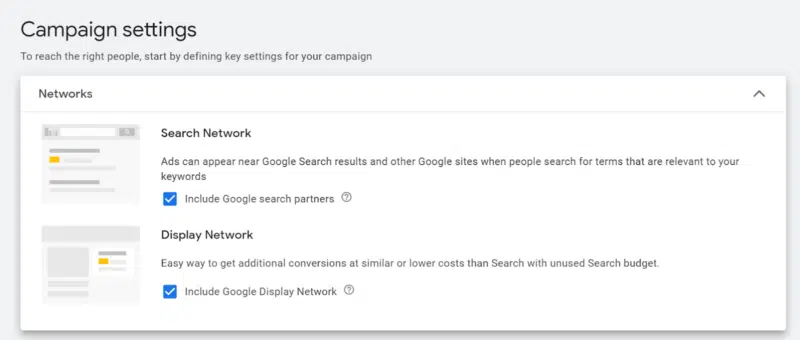
Google defines Search campaigns as “text ads on search results that let you reach people while they’re searching on Google.” 

Yet, the Search campaign settings default to include the Display Network, which does not belong in the campaign by its very definition.

Image 58 800x340

Location targeting defaults to include people who may be “interested in” (but have never been to) your target. 

This setting is not immediately visible from the Location section. Not only do you need to uncheck it, but you have to know to un-nest it (click Location Options to expand) in order to uncheck it. 

Some campaign types don’t even allow for the removal of “interested in.”

Automated assets (formerly ad extensions) are also hidden and run without your review or approval, even if they’re irrelevant to your business model. 

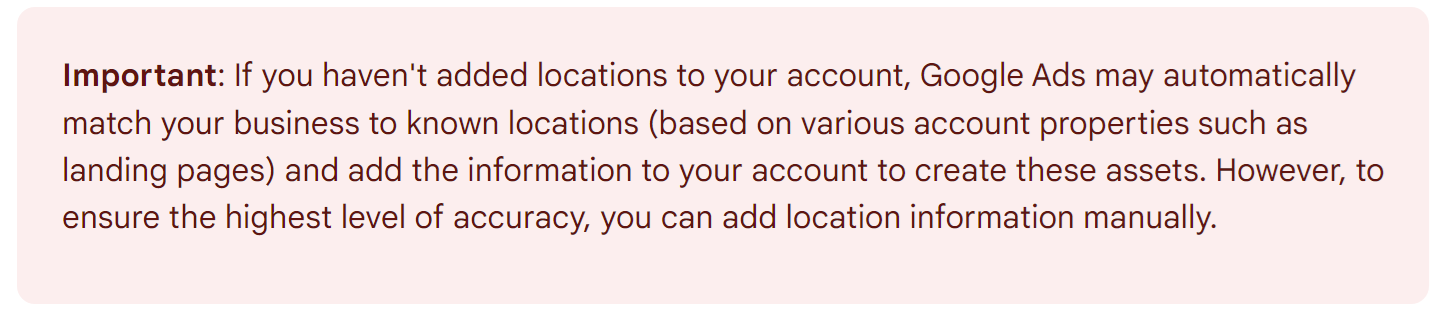
Here’s Google explaining how they run automated location assets even if you never linked your Business Profile to your account:

YEcNHDXBHDX8DYTAf2Lrfvrh3bqhBcbvxiUCpNYqVtsC9H62Qz01GGFnPOnMyslmRvWfj7kwyAlZWVUJY7LttBoC9V VENTkBXGWgYHOHLVI7jqyjCvaewffiymArsjElbbuJmZFe79Hy GvPY5uCU0

Obstacle course 

The “obstacle course” tactic places deliberate barriers in your way when you try to perform specific actions online.

Instead of a simple process, you’re forced to jump through hoops or contact a representative, adding complexity and deterring you from completing your intended tasks.

For instance, here are the steps to turn off the aforementioned automated assets you may not want running in your account:

  • Go to Ads & Assets. 
  • Select Assets 
  • Navigate to More (indicated only by three vertical dots).
  • Select Account-level automated assets. 
  • Navigate to More once again
  • Select Advanced settings.  
  • Select an asset
  • Select Off.
  • Select a reason (required).
  • Enter comments (optional).
  • Select Save.

Simple, right?

Other management tasks can’t even be completed in the interface, requiring you to contact Google directly for help. Good luck with that.

Image 59

Sneak into basket and forced choice

These deceptive design patterns manipulate users into making decisions or accepting choices you might not have consciously intended.

Google Ads wants you to keep mobile apps in your proverbial basket. There is no simple opt-out. They even “yanked advertisers’ option to exclude all mobile apps” in 2018. 

Though you can try to exclude 140 different app categories manually, the process isn’t 100% effective at eliminating app traffic.

Last year, they removed the option of content targeting for YouTube conversion campaigns, meaning you have to choose between contextual relevance and conversion optimization.

While certain feature restrictions may stem from technical and data constraints, the deliberate elimination of features that advantage Google underscores a conscious, strategic decision.

How to protect yourself from deceptive patterns

Deceptive patterns are a growing problem that institutions like the European Union and the Federal Trade Commission (FTC) are fighting against. 

Here’s how you can do your part in your Google Ads account:

  • Get to know the interface. Yes, the interface is always changing, but knowing where your settings live is the only way to ensure you know what they’re set to.
  • Challenge the default. Many marketers use default settings simply because they didn’t feel they had a reason to make an active change. But “it was like that when I found it” can be an expensive management style.
  • Learn the cheat codes. Navigating the Google ads interface might feel like a maze, but like the classic “Up, Up, Down, Down, Left, Right, Left, Right, B, A” code, there are shortcuts and hidden solutions. At the time of this article, you can still use “mobileappcategory::69500” to exclude app placements, a method not openly advertised by Google.

Completion bias: The allure of the checkmark

Completion bias is your brain’s tendency to favor tasks you can finish quickly, often at the expense of more important or complex tasks. 

The satisfaction and sense of accomplishment you feel successfully completing a task leads you to focus on short, achievable goals rather than more challenging or valuable ones.

How Google Ads capitalizes on your need to complete

The Google Ads interface hosts thousands of choices for changing settings and exploring data. 

Because it can be overwhelming, you’re likely drawn to tasks that offer immediate results and a clear sense of completion.

Google knows that if it gives you a ranking, you’re hard-wired to improve it. It has cleverly assigned “scores” to certain actions it wants you to take that don’t otherwise benefit you.

Ad Strength

Not to be confused with Quality Score or Ad Rank, Ad Strength is a score assigned to responsive ads that doesn’t directly influence your ad’s serving eligibility.

Image 60

Will you sacrifice focused, curated ad messaging for a better arbitrary score in the interface? Lots of marketers do.

Optimization score

A 100% optimization score means “your account can perform at its full potential,” according to Google

Image 61

Your score (and the “full potential” of your account) is mostly based on your willingness to adopt Google’s campaign recommendations, which may not align with your best interests.

How to outsmart completion bias

First, understand that not all scores are created equal. 

Diagnostic tools like Quality Score represent factors used in auction bidding and shouldn’t be overlooked. 

But with vanity scores, “everything’s made up and the points don’t matter,” so you’ll want to:

  • Scrutinize recommendations, and only apply those that align with your goals. (Some recommendations may help your account, so don’t reject everything out of spite – just be judicious.)
  • Dismiss recommendations you don’t agree with. Dismissing recommendations essentially removes them from the denominator, giving you a higher total percentage. This is especially important for Google Partners, who now need an optimization score of at least 70% for Partner status. You will have to give a reason why you’re rejecting the recommendation before it’s removed – another example of an “obstacle course” deceptive pattern.
  • Be OK with low completion scores. These Google-assigned scores don’t reflect your skills as a marketer and are rarely worth achieving.

Get the daily newsletter search marketers rely on.


The framing effect: How data is presented matters

The framing effect occurs when you interpret the same piece of information differently based on how it’s presented to you, leading you to make decisions influenced by the presentation rather than the information itself.

The way choices are framed, whether as a loss or a gain, can significantly influence decision-making and perception.

How Google Ads frames your choices

Google uses preattentive attributes, positive and negative messaging, and selectively emphasized metrics to nudge you toward certain decisions.

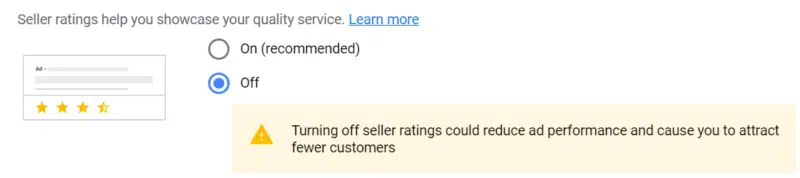
Can you spot the tactics they’re using here to encourage you to keep seller ratings turned on?

Image 62 800x178
  • The “(Recommended)” callout makes one option seem preferable.
  • A yellow caution sign makes one choice look more risky.
  • Messaging about the potential negative downside of an action discourages the behavior.

Your budget’s looking awfully low

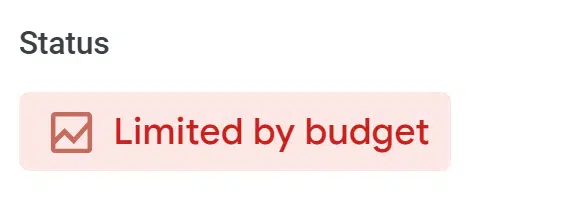
Google is quick to warn you when your campaigns are limited by budget, using red text on a red highlight. 

Image 63

But is increasing the budget a good decision? 

Interestingly, no default column even compares actual performance to campaign goals, let alone color codes it. 

This nudge draws your attention only to what Google wants you to focus on (increasing your spend).

You may already be a winner

Google Ads is keen to tell you about the potential upside of taking a certain action while completely ignoring the downside. Here’s the language they’re using in my interface right now:

  • “Improve performance by …”
  • “Upgrade your existing keywords to broad match.”
  • “Get more conversions at a similar or better ROI by…”
  • “Drive better campaign performance by…”
  • “Get more conversion value with…”

These messages imply (or directly state) that the recommended actions are riskless. 

Who doesn’t want more conversions at a better ROI? Nowhere does it mention the fact that your ROI could actually be worse if you make the suggested change. 

How to protect your account from the framing effect

To avoid making account decisions based on how Google Ads frames its recommendations, practice the art of reframing. 

If a red warning message makes you feel pressured into changing a setting, think about whether you’d make that same decision without the warning message. 

If a recommendation only focuses on a change’s potential upside, consider the downside before deciding what to do.

Authority bias: Trading on trust

Authority bias is the tendency to attribute greater accuracy to the opinion of an authority, often overlooking your own judgment or contradictory evidence. 

How Google Ads exploits your authority bias

Google is the biggest player in online search, holding over 80% of the market in 2023. Google Ads has been serving billions of ads daily for over a decade. 

Even savvy marketers will defer to Google’s take on what’s working. 

But that trust can come at a cost, especially when it involves “Googlers” weighing in on your account. While the Big Tech companies are known for hiring the best and brightest, the reality can be sobering.

Misrepresentation from Google representatives

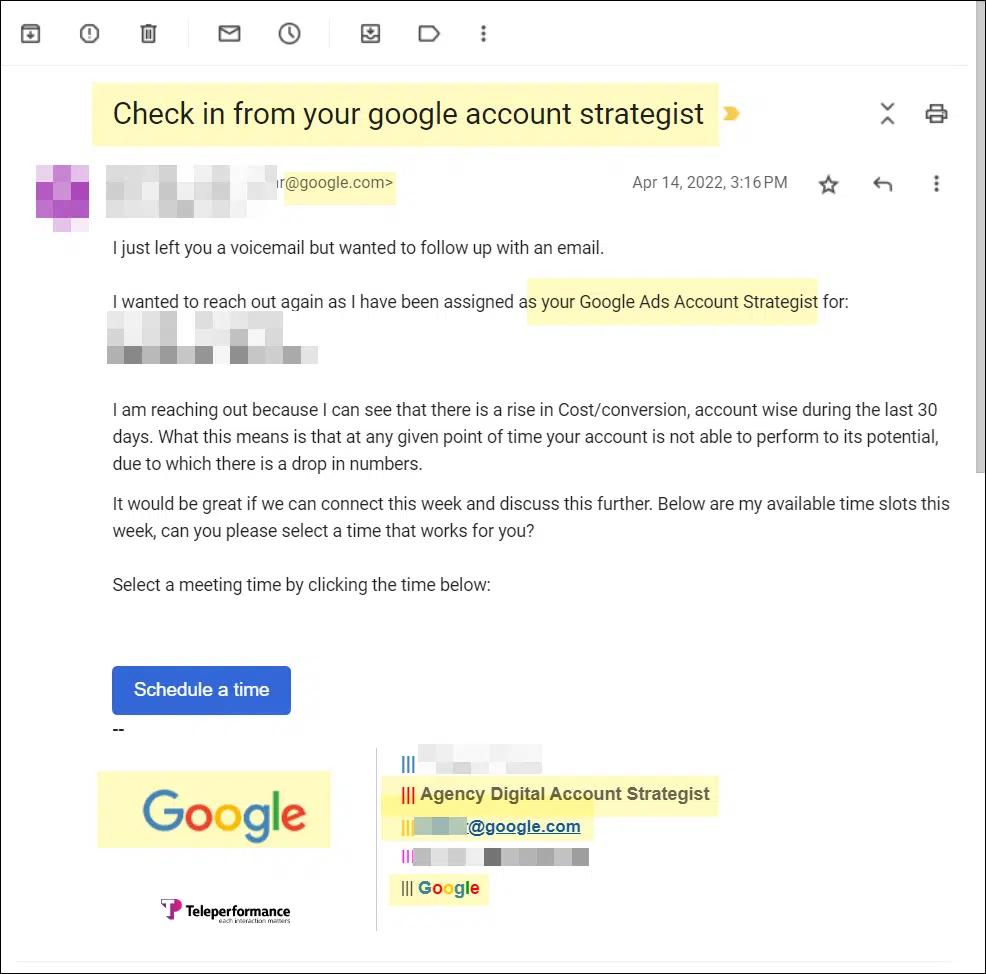
You get an email from Beth, who introduces herself as your Google Ads Account Strategist.

She has a verified google.com email address and includes confidential details about your Google Ads account. She wants to help you optimize your account performance.

Which of these statements seems most plausible:

  • A. Beth is a Google employee trained by Google on the ads platform. As your Account Strategist, she will help you improve your results.
  • B. Beth is not employed by Google and has not received training from Google. She works for a third party, where her compensation is based on convincing you to increase ad spend and adopt products that benefit Google’s bottom line.

If you guessed “B,” you probably use Google Ads.

Most people don’t expect Google to hand their account info to third parties using misleading job titles. And the clues are so subtle it can be hard to know that’s what happened.

Image 64

In this email screenshot, only the small “Teleperformance” graphic on the left side of the signature suggests a third-party company. In contrast, the substance of the email implies a direct relationship.

The outsourcing is especially deceptive, but actual Googlers are often driven by similar undisclosed OKRs and product adoption goals when advising on your account. Google employees who work with accounts are often on the sales team. 

How to reclaim your own authority

Humans who are motivated to influence your decision-making can be even trickier to deal with than interfaces. Here are some tips to stop the madness:

  • Avoid on-the-spot pressure. When a rep has you on the phone, they may pressure you to make real-time changes (or to approve them doing so on your behalf). Just say no. Any change worth making can be made when you’re off the call.
  • Warn your team. When aggressive Google reps encounter resistance from you, they may contact other team members or your clients directly to push their recommendations. By forewarning your team, they’ll be more cautious about the advice they accept.

Unmasking covert persuasion tactics in Google Ads

We tend to think of the Google Ads interface as a utility for ads management, not a sales tool for a Fortune 10 company.

But Google Ads is using sophisticated persuasion tactics that always benefit them and only sometimes benefit you. 

Always consider the motivation and incentives behind Google’s explicit and implied recommendations, and only accept the ones that are good for your business.


Opinions expressed in this article are those of the guest author and not necessarily Search Engine Land. Staff authors are listed here.


Related stories

New on Search Engine Land

@media screen and (min-width: 800px) { #div-gpt-ad-3191538-7 { display: flex !important; justify-content: center !important; align-items: center !important; min-width:770px; min-height:260px; } } @media screen and (min-width: 1279px) { #div-gpt-ad-3191538-7 { display: flex !important; justify-content: center !important; align-items: center !important; min-width:800px!important; min-height:440px!important; } }

About the author

Amy Hebdon

Amy Hebdon is a Google Ads conversion expert and the founder and managing director of the Google Partner agency Paid Search Magic. Since 2004, she’s managed Google Ads for clients ranging from Fortune 10 to SMBs at agencies, in-house, and freelancing. Her articles have been published in Search Engine Journal, Unbounce, PPC Hero, Supermetrics, Copy Hackers and CXL. Together with her husband James, she also runs the Facebook group Google Ads for Savvy Digital Marketers.

https://searchengineland.com/google-ads-manipulation-432089


TikTok rolls out new label for AI-generated content

TikTok is launching a new label to help creators tag their AI-generated content.

Creators are advised to use this label on content that’s been fully or heavily edited by AI to comply with the platform’s rules on synthetic media.

Additionally, TikTok is planning to test an automatic “AI-generated” label that will be added to any content it detects as having AI involvement.

Why we care. Keeping up-to-date with TikTok’s guidelines is crucial to avoid potential penalties. In addition, clearly labelling AI-generated content plays a pivotal role in tackling misinformation and deceit, helping to improve trust and simplifying the process for creators to build relationships and foster credibility with their audience.

Why now? TikTok launched its new label after making it a requirement for creators to tag AI-generated content earlier this year, under its Community Guidelines’ synthetic media policy. These labels should be used on content that includes lifelike images, audio, or video. Their purpose is to help viewers understand the content better and prevent the possible spread of misleading information.

Learning tools. To help TikTok creators understand how and why they should use the AI labels, the platform plans to release educational videos and resources in the coming weeks. A spokesperson explained:

  • “We hope that with time, people will start using these labels just like they do verified account badges and branded content labels, making them another useful tool for creators and viewers to share and make sense of content.”

TikTok AI effects rebrand. To make things even clearer regarding TikTok’s AI-driven features, the platform is renaming all TikTok AI effects. Now, these effects will have “AI” in their name and label, and the platform has also instructed Effect House creators to follow suit in their guidelines.


Get the daily newsletter search marketers rely on.


What has TikTok said? A TikTok spokesperson said in a press release:

  • “Our goal with these efforts is to build on existing content disclosures—such as our TikTok effects labels—and find a clear, intuitive and nuanced way to keep our community informed about AI-generated content.”
  • “AI-generated content is an exciting opportunity, and as it evolves, our approach will too.”
  • “We will continue to iterate as we evaluate the impact of these updates and work with our community to safely navigate the recent advancements of AI-generated content together.”

Deep dive. Read TikTok’s official announcement on New labels for disclosing AI-generated content for more information.


Related stories

New on Search Engine Land

@media screen and (min-width: 800px) { #div-gpt-ad-3191538-7 { display: flex !important; justify-content: center !important; align-items: center !important; min-width:770px; min-height:260px; } } @media screen and (min-width: 1279px) { #div-gpt-ad-3191538-7 { display: flex !important; justify-content: center !important; align-items: center !important; min-width:800px!important; min-height:440px!important; } }

About the author

Nicola Agius

Nicola Agius is Paid Media Editor of Search Engine Land after joining in 2023. She covers paid search, paid social, retail media and more. Prior to this, she was SEO Director at Jungle Creations (2020-2023), overseeing the company’s editorial strategy for multiple websites. She has over 15 years of experience in journalism and has previously worked at OK! Magazine (2010-2014), Mail Online (2014-2015), Mirror (2015-2017), Digital Spy (2017-2018) and The Sun (2018-2020). She also previously teamed up with SEO agency Blue Array to co-author Amazon bestselling book ‘Mastering In-House SEO’.

https://searchengineland.com/tiktok-new-label-ai-generated-content-432127


Elon Musk plans to make X (Twitter) a paid-for platform to tackle bots

Elon Musk is planning to make X (formerly known as Twitter) a paid-for platform for all users.

In a bid to tackle the issue of rampant bot activity, he unveiled proposals to roll out small monthly subscriptions during a live conversation with Israeli Prime Minister, Benjamin Netanyahu.

Musk did not specify how much the plans would cost or what features would be included at the lowest tier.

However, he did claim that X now has 550 million monthly users that typically post 100 million to 200 million posts a day – although it’s not yet known what proportion of this data is bots versus authentic users.

This marks a 140% increase on the “average monetizable daily active usage” of 229 million reported by Twitter in May 2022, before Musk’s takeover.

Why we care. Transitioning X to a paid platform could be good news for advertisers because it might mean they get a better-quality audience and fewer problems with bots. That could lead to more conversions and a higher ROI. But there’s a downside: some users might ditch X for free alternatives like Threads, which could shrink the platform’s user base and, in turn, reduce the reach of X advertisers.


Get the daily newsletter search marketers rely on.


What has X said? Musk told Prime Minister, Netanyahu:

  • “The single most important reason that we’re moving to having a small monthly payment for use of the X system is that it’s the only way I can think of to combat vast armies of bots.”
  • “Because a bot costs a fraction of a penny, or a tenth of a penny, but if somebody even has to pay a few dollars or something, some minor amount, the effective cost of bots is very high, and then you also have to get a new payment method every time you have a new bot.”
  • “We’re actually going to come out with lower tier pricing. We want it to be just a small amount of money [and] in my view, this is actually the only defense against vast armies of bots.”

Deep dive. Read the X blog for more information about the platform’s latest updates.


Related stories

New on Search Engine Land

@media screen and (min-width: 800px) { #div-gpt-ad-3191538-7 { display: flex !important; justify-content: center !important; align-items: center !important; min-width:770px; min-height:260px; } } @media screen and (min-width: 1279px) { #div-gpt-ad-3191538-7 { display: flex !important; justify-content: center !important; align-items: center !important; min-width:800px!important; min-height:440px!important; } }

About the author

Nicola Agius

Nicola Agius is Paid Media Editor of Search Engine Land after joining in 2023. She covers paid search, paid social, retail media and more. Prior to this, she was SEO Director at Jungle Creations (2020-2023), overseeing the company’s editorial strategy for multiple websites. She has over 15 years of experience in journalism and has previously worked at OK! Magazine (2010-2014), Mail Online (2014-2015), Mirror (2015-2017), Digital Spy (2017-2018) and The Sun (2018-2020). She also previously teamed up with SEO agency Blue Array to co-author Amazon bestselling book ‘Mastering In-House SEO’.

https://searchengineland.com/elon-musk-x-twitter-paid-for-platform-bots-432119


Microsoft Audience Ads announces new AI bid strategies and market expansion

Microsoft is launching two new automated bid strategies to help “advertisers reach their target audience with minimal effort”:

  • Maximize conversion: Advertisers can use this feature to maximize conversions as much as possible, given the budget.
  • Target CPA: Advertisers can use this feature to maximize conversions as much as possible, given the CPA target and the budget.

The two new offerings are currently in pilot with general roll out planned for October 2023.

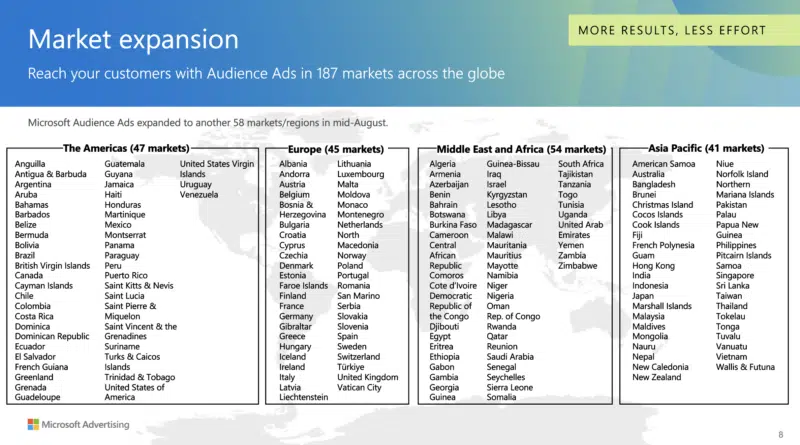
In addition, the tech giant has expanded into 58 new markets, meaning its ads are now served in 187 countries across the globe.

Screenshot 2023 09 18 At 16.10.24 800x445

Why we care. Automated bidding can save advertisers time and effort, thanks to AI doing the heavy lifting. It takes care of improving your campaign’s performance without you needing to get hands-on. With these particular new bid strategies, you also maintain control as you still have the freedom to set your budget and choose how you want to measure success.

What are Audience Ads? Audience Ads are Microsoft’s native, display ads. These products enable you to target your ideal audience based on Microsoft’s understanding of people’s interests and consumer intent signals. The ads are then served in placements across the web like Microsoft’s MSN, Start, Outlook, and more.

What has Microsoft said? Microsoft Senior Product Marketing Manager Mallory Harwood told Search Engine Land:

  • “We are continuing to invest in more bid strategies for Microsoft Audience Ads to enable advertisers to meet their goals wherever they are across the globe.”
  • “Market expansion has been a huge priority for us across our search and marketing offering. We recently expanded our Audience Ads to 58 new markets, which brings us to 187 countries as of mid August – which is huge and very exciting.”
  • “A couple of years ago, we were only at seven markets – so as you can see, we have been doing a lot of investing very quickly!”

Deep dive. Read Microsoft’s Automated Bidding guidelines for more information.


Related stories

New on Search Engine Land

@media screen and (min-width: 800px) { #div-gpt-ad-3191538-7 { display: flex !important; justify-content: center !important; align-items: center !important; min-width:770px; min-height:260px; } } @media screen and (min-width: 1279px) { #div-gpt-ad-3191538-7 { display: flex !important; justify-content: center !important; align-items: center !important; min-width:800px!important; min-height:440px!important; } }

About the author

Nicola Agius

Nicola Agius is Paid Media Editor of Search Engine Land after joining in 2023. She covers paid search, paid social, retail media and more. Prior to this, she was SEO Director at Jungle Creations (2020-2023), overseeing the company’s editorial strategy for multiple websites. She has over 15 years of experience in journalism and has previously worked at OK! Magazine (2010-2014), Mail Online (2014-2015), Mirror (2015-2017), Digital Spy (2017-2018) and The Sun (2018-2020). She also previously teamed up with SEO agency Blue Array to co-author Amazon bestselling book ‘Mastering In-House SEO’.

https://searchengineland.com/microsoft-audience-ads-automated-bid-strategies-market-expansion-432105


Google Ads explains ‘limited by bid strategy’ status amid manual bidding concerns

Google Ads has clarified its new “limited by bid strategy” indicator.

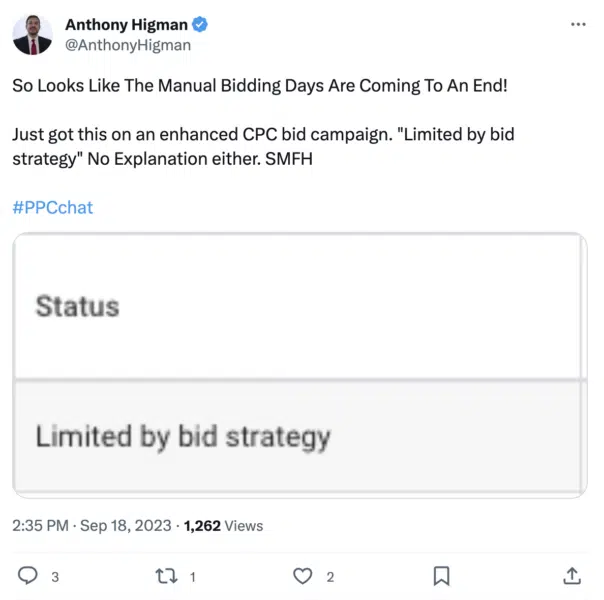
Digital marketing expert Anthony Higman first noticed the pop-up on an enhanced manual CPC campaign.

He shared a screenshot of the notification on X (formerly known as Twitter) and claimed there no further explanation had been provided:

Screenshot 2023 09 18 At 17.57.34 604x600

After the screenshot raised concerns in the PPC community, Google explained that the indicator simply highlights when a campaign can achieve better conversion value while maintaining a similar ROAS or conversions at the target CPA with a value-based bidding strategy.

The platform reassured that despite the notification, no action is actually required by advertisers – it currently just serves as a potential recommendation.

Why we care. Advertisers are concerned that this could be a signal that Google Ads is taking another step towards manual CPC deprecation, which may prove problematic for industries that aren’t suited to enhanced conversion data or conversion values.

However, as pointed out by digital marketing expert Greg Finn, this feature could be beneficial for Smart Campaigns. He explained on X:

  • “It would however be very useful for diagnosis purposes if it did help with Smart Campaigns that are actually limited by to aggressive of a target. That would be very nice in fact!”

Get the daily newsletter search marketers rely on.


What has Google said? Google Ads Product Liaison officer Ginny Marvin said:

  • “This is a relatively new indicator that may appear when the system determines the campaign can get more conv value at a similar ROAS or convs at the target CPA with a value-based bidding strategy. You can review the recommendation, but no action is required.”
  • “Separately, last month, we notified advertisers using eCPC for Shopping campaigns that those campaigns will begin behaving as if they’re using Manual CPC bidding starting in early October.”
  • “There are also status indicators that may show when a bid strategy is limited by inventory, bid status or budget constraint.”

Deep dive. Read Google’s Bid Strategy Status guidelines for more information.


Related stories

New on Search Engine Land

@media screen and (min-width: 800px) { #div-gpt-ad-3191538-7 { display: flex !important; justify-content: center !important; align-items: center !important; min-width:770px; min-height:260px; } } @media screen and (min-width: 1279px) { #div-gpt-ad-3191538-7 { display: flex !important; justify-content: center !important; align-items: center !important; min-width:800px!important; min-height:440px!important; } }

About the author

Nicola Agius

Nicola Agius is Paid Media Editor of Search Engine Land after joining in 2023. She covers paid search, paid social, retail media and more. Prior to this, she was SEO Director at Jungle Creations (2020-2023), overseeing the company’s editorial strategy for multiple websites. She has over 15 years of experience in journalism and has previously worked at OK! Magazine (2010-2014), Mail Online (2014-2015), Mirror (2015-2017), Digital Spy (2017-2018) and The Sun (2018-2020). She also previously teamed up with SEO agency Blue Array to co-author Amazon bestselling book ‘Mastering In-House SEO’.

https://searchengineland.com/google-ad-limited-bid-strategy-status-manual-bidding-432092