Google Ads trials enhanced customer service for small businesses
Google Ads will offer enhanced customer service for small businesses as part of a new paid pilot.
A select number of agencies and advertisers have been invited to test the new program, which offers one-on-one support tailored to specific customer needs.
Why we care. Small business owners using the program can get specialized advice faster by using this premium service, which has historically only been accessible to Google Ads’ biggest clients.
What’s next? Google will collect feedback from participants. In time, Google hopes to roll the service out to more small- and medium-sized businesses. A Google spokesperson said:
“These changes are part of a long-term strategy that we’ll be building on over time, testing, and learning as we go.”
Why now? Google launched the pilot in response to a “common complaint” from small businesses that they more specialized advice from the search engine’s experts, along with ideas for how they can improve their ads campaigns and optimize their budgets – a level of service not provided by Google’s automated self-service system.
Get the daily newsletter search marketers rely on.
What has Google said? A spokesperson from Google told Search Engine Land:
“The paid pilot is intentionally small in scope so we can take feedback and iterate based on what works best for our customers.”
“As part of this evolution, we’ve made significant upgrades to the Help Center to help customers resolve issues on their own, more easily. This includes multimedia additions, such as videos and GIFs, across articles related to how to edit your campaign settings, edit your bids, and resolve data inconsistencies in Google Ads accounts. We will continue to invest in this area.”
“Agencies working with customers included in this pilot will also be able to schedule specialized paid support consultations tailored to their clients’ specific needs.”
@media screen and (min-width: 800px) { #div-gpt-ad-3191538-7 { display: flex !important; justify-content: center !important; align-items: center !important; min-width:770px; min-height:260px; }
}
@media screen and (min-width: 1279px) { #div-gpt-ad-3191538-7 { display: flex !important; justify-content: center !important; align-items: center !important; min-width:800px!important; min-height:440px!important; }
}
About the author
Nicola Agius is Paid Media Editor of Search Engine Land after joining in 2023. She covers paid search, paid social, retail media and more. Prior to this, she was SEO Director at Jungle Creations (2020-2023), overseeing the company’s editorial strategy for multiple websites. She has over 15 years of experience in journalism and has previously worked at OK! Magazine (2010-2014), Mail Online (2014-2015), Mirror (2015-2017), Digital Spy (2017-2018) and The Sun (2018-2020). She also previously teamed up with SEO agency Blue Array to co-author Amazon bestselling book ‘Mastering In-House SEO’.
How to use PPC to act on (or respond to) unplanned publicity
When your business is in the news or getting attention online, it’s an opportunity for PPC teams.
If the publicity is good, you can use your Google Ads program to capitalize on it.
If the publicity is bad, you can use your Google Ads program to respond and potentially mitigate the impact.
What kind of publicity are we talking about? It could be:
A hate-based group is organizing on your university campus.
Your CEO makes off-handed, controversial remarks.
A powerful influencer gives your product a glowing review.
A celebrity shares their personal experience with a health issue your charity supports.
Whenever this type of publicity arises, having the number one ad spot on Google helps you:
Capitalize on the positive attention
Respond directly to the negative coverage.
But this is easier said than done. So I also checked in with our PR expert, Michelle Garrett of Garrett Public Relations, to get her perspective and ideas.
How to get ahead of publicity
If you’re lucky, you’ll have a PR department, consultant or agency that monitors the media and online spaces for conversations about your company.
But if you don’t (and even if you do), it’s always a good idea to have Google Alerts set up for your company name, the names of your leadership team, and other important industry and branded terms.
Garrett suggests another tactic: set up a free Talkwalker alert, which may help catch mentions that Google Alerts misses.
These steps might seem outside the realm of responsibility for paid search advertising teams, but they’re simple and easy to do. And in the past, we’ve caught publicity issues with Google Alerts that PR teams have missed.
A huge spike in traffic on branded search terms is another major clue that your business is in the news or a topic of discussion online.
This happened with the CEO of one of our clients. We saw a huge spike in traffic for the business’s brand name that we couldn’t explain.
We asked the client about it, and they told us about the CEO’s unfortunate remarks. We worked together to develop a new plan for their branded ads and sitelinks to communicate the company’s response to the situation.
And sometimes, another team will come to you when they see something going viral. They may ask you to crank out a couple of campaigns or ads to dominate the SERPs if something is getting traction online or in the news. (Murphy’s Law: It’s usually at 5 p.m. on a Friday.)
Get the daily newsletter search marketers rely on.
3 challenges of managing PR with PPC
While paid search advertising is a great tool for managing PR crises and opportunities, it also comes with unique challenges.
But you can overcome most of these challenges if you plan for them.
1. You need to respond quickly
Publicity can evaporate in an instant. You have to act fast.
That means you might not (and probably won’t) have everything just perfect before you respond. So, for example, you might update your ad messaging but not have the best landing pages in place.
Until you do, you may have to send traffic to your home page (for positive publicity) or a press release (for negative publicity).
The idea is to respond ASAP and then work to finesse what you have. So while you might use your home page as a temporary landing page, try to get a custom landing page up as quickly as possible.
The problem of getting all the pieces in place as soon as possible isn’t as easily solved as you might think.
Even if you and your PPC team are on the ball and ready to respond on a Friday at 5 p.m., that doesn’t mean every other team involved will be.
And whether it’s a crisis or an opportunity, you can’t draft messaging in a vacuum. You’re going to need to plan and collaborate. And that takes time.
The key to responding quickly is to plan for public relations crises in advance, Garrett said.
Make sure your plan includes a “holding” statement (a prepared, fill-in-the-blanks type statement) that you can quickly issue to buy your team more time – because every minute counts when you need to respond to a situation that’s unraveling quickly.
Your plan should also include:
A list of your internal crisis team members.
Which audiences you need to notify (this will vary depending on the nature of the crisis).
How to track any media inquiries that come in.
We should also revisit this plan occasionally to keep it up to date.
Having this plan in place helps you rest easier. It’s like having insurance – it’s always there, just in case. Sage advice from Garrett!
2. You need to respond with sensitivity (i.e., don’t be a jerk)
As hinted above, unplanned publicity can come with complex issues. If you’re not careful, you can come off looking like a jerk and make everything worse.
Again, you must consult with other departments, especially PR, as you navigate these waters.
Garrett also reminds us to pull in legal counsel. They can work with PR to ensure any comments made to address the crisis won’t put the company in legal jeopardy.
For example, in the case of the CEO who made offensive comments, downplaying what the CEO said could easily backfire. That’s why we worked carefully with that company’s PR department to craft a response. This shouldn’t live with your PPC team alone.
As a PR expert that’s lived through more than a few crises, Garrett notes that the winning formula involves:
Taking responsibility for your actions.
Apologizing genuinely.
Moving on with actions that illustrate you’re trying to do better.
3. You need a longer-term plan
While publicity can happen quickly, the impact (and opportunities) can be long-lasting.
After the kerfuffle dies down, consider whether you need additional content or if it would be valuable.
If a celebrity comes forward with their personal experience of a health issue, you might consider creating more content around the celebrity and the topic. Perhaps the PR team could land an interview with the celebrity, then you could use that interview in your advertising to help spread their message.
You could even use that article as a landing page if the celebrity speaks out about the issue to the media again.
In the case of bad publicity, you should continue to monitor the situation, even after everyone else has forgotten about it. (And people will eventually forget and move on, Garrett reassures us. Which is nice to know when you’re in a crisis.)
But until then, watch keyword trending for search ads and site placements for video and display ads to see if the issue rises again.
Not everyone thinks of PPC as a way to respond to PR opportunities and crises, but it’s a valuable tool.
Having your search ad at the top of search results pages – with a link to your messaging on the topic of discussion – is a great means of distributing your unfiltered message.
It’s not always easy to do. But when unexpected publicity hits, it’s well worth the effort.
Opinions expressed in this article are those of the guest author and not necessarily Search Engine Land. Staff authors are listed here.
@media screen and (min-width: 800px) { #div-gpt-ad-3191538-7 { display: flex !important; justify-content: center !important; align-items: center !important; min-width:770px; min-height:260px; }
}
@media screen and (min-width: 1279px) { #div-gpt-ad-3191538-7 { display: flex !important; justify-content: center !important; align-items: center !important; min-width:800px!important; min-height:440px!important; }
}
About the author
Pauline Jakober is Founder and CEO of Group Twenty Seven, a boutique online advertising agency that provides Google Ads and LinkedIn Ads management, consulting and audits to B2B clients.
Once you’re in the beta, your Discovery campaigns will be automatically upgraded to Demand Gen.
All Discovery campaigns should be “upgraded” to Demand Gen by early 2024.
What is Demand Gen beta? “Demand Gen campaigns combine image + video ads in one place and can be used to drive conversions, site visits and actions like sign-up and add-to-cart across YouTube, Discover and Gmail,” Google Ads Liaison Ginny Marvin explained in a thread on X, formerly known as Twitter.
In addition to YouTube Home, Search and Watch Next, Discover, and Gmail, Demand Gen campaigns work across:
Why we care. Being able to see how your creative will look across Demand Gen placements is great for advertisers, especially brands with strict compliance and/or brand teams, as PPC expert and SMX speaker Sam Tomlinson points out in an X thread full of reactions and takeaways.
Who is eligible for an upgrade? Right now, all you need is an active Discovery campaign. Google Ads will open Demand Gen campaigns to everyone in October 2023.
How to upgrade. Sign up for the Demand Gen beta via this short form.
New features. Once you sign up for the Demand Gen beta, you can explore these new features:
Different ad formats in one campaign: You will be able to experiment with a variety of different ad formats, including short-form videos, carousels, portraits, and square images to try to engage your audience more effectively.
Lookalike segments: This feature will help you find customers similar to those who have already engaged with your brand through a custom-built Seed list. The ability to test from Narrow to Broad also provides the ability to restrain or expand reach.
Unique goals: Similar to Discovery ads, you can optimize Demand Gen for conversions or use value-based bidding strategies.
Maximize Clicks bidding: You can use this tool to optimize for site visits and actions, helping to drive high-value customers to your website.
Ad previews: This feature lets you see how your creatives will look across different surfaces.
A/B experimentation: Use this feature to optimize placements and find the perfect mix for your campaigns.
What Google is saying. Demand Gen was “built to help advertisers who buy on social platforms find and convert consumers with immersive, relevant, and visual creatives that grab attention and spur action in the right moment,” a Google spokesperson said:
“Demand Gen drives conversions, site visits, and actions (like sign-ups and adds-to-carts) on our entertainment-focused touchpoints — YouTube, including Shorts, Discover and Gmail.”
“In the coming months, we’ll share more resources and best practices to help ensure your upgrade process is as smooth as possible.”
Get the daily newsletter search marketers rely on.
Timeline. Here’s what’s coming next:
October: All Discovery campaigns will become eligible to move to Demand Gen. Some Discovery campaigns will automatically migrate to Demand Gen.
January – March 2024: Google will launch automatic upgrades for all remaining Discovery campaigns.
@media screen and (min-width: 800px) { #div-gpt-ad-3191538-7 { display: flex !important; justify-content: center !important; align-items: center !important; min-width:770px; min-height:260px; }
}
@media screen and (min-width: 1279px) { #div-gpt-ad-3191538-7 { display: flex !important; justify-content: center !important; align-items: center !important; min-width:800px!important; min-height:440px!important; }
}
About the author
Nicola Agius is Paid Media Editor of Search Engine Land after joining in 2023. She covers paid search, paid social, retail media and more. Prior to this, she was SEO Director at Jungle Creations (2020-2023), overseeing the company’s editorial strategy for multiple websites. She has over 15 years of experience in journalism and has previously worked at OK! Magazine (2010-2014), Mail Online (2014-2015), Mirror (2015-2017), Digital Spy (2017-2018) and The Sun (2018-2020). She also previously teamed up with SEO agency Blue Array to co-author Amazon bestselling book ‘Mastering In-House SEO’.
Microsoft is giving advertisers more time to complete verification through its Advertiser Identity Verification (AIV) program.
The company will only pause ads in three scenarios.
Why we care. You will still need to complete the Microsoft Ads verification requirements if you want your ads to continue showing globally.
How it works. All advertisers will still be asked to complete AIV when setting up a new account. If verification has not been completed, Microsoft will pause ads in the following scenarios:
Advertisers whose ads will serve in the European Economic Area (EEA) will have 30 days to complete verification for ads to continue serving in the EEA.
If AIV is not complete within 30 days, eligibility to serve ads in the EEA will be suspended until successful completion of AIV.
Advertisers whose account has been flagged by systematic checks related to risk for advertisers or those who use our products.
Ads will not serve globally until successful completion of AIV.
Advertisers whose account has been suspended for policy violations, who have not already completed AIV.
Successful completion of AIV will be the first step for the advertiser to be able to appeal the suspension.
Why now? Microsoft reviewed its initial decision following feedback and decided this change was needed to minimize the impact on customers.
Get the daily newsletter search marketers rely on.
What is Microsoft is saying. “As this continues to roll out across advertisers, the scope of ads that may be paused may expand over time as we continue to learn and evaluate the process, as well as any risks for our users.,“ the company wrote in a blog post:
Identity verification help. You can read the official help documentation here.
@media screen and (min-width: 800px) { #div-gpt-ad-3191538-7 { display: flex !important; justify-content: center !important; align-items: center !important; min-width:770px; min-height:260px; }
}
@media screen and (min-width: 1279px) { #div-gpt-ad-3191538-7 { display: flex !important; justify-content: center !important; align-items: center !important; min-width:800px!important; min-height:440px!important; }
}
About the author
Nicola Agius is Paid Media Editor of Search Engine Land after joining in 2023. She covers paid search, paid social, retail media and more. Prior to this, she was SEO Director at Jungle Creations (2020-2023), overseeing the company’s editorial strategy for multiple websites. She has over 15 years of experience in journalism and has previously worked at OK! Magazine (2010-2014), Mail Online (2014-2015), Mirror (2015-2017), Digital Spy (2017-2018) and The Sun (2018-2020). She also previously teamed up with SEO agency Blue Array to co-author Amazon bestselling book ‘Mastering In-House SEO’.
X (Twitter) tells advertisers that promoted accounts are over
Advertisers will no longer be able to promote their brands in timelines using the promoted accounts ad format on X, formerly known as Twitter.
Why we care. You now have one less way to grow followers and reach for your brand on X. They were one of the oldest ad products on X, so this may be a shock to long-time advertisers.
Why now? Since Elon Musk’s take-over last year, X has been trying to prioritize new ad products that leverage multi-media tools, such as video – which promoted accounts don’t have the capacity for.
The hurried change is “part of a larger effort to optimize the X experience by prioritizing content formats”, according to an email from X obtained by Axios.
What are promoted accounts? Promoted accounts used to appear on the X timeline as text-based posts, along with a ‘Follow’ button, enabling users to start following brands with minimal effort.
Get the daily newsletter search marketers rely on.
What has X said? An X representative acknowledged that many brands rely heavily on promoted accounts as part of their advertising strategies:
“Will work to identify alternative routes to meet these goals.”
In the meantime, X is advising advertisers to explore its other ad products, such as engagement campaigns and reach campaigns.
@media screen and (min-width: 800px) { #div-gpt-ad-3191538-7 { display: flex !important; justify-content: center !important; align-items: center !important; min-width:770px; min-height:260px; }
}
@media screen and (min-width: 1279px) { #div-gpt-ad-3191538-7 { display: flex !important; justify-content: center !important; align-items: center !important; min-width:800px!important; min-height:440px!important; }
}
About the author
Nicola Agius is Paid Media Editor of Search Engine Land after joining in 2023. She covers paid search, paid social, retail media and more. Prior to this, she was SEO Director at Jungle Creations (2020-2023), overseeing the company’s editorial strategy for multiple websites. She has over 15 years of experience in journalism and has previously worked at OK! Magazine (2010-2014), Mail Online (2014-2015), Mirror (2015-2017), Digital Spy (2017-2018) and The Sun (2018-2020). She also previously teamed up with SEO agency Blue Array to co-author Amazon bestselling book ‘Mastering In-House SEO’.
How to get Universal Analytics-like insights in Google Analytics 4
While many of us miss Universal Analytics (UA), the fact is it’s gone and it isn’t coming back.
So, how do we get UA-like findings out of Google Analytics 4 (GA4)?
We asked Russell Ketchum, product director of Google Analytics, in the first of a three-part series of conversations with him.
The terminology and concepts in GA4 are different from those in Universal Analytics, what does it mean to recreate UA reports for GA4?
RK: Using GA4 requires a new way of thinking.
First and foremost, when comparing UA and GA4, it’s important to remember that UA was built when the internet looked very different from how it does today – and operated very differently. To accommodate these changes, we’ve updated features in GA4 to meet today’s expectations.
In UA, everything was a report – and there were a lot of them. And, looking back, there was a tendency to overload the purpose of several reports – which might have been great for power users but could be intimidating for newcomers.
With GA4, we’ve taken a more use-case-centric approach.
What we now call “Reports” is intended to be the canonical set of information you’d monitor on a daily basis. It’s customizable in a way that’s shared across your organization so you can be sure that everyone is on the same page and seeing the exact same data (this can be found in the GA4 left navigation).
So how do I come up with customized “reports” about things I want to know?
RK: For that you have Explore. Think of this more as a user’s personal “scratch pad.”
Explore lets you go really deep in your analysis – it actually has its roots in UA’s 360-only “Advanced Analysis” feature set. It offers a lot of functionality that most of our users haven’t seen before.
We don’t expect all users to go there, or at least not every day, but it’s a great option to have.
Explore is there to either answer a specific, one-off question – or to inspire a report that your organization would benefit from when added to the Reports section.
And in the Advertising Workspace, we focus on media measurement.
That said, depending on what your goal is, there are almost always more straightforward ways to get the answer out of GA4, rather than aiming to recreate UA reports.
Such as…?
RK: I think it is more useful to take this even broader and talk about the challenges users can have with GA4 in general.
Let’s be honest, customers were used to Universal Analytics. In a lot of ways, UA taught its users how to think – and GA4 requires you to think differently. We know that’s hard, but it’s also intentional. So we’re committed to helping our customers bridge that gulf – for example, with the newly launched Analytics Academy.
In UA, you had to shoehorn your view of the world into some pretty limiting constructs – sessions, bounces, last click, etc. …In GA4, we’ve broken free of those constraints, but there’s a learning curve.
GA4 measures user engagement with your site or app differently – and more accurately. It focuses on the users and all the things those users do (measured by different events).
Here’s an example:
In UA, you’d typically look at Bounces and Time on Page to get a sense of “not valuable” traffic (or sessions or users or clicks depending on the situation). But that’s not really what it’s measuring. A Bounce is just an “unbound session” — a user came to your site, registered one page view, and took no subsequent navigation action.
Is that a good measure of how engaged the user was? Given how the web worked in 2005 it was. Today, maybe…but more often, maybe not.
What if you have a single-page site? What if your important calls to action on a page don’t trigger navigation?
Even if a user was actively scrolling, reading from one article to another, playing all your video content, submitting every lead gen form you wanted them to, out of the box, UA would tell you that they were all bounces and you’d be looking at a wall of manual tagging if you wanted a better answer.
What’s the answer?
RK: With GA4, we teased it apart and did the hard parts for the customer. Now we have Sessions and Engaged Sessions — and more importantly Engaged Users. Engaged means “active or interacting with” — users that had some interaction with your site not limited to navigation.
There’s a level deeper as well. You could have a user land on a site and immediately leave and a user that lands and just sits there. You can’t distinguish the two in UA even though it’s very different behavior. In GA4 you can. It’s the difference between a Session and an Engaged Session. With modern techniques, we can measure when your site is in focus even if unengaged — so we do.
So that’s really what makes recreating reports from UA hard. In UA you have familiar constructs that may not be answering the questions you think they are. In GA4 you have new terms that mean what they say, but that are different from UA. If you are asking the same questions you did in UA, but GA4 has a better answer to give you, it will.
Are there similarities/overlaps between UA and GA4 I can use to do this?
RK:Yes, absolutely. GA4 can measure a lot more than UA could and can do it at scale – apps for example. But for the web, technologies may have evolved but we expect our customers to still have the same set of fundamental questions.
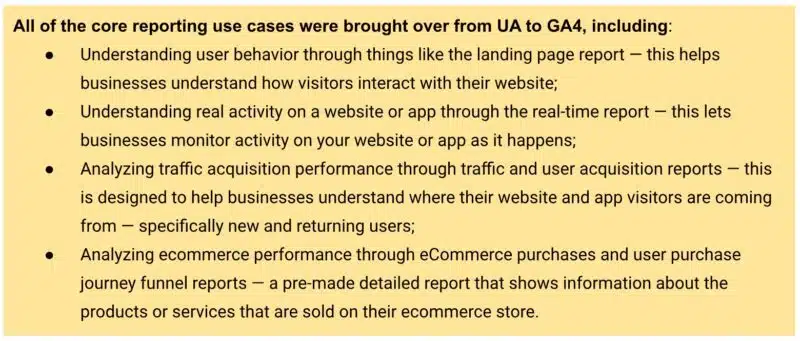
That’s why we made sure to bring over all of the core reporting use cases from UA to GA4.
GA4 takes many of the existing use cases and features Universal Analytics offered and either adds to them or distills them down to be simpler and more intuitive or customizable.
Are there specific things in GA4 I should focus on to do this?
RK: Yes! When you search GA4 for report names from UA, you’ll get pointers to the updated equivalents. Then, when you’re on a given report, but you get a different set of metrics or dimensions than you expected, look to customization – the pencil icon.
Customization is really powerful. Generally speaking, the metrics and dimensions you’re looking for can be added.
I’d suggest making a copy of the report before saving it. That way, you can have a version of the report from the old world and a version from the new.
Unlike UA, GA4 can be tailored for your business from the get-go. By specifying your Business Objectives, the UI will be customized for you to show relevant reports and hide others.
This is another reason that a UA report you expected may not be there. It may not be as relevant for you in GA4 as it was in UA, in other words, GA4 is likely answering your question in a different way.
If you’re new to GA4, I really recommend taking advantage of the many customization options available. It may not be immediately familiar if you’ve been using Universal Analytics for years, but GA4 was intentionally designed to really get businesses the information that matters in a simple and streamlined way, measuring in a way that more accurately reflects the way people use the internet today.
@media screen and (min-width: 800px) { #div-gpt-ad-3191538-7 { display: flex !important; justify-content: center !important; align-items: center !important; min-width:770px; min-height:260px; }
}
@media screen and (min-width: 1279px) { #div-gpt-ad-3191538-7 { display: flex !important; justify-content: center !important; align-items: center !important; min-width:800px!important; min-height:440px!important; }
}
About the author
Constantine von Hoffman is managing editor of MarTech. A veteran journalist, Con has covered business, finance, marketing and tech for CBSNews.com, Brandweek, CMO, and Inc. He has been city editor of the Boston Herald, news producer at NPR, and has written for Harvard Business Review, Boston Magazine, Sierra, and many other publications.
Google Ads launches new AI assistant but warns its content may be inaccurate
The Google Ads help guide has a new AI assistant.
Currently in open beta, the new tool has been designed to help users find answers and solve account issues relating to Google Ads.
Select users are currently being invited to test the AI and provide their feedback.
Here’s a screenshot of the new tool in action, as shared by PPC expert Julie F Bacchini:
Interestingly, the new AI assistant notably comes with a disclaimer, warning:
“While I know a lot, I’m still learning and may make some mistakes. If I do, please leave feedback so I can learn.”
Why we care. Marketers have been widely encouraged to test new AI tools and integrate them into their daily work strategies. However, this tool comes with a clear warning that isn’t yet a finished product and that it may provide incorrect answers, which would suggest it’s unreliable and could waste time.
What has Google said? Google sent emails to select users, inviting them to trial the new tool and provide their feedback:
“If you choose to try this new feature, you’ll see the option to provide feedback on any AI-generated content.”
“Your feedback helps us improve the quality and accuracy of AI answers. Keep in mind that this is an early technology preview, so it may display inaccurate or inappropriate content.”
“If you don’t want to try this feature, you can still get many answers from help guide without it.”
Get the daily newsletter search marketers rely on.
Deep dive. Read Google Ads’ Best Practice guide for more information on how to get the most out of Google Ads.
@media screen and (min-width: 800px) { #div-gpt-ad-3191538-7 { display: flex !important; justify-content: center !important; align-items: center !important; min-width:770px; min-height:260px; }
}
@media screen and (min-width: 1279px) { #div-gpt-ad-3191538-7 { display: flex !important; justify-content: center !important; align-items: center !important; min-width:800px!important; min-height:440px!important; }
}
About the author
Nicola Agius is Paid Media Editor of Search Engine Land after joining in 2023. She covers paid search, paid social, retail media and more. Prior to this, she was SEO Director at Jungle Creations (2020-2023), overseeing the company’s editorial strategy for multiple websites. She has over 15 years of experience in journalism and has previously worked at OK! Magazine (2010-2014), Mail Online (2014-2015), Mirror (2015-2017), Digital Spy (2017-2018) and The Sun (2018-2020). She also previously teamed up with SEO agency Blue Array to co-author Amazon bestselling book ‘Mastering In-House SEO’.
Google issues refunds amid accusations it missold ads on third-party websites
Google has reportedly issued refunds to marketers amid claims it has been selling low-quality ads.
A representative from the search engine confirmed the payments but insisted it was common practice.
The payouts come after Google was accused of violating its own advertising standards approximately 80% of the time, according to an Adalytics study.
Why we care. Advertisers paying premium prices for a service Google has allegedly been failing to deliver will want their ad dollars back. This cash can then be reinvested to improve campaign performance elsewhere.
What has Google said? A spokesperson for Google told Ad Age:
“As part of ongoing relationship building, we sometimes issue credits to advertisers, this is not uncommon.”
“As we’ve stated repeatedly, Adalytics used a flawed methodology to make wildly inaccurate claims about Google Video Partners.”
What did the Adalytics study find? The report accused Google of misleading advertisers by:
Playing premium ads without the promised audio.
Placing ads in small videos in low-value places such as the side of a page’s main content.
Placing ads in automatically-played videos.
Placing ads on websites that don’t meet Google’s standards for monetization.
Companies and organisations impacted include small businesses, Fortune 500 companies and even the U.S. Federal Government. Dozens of marketers have since expressed their regret over purchasing Google’s True View ad product, its primary video ad product, as a result.
Get the daily newsletter search marketers rely on.
Who is Adalytics? Adalytics is a crowd-sourced advertising performance optimization platform that was set up to review and improve the digital advertising landscape. The company conducted this research by investigating campaigns for more than 1,100 brands that achieved billions of ad impressions between 2020 and 2023.
@media screen and (min-width: 800px) { #div-gpt-ad-3191538-7 { display: flex !important; justify-content: center !important; align-items: center !important; min-width:770px; min-height:260px; }
}
@media screen and (min-width: 1279px) { #div-gpt-ad-3191538-7 { display: flex !important; justify-content: center !important; align-items: center !important; min-width:800px!important; min-height:440px!important; }
}
About the author
Nicola Agius is Paid Media Editor of Search Engine Land after joining in 2023. She covers paid search, paid social, retail media and more. Prior to this, she was SEO Director at Jungle Creations (2020-2023), overseeing the company’s editorial strategy for multiple websites. She has over 15 years of experience in journalism and has previously worked at OK! Magazine (2010-2014), Mail Online (2014-2015), Mirror (2015-2017), Digital Spy (2017-2018) and The Sun (2018-2020). She also previously teamed up with SEO agency Blue Array to co-author Amazon bestselling book ‘Mastering In-House SEO’.
YouTube tests new anti-adblocker popup with countdown timer
YouTube is trialling a new anti-adblocker popup that features a timer warning when the next advert will play.
A countdown clock, which reportedly runs for 30 to 60 seconds, appears in the top righthand corner of the message, showing non-paying viewers how long they have left to take action before another ad starts.
Viewers can then choose to either “Allow YouTube Ads” or “Try YouTube Premium”.
Why we care. Banning adblockers is a great way to boost reach, however, constant notifications may negatively impact the user experience, and brands must be mindful to not annoy potential customers.
Why now? YouTube has been increasing its efforts to persuade non-paying viewers to sign up for its Premium service, which bans ads entirely, allowing viewers to watch videos without interruption. However, people have been reluctant to convert due to the rising costs of YouTube accounts, which recently increased from $11.99 to $13.99 a month in the US.
Get the daily newsletter search marketers rely on.
How it works. Right now, the warning is being served to select groups of people around the world that have ad blockers enabled. When they sign into their accounts to watch content, all videos will be blocked unless they either change their settings to disallow ad blockers or they sign up for YouTube Premium. The warning they are served, looks like this:
What has YouTube said? YouTube has said that it is taking these measures to ensure that its content creators are compensated for their work. Oluwa Falodun, a spokesperson for Google, told The Verge in a statement:
“Ad blocker detection is not new, and other publishers regularly ask viewers to disable ad blockers.”
“We take disabling playback very seriously, and will only disable playback if viewers ignore repeated requests to allow ads on YouTube.”
“In cases when viewers feel they have been falsely flagged as using an ad blocker, they can share this feedback by clicking on the link in the prompt.”
“We want to inform viewers thatad blockers violate YouTube’s Terms of Service, and make it easier for them to allow ads on YouTube or try YouTube Premium for an ad free experience.”
Deep dive. For more information on YouTube’s ad policy, you can visit the YouTube Advertising hub.
@media screen and (min-width: 800px) { #div-gpt-ad-3191538-7 { display: flex !important; justify-content: center !important; align-items: center !important; min-width:770px; min-height:260px; }
}
@media screen and (min-width: 1279px) { #div-gpt-ad-3191538-7 { display: flex !important; justify-content: center !important; align-items: center !important; min-width:800px!important; min-height:440px!important; }
}
About the author
Nicola Agius is Paid Media Editor of Search Engine Land after joining in 2023. She covers paid search, paid social, retail media and more. Prior to this, she was SEO Director at Jungle Creations (2020-2023), overseeing the company’s editorial strategy for multiple websites. She has over 15 years of experience in journalism and has previously worked at OK! Magazine (2010-2014), Mail Online (2014-2015), Mirror (2015-2017), Digital Spy (2017-2018) and The Sun (2018-2020). She also previously teamed up with SEO agency Blue Array to co-author Amazon bestselling book ‘Mastering In-House SEO’.
Google Ads to sunset Enhanced CPC on Shopping campaigns
Google Ads Shopping campaigns will no longer use Enhanced cost-per-click (eCPC) starting in October.
Instead, Shopping campaigns using eCPC will behave as though they are using Manual CPC bidding, according to an email Google sent advertisers.
Why we care. It’s important to stay up-to-date with changes Google is implementing, especially just ahead of Q4 and the holiday shopping season. Google says switching to Manual CPC bidding will give you more control over bids and budgets, which could be advantageous. However, this process requires more time and attention to manage.
Why now? Google explained that it is adopting more advanced strategies and campaigns as its technology improves.
Google pointed out that eCPC was launched more than 10 years ago, and new strategies, such as target ROAS, Maximise conversion value and fully automated campaigns like Performance Max, can help you achieve the same or better results.
Next steps. If you are using eCPC, Google recommends taking the following actions:
In your Standard Shopping campaigns, try the one-click Target ROAS experiments for Shopping, which you can find in your campaign settings.
Alternatively, you can trial Google Ads’ newest fully automated solution, Performance Max campaigns.
If, on the other hand, you decide not to take any action by October, your campaign will simply continue operating as it is using Manual CPC bidding.
Get the daily newsletter search marketers rely on.
Deep dive. For more information or if you have any questions about the upcoming change, you can reach out to your account team or contact the Google Ads team at any time.
@media screen and (min-width: 800px) { #div-gpt-ad-3191538-7 { display: flex !important; justify-content: center !important; align-items: center !important; min-width:770px; min-height:260px; }
}
@media screen and (min-width: 1279px) { #div-gpt-ad-3191538-7 { display: flex !important; justify-content: center !important; align-items: center !important; min-width:800px!important; min-height:440px!important; }
}
About the author
Nicola Agius is Paid Media Editor of Search Engine Land after joining in 2023. She covers paid search, paid social, retail media and more. Prior to this, she was SEO Director at Jungle Creations (2020-2023), overseeing the company’s editorial strategy for multiple websites. She has over 15 years of experience in journalism and has previously worked at OK! Magazine (2010-2014), Mail Online (2014-2015), Mirror (2015-2017), Digital Spy (2017-2018) and The Sun (2018-2020). She also previously teamed up with SEO agency Blue Array to co-author Amazon bestselling book ‘Mastering In-House SEO’.