YouTube enables linking between Shorts and long-form videos
YouTube creators will soon be able to link Shorts to other types of content, such as long-form videos.
The platform announced that it is going to start introducing a safer way for creators to direct viewers by the end of September 2023.
Why we care. YouTube Shorts are viewed by more than 2 billion logged-in users a month and are seen by people who may not be subscribed to your channel, so linking this content to your long-form videos could be vital in unlocking your brand’s growth and success.
Are there ads on Shorts? There isn’t currently an option to display pre or mid-roll ads on Shorts –however, linking Shorts to long-form videos provides an opportunity to monetize that traffic, as ad products are available on long-form videos.
How it works. Creators can add a link to any Short they post using a new option now available in YouTube Studio. Once a link has been inputted, it will then appear in the description of the Short video, accompanied by a play button encouraging viewers to tap through to the linked content. Once they hit that button, viewers will be redirected to the linked video, expanding their YouTube experience with your channel, as shown below:
What has YouTube said? YouTube announced the link update via a statement on its blog:
“We know that clickable links help creators direct their Shorts audiences to other types of content, like their long-form videos. By the end of September, we’ll start introducing a safer way for creators to direct viewers from Shorts to their other YouTube content – stay tuned!”
Get the daily newsletter search marketers rely on.
Deep dive. Read YouTube’s Link Updates announcement in full for more information.
@media screen and (min-width: 800px) { #div-gpt-ad-3191538-7 { display: flex !important; justify-content: center !important; align-items: center !important; min-width:770px; min-height:260px; }
}
@media screen and (min-width: 1279px) { #div-gpt-ad-3191538-7 { display: flex !important; justify-content: center !important; align-items: center !important; min-width:800px!important; min-height:440px!important; }
}
About the author
Nicola Agius is Paid Media Editor of Search Engine Land after joining in 2023. She covers paid search, paid social, retail media and more. Prior to this, she was SEO Director at Jungle Creations (2020-2023), overseeing the company’s editorial strategy for multiple websites. She has over 15 years of experience in journalism and has previously worked at OK! Magazine (2010-2014), Mail Online (2014-2015), Mirror (2015-2017), Digital Spy (2017-2018) and The Sun (2018-2020). She also previously teamed up with SEO agency Blue Array to co-author Amazon bestselling book ‘Mastering In-House SEO’.
YouTube creators can now include more external links on their channels
YouTube is expanding its link listing display on creators’ channel profiles.
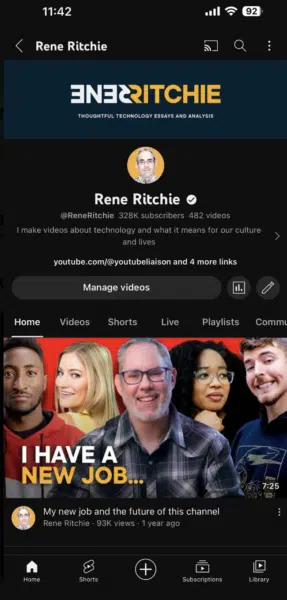
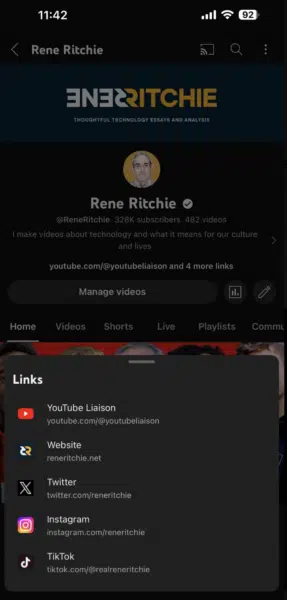
The platform now allows you to include up to 14 prominent clickable links near the ‘Subscribe’ button to create awareness of your other platforms, such as websites, social profiles, merch sites and any other links that comply with its Community Guidelines.
The new feature will be visible on desktop and mobile to everyone by August 23.
Check out the images below for a preview of the new layout:
Why we care. This is a quick, easy and cost-effective way to promote a brand’s online presence from YouTube. Your subscribers might not know there are other ways to follow your brand, so let them know and start building stronger relationships with potential customers.
Customization. YouTube is also enabling content creators to customize the titles of external links. In addition, links will appear next to the relevant platform icon for glanceability.
Get the daily newsletter search marketers rely on.
What has YouTube said? A YouTube spokesperson said in a statement:
“We know that links are an important way for creators to share information and recommend products/brands to their communities, so we’re actively working on safer ways for creators to include important links in their content.”
Deep dive. Read YouTube’s External Link Policy to find out what links are eligible, and check out its Link Updates announcement in full for more information.
@media screen and (min-width: 800px) { #div-gpt-ad-3191538-7 { display: flex !important; justify-content: center !important; align-items: center !important; min-width:770px; min-height:260px; }
}
@media screen and (min-width: 1279px) { #div-gpt-ad-3191538-7 { display: flex !important; justify-content: center !important; align-items: center !important; min-width:800px!important; min-height:440px!important; }
}
About the author
Nicola Agius is Paid Media Editor of Search Engine Land after joining in 2023. She covers paid search, paid social, retail media and more. Prior to this, she was SEO Director at Jungle Creations (2020-2023), overseeing the company’s editorial strategy for multiple websites. She has over 15 years of experience in journalism and has previously worked at OK! Magazine (2010-2014), Mail Online (2014-2015), Mirror (2015-2017), Digital Spy (2017-2018) and The Sun (2018-2020). She also previously teamed up with SEO agency Blue Array to co-author Amazon bestselling book ‘Mastering In-House SEO’.
X (Twitter) lowers eligibility threshold for ads revenue sharing program
X, formerly known as Twitter, has reduced the eligibility threshold for its ads revenue sharing program.
Verified creators now need to have generated 5 million impressions in the previous three months – as opposed to 15 million.
In addition, the company has also lowered the minimum payout requirement to $10 instead of $50, enabling more content creators to get paid for posting on the Elon Musk-owned platform.
Why we care. X’s ads revenue sharing program was criticised for failing to pay creators on time and making its eligibility threshold extremely high. Lowering its criteria could be a step in the right direction in terms of damage control, building trust and encouraging creators, as well as advertisers, to return to the platform.
Who is eligible now? To be considered for the creator ads revenue sharing program, your account must meet the following criteria:
Subscribed to Blue or Verified Organizations.
Have at least 5 million impressions on cumulative posts within the last three months.
Get the daily newsletter search marketers rely on.
How it works. If your account is eligible, this is how to get started:
Join and set up payments from within the Monetization section of the app, which can be found in the side menu on iOS and Android, and the overflow menu on web.
Click on Join and setup payouts, which will redirect you to Stripe.
Setup a Stripe account to receive your share – this is the account you will need to transfer funds to your external bank account.
Once you opt in, you will receive payouts at a regular cadence, so long as you have generated more than $10.
What has X Said? A spokesperson announced the news on the company’s official X account:
“Now, even more people can get paid to post! We’ve lowered the eligibility threshold for ads revenue sharing from 15M to 5M impressions within the last 3 months.”
“We’ve also lowered the minimum payout threshold from $50 to $10. Sign up for a Premium subscription to get access.”
@media screen and (min-width: 800px) { #div-gpt-ad-3191538-7 { display: flex !important; justify-content: center !important; align-items: center !important; min-width:770px; min-height:260px; }
}
@media screen and (min-width: 1279px) { #div-gpt-ad-3191538-7 { display: flex !important; justify-content: center !important; align-items: center !important; min-width:800px!important; min-height:440px!important; }
}
About the author
Nicola Agius is Paid Media Editor of Search Engine Land after joining in 2023. She covers paid search, paid social, retail media and more. Prior to this, she was SEO Director at Jungle Creations (2020-2023), overseeing the company’s editorial strategy for multiple websites. She has over 15 years of experience in journalism and has previously worked at OK! Magazine (2010-2014), Mail Online (2014-2015), Mirror (2015-2017), Digital Spy (2017-2018) and The Sun (2018-2020). She also previously teamed up with SEO agency Blue Array to co-author Amazon bestselling book ‘Mastering In-House SEO’.
Plenty of tools promise to offer excellent PPC data and insights. However, they usually come at a cost. But if you know where to look, you can gather a wealth of data and insights without spending a dime.
In this article, I’ll share a list of free tools I use to manage client accounts and optimize campaigns across paid channels.
Analyzing the competition is crucial when planning and managing your paid media ads. You also need to keep up with what is happening in the market.
The tools below offer free insight into just this.
1. Google Ads Transparency Center
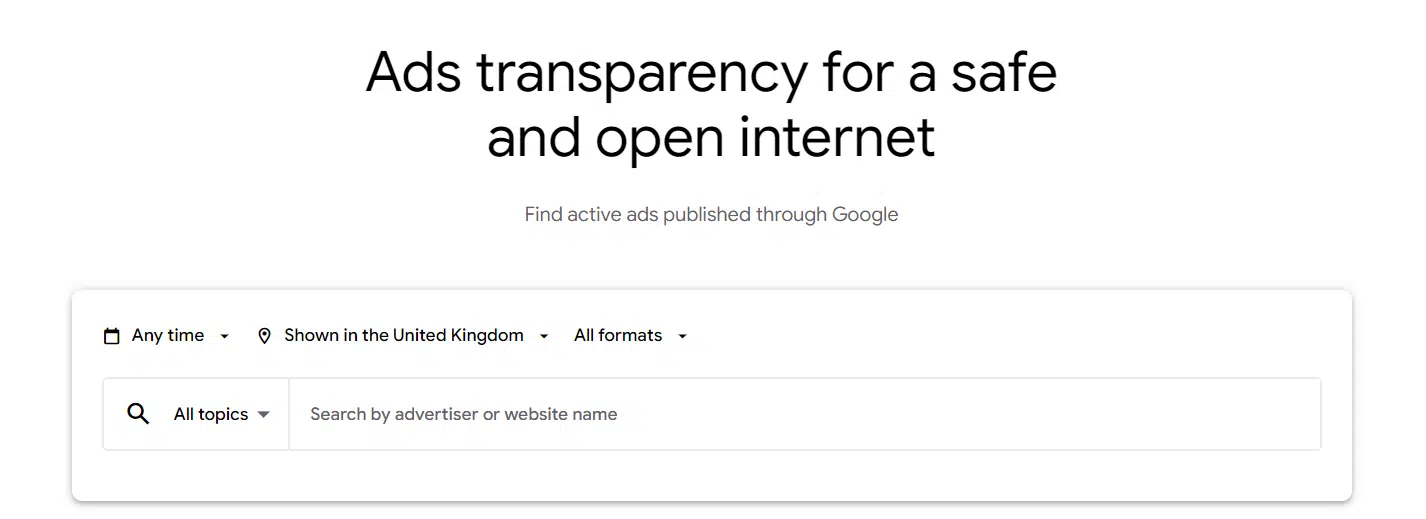
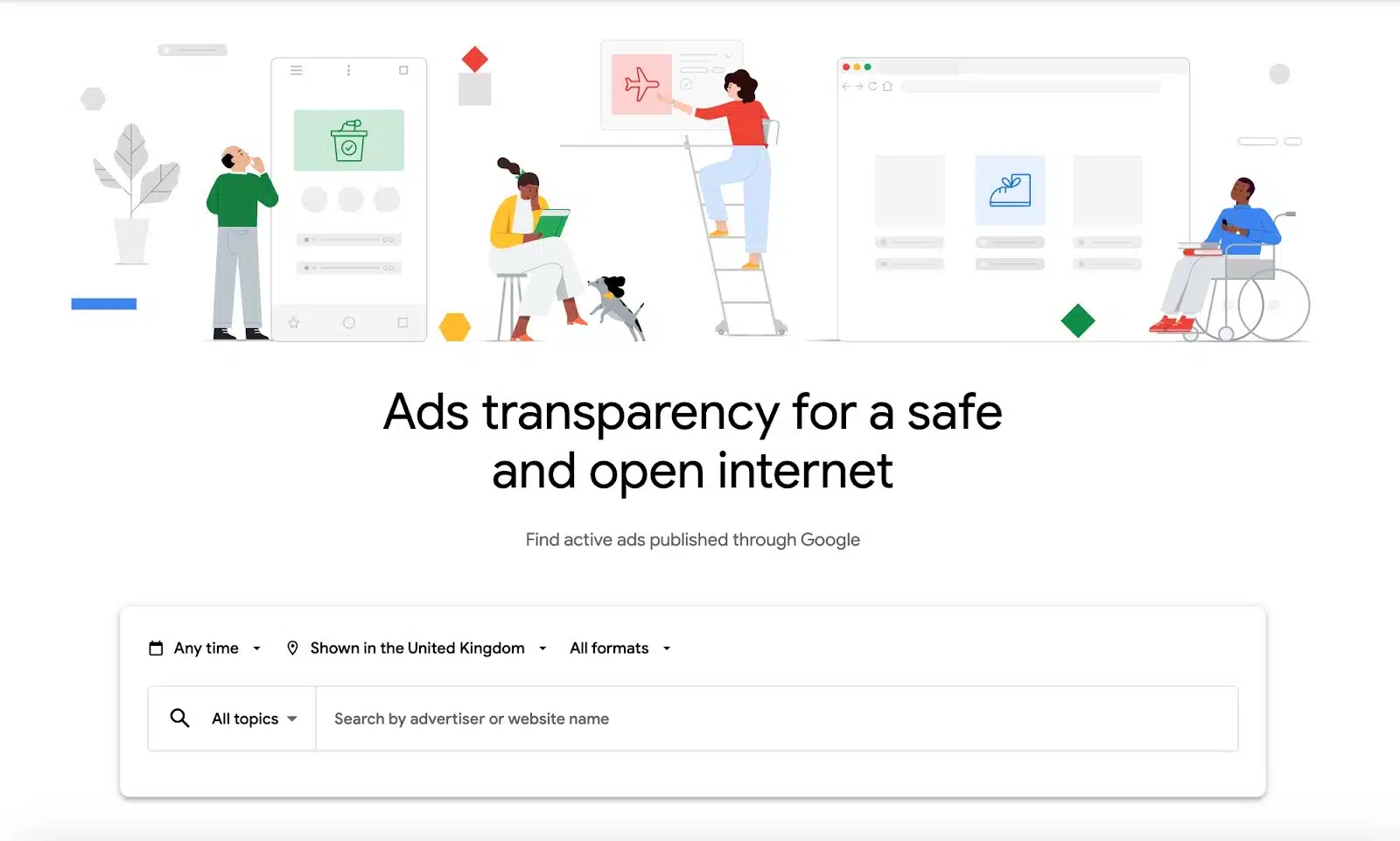
Google Ads Transparency Center is a relatively new tool that enables users to see what ads any verified advertiser is running across Google networks.
The tool was released as a privacy measure to create a “safe and open internet.” But for advertisers, it also works as a great way to see your competitors’ ads.
Ads Transparency allows you to search for any advertiser, specify a date range, location and ad format and see what ads are or have been running.
You can use this feature to check the messaging, visuals and offers your competitors are using to better understand how you can make your own ads more enticing.
If you see a change in performance in your ads, it works as an additional place to check to see if a competitor has adjusted their offering or started/stopped ads.
2. Facebook Ads Library
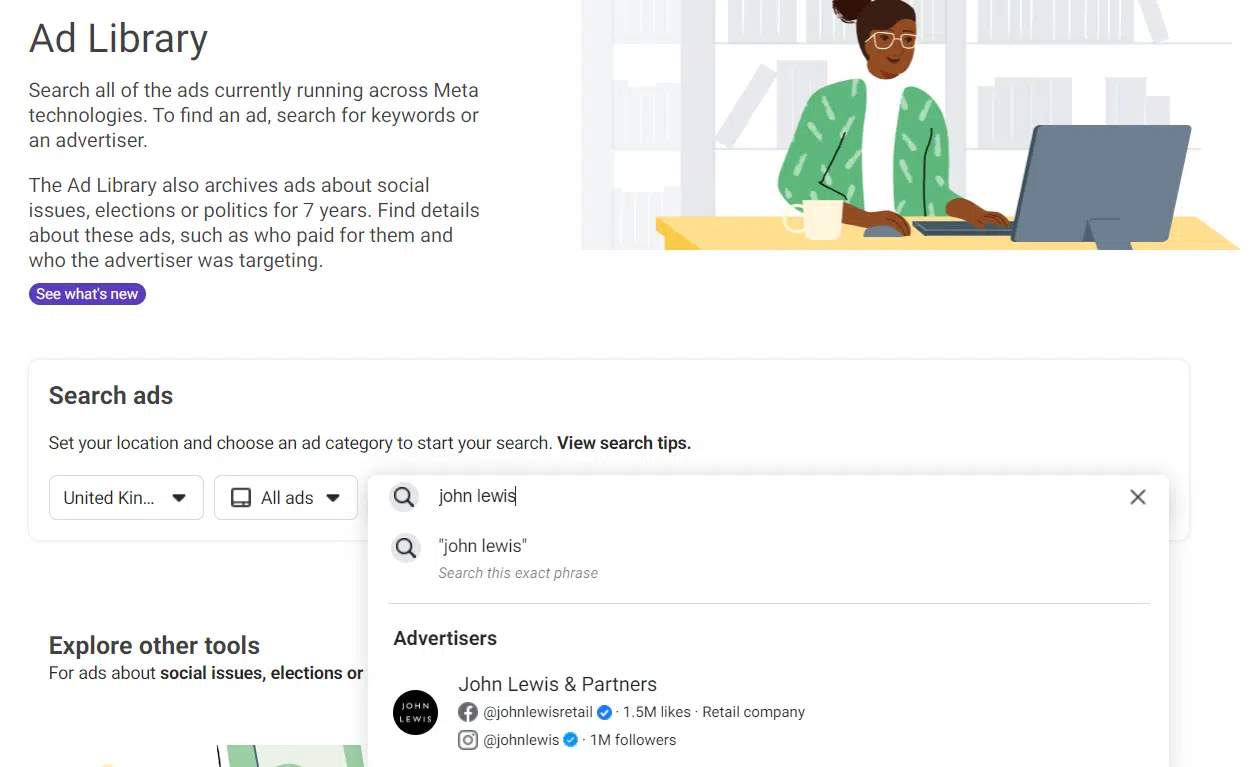
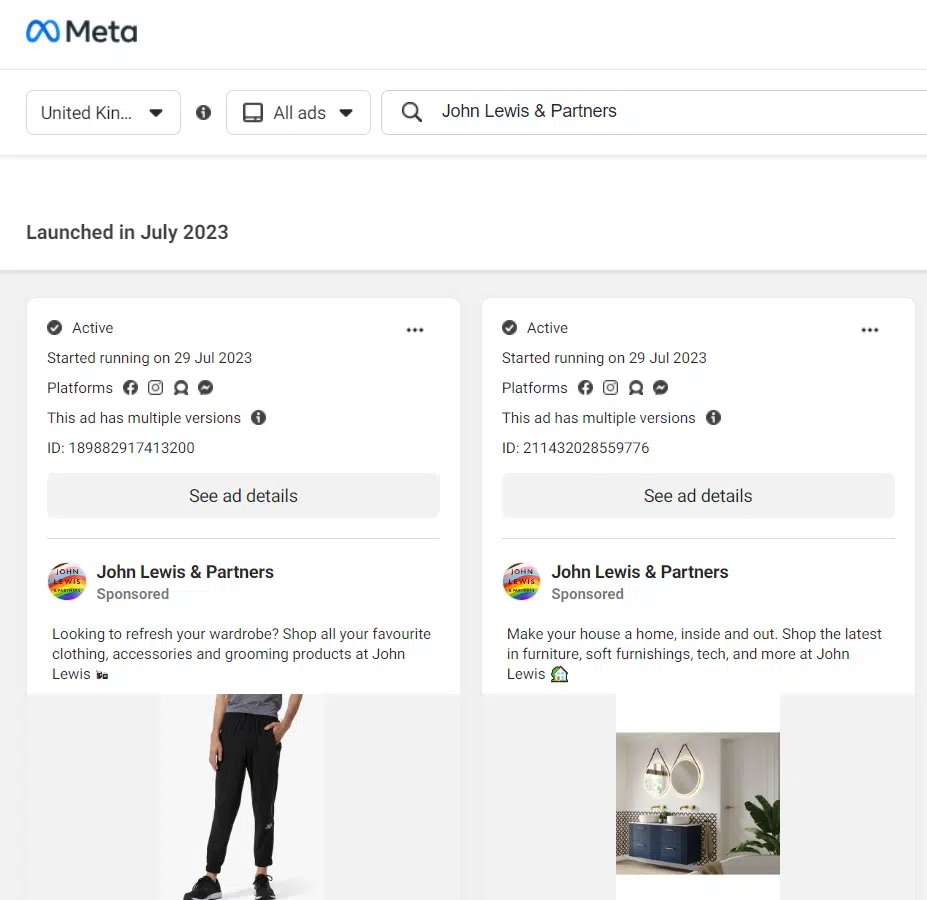
Similar to the Ads Transparency Center is the Facebook Ad Library. The Ads Library allows you to search all ads currently running across Meta platforms from any advertiser.
To use it, you just need to search for a specific advertiser or keyword, select the ad category (employment, political and a few others fall into special categories), and Facebook will do the rest.
You can view:
The date the ad was launched.
The platforms the ad is running on.
Whether it is a static or dynamic ad.
The messaging and creative.
Click through to the landing page in use.
By combining the tools, you can build a picture of the messaging and funnel your competitors are adopting.
LinkedIn also has a similar feature if you navigate to a business profile, view posts and filter down to ads.
3. Google Trends
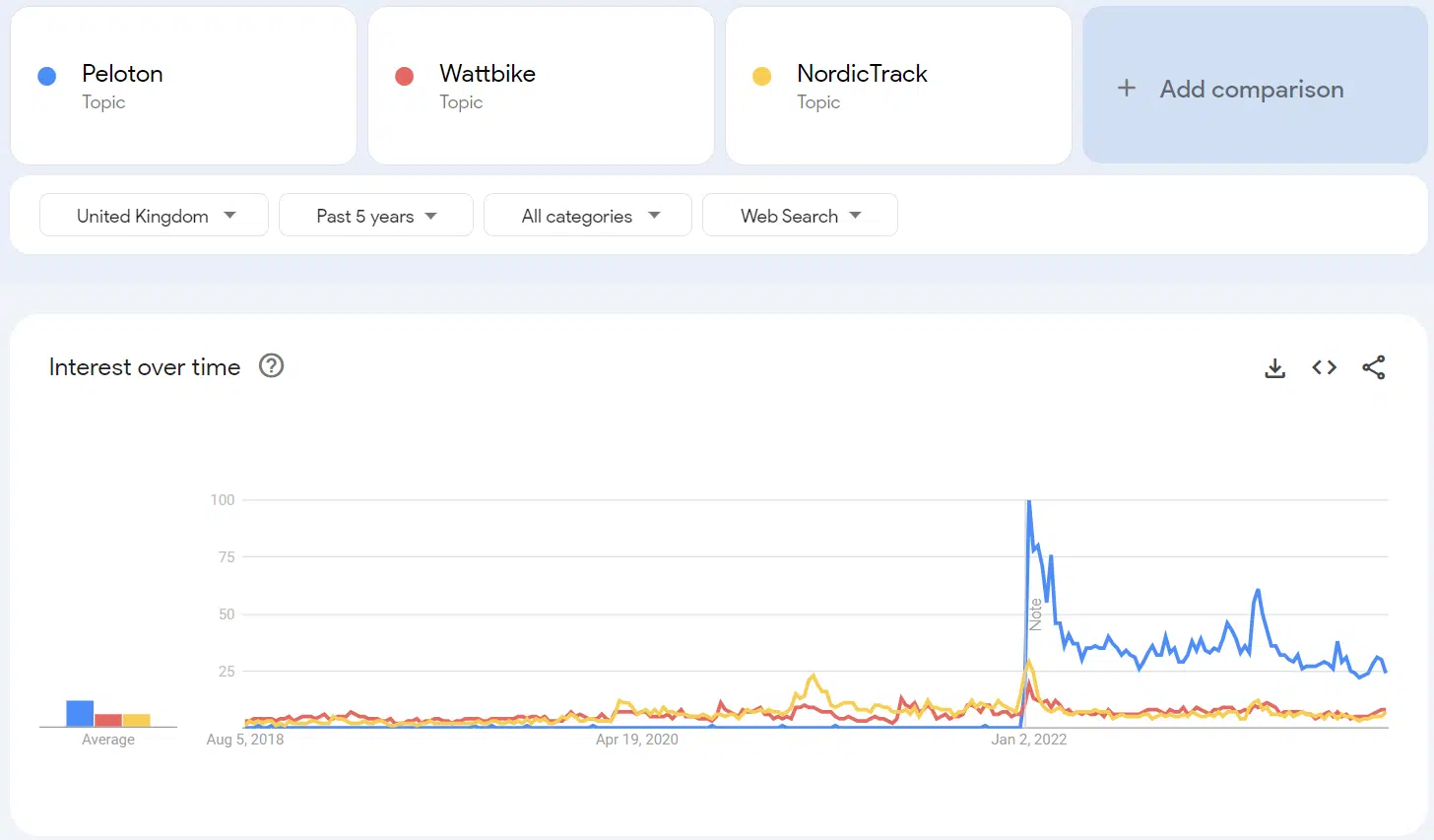
Google Trends allows you to track the popularity of terms, topics or companies over a given period and location.
It also lets you compare the trend data, making it a great tool for tracking brand growth over time.
You can use Google Trends to:
Plot how your brand name trends vs. your competitors.
Add up to four keywords to compare.
Export this data to give you an idea of brand share over time.
Filtering the results by the type of search used (i.e., Google Shopping or YouTube) gives insights into the different buying intents and trends. This can help you shape your channel strategy.
4. Glimpse
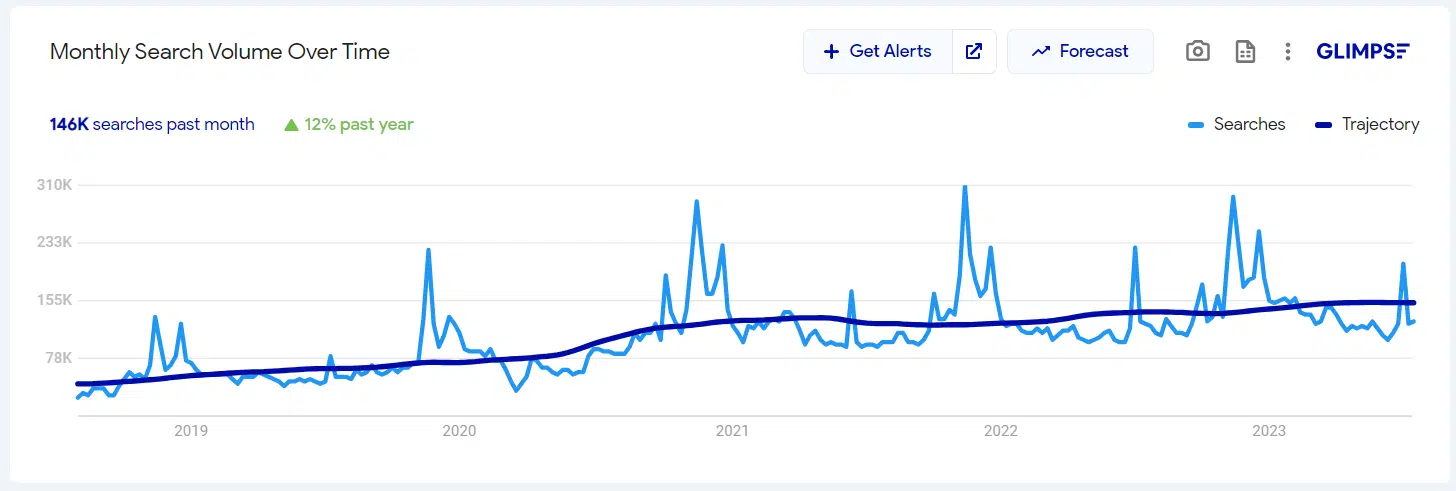
Glimpse is a great little tool to help you better understand trends and potential within a given topic or keyword. It works as an extension to Google Trends to provide additional insights and data.
You can still use the traditional functions within Google Trends, like the location and time period settings.
Within the free package, you can access 10 free lookups per month on any topic or keyword. These credits allow you to:
Track trends and trajectory.
See what variations of the keywords people are also searching for.
Break down what people are searching across six channels (Google, Amazon, YouTube, TikTok, Pinterest and Etsy) and sort this by volume, growth or CPC.
See the social media channels where the keyword is used, and understand the level of usage
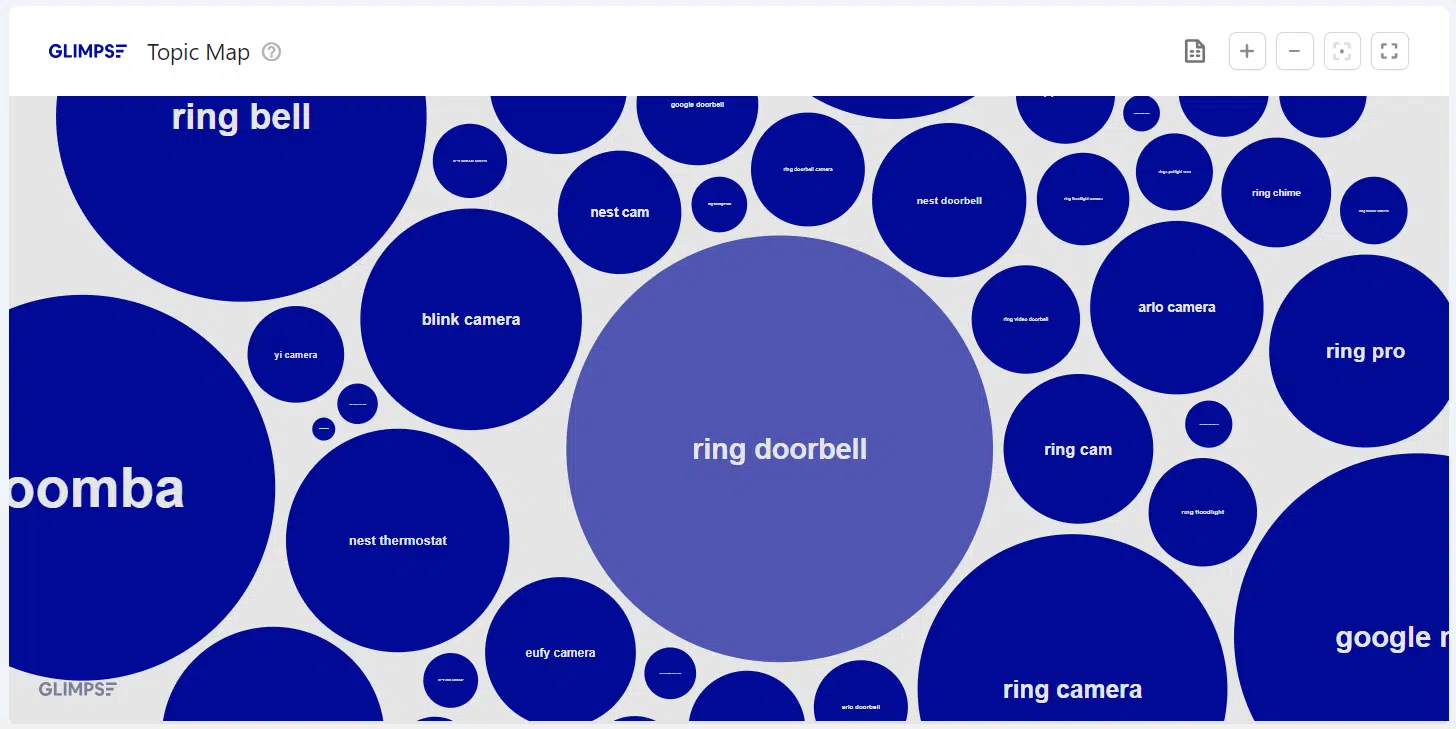
See a topic map to give you new ideas for keyword clusters
If you upgrade to the premium version, you can access additional features such as forecasting data.
The free version, however, gives loads of insight and is a great place to supplement your existing trend data.
Other tools
In addition to these tools, several other premium platforms offer basic free access.
While these tools alone do not give you all the answers, you can build a comprehensive view when used with other tools.
5. SpyFu
In the free version, you can view:
The number of keywords a domain is ranking for (both organic and paid).
The top competitors.
The estimated monthly clicks and ad spend.
To gauge how far out the estimates can be a good approach, put your domain through the tool and compare its figures to your actual platform data.
6. Semrush
Semrush has valuable data showcasing keywords used, search volume, CPCs, traffic, etc. You can use the tool to conduct a keyword gap analysis against your competitors.
The downside to the free version is that it only allows 10 free requests per day, so you have to be mindful of where you are clicking and plan the data you want to access ahead of time.
Similar to SpyFu, it’s always good to have comparison data. Take data from more than one platform to give a more rounded view.
Get the daily newsletter search marketers rely on.
Keyword research
Keyword research is the building block of search campaigns, but can also influence your strategy on Youtube, Shopping and Pinterest, among other channels.
While automation is changing how Google campaigns are created, conducting effective research is still essential to your campaign builds.
7. Google Keyword Planner
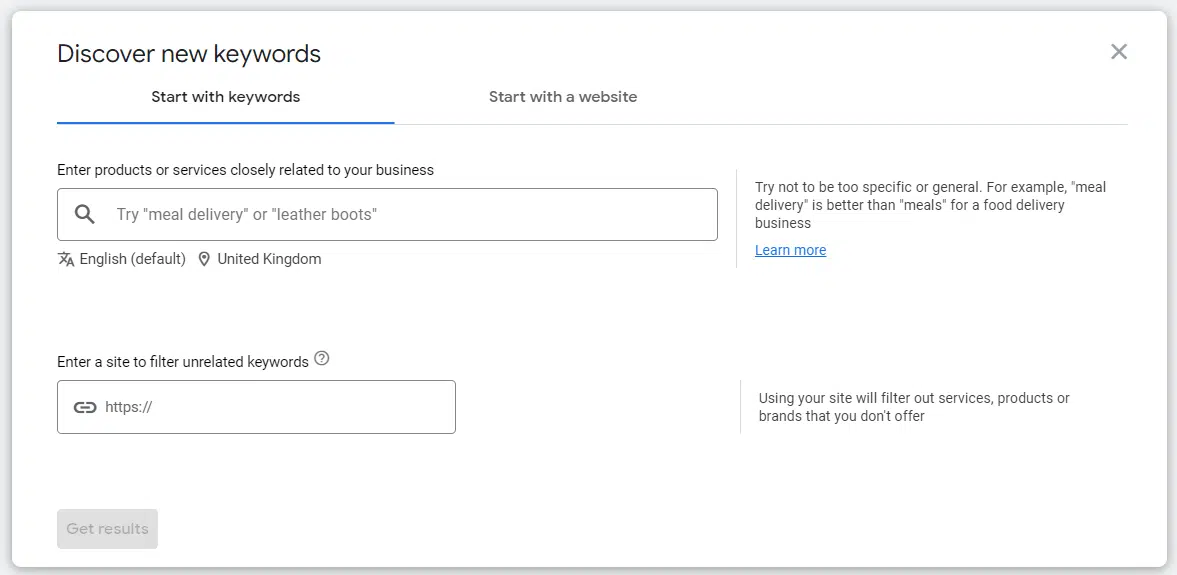
Google Keyword Planner is a more widely used keyword research tool. All you need to get started is an active Google Ads account. (Though you may be required to add billing details upon setting up your account).
The tool allows you to start with either base keywords or a website URL. Google then uses this information and comes back with related keywords.
Scanning through and selecting the keywords relevant to your business and what you want to advertise on is a manual process.
The tool provides both historical search volume metrics as well as forecasts.
While these give an indication, always take them with a grain of salt.
Remember that many other factors will determine when your ad will show and what you will have to pay, such as competition, ad relevance and bid strategy.
One of the additional great benefits of the tool is when you use the URL feature, which gives you insight into how Google reads your page.
If it is kicking back a lot of irrelevant terms, you can use this information to customize your page content to make it more relevant.
8. Answer the Public
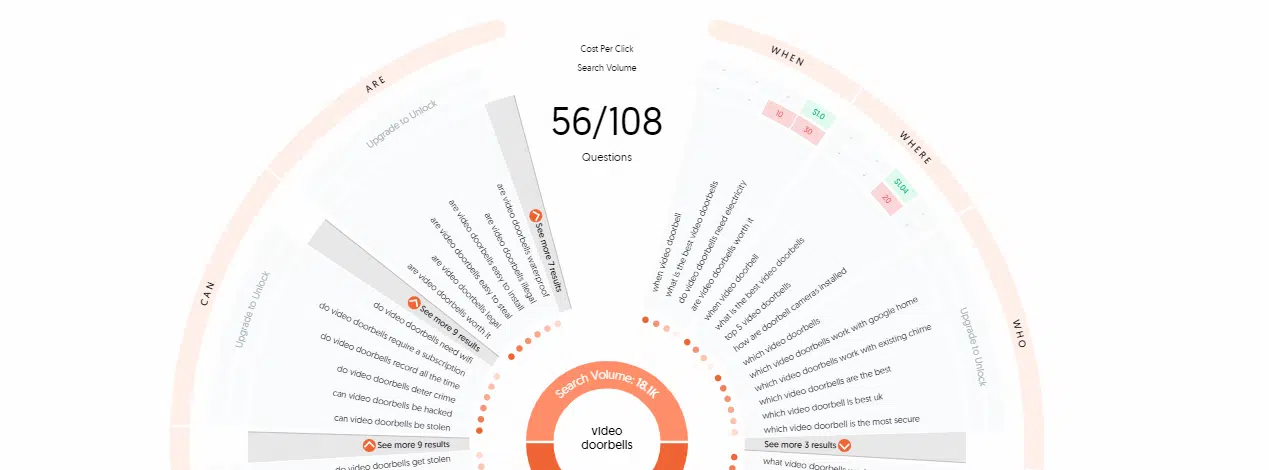
Answer the Public is an alternative keyword research tool that offers a free version of up to three searches per day. As the name suggests, the tool focuses on question-based searches.
In addition to questions, it also provides prepositions and comparisons.
The downside to the free version is that it does not show all of the search volume data. Still, you can export the keywords and get search volumes from another tool, such as Google Keyword Planner.
9. Ahrefs
Ahrefs is typically used as an SEO tool. However, it can be a good place to start for keyword idea generation.
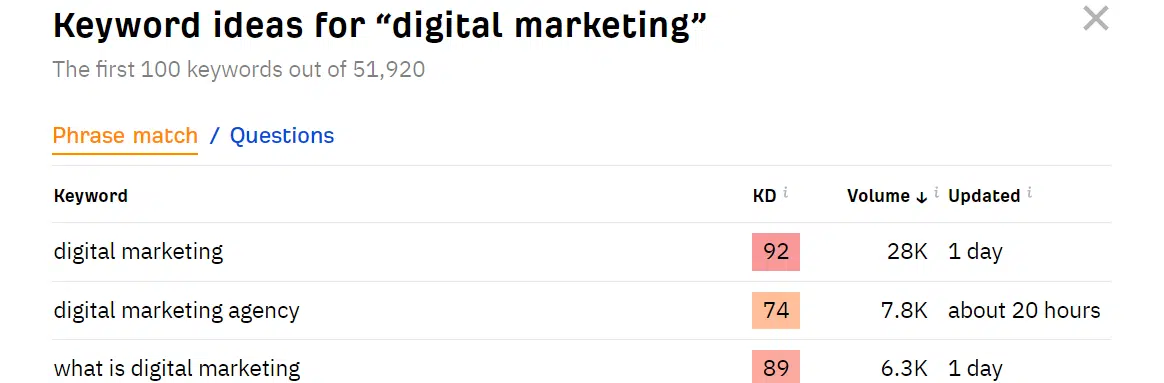
Without a subscription, you can’t see all data for all keywords. But it gives the first 100 keywords for free, along with their search volume and difficulty ranking (from an organic perspective).
In addition to using it for research in Google search, it also provides data for Bing, YouTube and Amazon.
Design
When it comes to visual ads, your creative is everything. But creative traditionally can be expensive.
So if you are on a budget, there are free tools you can use that offer great design capabilities. Even better, they are intuitive and easy to use.
10. Canva
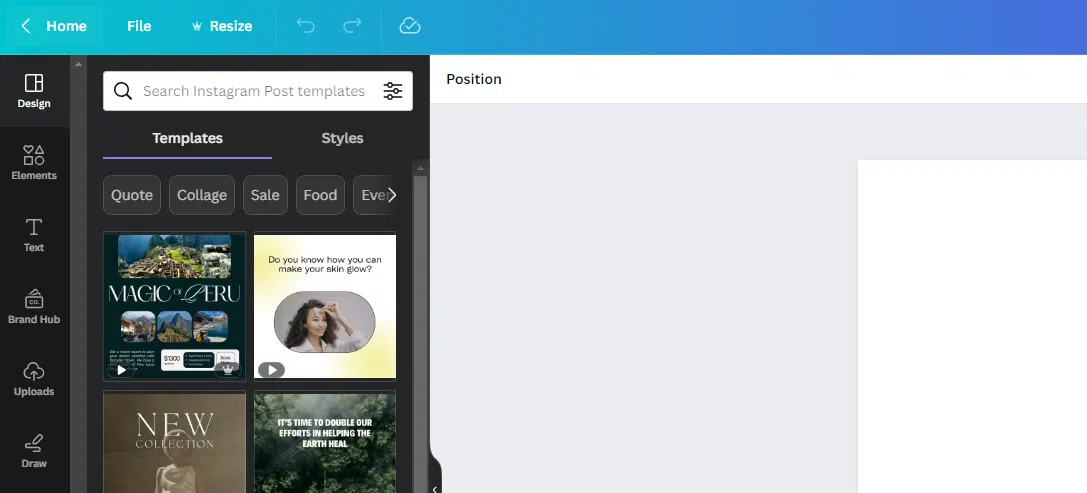
Canva is an extremely user-friendly design platform. You can use it for free to create visual assets.
If you are new to design, they have pre-built templates you can use and adopt, or you can start with a blank template.
You can also access free stock imagery, videos and icons to use as part of your creative.
The elemental nature of the tool makes it easy to use and quick to grasp.
Website analysis
You need to understand how users behave when they visit your site if you want to improve your overall performance, along with your PPC landing pages.
While there are obvious tools like Google Analytics, consider these little-known tools that provide more enhanced data, such as heat mapping, for free.
11. Microsoft Clarity
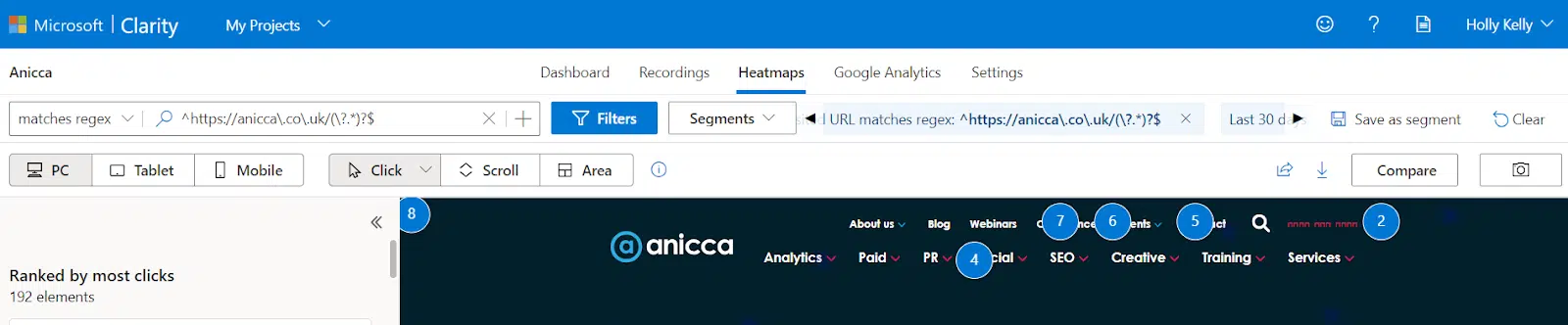
Microsoft Clarity is a free behavior analytics tool that offers heat mapping and session recordings.
You may have heard of or used HotJar, and while HotJar does have a free version, the scope of a free account is quite limited.
With Clarity, you get access to the full platform for free. There is no paid version.
It allows you to narrow into specific pages, time periods and devices (amongst other filters) to really understand how users are behaving on site.
You can get insight into where people are clicking, receiving errors and quickly clicking back.
If you connect your Google Analytics accounts, you will also see session data and be able to import your goals to analyze journeys in a more granular way.
You can use this information to guide your landing page optimizations and identify issues in your conversion journey.
They have also released a new browser extension so that you can see data live on your site when you visit.
While this is not an exhaustive list of all of the free tools for paid media, these are the ones I turn to most often to gain actionable PPC insights.
If there’s something here you haven’t used before, I would highly recommend testing them out.
Opinions expressed in this article are those of the guest author and not necessarily Search Engine Land. Staff authors are listed here.
@media screen and (min-width: 800px) { #div-gpt-ad-3191538-7 { display: flex !important; justify-content: center !important; align-items: center !important; min-width:770px; min-height:260px; }
}
@media screen and (min-width: 1279px) { #div-gpt-ad-3191538-7 { display: flex !important; justify-content: center !important; align-items: center !important; min-width:800px!important; min-height:440px!important; }
}
About the author
Holly leads the Paid Media team at Anicca Digital and has been specialising in paid search since 2015. She has experience in planning, strategy and delivery of campaigns across a multitude of channels including Google Ads, Microsoft Ads, Meta, LinkedIn and AWIN. Coming from a data mindset Holly also holds extensive knowledge and experience in using Google Analytics, Google Tag Manager and Google Looker Studio. As a marketing and retail graduate, Holly holds a particular interest in eCommerce. With her hands on delivery of client projects she stays up to date with new ways of working and best practices and is a keen sharer of these as a regular speaker on Anicca Digital’s weekly webinar schedule.
Google Ads account suspensions: What advertisers need to know
Account suspensions are essential to “maintain a healthy and sustainable digital advertising ecosystem with user protection at its core,” according to Google Ads.
While we can all agree that the platform needs to be a safe experience for all, it can be a minefield for advertisers navigating the account suspension process.
Let’s look at account suspensions, the three main types of account suspensions and how to deal with them.
Why do accounts get suspended?
Accounts get suspended when Google Ads finds a violation of one of their policies.
Google Ads uses a combination of automated systems and manual reviews when detecting violations.
The process includes reviewing the account and other aspects, including customer reviews, your business practices and the content of your website.
How are accounts suspended?
Depending on the violation, accounts may be suspended immediately upon the detection of a violation.
In other cases, advertisers will be given a prior warning of at least seven days before the suspension takes place.
What happens when an account is suspended?
When an account is suspended:
Ads will not run.
You won’t be able to create any new content, such as ads, ad groups or campaigns.
You can, however, still access the account to review historical data and reports.
In some instances, accounts related or linked to the suspended account may also be suspended, such as linked Merchant Center accounts or those linked to the same manager account. These will be lifted if/when the original suspension is resolved.
Get the daily newsletter search marketers rely on.
What are the different types of account suspensions?
These are suspensions that Google Ads deems unlawful or harmful.
They typically reflect the overall practices of a business, not necessarily their campaigns or account.
As such, it is unlikely that the suspension will be overturned and will probably be permanent.
Common egregious violations include:
Circumventing systems.
Unacceptable business practices.
Malicious software.
Counterfeiting.
Other suspensions
Other reasons why an account may be temporarily suspended include:
Suspicious payment activity.
Unpaid balance.
Unauthorized account activity.
What to do if your account is suspended?
Policy violations
If your account has been suspended for policy or terms and conditions violations, you must resolve the issue causing the suspension before submitting an appeal.
The Google Ads help guides are full of detailed information about these policies, so make sure you read these thoroughly.
Do not submit an appeal until you are certain that you have made the relevant changes.
For example, if you have been suspended for violating editorial requirements, review your ad copy to check for potential issues regarding capitalization, spacing, spelling and symbols.
If you are uncertain about the violation/s that caused the suspension and how to fix them, you can use the account troubleshooter to determine what steps need to be taken.
To submit an appeal, click on a Contact us link, which will direct you to the appeals form. You have a minimum of six months to submit this appeal.
Egregious violations
Egregious violations are treated very seriously. In most cases, the suspension is permanent.
However, if you genuinely believe that the suspension is baseless, then you can submit an appeal.
Make relevant changes to your account and/or business practices before you submit your appeal. This is important because egregious violations only get one chance to submit an appeal.
Take the time to review your business practices honestly and make sure you have done all that you can to comply.
Other suspensions
In many of these cases, billing issues cause suspension, so check the billing section of your account.
Ensure that billing information is accurate, your payment method is up to date, and recent payments have not been declined.
If your account has been suspended for a billings and payment issue, you must fix this within 30 days.
Above: Verified advertisers show in the Ads Transparency Center, which plays a part in Google’s efforts to build a safe and positive experience.
In the case of an “Unauthorized account activity” suspension, Google Ads has detected suspicious activity, and your account has been suspended to protect your account.
This may be triggered due to recent changes to account access, an unusual increase in your ad spend or if your ads are sending traffic to unfamiliar destinations.
You will need to:
Change your Google account password immediately.
Check for any unfamiliar devices signed in to your account.
Unfortunately, many advertisers are reporting long wait times to hear back about their appeal. This means that you will need to be patient and wait for a response via email.
In the meantime, donot submit additional appeals. This can delay the process.
If your appeal is accepted and your account is reinstated
You can resume running your campaigns via Google Ads as usual.
Be aware of violating the same policy again in the future. Depending on the type of policy infringed, you may face permanent suspension for repeat violations.
If your appeal is denied
You may be eligible to submit another appeal, but you must make the relevant changes before you do so.
While there is no limit on the number of appeals you can make, if too many appeals have been made, they may not be processed.
For egregious violations
If your appeal is denied and you are permanently suspended, you have been banned from using Google Ads. Creating any new accounts will also result in suspensions.
If you still have funds in your account, you will need to cancel your account to receive a refund.
Making sense of Google Ads account suspensions
Account suspensions are designed to help keep advertisers and users safe.
They help keep dangerous and malicious activities off the platform, improving the Google Ads experience.
While finding out your account is suspended is frustrating, in most cases, there are steps you can take to resolve the issues behind the violation and have your account reinstated.
@media screen and (min-width: 800px) { #div-gpt-ad-3191538-7 { display: flex !important; justify-content: center !important; align-items: center !important; min-width:770px; min-height:260px; }
}
@media screen and (min-width: 1279px) { #div-gpt-ad-3191538-7 { display: flex !important; justify-content: center !important; align-items: center !important; min-width:800px!important; min-height:440px!important; }
}
About the author
Sophie is the Head of Paid Media at Victress Digital, a PPC and Social Media agency based in Nottingham, UK. A lover of all things Lead Gen, Sophie has a particular interest in B2B and SaaS brands, and specialises in both Search and Display Campaigns.
Sophie has spoken at numerous conferences and industry events including Hero Conf London, PPC Live UK and brightonSEO’s Search Advertising Show. She is also a Gold Product Expert on the Google Ads Help forum.
Google Ads API version 14.1 is now available – two months after version 14 was released.
The minor update includes additional search term data, new recommendation types and account management assistance.
Why we care. The updated version of Google Ads offers a range of new tools and features to help you better monitor the performance of campaigns, so that you can make data led decision to improve optimization efficiency.
Upgrade needed. In order to use some of the new Google Ads API version 14.1 features, you will need to upgrade your client libraries and client code. The updated client libraries and code examples are set to be published by Google next week.
Get the daily newsletter search marketers rely on.
New features. Although there are no breaking changes, there are several new features available through the updated Google Ads system:
Account Management
Customer.customer_agreement_setting which shows if the customer has accepted the lead form term of service
Assets
New fields in AssetGroup to show whether the asset group is serving or the reasons why it’s not serving: primary_status and primary_status_reasons
New fields in AssetGroupAsset to show whether the asset group asset is serving or the reasons why it’s not serving: primary_status, primary_status_details and primary_status_reasons
New values in the CallToActionType enum: BUY_NOW, DONATE_NOW, ORDER_NOW, PLAY_NOW, SEE_MORE, START_NOW, VISIT_SITE and WATCH_NOW
New values in the AssetLinkError enum: CUSTOMER_NOT_VERIFIED, UNSUPPORTED_CALL_TO_ACTION and PAGE_FEED_INVALID_LABEL_TEXT
Billing
New fields in Invoice and AccountSummary: export_charge_subtotal_amount_micros, export_charge_tax_amount_micros and export_charge_total_amount_micros
Campaigns
New values in the CampaignPrimaryStatusReason enum: HAS_ASSET_GROUPS_DISAPPROVED, HAS_ASSET_GROUPS_LIMITED_BY_POLICY and MOST_ASSET_GROUPS_UNDER_REVIEW
(Allowlisted accounts only) DiscoveryCampaignSettings with upgraded_targeting: When upgraded_targeting is set to true, you can add a location and a language as an ad group criterion
Criteria
New enum value: CriterionError.INVALID_DETAILED_DEMOGRAPHIC
(Allowlisted accounts only) Support for adding LanguageInfo and LocationInfo as an AdGroupCriterion: This is available only for a Discovery campaign with upgraded targeting enabled
Experiments
New values in the ExperimentError enum: DUPLICATE_EXPERIMENT_CAMPAIGN_NAME, CANNOT_REMOVE_IN_CREATION_EXPERIMENT and CANNOT_ADD_CAMPAIGN_WITH_DEPRECATED_AD_TYPES
Recommendations
PerformanceMaxOptInRecommendation which recommends creating the first Performance Max campaign in the account
ImprovePerformanceMaxAdStrengthRecommendation which recommends improving the asset group’s strength of a Performance Max campaign
MigrateDynamicSearchAdsCampaignToPerformanceMaxRecommendation which recommends migrating a Dynamic Search Ad campaign to Performance Max
Reporting
New metrics and segments about new versus returning customers: metrics.new_customer_lifetime_value, metrics.all_new_customer_lifetime_value and segments.new_versus_returning_customers
New customer_search_term_insight and campaign_search_term_insight views: metrics.search_volume shows the volume range for a search term insight category
Shopping
New fields for listing groups: ListingGroupInfo.path and AssetGroupListingGroupFilter.path
New field: ShoppingSetting.advertising_partner_ids
New values in the CampaignError enum: NOT_LINKED_ADVERTISING_PARTNER and INVALID_NUMBER_OF_ADVERTISING_PARTNER_IDS
Videos
(Allowlisted accounts only) AdType.DISCOVERY_VIDEO_RESPONSIVE_AD and its corresponding DiscoveryVideoResponsiveAdInfo
@media screen and (min-width: 800px) { #div-gpt-ad-3191538-7 { display: flex !important; justify-content: center !important; align-items: center !important; min-width:770px; min-height:260px; }
}
@media screen and (min-width: 1279px) { #div-gpt-ad-3191538-7 { display: flex !important; justify-content: center !important; align-items: center !important; min-width:800px!important; min-height:440px!important; }
}
About the author
Nicola Agius is Paid Media Editor of Search Engine Land after joining in 2023. She covers paid search, paid social, retail media and more. Prior to this, she was SEO Director at Jungle Creations (2020-2023), overseeing the company’s editorial strategy for multiple websites. She has over 15 years of experience in journalism and has previously worked at OK! Magazine (2010-2014), Mail Online (2014-2015), Mirror (2015-2017), Digital Spy (2017-2018) and The Sun (2018-2020). She also previously teamed up with SEO agency Blue Array to co-author Amazon bestselling book ‘Mastering In-House SEO’.
Lyft will start serving ads to customers on its app for the first time this week.
Adverts will appear while consumers wait for their taxi, when they are matched with a driver, and for the duration of the journey.
The company is also planning to roll out video ads on the app later this year in addition to exploring other ad products such as in-car screens.
How it works. Targeted ads will be served to Lyft customers using data collected via payment methods, ride histories and lifestyle segments. Users will have the option to opt out of targeted advertising, however, they will not be able to opt out of being served ads.
Why we care. It’s important to be open to testing new ad formats and to diversify as much as possible because relying too heavily on one platform or channel can have a devastating financial impact. However, there is a risk of potentially annoying customers if they are bombarded with ads. The targeted ads may also raise privacy concerns, which would not be a good look for advertisers.
Why now? The move comes after Lyft said that ad revenue had exceeded expectations and grown significantly in recent months. So it’s understandable that the company is continuing to invest in this area.
Notably, Lyft’s rival, Uber, launched in-app video ads last month. When the company announced its Q2 earnings last week, it said that advertising revenue exceeded expectations at over $650 million. Given the success Uber has experienced, it makes sense for Lyft to also trial in-app video ads.
Get the daily newsletter search marketers rely on.
What has Lyft said? Lyft’s Chief Business Officer, Zach Greenberger, told the Wall Street Journal:
“We’re going to continue to invest in our omnichannel strategy that we believe does create differentiation from our competition because we can hit a user on every kind of step and part of their transportation journey, which also includes our massive bike network.”
Deep dive. Visit Lyft’s advertising help centre for more information on its ad product offering.
@media screen and (min-width: 800px) { #div-gpt-ad-3191538-7 { display: flex !important; justify-content: center !important; align-items: center !important; min-width:770px; min-height:260px; }
}
@media screen and (min-width: 1279px) { #div-gpt-ad-3191538-7 { display: flex !important; justify-content: center !important; align-items: center !important; min-width:800px!important; min-height:440px!important; }
}
About the author
Nicola Agius is Paid Media Editor of Search Engine Land after joining in 2023. She covers paid search, paid social, retail media and more. Prior to this, she was SEO Director at Jungle Creations (2020-2023), overseeing the company’s editorial strategy for multiple websites. She has over 15 years of experience in journalism and has previously worked at OK! Magazine (2010-2014), Mail Online (2014-2015), Mirror (2015-2017), Digital Spy (2017-2018) and The Sun (2018-2020). She also previously teamed up with SEO agency Blue Array to co-author Amazon bestselling book ‘Mastering In-House SEO’.
Google tests scan-to-call QR codes and extra images on sponsored ads
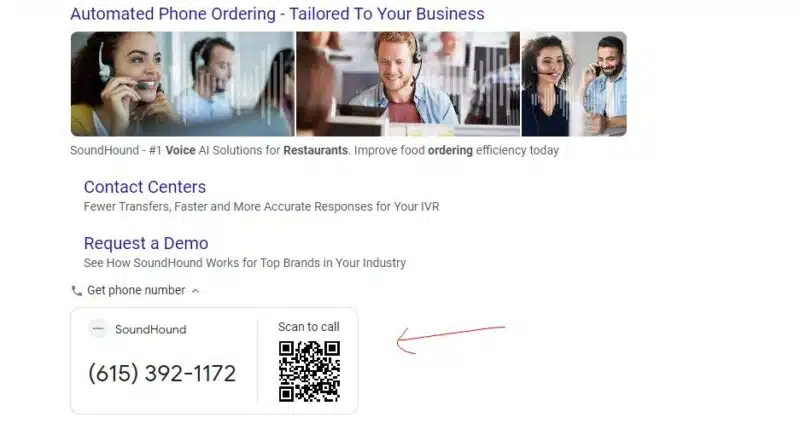
Google Ads appears to be testing a new QR codes ad extensions. Scanning the QR code lets consumers instantly call a number provided by a business or brand.
The feature, which was first spotted by SEO analyst Khushal Bherwani, has been appearing on a new expandable call box found at the bottom of ads.
Inside the box, the brand’s telephone number is also displayed, making accessing a company’s contact details simpler.
Google is also testing displaying three images across ads now instead of one.
The search engine is yet to officially comment on its trial, but Bherwani shared some screenshots of the new Sponsored Ads layout on X, formerly known as Twitter:
Why we care. If phone calls are important to your business, this may be a feature you’ll want to look into if and when it becomes available. QR codes have made a comeback – and this extension could potentially reduce friction, making it easier for people to call, which could lead to more sales, greater customer satisfaction or other positive business outcomes.
Get the daily newsletter search marketers rely on.
Deep dive. Read the Google Ads Guide on its official Help Center for more information on sponsored posts.
@media screen and (min-width: 800px) { #div-gpt-ad-3191538-7 { display: flex !important; justify-content: center !important; align-items: center !important; min-width:770px; min-height:260px; }
}
@media screen and (min-width: 1279px) { #div-gpt-ad-3191538-7 { display: flex !important; justify-content: center !important; align-items: center !important; min-width:800px!important; min-height:440px!important; }
}
About the author
Nicola Agius is Paid Media Editor of Search Engine Land after joining in 2023. She covers paid search, paid social, retail media and more. Prior to this, she was SEO Director at Jungle Creations (2020-2023), overseeing the company’s editorial strategy for multiple websites. She has over 15 years of experience in journalism and has previously worked at OK! Magazine (2010-2014), Mail Online (2014-2015), Mirror (2015-2017), Digital Spy (2017-2018) and The Sun (2018-2020). She also previously teamed up with SEO agency Blue Array to co-author Amazon bestselling book ‘Mastering In-House SEO’.
3 creative-driven tips to optimize your PPC performance
Historically, PPC marketers are accustomed to spending hours behind a spreadsheet crunching numbers, analyzing bid models, finding statistical significance for test results, and carefully plotting the next move.
PPC has been very logical, data-driven and more science than art. But the industry is shifting, and creative is arguably one of the best levers PPC managers have to optimize performance.
As a result, performance agencies must adapt quickly and rebalance the scales between art and science.
So, how can you prepare your performance marketing team for this change? Here are three tips to get you started.
1. Focus on asset coverage
First, understand that the shift to using AI for creative optimization is taxing on creative teams.
Ad platforms like Google and Facebook are scrambling to integrate generative AI capabilities.
However, these capabilities are fraught with issues related to ownership, brand safety and adherence to brand standards.
None of these are issues the ad platforms will tackle before rolling these new capabilities out to the masses.
So, how can you balance the need to “feed the machine” without overtaxing your creative team?
You need to focus on asset coverage. Asset coverage is simply a measure of whether you have the creative assets available to run in all the places you’d like.
Optimal asset coverage is going to depend on your specific media plan, but a good rule of thumb for most performance marketers is: 3 asset types x 3 aspect ratios x 3 asset lengths
Asset types
Your creative assets should include video, images and text ads.
Video: Video is the most underutilized asset, yet 54% of marketers say it’s the most powerful. Video is most effective at engaging audiences and the most powerful storytelling medium making it a must-have for an effective media plan.
Image: While TikTok and Reels may be solely focused on video, other ad networks are still largely driven by image ad inventory.
Text: Every good performance marketer should be running SEM text ads.
Asset size/ratio
While there is no shortage of unique asset sizes, advertisers can reach the vast majority of inventory by focusing on three key sizes:
1×1: A good image or video with a 1×1 aspect ratio is critical for several reasons. This ratio will allow you to run on most Meta inventory, including Facebook/Instagram Feeds, Instream Videos, Video Feeds, Reels and the right column. Plus, it will allow you to run on some Google responsive ad inventory.
9×16: The vertical rectangle 9×16 will provide the best performance for mobile devices. A strong 9×16 will allow access to Facebook and Instagram Stories and Messenger ads inventory alongside responsive search ads on Google.
16×9: The horizontal rectangle, 16×9, will give you strong performance for desktop devices on both YouTube and Google.
Asset length
A 30-second spot with cut downs for 15 and 6 seconds will give you reach across most placements.
15-second videos will give you access to unskippable or skippable inventory with just a little more room to tell your story.
6-second videos will give you access to YouTube bumper ads, Shorts and Reels inventory.
30-second videos will give you access to skippable inventory on most inventory.
Get the daily newsletter search marketers rely on.
2. Diversify your story types
Not all customers will respond to your messages the same way. Some may be more price driven. Others may be more feature driven.
The beautiful thing about AI is that brands no longer need to choose. AI will select the message most likely to engage that particular user. For that reason, it’s important to provide multiple story types:
Product features
Differentiate your product by showing various features, why they’re important and how it stands apart from its competitors.
Price/promotion or cost savings
Entice your audience to purchase through a special price or promotion. For longer sales cycles, use this story type to reduce barriers to purchase with a story around cost savings.
Aspirational or introductory
Introduce your brand and build an engaged audience through aspirational or introductory stories.
3. Nail the beginning
If you do nothing else, remember… you must nail the first five seconds.
Every PPC marketer should be looking for two things in the first five seconds
Brand: Is it clear what the ad is for? Does the logo appear? Does the product appear?
Value Prop: Does the audience understand why this is important for them?
Expect that creative teams will push back on these two guidelines. It disrupts the story arc and the creative flow.
But now is a good time to remind people that this is creative built for performance, not branding.
The first five seconds is the time to capture users’ fleeting attention and imprint your brand in their minds before they scroll by.
Balancing art and science
Rebalancing the art and science of performance marketing doesn’t have to be overwhelming.
As performance marketing embraces the full impact of creative, these three guidelines mark the foundation of strong performance creative.
With strong asset coverage, diversity of story types and nailing the first five seconds, advertisers can take advantage of one of the best levers in performance marketing today.
@media screen and (min-width: 800px) { #div-gpt-ad-3191538-7 { display: flex !important; justify-content: center !important; align-items: center !important; min-width:770px; min-height:260px; }
}
@media screen and (min-width: 1279px) { #div-gpt-ad-3191538-7 { display: flex !important; justify-content: center !important; align-items: center !important; min-width:800px!important; min-height:440px!important; }
}
About the author
Amanda has developed digital advertising strategies and paid media campaigns for companies across multiple industries for more than 20 years. She is data-driven and passionate about advancements in tracking technologies to ensure clients maintain a competitive advantage. Her specialties include large-scale SEM campaigns, web analytics and crafting comprehensive, easy-to-use dashboards to empower account performance. Amanda holds an MBA from San Jose State University and a BSC from Santa Clara University. Before serving as President of Closed Loop, a paid media agency, Amanda founded and led a comprehensive digital marketing consulting agency for seven years.
Google’s Performance Max Best Practices Guide gets major update
Google has rolled out significant updates to its Performance Max Best Practice Guide.
The refreshed document now includes information on new strategies, advising retail marketers on how they can better optimize campaigns and improve conversions.
Why we care. If you don’t keep up-to-date with the latest best practice guidelines from Google, the strategies you use to optimise your campaigns may be outdated and no longer effective, which could cost you in terms of reach, conversion and ROI.
What’s new? The updated document details new tools and features that marketers can use to market their campaigns more effectively:
PMax benefits – The updated guide explains how switching from Standard Shopping campaigns to PMax can increase conversions.
A/B testing – The document advises running A/B tests to prove that switching from Standard Shopping campaigns to PMax has increased your conversions. If you’re satisfied with the results, it encourages you to continue using PMax for the best results.
Plan budgets early with Performance Planner – It explains how to use Google’s Performance Planner to review your campaign’s projected monthly and quarterly performance. This tool can also be used to get recommendations on how to amend your campaign for the same spend. It’s worth noting that the tool’s forecasts are adjusted seasonally to enable marketers to identify conversion opportunities during key periods like holidays.
Taking seasonal action – The guide also contains tips on how to reduce ROAS targets to boost visibility for high-priority products during key periods, for example, in the lead-up to a holiday. Google advises setting more aggressive ROAS goals ahead of time to ensure your campaign reaches potential customers already researching purchases for maximum conversions.
Consolidation – Google advises consolidating your campaign structure where possible whenever you set up a new PMax campaign. This helps AI to optimize performance across channels using a unified budget.
Reaching high-value customers – Google has rolled out its New Customer Acquisition with High Value optimization tool in beta. This feature was designed to help optimize campaigns for new customers with a high predicted lifetime value, while still optimizing for regular new customers and engaging existing customers.
More insights and reports – The updated document also provided information on its new reporting features, including:
Asset group metrics
Performance change insights
Creative strength tests
Product-level data
Get the daily newsletter search marketers rely on.
What has Google said? Google announced its new features via an update posted in its Help Centre. A spokesperson said:
“We’ve created these best practices for retail marketers who are running Performance Max campaigns with a Google Merchant Center feed.”
“If your goal is to increase sales and reach new customers, these guidelines will help you get there.”
@media screen and (min-width: 800px) { #div-gpt-ad-3191538-7 { display: flex !important; justify-content: center !important; align-items: center !important; min-width:770px; min-height:260px; }
}
@media screen and (min-width: 1279px) { #div-gpt-ad-3191538-7 { display: flex !important; justify-content: center !important; align-items: center !important; min-width:800px!important; min-height:440px!important; }
}
About the author
Nicola Agius is Paid Media Editor of Search Engine Land after joining in 2023. She covers paid search, paid social, retail media and more. Prior to this, she was SEO Director at Jungle Creations (2020-2023), overseeing the company’s editorial strategy for multiple websites. She has over 15 years of experience in journalism and has previously worked at OK! Magazine (2010-2014), Mail Online (2014-2015), Mirror (2015-2017), Digital Spy (2017-2018) and The Sun (2018-2020). She also previously teamed up with SEO agency Blue Array to co-author Amazon bestselling book ‘Mastering In-House SEO’.