TikTok launches ads transparency library

TikTok has launched a Commercial Content Library to provide transparency around its paid advertising.

Marketers will be able to use the database to research information about TikTok’s paid ads – as well as other content that’s commercial in nature, such as:

  • The advertising creative.
  • Dates the ad ran.
  • Main parameters used for targeting (e.g. age, gender).
  • Number of people who were served the ad.

Why we care. Having access to this data can give marketers a better understanding of campaign performance and the TikTok algorithm. This key information will help reveal what creatives work, what ideas don’t work and more. Having this data at hand will enable marketers to make more informed decisions, potentially maximizing reach and ROI.

Slack Imgs 800x535

The rules. Access to TikTok’s Commercial Content Library is available to everyone globally. However, only data from Europe is available.

  • TikTok said that its team is already working on ways to include advertising data from more countries, such as the U.S., in the future. But a date for this release is yet to be confirmed.

Added bonus. In addition to the launch of the ads transparency library, TikTok is also giving marketers access to a Commercial Content API.

  • In order to use the Commercial Content API, marketers will be required to create a TikTok Developers account and submit an application for access, which will then be reviewed by the platform’s team in an effort to clamp down on the misuse of data.

Get the daily newsletter search marketers rely on.


What TikTok said. TikTok announced the launch of its ads transparency library on its official blog. A spokesperson said:

  • “We tested an early version of the Commercial Content Library with researchers and civil society to gather feedback over the last few months before making it more broadly available.”
  • “From our tests and input from experts, we’ve added the ability to perform precise searches, included more targeting parameters, and improved data quality – among other updates.”
  • “We value feedback on where we can improve both APIs. We’ll continue to respond with updates to better support independent research and transparency into TikTok.”

Deep dive. Read TikTok’s official blog post to find out more about its ads transparency library.


Related stories

New on Search Engine Land

@media screen and (min-width: 800px) { #div-gpt-ad-3191538-7 { display: flex !important; justify-content: center !important; align-items: center !important; min-width:770px; min-height:260px; } } @media screen and (min-width: 1279px) { #div-gpt-ad-3191538-7 { display: flex !important; justify-content: center !important; align-items: center !important; min-width:800px!important; min-height:440px!important; } }

About the author

Nicola Agius

Nicola Agius is Paid Media Editor of Search Engine Land after joining in 2023. She covers paid search, paid social, retail media and more. Prior to this, she was SEO Director at Jungle Creations (2020-2023), overseeing the company’s editorial strategy for multiple websites. She has over 15 years of experience in journalism and has previously worked at OK! Magazine (2010-2014), Mail Online (2014-2015), Mirror (2015-2017), Digital Spy (2017-2018) and The Sun (2018-2020). She also previously teamed up with SEO agency Blue Array to co-author Amazon bestselling book ‘Mastering In-House SEO’.

https://searchengineland.com/tiktok-ads-transparency-library-429659


Meta’s guidance on how to ‘integrate brands on Threads’

Meta has been advising creators on what content they should post on Threads.

The social network reportedly provided extensive guidelines on how marketers can integrate their brands on the platform in a leaked email.

The message allegedly provided creators with content suggestions, engagement ideas, feature recommendations and specific examples of what makes a good post for inspiration.

Why we care. The Threads algorithm balances post ranking with content discovery in news feeds – with a huge priority on the latter. The app has said it wants to encourage exploration by serving posts to users beyond their network. This is a huge opportunity for brands to maximize reach and potentially serve their content to untapped audiences. If Threads is transparent about the type of discovery content it will prioritize, this will help brands make more informed choices regarding content ideas to ensure maximum visibility on the platform.

What has Meta said? Meta has emailed content creators, providing tips on what content they should post on Threads, according to a leaked email obtained by Business Insider:

  1. Make a grand entrance. The leaked email notes that “epic entrances” combine images, memes and “open-ended” questions to announce that a brand or influencer has joined Threads. It points to Netflix, Gabrielle Union, and the Backstreet Boys’ first post as strong examples of epic entrances for brands that may want a little inspiration.
  2. Engage your followers. Instagram suggested that interactive content is a great way for a brand to get noticed on Threads. Whether that’s starting conversations or creating polls, the platform appears to be encouraging content that produces more content. Although Threads doesn’t have a tool to create polls just yet, the email advised that brands can, for the meantime, simply post two images and give followers a choice of emoji as a way to vote.
  3. Post a challenge or competition. Meta is also encouraging brands and influencers to create their own challenges or contests – again, another example of posting content that will result in more content. The leaked email cites “If I reach 100k followers, I’ll donate $100” as an example of what to do.
  4. Make use of Puns… and talk about Threads. Puns are apparently a good shout for brands and influencers – with the leaked email even citing a Meta pun as an example: “Get ~Meta~ About Being On Threads.” Meta also seems to be encouraging posting the Threads platform itself.
  5. Explore Threads’ existing tools. Brands and influencers are encouraged to use the Threads features that are currently available such as the ability to share up 10 photos in one post or five-minute-long video clips. Although the social platform is working on adding an array of new tools, it wants users to take advantage of what’s already available at their disposal to make the app more engaging.

Get the daily newsletter search marketers rely on.


Why now? Threads got off to an impressive start with more than 150 million downloads since its launch two weeks ago on July 5. However, user engagement has started to slow with daily active users falling from 49 million on July 7 to 23.6 million a week later, according to Similarweb. With that in mind, it’s little wonder Meta is pushing for content that produces more content and generates engagement in order to sustain momentum.

Deep dive. Read our Threads FAQ for more detailed information on how the new platform works.


Related stories

New on Search Engine Land

@media screen and (min-width: 800px) { #div-gpt-ad-3191538-7 { display: flex !important; justify-content: center !important; align-items: center !important; min-width:770px; min-height:260px; } } @media screen and (min-width: 1279px) { #div-gpt-ad-3191538-7 { display: flex !important; justify-content: center !important; align-items: center !important; min-width:800px!important; min-height:440px!important; } }

About the author

Nicola Agius

Nicola Agius is Paid Media Editor of Search Engine Land after joining in 2023. She covers paid search, paid social, retail media and more. Prior to this, she was SEO Director at Jungle Creations (2020-2023), overseeing the company’s editorial strategy for multiple websites. She has over 15 years of experience in journalism and has previously worked at OK! Magazine (2010-2014), Mail Online (2014-2015), Mirror (2015-2017), Digital Spy (2017-2018) and The Sun (2018-2020). She also previously teamed up with SEO agency Blue Array to co-author Amazon bestselling book ‘Mastering In-House SEO’.

https://searchengineland.com/meta-integrate-brands-threads-429633


Microsoft Logo Extension rolls out globally in open beta

Microsoft’s Logo Extension pilot is now in open beta globally, the company has confirmed.

Advertisers eligible to participate can choose to associate at the account, campaign or ad group level – but only one logo set up is allowed per association.

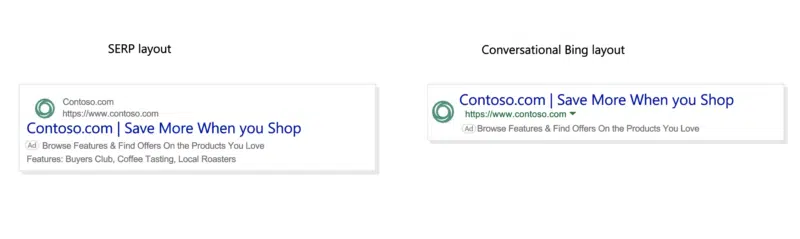
Logo extensions are being served on Bing across computer, tablet and mobile devices, and can appear alongside other extensions.

Why we care. Displaying a logo next to an ad can help a brand stand out from its competition, establish its identity and build customer trust. Increasing brand recognition is also associated with generating more clicks and conversions for websites.

Screenshot 2023 07 20 At 13.55.12 800x239

Getting set up. To create a logo extension, simply follow these steps:

  1. Select the collapsible menu on the left side of your screen, navigate to All Campaigns > Ads & Extensions > Extensions.
  2. From here, select which level you would like associate your extension. You can choose between Account, Campaign or Ad Group.
  3. Go to the extensions dropdown and then select ‘Logo Extensions’.
  4. Select ‘Create’ and then go to ‘Create New Logo Extension’.
  5. Upload your Business logo.
  6. Add your Business name.
  7. Enter the Domain name for your business website (your domain shouldn’t include any subdirectories).
  8. Press ‘Save’.
  9. Your new extension should then appear in the ‘Selected Lead Form Extensions List’. On the main extension page, select ‘Save’ to finish adding the extension to your account, campaign or ad group.

Logo requirements. In order to upload a logo, the image must meet the following criteria:

  • Aspect ratio: 1:1
  • Accepted file types: PNG and JPG
  • Maximum file size: 5120 KB
  • Minimum resolution: 128 x 128 pixels (recommended 1200 x 1200 pixels)

Get the daily newsletter search marketers rely on.


What has Microsoft said? Daniel Godoy, Global Programmatic Evangelist at Microsoft Advertising, told Search Engine Land:

  • “We’re rolling this out to all markets on all devices all at once. This is a global roll out – we’re not doing this market by market.”
  • “If the logo extension is set up, the logo extension is going to be the priority. It will always be the first choice of source. If you don’t have the logo extension set up, then an automated business logo (favicon) will be used.”
  • “If the advertiser is opt out and a logo extension is not set up then the default version will be used for ad texts.”
  • “We’ve been asked if this submission competes with other features – it doesn’t. There is a dedicated space for the logo, so it is not competing with any other feature. It has its own space.”

Deep dive. Read Microsoft’s Logo Extensions guide for more information.


Related stories

New on Search Engine Land

@media screen and (min-width: 800px) { #div-gpt-ad-3191538-7 { display: flex !important; justify-content: center !important; align-items: center !important; min-width:770px; min-height:260px; } } @media screen and (min-width: 1279px) { #div-gpt-ad-3191538-7 { display: flex !important; justify-content: center !important; align-items: center !important; min-width:800px!important; min-height:440px!important; } }

About the author

Nicola Agius

Nicola Agius is Paid Media Editor of Search Engine Land after joining in 2023. She covers paid search, paid social, retail media and more. Prior to this, she was SEO Director at Jungle Creations (2020-2023), overseeing the company’s editorial strategy for multiple websites. She has over 15 years of experience in journalism and has previously worked at OK! Magazine (2010-2014), Mail Online (2014-2015), Mirror (2015-2017), Digital Spy (2017-2018) and The Sun (2018-2020). She also previously teamed up with SEO agency Blue Array to co-author Amazon bestselling book ‘Mastering In-House SEO’.

https://searchengineland.com/microsoft-logo-extension-global-open-beta-429618


Microsoft’s Performance Max is now in open beta

Microsoft’s Performance Max is now in open beta. Select marketers can now access its full inventory and serve ads across its network.

Why we care. Microsoft’s Performance Max offers new features which aim to simplify marketers’ workloads and give them back time to focus on the creative and help them to reach untapped audiences. Being able to work directly with Microsoft on Performance Max campaigns will also give advertisers more transparency and detail into that asset level of reporting.

How to get started. Creating a campaign with Microsoft Performance Max consists of five steps:

  1. Set up Microsoft conversion tracking: While Google import is a great way to get started if you’re already using Performance Max there, you must ensure that conversion tracking is set up with Microsoft too as it’s a requirement. This can be done via UET or with offline conversion goals. This should always be the first set up and Microsoft advises making sure that you’ve set up the appropriate goals.
  2. Set budget and bid strategy: With maximize conversions within optional target return on ad spend goal, you can set and maximize conversion values with optional target CPA goals.
  3. Final URL expansion: Microsoft recommends turning this setting on because it helps drive consumers to the most relevant landing page. It also lets Microsoft create additional assets based on what’s working well on landing pages.
  4. Add assets: Next up, you should add text, images and ensure that their brand’s store is set up with Microsoft when using the Merchant Center.
  5. Audience signals: This helps Microsoft with regard to predictive targeting, which in turn can help you reach your target audience.

What has Microsoft said? Lauren Tallody, Sr. Product Marketing Manager and Automation Lead for Microsoft, told Search Engine Land:

  • “Since Google launched their Performance Max product in 2021, we took our time to understand if there was a need across advertisers for this kind of product on our side.
  • “We wanted to understand your needs, where we could differentiate and where we could focus. And this will continue to be a long journey.”

Timeline. Microsoft has been working on the creation of its Performance Max program since the fall of last year and has already seen positive results:

  • September 2022: Import Google PMAX campaigns using Merchant Center – As more advertisers started embracing the PMAX product in Google, Microsoft wanted to capture that demand and have a parity experience and so started importing Google Max campaigns as either smart shopping or local inventory ads.
  • October 2022: Import Google PMAX campaigns not using Merchant Center – Microsoft changes its approach slightly by importing Google Max campaigns as DSA campaigns.
  • May 2023: Closed beta launch of Microsoft’s Performance Max – The close beta launch went “very well” for Microsoft and the results encouraged it to continue building the product and import those campaigns in.
  • July 2023: Open beta launch – Microsoft’s Performance Max officially went into open beta a couple of weeks ago.

Get the daily newsletter search marketers rely on.


Next steps. Microsoft is now looking to bring its Performance Max product to general availability and continue to build on more features. This includes:

  • API support.
  • Microsoft Advertising Editor support.
  • Expanded reporting like search term and domain reports.
  • Smart shopping campaign upgrade tool.

Related stories

New on Search Engine Land

@media screen and (min-width: 800px) { #div-gpt-ad-3191538-7 { display: flex !important; justify-content: center !important; align-items: center !important; min-width:770px; min-height:260px; } } @media screen and (min-width: 1279px) { #div-gpt-ad-3191538-7 { display: flex !important; justify-content: center !important; align-items: center !important; min-width:800px!important; min-height:440px!important; } }

About the author

Nicola Agius

Nicola Agius is Paid Media Editor of Search Engine Land after joining in 2023. She covers paid search, paid social, retail media and more. Prior to this, she was SEO Director at Jungle Creations (2020-2023), overseeing the company’s editorial strategy for multiple websites. She has over 15 years of experience in journalism and has previously worked at OK! Magazine (2010-2014), Mail Online (2014-2015), Mirror (2015-2017), Digital Spy (2017-2018) and The Sun (2018-2020). She also previously teamed up with SEO agency Blue Array to co-author Amazon bestselling book ‘Mastering In-House SEO’.

https://searchengineland.com/microsoft-performance-max-open-beta-429584


How to calculate and improve your agency’s churn rate

To grow your agency, you need to lose some clients.

While it sounds crazy at first, there is actually value in that thought.

Understanding why clients leave enables you to improve your acquisition and retention approach. 

So if you’re an agency owner and you don’t track churn rate, this article is for you.

What is churn rate? A simple definition

Churn rate refers to the rate at which customers or subscribers discontinue or cancel their subscription or service within a specific period. It is often expressed as a percentage and is used as a metric to measure customer attrition or turnover. 

A high churn rate indicates that a significant number of customers are leaving, which can have negative implications for businesses.

Churn rate is a North Star KPI that every agency should closely monitor.

Repeat purchase rate is different from churn rate but when you think about it, it is about looking at a half-empty / half-full glass (it describes the same situation). So because your agency sells one-time projects doesn’t mean you should not pay attention.

The real question is: are your clients leaving too soon? And are those representing a significant share of your client base?

If you answered yes to both questions, don’t panic but get busy.

Conversely, you should ask yourself how many clients you need to acquire (and how fast you should do so) to reach your growth targets. If you can’t answer such questions, then get busy too! 😀

For example, say you start with 1,000 clients but also lost 100 of them over a certain period of time.

And that your growth goal is to reach 1,500 clients by the end of the next period. That means your client acquisition goal should be 1,500 – 1,000 + 100 = 600 clients.

In that example, if your churn (100 clients lost) and your acquisition (600 clients acquired) are OK, you’ll hit your target. But if you start losing more than 100 clients… careful!

The churn rate trap people fall into way too often

You need to define your analysis period better to calculate churn rate.

For example, let’s say your average client stays with your agency for two years. And say that you take a two-month reference period to analyze churn. Would you trust your churn rate? I know I would not.

Having a fixed period of time (like a fiscal year) is more often than not a mistake. You actually need to incorporate client lifetime information into your churn rate calculation.

Say you’re a subscription-based agency. The longer a client stays, the higher the probability is that he or she leaves you. It’s like a law of nature. Naturally, not all businesses are made equal in that sense:

Don’t use a fiscal year by default. While it might make sense for your business, you first want to have a somewhat clear idea of your average client lifespan. 

Basically, if your agency has been around for some time, you should have a solid idea of that average lifespan. Use that as your reference period, not a fiscal year.

How to calculate churn rate

If you have a precise figure for your average client lifespan, you can use the below formula:

Churn rate = 1 / average customer lifespan

If client lifespan is not clear enough (your agency lacks the data or is too young, etc.), then I’d recommend using scenarios. Use whatever data you already have (be it 6 months or 2 years) and use different client retention windows (say 1 year, 2 years and 5 years).

In any case, you’ll want to use the below formula:

Churn rate = clients lost during the analysis period/clients at the beginning of that same period

Sounds simple? It is. Still, there are several things to say about the above formula.

To calculate the clients you lost during the analysis period, you want to subtract the number of clients you have at the end of the period from your clients at the beginning of the period. 

That means you should not consider the clients you acquired during that same period!

So let’s use the example mentioned above: you lost 100 clients and started with 1,000 of them. That means your churn rate is 100 / 1,000 = 10%.

And yes, you want to write it in percentages. 


Get the daily newsletter search marketers rely on.


How to read churn rate?

Churn rate tells you how fast your client base is getting thinner. So with a 10% churn rate, you’ll need 10 analysis periods to lose all your clients.

So is 10% great or horrendous? It really depends on your industry.

My recommendation is: do not compare with other agencies. At best, your data on your competitors (or those industry averages we find online) is partially reliable. But most of the time, that data is complete garbage. Just ignore them.

Instead, you want to compare your present agency with your past agency. Just use the previous analysis period. That data is 100% reliable: you control it (and you did a good job at calculating it right?).

If your churn rate is decreasing, you are doing good. Conversely, if it increases, you should have a red light flashing in your head.

The only question then becomes: can you reverse that course of action before it’s too late for your agency? And only you can answer that question (“is X amount of analysis periods enough to turn the ship away from the iceberg?”).

Ideally, you have something that looks like that:

  • Period #1 : 10%
  • Period #2 : 8.5%
  • Period #3 : 7.6%
  • Period #4 : 6.8%

Methodology and data to improve churn rate

Generally speaking, all agency owners take product / service quality levels very seriously. So churn rate and pain points are very much identified already. It simply is tough (if not impossible) to solve that equation right now.

That being said, I’ll share our methodology at my agency, it is fairly simple: track client lifecycle events. Like, all of them. It can be a challenge if your organization is big and includes many managerial layers, subproducts, etc. That will add sand to your wheels for sure.

When you have enough political power to prioritize that data collection effort, you can use it in a simple funnel-like dashboard. It should help you visualize the client lifecycle and all major steps. 

Here is a simplified example to get you started:

  • Onboarding: 100% of clients are still with us. That one wasn’t hard! 😁
  • Setup completed: 98% of clients are still here.
  • First business review: 92%…
  • One-year anniversary: 60%…
  • Two-year mark: 55%…

In that example, the main pain point clearly comes after that first business review. Did you actually identify what the client was looking for? Or did you turn a blind eye to her needs?

Or maybe it has to do with client goals: they were not a good fit in the first place.

Or maybe you switch client’s teams too often and that happens before the one-year anniversary. And so on.

Once you have built that dashboard, you can pinpoint several potential areas of improvement. Simply gather more data to prioritize your efforts.

Top ideas to improve churn rate

Everything I mentioned requires relatively heavy resources to become reality. And sometimes, we only need some quick ideas to get our heads going. So here are 10 ideas to improve churn rate:

  • Improve after-sale (i.e., production) services, specifically its speed of execution. A client faces a challenge, he or she should get an answer in less than 30 minutes. Less frustration, lower churn rate.
  • Reward your most profitable clients. It doesn’t apply to all of your clients but some of them deserve extra recognition: exclusive info, semi-private events, etc.
  • Show that you listen to your clients. Package that into a program to gather, process and communicate around client feedback. People should feel they’re heard and listened to.
  • Improve service / product quality. And specifically work on perceived value. Don’t be too “geeky” about it. Your clients also need to feel that increase in the short term.
  • Keep in touch with your clients. That means working on your content marketing. That way, you make sure your clients don’t feel like the grass is greener on the other side.
  • Personalize your client communications. This can be at the report, product, service or whatever level. They need to feel some degree of uniqueness. That way, they won’t be able to get the same product / service elsewhere.
  • Have sales and after-sales teams talk. The latter team needs to understand what actually drives sales… and salespeople need to understand what tensions exist after the initial contract is signed.
  • Evaluate client satisfaction. That means working on quantitative KPIs (repeat purchase, NPO, Customer Happiness Index, etc.) and qualitative ones (interviews, etc.).
  • Update your products. If a company doesn’t evolve, it is bound to die. The same goes for products and services. Simple as that.
  • Be transparent. On deadlines, works in progress, internal capacity and limits, ability to fix x, y and z, etc.

Do you have a leaky bucket?

Measuring churn rate helps you understand how fast clients go and why. Ideally, you can solve those first challenges easily.

The next step is to implement a system to reduce churn rate. That system should be in everybody’s hands… but HR and product people are usually first in line.

End vision: your clients will love your products and services so much that they will pay more and for a longer period of time. And maybe even better: they will turn into evangelists!


Opinions expressed in this article are those of the guest author and not necessarily Search Engine Land. Staff authors are listed here.


Related stories

New on Search Engine Land

@media screen and (min-width: 800px) { #div-gpt-ad-3191538-7 { display: flex !important; justify-content: center !important; align-items: center !important; min-width:770px; min-height:260px; } } @media screen and (min-width: 1279px) { #div-gpt-ad-3191538-7 { display: flex !important; justify-content: center !important; align-items: center !important; min-width:800px!important; min-height:440px!important; } }

About the author

Rémi Kerhoas

Rémi is an internationally recognized digital marketing expert and co-founder of Quantads, a data & growth marketing agency. Since 2011, he has successfully directed teams and grown ad accounts for clients ranging from Uber, Salomon or Asana to SMBs.

https://searchengineland.com/calculate-improve-agency-churn-rate-429550


How to use Google Ads to get more donations for your nonprofit

Google Ads can be useful for nonprofits, particularly for driving donations.

Many nonprofits limit themselves to a Google Grants account. Usually, they are worried they won’t have the necessary budget.

But that’s a mistake – one that can stop now.

Here are some lessons you can apply to your own nonprofit based on the advertising journey of one of our nonprofit clients.

Why Google Grants alone doesn’t cut it

Like many nonprofits, this client started with a Google Grants account. 

If your nonprofit is doing well with a Google Grants account, that’s great.

But you may find that Google Grants will only take you so far.

The program’s restrictions often make it difficult to spend any significant portion of the grant budget. 

That was the case for this client. With the Google Grants program alone, they struggled to get a foothold in a market crowded with pharmaceutical advertisers and larger nonprofit organizations.

They needed a different strategy. So they agreed to set up a paid (i.e., “normal”) Google Ads account.

This turned out to be a great decision.

Recently, we’ve been spending about $5,000 to $7,000 monthly on Google search text ads and getting $10,000 to $12,000 in donations in return – something we couldn’t achieve with a Google Grants account.

Lesson: If you’re unsuccessful with Google Grants (and even if you are), consider having a concurrent paid Google Ads program.

The limits of any one approach

Our client is thrilled with this return – and so are we. But neither of us wanted to stop there. 

We tried leaning into this strategy, dedicating even more budget to Google text ads. But we couldn’t get a return commensurate with the higher budget. So we needed to find a new approach.

Lesson: Putting more budget into your current approach – no matter how successful – isn’t always the answer. You’re likely to max out at some point.

Look to existing content, especially video

We looked for a new strategy, and that’s when our client’s YouTube channel caught our attention.

Our client already had some great video content. These videos convey the value of their organization more powerfully than any text ad possibly could. So we decided to test video ads. 

The results were impressive, especially around end-of-year giving.

Last year, we increased ad spend to $15,000 over that period, putting a portion of the additional budget into video ads. We earned over $70,000 in donations. 

With that kind of return, we encouraged the client to invest consistently in video advertising over the entire year to drive more donations year-round.

Lesson: Look at the resources you already have. If you’ve consistently created video content for new and current members over the years, you may already have what you need for a high-impact/low-cost video campaign.

Dig deeper: 7 important YouTube Ads lessons you need to learn


Get the daily newsletter search marketers rely on.


Donations aren’t the only goal

These videos aren’t driving donations, and that’s OK. These campaigns are growing brand awareness, which will help ensure the nonprofit will raise donations and continue its good work into the future. 

And the great news is that these campaigns don’t always require a huge budget.

For example, for as little as a $300 video push campaign, we’ve driven up to 100,000 impressions and 19,000 video views. Those are significant numbers!

Lesson: Not every advertising dollar has to be tied to a donation dollar. While donations are the end goal, brand awareness has value too. Consider creating an “always on” awareness program with success metrics tied to brand lift. 

Benefiting from unexpected clicks 

With our advertising program in place, we noticed an interesting trend. 

Sometimes, we get donations from people searching for another organization’s name in the same charity space. These people searched for the competitor’s name and decided to donate after viewing our client’s content and videos and learning more about them. 

Why are we benefiting from these competitor searches? We’re not sure, but we can speculate:

  • As far as we know, the competitor isn’t advertising on Google outside of their Google Grants account. Experience has taught us that Google puts paying advertisers ahead of Google Grants advertisers. (In fact, a Google rep once told us as much.) Having a paid account may give us the edge here. 
  • It could be that this competitor needs to do more to build brand awareness and trust. If they did, people might be more determined to seek them out specifically instead of donating to our client.

Lesson: Having a paid Google Ads account may give you the edge when competing against Google Grants accounts.

Stay the course

Naturally, our client has been excited about their success, and they’re motivated to keep testing new themes and ideas. 

We’re big believers in testing, so we love their enthusiasm. But at the same time, you need to give things time to play out – otherwise, it becomes increasingly difficult to determine what is working and what’s not. 

Lesson: Stay focused and consistent. If you test everything all at once, you risk muddying the waters. Take the time you need to accurately assess whether a new theme or approach is a good one.

Plan for the future 

Given the positive impact of YouTube ad campaigns for this nonprofit, we’re already planning our next steps. 

We’re working on an “always on” YouTube campaign featuring videos demonstrating the nonprofit’s value. 

We also list other types of videos we’d like to test. For example, videos that:

  • Feature underserved demographic groups. 
  • Highlight local support groups and seminars.
  • Answer “What is?” and “How to?” questions.
  • Relay stories about the positive impact of the nonprofit’s activities.
  • Describe personal member stories (i.e., similar to customer testimonials).
  • Describe exactly how donations are put to use.
  • Include a Q&A, such as an “Ask an expert” series. 

Lesson: If your existing videos perform well, consider creating and testing videos on different themes and see how they perform.

Google Ads isn’t just for for-profit businesses

Google Ads doesn’t get the attention it deserves from nonprofit organizations, which is too bad. 

Because just like for-profit businesses, Google Ads can also help nonprofits reach their goals and raise brand awareness.

And that’s a very good thing when that means more money for a good cause.


Opinions expressed in this article are those of the guest author and not necessarily Search Engine Land. Staff authors are listed here.


Related stories

New on Search Engine Land

@media screen and (min-width: 800px) { #div-gpt-ad-3191538-7 { display: flex !important; justify-content: center !important; align-items: center !important; min-width:770px; min-height:260px; } } @media screen and (min-width: 1279px) { #div-gpt-ad-3191538-7 { display: flex !important; justify-content: center !important; align-items: center !important; min-width:800px!important; min-height:440px!important; } }
About the author

Pauline Jakober

Pauline Jakober is Founder and CEO of Group Twenty Seven, a boutique online advertising agency that provides Google Ads and LinkedIn Ads management, consulting and audits to B2B clients.

https://searchengineland.com/google-ads-donations-nonprofit-429533


Meta rolls out multiple updates to enhance Facebook video experience

Meta has started rolling out a series of updates to enhance the Facebook video experience.

The social networking platform has:

  • Introduced new editing tools.
  • Redesigned video Explore.
  • Simplified its video tab.
  • Increased engagement opportunities.

Why we care. Facebook has transformed into a one-stop shop where people can enjoy the best of both Instagram and Facebook Reels. This is great news for marketers advertising their campaigns on Instagram as they now have access to the Facebook audience, even if they don’t have an active profile, and so their potential reach is greater than ever before. In addition, the simplified redesign means that Facebook users will find it easier than ever to discover new content, providing another opportunity for brands to reach new potential customers.

New video editing capabilities. Meta is rolling out Reels editing tools to Feed videos to help you create more dynamic content. The new tools include:

  • Seamless editing: If you use the Meta Business Suite, you can access audio, music and text editing features already available on Reels. These new tools will help you layer and time creative elements more easily, potentially resulting in a higher-quality end product.
  • More clip editing tools: You will now have the option to speed up, reverse or replace clips, offering more opportunities to get creative with your content.
  • Enhanced audio: You can now experiment more with sound, including adding music and audio clips, recording voiceovers and reducing unwanted noise
  • HDR access: You can now upload HDR videos from your phones to Reels. The clips uploaded can also now be played back in full HDR, resulting in a high-quality end product.

Get the daily newsletter search marketers rely on.


Simpler navigation. Facebook is aiming to make its video content as easy to discover as possible and so has started rolling out a number of changes, including design modifications and new features:

  • One-stop shop video tab: People can now access all videos from Reels to Live content to long-form on the video tab, previously known as Facebook Watch.
  • Highlighted recommended reels: Facebook users will be served a new horizontal reels section in the Video tab, highlighting recommended reels.
  • New layout: Making navigation even simpler, the Video tab will soon appear in the shortcut bar (although the tabs in the shortcut bar update in accordance with what features people use most).

Improved discovery and user experience. Facebook is also making it easier than ever for its users to discover videos about popular topics and trends by redesigning video Explore. The platform works by serving content it thinks the user will enjoy and find interesting by using a combination of human curation and machine learning.

More engagement opportunities. Not only will Instagram Reels be served on Facebook, helping brands to reach more people than ever before, people now have the opportunity to write comments on these clips without having to switch between the apps.

What has Meta said? Meta said via a statement published in the Facebook Newsroom:

  • “We’ve started to roll out updates that will bring more Reels editing tools to Feed, making it even easier to create dynamic videos on Facebook. Whether posting a video for friends and family to see, or trying to reach people who share similar interests, our video editing tools will make it possible for people to express themselves in new ways via Reels or long-form videos.”
  • “Video is core to Facebook – short videos could be posted to Feed as early as 2007. Nowadays, our unique cross-section of Reels, long-form and Live content brings people to Facebook to watch videos about the things they like, new stuff they’d want to know about, and to engage with real people with similar interests.”
  • “We continue to invest heavily in video, so today we’re sharing the latest ways we’re making it possible for people to create, explore, and engage with video on Facebook.”
  • “But this is just the beginning. We’ll continue developing more tools for creators so they can express themselves, build an audience and earn money, along with the discovery and personalization features that give you more control over your experience.”

Related stories

New on Search Engine Land

@media screen and (min-width: 800px) { #div-gpt-ad-3191538-7 { display: flex !important; justify-content: center !important; align-items: center !important; min-width:770px; min-height:260px; } } @media screen and (min-width: 1279px) { #div-gpt-ad-3191538-7 { display: flex !important; justify-content: center !important; align-items: center !important; min-width:800px!important; min-height:440px!important; } }

About the author

Nicola Agius

Nicola Agius is Paid Media Editor of Search Engine Land after joining in 2023. She covers paid search, paid social, retail media and more. Prior to this, she was SEO Director at Jungle Creations (2020-2023), overseeing the company’s editorial strategy for multiple websites. She has over 15 years of experience in journalism and has previously worked at OK! Magazine (2010-2014), Mail Online (2014-2015), Mirror (2015-2017), Digital Spy (2017-2018) and The Sun (2018-2020). She also previously teamed up with SEO agency Blue Array to co-author Amazon bestselling book ‘Mastering In-House SEO’.

https://searchengineland.com/meta-updates-to-enhance-facebook-video-experience-429549


Kroger’s new self-service ad platform: What you need to know

Kroger is breaking away from Microsoft to take its advertising platform – Kroger Precision Marketing – in-house.

The new system, which the grocer has spent the last year working on, is currently in beta but all marketers are set to transition in the fall.

Why we care. With 2,700 stores across 35 states, Kroger is the largest supermarket chain in the US and has historically worked with more than 2,000 brands. Marketers that launched campaigns using the old ads platform noted it was “clunky” and unnecessarily time-consuming as they were forced to navigate multiple systems to get a campaign live. The new platform, however, acts as a one-stop shop where marketers can both get their ads live and access data, meaning they can make informed decisions faster to potentially get a better ROI.

“It wasn’t a decision we took lightly because Microsoft has been a great partner,” Dan Mayer, VP, Media Platform, Kroger Precision Marketing at 84.51˚, told Search Engine Land. “But this new platform gives [marketers] more control and the ability to act on data and insights much more quickly – we’re excited for that.”

Highlights. The new platform will provide marketers with the power to:

  • Reach relevant audiences using search-based insights and custom ad groups.
  • Design, iterate, and activate creative messages within the platform.
  • Customize and save multiple creative templates by brand and product.
  • Optimize all campaign elements including budgets, messaging, and flighting.
  • Build reports and boost performance against deterministic retail data – including sales lift, household penetration and unit lift.  

Although Kroger is excited to roll out its new ad platform, Mayer emphasized that the system will always be a “work in progress” and that the team is looking forward to hearing feedback from clients.

  • “The media space is incredibly dynamic so there is lots more to come. We want to continue to enhance its features and functionalities,” Mayer said.

Read on for highlights from my recent Q&A with Mayer for more details around Kroger’s new self-service ad platform.

Kroger’s ‘biggest pain point’

Marketers had been submitting feedback to Kroger about the interface of its old platform, explaining it was unnecessarily time-consuming to get a campaign live.

  • “One of the biggest pain points was the creative of it.
  • “Targeted onsite ads in particular was a bit of a disjointed experience because the campaign process started in one spot but you’d have to jump out to build that creative in another spot – and then you’d have to come back in again!
  • “The current state is a little clunky if I’m being honest. There are multiple systems [marketers] have to navigate to get a campaign live. We needed to somehow bring that one experience into one platform.”

Taking back control

For Kroger, addressing marketers’ biggest pain point resulted in it taking the tough decision to move away from Microsoft and creating an in-house self-service ad platform, so that its team of scientists could provide real-time data for more control.

  • “We like to think we have a healthy obsession with our customer experience and optimizing that experience.
  • “[Going in-house] gives us more direct control over that experience as it allows us to offer our data insights and science much more seamlessly and quickly.
  • “We now own the roadmap, we own the decision on priority and what we can get into production and when, whereas in the past we depended on partners to bring that stuff to market.
  • “With our new platform, [marketers] can now come directly to us through a single entry point and stay contained within that platform. You’re not bouncing out onto other platforms to execute campaigns.”

Verdict from marketers so far…

Although the new platform is still in beta and it’s very early days, Kroger has already started collecting feedback.

  • “The feedback from marketers so far has been relief because of how we’ve simplified the process for them.
  • “Marketers seem to appreciate the ease of use now – especially when it comes to setting up and activating campaigns.
  • “They’re also excited by the science we’re bringing to them – and how much more quickly. We’ve successfully deployed science previously but now that is a much quicker process and advertisers can see the benefit of that in the form of increased performance of their campaigns.
  • “But when we were making this platform, there were certainly points at which we thought we had everything covered then we’d go and test it and we realized oh we’ve missed that so we’ve got to add a component of a feature. So I’m excited to get more feedback from our advertisers because this is a work in progress.”

Next steps

Kroger’s new ad platform won’t be rolled out to all marketers until the fall, however, the company is already looking to next year and beyond.

  • “We’ll have all advertisers coming over by the end of the year and we’ll be open to the feedback they have to give as we continue to enhance the features and functionalities.
  • “Marketers will be able to give feedback on the ad platform.
  • “We will also continue to build the platform out across our other advertising experiences across our off site portfolio later this year and into next year.
  • “We’re not reporting revenue or our financial goals at the time, but we expect to continue to rapidly grow. Watch this space!”

Related stories

New on Search Engine Land

@media screen and (min-width: 800px) { #div-gpt-ad-3191538-7 { display: flex !important; justify-content: center !important; align-items: center !important; min-width:770px; min-height:260px; } } @media screen and (min-width: 1279px) { #div-gpt-ad-3191538-7 { display: flex !important; justify-content: center !important; align-items: center !important; min-width:800px!important; min-height:440px!important; } }

About the author

Nicola Agius

Nicola Agius is Paid Media Editor of Search Engine Land after joining in 2023. She covers paid search, paid social, retail media and more. Prior to this, she was SEO Director at Jungle Creations (2020-2023), overseeing the company’s editorial strategy for multiple websites. She has over 15 years of experience in journalism and has previously worked at OK! Magazine (2010-2014), Mail Online (2014-2015), Mirror (2015-2017), Digital Spy (2017-2018) and The Sun (2018-2020). She also previously teamed up with SEO agency Blue Array to co-author Amazon bestselling book ‘Mastering In-House SEO’.

https://searchengineland.com/kroger-self-service-ad-platform-429480


The omnichannel magic of connected TV by MNTN

MNTN TDM Sponsored Article Image 1920x1080 1 800x450

’Cause we are living in an omnichannel world

When was the last time you used fewer than three internet-connected devices in a day? Less than two? One? We’re guessing it’s been a long time (if ever).

In today’s world, internet-connected devices play an integral, if not central, part of most consumers’ day. With everything from smart TVs and smartphones to tablets easily accessible and on hand, they often hop from screen to screen, splitting their attention across all these devices. And they’re usually also researching, shopping and engaging with brands as they go.

So as an advertiser, your strategy should look a lot like that path. With an omnichannel approach to advertising, brands can charm consumers no matter what device they’re looking at, or how far down the consideration funnel they are.

And yes, to achieve a fully comprehensive omnichannel strategy, brands absolutely need to add Connected TV into their marketing mix.

CTV as an integral part of your omnichannel strategy

No need to panic—connected TV has become more advertiser-friendly than ever. With more ad-supported streaming available, consumers have been flocking to streaming with ads to take advantage of the lower price point. In fact, this year ad-supported video-on-demand (AVOD) platforms are expected to see more than triple the growth in U.S. viewers than subscription streaming platforms. That means more opportunities for advertisers to reach their ideal customers on Connected TV.

And with all the advancements that have been made in the CTV ad tech space, it’s easier than ever for brands to use connected TV just like they do other ad channels. When linear was the only TV ad channel in play, it was much harder to shift gears with a TV campaign; now, brands can quickly deploy or change out their ads as needed. And with CTV’s robust audience targeting capabilities, advertisers can serve ads to specific viewers and get real-time, customizable feedback on performance and the success of their campaigns.

Leveraging your digital marketing skill set for CTV

Still nervous about slotting CTV into your ad mix? Here’s a secret: if you’re already running campaigns on paid search and social, you’re probably already an expert.

Connected TV perfectly aligns with the core principles and methodologies of performance marketing and is an additive solution for advertisers already familiar with those channels. In fact, you can use the same skills you’ve developed while running campaigns on other platforms to get started on connected TV. For instance: know how to use targeted keywords from your time running paid search campaigns? Great! You already know how to use targeted keywords in an audience segmentation tool to identify and convert valuable prospects for your new CTV campaign.

Setting up a CTV campaign follows the same core principles as any other digital campaign, too. You start by defining your goal and budget, selecting your audience segments, uploading any creative assets—and then, before you know it, you’re launching your campaign. Once it’s launched, you can monitor campaign performance in real-time, too, and optimize as needed—again, just like you already do when managing other performance channels.

CTV’s halo effect changes the game

Ready for the cherry on top? Once connected TV is folded into your omnichannel ad mix, you can take advantage of one of its biggest benefits: its “halo” effect on other channels. When integrated into a marketing strategy, connected TV’s precise targeting capabilities, comprehensive measurement tools, and non-skippable ads mean you’re going to see improved outcomes across all your channels—not just CTV.

You’re especially likely to see this impact in your paid search and social campaigns. When looking at MNTN first-party data, we found that after 30 days, connected TV’s halo effect created stronger conversion rates for paid social (4%) and paid search (2%). And after 90 days, that effect became even more significant—driving 9% stronger conversion rates for paid social and a whopping 22% (!) stronger conversion rates for paid search.

Ultimately, in a world where your consumers are reachable on every device imaginable, every day you don’t follow their lead to those devices is an opportunity wasted (and an opportunity for your competition to get there first). And the sooner you start, the sooner your Connected TV campaigns can make your other channels shine, too.


Related stories

New on Search Engine Land

About the author

MNTN

MNTN builds advertising software for brands to drive measurable conversions, revenue, site visits and more through the power of television. MNTN Performance TV is the world’s first and only Connected TV advertising platform optimized for direct-response marketing goals. It redefines what advertisers can do with television, giving them the power to tie performance directly to their TV campaigns.

https://searchengineland.com/the-omnichannel-magic-of-connected-tv-429441


Looker Studio reporting: 6 do’s and don’ts for search marketers

You’ve probably used Looker Studio (formerly Google Data Studio) to create reports for stakeholders or clients. 

I had the pleasure of seeing SearchLab’s Greg Gifford present on “Freddy Krueger’s Guide to Scary Good Reporting” recently. He spoke about ways to improve your Looker Studio reporting to make it more useful for clients. 

Below are key learnings from Gifford’s session in the form of do’s and don’ts, plus some examples of data visualizations that search marketers will find most helpful.

1. Don’t enter data into a text box manually

Work smarter, not harder. Set up a data source for the platform to instantly pull data from.

You can connect it to a specific Google Ads account and report on metrics directly from there. 

There are plenty of connectors built and supported by Looker Studio.

However, if you want to connect a platform that’s not on that list, you can do so through a third-party data integrator such as Supermetrics or Funnel.io.

You can export data to a Google Sheet and pull it into Looker Studio that way.

2. Don’t include metrics without comparison

Clients pay you to tell them a story, not spit out numbers that can already be found on their own. 

  • Why did clicks decrease compared to last month? 
  • Why did the conversion rate drop a whole percentage? There were 40 leads last month.
  • How does that compare to last month or this time last year? 

Show them what trends you are seeing in an easy-to-understand way. 

Here’s an example.

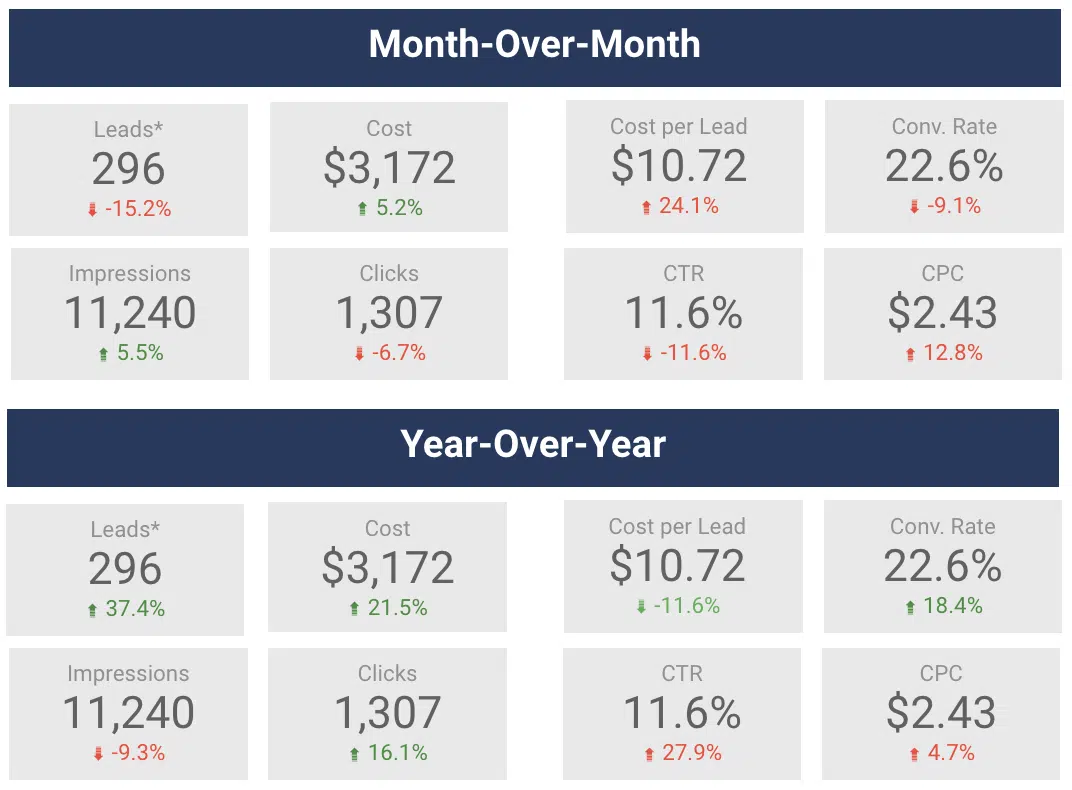
Looker studio comparisons

This is a way to demonstrate month-over-month (MoM) and year-over-year (YoY) changes for specific metrics. 

You can add these by clicking into the metric, navigating to the Setup section, and adding a comparison date range. 

Looker Studio will automatically calculate the percentage change and make it green or red based on a positive or negative trend.

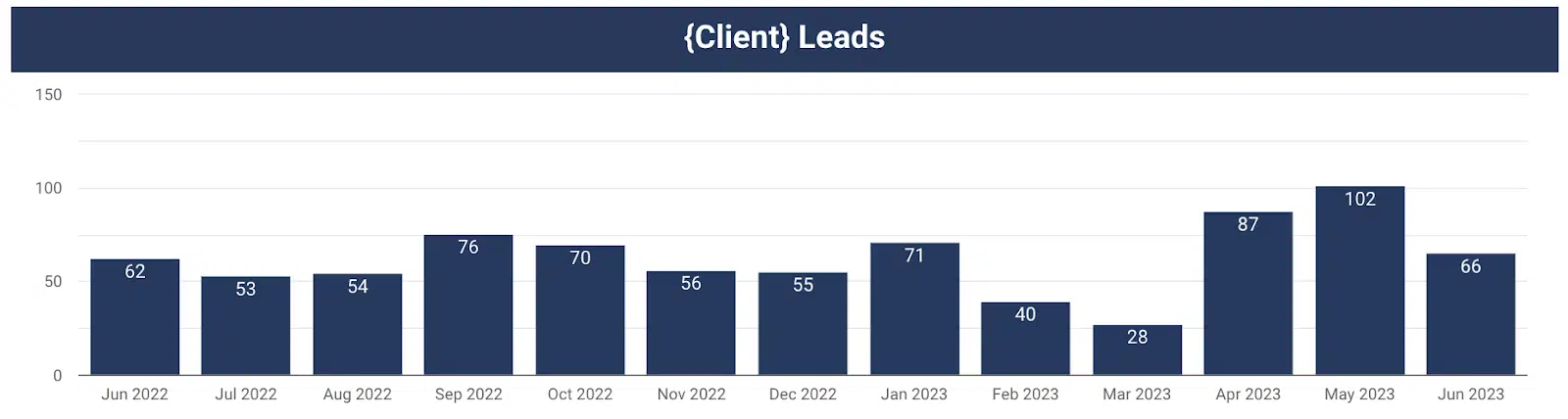
Looker studio - changes over a time period

This chart gives a visual representation of leads by month over time.

You can easily see month-over-month (MoM) and year-over-year (YoY) changes. Consider a chart like this for your report.

3. Don’t give them metrics that don’t tell them the whole story

Time on site is a metric commonly reported on. It’s typically assumed that the more time a user spends on the website, the better. 

Gifford challenged this mindset. Couldn’t spending more time on your website mean that people are unable to find what they really need? 

If they come to your website, find your contact us form, fill it out with their information, and leave it all within 45 seconds, that’s actually a good thing. 

As long as they convert, you should be happy (and the faster they convert, the better). 

Challenge yourself to choose metrics to report that will give a more accurate picture of what’s happening.


Get the daily newsletter search marketers rely on.


So now you know what not to do. Let’s discuss what you should do with your Looker Studio reports.

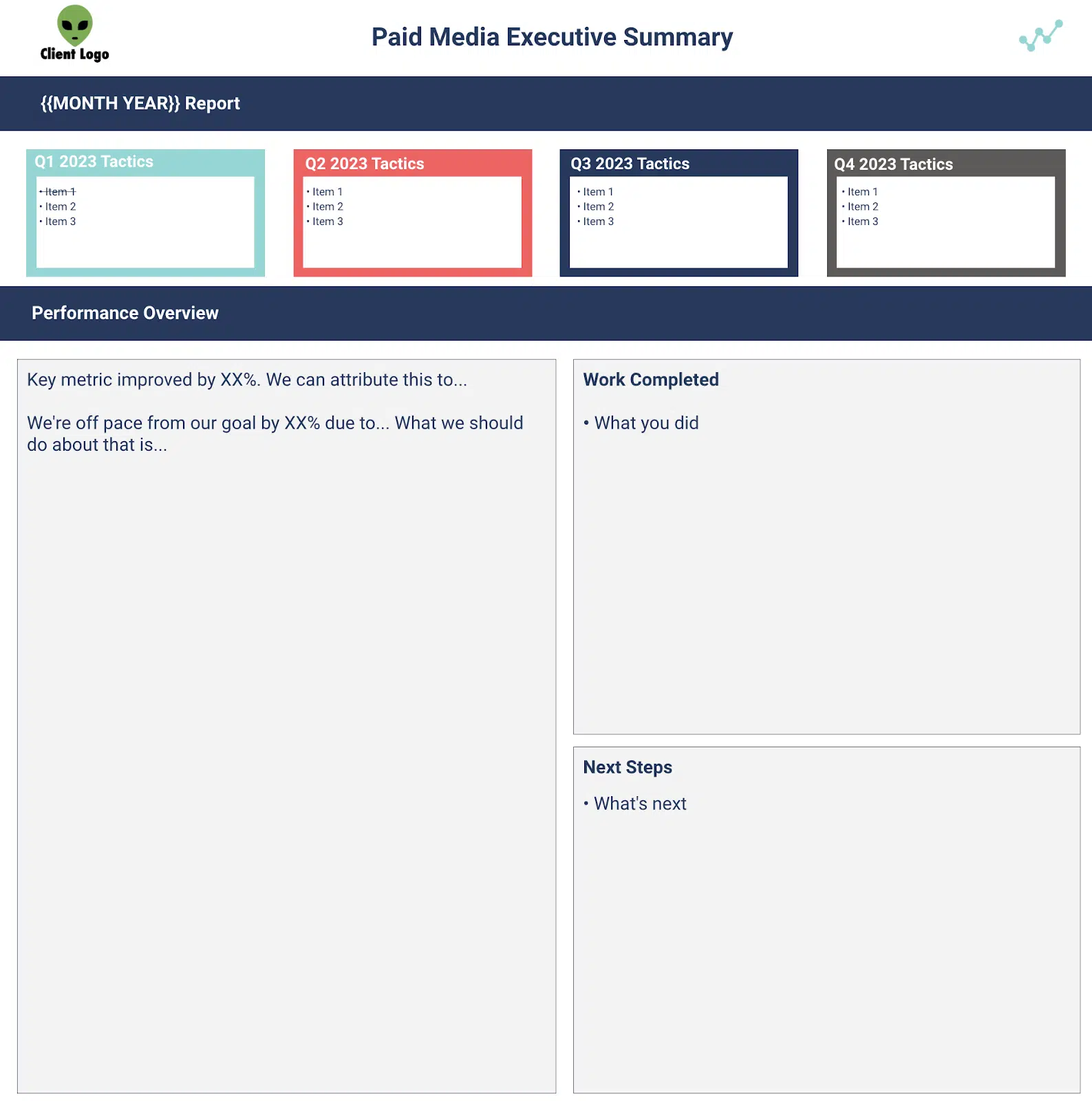
4. Do provide an executive summary, list of work completed and list of next steps

This is arguably the most important part of the report. 

This should serve as a tear sheet so the client has a place to quickly reference the most important insights from this past month. 

Everything else in the report is supplemental and helps provide additional color to the trends and insights you’ve provided in your executive summary. 

When you think about crafting your executive summaries, ask yourself, “So what?” 

  • My client saw 40 leads this month, so what? 
  • Traffic was up 25% month-over-month, so what? 

Use the executive summary to tell your client a story and give them the why. 

Tell them about how traffic was up 25% month-over-month because that non-brand campaign you restructured has been performing efficiently and drove 80% of the total leads for the month. 

Also, now that you’ve seen how well that campaign restructure is doing as a next step, you are going to restructure another campaign to further improve performance similarly. 

Boom! 

Now you’ve given your client the story about what happened, why that happened and what you plan to do next as a result. 

See an example executive summary template below.

Looker studio - executive summary

It’s imperative to align KPIs with your client before creating a report. 

If you don’t have a goal you are trying to achieve, then how can you prove your value to a client? 

Think of it this way:

Put yourself in the client’s shoes. Which sounds better to you? 

“We generated 40 leads in July.” 

or

“We generated 40 leads in July, which is double our lead goal of 20.” 

Let’s put all this together into your Looker Studio report. 

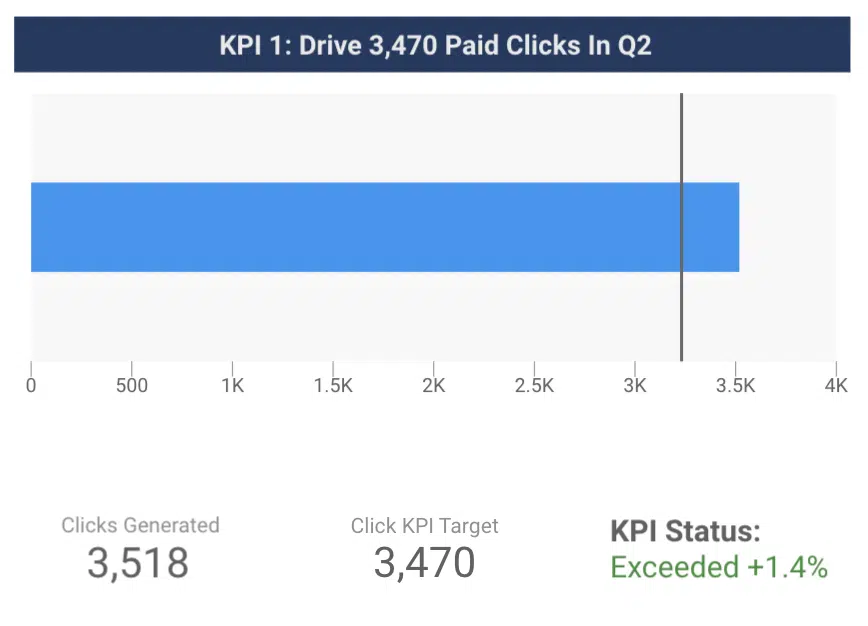
Show your client that you exceeded your KPIs, don’t just tell them. 

Below is an example of how to visualize your KPI progress.

Looker studio - KPI trendsa

The blue bar shows the number of clicks generated in a given time period. 

The line shows the click KPI for the given time period. 

The client can now easily see that you exceeded the target. 

6. Do pull together data that will answer your clients questions

Think about formatting every chart as if it were answering a client’s question, Gifford suggested. 

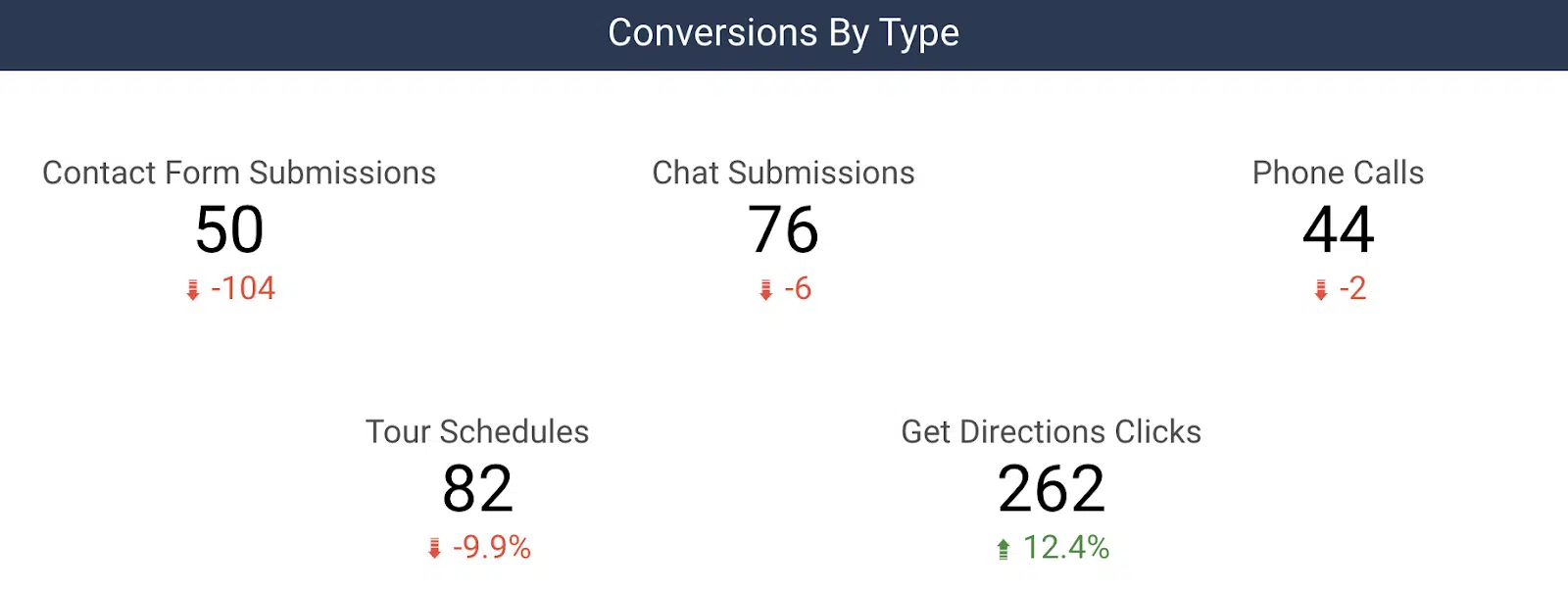
What actions did people take on our website? 

Show them data outlining how many phone calls, contact form submissions, tour schedules, etc. they received from your marketing efforts. 

Here’s an example of how to break down conversions by type for a client:

Looker studio - conversion by type

Another common question we get is, “So you drove 30 leads for us, but what does that mean for my business?” 

Connecting lead data to sales is powerful to include in reporting. 

Whether it’s actual revenue (through a CRM import) or estimated revenue (based on an average order value), you can unlock additional revenue-based metrics in your reporting, such as ROI. 

You can begin to answer their question by letting them know what percentage of those leads turned into sales, total revenue, and ROI for a given month. 

Creating useful client reports with Looker Studio

Looker Studio is an incredibly powerful reporting tool that reduces time spent manually typing in metrics.

It enables you to instantly pull together powerful data visualizations to help tell your digital marketing story.

Now, you’ve got a list of do’s and don’ts to help you get started on your path to more valuable client reporting!


Opinions expressed in this article are those of the guest author and not necessarily Search Engine Land. Staff authors are listed here.


Related stories

New on Search Engine Land

@media screen and (min-width: 800px) { #div-gpt-ad-3191538-7 { display: flex !important; justify-content: center !important; align-items: center !important; min-width:770px; min-height:260px; } } @media screen and (min-width: 1279px) { #div-gpt-ad-3191538-7 { display: flex !important; justify-content: center !important; align-items: center !important; min-width:800px!important; min-height:440px!important; } }

About the author

Christine Askew

Christine Askew is a Paid Media Team Lead at Workshop Digital where she manages a team of analysts as well as Paid Media strategies for clients. Christine is a proud James Madison University (JMU) alumni whose participation in the Google Online Marketing Challenge (GOMC) back in 2016 was a catalyst for her interest in digital marketing. Today she brings 6+ years of experience to the table after climbing the ranks at multiple agencies. Christine was recently featured on a panel in the 2022 SMX Next Session “Ask The Winners” after having received the “Best B2B Search Marketing Initiative” in the Search Engine Land Awards 2022. When Christine isn’t working to exceed her client KPIs, you can find her outside in the Denver, CO sunshine walking/running/camping/hiking locally.

https://searchengineland.com/looker-studio-reporting-dos-donts-429498