Google Quietly Announces Search Partner Network Placement Visibility via @sejournal, @brookeosmundson

Google quietly rolled out a change advertisers have wanted for years: site-level reporting for the Search Partner Network.

Until now, advertisers could only opt in or out, with little understanding of where their ads actually showed.

This update finally gives visibility into where budgets are spent outside of Google.

Google lists this as an August 2025 update in its Help Center, however it wasn’t announced widespread.

Read on to understand the update from Google, how advertisers are reacting, and what you can do with this new level of information.

What Changed in Search Partner Reporting?

The new reporting applies to Search, Shopping, and App campaigns. You’ll now see which partner sites served your ads and how many impressions each one received.

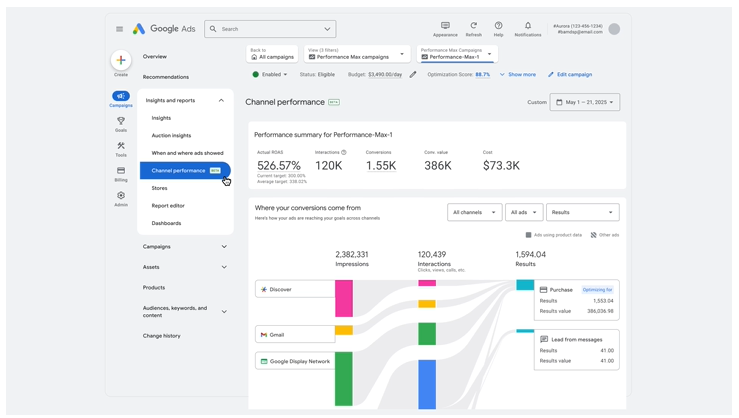
Think of it as the kind of placement data we already get in Performance Max, just extended to Search Partners.

This update follows other moves Google has made to address long-standing concerns about partner quality.

Earlier this year, they introduced brand safety pre-screening options with IAS, DoubleVerify, and Zefr. They also said parked domains will be opted out by default before the end of 2025.

This visibility layer feels like the missing piece that makes the rest of those updates more usable.

How Are Advertisers Reacting to This Update?

The update on Search Partner Network reporting was first found by Anthony Higman, who took to X (formerly Twitter) to share his opinion.

Higman stated:

Still Most Likely Wont Be Participating In The Search Partner Network But This Is Unprecedented And What ALL Advertisers Have Been Requesting For Decades! Honestly NEVER Thought I Would See This Day.”

Others gave some versioning mixture of applauding Google for giving data to advertisers that they’ve been asking for for years, while also being somewhat skeptical.

Mike Ryan replied to Higman with his thoughts:

I mean, good step but also, it’s the PMax version: impression data only.

Aaron Levy shared his thoughts on LinkedIn, stating that this is a major step in the right direction for Google.

Why This Matters & How to Take Action

Without Search Partner Network reporting, it was tough to justify opting in. Now advertisers finally have data to audit where ads run, decide if it fits brand standards, and see if partner traffic adds any real value.

That said, the update is only as good as the action that advertisers take with the information available.

Some sites won’t align with brand guidelines. Others may generate clicks but fail to drive quality conversions.

The difference is you can now point to actual data when making decisions, rather than relying on gut feel.

Here’s some quick pointers to make this update actionable:

  • Run a quick placement audit. Pull the report and check for sites that don’t align with your brand. Exclude what’s clearly not a fit.
  • Look beyond impressions. While this reporting is only limited to impressions, use your own conversion data to figure out which placements are driving useful traffic versus noise.
  • Revisit opt-in of campaigns. Many advertisers avoided Search Partners altogether because of the black box. Now it may be worth testing again, but do it with defined guardrails and success metrics.
  • Pressure test Smart Bidding. Google leans on Smart Bidding to balance Search Partner performance, but don’t assume it’s perfect. Keep an eye on conversion quality and modeled conversions before scaling.

Final Thoughts

If you’ve been skeptical of Search Partners, this update is a chance to take another look with data on your side.

If you’ve already been opted in, you finally have a way to prove which placements help your campaigns and which ones don’t.

Bottom line: advertisers now have a long overdue view into the Search Partner Network. With more visibility comes a bit more control, and smarter conversations about whether Search Partners deserve a place in your Search campaigns.

Will you be opting into Search Partner Network with this new reporting update?

https://www.searchenginejournal.com/google-quietly-announces-search-partner-network-placement-visibility/554294/


Google Expands iOS App Marketing Capabilities via @sejournal, @brookeosmundson

Running iOS app campaigns in Google has never been straightforward. Between Apple’s privacy changes and evolving user behavior, marketers have often felt like they were working with one hand tied behind their backs.

Measurement was limited, signals were weaker, and getting campaigns to scale often required more guesswork than strategy.

Google Ads Liaison, Ginny Marvin, took to LinkedIn to announce the numerous updates to iOS App Install campaigns/

Google is now making changes to help advertisers navigate this space more confidently. Their latest updates to iOS App Install campaigns are designed to give marketers a stronger mix of creative options, smarter bidding tools, and privacy-respecting measurement features.

While these changes won’t solve every iOS challenge overnight, they do mark a meaningful shift in how advertisers can approach growth on one of the world’s largest mobile ecosystems.

New Ad Formats Bring More Creative Opportunities

One of the biggest updates is the addition of new creative formats designed to improve engagement and give users a clearer picture of an app before they download.

Google is expanding support for co-branded YouTube ads, which integrate creator-driven content directly into placements like YouTube Shorts and in-feed ads.

For advertisers, it’s an opportunity to lean into the authenticity of creator-style ads, which often resonate more strongly than traditional branded spots.

Playable end cards are also being introduced across select AdMob inventory. After watching an ad, users can now interact with a lightweight, playable demo of the app.

Think of it as a “try before you buy” moment: users get a quick preview of the experience, which can lead to higher-quality installs.

For app marketers, this shift matters because it aligns user expectations with actual in-app experiences. The closer someone feels to your product before downloading, the less risk you face with churn or low-value installs.

Both of these creative updates point to a broader trend: ads are becoming less static and more interactive. That’s particularly important on iOS, where advertisers need every edge they can get to capture attention in environments where tracking is constrained.

Target ROAS Bidding Now Available for iOS

Another cornerstone of this announcement is Google’s expansion of value-based bidding on iOS.

Target ROAS (tROAS), a bidding strategy that optimizes for return on ad spend rather than raw install volume, is now fully supported.

This is especially valuable for apps with monetization models that vary widely across users, such as subscription services or in-app purchase businesses. Instead of paying equally for every install, advertisers can now direct spend toward users more likely to generate meaningful revenue.

Beyond tROAS, Google is also expanding the “Maximize Conversions” strategy for iOS. This allows campaigns to optimize not just for installs, but for deeper in-app actions.

By leaning into Google’s AI-driven modeling, advertisers can let the system identify where budget should be allocated to maximize results within daily spend limits.

The takeaway here is simple: volume still matters, but value matters more. With these updates, Google is nudging app marketers away from chasing installs at any cost and toward optimizing for users who truly drive long-term impact.

Measurement That Balances Privacy and Clarity

Perhaps the most challenging part of iOS advertising has been measurement.

Apple’s App Tracking Transparency framework made it harder to follow users across devices, limiting the signals available for campaign optimization. Google’s new measurement updates are designed to give advertisers more clarity without crossing privacy lines.

On-device conversion measurement is one of the most notable additions. Rather than sending user-level data back to servers, performance signals are processed directly on the device.

This means advertisers can still see which campaigns are working, but without compromising privacy. Importantly, it also reduces latency in reporting, helping marketers make faster decisions.

Integrated conversion measurement (ICM) is another feature being pushed forward. This approach works through app attribution partners (AAPs), giving advertisers cleaner, more near real-time data about installs and post-install actions.

Taken together, these tools signal a future where privacy and measurement don’t have to be opposing forces. Instead, advertisers can get the insights they need while users retain more control over their data.

How App Marketers Can Take Advantage

These updates aren’t the kind that require testing and adaptation.

For most advertisers, the best starting point is experimenting with the new ad formats. Running a co-branded YouTube ad or a playable end card alongside your existing creative can help you see whether engagement and conversion quality improve.

These tests don’t need to be massive, but they should be deliberate enough to give you actionable learnings.

For bidding, marketers should look closely at whether tROAS makes sense for their business model.

If your app has a clear monetization strategy and meaningful differences in user value, tROAS could be a game-changer. Start conservatively with your targets, give the algorithm time to learn, and refine based on observed performance.

On the measurement side, now is the time to talk to your developers and attribution partners about what it would take to implement on-device conversion tracking or ICM. These solutions may involve technical lift, but the payoff is improved data quality in an environment where every signal counts.

It’s also worth noting that these changes won’t transform campaigns overnight. Smart bidding models and new measurement frameworks take time to stabilize, and the impact of new formats might not show up in the first week of a test.

Patience, consistency, and a focus on week-over-week trends are key.

Looking Ahead

Google’s latest iOS updates don’t eliminate the complexities of app marketing, but they do give advertisers sharper tools to work with. From more engaging ad formats to value-based bidding and privacy-first measurement, the changes represent progress in a space that’s been difficult to navigate.

The message for marketers is clear: start testing, invest in measurement infrastructure, and don’t let short-term results cloud the bigger picture.

With the right approach, these updates can help shift iOS campaigns from a defensive play into an opportunity for real growth.

https://www.searchenginejournal.com/google-expands-ios-app-marketing-capabilities/553914/


Google: Invalid Ad Traffic From Deceptive Serving Down 40% via @sejournal, @MattGSouthern

Google cites a 40% drop in invalid ad traffic from deceptive serving, helping protect budgets and keep billing clean for advertisers.

  • Google reports a 40% reduction in invalid traffic from deceptive or disruptive serving.
  • Google now reviews content, placements, and interactions more precisely.
  • Advertisers are not charged for invalid traffic, with credits applied after detection.

https://www.searchenginejournal.com/google-invalid-ad-traffic-from-deceptive-serving-down-40/553563/


Google Expands Performance Max Controls and Reporting via @sejournal, @brookeosmundson

Google Ads just dropped another wave of updates to Performance Max today.

For those who’ve been asking for better audience targeting, clearer reporting on new customer acquisition, and more transparency around auto-generated assets, these updates will feel like long-overdue upgrades.

Let’s break down what’s new, why it matters, and how advertisers should respond.

What’s New in Performance Max

Google has announced three core areas of updates for Performance Max campaigns:

  1. Expanded audience and campaign controls
  2. Improved new customer acquisition reporting and diagnostics
  3. More granular creative reporting and AI-powered asset recommendations

Most are either rolling out now or available broadly, with some elements in beta. Let’s walk through the details.

Expanded Controls Over Audience Targeting and Search Inventory

Performance Max has long leaned on automation, sometimes at the expense of control. Google is slowly changing that, and this release continues that shift.

Campaign-Level Negative Keyword Lists

Advertisers can now apply negative keyword lists across Performance Max campaigns. Previously, campaign-level negatives had to be managed individually, which created friction for accounts with dozens of asset groups.

With this update, advertisers can centralize keyword exclusions. For example, excluding terms like “cheap” or “free” across multiple luxury or premium product campaigns.

Campaign-level negative keyword lists in Performance Max.Image credit: Google, August 2025

You still have the option to apply unique negative keywords to individual campaigns, but this rollout makes managing brand suitability far more scalable.

More Search Themes per Asset Group

Google has doubled the search theme limit from 25 to 50 per asset group. This matters for brands that want to influence where their Performance Max ads show up in Search, without leaning on historical keyword builds.

By expanding your search theme input, you’re giving Google more information to better match your ads to queries. It also helps widen your eligible inventory while staying relevant.

Device and Demographic Targeting Updates

You can now fully control which device types your Performance Max campaigns appear on, something that was previously only partially available.

For example, a gaming company can restrict campaigns to mobile devices, or a B2B advertiser can exclude tablets entirely.

Age targeting is now also available, allowing advertisers to exclude or target specific age ranges.

Google is also testing gender-based demographic targeting in beta. These controls bring Performance Max closer in line with what’s long been possible in Search, Display, and YouTube campaigns.

New Customer Acquisition Reporting Gets Smarter

One of the most frustrating parts of new customer acquisition bidding has been the vague “Unknown” label in reporting. That’s changing with today’s updates in Performance Max reporting.

No More “Unknown” Conversions

In lifecycle reporting for new vs. returning customers, Google previously bucketed a portion of conversions as “Unknown”. This left advertisers with limited visibility into actual performance.

Google has now improved the backend logic that determines if a user is new or existing, meaning those “Unknown” labels should be gone moving forward.

This matters for two key reasons:

  • You can now get a more accurate read on how many new customers you’re acquiring.
  • Bidding strategies that rely on new customer signals will become more effective as the data improves.

For even more precision, Google encourages advertisers to update their conversion tracking tags to include the new customer acquisition parameter. This signals to Google whether a conversion is from a new or returning customer, based on first-party data.

New Goal Diagnostics and Recommendations

Alongside the reporting improvements, Google has added new diagnostics that surface goal-related issues in Performance Max.

These include broken or missing conversion tags, goal misconfigurations, or other tracking issues that could be holding back performance.

The diagnostics come with actionable recommendations to help advertisers resolve the problem. While this might not be the most glamorous update, it will save time and frustration during campaign setup and troubleshooting.

Creative Reporting and Asset Control Get a Boost

Asset transparency in Performance Max has been a long-standing pain point. While things have improved in the last year, these new changes go further.

Final URL Expansion Asset Reporting

Advertisers can now view reporting for assets generated through Final URL Expansion (FUE). This is Google’s feature that dynamically creates assets based on landing page content.

You’ll be able to see what text and visuals were created through FUE and how they performed.

Expanded Final URL reporting in Google AdsImage credit: Google, August 2025

More importantly, if you don’t like what Google created, you now have the ability to remove those assets from your campaign.

This is a big win for brands concerned about creative consistency, especially when it comes to legal language or brand tone. While FUE can be useful for scale, it hasn’t always produced on-brand results. So, this added visibility is a welcome change.

AI-Powered Creative Recommendations

Performance Max will now generate image-specific recommendations to help you improve performance. These suggestions will include both what types of visuals to add and how to optimize existing ones for better performance on various channels (like YouTube vs. Discover).

New creative asset recommendations in Google AdsImage credit: Google, August 2025

Best of all, these recommendations link directly into the built-in AI-powered image editor in Google Ads, so you can make changes right inside the platform without needing to re-upload or redesign assets elsewhere.

It’s clear Google wants advertisers to take a more active role in creative strategy, even inside an automated campaign structure.

Wrapping Up

Google is clearly listening to advertisers’ calls for more transparency and control. These updates to Performance Max mark another step toward striking a better balance between scale and strategy.

While not every advertiser will need to use every new feature, the option to do so means there’s more room to tailor Performance Max campaigns to your business goals, creative preferences, and customer insights.

Whether you’re looking to fine-tune audience reach, fix tracking issues, or clean up your creative assets, there’s something in this update that’s worth your attention.

https://www.searchenginejournal.com/google-expands-performance-max-controls-and-reporting/553264/


PPC Audience Strategy: Targeting Vs. Observation (With Examples) via @sejournal, @brookeosmundson

If you’ve layered audiences into your Google Ads campaign and weren’t sure if you should select “targeting” or “observation,” you’re not alone.

While the Google and Microsoft platforms give decent explanations of the two modes, picking the wrong option can quietly sabotage performance.

This setting controls how your audience selections influence who sees your ads and how campaign data gets segmented. It’s a critical lever in your targeting strategy, not just a checkbox to breeze past.

This article will walk you through what each mode actually does, when to use one over the other, and how to avoid costly mistakes that many advertisers don’t catch until it’s too late.

Targeting Vs. Observation: What’s The Difference?

At its core, this setting determines how Google and Microsoft Ads use the audience data you apply to a campaign or ad group.

The “targeting” setting narrows your audience reach. Only people in the audience you’ve selected are eligible to see your ads.

The “observation” setting keeps your audience reach broad. Your ads are eligible to show to everyone, but the platforms track how the audience you’ve selected performs within that broader reach.

In a simpler approach: Targeting restricts your audience; observation observes it.

This setting is available for all Search, Display, and YouTube campaigns when utilizing audiences.

Demand Gen campaigns also utilize audiences, and while they don’t have “targeting” and “observation” modes, it allows you to choose your audience target, and turn on “Optimized targeting” as an option. That essentially expands your reach outside of your chosen audience.

When To Use Each Setting

The targeting and observation settings are vastly different. Each one can provide benefits to your PPC campaigns if you use them the right way.

When To Use The Targeting Setting

When you want to restrict your targeting to only the audience of your choice.

Examples Of Targeting-Only Strategies

  • Remarketing Campaigns: Only show ads to users who’ve already visited your site.
  • Customer Match Lists: Reach high-value customers or email subscribers with tailored messaging.
  • Search + Broad Keywords: This is common in B2B niche companies where they struggle to find volume. By utilizing a broad match + targeted audience strategy, you can end up with more qualified visitors.
  • YouTube or Display: Combine audience signals with creatives that speak directly to a group’s intent or behavior.

In these cases, limiting the audience is the goal. You’re willing to sacrifice scale to improve relevance and performance.

When To Use The Observation Setting

Observation is more passive, but still powerful. When you want to monitor the performance of a certain audience, without narrowing campaign reach.

Examples Of Observation-Only Strategies

  • Search campaigns using intent-based keywords: See how in-market audiences or affinity groups perform without shrinking your eligible reach.
  • Testing new audience segments: Add them in Observation mode to gather data before committing budget.
  • Using Smart Bidding: Observation mode allows Google to factor audience signals into its automated bidding models without you needing to manually adjust bids.

Once you see how certain audiences perform, you can layer in bid adjustments or even break them into dedicated campaigns or ad groups later.

As a general rule of thumb, I typically do not recommend Observation on any Display or YouTube campaign. This is because those campaigns are more awareness-focused, and targeting a proper audience is key.

There are many other use cases for using one setting or another, but this gives a good starting point if you’re just getting started.

Where To Find This Setting

In the Google Ads interface, once you’re in the campaign you’d like to edit, navigate to the Audiences, keywords, and content tab on the left-hand side. Choose Audiences.

Note: You’ll want to decide if your PPC campaigns will have a campaign-wide audience target or ad group-wide audience target.

Google Ads audience targeting settingScreenshot from Google Ads by author, June 2025

From there, click on Edit Audience Segments to the right:

Google Ads audience targeting summaryScreenshot from Google Ads by author, June 2025

At the top, this is where you’ll have the option to choose between Targeting and Observation:

Screenshot from Google Ads by author, June 2025

In this example, I chose to use Observation due to not wanting to narrow the reach on a particular branded search campaign.

Where To Find In Microsoft Ads

Let’s not forget about Microsoft (Bing) Ads. Microsoft has the same feature capability as Google.

In the Microsoft Ads interface, navigate to the Audiences tab on the left-hand side (similar to Google).

From there, click Create Association.

Microsoft audience targeting optionsScreenshot from Microsoft Ads by author, June 2025

Once you’re in, you will scroll down to see the options. Microsoft does use a different language than Google with these features, but it accomplishes the same thing.

Microsoft options are Bid Only (compared to Observation in Google) and Target and Bid (compared to Targeting in Google).

Screenshot from Microsoft Ads by author, June 2025

Once you’ve set your desired target, there is the option to increase or decrease bids on your chosen audience(s).

Performance Examples

Now that you’re familiar with these targeting settings, let’s take a look at real-life examples of how these were implemented.

In the screenshot below, a client had only wanted to target existing customers of a different product for its larger “brand” search campaign.

After a month, results were minimal, so we decided to switch those Customer List audiences to “Observation Only” and see how it affected performance.

The performance after three months was clear: While the Customer List audiences had a higher click-through rate, conversion rate, and lower cost/conversion, we were severely limiting reach.

In the “Other” row, you’ll see that 89% of total conversions came from users not in those Customer List audiences!

In this case, “Observation” was the right setting for this campaign in order to have efficiency and scale reach.

Screenshot taken by author, June 2025

The ‘Optimized Targeting’ Mistake You Don’t Want To Make

If you’re a seasoned PPC marketer, it probably comes as no surprise that Google will sometimes hide automated features it doesn’t want you to find.

One feature in particular that can be difficult to locate is something called “Optimized Targeting.”

This feature is located in Google Display, YouTube, and Demand Gen campaigns (not Search).

Take this remarketing campaign, for example. Before we were able to find this “hidden” feature from Google, you’ll notice a stark difference in performance.

  • The remarketing audience only accounted for 578,000 impressions.
  • The display optimized targeting accounted for over 3 million impressions.
  • While there were some conversions, they came at a significant cost.
Screenshot taken by author, June 2025

In the case of remarketing, this setting should almost always be turned off. Why?

The whole point of remarketing is to re-engage users who are aware of you. If you’ve got specific messaging towards this group of people, you don’t want anyone else to see it.

If you’re building an awareness campaign, you may find this setting more useful. However, always be cautious.

Where To Find And Turn Off The Setting

In a Display campaign, you’ll need to be in the specific ad group. So, if you have multiple ad groups, you’ll need to turn this off for each one.

Navigate to Ad Group Settings > Edit Ad Group Targeting.

Screenshot taken by author, June 2025

From there, you’ll see this box with an option to check the box.

Screenshot taken by author, June 2025

Audience Targeting Isn’t Just A Checkbox

Audience settings are often treated as a set-and-forget decision. But, the choice between targeting and observation has real implications on performance, scale, and optimization.

Take the time to test both approaches. Revisit your audience segments regularly. Don’t assume what worked six months ago still applies. Platforms evolve, so should your targeting strategy.

And if nothing else, make sure you’re intentional. Because this one dropdown setting? It can quietly influence every click, impression, and dollar spent.

More Resources:


Featured Image: Lerbank-bbk22/Shutterstock

https://www.searchenginejournal.com/targeting-observation-ppc/430438/


Stop Paying the Google Ads Tax Without Realizing It [Webinar] via @sejournal, @hethr_campbell

Most brands don’t know they’re wasting money on branded ads. Are you one of them?

What if your Google Ads strategy is quietly draining your budget? Many advertisers are paying high CPCs even when there’s no real competition. It’s often because they’re unknowingly bidding against themselves.

Join BrandPilot AI on July 17, 2025 for a live session with Jenn Paterson and John Beresford, as they explain The Uncontested Paid Search Problem and how to stop it before it eats into your performance.

In this data-backed session, you’ll learn:

  • Why CPCs rise even without competitor bidding
  • How to detect branded ad waste in your own account
  • What this hidden flaw is costing your brand
  • Tactical strategies to reclaim lost budget and improve your results

Why this matters:

Brands are overspending on Google Ads without knowing the real reason. If you’re running branded search campaigns, this session will show you how to identify and fix what’s costing you the most.

Register today to protect your spend and improve performance. If you can’t attend live, sign up anyway and we’ll send you the full recording after the event.

https://www.searchenginejournal.com/stop-paying-the-google-ads-tax/550090/


How To Get The Perfect Budget Mix For SEO And PPC via @sejournal, @brookeosmundson

There’s no one-size-fits-all answer when it comes to deciding how much of your marketing budget should go toward SEO versus PPC.

But that doesn’t mean the decision should be based on gut instinct or what your competitors are doing.

Marketing leaders are under more pressure than ever to show a return on every dollar spent.

So, it’s not about choosing one over the other. It’s about finding the right balance based on your goals, your timelines, and what kind of results the business expects to see.

This article walks through how to think about budget allocation between SEO and PPC with a focus on what kind of output you can reasonably expect for your spend.

What You’re Actually Paying For

When you spend money on PPC, you’re buying immediate visibility.

Whether it’s Google Ads, Microsoft Ads, or paid social, you’re paying for clicks, impressions, and leads right now.

That cost is largely predictable and better to forecast. For example, if your cost-per-click (CPC) is $3 and your budget is $10,000, you can expect about 3,300 clicks.

PPC spend can be directly tied to pipeline, which is why it’s often favored by performance-driven teams.

With SEO, you’re investing in long-term growth. You’re paying for content, technical fixes, site structure improvements, and link acquisition.

But you don’t pay for clicks or impressions. Once rankings improve, those clicks come organically.

The upside is compounding growth and reduced cost per lead over time.

The downside? It can take months to see meaningful impact, and the cost-to-output ratio is harder to predict.

It’s also worth noting that PPC costs often increase with competition, while SEO costs tend to remain relatively stable over time. That can make SEO more scalable in the long term, especially for brands in high-CPC industries.

How Urgency And Goals Influence Budget Splits

If you need leads or traffic now, PPC should probably get the bulk of your short-term budget.

Launching a new product? Trying to meet quarterly goals? Paid search and social can give you the volume you need pretty quickly.

But if you’re trying to reduce customer acquisition cost (CAC) in the long run or improve visibility in organic search to support brand awareness, SEO deserves more attention. It builds value over time and often pays dividends past the life of your campaign.

Many brands start with a 70/30 or 60/40 split favoring PPC, then shift the mix as organic efforts gain traction.

Just make sure you set clear expectations: SEO is not a quick fix, and over-promising short-term gains can backfire when the board wants results next quarter.

If you’re rebranding, expanding into new markets, or supporting a product launch, a heavier upfront PPC investment makes sense. But brands that already rank well organically or have strong content foundations can afford to rebalance the mix in favor of SEO.

Why Organic Traffic Is Getting Harder To Defend

One emerging challenge for organic marketing is the rise of AI Overviews in Google Search. More brands are seeing a dip in organic traffic even when they maintain strong rankings.

Why?

Because the search experience is shifting. AI-generated summaries are now answering questions directly on the results page, often pushing traditional organic listings further down.

That means your SEO strategy can’t just be about rankings anymore. You need to invest in content that earns visibility in AI Overviews, featured snippets, and other enhanced search features.

This may involve rethinking how content is structured, focusing more on schema markup, FAQs, and direct-answer formats that AI models tend to surface.

In practical terms, your SEO budget should now include:

  • Structured content planning built around entity-based search.
  • Technical SEO improvements like schema and page speed.
  • Multimedia content like images and videos, which AI often pulls into results.
  • Continual refresh of older content to maintain relevance in evolving search formats.

This shift doesn’t mean SEO is no longer worth it. It means you need to be more strategic in how you spend.

Ask your SEO partner or in-house team how they’re adapting to AI search changes, and make sure your budget reflects that evolution.

Budget Planning Based On Realistic Outputs

Let’s put this into numbers. Say you have a $100,000 annual digital marketing budget.

Putting $80,000 toward PPC might get you 25,000 paid clicks and 500 conversions (based on a fictional $3.20 CPC and 2% conversion rate).

The remaining $20,000 on SEO might buy you four high-quality articles a month, technical clean-up work, and backlink outreach.

If done well, this might start showing traction in three to six months and bring in sustained traffic over time.

The key is to model your budget around what’s actually possible for each channel, not just what you hope will happen. SEO efforts often have a longer lag time, but PPC campaigns can run out of gas as soon as you turn off the spend.

You should also budget for maintenance and reinvestment. Even strong SEO performance requires fresh content and updates to keep rankings.

Similarly, PPC campaigns need regular optimization, creative testing, and bid adjustments to stay efficient.

You should also plan for budget allocation across different campaign types: brand vs. non-brand, search vs. display, and prospecting vs. retargeting.

Each serves a different purpose, and over-investing on one without supporting the others can limit growth.

For example, allocating part of your PPC budget to retargeting warm audiences can drastically improve efficiency compared to cold prospecting alone.

While branded search often delivers low-cost conversions, it shouldn’t be your only area of investment if you’re trying to scale.

What To Communicate To Leadership

Leadership wants to know two things: how much are we spending, and what are we getting in return?

A mixed SEO and PPC strategy gives you the ability to answer both.

PPC provides short-term wins you can report on monthly.

SEO builds long-term momentum that pays off in quarters and years.

Explain that PPC is more like a faucet you control. SEO is more like building your own well. Both are valuable.

But if you only have one or the other, you’re either stuck renting traffic or waiting too long to see the impact.

Board members and non-marketing executives often prefer hard numbers. So, when proposing a budget mix, include projected costs per acquisition, estimated traffic volumes, and timelines for ramp-up.

Make it clear where each dollar is going and what kind of return is expected.

If possible, create a model that shows various scenarios. For example, what a 50/50 vs. 70/30 SEO/PPC split might look like in terms of conversions, traffic, and cost per lead over time.

Visuals help ground the conversation in data rather than preference.

Choosing The Right Metrics For Each Channel

One challenge with mixed-channel budget planning is deciding which key performance indicator (KPI) to prioritize.

PPC is easier to measure in terms of direct return on investment (ROI), but SEO plays a broader role in business success.

For PPC metrics, you may want to focus on KPIs like:

  • Impression share.
  • Conversion rate.
  • Cost per acquisition (CPA).
  • Return on ad spend (ROAS).

For SEO metrics, you may want to focus on:

  • Organic traffic growth over time.
  • Ranking improvements.
  • Page engagement.
  • Assisted conversions.

When reporting to leadership, show how the two channels complement each other.

For example, paid search might drive immediate clicks, but your top-converting landing page could rank organically and reduce spend over time.

When To Adjust Your Budget Mix

Your initial budget allocation isn’t set in stone. It should evolve based on performance data, market shifts, and internal needs.

If PPC costs rise but conversion rates drop, that could be a cue to pull back and invest more in organic.

If you’re seeing strong rankings but low engagement, it may be time to shift some SEO funds into conversion rate optimization (CRO) or paid retargeting.

Seasonality and campaign cycles also matter. Retailers may lean heavily on PPC during Q4, while B2B companies might invest more in SEO during longer sales cycles.

Set quarterly review points where you re-evaluate performance and make adjustments. That level of agility shows leadership you’re making informed decisions, not just sticking to arbitrary ratios.

Avoiding Common Budget Mistakes

Some companies go all-in on SEO, expecting miracles. Others burn through paid budgets with nothing left to sustain organic efforts. Both approaches are risky.

A healthy mix means budgeting for:

  • Immediate lead gen (PPC).
  • Long-term traffic growth (SEO).
  • Regular testing and performance analysis.

Don’t forget to budget for what happens after the click: landing page development, CRO, and reporting tools that tie it all together.

Another mistake is treating SEO as a one-time project instead of an ongoing investment. If you only fund it during a site migration or a content sprint, you’ll lose momentum.

Same goes for PPC: Without a proper landing page experience or conversion tracking, even high-performing ads won’t deliver meaningful results.

Balancing Short-Term Wins With Long-Term Growth

There is no universal perfect split between SEO and PPC. But there is a perfect mix for your goals, stage of growth, and available resources.

Take the time to assess what you actually need from each channel and what you can realistically afford. Make sure your projections align with internal timelines and expectations.

And most importantly, keep reviewing your mix as performance data rolls in. The right budget allocation today might look very different six months from now.

Smart marketing leaders don’t choose sides. They choose what makes sense for the business today, and build flexibility into their strategy for tomorrow.

More Resources:


Featured Image: Jirapong Manustrong/Shutterstock

https://www.searchenginejournal.com/how-to-get-the-perfect-budget-mix-for-seo-and-ppc/548300/


Is Your Conversion Data Misleading You? 7 Common Google Ads Tracking Issues

Conversion tracking tends to be one of those things advertisers set up once and then forget about, until something fails – big time.

But in my 16 years of experience running Google Ads, I can confidently say it’s the single most important factor affecting PPC results. Way before campaign failure, when results first start lagging, faulty conversions are almost always to blame.

So, whether you want to improve performance, or save a campaign that’s heading towards collapse, the starting point should be the same. Check your conversion data.

Conversion data will only be useful for you if it’s accurate. Serious missteps can happen if you rely on Google Ads to optimize performance when it has misleading or incomplete conversion tracking.

If your numbers are wrong, you’ll end up scaling the wrong campaigns, pausing the ones generating a positive return, or having a wrong idea of return on ad spend (ROAS) altogether – and this happens more often than you think.

Here are seven of the most common causes of inaccurate or inconsistent conversion data in Google Ads, and what you can do to fix each one.

1. Conversion Tracking Isn’t Set Up Properly

Conversion tracking is often missing, duplicated, or firing in the wrong place. This is still one of the most common issues, and it can be the most damaging.

For example, you may track a thank-you page where users refresh the screen three times. Your backend will have one sale, but in Google Ads, you’ll see three.

Using reports like Repeat Rate is a great way to catch that error and ensure you fix it sooner rather than later.

When tracking is unreliable, it’s impossible to optimize performance accurately. Campaign decisions are made on incomplete signals, and smart bidding models won’t have the data they need to learn effectively.

Start by ensuring your conversion actions in Google Ads are appropriately defined.

Use Google Tag Manager to centralize tracking across pages and platforms, and confirm accurate tag firing using Google’s Tag Assistant or built-in diagnostics.

2. Tracking Low-Value Or Secondary Conversions

Not all user actions are created equal – at least not when it comes to Google Ads optimization.

Metrics like scroll depth, time on site, or video engagement can be helpful, but they shouldn’t be treated as primary conversion events in your ad account.

These types of interactions are better as supporting metrics (secondary conversions). They can offer insights into how users engage with your landing page or website.

This type of information is valuable, but it does not belong to the core set of conversion actions used to drive bidding decisions in Google Ads.

When Google optimizes towards actions that don’t directly tie to revenue or qualified leads, you risk directing your budget towards activities that look great on a dashboard but don’t move the needle in your business.

Instead, focus on tracking high-intent actions in your Google Ads account, like purchases, form submissions, or phone calls, and use the supporting metrics to help improve the user experience.

3. Data Doesn’t Match Between Google Ads And GA4

Discrepancies between platforms are expected, but that doesn’t mean they should be ignored. It’s common to see Google Ads report one number and Google Analytics 4 report another for the same conversion event.

The root cause typically comes down to attribution model differences, reporting windows, or inconsistent event definitions.

To reduce confusion, first ensure your Google Ads and GA4 accounts are correctly linked. Then, audit the attribution models in both platforms and understand how each system defines and credits conversions.

GA4 uses data-driven attribution by default, whereas Google Ads may still be using last-click or another model (but now defaults to data-driven models for most accounts). Align conversion settings as much as possible to maintain consistency in your reporting.

4. GCLID Is Missing Or Broken

Google Ads can’t attribute conversions to a specific click if the GCLID isn’t passed through correctly, which will cause in-platform results to be lower.

This issue tends to result from redirects, link shorteners, or forms that strip URL parameters.

Fixing it starts with enabling auto-tagging in your account. Then, confirm that the GCLID is retained throughout the user journey, especially when forms span multiple pages or involve third-party integrations.

Customer relationship management (CRM) systems and custom landing pages are often the culprits, so work with your developers to make sure GCLID values persist and aren’t overwritten.

5. Privacy Settings And Consent Mode Are Blocking Data

Unfortunately, privacy compliance has introduced new gaps in attribution. If a user declines consent, Google’s tags may not fire, leaving conversions untracked.

This is particularly relevant in regions governed by GDPR, like the EU, and similar regulations.

Consent Mode helps to bridge the gap. It adjusts how tags behave based on user permissions, allowing for some modeled data even without full cookie acceptance, making it a great solution.

Pair that with first-party data strategies and server-side tagging where appropriate.

Note, modeled conversions may take time to appear and don’t fully restore lost data, especially for smaller datasets or stricter consent regimes. But, it will help fill in the blanks responsibly.

6. Offline Conversions Are Delayed Or Missing

Offline conversions – like phone sales or in-store transactions – can be imported into Google Ads.

But if you’re inconsistent with your upload process or if it lacks the proper identifiers, those conversions won’t map to the original ad click.

Set up a schedule to upload offline conversions regularly, ideally on a daily or weekly basis. Include GCLID information and a timestamp with each entry to preserve click-level attribution.

Once the data is uploaded, monitor for errors inside the Google Ads interface. Minor mismatches in format or missing fields can stop conversions from registering entirely.

7. Tagging Conflicts Or Technical Errors

Even when tracking is conceptually correct, technical issues can block it from functioning.

Conflicting scripts, outdated plugins, or misplaced tags can all prevent conversion events from firing properly. These problems often go undetected until someone audits the data or sees a sudden drop in conversions.

Use Tag Assistant or Google Tag Manager’s Preview Mode to audit your implementation regularly.

Avoid conditional loading unless absolutely necessary, and coordinate with developers when other platforms – like Meta, HubSpot, or Salesforce – are active on the same pages.

Final Thoughts

Conversion tracking doesn’t exist in a vacuum, and it’s your job to make sure it plays well with the rest of your stack.

Incomplete conversion data is a strategic liability. Feeding Google Ads AI the right signals can mean the difference between PPC growth and stagnation.

By consistently auditing your setup and addressing these common issues, you’ll build cleaner data, glean better insights, and track your way to better performance.

More Resources:


Featured Image: TetianaKtv/Shutetrstock

https://www.searchenginejournal.com/is-your-conversion-data-misleading-common-google-ads-tracking-issues/548098/


How To Weed Out Less Qualified Audiences From Your PPC Campaigns via @sejournal, @jonkagan

To my fellow marketers, I first wrote this title in the summer of 2020, back when I thought, “Wow, surely things couldn’t get worse.” Needless to say, I was wrong.

Here’s the actual quote I started with last time:

“If you’re reading this, then it is early July, you’ve made it this far in the game of ‘Let’s See What Else Can Happen in 2020’.”

We have largely left the world of all-day Netflix and sourdough, and moved on to more pressing things like understanding the impact of tariffs on a brand’s willingness to run digital, and wondering how, five years later, my NY Jets are still so terrible.

With those changes has come a shifting dynamic in search, once called “PPC” (I have always disliked that term), more recently referred to as search engine marketing (SEM) and paid search, which is now simply “paid media.”

With this shift in ad types, ad placements, and management comes a shift in how we target audiences for our ads.

Why? Ad technologies change, ad units change, and thus, targeting changes. Not to mention, a shift in “what is demand?” affects more people than those who are actually qualified to see your ads.

Didn't See Economy Searches overtaking COVID-19I didn’t see economy-driven searches overtaking COVID-19 in my future (Screenshot from Google Trends, June 2025)

And once again, there are caveats:

Consumer sentiment is in flux as the economy rocks back and forth from concerning to good.

Google’s look-alike audiences (similar audiences) sunsetted (except for Demand Generation).

Audience targeting can easily be mixed up with various forms of AI targeting (i.e., Meta Advantage+).

Cookie deprecation started and then stopped, but first-party and modeled audience data became worth as much as gold.

The concept of the keyword match type (or even the keyword itself) is continuing to erode away.

Who Is Worthy To See Your Ads?

Not everyone who views your ad is truly qualified. Whether it is in-market, demographic, geographic, behavioral, etc., not everyone should see your ad.

To put it bluntly (and I am trying my best not to sound rude), some individuals are not worth spending ad dollars on for a specific ad.

For high price point items:

IncomeIncome often correlates with CVR based on category (Image from author, June 2025)

For more age-specific items:

AgeAge is often a deciding factor as well (Image from author, June 2025)

With times being as uncertain as they are, brands must tighten their purse strings and become more selective in their prospecting efforts to help the bottom line.

One would think that this concept, focusing ads on a particular audience, would always be the case, but the reality is, mid to larger brands will still often do the “spray and pray” approach, with just small audience adjustments.

Why?

Tighter audiences help with return on investment and efficiency, but they can wreak havoc on volume and total revenue when done too excessively.

This leaves the advertiser with a decision to make: What is the best approach?

  • Improve ROI but at a lower return volume, and then open up the floodgates later with a looser audience target.
  • Keep a looser audience and focus on return volume to build a better audience profile, and then tighten during your peak season to improve profitability.
  • A hybrid, where you lean toward return volume, cast a wider net – the ROI won’t be amazing, but you won’t go bankrupt, all by controlling somewhat focused audiences, and scaling bid strategy controls.

The most important (and first) step: Identify who your ideal customer is.

Important disclaimer: Identify who your ideal customer is/has been, not who you think it is going to be/should be.

Be sure to pore over your analytics and conversion data to decipher this. Otherwise, any future steps are pointless.

ProfileLearn exactly who your converter is (Image from author, June 2025)

Previously, to weed out the less qualified and still feed the top of the funnel and prospect, you would need to lean heavily into audience exclusion and audience targeting. That is still true, to a degree, and more specifically in the case of paid search.

However, for more modern concepts, such as Performance Max, Demand Generation, LinkedIn, or Meta, we are leaning more toward the target, as the exclusion may not be as readily or easily available for use.

Audience targeting vs. exclusion: Yes, they are similar, but different. Here’s a quick refresher:

Targeting Vs. Excluding

Targeting: The direct targeting of a specific group of consumers who fall within a certain characteristic(s), enabling everyone who meets it to see the ad.

For example: “I am selling a luxury car with a high price point, so I am only showing the ad to those whose household income is in the top 10%.”

Note: This is still valid in most scenarios. However, certain platforms and verticals do have limitations or restrictions.

Excluding: Indirectly targeting an audience by minimizing the ad units’ reach, based on consumers’ characteristics, by intentionally preventing ads from showing to those individuals.

For example: “I am excluding homeowners, so they are not served my apartment rental ads.”

Not doing one or both is as good for you as trusting a truthful outcome from Theranos.

How does one use these targets and exclusions to tighten one’s belt?

Audience Targeting

This is not rocket science, and more importantly, it doesn’t need to be applied account-wide, just high (sometimes mid) funnel initiatives.

Particularly in search, the more specific the query (often mid- to long-tail searches), the higher the qualification, the higher the likelihood of conversion.

But those are often few and far between (terrible for prospecting in terms of feeding the top of the funnel).

So, audience targeting becomes a necessity for high-volume search keywords. Otherwise, you’re spending your already limited budget on everyone (not ideal).

We break audience targeting into two types: actualized behavior and user traits.

The most common form (and easiest to use) of actualized behavior is retargeting.

Cart abandoners are the lowest-hanging fruit. It is a simple setup and deployment (I am a huge advocate of it via Google Analytics 4):

Building the AudienceAs much as I dislike GA4 UI vs. GA UA, they make audience creation fairly simple. (Image from author, June 2025)

But keep in mind: If you’re still getting those queries off a top-of-funnel query (generic, short-tail), then the qualification is already lower to start off with.

Frequently, we separate out retargeting past shoppers, retargeting site/cart abandoners, and prospecting (brand new visitors) from one another. Thus, controlling spend, creative, and user experience for each category.

At the same time, these lists can be used as exclusionary, ensuring there is no overlap, and a consumer receives an experience they were not intended for, which works well for prospecting audiences.

When thinking about user traits, these can be tied to platform-predicted behavior (i.e., affinity or in-market), or even self-identified characteristics (i.e., age, gender, income, etc.).

User traits are great at isolating targeting to your most qualified/relevant audience.

For example, anyone can eat at one of my fast-casual restaurant locations across the major cities of Connecticut.

But suppose I want to maximize the cost-per-customer efficiency for the “kids eat free” special. In that case, I will target parents of children under 12, not in the top 25% of the Herfindahl-Hirschman Index (HHI), but who have some disposable income, who enjoy eating, and are within a five-mile radius of one of our locations.

Meta AudienceMake the audience that meets your typical customer (Image from author, June 2025)

But a nice little function these days is that Google and Meta are learning from current activity to help build out in-market audiences on a rolling basis.

It is great for all of Meta, PMax, YouTube, Demand Gen, etc.

Google finally being helpful without a sales repGoogle is finally being helpful without a sales rep (Image from author, June 2025)

Using these tools, we have taken a step to prequalify the audience we’re prospecting. If they don’t convert at first (but do engage with the page), at least they’re pulled into our remarketing lists as a higher degree of qualification for later.

Net-net: These consumers are deemed worthy of seeing our ads.

Audience Exclusion

To put it bluntly, exclusion is a vastly underrated, yet wildly glorified version of a search negative keyword list.

But rather than saying we don’t want to show if someone searches for XYZ, we say, we don’t want to show for you.

When we apply exclusions in any channel, we are saying, “I am open to anyone seeing my ads, provided they aren’t [fill in the blank].”

I know it sounds harsh, but it is highly effective and important.

Remember, not everyone is right for your brand, but they may still try and find a way to see the ads.

Exclusions can be simple, such as geography or time of day, or they can be much more specific.

One of the key times I see this needed is for YouTube and Google Display Network (GDN).

You want to capture a wide audience, but you know not everyone is right.

I should note, though, that certain verticals (those falling under Housing, Employment, and Credit or HEC policies in Google and anti-discriminatory policies in Meta) limit what can be excluded.

In addition, the rapidly growing share of wallet ad unit, Performance Max, in both Google and Bing (I still refuse to call it Microsoft), you cannot exclude audiences (yet), but you can exclude keywords (Google only beta) and brands.

Some day...Some day… (Image from author, June 2025)
It is a glorified negative keywordIt is a glorified negative keyword (Image from author, June 2025)

Takeaway

You’ll get fewer visitors, but a more qualified audience. You also maintain control of who you’re spending ad dollars on.

We are in the early stages of exiting the world of keywords and focusing on the audience. At the same time, platforms continue to reduce control and transparency of who/what/when/why/how your ad is served. That hurts your wallet and your bottom line.

When you can’t use first-party audiences, learn your typical customer’s profile, and build audiences for it.

By ensuring you target the right audience and exclude the wrong ones, you can make sure your operation continues to thrive another day.

More Resources:


Featured Image: ICONMAN66/Shutterstock

https://www.searchenginejournal.com/excluding-less-qualified-audiences-ppc/546298/


What Are Good Google Ads Benchmarks In 2025? [STUDY] via @sejournal, @brookeosmundson

Keeping up-to-date on industry Google Ads benchmarks is crucial to help answer questions you might get from clients or exec such as:

  • “Is this a good CTR?”
  • “Why is our CPA so high?”
  • “What’s a good conversion rate, anyway?”

Questions like these come up all the time, especially when budgets are tight and performance dips even slightly.

But unless you’ve got fresh benchmark data on hand, these conversations are usually filled with guesswork, vague assurances, or worse, outdated reports that no longer reflect how competitive today’s ad landscape really is.

Wordstream by LocaliQ recently updated its Search Advertising benchmarks for 2025, compiling real data from thousands of Google and Microsoft Ads campaigns across 20 verticals.

The data consists of data points from thousands of campaigns in both Google and Microsoft Ads for some of the top industries. Some of the top industries include:

  • Arts & Entertainment.
  • Automotive.
  • Education.
  • Finance & Insurance.
  • Health & Fitness.
  • Home Improvement.
  • Shopping & Retail.
  • Travel.

While these benchmarks are a starting point, it’s important to note that many factors go into setting benchmarks that are attainable for your business.

We hope this data is useful for you to help level-set expectations and goals for your business, and get a sense of how you stack up to the competition.

In this report, you’ll find benchmarks for Search campaigns in Google & Microsoft Ads for:

  • Click-through rate (CTR).
  • Average cost-per-click (CPC).
  • Conversion rate (CVR).
  • Cost per lead (CPL).

Let’s dig into the data.

Average Click-Through Rate In Google & Microsoft Ads By Industry

Average CTR by IndustryData from LocaliQ benchmark report, June 2025

The average click-through rate for Google & Microsoft Ads across all industries averaged out to 6.66% over the last 12 months.

Compared to when the company first started gathering data in 2015, the average CTR for search ads was minimal at 1.35%.

The business category that boasted the highest CTR was Arts & Entertainment, with an astounding 13.10% CTR.

At the other end of the spectrum was Dentists and Dental Services at a 5.44% CTR.

The CTR metric should be analyzed as only one indicator of performance, not the end-all-be-all when trying to determine if your ads are doing well.

The widespread in CTR performance is influenced by:

  • Your competition (Is the SERP saturated?).
  • Your bidding strategy.
  • Your position on the results page.
  • Your ad copy relevancy.
  • Your audience targeting.

High CTR doesn’t always mean high performance, though. Sometimes it just means your ad is click-worthy, not necessarily that it’s converting. That’s why CTR should be viewed as one piece of the puzzle, not the whole picture.

If your CTR is low compared to your industry average, tools like Google’s Quality Score can help pinpoint the problem areas, from poor ad relevance to weak expected click-through rate.

Average Cost-Per-Click In Google & Microsoft Ads By Industry

Average CPC by IndustryData from LocaliQ benchmark report, June 2025

The average cost-per-click for Google and Microsoft Ads across all industries over the past 12 months averaged $5.26.

While the Attorneys and Legal Services showcased one of the lowest CTR categories, it also boasted the highest average CPC. In 2025, the average CPC for this industry came in at $8.58.

This average is unsurprising, given the higher-than-average cost of acquiring a customer.

On the lower end of the spectrum, the Arts & Entertainment industry had the lowest average CPC at $1.60.

Similar to analyzing the CTR metric, average CPC is just one performance indicator.

For example, your ads may show a low average CPC and a low CTR. This could mean your bids aren’t high enough to be competitive in the market, and you may want to consider raising bids.

On the other hand, if you have a higher-than-average CPC, you’ll want to monitor these more closely to ensure you can prove your return on ad spend/investment.

Average Conversion Rates In Google & Microsoft Ads By Industry

Average Conversion Rate by IndustryData from LocaliQ benchmark report, June 2025

The average conversion rate across all industries for Google and Microsoft Ads in the last twelve months was 7.52%.

The average conversion rate is calculated from the number of leads/sales you get divided by the number of clicks from your ad.

When looking at the data from 2025, the average conversion rate varied highly across industries.

On the high end of performance, Automotive had the highest conversion rate at 14.67%, followed by Animals and Pets at 13.07%.

The industries that had the lowest conversion rate included:

  • Finance & Insurance: 2.55%
  • Furniture: 2.73%
  • Real Estate: 3.28%

When looking at these industries and the products they sell, these conversion rates make sense.

Furniture is a high-ticket item for many customers. Users do a lot of research online before making a purchase. Not only that, but because of the price tag, many customers end up purchasing in stores instead of online.

While the conversion rate may be low in this particular industry, it’s more important than ever to be able to measure offline conversions, such as in-store visits or purchases.

In the apparel industry, new brands seem to pop up every day.

If you do a simple search for Nike sneakers, the number of sellers and resellers for these types of products has skyrocketed in recent years.

The amount of competition can directly contribute to a low (or high) conversion rate.

Average Cost Per Lead In Google & Microsoft Ads By Industry

Average Cost Per Lead by IndustryData from LocaliQ benchmark report, June 2025

The average cost per lead across all industries for Google and Microsoft Ads in the last twelve months was $70.11.

The average cost per lead is a core KPI that advertisers should keep a pulse on when analyzing performance.

It remains one of the most scrutinized metrics by marketing and finance teams alike.

It’s no surprise that certain industries have a much higher CPL compared to other industries. Some of the factors that can influence CPL include:

  • Average CPC.
  • Average CTR (this influences your CPC).
  • Audience targeting.
  • Conversion rate.
  • The type of product/service you’re selling.

On average, the CPL across all industries reported was $70.11.

The Attorneys and Legal Services industry had the highest CPL out of all industries at a whopping $131.63.

However, while the CPL may be high, many businesses in that industry find that well worth the investment, considering their return on each individual they represent.

Those industries with lower-priced products and services likely have a lower CPL goal.

The industries that showed the lowest CPL in 2025 were Automotive Repair, Services & Parts at $28.50, followed by Arts & Entertainment and Restaurants & Food at $30.27.

Compared to last year’s data, 13 out of the 23 industries reported an increase in CPL.

Average Google Ads Cost Per Lead by YearData from LocaliQ benchmark report, June 2025

While the last few years have seen such a large fluctuation in CPL due to the record inflation and economic instability, the year-over-year changes in CPL have mellowed out a bit.

Summary

Benchmark reports are exactly that: benchmarks. They’re not scorecards, and they don’t account for your specific brand, audience, goals, or tech stack.

So, if your numbers don’t perfectly align with the averages, it doesn’t mean you’re underperforming.

If you’re looking to make progress in the second half of the year, try following the tips below:

  • Make sure your goals are aligned with your industry’s actual buying journey.
  • Explore alternative platforms like Microsoft Ads to diversify CPC risk.
  • Prioritize ad relevance and landing page experience.
  • Improve tracking for offline conversions where applicable.
  • Don’t forget to test (and retest) your keyword and bidding strategy.
  • Don’t forget about the mobile experience!

Make sure to check out Wordstream by LocaliQ’s full report on benchmarks and tips to improve your campaigns.

More Resources:


Featured Image: Roman Samborskyi/Shutterstock

https://www.searchenginejournal.com/what-are-good-google-ads-benchmarks/546995/