Threads FAQ: Everything marketers need to know

Threads has become the fastest-growing social media platform in history since it launched on July 5.

Within the first hour alone, it received a whopping five million sign ups – just three months after Meta confirmed it was working on an alternative to Twitter.

The buzz around Threads is huge news for marketers as many have been taking a step back from Twitter following Elon Musk’s takeover last year, resulting in a 59% drop in ad spend in the US. Marketers are now understandably exploring new platforms to host their campaigns without compromising reach or quality.

Is Threads the best alternative for advertisers? Here’s everything you need to know…

What is Threads?

Threads is a new social networking app, operated by Mark Zuckerberg’s Meta Platforms, which is closely integrated with instagram and currently only available on iOS or Android devices. Meta has described Threads as “Instagram’s text-based conversation app”.

It gives its users the opportunity to post updates, share text, images, videos, and interact with other users’ posts via likes, reposts and replies. On the app store, Threads is described as:

  • “[A place] where communities come together to discuss everything from the topics you care about today to what’ll be trending tomorrow.”
  • “Whatever it is you’re interested in, you can follow and connect directly with your favorite creators and others who love the same things – or build a loyal following of your own to share your ideas, opinions and creativity with the world.”

Although the app is very similar to Twitter in several ways, Zuckerberg has stressed that one of the key differences is the focus on “kindness” and being “friendly”. He wrote on his Threads account:

  • “The goal is to keep it friendly as it expands. I think it’s possible and will ultimately be the key to its success.”
  • “That’s one reason why Twitter never succeeded as much as I think it should have, and we want to do it differently.”
  • “We are definitely focusing on kindness and making this a friendly place.”

It’s worth noting that Threads is very closely integrated with instagram. So much so, users can’t sign up to Threads without an Instagram account.

How many people have joined Threads?

More than 100 million people have signed up for Threads since its launch.

Taking to his own Threads account, Zuckerbeg commented on the success of his app so far, writing:

  • “Threads reached 100 million sign ups over the weekend.”
    “That’s mostly organic demand and we haven’t even turned on many promotions yet.”
  • “Can’t believe it’s only been five days!”

To give some context into how significant this number is, when Instagram launched back in 2010 as an independent platform, it took a week to just reach 100,000.

What brands have signed up to Threads so far?

Nine of the top ten retailers, including Walmart and Kroger, have now activated their accounts on Threads, according to the National Retail Federation. The only chain not to so far is Costco

When it comes to the top five biggest consumer brands, only Reese’s has activated their account. And of the top ten most popular fashion brands, only Nike has signed up. It’s believed this is because advertisers are being cautious and want to see how Threads develops before making any commitments.

However, other huge names have been quicker with signing up and already have active accounts, such as Calvin Klein, Kith, Allbirds, Shein and Uniqlo.

Which celebrities have signed up to Threads?

A number of famous faces have signed up to Threads including Oprah, Jennifer Lopez, Kim Kardashian, Shakira and Sarah Jessica Parker.

Sex And The City star Parker announced she had joined Threads on her Instagram account. She wrote:

  • “I am giddy with the hope that @threadsapp will be a new opportunity to continue to share book titles, images of my day in NYC and elsewhere, support for our libraries, a divinely cooked thin cut pork chop on the bone or anything else I think deserving of your time.
  • “I hope that @threadsapp might prove to be a platform where folks are kind, thoughtful, don’t feel encouraged to be mean, aggressive or hostile… this could be a new day.”

Will Threads have ads?

Marketers don’t currently have the option to purchase ad space on Threads. However, a source told Axios that the Instagram team are working on making their branded content tools available in the not too distant future, with ads expected to be introduced when Threads reaches a critical mass. Until then, marketers are advised to clearly disclose paid partnerships by using hashtags or text.

It’s worth noting that Meta’s other brands, such as Instagram, launched without ads. Now, advertising is one of Instagram’s biggest sources of revenue.


Get the daily newsletter search marketers rely on.


Why isn’t Threads available in the EU?

Threads is available in more than 100 countries – however, it’s not currently available in the European Union. This is due to concerns its data privacy operations don’t comply with the EU’s Digital Markets Act.

Carissa Veliz, an associate professor at the Institute for Ethics in AI at the University of Oxford, told the Guardian:

  • “Meta has not only not changed its business model, it continues to want to do targeted ads, essentially surveillance advertising.”
  • “To that end, the company is trying to collect as much data as possible and trying to continue in the same direction as it has from the very start despite all the scandals, despite the public backlash, despite warnings from regulators, despite fines. It’s not reimagining its business model to make it a more respectful business model towards users.”
  • “It can include sexual orientation, race and and ethnicity, biometric data, trade union membership, pregnancy status, politics, religious beliefs. And all these data can potentially be sent to third parties.”

Currently, there are no plans to roll out Threads in EU countries. However, a person familiar with the matter told Bloomberg that Meta is awaiting further guidance regarding the Digital Marketing Act to see if an EU launch will be possible at a later stage.

The European Commission is expected to provide more details but not until September. So a Threads launch date in EU countries is yet to be confirmed.

How will Threads track its users?

Threads will collect a vast amount of information about its users, in the same way Meta’s other platforms Facebook and Instagrams do. Meta’s apps gather and store all the details users enter, including sensitive information such as:

  • Health and fitness information
  • Financial information
  • Location
  • Browsing history
  • Search history
  • Home address
  • Email address
  • Phone number
  • Cameras
  • Photos
  • IP information
  • Type of device being used
  • Device signals (such as Bluetooth signals, nearby Wi-Fi access points and cell towers)

In addition to the above, Threads also stores data on how its users interact with posts and who they are following.

This in-depth level of detail Threads stores about its user is why EU officials are concerned about data privacy.

Is Threads safe?

Threads is enforcing Instagram’s Community Guidelines on content and interactions. Under these terms, users must be at least 13 years or older, and users under 16 years (or 18 in some countries) will automatically get a private account by default. However, parents are still advised to monitor their children’s activities online.

Users will have the option to filter their settings, meaning they have control over who can reply to them in texts. In addition, users will be able to block unwanted accounts and any accounts that they may have blocked on Instagram will automatically be blocked on Threads too.

Meta has invested more than $16 billion into protecting people that use its platforms since 2016, and has stated that safety remains a top priority on Threads.

What can you search for on Threads?

Threads is different to Twitter in the sense you currently cannot search for hashtags or topics. At the moment, users can only use the search tool to look up other users – both those they already follow and those they don’t follow.

When profiles are presented in the Threads search results that a user doesn’t already follow, they will have the option to instantly follow them or to view their full profile.

Why do you need an Instagram account to join Threads?

Meta announced on its Instagram blog that Threads would be linked to people’s Instagram accounts. Explaining the reasoning behind this decision, it said:

  • “Our vision with Threads is to take what Instagram does best and expand that to text, creating a positive and creative space to express your ideas.”
  • “Just like on Instagram, with Threads you can follow and connect with friends and creators who share your interests – including the people you follow on Instagram and beyond.”
  • ‘The benefits of open social networking protocols go well beyond the ways people can follow each other. Developers can build new types of features and user experiences that can easily plug into other open social networks, accelerating the pace of innovation and experimentation. Each compatible app can set its own community standards and content moderation policies, meaning people have the freedom to choose spaces that align with their values.
  • “We believe this decentralized approach, similar to the protocols governing email and the web itself, will play an important role in the future of online platforms.”
  • “Threads is Meta’s first app envisioned to be compatible with an open social networking protocol – we hope that by joining this fast-growing ecosystem of interoperable services, Threads will help people find their community, no matter what app they use.”

How can you change your username on Threads?

As your Threads profile is connected to your Instagram account, certain details are transferred between the two including your name and username. So in order to change your username on Threads, you need to change your Instagram user name. To do this, you need to take the following steps:

  • Tap the profile icon in the bottom righthand corner to load your profile.
  • Select the ‘Editor Profile’ button which is located underneath your bio.
  • Users can then enter a new Instagram username in the Username field.
  • Once the new username has been entered, select the checkmark in the top righthand corner to save your new settings.

Are there any posting limitations on Threads?

There are limitations on posts and videos:

  • Posts – Users are restricted to sharing posts with a maximum of 500 characters. However, they can include links, photos and videos.
  • Videos – Videos can be no longer than five minutes.

How does Threads work?

Threads is a pretty straight-forward app to use that operates in a similar way to Twitter. Here’s how you get started:

  • Make sure you have an Instagram account. If you don’t have one, you’ll need to sign up.
  • Download the Threads app and sign in using your Instagram log in details.
  • Once you’re logged in, the app will ask if you’d like to follow the same accounts that you follow on Instagram.
  • The app will then suggest other profiles to follow that it thinks may be of interest to you.
  • You can then start using the app. Your feed will serve a combination of posts from people you follow as well as recommended content. You can engage with these posts by either liking them, replying, reposting, or quoting the posts.
  • As with Twitter, you also have the option to share posts, videos and pictures on your own profile too.

How do you delete your Threads account?

To deactivate an account, users will need to go to their profile tab, access the settings menu in the top right-hand corner, and then press the ‘Account’ button. Users will then be asked if they would like to deactivate their profile.

After deactivating a profile, a user’s previous posts and interactions will no longer be visible on Threads. Deactivating a profile will not impact the data the platform has collected or affect the linked Instagram account.

If a user deactivates their Instagram account, their Threads account will also be deactivated. If a user would like to reactivate their profile, they can do so by simply logging back into the app.

If a user wishes to delete their account rather than temporarily deactivate it, they will need to delete their Instagram account.

Is Threads replacing Twitter?

Meta CEO Zuckerberg said he believes Threads will be bigger than Twitter but it will take time.

  • “I think there should be a public conversations app with 1 billion+ people on it,” he said. “Twitter has had the opportunity to do this but hasn’t nailed it. Hopefully we will.”

Since its launch, Threads has certainly been a success so far. During its first two days of operation, Twitter traffic was down 5% in comparison to the same period a week earlier. It was also 11% down compared to the same period a year earlier, according to the web analytics company SimilarWeb.

Deep dive. Read the Threads Supplemental Privacy Policy for more information on how Meta shares your data and how to deleting a Threads account.


Related stories

New on Search Engine Land

@media screen and (min-width: 800px) { #div-gpt-ad-3191538-7 { display: flex !important; justify-content: center !important; align-items: center !important; min-width:770px; min-height:260px; } } @media screen and (min-width: 1279px) { #div-gpt-ad-3191538-7 { display: flex !important; justify-content: center !important; align-items: center !important; min-width:800px!important; min-height:440px!important; } }

About the author

Nicola Agius

Nicola Agius is Paid Media Editor of Search Engine Land after joining in 2023. She covers paid search, paid social, retail media and more. Prior to this, she was SEO Director at Jungle Creations (2020-2023), overseeing the company’s editorial strategy for multiple websites. She has over 15 years of experience in journalism and has previously worked at OK! Magazine (2010-2014), Mail Online (2014-2015), Mirror (2015-2017), Digital Spy (2017-2018) and The Sun (2018-2020). She also previously teamed up with SEO agency Blue Array to co-author Amazon bestselling book ‘Mastering In-House SEO’.

https://searchengineland.com/threads-meta-faq-marketers-429274


10 ways to revolutionize your PPC game with GPT

Writing compelling, must-click ads was, until recently, one of the last aspects of PPC that couldn’t be automated. But with the introduction of ChatGPT and the rise of other large language models (LLMs), automation in PPC is now on a whole new level. 

Automation has had a game-changing impact on PPC marketing over the last six months, according to Frederick Vallaeys, co-founder & CEO of digital marketing agency Optmyzr, who spoke at SMX Advanced. So how can you use GPT to your advantage in PPC?

Here’s a recap of Vallaeys’ top tips and tricks that he believes can help you get the best PPC results, from having played with GPT.

1. Building a campaign using just GPT

Advertisers can create campaigns on platforms such as Google’s Performance Max with a generative build experience. Marketers simply need to have a conversation with the Google system to build it out using prompts.

This can be used not just for PMax, but also traditional search and shopping campaigns.

To give instructions via prompts, make sure you are as clear as possible. Try following a similar setup to what we’ve listed below:

  • Create prompts: Enter the specified URL, ad text, keyword that you would like to be the focus of the prompt.
  • Give simple instructions: Ask Google a clear question such as “Find some keywords to advertise the landing page.”
  • Results: AI should instantaneously provide you with an answer to help you on your way to building your campaign.

Vallaeys said he has tested GPT 3.5 and 4.0. There are differences between the two – both work – but he advised running the OpenAI in chat mode rather than completion as it “maintains context.”

2. Using GPT for keyword classification

GPT is an excellent tool when it comes to keyword classification because “it figures everything out for you” at a much faster pace, Vallaeys said:

  • “For keywords to be classified, they have to be turned into a mathematical model – which is basically vectors. The AI system is really good at that.”
  • “So if you say here’s a list of keywords, put it into categories, you don’t even have to specify what categorization means – like what kind of high level categories you need. GPT does it for you.”
  • “You can then go one further and say ‘Well, actually, GPT, can you give me that output in a table format and the second column should be the classification and the first column should be the keyword suggestion – then it become much more usable.”
  • “Then you have everything in a sheet that you can copy and paste into either Excel or Google Sheets.”

3. Finding keywords for existing ad groups

GPT is a great tool for finding keyword for existing ad groups. Simply, create a prompt with a simple direction, such as “Find me keywords similar to existing keywords in that ad group.”

During his presentation, Vallaeys shared that he used this exact technique himself and that the results GPT served were “quite good.”

4. Creating ad text using GPT

Using GPT to create ad content has recently been a huge talking point amongst marketers. One aspect of the tool that seems to have really impressed the industry is that the bot remembers your previous instructions and the results it served.

This means that if you have just asked GPT to find keywords, you won’t need to remind the bot of these results before going on to create your ad as it still has this context.

  • “It’ll just say ‘here’s a couple of ad texts related to the thing you were asking’ – it still knows what you’re talking about,” Vallaeys said.

Although Vallaeys was impressed with GPT’s ability to create ad content, he did note that it still needs more development (e.g., the bot isn’t great with character counts and the results aren’t always usable).

5. Optimizing landing pages

GPT can help ensure landing pages are as effective as possible.

For example, if you come across a website that you like and think the style of writing is of particularly high quality, GPT can help emulate that same writing style for your campaigns. Vallaeys explained:

  • “I found a website I liked, so I then went to GPT and asked what the style was of the text on that page. GPT told me the writing style was business-oriented, customer-focused – along with a number of other bullet points.
  • “So I then asked GPT to take a certain piece of text from my landing page and rewrite it in a style more similar to the other website. It took those stylist points and rewrote the text for me – which made my landing page better.

6. Enhancing product pages

If you’re a shopping advertiser and want to create great headlines and product descriptions, GPT can help you.

“This is what it’s good at,” Vallaeys said. “It’s really good at writing.” He added:

  • “You can literally say, here’s a URL – what is the product category for this page? Then you can put the product category down in the Google Merchant Center feed.
  • “[If you’re not happy with your content] you can say give me a better title description and it’ll give you new title. These are great quick ways to try to do optimization if you’re a shopping advertiser.”

Get the daily newsletter search marketers rely on.


7. Translating using GPT

Vallaeys and his team have tried and tested GPT’s translating capabilities and were very happy with the results. “GPT is really good at translations,” he added. If you’re in regions such as Europe, you will find this tool particularly helpful because of the huge variety of languages spoken there.

Sharing the results from his own experiments, Vallaeys said:

  • “We took a sentence from one of our headlines – and I don’t speak Finnish, so I couldn’t even pronounce the words!”
  • “But the Finnish colleagues on my team said [GPT provided a] very, very good translation.”
  • “So it’s a nice way to do translations. And again, you can do them at scale through a spreadsheet with GPT.”

8. Creating unique Imagery

You can also use AI to create unique pictures – whether that be creating completely new images or overlaying existing graphics.

  • Simply, upload a product image you would like to use.
  • Tell the AI to remove the background in the photo.
  • Then you can layer the remaining image on top of another picture.

“AI generated images don’t always look fantastic,” warned Vallaeys. However, it can still prove to be a very handy and time-saving tool.

9. Developing audiences

Audiences are becoming increasingly important in PPC. This is another area where AI can help.

“You can have a conversation with AI and ask what characteristics or attributes would a budget-conscious traveler have, for example. And it’ll give you a list,” Vallaeys said. He added:

  • “Now, I can copy those keywords and I can make custom audience segments in Google.”
  • “You can put in keywords – and this is a really cool way to use GPT to build audiences from scratch.”
  • “It is basically like your intern who gives you new suggestions, new ideas about who might be looking for the types of things that you sell.”
  • “GPT can give you that insight. They can open up your perspective and give you some insights that you may have otherwise completely missed.”

10. Reviewing performance

Once a campaign is up and running, marketers can use GPT to check that it’s not running alongside poor search terms.

  • “You want to make sure you’re not wasting your money,” Vallaeys said.

You can do this by feeding GPT a list of keywords and asking AI to rank them from most to least relevant. GPT then decides by itself how it’s going to group and score keywords.

Vallaeys added:

  • “For me, the key point is that there’s always the bottom of the list – the least relevant stuff.”
  • “I can look at that and I can quickly get some pretty good ideas for negative keywords, and I don’t have to look through a list of hundreds of potential search terms to figure out what is least relevant to the thing that my website is about.”
  • “So this is another way that GPT is quite helpful.”

As the capabilities of AI continue to grow, some marketers have grown increasingly concerned about job security. However, the truth of the matter is that AI is not coming for your job.

  • “You’re competing against other advertisers for your job – not AI. And it’s the advertisers who have figured out how to use AI to their advantage that will win,” Vallaeys said.

Related stories

New on Search Engine Land

@media screen and (min-width: 800px) { #div-gpt-ad-3191538-7 { display: flex !important; justify-content: center !important; align-items: center !important; min-width:770px; min-height:260px; } } @media screen and (min-width: 1279px) { #div-gpt-ad-3191538-7 { display: flex !important; justify-content: center !important; align-items: center !important; min-width:800px!important; min-height:440px!important; } }

About the author

Nicola Agius

Nicola Agius is Paid Media Editor of Search Engine Land after joining in 2023. She covers paid search, paid social, retail media and more. Prior to this, she was SEO Director at Jungle Creations (2020-2023), overseeing the company’s editorial strategy for multiple websites. She has over 15 years of experience in journalism and has previously worked at OK! Magazine (2010-2014), Mail Online (2014-2015), Mirror (2015-2017), Digital Spy (2017-2018) and The Sun (2018-2020). She also previously teamed up with SEO agency Blue Array to co-author Amazon bestselling book ‘Mastering In-House SEO’.

https://searchengineland.com/revolutionize-ppc-gpt-429202


Digital advertising checklist: Your essential guide to launching successful campaigns by Digital Marketing Depot

Man Checklist Tablet Ss 1920x1080 1 800x450

Are you ready to take your digital advertising campaigns to the next level?

Launching and managing successful campaigns requires careful planning and a deep understanding of the strategies that drive results. To help you navigate the intricacies of digital advertising, MoreVisibility created a comprehensive checklist that will equip you with the knowledge and tools needed to achieve outstanding outcomes. It includes:

  • Campaign preparation
  • Selecting the right channels
  • Developing creative assets
  • Budget allocation

Whether you’re a seasoned marketer or just starting out, this guide is a must-have resource to supercharge your advertising efforts. Visit Digital Marketing Depot to download the 2023 Digital Advertising Campaign Checklist.


Related stories

New on Search Engine Land

@media screen and (min-width: 800px) { #div-gpt-ad-3191538-7 { display: flex !important; justify-content: center !important; align-items: center !important; min-width:770px; min-height:260px; } } @media screen and (min-width: 1279px) { #div-gpt-ad-3191538-7 { display: flex !important; justify-content: center !important; align-items: center !important; min-width:800px!important; min-height:440px!important; } }

About the author

Digital Marketing Depot

Digital Marketing Depot is the resource center for digital marketing strategies and tactics. Created by Third Door Media, Digital Marketing Depot features a robust library of hosted white papers, eBooks, original research, and webinars on a wide range of digital marketing topics- from advertising, analytics, data and content management, to email marketing, SEO and PPC campaign management, and much more. Visit us at http://digitalmarketingdepot.com.

https://searchengineland.com/digital-advertising-checklist-your-essential-guide-to-launching-successful-campaigns-429286


Microsoft rolls out AI-generated ad headlines and descriptions

Microsoft is introducing AI-generated headlines and descriptions for ad campaigns.

This new service has been launched alongside the company’s new auto-generated assets feature and IF functions for responsive search ads (RSAs).

Why we care. AI-generated headlines and descriptions are fantastic tools for advertisers as they offer inspiration when marketers may be struggling creatively, highlight potential improvements to ad copy and can also help save time. Meanwhile, the auto-generated assets feature enables advertisers to scale their work more easily and can help advertisers to create more relevant ads. So all in all, these new additions to the Microsoft ad placement experience should make life easier for marketers everywhere.

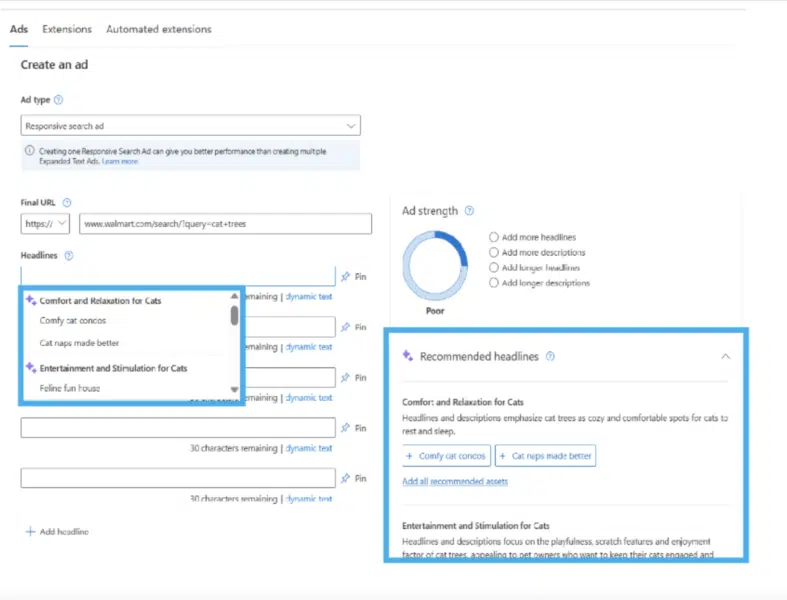
How it works. Microsoft’s generative AI tool for ad headlines and descriptions is available in 35 languages, which are automatically detected based on the language of your website. Here’s how you can access this feature under the ‘Create an Ad’ tab:

  • After clicking on the ‘Create an Ad’ tab, enter the final URL you are focusing on.
  • Underneath the ‘Final URL’ section, you will notice another section titled ‘Headlines’.
  • Here, multiple headline recommendations will be served based on the final URL.
  • These recommendations will be neatly categorized, high quality and more diversified.
  • Once the recommendations are offered, marketers will be able to choose from the multiple options in just one click.

Other RSA enhancements. Alongside the launch of AI-generated headlines and product descriptions, Microsoft unveiled two other ad products:

  • Auto-generated assets: This feature was designed to reduce the need to create separate campaigns or ad groups for different devices and audiences. This tool is gradually being rolled out now.
  • IF functions: This feature is being rolled out later this month to help you easily edit ad copy based on two targets; device and audience. This function is also expected to help with scalability issues by reducing the need for separate campaigns or ad groups for different devices and different audiences.

Get the daily newsletter search marketers rely on.


What has Microsoft said?

  • “As Microsoft Advertising has made a commitment to innovating with the vision to reimagine advertising with generative artificial intelligence (AI), an exciting development in this space is transpiring with responsive search ads (RSA).
  • “Classified as Microsoft Confidential We’re folding the power of generative AI into how you create and edit RSA now, by recommending AI-generated headlines and descriptions for you.”
  • “Now, a single responsive search ad can be customized with unique messages based on the user’s device usage or specific audience segment, helping you send the right message to the right audience.”

Why now? Google announced that it was introducing AI-generated campaign headlines, descriptions, keywords, images and assets to marketers back in May. So it’s little wonder Microsoft is taking action to make sure it isn’t being outperformed by a competitor.

And we can expect more conversational AI in Microsoft Ads, as Kya Sainsbury-Carter, corporate vice president of Microsoft Advertising, told us at SMX Advanced.

Deep dive. Read Microsoft’s ‘About Responsive Search Ads‘ guide for more information.


Related stories

New on Search Engine Land

@media screen and (min-width: 800px) { #div-gpt-ad-3191538-7 { display: flex !important; justify-content: center !important; align-items: center !important; min-width:770px; min-height:260px; } } @media screen and (min-width: 1279px) { #div-gpt-ad-3191538-7 { display: flex !important; justify-content: center !important; align-items: center !important; min-width:800px!important; min-height:440px!important; } }

About the author

Nicola Agius

Nicola Agius is Paid Media Editor of Search Engine Land after joining in 2023. She covers paid search, paid social, retail media and more. Prior to this, she was SEO Director at Jungle Creations (2020-2023), overseeing the company’s editorial strategy for multiple websites. She has over 15 years of experience in journalism and has previously worked at OK! Magazine (2010-2014), Mail Online (2014-2015), Mirror (2015-2017), Digital Spy (2017-2018) and The Sun (2018-2020). She also previously teamed up with SEO agency Blue Array to co-author Amazon bestselling book ‘Mastering In-House SEO’.

https://searchengineland.com/microsoft-ai-generated-ad-headlines-descriptions-marketers-429246


Ecommerce PPC: 4 optimizations to do before the holiday season

Performance Max is a wonderful advertising technology, but it comes with a significant downside: All advertisers receive the same advantage.

Everyone can access the thousands of data points Google uses to make decisions, the same competitive bidding algorithms that drive incremental growth. When everyone has access to the same tools, you can never claim an advantage over anyone else.

Instead, you create that with what you do beyond your ad account. This has a bigger impact on your success with Google (or Meta) Ads in the modern PPC landscape. It’s the only way to differentiate yourself when using machine learning ad tech.

This article will cover how to approach four outside-of-Google optimizations that will boost your chances of success this holiday season:

  • Campaign structure
  • Offer positioning
  • Data feed
  • Post-click experience

And if you lean toward Meta as your ad engine of choice, you’ll find much of this advice carries over to your environment as well.

1. Campaign structure

There’s many ways to build your Performance Max campaigns for Q4, but any decisions will revolve around these three factors:

  • The number of products or SKUs you sell.
  • Allotted budgets for different products or categories.
  • Performance goals, such as different ROAS targets.

Fewer campaigns are the way to go for more traffic and better efficiency, according to Google’s best practices and what we see in real life.

If you only have one or two SKUs…

  • Build your asset groups around the angles of the products you’re trying to advertise. If your product can work for two distinct audiences, you can apply different audience signals, copy, and creative that speaks to those groups.
  • Put everything in one campaign. With a single campaign, it’s easier for the system to optimize towards whatever it believes will work best.

If you’ve got a larger catalog to advertise…

Working with truly large catalogs – dozens, hundreds, or even thousands of products – means having to segment more heavily.

With larger campaigns, we’ll usually exclude some products from Performance Max and let them run inside of a Standard Shopping campaign.

We decide what goes into each by looking at products that get scale and reach with Performance Max – a level that you rarely get with Standard Shopping.

On the flip side, which products do we need stronger control over?

Which products do we need to be conscious about negative keywords and things of that nature versus simply going after volume?

That’s what we’ll push into Standard Shopping.

Sometimes, only around 10% of your Performance Max products get real traffic and traction.

How do you make it spend more or push harder on the neglected products? Separate them into a different Performance Max campaign, or put them in Standard Shopping.

As always, make choices that are right for your account. Many times, we’ll get just the core products into Performance Max and let it run based on performance.

Everything else has low bids in Standard Shopping, capturing whatever traffic we can in a complementary way.

2. Offer positioning

Shopping habits during the holiday season aren’t like the rest of the year, so what works in terms of offers will also need to change. A few offer characteristics you might want to consider include:

  • Presentation of your offer.
  • How much it costs.
  • What it includes.

These are the kinds of things that can help you convert the traffic Performance Max is capable of bringing to your website or landing page.

Even if you have a great offer, how can you make it more compelling?

One part is how you structure your offer. The other is product-market fit.

Peak season differs from how people shop for the rest of the year. A lot of purchases will be gifts, not only for family but friends and co-workers too.

Maybe you need to lower your price or offer free shipping. Is there a coupon code you want to use?

Meanwhile, bundles can increase your average order value (AOV) with variants of a product in different colors, flavors, and sizes.

If you sell T-shirts and they’re doing well, you want to try to do even better. So you add in a two-pack or three-pack with new or seasonal designs, and your AOV increases considerably.

In addition to bundles, get the basics in order. Ensure you’re in stock when you advertise, and be clear about timelines and availability when you’re not.

You may even want to set up a redirect to an alternate page so that you’re doing everything possible to win and convert clicks. People want to spend money, but you’ve got to give them a compelling reason to do it with you.

In many ways, ecommerce advertising during Q4 is a crash course in consumer economics.


Get the daily newsletter search marketers rely on.


3. Data feed

Product feeds are the life and soul of a good Performance Max campaign, and this counts double at a time when people are searching for and purchasing more products.

There’s a lot you can do with a feed, but I focus on four areas:

  • Titles
  • Identifiers
  • Price
  • Category

With Performance Max and Shopping, Google decides which search auctions to show your product using the information in your product feed.

A lot of advertisers still don’t take this seriously. Sadly, I’ve seen scenarios like this play out too many times.

An online retailer sells a range of sunglasses as part of what they call “The Leo Collection”. Their whole website is nothing but sunglasses.

But on the feed they submit to Google, the product title simply says “Leo Collection”. It doesn’t mention sunglasses, doesn’t say it’s for men and doesn’t mention colors or styles like aviators.

What happens is Google isn’t going to show those products for searches like “men’s aviators,” “aviator sunglasses” or “men’s sunglasses gold frames.”

It probably won’t show unless someone searches specifically for “leo collection”, which is a tiny portion of the market.

This illustrates why it’s important to include the basics of your product and how people search for it.

You may even want to revamp the title to service how people search for your product. For instance, for a pair of sneakers, include phrases like “basketball shoes”.

Just don’t go crazy – you want to be descriptive, not stuff your feed with keywords.

The more keywords in your title and description, the more auctions your product will be eligible to show up in.

This increases your ability to find success, especially opportunities you didn’t actively target given Performance Max’s ability to capture those new streams of business.

Identifiers are how Google knows what each product is. When you submit a product, it needs to have two out of the three pieces of data Google uses to match your product with other products in the database:

  • Global Trade Identification Number (GTIN)
    • US: Universal Product Code (UPC)
    • Europe: European Article Number (EAN)
    • Other GTINs include International Standard Book Numbers (ISBN) and ITF-14
  • Manufacturer Part Number (MPN)
  • Brand name

If you sell your own products, just submit the UPC or other GTIN.

If you sell products from other brands, you really want to make sure to get this piece right.

That’s because you’ll show up in the primary listing, where you’ll be alongside the other stores selling that type of product. Matching up with this wins the most impressions and traffic.

Same product, different stores

You also want to be 100% sure that your price is competitive. Google is a price-sensitive shopping engine, so without that, you won’t get clicks. Potential customers always look at that information before clicking on an ad.

Finally, ensure your products are correctly categorized in the Google Merchant Center taxonomy. You can leave this blank, and Google will fill it in for you, but that isn’t always going to be accurate and may end up hurting performance.

In ecommerce, Performance Max without an optimized data feed is like a Search campaign with poorly written responsive search ads.

Yes, it will work but it won’t work well. So sharpen your data feed and watch efficiency go up.

4. Post-click experience

Performance Max might win you a lot of traffic, but it’s the landing page where you win hearts (and sales).

With so few advertisers prioritizing this part of the purchase experience, you can boost your financial performance quite a bit by focusing on:

  • Website speed.
  • Landing or product page.
  • Cart behavior.

Until this point, the goal has been to get traffic to your website.

Now that people are there, what can you do to make a higher percentage of them convert and increase your profitability?

It’s typically not something that many ecommerce retailers think about. So those who do optimize this experience usually see much higher conversion rates, which is often the biggest driver of conversion growth.

  • Make sure the layout of your product page is simple and loads quickly. It should be quick and easy for anyone to understand what’s being sold, why it’s worth buying, and how much it costs.
  • You certainly want to look at it on a mobile device and make sure the design is responsive.
  • Your product title, reviews, product image, price, and “add to cart” button should all be visible without needing to scroll. Only additional information should live below.
  • Reviews from happy customers build credibility for your product. By providing this, you save people the hassle of looking for this and ensure they only see honest and accurate reviews.
  • Design optimizations like reducing clutter, getting rid of extra buttons, and having enough white space make it as simple as possible for people to land on your page, add products to their cart, and check out.

If your product page isn’t amazing, consider building a standalone landing page – usually easier for smaller catalogs – and drive traffic there.

Your landing page should be built for a single, specific purpose: to get people to the next step of the purchase process.

When it comes to your cart, you can do a few things to make the last-mile purchase experience phenomenal.

  • Make the page mobile responsive.
  • Remove off-page navigation.
  • Reduce clutter.
  • Fit everything on one screen.
  • Only have one large call to action.
Decluttering the checkout process

How soon is too soon to start preparing?

Building, testing, iterating, and fixing bugs. All this takes much longer than you think, especially if you’re starting from scratch.

The earlier you begin, the less likely you’ll need to deal with something system-breaking right as traffic and interest peak.

This year, we’ve also got new controls for Performance Max to test out: brand exclusions, asset group reporting, page feeds, and more.

Not to mention seasonal adjustments, creatives, and supply chain considerations.

If you need help with what to do inside your Google Ads account, don’t miss my tactical guides:

It’s never too early to think about your peak-season advertising strategy. Q4 will be here before you know it.

In 20 years of running Google Ads, I’ve never once looked back on this period and thought, “I wish I’d started preparing a bit later.”


Opinions expressed in this article are those of the guest author and not necessarily Search Engine Land. Staff authors are listed here.


Related stories

New on Search Engine Land

@media screen and (min-width: 800px) { #div-gpt-ad-3191538-7 { display: flex !important; justify-content: center !important; align-items: center !important; min-width:770px; min-height:260px; } } @media screen and (min-width: 1279px) { #div-gpt-ad-3191538-7 { display: flex !important; justify-content: center !important; align-items: center !important; min-width:800px!important; min-height:440px!important; } }

About the author

Menachem Ani

Menachem Ani, Founder of JXT Group, is a digital advertising expert with over a decade of success developing high-impact marketing strategies for online retailers and lead-generation clients.

https://searchengineland.com/ecommerce-ppc-optimizations-before-holiday-season-429203


How to use AI in digital advertising by Fluency

Fluency 7 11 FLC02723 TDM 1920x1080 800x450

Artificial Intelligence (AI) is all the talk across various industries today—and there’s currently no shortage of speculation or articulated benefits in this space.

While you may have already explored the capabilities of ChatGPT, Bard or another AI-enhanced tool to generate content for a new email, brainstorm topics for your next blog article—or to gain efficiency in another digital advertising task—there’s a variety of benefits you may not have tapped into, or even thought of yet. One thing is for certain, all of these advancements in AI promise at least one thing to advertisers: massive time-savings.

In an ‘always on’ era, marketers need efficiency and variability in messaging

Google Search, Instagram, Tik Tok, Pinterest and YouTube; marketers are always on these days as there’s no shortage of channels to engage on. While that allows today’s advertisers to reach a wider audience, some challenges come with keeping up with a laundry list of platforms.

One key challenge is how to customize your message to each user base. Since tonality inherently differs across the array of platforms, the time you have each day quickly dwindles when you alter your message to fit every audience on various channels.

This is one of the many areas where AI can shine. Users can quickly save on keystrokes— keywords, headlines and body text—by prompting AI-based tools to help them generate variation in their message or inspiration to motivate their creativity. While digital advertisers will still need to keep their pulse on compliance or any arguable language that may arise, they still achieve greater efficiency, thus leaving more time to focus on strategic work.

Why human supervision remains paramount: the argument of attended vs. unattended AI

While AI replaces the need to focus on mundane tasks, we do not believe it’s a full replacement for the human touch. Since there’s complexity across brands, organizations and states, even if you rely on AI to generate content, you still need a middle-person to ensure the generative language is compliant and safe. We repeat: AI-enhanced tools are not a full replacement for human work.

This is where organizations will see the most opportunity: by combining the opportunity of AI with the integrity of human power, you can gain efficiency, reduce costs and focus precious brain power and resources on the areas of your business that contribute most to your bottom line.

AI can help you with the last mile of your creative

AI is great at generating keywords, headlines and even helping you brainstorm some creative angles for your messaging. While it’s all that—and a little bit more—it’s not going to generate the same level of quality for long-form content that a human will. We like to think of AI as the assistant to creative teams in helping them with the last mile of their strategy.

The industry today has high expectations for individual output, but it’s not sustainable for one single person to keep up with client relations, traditional marketing and technical responsibilities. Those unrealistic expectations, however, start to become management when you have automation powering aspects of your strategy and workflow.

Keep a pulse on your margins with the help of automation

Digital advertising often correlates to large budgets. When relying solely on people to manage your margins, human error can quickly cost your business hundreds of thousands of dollars. Think of it this way—if you have a sale or promotion running around a major holiday, that sale ends, and someone forgets to remove that ad placement, what happens when it’s discovered? These potential risks can drastically reduce or mitigate these risks so you no longer have to issue credits on outdated ad copy promoting past sales or promotions.

You see the benefits, not it’s time to automate

Automation is already making businesses radically more efficient and profitable. If you have been curious about harnessing the power of AI in digital advertising, or you’re already working with a partner, but they’re struggling to help you scale, we would love to share how our platform can help form the backbone of your ad agency’s present and future success.


Related stories

New on Search Engine Land

About the author

Fluency

Fluency is the premier provider of enterprise-level campaign software to the advertising industry. The company’s platform is built around Robotic Process Automation—a technology application unique in advertising—that delivers unparalleled efficiency, accuracy and quantity capabilities for digital marketers working in both agencies and brands. Based in Burlington, Vermont, with team members in 11 states, Fluency’s founders and staff leverage a singular combination of expertise, talent and inventiveness in their efforts to sustainably, collaboratively and enjoyably transform their clients’—and their own—businesses.

https://searchengineland.com/how-to-use-ai-in-digital-advertising-429084


Universal Analytics still processing data for most after sunset

The majority of marketers are still able to use their Universal Analytics accounts as usual.

Despite warning advertisers that the tool would be replaced by Google Analytics 4 on July 1, UA is still processing data as usual for most people.

Why we care. Marketers were reluctant to make the switch from UA to GA4, despite Google insisting it was enforcing the migration. Although the industry was given more than a year’s notice, many were not prepared for the sunset deadline and have been struggling to understand how to navigate GA4. With that in mind, it’ll come as a reassurance that UA is still processing data – but it’s unlikely to be for much longer.

What’s happening? While it appears that the majority of marketers are still able to access real time data as usual in UA, some have reported seeing a new warning messages on their accounts. It reads:

  • “This property is scheduled to stop processing data very soon.”
  • “Any conversions and audiences you use with Google Ad campaigns will stop working.”
  • “To avoid serious disruption to your ads, book a free support session to to complete your move to Google Analytics 4 today.”

Meanwhile, others have confirmed to Search Engine Land that UA has already stopped processing data on their accounts. James Brockbank, managing director of Digitaloft, told us:

  • “I can still see realtime for this UA property but it’s no longer tracking data as of today.
  • “This has been showing as 0 (same across a few different sites’ properties) since midnight in the properties’ time zone. Was all showing up to today.”

For those still using UA as opposed to GA4, it looks as though their accounts may very well be on borrowed time.

Screenshot 2023 07 10 At 20.15.12 800x299

What has Google said? On July 1, Google released a statement on  Twitter and the Analytics Help Center to explain why some people may still have access to their UA data as. The search engine stated that the sunset was being rolled out in phases. It said:

  • “This will not happen overnight, so some Universal Analytics properties may continue to process data.”
  • “However, all properties have now been added to the queue, and those that have not completed the upgrade will Jumpstart on a rolling basis.”
  • Google Analytics 4 is our next-generation measurement solution, and it has replaced Universal Analytics.”
  • “Standard Universal Analytics properties have stopped processing new data. To maintain your website measurement, you’ll need a Google Analytics 4 property.”
  • “We strongly encourage you to make the switch to Google Analytics 4 as soon as possible. If you use Universal Analytics data in your Google Ads account, make sure you migrate your Universal Analytics property’s Google Ads links to your Google Analytics 4 property.”
Screenshot 2023 07 10 At 20.21.56 275x600

Timeline. The shutdown of Universal Analytics is being rolled out the following stages, with the final phase set for July 2023:

  • March 2023: Google automatically created a GA4 property for marketers who didn’t opt out of the automatic property creation option. Where possible, existing site tags were used.
  • July 2023: UA stops processing hits, including standard properties in accounts that also contain 360 properties. Marketers still have access to previously processed data in their UA property until July 2024.
  • July 2024: All marketers, even those with 360 properties, will no longer have access to the UA user interface and API.

Deep dive: For more information on how to migrate to GA4, read Google’s ‘Learn how to make the switch‘ guide.


Related stories

New on Search Engine Land

@media screen and (min-width: 800px) { #div-gpt-ad-3191538-7 { display: flex !important; justify-content: center !important; align-items: center !important; min-width:770px; min-height:260px; } } @media screen and (min-width: 1279px) { #div-gpt-ad-3191538-7 { display: flex !important; justify-content: center !important; align-items: center !important; min-width:800px!important; min-height:440px!important; } }

About the author

Nicola Agius

Nicola Agius is Paid Media Editor of Search Engine Land after joining in 2023. She covers paid search, paid social, retail media and more. Prior to this, she was SEO Director at Jungle Creations (2020-2023), overseeing the company’s editorial strategy for multiple websites. She has over 15 years of experience in journalism and has previously worked at OK! Magazine (2010-2014), Mail Online (2014-2015), Mirror (2015-2017), Digital Spy (2017-2018) and The Sun (2018-2020). She also previously teamed up with SEO agency Blue Array to co-author Amazon bestselling book ‘Mastering In-House SEO’.

https://searchengineland.com/google-universal-analytics-processing-data-after-sunset-429240


6 Google Analytics 4 alternatives that marketers are switching to

The forced migration to Google Analytics 4 hasn’t been an easy ride for marketers.

Some advertisers are finding it so difficult to navigate that they have abandoned the tool and jumped ships to a rival platform – a move that would have seemed unthinkable not too long ago.

But what GA4 alternatives are marketers genuinely switching over to?

Below, we take a look at the up-and-coming analytics platforms that are proving increasingly popular among former Google Analytics devotees.

1. Plausible

Tech engineer Mark Phillips explained why he is now using Plausible instead of GA4:

  • “I had ended my subscription to Plausible a couple of months ago for no reason other than I didn’t need stats any more.
  • “Then I started doing some work for a client this week, and was so pained by how awful GA4 is, I resubscribed.
  • “The UX of Plausible is such a delight!”

Cost: Plans start at $9

Plausible is a popular GA4 alternative because it is easy to use, complies with he EU’s General Data Protection Regulation (GDPR) and is relatively low cost. It also tracks valued basic data such as pageviews, session duration and referrer information. The disadvantage is that its functionality is quite basic.

2. Semrush

One marketer, who wished to remain anonymous, told Search Engine Land:

  • “GA4 is an unfinished product that was rushed to market.”
  • “We will likely pivot to Semrush, and use first-party data collected from customers instead of bothering with GA4.”

Cost: Prices start from $195.95 a month.

Semrush has always been a popular tool amongst marketers, but now, some are making it their go-to data analytics tool instead of Google Analytics. In addition to monitoring the performance of keyword rankings, content gaps and backlink profiles, this platform can be used to analyze your competitor’s traffic trends, keywords and more.

3. Matomo

Lee Foot, eCommerce SEO, explained why he is now using Matomo instead of GA4:

  • “We’ve subscribed to Matomo for day to day quick checks.
  • “We’re keeping GA4 for Google Ads and API stuff but that’s about it.
  • “Seems really good so far, familiar interface and have just imported all our legacy data in.”

Cost: Free if hosted on your servers.

Matomo provides real-time data, a customizable dashboard and detailed reports, making it a very good option for marketers who were fans of Universal Analytics. On this platform, users are given complete control over their data. It also has an array of privacy features for extra security.

4. Fathom

Ross Stevens, independent SEO consultant, explained why he thinks Fathom is an excellent alternative to GA4:

  • “I get the feeling that SEOs are migrating to GA4 just because it’s convenient and has Google’s name behind it. Not because it’s actually good!
  • “They’re not making the effort to spend the time to consider the alternatives and convince clients there are better options out there.
  • “Personally, I’m setting up GA4 as a backup, and using Fathom as the main analytics/reporting tool.
  • “If you’re going to use GA4 as your main tool, you’re going to need to setup a few screens in Looker Studio, but even then, there’s certain metrics still missing at the moment.”

Cost: Plans start at $14.

Fathom is proving to be a popular analytics tool because it’s easy-to-use and is privacy-focused. Unfortunately, this program doesn’t offer the more complex data that GA4 does, but the platform is a good option for marketers wanting a lightweight website analytics tool.

5. Clicky

Web developer Ian Nuttall explained why he prefers Clicky to GA4:

  • “I’ve switched to Clicky and it works just fine for me. GA4 is a joke.
  • “The way Google closes sh*t down on a whim, I’d rather move away from relying on them. Clicky is great and I can see all of my sites at a glance.
  • “I have two GSC accounts and I switched to Clicky now because GA4 sucks.
  • “But I don’t worry about Google ‘finding all my sites’ – they probably know.”

Cost: Clicky has a free option and four paid options.

We’ve seen many marketers showering Clicky with praise as a fantastic alternative to GA4. People that have switched over so far seem to huge fans of how easy the real-time platform is to use, as well as features such as heat mapping, backlink analysis and mobile compatibility.

6. Simple Analytics

Alex Bass, data scientist at Dynata, explained why he switched from GA4 to Simple Analytics:

  • “Google Analytics has changed and become more complicated to the dismay of many people (now called Google Analytics 4).
  • “Recently, there have been government bans over privacy concerns from Google Analytics. I am not extremely knowledgeable about all things data privacy, but really just wanted another analytics platform that was simple and delivered what I needed to track traffic ethically on this website you are on now.
  • “Simple Analytics was easy to set up and delivers exactly what I wanted to see in a clean dashboard that worked out of the box.
  • There are options to customize specific goals or events of special interest. Also, they have the option of sending a weekly email summary of visiting stats.”

Cost: Prices start from $11 a month.

Simple Analytics describes itself as a “privacy first Google Analytics alternative,” making it a popular choice for marketers within the EU. More than 600 businesses and organizations, including Michelin, Hyundai and the British government, are all customers. It’s a popular choice for marketers who want access to audience data but also want to protect the privacy of their website users.

Why we care. If you’re struggling to get to grips with GA4, then you may be thinking of alternative platforms to use instead. There are many options available – but how do you know which one to pick? By reading the opinions of your peers who have already tried and tested GA4 alternatives of course.


Related stories

New on Search Engine Land

@media screen and (min-width: 800px) { #div-gpt-ad-3191538-7 { display: flex !important; justify-content: center !important; align-items: center !important; min-width:770px; min-height:260px; } } @media screen and (min-width: 1279px) { #div-gpt-ad-3191538-7 { display: flex !important; justify-content: center !important; align-items: center !important; min-width:800px!important; min-height:440px!important; } }

About the author

Nicola Agius

Nicola Agius is Paid Media Editor of Search Engine Land after joining in 2023. She covers paid search, paid social, retail media and more. Prior to this, she was SEO Director at Jungle Creations (2020-2023), overseeing the company’s editorial strategy for multiple websites. She has over 15 years of experience in journalism and has previously worked at OK! Magazine (2010-2014), Mail Online (2014-2015), Mirror (2015-2017), Digital Spy (2017-2018) and The Sun (2018-2020). She also previously teamed up with SEO agency Blue Array to co-author Amazon bestselling book ‘Mastering In-House SEO’.

https://searchengineland.com/google-analytics-4-ga4-alternatives-marketers-switching-429160


YouTube Search from Comments: New test adds links to keywords

YouTube is testing a new feature that could help brands and creators engage with viewers while causing minimal disruption.

YouTube will enable hyperlinking over single words or phrases in the comments section for the first time.

Links will direct viewers to a YouTube search results page while still playing the video they were originally watching.

Why we care. Viewers are more likely to follow a link if their streaming experience isn’t interrupted. This means that marketers may have an increased chance of reaching more people and engaging more effectively with potential customers.

But. While this could be good, some marketers are concerned that leading people away from videos could do more harm than good. Search from Comments could lead viewers to a YouTube search results page that then takes them directly to rival brands and competitor videos.

How it works. The pilot, which is being rolled out over the next few weeks, will work as follows:

  • Phrases or single words in the comments section that encourage exploration will be hyperlinked.
  • Clicking on a link will initiate a new YouTube search with that term, navigating users to the search results page.
  • To avoid interruption, the video will stay playing in the Miniplayer.
  • Linked words are determined by YouTube based on what users are likely to want to explore further.
  • The links cannot be added or modified by the commenter, though creators can remove links on their video comments if they’d like.
  • Viewers will be able to opt out of the experiment if they prefer their comments not to be hyperlinked.

What has YouTube said? YouTube released a video via its Creator Insider channel to announce the pilot:

  • “We’re experimenting with a new way to explore topics and recommendations in comments.
  • “Currently, if a viewers wants to learn more about a topic or a product they find in a comment, they have to navigate away from the video they’re watching to learn more.
  • “We’re experimenting with new hyperlinked keywords in comments to reduce friction for viewers looking to discover new and relevant content on the platform.
  • “We’ll be experimenting with this in the coming weeks but would love your feedback in the comments whether you’re in the experiment or not.”

Other news. Hyperlinking in the the comments section isn’t the only news YouTube confirmed this week. The social media platform also made three other announcements:

  • Visibility on tablets: Although creators could create posts on tablets previously, those posts were not visible on tablets to creators and their viewers. YouTube acknowledged that this has been a top feature request for many creators and viewers, so it is now giving visibility to all Android tablets and iPads users. This means posts can now reach viewers who mainly use YouTube on tablets.
  • Reminders for live streams and premieres: Currently, viewers on YouTube are able to set reminders for upcoming live streams or premieres by clicking the ‘notify me’ button to get email and push notifications for when that live stream or premiere starts. Now, a new metric is being added in YouTube analytics that will show creators how many reminders were set for an upcoming live stream or premiere. You can find the Reminders Set metric in YouTube Analytics Deep Dive.
  • Channel membership management: Eligible creators can now set up and manage channel memberships and other fan funding offerings via Studio Mobile. Previously, this was only available on desktop. Additionally, members-only videos were not served in members’ home feeds, subscription feeds or channel page content tabs. Now members-only videos will surface on members home and subscription feeds, and on your channel page.

Get the daily newsletter search marketers rely on.


Important reminder. YouTube advises accepting the new YPP program terms in Studio if you’re currently in YPP and haven’t done so already.

If the terms are not accepted by July 10, marketers will be removed from the YouTube partner program and their content will no longer be eligible to monetize on the platform. Any previously monetized content will stop accruing revenue effective July 11 and all monetization features including and not limited to channel memberships, SuperChat and similar features, will be turned off.

To see if you’ve already accepted the terms or still need to take action, please take the following steps:

  • Go to Studio > Settings > Agreements.
  • Here, if you see View Agreement for the base terms you’ve previously accepted, then you’re all set.
  • If you see Review and Agree, this means that you still need to accept.

Deep dive: For more information on changes to the YouTube Partner Program terms, you can read YouTube’s full announcement on the YouTube Help Center.


Related stories

New on Search Engine Land

@media screen and (min-width: 800px) { #div-gpt-ad-3191538-7 { display: flex !important; justify-content: center !important; align-items: center !important; min-width:770px; min-height:260px; } } @media screen and (min-width: 1279px) { #div-gpt-ad-3191538-7 { display: flex !important; justify-content: center !important; align-items: center !important; min-width:800px!important; min-height:440px!important; } }

About the author

Nicola Agius

Nicola Agius is Paid Media Editor of Search Engine Land after joining in 2023. She covers paid search, paid social, retail media and more. Prior to this, she was SEO Director at Jungle Creations (2020-2023), overseeing the company’s editorial strategy for multiple websites. She has over 15 years of experience in journalism and has previously worked at OK! Magazine (2010-2014), Mail Online (2014-2015), Mirror (2015-2017), Digital Spy (2017-2018) and The Sun (2018-2020). She also previously teamed up with SEO agency Blue Array to co-author Amazon bestselling book ‘Mastering In-House SEO’.

https://searchengineland.com/youtube-hyperlinking-comments-429154


Google Ads launches new tool to help marketers connect with Gen Z

Google has launched the Gen Z Music lineup, a new tool that helps marketers better connect with young people.

The paid-for feature is now available globally to assist advertisers who would like to increase their appeal to 18- to 24-year-olds.

Why we care. Google has identified that the music favored by Gen Z plays an important role in shaping today’s culture. By finding out what songs are trending and allowing advertisers to have their campaigns displayed near media that uses the music this cohort has on repeat, brands will be seen at the forefront of culture.

The Gen Z Music lineup also provides marketers with an opportunity to better connect with Gen Z – a group of people that is rapidly becoming one of the largest online consumer groups. If advertisers aren’t paying attention to content that engages these potential customers most, then they risk failing to secure their buy-in.

How it works. The Gen Z Music lineup feature uses data from audio, long-form and YouTube Shorts to identify trending music. It follows these steps:

  • The Gen Z Music lineup identifies trending songs amongst 18- to 24-year-olds using regularly refreshed data across audio, long-form and YouTube Shorts.
  • Google AI then uses this data to package relevant music videos into the Gen Z Music lineup.
  • Marketers then have the option to buy the lineup.
  • Upon purchasing the lineup, advertisers’ campaign will then be served alongside content that plays the identified trending songs.

Get the daily newsletter search marketers rely on.


What has Google said? Brian Anderson, Google’s Global Head of Music and Audio, released a statement via the Google Ads Help newsroom. He said:

  • “Gen Z plays a huge role in shaping the cultural zeitgeist. And this largely happens on YouTube, where Gen Z music fans discover, consume, and participate in music across multiple formats.”
  • “Now we’re helping advertisers align their brand with the music Gen Z audiences (18-24) love on YouTube with the new Gen Z Music lineup.”

Deep dive. For more information, read Google’s full Gen Z Music announcement.


Related stories

New on Search Engine Land

@media screen and (min-width: 800px) { #div-gpt-ad-3191538-7 { display: flex !important; justify-content: center !important; align-items: center !important; min-width:770px; min-height:260px; } } @media screen and (min-width: 1279px) { #div-gpt-ad-3191538-7 { display: flex !important; justify-content: center !important; align-items: center !important; min-width:800px!important; min-height:440px!important; } }

About the author

Nicola Agius

Nicola Agius is Paid Media Editor of Search Engine Land after joining in 2023. She covers paid search, paid social, retail media and more. Prior to this, she was SEO Director at Jungle Creations (2020-2023), overseeing the company’s editorial strategy for multiple websites. She has over 15 years of experience in journalism and has previously worked at OK! Magazine (2010-2014), Mail Online (2014-2015), Mirror (2015-2017), Digital Spy (2017-2018) and The Sun (2018-2020). She also previously teamed up with SEO agency Blue Array to co-author Amazon bestselling book ‘Mastering In-House SEO’.

https://searchengineland.com/google-ads-gen-z-music-lineup-429148