How to get the most out of PPC for your SaaS brand

With more startups than ever entering the market, it is becoming more difficult for SaaS brands to cut through the noise.

That’s why many have realized that PPC can be a fantastic way to build brand awareness and draw in new customers.

However, a more strategic approach is required to run campaigns effectively and gain a competitive edge. 

It is not enough to set and forget campaigns. There is a lot more that SaaS brands can do to elevate their performance.

Here are five ways SaaS brands can get the most out of PPC campaigns.

1. Build a cold audience display campaign

Dear SaaS businesses: not everyone knows about your brand. 

Most people are aware that there are solutions available to solve their problems. But they are less likely to know specific brands which provide a suitable product. 

To build brand awareness and influence consideration with these types of individuals, you must reach out to them through your marketing efforts. 

One way to do this is to run a cold audience display campaign in Google Ads.

The term “cold audience” refers to individuals who have not yet engaged with a brand and, in this case, still fall within the parameters of the brand’s target audience. 

By running display campaigns targeting these individuals, SaaS brands can build brand awareness with new potential customers and influence their purchasing decisions.

Display campaigns enable brands to showcase their software through image and video assets, which can be more eye-catching than text-based ads. 

Through these visual assets, SaaS brands can give potential customers a feel about how their software looks and feels. 

What’s more, SaaS brands can use a range of targeting options to reach their target audience while they browse the web.

To effectively run a cold audience display campaign, consider targeting your campaigns by:

Custom segments

Custom segments enable advertisers to target audiences based on a range of online behaviors, including:

  • What they have searched for in Google.
  • What websites they have browsed.
  • What apps they have used. 
Creating a new custom segment in Google Ads

Use converting keywords from your search campaigns and research into websites and apps your target audience frequently uses to build these segments. 

In-market audiences 

In-market audiences let you target people actively researching or comparing SaaS products or services. Relevant segments include antivirus and security software, video software and accounting software. 

Individuals within these groups have been categorized by:

  • The types of websites they use.
  • The content they engage with.
  • How frequently they have been visiting relevant websites. 

This indicates they have a relevant intent to convert in the near future. 

Affinity audiences

Affinity audiences enable you to reach people based on who they are, what their interests are and what types of habits they have. 

Use match affinity audience options with the personas of their target audience. For example, high-end computer enthusiasts, PC gamers or cloud services power users.

2. Use customer match exclusions

With the average CPC of a PPC campaign in 2023 coming in at $4.22, you need to ensure every click counts. 

One thing you don’t want to be doing is paying for clicks from existing customers looking to log into their accounts.

By excluding current customers from seeing ads, you can ensure your budget is spent on reaching potential new customers, not those already using their software.

To do this, create a new audience list by uploading a list of your current customers using first-party data, such as email addresses, phone numbers and user IDs.

Then, manually add them as exclusions under the Audience tab of each of your active campaigns.

Consider creating exclusions for those currently within the “lead to sale” process.

For example, those who have already claimed a free trial, are newsletter subscribers or are in contract discussions with the sales team. 

There is little value in spending money on those who are already:

  • Engaging with the software.
  • Communicating with the sales team.
  • Receiving marketing communications through emails/newsletters. 

Get the daily newsletter search marketers rely on.


3. Use remarketing lists

Rarely will an individual engaging with your website for the first time be ready to convert. 

It’s more likely that they will need time to find out more about your brand, continue researching their situation, check out alternative providers and discuss their options with other stakeholders. 

During this period (which could be weeks or months), it is vital to retain top-of-mind awareness. You can not afford to fall off a potential customer’s radar before the final consideration stage.

One way you can reach out to previous site visitors and remind them of your product is by using remarketing lists and using them as targeting for display campaigns (Google Ads) or audience ads campaigns (Microsoft Advertising).

The biggest advantage of running such campaigns is that the audience has already shown interest in the software and will therefore have a higher intent to convert. 

By reaching out to these previous site visitors again, you can encourage them to return to the website to convert.

Creating a Remarketing List in the Microsoft Advertising platform

To take this to the next level, consider offering something extra in your ad messaging that wasn’t available during the initial website visits. 

This could be more information about your brand, such as a glowing customer review or reviewing website ratings, or an extended trial or discount code.

For example: If a website offers a 7-day free trial, the messaging in the remarketing display campaign could offer an exclusive 14-day free trial. 

While a 7-day trial may not have persuaded an individual to convert, an exclusive extended trial could be what it takes to bring them in. 

4. Engage in competitor bidding

SaaS is a real dog-eat-dog industry. Brands must do what they can to outsmart their competitors. One way to do this is by engaging in competitor bidding.

Competitor bidding refers to running search campaigns or ad groups with keyword lists targeting competitors’ branded keywords. 

So when someone is searching for a particular software provider, they are presented with an ad for an alternative provider instead. 

This can be an effective strategy in SaaS as it enables you to get in front of an audience actively searching for a solution you can provide. 

An ad for Jira appearing for a search for Monday.com

Consider creating designated landing pages when using competitor bidding, where the content focuses on differentiating them from your competitors. 

This could include a breakdown of your exclusive features and industry-recognized rating cards, such as those available via G2. 

The page’s purpose should be to demonstrate what makes your software great, not be a despairing remark on the competitor’s product. 

While this can be a successful way for SaaS brands to steal attention away from competitors, it is always worth remembering that the competitor can retaliate and do the same in return. 

This can result in an aggressive bidding situation where brands end up paying inflated CPCs for their own brand name. It is a powerful strategy but should be used with caution. 

5. Optimize ad copy

As the saying goes: You never get a second chance to make a first impression.

Ensure you’re making the most out of your first interactions with potential customers by using ad copy that is both persuasive and informative. 

The messaging needs to demonstrate how your software solves their problem and why they should choose you over competitors.

Work out how to communicate these points by reading and analyzing reviews and feedback left by actual users of your software. 

These individuals are best placed to describe how they have benefited from the product. They will also use terminology and adjectives which will resonate with your target audience.

For example, a review for Google Ads on Capterra states:

“Google Ads is very useful in my business since it helps me in advertising, in this era of digital advertising it is very intuitive. The bidding strategies are flexible enough for a variety of businesses which makes carrying out different campaigns way easier. Real time tracking has also been made easier. Customers and clients can easily find our products online.”

A review for Google Ads on Capterra

This could be used to create messaging such as:

  • Intuitive and easy-to-use platform.
  • Flexible advertising solutions. 
  • Help potential customers to find your products online.
  • Campaign types suitable for all businesses.

This type of messaging can help your brand to portray relevance and suitability to potential customers, helping to reassure them that you are the solution they need. 

PPC strategies to make your SaaS shine

You’ll need to work your PPC accounts hard to build brand awareness and influence consideration in a rapidly expanding industry. 

Luckily, you can implement many campaign types and strategies to help you get there. 


Opinions expressed in this article are those of the guest author and not necessarily Search Engine Land. Staff authors are listed here.


Related stories

New on Search Engine Land

@media screen and (min-width: 800px) { #div-gpt-ad-3191538-7 { display: flex !important; justify-content: center !important; align-items: center !important; min-width:770px; min-height:260px; } } @media screen and (min-width: 1279px) { #div-gpt-ad-3191538-7 { display: flex !important; justify-content: center !important; align-items: center !important; min-width:800px!important; min-height:440px!important; } }

About the author

Sophie Logan

Sophie is the Head of Paid Media at Victress Digital, a PPC and Social Media agency based in Nottingham, UK. A lover of all things Lead Gen, Sophie has a particular interest in B2B and SaaS brands, and specialises in both Search and Display Campaigns.
Sophie has spoken at numerous conferences and industry events including Hero Conf London, PPC Live UK and brightonSEO’s Search Advertising Show. She is also a Gold Product Expert on the Google Ads Help forum.

https://searchengineland.com/ppc-tactics-saas-brands-429126


Comparing UA vs. GA4 metrics: Key differences you need to know

Unless you’ve been away on a desert island for the last 18 months, you’re well aware that Google Analytics 4 (GA4) took center stage on July 1 as the source for our web metrics. We’ve had to say goodbye to Universal Analytics (UA), an old friend to many marketers. 

One of the biggest challenges marketing teams may face will be comparing a current period of data to year-over-year (YOY) historicals to measure growth success.

There are fundamental changes in how GA4 measures data vs. how UA does, so comparing data between the two won’t be an apples-to-apples scenario.

The apples-to-apples YOY comparison scenario is why there was a big push by many to get GA4 set up, running and collecting data by July 1, 2022. That would allow for a true comparison.

So what happens if you’re one of the procrastinators (don’t feel bad – there are plenty!) who won’t be able to make a true apples-to-apples comparison? Well, here’s what you need to know.

Fundamentally different data models

UA was based on sessions and pageviews. GA4 is based on events and parameters. Both methods can collect and tally data, but the output in a report will look different. 

So what does this mean in plain English?

Different numbers in metrics you report

You’ll encounter cases where the metric is called the same thing so you’re tempted to believe the number should completely match up (or at least come close). However, you may find some variances. 

For example:

User counts

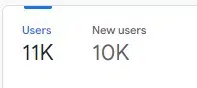
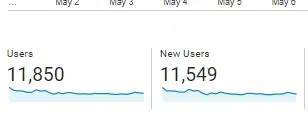
Here is a small website’s UA user/new user count for one month:

UA count of users and new users

Now here is that same small website’s GA4 user/new user count for the same exact time period:

GA4 count of users and new users

In the reports snapshot, GA4 rounds the numbers, but you can see the users reported in GA4 is about 8% lower than what’s seen in UA. 

The new users metric is even more pronounced (a difference of almost 14%) if you look at the rounded number. (Actual number reported in GA4 when you drill down is 10,443 – a difference of just under 10%.) 

Sessions

GA4 has a couple of key differences when it comes to counting sessions, which actually make the count more accurate. 

While both platforms have a default session timeout setting of 30 minutes, UA restarts the session at midnight and generates a new one when a UTM promo code is clicked on. 

If you could follow that, basically, the “session count” numbers you’ve been reporting on forever aren’t exactly an exact tally.

GA4 does not restart at midnight and does not generate a new session if a UTM promo code is clicked. 

For example, I have seen some websites put a promo UTM code on a link to an internal page (bad idea and unnecessary, by the way). 

In UA, that causes a new session to be started and it overwrites any other UTM promo code that may have actually driven the traffic.

Conversions

The way conversions are calculated between the two platforms differ.

UA will only count one conversion per session for each goal. So for example, a user clicks on the “click to call ” multiple times. 

However, the user doesn’t follow through and cancels before the call goes through the first time. Only one conversion will be counted for that goal.

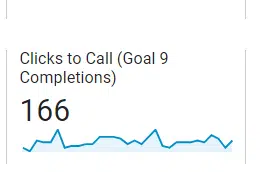
Here’s an example of the “Clicks to Call” goal setup in UA: 

Clicks to Call goal completions in UA

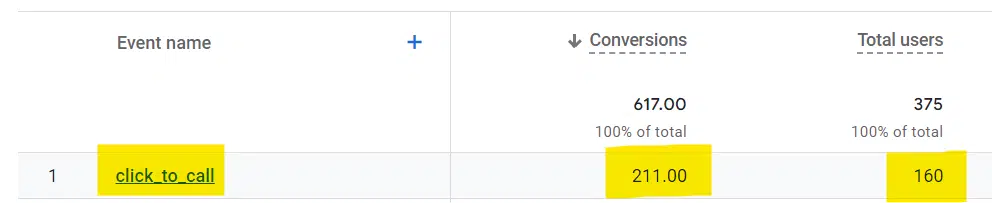
In contrast, GA4 will count a conversion every time even if that same conversion event is recorded multiple times during a session (Same user, same site, same visit):

Click to Call goal completions in GA4

Understanding the proper context matters here. 

On the one hand, you could argue GA4 inflates the actual number of conversions since you basically have the same individual clicking on the “call” link multiple times (presumably for a single purpose). 

On the other hand, you could argue that all you really cared about was whether the user converted on the call to action – not how many attempts it took on a particular session. Regardless of which method you feel is better, the GA4 method is now the way forward.

If we’re talking about an “Add to cart” conversion where the user put one pair of shoes in a cart, then continued to shop and added socks, GA4 would count this as two conversion events. 

You could argue that GA4 counting two conversion events is appropriate (depending on how you choose to look at it).


Get the daily newsletter search marketers rely on.


Rethinking our web performance metrics

GA4 is giving us a new way to think about success metrics for the business and what really matters. Here are a couple of examples:

Sessions 

We already covered the differences in how the two platforms calculate sessions, but GA4 steers us to thinking about sessions that actually result in meaningful engagement on the site. 

One of the first callouts you’ll notice is “Engaged sessions,” which is simply a count of sessions where the user actually did something.

Engagement metrics
Engagement metrics

An “engaged session” can only be considered if it lasts longer than 10 seconds, has one or more conversion events, or has two or more page/screen views. 

You may or may not agree, but that’s what GA4 uses for its standard. “Engaged session” is not a canned metric in UA.

Bounce rate

For a generation, marketers loved to report a low bounce rate as a measure of success. However, it’s not always a great metric. As with any success metric, context is king. 

For example, a simple recipe page could do its job perfectly but show a high bounce rate. 

The user got what they came for (the recipe) and then made a happy exit. Is that bad? 

No, actually. It’s a good thing for the user. 

Bounce rate is now gone as a stand-alone metric in GA4. Now you can refer to the engagement rate intended to show you the percentage of quality site visits. (Again, according to the definition of quality.) 

If you start with 100 and subtract the engagement rate from it, in theory, you get something similar to a bounce rate.

Events

How GA4 handles events could easily be the subject of a separate article. (See Event tracking in Google Analytics 4: What marketers need to know for more details.)

For this article, just a quick high-level reminder of the differences:

In UA, events are used to track site actions that don’t necessarily generate a success page. 

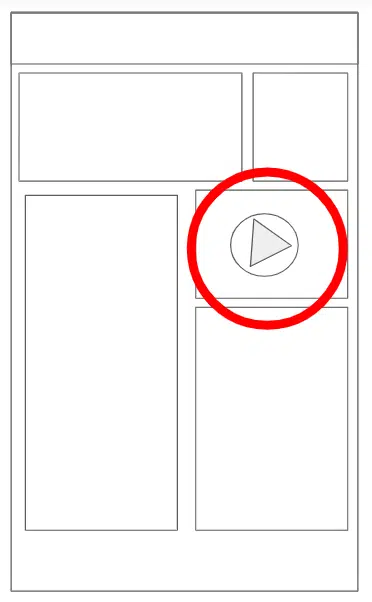
For example, you have a video on your home page. That video is played all the way through. 

Upon completion of that video, there is no “Thank You” page you can easily set up as a standard conversion goal. This is where events come in.

UA lets you give “events” a category, action, and label to provide more description and context. An event is counted when an action is triggered. For example, if you have a video on the home page and track completions.

A wireframe example of a video on the front page of a site

GA4 has no category, action, or label, so there’s no point in learning it now. And with GA4, everything is an event. For example:

  • Pageview = Event
  • Session Start = Event
  • First Visit = Event
  • Scroll = Event
  • Click = Event
  • Video Start = Event
  • File Download = Event
  • Video progression = Event
  • Video complete = Event
  • Newsletter Signup = Event
  • Contact Submission = Event
  • View Search Results = Event

You get the idea.

Everything remotely worth measuring is an event.

Views vs. data streams

In UA, you can have one simple website and a mind-boggling number of views set up. You can see different numbers depending on which view you’re looking at, so it was worth understanding. 

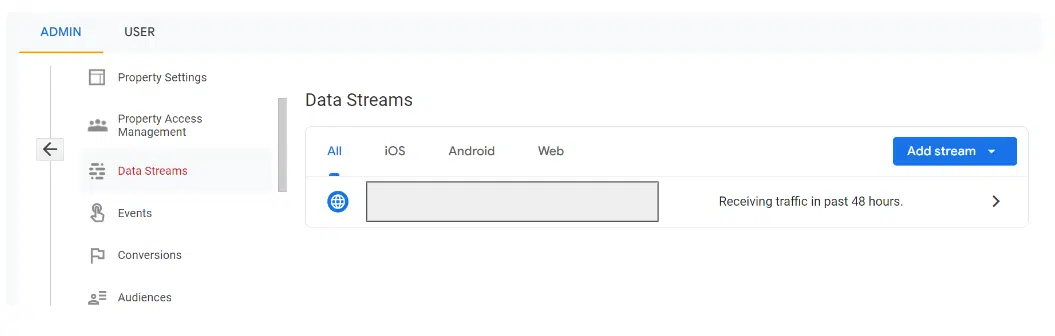
There are no more views in GA4. Instead, there are data streams. Those can be seen in Admin > Data Streams:

Data streams

If you had previously set up multiple views in UA, you’ll want to look at the data stream settings in GA4 to make sure you’re measuring what matters to your business. 

One of the benefits of GA4 is you can better see a more accurate reflection of the number of users. 

For example, a data stream can be a website or an app. If your business also has a native mobile app, that can be a plus. 

Moving on from UA to GA4

If you didn’t have GA4 set up and running by July 1, 2022, you will not have a true apples-to-apples YOY comparison for July 2023 data. So be careful how you report the numbers. 

If you have no choice but to show UA data for the previous year, include a big asterisk along with an explanation. Hopefully, this article provides a little context and backup info when you’re asked why.


Opinions expressed in this article are those of the guest author and not necessarily Search Engine Land. Staff authors are listed here.


Related stories

New on Search Engine Land

@media screen and (min-width: 800px) { #div-gpt-ad-3191538-7 { display: flex !important; justify-content: center !important; align-items: center !important; min-width:770px; min-height:260px; } } @media screen and (min-width: 1279px) { #div-gpt-ad-3191538-7 { display: flex !important; justify-content: center !important; align-items: center !important; min-width:800px!important; min-height:440px!important; } }

About the author

Adam Proehl

Adam Proehl is Partner & Co-Founder at NordicClick Interactive, a full-service digital agency with local and national clients, based in Minneapolis.
In digital marketing since 1998, Proehl has spoken at numerous national and international conferences, including SMX. He is a current Advisory Board Member for the Paid Search Association.

https://searchengineland.com/ua-vs-ga4-metrics-key-differences-429093


Why people hate the Google Analytics 4 user interface

Marketers are not happy with the Google Analytics 4 user interface (UI).

In fact, social media has been inundated with complaints about the Universal Analytics replacement – but it’s concerns over the UI that have been dominating the conversation.

So, is the GA4 UI really as bad as some are claiming? We spoke to three digital marketing experts to find out…

‘Usability is poor – but hang in there!’

Janet Driscoll Miller, president and CEO of Marketing Mojo, isn’t a fan of GA4’s UI but said “it’s not terrible”. She believes the difficulties that arise are due tot he platform being so new and different to Universal Analytics. “I don’t think Google did a very good job with usability in the design of the interface,” she tells Search Engine Land.

  • The settings and layout aren’t intuitive – “For example, if you create an Explorations report, you must first essentially import the dimensions and metrics you’d like to pull from in the first settings column, then pull from those into the second column which creates your data visualization. That’s certainly different than UA and not necessarily very clear to new users.”
  • Google needs to make some tweaks – “I think I speak for most Google Analytics power users here, they really need to add back the Annotations feature. It was a great UA feature and likely isn’t difficult to program (it’s literally a note and a date) but it was so helpful to many of us, especially when doing forensic or troubleshooting projects and working with large teams.”
  • Fix the sharing of Explorations reports – “When you currently create and share an Explorations report with others, you a) cannot limit who it is specifically shared with and b) those that it is shared with cannot change the report date range. Currently for others to change a shared report’s date range, the user must make a copy of the report so that user becomes that new report copy’s owner and then the date can be altered.”

If you’re struggling to navigate the new UI, simply keep practicing, Miller said.

“The more you become accustomed to how GA4 works, the easier it will get over time,” she said. “Change is hard, but this is here to stay. Before too long, we’ll all be much better with it. Hang in there!”

‘GA4 lacks basic capabilities – but we’ll get used to it’

Independent contractor and advisor, John Erikson, has been feeling increasingly frustrated with the GA4 UI. Universal Analytics was more straightforward and easier to navigate, which made simple tasks, like creating reports, much easier to carry out, he said.

Erikson explained:

  • No ability to use regex in the search box: “You can only search one phrase at a time which is very limiting. The only way I could find to filter by URL patterns was to set up Audiences. But Audiences have to be set up in advance, cannot be edited/changed, and the regex is limited to 100 characters so I had to split long patterns in to many chunks to build audiences.”
  • Problems arise if URL structures are tweaked: “If anything changes in the site in URL structure (which is guaranteed to happen many times in the future), the audience becomes obsolete and no way to look backwards.”
  • Time-consuming mistakes: “If you make any mistake in creating an Audience, you have to discard what you did and create a new one.”
  • Segments/dimensions issues: “On selecting segments/dimensions in GA4, instead of the ability in Universal to select/deselect one or more segments in a single list and click apply, you have to open customization or add comparison, click add filter, select a dimension from a long dropdown, then select dimension value from another dropdown, then apply (and you can only select one). Granted it is only a few seconds difference, but when you look at many different patterns every day, it becomes frustrating to repeat those excess UI moves over and over when you used to do it faster.”
  • Clumsy design: “That same dropdown structure is used in creating/editing GA4 reports. The dropdown lists are long and it is hard to find what you are looking for.  You can type in partial names and more quickly find them once you know them, but initially it is very hard to scroll through them all and find what you want. Also, you can only select one so it is hard to look at multiple dimensions/values. I do find it clumsy to use.”

Despite Erkison’s issues with the new platform, he realizes it’s here to stay and is confident he will get used to it and adapt.

“It’s just frustrating when you’ve used a system that works well for many years and see it replaced by a supposed improvement that is just harder to use and lacks such basic capabilities,” he added


Get the daily newsletter search marketers rely on.


‘GA4 is missing the simplest functions’

Chris Fox, independent analytics strategist, has also been experiencing problems with GA4’s UI. He notes that simple functions that were present in UA are now either completely missing or are more complicated and time-consuming to perform. He explained:

  • “Time Series charts can only show data at the day level and cannot be changed to view data at a Week/Month level.”
  • “You have to edit reports to be able to use basic dimensions like Landing Page in a Traffic report.”
  • “Segments are gone and instead we have ‘Comparisons’, which don’t have preset options and do not allow you to save the ‘Comparisons’ you create like you could with Segments.”
  • “If you want to add a filter to both dimensions in a report with a secondary dimension, you cannot do it in the table — rather, you have to filter one in the table and the other at the report-level at the top of the page (or both at the report-level).”
  • “When you edit a report to add metrics, you are limited to 12; so I’m often editing a report just to view a certain metric and then resetting back to the previous configuration.”
  • “Before, if I wanted to look at a visualization of monthly traffic for the last year, I just had to change the date granularity in the line chart on the Channels report to ‘Monthly.’ To do that in GA4, I’d have to download the data and create the chart myself in Excel/Tableau/etc.”

Venting his frustrations, Fox told Search Engine Land that these unnecessary, time-wasting changes have made GA4 “feel like a free edition of the full product which was Universal Analytics”.

Unfortunately, he joins a long list of marketers that have been making the same complaints about the GA4 UI.

Why we care: If enough people are experiencing the same problems with GA4 and these issues are then reported to Google, the search engine may review its product to make necessary changes. In the event it doesn’t, marketers will be forced to come up with their own solutions – and it will undoubtedly be easier to come together in order to brainstorm ideas.

Deep dive. For more information on how to migrate to GA4, read Google’s ‘Learn how to make the switch‘ guide.


Related stories

New on Search Engine Land

@media screen and (min-width: 800px) { #div-gpt-ad-3191538-7 { display: flex !important; justify-content: center !important; align-items: center !important; min-width:770px; min-height:260px; } } @media screen and (min-width: 1279px) { #div-gpt-ad-3191538-7 { display: flex !important; justify-content: center !important; align-items: center !important; min-width:800px!important; min-height:440px!important; } }

About the author

Nicola Agius

Nicola Agius is Paid Media Editor of Search Engine Land after joining in 2023. She covers paid search, paid social, retail media and more. Prior to this, she was SEO Director at Jungle Creations (2020-2023), overseeing the company’s editorial strategy for multiple websites. She has over 15 years of experience in journalism and has previously worked at OK! Magazine (2010-2014), Mail Online (2014-2015), Mirror (2015-2017), Digital Spy (2017-2018) and The Sun (2018-2020). She also previously teamed up with SEO agency Blue Array to co-author Amazon bestselling book ‘Mastering In-House SEO’.

https://searchengineland.com/why-people-hate-google-analytics-4-user-interface-428994


8 Twitter alternatives marketers need to know about

Marketers have been growing increasingly concerned about advertising on Twitter.

So much so, Twitter’s US ad revenue alone is down 59% year-on-year with huge brands such as Coca-Cola, Jeep and Unilever all pulling their campaigns, according to an internal presentation.

But where are marketers going if Twitter is no longer their go-to option for advertising? Below, we take a look at eight Twitter alternatives that advertisers should be paying close attention to…

1. Threads

Active users: 30 million

Meta’s Twitter alternative Threads launched yesterday, with 5 million people signing up in the first few hours. Companies to sign up within minutes of its launch include Netflix, HBO and Billboard.

Meta CEO Mark Zuckerberg said he believes Threads will be bigger than Twitter but it will take time.

  • “I think there should be a public conversations app with 1 billion+ people on it,” he said. “Twitter has had the opportunity to do this but hasn’t nailed it. Hopefully we will.”

Threads is available in 100 countries, including the U.S., UK, Australia and Canada, via the Apple and Google app stores. However, due to regulatory issues, it is not yet available in the EU.

Marketers can’t currently place ads on Threads, but it is expected Meta will be announcing ad space in the not-too-distant future. It’s worth noting that Meta’s other brands, such as Instagram, launched without ads. Now, advertising is one of Instagram’s biggest sources of revenue.

2. Bluesky

Active users: 200,000

Bluesky is an invite-only decentralized social networking platform that already has a string of high-profile users such as model Chrissy Teigen and US politician Alexandria Ocasio-Cortez.

However, the app, which started off as a Twitter project but is now an independent company, is still in its early testing period so has not yet been fully rolled out. Currently, people can join a waiting list to sign up when the app fully launches, but a date for this is yet to be confirmed.

Bluesky has said that it doesn’t want to make advertising its dominant business model and so had “been exploring other avenues of monetization”. However, as the app is so new, company bosses could still take any direction and so advertisers are paying close attention.

3. Substack Notes

Active users: 35 million

Substack Notes is a platform for independent writers to publish short-form posts and share ideas. Both writers and readers can use the site to share posts, links, images, quotes and more with their Substack network, and also join in conversations with other writers and fellow readers.

The app was rolled out to all writers and readers in April 2023. Its creators have described the site as a new platform designed to “inspire, enlighten, and entertain readers based on the writers you’re already reading.”

The company’s founder Chris Best has made clear his reluctance to rely on advertising for revenue since the beginning. However, active users are openly using subscriptions and sponsorships to earn more money from the website.

4. Post

Active users: 430,000

Post is a platform that allows its users to access news from premium publishers without subscriptions or adverts. The app which is still in beta, is “designed to give the voice back to the sidelined majority; there are enough platforms for extremists, and we cannot relinquish the town square to them,” according to its founder Noam Bardin, former CEO of Waze.

Unfortunately, Post’s zero-ads policy isn’t exactly the best news for marketers. Although advertisers will still play a role on the site, what they are able to post will be restricted. For example, instead of posting promotional campaigns, marketers will be limited to sharing relevant, informative and engaging content.

The app operates using a points-based currency, which can be exhanged to read full articles. Users can also tip people or publications. To get more points, users have to cough up real money.

5. Mastodon

Active users: 10 million

Rolled out in 2016, Mastodon is a popular Twitter alternative and received a surge in new sign-ups after Elon Musk took-over its rival. It operates in a similar fashion to Twitter in the sense that users can post opinions, join conversations in their news feeds, upload pictures and more. However, the key difference is that Matsodon has a decentralized network and is nonprofit.

Unfortunately for marketers, Mastodon has stated that it will never serve ads or use an algorithm to promote some profiles over others. But other options are available that may interest advertisers such as affiliate marketing, sponsorships and UGC campaigns.

6. Spill

Active users: 20,000

Spill is a new app, created by former Twitter employees, that aims to create a safe space for marginalized communities – especially for people of color and the LGBTQ+ community. The platform, which launched in January, is invite-only and is still a beta, currently only available on Apple’s OS.

The app already has a string of famous names on its books, including Lizzo, Amber Riley and Questlove, as well as its first bunch of advertisers confirmed. The platform is yet to reveal more information but promises “we’re only just getting started“.

More details are expected to be announced over the next few months.

7. Hive

Active users: 1 million

Hive is a mobile-only app which was praised as an excellent alternative to Twitter – especially when Musk came into play last year. However, although development of the platform is ongoing, the hype was short-lived and the app didn’t take off in the same way people had expected.

The platform functions in a similar way to Twitter but is different in that it claims to be free of algorithms. This means news feeds are displayed in chronological order as opposed to the order AI thinks you’ll prefer. The platform also rolled out a verification feature in June – however, unlike Twitter, Hive does not charge for this.

Hive doesn’t currently host adverts or business accounts, however, brands can still use it to promote their products and services by posting links that connect back to their brand’s site.

8. Spoutible

Active users: 240,000

Founded by Christopher Bouzy and Bot Sentinel, Spoutible is the only Black-owned social networking site. Launched in January, the app was created to provide a “safe, inclusive, and enjoyable online space” that has a “zero-tolerance policy for targeted harassment, hate speech, disinformation, and platform manipulation.”

Both solicited adverts and unsolicited content are prohibited on Spoutible. This means marketers cannot send direct messages to users about their products or services and they cannot host giveaways. Not adhering to Spoutible’s rules can result in your account being suspended. And if an account is suspended, there will not be an opportunity to get it reinstated in the future.

Why we care. Advertisers appear to be taking a step back from Twitter following Musk’s takeover last year. With that in mind, they’ll be looking for new platforms to advertise their campaigns on without sacrificing reach or quality. That may prove to be a tricky task as Twitter boasts 450 million active users globally.

Why advertisers are leaving Twitter. Marketers have been fleeing the social networking platform since Elon Musk acquired the platform for $44 billion in October and privatized the company. The billionaire put relationships with advertisers under strain by terminating key sales executives, promoting a conspiracy theory on the platform and reinstating previously banned Twitter users, such as Jordan Peterson, Andrew Tate and Rep. Marjorie Taylor Greene.

Advertisers have also been discouraged from using the platform following a sharp rise in hate speech and explicit content, coupled with an increase in ads for marijuana products and online gambling.


Related stories

New on Search Engine Land

@media screen and (min-width: 800px) { #div-gpt-ad-3191538-7 { display: flex !important; justify-content: center !important; align-items: center !important; min-width:770px; min-height:260px; } } @media screen and (min-width: 1279px) { #div-gpt-ad-3191538-7 { display: flex !important; justify-content: center !important; align-items: center !important; min-width:800px!important; min-height:440px!important; } }

About the author

Nicola Agius

Nicola Agius is Paid Media Editor of Search Engine Land after joining in 2023. She covers paid search, paid social, retail media and more. Prior to this, she was SEO Director at Jungle Creations (2020-2023), overseeing the company’s editorial strategy for multiple websites. She has over 15 years of experience in journalism and has previously worked at OK! Magazine (2010-2014), Mail Online (2014-2015), Mirror (2015-2017), Digital Spy (2017-2018) and The Sun (2018-2020). She also previously teamed up with SEO agency Blue Array to co-author Amazon bestselling book ‘Mastering In-House SEO’.

https://searchengineland.com/twitter-alternatives-marketers-need-know-429087


Unicorn sightings: The people who love Google Analytics 4 and why

Google Analytics 4 is better than Universal Analytics – at least, that’s what some marketers have been telling Search Engine Land.

While the new platform certainly has its fair share of haters, some advertisers seem to absolutely adore it and have been showering the tool with praise.

If you’re scratching your head wondering how on Earth they could have reached this conclusion, below, we’ve put together some of the feedback we received from these unicorns. Let us know if their explanations could persuade you to have a sudden change of heart.

1. GA4 is easier (when it’s been set up properly)

Tim Barlow, managing director of Attacat, says that GA4 is a superior tool to UA because:

  • “Customisation is easy.”
  • “When well set-up, GA4 is much easier for first-time users to get to grips with.”
  • “GA4 has a better data model – someone reading a blog post for 30 mins is a bounce in GA3. In GA4 they are the valued reader they are.”
  • “GA4 is designed for more than just websites whereas GA3 isn’t suitable for the multi-device/mixed on and offline world we now live in.”
  • “Consent is now a major issue in Europe. Google seems to be the only company properly investing in this issue – at least in the world of free or affordable Analytics.”
  • “Non-developers can achieve more with GA4 because GA3 invariably needed devs for any customisation. With GA4 you still need a dev involved but not as often.”

2. It’s more accurate

The unpopularity of GA4 is simply down to people not having enough time to learn how it works rather than it being a reflection of the tool itself, according to Drew Blumenthal, founder and CEO of Digital Drew SEM.

GA4 has a number of great features to offer the industry, once advertisers have the chance to understand how it works, he said:

  • “I personally think the interface is a lot sleeker than UA, but more importantly it is more accurate.
  • “With the loss of data through privacy policies, you need GA4 to be more accurate of the traffic coming in.
  • “GA4 also combines app, first-party data as well as cookie data, which is going to be a lot better long term. “

3. GA4 is powerful, flexible and creative

Digital marketer Stacey Chance admits that trying to understand how to use GA4 to its full capacity has definitely been a “learning curve”.

However, she pointed out that using events in the new tool is actually the same as it is in other analytics platforms, such as Heap, making the process straight forward than she originally realized, she said:

  • “Our team has found GA4’s features incredibly powerful and flexible.”
  • “The more we use it, the more we find creative, smart ways to leverage its features.”

4. It’s better than UA

The team at AS Marketing admit they found GA4 a bit tricky to navigate in the beginning, but since taking the time to understand how it works, they now think its a superior tool to its predecessor. They explain:

  • “Our team at my marketing agency has actually found GA4 to be better than Universal Analytics, because it focuses on events over a mass conglomerate of complex data with no meaning.”
  • “With so many companies doing digital marketing, focusing on engagement data and tracking that as events makes a lot more sense, which GA4 does a brilliant job of.”
  • “We also find the custom dashboards easier to set up and understand. We’ve migrated all our clients to GA4 and they’ve all been pleased with the new set up.”

Andrew Glenn, digital experience analyst and SEO Manager at Abbott, says that he is a huge fan of GA4. In fact, he tells Search Engine Land that he “loves” the new tool.

Explaining why he thinks it’s such a great platform, he said:

  • “GA4 is perfectly aligned to better segment audiences, learn about them and use the GMP to better serve what’s most important to those audiences.”

6. GA4 is robust and offers more flexibility

Freelance Java EE Developer Robert Nowak isn’t a huge fan of GA4’s interface and thinks some marketers may find it harder to use. However, overall, the new platform offers a bunch of benefits that have ultimately won him over. He says:

  • “I love the new options for event tracking – they are much more robust and offer a lot of flexibility.
  • “GA4 for me is a big bag – you throw in it all the data you can gather, and then you must figure out how to match pieces to filter that bag. Theoretically, this is better because you can make GA4 your own with your own setup and data you actually need instead of 100 reports you might never use in GA UA.

7. Taking pipelining possibilities to a new level

Digital strategist at Marketing Doctor Richie Moczo and his team are now confident in using GA4 after taking the time to learn how to use the tool properly. He personally now prefers this tool to its predecessor because of the capabilities it offers:

  • “GA4 takes data pipelining possibilities to a new level with it’s free integration with Big Query. For example, with GA4 you are limited to 25 params per event, but if you want to exceed that limit, you can send your additional parameters to big query.
  • “In UA this feature was only an option to Marketing 360 customers!
  • “Don’t make up reasons to avoid using GA4. Some of the most popular features from UA were slow to be added to GA4, however newly added GA4 have been flying into place!”

Get the daily newsletter search marketers rely on.


Why we care

GA4 has received a lot of flack from the digital marketing world following the sunset of UA. But Google’s new tool isn’t going away anywhere soon, so we had all better get used to it.

With that in mind, perhaps it’s time to let our guards down and embrace the many advantages GA4 has to offer – because it looks like there are a lot!

Why GA4 is causing issues for some marketers

Although the advertisers we spoke to above are fans of the new analytics platform, they acknowledged it’s easy to understand why some marketers might not like it.

In addition to people in general typically not responding well to change, managing director of Attacat, Tim Barlow, thinks GA4 was rolled out before it was truly ready. Despite believing it’s a superior tool to UA, he says there are a number of issues with GA4, such as:

  • “Some of the language used in the interface is awful! For example, the ‘Users by Session default channel group over time’ – why not just stick with ‘Session source’?”
  • “The out-of-the-box set-up is deliberately generalized as GA4 is designed to cover so much more than a simple website. This means however that the default reports are close to useless as they have far too many irrelevant metrics.”
  • “The lame attempt to promote AdSense by including advertising metrics causes extra confusion.”
  • “Gaining the real benefit requires a lot of set-up/getting up to speed on the tool’s capability and that’s not a journey those who only want the real basics want to have to go through.”
  • “Google released GA4 way too early so when people looked at it, it was missing so many features as to be virtually unusable. For example its frustrating that you can only look at daily data rather than weekly or monthly data.”

Despite flagging these issues, Barlow concludes that he is confident Google will take action and improve its product. He adds: “I have faith though that all these features will come with time.”

Deep dive

For more information on how to migrate to GA4, read Google’s ‘Learn how to make the switch‘ guide.


Related stories

New on Search Engine Land

@media screen and (min-width: 800px) { #div-gpt-ad-3191538-7 { display: flex !important; justify-content: center !important; align-items: center !important; min-width:770px; min-height:260px; } } @media screen and (min-width: 1279px) { #div-gpt-ad-3191538-7 { display: flex !important; justify-content: center !important; align-items: center !important; min-width:800px!important; min-height:440px!important; } }

About the author

Nicola Agius

Nicola Agius is Paid Media Editor of Search Engine Land after joining in 2023. She covers paid search, paid social, retail media and more. Prior to this, she was SEO Director at Jungle Creations (2020-2023), overseeing the company’s editorial strategy for multiple websites. She has over 15 years of experience in journalism and has previously worked at OK! Magazine (2010-2014), Mail Online (2014-2015), Mirror (2015-2017), Digital Spy (2017-2018) and The Sun (2018-2020). She also previously teamed up with SEO agency Blue Array to co-author Amazon bestselling book ‘Mastering In-House SEO’.

https://searchengineland.com/people-love-google-analytics-ga4-why-428991


10 things we hate about Google Analytics 4

Google Analytics 4 hasn’t exactly got off to the best start with marketers.

In fact, it’s getting pretty awkward – some advertisers are so disappointed with the new program that they’ve even been hosting funerals for its predecessor, Universal Analytics.

But what is it about GA4 that’s got the world of digital marketing so riled up?

We decided to ask our readers in a GA4 readiness poll to find out. Below, we’ve put together a list of the most common complaints. Let us know if you and your team can relate…

1. User interface

GA4’s user interface was hands-down the biggest issue our readers reported.

The UI was described as “slow”, “laughable” and a few other adjectives we’re opting not to publish.

Independent sales and marketing contractor, John Erikson, told us:

  • “When on selecting segments/dimensions in GA4, instead of the ability in Universal to select/deselect one or more segments in a single list and click ‘apply’, you have to open customization or add comparison, click add filter, select a dimension from a long dropdown, then select dimension value from another dropdown, then apply (and you can only select one).
  • “Granted it is only a few seconds difference, but when you look at many different patterns every day, it becomes frustrating to repeat those excess UI moves over and over when you used to do it faster.”
  • “That same dropdown structure is used in creating/editing GA4 reports. The dropdown lists are long and it is hard to find what you are looking for. You can type in partial names and more quickly find them once you know them, but initially it is very hard to scroll through them all and find what you want.
  • “Also, you can only select one so it is hard to look at multiple dimensions/values. I don’t know the answer to fixing this, but I do find it clumsy to use.”

2. Data lag

Another major concern for marketers has been the delay of same day data on GA4.

Advertisers have stressed that they need the ability to monitor performance constantly and are confused as to why the new analytics platform doesn’t appear to have this function.

Ron Weber, Sr Director at Actian, explained:

  • “The data latency is a joke, taking 12-24 hours to report on what is happening prevents this from being an actionable tool.”
  • “I wish I wasn’t backlogged for the past few years and thus could/would have realized this before.”
  • “Maybe Google will just move the computing power from UA -> GA4 so that this will change? [praying]!”

3. Data discrepancies

Marketers raised concerns about discrepancies on GA4 too.

Differences in information had resulted in some worrying that the data being served therefore couldn’t possibly be accurate, resulting in people questioning if they can trust GA4.

Sabine Walton, Senior SEO Manager at Handlerbund Marketplace, told us:

  • “What I find problematic is the discrepancy between GA4 API and the respective Looker Studio Connector. Dimensions that are present in the API and even per default in the GA4 reporting interface are apparently missing in the Looker Studio connector, e.g. Landing Page dimension.”
  • “The Google Team seems to work on that, because at least the landing page dimension is now present. But that also means that I have to minus two days before UA data collection comes to an end – then adjust and check my numerous reports again and again.
  • “I am as ready as the tool is, but I certainly do not look forward to working solely with GA4. I am also thinking about looking for alternative tools to GA4.“

4. Hard to use

Marketers across the board have been reporting that GA4 is incredibly difficult to use.

Even seasoned advertisers are finding it challenging trying to navigate their way around the new platform.

SEO and marketing consultant Jason McDonald told Search Engine Land:

  • “GA4 is a disaster. It is so much harder to use than UA, and completely non-intuitive.”
  • “It is nearly impossible to drill down by clicking as was possible than UA.
  • “It is the Windows Vista of Google Analytics, and all the cognoscenti are afraid to say publicly that it is garbage. But everyone knows it is garbage.”

5. Lack of resources

With so many marketers struggling as they try to figure out GA4, many are questioning why Google hasn’t provided more educational resources explaining how the new tool works.

The marketing team at Storis told us:

  • “I found most of the answers that I was stuck on from taking private courses through SMX or finally getting to a knowledgeable Google team member.
  • “Their documentation really lacked especially where there were major functional changes or gaps. I kept trying to figure out how to replicate things that weren’t brought over.
  • “Also, many of the people on Google’s own team aren’t up to speed making support calls confusing.”

6. No basic option

Some advertisers explained that marketing doesn’t wear a one size fits all hat.

While some of the more complex settings may suit some, other professionals, such as bloggers, would just like access to basic tools on GA4 and are wasting time and money trying to understand features they don’t need to use.

Eb Gargano from Productive Blogging told us:

  • “One of the things I have observed is that many bloggers and online businesses have been totally losing their minds over GA4 – wasting days (and in some cases weeks) stressing over this, when their time could have been much better spent elsewhere.”
  • “The truth is most bloggers and online businesses need only a simple setup and an understanding of the basic reports. But no one is saying that, and online business owners are being scared into believing they need to spend lots of money on expensive courses and a lot of time creating multiple custom reports.”
  • “I think it’s a real shame there isn’t a ‘GA4 Lite’ for users who only need basic data.”

7. Lack of features

Another common complaint from marketers responding to our poll was the lack of features GA4 has to offer in comparison to Universal Analytics.

Marketers seemed particularly bothered by the removal of attribution features.

Elizabeth Rule, account manager and local SEO analyst for Sterling Sky, told us:

  • “I’ve been using GA4 as much as possible the past month to get used to it, but honestly it just feels like a clunkier version of GA3 with fewer features that I actually want to use.
  • “I find myself wanting to go back to GA3 every time I use GA4 – and it’s not because I’m just too used to it. Some of the features I use every day are missing or extremely complicated to find in GA4.”

Get the daily newsletter search marketers rely on.


8. Difficulty recreating reports

Clients and marketers alike have desperately been trying to recreate reports in GA4 that they previously relied upon when using Universal Analytics.

Unfortunately, it seems for many that this task has proved far more difficult than it should have been.

Tom Demers, co-founder and managing partner of SEO and PPC agency Measured SEM, told us:

  • “Clients are frustrated with recreating their existing reports in GA4, particularly for specific edge cases, recreating dashboards in third-party reporting tools – including Looker Studio.”
  • “There is also a lot of work around recreating events / goals within GA4 (and confusion around not seeing those events in certain reports).”

9. Reports

Marketers also complained that they were struggling to simply create reports in GA4 – an issue that didn’t impact them when they were working with UA.

According to many marketers who took part in our poll, Google has made many unnecessary changes when it comes to building reports, making their workload more difficult.

Eric Bushaw, search engine optimization manager at G5, told us:

  • “In time, I think GA4 will enable greater insights than UA did.”
  • “With that said, some of the seemingly arbitrary changes to how reporting can be done are frustrating.
  • “Eliminating views, restrictions around how custom segments can be used, and other seemingly unnecessary changes are going to make life difficult for us once UA is really gone.”

10. Bugs

Several marketers contacted Search Engine Land to report bugs within GA4, claiming many features weren’t working as intended. Issues being flagged included syncing issues with Looker Studio Dashboard and AMP new script not working.

SEO consultant John McAlpin told us:

  • “The platform still has a lot of bugs, and we find ourselves spending more time figuring out why attribution is not properly labeled and why the data is inconsistent.”

Let’s not panic

Marketers have found the enforced migration from Universal Analytics to GA4 tough, so it can be reassuring to know this challenge is being felt across the industry.

But regardless of how difficult the adjustment has been, search marketing expert and SMX Advanced speaker Kayle Larkin told Search Engine Land it’s important marketers get on board with Google’s latest analytics program as it will likely be around for a long time. She said:

  • “There’s an age-old saying that the grass isn’t always greener on the other side.”
  • “People use the internet in completely different ways than in 2012, and I see GA4 as Google’s answer for future-proofing website analytics. The industry needs a free option.”
  • “Marketers need to pause for a moment and think about what information is really useful and helpful – what they need to know.”
  • “Himanshu Sharma said it well on LinkedIn: ‘It is important to remember that we are not in the business of data retrieval. We are in the business of data analysis to improve ROI.'”
  • “Either way, you need to understand your data and how that supports your marketing initiatives.”

Larkin went on to explain that change within any platform and any industry can cause people to panic. But as time passes, confidence and familiarity increases, causing attitudes to change. She concluded:

  • “Everyone was mad when Facebook updated their interface and ‘couldn’t find anything’. It was ‘horrible’ and ‘the end of Facebook.'”
  • “Because we use Facebook daily, that was quickly forgotten, and no one even remembers what the old interface looked like.”
  • “The response to the GA4’s interface – you see the same reaction when any platform changes its interface. People do not like change.”
  • “But GA4 is so customizable, and with LookerStudio – there are a lot of options for getting the reports to visualize information and insights in a meaningful way.”

Did deeper

If you’re struggling to navigate GA4, why not sign up for a GA4 training course?

Alternatively, for free information and resources on how to use GA4, read the Google Analytics 4 account training guide and support guide


Related stories

New on Search Engine Land

@media screen and (min-width: 800px) { #div-gpt-ad-3191538-7 { display: flex !important; justify-content: center !important; align-items: center !important; min-width:770px; min-height:260px; } } @media screen and (min-width: 1279px) { #div-gpt-ad-3191538-7 { display: flex !important; justify-content: center !important; align-items: center !important; min-width:800px!important; min-height:440px!important; } }

About the author

Nicola Agius

Nicola Agius is Paid Media Editor of Search Engine Land after joining in 2023. She covers paid search, paid social, retail media and more. Prior to this, she was SEO Director at Jungle Creations (2020-2023), overseeing the company’s editorial strategy for multiple websites. She has over 15 years of experience in journalism and has previously worked at OK! Magazine (2010-2014), Mail Online (2014-2015), Mirror (2015-2017), Digital Spy (2017-2018) and The Sun (2018-2020). She also previously teamed up with SEO agency Blue Array to co-author Amazon bestselling book ‘Mastering In-House SEO’.

https://searchengineland.com/google-analytics-4-we-hate-428942


Get organized: PPC ad campaign structure in a changing world

I had the privilege of moderating a panel at SMX Advanced on PPC ad campaign structure.

I had an enlightening discussion with Andrea Cruz, Director of Client Strategy at Tinuiti, and Greg Kohler, Digital Marketing Manager at ServiceMaster Brands. Here’s a recap of the session.

Is Performance Max the only way forward for campaign structure?

Performance Max is geared toward ecommerce, not B2B or lead gen. There’s not enough direct control and segmentation. Kohler said they’ve tried Performance Max and haven’t had success. 

Cruz feels that for B2B lead gen, Performance Max works here and there for volume but struggles with quality. For ecommerce, it’s a different story, as Performance Max helps marketers find new audiences.

I have found that Performance Max has not given B2B advertisers what we need for lead gen.

How will AI affect campaign structure?

AI won’t affect structure but will be helpful for small or new advertisers (not experienced marketers), Cruz believes. AI helps you know if you covered all your settings properly.

It will also be great for new advertisers and business owners who want to launch a campaign quickly, according to Kohler. AI acts as a checklist for campaign builds.

The concern is that it’s full of pitfalls. For example, opting into display and search partners and targeting mobile apps. AI will love this to drive impressions, but new advertisers may not know you shouldn’t start with that.

Mike Ryan highlights this in his LinkedIn post. AI is a fast-learning intern, but you still need to check their work.

Are keywords going away?

In the past, we’ve seen campaign organization by keywords, match types, etc. Do keywords and match types even matter anymore? 

Cruz believes the Google best practice of following website structure is good. Focus on categories, products or the problems you’re trying to solve if you’re B2B.

Meanwhile, Kohler points out that as SKAGs and ultra-segmentation are gone, we must think about where we’re driving people on the site and the ad group’s theme.

With the advent of RSAs, you want to get as much data on each headline as possible. Consider condensing ad groups and getting more data so Google can optimize. You no longer need 200 ad groups for a single theme.

I pointed out that it’s all about giving up data to the machine. Granular ad groups don’t provide enough data for the machine to learn and optimize.

What about match types? 

Kohler hopes we don’t lose the match types we have. He’d be surprised if Google removes them because advertisers use them strategically. Maybe phrase could go away.

Exact and broad match each have value combined with smart bidding – broad helps find one-off searchers. But he doesn’t think match types will go away.

Jumping back to the question of whether keywords are going away: If Google were to get away from keywords, it would be one of the biggest blunders ever on their part because keywords are so powerful. You’re bidding on someone looking for your exact service.

Keywords, and the intent they provide, are why people spend so much money advertising on Google. If this goes away, it blurs the line between Google and other advertiser platforms.

I agree. Getting rid of keywords turns search into paid social by taking away intent, which is the big selling point of search.

However, Cruz thinks match types are going away whether we like it or not. This is what we’ve seen historically – lines are blurred between match types. 

None of the new ad formats and features are keyword-based – Performance Max, DSA, etc. While paid search is the only place where we have intent via keywords, Cruz still thinks keywords will go away. She thought it would happen at this Google Marketing Live, but they didn’t pull the plug.

Also, she learned early in her career that there is always the “milk chocolate” and “chocolate milk” issue. How do we make the algorithm understand these differences? 

Keywords also might go away and be replaced with signals. Privacy has made Google put the brakes on a bit.

DSAs: Are you using them?

Cruz has tested them, and they work well for a few accounts. Dynamic search ads (DSAs) are a good way to mine data, find queries we might have missed, and understand Google’s interpretation of the landing pages.

Kohler doesn’t actively use them, but generally, the best practice is to use DSAs to find queries and build a campaign using these specific queries.

Kohler thinks there has been a shift from keywords in the local service space. Local service ads are all about signals. Pick your vertical, location, and budget. Then Google does the rest. You don’t get to pick keywords or negatives. 

So there is a path away from keywords when we look at it this way. Will Google continue to push away from keywords or let us continue to bid on specific keywords?

How are you approaching campaign organization for local services today?

Kohler says they’re keeping it simple and condensed. They don’t break things out too much.

Don’t try to narrow down to the specific users you think you want to show for. Keep it more open and see how things go.

Look at demographics and geos and then narrow down based on what’s working. A huge pitfall is assuming you know your perfect customer. This will limit your impressions too much and you won’t have reach.

Plus, how correct is Google’s data on this? It’s better to keep things open to the users searching for your service as long as they’re in the correct local area.

I noted that a lot of people treat search like broadcast. Broadcast tactics don’t work well for search. Don’t limit it.


Get the daily newsletter search marketers rely on.


What are the nuances for B2B campaign organization?

Cruz breaks B2B advertisers into two sub-segments based on spend.

For advertisers spending less than $100,000 monthly, the challenge is to drive as many leads as possible and cover the whole website.

But to get the best results, we need to give as many signals as possible – which means we are spread too thin at this budget level.

Instead, focus on the areas where you have volume and good content to send people to. This prevents advertisers from having many tiny campaigns spending $20 per day. Group spend and intent to drive better performance.

With large advertisers spending more than $200,000 per month, you can really test something new. You can use broad match because you have enough data to feed the algorithm.

Use first-party data! Tell Google this person is worth 10x more than just any lead. B2B is expensive because everyone wants to talk to the big enterprise, so many people are competing on the same keywords.

First-party audiences and privacy

Google teased in Google Marketing Live that we will have better data connections and easier ways to bring first-party data in. So how do privacy and first-party data play in?

Cruz says that either the client is very into privacy and has all the data, or people are very scared. No one wants to get fined.

Google has not addressed concerns adequately. Cruz would love to see Google vet small businesses for privacy or have Google-approved attorneys who can recommend compliance. She doesn’t think Google will actually do this, but it would be good to see.

Kohler is not using a lot of first-party data for targeting or segmentation. It’s important to talk to your lawyers first because Google has clarified that privacy is your responsibility. 

Kohler would love to see a best practice documentation from Google on privacy policy wording, etc. But then Google becomes liable, so they probably won’t do this.

For Kohler, the risk isn’t worth it at this point. They can do other things to target their audience. 

Also, how much do you want to tell Google about your specific customers? Are in-market audiences just being built off other people’s customer data?

This is a bit “conspiracy theory” but we are giving Google data to help build audiences for competitors.

I feel that for B2B, first-party audiences are awesome because it’s hard to find B2B buyers. But then you get privacy concerns, plus you’re giving away your data.

The privacy angle gets lost with automation and smart bidding but it’s important to remember.

Does smart bidding play into campaign organization at all?

Cruz doesn’t create campaigns based on smart bidding, but she focuses on the campaign objective and the best bid strategy. 

Focus on the objective/goals first, then build your campaigns.

What’s your overall best tip for streamlining campaign management?

Kohler says to figure out your weekly and monthly to-dos and stick to them. You need a to-do list or you’ll be jumping around and forgetting things.

Have a ClickUp or other task manager checklist to know you did them.

Use custom rules and actions in Google Ads Editor. If you encounter a mistake or pitfall, create a rule to flag these in the future.

For example, you can check to see if search partners are enabled, check for location targeting, etc. Copy and paste the rule to every account. Then you won’t have this problem again. Rules and scripts are underused!

Cruz wants advertisers to forget that SKAGs ever existed! We don’t need these.

Consolidate instead of breaking out. Is the theme of this campaign or ad group accurate? That is the key.

Regarding the buyer journey – Cruz still segments by buyer journey. Early-stage campaigns should be separate from late stage. Intent is different.

Kohler says to think about where the campaigns fall in the customer funnel. By breaking it out, you can focus on where your dollars are spent and bid more on lower funnel campaigns.

I want to thank Andrea Cruz and Greg Kohler for participating in this engaging panel! Advertisers came away with lots of actionable tips for campaign organization.


Opinions expressed in this article are those of the guest author and not necessarily Search Engine Land. Staff authors are listed here.


Related stories

New on Search Engine Land

@media screen and (min-width: 800px) { #div-gpt-ad-3191538-7 { display: flex !important; justify-content: center !important; align-items: center !important; min-width:770px; min-height:260px; } } @media screen and (min-width: 1279px) { #div-gpt-ad-3191538-7 { display: flex !important; justify-content: center !important; align-items: center !important; min-width:800px!important; min-height:440px!important; } }

About the author

Melissa Mackey

Melissa Mackey is associate director of paid search at MerkleB2B. A veteran PPC marketer, she helps clients achieve maximum ROI from paid search. Mackey contributes regularly to several industry publications, writing on PPC strategy. Mackey has spoken at industry conferences such as SMX Advanced, SMX Create and HeroConf.

https://searchengineland.com/get-organized-ppc-ad-campaign-structure-428978


Google Ads Editor version 2.4 is out with 8 new features

Google has just released its Ads Editor version 2.4, and advertisers can take advantage of several new features and updates. Let’s see what’s new.

New Features:

  1. Video asset library. All of the videos used in the account can now be found in the video asset library.
  2. Multi-account overview. The “Overview” tab now shows a summary across multiple accounts. Previously, it could only show one account at a time.
  3. Google Drive integration. With Google Drive integration, Editor now supports export to or import from Google Drive. You can also share files in Drive with other users. But Google Sheets is not currently supported with this release.
  4. Scheduled Post. You can now schedule your posts for a specified time.
  5. Editable product groups and listing groups. Product groups and listing groups can now be added and modified within Editor, in a dialog that makes it easier to view and maintain their tree-like structure for campaigns using Merchant Center product feeds. Previously, the only way to manipulate product groups and listing groups was via CSV import.
  6. One YouTube Network. All Video campaigns now target YouTube Search and YouTube Video networks, so these options are removed from Editor. Only the Video Partners setting remains the same.
  7. Video enhancement opt-out. There is a new setting to enable or disable video enhancements for Video campaigns.
  8. Download. “Download,” which was previously known as “Get recent changes” now allows you to download previously downloaded campaigns, item types, and optimize downloaded data or the combination of all 3 choices. You can also schedule downloading a campaign or other item types.

Deprecated Feature:

Google deprecated one feature, the updated validations for geo targeting and exclusion methods. Google said the “Area Of Interest (“People interested in your locations”) geo targeting method is mostly deprecated. It’s only allowed for Discovery campaigns. In addition, the Don’t care (“People in or interested in…”) exclusion method is disallowed in Search, Display, Shopping, and Performance Max.”

Why we care. The new features can help improve the efficiency and effectiveness of your Google Ads campaigns. Hopefully some of these 8 new features can help you be more efficient with your Google Ads workflows and campaigns.

Here is the full list of changes.


Related stories

New on Search Engine Land

@media screen and (min-width: 800px) { #div-gpt-ad-3191538-7 { display: flex !important; justify-content: center !important; align-items: center !important; min-width:770px; min-height:260px; } } @media screen and (min-width: 1279px) { #div-gpt-ad-3191538-7 { display: flex !important; justify-content: center !important; align-items: center !important; min-width:800px!important; min-height:440px!important; } }

About the author

Barry Schwartz

Barry Schwartz a Contributing Editor to Search Engine Land and a member of the programming team for SMX events. He owns RustyBrick, a NY based web consulting firm. He also runs Search Engine Roundtable, a popular search blog on very advanced SEM topics. Barry can be followed on Twitter here.

https://searchengineland.com/google-ads-editor-version-2-4-is-out-with-8-new-features-429001


How to harness DSA wins in Performance Max

Dynamic search ads (DSA) have been a staple in Google Ads and Microsoft Ads management for years.

This powerhouse campaign type/setting enhances advertisers’ ability to use their organic search strength to inform their PPC campaigns. 

By allowing Google to crawl their site and find the right landing page for a user’s query, advertisers can leverage well-optimized content and turn it into compelling headlines. 

DSAs

One of the reasons DSA was so powerful is that it could function with feed-specific pages or a full index of the site, allowing advertisers to target specific categories effectively. 

DSA was particularly popular in industries such as:

  • Automotive. 
  • Travel. 
  • Real estate.
  • Ecommerce.
  • Any business with numerous landing pages to cover their products or services. 

Essentially, it allowed brands to focus on core objectives rather than having to factor in every single landing page and budget for each one.

DSA also played a significant role in discovering keyword concepts for other campaigns. Advertisers could bid on these exact concepts with exact match, or leverage predictive AI with broad match. 

However, dynamic search ads appear to be phased out in favor of Performance Max (PMax) campaigns. 

Advertisers have noted a decline in DSA performance for the past few months (namely, a lack of serving) and accounts running all campaigns have seen PMax ramp up.

Declined PSA performance
April 2023 performance comparing a PMax campaign with branded terms filtered out, DSA, traditional branded campaign, and Spanish campaign.

Performance Max supports every ad type within Google:

  • Search: Ads serving on the SERP/SERE (search engine result page/search engine result experience).
  • Display: Visual ads serving on third-party sites.
  • YouTube: Video ads serving on youtube or display spots depending on the format.
  • Discover: Part visual and part text ads serving on Google Discover.
  • Local ads: Google Business Profile-oriented ads serving on the map section of the SERP/SERE.
  • Shopping: Product listing ads that serve on the SERP/SERE, youtube, and display spots.

Advertisers are actively forging the rules of engagement for PMax, which represent an operational shift for those accustomed to running dynamic search ads. 

First and foremost, this means accounting for the visual placements (display, video, discover), which hold top-of-funnel value and cheaper auction prices. 

Yet, it also means adjusting expectations for PPC campaigns. Many think of PPC campaigns as transactional; if it doesn’t lead to a sale, it’s a waste. 

However, with top-of-funnel visual placements being baked into accounts, the criteria for success must also shift. 

This post aims to prepare advertisers and their SEO counterparts who rely on DSA as part of their SEO strategy to harness what they gained from DSA within PMax. 

Although no official statement about phasing out DSA has come from Google, the recommendations to upgrade DSA indicate a potential shift. 

It’s crucial to note that this post was written when both dynamic search ads and PMax could run simultaneously. 

If this changes, the article will be updated accordingly to reflect the new rules of engagement.


Get the daily newsletter search marketers rely on.


What we lose in transitioning from DSA to Performance Max

Before discussing what we are gaining in the transition, it’s important to understand the losses and how to mitigate them. 

First and foremost is the idea of exclusions on the site itself. A big part of the DSA setup was adding rules for site exclusions (home page, blog, etc.).

While Performance Max allows for the use of feeds and URL expansion, it doesn’t provide the ability to exclude specific parts of the site. 

This means certain categories may trigger DSA components within Performance Max, resulting in serving ads you don’t want to allocate budget to.

To counteract this, including audience signals for search terms reflecting the desired categories and adding negatives within Performance Max becomes crucial. 

While not everyone has this yet, the “Where/When Ads Showed” insights report can help advertisers know which placements to exclude at the account level. 

DSA Budgeting 800x334
Budgeting for DSA used to mean purely transactional search.

Since budget can now go to the other campaign types, it’s critical to keep an eagle eye on metrics like interaction rate (click-through rate or CTR for anything that has a visual component) and average CPC (cost per click) to ensure budget isn’t being disproportionately allocated to top of the funnel. 

We’re losing the clear answer with impression share (which would tell us if we were losing due to budget or rank). Using these proxies will be critical in ensuring proper budget. 

Gains in the transition to Performance Max

Transitioning from DSA to Performance Max offers several significant gains. One of the key benefits is the ability to control all assets used, not just the descriptions. 

While a good SEO strategy could heavily influence headlines, there was no guarantee of having the desired headlines in DSA. 

With Performance Max, although you won’t know the exact combination served to each person, you can ensure that each campaign includes the correct creative.

Source: Google Marketing Live 2023

Furthermore, Performance Max allows for the discovery of additional audiences that might have been overlooked due to the emphasis on visual creative. 

As PPC and SEO move toward a more visual content future along with consumers demanding easier information processing, Performance Max enables advertisers to find the best landing page and category for a user’s query or interest and prepare it with visual content that speaks to their preferences.

While the phasing out of dynamic search ads may not have an official statement from Google yet, the writing is on the wall.

Ginny Marvin Slack
Ask Me Anything with Ginny Marvin on the Paid Search Association Slack

The biggest collaboration area is visual content and getting more comfortable with PPC and SEO being responsible for the top of funnel. 

Additionally, for those who don’t want to give up DSA, Microsoft has a strong DSA offering with essentially the same rules of engagement as Google’s.

If PMax isn’t delivering the results you need, be empowered to test Microsoft’s DSA solution.  


Opinions expressed in this article are those of the guest author and not necessarily Search Engine Land. Staff authors are listed here.


Related stories

New on Search Engine Land

@media screen and (min-width: 800px) { #div-gpt-ad-3191538-7 { display: flex !important; justify-content: center !important; align-items: center !important; min-width:770px; min-height:260px; } } @media screen and (min-width: 1279px) { #div-gpt-ad-3191538-7 { display: flex !important; justify-content: center !important; align-items: center !important; min-width:800px!important; min-height:440px!important; } }

About the author

Navah Hopkins

A veteran of the digital marketing industry and “Top 25 PPC Expert,” she began as an SEO in 2008, transitioning to PPC in 2012. She manages the strategy and execution of paid media campaigns, as well as helping brands build relationships with profitable partners and customers. Throughout her career, Navah makes a point to give back and loves sharing lessons learned on the international speaking circuit as well as local universities. She is a frequent contributor to several publications and in 2019, she became a founding member of the Paid Search Association.

https://searchengineland.com/dsa-wins-performance-max-428883


5 tips for handling client and stakeholder requests for PPC projects

If you manage paid media accounts of any kind, you probably deal with many requests and questions from clients, bosses and other stakeholders. 

Common requests could include launching a new campaign, pulling together a report, or asking for your perspective on a recent platform change or emerging trend.

Depending on your job seniority, you may also be asked to contribute internally to the growth of your organization or department (like helping out on a proposal). 

Successful project management means dealing with all of these requests – and more – in a timely, professional manner.

Below are some of the most helpful tactics for handling PPC requests that I’ve learned after over five years of working at a digital agency.

1. Understand and set expectations

The most important part of a new request is ensuring you’re aligned on the goal and the other person’s general expectations.

Once you understand what they’re trying to accomplish, you can better determine next steps, set more realistic timelines, and discuss any nuances or caveats of the task. 

If a request impacts another initiative you’re working on for the client/stakeholder, let them know the opportunity cost of their ask, especially if you operate on an hours-based retainer.

This gives you a better understanding of how important the request actually is and allows everyone to prioritize accordingly.

It’s also helpful to position any new initiatives (like a campaign or platform expansion) as a test. This makes it easier to set expectations because it gives you more flexibility. 

Example:

  • A B2B software client reaches out about a new LinkedIn campaign they want to run in order to generate more leads. Assuming their ask is within the project scope, let them know that you’re happy to test that – but make it clear how long the build will take (including audience research and ad copy), how much notice you need before the launch date, what resources you need from them (such as creative assets), etc. Alternatively, you could push back slightly and recommend that they test campaigns on a different platform (like Google Ads).
  • Three months later, the new campaign is running, but performance has been underwhelming. Because you framed it as a test, you can end this initiative with the takeaway of “The test wasn’t as successful as we wanted, but it was important to learn and here’s how we can approach it differently next time.” That’s a much different conversation than if you had promised certain results and had to report back that “We failed to generate more leads.” It’s only a minor change in language, but it can make a big difference in how everyone feels about the state of the project.

Additionally, try to approach client/stakeholder requests with an open mind. You both want to achieve the same thing at the end of the day: better results and higher performance.

A successful partnership means you can meet the other party’s needs while also delivering your best quality work. 

2. Refer to the overall goals

Project goals should be defined in the kickoff meetings and used as a guide for all of the work that follows.

If someone reaches out about a new task or initiative, ask yourself, “How does this contribute to our goal of X and the overall project?” 

In your response, you can then reference specific metrics, KPIs, documentation, etc., that were previously established (if you feel it’s necessary/appropriate). Show that you’re thinking strategically about the impact of their request. 

Data is also impactful if you’re pushing back on someone’s idea or request. It helps to offer an alternative solution and be transparent with your reasoning. Even if they reject your alternative, at least you have it documented.


Get the daily newsletter search marketers rely on.


3. Get everything in writing

Keep a paper trail of requests that you’ve received. This holds everyone accountable, prevents misunderstandings, and helps to define the action items or next steps clearly. 

  • Example: Send a recap via email to all relevant parties after any calls you have with a client/stakeholder. 

Written documentation also ensures you have receipts in case anything goes awry. Unfortunately, some people may try to blame others if performance drops or a target isn’t met (especially if you work for an agency or as a freelancer).

Not every request leads to success, so being able to link back to a specific conversation helps avoid any finger-pointing if it comes to that.

  • Example: A client asks to pause some of their top-performing keywords. You respond saying that you don’t recommend that because we will likely see a drop in conversions and an increase in CPA (their two main goals). They say to do it anyway. Three weeks later, they send you a heated message about lower performance, which you can promptly respond to with a link to your last message.

4. Respond promptly

In the absence of information, people tend to fill in the gaps themselves. Don’t leave your clients or stakeholders hanging, so try to get back to them as soon as possible. 

Even if the question is more time-intensive, requires a detailed response, or comes through at 5 p.m. on a Friday (we’ve all been there), you can confirm receipt of their message and say you’ll follow up later. That gives you time to do the work you need to do while also making sure they feel heard.

That said, if something rubs you the wrong way (like a rude request or critique), don’t reply right away. It’s better to take a breath and wait. 

Return to the message an hour later and ensure you didn’t misinterpret anything. Ask a coworker or manager to quickly review their message and your response. It’s important not to get caught up in the heat of the moment and tarnish a relationship.

5. Anticipate common requests

PPC is a nuanced and ever-changing industry, which leads to a number of questions and requests from people who don’t fully understand the channel. However, a lot of people get hung up on the same issues.

To combat this, try to automate, templatize, and get in front of what you can. The up-front work will save you time in the long run and helps you handle certain questions, requests, etc. faster.

This includes anticipating frequently asked questions so that client/stakeholder requests don’t derail your day. 

  • Example: A common question from clients is how their ad spend is pacing for the month (i.e., “what are we projected to spend?”). Get ahead of that ask by creating a spreadsheet, custom column, or report that forecasts monthly ad spend at the start of the project.

Creating a reporting dashboard (like in Looker Studio) that the client/stakeholder can access will also help you get ahead of any metric- or spend-related requests.

At the start of the project, ask what the most important KPIs are to them and their bosses. This helps limit back and forth about performance and ensures you’re reporting on what actually matters. 

Project plans are another great tool for expectation-setting around deliverables and timelines.

Additionally, set up recurring status calls with the client so you can outline what you’re working on in the short, medium, and long-term on a consistent basis.

These kinds of check-ins and plans allow you to better control the project, avoid surprises, get in front of requests, and ensure alignment on strategy. 

Managing requests from clients and stakeholders

When a client or stakeholder makes a request, the goal is to be accommodating but reasonable. 

Handle them gracefully, but stay in control of your day by setting realistic expectations, aligning strategy with the overall project goals, and anticipating requests based on other projects you’ve worked on. 


Opinions expressed in this article are those of the guest author and not necessarily Search Engine Land. Staff authors are listed here.


Related stories

New on Search Engine Land

@media screen and (min-width: 800px) { #div-gpt-ad-3191538-7 { display: flex !important; justify-content: center !important; align-items: center !important; min-width:770px; min-height:260px; } } @media screen and (min-width: 1279px) { #div-gpt-ad-3191538-7 { display: flex !important; justify-content: center !important; align-items: center !important; min-width:800px!important; min-height:440px!important; } }

About the author

Ashton Clarke

Ashton Clarke is the Paid Media Team Lead at Knucklepuck, responsible for managing a small team of consultants in addition to client strategy & execution. With 5+ years of agency experience and a passion for continuous learning, he takes a data-driven, results-focused approach to all projects. Ashton’s portfolio ranges from local businesses to global organizations in highly-regulated industries (like healthcare & financial services), primarily focusing on lead & demand generation across most major ad platforms. Outside of work, you’ll find Ashton hiking his way through Colorado and watching an alarming amount of soccer (particularly the English Premier League).

https://searchengineland.com/handling-client-stakeholder-requests-ppc-projects-428897