Instagram Ads on Reels now available to more marketers
Meta is extending its Ads on Reels pilot to a wider pool of marketers on Instagram.
The initiative was previously exclusive to Facebook before being rolled out to some marketers on Instagram in May.
Now, Instagram Ads on Reels is being expanded further so that more advertisers can try the product on the social networking platform.
How it works: Image ads are displayed to Instagram users directly on Reel content – so there is no interruption to the person watching the Reels. These ads are designed specifically to seamlessly blend into Reel content, meaning the user experience isn’t compromised.
Why we care: Too many ads on Instagram could be problematic for both users and advertisers; users could become irritated by constant interruptions, resulting in less engagement for advertisers. However, as Ads on Reels has been created to not disturb the user experience, it could prove to be a great solution for marketers to reach a significant segment of Instagram’s 2 billion active users.
Get the daily newsletter search marketers rely on.
Why now? Since its launch, Ads on Reels has witnessed rapid growth, with people re-sharing them more than 2 billion times a day – a number that has doubled over the last six months. Following the success of the pilot so far, Instagram is opening up the trial to encourage more advertisers to test out the product before it decides whether to bring Ad Reels to other placements and supporting additional languages.
What has Meta said? Nicola Mendelsohn, Meta’s Head of Global Business Group, said in a statement:
“Video is a large part of how people engage on our platforms – in fact, people spend more than half of their time on Facebook and Instagram watching video. To help businesses reach new customers and drive performance that matters we are expanding Ads on Reels.
“This is to help advertisers on Instagram looking to reach customers through the creator content they love. Ads on Instagram Reels provide an opportunity to expand your reach to new audiences via image ads directly on Reels content, without interrupting the person watching the Reel.”
Other useful features for marketers: As Instagram prepares to extend its Ads on Reels scheme to more advertisers, marketers can also make use of the social networking platform’s addition tools, including:
App promotion ads – This feature, which has been rolled out across Facebook and Instagram Reels, helps marketers reach bigger audiences as they expand their user base.
Music optimization – Meta launched free, high-quality songs from its Sound Collection library that can be used on Facebook and Instagram Reels and Carousel Ads.
Inventory filter – Meta recently started testing this new tool as well as its third party verification solution across Facebook and Instagram with select marketers.
@media screen and (min-width: 800px) { #div-gpt-ad-3191538-7 { display: flex !important; justify-content: center !important; align-items: center !important; min-width:770px; min-height:260px; }
}
@media screen and (min-width: 1279px) { #div-gpt-ad-3191538-7 { display: flex !important; justify-content: center !important; align-items: center !important; min-width:800px!important; min-height:440px!important; }
}
About the author
Nicola Agius is Paid Media Editor of Search Engine Land after joining in 2023. She covers paid search, paid social, retail media and more. Prior to this, she was SEO Director at Jungle Creations (2020-2023), overseeing the company’s editorial strategy for multiple websites. She has over 15 years of experience in journalism and has previously worked at OK! Magazine (2010-2014), Mail Online (2014-2015), Mirror (2015-2017), Digital Spy (2017-2018) and The Sun (2018-2020). She also previously teamed up with SEO agency Blue Array to co-author Amazon bestselling book ‘Mastering In-House SEO’.
Google Performance Max adds Store Sales reporting, bidding
Google has upgraded the capabilities of its Store Sales reporting and bidding to help marketers working on Performance Max campaigns to boost offline sales.
The new features have been built to help advertisers better understand omnichannel shoppers, who are 2.9x more likely to make a purchase from brands, according to Google.
Why we care: Marketers can accurately measure their brand’s total sales both on and offline using Store Sales, helping them to better optimize bids for in-store revenue, potentially resulting in a higher omnichannel return on ad spend (ROAS) and increased offline sales.
What’s new? Google has added an array of new and improved features to Store Sales to help advertisers better understand the success of their campaigns. This includes:
Smart bidding capabilities: This feature optimizes Google ads for improved store sales conversions.
Alignment of reporting: This methodology, which can be used across Store Visit and Store Sales, will enable advertisers to better understand store visit-to-purchase rates by campaign.
Holistic measurements: There will now be ROAS calculations for online and offline conversions.
Get the daily newsletter search marketers rely on.
How it works: Store Sales analyses sales data to measure online-to-offline ad activity. By uploading and matching your brand’s transaction data, Store Sales can help advertisers identify how ads translate into offline purchases.
What has Google said? Beta customers who have used Store Sales have reported a significant lift in their sales volume and ROAS. In a statement, Google said that Dutch variety chain store HEMA saw an 89% rise in Omnichannel return-on-ad-spend as it was able to create more personalized ads by using its data. Meanwhile, Indian jewelry brand Tanishq reported a 7% increase in offline sales.
Deeper dive: For more information on implementing store sales data and Performance Max bidding campaign analysis, visit Google’s Help Center for Store sales or Smart Bidding.
@media screen and (min-width: 800px) { #div-gpt-ad-3191538-7 { display: flex !important; justify-content: center !important; align-items: center !important; min-width:770px; min-height:260px; }
}
@media screen and (min-width: 1279px) { #div-gpt-ad-3191538-7 { display: flex !important; justify-content: center !important; align-items: center !important; min-width:800px!important; min-height:440px!important; }
}
About the author
Nicola Agius is Paid Media Editor of Search Engine Land after joining in 2023. She covers paid search, paid social, retail media and more. Prior to this, she was SEO Director at Jungle Creations (2020-2023), overseeing the company’s editorial strategy for multiple websites. She has over 15 years of experience in journalism and has previously worked at OK! Magazine (2010-2014), Mail Online (2014-2015), Mirror (2015-2017), Digital Spy (2017-2018) and The Sun (2018-2020). She also previously teamed up with SEO agency Blue Array to co-author Amazon bestselling book ‘Mastering In-House SEO’.
Microsoft Ads announces major policy updates that start July 1
Microsoft is urging marketers to review and adjust their ad campaigns as it prepares to roll out a major policy update.
Advertisers can expect big changes to their Microsoft Advertising accounts in the coming months, as new policies and resources start being introduced from July 1.
Why we care: Advertisers will potentially need to take action depending on how their brands are impacted by the updates. Microsoft says the changes are set to help marketers reach greater audiences and offer more security for consumers to align with upcoming regulatory changes.
The update comes just two weeks after Microsoft announced advertisers might see a small increase in conversions when it rolls out its new Cross-Device attribution model later this month.
What are the new rules? Microsoft has confirmed additional policy updates which will have a significant impact on marketers working in sectors such as health and gambling: The new policy updates are as follows:
Vitamin and supplement ads are given the green light – The Microsoft Audience Network will now permit vitamin and supplement ads. However, claims must be accurate and truthful. Marketers cannot say that their product “cleanses the liver,” for example. Under the new policy, landing pages must be product pages as opposed to advertorials or video content.
Gambling ads are now approved – Marketers in the gambling and betting sectors can now place ads on the Microsoft Audience Network. However, advertisers must be licensed in the market they wish to reach and have gone through the gambling enablement process to obtain approval.
Gambling ads in Belgium are banned – Microsoft will cooperate with Belgium authorities when it rolls out a ban on gambling advertising. The tech giant has announced it will begin enforcing rules to ensure local laws are adhered to from July 1 and is telling marketers to ensure that they no longer target this market.
Restrictions on gambling ads in Ireland – Microsoft is introducing a watershed on gambling ads in Ireland and is urging marketers to update any relevant ad campaigns that may be impacted. However, an exact date has not yet been confirmed.
Ban on clinical trial ads – From Aug. 1, Microsoft will be rolling out a global ban on ads promoting clinical trials or experimental treatments across all ad types.
How are Microsoft Ads accounts changing? Microsoft has given some insight into how these updates will impact Microsoft Ads accounts:
Ad and ad component disapprovals – including keywords, ad copy and landing pages.
Store or product disapprovals.
A three-strike violation policy – this policy already existed but the tech giant has explained its rules in more detail.
Immediate suspension penalty for egregious violations – this policy already existed but Microsoft has provided more clarity as to how these violations are classified.
Get the daily newsletter search marketers rely on.
What has Microsoft said? The company said the changes are meant to provide greater visibility for advertisers and users.
“We will be updating some of our advertising policies with a focus on helping you reach greater audiences for some products and services. Some updates will help further protect those who use our products and services, and some updates will align with upcoming regulatory changes. We are also making updates to our policy pages to provide better alignment on some policy areas by moving content to different pages or adding examples and clarity where needed.”
Deeper dive: For more information on Microsoft’s policy changes, read its Advertising Policy here.
@media screen and (min-width: 800px) { #div-gpt-ad-3191538-7 { display: flex !important; justify-content: center !important; align-items: center !important; min-width:770px; min-height:260px; }
}
@media screen and (min-width: 1279px) { #div-gpt-ad-3191538-7 { display: flex !important; justify-content: center !important; align-items: center !important; min-width:800px!important; min-height:440px!important; }
}
About the author
Nicola Agius is Paid Media Editor of Search Engine Land after joining in 2023. She covers paid search, paid social, retail media and more. Prior to this, she was SEO Director at Jungle Creations (2020-2023), overseeing the company’s editorial strategy for multiple websites. She has over 15 years of experience in journalism and has previously worked at OK! Magazine (2010-2014), Mail Online (2014-2015), Mirror (2015-2017), Digital Spy (2017-2018) and The Sun (2018-2020). She also previously teamed up with SEO agency Blue Array to co-author Amazon bestselling book ‘Mastering In-House SEO’.
3 simple PPC optimizations you may have overlooked
As PPC pros, we’re trained to look for new ways to optimize our PPC programs.
But in this quest, our natural bias is to focus on the big stuff, like revamping account structures or updating landing pages. These projects can make a real difference in performance but take time to complete.
Fortunately, not every optimization has to be a weeks-long project. Some optimizations are relatively quick and simple but can still pack a punch. Here are three you may have overlooked.
1. Reevaluate Microsoft Ads
Many advertisers only advertise on Google networks, where competition can be high. In contrast, fewer advertisers are on Microsoft Ads.
With less competition, some advertisers effectively squeezed out of Google Ads can still get some traction on Microsoft. It’s one reason I’ve always advocated for Microsoft Ads.
True, the volume of leads and sales we get for our clients with Microsoft Ads is typically only 5% to 10% of what we get from our Google programs. But still, that’s not an insignificant amount, especially for B2Bs in competitive spaces.
But unfortunately, Microsoft Ads is changing – and not for the better.
The context
Earlier this year, Microsoft announced that the Microsoft Audience Network is now integrated with their search network. You have no option but to advertise in both spaces. You can’t opt out of one or the other.
“We’ve conducted studies across accounts that are running search and audience traffic to understand the incremental value for advertisers. We found that advertisers maximize performance and drive lift when combining their Microsoft Search and Audience Network efforts.”
In theory, this sounds great. I’ve always believed in future-proofing your brand with campaigns that grow awareness – so it’s not like I have anything against the Microsoft Audience Network.
But still, I would much prefer to control the terms of how I advertise.
When Microsoft made this change, it initially didn’t seem like a big deal. Microsoft assured us that while we couldn’t opt out of the Audience network, we could add a few main exclusions to cover us.
So everything would be okay, right?
Moving away from Microsoft
At the time of this writing, this change took place about three months ago.
Some of our client accounts remain largely unaffected. But one of our larger accounts is hurting and bad.
Despite daily monitoring and updating of site exclusions, we haven’t been able to turn things around.
No matter what we do, Microsoft keeps increasing impressions and ad spend on the Audience Network, with little to show for it.
Performance has been so dismal we’re at the point of recommending that this client funnel their Microsoft Ads budget to Google or LinkedIn instead.
Get the daily newsletter search marketers rely on.
2. Rethink retargeting
Retargeting (now known as Audience Segments) may seem a little 2010. But it is still around because it’s a great way to re-engage with someone previously engaged with you.
However, retargeting is widely underutilized and a little bit misunderstood.
The context
If you haven’t refreshed your thinking about retargeting recently, here are three reminders about how to optimize it:
Narrow your focus
Retargeting has been around for so long that we forget it’s not just a way to reach people who have previously visited a website.
You can also retarget people who’ve viewed a particular video on your YouTube channel, any video on your YouTube channel, or your video ad (or some combination of the three) – making it even more targeted.
As you can see from the image below, you have multiple targeting options, from website visitors to app users to YouTube users and more:
Add exclusions
Don’t forget to exclude audiences that you don’t want to retarget. These could be:
People who have already converted.
Past customers who are unlikely to purchase again.
Audiences who aren’t relevant to the category of solutions or services you’re promoting.
Unless your business is very narrow with one point of focus (e.g., you sell only one product to one type of audience), you should never target all previous website visitors.
Audit your audiences regularly
Retargeting isn’t “set and forget.” As your business changes and grows, you’ll need to update the audiences you target accordingly. Have you added a new service line or adjusted your target market? Make sure those changes are reflected in the audiences you target.
Retargeting with a limited budget
We applied these strategies recently when a B2B client gave us a special launch budget to create awareness for a new product.
The budget wasn’t huge. So rather than retargeting people who had visited the client’s website, we retargeted people who had watched a video of the new product in action – a much smaller segment of prospective customers.
The result? This strategy worked extremely well for this client – and at a very reasonable cost.
3. Revisit sitelinks
Like retargeting, sitelinks have also undergone a recent name change, now known as “assets” instead of “extensions.” Whatever they’re called, they remain my favorite ad extension.
The context
Like retargeting, sitelinks are ripe for optimization. Many advertisers fail to optimize them in three ways:
Not quickly fixing disapproved sitelinks
Every PPC Pro knows that ads can get disapproved. Most of us monitor and address these disapprovals promptly.
But just like ads, sitelinks can also be disapproved. Unfortunately, the reporting of disapproved sitelinks isn’t nearly as obvious, and they’ll often go unnoticed until an account is audited.
Not turning off automated sitelinks
Turning off automated sitelinks is another way to optimize. We do this as a matter of course whenever we onboard new clients.
Generally, we don’t like to give Google permission to create content on our behalf. At a minimum, we want the opportunity to review and approve.
That’s not to say that Google creates bad sitelinks, exactly. It’s just that, in our experience, Google-created sitelinks rarely align with our client’s goals.
Not implementing a sitelink strategy
As hinted above, you want your sitelinks to support your goals.
If one of your goals is to sell products, you should create sitelinks to support that goal. Maybe you could use them as a way to upsell or cross-sell products.
However, even if sales is your primary goal, you don’t want to overdo it. Not every sitelink has to be (or should be) sales-y.
Save some sitelinks to grow brand awareness or tell people about your new product. Use them to provide helpful information, such as links to educational webinars or other events.
Optimization doesn’t have to be long or complex
Optimization is a never-ending task. But that doesn’t mean every optimization must be difficult or time-consuming.
Sometimes minor changes, whether that’s shifting budget from one platform to another or retargeting a slightly different audience group, can happen in mere minutes – as these three examples prove.
Opinions expressed in this article are those of the guest author and not necessarily Search Engine Land. Staff authors are listed here.
@media screen and (min-width: 800px) { #div-gpt-ad-3191538-7 { display: flex !important; justify-content: center !important; align-items: center !important; min-width:770px; min-height:260px; }
}
@media screen and (min-width: 1279px) { #div-gpt-ad-3191538-7 { display: flex !important; justify-content: center !important; align-items: center !important; min-width:800px!important; min-height:440px!important; }
}
About the author
Pauline Jakober is Founder and CEO of Group Twenty Seven, a boutique online advertising agency that provides Google Ads and LinkedIn Ads management, consulting and audits to B2B clients.
Facebook lead gen ads: Instant forms vs. website conversions
Are you looking to get more leads for your business on Facebook?
While the Meta ad platform is one of the best ways to get highly targeted leads, it can be a little confusing to set up the right optimization in your campaign.
This article tackles the difference between instant forms and website conversions, when to use each option, and how to set up Facebook lead generation ads.
Instant forms vs. website conversions in Facebook ads
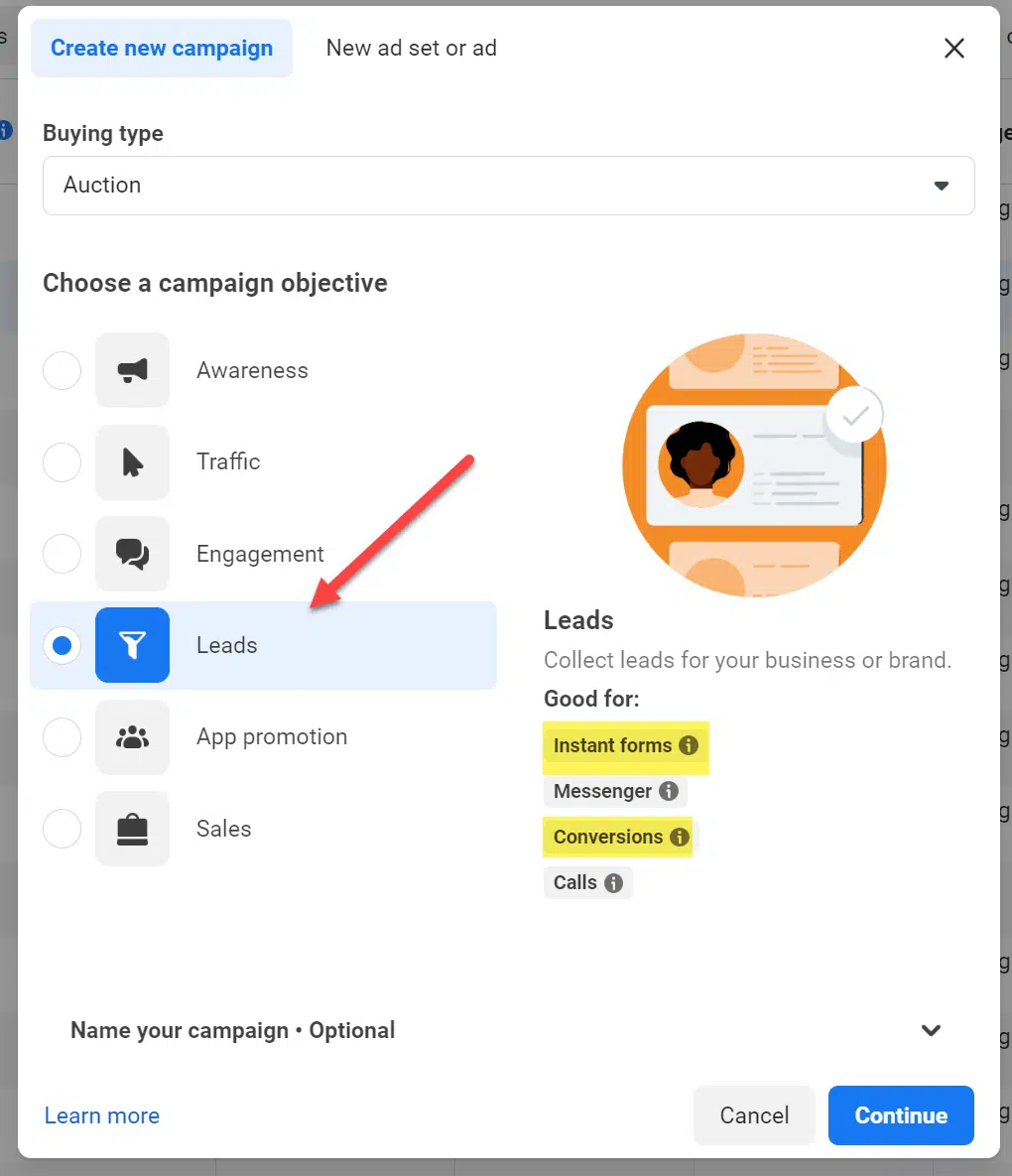
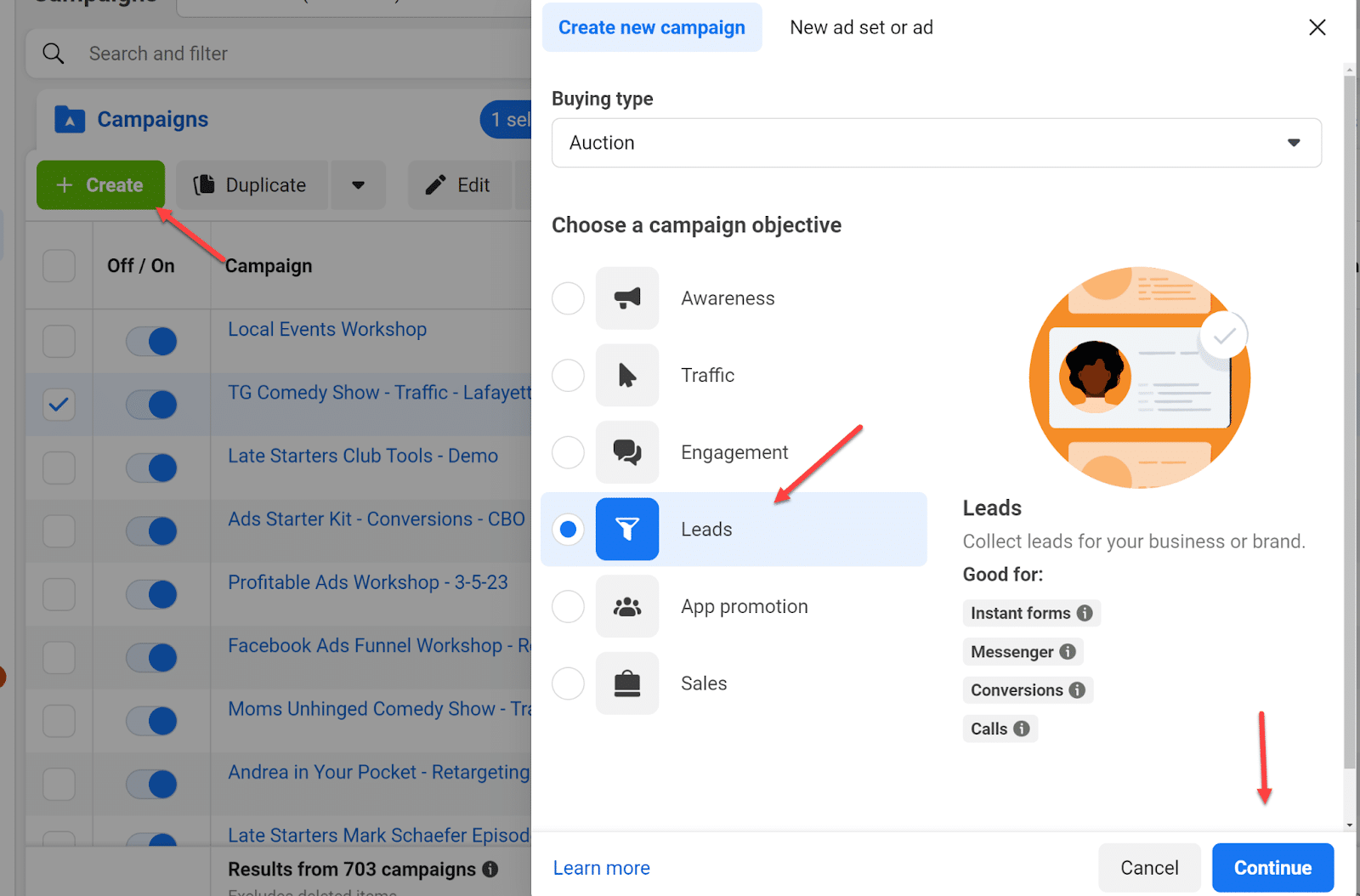
Your first step in setting up lead gen ads is understanding which type of campaign you want to run. There are two main types within the “Leads” campaign objective in the Meta platform:
Instant forms.
Conversions.
(In my opinion, the Messenger or Calls conversion options are not quite as effective at the time of this writing.)
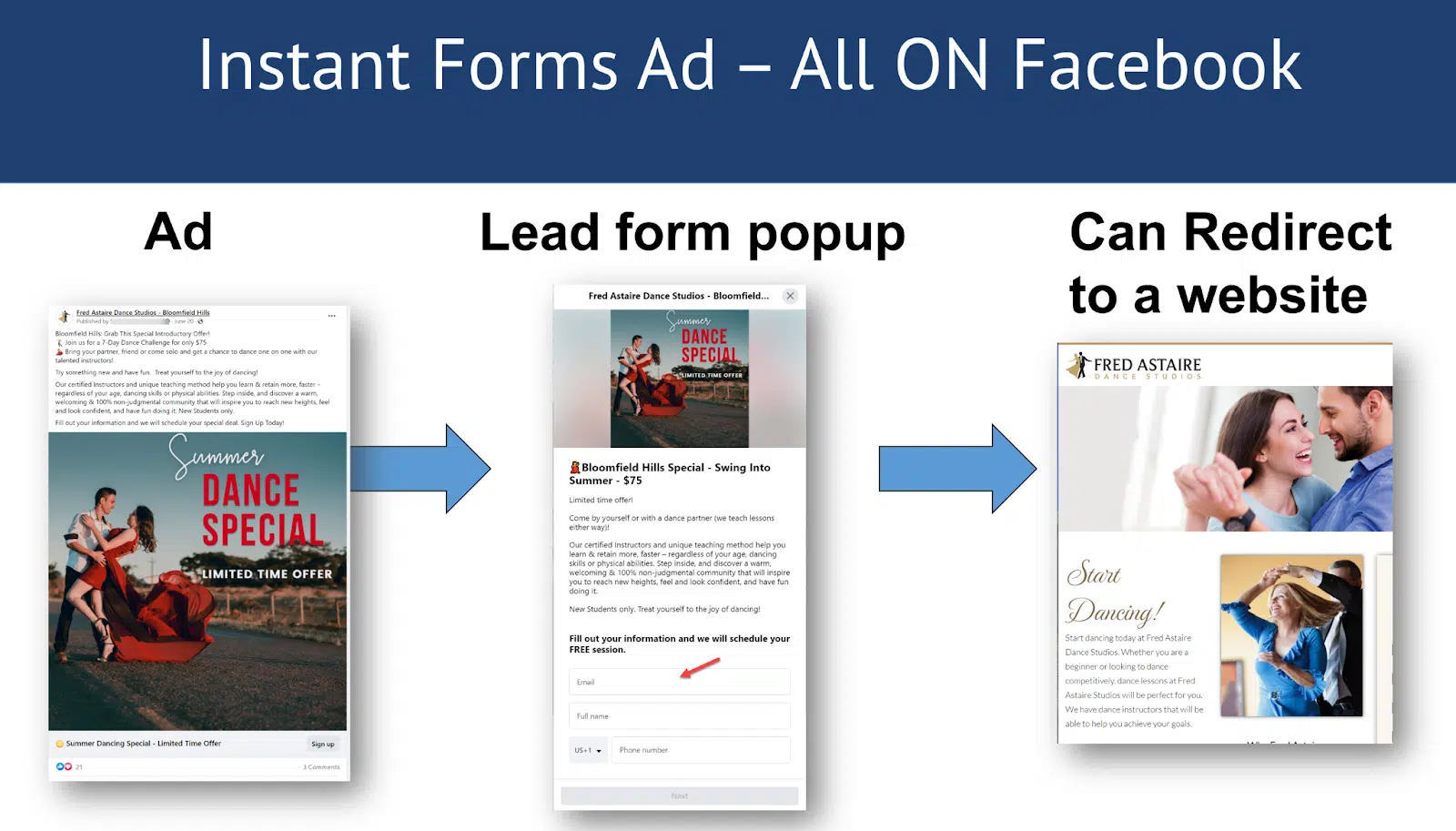
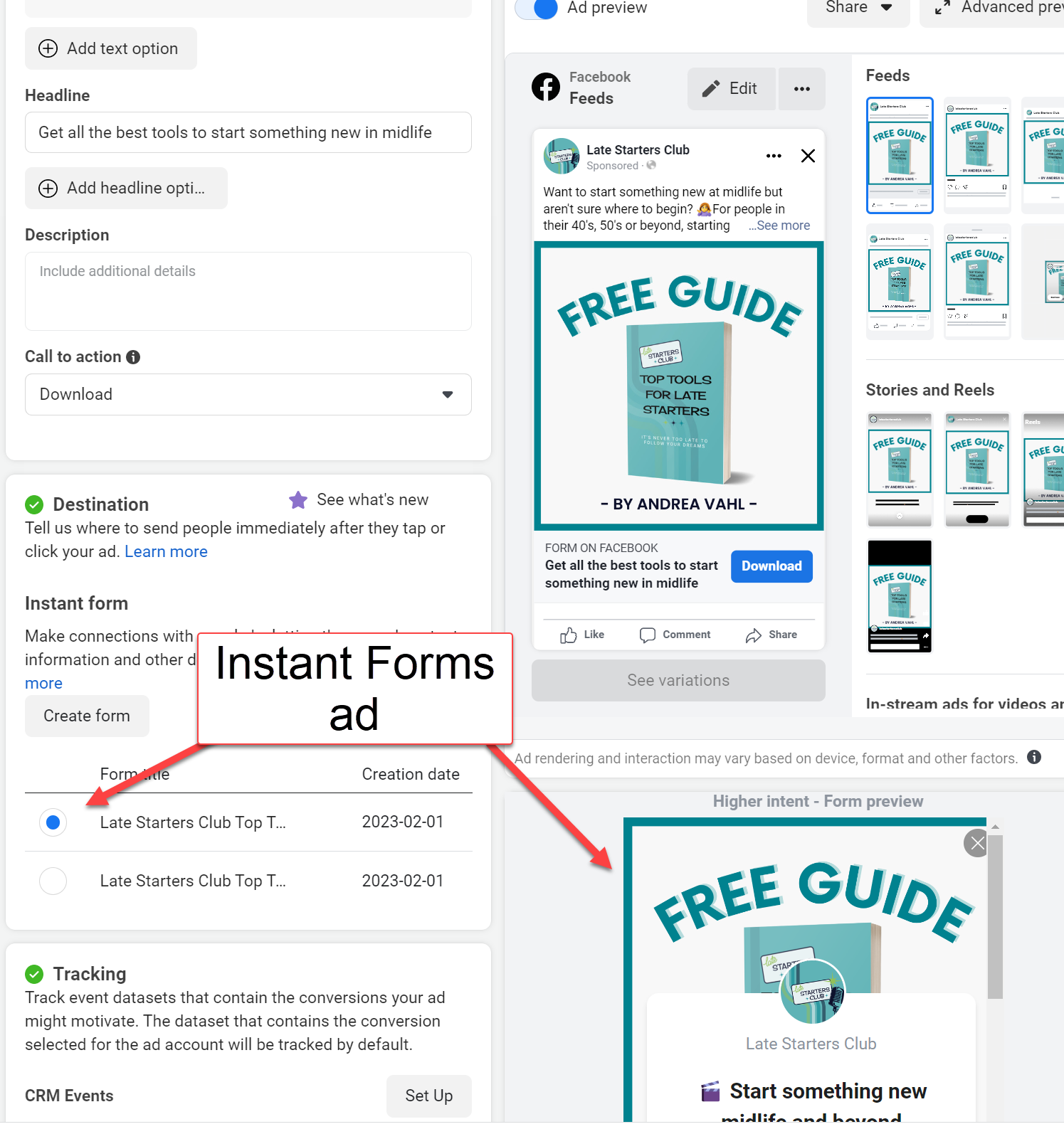
The biggest difference is that instant forms happen all on Facebook. This ad will look just like any ad but you will see the Form on Facebook designation on the ad.
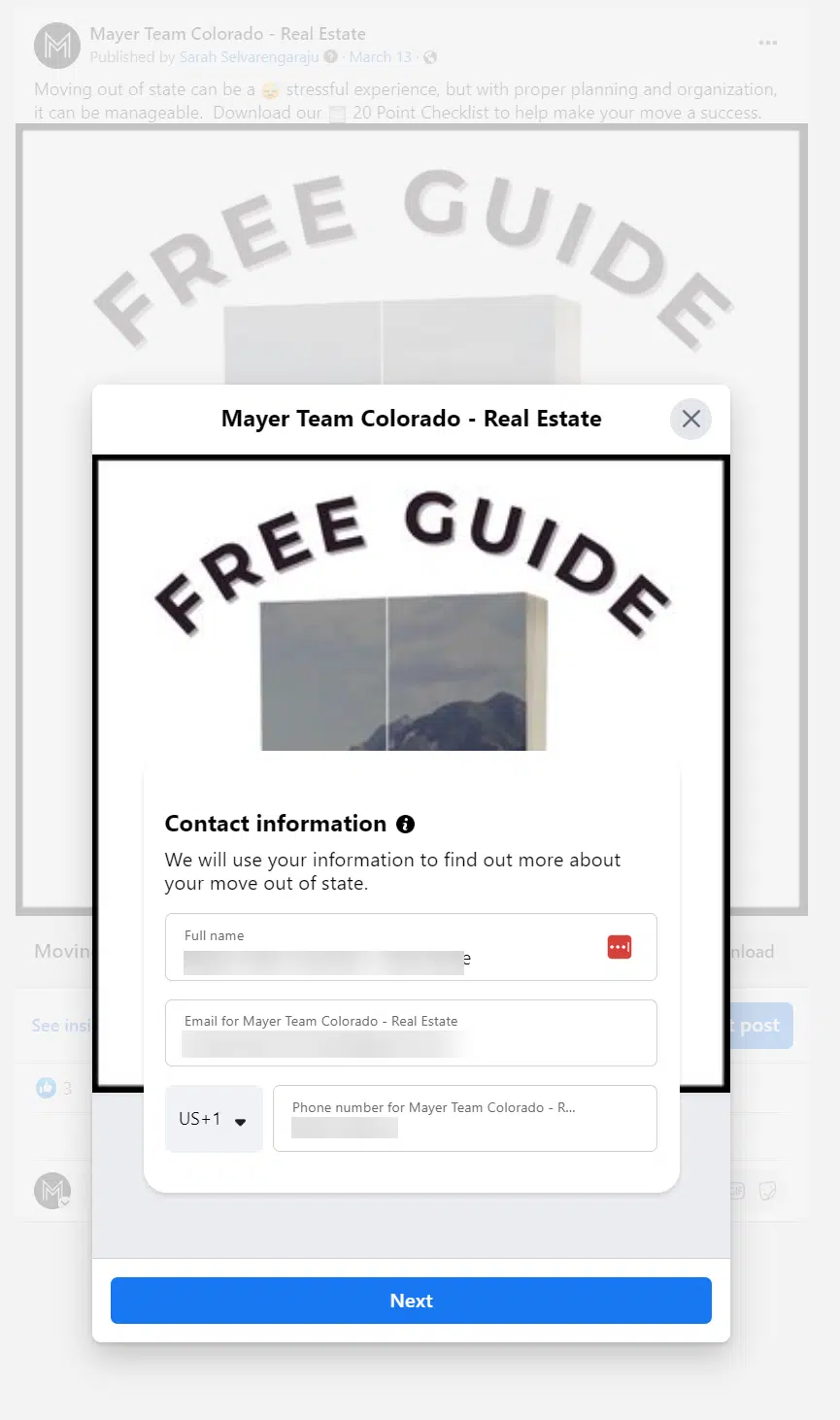
When you click the Sign up button (or the call to action you used), you will get a popup box that allows you to add your name, email, and whatever fields the advertiser has requested.
A nice feature of the instant form is that the name, email, and phone number fields are pre-filled with the person’s information from Facebook, so the user doesn’t have to type that information in.
This can lead to better leads since it doesn’t require typing on a mobile phone, and you know you are getting the correct phone number and email address. The user can edit that information before submitting it if needed.
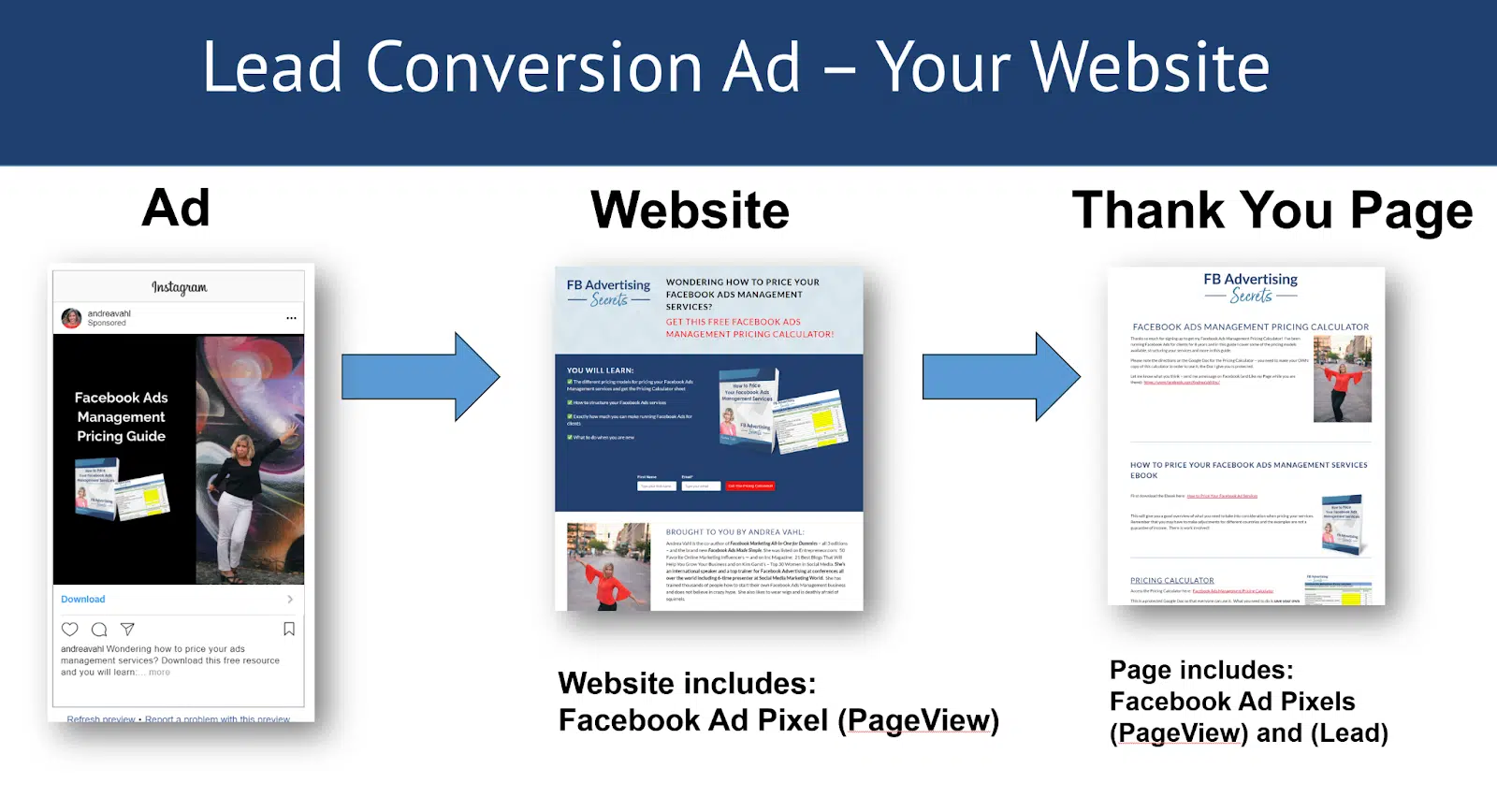
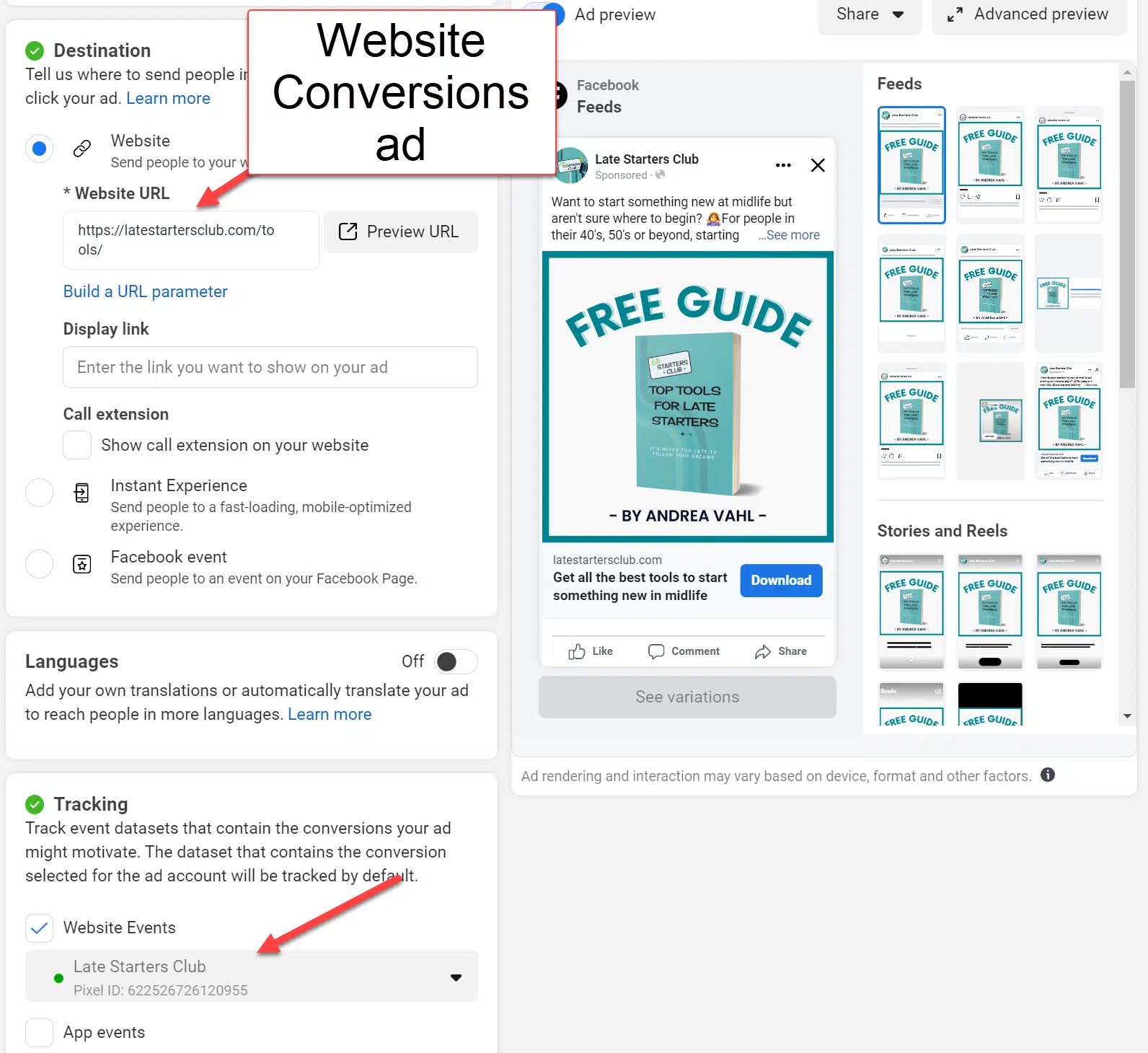
With a conversions ad, you send the traffic off Facebook and to your website, which has your Facebook Pixel installed.
You must install your Facebook pixel to make the conversion ad track properly.
You also need to have a “thank you” page where you can install the lead pixel standard event code.
Facebook will track a conversion from an ad any time someone clicks on your ad (or views your ad if you have the View attribution also selected) and then lands on the “thank you” page.
Get the daily newsletter search marketers rely on.
When to use instant forms vs. website conversions
If you don’t have a landing page but want to collect leads, the lead generation ad is a perfect solution.
You can redirect to a website or even have a Call now button after someone has completed the form.
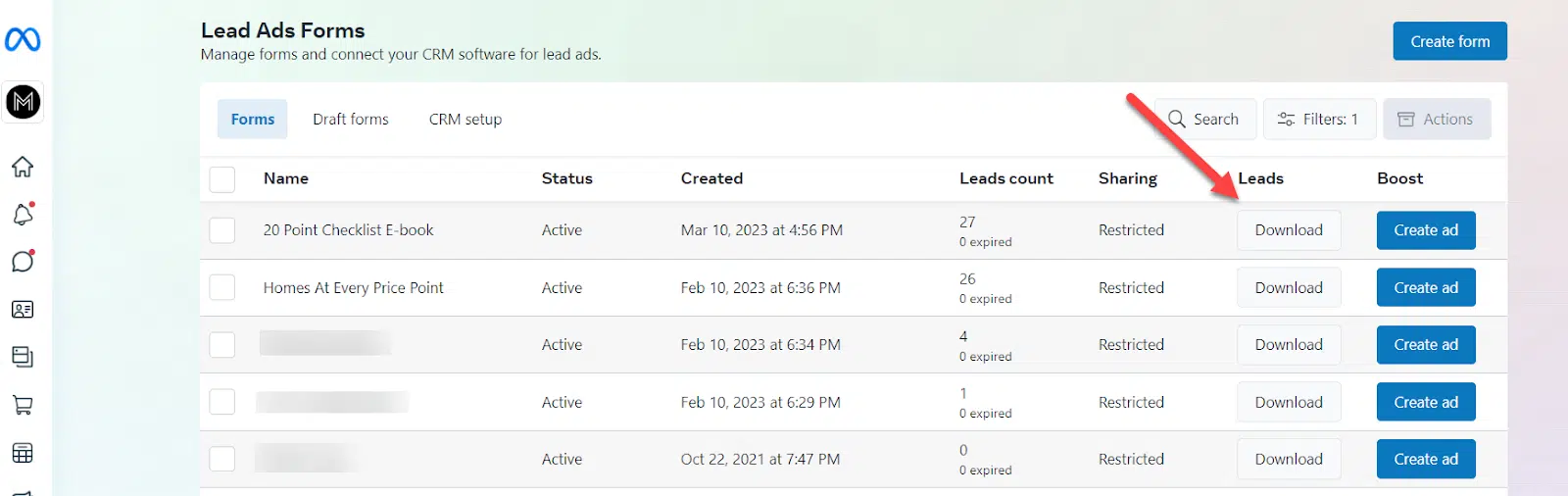
One downside to the instant forms is that you must manually download the leads from the lead ad forms section of your Facebook Page in the Business Suite area.
You can pay for a tool like Zapier to automate the process and send the leads to your email or CRM as they arrive.
If you have a website – or a “landing page” or “squeeze page” – that you want the traffic to go to, then you need to select the conversion ad as long as you can install the Facebook pixel.
If you can’t redirect to the “thank you” page after someone submits their information, you may be able to install the pixel on a button click but you will have to either check with your web developer or know how to install that on your own.
You may also want to test an instant form ad and a website conversion ad to see which gives you better results.
Typically, I find that the instant form ads can give you cheaper leads but the website conversion ads can give you higher quality leads because of higher intent.
How to set up Facebook lead generation ads
Creating lead generation ads is similar for both instant forms and website conversion ads but there are a few key differences that I will outline for each.
Steps for instant forms:
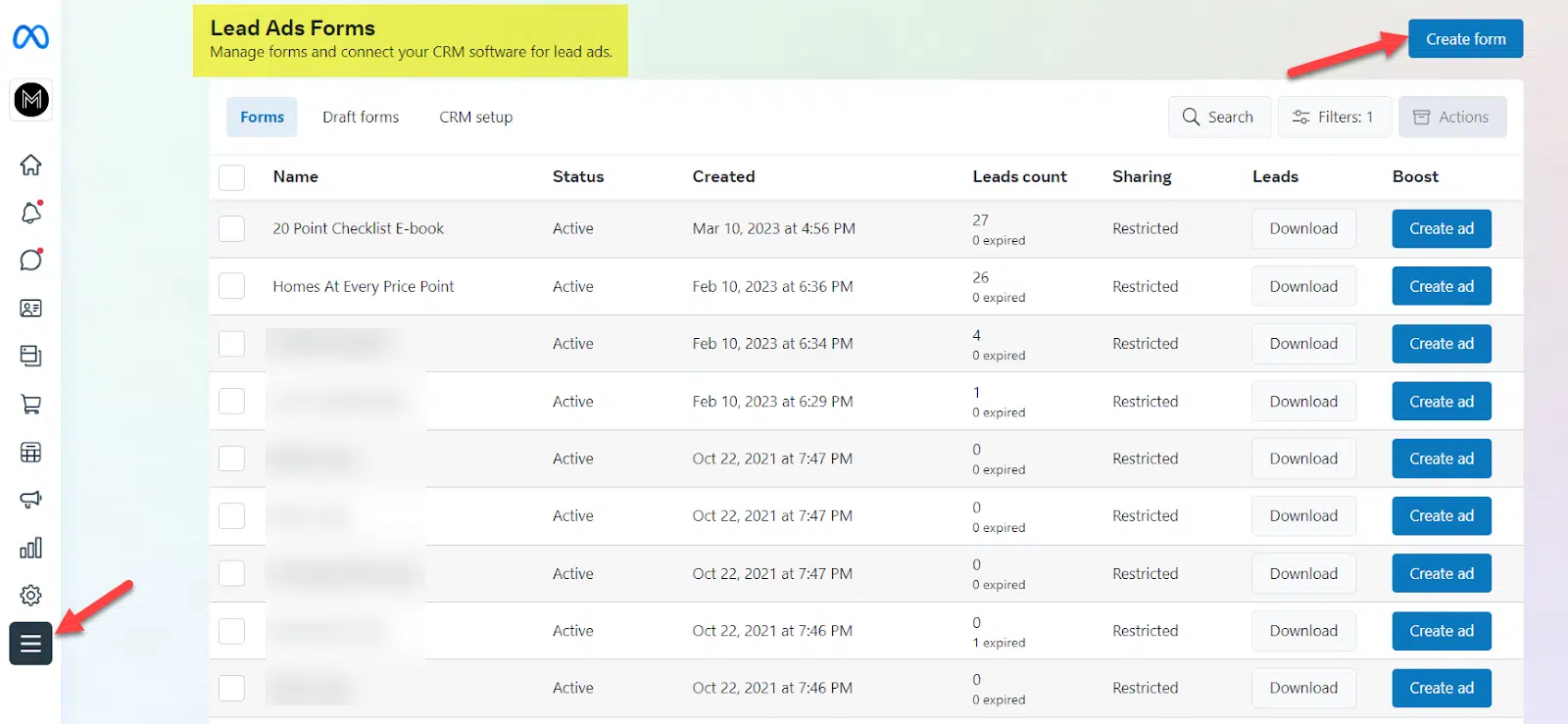
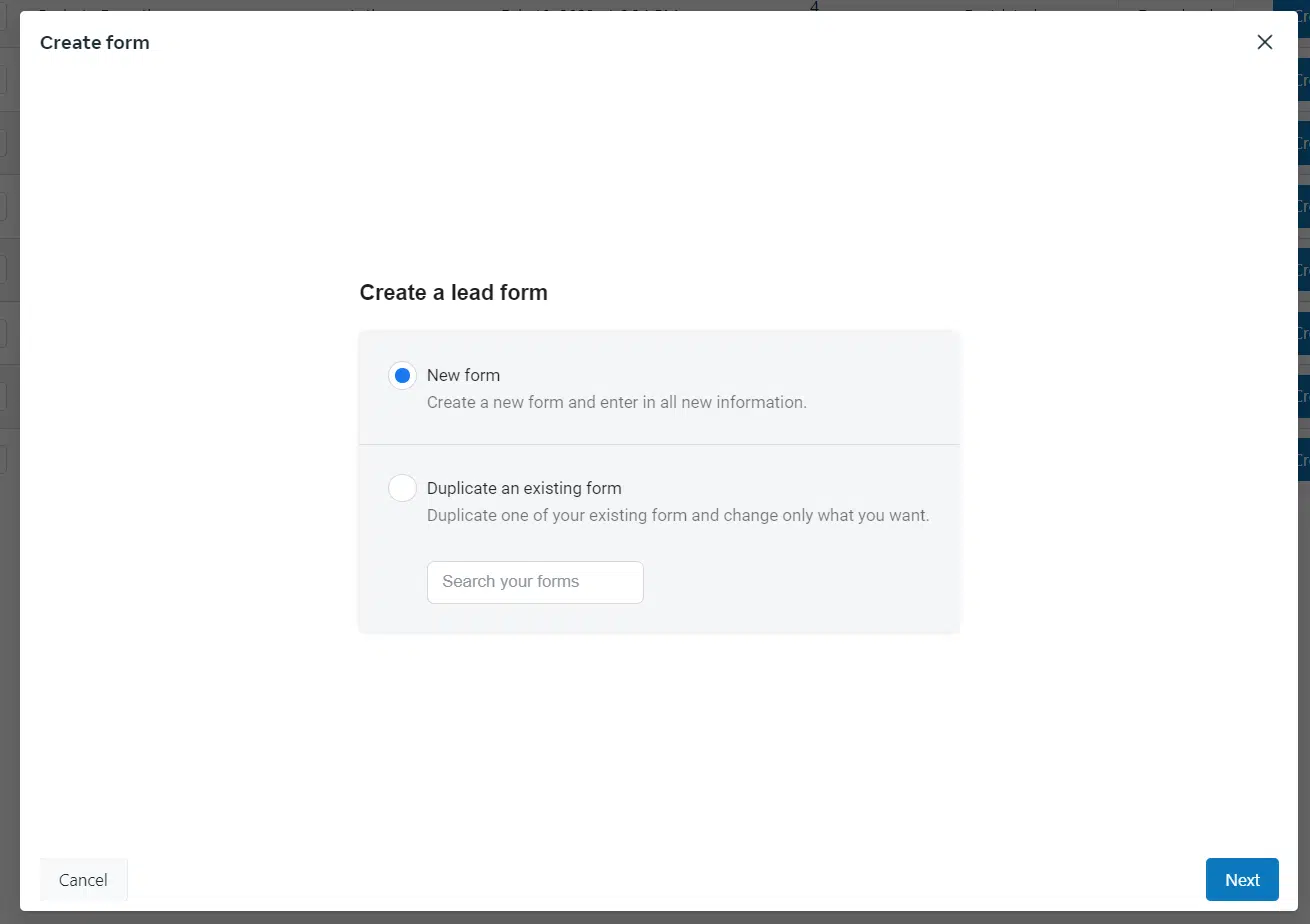
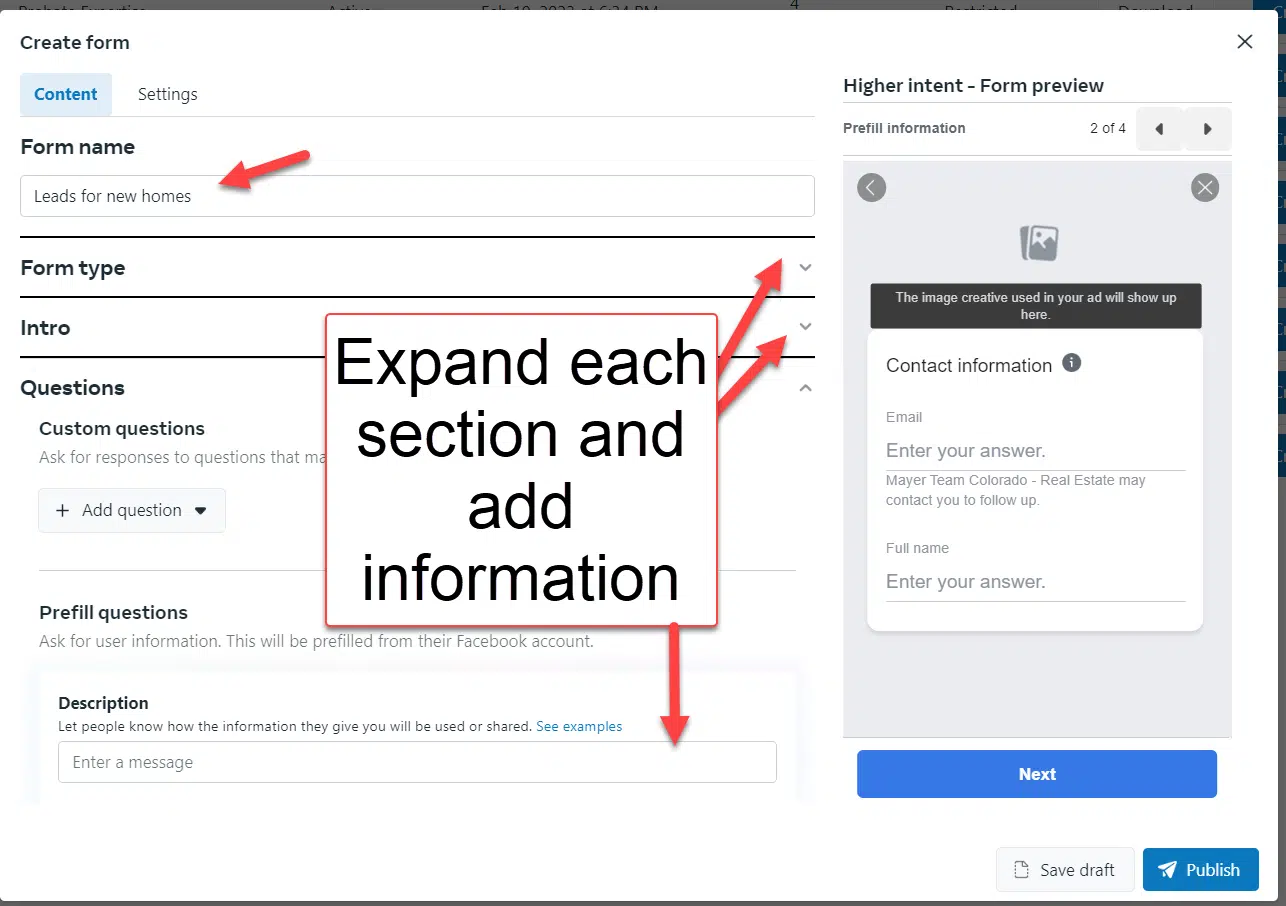
Create the lead form (under Instant forms) in the Business Suite area of the Facebook Page. You can also create this within the Ads Manager as you create the ad but I think it’s a little easier to do it ahead of time.
Connect the lead form to Zapier if desired for automation.
Create the leads ad and select that lead form.
Steps for website conversion ads:
Add the main base Facebook pixel code to your landing page.
Add both the base pixel and the standard event codes to your “thank you” page (typically, people choose Lead as the standard event).
Create the leads ad and send the traffic to your landing page, optimizing around the lead pixel.
I will show you the flow of creating a lead generation ad and highlight the differences along the way.
Creating the instant form
Below are the steps for creating an instant form in the Business Suite. (The steps are similar if you do it within the Ads Manager)
Step 1: Go to the Business Suite and select Lead Ads forms from the menu
When you select Continue, you will see the campaign, ad set, and ad structure.
You may be prompted to do a “Streamlined” setup but choose Manual so that you can select the options you want.
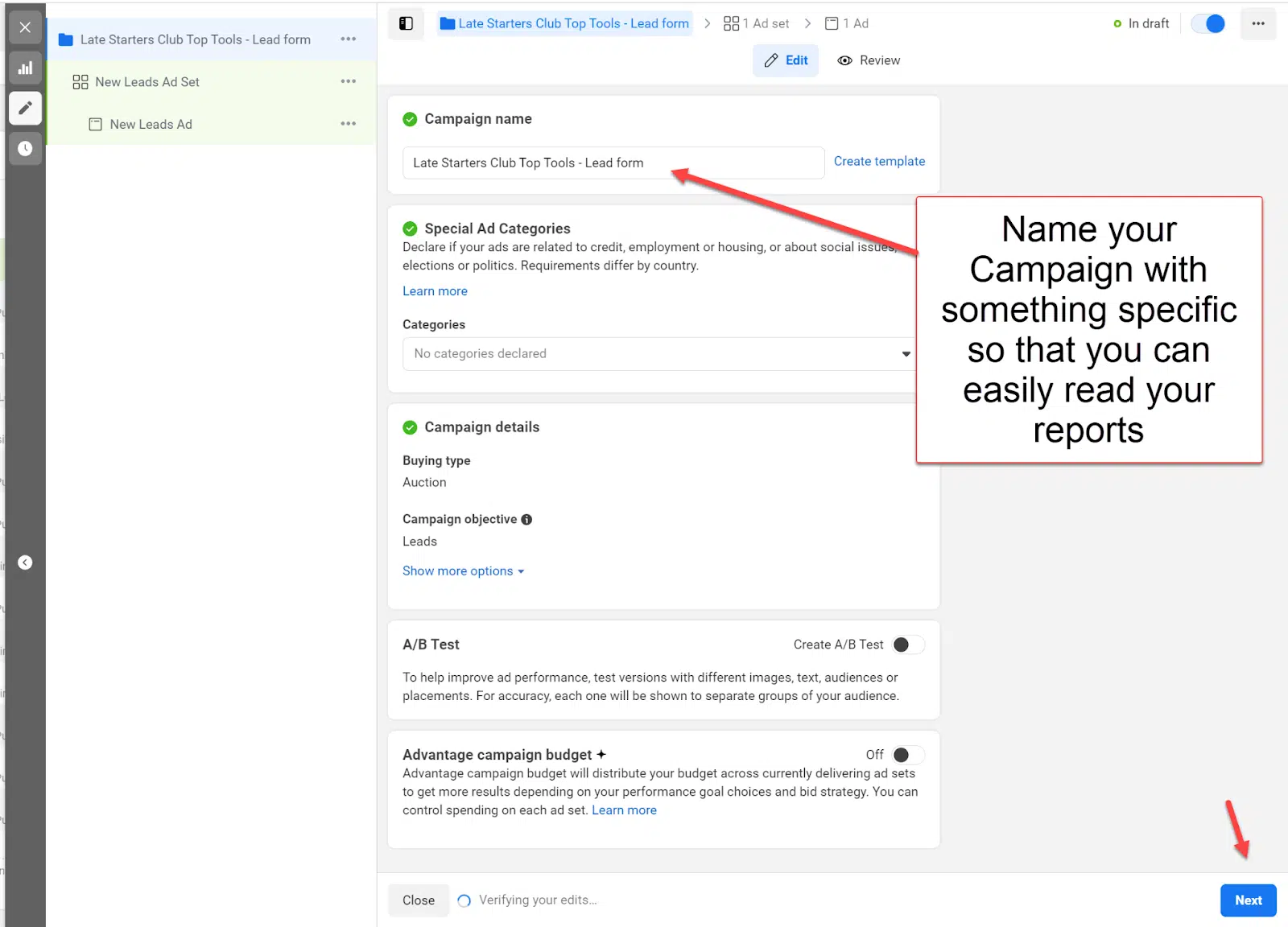
Step 2: Name your campaign
Give your campaign a meaningful name so it’s easy to read your reports, then select Continue.
I like to also add the type of optimization in my campaign name so it’s clear to me. Then select Next.
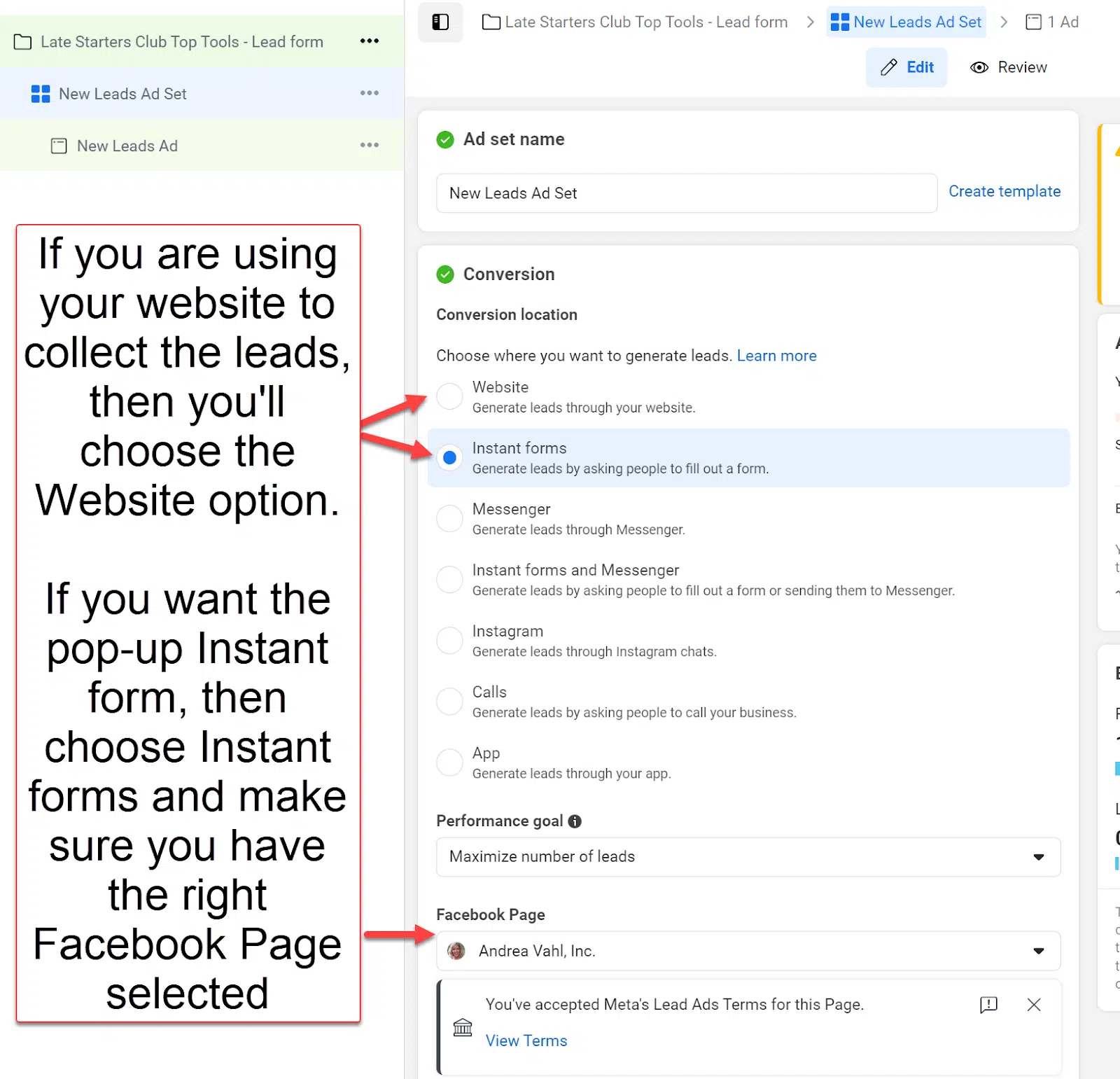
Step 3: Choose website conversions or instant forms at the ad set level
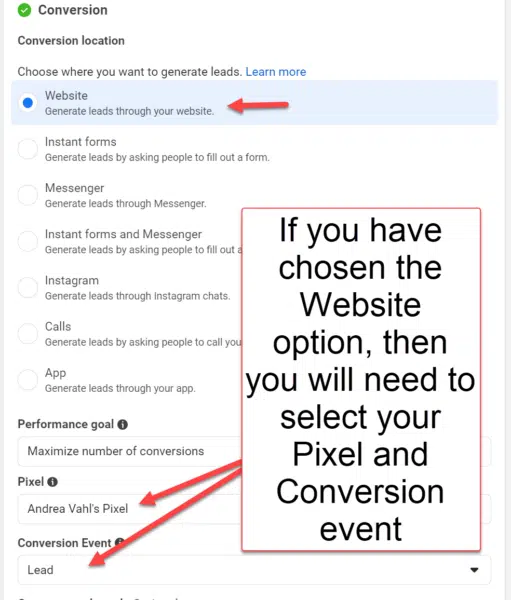
At the ad set level, you will choose whether you want to send people to the website for website conversion ads or if you have created an instant form, you’ll select the instant form conversion location.
If you have chosen the website option, you must choose the Pixel and Conversion Event at this stage.
Step 4: Set up your targeting, budgeting, and placement
For the scope of this article, I won’t go into all the steps of your ad targeting, budget and placement.
But you will complete those steps at the ad set level and then select the Next button to create your ad.
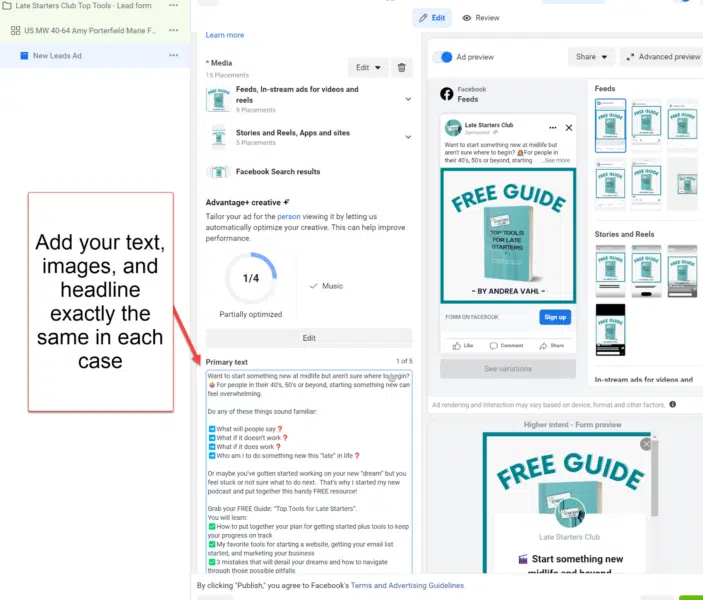
Step 5: Create your Facebook ad
The ad text, images and headline will be exactly the same in each case.
Step 6: Make sure you’ve selected the correct instant form or pixel
If you have selected the instant form option, the default will typically be the most recent one you’ve created.
Website conversion ads will have the website address as the destination and you should also ensure you’ve selected the right Facebook pixel.
You can see in these two examples that the ad itself can look exactly the same.
Step 7: Click ‘Publish’
Once you are done setting up the ad, you can click Publish and your ad will go into the Review process.
Both types of ads have pluses and minuses. What is important is to test what works for your business and balance the lead volume vs. quality.
Facebook is an amazing tool for lead generation. Both options can generate high-quality leads for your business.
Opinions expressed in this article are those of the guest author and not necessarily Search Engine Land. Staff authors are listed here.
@media screen and (min-width: 800px) { #div-gpt-ad-3191538-7 { display: flex !important; justify-content: center !important; align-items: center !important; min-width:770px; min-height:260px; }
}
@media screen and (min-width: 1279px) { #div-gpt-ad-3191538-7 { display: flex !important; justify-content: center !important; align-items: center !important; min-width:800px!important; min-height:440px!important; }
}
About the author
Andrea Vahl is a Facebook and Instagram Ads Expert and is the co-author of Facebook Marketing All-in-One for Dummies. Her newest book is Facebook Ads Made Simple. She speaks and trains all over the world and has managed over $6M in ad spend for her clients. She is also a stand up comedian. Learn more at www.andreavahl.com.
Google sued by USA Today publisher amid falling ad revenue fears
Google has been accused of unfairly monopolizing the digital advertising market resulting in a significant drop in advertising revenue for publishers.
Gannett, the publisher of USA Today, is suing the search engine for using “deceptive commercial practices” and breaching U.S. antitrust and consumer protection laws.
Why we care: This is the latest in a string of lawsuits in which Google has been accused of violating antitrust laws. The outcome of these cases could force the search engine to implement big changes such as the divestment of its ad business, which could potentially lead to increased transparency, more campaign control for advertisers and better innovation – which could also possibly mean the creation of new ad tools.
What’s happening? Gannett filed a federal lawsuit against Google in New York today. In a statement, the company said:
“Google controls 90% of the market for publisher ad servers, which publishers use to offer ad space for sale. Google also controls over 60% of the market for ad exchanges, which run auctions among advertisers bidding for ad space on publishers’ websites.”
Publishers rely heavily on digital ad revenue in order to survive – and Gannett is the largest newspaper publisher in the U.S.
Get the daily newsletter search marketers rely on.
What has Gannett said? Gannett’s CEO Mike Reed released a statement explaining the impact Google’s alleged illegal practices have been having on news publishers:
“News publishers depend on digital ad revenue to provide timely, cutting-edge reporting and essential content communities rely on, yet Google’s practices have had negative implications that depress not only revenue, but also force the reduction and footprint of local news. Without free and fair competition for digital ad space, publishers cannot invest in their newsrooms.”
What has Google said? Dan Taylor, vice president of Google Ads, has denied the allegations.
“These claims are simply wrong. Publishers have many options to choose from when it comes to using advertising technology to monetize – in fact, Gannett uses dozens of competing ad services, including Google Ad Manager. And when publishers choose to use Google tools, they keep the vast majority of revenue. We’ll show the court how our advertising products benefit publishers and help them fund their content online”
Has this happened before? Google was charged with violating the European Union’s antitrust laws just last week. After a two-year investigation, the European Commission said that “mandatory divestment” is the only way the search engine can look to resolve the issue as behavioral changes would not be effective.
Earlier this year, nine U.S. states (Michigan, Nebraska, Arizona, Illinois, Minnesota, New Hampshire, North Carolina, Washington, and West Virginia), also joined forces to bring a similar lawsuit against Google.
The states claimed that the search engine’s ad business violated antitrust regulations. To rectify the matter, they urged Google to break up its Ad Manager suite, suggesting it was exploiting its online advertising dominance. Google denied the claims and asked for the case to be dismissed.
In 2020, Google was also accused of breaching antitrust laws in order to maintain its position as the leading search engine. This case is set for trial in September.
But. We expect this to be a challenging year for digital advertising, with the slowest growth in recent memory. How much of that can be blamed on Google, as opposed to economic and other factors, is very much debatable.
@media screen and (min-width: 800px) { #div-gpt-ad-3191538-7 { display: flex !important; justify-content: center !important; align-items: center !important; min-width:770px; min-height:260px; }
}
@media screen and (min-width: 1279px) { #div-gpt-ad-3191538-7 { display: flex !important; justify-content: center !important; align-items: center !important; min-width:800px!important; min-height:440px!important; }
}
About the author
Nicola Agius is Paid Media Editor of Search Engine Land after joining in 2023. She covers paid search, paid social, retail media and more. Prior to this, she was SEO Director at Jungle Creations (2020-2023), overseeing the company’s editorial strategy for multiple websites. She has over 15 years of experience in journalism and has previously worked at OK! Magazine (2010-2014), Mail Online (2014-2015), Mirror (2015-2017), Digital Spy (2017-2018) and The Sun (2018-2020). She also previously teamed up with SEO agency Blue Array to co-author Amazon bestselling book ‘Mastering In-House SEO’.
Optimizing your Google Ads account: 10 advanced strategies
Google Ads continues to be one of the most important platforms for businesses of all sizes and scales. But with constant updates, increasing automation and the loss of many “traditional” control levers, finding the right balance between investment and returns can be incredibly difficult.
At SMX Advanced, Sam Tomlinson, executive vice president at marketing communications agency Warschawski, explained that marketers need to figure out how to work alongside AI and help them do better “because fundamentally we are not going to outtrade a machine.”
Here are 10 advanced strategies that have helped Tomlinson’s company achieve huge results with Google Ads campaigns.
1. Data is your optimization lever – so help the machine learn
It’s vitally important to feed machines the best data possible. Four useful tools to ensure you are giving Google the best data possible:
Conversion Action Set
This great, underutilized option allows you to “group conversions for a similar stage in funnel” and “allow you to have different goals…so that you’re actually optimizing the relevant campaign towards a relevant set of objective without other data coming in and confounding the mix,” Tomlinson said.
Enhanced Conversion
Tomlinson revealed his company uses enhanced conversion for every client because it allows you to link any CRM directly with Google Ads and set primary optimization events. Tomlinson said:
“This means you’re actually giving machines data that they need to make smarter bids and smarter decisions, so you’re getting fewer and fewer junk leads. Honestly, one of the biggest ways to avoid junk leads is to just use enhanced conversions…We saw a 75% reduction in junk leads within 45 days of implementing an MQL-based primary conversion action. That’s fantastic!”
Smart Business Data
Marketers can import business data into Google Analytics and, by extension, into Google Ads.
“I highly recommend you do this. The more data you give machines, the better they can optimize,” said Tomlinson.
Offline Conversion Import
Enhanced conversion is the first step in this process, followed by conversion adjustment. This allows you to restate the conversion value so you can adjust it up or down.
“You can remove data from the optimization algorithm so that you’re not optimizing flawed data,” Tomlinson said, adding:
“For example, if somebody makes two purchases by mistake, you can retract one of them…Remember that every piece of data you give Google, unless you tell it otherwise, Google will assume it’s incremental. So if there is a discrepancy between what you’ve initially told Google and what actually happened, use conversion adjustments to change that.”
2. Use data to focus engines on what matters to you
This is a powerful approach for both B2B and B2C businesses because it lets marketers make smaller adjustments to how algorithms bid, based on their business’ unique data – which is something that they can control.
“Every business has different value structures. So being able to one, understand what those are, and number two, translate them into value rules…enables you to get so much more from your Google Ads campaign.
“I’ll review probably between 200 and 300 Google Ads accounts per year and I would say less than 10% are using value rules you see. They’re so powerful and they’re so under-utilized,” Tomlinson said
3. Layer audience & business insights on top of a data-centric foundation
Give Google the data it needs to optimize your content better and faster – ultimately, this will get marketers better results from their campaigns.
The best way to do this is by layering your category information about how customers buy your products, such as product type, price, buyer type and so on.
“What matters is that you are combining the data about your business with data about your audience to give the machine a structure that it can operate within. When you layer information about how customers are buying your products with how you make money on your products, you end up with a matrix – prioritize the matrix of what you should bid on,” he said.
4. Use CPA or ROAS as your campaign’s steering wheel
Too many advertisers are using automation and automated bidding strategies in the wrong way, according to Tomlinson. Commenting on the campaigns his company has achieved the most success with, he pointed out that a low CPA target or high ROAS targets are a lower priority for Google Ads.
“Your highest priority campaigns should get the highest target CPA or the lowest target ROAS, because that reduces the threshold for them to serve to the very least that you can tolerate based on your business data and your business’s unique cost structures and value structure. “The only way this structure actually works profitably is if you know your business’s numbers and you’re confident and can trust them.”
He added:
“When you start thinking about how to set these CPAs or ROAS targets, Google’s Budget Simulator is actually great. I love it. It’s a really fantastic tool…But remember, anything beyond that optimal spending starts getting into inefficiency and loss. You start to give back the gains that you’ve got. So getting the right target CPA is critical. Use that budget simulator to understand where that is, the second part of that.”
Get the daily newsletter search marketers rely on.
5. Don’t let runaway CPCs blow up your ad account
Get the most out of your campaigns by preventing runaway CPCs, which can blow up your ad account – and not in a good way.
You can do this by setting a minimum and maximum bid for any automated strategy within your portfolio.
“It’s free insurance because sometimes, Google does get it wrong – and this creates downside protection. There is a possibility that you could have an outlier conversion rate or an absolute fantastic runaway success, but how much are you going to shape that risk? Just eliminate the bad hands and you’ll be fine.
6. Use a modern structure to minimize time learning
The more you split your data, the harder it is for machines to learn from it. So marketers need to focus on minimizing fragmentation and segmentation to the points where it is necessary, and provide an actual marginal return that justifies it, according to Tomlinson.
“That is a hard pill to swallow for a lot of old school SEM people, but it is one you absolutely must swallow. And start consolidating.”
Tomlinson advised consolidating 20 single keyword ad groups into a single ad group. He then recommended combining audience targeting and data targeting with keyword targeting.
“This will create a combination of passive targeting and active targeting. That’s what gets you a better result.”
PPC experts were also urged to stop competing with AI and instead take on more strategic tasks that will help machines. For example, by writing good ad copy, you can help machines to get a better understanding of your content, explained Tomlinson.
“Creating unique, highly relevant and highly informative landing pages is important as well. It is doubly important now that Broad Match looks at landing page content as a signal for what types of users and what types of searches might be relevant.”
He added:
“Finally, make automation your friend. Negative goals are a great way to do this. If a campaign performance deviates from the expected by a significant amount, turn the campaign off. Something’s not working the way it’s supposed to, so before it gets worse, stop the bleeding so that you can then go in and adjust; restructure, and move keywords and products. Teach the machine what it needs to look for so that it can do its job better.”
7. Always add audiences… even if it is just as ‘observe’
Marketers must remember that they are targeting people rather than keywords, and so it’s important that they use audience tools more effectively. One way to do this is to go to GA4 and use predictive audiences.
“This is an incredible feature,” said Tomlinson. “Brands have historically spent billions of dollars trying to figure this out – and here it is for free!”
GA4 can tell you what audiences are likely to engage with your marketing and which people are unlikely to return to your website in the next seven days.
Marketers can also create custom segments based on what specific audiences search for in Google. Alternatively, they can identify which audience browse certain types of websites or use certain types of apps.
“It’s incredible,” added Tomlinson. “You can look research people who are searching for solutions, people who are searching problems that we solve, people who use alternatives to our current service – you’re limited only by your imagination.”
8. What you exclude is more important than what you include
As machines get increasingly broad, as match types continue to change, your exclusions become so, so important.
“So please, please, please think more about what you can cut out,” said Tomlinson. “Can I cut out the absolute garbage versus can I include everything I need to? The machines will find the stuff that you need to include. Your job is to seep out the stuff that needs to stay out. “
9. Test RSAs using variants
Variant testing is the best way to test RSAs, according to Tomlinson.
“What I recommend doing is one of three tests that look at composition,” he explained. “Say I want to test brand differentiator call to action versus proof point. I’m going to test them against each other and for each of those structures I’m going to use pinning and multiple headlines. The pin ensures that the headlines in each position match the structure I am testing, and the multiple headlines gives me some flexibility so that Google doesn’t completely hate me.
“You can test your offers and your value props or a seed and iterate where you just put in a bunch of headlines, see what comes out, see which combinations work best, and then use that as an inspiration to do testing. Any of those approaches is right and fine.”
Tomlinson added:
“Variant testing is something that is so rarely done that it hurts. It genuinely hurts to go into an ad account and see one or two RSAs with no variant testing because candidly it just doesn’t work right.”
10. Ensure you’re doing multi ad group testing
It is essential for advertisers to have RSA testing structures – especially those working on smaller account. The best way to do this is to use variants and look for patterns across your headlines and descriptions.
“You’re basically testing messaging across your entire account versus just one ad group,” explained Tomlinson.
“That gives you statistical significance faster and allows you to take learnings and apply them across your account. Multi ad group testing is amazing – but it’s just not done, which is really unfortunate because what you really want is to understand which assets and which combinations of assets lead to the best results.”
Remember labels for brownie points!
Tomlinson urged PPC marketers to make better use of labels for monitoring purposes when changes are implemented.
“Most of us don’t remember what happened last week, let alone remember why you made a certain change seven months ago.
“Whenever you make changes, whenever you add stuff or do stuff, always label your changes and use a standard set of labels so that you can actually group them, pull the data and understand what’s happening.”
@media screen and (min-width: 800px) { #div-gpt-ad-3191538-7 { display: flex !important; justify-content: center !important; align-items: center !important; min-width:770px; min-height:260px; }
}
@media screen and (min-width: 1279px) { #div-gpt-ad-3191538-7 { display: flex !important; justify-content: center !important; align-items: center !important; min-width:800px!important; min-height:440px!important; }
}
About the author
Nicola Agius is Paid Media Editor of Search Engine Land after joining in 2023. She covers paid search, paid social, retail media and more. Prior to this, she was SEO Director at Jungle Creations (2020-2023), overseeing the company’s editorial strategy for multiple websites. She has over 15 years of experience in journalism and has previously worked at OK! Magazine (2010-2014), Mail Online (2014-2015), Mirror (2015-2017), Digital Spy (2017-2018) and The Sun (2018-2020). She also previously teamed up with SEO agency Blue Array to co-author Amazon bestselling book ‘Mastering In-House SEO’.
Marketers may soon be able to run ads on video-streaming services specifically targeting LinkedIn users.
A new ad product is about to be trialed by the social networking platform, which is owned by Microsoft, that will be aimed as reaching its 930 million subscribers when they watch movies and TV shows.
Why we care: Marketers could potentially increase their ROI and subsequently boost revenue as it is an opportunity to reach their target audience more efficiently.
Why now? LinkedIn makes most of its $5 billion revenue from ads sold on its news feed. The social networking platform, which is already up 8% year-on-year in sales, is reportedly now looking to boost profit further by exploring the fast-growing ad streaming sector.
The move comes just two weeks after LinkedIn announced it was piloting generative AI features to help advertisers.
What has LinkedIn said? “In-stream video ads can change the way brands and buyers reach and engage their audiences,” Penry Price, vice president of marketing solutions at LinkedIn, explained to Reuters.
Get the daily newsletter search marketers rely on.
What AI features are available to advertisers on LinkedIn? The social networking platform rolled out AI Copy Suggestions to a limited number of North American marketers two weeks ago. However, LinkedIn has suggested that it will be introducing the feature in more languages and regions over the next few months.
The professional networking platform has followed in the footsteps of Google Ads, Meta and Amazon by offering generative AI features to advertisers.
@media screen and (min-width: 800px) { #div-gpt-ad-3191538-7 { display: flex !important; justify-content: center !important; align-items: center !important; min-width:770px; min-height:260px; }
}
@media screen and (min-width: 1279px) { #div-gpt-ad-3191538-7 { display: flex !important; justify-content: center !important; align-items: center !important; min-width:800px!important; min-height:440px!important; }
}
About the author
Nicola Agius is Paid Media Editor of Search Engine Land after joining in 2023. She covers paid search, paid social, retail media and more. Prior to this, she was SEO Director at Jungle Creations (2020-2023), overseeing the company’s editorial strategy for multiple websites. She has over 15 years of experience in journalism and has previously worked at OK! Magazine (2010-2014), Mail Online (2014-2015), Mirror (2015-2017), Digital Spy (2017-2018) and The Sun (2018-2020). She also previously teamed up with SEO agency Blue Array to co-author Amazon bestselling book ‘Mastering In-House SEO’.
Elevate your PPC with ChatGPT: The art of asking disconfirming questions
Have you tried to use generative AI in your digital marketing but found that it behaves more like “spicy autocomplete” than actual intelligence?
Try using disconfirming questions. Here’s how.
The power of disconfirming questions
Disconfirming questions challenge what you already believe or think is true.
Instead of asking questions that agree with your ideas, disconfirming questions encourage you to question and explore different possibilities.
Contrast this with confirming questions, which seek validation and reinforce existing perspectives.
Notice the difference between these two questions and the answers they’ll elicit:
Confirming: Do you agree this new feature will greatly enhance the user experience?
Disconfirming: What potential drawbacks or challenges might arise from implementing this new feature, and how might they impact the user experience?
How you ask a question has a big impact on the response.
In a Wharton study, participants were asked to play the role of a salesperson selling a used iPod. They were told the iPod had crashed twice in the past, wiping out all the music stored in it.
The researchers wanted to see what types of questions would lead the sellers to disclose the problem. Here are the questions from the experiment:
When asked, “What can you tell me about the iPod?” fewer than one in 10 sellers disclosed the problem. More than 10x as many sellers disclosed the crash when asked, “What problems does it have?”
I borrowed this experiment to see how ChatGPT would change its responses based on the questions I gave. Here’s how it went:
Prompt A: “I would like to buy this used iPod. What can you tell me about it?“
ChatGPT response:“…iPod models vary in terms of features, storage capacity, and generation. Please provide me with the necessary details or any identifying information about the iPod so that I can assist you better.”
After confirming that it’s a language model and informing me it would need more specific details, the response is a vague overview of the differences between iPod models.
Compare that answer to the one it provides for a disconfirming question:
Prompt C: “I would like to buy this used ipod. What problems does it have?“
ChatGPT response:“…I don’t have access to specific information about the individual iPod you’re referring to. However, when buying a used iPod, it’s important to consider potential issues that could arise. Here are some common problems that could affect a used iPod:
Potential Issues
Description
Battery Life
The battery may not hold a charge as well as it did when the iPod was new, resulting in shorter battery life and more frequent charging.
Physical Condition
Used iPods may have scratches, dents, or other signs of wear and tear. It’s important to assess the physical condition of the device through pictures or inspection.
Screen Issues
The iPod’s screen may have dead pixels, discoloration, or backlight problems. Check for any visible screen defects or irregularities.
Functionality
Verify that all buttons, ports, and features of the iPod are working correctly. Test the headphone jack, volume buttons, and other essential functions.
Software and Compatibility
Ensure the iPod is compatible with the software and operating system versions you plan to use. Older iPod models may not support the latest updates or apps.
Storage Capacity
Confirm the exact storage capacity of the iPod and ensure it matches your requirements. Verify that the advertised storage size is accurate.
To minimize the risk, consider purchasing from reputable sellers with good ratings or warranties, if available. Additionally, ask the seller about any known issues or defects the iPod may have before making a final decision.”
The second prompt didn’t provide any extra information, but the response gave me an action plan to ensure I get a working iPod.
Much like the sellers in the original Wharton study, ChatGPT seeks to answer the specific questions we ask.
This means we can influence the quality of responses we get based on the prompts we provide.
Asking disconfirming questions to generative AI can result in more transparent and useful responses.
Get the daily newsletter search marketers rely on.
How disconfirming questions can benefit your digital marketing strategy
While disconfirming questions are useful in most professions, they’re especially valuable in digital marketing, where the volume of data and lurking variables can easily lead to the wrong conclusions.
Using disconfirming questions in your marketing strategy can help you:
Avoid confirmation bias by actively seeking evidence that contradicts your assumptions or initial interpretations.
Uncover hidden patterns by digging deeper, exploring outliers, and considering alternative perspectives.
Test assumptions by adopting a more rigorous approach to data interpretation.
All this drives more accurate data and conclusions, leading to better results.
Building a practice of asking high-quality disconfirming questions also contributes to professional growth, including:
Critical thinking skills: Develop a more balanced and objective perspective as you seek ideas and viewpoints that contradict your current understanding.
Breakthrough innovation: Challenge conventional wisdom and question the status quo to find innovative insights that would have been overlooked.
Strengthened problem-solving abilities: Build a more holistic and complete analysis of a situation to identify new angles and potential solutions.
When paired with generative AI, the benefits of disconfirming questions are even more powerful.
That’s because you can use generative AI as a brainstorming partner, giving you guidance and answers to otherwise rhetorical questions. AI can help you:
Identify diverse perspectives: Generative AI can provide fresh and diverse perspectives you may not have considered.
Overcome mental blocks: Get help with new ideas, alternative viewpoints, and unexpected connections.
Collaborative iteration: Use AI iteratively, ask follow-up questions and challenge responses, and bring your own judgment and expertise to the conversation for a productive and interactive dialogue.
Let’s look at specific digital marketing areas where you can combine disconfirming questions and generative AI for powerful results.
How to uncover untapped marketing opportunities with disconfirming questions
To make the most of your prompts and questions, it’s important to start by clearly understanding the problem. When problems are well-defined, they become easier to solve.
So, before creating your prompts and questions, take the time to grasp the problem and its details fully. This will help you develop effective prompts and questions that lead to meaningful solutions.
Landing page disconfirming questions
Your PPC ads’ success depends on a high-converting landing page, but landing page development is often a different discipline than digital marketing.
If you work on landing pages, these questions can help your process.
If you aren’t directly responsible for landing pages or don’t feel comfortable weighing in on edits, you can provide high-quality feedback as a value-add.
Here’s how to use generative AI to identify improvements to increase conversion rates.
First, paste your landing page content into the prompt box, or use a plugin to connect to the page directly. Then ask disconfirming questions, such as these sample prompts:
Prompt: “What is missing from the landing page that might keep a customer from buying?”
ChatGPT can provide feedback on specific elements (such as product descriptions or CTA buttons), usability and navigation, value propositions, social proof and trust signals, and persuasive content.
Prompt: “What elements or features of my landing page could be confusing or misleading to visitors, and how can I clarify them?”
ChatGPT can analyze your page’s clarity of messaging, message hierarchy, navigation, consistency and trustworthiness, and the potential of information overload and provide recommendations for improvement.
Audience disconfirming questions
Many prebuilt prompts for audience insights address strictly demographic data, such as asking about the age range of your target market.
What if instead you ask disconfirming questions like:
Prompt: “What are some potential biases or assumptions that I may have about my audience, and how can I challenge them?”
ChatGPT can help identify potential behavior assumptions about your audience, such as their decision-making process, cultural or linguistic biases, psychographic assumptions (like motivations and needs), and demographic assumptions.
Prompt: “What are some reasons why my audience might not be interested in my product or service, despite its benefits and features?”
ChatGPT can help you consider factors like misaligned value propositions, brand awareness (or lack thereof), the effectiveness of targeting, competitive landscape, communication gaps, and price and affordability.
You can also use disconfirming questions to identify new target audiences (“Could there be a different demographic group that would benefit from our product/service that we haven’t considered?”), or to evaluate specific audience segments (“How might our marketing messages be perceived differently by diverse segments of our audience?”).
Client disconfirming questions
Managing digital marketing and managing client expectations are two different skill sets. Fortunately, ChatGPT can help with both.
Prompt: “What are some potential objections or concerns my client may have about my marketing strategies, and how can I address them in a clear and effective manner?”
ChatGPT can help anticipate and address issues your clients may have with strategy, messaging, measurement, reporting, positioning, brand identity, or budgets.
Prompt: “Can you think of any reasons why my client may not be satisfied with my current communication approach, and how can I improve it?”
No one’s a perfect communicator. ChatGPT can reveal issues with clarity, frequency, personalization, channel selection, feedback methods and use of visuals to make your client communication more effective.
Driving innovation in ChatGPT with disconfirming questions
The best way to use generative AI is through collaboration.
Combine your own knowledge, creativity and experience with the power of disconfirming questions to drive high-value discussions, get better results and grow professionally.
Opinions expressed in this article are those of the guest author and not necessarily Search Engine Land. Staff authors are listed here.
@media screen and (min-width: 800px) { #div-gpt-ad-3191538-7 { display: flex !important; justify-content: center !important; align-items: center !important; min-width:770px; min-height:260px; }
}
@media screen and (min-width: 1279px) { #div-gpt-ad-3191538-7 { display: flex !important; justify-content: center !important; align-items: center !important; min-width:800px!important; min-height:440px!important; }
}
About the author
Amy Hebdon is a Google Ads conversion expert and the founder and managing director of the Google Partner agency Paid Search Magic. Since 2004, she’s managed Google Ads for clients ranging from Fortune 10 to SMBs at agencies, in-house, and freelancing. Her articles have been published in Search Engine Journal, Unbounce, PPC Hero, Supermetrics, Copy Hackers and CXL. Together with her husband James, she also runs the Facebook group Google Ads for Savvy Digital Marketers.
Major Looker Studio GA4 connector update adds 170 new fields
Looker Studio has rolled out a major update to its system, unveiling 170 new fields for reporting. In order to access the new data, users must refresh their GA4 data sources.
Why we care: You can now create more in-depth, detailed Looker Studio reports because they will have access to data that previously wasn’t available. Advertisers are particularly excited as they’ll have insights into landing page, user conversion, page location and session conversion rates by event data, which will help them to make more informed decisions with regards to ad placements and campaigns moving forward.
What are the new fields: An impressive 170 new fields have been implemented – so we’ve just highlighted some of personal favourites here:
Ads clicks & cost
Average session duration
Landing page
Page location
Page referrer
Session & user conversion rate
Session conversion rate by event name
Time dimensions like hour or week
How do you get the new fields? To get access to Looker Studio’s new fields, follow these step-by-step instructions:
Click on ‘Data Sources’ in their Looker Studio account.
Select the GA4 source you wish to update and select the ‘Refresh Fields’ button in the bottom left corner.
A new window will then pop up on your screen with all 170 new fields listed.
Click on ‘Apply’.
All the new fields should then appear in your existing reports.
You’re all set!
Some marketers may not have access to all 170 new fields right away. The number of new fields your account has access to will depends on how many conversion events you have.
@media screen and (min-width: 800px) { #div-gpt-ad-3191538-7 { display: flex !important; justify-content: center !important; align-items: center !important; min-width:770px; min-height:260px; }
}
@media screen and (min-width: 1279px) { #div-gpt-ad-3191538-7 { display: flex !important; justify-content: center !important; align-items: center !important; min-width:800px!important; min-height:440px!important; }
}
About the author
Nicola Agius is Paid Media Editor of Search Engine Land after joining in 2023. She covers paid search, paid social, retail media and more. Prior to this, she was SEO Director at Jungle Creations (2020-2023), overseeing the company’s editorial strategy for multiple websites. She has over 15 years of experience in journalism and has previously worked at OK! Magazine (2010-2014), Mail Online (2014-2015), Mirror (2015-2017), Digital Spy (2017-2018) and The Sun (2018-2020). She also previously teamed up with SEO agency Blue Array to co-author Amazon bestselling book ‘Mastering In-House SEO’.