How to set up feed rules in Google Merchant Center and ensure quality product data

The product feed is the single most essential element when it comes to listing shopping inventory on Google. However, feeds can be notoriously low-quality and heavily neglected. 

Shopping feeds work on multiple levels to help promote retail businesses, with paid and free listings. This, coupled with the emergence of more AI within Google Ads, propels the importance of the feeds to even higher levels. 

Providing Google’s algorithms with high-quality and accurate product data is crucial. You can enhance your product data in various ways, including back-end website changes, plugins and feed optimization tools. However, each of these comes with a cost. 

This is where Google’s feed rules, supplementary feeds and product edits directly within Merchant Center come in. These valuable tools can optimize your product data and enhance your product listings at no cost.

This guide tackles how to use feed rules to overcome a low-quality feed.

What are feed rules?

Feed rules in Google Merchant Center allow you to adjust and manipulate your base feed. You can use feed rules to help you resolve errors so that your feed adheres to Google’s policies and improves the overall quality.

You can use the rules to adjust any of your feed attributes and create new attributes not yet submitted. With the rules, you can set an attribute to a specific value, extract values from other attributes in the feed or modify the data.

Understanding what attributes to optimize

The title is the most important element of a product feed. When deciding whether your product is relevant to a search, Google uses this as its first reference point. The more complete and comprehensive your feed, the better your odds of success in the ad auction.

To understand the state of your feed in the first instance, you can review product data in Merchant Center or download available data from the products tab. If you are using an XML feed, you can also use tools like XML converters to extract your feed into a readable Excel spreadsheet.

Once you have your products in a format you can analyze, you can identify gaps in your feed where attributes are missing. You can also analyze title length, aiming for at least 30 characters but ideally 75-100.

How to create a feed rule

The first thing to know about feed rules is that they are added at an individual feed level. So if you have multiple product feeds or feed labels, you must apply the rules to each one.

To add a new feed rule, you must first ensure your product feed has been submitted. Once submitted, you are ready to start modifying your product data.
How to create a feed rule

To create your first rule:

  • Log in to your Merchant Center account.
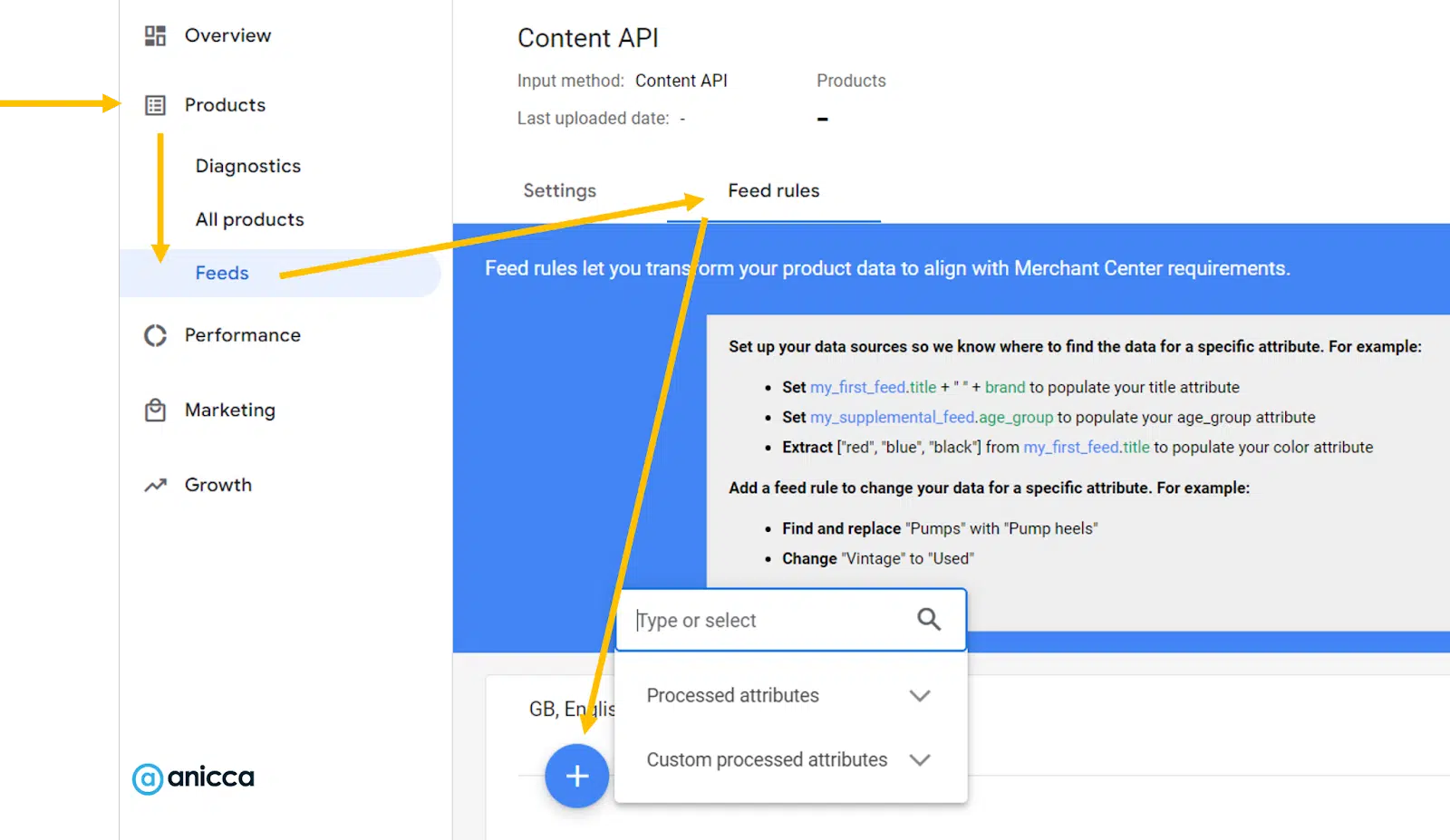
  • On the left-hand navigation, select Products and then Feeds.
  • Under primary feeds, select the feed you would like to create a rule by clicking on the feed name underlined and in blue.
  • Select the rules tab in the top navigation.
  • Click on the blue plus button to create a new rule and select the attribute you want to edit.
  • Configure your data source.
  • Apply any modifications.
  • Review the preview on the right-hand panel.
  • Select Save as Draft.
  • You will now see an option to test the changes of your draft rule before they are applied to your live product data.
  • Once satisfied with the changes, click Apply to save them and push live. If you are not happy, you can discard and remove the draft.

Important considerations for feed rules

When creating feed rules, always consider these points to ensure your rules work as expected.

  • Each attribute within a feed can only have one rule associated with it, so any amends have to be contained with that one rule.
  • Feed rules work in a cascading nature, meaning the rules layer on top of one another. Google will apply the first line of the rule, followed by the second and so on.
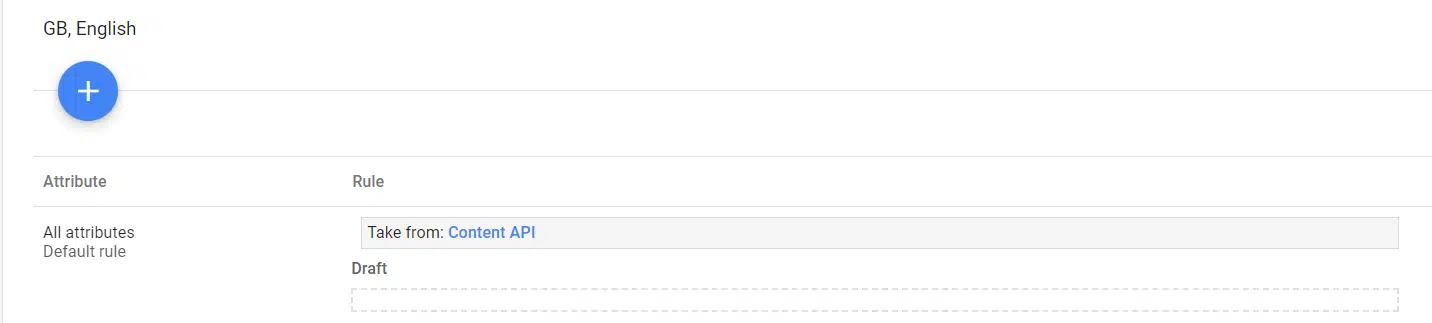
  • When you first access feed rules, you will see a default rule in place. Google applies this automatically to each account. It is instructions to take the value for each attribute from either a supplementary or a primary feed.
Feed attribute
  • When appending text, the text will appear exactly as entered. This includes spaces and periods. So if you want to append a brand name, for example, rather than just entering “Nike,” I recommend entering “ – Nike” or similar.
  • Feed rules are not designed for individual product optimizations and are there to make changes in bulk.

Get the daily newsletter search marketers rely on.


Your data source options

When configuring your feed rules, you need to select your data source. This configuration identifies where the base data for the chosen attribute should come from. 

You are given options on retrieving your data source through filters to apply conditions and operations that need to be met.

The operations allow you to “Set to,” “Extract” or “Take latest.”

  • “Set to” allows you to give a simple command to populate your chosen attribute with incoming data from your primary or supplementary feed or assign it a custom static value.
  • “Extract” allows you to search for specific terms within your base data and use these within the chosen attribute.
  • “Take latest” allows you to command Google to take the latest value submitted through a specific source.

You can use simple data source selections to carry out universal feed tweaks across your feed. For example, you could use the “Set to” function to combine your existing product title attribute with your brand attribute.

Your feed modification options

The options available to modify your feed attributes will depend on the attribute you are trying to change.

For example, numeric-based attributes will have different options to text-based ones. There are basic options, such as append, or more advanced options, such as calculate.

Depending on what you want to achieve, you must select the modification that will allow you to achieve this.

  • Append: Add new values to the end of the attribute.
  • Prepend: Add new values to the start of the attribute.
  • Find and replace: Search within the selected attribute for a specific value and replace it with another.
  • Calculate: Available for numerical attributes only. You can add, subtract, multiply or divide with other attributes or custom values.
  • Split and choose: Select one or more values from an attribute with a common period separating them (such as commas, arrows, etc.). You can then select the element to break out and use it as part of your attribute.
  • Clear: Remove all of the values submitted for an attribute field.
  • Add repeated field: Applicable only when multiple values can be submitted for an attribute. This allows you to add an additional value to fields such as additional image links.
  • Optimize URL: This function allows you to edit or remove URL aspects. This can be used to add parameters to your URLs.
  • Standardize: This can be used when an attribute accepts set values. For example, where there are errors in the original data in fields such as condition.

Using feed rules to overcome low-quality feeds

You can use feed rules for many alterations and modifications, but below are some of my top rules. They aim to reduce errors within the feed and improve its relevance and performance.

Remove errors in product titles

With product titles, there are certain policies they must adhere to. For example, your titles should not be used to promote free delivery or promotional codes.

In some instances, however, such elements can pull in automatically from your website. You can use feed rules to remove or replace such elements to ensure your titles are error-free.

To use feed rules, set the data source you wish to edit. In most instances, this will be your primary feed. If you have a supplementary feed containing titles, you should select the supplementary feed.

Once you have selected your data source, add a modification specifically to find and replace, then add a rule. When selected, a command box will pop up, allowing you to select an attribute or type in an entry. You will want to type in an entry manually. 

You should type in the text you wish to remove from your product titles. You can see in the image example we are removing two elements. In the Replace with field, you should leave this blank if you just want to remove the element.
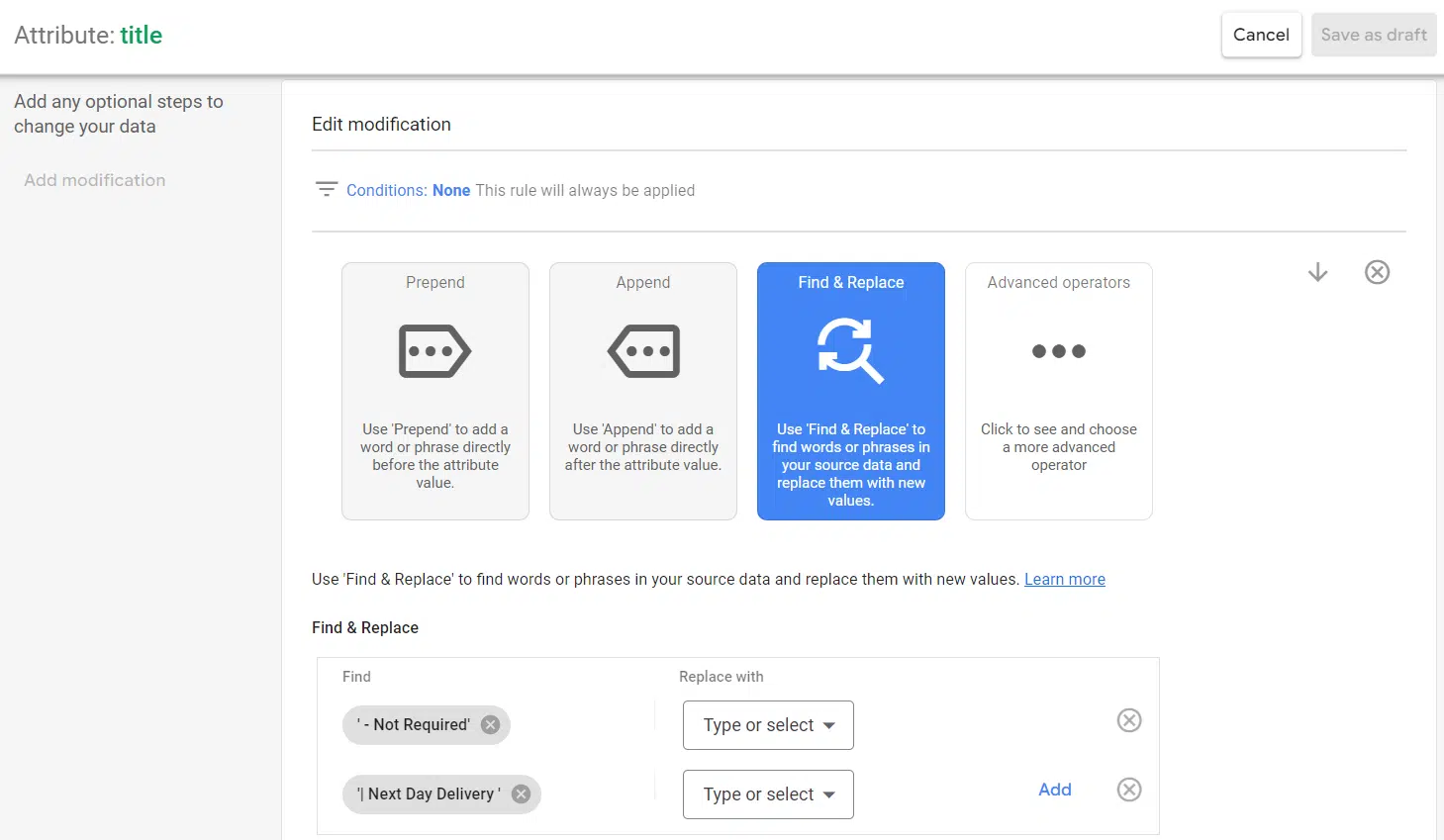
Find and replace attribute

When happy with your rule, click OK at the bottom. You should see previews populate on the right-hand panel. The panel will show how the rules build on top of each other.
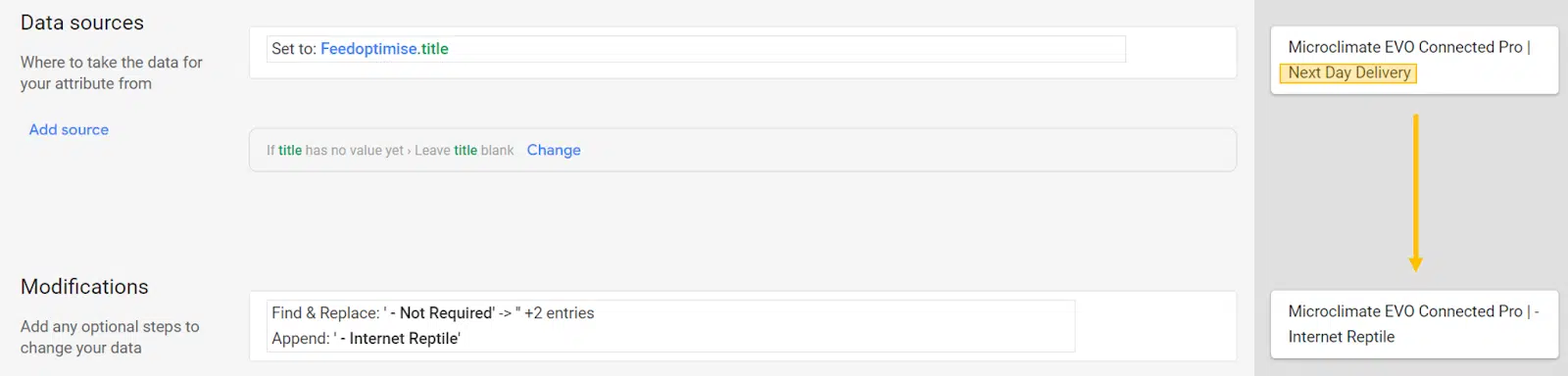
Data source attribute

You can also use the advanced section to shore up your rule, to specify case sensitivity or matching regular expression, amongst other commands.

Append text in product titles

Another great way to use feed rules for titles is to append text based on set criteria. This is a simple way to add relevancy based on core keywords.

This rule allows you to improve the feed quality to increase the match rate to more relevant searches for your products. This approach could also be applied to product descriptions.

If you are using more than one rule for titles, remember to layer them in the correct order. You can use the preview to accomplish this.
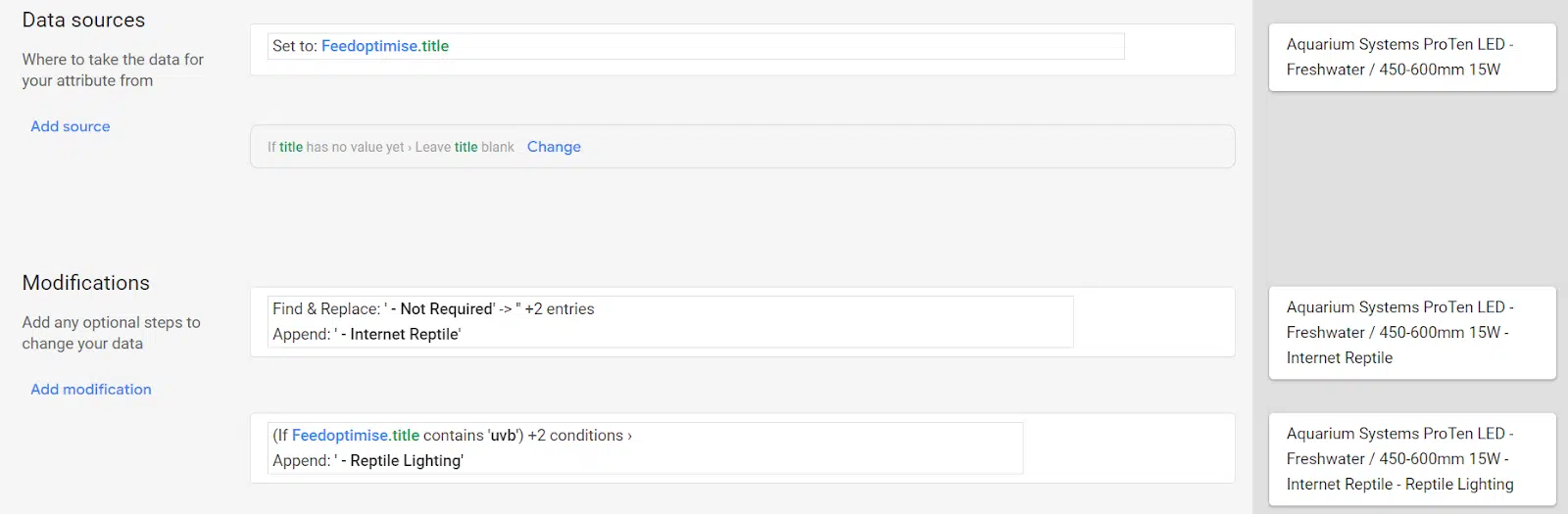
Append text in product titles

Build titles with product attributes

If your product titles lack key attributes such as color or size, but these are submitted attributes in your feed, you can draw on these.

You can also use this approach for attributes such as brand to help incorporate these details into your product titles.

Apply custom labels

A quick and easy way to group products based on set criteria is through custom labels. An example of this would be if you wanted to identify all products that were currently on sale.

In this example, I use other submitted attributes to build the criteria. We know that a sale price should be submitted with the primary feed for sale items. We can call on this element and tag all products with a sale price with a custom label.

Using a rule based on this criteria, the value becomes dynamic as products come in and out of sale. You can then use this label to build your campaign structure, optimize, or report on.
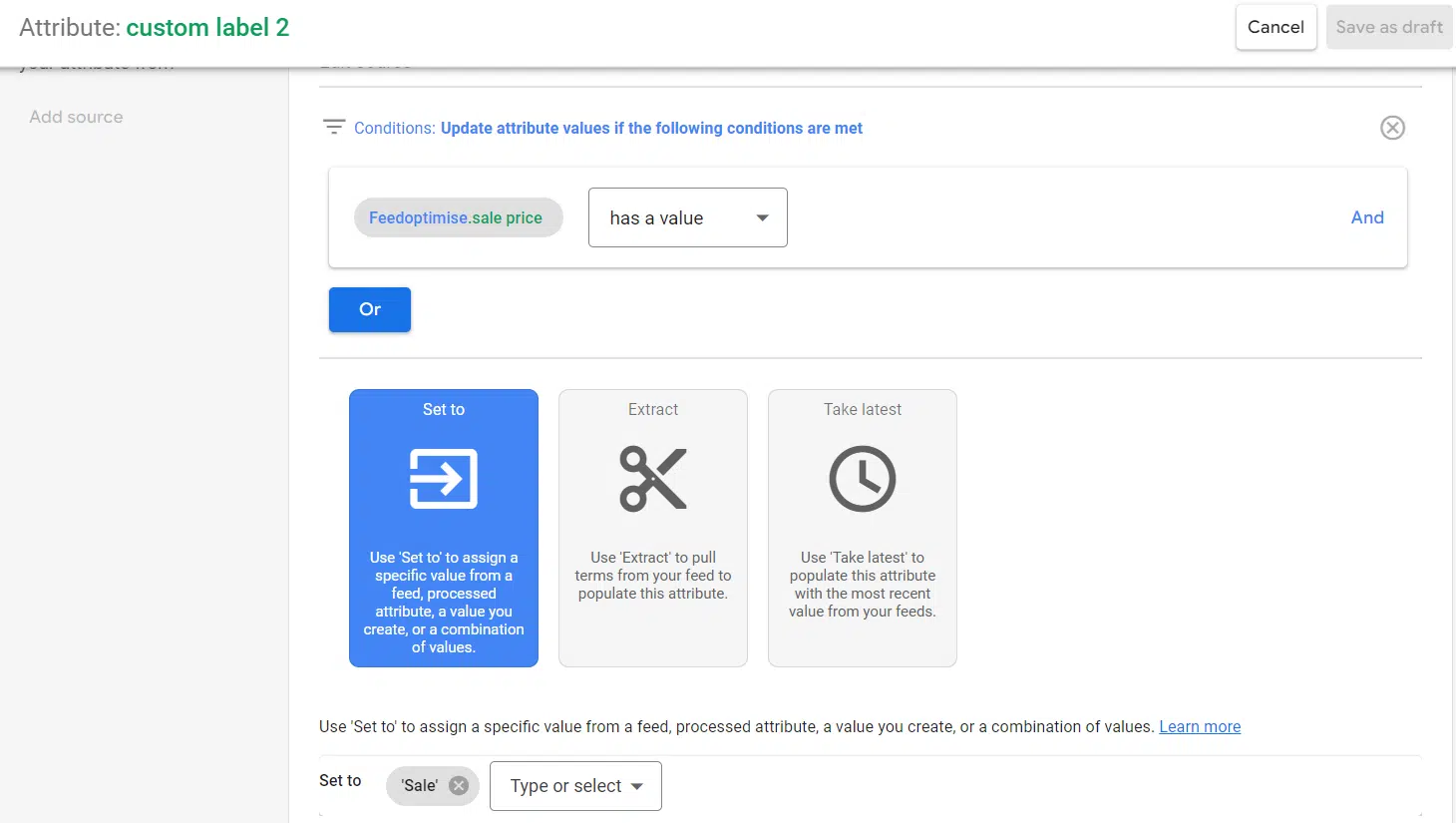
Attribute custom label

Because we aren’t amending a value but creating one, there are no modifications to add underneath this.

Add promotion IDs

If you are running promotions but need to narrow down to specific products only, you can use feed rules to apply a promotion ID. For example, if the offer was only available for specific brands.
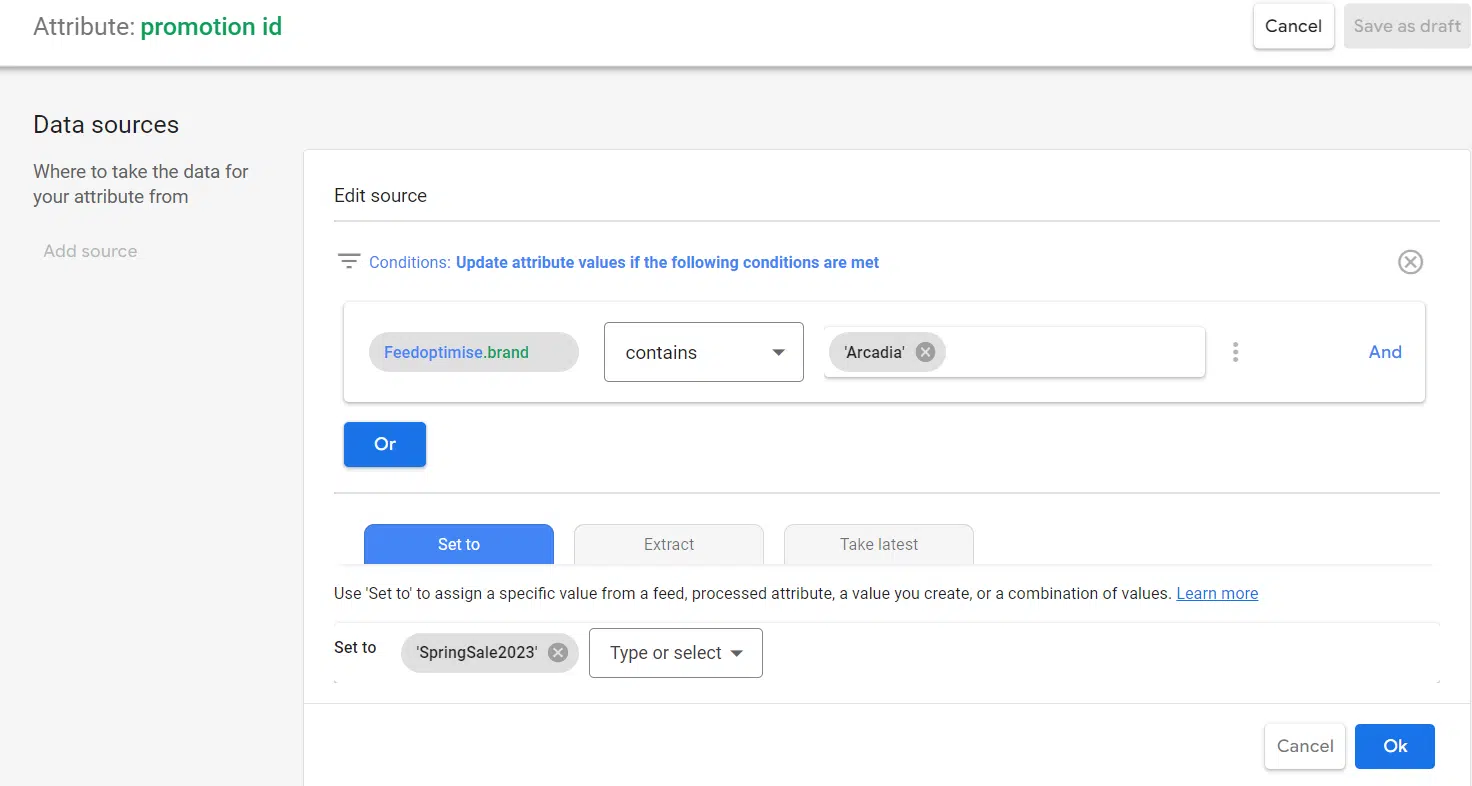
Attribute promotion ID

As with the other rules, you can only have one rule per attribute. So for each new promotion, you must replace the rule conditions.

Populate missing attributes

In some instances, your feed may underperform due to missing attributes. While these attributes may only be recommended, they can help increase feed quality or support in campaign structure.

Attributes you could build out with feed rules include product types and colors. To build these attributes out, the data needs to be available elsewhere in your feed, for example, within a title or description.

This way, your feed rule becomes “If title contains black set color to black.”

Remove errors in standardized fields

Within your shopping feed, there are several attributes that have standardized values you can submit, for example:

  • Condition
  • Availability

Building product types from URLs

The product types attribute is often among the messiest and hardest attributes to amend successfully.

While product type is only a recommended attribute and does not factor directly into ad delivery, it is a vital attribute for account structuring. Ultimately your account structure can make or break your performance, so it becomes an important attribute.

Depending on your site structure, feed rules can help to navigate this. With the use of split and choose, you can use the breadcrumb structure of your URLs to build out product types.

To build out your product types, you can follow the steps below:

  • First, add your data source as your primary feed and select “Set to.”
  • You will want to set the value to “Link.”
  • You will then want to add your modification and select “Split and choose.”
  • You will want to split your attribute by a slash (“/”).
  • Finally, you need to select the split attributes you want to use. For example, https:// will be 1 and your domain will be 2, so the best practice would be to start your selection at 3. You will also want to consider how deep into your URL path to go as not to include the product string itself
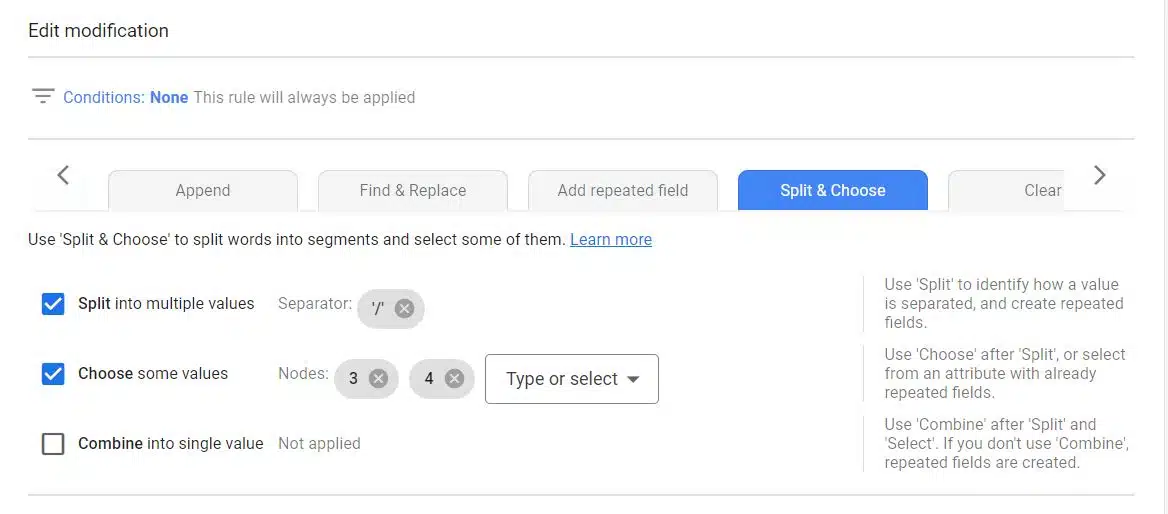
Split and choose - 1
Split and choose - 2

Overcoming low-quality feeds with feed rules

Many edits and improvements can be made to your product feed using feed rules. They are a great place to start if you have edits that span across all or a high volume of products.


Opinions expressed in this article are those of the guest author and not necessarily Search Engine Land. Staff authors are listed here.


Related stories

New on Search Engine Land

@media screen and (min-width: 800px) { #div-gpt-ad-3191538-7 { display: flex !important; justify-content: center !important; align-items: center !important; min-width:770px; min-height:260px; } } @media screen and (min-width: 1279px) { #div-gpt-ad-3191538-7 { display: flex !important; justify-content: center !important; align-items: center !important; min-width:800px!important; min-height:440px!important; } }

About the author

Holly Kelly

Holly leads the Paid Media team at Annica Digital and has been specialising in paid search since 2015. She has experience in planning, strategy and delivery of campaigns across a multitude of channels including Google Ads, Microsoft Ads, Meta, LinkedIn and AWIN. Coming from a data mindset Holly also holds extensive knowledge and experience in using Google Analytics, Google Tag Manager and Google Looker Studio. As a marketing and retail graduate, Holly holds a particular interest in eCommerce. With her hands on delivery of client projects she stays up to date with new ways of working and best practices and is a keen sharer of these as a regular speaker on Anicca Digital’s weekly webinar schedule.

https://searchengineland.com/set-up-feed-rules-google-merchant-center-428096


How better landing page experience and ad relevance can boost your Google Ads performance

Since the beginning, search marketing’s central theme has been to help consumers find the information and products they seek. This is why quality score is an essential factor that benefits both the advertiser and the consumer. 

Quality score is a useful metric for PPC marketers looking to gauge how well their ad quality compares to other advertisers.

Google states that “a higher quality score means that your ad and landing page are more relevant and useful to someone searching for your keyword, compared to other advertisers.”

An “average” quality score may not mean failure – but it does mean higher CPCs and lower click-through and conversion rates. Today I wanted to dive into some data showing why you should never be happy with “average.”

This article explores two quality score components linked to relevance – landing page experience and ad relevance.

Understanding landing page experience and ad relevance

First, let’s cover some quick definitions:

  • Landing page experience: How relevant and useful is your landing page is to people who click your ad.
  • Ad relevance: How closely your ad matches the intent behind a user’s search.

(Note: The expected click-through rate is the third metric. I’m ignoring that for simplicity and focusing on relevance.) 

Both landing page experience and ad relevance measure how well the keyword matches the content in the ad and landing page. This doesn’t mean every keyword variant needs its own landing page.

Instead, you should be thinking about the customer experience and how the flow from keyword to ad copy to landing page can be consistent. 

Delivering what the customer is expecting is always the best practice. Google provides this specific example. 

The other metric to monitor on your landing page is page speed. How quickly the site loads is also directly related to the consumer experience. So having a page that loads quickly and matches the consumer intent will be helpful. 

How Google assesses these scores

Google assigns a score for each of these metrics that is either: 

  • “Above average” 
  • “Average”
  • “Below average”

The score is assigned in comparison to other advertisers whose ads showed for the same exact keyword over the last 90 days. 

This is helpful for advertisers to understand because this score is given against direct keyword auction competition.

Sometimes there is no rating assigned and the data will show with a “-” in the report. This is just a placeholder for ads that do not have enough volume to assign a score. 


Get the daily newsletter search marketers rely on.


Looking at performance metrics by landing page experience and ad relevance scores

I pulled three months’ worth of data across my Google Ads accounts. I then parsed it to include non-branded keywords. 

To simplify things, I’m only sharing the data for keywords that received a “Below average” for both landing page experience (LPE) and ad relevance (AR), then comparing that to data that got “Above average” scores for both metrics. 

The findings of this data pretty clearly show how important it is to monitor and improve these scores. Each key metric vastly differs based on these scores – from cost per click to conversion rates. 

The data set I reviewed showed vast improvements when comparing results from keywords with “Above average” ratings in both landing page experience and ad relevance against those with “Below average” ratings in both. 

Performance metrics by landing page experience and ad relevance scores

Click-through and conversion rates were significantly higher for ads with “Above average” ratings for landing page experience and ad relevance.

CTR was better by 87%, and conversion rates by 750%. Remember, these are non-branded keywords only.

The same is true for cost per click. When the ratings were above average for both metrics (LPE and AR) the CPCs were well below the average by 36%.

Performance metrics by landing page experience and ad relevance scores - 2

What this potentially means

No matter the metric, Google rewards PPC ads that deliver a better experience. In this case, rewards are lower costs and a much better conversion rate. 

I’m sure by digging deep, you would find other scenarios that are helping drive these metrics, like competition, match type, etc. 

You can dig into all those specific data points for your accounts and determine how you want to adjust, even at the keyword level. 

This data indicates that if two advertisers spend $10,000, the advertiser with “Above average” scores for both LPE and AR metrics would receive over 2,000 more clicks and seven times more conversions.

Key takeaways

So, now that you realize how Google rewards advertisers that deliver relevant experiences, below are three best practices to improve PPC performance.

Deliver consistent experiences

Having the keyword match the ad copy and the landing page is key. Often improvements to this experience involve how the account is structured. 

Ad copy is driven at the ad group level, so having too many keyword varieties in each ad group could cause challenges. 

Restructuring the account to align with the user experience and tightly themed ad groups yields excellent results. 

Improve your technology 

The marketing team often can not make changes quickly, given the theme or technology restrictions. 

Perhaps the page is slow to respond because the design is heavy or the code is bloated. Updating these elements to be quick and efficient (for external customers and internal teams) is essential. 

The faster your tech is, the more you can test and make rapid improvements that move the business forward. 

Don’t overreach based on these metrics

These quality score metrics offer helpful insights to optimize your Google Ads performance.

However, if your campaigns are converting well and achieving their intended purpose, you don’t need to tear them down just because you got a poor quality score.

Ultimately, the business metrics should be your source of truth. 

Optimizing for landing page experience and ad relevance

The world of search continues to evolve rapidly, but it will still come down to providing the best user experience. If you can do that, you will have an excellent chance of winning against the competition. 

These metrics provide great insight into where you can improve, but too often, they go unwatched because making these changes requires resources. 

I’m hopeful that by sharing the direct impact these ratings can have on improving your metrics, you will find the bandwidth to test and improve your landing page experience and ad relevance scores.


Opinions expressed in this article are those of the guest author and not necessarily Search Engine Land. Staff authors are listed here.


Related stories

New on Search Engine Land

@media screen and (min-width: 800px) { #div-gpt-ad-3191538-7 { display: flex !important; justify-content: center !important; align-items: center !important; min-width:770px; min-height:260px; } } @media screen and (min-width: 1279px) { #div-gpt-ad-3191538-7 { display: flex !important; justify-content: center !important; align-items: center !important; min-width:800px!important; min-height:440px!important; } }

About the author

Jason Tabeling

Jason Tabeling is the CEO of Airtank and is an accomplished marketing executive and proven leader with over 20 years of experience growing strong and profitable teams, working for and with Fortune 500 companies in a variety of industries.
Prior to AirTank, Jason served as Executive Vice President of Product for BrandMuscle, an enterprise software and services company focused on Fortune 1,000 brands, where he led product innovation and strategy. He earned the company a Leadership Ranking in the Forrester 2020 Through-Channel Marketing Automation Wave. He also spent 16 years working with Rosetta, Razorfish and Progressive Insurance, leading Paid, Earned and Owned media teams across health care, financial services and retail verticals. He was named a “40 under 40” by Direct Marketing News, has been a judge for the AMA Reggie Awards, and has been published in Forbes and many other publications as a subject matter expert.

https://searchengineland.com/landing-page-experience-ad-relevance-boost-google-ads-428113


Google, Microsoft generative AI experiments concern advertisers

Google and Microsoft are placing ads into AI experiments without giving brands the choice to opt out. Advertisers are now concerned that their products and services could be promoted next to inappropriate content.

Why we care: Brands could potentially be at risk of damage to their reputation should their products or services be advertised next to unsuitable content. Digital marketers are calling on Google and Microsoft to give them the chance to opt out of their ad placement experiments in response.

What is happening? Google announced last month that it was planning to use existing search ads in experiments with its new Search Generative Experience. The search engine also said that advertisers would not have the choice to opt out, however, it would be closely monitoring the performance of ad placements during the experimental phase.

Meanwhile, Microsoft is experimenting with ads in its Bing AI chatbot. Advertisers once again are not being given the choice to opt out. However, despite their concerns, the new Bing chatbot has so far received positive feedback from searchers, with 71% giving it the thumbs up in its launch week.

Have Google or Microsoft responded to concerns? Both tech giants have said that they are listening to issues raised by advertisers and are actively working on addressing their feedback. However, as these ad placement experiments are still in the very early stages of testing, marketers still will not be given the choice to opt out.


Get the daily newsletter search marketers rely on.


How have advertisers responded? Digital marketers are concerned about the content their brands could potentially be associated with and are eager to take back control over where their ads appear online. Some businesses have temporarily pulled their ad spending in response to such restrictions, according to Reuters. Others have described the practices as “not industry standard”.

What have Google and Microsoft said? We’ve asked Google and Microsoft to comment on our story and will update if we hear back.


Related stories

New on Search Engine Land

@media screen and (min-width: 800px) { #div-gpt-ad-3191538-7 { display: flex !important; justify-content: center !important; align-items: center !important; min-width:770px; min-height:260px; } } @media screen and (min-width: 1279px) { #div-gpt-ad-3191538-7 { display: flex !important; justify-content: center !important; align-items: center !important; min-width:800px!important; min-height:440px!important; } }

About the author

Nicola Agius

Nicola Agius is Paid Media Editor of Search Engine Land after joining in 2023. She covers paid search, paid social, retail media and more. Prior to this, she was SEO Director at Jungle Creations (2020-2023), overseeing the company’s editorial strategy for multiple websites. She has over 15 years of experience in journalism and has previously worked at OK! Magazine (2010-2014), Mail Online (2014-2015), Mirror (2015-2017), Digital Spy (2017-2018) and The Sun (2018-2020). She also previously teamed up with SEO agency Blue Array to co-author Amazon bestselling book ‘Mastering In-House SEO’.

https://searchengineland.com/google-microsoft-generative-ai-advertisers-428083


TikTok targets $20 billion in ecommerce sales

TikTok is reportedly planning to quadruple its global ecommerce operations, with the goal of selling $20 billion in merchandise.

The ByteDance-owned social media app will rely heavily on rapid growth in Southeast Asia to reach its optimistic target. TikTok also hopes to also boost sales in the U.S. and Europe, Bloomberg reported.

Why we care: TikTok had the highest app store spend across the U.S., UK, France, Germany and Indonesia in the first quarter of 2023, according to Data.ai. Teaming up with the social media giant could not only help advertisers reach a huge audience on the most addictive social app in the world, but also a consumer base who are more likely to spend, which could result in higher conversions.

How does it work? TikTok Shop shows ads to users on its main social media app while they scroll through a never-ending feed of short video clips and livestreams. The business model, which combines entertainment with impulse buying, has already helped Douyin (TikTok’s sister app) establish itself as a major ecommerce player in China, competing against the likes of Amazon and Shopee – an achievement it hopes to repeat in the U.S.

Why now. Revenue from TikTok’s advertising business, which has historically been its primary source of income, is reportedly falling due to a worldwide slowdown in ad sales. So the app is now focusing its efforts on making the $17 trillion online ecommerce arena its main revenue driver instead.


Get the daily newsletter search marketers rely on.


Is TikTok banned in the U.S.? The state of Montana is imposing a ban on TikTok downloads from next year. Lawmakers in other states have also proposed similar bills for a nationwide ban across the U.S. – but a final decision is yet to be made by President Joe Biden.

TikTok fighting a potential U.S. ban. TikTok has 150 million U.S. users and is actively taking steps to prevent the ban, including introducing a range of security measures to address national security concerns raised by American politicians. It is giving partners like Oracle Corp. the right to review its technology and cordoning off American TikTokers’ data.

What TikTok has said. TikTok has declined to comment on its ecommerce plans. However, the social media did release a statement about its future in the U.S.:

  • “A US ban on TikTok is a ban on the export of American culture and values to the billion-plus people who use our service worldwide. We’re disappointed to see this rushed piece of legislation move forward, despite its considerable negative impact on the free speech rights of millions of Americans who use and love TikTok.”

Related stories

New on Search Engine Land

@media screen and (min-width: 800px) { #div-gpt-ad-3191538-7 { display: flex !important; justify-content: center !important; align-items: center !important; min-width:770px; min-height:260px; } } @media screen and (min-width: 1279px) { #div-gpt-ad-3191538-7 { display: flex !important; justify-content: center !important; align-items: center !important; min-width:800px!important; min-height:440px!important; } }

About the author

Nicola Agius

Nicola Agius is Paid Media Editor of Search Engine Land after joining in 2023. She covers paid search, paid social, retail media and more. Prior to this, she was SEO Director at Jungle Creations (2020-2023), overseeing the company’s editorial strategy for multiple websites. She has over 15 years of experience in journalism and has previously worked at OK! Magazine (2010-2014), Mail Online (2014-2015), Mirror (2015-2017), Digital Spy (2017-2018) and The Sun (2018-2020). She also previously teamed up with SEO agency Blue Array to co-author Amazon bestselling book ‘Mastering In-House SEO’.

https://searchengineland.com/tiktok-ecommerce-sales-428066


Reddit launches new ad products to boost conversions

Reddit launched two new ad products today – Contextual Keyword Targeting and Product Ads. The new features have been rolled out to help advertisers reach higher-value customers and to simplify the Reddit Ads Manager tool.

Why we care. Advertisers will be able to reach their target audience more easily and accurately, which could lead to increased conversions.

What’s new? Reddit’s new ad products enable brands to better connect with consumers already in research mode with the intention of making a purchase. These are:

Contextual Keyword Targeting. This new feature will help you reach consumers in active conversations on Reddit by choosing specific keywords you want their brand to be associated with. You will also be able to align keywords with creative ad copy for increased relevance.

As Reddit threads often become evergreen sources of information, Contextual Keyword Targeting will also provide long-term advertising opportunities.

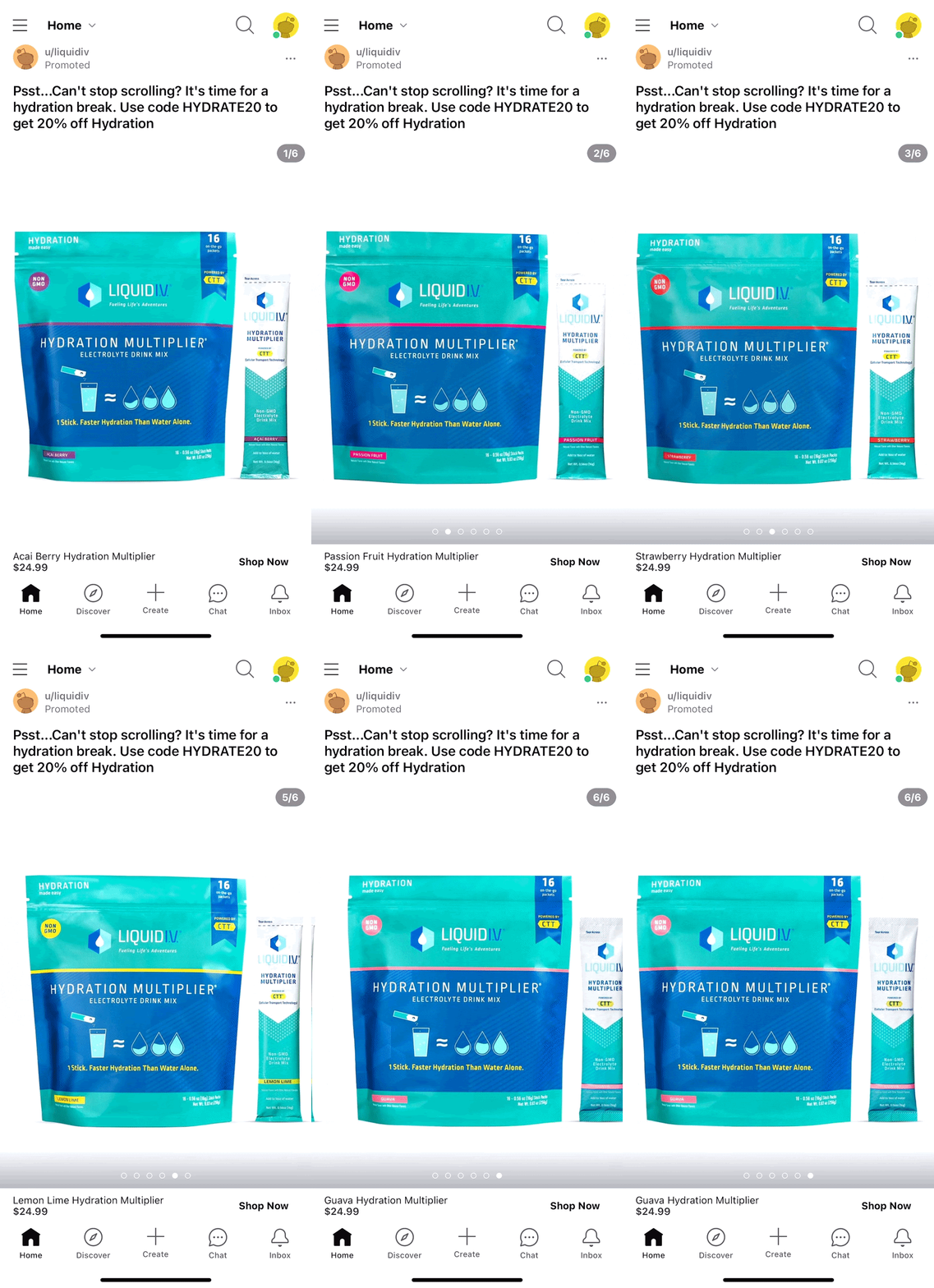
Product Ads. This new ad format will let you target consumers already in the midst of their shopping journey. It will display information such as product descriptions and pricing (in local currency).

Product Ads will also feature call-to-action buttons that will direct users to a brand’s product page. Also, you will also be able to create ads directly from existing catalogs, quickly and easily with no need for additional resources.

In addition, if you are simultaneously activating ad campaigns on competitor platforms, you will be able to easily import the same catalogs to the Reddit Ads Manager.

What Product Ads look like. Here’s an example of a Reddit Product Ad:

Reddit Product Ad

Get the daily newsletter search marketers rely on.


What has Reddit said? Reddit Chief Revenue Officer, Harold Klaje, told Search Engine Land:

  • “These updates will uplevel the search-and-discover experience for both brands and our users by tapping into our differentiated value as a hub for actionable conversation.”
  • “Our approach to this next phase of our Ads Product offering is to help brands help people make informed decisions, find answers to their questions, and discover products they care about – while in the process enabling advertisers to build connections with new and valuable new audiences,” Klaje added.

Interesting stats:

  • Redditors make 2x more category purchases than other online customers.
  • Redditors spend 2.5x more per purchase.
  • Redditors are more than 56% more likely to talk about a brand online positively.
  • Redditors are more than 46% more likely to trust a brand that advertises on Reddit.

Redit’s announcement: Investing in what makes Reddit unique: Introducing Contextual Keyword Targeting and Product Ads.


Related stories

New on Search Engine Land

@media screen and (min-width: 800px) { #div-gpt-ad-3191538-7 { display: flex !important; justify-content: center !important; align-items: center !important; min-width:770px; min-height:260px; } } @media screen and (min-width: 1279px) { #div-gpt-ad-3191538-7 { display: flex !important; justify-content: center !important; align-items: center !important; min-width:800px!important; min-height:440px!important; } }

About the author

Nicola Agius

Nicola Agius is Paid Media Editor of Search Engine Land after joining in 2023. She covers paid search, paid social, retail media and more. Prior to this, she was SEO Director at Jungle Creations (2020-2023), overseeing the company’s editorial strategy for multiple websites. She has over 15 years of experience in journalism and has previously worked at OK! Magazine (2010-2014), Mail Online (2014-2015), Mirror (2015-2017), Digital Spy (2017-2018) and The Sun (2018-2020). She also previously teamed up with SEO agency Blue Array to co-author Amazon bestselling book ‘Mastering In-House SEO’.

https://searchengineland.com/reddit-launches-ad-products-boost-conversions-428051


How to maintain targeting capabilities even without Google Ads similar audiences

Similar audiences have been a valuable tool for expanding prospecting efforts and improving the scale and quality of Google Ads campaigns – and it’s going away starting Aug. 1. 

The good news is that the impact will likely be surmountable. 

Here are alternatives and new strategies to maintain your PPC targeting capabilities. 

Providing high-quality data and signals to Google Ads is key to maintaining effective audience targeting even without similar audiences. 

This ensures that the various automation, machine learning, and algorithmic processes at play have enough of the right information to steer in the direction you want.  

For search + shopping campaigns

Level up how you leverage smart bidding by providing high-quality first-party data. 

You can do this through customer match lists, which can be uploaded directly to Google Ads in the audience manager. 

Smart bidding strategies will automatically utilize this first-party data to proactively seek valuable customers and would-be customers using Google’s automation. 

For display, discovery and video campaigns (Google Ads + Display and Video 360)

Suppose you have similar audiences applied to these campaign types as of Aug. 1. In that case, you will be automatically opted into using optimized targeting, which makes it no surprise that Google’s rec is to roll with it. 

Optimized targeting is a broader strategy than similar audiences. Rather than building personas off of advertiser-provided seed lists, it uses real-time conversion data to construct personas of people deemed more likely to convert. 

Optimized targeting will use your data (content targeting, selected audience segments, etc.) as a jumping-off point. It will also expand its search for qualified users beyond these boundaries. 

Advertisers using optimized targeting across their display and Video 360 campaigns see a 55% improvement toward their specified campaign objectives when using first-party data and a 25% improvement when using Google audiences, according to Google.

For video campaigns (reach or consideration)

On Aug. 1, any video campaigns that fall into this bucket will automatically opt into audience expansion. This strategy probably resembles similar audiences the most in how it works. 

Google will take the selected audience segments you apply and will expand your targeting to include segments across various types (e.g., custom segments, in-market segments) that look like the ones you’ve specifically chosen. 

Think similar audiences that don’t use first-party data as the seed list. 


Get the daily newsletter search marketers rely on.


What else can I do outside of what Google recommends? 

Beyond Google’s recommendations, here are strategies you can test to ensure you’re not missing out on any traffic volume or targeting opportunity come Aug. 1. 

Adding and testing custom segments in your accounts

I’ve seen this strategy used in a couple of different ways that could be useful in this situation. 

Option 1: Create keyword-based custom segment targeting containing your account’s top-performing search queries: one for brand and separate for relevant non-brand categories. 

Gather this data by:

  • Performing a search query analysis across your existing search campaigns.
  • Compiling keyword lists of the terms with the:
    • Highest conversion volume.
    • Most efficient cost per acquisition.
    • Highest conversion value.
    • And/or any other key performance indicator that’s important to you. 

Once these lists are created, you can apply them across your campaign types to capture users who:

  • Search the included terms and similar terms.
  • Show interest or purchase intent related to them. 

Option 2: Create URL-based custom segment targeting using your competitors’ websites. 

Collaborate with your client, internal team, etc., to identify your closest competitors and create a custom segment using the “people who browse websites similar to” option. 

This will tell Google that you want to reach people like those browsing your competitors’ sites. 

Talk about feeding two birds with one scone. You get pseudo-similar audience targeting and visibility to your competitors’ potential customers. 

Smart bidding and its machine learning capabilities 

These can be extremely powerful tools when used strategically. 

I’ve seen success here primarily through adding conversion values and using offline conversion importing.  

Adding conversion values to the existing conversion actions in your Google Ads accounts can assist in expanding targeting to include higher-value users. 

When you add values to your conversion actions, you effectively tell the smart bidding automation, “This is the priority I place on each of these types of actions.”

When you add these values and use a “Maximize conversion value” smart bidding strategy, the automation will use real-time conversion data to seek new users who are most likely to convert on your highest value (highest priority) conversion actions.

Basically, it uses the same logic that similar audiences are, which is “find me more people who exhibit behavior similar to these traits.” 

But in this case, the defined traits are conversion actions rather than advertiser-defined first-party seed lists. 

Testing offfline conversion importing is a worthwhile strategy. 

Offline conversion importing, simply put, is taking the data the business gets after a PPC conversion action and sharing it back into Google Ads via some feedback loop. 

This allows advertisers deeper visibility into which targeting tactics are actually driving bottom-line performance rather than just top-line conversions.

It has the added benefit of providing the highest-quality signal to the smart bidding algorithm/machine learning. 

To make the most of offline conversion importing as it relates to the sunsetting of similar audiences, you should employ it alongside smart bidding strategies as a primary conversion action. 

This will train the system to seek and optimize for these high-quality offline conversion actions, ultimately finding new users who exhibit behavior most like your existing customers. 

Providing high-quality signals to Google

Google’s move to sunset similar audiences is consistent with its goal to focus more on user privacy. 

Will it change the way we can seek new users? Yes. 

Can we still provide high-quality signals and targeting guidance to Google Ads to maintain and continue to improve results for our businesses and clients? Absolutely.  

While we’re seeing plenty of Google Ads features go, that doesn’t mean we are out of tools. It just means we need to find new or different ways to use the ones we’ve got.


Opinions expressed in this article are those of the guest author and not necessarily Search Engine Land. Staff authors are listed here.


Related stories

New on Search Engine Land

@media screen and (min-width: 800px) { #div-gpt-ad-3191538-7 { display: flex !important; justify-content: center !important; align-items: center !important; min-width:770px; min-height:260px; } } @media screen and (min-width: 1279px) { #div-gpt-ad-3191538-7 { display: flex !important; justify-content: center !important; align-items: center !important; min-width:800px!important; min-height:440px!important; } }

About the author

Jenny Williamson

Jenny has years of experience in paid digital marketing strategy and execution across in-house, agency, and consulting settings. She is currently a Paid Media Team Lead at Workshop Digital, where she manages a team of paid media experts to support their professional development, while also using her skills and experience to scale growth and efficiency for client accounts. If Jenny’s not at work, she’s probably out on the water enjoying the outdoors and the beaches of North Carolina, where she lives.

https://searchengineland.com/how-to-maintain-targeting-capabilities-even-without-google-ads-similar-audiences-428038


Google Ads API v.14 is here, with 5 big updates

Google Ads API version 14 has been rolled out with several major updates, including new features to support the move from Universal Analytics to Google Analytics 4.

Why we care. Version 14 of Google Ads API offers an improved user experience by enhancing both campaign management and performance.

What’s new? Here are just a few highlights of the 2023 update.

  • Account-level negative keywords: This new feature will enable advertisers to retrieve, create and update account-level negative keywords. This means that users will be able to exclude specific keywords from targeting not just a single ad group or campaign, but a whole account.
  • New recommendation types: This includes DynamicImageExtensionOptInRecommendation for advertisers whose accounts will benefit from enabling dynamic image extensions. It also includes LowerTargetRoasRecommendation and RaiseTargetCpaRecommendation, which will help users to tweak their return on ad spend.
  • New conversion action types: These new features will help advertisers to identify conversions imported from Google Analytics and determine if a conversion is from a GA4 or Universal Analytics property. This is particularly important as GA4 is replacing Universal Analytics on July 1, and so these changes need to be reflected in Google Ads API v14.
  • Offline conversion clients summaries: This is a brand new field in customer resources that offers information about the offline conversion process, such as how many conversions were uploaded successfully and how many failed when the offload jump was executed.
  • Keyword planning space: Google Ads API V14 features a new method called GenerateForecastKeywordMetrics, to support keyword forecast metrics without needing to create a keyword plan first.

What Google said. Mattia Tommasone, Senior Developer Relations Engineer on the Google Ads API team, told Search Engine Land:

  • “As you can see, there are many updates, changes, improvements and new ways to retrieve information from Google Ads API, version 14. The ones we have mentioned are just a few highlights. And we can’t wait to see you try out all of the new features in this version.”

Timeline:

  • June 2023 – Google Ads API version 14 is released
  • April 2023 – Google Ads API version 13.1 is released
  • October 2022 – Google Ads API version 12 is released
  • August 2022 – Google Ads API version 11.1 is released
  • June 2022 – Google Ads API version 11 is released
  • April 2022 – Google Ads API version 10.1 is released
  • February 2022 – Google Ads API version 10 is released

Further reading: For the complete list of changes made to Google Ads API in version 14, read the full release notes.


Related stories

New on Search Engine Land

@media screen and (min-width: 800px) { #div-gpt-ad-3191538-7 { display: flex !important; justify-content: center !important; align-items: center !important; min-width:770px; min-height:260px; } } @media screen and (min-width: 1279px) { #div-gpt-ad-3191538-7 { display: flex !important; justify-content: center !important; align-items: center !important; min-width:800px!important; min-height:440px!important; } }

About the author

Nicola Agius

Nicola Agius is Paid Media Editor of Search Engine Land after joining in 2023. She covers paid search, paid social, retail media and more. Prior to this, she was SEO Director at Jungle Creations (2020-2023), overseeing the company’s editorial strategy for multiple websites. She has over 15 years of experience in journalism and has previously worked at OK! Magazine (2010-2014), Mail Online (2014-2015), Mirror (2015-2017), Digital Spy (2017-2018) and The Sun (2018-2020). She also previously teamed up with SEO agency Blue Array to co-author Amazon bestselling book ‘Mastering In-House SEO’.

https://searchengineland.com/google-ads-api-14-428043


LinkedIn Ads rolling out generative AI, new ad formats

LinkedIn is testing generative AI and will soon give advertisers in-stream video ads, Conversation Ads and Thought Leader Ads.

Why we care. LinkedIn continues to test and roll out new tools and ad formats that could help advertisers more efficiently reach their target audience on the platform, improve ROI and increase revenue.

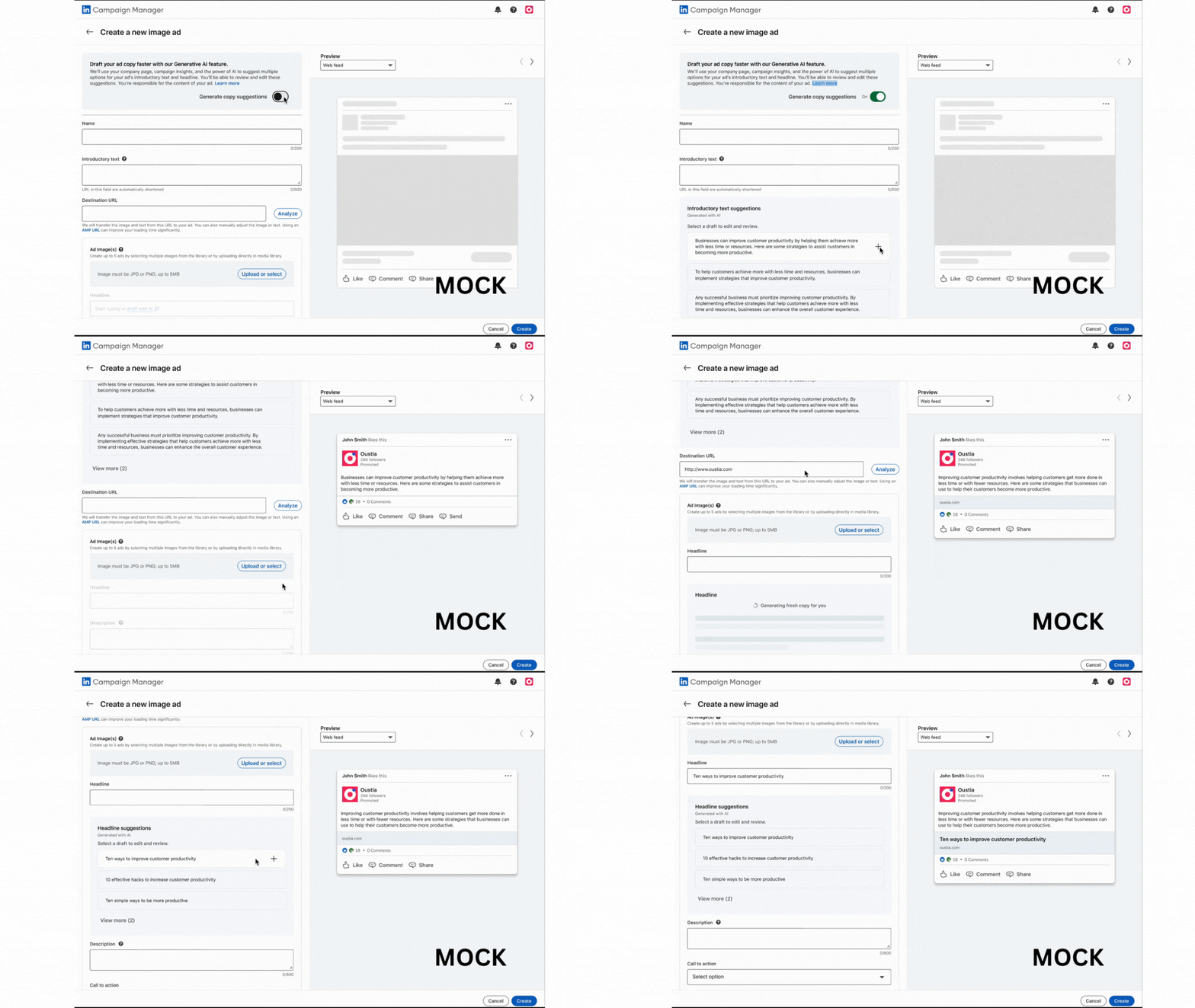
Testing Generative AI. LinkedIn is starting to test what it calls AI Copy Suggestions. It suggests headlines and text copy for ads based on your LinkedIn Page. Advertisers can select from five options, make edits and then apply the copy to a campaign.

Here’s what it looks like:

Linkedin Generative Ai

Only a limited number of North American advertisers have access to AI Copy Suggestions in LinkedIn Campaign Manager. But the company indicated it plans to roll out the feature to more languages and regions in the coming months. 

LinkedIn joins Google Ads, Meta, Amazon and other platforms that now (or soon will) offer generative AI to advertisers.

In-Stream Video ads. LinkedIn is bringing pre- and mid-roll ads to its network of third-party publishers:

  • “These ads, which will appear on mobile or desktop apps and sites, will play at the beginning (pre-roll) and middle (mid-roll) of long-form video content on trusted publisher sites across the LinkedIn Audience Network,” LinkedIn said.

Conversation Ads and Thought Leader Ads. These two new ad formats are not new, but they will become generally available starting in July.

  • Conversation Ads let you set up multiple call-to-action buttons (for content or offers) and collect leads. Here’s an video showing how it works:
[embedded content]

The announcement. You can LinkedIn announcement here.


Related stories

New on Search Engine Land

@media screen and (min-width: 800px) { #div-gpt-ad-3191538-7 { display: flex !important; justify-content: center !important; align-items: center !important; min-width:770px; min-height:260px; } } @media screen and (min-width: 1279px) { #div-gpt-ad-3191538-7 { display: flex !important; justify-content: center !important; align-items: center !important; min-width:800px!important; min-height:440px!important; } }

About the author

Danny Goodwin

Danny Goodwin has been Managing Editor of Search Engine Land & Search Marketing Expo – SMX since 2022. He joined Search Engine Land in 2022 as Senior Editor. In addition to reporting on the latest search marketing news, he manages Search Engine Land’s SME (Subject Matter Expert) program. He also helps program U.S. SMX events. Goodwin has been editing and writing about the latest developments and trends in search and digital marketing since 2007. He previously was Executive Editor of Search Engine Journal (from 2017 to 2022), managing editor of Momentology (from 2014-2016) and editor of Search Engine Watch (from 2007 to 2014). He has spoken at many major search conferences and virtual events, and has been sourced for his expertise by a wide range of publications and podcasts.

https://searchengineland.com/linkedin-ads-generative-ai-new-ad-formats-428040


Microsoft Store Ads to appear in Bing search results

Microsoft Store Ads will now appear in Bing search results, the company announced. Previously only available in the U.S., Microsoft will also open access to Store Ads to advertisers around the world.

Why we care. Aside from expanding the reach of Store Ads campaigns beyond the Microsoft Store to Bing’s search results, advertisers will now have the opportunity to reach customers outside of the U.S. as Microsoft Store Ads is going global this month, with plans to expand to 150 new regions.

How it works. Developers can promote their apps built for Windows on Microsoft Store Ads by following a few simple steps.

What’s next? Microsoft announced at Build 2023 that it is also planning to launch additional features to simplify its existing process for advertisers.

  • Premium Search Ads: Available through the Microsoft Store, this feature has been created to offer a visual and prominent ad placement to help advertisers reach more customers and increase downloads.
  • Microsoft Advertising Software Development Kit (SDK): Advertisers will be able to use this tool to re-target audiences on the Microsoft Network.
  • Simplified user interface: The new design enables advertisers to link their apps with one click once. This will make looking up app information easier as digital marketers will be able to track and analyze app installations, in-app purchases, as well as monitor customer engagement.

The announcement. You can read more about Store Ads in Microsoft’s announcement.


Related stories

New on Search Engine Land

@media screen and (min-width: 800px) { #div-gpt-ad-3191538-7 { display: flex !important; justify-content: center !important; align-items: center !important; min-width:770px; min-height:260px; } } @media screen and (min-width: 1279px) { #div-gpt-ad-3191538-7 { display: flex !important; justify-content: center !important; align-items: center !important; min-width:800px!important; min-height:440px!important; } }

About the author

Nicola Agius

Nicola Agius is Paid Media Editor of Search Engine Land after joining in 2023. She covers paid search, paid social, retail media and more. Prior to this, she was SEO Director at Jungle Creations (2020-2023), overseeing the company’s editorial strategy for multiple websites. She has over 15 years of experience in journalism and has previously worked at OK! Magazine (2010-2014), Mail Online (2014-2015), Mirror (2015-2017), Digital Spy (2017-2018) and The Sun (2018-2020). She also previously teamed up with SEO agency Blue Array to co-author Amazon bestselling book ‘Mastering In-House SEO’.

https://searchengineland.com/microsoft-store-ads-bing-search-results-428015


Amazon may launch ads on Prime Video

Amazon is reportedly planning to launch ads on its Prime Video streaming service. The move, which would see the introduction of short commercial breaks, has been in discussion for weeks, the Wall Street Journal reported.

Amazon has not officially confirmed the news, but industry insiders have said that Prime subscribers would have the option to pay extra for ad-free shows and films if plans do go ahead.

Why we care: Both Netflix and Disney launched ad tiers to their streaming services last year. Netflix’s ad tier already has nearly 5 million monthly active users. Meanwhile, Disney expects up to 70% of subscribers to switch to its ad-supported tier.

If Amazon follows in its rivals’ footsteps, it would create huge opportunities for digital marketers to team up with the third fastest-growing ad business in the U.S., having made $9.5 billion in the first quarter of 2023 (a year-on-year increase of 21%). Currently, the company sells the majority of ads to retailers looking to promote products on Amazon’s search results. But more doors could open for premium advertising if plans go ahead.

Why the change? An increasing number of streaming giants have been introducing ad-supported tiers to increase revenue and grow subscribers, such as HBO’s Max and NBCUniversal’s Peacock.

Amazon has been exploring new ways to boost revenue after the company made tens of thousands of layoffs, which impacted its ad division in April. It was the largest number of layoffs in the business’ 29-year history following a recruitment surge during the COVID pandemic.

The company is now shifting its focus on investing in new original shows, concerts and live sports, which premium advertising can be sold around.  

What has Amazon said? Amazon has reportedly been in discussions about Prime Video ad tiers with Warner Bros, Discovery and Paramount Global. However, as talks are believed to be in the very early stages, representatives from all three brands have refused to comment just yet.

However, in April, Amazon CEO Andy Jassy hinted at the huge potential he sees in ads, despite the recent layoffs. He said:  “Even in difficult economies, most people still shop and with the largest e-commerce shopping venue, we have a lot of customers that companies seek to reach.”

How else will things change for advertisers? In addition to creating more advertising opportunities on Prime Video, Amazon has confirmed that it is working on giving digital marketers the tools to create AI images and videos in ad campaigns. This could significantly help boost listings and sales. However, a timeline is yet to be confirmed.


Related stories

New on Search Engine Land

@media screen and (min-width: 800px) { #div-gpt-ad-3191538-7 { display: flex !important; justify-content: center !important; align-items: center !important; min-width:770px; min-height:260px; } } @media screen and (min-width: 1279px) { #div-gpt-ad-3191538-7 { display: flex !important; justify-content: center !important; align-items: center !important; min-width:800px!important; min-height:440px!important; } }

About the author

Nicola Agius

Nicola Agius is Paid Media Editor of Search Engine Land after joining in 2023. She covers paid search, paid social, retail media and more. Prior to this, she was SEO Director at Jungle Creations (2020-2023), overseeing the company’s editorial strategy for multiple websites. She has over 15 years of experience in journalism and has previously worked at OK! Magazine (2010-2014), Mail Online (2014-2015), Mirror (2015-2017), Digital Spy (2017-2018) and The Sun (2018-2020). She also previously teamed up with SEO agency Blue Array to co-author Amazon bestselling book ‘Mastering In-House SEO’.

https://searchengineland.com/amazon-may-launch-prime-ads-428013