Instagram has rebranded content ads to partnership ads

Instagram just revealed that it would rebrand branded content ads as partnership ads, offering new methods for brands and creators to collaborate on advertising efforts.

How partnership ads work. Partnership ads enable advertisers to expand content originating from a creator or other partner’s account, facilitating broader collaboration.

The updated advertising format allows advertisers to promote a wider range of organic Instagram content as partnership ads. This includes branded content with the paid partnership label, Instagram Collab posts, @mentions, people tags, product tags, and other content not featuring the paid partnership label. Advertisers also have the ability to create new partnership ads in Ads Manager without needing an existing post. To accommodate these additional use-cases, the company is updating permissions to make partnership ads even more user-friendly.

Early testing. According to Instagram, partnership ads are the most efficient and transparent method for advertisers and partners to work together on advertising campaigns. Their data suggests that campaigns combining partnership ads with business-as-usual (BAU) ads result in 53% higher click-through rates, 19% lower cost per actions, and a 99% probability of outperforming BAU ads on their own.

Dig deeper. You can read about the new ads on the Meta blog.

Why we care. The new ads offer a highly efficient and transparent way for brands and creators to collaborate on advertising campaigns. By enabling the promotion of various types of organic Instagram content, these ads facilitate broader collaboration and increased user engagement.

In early tests, the new ads have proven to yield significantly higher click-through rates, lower cost per action, and a greater likelihood of outperforming traditional business-as-usual ads.


Opinions expressed in this article are those of the guest author and not necessarily Search Engine Land. Staff authors are listed here.


Related stories

New on Search Engine Land

@media screen and (min-width: 800px) { #div-gpt-ad-3191538-7 { display: flex !important; justify-content: center !important; align-items: center !important; min-width:770px; min-height:260px; } } @media screen and (min-width: 1279px) { #div-gpt-ad-3191538-7 { display: flex !important; justify-content: center !important; align-items: center !important; min-width:800px!important; min-height:440px!important; } }

About the author

Nicole Farley

Nicole Farley was an editor for Search Engine Land covering all things PPC. In addition to being a Marine Corps veteran, she has an extensive background in digital marketing, an MBA and a penchant for true crime, podcasts, travel, and snacks.

https://searchengineland.com/instagram-has-rebranded-content-ads-to-partnership-ads-409470


How to use incentives in your PPC ads to drive more sales

We’re still not yet in a recession, but everything in life costs more. 

When everything costs more, sales are harder to come by. Especially if you aren’t the cheapest option, or worse, your website is less than ideal to encourage a purchase.

If you’re selling an in-demand good or service, have an amazing website, and are at the lowest price point among your competitors, stop reading. This article will be of no value to you. 

For the rest of you who don’t have Amazon in your domain, this may actually be helpful.

Providing you aren’t selling a one-and-done good or service (and yes, those do exist), any marketer who is worth their weight will tell you that a repeat customer is better than a one-time customer. Think of it from a lifetime value (LTV) angle.

When selling any good or service, two of the most significant barriers to sealing the deal online are the cost to the consumer and the consumer’s experience on the website. 

If lowering the price is out of the question for the long term, and you don’t have the means to enhance your questionable UX, then we turn to incentivization in your PPC campaigns.

Getting started: Parse out your audiences and know their worth

Disclaimer: As of April 2023, this approach is valid for Search, Display, Discovery, YouTube, Performance Max (sort of), and Bing Shopping (I still refuse to call it Microsoft). It is not valid for Google Shopping. It also may be restricted to certain categories (i.e., financial services, healthcare, etc.).

The first thing to do is segregate your previous and current customers into active audience lists and identify their LTV. 

To segregate customers, set a parameter of duration (i.e., those who have purchased within the past 120 days), which can be done with a basic CRM upload to the Google/Bing UI (this works well for Meta, Trade Desk, and most any biddable media platform where the end experience is on your website). 

In addition, I am a fan of creating audience lists of people who have completed a purchase on the site (use the same duration as you do for the CRM upload), allowing this to essentially act like a recycling dynamic list. (Just like the New York Jets quarterback position, a constantly rotating and repopulating role with a two-season lifespan before the player is dropped from it and a new one is added on.)

While doing this, an assessment of how much discount you can allow for should be conducted. If you know the average consumer buys three times a year from you, you can gauge how much of a first-time discount you can provide to a first-time customer (e.g., “15% off your first purchase”). 

Determine how much you’re willing to eat on the final revenue (possibly even at a slight loss) if it ensures you’ll get one more purchase from that consumer. 

I don’t recommend going broke on the incentive, but if you aren’t winning because of your price and the user experience is garbage (ask a 13-year-old to do a checkout on the site, they will give you unnecessarily brutal honesty of how bad it is), make it truly worth it.

Good thing to remember: An incentive doesn’t necessarily mean it has to be a discount on a good. Other avenues are gifts, free/discounted shopping, and bundle deals. 

Or even the allure of the special incentive, where someone gets to join your exclusive club with their first purchase (this is a glorified way of saying they were added to your rewards program and/or email list).


Get the daily newsletter search marketers rely on.


Account structure: Make sure your campaigns are designed to cater to different audiences

Here is where the tedious grunt work comes in.

I prefer to segment at the campaign level (required for Performance Max), but it could also be done at the ad group level. So for the sake of this explanation, we’ll do it at the campaign level.

When possible, determine if your search campaigns generate more repeat or first-time purchases. This will help you decide on audience exclusions and placements for the next part.

Duplicate your current campaigns. (Pro tip: Doing this in the editor tools will save you time.) 

If your current campaigns generate a lot of repeat shoppers, then note the original campaign will be dedicated to them. Just put it in the campaign name.

Then apply the repeat shopper audience lists and CRM lists to it as a target audience (There is a new-ish function in Google to only bid for new customers, but I don’t use that and prefer lists, except for on Performance Max). 

This will only allow the ads in that campaign to hit those on the target lists. If the campaign gets more new shoppers, then apply the CRM and shopper audience list as a negative audience/exclusion so that the campaign only serves ads to new shoppers.

On the new duplicated campaign, do the vice versa settings of the original campaign. 

Repeat this process for all applicable campaign types except for Performance Max. On Performance Max, this approach is directionally strong but far from 100%. 

Duplicate the campaigns (including audience segments). However, you will check the box for one campaign only to bid for new customers. It isn’t guaranteed the other campaign won’t serve first-time shoppers, but as of writing, it is as close as you can get.

The key thing to focus on is that while the two campaigns look identical, they actually show ads to different, non-overlapping audiences. This allows for unique creative to also be served to each audience. 

In addition, when first-time shoppers convert, they will be serviced by the repeat shopper campaign going forward.

Implementing the incentive

At this point, you’ve separated your campaigns into new/first-time customers and repeat customers.

Also, you’ve determined the LTV of a customer and figured out how much and what kind of incentive you can provide to “get them into your system.”

On the campaign designated for new shoppers, I recommend rotating three ads when possible (at least two). 

One is the control/evergreen ad (something you would also use for the repeat shopper campaign), and the remaining ad(s) with an incentive. 

The incentive ad should reflect a promotion, only shared with lapsed or first-time customers to entice them to buy from you once (before you hound them with emails). 

Promotion extensions, sitelinks, and other incentive deals can be applied at the specific campaign level to reinforce this. 

Lastly, unique landing pages that reflect the promotion in the ad (that cannot be navigated from within the site) are often the clincher.

The takeaway

Now you’ve successfully provided a promotion to a new customer, enticed them to give up their data and collected that info to market to them again. 

It is a clean method and gives you a better understanding of budget allocation needs, in addition to creative assets to use for both groups.


Opinions expressed in this article are those of the guest author and not necessarily Search Engine Land. Staff authors are listed here.


Related stories

New on Search Engine Land

@media screen and (min-width: 800px) { #div-gpt-ad-3191538-7 { display: flex !important; justify-content: center !important; align-items: center !important; min-width:770px; min-height:260px; } } @media screen and (min-width: 1279px) { #div-gpt-ad-3191538-7 { display: flex !important; justify-content: center !important; align-items: center !important; min-width:800px!important; min-height:440px!important; } }

About the author

Jonathan Kagan

Jon entered the online marketing industry in 2005 – starting out in the SEM world. Currently he is a Director of Search & Media Strategy for Amsive Digital. Prior, Jonathan had run search marketing teams for 9Rooftops, Mediacom, Forbes, and Digitas. Overseeing enterprise search operations for clients that included American Express, Revlon, GlaxoSmithKline, Equifax, Mead Johnson, Qdoba, Rite Aid and Abbvie. You may have seen some of his presentations on brand safety, mobile, programmatic and multi-screen marketing at conferences like DigiMarCon, Search Insider Summit, SMX and Digital Summit.

https://searchengineland.com/how-to-use-incentives-in-your-ppc-ads-to-drive-more-sales-406621



TikTok’s new ad product gives publishers 50% stake

TikTok has just announced the launch of a new product, Pulse Premiere, aimed at enabling publishers to sell advertisements alongside their content.

How it works. Pulse Premiere is an extension of TikTok’s existing Pulse program, where a select group of top creators receive half the revenue from video advertisements shown immediately after their posts.

The new offering extends similar benefits to select publisher accounts, such as Condé Nast, BuzzFeed, and NBC. Unlike the original Pulse program, which only covers the top 4% of creators’ posts based on metrics like likes, watch time, and comments, Pulse Premiere will allow ad sales against all posts from participating publishers.

What TikTok says. The ability to sell advertisements on one of the most popular social media platforms comes as a relief for many publishers grappling with challenging economic conditions, leading to cost-cutting measures and layoffs throughout the industry. Ray Cao, Global Head of Monetization, Product Strategy, and Operation at TikTok, expressed the company’s desire to support publishers while also creating new business opportunities for the platform.

Cao emphasized TikTok’s aim to diversify its portfolio and help publishers expand their presence on the platform, as well as gain insights into what content resonates with users.

Dig deeper. Read the announcement from the Wall Street Journal.

Why we care. This new product offers an opportunity to reach new audiences on one of the fastest-growing social media platforms. By partnering with reputable publishers like Condé Nast, BuzzFeed, and NBC, TikTok’s Pulse Premiere allows advertisers to associate their brand with quality content, enhancing their credibility and visibility.

Furthermore, as the platform’s user base grows, advertisers can tap into its diverse and engaged audience, potentially resulting in higher engagement rates, increased brand awareness, and, ultimately, better ROI for their advertising efforts.


Related stories

New on Search Engine Land

@media screen and (min-width: 800px) { #div-gpt-ad-3191538-7 { display: flex !important; justify-content: center !important; align-items: center !important; min-width:770px; min-height:260px; } } @media screen and (min-width: 1279px) { #div-gpt-ad-3191538-7 { display: flex !important; justify-content: center !important; align-items: center !important; min-width:800px!important; min-height:440px!important; } }

About the author

Nicole Farley

Nicole Farley is an editor for Search Engine Land covering all things PPC. In addition to being a Marine Corps veteran, she has an extensive background in digital marketing, an MBA and a penchant for true crime, podcasts, travel, and snacks.

https://searchengineland.com/tiktoks-new-ad-product-gives-publishers-50-stake-406854


GA4 custom funnel reports are here

Custom funnel reports can now be created inside Google Analytics 4 (GA4), allowing you to view the steps you can follow to complete a task and assess the number of users who abandon the process between each step.

How custom funnels work. Custom funnel reports are created using funnel explorations. To build a custom funnel report, you must first create a funnel exploration and save it as a report. Google Analytics then utilizes the exploration as a template for constructing the report. The report is saved in the report library, which contains all the reports within a specific property. From the library, you can easily add the funnel report to their left navigation for quick access.

Prerequisites. To create a funnel report and add it to the navigation, you must have Editor or Administrator privileges.

Creating and adding funnel reports. Creating a funnel report involves opening or creating a funnel exploration, saving the exploration as a report, and providing a name and description for the new report. You can then add the report to your navigation by accessing the report library, editing the desired collection, and dragging the funnel report into the appropriate topic.

Recreating funnel explorations from reports. If the original exploration used for creating a funnel report is deleted, you can recover the exploration by opening the funnel report in the Explore section.

Analyzing the funnel. The analysis includes examining abandonment rates, completion rates, funnel steps, and open and closed funnels. You can also use the table below the bar chart to further analyze data and segment it by dimensions.

Customizing the chart and date range. You can zoom in and out of the bar chart for a more detailed view and adjust the default 28-day date range using the drop-down menu in the top right of the report.

Limitations and restrictions. There are specific limits and restrictions when creating custom funnel reports, such as the maximum number of custom reports per property (200) and certain unsupported conditions for funnel explorations. Additionally, once a funnel exploration is saved as a report, any changes made to the exploration do not affect the report, and vice versa.

Dig deeper. Learn more about custom funnels on the Analytics Help blog.

Why we care. Understanding the paths customers take while interacting with a brand or product allows you to make data-driven decisions for optimizing advertising campaigns. By analyzing user behavior, identifying drop-off points, and pinpointing areas for improvement, advertisers can enhance user experience, increase conversion rates, and ultimately maximize their return on investment.


Related stories

New on Search Engine Land

@media screen and (min-width: 800px) { #div-gpt-ad-3191538-7 { display: flex !important; justify-content: center !important; align-items: center !important; min-width:770px; min-height:260px; } } @media screen and (min-width: 1279px) { #div-gpt-ad-3191538-7 { display: flex !important; justify-content: center !important; align-items: center !important; min-width:800px!important; min-height:440px!important; } }

About the author

Nicole Farley

Nicole Farley is an editor for Search Engine Land covering all things PPC. In addition to being a Marine Corps veteran, she has an extensive background in digital marketing, an MBA and a penchant for true crime, podcasts, travel, and snacks.

https://searchengineland.com/ga4-custom-funnel-reports-are-here-406611


3 new Facebook Reels features

Facebook is introducing three new ways for users to find short-form videos that are most relevant to them, as well as new controls to help customize their video experiences on the platform.

Discovering relevant Reels. Facebook is making it simpler for users to find Reels throughout the app, including some updates to their appearance in Facebook Watch.

Reels have also been added to the primary navigation at the top of Facebook Watch, providing quick access to short-form videos and making it easier for users to discover creators, trends, and content that aligns with their interests. Moreover, when watching videos on Facebook, users can now smoothly scroll between reels and long-form videos.

New ways to personalize Reels. Facebook is attempting to offer users more control over the reels they see across the app, similar to other personalization tools on the platform. There are two new ways to do this:

  • Show more, Show less: Facebook wants reels to mirror users’ interests, enabling them to explore current passions while also helping them uncover interests, creators, and communities they may appreciate in the future. Users can now influence the types of reels they see more or less of by tapping the three-dot menu at the bottom of the video player and selecting either Show More or Show Less. This option will also start to appear below reels and videos in the Watch feed. Choosing Show More on a reel will temporarily increase its ranking score and that of similar reels. Opting for Show Less will temporarily decrease its ranking score. By collecting direct user feedback, Facebook can make reels ranking more intelligent and better aligned with user preferences.
  • Contextual labels: Facebook is introducing new labels on the Reels video player to clarify why users are seeing particular reels — for instance, because a friend liked it.

Dig deeper. Review the announcements on the Meta blog.

Why we care. By leveraging the platform’s intelligent ranking system and contextual labels, advertisers can effectively target users with interests that align with their brand or product offerings, resulting in more meaningful interactions and potentially higher conversion rates. The integration of Reels within the Facebook app and its navigation system further ensures a steady stream of user attention, making it an ideal channel for advertisers to invest in and capitalize on for maximum visibility and impact.


Related stories

New on Search Engine Land

@media screen and (min-width: 800px) { #div-gpt-ad-3191538-7 { display: flex !important; justify-content: center !important; align-items: center !important; min-width:770px; min-height:260px; } } @media screen and (min-width: 1279px) { #div-gpt-ad-3191538-7 { display: flex !important; justify-content: center !important; align-items: center !important; min-width:800px!important; min-height:440px!important; } }

About the author

Nicole Farley

Nicole Farley is an editor for Search Engine Land covering all things PPC. In addition to being a Marine Corps veteran, she has an extensive background in digital marketing, an MBA and a penchant for true crime, podcasts, travel, and snacks.

https://searchengineland.com/3-new-facebook-reels-features-405365


Roku streaming collaboration and 5 other Microsoft Ads updates for May

Microsoft has just announced six new updates, focusing on tools and features that aim to assist advertisers in refining their campaigns and improving performance. Let’s dive in.

Roku. The collaboration between Roku TV streaming ads, Microsoft Audience Ads, and Bing’s paid and organic search is now underway. Advertisers interested in using the new cross-channel marketing approach, download the whitepaper for more info.

Simplifying video management for ad campaigns with the Asset Library. Considering using video ads? Now the Microsoft Ads Asset Library accommodates video assets, streamlining video uploading and management for campaigns. You can directly upload videos into the Asset Library from local files or URL links and apply filters such as asset type and video duration. It’s time to invigorate ad campaigns with captivating, dynamic video content.

Simple conversion setup for Smart Campaigns accounts using Multi-platform. In the upcoming weeks, Microsoft Advertising Smart Campaigns accounts utilizing Multi-platform will have access to code-free conversion goal setup. Rather than manually adding code snippets to websites, you can simply choose the relevant buttons and enable conversion tracking within minutes.

To activate this feature, tick the Enable Microsoft Clarity box during the goal setup process. This also grants access to free Microsoft Clarity insights, enabling users to comprehend post-click user behavior and engagement on landing pages through session recordings, instant heatmaps, and an analysis dashboard.

Change history for campaign-level conversions. Over the next few weeks, the change history report will be updated to include campaign-level conversions, raising awareness of any alterations and assisting users in troubleshooting. The addition and removal of campaign-level goals from campaigns will be visible.

English language support expanded for Shopping Campaigns in 52 new markets. The option to add the English language when creating a product feed within a Merchant Center has been extended to 52 new markets. Customers running Shopping Campaigns in these regions can now generate further shopper interest in their products.

Postponement of Enhanced CPC migration on the Microsoft Audience Network. The previously announced migration of all Audience Ads using Manual cost per click (CPC) to Enhanced CPC (eCPC) has been delayed, with a new migration date to be revealed later. Advertisers employing eCPC on the Microsoft Audience Network have experienced an 18% reduction in cost per acquisition (CPA) and a 7.5% reduction in CPC. Trying eCPC is recommended to improve performance on the Microsoft Audience Network.

Dig deeper. Review the announcements on the Microsoft Advertising Blog.

Why we care. The Microsoft and Roku collaboration, streamlined video management in the Asset Library, and code-free conversion goals in Smart Campaigns simplify the advertising process, leading to improved performance and efficiency.

Additionally, the expanded language support for Shopping Campaigns allows for increased shopper interest in new markets, while the success of Microsoft Store Ads showcases the potential for heightened brand awareness, preference, and engagement. By leveraging these advancements, advertisers can optimize their marketing strategies and elevate their overall campaign performance.


Related stories

New on Search Engine Land

@media screen and (min-width: 800px) { #div-gpt-ad-3191538-7 { display: flex !important; justify-content: center !important; align-items: center !important; min-width:770px; min-height:260px; } } @media screen and (min-width: 1279px) { #div-gpt-ad-3191538-7 { display: flex !important; justify-content: center !important; align-items: center !important; min-width:800px!important; min-height:440px!important; } }

About the author

Nicole Farley

Nicole Farley is an editor for Search Engine Land covering all things PPC. In addition to being a Marine Corps veteran, she has an extensive background in digital marketing, an MBA and a penchant for true crime, podcasts, travel, and snacks.

https://searchengineland.com/roku-streaming-collaboration-and-5-other-microsoft-ads-updates-for-may-405261


4 B2B paid media strategies to stay ahead of the curve

Whether you’ve sailed through Q1 and early Q2 with optimism intact or battling challenges exacerbated by macro turbulence, there’s plenty of opportunity to stretch yourself and find competitive gains in the coming months.

This article discusses four initiatives I’ve seen drive great results for my B2B clients, including:

  • Testing new channels to meet your audience where they are.
  • Testing AI tools to increase your tactical efficiency and free strategic-planning bandwidth.
  • Leaning into video.
  • Incorporating customer feedback.

You’ll also learn how you can put them to work in your campaigns.

1. Test new channels – and new features

Advertising platforms, large and small, have been busy releasing new B2B-friendly features. 

Social platforms, particularly, have recently added contextual and search-based targeting functionality. 

  • Instagram recently initiated testing for search result ads. 
  • TikTok is also testing search ads.
  • Reddit is testing contextual functionality and (according to our reps) plans to roll out a search beta in the coming months. 
  • Facebook, along with improving its algorithm to beef up the quality of conversions of its lead gen ads, has added lead form options to target based on volume, higher intent, or custom goals – all of which can help cut down on spam and focus spend where it counts.

The time is ripe for carving out aggressive test budgets for new channels, particularly if you’re laboring under the high engagement costs of Google and LinkedIn. 

My advice for expansion testing is to start with social channels and ignore programmatic until or unless you’re desperate for new traffic sources. 

Exercise these testing muscles now and watch updates from the platforms that show the most promise for engaging your ideal client profiles as they roll out features.

2. Take advantage of AI

You might be sick of hearing about AI, but I’d be remiss if I didn’t join the crowd urging you to wade in and test its capabilities.

On the paid media side, there are three main functions I recommend you start using AI to help with:

Our favorite copy AI tools besides ChatGPT are Jasper, Grammarly and Quillbot. All the usual caveats apply about needing to QA any AI-generated copy before it goes anywhere external-facing. 

But at minimum, AI can give you a great starting point to get over writer’s block since it’s almost universally easier for people to edit than to start from a blank slate.

Supplementing the AI copy options available is an emerging crop of visual tools. Whether it’s video (more on that in a bit), enhanced static-image creation from Canva, or motion graphics like Storyblock or Dribbble, marketers have plenty of tools to help bring their creative to life. 

The last area where you can use AI to save time and create efficiency is analytics. You can pay for fancy AI-powered analytics platforms like Segment Tealium, Pecan, etc., but plenty of low-cost options help your campaign performance. 

Even if you’re stuck in Google Sheets, you can use ChatGPT to:

  • Set up some basic functions to smooth out your reporting.
Build a VLOOKUP function
  • Build negative keyword lists.
Build negative keyword lists.
  • Write macros for spreadsheets.
Write macros for spreadsheets.

Get the daily newsletter search marketers rely on.


3. Get serious about video

Many marketers still aren’t fully embracing video in their campaigns.

Whether on LinkedIn, Facebook, TikTok, or YouTube, there’s plenty of room for B2B engagement – if you can build compelling enough video content to harness it. 

Even with a burgeoning marketplace of low-cost AI tools (e.g., Synthesis, DeepBrain, Pictory) that make video production and editing quick and cheap, many marketers have yet to dip a toe. 

As a starting point, think about the resources you already have available. If you aren’t versed in production development, you can test animations in static ads.

You may have some old YouTube videos to practice chopping up in bite-sized segments. Maybe you have product demos or client testimonials that would piece together a great brand story. 

The upshot is you’re likely starting with at least some inventory, not a blank slate.

And there may be folks on your marketing team who have at least dabbled in video editing – if you don’t have time to learn skills right now, take a quick straw poll of interest and experience on your team.

On the other hand, if you’re really down to learn, you can take matters into your own hands with tools like Loom or VideoAct and get content by recording yourself.

Video is only getting bigger. It’s time to join the fun.

4. Use the gift of customer feedback

Customer feedback has been around as long as things have been sold – and it’s never easier to gather it than it is right now.

Your customer service team, sales team, product reviews, online reviews, and social media accounts are great resources for insights about:

  • Why people buy.
  • Why they don’t buy.
  • What they love most (and least) about your product or service.

All that feedback, especially the feedback that coalesces into themes, is fodder for marketing campaigns.

Problems solved can become case studies or testimonials.

Great experiences can become ad copy.

Questions you can immediately answer should be placed somewhere prominent on your website’s product or service pages. 

One of the marketing team’s most important functions is to gather feedback and absorb its significance.

The most interactive a marketing team is with sources of customer insight, the more precise the targeting and messaging of its campaigns will be.

If, a few months after reading this, you’re still focused on Google and LinkedIn, using ads without motion or animation, applying manual rigor to all of your creative and analytics processes, and crafting strategic and tactical plans without considering audience feedback, you’ll be locking in a series of competitive disadvantages. 

Especially lately, free and budget-friendly features have emerged to help marketers do their jobs.

No matter what size your company, team and budget, ensure you’re using what’s available to help you do your job more effectively – and reap the performance rewards.


Opinions expressed in this article are those of the guest author and not necessarily Search Engine Land. Staff authors are listed here.


Related stories

New on Search Engine Land

@media screen and (min-width: 800px) { #div-gpt-ad-3191538-7 { display: flex !important; justify-content: center !important; align-items: center !important; min-width:770px; min-height:260px; } } @media screen and (min-width: 1279px) { #div-gpt-ad-3191538-7 { display: flex !important; justify-content: center !important; align-items: center !important; min-width:800px!important; min-height:440px!important; } }

About the author

Laura Schiele

Laura Schiele, Head of Paid Acquisition at Jordan Digital Marketing, has nearly a decade of experience in paid media strategy and execution in both agency and in-house accounts and uses advanced analytics skills to scale growth within efficiency goals across Google, LinkedIn, Facebook, and more. Laura manages a large team of paid media experts remotely from her home in Burlington, VT.

https://searchengineland.com/b2b-paid-media-strategies-404114


New update to Meta Ads location targeting

For some accounts, Meta has just updated its location targeting settings.

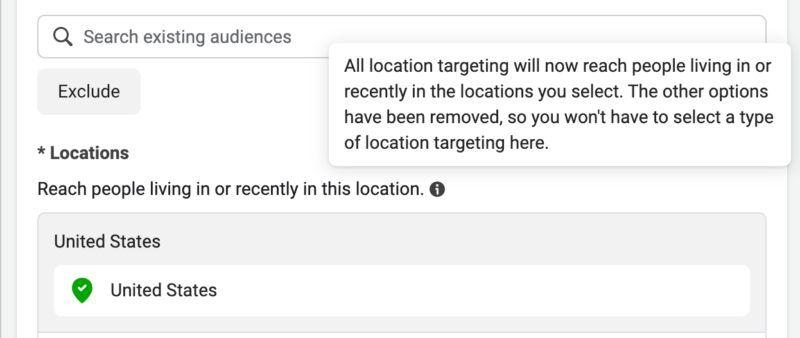
What’s changed. In the past, Facebook’s default setting for targeting locations was “Living in or recently in this location.” This meant that without making any alterations to the settings, advertisers would reach individuals who either resided in the selected locations or had recently visited them, regardless of their permanent address.

There were four available options to choose from:

  1. People living in or recently in this location
  2. People living in this location
  3. People recently in this location
  4. People traveling in this location

Now, the dropdown menu for location targeting has been eliminated, leaving only the “Living in or recently in this location” option. This change signifies that the other options have been removed, and advertisers no longer need to choose a specific type of location targeting.

Locations2 800x338
John Loomer

No exceptions have been identified for campaign objectives or optimization. The campaign objective represents the primary goal of a Facebook ad, and the chosen objective influences various options, including optimization and delivery. Optimization, on the other hand, determines who sees the Facebook ad, as the platform will display the ad to those most likely to perform the desired action.

Furthermore, Meta’s documentation, although not explicitly mentioning the change, seems to have been updated to reflect this new approach in location targeting.

Why we care. With the elimination of multiple targeting options and the focus on “Living in or recently in this location,” understanding this new approach is essential to successfully reach your desired audience. Adapting to these changes and optimizing campaign objectives accordingly will ensure that your ads are displayed to the most relevant users, ultimately leading to better ad performance and higher return on investment.


Related stories

New on Search Engine Land

@media screen and (min-width: 800px) { #div-gpt-ad-3191538-7 { display: flex !important; justify-content: center !important; align-items: center !important; min-width:770px; min-height:260px; } } @media screen and (min-width: 1279px) { #div-gpt-ad-3191538-7 { display: flex !important; justify-content: center !important; align-items: center !important; min-width:800px!important; min-height:440px!important; } }

About the author

Nicole Farley

Nicole Farley is an editor for Search Engine Land covering all things PPC. In addition to being a Marine Corps veteran, she has an extensive background in digital marketing, an MBA and a penchant for true crime, podcasts, travel, and snacks.

https://searchengineland.com/new-update-to-meta-ads-location-targeting-404124


Google expands media buying with real-time bidding integrations

To enhance media buying efficiency, Google Ads plans to adopt real-time bidding auctions for apps, ceasing to respond to multiple calls in mediation starting October 31, 2023. Google Ads will no longer engage with or participate in the practice of handling multiple requests for the same ad impression within the mediation process.

How it works. Prior to this date, Google Ads will commence transitioning away from waterfall buying for certain multi-call requests. The shift to real-time bidding is expected to enable advertisers to find optimally-priced app inventory more efficiently and boost competition within the real-time auction.

Third-party integrations. Google Ads and Display & Video 360 are broadening their real-time bidding integrations with third-party app monetization platforms. These integrations are transitioning to open beta and will be accessible to all app developers using AppLovin (Max), Chartboost Mediation, Digital Turbine FairBid, and Unity LevelPlay monetization platforms.

Implementations. No alterations to campaigns will be required for advertisers to reap the benefits of this program. In the coming week, the option to enable Google bidding will be made available to all app developers using the supported third-party monetization platforms. App developers can also access Google’s demand through real-time bidding integrations with AdMob and Ad Manager publisher offerings.

Dig deeper. You can read about the new integrations on the Google Ads & Commerce Blog.

Why we care. The transition to real-time bidding auctions for apps, and ceasing to respond to multiple calls in mediation, will streamline the media buying process, increase competition, and ensure that advertisers find the best-priced app inventory more efficiently.


Related stories

New on Search Engine Land

@media screen and (min-width: 800px) { #div-gpt-ad-3191538-7 { display: flex !important; justify-content: center !important; align-items: center !important; min-width:770px; min-height:260px; } } @media screen and (min-width: 1279px) { #div-gpt-ad-3191538-7 { display: flex !important; justify-content: center !important; align-items: center !important; min-width:800px!important; min-height:440px!important; } }

About the author

Nicole Farley

Nicole Farley is an editor for Search Engine Land covering all things PPC. In addition to being a Marine Corps veteran, she has an extensive background in digital marketing, an MBA and a penchant for true crime, podcasts, travel, and snacks.

https://searchengineland.com/google-expands-media-buying-with-real-time-bidding-integrations-404021


3 new enhancements for YouTube Shorts

This week YouTube announced new strategies for incorporating Shorts to engage new audiences.

  • Expanding Shorts into Video reach campaigns
  • Positioning alongside trending Shorts content
  • First Position on Shorts

Incorporating Shorts to optimize reach. Shorts is being integrated into Video reach campaigns, which employ Google AI to present the most effective combination of ads, enhancing reach and efficiency on YouTube.

In-feed video ads are also being added to Video reach campaigns to increase opportunities for audience engagement across the platform. Paramount+ was among the early partners to experiment with the updated version of Video reach campaigns.

With the Video reach campaigns update, advertisers can simply upload a 60-second (or shorter) vertical video along with other assets. Alternatively, existing horizontal creative can be adapted and optimized for vertical screens using YouTube’s AI-powered campaign setup tools.

Positioning ads alongside trending Shorts content. YouTube Select enables advertisers to place their ads alongside the most popular content on the platform within a brand-safe environment. The same technology is now being applied to Shorts, allowing brands to reach 1.5 billion logged-in monthly Shorts users.

YouTube Select Run of Shorts lineup. This ensures that ads appear next to the most popular and relevant videos in users’ Shorts feeds, keeping brands at the forefront of viewers’ minds. The First Position on Shorts pilot, available through YouTube Select, allows advertisers to make a strong initial impression in a highly immersive setting by ensuring their ad is the first one viewers see when they open YouTube Shorts.

Leveraging YouTube’s long and Shorts content YouTube offers a wide variety of content, including different entertainment categories, music genres, and video formats (live, short, long, podcast, and music). Both Shorts and long-form videos contribute to viewer engagement and discovery on the platform, making YouTube the preferred destination for creator and short-form content consumption.

By incorporating YouTube into awareness campaigns, brands can reach more people with their creative messaging while users enjoy their favorite content. YouTube’s products and tools make short-form video advertising a seamless addition to campaigns, helping brands of all types maintain relevance and connections with today’s viewers.

Dig deeper. Read more about the new Shorts updates on the Google Ads & Commerce Blog.

Why we care. By incorporating short-form videos into their campaigns, advertisers can tap into new audiences, enhance their reach, and improve brand recall. This creates an ideal environment for brands to stay relevant, connected, and top-of-mind for today’s viewers, ultimately driving better results and fostering long-term brand loyalty.


Related stories

New on Search Engine Land

@media screen and (min-width: 800px) { #div-gpt-ad-3191538-7 { display: flex !important; justify-content: center !important; align-items: center !important; min-width:770px; min-height:260px; } } @media screen and (min-width: 1279px) { #div-gpt-ad-3191538-7 { display: flex !important; justify-content: center !important; align-items: center !important; min-width:800px!important; min-height:440px!important; } }

About the author

Nicole Farley

Nicole Farley is an editor for Search Engine Land covering all things PPC. In addition to being a Marine Corps veteran, she has an extensive background in digital marketing, an MBA and a penchant for true crime, podcasts, travel, and snacks.

https://searchengineland.com/3-new-enhancements-for-youtube-shorts-403991