6 new Reddit Ads Manager features

Reddit has announced a series of updates to its Ads Manager to accommodate its growing global advertising business and cater to the diverse needs of its advertisers. These changes are effective immediately and offer specific improvements for self-service clients and international advertisers.

New features introduced in Reddit’s Ads Manager:

  1. Simple Campaign Creation:
    • Create a campaign with a single ad in three easy steps
    • Ideal for self-serve advertisers and quick ad launches
  2. Automated Ad Creation:
    • Build and test multiple ad variations on the platform
    • Save time previously spent creating new ads one-by-one
  3. Multi-Currency Support:
    • Choose from international currencies like AUD, CAD, EUR, GBP, and NZD
    • Catering to the needs of a growing international client base
  4. Improved Community Search:
    • Find targetable communities based on topic relevance
    • Maximize reach to relevant audiences
  5. Reporting Retention:
    • Support for a 12-month reporting look-back
    • Helpful for advertisers analyzing ad activity over time
  6. Bulk Edit Improvements:
    • Make changes to bids, budgets, and third-party reporting trackers
    • Edit ads across multiple campaigns and ad groups simultaneously

Simple Campaign Creation. Enables advertisers to create a campaign with a single ad in just three easy steps: create an ad, set up targeting and budgets, and select payment. This feature is particularly helpful for self-serve advertisers who want to launch ads quickly and seamlessly.

Automated Ad Creation. Allows advertisers to build and test multiple sets of ad variations to determine which messaging connects best with their target audience. This feature saves time previously spent creating new ads one-by-one.

Multi-Currency Support. Advertisers from more than 40 countries can choose from various international currencies, including the Australian Dollar (AUD), Canadian Dollar (CAD), Euro (EUR), British Pound (GBP), and New Zealand Dollar (NZD).

Once campaigns are live, Reddit has made several updates to improve ad management.

Improved Community Search. Lets advertisers find targetable communities based on topic relevance, ensuring better reach to relevant audiences.

Reporting Retention. Now supports a 12-month look-back, enabling advertisers to analyze their ads’ activity over time.

Bulk Edit Improvements. Allow advertisers to change bids, budgets, and third-party reporting trackers for ads across multiple campaigns and ad groups simultaneously.

These updates reflect the platform’s diverse advertiser base and aim to help all clients get the most from their campaigns on Reddit. As the company continues to scale and welcome advertisers globally, Reddit’s focus remains on providing an easy, intuitive, and dynamic advertising experience, says Shariq Rizvi, Reddit’s EVP of Ads Monetization.

Why we care. The new features simplify and streamline the ad creation process, making it more efficient and saving advertisers time and effort. Advertisers can also better target and find relevant communities for their campaigns, increasing the likelihood of reaching the right audience.


Related stories

New on Search Engine Land

@media screen and (min-width: 800px) { #div-gpt-ad-3191538-7 { display: flex !important; justify-content: center !important; align-items: center !important; min-width:770px; min-height:260px; } } @media screen and (min-width: 1279px) { #div-gpt-ad-3191538-7 { display: flex !important; justify-content: center !important; align-items: center !important; min-width:800px!important; min-height:440px!important; } }

About the author

Nicole Farley

Nicole Farley is an editor for Search Engine Land covering all things PPC. In addition to being a Marine Corps veteran, she has an extensive background in digital marketing, an MBA and a penchant for true crime, podcasts, travel, and snacks.

https://searchengineland.com/6-new-reddit-ads-manager-features-394760


3 new Google Discovery ads features

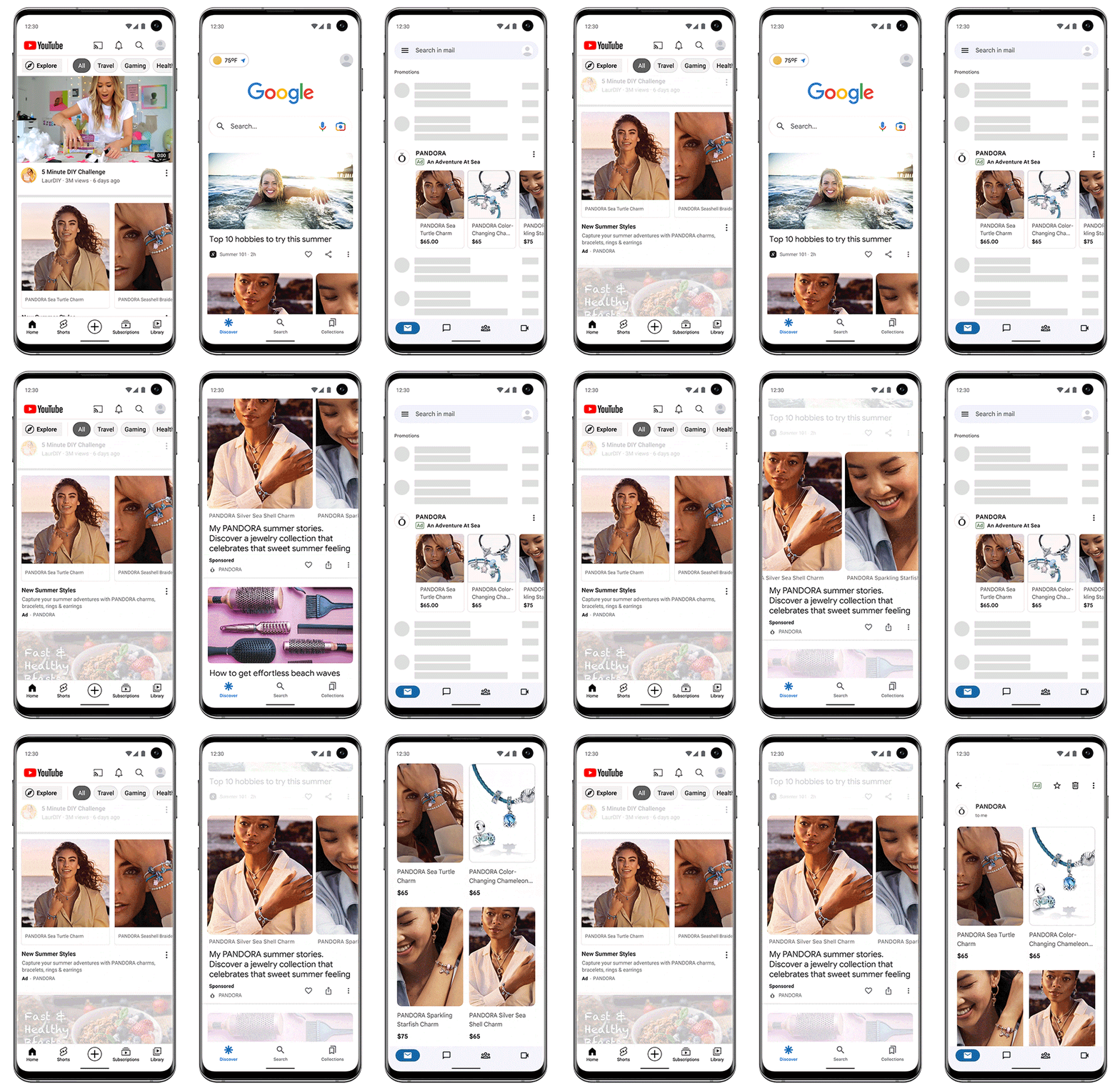
Google Discovery ads have been updated with new features to help brands stand out on our most engaging ad surfaces, including

  • Product feeds that spark audience interest
  • Product-level reporting and data-driven attribution
  • Measure incremental impact through Conversion Lift experiments

New, engaging layouts & product feeds. Advertisers can leverage various layouts, such as carousels, square, and portrait, to create more compelling and impactful ads.

With this feature, advertisers can display products to consumers based on their interests and intent. Retailers can use lifestyle images and concise text from their Google Merchant Center catalog to deliver more relevant ads.

According to early tests, including product feeds in Discovery ads with sales or lead generation objectives can result in an average of 45% more conversions at a similar cost per action, Google says.

WIs2rrACLGg5De7pq0vY9eN9EHBTlLA3i410

Updated reporting and measurement. Later this month, advertisers will be able to utilize product-level reporting to track the performance of their Google Merchant Center catalog items in product feeds based on metrics such as impressions or clicks. This means that retailers who are promoting a diverse array of products will be able to discern which types of products are generating more interest and take relevant business-related actions.

Beginning in Q2, Discovery advertisers will be able to obtain a more precise understanding of their campaign performance in the Google ecosystem through data-driven attribution (DDA). DDA credits conversions based on how individuals interact with your ads and employs your account data to identify which campaigns are having the most significant impact on your business objectives. You can then utilize this information in combination with automated bidding strategies like Max Conversions to generate even more conversions.

Advertisers who switch to data-driven attribution from other attribution models generally see an average increase of 6% in conversions, Google estimates.

Conversion Lift experiments. To accurately assess the effectiveness of campaigns, Google introduced Conversion Lift experiments last year. This is one of their most recent measurement solutions that enable advertisers to determine incremental conversions based on either users or geography.

“For advertisers who are running both Discovery ads and Video action campaigns, you can use Conversion Lift based on geography to measure their impact together. Reach out to your Google account representative to learn how you can participate.”

Dig deeper. Read the announcement from Google.

Why we care. These new tools can help to optimize your ad campaigns more effectively. By utilizing product-level reporting, advertisers can identify which products are driving more interest and take action accordingly. Data-driven attribution helps to accurately measure the impact of ad campaigns on business objectives, while Conversion Lift experiments provide insights into the incremental conversions generated by their campaigns.


Related stories

New on Search Engine Land

@media screen and (min-width: 800px) { #div-gpt-ad-3191538-7 { display: flex !important; justify-content: center !important; align-items: center !important; min-width:770px; min-height:260px; } } @media screen and (min-width: 1279px) { #div-gpt-ad-3191538-7 { display: flex !important; justify-content: center !important; align-items: center !important; min-width:800px!important; min-height:440px!important; } }

About the author

Nicole Farley

Nicole Farley is an editor for Search Engine Land covering all things PPC. In addition to being a Marine Corps veteran, she has an extensive background in digital marketing, an MBA and a penchant for true crime, podcasts, travel, and snacks.

https://searchengineland.com/3-new-google-discovery-ads-features-394747


Countdown to GA4: 100 days to make the switch

As the sun begins to set on Google Analytics Universal Analytics (UA), businesses are (or should be) gearing up for the transition to Google Analytics 4 (GA4).

With just 100 days left until UA is officially retired, it’s crucial for organizations of all sizes to understand the benefits and challenges of migrating to GA4, as well as the essential steps to ensure a smooth transition.

A Q&A from Steve Ganem, Director of Product for Google Analytics, helps us gain invaluable insights into the key features, challenges, and advantages of adopting GA4.

What are the biggest misconceptions about GA4?

“It’s a new product that is not mature enough to use.”  

Despite announcing the migration a little over a year ago, GA4 has been in use by advertisers since 2020, while the idea of web and app analytics has been around since 2019.

With GA4, businesses can access valuable insights to help them make informed and strategic decisions for their operations.

“It’s overly complex and doesn’t provide the same reporting as Universal Analytics” 

GA4 has a learning curve, but it’s essential to move beyond the traditional session-based mindset. To address the complexity of the current digital landscape, we developed GA4, incorporating features like a novel event structure and redesigned user journeys.

Although these concepts might not be immediately clear or easy to grasp, businesses that overcome the learning curve will discover that GA4 is designed to efficiently navigate this evolving digital world and anticipate future changes.

“It’s not designed for small businesses.” 

GA4 was developed to cater to businesses of all sizes, not just small or large enterprises. The aim was to establish a platform that offers comprehensive reporting capabilities and extensive customization options smoothly.

This seamless experience is evident in features such as the personalized homepage, which presents the most pertinent reports to customers, and predictive audiences, which help identify users with a higher likelihood of making a purchase. GA4 effectively takes on much of the analytical workload, delivering crucial insights directly to businesses.

Should I wait for Jumpstart?

The short answer is no. 

For a more detailed response, manual migration remains the suggested method for all businesses. This approach allows for creating a customized property and ensures that everything aligns with your preferred configuration.

This is particularly crucial for advertisers, as their conversion bidding might be linked to Universal Analytics, and it is essential to guarantee a proper transfer to GA4.

While Jumpstart serves as a helpful tool for businesses with limited resources, it only establishes a basic property, making manual migration the preferred option. Furthermore, Jumpstart is being introduced progressively, and the earlier businesses transition, the sooner they can accumulate historical data for year-over-year comparisons.

What are the challenges to migrating and how is Google addressing those?

GA4 was developed for a new era of measurement, which entails new product features and a different measurement approach compared to Universal Analytics. While this doesn’t make it inherently harder, Google recognizes that change can be challenging, and the property’s distinct appearance and functionality compared to Universal Analytics may pose difficulties during migration.

The Setup Assistant. Each tool within the Setup Assistant has been purposefully designed to tackle specific challenges in the migration process, such as property creation, tagging, goal migration, conversion swapping, and more. During preliminary user testing, these aspects were identified by Google as potential challenges and areas where businesses might face difficulties while setting up a GA4 property for the first time.

Search Engine Land posted a guide late last year to give an in-depth look at the Setup Guide. Check it out here.

Additionally, this tutorial has been helpful for many businesses making the transition.  

What are the key features in GA4 that businesses should know?

“One of the reasons we’re so excited about GA4 is all of the new features that not only allow for durability in this evolving privacy landscape, but also that bring to life a new way of measurement that has evolved with how the web and app experiences are evolving,” Ganem said.

That said, here are a few that are worth highlighting: 

  1. Built with Google’s AI at its core: Google’s advanced machine learning helps businesses predict future consumer behavior, allowing marketers to get insights about future consumer behavior and activate on those insights. Additionally, marketers can tap into behavioral modeling, conversion modeling and data-driven attribution to get a complete and accurate view of their campaign performance, even as cookies go away. 
  2. Privacy by default GA4 was designed for now and the future, where privacy is paramount. People’s expectations for privacy have changed and, as a result, so has the way we measure. Built with solutions like modeling, consent mode and data driven attribution baked in, it’s automatically set up to help businesses measure in a privacy-centric way, while still getting the insights they need. 
  3. Web + app: By design, GA4 was built for both web and app – something that previous versions of Google Analytics dealt with separately. People move between web and apps seamlessly and measurement should reflect that. 
  4. Customizable reporting: GA4 enables many different levels of reporting, both detailed and at the overview level – giving businesses either a quick look at a particular topic, while also giving them the opportunity to drill down into additional data. With Customized Overview Reports, you can quickly get a summary of your most important reports. Universal Analytics had a large reporting collection that many businesses found overwhelming – mainly because it was trying to be everything for everyone. That is why in GA4 we prioritized a smaller, curated baseline set of reports and a robust custom reporting tool, allowing businesses to create reports relevant for their business exclusively.
  5. Advertiser workspace: There are currently four advertising reports to provide a quick snapshot and enable you to drill down into performance metrics, attribution models and conversion paths to understand the impact of your advertising campaigns on the business.
  6. Robust API: GA4 supports a large number of APIs, enabling an even more customized measurement foundation. In GA4 we aim to keep the API up to speed with the features of the product so developers can always take advantage of the latest in GA4 – a notable difference from Universal Analytics, where the API often lacked functionality.

Why advertisers will lose out if they don’t move 

Bottom line: for advertisers, ROI is on the line. 

Once Universal Analytics property stops processing data on July 1st, 2023, conversions and audiences will stop flowing new data from that property into Google Ads. This could significantly affect the performance of their ad campaigns. It’s critical that advertisers make the switch to GA4, so that they are in a much more stable and durable position.

What happens to Universal Analytics properties after July 1st?

Universal Analytics properties will stop reporting new data July 1st. 

To be a bit more specific, they will stop processing data, meaning your standard UA property will no longer operate the way it does today. That said, businesses shouldn’t be surprised when they can still log into their accounts after July 1st – it will take time to completely sunset the product for all businesses. 

Historical data will be available for six months to aid with period-over-period comparisons, giving businesses a chance to export their historical data even after the sunset. 

Why is it so important to make the move now?

Now is the time. 

By making the move you will: 

  1. Get comfortable with GA4. GA4 is a new platform and has new tools and capabilities. They will take time to adjust to and the earlier businesses get their properties setup, the sooner they’ll get accustomed to the new platform. 
  2. Build historical data. Building historical, comparative data is important to a successful analytics property – of any kind. 
  3. Side by side. Being able to use a GA4 property in parallel to an existing UA property will give businesses the ability to see what’s different, what’s the same and what they have in UA that they need to have in GA4. This side by side time is essential, especially for businesses who have put a lot of time and effort into their existing UA properties to date.

Dig deeper. Still confused? Check out more resources:

Why we care. Plain and simple, UA is going away. But according to ChatGPT, here is why GA4 could be better for advertisers.

  1. Improved insights: GA4 offers better data analysis and insights, allowing advertisers to make more informed decisions and optimize their campaigns effectively.
  2. Unified measurement: GA4 combines data from websites and mobile apps, enabling advertisers to track user behavior across multiple platforms and devices, providing a more comprehensive understanding of their audience.
  3. Enhanced audience targeting: With advanced audience segmentation tools, GA4 allows advertisers to create more personalized and targeted campaigns, leading to improved ad performance and higher ROI.
  4. Machine learning integration: GA4 leverages machine learning algorithms to provide automated insights, recommendations, and predictions, helping advertisers to identify trends and opportunities more efficiently.
  5. Future-proofing: GA4 is designed to adapt to future changes in user behavior, technology, and privacy regulations, ensuring that advertisers stay ahead of the curve and maintain a competitive edge.
  6. Privacy compliance: GA4 is built with a strong focus on user privacy and compliance with data protection regulations such as GDPR and CCPA, which is essential for responsible advertising practices.
  7. Better integration with Google Ads: GA4’s tighter integration with Google Ads simplifies the data import/export process between the platforms, allowing for better analysis and optimization of campaigns.

Related stories

New on Search Engine Land

@media screen and (min-width: 800px) { #div-gpt-ad-3191538-7 { display: flex !important; justify-content: center !important; align-items: center !important; min-width:770px; min-height:260px; } } @media screen and (min-width: 1279px) { #div-gpt-ad-3191538-7 { display: flex !important; justify-content: center !important; align-items: center !important; min-width:800px!important; min-height:440px!important; } }
About the author

Nicole Farley

Nicole Farley is an editor for Search Engine Land covering all things PPC. In addition to being a Marine Corps veteran, she has an extensive background in digital marketing, an MBA and a penchant for true crime, podcasts, travel, and snacks.

https://searchengineland.com/countdown-to-ga4-100-days-to-make-the-switch-394725


Make sense of your marketing with the 101 Guide to Marketing Attribution by Digital Marketing Depot

101 Guide Textbook Highlight College 800x450

Every marketer measures the impact of their activity but do they truly know the effectiveness of their activity and advertising spend? For the majority of marketers, the overwhelming answer is no. On average, marketers estimate they waste over one quarter of their budget (26%) on ineffective channels and strategies, according to a study by Rakuten.

Though marketing attribution may seem like a difficult task, in a world where ROI is king, accurate marketing attribution needs to be at the forefront of every marketer’s mind to maximize the efficiency of their activity in 2023.

This guide deep dives into how marketers are successfully moving the needle and implementing true multi-touch algorithmic attribution to measure and optimize their activity.

Don’t miss out on the opportunity to make sense of your marketing attribution and get to value quickly with our easy-to-follow guide. Visit Digital Marketing Depot to download the 101 Guide to Marketing Attribution from Snowplow.


Related stories

New on Search Engine Land

@media screen and (min-width: 800px) { #div-gpt-ad-3191538-7 { display: flex !important; justify-content: center !important; align-items: center !important; min-width:770px; min-height:260px; } } @media screen and (min-width: 1279px) { #div-gpt-ad-3191538-7 { display: flex !important; justify-content: center !important; align-items: center !important; min-width:800px!important; min-height:440px!important; } }

About the author

Digital Marketing Depot

Digital Marketing Depot is the resource center for digital marketing strategies and tactics. Created by Third Door Media, Digital Marketing Depot features a robust library of hosted white papers, eBooks, original research, and webinars on a wide range of digital marketing topics- from advertising, analytics, data and content management, to email marketing, SEO and PPC campaign management, and much more. Visit us at http://digitalmarketingdepot.com.

https://searchengineland.com/make-sense-of-your-marketing-with-the-101-guide-to-marketing-attribution-394719


TikTok CEO faces congress over security concerns

In a wildly dramatic and painful-to-watch session, TikTok CEO Shou Zi Chew testified before Congress in a hearing that will determine the future of the social media app.

Just as US user adoption hit 150 million, the CEO faced tough questions from out-of-touch congresspeople about safety, privacy, selling data, and security concerns. Here’s what happened:

“Mr. Chew, you are here because the American people need the truth about the threat TikTok poses to our national and personal security,” Committee Chair Cathy McMorris Rodgers, a Republican, said in her opening statement. “TikTok has repeatedly chosen a path for more control, more surveillance and more manipulation.”

Privacy and security. Let’s remember there is no evidence that TikTok has shared U.S. user data with the Chinese government, but policymakers fear that the Chinese government could compel the company to do so. Chew says legacy U.S. data in Virginia and Singapore servers are being deleted. “We expect that to be complete this year. When that is done, all protected U.S. data will be under the protection of U.S. law.”

Chew says the company has created “what amounts to a firewall that seals off protected U.S. user data from unauthorized foreign access.” “American data stored on American soil by an American company overseen by American personnel.”

Chew made 4 commitments to U.S. lawmakers:

  1. Prioritizing safety for young users
  2. Firewall protection for U.S. user data
  3. The app will remain a place for free expression & ‘will not be manipulated by any government’
  4. Transparency

Surveillance concerns. When asked about surveillance, Rep. Cathy McMorris Rodgers (R-WA)”Can you say with 100% percent certainty that neither ByteDance nor TikTok employees can target…Americans with…surveillance techniques?” Chew said, “I disagree with the characterization of surveillance.”

While Chew does not deny employees at TikTok’s parent company in China have access to Americans’ sensitive user data, so does every other social media platform. Chew says he believes that TikTok doesn’t collect any more data than any other social media platform.

Rep. Richard Hudson (R-NC) asks TikTok CEO Shou Chew: “Does TikTok access the home WiFi network?”

After a five-minute rant from Rep. Kat Cammack (R-FL), Chew asked to respond to questions and comments but was told, “No. We’re going to move on.”

Save our children. Rep. Gus Bilirakis (R-FL) showed a compilation of TikTok videos encouraging suicide and death and told Chew, “Your technology is literally leading to death.” After the video, Chew asked to say a word about the death but was promptly cut off mid-sentence in what seemed more like a show than an effort to extract any meaningful information.

Rep. Castor (R-FL) blamed the CEO for people’s algorithms causing them to commit suicide. She also reminded us that Facebook and Instagram sat in the same seats and told congress they knew of the issues and did nothing to prevent kids from self-harm.

Here’s what Twitter thought. An overwhelming majority of people watching and live Tweeting the hearing are noticing that congress isn’t letting Chew respond to questions and accusations.

Dig deeper. Watch it live. If you have the patience.

Why we care. A TikTok ban could have a significant impact on the future of the popular social media app, and therefore their advertising strategy. If TikTok is banned or faces severe restrictions, it could affect the app’s user base and potentially make it less attractive to advertisers.

Additionally, if the hearing reveals serious security or privacy concerns with the app, it could lead to a loss of trust among users and advertisers alike. On the other hand, if the hearing goes well and TikTok is allowed to continue operating with minimal restrictions, it could present a valuable opportunity for advertisers to continue reaching a large and engaged audience on the platform.


Related stories

New on Search Engine Land

@media screen and (min-width: 800px) { #div-gpt-ad-3191538-7 { display: flex !important; justify-content: center !important; align-items: center !important; min-width:770px; min-height:260px; } } @media screen and (min-width: 1279px) { #div-gpt-ad-3191538-7 { display: flex !important; justify-content: center !important; align-items: center !important; min-width:800px!important; min-height:440px!important; } }

About the author

Nicole Farley

Nicole Farley is an editor for Search Engine Land covering all things PPC. In addition to being a Marine Corps veteran, she has an extensive background in digital marketing, an MBA and a penchant for true crime, podcasts, travel, and snacks.

https://searchengineland.com/tiktok-ceo-faces-congress-over-security-concerns-394726


Google Analytics has increased the number of allowed properties

Google Analytics has increased the number of Properties that can be added to an account, from the previous default value of 100 to 2000.

What’s changed. This modification provides greater flexibility in managing Properties and eliminates the need to seek support for additional capacity. Moreover, a new limitation has been introduced for the number of subproperties that can be associated with a Property, currently set at 400. If the limit needs to be increased, users may request support.

Dig deeper. You can review the announcement on the Google Analytics Help guide.

Why we care. Additional properties offer greater flexibility and ease of organization. With the ability to manage more Properties, advertisers can gain a more comprehensive understanding of their online presence and how users interact with their content.


Related stories

New on Search Engine Land

@media screen and (min-width: 800px) { #div-gpt-ad-3191538-7 { display: flex !important; justify-content: center !important; align-items: center !important; min-width:770px; min-height:260px; } } @media screen and (min-width: 1279px) { #div-gpt-ad-3191538-7 { display: flex !important; justify-content: center !important; align-items: center !important; min-width:800px!important; min-height:440px!important; } }

About the author

Nicole Farley

Nicole Farley is an editor for Search Engine Land covering all things PPC. In addition to being a Marine Corps veteran, she has an extensive background in digital marketing, an MBA and a penchant for true crime, podcasts, travel, and snacks.

https://searchengineland.com/google-analytics-has-increased-the-number-of-allowed-properties-394703


Instagram launched Reminder ads and initiates testing for Search Result Ads

Instagram unveiled two new ad products to offer businesses additional avenues for discovery and increased visibility – Reminder Ads and Search Result Ads.

Reminder Ads. Instagram collaborated with brands like Starz to experiment with a unique ad format, streamlining the process for businesses to announce, remind, and inform users about upcoming events or launches that may pique their interest.

Availability. Reminder ads are now available to all advertisers as a feed option, allowing advertisers to boost awareness, generate excitement, and promote consideration for upcoming occasions.

How it works. Users can choose to receive handy reminders and will be notified by Instagram three times – one day prior, 15 minutes before, and at the precise time of the event.

337139071 756459869257583 8821971081360258037 N 800x554

Ads in search results. Instagram is beginning to test ads in search results to reach people actively searching for businesses, products and content. Ads will show up in the feed that people can scroll when they tap into a post from search results. They plan to launch this placement globally in the coming months.

Why we care. The new ad solutions increase visibility for businesses on the platform, enabling them to reach a wider audience and potential customers who may have yet to discover them. The ads can also increase brand awareness, drive event attendance, or promote product launches, providing flexibility to tailor campaigns according to advertisers’ needs.


Related stories

New on Search Engine Land

@media screen and (min-width: 800px) { #div-gpt-ad-3191538-7 { display: flex !important; justify-content: center !important; align-items: center !important; min-width:770px; min-height:260px; } } @media screen and (min-width: 1279px) { #div-gpt-ad-3191538-7 { display: flex !important; justify-content: center !important; align-items: center !important; min-width:800px!important; min-height:440px!important; } }

About the author

Nicole Farley

Nicole Farley is an editor for Search Engine Land covering all things PPC. In addition to being a Marine Corps veteran, she has an extensive background in digital marketing, an MBA and a penchant for true crime, podcasts, travel, and snacks.

https://searchengineland.com/instagram-launched-reminder-ads-and-initiates-testing-for-search-result-ads-394673


5 steps to optimize your brand in search by Digital Marketing Depot

Web Search Laptop 1920x1080 1 800x450

In paid search, your most effective and cost-effective strategy should be to leverage your own valuable brand equity. Your online brand space is where you should be most confident at securing transactional web traffic associated with your products or services.

Your brand is constantly under attack in paid search from businesses and brands freeloading on your brand equity, bidding on your brand terms, and using your brand name and trademarks in their ad copy. These brand crashers are driving up your brand CPCs and syphoning off customers.

In this guide, Adthena shows you how to easily monitor and take action against trademark infringements, prevent partners and affiliates from cannibalizing clicks, and save money on terms you’re already winning organically. Visit Digital Marketing Depot to download the Brand Crashers: 5 Steps to Optimize Your Brand in Search.


Related stories

New on Search Engine Land

@media screen and (min-width: 800px) { #div-gpt-ad-3191538-7 { display: flex !important; justify-content: center !important; align-items: center !important; min-width:770px; min-height:260px; } } @media screen and (min-width: 1279px) { #div-gpt-ad-3191538-7 { display: flex !important; justify-content: center !important; align-items: center !important; min-width:800px!important; min-height:440px!important; } }

About the author

Digital Marketing Depot

Digital Marketing Depot is the resource center for digital marketing strategies and tactics. Created by Third Door Media, Digital Marketing Depot features a robust library of hosted white papers, eBooks, original research, and webinars on a wide range of digital marketing topics- from advertising, analytics, data and content management, to email marketing, SEO and PPC campaign management, and much more. Visit us at http://digitalmarketingdepot.com.

https://searchengineland.com/optimize-your-brand-in-search-394622


How to keep up with macro trends that impact PPC performance

Understanding macro trends is crucial for making informed decisions within your PPC account. This is why businesses must create a holistic monitoring plan that takes all relevant data points into account. 

3 ways to stay on top of PPC performance covered how to monitor your paid search performance comprehensively.

This article will demonstrate how to set up monitoring and analysis processes for macro-level events that impact your overall PPC performance and business. 

Contextualize your PPC performance with macro-trend monitoring

Various external factors may impact your paid search efforts. Thus, your PPC monitoring plan should help you surface emerging trends in your industry so you can adapt your advertising strategies accordingly. 

Tracking news cycles, PR, and competitor activity can provide valuable insights into your industry and how your advertising performance compares.

Here are some benefits of macro-trend monitoring for PPC:

  • Crisis management: Monitoring PR through Google alerts can help you quickly identify negative press or publicity. You can then immediately mitigate potential damage to your brand reputation.
  • Opportunity identification: When you are on top of competitor activity, you’ll know what’s working and not in your industry. Use this to determine new growth opportunities and develop strategies to differentiate your brand from competitors.
  • Benchmarking: Comparing your PPC campaigns to your competitors’ also provides benchmarks for campaign performance. Clear benchmarks set realistic goals and expectations for your advertising efforts and specify areas that require optimization.
  • Cost savings: By monitoring macro-trends, you can optimize your ad spend based on industry trends and market conditions. 

This can result in significant cost savings and help companies to achieve a better return on investment (ROI) for their advertising efforts.

These monitoring tools are useful for staying on top of PPC macro trends.

  • Google Analytics: This free web analytics tool provides data on website traffic, user behavior, and conversions. It helps you track and analyze your paid search campaigns’ performance and identify improvement areas.
  • Google Search Console: Tracking organic search metrics, such as impressions, clicks, and click-through rates, can inform your paid search strategy.
  • Google Trends: This free tool tracks search trends and patterns across different regions and languages.
  • Google Alerts: You can customize this to track mentions of keywords or phrases in a specific language, region, or source, such as news, blogs, or videos. Choose the frequency of alerts, ranging from “as it happens” to “once a day” or “once a week.”
  • Earnings reports: You would be surprised at how informative earnings reports for publicly traded companies can be. If you have a client in this category, you should attend their earnings calls.

Get the daily newsletter search marketers rely on.


Year-over-year (YoY) projections based on historical data can set realistic expectations for your campaign result. 

YoY projections improve forecasting accuracy, enable you to make data-driven decisions, facilitate long-term strategic planning, and improve accountability.

Tools to build performance projections

A few free resources can help you build projections based on your historical PPC performance. 

Microsoft Advertising, Google Ads and Google Sheets

Download your historical performance data directly from the ad platforms (Google and Microsoft) to create month-to-month projections for the upcoming year. 

You will want to adjust your forecasts by excluding data impacted by specific strategies or changes in your PPC accounts. 

For example, your company may have run a one-time sale over the summer, which boosted sales. But this is not an annual sale, so it should not be built into your projections model. 

Google Performance Planner

Performance Planner is a free tool offered by Google Ads that helps advertisers create and forecast the performance of their Google Ads campaigns.

You need to input essential information about your campaign, such as your target location, ad format, bidding strategy, and budget. 

You’ll also need to list keywords you plan to target in your campaign. Once you’ve entered this information, the Performance Planner will analyze historical performance data from your Google Ads account and use machine learning algorithms to project how your campaigns will perform in the future.

Paid tools

If you want to develop a more robust projections program, you could check out the following tools:

  • Optmyzr: Optmyzr has a forecasting feature where you can estimate the potential performance of your Google Ads campaigns based on your budget and other key metrics.
  • AdStage: AdStage lets you estimate the potential performance of your campaigns across multiple advertising channels, including search engines.
  • NinjaCat: Ninjacat’s ability to forecast PPC performance involves using historical data to predict future outcomes. The platform can analyze past PPC performance data, including clicks, impressions, conversions, and other relevant metrics.

Competitor monitoring informs your macro-level analysis 

Regularly checking your competitors’ advertising activity can give you a better understanding of what’s working for them and what isn’t. 

Tools to help with competition monitoring 

Discover competitive insights with the core PPC platforms. Google and Microsoft provide tools that offer insights into competitor activity.

Google Ads Auction Insights

Google Ads Auction Insights is a free tool that compares your performance to other advertisers in the same auction. 

You can use it to see how often your ads are shown alongside your competitors’ ads and identify areas where you may fall behind.

Microsoft Advertising Competition Tab

The Competition Tab provides valuable competitive insights for your campaigns. Their Auction Insights reports can give an overview of your competitors’ performance metrics and how they compare to yours.

Google Alerts 

You can use Google Alerts to monitor your company, but it’s also an excellent strategy to set up alerts for your main competitors. They may make significant announcements that would be insightful for your campaigns. 

Earnings reports

If you have critical competitors in your industry, you should also consider attending their earnings! You can gain valuable insights from these calls. Companies provide earnings reports, strategic initiatives, and more. 

Paid tools

Some helpful paid subscription tools can help inform your competitive monitoring practices. Check out the tools listed below if you need more than the free tools.

  • Semrush allows you to analyze your competitors’ organic and paid search strategies. You can use it to determine which keywords your competitors rank, what ad copy they use, and their budget.
  • SpyFu specializes in competitive analysis for PPC advertising. It lets you see your competitors’ ad history, top-performing keywords, and ad copy variations. You can also use it to identify negative keywords that your competitors use, which can help you optimize your campaigns.
  • SimilarWeb: SimilarWeb provides insights into your competitor’s website traffic, including where their traffic is coming from, what pages are performing well, and what channels they use to drive traffic. 

Numerous external factors can impact your PPC performance. Therefore, you should prioritize campaign performance and optimize based on that data. 

Understanding your competitive landscape and monitoring trends and competitors will help provide you with a slight edge. 


Opinions expressed in this article are those of the guest author and not necessarily Search Engine Land. Staff authors are listed here.


Related stories

New on Search Engine Land

@media screen and (min-width: 800px) { #div-gpt-ad-3191538-7 { display: flex !important; justify-content: center !important; align-items: center !important; min-width:770px; min-height:260px; } } @media screen and (min-width: 1279px) { #div-gpt-ad-3191538-7 { display: flex !important; justify-content: center !important; align-items: center !important; min-width:800px!important; min-height:440px!important; } }

About the author

Joseph Kerschbaum

Joseph Kerschbaum is Senior Vice President of Search & Growth Labs for 3Q/DEPT. During his 20 years of experience in digital marketing, Joseph has worked with businesses of every size from SMBs to enterprise-scale. Joseph has been a regular speaker at digital marketing conferences for over a decade. Joseph is a regular contributor to Search Engine Land. He is co-author of the Wiley/Sybex book, “Pay-Per-Click SEM: One Hour a Day,” which was published long enough ago to be outdated but that is a good thing because SEM is such a dynamic industry.

https://searchengineland.com/macro-trends-ppc-performance-394599


New Microsoft Ad solution targets shoppers based on categories, uses keywords as “boosters”

Microsoft announced a non-targeting solution to help brands to leverage keywords without the constraints of traditional keyword targeting. The approach aims to maximize reach and performance for advertisers while simultaneously increasing advertising revenue for retailers.

The limitations of traditional keyword targeting. Keyword targeting has long been the go-to approach for search advertising in retail media. However, exclusively focusing on keywords can limit a campaign’s performance and spend-through, thereby constraining the revenue potential for retailers. This is because shoppers on retail websites often browse through categories rather than searching for specific products, which renders keyword targeting less effective.

The potential of category-based targeting with keywords. In response to the challenges posed by traditional keyword targeting, Microsoft PromoteIQ developed a solution to target shoppers based on the categories they browse while using keywords as a booster for campaign bids. This hybrid approach allows advertisers to tap into both audience behaviors, resulting in improved performance for both retailers and advertisers.

The benefits. Advertisers can utilize this new solution to boost bids with keywords for shoppers searching for specific products, increasing the likelihood of converting purchase intent into a sale.

Retailers, on the other hand, can optimize their site experience by using product taxonomies and categorization, making it easier for shoppers to find what they want. By integrating category-based targeting with keyword boosting, Microsoft’s AI-driven algorithms can deliver more relevant ads, enhancing the overall shopping experience.

Efficiency in Campaign Management. Unlike traditional keyword targeting, which necessitates extensive research and the creation of a comprehensive keyword list for each campaign, the new solution only requires advertisers to test and retain a few high-performing keywords. This streamlined process should ideally result in greater demand for retailers, as they no longer have to deal with exhaustive keyword lists.

Early testing. “Tests have shown that applying this unique solution has delivered impressive results. Campaigns that boost bids by keyword while targeting by category exhibit 320% higher click-through-rate (CTR) than the campaigns without boosting bids by keyword,” Microsoft says.

Dig deeper. Read the announcement from Microsoft here.

Why we care. This latest development in category-based targeting with keyword leveraging is supposed to maximize revenue and sales for both retailers and advertisers, while also delivering an exceptional experience for shoppers. Interested advertisers should test the new

To learn more about this cutting-edge solution, visit the Microsoft PromoteIQ website or inquire about their services.


Related stories

New on Search Engine Land

@media screen and (min-width: 800px) { #div-gpt-ad-3191538-7 { display: flex !important; justify-content: center !important; align-items: center !important; min-width:770px; min-height:260px; } } @media screen and (min-width: 1279px) { #div-gpt-ad-3191538-7 { display: flex !important; justify-content: center !important; align-items: center !important; min-width:800px!important; min-height:440px!important; } }

About the author

Nicole Farley

Nicole Farley is an editor for Search Engine Land covering all things PPC. In addition to being a Marine Corps veteran, she has an extensive background in digital marketing, an MBA and a penchant for true crime, podcasts, travel, and snacks.

https://searchengineland.com/new-microsoft-ad-solution-targets-shoppers-based-on-categories-uses-keywords-as-boosters-394569