Leveraging TikTok’s ad content to get valuable insights on top-performing products
TikTok has just released a “Top Products” element to its Creative Center.
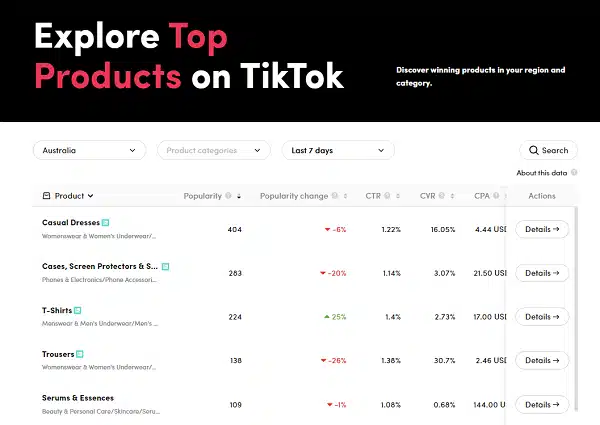
This data provides insights into the popularity of particular products on the app, as indicated by the frequency of ads featuring the item, as well as metrics such as impressions, view-through rate, comments, and likes. Essentially, all the relevant data points are available to analyze the performance of each product.
🤯 TikTok releases “Top Product” in the Creative Center! A Game changer?
➡️What the CPA is ➡️Top ranking videos ➡️Which Niche / Product performing the best ➡️What the product is and how much they’re spending ➡️Literally everything
How it works. Utilizing the filtering options provided allows narrowing down the Top Products listing according to specific regions and product categories. You can also view the data for the last day, 7 days, or 30 days.
To gain a deeper understanding of a particular product, click on the ‘Details’ element on the far right of the listing. This will provide you with a comprehensive product overview, including data such as CTR, CPA, impressions chart, and more.
The ‘Audience insights’ element allows you to see an age bracket breakdown of who’s engaging with these ads, along with related interests, providing key data for analysis and planning efforts.
Dig deeper. You can check out the Creative Center here.
Why we care. This could allow advertisers to make informed decisions about new strategies. By analyzing the performance of specific products based on metrics such as impressions, CTR, CPA, and more, advertisers can determine which products are popular and which are not, and adjust their advertising efforts accordingly.
This data can also help advertisers identify trends in consumer behavior, which can inform their future product development and marketing campaigns. Ultimately, the insights gained from analyzing this data can lead to more effective and efficient advertising strategies, resulting in increased sales and revenue for the advertiser.
@media screen and (min-width: 800px) { #div-gpt-ad-3191538-7 { display: flex !important; justify-content: center !important; align-items: center !important; min-width:770px; min-height:260px; }
}
@media screen and (min-width: 1279px) { #div-gpt-ad-3191538-7 { display: flex !important; justify-content: center !important; align-items: center !important; min-width:800px!important; min-height:440px!important; }
}
About the author
Nicole Farley is an editor for Search Engine Land covering all things PPC. In addition to being a Marine Corps veteran, she has an extensive background in digital marketing, an MBA and a penchant for true crime, podcasts, travel, and snacks.
Microsoft Advertising unveils Lodging solutions, and adds 11 new Google import markets for Smart campaigns
Microsoft has just announced two new updates affecting those who use Smart campaigns, as well as hotel and property managers.
Google import for Smart campaigns. Now available in 11 new markets.
The 11 new markets are:
United States
United Kingdom
Australia
Canada
France
Germany
New Zealand
Ireland
Italy
The Netherlands
Singapore
Lodging solutions. Expanded Lodging solutions offerings, including international expansion, new placements for Property Promotion ads, including mobile and new product updates (Vacation Rentals and Room Bundles).
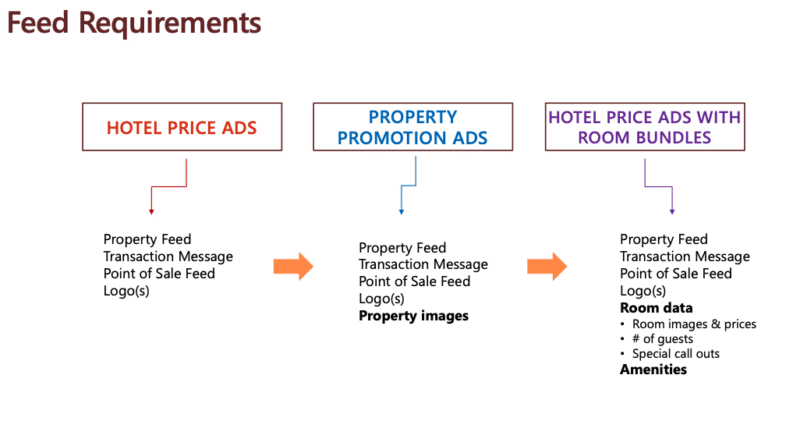
The new Lodging solutions ads provides users with:
Property promotion ads
Hotel price ads
Hotel price ads with room bundles
Bing Maps
Bing Travel Hub
Property promotion ads with vacation rentals
Feed requirements. Microsoft provides the following display for property ads feed requirements.
Why we care. With the addition of new markets for Smart campaigns, advertisers will have access to a larger audience, which can lead to increased visibility and potential conversions.
Lodging solutions provide advertisers with tools to efficiently manage and optimize their campaigns for hotels and other lodging businesses.
Overall, the two new additions provide further diversification of advertising platforms. By having access to both Microsoft Advertising and Google import for Smart campaigns, advertisers can diversify their advertising efforts and reach a broader audience across multiple platforms.
This may be a good opportunity to test them if you’re not currently using Microsoft ads.
@media screen and (min-width: 800px) { #div-gpt-ad-3191538-7 { display: flex !important; justify-content: center !important; align-items: center !important; min-width:770px; min-height:260px; }
}
@media screen and (min-width: 1279px) { #div-gpt-ad-3191538-7 { display: flex !important; justify-content: center !important; align-items: center !important; min-width:800px!important; min-height:440px!important; }
}
About the author
Nicole Farley is an editor for Search Engine Land covering all things PPC. In addition to being a Marine Corps veteran, she has an extensive background in digital marketing, an MBA and a penchant for true crime, podcasts, travel, and snacks.
Longer video ads have demonstrated greater effectiveness compared to their shorter counterparts. Mobile user acquisition managers have noted significant performance improvements when using videos that are between 31-60 seconds long.
“Our attention spans may be short, but longer mobile video ads have proven effective at catching users’ attention,” says marketing platform Liftoff, who published the report.
Liftoff says its report analyzed nearly 1 trillion impressions across 24.5 billion clicks and 240 million installs between the start of 2022 and the beginning of 2023.
Why we care. If you’re using shorter video ads in your app campaigns, try creating longer videos to test. By using longer video ads, you may be able to increase the effectiveness of your mobile marketing campaigns, resulting in higher engagement, conversions, and, ultimately a better return on investment (ROI).
Getting more from your ads. When creating video game app ads, here are a few tips that can help you get more:
Start with what you have. If you have current videos of 15-30 seconds, start combining sections to create one longer video. It’s budget-friendly and time-saving.
Embrace the art of storytelling. Don’t be afraid to tell a story. With longer video ads, you have a whole minute to convey a well rounded story with a hook and compelling conclusion.
Show off more of what your app does. You can tell fuller stories and showcase more of your apps unique selling points. By highlighting more features, you can reach a broader audience.
Spotlight authenticity with user-generated content. User-generated content video ads have a sincere feel, as demonstrated by TikTok, Instagram Reels, Snapchat, or other platforms. These can be most effective when the creator directly addresses the camera or directly recommends a particular app to the viewer.
Dig deeper. You can view the entire report from Liftoff here.
@media screen and (min-width: 800px) { #div-gpt-ad-3191538-7 { display: flex !important; justify-content: center !important; align-items: center !important; min-width:770px; min-height:260px; }
}
@media screen and (min-width: 1279px) { #div-gpt-ad-3191538-7 { display: flex !important; justify-content: center !important; align-items: center !important; min-width:800px!important; min-height:440px!important; }
}
About the author
Nicole Farley is an editor for Search Engine Land covering all things PPC. In addition to being a Marine Corps veteran, she has an extensive background in digital marketing, an MBA and a penchant for true crime, podcasts, travel, and snacks.
4 new Google Performance Max features are coming soon
Google just announced that they’re adding four new Performance Max (PMax) features.
TBD. There is no word on when exactly the new features will be rolled out.
Campaign-level brand exclusions – for added control to ensure PMax doesn’t serve on branded queries advertisers may want to avoid.
Page feeds – this feature gives advertisers flexibility to help send traffic to a specific set of landing page URLs on their website.
Video creation – we’re making this easier by incorporating more editing tools directly into the campaign setup workflow.
Additional reporting – asset group level reporting and budget pacing insights will continue to help advertisers increase their understanding of how campaigns are performing.
Why we care. Advertisers have been asking for improvements to PMax for quite some time, and it seems like Google is at least trying. The ability to view conversions, conversion value, and other metrics at the asset group level allows advertisers to refine their creative strategy and optimize their campaigns more effectively.
Second, budget pacing insights can help advertisers ensure that their campaigns are delivering the desired results.
And, the integration of video creation tools directly into PMax campaign setup and editing workflows is a simple and efficient way to create high-quality video content. However, the tool could be very limited in features.
The new features and tools seem like a step in the right direction, but be sure to test them extensively and provide your feedback to Google whenever possible.
Campaign-level brand exclusions. Google will provide advertisers with more control over their Performance Max campaigns. These exclusions will prevent the campaigns from appearing in Search and Shopping inventory for specific branded queries that the user wishes to avoid. By applying these exclusions, you can also prevent traffic from brand misspellings and brand searches in a foreign language. You’ll be able to exclude your own brand terms and choose from a list of other brands to exclude. If a particular brand is not on the list, you can request its addition through Google Ads.
Page feeds. Performance Max users will soon have access to page feeds, a feature that will allow them to further optimize results from Search inventory. With page feeds, you can direct traffic to specific landing page URLs on their website and group those URLs by theme using labels to make them more easily usable in a particular campaign or asset group.
When combined with final URL expansion, which uses keywordless AI technology to better understand the importance of landing pages to a business, page feeds can help guide and inform the AI and drive valuable conversions from unexpected or untargeted search queries. This provides Performance Max users with another tool to help them effectively utilize their final URL expansion feature.
Video creation. To simplify the process of creating video ads, video creation tools have been integrated directly into the Performance Max campaign setup and editing workflows. Previously, these tools were only available in the asset library. This integration allows users to create video content quickly and easily, even if they lack the resources or time to do so.
Additional reporting. Soon you’ll have the ability to view conversions, conversion value, cost, and other metrics at the asset group level. This data will enable you to refine your creative strategy and optimize campaigns.
In addition, budget pacing insights will be available soon, providing you with automated suggestions to optimize budgets and improve campaign performance. These insights will include information on how much a campaign has spent and is projected to spend, as well as current and forecasted conversion performance.
@media screen and (min-width: 800px) { #div-gpt-ad-3191538-7 { display: flex !important; justify-content: center !important; align-items: center !important; min-width:770px; min-height:260px; }
}
@media screen and (min-width: 1279px) { #div-gpt-ad-3191538-7 { display: flex !important; justify-content: center !important; align-items: center !important; min-width:800px!important; min-height:440px!important; }
}
About the author
Nicole Farley is an editor for Search Engine Land covering all things PPC. In addition to being a Marine Corps veteran, she has an extensive background in digital marketing, an MBA and a penchant for true crime, podcasts, travel, and snacks.
Musk gave engineers one week to make Twitter’s ad targeting work like Google
Despite announcing an end to layoffs at a meeting held on November 21st, Elon Musk has continued to terminate Twitter employees, even after already forcing out approximately two-thirds of the workforce in just a few weeks.
What’s happening. Musk intends to revamp Twitter’s ad targeting system to resemble that of Google’s search ads, which primarily focus on keywords searched for rather than a user’s activity or profile data. Although this approach has proven successful for search engines, where users seek out specific information, it has yet to prove effective for social media businesses.
Sorry for showing you so many irrelevant & annoying ads on Twitter!
We’re taking the (obvious) corrective action of tying ads to keywords & topics in tweets, like Google does with search.
This will improve contextual relevance dramatically.
Set up for failure. Following his recent termination from his position as engineering manager for monetization at Twitter, Marcin Kadluczka suggested in a tweet on Saturday that the one-week deadline imposed by Elon Musk was impractical, stating that he believed it would take 2-3 months for Twitter to genuinely enhance its advertising capabilities. My sources have confirmed that Musk set this demanding timeline just before dismissing Kadluczka, as well as other employees in the ads, consumer, and sales departments last Friday.
Musk has been trying to improve Twitter ads since he acquired the company. While it’s uncertain whether altering Twitter’s ad targeting system to prioritize keywords, similar to Google ads, will result in better quality advertising, experts in the field have raised questions and identified potential drawbacks
Good luck with that. This is the essential difference between search and social networking. You search for things you’re looking for, which makes keywords so effective for Google. You post about things you’re interested in. Thoughts and prayers to advertisers buying keywords… https://t.co/2eGCr3xgKH
Why we care. If the new targeting strategy fails to produce satisfactory results (which is the most likely scenario), advertisers could be wasting their advertising budgets on ineffective campaigns.
Additionally, any changes to Twitter’s advertising platform could have broader implications for the social media advertising industry as a whole, potentially leading to changes in advertising best practices across multiple platforms. The uncertainty and changes could cause the few advertisers still on Twitter could leave the platform.
@media screen and (min-width: 800px) { #div-gpt-ad-3191538-7 { display: flex !important; justify-content: center !important; align-items: center !important; min-width:770px; min-height:260px; }
}
@media screen and (min-width: 1279px) { #div-gpt-ad-3191538-7 { display: flex !important; justify-content: center !important; align-items: center !important; min-width:800px!important; min-height:440px!important; }
}
About the author
Nicole Farley is an editor for Search Engine Land covering all things PPC. In addition to being a Marine Corps veteran, she has an extensive background in digital marketing, an MBA and a penchant for true crime, podcasts, travel, and snacks.
Digital advertising is dynamic. It requires us to make the best possible account adjustments at the right time. But to make informed decisions, we must fully understand micro and macro trends.
The correct data, analysis and insights drive optimizations that positively impact PPC performance.
This is why creating a holistic monitoring plan that considers all relevant data points is key to tracking PPC metrics and results.
This article shares ways to comprehensively monitor your paid search performance by setting up automated reports, custom dashboards and performance alerts.
1. Automated reports
Automated reports deliver regular updates on campaign performance, giving you a clear picture of what is and isn’t working.
You can set up automated reporting in Google Ads and Microsoft Advertising if you are starting or re-imaging your reporting program.
To set up an automated report in Google Ads:
Build and customize your report within the Reports tab.
Click “Schedule” on the top right of the screen.
Select who should receive the report. (You can select users in your Google Ads account.)
Determine your preferred report frequency (i.e., one-time, daily, weekly, monthly).
Choose your preferred document format (CSV, Excel, XML).
You can follow a similar process in Microsoft Advertising to establish an automated report for your team.
Within the Microsoft Ads interface, navigate to “Reports.”
Build a new, customized report.
On the top left, select “Scheduling frequency.”
Within the screen, you can choose the frequency (i.e., daily, weekly, monthly).
And you can decide who should receive the report (users within your account).
To make the most out of automated reporting, follow these tips.
Set clear objectives
Before automating your reports, you must set clear objectives for your campaigns.
This will help you determine which metrics are most important to track and ensure that you focus on the right areas.
Choose the right tools
Many tools are available so choosing the right ones is essential. Consider factors such as ease of use, integration with other tools, and cost when selecting.
Take action quickly
A key benefit of using automated reports is that you can identify underperforming areas quickly.
While this process will require a bit more work, a key benefit is that you can report on all of your paid search campaigns in Google and Microsoft in one platform.
Get the daily newsletter search marketers rely on.
3. Automated alerts
Another critical component of a holistic monitoring plan is setting up performance alerts.
These alerts can notify you when specific metrics fall outside of an acceptable range, allowing you to take action before any significant negative impact on your advertising performance.
Automated alerts are mission-critical for paid search management. Here are a few benefits of establishing alerts for your account.
Real-time monitoring
Automated alerts can notify you immediately when specific metrics fall below or exceed a certain threshold, providing real-time monitoring of your campaigns.
You can take quick corrective action to optimize your campaigns and prevent further damage.
Time-saving
Manually monitoring metrics can be a time-consuming and tedious task.
Automated alerts save time by watching the metrics for you and sending notifications only when necessary, allowing you to focus on other essential tasks.
Data-driven decisions
Automated alerts help you stay informed about the performance of your campaigns and enable you to make data-driven decisions based on the insights provided.
By staying current with your campaign performance, you can identify trends and patterns in your data and make informed decisions on optimizing your campaigns.
Flexibility
Automated alerts can be customized to track the metrics that matter most to your business goals, allowing you to focus on the most relevant KPIs to your campaigns.
Setting up automated alerts
Setting up automated alerts within your Google Ads and Microsoft Ads campaigns is easy.
Google Ads
Within any screen of your Google Ads account, you can create an automated rule which serves as an automated alert.
You can create automated rules to take specific actions within your account and establish rules to trigger email notifications when particular criteria are met.
In the example below, this campaign will email me if conversions are less than one during any day.
You can set up an alert like this to run hourly, but you will likely trigger false alerts.
Remember to develop alerts relevant to your account’s volume and performance.
Monitor your PPC campaigns to make the right optimizations
Making the proper account adjustments at the right time is critical to maintaining and improving your advertising performance.
When managing PPC campaigns, you must create a holistic monitoring plan considering all relevant data points.
Creating dashboards, setting up performance alerts and running automated reporting will help you make informed decisions and stay ahead of the curve in the ever-evolving paid search landscape.
Opinions expressed in this article are those of the guest author and not necessarily Search Engine Land. Staff authors are listed here.
@media screen and (min-width: 800px) { #div-gpt-ad-3191538-7 { display: flex !important; justify-content: center !important; align-items: center !important; min-width:770px; min-height:260px; }
}
@media screen and (min-width: 1279px) { #div-gpt-ad-3191538-7 { display: flex !important; justify-content: center !important; align-items: center !important; min-width:800px!important; min-height:440px!important; }
}
About the author
Joseph Kerschbaum is Senior Vice President of Search & Growth Labs for 3Q/DEPT. During his 20 years of experience in digital marketing, Joseph has worked with businesses of every size from SMBs to enterprise-scale. Joseph has been a regular speaker at digital marketing conferences for over a decade. Joseph is a regular contributor to Search Engine Land. He is co-author of the Wiley/Sybex book, “Pay-Per-Click SEM: One Hour a Day,” which was published long enough ago to be outdated but that is a good thing because SEM is such a dynamic industry.
Google page experience update for desktop rolls out
In 2022, Google began a nine-day rollout of the desktop version of its page experience update.
Page experience was made up of several Google search ranking factors, including the mobile-friendly update, Page Speed Update, the HTTPS ranking boost, the intrusive interstitials penalty, safe browsing penalty and Core Web Vitals.
The page experience update for desktop included all the signals from the mobile version (except for mobile-friendliness, for obvious reasons):
Largest Contentful Paint (LCP)
Cumulative Layout Shift (CLS)
First Input Delay (FID)
HTTPS security
Absence of intrusive interstitials
What Google said:
“While this update is designed to highlight pages that offer great user experiences, page experience remains one of many factors our systems take into account… Given this, sites generally should not expect drastic changes.”
2022: Merchants that provided an excellent customer experience would see a boost in rankings and other visibility improvements in the Google Shopping tab.
2013: The latest images showing what people eat at the search engine companies, how they play, who they meet, where they speak, what toys they have, and more.
2011: The new display was organized into different content types, replacing the old version which showed results in a straight list format with no organization.
2011: Google filed a friend-of-the-court brief in a civil case against Isohunt Web Technologies, a BitTorrent site, because it was concerned the court would set a precedent it didn’t like.
2011: Data from Google’s search suggest/auto-complete function indicated that French people were routinely searching on politicians’ names followed by the world “juif,” which means “Jewish” in French.
2011: China Mobile and state-run news agency Xinhua launched Panguso, a search engine that let people search for news, web sites, images, videos and audio.
2008: An email from Kevin Johnson, president of Microsoft Platforms & Services Division, had a tone of confidence that assumed a deal with Yahoo would ultimately take place.
2008: The latest images showing what people eat at the search engine companies, how they play, who they meet, where they speak, what toys they have and more.
2007: A consumer watchdog filed a friend of the court brief on behalf of a Florida realtor sued by a homebuilder for using its corporate name in the URL of a website and buying sponsored search ads using the trademarked name to promote the site.
2007: FeedBurner was able to track clicks on virtually all web-based RSS readers.
Past contributions from Search Engine Land’s Subject Matter Experts (SMEs)
These columns are a snapshot in time and have not been updated since publishing, unless noted. Opinions expressed in these articles are those of the author and not necessarily Search Engine Land.
@media screen and (min-width: 800px) { #div-gpt-ad-3191538-7 { display: flex !important; justify-content: center !important; align-items: center !important; min-width:770px; min-height:260px; }
}
@media screen and (min-width: 1279px) { #div-gpt-ad-3191538-7 { display: flex !important; justify-content: center !important; align-items: center !important; min-width:800px!important; min-height:440px!important; }
}
About the author
Danny Goodwin is Managing Editor of Search Engine Land & SMX. In addition to writing daily about SEO, PPC, and more for Search Engine Land, Goodwin also manages Search Engine Land’s roster of subject-matter experts. He also helps program our conference series, SMX – Search Marketing Expo. Prior to joining Search Engine Land, Goodwin was Executive Editor at Search Engine Journal, where he led editorial initiatives for the brand. He also was an editor at Search Engine Watch. He has spoken at many major search conferences and virtual events, and has been sourced for his expertise by a wide range of publications and podcasts.
Microsoft and NVIDIA have announced a 10-year partnership on Tuesday to make Xbox PC games available on NVIDIA’s cloud gaming service, GeForce NOW™. The service currently has over 25 million members across 100 countries.
As per the agreement, players will have the ability to stream Xbox PC games from GeForce NOW to various devices like PCs, macOS, smartphones, Chromebooks, and more. Additionally, once Microsoft’s acquisition of Activision is finalized, Activision Blizzard PC games, including Call of Duty, will also be available for streaming on GeForce NOW.
What Microsoft says.
“Xbox remains committed to giving people more choice and finding ways to expand how people play.”
“This partnership will help grow NVIDIA’s catalog of titles to include games like Call of Duty, while giving developers more ways to offer streaming games. We are excited to offer gamers more ways to play the games they love.”
Microsoft Gaming CEO Phil Spencer
What NVIDIA says.
“Combining the incredibly rich catalog of Xbox first party games with GeForce NOW’s high-performance streaming capabilities will propel cloud gaming into a mainstream offering that appeals to gamers at all levels of interest and experience.”
“Through this partnership, more of the world’s most popular titles will now be available from the cloud with just a click, playable by millions more gamers.”
Jeff Fisher, senior vice president for GeForce, NVIDIA
Concerns over the Activision Blizzard acquisition. The partnership between Microsoft and NVIDIA offers gamers more options and addresses NVIDIA’s apprehensions regarding Microsoft’s acquisition of Activision Blizzard. Therefore, NVIDIA has expressed its complete support for the acquisition’s regulatory approval.
Starting right away, Microsoft and NVIDIA will collaborate to integrate Xbox PC games into GeForce NOW, allowing GeForce NOW users to stream games they purchase from the Windows Store, as well as third-party titles for which the publisher has granted streaming rights to NVIDIA. Additionally, Xbox PC games that are presently accessible on third-party stores like Steam or Epic Games Store will also be streamable on GeForce NOW.
Why we care. The partnership between Microsoft and NVIDIA could increase the availability and accessibility of Xbox PC games to a wider audience through the GeForce NOW cloud gaming service. This means that more people will be able to play these games on a variety of devices, including smartphones and Chromebooks, which could lead to increased engagement with the games and more opportunities for advertisers to reach these audiences.
Furthermore, once Microsoft’s acquisition of Activision Blizzard is finalized, it will also bring popular Activision Blizzard PC games like Call of Duty to the GeForce NOW service, further expanding the potential audience for advertisers to target.
Overall, the partnership between Microsoft and NVIDIA creates an opportunity for advertisers to reach a larger and more diverse gaming audience, which could result in increased ad revenue and better return on investment for their marketing efforts.
@media screen and (min-width: 800px) { #div-gpt-ad-3191538-7 { display: flex !important; justify-content: center !important; align-items: center !important; min-width:770px; min-height:260px; }
}
@media screen and (min-width: 1279px) { #div-gpt-ad-3191538-7 { display: flex !important; justify-content: center !important; align-items: center !important; min-width:800px!important; min-height:440px!important; }
}
About the author
Nicole Farley is an editor for Search Engine Land covering all things PPC. In addition to being a Marine Corps veteran, she has an extensive background in digital marketing, an MBA and a penchant for true crime, podcasts, travel, and snacks.
Based on P&Ls provided by a sample of sellers, the fees incurred by a typical Amazon seller include a 15% transaction fee, referred to as a referral fee by Amazon, and 20-35% in Fulfillment by Amazon fees, which encompass storage and other fees. Additionally, advertising and promotional expenses on Amazon can amount to up to 15% of the total fees, with the overall costs varying according to category, product price, size, weight, and the seller’s business model.
marketplacepulse.com
While the 15% transaction fee has remained constant for more than a decade, it can vary by category and be as low as 8%. Meanwhile, Fulfillment by Amazon (FBA) fees have increased gradually over time, with Amazon introducing yearly increases in fulfillment fees and storage fees. Given that selling on Amazon is tied to using FBA, most sellers rely on it to succeed on the platform.
Not news for many sellers. I reached out to a few Amazon sellers and agencies and was asked to keep their information private. But I was told:
“For several years Amazon has been prioritizing Advertising revenue and increasing fees which has put pressure on sellers, especially smaller brands. Despite that brands would be leaving money on the table not being on Amazon. Smart brands diversify to other channels(DTC/Retail) and continue to optimize their business to adapt to the changing landscape.”
I’m not an Amazon seller, and my digital experience is more limited to lead generation, so I thought this was eye opening. But for those more familiar with the ecommerce landscape in 2023, it’s not a surprise.
“At the same time it’s not necessarily cheaper to sell elsewhere – fees have gone up everywhere.”
Forcing sellers to advertise. While Amazon does not dictate how much to spend on advertising, competition among sellers who choose to advertise drives up that cost. Unlike other marketplaces, advertising on Amazon is not a choice, as the most prominent screen space is typically reserved for ads.
Consequently, sellers must advertise to increase their chances of being discovered by customers. Some sellers still spend relatively little on advertising, and some resellers spend less than 5% of their sales on ads. However, private label sellers often spend over 10% of their revenue on advertising to grow their brand.
The percentage of fees paid by Amazon sellers as a proportion of their sales increases every year, not because they are using more services, but because the cost of certain services has risen (e.g., FBA) or because certain fees are now unavoidable (e.g., advertising).
marketplacepulse.com
Other options for ecommerce sellers. Compared to Amazon, Walmart is a more economical choice, particularly for new sellers that can take advantage of transaction fee discounts. However, Walmart’s market size is significantly smaller than Amazon’s, meaning that sellers cannot entirely replace Amazon with Walmart. Additionally, direct-to-consumer e-commerce platforms like Shopify operate on a fundamentally different business model, and fees are not the sole consideration.
To cope with the rising fees, sellers are either increasing their prices, seeking alternatives to FBA, or branching out from Amazon entirely. Nevertheless, some sellers only realize how little net profit they have left at the end of the tax year, with a few even reporting paying up to 60% or 70% of their revenue to Amazon in fees. They must still account for other expenses, such as inventory, freight, and employees.
Why we care. Rising fees on Amazon have a direct impact on advertising costs, as advertising is a necessary expense for most sellers on the platform. As more sellers choose to advertise, the competition for ad space increases, driving up advertising costs. Consequently, advertisers may need to adjust their advertising strategies and budgets to account for these costs.
As fees continue to increase, advertisers may face difficulty generating a return on investment, which could impact their bottom line. Therefore, advertisers need to keep a close eye on the costs of selling on Amazon and ensure that they are making informed decisions when allocating their advertising budgets.
@media screen and (min-width: 800px) { #div-gpt-ad-3191538-7 { display: flex !important; justify-content: center !important; align-items: center !important; min-width:770px; min-height:260px; }
}
@media screen and (min-width: 1279px) { #div-gpt-ad-3191538-7 { display: flex !important; justify-content: center !important; align-items: center !important; min-width:800px!important; min-height:440px!important; }
}
About the author
Nicole Farley is an editor for Search Engine Land covering all things PPC. In addition to being a Marine Corps veteran, she has an extensive background in digital marketing, an MBA and a penchant for true crime, podcasts, travel, and snacks.
PPC management checklist: Daily, weekly and monthly reviews
Despite the hype surrounding automation and machine learning, managing a PPC account requires human hands on the wheel.
If anything, all these capabilities make it more complex. So set and forget, but at your own peril.
No one truly understands this more than PPC pros who manage a diverse set of accounts – large and small – in B2B, ecommerce and serveral other industries.
Several of those pros were kind enough to offer their insights to be compiled into the following simplified PPC checklist for daily, weekly and monthly account reviews.
Why: You’re introducing something new into the wild. Even if you planned and executed it well, you still want to ensure everything’s approved and progressing as desired, without unintended consequences.
Budget pacing
Why: You’ll also see this one in the weekly section. Depending on the size of the campaign, you may not need to check this every single day, but you want to find the right cadence.
If a campaign underspends or overspends at the end of the month, quarter, or custom length, that’s usually a bad thing. It means you missed some potential opportunities or you blew past the budget.
You may have one campaign where you struggle to spend the budgeted amount but another consistently running up against caps.
Review any flags, disapprovals, or other notifications to address
Why: These things always happen, even to the best pros.
The only difference is the best pros stay on top of it and quickly take corrective action or make appeals when needed.
Get the daily newsletter search marketers rely on.
Weekly account review
Recommendations
Dismiss anything irrelevant.
Apply anything helpful.
Why:Dismissing anything irrelevant will raise your optimization score and hopefully train the machine learning system algorithm to offer better ones in the future. Also, in the event there is a recommendation that’s actually helpful you want to try it.
Word of caution: Google makes it very easy to simply “Apply” changes so be crystal clear about what you’re approving.
Budget pacing
Why: See above under daily checks.
(If you’re checking this daily then by default it would be getting weekly attention. Either way, hopefully you get the message that proper budget pacing is critical, especially on enterprise-level accounts where a hard budget cap is spread out across multiple ad groups, campaigns, etc.)
Conversions
Why: When necessary, pivot spend to campaigns with higher conversion rates or lower cost per conversion and you’ll be the hero.
Search terms report
Look for irrelevant keywords to negate.
Look for relevant keywords to be added.
Why: The last thing you want to do is waste money on keywords irrelevant to your business. The second to last thing you want to do is miss out on keywords you should be bidding on.
Abnormal performance spikes (up or down)
Why: It’s always better you be the one to catch and analyze an abnormal spike in performance rather than be caught by surprise. Plus, you need to see if any recent optimizations are making the desired impact.
On the flip side, if you’re regularly monitoring performance spikes you can catch red flags and resolve any issues sooner.
Display placements
Why: If not checked regularly, display can be quickly taken over by low quality or irrelevant placements.
Every week you should look to verify where display dollars are being spent and don’t be shy about making exclusions when you think you’re wasting budget.
Keywords / search terms
Why: Check weekly to ensure you’re not wasting budget on irrelevant terms.
This means tracking keyword performance to see if any should be removed. This is also useful for seeing search trends in real-time, which may present you opportunities to capitalize on.
Device performance
Why: Sometimes it matters. If you’re a B2B supplier with a very limited budget, you may find mobile campaigns just don’t convert. Or maybe they convert better. Perhaps they convert fine, but the cost per conversion is far too high and not profitable. Just check it!
Cost per conversion (CPC) at an ad group level and adjust based on performance trends
Why: Make sure you’re not paying too much. As a general rule, always optimize for success metrics that justify more budget.
Country performance (traffic spikes or performance variations)
Why: This applies only if you’re running campaigns in more than one country. If you are, don’t assume performance is consistent across borders.
Monthly account review
In-depth performance review and analysis
Account level
Campaign level
Ad group level
Audience level
Ad level
Keywords
Conversions
Cost per conversion
Why: This is fundamental to managing a PPC campaign. Changes in performance happen. It’s your job to know why and what action to take.
In addition, you’ll get more buy-in if you can take the complex and present it in an easy to consume report for your clients and stakeholders.
Client KPI metrics
Why: Make sure the performance of the campaigns you’re managing are serving the needs of the client’s business objectives. This is the time to analyze and make adjustments as needed.
Key trends
Year-over-year (YoY) trends
Month-over-month (MoM) trends
Why: Analyzing YoY trends is more likely to provide an apples-to-apples comparison since you’re looking at a similar time period.
Analyzing MoM data will help you identify key turning points resulting in the YoY number.
Auction insights report
Any new competitors?
Any existing competitors spending more?
Any competitors drop out?
Why: An aggressive competitor with deeper pockets than you can quickly change the dynamics of your PPC campaign. Ignorance is not bliss.
Keyword research
Why: Look for new keyword ideas relevant to your campaigns.
It’s best to understand volume, intent, cost, and likelihood of conversion before you allocate budget toward them.
Quality score audit
Why: Low scores generally mean poor performing campaigns.
Look to improve low scores by analyzing the data to ensure the keywords you’re bidding return ads relevant to the query intent and ultimately lead to a landing page that converts.
Ad copy audit
Why: Keep improving your ad copy until you can’t improve it anymore and you’ll have well-optimized PPC campaigns.
Look at the individual ad copy snippets and how they get assembled together.
Is there anything that needs a pin? Is everything submitted headline and t audience? Create new ads to test based on past performance.
General deep data analysis
Why: You must understand what’s working and not and use experiments to test new hypotheses.
Regular review is key to successful PPC performance
Even with automation in ad platforms, taking your eyes off your campaigns for too long isn’t advisable. Without proper monitoring, paid search accounts can go sideways.
While not a complete list, following the above checks will keep your PPC campaigns on a much better path.
Opinions expressed in this article are those of the guest author and not necessarily Search Engine Land. Staff authors are listed here.
@media screen and (min-width: 800px) { #div-gpt-ad-3191538-7 { display: flex !important; justify-content: center !important; align-items: center !important; min-width:770px; min-height:260px; }
}
@media screen and (min-width: 1279px) { #div-gpt-ad-3191538-7 { display: flex !important; justify-content: center !important; align-items: center !important; min-width:800px!important; min-height:440px!important; }
}
About the author
Adam Proehl is Partner & Co-Founder at NordicClick Interactive, a full-service digital agency with local and national clients, based in Minneapolis.
In digital marketing since 1998, Proehl has spoken at numerous national and international conferences, including SMX. He is a current Advisory Board Member for the Paid Search Association.