SEO Vs. PPC: What’s The Best Strategy For Your Business? via @sejournal, @brookeosmundson

Both SEO and PPC are essential components of digital marketing, yet they operate in entirely different ways.

One delivers instant visibility and quick results, while the other builds long-term authority and organic traffic.

But, when budgets are tight, and results need to be justified to the board, which channel deserves more attention?

The answer isn’t one-size-fits-all. It depends on factors like business goals, industry competition, timeline, and available resources.

In this article, we’ll break down the key differences, advantages, and trade-offs between SEO and PPC, helping you make an informed decision about where to allocate your marketing dollars.

SEO: The Long Game For Sustainable Growth

SEO is the process of increasing organic visibility in search engines through high-quality content, technical optimization, and authoritative backlinks.

Unlike PPC, SEO doesn’t provide instant gratification, but the payoff is well worth the effort.

Once a page ranks well, it can drive continuous, high-intent traffic at little to no cost per click.

Key Benefits Of SEO

SEO is often seen as the foundation of a long-term digital marketing strategy.

While it requires patience and investment upfront, the ability to generate consistent, high-quality traffic without paying for each click makes it a compelling choice for many businesses.

  • Long-Term Traffic Without Per-Click Costs. While SEO requires upfront investment in content and optimization, its long-term benefits far outweigh PPC in terms of cost-efficiency. Once a page ranks, it can drive organic traffic for years without requiring a constant budget.
  • Higher Trust And Credibility. Consumers tend to trust organic search results more than ads. Studies show that organic listings receive significantly higher click-through rates (CTR) than paid ads, making SEO a valuable channel for establishing brand credibility.
  • Compounds Over Time. Unlike PPC, where you pay for every visitor, SEO works like a snowball effect. The more high-quality content and backlinks you accumulate, the stronger your site’s domain authority becomes, making it easier to rank for new keywords in the future.

Disadvantages Of SEO

Although SEO can be incredibly rewarding for any business, it’s not without its challenges.

Businesses need to understand the trade-offs that come with relying on organic search, particularly when it comes to the time and resources required to see meaningful results.

  • Results Take Time. SEO is not an overnight success story. Depending on your industry and competition, it can take months (or even years) to rank competitively. This makes SEO a long-term play rather than a quick win.
  • Algorithm Uncertainty. Google frequently updates its ranking algorithms, meaning that even well-ranked pages can see fluctuations. If your SEO strategy isn’t built on a strong foundation of best practices, you could be at risk of losing visibility overnight.

When SEO Makes The Most Sense

SEO is best suited for businesses looking to:

  • Establish long-term brand authority and recognition.
  • Generate consistent, cost-effective leads or sales over time.
  • Compete in industries where paid advertising costs are prohibitive.
  • Build a sustainable content marketing strategy that drives traffic and engagement.

PPC: The Power Of Instant Results

PPC advertising offers immediate visibility on search engines and social platforms. It’s the equivalent of flipping a switch – your brand appears in front of potential customers right away.

This visibility comes at a price, literally. Once you stop spending, the traffic stops. However, when executed correctly, PPC can drive high-quality leads and sales faster than any other marketing channel.

Key Benefits Of PPC

PPC advertising has several compelling advantages that make it a powerful tool for businesses looking to gain immediate traction.

While it requires an ongoing budget, the ability to reach high-intent users and measure performance in real-time makes it an essential component of a well-rounded marketing strategy.

  • Immediate Traffic And Quick Wins. With PPC, there’s no waiting game. Unlike SEO, where ranking takes time, PPC can get your business to the top of search results instantly. Whether it’s Google Ads, Microsoft Ads, or paid social campaigns, your ads are live essentially the moment your campaign is approved.
  • Granular Targeting. PPC allows you to target potential customers with laser precision. You can define your audience based on search intent, location, device, demographics, behavior, and even specific interests. This ensures that your budget is spent reaching only the most relevant users, which increases efficiency and conversions.
  • Measurable And Scalable. Every click, impression, and conversion is trackable in PPC, making it one of the most measurable digital marketing strategies. You can quickly assess performance, make data-driven decisions, and scale up or down depending on return on investment (ROI). This level of control is unmatched in SEO.

Disadvantages Of PPC

Despite its advantages, PPC isn’t a perfect solution.

Businesses need to be aware of the potential challenges that come with running paid campaigns, particularly when it comes to costs, competition, and ad performance over time.

  • Costs Can Escalate Quickly. Unlike organic traffic, PPC is a pay-to-play model. The moment you stop funding campaigns, the traffic disappears. If your cost-per-click (CPC) is high, profitability can be challenging without a well-optimized campaign and conversion funnel.
  • Ad Fatigue And Diminishing Returns. Users can become blind to repetitive ads, leading to declining performance over time. This means ongoing creative refreshes, audience testing, and bid adjustments are necessary to maintain strong results.

When PPC Makes The Most Sense

PPC is ideal when you need immediate results, such as:

  • Launching a new product or service that needs instant visibility.
  • Running seasonal promotions or limited-time offers.
  • Competing in a saturated market where organic ranking is difficult.
  • Driving leads or sales in industries with high transaction values.

SEO Vs. PPC: Side-By-Side Comparison

SEO vs PPC Comparison Chart

Choosing The Right Strategy For Your Business

The best marketing strategies align with your business goals, industry dynamics, and available resources.

While some businesses can afford to take a long-term approach with SEO, others may need the immediacy of PPC.

The key is to evaluate your needs carefully and choose the right mix of paid and organic efforts.

If You Need Instant Wins: Focus On PPC

If your business needs immediate traffic, leads, or sales, PPC is the way to go. This is especially true for:

  • Startups and new businesses: When brand awareness is low, PPC can help put your company in front of potential customers quickly.
  • High-margin industries: Businesses that generate high profits per conversion (e.g., legal services, SaaS, finance) can justify PPC spend more easily.
  • Seasonal promotions: If your business thrives on specific times of the year (e.g., holiday sales, back-to-school shopping), PPC ensures you capture demand at the right moment.
  • Local businesses: Companies with a local presence can use PPC to dominate searches for high-intent queries like “best plumber near me.”

If You Want Long-Term Growth: SEO Is The Way To Go

If you’re focused on building a sustainable marketing funnel that pays dividends in the future, SEO is the smarter play.

Prioritize SEO if:

  • Your business relies on organic search traffic: Industries like blogging, ecommerce, and B2B SaaS benefit from strong SEO foundations.
  • You’re in a highly competitive PPC market: If CPCs are prohibitively expensive, investing in organic search can provide a more cost-effective alternative.
  • You’re willing to invest in content marketing: High-quality, evergreen content fuels SEO and positions your business as an authority in your space.
  • Your audience conducts research before purchasing: If customers compare multiple options before making a decision, strong SEO can help you stay top-of-mind.

Invest In SEO And PPC For The Best Of Both Worlds

For most businesses, the real answer isn’t SEO or PPC – it’s SEO and PPC. A blended approach allows you to capture immediate opportunities while building long-term organic growth.

Businesses that view these two strategies as complementary, rather than competing, often see the best results.

Here’s why integrating both SEO and PPC is a smart move:

SEO Supports Long-Term Sustainability, While PPC Fills Gaps

Even with the best SEO strategy, organic rankings fluctuate due to algorithm updates and competition.

PPC acts as a safety net, ensuring your brand remains visible even when organic rankings dip. It also allows you to target high-intent keywords that may be too competitive to rank organically in the short term.

PPC Provides Data To Strengthen SEO Efforts

One of the most effective ways to refine your SEO strategy is by using PPC data.

Paid search campaigns provide insights into which keywords convert best, which messaging resonates, and which audience segments drive the most revenue.

This data can be leveraged to optimize SEO efforts, helping to prioritize content creation and organic keyword targeting.

SEO Reduces Long-Term Costs, While PPC Provides Immediate ROI

A well-executed SEO strategy reduces reliance on paid ads over time. Once your site ranks well for high-value keywords, you receive continuous traffic without ongoing ad spend.

PPC, on the other hand, delivers instant results, making it ideal for new product launches, promotions, or when entering new markets.

A combined strategy ensures you’re not putting all your eggs in one basket.

Using PPC To Boost SEO Content

Even the best content needs exposure to gain traction. PPC can be used to drive initial traffic to newly published blog posts, product pages, or other high-value content.

The added engagement signals from paid visitors, such as time on page, shares, and backlinks, can indirectly improve organic rankings.

Retargeting SEO Visitors With PPC

Not all organic visitors convert on their first visit. Using PPC remarketing campaigns, you can re-engage visitors who found you through SEO but didn’t take action.

This keeps your brand top-of-mind and helps improve overall conversion rates.

By investing in both SEO and PPC, you build a balanced marketing strategy that delivers short-term wins while positioning your business for long-term success.

Rather than choosing one over the other, leveraging their combined strengths leads to more sustainable and profitable growth.

Final Thoughts

SEO and PPC each have distinct advantages, and the right choice depends on your business objectives. If you need fast results, PPC is the clear winner. If you’re playing the long game, SEO is invaluable.

But in reality, the most effective digital marketing strategies don’t rely on just one – they integrate both.

The best approach? Evaluate your budget, resources, and competitive landscape. Align your strategy with short-term and long-term goals.

And if you have the ability, combine SEO and PPC for a well-rounded marketing engine that delivers both immediate and sustained results.

More Resources:


Featured Image: Paulo Bobita/Search Engine Journal

https://www.searchenginejournal.com/seo-vs-ppc-best-strategy-for-your-business/542307/


How AI Is Changing The Way We Measure Success In Digital Advertising via @sejournal, @LisaRocksSEM

Success in PPC has historically been measured using performance indicators like click-through rates (CTR), cost per acquisition (CPA), and return on ad spend (ROAS).

However, with the rise of AI, new technologies are having an impact on how we approach and measure performance and success, causing a major change in customer behavior.

From Click-Based Metrics To Predictive Performance Modeling

PPC has relied heavily on click-based metrics, it’s even in the name “pay-per-click.” This has always provided immediate but narrow insights.

AI changes this by integrating predictive performance modeling: Machine learning algorithms analyze historical data to predict which campaigns will drive conversions.

Predictive modeling in AI-powered marketing is revolutionizing how advertisers allocate their precious resources by identifying high-converting audience segments before campaigns even launch.

Instead of reacting to past performance, AI-driven predictive analytics helps businesses forecast:

  • Future customer behaviors based on past interactions.
  • The likelihood of conversion for different audience segments.
  • The optimal bid adjustments for different times of day or geographies.

This allows a more in-depth and detailed budget allocation and performance optimizations beyond simple impressions or clicks.

Quality Score 2.0 – AI-Driven Relevance Metrics

Google’s long-standing Quality Score is based on expected CTR, ad relevance, and landing page experience.

With the current tech advancements, it no longer provides a complete picture of user intent or engagement. AI provides a more advanced approach that some in the industry refer to as “Quality Score 2.0.”

AI-powered relevance metrics now analyze:

  • Deeper contextual signals beyond keywords, including sentiment analysis and user intent.
  • Engagement and behavior patterns to determine the likelihood of conversions.
  • Automated creative testing and adaptive learning to refine ad messaging in real-time.

Google’s AI-driven Performance Max campaigns now use advanced machine learning techniques to optimize ad relevance, suggesting that the traditional Quality Score may soon be obsolete.

Automated Bidding & AI-Driven KPIs

Automated “smart” bidding has changed the way advertisers manage campaign performance.

Manual bid strategies have always required constant monitoring, now AI dynamically adjusts bids based on real-time data signals such as:

  • User device, location, and browsing behavior.
  • Time-of-day performance variations.
  • Probability of conversion based on previous engagement.

Automated bidding strategies like Maximize Conversion Value and Target ROAS are outperforming manual CPC approaches, increasing account efficiencies.

AI-driven key performance indicators (KPIs) are helping advertisers shift to goal-based strategies tied directly to revenue.

Campaigns hitting the revenue goals can be easily scaled, which is a big step in maximizing PPC investments.

The Rise Of New AI-Generated PPC Metrics

Beyond improving existing measurement models, AI is introducing entirely new ways to assess digital ad performance.

These AI-driven PPC metrics offer more holistic insights into customer engagement and lifetime value.

AI Attribution Modeling

Attribution has always been a challenge in PPC.

Traditional models like last-click and linear attribution often miss the full picture by giving all the credit to a single touchpoint, making it hard to understand how different interactions actually contribute to conversions.

AI-powered attribution models solve this by using machine learning to distribute credit across multiple interactions, including clicks, video views, offline actions, and cross-device conversions.

This approach captures the complete customer journey rather than just focusing on the last click interaction.

AI attribution models typically include:

  • Data-Driven Attribution: Measures the true impact of each interaction, whether it’s a click, view, or engagement.
  • Dynamic Adaptation: Continuously adjusts as new data comes in to keep the model accurate and up-to-date.
  • Cross-Channel Integration: Combines online and offline data to reduce gaps and blind spots in tracking.

AI Attribution Modeling is a measurement tool and provides a comprehensive view of how interactions contribute to long-term value.

It is also a strategic approach that connects both Engagement Value Score (EVS) and Customer Lifetime Value (CLV).

EVS measures the depth and quality of interactions rather than just clicks, while CLV focuses on the long-term worth of a customer.

By combining AI attribution with EVS and CLV, marketers gain a deeper understanding of the customer journey and can optimize campaigns for both meaningful engagement and sustainable growth rather than just short-term conversions.

Let’s dive into these two more specific metrics.

Engagement Value Score (EVS)

A growing alternative to CTR, the EVS measures how meaningful an interaction is rather than just if a click occurred.

Unlike CTR, which assumes all clicks are valuable, EVS pinpoints users who genuinely engage with your content.

To measure EVS, combine different engagement signals into one score. Start with your key engagement actions, like:

  • Time Spent on Site: How long users stay on your pages.
  • Multi-Touch Interactions: Video views, chatbot conversations, or content consumption.
  • Behavioral Indicators of Intent: Scroll depth or repeat visits.

After assigning points to each action, create a custom metric in Google Analytics 4 that calculates the total EVS score from these individual actions and integrates into the Google Ads account.

Implementation Steps:

  1. Create Events: Set up custom engagement events with conditions that match high EVS behaviors.
  2. Mark as Key Events: After creating these custom events, mark them as ket events in GA4.
  3. Import to Google Ads: Once the custom conversion is set up in GA4, import it into Google Ads.
  4. Align Bidding Strategies: Use automated bidding strategies that optimize for conversions rather than just clicks.

By using this EVS methodology, Google Ads can optimize campaigns not just for clicks, but for meaningful interactions that drive high value.

Customer Lifetime Value (CLV)

Rather than optimizing for one-time conversions, Customer Lifetime Value (CLV) focuses on the long-term value of a customer.

AI-driven CLV measurement looks beyond quick wins and digs into the total worth of a customer over their entire relationship with your brand.

It’s similar to using EVS in that is focuses on meaningful interactions rather than quick clicks.

To measure CLV accurately, AI models analyze key data points like:

  • Past Purchase Behavior: Predicts future spend based on historical transactions.
  • Churn Risk and Retention Probability: Identifies how likely a customer is to leave or stay.
  • Cross-Channel Interactions: Tracks engagement across social media, email, and customer support.

Just like EVS, CLV requires combining multiple signals into one clear metric. After gathering these data points, create a custom metric in GA4 that calculates the total CLV from individual interactions.

Implementation Steps:

  1. Create Events: Set up custom engagement events for key behaviors (like repeat purchases or social interactions).
  2. Mark as Key Events: Once created, mark these events as key events in GA4.
  3. Import to Google Ads: Bring the custom conversion data into Google Ads to guide bidding strategies.
  4. Optimize with AI: Use automated bidding and predictive analytics to prioritize high-CLV customers.

AI-powered CLV analysis is gaining traction as businesses move toward sustainable, long-term growth strategies rather than chasing short-term conversions.

Take a scientific deep dive into this topic, including risk-adjusted CLV, here.

Challenges And Considerations

While AI-driven measurement is transforming PPC advertising, it is not without its challenges. Decision-makers need to consider the following:

Data Privacy & Compliance

AI’s ability to collect and analyze large amounts of user data raises concerns about privacy and compliance.

General Data Protection Regulation (GDPR) and California Consumer Privacy Act (CCPA) are data privacy laws that regulate how businesses collect, store, and use personal information from consumers.

With these regulations, advertisers must balance data-driven insights with ethical and legal responsibilities. AI-powered models should prioritize anonymized data and ensure transparency in data usage.

AI Accuracy

Machine learning models rely on historical data, which can sometimes lead to inaccuracies.

If an AI model is trained on outdated or incomplete data, it can result in poor decision-making. Human oversight is needed to reduce these risks.

Algorithmic Bias

AI models can sometimes reflect biases present in the data they are trained on.

If left unchecked, this can lead to skewed campaign recommendations that favor certain demographics over others. Businesses must check that AI tools are built with fairness and inclusivity in mind.

Interpreting AI-Generated Insights

AI provides highly complex data outputs, which can be difficult for marketing teams to interpret.

Businesses should invest in AI literacy training for decision-makers and teams to ensure that insights are actionable and interpreted correctly.

Key Takeaways

AI is fundamentally changing how we measure success in PPC and digital advertising.

From predictive performance modeling to AI-driven attribution, CLV, and EVS, these advanced metrics are helping marketers move beyond basic clicks and short-term conversions.

Instead, they focus on deeper insights that drive sustainable growth and long-term value.

However, leveraging AI responsibly requires navigating challenges like data privacy, accuracy, algorithmic bias, and the complexity of interpreting insights.

Marketers must prioritize transparency, fairness, and continuous learning to make the most of these powerful tools.

The future of digital advertising lies in bringing together data insights and thoughtful strategy and sustaining that success over time.

More Resources:


Featured Image: metamorworks/Shutterstock

https://www.searchenginejournal.com/how-ai-is-changing-measure-success-digital-advertising/542710/


PPC Unlocked: Fast Wins For Smarter Ad Strategies via @sejournal, @CallRail

Click fraud in lead generation can drain your marketing budget and corrupt your data, leading to misguided strategic decisions.

While automated detection tools serve as a first line of defense, relying solely on them is not enough.

This guide presents practical, hands-on approaches to identify and combat click fraud in your lead generation campaigns in Google Ads.

Understanding Modern Click Fraud Patterns

Click fraud isn’t just about basic bots anymore. The people running these scams have gotten much smarter, and they’re using tricks that your regular fraud tools might miss.

It’s a big business, and if you think you are not affected, you are wrong.

Here’s what’s really happening to your ad budget: Real people in click farms are getting paid to click on ads all day long.

They use VPNs to hide where they’re really coming from, making them look just like normal customers. And they’re good at it.

The bots have gotten better, too. They now copy exactly how real people use websites: They move the mouse naturally, fill out forms like humans, and even make typing mistakes on purpose.

When these smart bots team up with real people, they become really hard to spot.

The scammers are also messing with your tracking in clever ways. They can trick your website into thinking they’re new visitors every time.

They can make their phones seem like they’re in your target city when they’re actually on the other side of the world.

If you’re counting on basic click fraud protection to catch all this, you’re in trouble. These aren’t the obvious fake clicks from years ago – they’re smart attacks that need smart solutions.

That being said, the good old competitor trying to click 50 times on your ad is also still existent and not going away anytime soon.

Luckily, it is safe to say that Google can spot and detect those obvious fraud clicks in many cases.

Google’s Click Fraud Dilemma: Walking The Revenue Tightrope

Google faces a tricky problem with click fraud.

Every fake click puts money in Google’s pocket right now, but too many fake clicks will drive advertisers away. This creates a conflict of interest.

Google needs to show that it’s fighting click fraud to keep advertisers happy and the ad platform and all of its networks healthy, but it can’t afford to catch every single fake click.

If it did, its ad revenue would drop sharply in the short term because it also runs the risk of blocking valid clicks if it goes in too aggressively.

But if it doesn’t catch enough fraud, advertisers will lose trust and move their budgets elsewhere.

Some advertisers say this explains why Google’s fraud detection isn’t as strict as it could be.

They argue Google has found a sweet spot where it catches just enough fraud to keep advertisers from leaving, but not so much that it seriously hurts its revenue.

This balance gets even harder as fraudsters get better at making fake clicks look real.

This is also why many advertisers don’t fully trust Google’s own click fraud detection and prefer to use third-party tools.

These tools tend to flag more clicks as fraudulent than Google does, suggesting Google might be more conservative in what it considers fraud.

The Over-Blocking Problem Of Third-Party Tools

Third-party click fraud tools have their own business problem: They need to prove they’re worth paying for every month.

This creates pressure to show lots of “blocked fraud” to justify their subscription costs. The result? Many of these tools are too aggressive and often block real customers by mistake.

Other tactics are to show lots of suspicious traffic or activities.

Think about it. If a click fraud tool shows zero fraud for a few weeks, clients might think they don’t need it anymore and cancel.

So, these tools tend to set their detection rules very strict, marking anything slightly suspicious as fraud. This means they might block a real person who:

  • Uses a VPN for privacy.
  • Shares an IP address with others (like in an office).
  • Browses with privacy tools.
  • Has unusual but legitimate clicking patterns.

This over-blocking can actually hurt businesses more than the fraud these tools claim to stop.

It’s like a store security guard who’s so worried about shoplifters that they start turning away honest customers, too.

Why Click Fraud Tools Are Still Valuable

Despite these issues, click fraud tools are still really useful as a first line of defense.

They’re like security cameras for your ad traffic. They might not catch everything perfectly, but they give you a good picture of what’s happening.

Here’s what makes them worth using:

  • They quickly show you patterns in your traffic that humans would take weeks to spot.
  • Even if they’re sometimes wrong about individual clicks, they’re good at finding unusual patterns, like lots of clicks from the same place or at odd hours.
  • They give you data you can use to make your own decisions – you don’t have to block everything they flag as suspicious.

The key is to use these tools as a starting point, not a final answer. Look at their reports, but think about them carefully.

Are the “suspicious” clicks actually hurting your business? Do blocked users fit your customer profile?

Use the tool’s data along with your own knowledge about your customers to make smarter decisions about what’s really fraud and what’s not.

In terms of functionality, most third-party click fraud detection tools are somewhat similar to each other.

A simple Google search on “click fraud tool” shows the market leaders; the only bigger difference is usually pricing and contract duration.

Tackling Click Fraud With Custom Solutions

After getting a first impression with third-party click fraud tools, it’s best to build a collection of custom solutions to tackle your individual scenario.

Every business has a different situation with different software environments, website systems, and monitoring.

For custom solutions, it’s recommended to work closely with your IT department or developer, as many solutions require some modification on your website.

The Basics: Selecting An Identifier

There are a handful of solutions to cover 80% of the basics.

The first way to do something against click fraud is to find a unique identifier to work with.

In most cases, this will be the IP address since you can exclude certain IP addresses from Google Ads, thus making it a good identifier to work with.

Other identifiers like Fingerprints are also possible options. Once an identifier is found, you need to make sure your server logs or internal tracking can monitor users and their identifiers for further analysis.

The Basics: CAPTCHAs

Another basic tool, which is often forgotten, is CAPTCHAs.

CAPTCHAs can detect bots or fraudulent traffic. Google offers a free and simple-to-implement solution with reCAPTCHA.

CAPTCHAs might seem like an easy answer to bot traffic, but they come with serious downsides.

Every time you add a CAPTCHA, you’re basically telling your real users, “Prove you’re human before I trust you.” This creates friction, and friction kills conversions.

Most websites see a drop in form completions after adding CAPTCHAs if they are set too aggressively.

Smart CAPTCHAs can limit the frequency, but not all CAPTCHA providers allow that option, so choose your provider or solution wisely.

The Basics: Honeypot Fields

Honeypot fields are hidden form fields that act as traps for bots.

The trick is simple but effective: Add extra fields to your form that real people can’t see, but bots will try to fill out.

Only bots reading the raw HTML will find these fields; regular users won’t even know they’re there. The key is to make these fields look real to bots.

Use names that bots love to fill in, like “url,” “website,” or “email2.” If any of these hidden fields get filled out, you know it’s probably a bot. Real people won’t see them, so they can’t fill them out.

Pro tip: Don’t just add “honeypot” or “trap” to your field names. Bots are getting smarter and often check for obvious trap names. Instead, use names that look like regular-form fields.

Advanced Validation Methods

Smart Form Validation: Email

Most businesses only check if an email address has an “@” symbol and looks roughly correct.

This basic approach leaves the door wide open for fake leads and spam submissions.

Modern email validation needs to go much deeper. Start by examining the email’s basic structure, but don’t stop there.

Look at the domain itself: Is it real? How long has it existed? Does it have proper mail server records?

These checks can happen in real time while your user fills out the form. It should be noted, however, that smart form validation usually requires some sort of third-party provider to check the details, which means you need to rely on external services.

A common mistake is blocking all free email providers like Gmail or Yahoo. This might seem logical, but it’s a costly error.

Many legitimate business users rely on Gmail for their day-to-day operations, especially small business owners.

Instead of blanket blocks, look for unusual patterns within these email addresses. A Gmail address with a normal name pattern is probably fine; one with a random string of characters should raise red flags.

For enterprise B2B sales, you expect bigger companies to sign up with their company domain email address, so blocking free mail providers might work.

Smart Form Validation: Phone

Phone validation goes far beyond just counting digits. Think about the logic of location first.

When someone enters a phone number with a New York area code but lists their address in California, that’s worth investigating.

But be careful with this approach – people move, they travel, and they keep their old numbers. The key is to use these mismatches as flags for further verification, not as automatic rejections.

The Art Of Smart Data Formatting

Data formatting isn’t just about making your database look neat. It’s about catching mistakes and fraud while making the form easy to complete for legitimate users.

Name fields are a perfect example.

While you want to catch obviously fake names like “asdfgh” or repeated characters, remember that real names come in an incredible variety of formats and styles.

Some cultures use single names, others have very long names, and some include characters that might look unusual to your system.

Modify Your Google Ads Campaign Settings To Tackle Click Fraud

Google offers multiple campaign options to increase reach, on the downside most of those options come along with an increase of click fraud activities.

App Placements

Performance Max campaigns can place your ads across Google’s entire network, including in apps. While this broad reach can be powerful, it also opens the door to potential fraud.

The challenge is that you have limited control over where your ads appear, and some of these automatic placements can lead to wasted ad spend.

Kids’ games are often a major source of accidental and fraudulent clicks. These apps frequently have buttons placed near ad spaces, and children playing games can accidentally tap ads while trying to play.

What looks like engagement in your analytics is actually just frustrated kids trying to hit the “play” button.

Another issue comes from apps that use deceptive design to generate clicks. They might place clickable elements right where ads appear, or design their interface so users naturally tap where ads are located.

This isn’t always intentional fraud. Sometimes, it’s just poor app design, but it costs you money either way.

Unlike traditional campaigns, where you can easily exclude specific placements, Performance Max’s automation makes this more challenging.

The system optimizes for conversions, but it might not recognize that clicks from certain apps never lead to quality leads. By the time you spot the pattern, you’ve already spent money on these low-quality clicks.

Excluding app placements is for almost all advertisers a must have. Very few advertisers benefit from app placements at all.

Partner And Display Network

Lead generation businesses face a unique challenge with Performance Max campaigns that ecommerce stores can largely avoid.

While ecommerce businesses can simply run Shopping-only campaigns and tap into high-intent product searches, lead gen businesses are stuck dealing with the full Performance Max package, including the often problematic Display Network.

The Display Network opens up your ads to a mass of websites, many of which might not be the quality placements you’d want for your business.

While Google tries to filter out bad actors, the display network still includes sites that exist primarily to generate ad clicks.

These sites might look legitimate at first glance, but they’re designed to encourage accidental clicks or attract bot traffic.

Some are specifically designed for server bot farms, as they run on expired domains and have no content besides ads.

Lead generation businesses don’t have this luxury. Their Performance Max campaigns typically run on all networks except shopping. This creates several problems:

  • The quality of clicks varies wildly. Someone might click your medical practice ad while trying to close a pop-up on a gaming site. They’ll never become a patient, but you still pay for that click.
  • Display placements can appear on sites that don’t match your brand’s professional image. Imagine a law firm’s ad showing up on a site full of questionable content – not ideal for building trust with potential clients.
  • Bot traffic and click farms often target display ads because they’re easier to interact with than shopping ads. You might see high click-through rates that look great until you realize none of these clicks are turning into leads.

All those are reasons to question PMax campaigns for lead gen, but that’s a decision every marketer has to make.

Advanced Google Ads Settings To Tackle Click Fraud

If the basics are implemented but there is still a higher amount of suspected click fraud, advanced solutions need to be implemented.

Besides excluding suspicious IP addresses, you can also build negative audiences.

The idea is to have a second success page for your lead generation form and only forward potential bots or fake sign-ups to this page.

To achieve that, your website needs to evaluate potential bots live during the sign-up process.

You can then setup a dedicated “bot pixel” on the second success page in order to send data of this audience to Google.

Once enough data is retrieved, you can exclude this audience from your campaigns. This approach is a little trickier to implement but is worth the effort as those audience signals are of high quality if enough data is supplied.

Make sure to only fire the “bot pixel” on the special success page and only there, otherwise you run the risk of mixing your audiences which would render the system useless.

Filtering Fake Leads With Conditional Triggers

Another tracking-based strategy is to set up condition-based conversion tracking. Combined with hidden form fields, you can modify the conversion trigger not to send data if the hidden field was filled.

In that scenario, you would filter out bots from conversion tracking, sending back only real conversion to your campaign, and therefore, also training the Google algorithm and bidding strategy only on real data.

You eliminate a majority of fake leads and traffic with this setup.

Making Sign-Ups More Challenging To Improve Lead Quality

Another advanced strategy is to make the sign-up process a lot harder.

Tests have shown that much longer forms are not finished by bots because they are usually trained on simpler and shorter forms, which require only mail, name, phone, and address.

Asking specific questions and working with dropdowns can dramatically increase the lead quality. It should be noted, however, that longer forms can also hurt the valid signup rate, which is a risk you want to take if you have to deal with bot and fraud traffic.

A fitting case was a car dealer I worked with. They had a form where people could offer their cars for sale and retrieve a price estimate.

A short form had almost three times the signup rate than before, but it turned out later that a lot of them were spam signups or even very low-qualified leads.

A shorter form leads to more spam because it’s easy to sign up. After switching to a longer form, the signups dropped, but quality increased drastically.

Almost 20 fields long, and potential clients had to upload pictures of their car.

It took a few minutes to finish the signup, but those who did were committed to doing business and open to discussing the sale, which also made it easier for the salespeople to follow up properly.

A Hard Truth About Lead Fraud

Let’s be honest: You can’t completely stop lead fraud. It’s like shoplifting in retail – you can reduce it, you can catch it faster, but you can’t eliminate it entirely.

The fraudsters are always getting smarter, and for every security measure we create, they’ll eventually find a way around it.

But here’s the good news: You don’t need perfect protection. What you need is a balanced approach that catches most of the bad leads while letting good ones through easily.

Think of it like running a store: You want security, but not so much that it scares away real customers.

The key is to layer your defenses. Use click fraud tools as your first line of defense, add smart form validation as your second, and keep a human eye on patterns as your final check.

Will some fake leads still get through? Yes. But if you can stop 90% of the fraud, you’re winning the battle.

Remember: Perfect is the enemy of good. Focus on making fraud expensive and difficult for the bad actors, while keeping your lead generation process smooth and simple for real prospects. That’s how you win in the long run.

More Resources:


Featured Image: BestForBest/Shutterstock

https://www.searchenginejournal.com/rundowns/ppc-unlocked-fast-wins-for-smarter-ad-strategies/


Microsoft Monetize Gets A Major AI Upgrade via @sejournal, @brookeosmundson

Microsoft’s Monetize platform just received one of its biggest updates to date, and this one is all about working smarter, not harder.

Launched April 14, the new Monetize experience introduces AI-powered tools, a revamped homepage, and much-needed platform enhancements that give both publishers and advertisers more visibility and control.

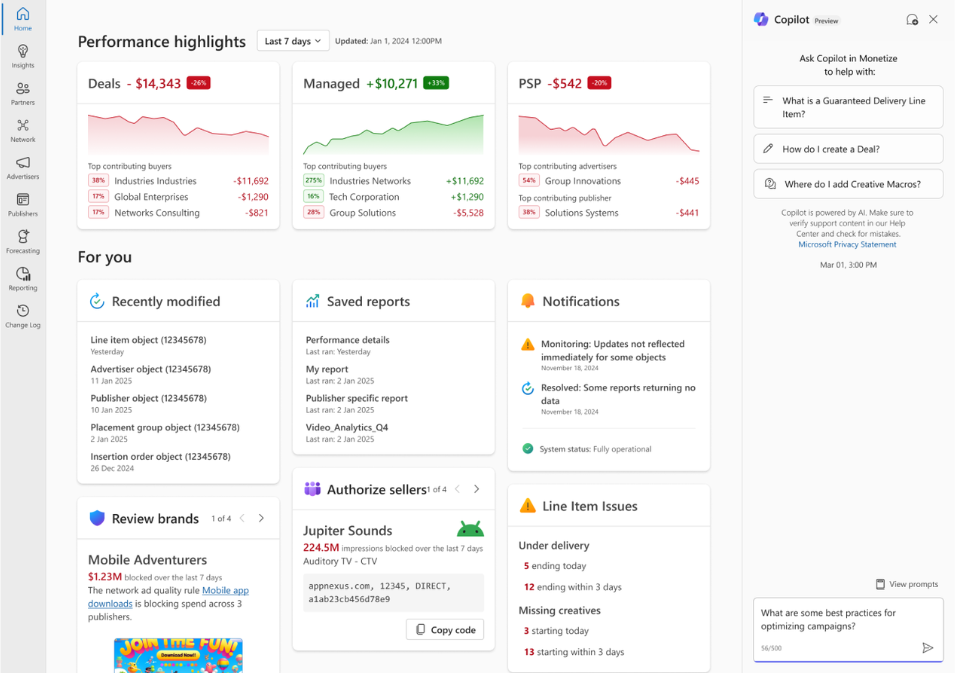
This isn’t just a design refresh. With Microsoft Copilot now integrated, a new centralized dashboard, and a detailed history log, the platform is being positioned as a smarter command center for digital monetization.

Here’s what’s new and how it impacts your bottom line.

Copilot Is Now Built Into Monetize

Microsoft’s Copilot is now officially integrated into Monetize and available to all clients.

Copilot acts like a real-time AI assistant built directly into your monetization workflow. Instead of sifting through reports and data tables to figure out what’s wrong, Copilot surfaces insights automatically.

Think: “Why is my fill rate down?” or “Which line items are underperforming this week?”

Now, you’re able to ask and get answers without leaving the platform.

It’s designed to proactively alert users to revenue-impacting issues, like creatives that haven’t served, line items that didn’t deliver as expected, or unexpected dips in CPM.

For publishers who manage large volumes of inventory and multiple demand sources, this type of AI support can dramatically reduce troubleshooting time and help get campaigns back on track faster.

This allows monetization teams to shift their focus to revenue strategy, not just diagnostics.

A Smarter, Centralized Homepage

The new Monetize homepage is more than just a cosmetic update, it’s now the nerve center of the platform. It’s built around clarity and action.

Instead of bouncing between multiple tabs or reports, users now land on a central dashboard that shows performance highlights, revenue trends, system notifications, and even troubleshooting insights.

It’s designed to cut down the time spent navigating the platform and ramp up how quickly you can make revenue-driving decisions.

Microsoft Monetize homepage performance highlights example.Image credit: Microsoft Ads blog, April 2025

Some of the key features of the new homepage include:

  • Performance highlights: Get a high-level summary of revenue trends and your most important KPIs at the top of the screen.
  • Revenue and troubleshooting insights: What was originally in the Monetize Insights tool is now integrated into the homepage.
  • Brand unblock and authorized sellers insights: Brings visibility to commonly overlooked revenue blocks.

In short: you no longer need to click into five different tabs to piece together what’s going on. The homepage is designed to give a high-level pulse on your monetization performance, with quick pathways to dig deeper when needed.

It’s particularly helpful for teams managing multiple properties, as you can prioritize where to intervene based on the highest revenue impact.

A Simplified Navigation Experience

Another welcome change is the platform’s redesigned navigation. Microsoft has moved to a cleaner left-hand panel layout, consistent with its broader product ecosystem.

It may seem like a small thing, but this update removes a lot of the friction users previously experienced when trying to find specific tools or data. Now, when you hover over a section like “Line Items” or “Reporting,” all related sub-navigation options appear instantly, helping users get where they need to go faster.

For publishers who jump between Microsoft Ads, Monetize, and other tools like Microsoft’s Analytics offerings, this consistency in layout creates a smoother experience overall.

History Log Adds Transparency

One of the more functional (but underrated) updates is the new history change log.

This feature gives users the ability to view a running history of platform changes, whether it’s edits to ad units, campaign-level changes, or adjustments made by different team members.

You can now:

  • Filter changes by user, object type, or date range
  • View a summary of all edits made to a specific item over time
  • Compare and search up to five different objects at once
  • Spot which changes may have inadvertently affected revenue or delivery

The is such a time-saver for teams managing complex account structures or operating across multiple internal stakeholders.

Why Advertisers and Brands Should Care

While most of these updates are tailored to publishers, advertisers and brands also stand to benefit – especially those buying programmatically within Microsoft’s ecosystem.

Here’s a few examples of how brands and advertisers can benefit:

  • Cleaner inventory = better delivery. Copilot helps publishers resolve issues like broken creatives or poor match rates faster. That means your ads are more likely to show where and when they should.
  • More consistent pricing. With publishers better able to manage and optimize their inventory, the fluctuations in floor pricing and bid dynamics can become more predictable.
  • Better campaign outcomes. When ad operations run more smoothly, campaign metrics tend to improve.
  • Reduced latency. The homepage’s new alert system flags latency issues immediately, helping prevent delayed or missed ad requests that impact advertiser performance.

In short: a more efficient supply side leads to fewer wasted impressions and stronger results for advertisers across Microsoft inventory.

Looking Ahead

With this revamp, Microsoft is signaling that Monetize is no longer just an ad server: it’s becoming an intelligence hub for publishers.

Between the Copilot integration, the centralized homepage, and detailed change logs, the platform gives monetization teams tools to act faster, stay informed, and optimize proactively.

By improving the infrastructure on the publisher side, Microsoft is also improving the health and quality of its programmatic marketplace. That’s a win for everyone involved, whether you’re selling impressions or buying them.

If you’re a publisher already using Monetize, now’s the time to explore these new features. If you’re an advertiser, these updates may mean more reliable inventory and smarter campaign performance across Microsoft’s supply chain.

https://www.searchenginejournal.com/microsoft-monetize-gets-a-major-ai-upgrade/544522/


Beyond ROAS: Aligning Google Ads With Your True Business Objectives [Webinar] via @sejournal, @hethr_campbell

Are your paid campaigns delivering the results that really matter?

If your ad strategy is focused only on cost-per-acquisition, you might be leaving long-term growth on the table. It’s time to rethink how you measure success in Google Ads.

In this upcoming webinar, you’ll get:

  • Smarter ways to measure PPC success.
  • Tested, powerful bidding strategies.
  • Real, bigger business impact.

Why This Webinar Is a Must-Attend Event

This session is designed to help you move beyond ROAS and align your ad performance with actual business goals.

Join live and you’ll learn to:

Expert Insights From Justin Covington

Justin Covington, Director of Paid Channels Solutions at iQuanti, will walk you through the latest updates in Google Ads and how to use them to drive stronger results. You’ll leave with practical, ready-to-use strategies you can apply immediately.

From campaign structure to audience strategy, you’ll get practical steps to start optimizing your paid ads immediately.

Don’t Miss Out!

Save your spot now for clear, tactical guidance that helps your ad dollars go further.

Can’t Make It Live?

Register anyway, and we’ll send the full recording straight to your inbox.

https://www.searchenginejournal.com/beyond-roas-aligning-google-ads/544376/


How To Install The Google Tag For Conversion Tracking via @sejournal, @brookeosmundson

Tracking conversions in Google Ads isn’t optional if you care about making the most of your ad budget.

Without it, you’re flying blind, guessing what’s working and what’s wasting money.

The good news? Setting up the Google Tag for conversion tracking is easier than it used to be, giving advertisers multiple installation options to fit their needs.

Whether you’re setting it up for the first time or just need a refresher, here’s a step-by-step guide to getting the Google tag installed and firing correctly.

Step 1: Create A Conversion Action

Before getting to the details of the Google Tag, we need to start with creating a conversion action.

Why are conversion actions needed?

They’re vital pieces of data that:

  • Allow you to measure your ads’ performance by measuring users’ relevant conversion actions on your website.
  • Allow you to optimize your campaigns by analyzing conversion data.
  • Allow the algorithm to use these actions to learn who your best customers are and to find more of them.

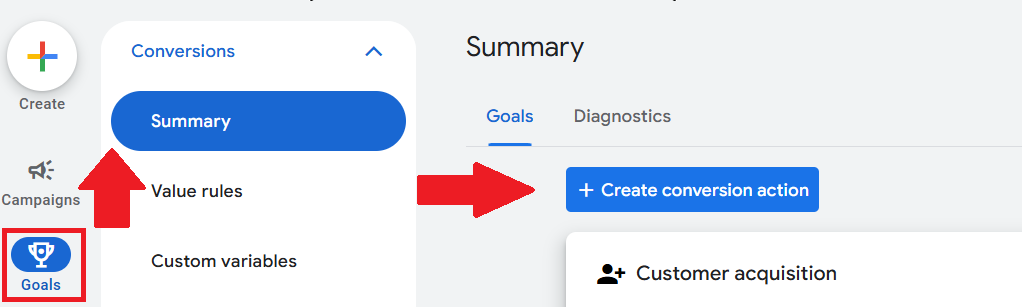
To create a conversion action in your Google Ads account, navigate to Goals > Conversions > Summary. From there, click + Create conversion action:

Where to find conversion actions in Google Ads.Screenshot of Google Ads, March 2025

Now, it’s time to decide what type of conversion actions to track. You can choose from:

  • Website.
  • App.
  • Phone calls.
  • Offline conversions (imported from other connecting sources).

Additionally, Google offers different conversion categories to better group what you’re measuring, and why. The conversion categories in Google include:

  • Purchase.
  • Signup.
  • Download.
  • Subscribe.
  • Phone call lead.
  • Submit lead form.
  • Book appointment.
  • Request quote.
  • Contact.
  • Add to cart.
  • Begin checkout.
  • Get directions.
  • In-app ad revenue.
  • Page view.
  • Outbound click.

You can create a conversion action from Web and App events within Google Ads, or you can set them up manually.

If you choose to use Web and App events from Google Analytics, you won’t have to make any changes to your code.

If you choose to set up a conversion action manually, you’ll need to add an event snippet to your website code.

Step 2: Installing The Google Tag

There are three main components of establishing the Google tag:

  • Installing the Google tag.
  • Adding conversion event snippets (if creating conversion actions manually).
  • Verifying the Google tag.

How To Install The Google Tag

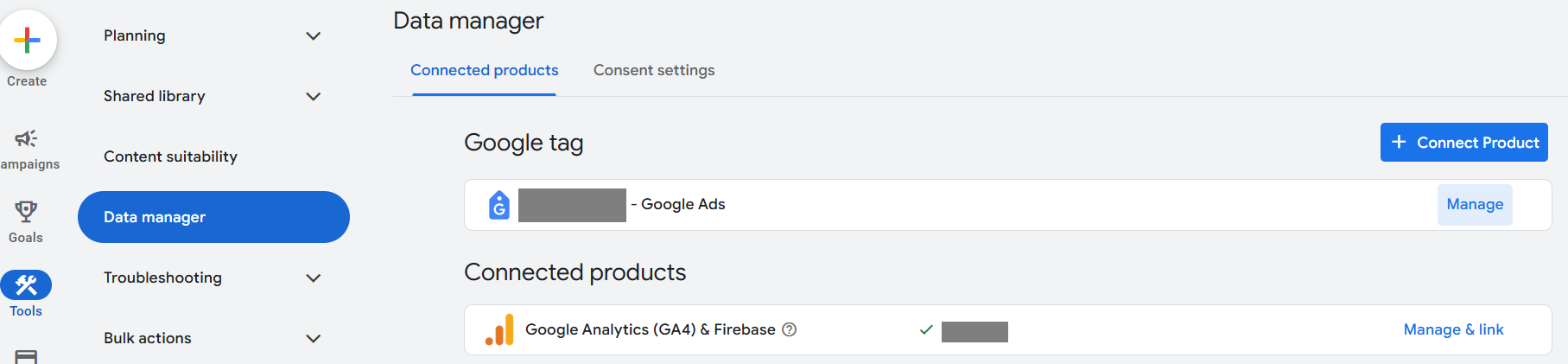
In the Google Ads interface, locate the option to set up the tag. Navigate to Tools > Data Manager.

From there, you’ll see the first option for the Google tag.

Google Ads data manager settings.Screenshot of Google Ads, March 2025.

In the example above, I’ve already got the Google tag set up. If you don’t, you’ll click on + Connect Product to set it up.

The Google tag can be installed in two different ways:

  • Install with a website builder or content management system (CMS) like Wix, Shopify, etc.
  • Manually.
2 ways to install the Google Tag.Screenshot taken by author, March 2025

If installing manually, you’ll need to copy the code displayed on the screen. Paste it on every page of your website immediately after the <head> element.

Manual Google tag example.Screenshot taken by author, March 2025

It’s important not to add more than one Google Tag to each page.

After you’ve added it, you can test the website to verify that it’s working.

Lastly, if your team uses Google Tag Manager, you can add the Google Tag via the Google Tag Manager for additional features. This is helpful if you need to manage multiple tags.

Adding The Conversion Event Snippet(s)

If the Google Tag was installed with a website builder or CMS, you can skip this step!

If you’ve added the Google Tag manually, this is an essential step you can’t skip.

In the Google Tag section of Google Ads, navigate to Details to see the event snippet.

From there, you’ll choose how to track conversions:

  • Page loads.
  • Clicks.
Image credit: Google Ads, March 2025

The code can either be downloaded or copied directly from the page.

Finally, you’ll paste the code within the “<head>” section of your conversion page(s). This is important if that conversion snippet is to be measured on multiple pages.

Verifying The Google Tag

If you didn’t verify your tag setup earlier, now’s the best time to verify – especially if you installed the tag manually and used conversion event snippets.

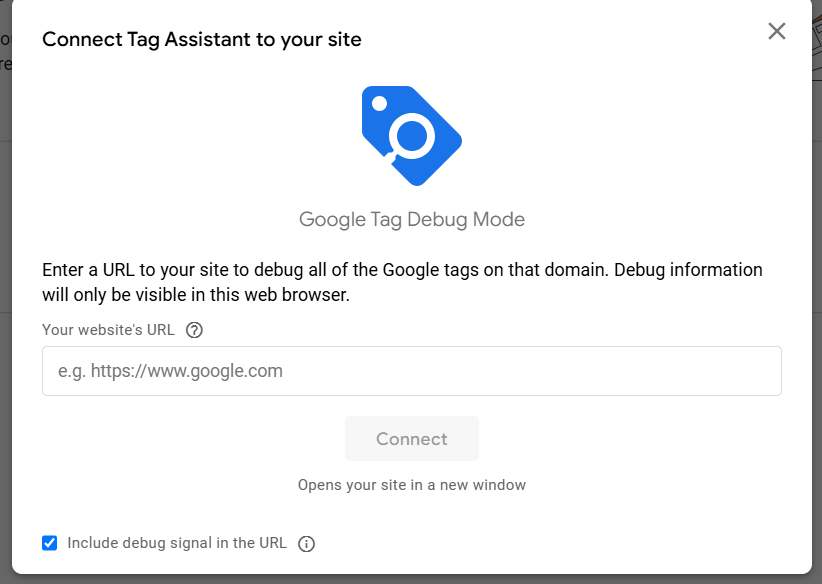
In the Google Tag section of Google Ads, go to the Admin section of your tag and scroll down to Launch Tag Assistant.

This will open a new tab, where you’ll input your website URL, then click Connect.

Screenshot taken by author, March 2025

From there, the Google Tag Assistant debug will confirm if the tag is placed correctly or if further action is needed.

Accurate Tracking Is Essential

Once your Google Tag is up and running, conversion data starts rolling in, giving you real insights into how your ads perform.

No more guessing if your campaigns are paying off – you’ll have the data to prove it.

Just remember: If your site changes (like a new checkout flow or different URL structures), revisit your tracking setup to make sure nothing breaks. And if you ever wonder why conversions look low, start by testing the tag – it’s usually something simple.

You’re now one step closer to achieving your campaign goals with accurate measurement.

More Resources:


Featured Image: UnderhilStudio/Shutterstock

https://www.searchenginejournal.com/google-tag-for-conversion-tracking/541336/


Reddit Introduces Faster Ad Setup and Pixel Integration via @sejournal, @brookeosmundson

Starting today, Reddit rolled out a series of updates aimed at making it easier for small and medium-sized businesses (SMBs) to advertise on the platform.

The changes focus on simplifying the ad creation process, improving signal quality, and helping advertisers move campaigns from other platforms like Meta with fewer headaches.

These updates follow Reddit’s continued push to make its Ads Manager more accessible, especially for smaller businesses that may not have the luxury of dedicated ad ops teams or outside agencies.

Launching Campaigns Faster With New Tools

In the Reddit Ads update, they announced two new tools to streamline campaign creation:

  • Campaign Import.
  • Simplified Campaign Quality Assurance (QA).

The first of the additions is Campaign Import, a tool that lets advertisers bring campaigns over from Meta directly into Reddit Ads Manager.

The process is straightforward — after connecting their Meta account, advertisers can select an existing campaign, import it, and make any necessary adjustments to suit Reddit’s environment.

This isn’t just a time-saver; it gives brands a quick way to leverage proven creative and targeting strategies while adapting them to Reddit’s unique audiences.

Another welcomed update is Reddit’s new Campaign Quality Assurance (QA) system. Instead of clicking back and forth between settings pages, advertisers now get a consolidated review page summarizing all key campaign details.

If something looks off — budget, targeting, placements, or creative — users can jump directly to the relevant section and make fixes before going live.

It may seem small, but anyone who’s fumbled through nested ad platforms under tight deadlines knows how much this improves workflow.

Improved Quality Signals In Reddit Ads

In addition to the streamlined campaign creation tools, Reddit also announced two features to improve the quality of audience and user behavior signals:

  • 1-click Google Tag Manager integration for Reddit Pixel.
  • Event Manager Quality Assurance (QA).

The platform now offers a 1-click integration with Google Tag Manager (GTM) for the Reddit Pixel, dramatically reducing the friction of installing and configuring conversion tags.

Advertisers can now fire up GTM, install the Reddit Pixel in minutes, and start sending conversion data without needing to pull in a developer. This update alone will make performance-focused advertisers breathe a little easier.

Reddit also upgraded its Event Manager QA tools. The revamped Events Overview now gives a clearer breakdown of conversion events coming from both the Reddit Pixel and the Conversions API (CAPI).

Advertisers can spot data discrepancies faster and ensure their lower-funnel campaigns are set up for success.

Jim Squires, EVP of Business Marketing and Growth at Reddit, noted that SMBs have always been an essential part of the platform’s community and advertising base.

We continue to make improvements to the Reddit Ads Manager that make it easier to launch and manage campaigns, so they can focus on what matters most: growing and running their businesses.

Reddit Ads Continues To Push Forward

With these latest updates, Reddit continues refining its ad platform for a broader range of advertisers, with particular attention to reducing friction for growing businesses.

Advertisers who have been looking for more streamlined ways to import, optimize, and measure campaigns will likely find these tools helpful as they plan their next steps on Reddit.

Have you already tried out Reddit Ads? Will these updates make you lean towards testing a new platform next quarter?

https://www.searchenginejournal.com/reddit-introduces-faster-ad-setup-and-pixel-integration/543273/


Google Updates Unfair Advantage Policy, Advertisers React via @sejournal, @brookeosmundson

On Friday, Google sent out a subtle but impactful policy update to advertisers, confirming changes to its long-standing “Unfair Advantage Policy”.

While the official enforcement date is April 14, 2025, the conversation has already started — and it’s anything but quiet.

The PPC community is buzzing with opinions, questions, and concerns. But this update didn’t come out of nowhere.

About a month ago, Google quietly laid the groundwork for this change without most people noticing.

Let’s unpack exactly what’s happening, why it matters, and how advertisers are reacting.

What Did Google Change?

The core of the update is about limiting how many ads a business, app, or site can show in a single ad location. Here’s Google’s new language:

Google email to advertisers about Unfair Advantage policy update.

The new language is crucial to understand.

The focus isn’t on restricting brands from showing multiple ads across different placements—it’s about stopping advertisers from stacking multiple ads in the same slot, which would effectively block competition and inflate dominance.

It’s not a total ban on multiple ads from the same advertiser showing on a single page, but rather a limit within a specific ad location.

However, as with many Google Ads policies, the phrase “single ad location” is doing a lot of heavy lifting—and advertisers are left wondering how Google will interpret and enforce it in practice.

One notable detail: Google says violations won’t lead to instant account suspensions. Advertisers will receive a warning and at least seven days to address any violations before facing suspension.

This is important. Google seems to be trying to strike a balance between tightening policy and giving advertisers room to adapt.

The Breadcrumb Many Missed – February Auction Documentation Update

Interestingly, this isn’t the first time Google has hinted at this shift.

Back in February 2025, advertisers noticed that Google updated its documentation on “How the Google Ads Auction Works”.

The update clarified that Google runs separate auctions for each ad location, meaning that the auction for the first position is distinct from the auction for the second, third, and so on.

Ginny Marvin, Google Ads Liaison, even acknowledged the change directly in LinkedIn discussions. This detail flew under the radar for many but now seems like a foundational piece for this official Unfair Advantage update.

Effectively, Google was setting the table a month ago. This policy update simply formalizes how those auctions will now prevent advertisers from “double-serving” or stacking ads in the same position.

Why Google Is Doing This, And Why Now

Google’s goal here appears twofold:

  1. Auction Fairness — Google wants to prevent scenarios where advertisers, affiliates, or large multi-account setups game the system by occupying multiple positions within a single auction.

  2. Affiliate Abuse Control — This rule directly calls out affiliates who break affiliate program rules, a growing concern in Google’s search ecosystem.

Of course, some advertisers suspect there’s a third goal: protecting the user experience and, more directly, protecting Google’s own long-term revenue by encouraging more advertisers to compete rather than allowing the largest players to squeeze others out.

Advertisers Give Mixed Reactions to Google Update

While this update was emailed to advertisers on Friday afternoon, marketers didn’t waste time sharing their takes on the update.

Andrea Atzori, who also received the email from Google, took to LinkedIn to provide his take on the update.

Atzori highlighted that this change is more about clarification than transformation, as he’d seen the same advertiser in multiple locations previously.

Navah Hopkins also took to LinkedIn with a more brief update, eager to hear thoughts from fellow marketers on the Unfair Advantage policy.

Hopkins and others noted that while the update may sound fair in theory, the proof will come in how it affects impression share, Auction Insights, and real-world campaign performance.

From the comments on Hopkin’s post, early reactions seem to lead towards skepticism and questions:

Chris Chambers commented:

This is going to be wild from a metric reporting standpoint since it seems like right now it counts as 2 impressions and also affects your impression share and position in Auction Insights (same with competitors).

But it also seems like now the advertisers with the most to spend in each niche will get even more real estate and be able to show twice, potentially cutting out smaller competitors completely from the first page.

Steve Gerencser had a similar take to Chambers:

I wonder how they are going to count people that pogo from one ad right back to the next and then back to something else? I can see a lot of wasted ad spend, or an opportunity for someone with deep pockets to dominate.

Some worry that well-funded advertisers will still find ways to dominate, while smaller brands hope this levels the playing field.

What Advertisers Should Watch For

While the policy may not seem earth-shattering at first glance, it does come with a few things advertisers should actively monitor.

First, smaller and mid-sized advertisers may stand to benefit, at least in theory. By limiting how many ads a single business can show in one location, Google could slightly reduce the dominance of big-budget brands that have historically owned the top of the page through multiple placements.

This could open up space for other players to get visibility where previously they were pushed out.

But, as several PPC pros pointed out on LinkedIn, the big question is how Google defines and enforces a single ad location in practice.

Google clarified last month that each ad location runs its own auction, meaning it’s technically possible for a brand to show up in multiple places on the same page—just not in the exact same slot.

So, while the policy aims to limit dominance, it doesn’t necessarily mean fewer total appearances for advertisers with deep pockets.

This also has potential ripple effects on Auction Insights reports. If Google starts filtering or limiting how often multiple ads from the same business appear in a given location, expect impression share metrics and overlap rates to behave differently—maybe even unexpectedly.

Advertisers will need to watch Auction Insights and Impression Share trends closely post-April to see if any patterns emerge.

Additionally, affiliate marketers and businesses using aggressive multi-account or multi-site strategies should be especially careful. The updated policy makes it clear that affiliates must play by their program’s rules and can no longer try to sneak multiple ads for the same offer into the same auction.

While Google says you’ll get a warning before any suspension, it’s probably wise to get ahead of this now, rather than risk a compliance issue later.

And finally, there’s still some ambiguity about multi-brand or franchise setups. If you’re managing a brand with multiple sub-brands, sister companies, or franchisees, the question remains: will Google treat you as one business under this policy or multiple?

That detail could make a big difference, especially for large organizations or verticals like automotive, real estate, or hospitality.

Final Thoughts: Is This Really a Game-Changer?

Honestly? It’s hard to call this a monumental shift yet. The update feels more like a formalization of existing enforcement patterns than a radical new rulebook.

That said, the PPC community is right to question what this will look like in Auction Insights and daily performance reports. Whether this is a minor tweak or the start of stricter anti-duplication policing will become clearer as advertisers see real-world data throughout Q2 and beyond.

Either way, it’s worth watching—especially if you’ve ever benefitted from, or competed against, someone taking up too much SERP real estate.

https://www.searchenginejournal.com/google-updates-unfair-advantage-policy-advertisers-react/543210/


Navigating Time Zone Differences: Scheduling Ads For Maximum Impact via @sejournal, @brookeosmundson

Ad scheduling is a fundamental setting in Google Ads and Microsoft Ads, but when managing campaigns across multiple time zones, it becomes more complex.

Standard scheduling tactics may not cut it if you’re advertising internationally or running campaigns across regions with different peak engagement times.

Poorly timed ads can lead to wasted budget, lower conversion rates, and missed opportunities.

This article goes beyond the basics to cover next-level strategies for scheduling ads effectively across different time zones.

We’ll explore techniques such as localized scheduling, data-driven adjustments, and automation to maximize campaign performance.

Understanding Time Zone Challenges In PPC

When advertising across multiple regions, time zone discrepancies can create challenges that impact ad delivery, engagement, and conversions.

A common pitfall is assuming that a single campaign schedule will work universally. In reality, what works in one location might be completely ineffective in another.

For example, if your Google Ads account is set to Eastern Time but your target audience is primarily on the West Coast, your ads might be running during off-hours, leading to suboptimal performance.

International campaigns require even more diligence to consider local business hours and consumer behavior patterns.

Another factor is peak engagement hours. While lunchtime or evening hours may be prime time in one country, those same hours could be completely irrelevant in another.

Understanding these nuances is essential for optimizing your ad scheduling strategy.

Advanced Strategies For Scheduling Ads Across Time Zones

Successfully managing ad scheduling across time zones requires a thoughtful approach that goes beyond the basics.

While many advertisers set simple schedules and hope for the best, the real wins come from leveraging automation, data-driven insights, and strategic segmentation.

Whether you’re running campaigns domestically across U.S. time zones or managing international PPC efforts, applying advanced techniques can help ensure your ads are served at the right time for the right audience.

Segmenting Campaigns By Time Zone For Better Control

If you’re running campaigns across multiple time zones, one of the best ways to stay in control is by creating separate campaigns for different regions.

This lets you adjust ad schedules, budgets, and bidding strategies based on local peak performance times rather than forcing a single schedule to work for every location.

For example, an ecommerce brand serving customers in the U.S. and Europe might run separate campaigns for each region.

The U.S. campaign can focus on morning and evening hours when engagement peaks, while the European campaign targets prime shopping hours in local time zones.

While this approach adds complexity, the benefits far outweigh the extra management effort. Automating adjustments with rules and scripts can help streamline this process, ensuring each campaign is optimized without constant manual oversight.

Leveraging Automated Bidding Over Fixed Schedules

Manual ad scheduling has its place, but automated bid strategies like Target ROAS or Maximize Conversions allow you to optimize bids dynamically rather than setting fixed hours.

These AI-driven approaches adjust bids in real time, ensuring ads appear when conversion probability is highest, regardless of time zone differences.

For instance, if data shows that users in one region convert at a higher rate between 9 a.m. and 11 a.m. but another region performs better in the evening, automated bidding will allocate more budget when it matters most.

Instead of manually adjusting bids every few weeks, let machine learning do the heavy lifting.

Optimizing Scheduling Based On Market-Specific Peak Hours

Different markets have different user behaviors, so it’s crucial to base your scheduling decisions on actual performance data rather than assumptions.

Google Ads’ ad schedule reports and Microsoft Ads’ time-of-day insights can help you identify when users in each region are most active.

For example, if analytics reveal that North American users are most engaged in the evening while European users peak in the morning, your campaigns should reflect that.

Instead of blanketing all markets with a generic ad schedule, tailor your approach based on real-time engagement trends.

Using Labels To Manage And Adjust Scheduling

One often overlooked yet powerful feature in Google and Microsoft Ads is the use of labels.

Labels let you group campaigns, ad groups, or keywords into easily manageable categories, making it simpler to track and adjust schedules.

For example:

  • Tagging campaigns by region allows for easy bulk adjustments when shifting schedules due to seasonal changes or promotional events.
  • Labeling time-sensitive ads ensures that you can quickly pause or resume campaigns as needed without sifting through dozens of settings.
  • Using automation scripts with labels enables automatic bid adjustments or scheduling changes based on real-time performance.

By applying labels effectively, you can streamline scheduling changes without manually editing each campaign, saving time and reducing errors.

Automating Scheduling Adjustments With Scripts

If you’re managing multiple time zones, Google Ads scripts can be a game-changer.

Rather than manually adjusting schedules, scripts can dynamically modify bids based on real-time performance data.

For example, a script could be set up to boost bids by 20% during high-converting hours and reduce them by 10% when conversions drop. This keeps campaigns optimized while freeing up time to focus on strategy rather than daily bid adjustments.

Scripts also work well with labels. You can program scripts to modify bid strategies for campaigns tagged with specific labels, ensuring changes are applied only to relevant ads.

Adjusting For Daylight Saving Time Changes

Another scheduling headache is Daylight Saving Time (DST), which varies by country and can cause misalignment in ad schedules.

A campaign that ran perfectly last month might suddenly be off by an hour if a region switches to DST.

To avoid this, maintain a calendar of DST changes in key markets and adjust schedules proactively.

Another option is using automated rules or machine learning-based bid adjustments to handle these shifts without manual intervention.

Budget Allocation Based On Regional Performance Trends

Rather than splitting your budget evenly across all time zones, consider allocating more spend to the highest-performing regions based on historical data.

By analyzing performance reports, you can determine which locations deliver the best ROI and adjust budgets accordingly.

For instance, if your data shows that conversions peak in the late evening for Pacific time zone users but decline in the early morning for Eastern time users, shift more budget toward the stronger-performing time periods.

This approach ensures ad spend is being used effectively rather than wasted on time slots that don’t generate conversions.

Mastering Ad Scheduling For Global Success

Effectively navigating time zone differences in Google and Microsoft Ads isn’t just about setting a schedule and forgetting about it.

A winning strategy requires a mix of localized segmentation, automation, and continuous data-driven adjustments.

Instead of seeing time zone variations as a challenge, think of them as an opportunity to refine and optimize your strategy.

By leveraging campaign segmentation, smart bidding, labels, and scripts, you’ll gain greater control over when and where your ads appear – without unnecessary budget waste.

At the end of the day, great PPC management isn’t about simply keeping the lights on. It’s about making smart, strategic moves that maximize impact.

Test, tweak, and refine your approach, and you’ll see the results in both efficiency and performance.

More Resources:


Featured Image: tovovan/Shutterstock

https://www.searchenginejournal.com/scheduling-ads-for-maximum-impact/541114/


Measuring PPC Performance In The Luxury Fashion Space

When it comes to luxury fashion, the likes of Louis Vuitton, Chanel, and Gucci are among the most well-known, and rightfully so. These three alone are valued at over $87 billion.

Over the last decade and a half, I have had the opportunity to work extensively within this market.

Managing PPC in this space is super interesting as it requires a shift in thinking away from cookie-cutter ecommerce PPC strategies.

It’s not just a case of the product value being above average, leading to longer, more considered decision-making processes.

Luxury audiences are unique. They differ by brand, and finding success with PPC requires careful consideration and a holistic understanding of digital performance – not just the data within the accounts.

Understanding The Luxury Fashion Consumer

Luxury consumers have unique characteristics and behaviors that mold their purchase motivations and preferences.

You may be thinking through a lens of tactical management and day-to-day operations, “But how does this really impact PPC?”

But it really does.

Broadly speaking, luxury fashion consumers can be divided into three groups:

  1. Ultra-High-Net-Worth Individuals (UHNWI): Buyers with plenty of disposable income who frequently purchase luxury fashion without too much consideration for price.
  2. Aspirational Consumers: Middle- to high-income buyers who occasionally purchase within their budget to match their lifestyle.
  3. New Luxury Shoppers: Younger buyers, particularly Millennials and Gen Z, who engage with luxury brands online and purchase more infrequently, likely to have more of an affiliation with pre-loved luxury.

From a motivational perspective, elements such as social standing, quality, heritage, and storytelling play an important role. They can feed into ad copy and/or landing page messaging to test the impact on PPC.

Let’s say a brand is only bidding on new customers through Google Ads with a basic strategy of “brand keywords” (e.g. “louis vuitton”) and “generic keywords” (e.g. “luxury handbags”).

Focussing on generic keywords, these three audience groupings have to be considered – and segmentation is absolutely essential – as they all search using the same queries and are served the same SERP:

Google search results page showing the paid ad results for the query 'buy luxury handbags'Screenshot from search for [buy luxury handbags], Google, February 2025

It differs on a case-by-case basis, but the customer lifetime value (CLV) of a “New Luxury Shopper” will likely be vastly different from users in the “UHNWI” grouping.

Aspirational buyers now make up 18% of the luxury fashion market across key economies. By 2030, Gen Z is projected to contribute 25-30% of luxury market purchases, with Millennials making up the majority at 50-55%.

There are plenty of opportunities for brands to benefit from when scaling up their PPC spend.

Simply excluding current customers, allocating a percentage of the budget to generic keywords/shopping listings, and then reporting on return on ad spend (ROAS) or customer acquisition cost (CAC) isn’t enough.

Segment performance data, get a clear view of which grouping demands the highest portion of media spend, and ask yourself whether this can be improved and how this data can be used to drive better results.

The Complexity Of Luxury Purchase Paths

Deliberated decision-making is a key element to consider when measuring PPC performance in luxury fashion.

A study found that two-thirds of Chinese luxury goods consumers undertake thorough product research before making luxury purchases, with over 40% of the respondents sharing that they used photos and pricing comparisons and compared to similar products before making the purchase.

Reporting week-to-week on ROAS/CAC may not be enough, and if decisions are made using windows that are too short/long, optimizations won’t align with the overarching goal.

I’ve seen growth stunted because of this, and access to purchase path data is a must.

The journey to purchasing luxury as a whole (not even considering the three audience groupings) involves many interactions.

A consumer insights study from NP Digital found that as the price point grew, the number of touchpoints for B2C increased.

For example, from $100 or less to $10,000+, the number of touch points moved from 8 to 23, and while price point doesn’t necessarily mean luxury, it shows a strong correlation.

This, combined with 80% of all luxury sales being digitally influenced, shows the importance of having connected data that can be fed into PPC strategies.

Take a scenario where a brand’s new customer acquisition through PPC is bulletproof, but social content is thin, and lead nurturing is non-existent.

This fractures the decision-making process, which ultimately impacts the results driven through PPC as demand will stay consistent and budget will be spent.

Still, the needs of the consumer are not met, which would mean fewer sales, a lower conversion rate, and declining efficiency.

A long-term view is essential for both reporting and optimization, and the necessity for brands to adopt an integrated marketing strategy has never been more critical.

The Influence Of Trends And Tradition

A survey found that 70% of consumers identify as trend-focused, and 77% value tradition.

Trend-focused consumers are driven by the latest movements in luxury fashion, whether this is the latest collab, a change in leadership, or a trending style – all of this will influence PPC.

These trends can occur steadily over time or, in some cases, emerge overnight due to the media, social influence, etc.

Depending on how an account is set up, the flow of search queries over time for “brand” keywords, “brand + product,” “product,” and “generics” will experience ebbs and flows based on a wealth of factors.

Knowing why certain products become more popular than others and being able to pull this data out of the accounts to share with the wider team is essential.

This should be reported as frequently as platform ROAS or blended CAC, not just on an ad hoc basis.

This can be done a few ways, one being to group search queries together, categorize them, and report using an index vs. the average, for example:

  • Automate the export of all search queries on a daily basis (or longer, depending on the size of the brand and budget) with a date stamp.
  • Create a script (or use Python/equivalent) – or find a partner to build one for you – to categorize these queries into groupings, or do this manually to get started.
  • Build a dashboard that maps the groupings over time and benchmarks vs. the average to provide a clear view of increases/decreases in demand, sales, cost, etc.
  • Map an index to each category and rank these based on the average.

It may take some work, but it is definitely worth it, considering how often trends and seasons change in luxury fashion.

With this data, brands can look at trends over time and react much quicker than simply seeing a better or worse ROAS one week vs. the previous week.

From a holistic perspective, this data can be shared across channels (e.g., SEO, PR, and content) and with the wider team, such as buyers, to share insights ahead of time on what users are searching for and why.

Holistic Performance Measurement

A robust measurement strategy is paramount when managing PPC in any capacity, and even more so for luxury fashion.

Gone are the days when teams were asked, “How much did we put in and how much did we get back?” at an ad platform level (well, almost gone).

Luxury brands are leaning into smart attribution modeling, focusing on CLV and personalization, to find the true value of their PPC activity.

This goes much further than an out-of-the-box attribution solution.

Unified Data Collection

Luxury brands spend millions annually on advertising, with 33% of this cost allocated to digital.

Measuring PPC performance through one or two lenses isn’t enough as it influences (and is influenced) by all other channels.

Data unification is essential to facilitate integration, understand the customer journey, and set budgets and key performance indicators (KPIs) for PPC.

Stores, pop-ups, and events are incredibly important for luxury fashion brands, and being able to target new and returning users at key touchpoints through PPC is a must.

Pulling together online and offline data across multiple markets, channels, and sources requires robust processes, ownership, and consistency.

And, as easy as it is for me to write this, it most likely isn’t a quick task and will take considerable time and resources, but the payoff is certainly worth it to have a clear view of PPC performance.

Attribution Modeling

In this day and age, models such as “last click” are a touchy subject, and with good reason.

Consider all the touchpoints, advertising channels, and budget invested in delivering great customer journeys that luxury buyers experience for billion-dollar brands to then turn around and say the last click before the sale gets 100% of the credit.

In-platform, brands use multi-touch attribution (such as Google data-driven attribution or DDA), which is the best of the bunch, but still very limiting.

To begin to bridge the gap between online and offline, Louis Vuitton and Gucci invested heavily in omnichannel data platforms that allow them to connect in-store activity with digital interactions.

Another way brands are moving towards a more connected view of performance is through Marketing Mix Modelling (MMM), a methodology that was first used in the 1950s.

This takes attribution a step further by measuring the impact of PPC (for example) on the broader marketing ecosystem, quantifying PPC’s role within the entire marketing mix.

The complex decision-making process for luxury fashion makes having this connected data a non-negotiable for effective PPC budgeting, optimization, and growth.

Customer Lifetime Value

This metric refers to the total profit a customer is expected to drive over the duration of their relationship with a brand.

New customer acquisition through PPC is often measured through in-platform/blended ROAS and CACs, both serving a purpose when analyzing platform performance.

However, luxury brands that adopt CLV are able to identify which customer segments are the most profitable and take a longer-term view of acquiring high-value customers while tailoring strategies to audiences that aren’t as profitable to them.

Let’s look at an example of Brand A, who sells luxury handbags:

  • Current KPI for paid search: Account-wide Google Ads in-platform ROAS >5.

Brand A runs a data analysis project to find CLV by user segment and discovers that Audience 1 spends $11,000 over their lifecycle with the brand, and Audience 2 spends $4,000.

Their new KPIs would look vastly different, which feeds into budgeting, setting bidding strategy targets, promotions, and more.

Looking at the longer term, having this data gives luxury brands the benchmarks to work from to improve CLV numbers, which will, in turn, allow more freedom for scaling PPC spend.

Bringing It All Together

PPC doesn’t exist in isolation for any brand.

It’s influenced by many factors, and looking at one metric or platform for the answers isn’t enough.

Luxury fashion operates differently from a standard ecommerce retailer with unique audience profiles, extended decision-making processes, and an ever-moving flow of trends and traditions.

I’ve seen luxury brands dive headfirst into advanced data modeling, then go back to the drawing board to set accurate KPIs that fuel the fire of scaling media spend on PPC.

At the same time, plenty of luxury fashion brands use arbitrary in-platform modeling (e.g., last click) as the source of truth.

Aside from the obvious (cost, time, resource, etc.), there are only benefits from digging into the data to improve PPC performance from one end (e.g., setting bids, messaging, etc.) to the other (e.g., budgeting, market/network expansion).

More Resources:


Featured Image: spoialabrothers/Shutterstock

https://www.searchenginejournal.com/measuring-ppc-performance-in-luxury-fashion-space/540151/