Bing tests clickable underlined text in organic result descriptions
Bing is testing clickable, underlined text within the descriptions of its organic search results. When clicked, this text doesn’t take you to the website’s landing page like you might expect instead, it redirects you to a new search query within Bing’s own results.
Here is a screenshot of how it looks.
This suggests Bing may be more focused on keeping users engaged within its own search experience surfacing related queries directly from organic content rather than driving traffic out to the underlying site. It’s a notable difference from how we’d typically expect clickable text in a result description to behave.
DuckDuckGo is the best private search engine for most people, but it is not the right answer for every threat model. We examined what seven active services collect, where their results come from, how they make money, and whether their AI can really be turned off. Read below for the full list and analysis.
Privacy search has a marketing problem. Almost every alternative to Google says it does not track you. That phrase can mean anything from “we do not build an advertising profile” to “we briefly process your IP address, send your query to another company, retain an anonymous copy, and display ads without tying any of it back to you.” Those are not the same promise.
There is also no universal best search engine once relevance, price, index independence and AI enter the picture. The most private configuration may be too slow or technical for daily use. The search engine with the strongest results may require an account or send a query to an upstream index. A provider can minimize its own collection and still be visible to your internet provider or the sites you click.
Our answer for a typical reader is DuckDuckGo. It is free, works on desktop and mobile, requires no account, and offers a dedicated no-AI version. Choose Brave Search instead if independence from Bing matters more. If you will pay for a stronger product, Kagi is the best premium option.
The short list
Comparison of the best private search engines in 2026
Search engine
Best for
AI control
Cost and main caveat
1. DuckDuckGo
Best for most people
Yes — dedicated no-AI version
Free; Bing-heavy results can struggle with deeper queries
2. Kagi
Best paid search
Yes — disable it in Search settings
$10/month for unlimited use; account and temporary logs
3. Brave Search
Independent free index
Partly — summaries turn off, but Ask remains
Free; AI remains visible and results can vary
4. Startpage
Familiar Google and Bing results
No generative layer in core search
Free; System1 ownership and old public audit history
5. MetaGer
Nonprofit metasearch
No generative layer documented
Prepaid usage; no native iPhone app
6. Mojeek
UK-based independent index
Search Summary is optional
Free; smaller index and less consistent deep-query coverage
7. SearXNG
Self-hosters and technical users
Depends on the instance
Free and open source; requires setup and administrator trust
Best overall: DuckDuckGo ⭐⭐⭐
DuckDuckGo wins by being the easiest privacy improvement that most people will keep using.
Its privacy policy says it does not write an IP address or unique identifier to disk alongside a query. It does retain anonymous search terms for tasks such as correcting misspellings and improving results, but says those terms are disconnected from anything that identifies a person. That is more precise—and more believable—than pretending the service never processes data at all.
DuckDuckGo combines its own crawlers and many instant-answer sources, but its traditional links and images are largely supplied by Microsoft Bing. That gives it broad coverage without handing Microsoft a user’s direct identity, but it also means DuckDuckGo is not an independent web index in the way Brave or Mojeek is.
The clearest reason it ranks first in 2026 is noai.duckduckgo.com. The dedicated version turns off Search Assist and Duck.ai and filters images identified as AI-generated. It answers “best search engine for privacy and no AI” more cleanly than a buried toggle that leaves an AI button in the interface.
The compromise is relevance. In a recent r/privacy discussion, the most repeated complaint is not privacy—it is having to repeat detailed searches elsewhere, especially for forum posts, troubleshooting and nuanced questions. That experience is not universal, but it is common enough to take seriously. DuckDuckGo’s !bang shortcuts make fallback easy, although using a bang sends you to the destination search service and subjects that search to the destination’s privacy practices.
Choose DuckDuckGo if: you want the best free balance of privacy, convenience and no-AI control on iPhone, Android and desktop.
Skip it if: you regularly run obscure research, technical or user-generated-content searches and dislike using a fallback.
Best paid: Kagi ⭐⭐
Kagi is what search looks like when the customer pays instead of the advertiser.
There are no ads, and the product provides unusually strong result controls. You can raise, lower or block domains; choose lenses; and use sources drawn from Kagi’s own indexes and anonymized requests to other traditional indexes. Kagi’s current plans include a 100-search trial, $5 a month for 300 searches, $10 for unlimited search and $25 for an Ultimate tier with premium AI features.
The subscription is both its privacy advantage and its most obvious obstacle. Kagi requires an account for billing, although it says searches are anonymized and not associated with that account. Its privacy materials describe temporary search-query debugging logs, with search queries said to be removed after seven days. That is more retention than a purist might want, even when the query is not attached to the account.
Supported paid plans can use Privacy Pass, which issues anonymous tokens so the search service can confirm entitlement without seeing the user’s account identity. It is a thoughtful design, but not available on every plan or browser; Safari is a notable limitation.
Kagi also has the best AI control in this group. Its Search AI settings state that AI is invoked on demand. Turning AI off hides its Search interface elements and prevents explicit AI triggers. Users who do want AI should read Kagi’s separate provider disclosures, because model vendors may have their own limited retention rules.
Choose Kagi if: search is important enough to justify $10 a month and you want high-quality controls without advertising.
Skip it if: you want an account-free service, zero temporary query retention, or a fully capable free tier.
Best independent free index: Brave Search ⭐⭐
Brave Search is the strongest answer to a different question: which private search engine is least dependent on Google and Microsoft?
Brave says the standard service runs on its own independent web index. That matters beyond branding. A private front end to Bing can protect a user’s identity, but it does not create competition at the infrastructure level. Brave controls crawling, ranking and delivery end to end. An optional Google fallback can supplement a weak result set, but enabling it naturally reduces that independence.
Its privacy policy says IP addresses are not retained and search ads are contextual rather than based on a personal profile. Brave’s anonymous usage metrics are enabled by default. The company says those metrics exclude actual query text, IP addresses and unique identifiers, but privacy-conscious users should still consider switching them off in Search settings.
Brave loses points on the no-AI question. You can turn off automatic “Answer with AI” summaries, but the Ask entry point remains in the search interface. That may be acceptable to someone who simply does not want generated text placed above links. It is not a complete AI-free mode in the DuckDuckGo or Kagi sense.
Choose Brave Search if: you want a free, capable private search engine with its own index and can tolerate an optional AI surface.
Skip it if: “no AI” means no AI button, prompt or generative feature anywhere in the search experience.
Best for familiar Google and Bing results: Startpage ⭐
Startpage is the least disruptive move for someone who likes mainstream results but does not want a mainstream engine building the personal search profile.
It submits searches to Google and Bing on the user’s behalf and returns the results. Startpage says it does not record IP addresses or user agents, keeps only aggregate search counts by language, and uses transient anti-abuse techniques instead of a conventional IP log. It also avoids tracking cookies; an optional preference cookie can remember settings.
Anonymous View extends that proxy model after the results page. Startpage retrieves a destination page with its own IP address and displays it to the user. It can be useful for a quick read, but scripts and interactive functions may break. It should not be confused with the stronger anonymity and traffic separation Tor is designed to provide.
Startpage’s core results do not currently contain generative AI summaries. Its Instant Answers are conventional result modules and can be disabled.
The trust caveat is corporate and evidentiary. Startpage operates from the Netherlands, but System1—an advertising-technology company—invested through Privacy One. Startpage says its management controls privacy decisions. There is no public evidence in the reviewed materials that System1 has overturned those practices, but the strongest audit talking point is old: Startpage says its regular EuroPriSe recertification was postponed in 2017.
Choose Startpage if: familiar result quality matters more than index independence and you want no generative layer in core search.
Skip it if: ownership by an ad-tech group or reliance on Google and Bing is outside your threat model.
Best nonprofit metasearch: MetaGer ⭐
MetaGer combines several appealing properties that rarely appear together: it is operated by a German nonprofit, publishes its code, has no ads, and does not require a personal account.
Its July 2026 privacy policy says IP addresses and user agents are neither saved nor shared. Because MetaGer is a metasearch engine, it must send the query to result partners. It says returned results and the query are kept for display for a few hours. Its current source list includes Brave, Mojeek and Google results supplied through Serper.
Instead of an account, MetaGer gives the user a random key. A one-time payment adds tokens; the service estimates that €5 for roughly 500 tokens lasts a typical user around two months. Cash payment is available for people who want to avoid a payment trail. The key can also unlock a proxy that loads destination pages on MetaGer’s servers.
This is a credible privacy design, but it is less convenient than opening a free search page. MetaGer has browser integrations and an Android app, but no native iOS app. We also found no standard generative-answer layer in the reviewed search product, making it a good no-AI option for users comfortable with its payment model.
Choose MetaGer if: you value nonprofit governance, open code, no advertising and an anonymous payment/access model.
Skip it if: you want a frictionless free default or a polished native iPhone app.
Best UK private search engine: Mojeek
Mojeek is the clearest answer for a UK reader who wants a locally based search company and a genuinely independent index.
The Brighton-based company crawls and ranks the web itself. Its privacy policy says operational logs are retained indefinitely but do not contain IP addresses; the IP is replaced with a two-letter country code. Mojeek describes the remaining data as non-personal and says it does not set a cookie unless a user chooses to save preferences.
Mojeek does offer a generative Search Summary, but it is user-triggered rather than automatically placed above every result set. The answer appears alongside traditional links and includes citations. That makes Mojeek a reasonable choice for someone who wants AI off by default, even though it is not an engine built without AI capability.
The cost of independence is index depth. Mojeek can be excellent for straightforward discovery and provides a different ranking perspective, but its smaller corpus is less dependable for obscure, highly local, shopping or rapidly changing queries. Keep a fallback available.
Choose Mojeek if: UK jurisdiction and independence from Google, Bing and Brave matter most.
Skip it if: you need one engine to handle every deep or time-sensitive query.
Best for self-hosting: SearXNG
SearXNG is not a single search company. It is open-source metasearch software that can query a configurable mix of external services and remove identifying headers and cookies before doing so.
That flexibility explains why privacy communities recommend it—and why simplistic rankings often get it wrong. If you use a public instance, you must trust the administrator. SearXNG’s own instance guidance warns that an operator could log or sell data. If you self-host, you control the logs, but upstream search engines still see requests coming from your instance. A server used by only one person can produce a query stream that is easier to separate than one shared by many users.
The default software does not impose a generative answer layer, although instance operators can change the interface or add engines. Speed, uptime, result mix and privacy therefore vary by instance.
Choose SearXNG if: you understand the deployment model and want maximum control over sources and configuration.
Skip it if: you want a service whose privacy properties, support and uptime are consistent without technical work.
Popular privacy search engines we did not recommend
Its policy says IP addresses and queries are automatically shared with Bing or Google. Its new desktop AI-free mode is welcome but does not change that core comparison.
The free tier shares the query and masked technical data with advertising partners, and ad iframes can send personal data to Bing or Google. Pro is a different, paid proposition.
Mullvad shut the service down on November 27, 2025.
These products are not necessarily “bad.” They simply do not support the same top-line privacy recommendation under their current availability and published terms.
What Reddit users get right—and what Reddit cannot prove
There is no secret community consensus that the product pages are hiding. Recent privacy threads repeat the same trade-offs: DuckDuckGo is convenient but can struggle on detailed searches; Kagi earns praise but costs $10 a month for unlimited use; Startpage provides familiar results but prompts ownership questions; and SearXNG offers control at the cost of setup, speed and trust in an instance operator.
That lived experience is useful when judging whether someone will keep a new default. It cannot verify what happens on a provider’s servers. Reddit comments about an engine “selling data,” being “compromised” or offering perfect anonymity are not evidence unless they point to a policy, audit, technical finding or documented incident. This ranking therefore uses community reports for usability and official disclosures for data-handling claims. The clearest current example is a thread asking for both privacy and convenience: the replies reveal real compromises, not one uncontested winner.
Private search is not anonymous search
A private search engine primarily limits what the search provider records and how it profiles the user. It does not make the whole browsing session invisible.
The search provider receives a network connection and may briefly process an IP address even if it does not retain it.
HTTPS normally hides the query text from the internet provider, but the provider can still see the domain being contacted.
Once you click a result, the destination site applies its own cookies, scripts, fingerprinting and account rules.
Search suggestions can transmit text as it is typed, before the query is submitted.
A !bang shortcut takes the user to another search service; the destination’s privacy policy then applies.
If the goal is to hide an IP address from the search provider, Privacy Guides recommends considering Tor or a trusted VPN. Tor Browser is the stronger anonymity tool, but its privacy benefits depend on using it correctly. A private search engine is one layer, not an invisibility cloak.
Which private search engine should you choose?
For most people: DuckDuckGo.
For mainstream search with built-in AI features switched off:noai.duckduckgo.com.
For the best paid experience: Kagi Professional at $10 a month.
For an independent free index: Brave Search.
For familiar Google/Bing-style results: Startpage.
For nonprofit, ad-free metasearch: MetaGer.
For a UK-based independent engine: Mojeek.
For self-hosting and source control: SearXNG.
For iPhone: DuckDuckGo is the simplest all-in-one option; Startpage and Brave also have mobile-browser routes.
For Android: DuckDuckGo and Brave offer the easiest full mobile experiences; MetaGer and Mojeek also have Android apps.
How to change the default on iPhone and Android
On iPhone, Apple’s current default-search guide shows the available choice in Safari settings. The exact list depends on iOS version and region. If the provider is not offered, use its app, browser or Safari extension instead.
On Android, Chrome exposes the choice under More > Settings > Search engine; Google documents the current steps in its Chrome help page. A privacy-focused browser can expose a different provider list. If you use DuckDuckGo’s no-AI endpoint, add it as a custom search engine where the browser permits it or bookmark it as the search home page.
Frequently asked questions
What is the best search engine for privacy?
DuckDuckGo is the best private search engine for most people in 2026. It does not associate search queries with retained IP addresses or unique identifiers, requires no account, works across desktop and mobile, and has a dedicated no-AI version. Brave Search is the better choice if index independence is the priority.
What is the most private search engine?
There is no universal answer without a threat model. MetaGer’s anonymous-key design and SearXNG under a carefully operated deployment can minimize different kinds of exposure. For mainstream use, DuckDuckGo, Brave Search and Startpage provide a stronger balance of privacy and usability. Use Tor if the search provider must not see your real IP address.
Which private search engine has no AI?
DuckDuckGo provides the clearest no-AI option at noai.duckduckgo.com, which disables its AI features and filters AI-generated images. Kagi can hide and disable Search AI from settings. Startpage’s core search currently has no generative answer layer. MetaGer also had no standard generative-answer feature in the product reviewed for this article.
Is DuckDuckGo really private?
DuckDuckGo says it does not retain IP addresses or unique identifiers with search queries and does not build personal search profiles. It does retain anonymous query strings for product improvement. Its traditional link and image results are largely sourced from Bing, but DuckDuckGo says requests are proxied so Microsoft does not receive the user’s direct identity.
Is Startpage safer than DuckDuckGo?
Both have strong published privacy practices, but they optimize for different things. Startpage proxies Google and Bing and may provide more familiar results. DuckDuckGo is easier to use across devices and has stronger no-AI controls. Startpage’s System1 ownership and old public audit history are reasonable trust considerations.
Is Brave Search more private than DuckDuckGo?
Brave retains no IP address and operates its own index, which reduces exposure to an upstream search provider. DuckDuckGo also avoids a personal search profile but relies heavily on Bing for standard results. DuckDuckGo has the better complete no-AI mode; Brave has the stronger independence story.
What is the best private search engine for iPhone?
DuckDuckGo is the simplest recommendation because it offers an iOS app and can be used as a default search option in common browsers. Startpage also offers an iOS browser app, and Brave integrates Brave Search into its iPhone browser. Exact default-search choices vary by browser, iOS version and region.
What is the best private search engine for Android?
DuckDuckGo and Brave provide the most complete Android experiences. MetaGer and Mojeek also offer Android apps, while SearXNG can be used through a browser or a configured instance.
Are private search engines more secure?
They can reduce profiling and the exposure of sensitive queries, but they do not automatically block malware, prevent browser fingerprinting or secure the sites opened from results. Browser security, software updates, tracker blocking, careful account use and, where appropriate, Tor or a trusted VPN still matter.
Google is mixing AI Mode replies into Search Console query data
Earlier this year, Google launched a new AI Performance Report within Google Search Console, nested under the main Performance report. This new report lets site owners see impressions, pages, countries, devices, and dates but notably, it doesn’t include query data.
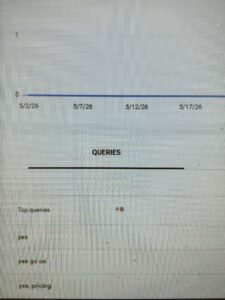
Recently, Anastasia Kourou posted on LinkedIn about spotting odd queries in her regular Search Console performance report things like:
“Yes”
“Yes, go on.”
“Yes, pricing”
Kourou found these queries odd enough to flag, and John Mueller from Google responded with some clarification. He wrote: “Search Console includes information on AI Overviews and AI Mode in the general performance report.
The linked documentation explains: “If a user asks a follow-up question within AI Mode, they are essentially performing a new query. All impression, position, and click data in the new response are counted as coming from this new user query.”
Here is the screenshot.
So here’s what’s happening: when someone uses AI Mode and responds with something like “yes” to continue a conversation, Google treats that as a brand-new query and it gets logged into the regular Search Console performance report, complete with its own impressions, clicks, and position data.
Just as we’ve come to assume that unusually long, conversational-style queries in Search Console likely originated from AI Overviews or AI Mode, short follow-up responses like “yes” are now another signal pointing to the same source. Have you spotted odd, conversational queries like these in your own Search Console reports?
Bing tests new “Top Source” section in search results
Bing is testing a new section on its search results page called “Top Source.” Based on what we’re seeing, this section appears to group together multiple pieces of content whether individual pages or news articles from a single site.
We’ve noticed Bing testing additional source-focused sections on its results pages recently, suggesting Bing may be exploring different ways to highlight authoritative or dominant sources for certain searches.
Microsoft hasn’t confirmed this test, so it’s worth treating this as a limited experiment for now. Not all users are likely seeing this on Bing.
How to check if your ste is eligible in Preferred Sources
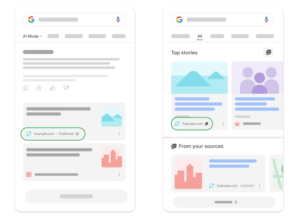
Google recently rolled out a preferred sources feature on the search results page. When a user selects a website as a preferred source, that site’s content is more likely to show up in Top Stories and gets highlighted as a preferred source within AI Overviews and AI Mode.
Here is a screenshot of how it looks.
This feature is available for all languages. Google noted that preferred sources apply to AI Overviews and AI Mode, and that only domain-level and subdomain-level sites are eligible not subdirectories. So a site like:
https://www.example.com/
https://code.example.com/
would be eligible, but something like https://www.example.com/blog would not.
How To Check If Your Site Is Eligible
Before doing anything else, check whether your site actually shows up in the source preferences tool. If it does, you can guide users to select it as a preferred source.
How To Send Users Directly To The Source Preferences Tool
You can use this URL format to take users straight to the tool:
Sharing this link with your audience in a newsletter, on social, or on your site gives them a direct path to mark your domain as a preferred source, which could help increase your visibility in Top Stories and AI-generated results going forward.
AI Visibility Measurement: What To Track & What To Ignore
I have dozens of conversations per week with folks in growth and marketing, ranging from directors, VPs of marketing, and CMOs to SEOs in the nitty-gritty day-to-day.
Many of my conversations involve measurement. This is an increasingly challenging topic as traditional SEO metrics are breaking down with the advent of AI answers.
Much of the conversation is spent debunking misconceptions and misguided advice operators see on social media.
It’s not an easy conversation, but it’s important. This means telling people to avoid many of the things they see people promote on social media. It’s not an easy conversation, but it’s the right conversation.
My goal here is to clear up the confusion so you can tie your AI visibility efforts to business outcomes.
What To Track
These are a mix of leading and lagging indicators that you have varying degrees of control over. I’ll make the case for why each one matters, then we’ll cover how to influence them.
Prompts
This is the most obvious and most important decision, because what you measure influences behavior. From dozens of conversations, it’s also what many people get wrong.
It becomes the first domino in a chain of mismeasurement. None of the other metrics, like citation share, brand mentions, or visibility, matter if you’re tracking the wrong set of prompts.
Most AI visibility tools like Profound, Peec, and AirOps will automatically recommend prompts to track, but these are rarely what you should focus on. I haven’t confirmed this, but from what I can tell, they analyze your website and map existing pages back to prompts. They assume the pages already on your site are the ones that should be cited or visible in LLM outputs.
That might be true. But most companies we speak to say, “We aren’t appearing for the prompts we want to show up for,” which tells me they don’t have the right strategy and thus haven’t published the right pages.
AI Visibility
You can see how, if you’re tracking the wrong prompts, you’ll measure visibility for the wrong things.
From our perspective across dozens of clients, ChatGPT is the most commonly used LLM, but it’s worth tracking how often your brand shows up for your target prompts across ChatGPT, Gemini, Google AI Mode, Perplexity, Claude, and Copilot as well.
This is important because ChatGPT’s user base skews consumer, while Claude’s user base skews business and enterprise. If you’re a B2B business, Claude has fewer users, but those users are using Claude at work, which is the context that matters.
For most of the last decade, marketers leaned on clickstream analytics and UTM parameters to tell them where leads came from.
That paradigm has been breaking down for a while, and it now shows an even smaller part of the picture.
LLMs are zero-click by design. When someone asks ChatGPT, Gemini, or Claude a question, the answer is provided in the chat. They don’t click through. They research in the conversation, then they might do a Google search for your brand directly or type your URL straight in. Your analytics and CRM platforms will log that traffic as “Organic” or “Direct,” but the reality is that an LLM is what led to the person going to your website.
Self-reported attribution is the simplest yet highest-signal way to get more of the story. We recommend simply asking people, “How did you hear about us?” There are well-known and documented flaws to self-reported attribution (mostly human memory and salience of touchpoints), so it won’t be perfect, but it’s the buyer telling you, in their own words, how they found you.
If you capture that information through a field on your lead form, you can then track those lead sources in your CRM to pipeline and closed revenue. That’s the ultimate success metric for a marketing channel.
One client that added it discovered ~5% of registrations were coming from ChatGPT despite doing zero work around AI visibility.
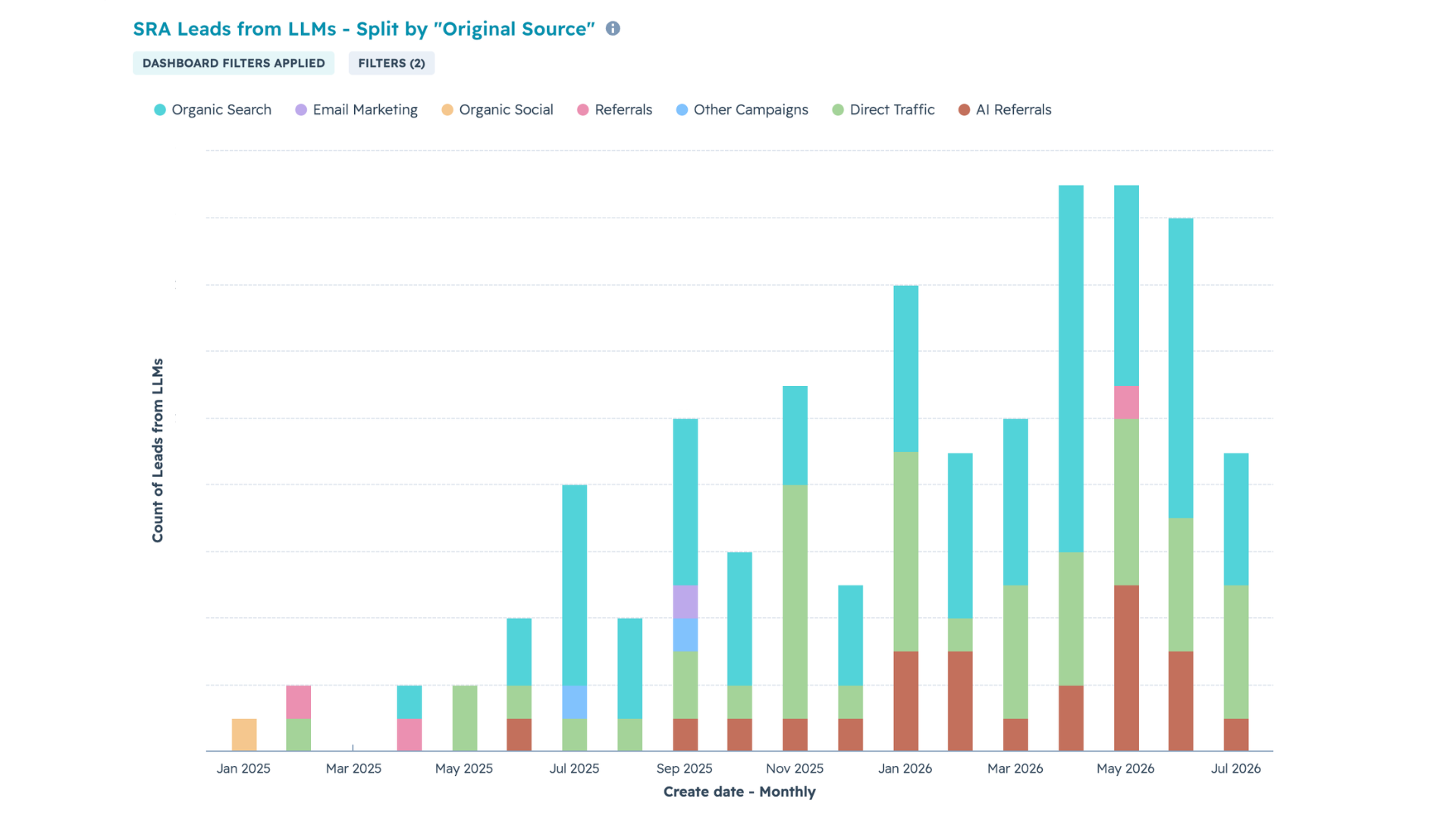
Below is a chart from our internal dashboard. These are the number of people who filled out our consultation form and stated that they found us through an LLM, split by the HubSpot-tagged source. Where possible, HubSpot automatically tags the source as “AI Referrals” (red).
We found that 80-90% of leads that came in via an AI platform were incorrectly tagged as “organic” or “direct.”
Image from author, July 2026
What To Monitor, But Not Set As KPIs
These metrics tend to be related but not the ultimate goal, and often not what you have control over.
Citations
This is the strategic piece that people mistakenly view as the success metric.
Off-page sources dominate citations at every funnel stage. Our research on citation sources found that, even for branded or bottom-funnel queries, 48% of sources were earned media, 30% were commercial content from other sites, and only 22% were from the brand’s own website.
So you should be measuring what percentage of attainable mentions you currently occupy across third-party surfaces. If it’s 1%, there’s massive headroom.
This means that, yes, you should look at citations, but not simply to see if your website is cited, but whether your brand is mentioned on the most cited pages.
Sentiment
I get a lot of questions from marketers who say, “ChatGPT shows our brand in a less favorable light than it does our competitors. How do we improve that?”
Influencing market sentiment about a brand is a massive undertaking that no single person can control.
There are tactics you could use to influence the sentiment LLMs present, like engaging on relevant Reddit threads or producing content that paints your brand in a better light.
Ultimately, what LLMs present about your brand is not what the LLM thinks–it’s what the market is saying about your brand across hundreds of websites.
That has more to do with people’s experience with your product, your sales team, your customer support, and the overall customer experience your company provides. Marketing is just a small piece of that. No amount of marketing will overcome a negative experience with your brand.
So monitor sentiment, but treat it less as something to influence through marketing and more as feedback to improve the customer experience, which in turn improves sentiment.
LLM Referral Traffic
This is worth monitoring, but not a good KPI because you can’t control this.
OpenAI recently changed how ChatGPT presents sources and reduced the number of sources it showed. As a result, many websites lost ChatGPT referral traffic. However, they reversed that change a month later and showed more citations, leading to a large increase in ChatGPT referral traffic. That makes for a volatile KPI.
Beyond that, a lot of LLM traffic doesn’t get tagged as LLM referral traffic by tools like HubSpot or Google Analytics because the referral source is getting stripped. So traffic ends up being bucketed under direct.
How To Measure The Most Important Metrics
How Do You Track The Right Prompts?
The mistake many teams make is letting their AI visibility tool pick their prompts for them or trying to guess what prompts to track.
The problem is that those tools don’t know your customers. The good news: you do. That knowledge already exists as sales call recordings and transcripts, onboarding calls, and customer research calls. These are rich sources you can mine for voice of customer to understand:
What questions come up frequently?
What objections come up?
What language do they use to describe pain points or challenges?
If your prospects are asking these questions on a call, they – and people like them – are asking the same questions of ChatGPT or Claude.
The other source is self-reported attribution (see below). Once you’ve implemented self-reported attribution, your sales team can see whether a lead came through an LLM and simply ask them what prompt they used or even request a screenshot of the chat thread. In my experience, people are happy to share.
Between call transcripts and direct buyer input, you replace guesswork with the exact language customers use.
Your target prompts can and probably should change. We recommend reviewing prompts against voice-of-customer research quarterly, especially if you’re in a fast-moving industry.
How Do You Measure AI Visibility In ChatGPT, Claude, Gemini, Etc.?
Once you have your set of prompts, we recommend using Profound, Peec, or AirOps for tracking prompts.
Watch for the default channels that get tracked. For example, we don’t care much for Perplexity, and Claude is often not included as a default LLM. So we prioritize Claude, ChatGPT, Gemini, and AI Mode.
Put in your prompts, track your competitors, and track your visibility over time.
How Do You Set Up And Report On Self-Reported Attribution?
I mentioned above that platforms like Google Analytics and HubSpot don’t give the full picture of a lead source.
We recommend having a method to capture self-reported attribution so that a person can explicitly tell you how they found you. This won’t be perfect (attribution never is), but it will give you another informative data point.
This will also allow you to track sales opportunities, pipeline, and ultimately revenue that came in via LLMs.
I’ve seen this done in three ways:
Add a question for “How did you hear about us?” in your lead or product signup forms. You can keep it open-ended or offer a dropdown with pre-defined options and have “AI Assistant (ChatGPT, Claude, Gemini, etc.)” as an option. Some clients are averse to this because they don’t want to negatively impact conversion rates. I’d recommend running an A/B test to see if that’s actually the case.
Add the “How did you find out about us?” question to your product onboarding flow. This addresses the concern about conversion rates, but doesn’t account for pure sales-led motions.
Have your sales team ask on their discovery calls. This requires a behavior change from your sales team, and the downside is it doesn’t account for self-service products.
Focus On What Pays The Bills
When we talk about paid marketing, we usually don’t measure success by the number of impressions because impressions don’t pay the bills. Instead, we talk about return on ad spend. For every dollar we put in, how many dollars do we get out?
It isn’t quite apples-to-apples, but the same logic applies. Instead of measuring visibility or citations (which don’t pay the bills), we should ask whether we’re reaching the right people through LLMs, and whether that visibility translates into business outcomes.
That means focusing on leads, pipeline, and revenue.
Reddit CEO Intends To Show More Reviews And Recommendations via @sejournal, @martinibuster
Reddit’s Q2 earnings call revealed that Reddit intends to surface more evergreen content to users. The company also explained that it intends to make its search bar more visually engaging by integrating advertising modules. It’s clear that Reddit aspires to compete with online content publishers and become a stronger competitor to social networks.
Reddit Targeting Recommendations And Reviews
The question was whether Huffman could visualize the Reddit feed integrating video and machine learning in the way other social platforms do, what the engagement trends were within Reddit’s app search, and where Reddit stood on launching advertising within the app search results.
Huffman responded that, with the search bar fully integrated within its app, Reddit is now seeing growth in the number of people who search and in the number of searches. He characterized its progress as “chipping away” at it.
He then pivoted to sharing his opinion that Reddit is the best place to surface recommendations and reviews.
Huffman explained his point:
“And I think for many queries – for many queries that I run at least – Reddit is now the best platform for searching Reddit. That hasn’t always been the case.
…But I think any query where you want to know something or want to see multiple perspectives, like what should I watch? What do people think about this? What should I buy? Reddit … provides the best answers on the internet. So I’m really encouraged with the progress there, and we’re starting to look towards ads on that surface which I’ll turn it over to Jen to address.”
Monetizing Reddit Search With Ads
Reddit’s advertising aspirations are dependent on getting the search part right. And part of getting that search part right is being able to surface recommendations and reviews.
Chief Operating Officer Jen Wong expressly tied search to the consumer’s shopping experience, explaining that there are two angles to it. The first angle was adding product images and rich media modules to search. The second part was adding advertising modules with multiple retailers and products.
Wong explained:
“So search is in a space where it’s very married to like a shopping experience. And so we — there’s a couple of different angles to this.
One is that we think that the search page can be enriched with more like rich media modules. So it can have product visuals from the catalogs that we have when people are searching or discussing or a specific product.
And we’ve started to do that. We had done a test earlier on electronics and consumer electronics and now we’ve expanded those categories. And so that enriches the core search experience and hopefully increases engagement so people get more out of that experience.
And I do agree with Steve, that I think especially the agentic ask function on Reddit search, I think, is now the best way to search Reddit.
The second is, what goes along with that engagement at the product level when you have a match is ads, right? So I talked about our Shopping Listing Ads where you can have a module that has multiple different retailers and product types and brands in one module. That’s a great sort for a search page.
And that’s ultimately how I think ads would be well represented on search. So that’s a space that we’re eyeing. We clearly have the capability to do it. We keep tracking as the page settles and as users adopt that, …we do see an advertising opportunity there. And the good news is we have the infrastructure, and I think a lot of that capability, already queued up.”
Reddit Wants To Surface Evergreen Content
Huffman expressed that they have a massive amount of evergreen content about parenting and reviews that they want to show within their feeds.
User feeds are recommendation engines. Google Discover and YouTube are examples of recommendation engines that show the latest articles and videos that users are likely to engage with.
Google Discover and YouTube prioritize fresh content; evergreen content is not a priority for Google. But it is a priority for Reddit because they have a massive amount of evergreen content that users can engage with.
Unfortunately for Reddit, their feed is bottlenecked because of “small models” that hinder Reddit from showing evergreen topics. This is a serious problem for Reddit because their technology constrains them to show only a week’s worth of content.
That’s good news for publishers that rely on evergreen content. However, once Reddit solves this problem, they will be on a path that leads toward keeping users on Reddit for longer periods, engaging with evergreen topics, including product reviews.
This is the question that was asked:
“And then on the feed models, I don’t know if you can maybe give us some type of purview into the drivers. Obviously, there’s a lot that goes into building these models between retrieval and ranking and serving and refresh and there’s million different parameters, and I probably don’t want to get too much detail, but just kind of any sense can you give us on maybe what are some of the specific areas you’re focusing within the feed improvement?”
Huffman replied:
“So …posts that are eligible for recommendation, Reddit right now is limited to a week. So Reddit is basically… our feed is almost like a real-time feed where we have this actual mass of corpus. Much of that content is timeless.
So think about things like parenting advice or book or movie reviews, things like that are relevant for a very long time. We don’t show this on the feed at all.
So we can dramatically improve candidate selection, model size, model speed, the signals that go in from users, pretty much every dimension. We have, sometimes order of magnitude improvement opportunity. So we’ll be doing that work over the next year, and I expect every improvement we make to work because we’re just starting from such a low base.”
Reddit Intends To Surface More Reviews And Evergreen Content
This is a compelling sign that Reddit intends to surface its vast amount of reviews, advice, and recommendations through its feed, as well as more aggressively monetize product searches with advertising. This may not be good news to publishers of evergreen content, like recipes and reviews, but there is still at least a year.